
SMART Training Tip Sheets This tip sheet outlines
- Slides: 3
SMART Training Tip Sheets This tip sheet outlines the procedures required to Discharge a client. Total Pages: 3 Maryland March 24, 2006 BGR Technical Support: 301. 397. 2330 Discharge Closing Treatment Record
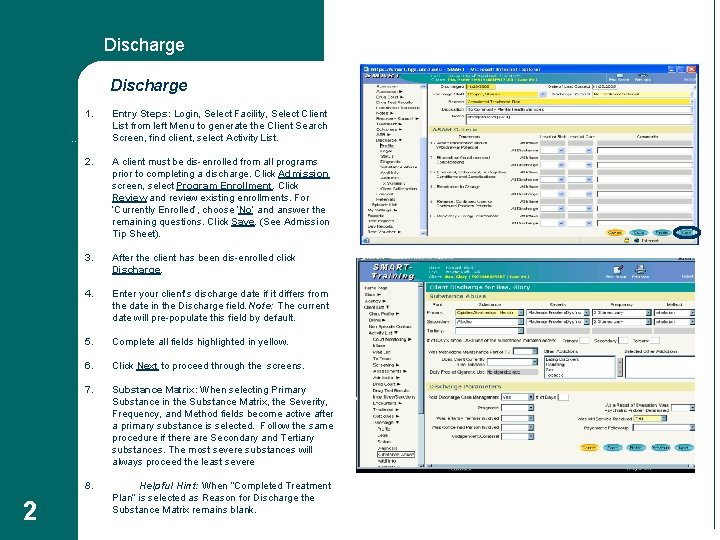
Discharge 1. Entry Steps: Login, Select Facility, Select Client List from left Menu to generate the Client Search Screen, find client, select Activity List. 2. A client must be dis-enrolled from all programs prior to completing a discharge. Click Admission screen, select Program Enrollment. Click Review and review existing enrollments. For ‘Currently Enrolled’, choose ‘No’ and answer the remaining questions. Click Save. (See Admission Tip Sheet). 3. After the client has been dis-enrolled click Discharge. 4. Enter your client’s discharge date if it differs from the date in the Discharge field. Note: The current date will pre-populate this field by default. 5. Complete all fields highlighted in yellow. 6. Click Next to proceed through the screens. 7. Substance Matrix: When selecting Primary Substance in the Substance Matrix, the Severity, Frequency, and Method fields become active after a primary substance is selected. Follow the same procedure if there are Secondary and Tertiary substances. The most severe substances will always proceed the least severe 8. Helpful Hint: When “Completed Treatment Plan” is selected as Reason for Discharge the Substance Matrix remains blank. Discharge 2
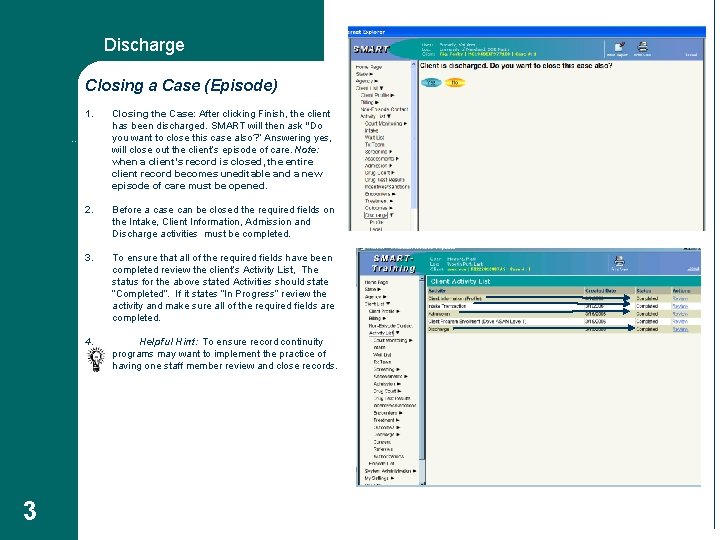
Discharge Closing a Case (Episode) 1. Closing the Case: After clicking Finish, the client has been discharged. SMART will then ask “Do you want to close this case also? ” Answering yes, will close out the client’s episode of care. Note: when a client’s record is closed, the entire client record becomes uneditable and a new episode of care must be opened. 2. Before a case can be closed the required fields on the Intake, Client Information, Admission and Discharge activities must be completed. 3. To ensure that all of the required fields have been completed review the client’s Activity List, The status for the above stated Activities should state “Completed”. If it states “In Progress” review the activity and make sure all of the required fields are completed. 4. Helpful Hint: To ensure record continuity programs may want to implement the practice of having one staff member review and close records. Client Satisfaction 3