
Smart Schools Bond Act Investment Plan Submission Information
Smart Schools Bond Act Investment Plan Submission Information and Review Process Presentation to Regional Partners Hosted By: Capital Region BOCES October 27, 2015 http: //www. p 12. nysed. gov/mgtserv/smart_schools/ 1
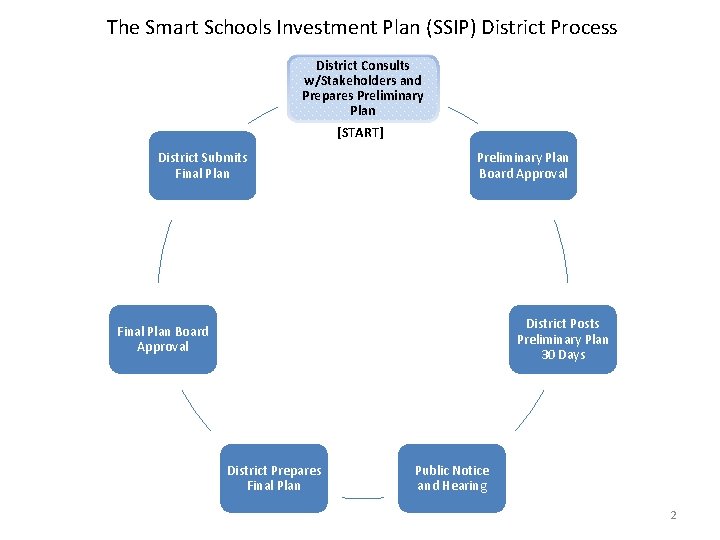
The Smart Schools Investment Plan (SSIP) District Process District Consults w/Stakeholders and Prepares Preliminary Plan [START] District Submits Final Plan Preliminary Plan Board Approval District Posts Preliminary Plan 30 Days Final Plan Board Approval District Prepares Final Plan Public Notice and Hearing 2
![The Smart Schools Investment Plan (SSIP) Approval Process District Submits Final Plan [START] SED/State](http://slidetodoc.com/presentation_image/4a349152ff94f5901381371136a387c1/image-3.jpg "The Smart Schools Investment Plan (SSIP) Approval Process District Submits Final Plan [START] SED/State")
The Smart Schools Investment Plan (SSIP) Approval Process District Submits Final Plan [START] SED/State Reimburses District SED Staff Review and Approve Plan District Submits Reimbursement Request(s) SSBA Review Board Review and Approve Plan District Begins Project(s) 3
Preliminary Steps to Prepare the SSIP • Submit to the SED Office of Educational Design and Technology the required annual 3 -Year Educational Technology Survey that defines the near-term goals of the District. It must be approved by SED for districts that include educational technology purchases on their SSIP. • Should be used as a reference for completing the SSIP’s category-specific questions. Investments shown as financed with SSBA funds in the Educational Technology Survey should be included in the SSIP. • Conduct a planning process that includes all stakeholders, including nonpublic schools, and provide the required 30 -day comment period. • Contact the SED Office of Facilities Planning for initial review of any capital projects or components. The Office will also determine whether certain minor projects can receive an expedited SSBA review. The Office must issue a project number for each building before submitting the SSIP http: //www. p 12. nysed. gov/mgtserv/smart_schools/ 4
Smart Schools Bond Act Investment Plan Office of Facilities Planning Process http: //www. p 12. nysed. gov/mgtserv/smart_schools/ 5
![Office of Facilities Planning Review Process District Submits Letter of Intent (LOI) [START] District](http://slidetodoc.com/presentation_image/4a349152ff94f5901381371136a387c1/image-6.jpg "Office of Facilities Planning Review Process District Submits Letter of Intent (LOI) [START] District")
Office of Facilities Planning Review Process District Submits Letter of Intent (LOI) [START] District Submits SSIP OFP Reviews OFP Issues Project Number OFP Determines Streamlined OFP Determines Full Review OFP Issues Project Number 6
Smart Schools Bond Act Office of Facilities Planning Letter of Intent (LOI) • For capital projects using Smart School Bond Act funding • For determining the SSBA eligibility of the Capital Project • For determining if the Project can be streamlined to receive a Building Permit • For determining if the Capital Project requires a full review leading to a Building Permit • A Determination of Need will need to be performed before authorizing districts to apply for Prekindergarten Construction or Renovation or Replacement of Transportable Classroom Units projects in an SSIP 7
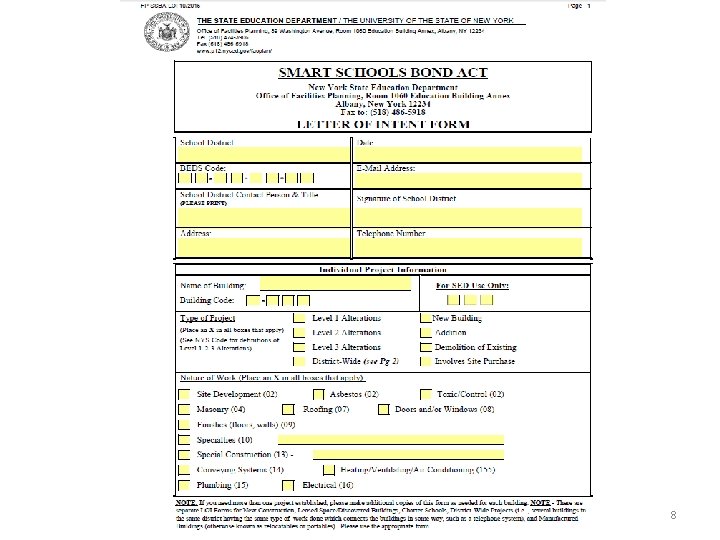
Office of Facilities Planning Letter of Intent 8
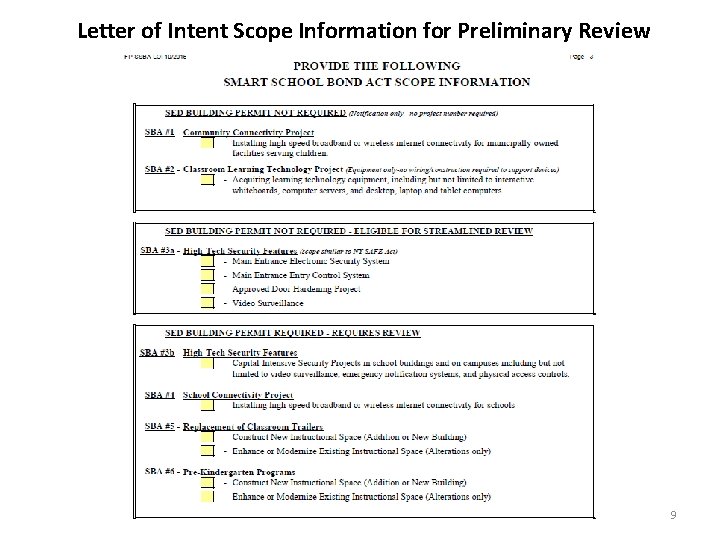
Letter of Intent Scope Information for Preliminary Review 9
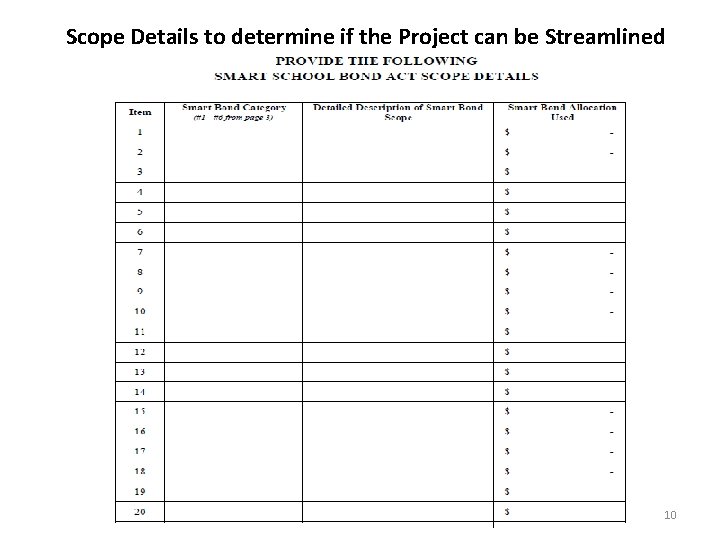
Scope Details to determine if the Project can be Streamlined 10
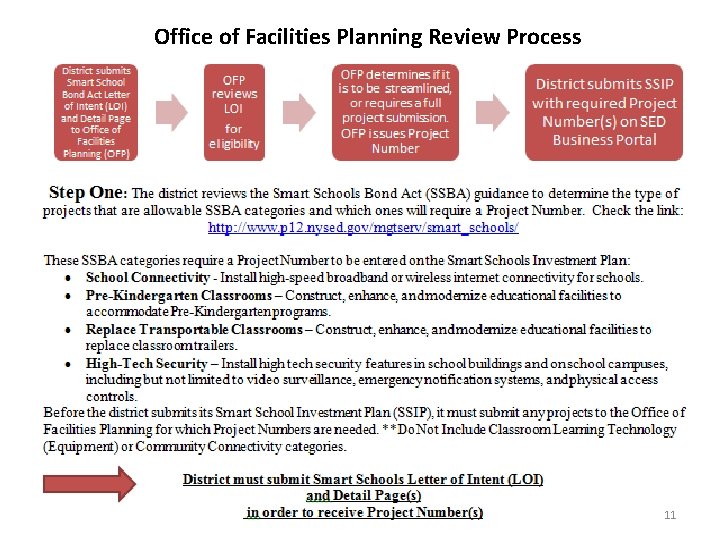
Office of Facilities Planning Review Process 11
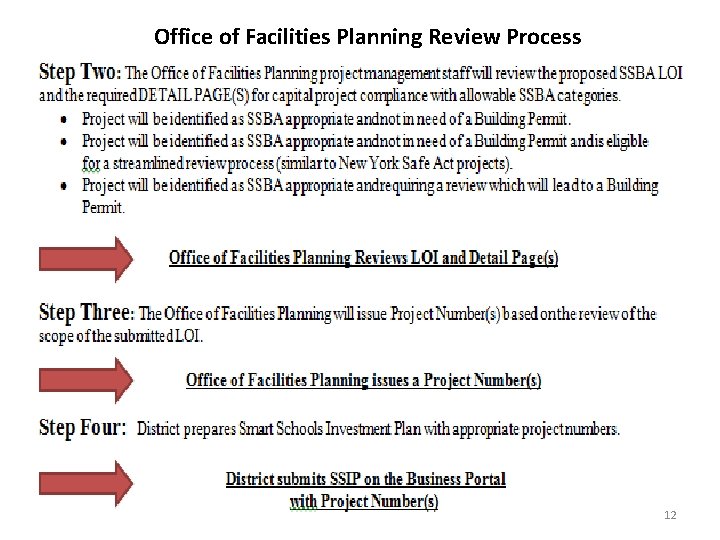
Office of Facilities Planning Review Process 12
Office of Facilities Planning Links and Contacts • Guidance: http: //p 1232. nysed. gov/mgtserv/smart_schools/ • Letter of Intent and Scope Detail: http: //www. p 12. nysed. gov/facplan/Smart. Schools. Bond. Act. html • Review Process: http: //www. p 12. nysed. gov/facplan/documents/Processfor. SSBAReview. pd f • Contact: 518 -474 -3906 13
Smart Schools Bond Act Investment Plan Online Investment Plan Process http: //www. p 12. nysed. gov/mgtserv/smart_schools/ 14
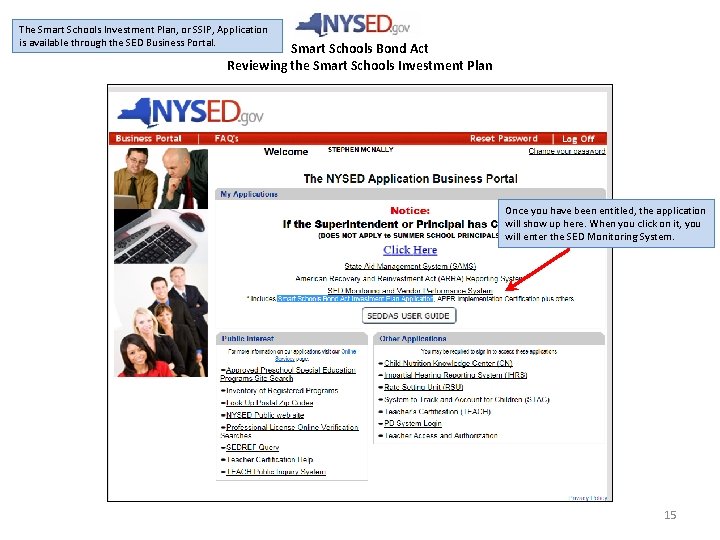
The Smart Schools Investment Plan, or SSIP, Application is available through the SED Business Portal. Smart Schools Bond Act Reviewing the Smart Schools Investment Plan Once you have been entitled, the application will show up here. When you click on it, you will enter the SED Monitoring System. 15
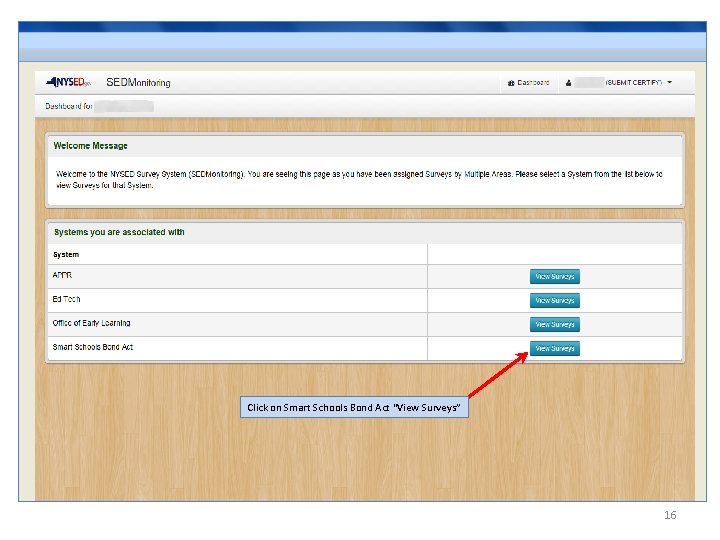
Click on Smart Schools Bond Act “View Surveys” 16
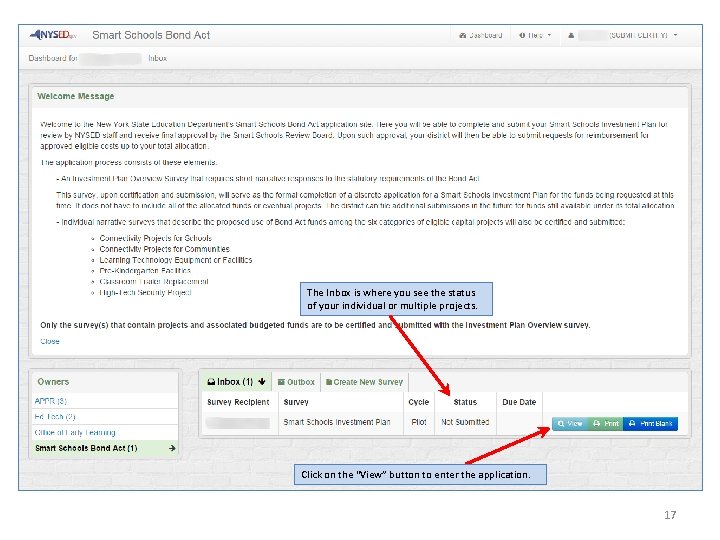
The Inbox is where you see the status of your individual or multiple projects. Click on the “View” button to enter the application. 17
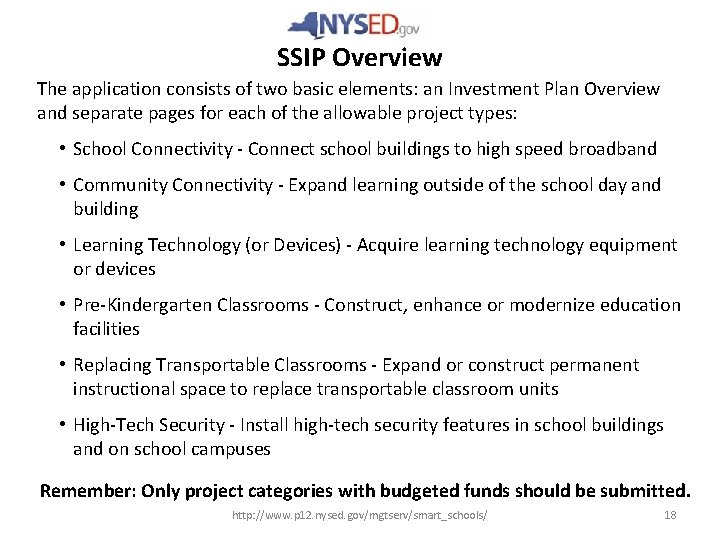
SSIP Overview The application consists of two basic elements: an Investment Plan Overview and separate pages for each of the allowable project types: • School Connectivity - Connect school buildings to high speed broadband • Community Connectivity - Expand learning outside of the school day and building • Learning Technology (or Devices) - Acquire learning technology equipment or devices • Pre-Kindergarten Classrooms - Construct, enhance or modernize education facilities • Replacing Transportable Classrooms - Expand or construct permanent instructional space to replace transportable classroom units • High-Tech Security - Install high-tech security features in school buildings and on school campuses Remember: Only project categories with budgeted funds should be submitted. http: //www. p 12. nysed. gov/mgtserv/smart_schools/ 18
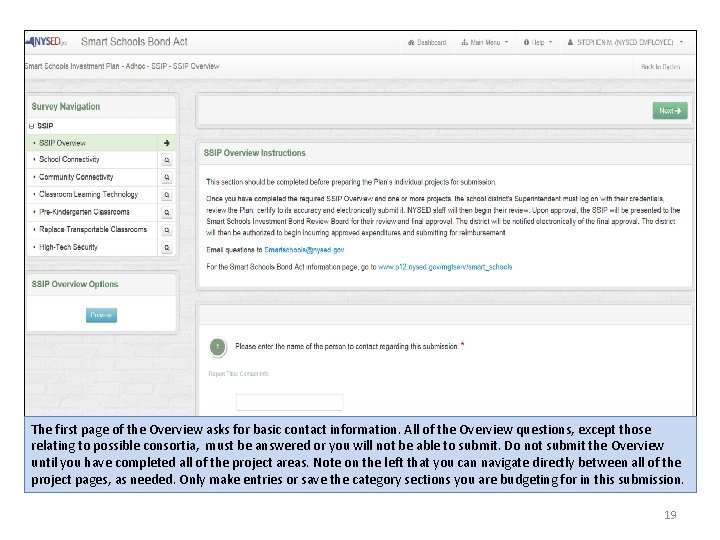
The first page of the Overview asks for basic contact information. All of the Overview questions, except those relating to possible consortia, must be answered or you will not be able to submit. Do not submit the Overview until you have completed all of the project areas. Note on the left that you can navigate directly between all of the project pages, as needed. Only make entries or save the category sections you are budgeting for in this submission. 19
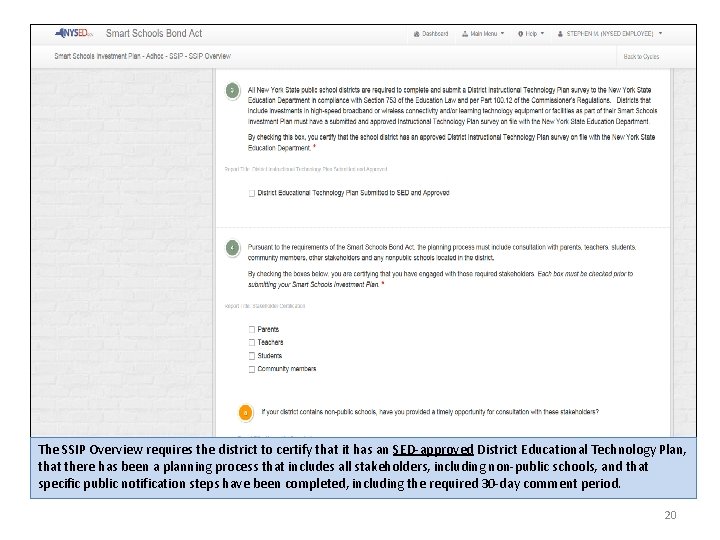
The SSIP Overview requires the district to certify that it has an SED-approved District Educational Technology Plan, that there has been a planning process that includes all stakeholders, including non-public schools, and that specific public notification steps have been completed, including the required 30 -day comment period. 20
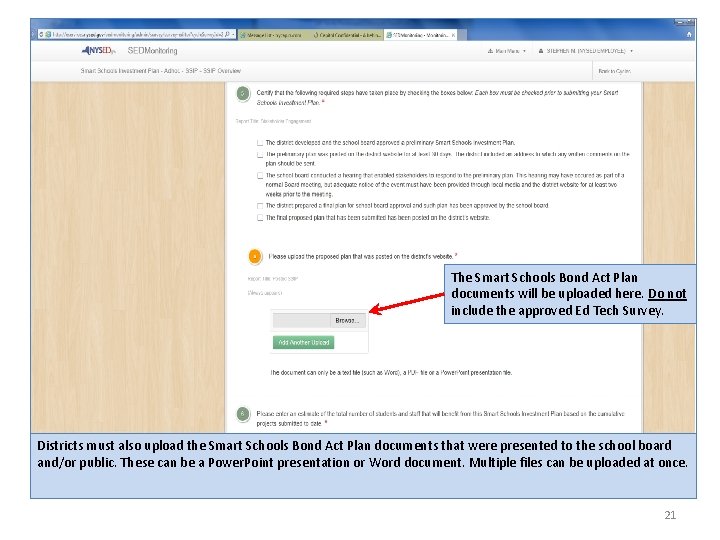
The Smart Schools Bond Act Plan documents will be uploaded here. Do not include the approved Ed Tech Survey. Districts must also upload the Smart Schools Bond Act Plan documents that were presented to the school board and/or public. These can be a Power. Point presentation or Word document. Multiple files can be uploaded at once. 21
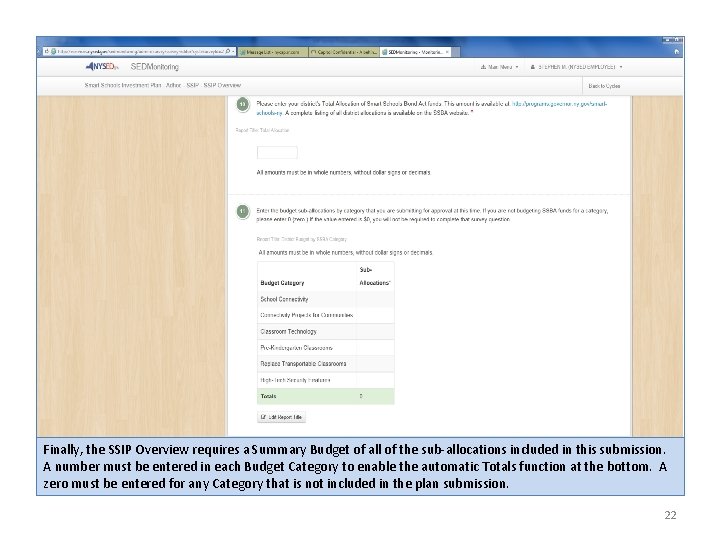
Finally, the SSIP Overview requires a Summary Budget of all of the sub-allocations included in this submission. A number must be entered in each Budget Category to enable the automatic Totals function at the bottom. A zero must be entered for any Category that is not included in the plan submission. 22
Smart Schools Bond Act Investment Plan Frequently Asked Questions http: //www. p 12. nysed. gov/mgtserv/smart_schools/ 23
Smart Schools Investment Plan FURTHER QUESTIONS? Smart Schools Bond Act Website: http: //www. p 12. nysed. gov/mgtserv/smart_schools/ Smart Schools Bond Act Email Box: smartschools@nysed. gov SED Office of Educational Management Services (518) 474 -2487 24
- Slides: 24