
Slides for Chapter 4 Interprocess Communication From Coulouris
![Figure 4. 12 Operations of the request-reply protocol public byte[] do. Operation (Remote. Object.](https://slidetodoc.com/presentation_image/4d60e751e808e7fbe55dd51e0e63969f/image-14.jpg "Figure 4. 12 Operations of the request-reply protocol public byte[] do. Operation (Remote. Object.")
![Figure 4. 17 continued // get messages from others in group byte[] buffer =](https://slidetodoc.com/presentation_image/4d60e751e808e7fbe55dd51e0e63969f/image-20.jpg "Figure 4. 17 continued // get messages from others in group byte[] buffer =")
- Slides: 22
Slides for Chapter 4: Interprocess Communication From Coulouris, Dollimore and Kindberg Distributed Systems: Concepts and Design Edition 3, © Addison-Wesley 2001
Figure 4. 1 Middleware layers Instructor’s Guide for Coulouris, Dollimore and Kindberg Distributed Systems: Concepts and Design Edn. 3 © Addison-Wesley Publishers 2000
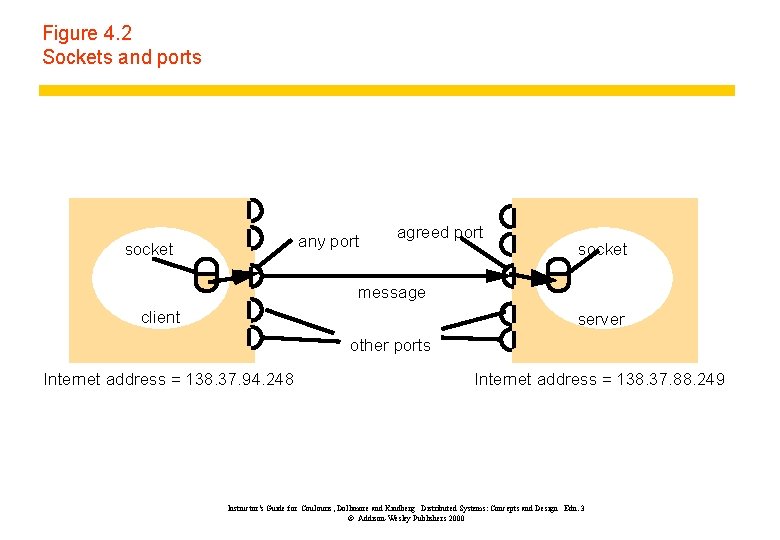
Figure 4. 2 Sockets and ports any port socket agreed port socket message client server other ports Internet address = 138. 37. 94. 248 Internet address = 138. 37. 88. 249 Instructor’s Guide for Coulouris, Dollimore and Kindberg Distributed Systems: Concepts and Design Edn. 3 © Addison-Wesley Publishers 2000
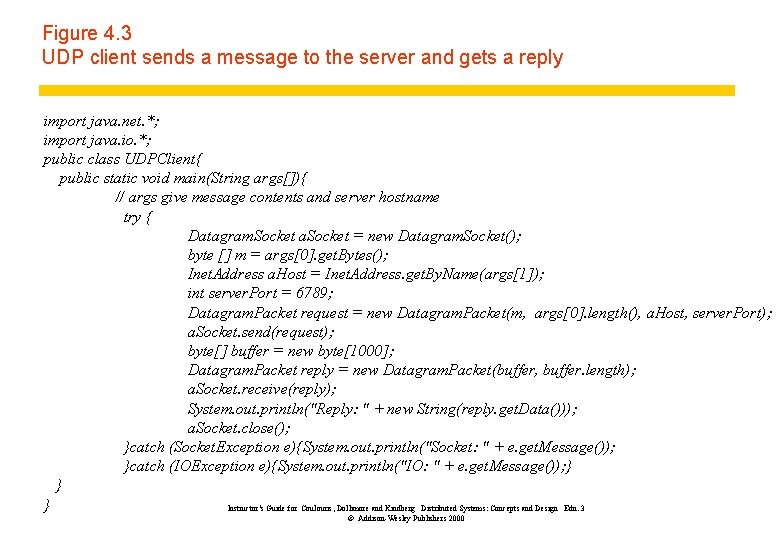
Figure 4. 3 UDP client sends a message to the server and gets a reply import java. net. *; import java. io. *; public class UDPClient{ public static void main(String args[]){ // args give message contents and server hostname try { Datagram. Socket a. Socket = new Datagram. Socket(); byte [] m = args[0]. get. Bytes(); Inet. Address a. Host = Inet. Address. get. By. Name(args[1]); int server. Port = 6789; Datagram. Packet request = new Datagram. Packet(m, args[0]. length(), a. Host, server. Port); a. Socket. send(request); byte[] buffer = new byte[1000]; Datagram. Packet reply = new Datagram. Packet(buffer, buffer. length); a. Socket. receive(reply); System. out. println("Reply: " + new String(reply. get. Data())); a. Socket. close(); }catch (Socket. Exception e){System. out. println("Socket: " + e. get. Message()); }catch (IOException e){System. out. println("IO: " + e. get. Message()); } } } Instructor’s Guide for Coulouris, Dollimore and Kindberg Distributed Systems: Concepts and Design Edn. 3 © Addison-Wesley Publishers 2000
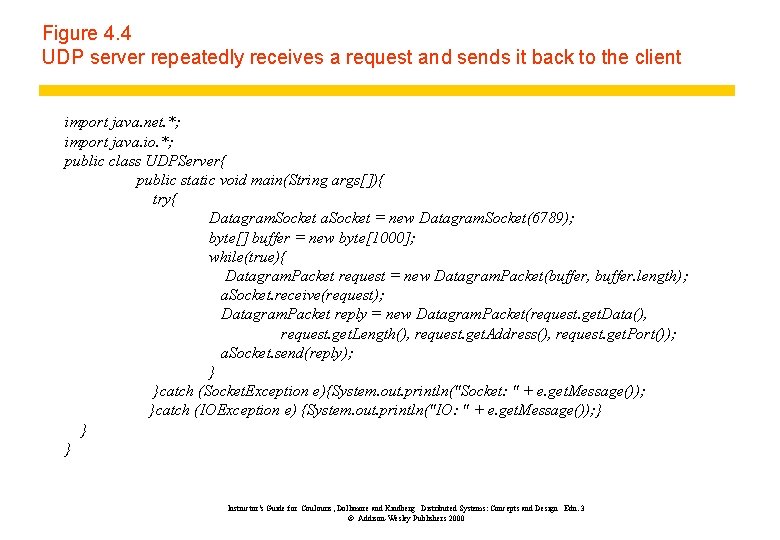
Figure 4. 4 UDP server repeatedly receives a request and sends it back to the client import java. net. *; import java. io. *; public class UDPServer{ public static void main(String args[]){ try{ Datagram. Socket a. Socket = new Datagram. Socket(6789); byte[] buffer = new byte[1000]; while(true){ Datagram. Packet request = new Datagram. Packet(buffer, buffer. length); a. Socket. receive(request); Datagram. Packet reply = new Datagram. Packet(request. get. Data(), request. get. Length(), request. get. Address(), request. get. Port()); a. Socket. send(reply); } }catch (Socket. Exception e){System. out. println("Socket: " + e. get. Message()); }catch (IOException e) {System. out. println("IO: " + e. get. Message()); } } } Instructor’s Guide for Coulouris, Dollimore and Kindberg Distributed Systems: Concepts and Design Edn. 3 © Addison-Wesley Publishers 2000
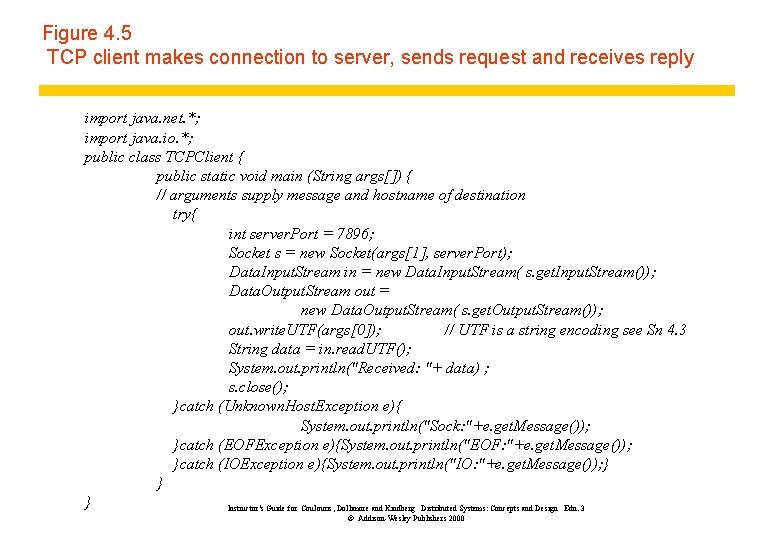
Figure 4. 5 TCP client makes connection to server, sends request and receives reply import java. net. *; import java. io. *; public class TCPClient { public static void main (String args[]) { // arguments supply message and hostname of destination try{ int server. Port = 7896; Socket s = new Socket(args[1], server. Port); Data. Input. Stream in = new Data. Input. Stream( s. get. Input. Stream()); Data. Output. Stream out = new Data. Output. Stream( s. get. Output. Stream()); out. write. UTF(args[0]); // UTF is a string encoding see Sn 4. 3 String data = in. read. UTF(); System. out. println("Received: "+ data) ; s. close(); }catch (Unknown. Host. Exception e){ System. out. println("Sock: "+e. get. Message()); }catch (EOFException e){System. out. println("EOF: "+e. get. Message()); }catch (IOException e){System. out. println("IO: "+e. get. Message()); } } } Instructor’s Guide for Coulouris, Dollimore and Kindberg Distributed Systems: Concepts and Design Edn. 3 © Addison-Wesley Publishers 2000
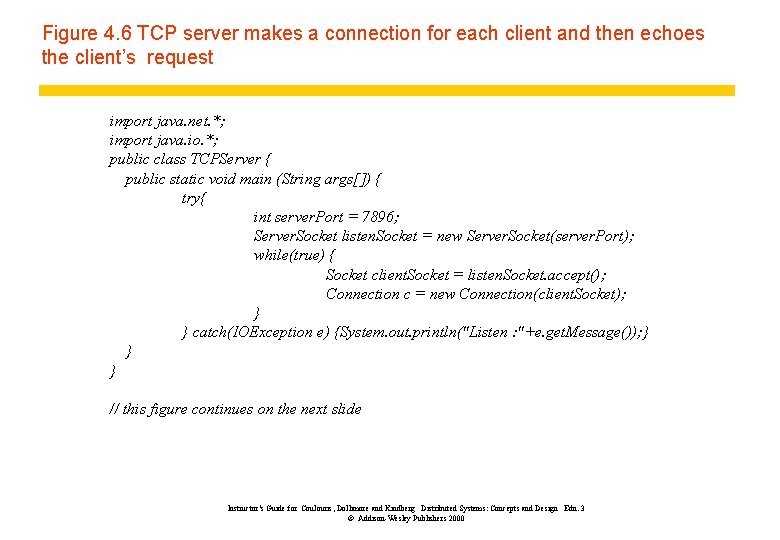
Figure 4. 6 TCP server makes a connection for each client and then echoes the client’s request import java. net. *; import java. io. *; public class TCPServer { public static void main (String args[]) { try{ int server. Port = 7896; Server. Socket listen. Socket = new Server. Socket(server. Port); while(true) { Socket client. Socket = listen. Socket. accept(); Connection c = new Connection(client. Socket); } } catch(IOException e) {System. out. println("Listen : "+e. get. Message()); } } } // this figure continues on the next slide Instructor’s Guide for Coulouris, Dollimore and Kindberg Distributed Systems: Concepts and Design Edn. 3 © Addison-Wesley Publishers 2000
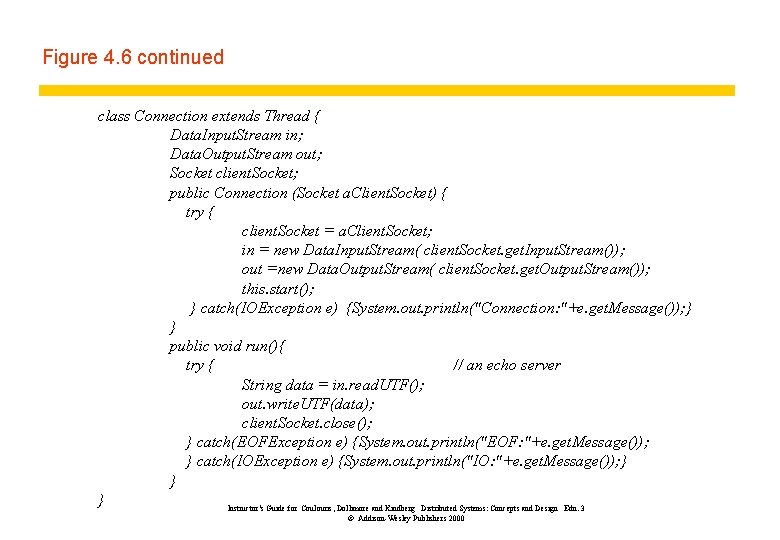
Figure 4. 6 continued class Connection extends Thread { Data. Input. Stream in; Data. Output. Stream out; Socket client. Socket; public Connection (Socket a. Client. Socket) { try { client. Socket = a. Client. Socket; in = new Data. Input. Stream( client. Socket. get. Input. Stream()); out =new Data. Output. Stream( client. Socket. get. Output. Stream()); this. start(); } catch(IOException e) {System. out. println("Connection: "+e. get. Message()); } } public void run(){ try { // an echo server String data = in. read. UTF(); out. write. UTF(data); client. Socket. close(); } catch(EOFException e) {System. out. println("EOF: "+e. get. Message()); } catch(IOException e) {System. out. println("IO: "+e. get. Message()); } } } Instructor’s Guide for Coulouris, Dollimore and Kindberg Distributed Systems: Concepts and Design Edn. 3 © Addison-Wesley Publishers 2000
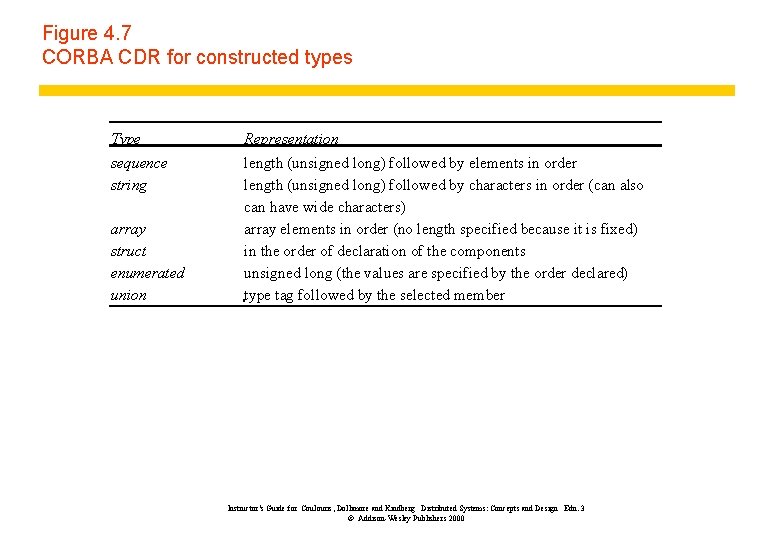
Figure 4. 7 CORBA CDR for constructed types Type sequence string array struct enumerated union Representation length (unsigned long) followed by elements in order length (unsigned long) followed by characters in order (can also can have wide characters) array elements in order (no length specified because it is fixed) in the order of declaration of the components unsigned long (the values are specified by the order declared) type tag followed by the selected member Instructor’s Guide for Coulouris, Dollimore and Kindberg Distributed Systems: Concepts and Design Edn. 3 © Addison-Wesley Publishers 2000
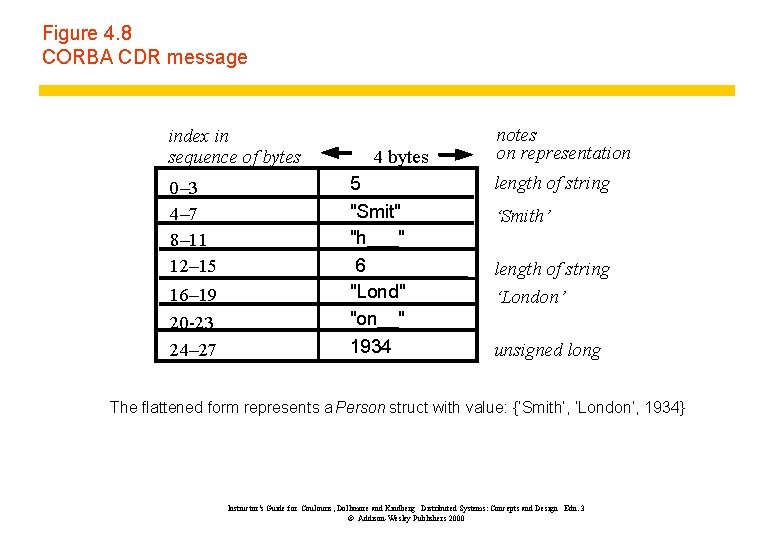
Figure 4. 8 CORBA CDR message index in sequence of bytes 0– 3 4– 7 8– 11 12– 15 16– 19 20 -23 24– 27 4 bytes 5 "Smit" "h___" 6 "Lond" "on__" 1934 notes on representation length of string ‘Smith’ length of string ‘London’ unsigned long The flattened form represents a Person struct with value: {‘Smith’, ‘London’, 1934} Instructor’s Guide for Coulouris, Dollimore and Kindberg Distributed Systems: Concepts and Design Edn. 3 © Addison-Wesley Publishers 2000
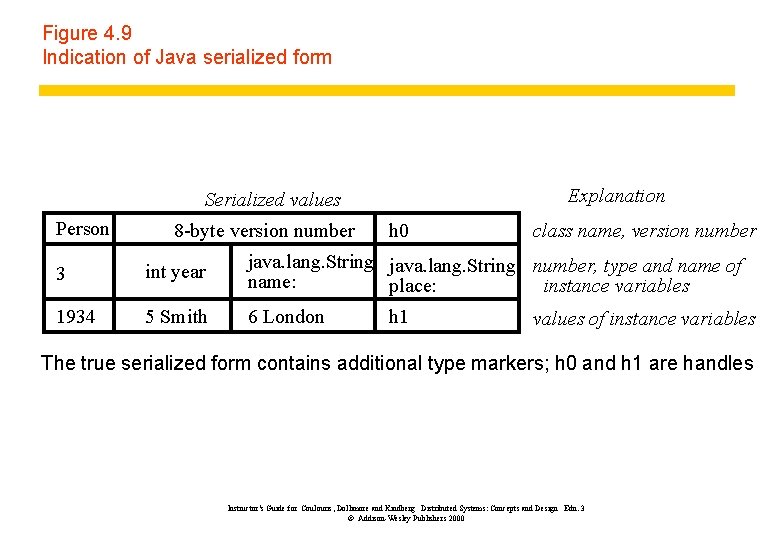
Figure 4. 9 Indication of Java serialized form Explanation Serialized values Person 8 -byte version number h 0 class name, version number 3 int year java. lang. String number, type and name of name: place: instance variables 1934 5 Smith 6 London h 1 values of instance variables The true serialized form contains additional type markers; h 0 and h 1 are handles Instructor’s Guide for Coulouris, Dollimore and Kindberg Distributed Systems: Concepts and Design Edn. 3 © Addison-Wesley Publishers 2000
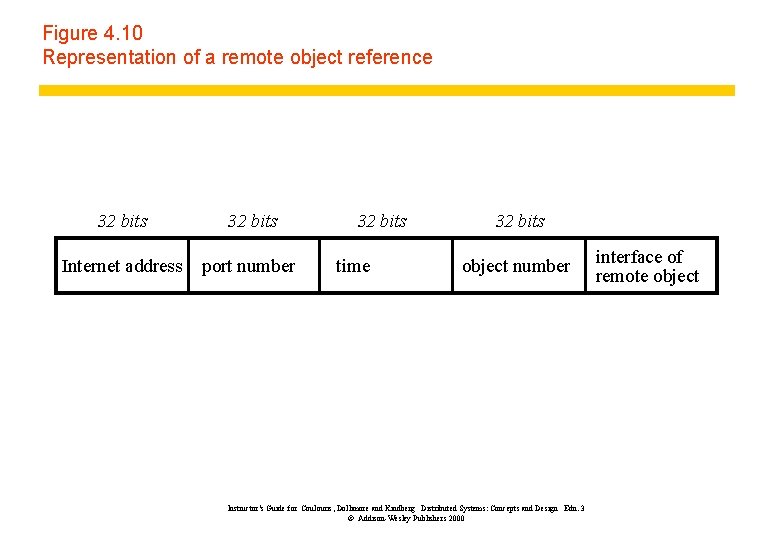
Figure 4. 10 Representation of a remote object reference 32 bits Internet address port number 32 bits time 32 bits object number Instructor’s Guide for Coulouris, Dollimore and Kindberg Distributed Systems: Concepts and Design Edn. 3 © Addison-Wesley Publishers 2000 interface of remote object
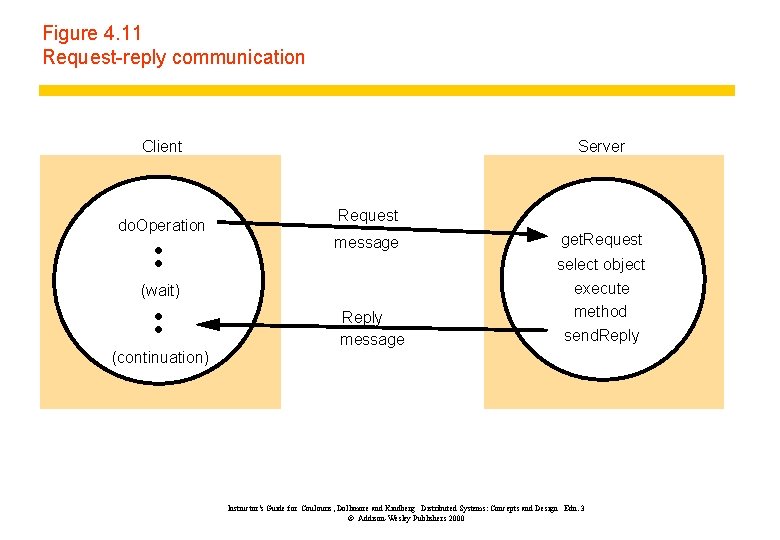
Figure 4. 11 Request-reply communication Client do. Operation Server Request message (wait) (continuation) Reply message get. Request select object execute method send. Reply Instructor’s Guide for Coulouris, Dollimore and Kindberg Distributed Systems: Concepts and Design Edn. 3 © Addison-Wesley Publishers 2000
Figure 4. 12 Operations of the request-reply protocol public byte[] do. Operation (Remote. Object. Ref o, int method. Id, byte[] arguments) sends a request message to the remote object and returns the reply. The arguments specify the remote object, the method to be invoked and the arguments of that method. public byte[] get. Request (); acquires a client request via the server port. public void send. Reply (byte[] reply, Inet. Address client. Host, int client. Port); sends the reply message reply to the client at its Internet address and port. Instructor’s Guide for Coulouris, Dollimore and Kindberg Distributed Systems: Concepts and Design Edn. 3 © Addison-Wesley Publishers 2000
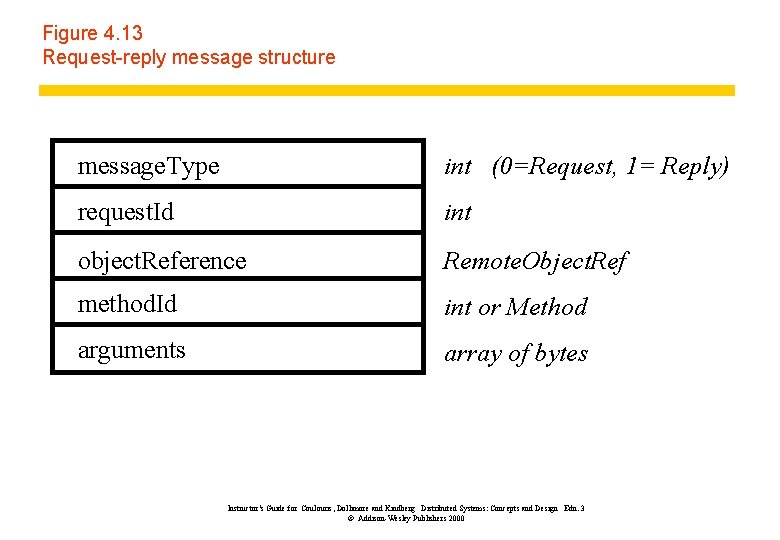
Figure 4. 13 Request-reply message structure message. Type int (0=Request, 1= Reply) request. Id int object. Reference Remote. Object. Ref method. Id int or Method arguments array of bytes Instructor’s Guide for Coulouris, Dollimore and Kindberg Distributed Systems: Concepts and Design Edn. 3 © Addison-Wesley Publishers 2000
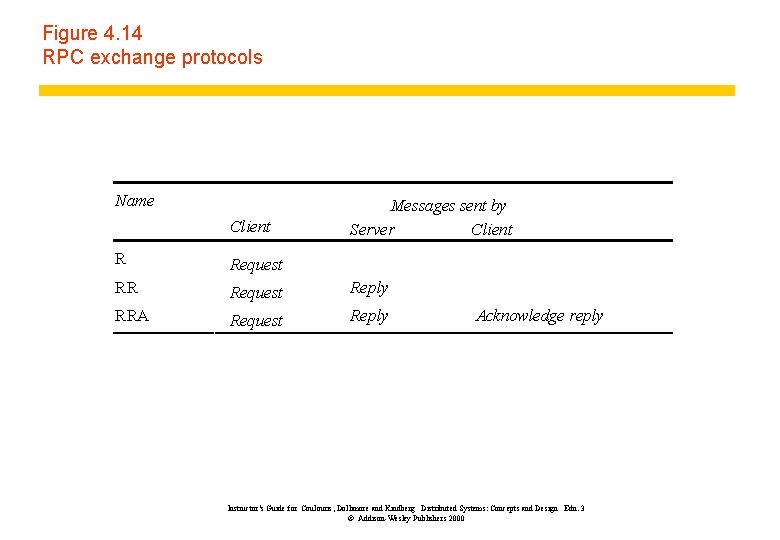
Figure 4. 14 RPC exchange protocols Name Client Messages sent by Server Client R Request Reply RRA Request Reply Acknowledge reply Instructor’s Guide for Coulouris, Dollimore and Kindberg Distributed Systems: Concepts and Design Edn. 3 © Addison-Wesley Publishers 2000
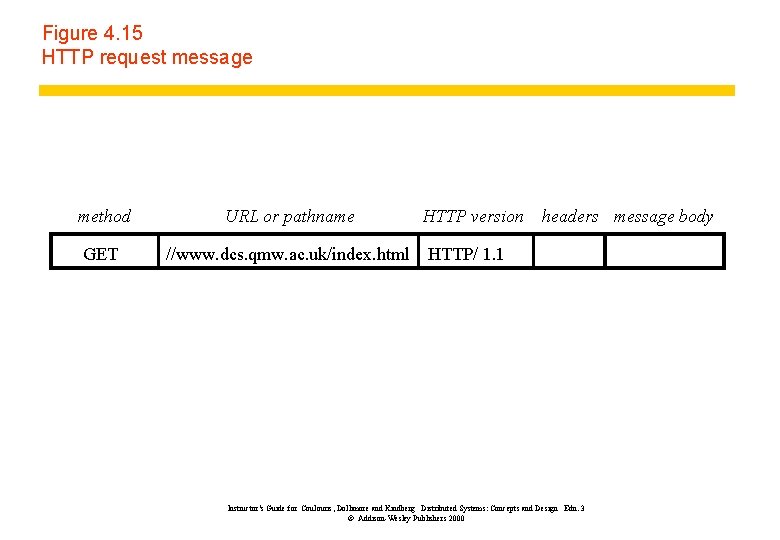
Figure 4. 15 HTTP request message method URL or pathname GET //www. dcs. qmw. ac. uk/index. html HTTP version headers message body HTTP/ 1. 1 Instructor’s Guide for Coulouris, Dollimore and Kindberg Distributed Systems: Concepts and Design Edn. 3 © Addison-Wesley Publishers 2000
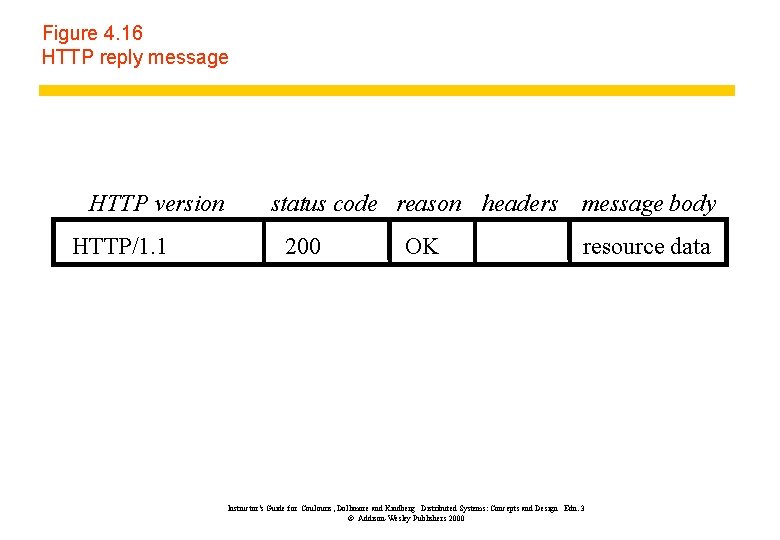
Figure 4. 16 HTTP reply message HTTP version HTTP/1. 1 status code reason headers message body 200 OK resource data Instructor’s Guide for Coulouris, Dollimore and Kindberg Distributed Systems: Concepts and Design Edn. 3 © Addison-Wesley Publishers 2000
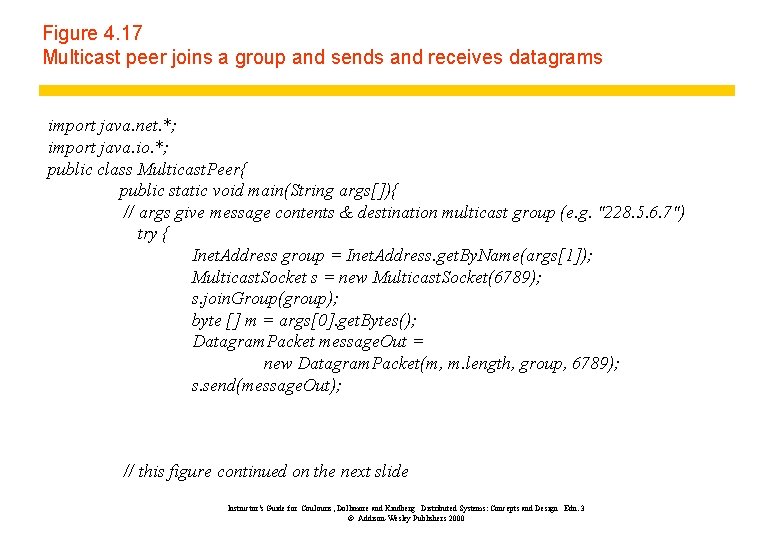
Figure 4. 17 Multicast peer joins a group and sends and receives datagrams import java. net. *; import java. io. *; public class Multicast. Peer{ public static void main(String args[]){ // args give message contents & destination multicast group (e. g. "228. 5. 6. 7") try { Inet. Address group = Inet. Address. get. By. Name(args[1]); Multicast. Socket s = new Multicast. Socket(6789); s. join. Group(group); byte [] m = args[0]. get. Bytes(); Datagram. Packet message. Out = new Datagram. Packet(m, m. length, group, 6789); s. send(message. Out); // this figure continued on the next slide Instructor’s Guide for Coulouris, Dollimore and Kindberg Distributed Systems: Concepts and Design Edn. 3 © Addison-Wesley Publishers 2000
Figure 4. 17 continued // get messages from others in group byte[] buffer = new byte[1000]; for(int i=0; i< 3; i++) { Datagram. Packet message. In = new Datagram. Packet(buffer, buffer. length); s. receive(message. In); System. out. println("Received: " + new String(message. In. get. Data())); } s. leave. Group(group); }catch (Socket. Exception e){System. out. println("Socket: " + e. get. Message()); }catch (IOException e){System. out. println("IO: " + e. get. Message()); } } } Instructor’s Guide for Coulouris, Dollimore and Kindberg Distributed Systems: Concepts and Design Edn. 3 © Addison-Wesley Publishers 2000
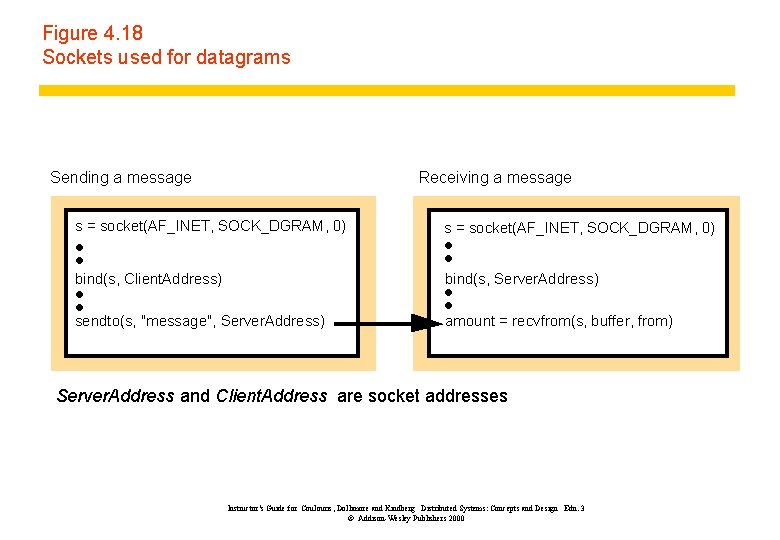
Figure 4. 18 Sockets used for datagrams Sending a message Receiving a message s = socket(AF_INET, SOCK_DGRAM, 0) bind(s, Client. Address) bind(s, Server. Address) sendto(s, "message", Server. Address) amount = recvfrom(s, buffer, from) Server. Address and Client. Address are socket addresses Instructor’s Guide for Coulouris, Dollimore and Kindberg Distributed Systems: Concepts and Design Edn. 3 © Addison-Wesley Publishers 2000
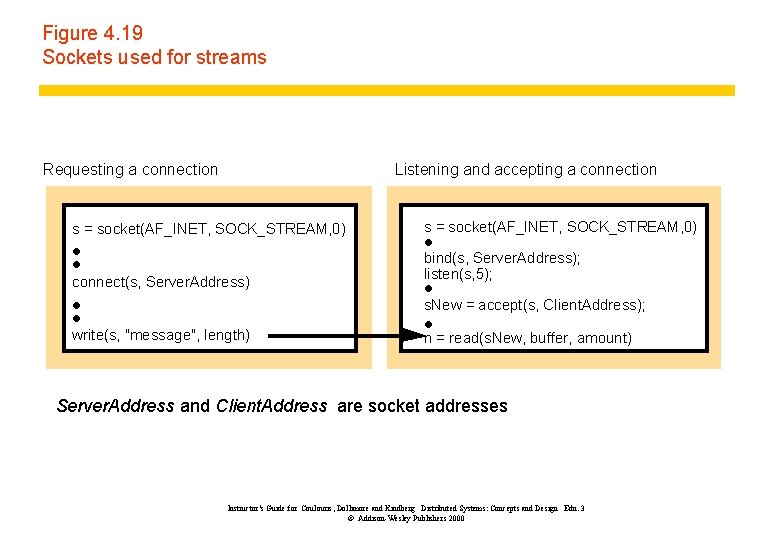
Figure 4. 19 Sockets used for streams Requesting a connection Listening and accepting a connection s = socket(AF_INET, SOCK_STREAM, 0) connect(s, Server. Address) s = socket(AF_INET, SOCK_STREAM, 0) bind(s, Server. Address); listen(s, 5); s. New = accept(s, Client. Address); write(s, "message", length) n = read(s. New, buffer, amount) Server. Address and Client. Address are socket addresses Instructor’s Guide for Coulouris, Dollimore and Kindberg Distributed Systems: Concepts and Design Edn. 3 © Addison-Wesley Publishers 2000