
Slides for Chapter 1 Introduction to Distributed System
Slides for Chapter 1 Introduction to Distributed System and Computing From Coulouris, Dollimore and Kindberg Distributed Systems: Concepts and Design Edition 4, © Pearson Education 2005 Reference slides from Distributed Computing Introduction, M. Liu And Java programming, D. Liang

Distributed system, distributed computing z Early computing was performed on a single processor. Uni-processor computing can be called centralized computing. z A distributed system is a collection of independent computers, interconnected via a network, capable of collaborating on a task by message passing. It has three features: y. Concurrency y. No global clock y. Independent failure z Distributed computing is computing performed in a distributed system. Instructor’s Guide for Coulouris, Dollimore and Kindberg Distributed Systems: Concepts and Design Edn. 4 © Pearson Education 2005

Examples of Distributed Systems z Web Search: major growth industry in the last decade. 10 billion per month for global number of searches. Complex task for searching a big database with 63 billion pages. (e. g. Google distributed infrastructure, file system, storage, lock service, parallel computing) z Massively multiplayer online games: Large number of people interact through the Internet with a virtual world. Challenges include fast response time, real-time propagation of events. z Financial trading: provides real-time access to a wide range of information sources such as current share prices and trends, economic and political development news. Challenges include how to deliver events reliably and in a timely manner to very large numbers of clients. Instructor’s Guide for Coulouris, Dollimore and Kindberg Distributed Systems: Concepts and Design Edn. 4 © Pearson Education 2005
Trend in Distributed Systems z Pervasive networking and modern Internet: Wifi, Wi. Max, Bluetooth, the thirdgeneration of mobile phone networks. The result is that networking has become a pervasive resource and devices can be connected at any time and in any place. z Mobile and ubiquitous computing: small and portable computing devices are integrated into the distributed system such as laptop, handheld devices( PDA, cell phone, camera etc). z Distributed multimedia systems: it support a range of media types such as audio, video in a distributed system. So desktop can access live television, file libraries, music libraries, telephone IP phone (Skype) in distributed system. Qo. S issue z Distributed Computing as a utility: A number of companies provide the computing, storage and application resources as a commodity or utility to users. So users do not need to maintain local IT. Pay as use. Analogy between distributed resources and other utilities such a water or electricity. Instructor’s Guide for Coulouris, Dollimore and Kindberg Distributed Systems: Concepts and Design Edn. 4 © Pearson Education 2005

Figure 1. 1 A typical portion of the Internet intranet ISP % % backbone satellite link desktop computer: server: network link: Instructor’s Guide for Coulouris, Dollimore and Kindberg Distributed Systems: Concepts and Design Edn. 4 © Pearson Education 2005
Figure 1. 2 A typical intranet Instructor’s Guide for Coulouris, Dollimore and Kindberg Distributed Systems: Concepts and Design Edn. 4 © Pearson Education 2005
Figure 1. 3 Portable and handheld devices in a distributed system Instructor’s Guide for Coulouris, Dollimore and Kindberg Distributed Systems: Concepts and Design Edn. 4 © Pearson Education 2005
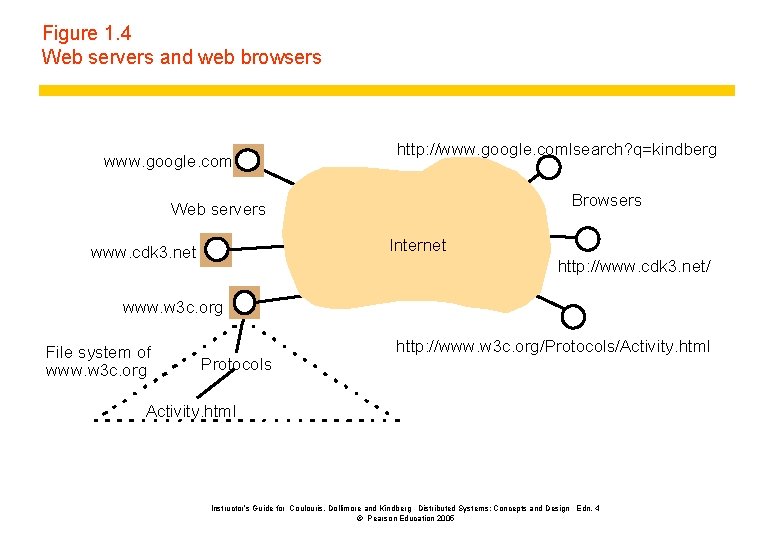
Figure 1. 4 Web servers and web browsers www. google. com http: //www. google. comlsearch? q=kindberg Browsers Web servers Internet www. cdk 3. net http: //www. cdk 3. net/ www. w 3 c. org File system of www. w 3 c. org Protocols http: //www. w 3 c. org/Protocols/Activity. html Instructor’s Guide for Coulouris, Dollimore and Kindberg Distributed Systems: Concepts and Design Edn. 4 © Pearson Education 2005
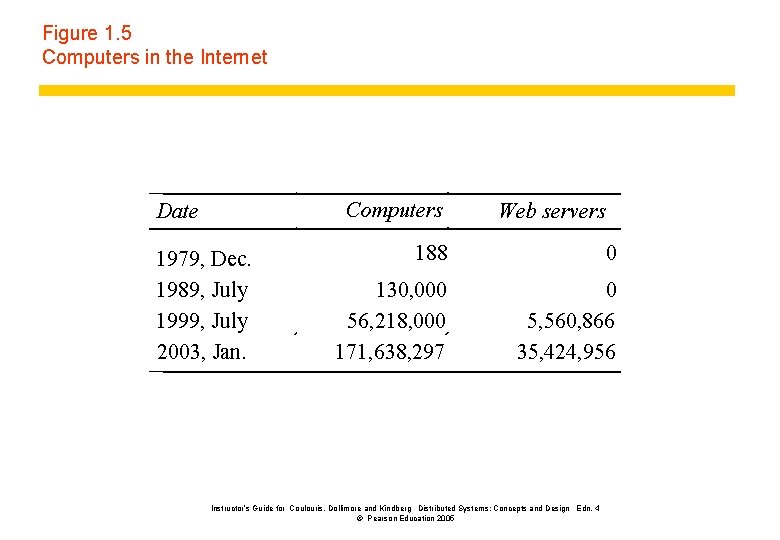
Figure 1. 5 Computers in the Internet Computers Date 1979, Dec. 1989, July 1999, July 2003, Jan. Web servers 188 0 130, 000 56, 218, 000 171, 638, 297 0 5, 560, 866 35, 424, 956 Instructor’s Guide for Coulouris, Dollimore and Kindberg Distributed Systems: Concepts and Design Edn. 4 © Pearson Education 2005
Centralized vs. Distributed Computing Instructor’s Guide for Coulouris, Dollimore and Kindberg Distributed Systems: Concepts and Design Edn. 4 © Pearson Education 2005
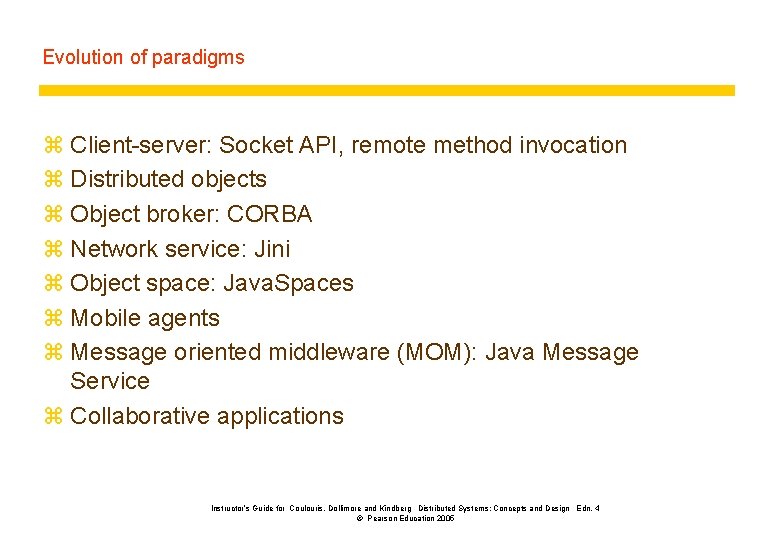
Evolution of paradigms z Client-server: Socket API, remote method invocation z Distributed objects z Object broker: CORBA z Network service: Jini z Object space: Java. Spaces z Mobile agents z Message oriented middleware (MOM): Java Message Service z Collaborative applications Instructor’s Guide for Coulouris, Dollimore and Kindberg Distributed Systems: Concepts and Design Edn. 4 © Pearson Education 2005
Why distributed computing? z Resource sharing/Economics: distributed systems allow the pooling of resources, including CPU cycles, data storage, input/output devices, and services. z Scalability: Increasing demands and users can be easily addressed by adding more resources and the system can still run effectively. z Reliability: a distributed system allow replication of resources and/or services, thus reducing service outage due to failures. z The affordability of computers and availability of network access: The Internet has become a universal platform for distributed computing. Instructor’s Guide for Coulouris, Dollimore and Kindberg Distributed Systems: Concepts and Design Edn. 4 © Pearson Education 2005
The Challenges of Distributed Computing The Challenges of distributed computing: z Heterogeneity: computers and networks are of different types. Including hardware, network, programming language, and operating system. z E. g. Two alternatives for byte ordering of integers on different hardware, namely bigendian and little-endian. Message transfer should take care of it. z E. g. The different types of networks are masked by the fact that all computers attached to the Internet use the Internet protocols to communicate. z E. g. Different OS may provide the different programming interface for message exchanges. Like different calls in UNIX and Windows. z E. g. Different programming languages use different representations for characters and data structures. Difference must be handled if two need to communicate. z E. g. Different programs written by different developers even same language may use different communication protocols and primitive data items and data structures in messages. Instructor’s Guide for Coulouris, Dollimore and Kindberg Distributed Systems: Concepts and Design Edn. 4 © Pearson Education 2005
The Challenges of Distributed Computing z Failure handling: Failures in a distributed system are partial- that is, some components fail while others continue to function. So is particularly difficult. z Detecting failures: some can be detected (checksum) and some may not. z Masking failures: detected and can be hidden or made less severe. a. message can be retransmitted b. file data can be save on two disks if one fails, the other one works. z Tolerating failures: not possible to detect all and hide all. Just report the error. z Recovery from failure: software so that the state of permanent data can be recovered or rolled back after a server crash. z Redundancy: redundant components. a. two routes between two routers. b. Domain name system, every name table is replicated in at least two servers. c. database may be replicated in different servers. Redirect client to other servers The design of effective techniques for keeping replicas of rapidly changing data up-todate without excessive loss of performance is challenging. Instructor’s Guide for Coulouris, Dollimore and Kindberg Distributed Systems: Concepts and Design Edn. 4 © Pearson Education 2005
The Challenges of Distributed Computing z Concurrency: several clients may attempt to access a shared resource at the same time. For example, auction bid data structure by clients z Process manages a shared resource could take one client request at a time. But that approach limits throughput. So concurrent threads are usually allowed. Smith: $122 and Jones: $111. If operations are interleaved without any control, then they might get stored as Smith: $1111 and Jones: $122 z For data to be safe in a concurrent environment, its operations must be synchronized in such a way that data remains consistent such as semaphores. Instructor’s Guide for Coulouris, Dollimore and Kindberg Distributed Systems: Concepts and Design Edn. 4 © Pearson Education 2005
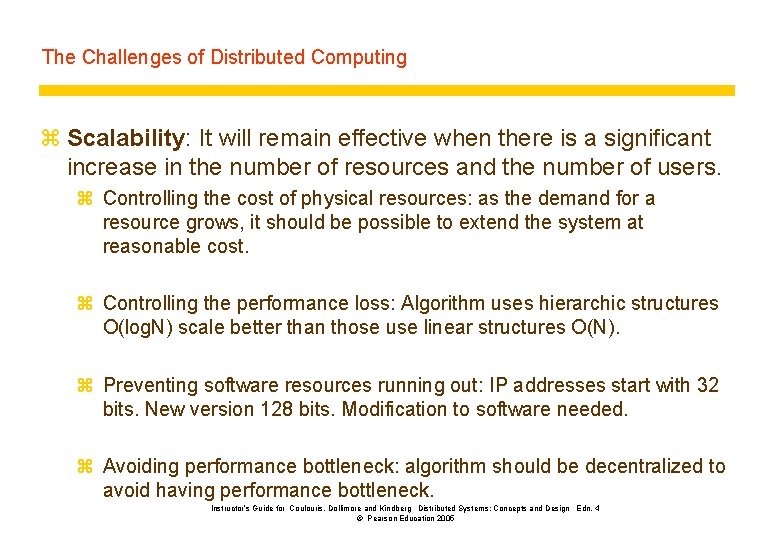
The Challenges of Distributed Computing z Scalability: It will remain effective when there is a significant increase in the number of resources and the number of users. z Controlling the cost of physical resources: as the demand for a resource grows, it should be possible to extend the system at reasonable cost. z Controlling the performance loss: Algorithm uses hierarchic structures O(log. N) scale better than those use linear structures O(N). z Preventing software resources running out: IP addresses start with 32 bits. New version 128 bits. Modification to software needed. z Avoiding performance bottleneck: algorithm should be decentralized to avoid having performance bottleneck. Instructor’s Guide for Coulouris, Dollimore and Kindberg Distributed Systems: Concepts and Design Edn. 4 © Pearson Education 2005
The Challenges of Distributed Computing z Security Concerns: In a distributed system, there are more opportunities for unauthorized attack. z Confidentiality (protecting against disclosure to unauthorized individuals); z Integrity (protection against alteration or corruption); z Availability (protection against interference with the means to access the resource); Instructor’s Guide for Coulouris, Dollimore and Kindberg Distributed Systems: Concepts and Design Edn. 4 © Pearson Education 2005
The Challenges of Distributed Computing Transparency: It is a major influence on the design of the distributed system software Defined as the concealment from the user and the application programmer of the separation of components in a distributed system, so that the system is perceived as a whole rather than a collection of independent component. Instructor’s Guide for Coulouris, Dollimore and Kindberg Distributed Systems: Concepts and Design Edn. 4 © Pearson Education 2005
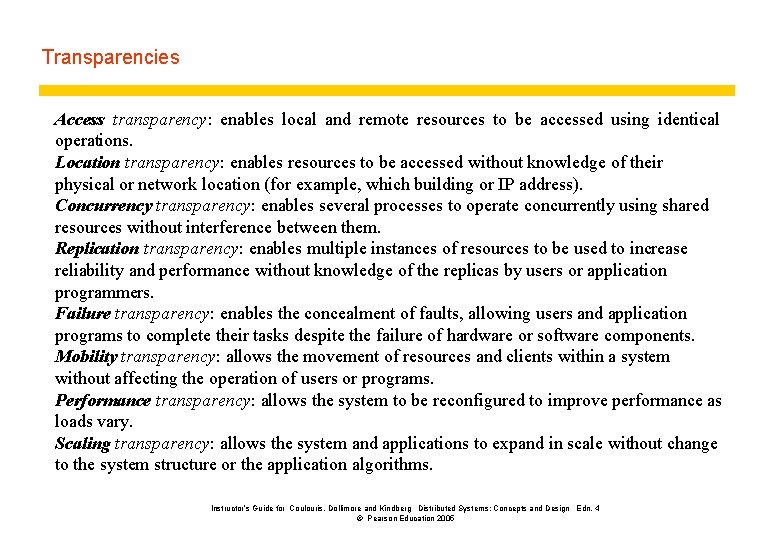
Transparencies Access transparency: enables local and remote resources to be accessed using identical operations. Location transparency: enables resources to be accessed without knowledge of their physical or network location (for example, which building or IP address). Concurrency transparency: enables several processes to operate concurrently using shared resources without interference between them. Replication transparency: enables multiple instances of resources to be used to increase reliability and performance without knowledge of the replicas by users or application programmers. Failure transparency: enables the concealment of faults, allowing users and application programs to complete their tasks despite the failure of hardware or software components. Mobility transparency: allows the movement of resources and clients within a system without affecting the operation of users or programs. Performance transparency: allows the system to be reconfigured to improve performance as loads vary. Scaling transparency: allows the system and applications to expand in scale without change to the system structure or the application algorithms. Instructor’s Guide for Coulouris, Dollimore and Kindberg Distributed Systems: Concepts and Design Edn. 4 © Pearson Education 2005
Operating Systems Basics Instructor’s Guide for Coulouris, Dollimore and Kindberg Distributed Systems: Concepts and Design Edn. 4 © Pearson Education 2005
Process and program z A process consists of an executing program, its current values, state information, and the resources used by the operating system to manage its execution. z A program is an artifact constructed by a software developer; a process is a dynamic entity which exists only when a program is run. Instructor’s Guide for Coulouris, Dollimore and Kindberg Distributed Systems: Concepts and Design Edn. 4 © Pearson Education 2005
Process State Transition Diagram Instructor’s Guide for Coulouris, Dollimore and Kindberg Distributed Systems: Concepts and Design Edn. 4 © Pearson Education 2005
Java processes z There are three types of Java program: applications, applets, and servlets, all are written as a class. y A Java application program has a main method, and is run as an independent(standalone) process. y An applet does not have a main method, and is run using a browser or the appletviewer. y A servlet does not have a main method, and is run in the context of a web server. z A Java program is compiled into bytecode, a universal object code. When run, the bytecode is interpreted by the Java Virtual Machine (JVM).
Three Types of Java programs z Applications a program whose byte code can be run on any system which has a Java Virtual Machine. An application may be standalone (monolithic) or distributed (if it interacts with another process). z Applets A program whose byte code is downloaded from a remote machine and is run in the browser’s Java Virtual Machine. z Servlets A program whose byte code resides on a remote machine and is run at the request of an HTTP client (a browser).
Three Types of Java programs
A sample Java application
A Sample Java Applet
A Sample Java Servlet
Concurrent Processing On modern day operating systems, multiple processes appear to be executing concurrently on a machine by timesharing resources.
Concurrent processing within a process It is often useful for a process to have parallel threads of execution, each of which timeshare the system resources in much the same way as concurrent processes.
Java threads z The Java Virtual Machine allows an application to have multiple threads of execution running concurrently. z Java provides a Thread class: public class Thread extends Object implements Runnable z When a Java Virtual Machine starts up, there is usually a single thread (which typically calls the method named main of some designated class). The Java Virtual Machine continues to execute threads until either of the following occurs: y The exit method of class Runtime has been called and the security manager has permitted the exit operation to take place. y All threads have terminated, either by returning from the call to the run method or by throwing an exception that propagates beyond the run method. Using a subclass of the Thread class Using a class that implements the Runnable interface
Create a class that is a subclass of the Thread class Declare a class to be a subclass of Thread. This subclass should override the run method of class Thread. An instance of the subclass can then be allocated and started:
Create a class that implements the Runnable interface The other way to create a thread is to declare a class that implements the Runnable interface. That class then implements the run method. An instance of the class can then be allocated, passed as an argument when creating Thread, and started.
Thread-safe Programming z When two threads independently access and update the same data object, such as a counter, as part of their code, the updating needs to be synchronized. (See next slide. ) z Because threads are executed concurrently, it is possible for one of the updates to be overwritten by the other due to the sequencing of the two sets of machine instructions executed on behalf of the two threads. z To protect against the possibility, a synchronized method can be used to provide mutual exclusion.

Race Condition
Synchronized method in a thread
Network Basics Instructor’s Guide for Coulouris, Dollimore and Kindberg Distributed Systems: Concepts and Design Edn. 4 © Pearson Education 2005
Network resources z Network resources are resources available to the participants of a distributed computing community. z Network resources include hardware such as computers and equipment, and software such as processes, emailboxes, files, web documents. z An important class of network resources is network services such as the World Wide Web and file transfer (FTP), which are provided by specific processes running on computers. Instructor’s Guide for Coulouris, Dollimore and Kindberg Distributed Systems: Concepts and Design Edn. 4 © Pearson Education 2005
Network standards and protocols z On public networks such as the Internet, it is necessary for a common set of rules to be specified for the exchange of data. z Such rules, called protocols, specify such matters as the formatting and semantics of data, flow control, error correction. z Software can share data over the network using network software which supports a common set of protocols. Instructor’s Guide for Coulouris, Dollimore and Kindberg Distributed Systems: Concepts and Design Edn. 4 © Pearson Education 2005
Protocols § § § In the context of communications, a protocol is a set of rules that must be observed by the participants. In communications involving computers, protocols must be formally defined and precisely implemented. For each protocol, there must be rules that specify the followings: § How is the data exchanged encoded? § How are events (sending , receiving) synchronized so that the participants can send and receive in a coordinated order? The specification of a protocol does not dictate how the rules are to be implemented. Instructor’s Guide for Coulouris, Dollimore and Kindberg Distributed Systems: Concepts and Design Edn. 4 © Pearson Education 2005
The network architecture z Network hardware transfers electronic signals, which represent a bit stream, between two devices. z Modern day network applications require an application programming interface (API) which masks the underlying complexities of data transmission. z A layered network architecture allows the functionalities needed to mask the complexities to be provided incrementally, layer by layer. z Actual implementation of the functionalities may not be clearly divided by layer. Instructor’s Guide for Coulouris, Dollimore and Kindberg Distributed Systems: Concepts and Design Edn. 4 © Pearson Education 2005
Protocol layers in the ISO Open Systems Interconnection (OSI) model Instructor’s Guide for Coulouris, Dollimore and Kindberg Distributed Systems: Concepts and Design Edn. 4 © Pearson Education 2005
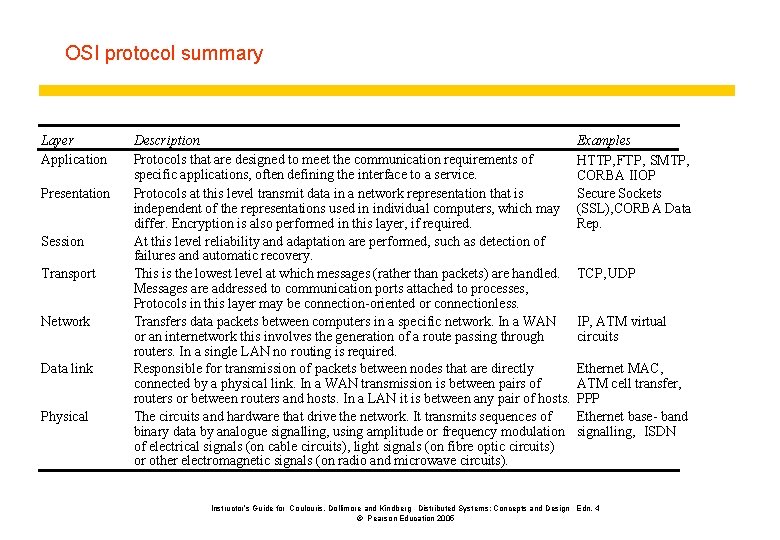
OSI protocol summary Layer Application Presentation Session Transport Network Data link Physical Description Protocols that are designed to meet the communication requirements of specific applications, often defining the interface to a service. Protocols at this level transmit data in a network representation that is independent of the representations used in individual computers, which may differ. Encryption is also performed in this layer, if required. At this level reliability and adaptation are performed, such as detection of failures and automatic recovery. This is the lowest level at which messages (rather than packets) are handled. Messages are addressed to communication ports attached to processes, Protocols in this layer may be connection-oriented or connectionless. Transfers data packets between computers in a specific network. In a WAN or an internetwork this involves the generation of a route passing through routers. In a single LAN no routing is required. Responsible for transmission of packets between nodes that are directly connected by a physical link. In a WAN transmission is between pairs of routers or between routers and hosts. In a LAN it is between any pair of hosts. The circuits and hardware that drive the network. It transmits sequences of binary data by analogue signalling, using amplitude or frequency modulation of electrical signals (on cable circuits), light signals (on fibre optic circuits) or other electromagnetic signals (on radio and microwave circuits). Examples HTTP, FTP , SMTP, CORBA IIOP Secure Sockets (SSL), CORBA Data Rep. TCP, UDP IP, ATM virtual circuits Ethernet MAC, ATM cell transfer, PPP Ethernet base- band signalling, ISDN Instructor’s Guide for Coulouris, Dollimore and Kindberg Distributed Systems: Concepts and Design Edn. 4 © Pearson Education 2005
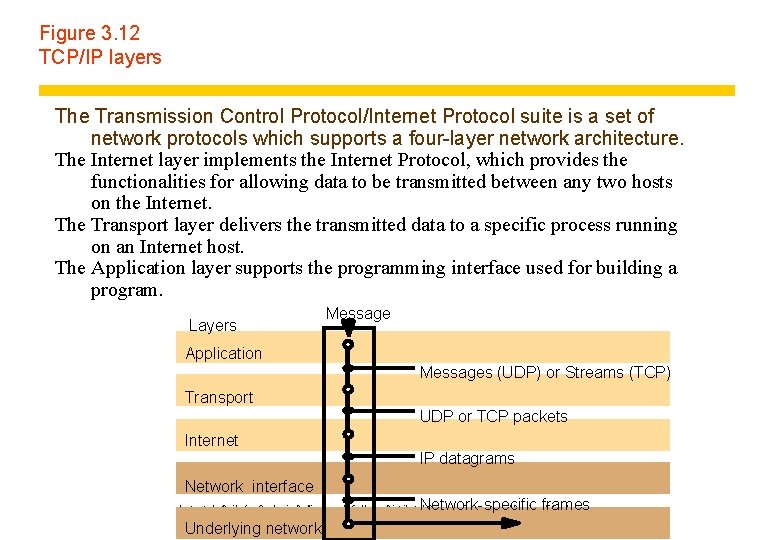
Figure 3. 12 TCP/IP layers The Transmission Control Protocol/Internet Protocol suite is a set of network protocols which supports a four-layer network architecture. The Internet layer implements the Internet Protocol, which provides the functionalities for allowing data to be transmitted between any two hosts on the Internet. The Transport layer delivers the transmitted data to a specific process running on an Internet host. The Application layer supports the programming interface used for building a program. Layers Message Application Messages (UDP) or Streams (TCP) Transport UDP or TCP packets Internet IP datagrams Network interface Network-specific frames Instructor’s Guide for Coulouris, Dollimore and Kindberg Distributed Systems: Concepts and Design Edn. 4 © Pearson Education 2005 Underlying network
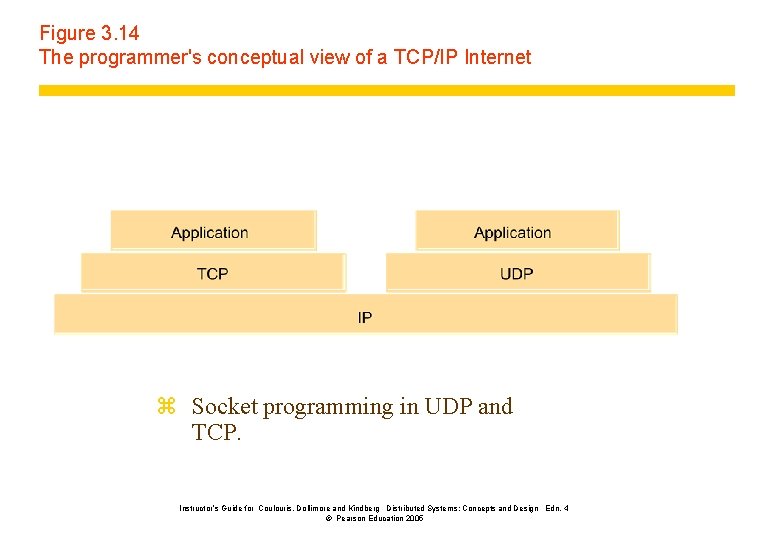
Figure 3. 14 The programmer's conceptual view of a TCP/IP Internet z Socket programming in UDP and TCP. Instructor’s Guide for Coulouris, Dollimore and Kindberg Distributed Systems: Concepts and Design Edn. 4 © Pearson Education 2005
Identification of Network Resources One of the key challenges in distributed computing is the unique identification of resources available on the network, such as emailboxes, and web documents. y. Addressing an Internet Host y. Addressing a process running on a host y. Email Addresses y. Addressing web contents: URL Instructor’s Guide for Coulouris, Dollimore and Kindberg Distributed Systems: Concepts and Design Edn. 4 © Pearson Education 2005
The Internet Topology z The internet consists of an hierarchy of networks, interconnected via a network backbone. z Each network has a unique network address. z Computers, or hosts, are connected to a network. Each host has a unique ID within its network. z Each process running on a host is associated with zero or more ports. A port is a logical entity for data transmission. Instructor’s Guide for Coulouris, Dollimore and Kindberg Distributed Systems: Concepts and Design Edn. 4 © Pearson Education 2005
Network Basics 1. Addressing an Internet Host Instructor’s Guide for Coulouris, Dollimore and Kindberg Distributed Systems: Concepts and Design Edn. 4 © Pearson Education 2005
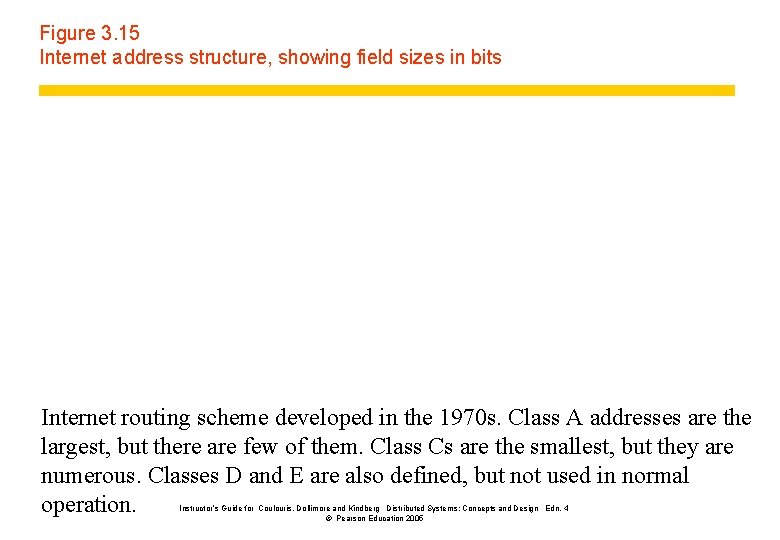
Figure 3. 15 Internet address structure, showing field sizes in bits Internet routing scheme developed in the 1970 s. Class A addresses are the largest, but there are few of them. Class Cs are the smallest, but they are numerous. Classes D and E are also defined, but not used in normal operation. Instructor’s Guide for Coulouris, Dollimore and Kindberg Distributed Systems: Concepts and Design Edn. 4 © Pearson Education 2005
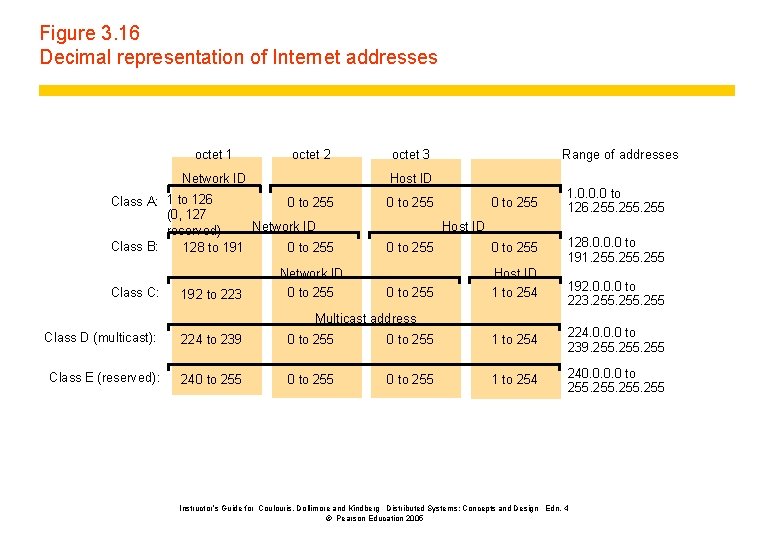
Figure 3. 16 Decimal representation of Internet addresses octet 1 octet 2 Network ID 192 to 223 Range of addresses Host ID Class A: 1 to 126 0 to 255 (0, 127 Network ID reserved) Class B: 128 to 191 0 to 255 Class C: octet 3 Network ID 0 to 255 1. 0. 0. 0 to 126. 255 0 to 255 128. 0. 0. 0 to 191. 255 0 to 255 Host ID 1 to 254 0 to 255 Host ID Multicast address 192. 0. 0. 0 to 223. 255 Class D (multicast): 224 to 239 0 to 255 1 to 254 224. 0. 0. 0 to 239. 255 Class E (reserved): 240 to 255 1 to 254 240. 0 to 255 Instructor’s Guide for Coulouris, Dollimore and Kindberg Distributed Systems: Concepts and Design Edn. 4 © Pearson Education 2005
The Internet addressing scheme Instructor’s Guide for Coulouris, Dollimore and Kindberg Distributed Systems: Concepts and Design Edn. 4 © Pearson Education 2005
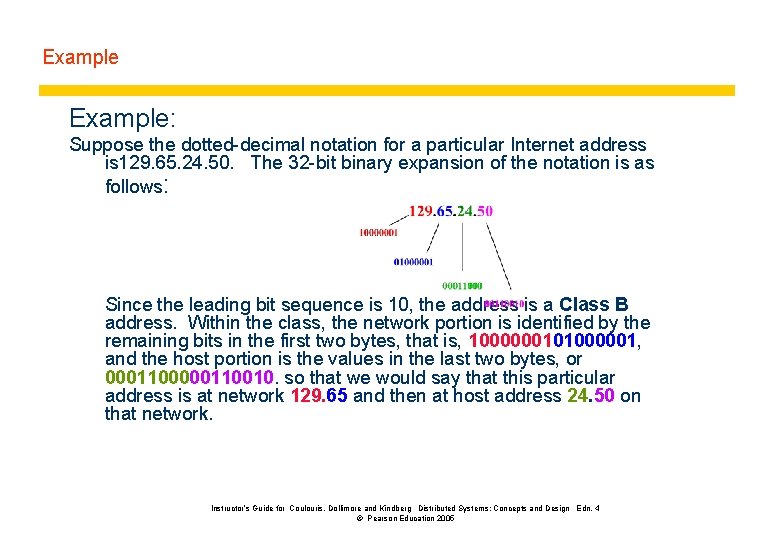
Example: Suppose the dotted-decimal notation for a particular Internet address is 129. 65. 24. 50. The 32 -bit binary expansion of the notation is as follows: Since the leading bit sequence is 10, the address is a Class B address. Within the class, the network portion is identified by the remaining bits in the first two bytes, that is, 1000000101000001, and the host portion is the values in the last two bytes, or 000110010. so that we would say that this particular address is at network 129. 65 and then at host address 24. 50 on that network. Instructor’s Guide for Coulouris, Dollimore and Kindberg Distributed Systems: Concepts and Design Edn. 4 © Pearson Education 2005
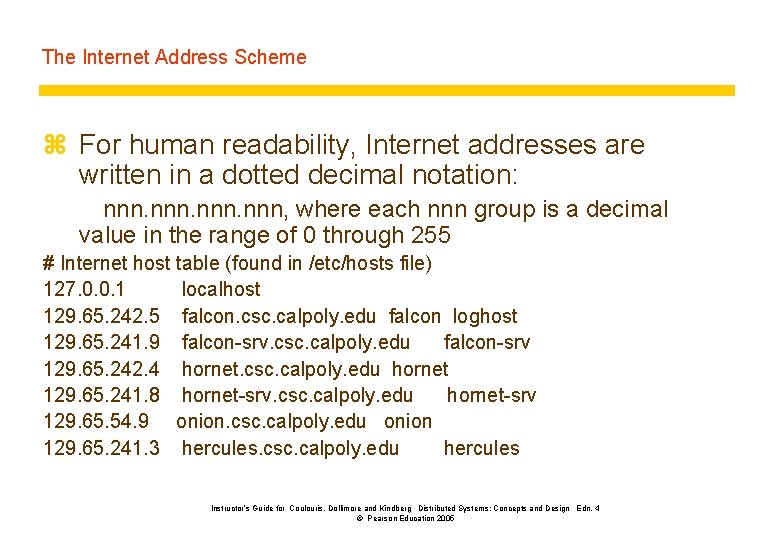
The Internet Address Scheme z For human readability, Internet addresses are written in a dotted decimal notation: nnn, where each nnn group is a decimal value in the range of 0 through 255 # Internet host table (found in /etc/hosts file) 127. 0. 0. 1 localhost 129. 65. 242. 5 falcon. csc. calpoly. edu falcon loghost 129. 65. 241. 9 falcon-srv. csc. calpoly. edu falcon-srv 129. 65. 242. 4 hornet. csc. calpoly. edu hornet 129. 65. 241. 8 hornet-srv. csc. calpoly. edu hornet-srv 129. 65. 54. 9 onion. csc. calpoly. edu onion 129. 65. 241. 3 hercules. csc. calpoly. edu hercules Instructor’s Guide for Coulouris, Dollimore and Kindberg Distributed Systems: Concepts and Design Edn. 4 © Pearson Education 2005
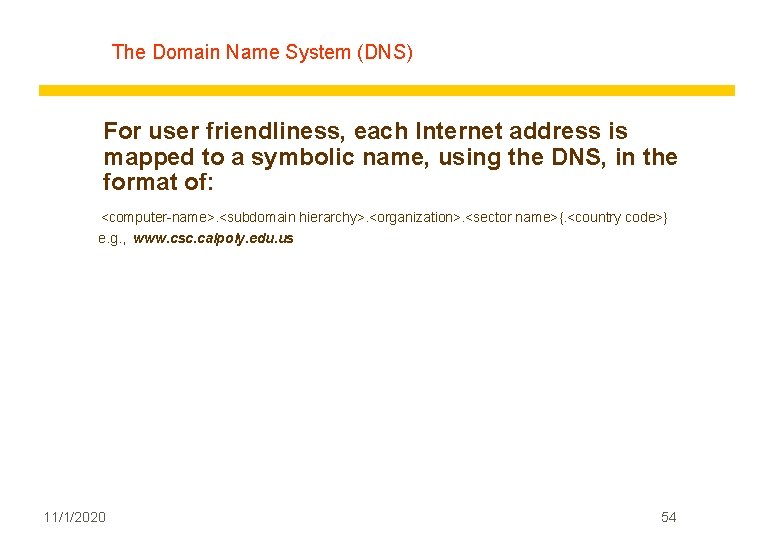
The Domain Name System (DNS) For user friendliness, each Internet address is mapped to a symbolic name, using the DNS, in the format of: <computer-name>. <subdomain hierarchy>. <organization>. <sector name>{. <country code>} e. g. , www. csc. calpoly. edu. us 11/1/2020 54
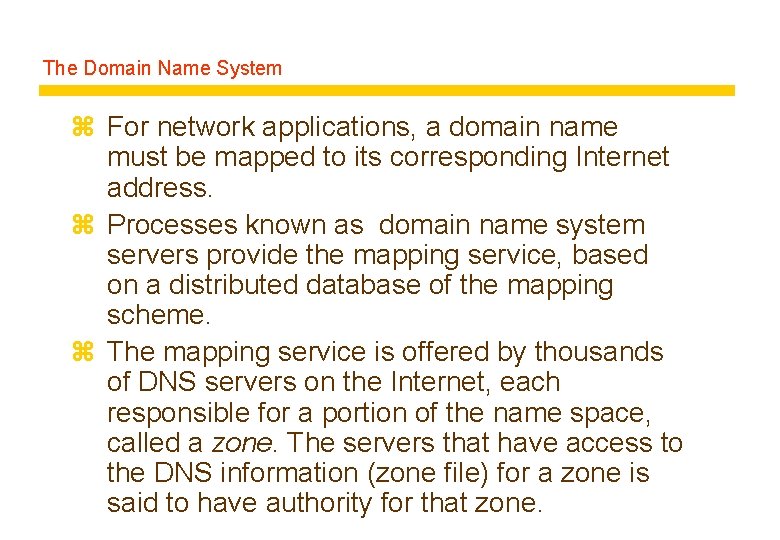
The Domain Name System z For network applications, a domain name must be mapped to its corresponding Internet address. z Processes known as domain name system servers provide the mapping service, based on a distributed database of the mapping scheme. z The mapping service is offered by thousands of DNS servers on the Internet, each responsible for a portion of the name space, called a zone. The servers that have access to the DNS information (zone file) for a zone is said to have authority for that zone.
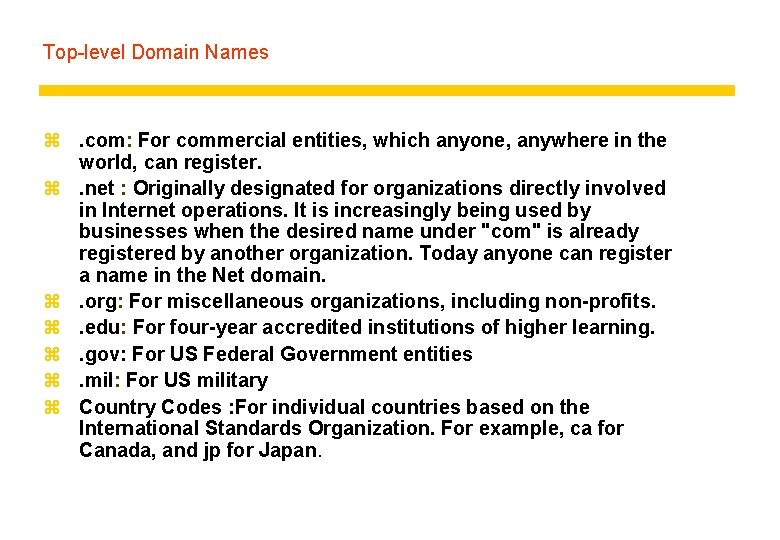
Top-level Domain Names z. com: For commercial entities, which anyone, anywhere in the world, can register. z. net : Originally designated for organizations directly involved in Internet operations. It is increasingly being used by businesses when the desired name under "com" is already registered by another organization. Today anyone can register a name in the Net domain. z. org: For miscellaneous organizations, including non-profits. z. edu: For four-year accredited institutions of higher learning. z. gov: For US Federal Government entities z. mil: For US military z Country Codes : For individual countries based on the International Standards Organization. For example, ca for Canada, and jp for Japan.
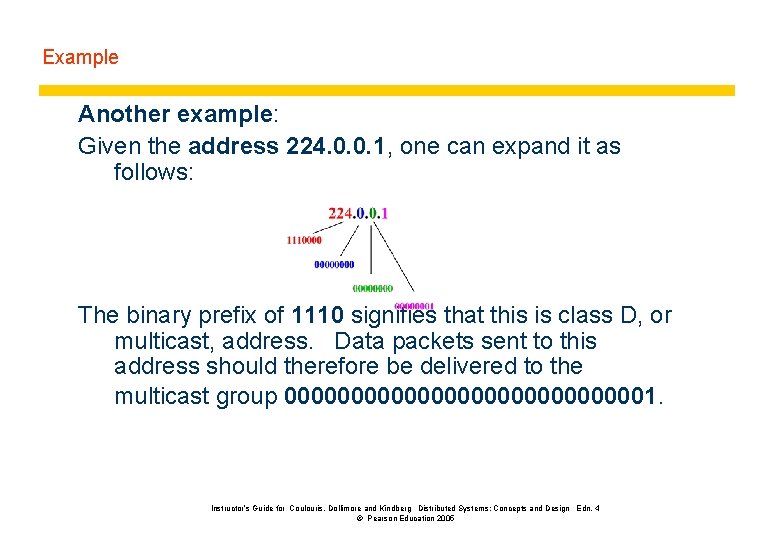
Example Another example: Given the address 224. 0. 0. 1, one can expand it as follows: The binary prefix of 1110 signifies that this is class D, or multicast, address. Data packets sent to this address should therefore be delivered to the multicast group 000000000000001. Instructor’s Guide for Coulouris, Dollimore and Kindberg Distributed Systems: Concepts and Design Edn. 4 © Pearson Education 2005
Network Basics 2. Addressing a process running on a host Instructor’s Guide for Coulouris, Dollimore and Kindberg Distributed Systems: Concepts and Design Edn. 4 © Pearson Education 2005
Addressing a process running on a host Instructor’s Guide for Coulouris, Dollimore and Kindberg Distributed Systems: Concepts and Design Edn. 4 © Pearson Education 2005
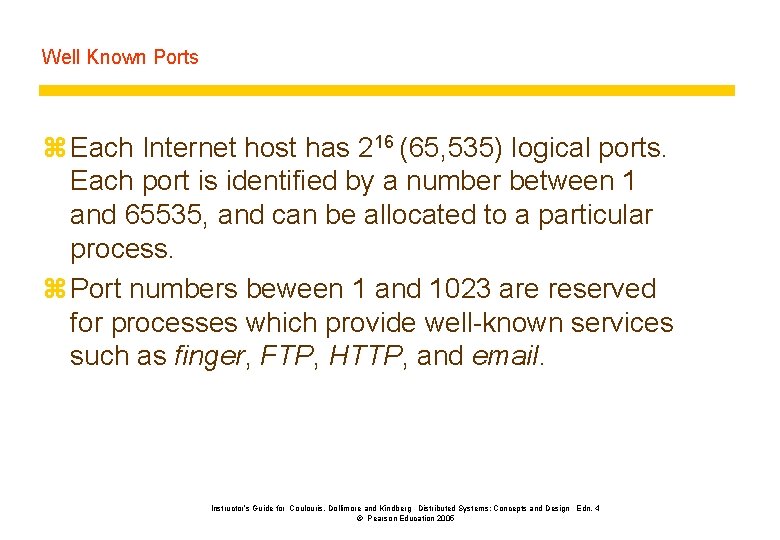
Well Known Ports z Each Internet host has 216 (65, 535) logical ports. Each port is identified by a number between 1 and 65535, and can be allocated to a particular process. z Port numbers beween 1 and 1023 are reserved for processes which provide well-known services such as finger, FTP, HTTP, and email. Instructor’s Guide for Coulouris, Dollimore and Kindberg Distributed Systems: Concepts and Design Edn. 4 © Pearson Education 2005
Well Known Ports Instructor’s Guide for Coulouris, Dollimore and Kindberg Distributed Systems: Concepts and Design Edn. 4 © Pearson Education 2005
Choose a port z For our programming exercises: when a port is needed, choose a random number above the well known ports: 1, 024 - 65, 535. z If you are providing a network service for the community, then arrange to have a port assigned to and reserved for your service. Instructor’s Guide for Coulouris, Dollimore and Kindberg Distributed Systems: Concepts and Design Edn. 4 © Pearson Education 2005
Network Basics 3. Addressing a Web Document Instructor’s Guide for Coulouris, Dollimore and Kindberg Distributed Systems: Concepts and Design Edn. 4 © Pearson Education 2005
The Uniform Resource Identifier (URI) z Resources to be shared on a network need to be uniquely identifiable. z On the Internet, a URI is a character string which allows a resource to be located. z There are two types of URIs: y URL (Uniform Resource Locator) points to a specific resource at a specific location y URN (Uniform Resource Name) points to a specific resource at a nonspecific location. y “A URN is like a person's name, while a URL is like their street address. The URN defines something's identity, while the URL provides a method for finding something. Essentially, "what" vs. "where". ” (from Wiki) Instructor’s Guide for Coulouris, Dollimore and Kindberg Distributed Systems: Concepts and Design Edn. 4 © Pearson Education 2005
![URL A URL has the format of: protocol: //host address[: port]/directory path/file name#section Instructor’s](http://slidetodoc.com/presentation_image/3818942b45df8c805eafa227b97af5ba/image-65.jpg "URL A URL has the format of: protocol: //host address[: port]/directory path/file name#section Instructor’s")
URL A URL has the format of: protocol: //host address[: port]/directory path/file name#section Instructor’s Guide for Coulouris, Dollimore and Kindberg Distributed Systems: Concepts and Design Edn. 4 © Pearson Education 2005
- Slides: 65