
Slide Deck Overview This Document contains an overview
- Slides: 34
Slide Deck Overview This Document contains an overview of each Planned Movement document and Document Exchange/RTL Exchanges between Partners. The goal is to guide the TAS Developer through the standard so they can merge how their processes work with what is going to come across on in the Planned Movement Document. These recommendations are to be used as a guideline for implementation since each TAS may operate slightly differently and have different regional requirements. Each Bullet point references a Section in the Slide Deck • Overview/Terminology/Master Data • Basics about Planned Movement – Document Hierarchy and potential Submitting Partners. • Required Fields and Validation – Discuss what needs to be on the document an a minimum and the validation requirements when receiving a document (base case). • Planned Movement Document Exchange with TAS – Planned Movement Exchange directly with TAS. • Planned Movements and RTL Document Exchange – Pulls in Document Exchange with DCH in the Mix. • Implementation Options for Mixed Version Operations – RTL Lifting Requests by Request type and TAS PIDX Support level.
Why Planned Movements? The Goal of Planned Movements is to: § Improve Accuracy of Loading at the Rack by reducing Driver Errors. § Improve Billing by moving Line Item References placed on the Planned Movement to the BOL/LDR. § Reduce Allocation Outages at the Rack by allowing allocation holds to be placed on Shipments/Orders. § Safe Loading!
Planned Movement Purpose & Design Objectives Document Content The Content in PM-Documents provides relevant data for a loading at a Terminal/Refinery. A PM Document contains information to authorize a loading, e. g. Product, Quantity, Tax-Handling Type, Mode of Transport, Equipment, Parties involved (Reference Master like Data Sold To, Ship To, and Tax To, and Market Master Data for Supply Partner, Stockowner, Carrier, and Seller Company Codes), references to existing accounts or Load. IDs. Subcommittee Objectives • • • Create XSDs/WSDL which define Document Structure and SOAP Request/Response definitions. Working Examples – Document how everything works together through Use Cases and Required elements. Provide Mapping Documentation - The mapping will describe required and recommended field usage for each document type and field level definitions. This mapping will ensure consistent use by companies generating the PM as well as TAS vendors parsing the data. Document Exchange Guidelines for each Movement Type and Right To Lift Loading Type. Minimize Account Changes Required for Implementation - The concept of PICKUP and Delivery/Order Accounts should exist and when implementing Planned Movements (PMs), no major changes should be needed to adjust the pre-existing account data (other than setting flags for Secondary Identification requirements). Planned Movements should be a layer on top of the pre-existing accounts.
Movement Type Overview Movement Type field defines the Planned Movement Document Type being sent, supported types are: Rack Pickup Document – Load. ID • Account • Load. ID Planned Movement Document – – Contract Order Shipment Nominations – Supported but not covered in this slide deck.
Terminology - 1 • • • Account – Identifier that the driver enters at the TAS which is usually related to a customer and the products a customer can lift. Account and Load. ID are terms that are usually interchangeable except when referencing German Loading scenarios (see Load ID definition Below). Delivery – An End Point/Destination where product(s) may be delivered (for example, a Convenient Store). If you have multiple delivery IDs on a Shipment, you would be delivering product to 2 different End Points. Delivery Line Item(LI) –Delivery Line Item references a product and total amount to be delivered to an End Point/Destination. More than one Delivery Line Item for a Delivery indicates 2 products on the delivery. Leading Document – A document that is required to be processed prior to receiving the current document. For Example, a Shipment should have at least one of the following leading documents specified in the Reference section - Order, Contract or Load. ID. Load Plan – Compartment Loading Plan for a Container. Load. ID – Identifier typically defining Sold. To/Ship. To/Tax. Code/Product/Customer in countries like Germany, however in this Slide Deck we will use “Load. ID/Account” to reference either a Load. ID or an Account. For Planned Movements the “Load. ID” Movement Type should be used to create Accounts and Load. IDs at the Terminal, or they can be manually entered.
Terminology - 2 • • • Loading. Ref – The Loading. Ref is a Unique ID assigned to a Planned Movement Line Item which is returned in the RTL Response. The Loading. Ref is the Line Item Reference for a Planned Movement. Nomination – A Nomination is a document used for pre-planning bulk movements (Rail, Barge, . . ). Shipment – Document Containing Delivery Details, container/compartment load planning, other references which should eventually point to a Loading Account/Load. ID. Ship To ID – ERP ID used to identify a customer of a supplier and their taxing region. Sold To ID – ERP ID used to identify a Supplier’s Customer.
Master Data Type/Usage in Planned Movements Need Agreement on how master data should be tracked since ownership/origination of the data is important when making references to supply contracts or storing parsed data outside the XML structure. • Reference Master Data - should always have a Reference Owner of the ID specified (PM Fields like Party. Owner, Reference. Owner Identified by PIDX Company Code). • • IDs related to transactional details (shipment, other Movement IDs). IDs related to Party Data (like Soldto/Ship. To/Tax Codes) are all considered owned by the party issuing the documents or specified at the in the Party. Owner field. If NO Refrence Owner is specified, the assumption that from Party or Seller ID will be used for the Document and this ID Maybe Populated if sent through a DCH Prior to being pushed to the TAS. Market Master Data - should always specify an Agency that issued the data. Examples – PIDX Data • • • – Government Master Data • • – Seller, Final. Shipper, Thrid. Party, Terminal Owner Reference – PIDX Company Code (see Party Usage Excel Sheet). Terminal Codes/TCNs PIDX Product Terminal – TCN (US Only) FEIN – (Federal Employee Identification Number _US) Other Agencies • • SCAC - (US Only) DUNS
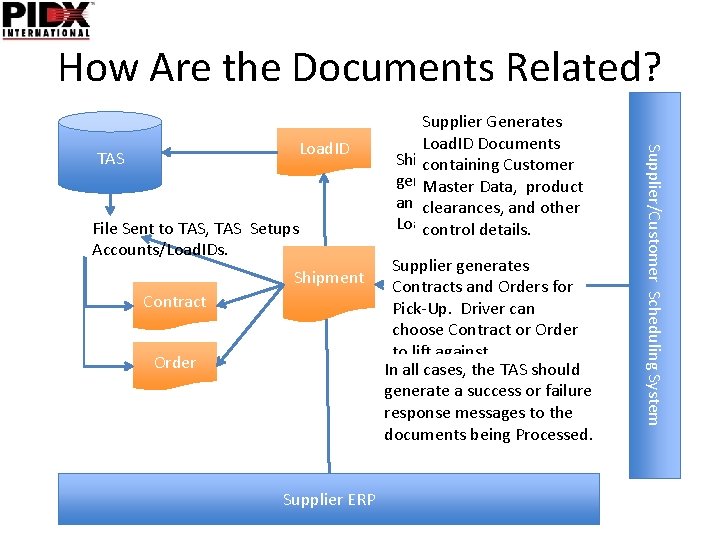
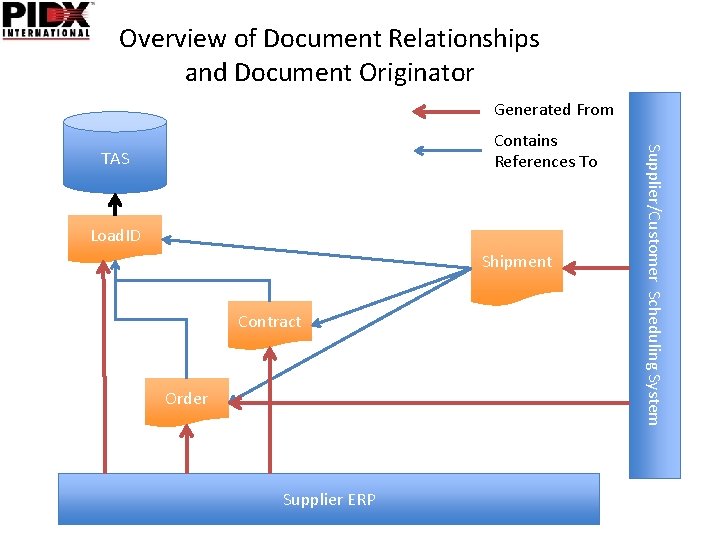
How Are the Documents Related? File Sent to TAS, TAS Setups Accounts/Load. IDs. Shipment Contract Order Supplier ERP Supplier generates Contracts and Orders for Pick-Up. Driver can choose Contract or Order to lift against. In all cases, the TAS should generate a success or failure response messages to the documents being Processed. Supplier/Customer Scheduling System Load. ID TAS Supplier Generates Load. ID Documents Shipment can be also be containing Customer generated lift against Masterto Data, product an Order, Contract, or clearances, and other Load. ID. control details.
Overview of Document Relationships and Document Originator Generated From TAS Load. ID Shipment Contract Order Supplier ERP Supplier/Customer Scheduling System Contains References To
Guidelines for Filling out Planned Movements • The next set of slides will discuss required fields for each Planned Movement Document.
Account/Load. ID Document is used to setup account/product authorizations at the terminal. There are generally 2 different Types of Load IDs used at the terminal. – – Product Level Load. IDs - Each Load. ID represents the Customer, Product, Supply. Parnter and Taxation information. See Load. ID PPT for details on Product Level Load. IDs. Account Level Load. IDs - For Account Level Load. IDs, each Terminal Account has a Load. ID with a number of products under the account. For Equity Terminals, a Soldto or Ship. To is usually used as the Load. ID. For non-equity terminals you may be able to use your own Soldto/Ship. To, but in some cases you may have to use the Load. ID assigned by the TAS Owner. Key Elements of a Load. ID • RTL Customer Details – Seller/Consignee (if RTL Required) • Supply Partner – (Third. Party – or owner on Supply Contract) • Product Details – Terminal Product/PIDX Products and Supplier Products (Seller Product Codes) • Taxation Codes • Driver Requirements for Entering a Secondary ID or Planned Movement Document ID. • Right To Lift Requirements (At. Lifting. Time, On. Receipt (Planned Movement pre-auth), Not. Required) – • Transport Company can be listed at the Header or LI level in the document which should allow for “Carrier” Authorization by Account/Product, if NO Carriers are specified in the header/line item section, then the assumption is the carrier can lift all products or the carrier is setup for product authorization at the TAS. • TASLoad. ID – This should be specified and can be either a single ID or ID + LI reference. • Only Load IDs can create accounts or authorize Products at a Terminal. • Load. IDs may be created with Contract Detail References in cases where only a single Contract per customer exists at a Terminal. If Suppliers want to create accounts at the TAS with Contracts, have them use the Load. Id commands. NOTE: Existing Account/Load. ID data may already exist at the TAS in the form of Product Level Load. IDs (Germany Usage) or Account Level Load. IDs (US/EU other than Germany/Austria). These existing Load. Ids and Accounts can be referenced in Planned Movement Documents (Order, Contratcts, and Shipments).
Load. ID Document Validation • Load. ID Validation – – – Document. Originator Authorization – Document. Originator needs to be authorized to create Load. Ids/Account details. Terminal Account/Load. ID creation • Load. ID or Document. Originator + Load. ID uniqueness needs to be performed - In some systems the Load. ID may be unique across the terminal (equity owner assigned), in others they may require a Document Originator + Load ID to be unique. Customer Details - The Soldto/Ship. To data should be loaded for that Seller. If Authorization Required (At Lifting/On Receipt), then Seller/Consignee should be included with data. Product - Terminal Product details should be validated. Its recommended that TAS systems store the Sellers Material Codes defined in the Load. ID, which will allows for direct submission of Contract/Orders/Shipments without requiring terminal products be specified on all docs, the Seller/Product Codes can be looked up in the Load. ID file and used to cross reference to the Terminal Products already validated. Terminal may have regional data requirements. • Not all countries have the same requirements for account/Load. ID creation so some additional field level details may need to be parsed on a country by country basis. These Required field should be additional field to the standard fields. Multiple Transport Companies may be included in the Load. ID Party Data, this would could be treated as a list of Transport companies capable of loading against the Load. ID. If no Transport companies are specified then its assumed the terminal will manage this list. Transport Company at the Detail Level – If transport companies are specified in the detail level, then that company can load the specified product. Date Validation • Valid date should be in the past, or Less than 2 mos in the future. • Expire Date should be > Today or not specified if valid forever. Detail References should include Supply Partner/Supply Contract LI detail if not lifting against your own stock. TASLoad. ID - Should exist for the Stockowner.
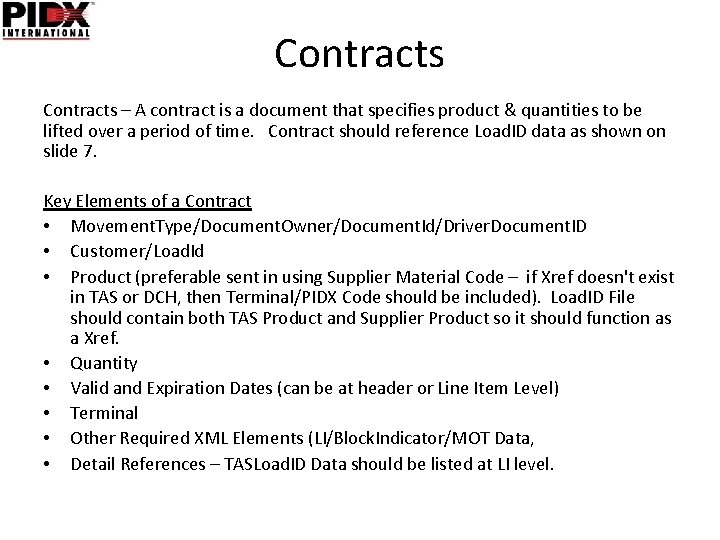
Contracts – A contract is a document that specifies product & quantities to be lifted over a period of time. Contract should reference Load. ID data as shown on slide 7. Key Elements of a Contract • Movement. Type/Document. Owner/Document. Id/Driver. Document. ID • Customer/Load. Id • Product (preferable sent in using Supplier Material Code – if Xref doesn't exist in TAS or DCH, then Terminal/PIDX Code should be included). Load. ID File should contain both TAS Product and Supplier Product so it should function as a Xref. • Quantity • Valid and Expiration Dates (can be at header or Line Item Level) • Terminal • Other Required XML Elements (LI/Block. Indicator/MOT Data, • Detail References – TASLoad. ID Data should be listed at LI level.
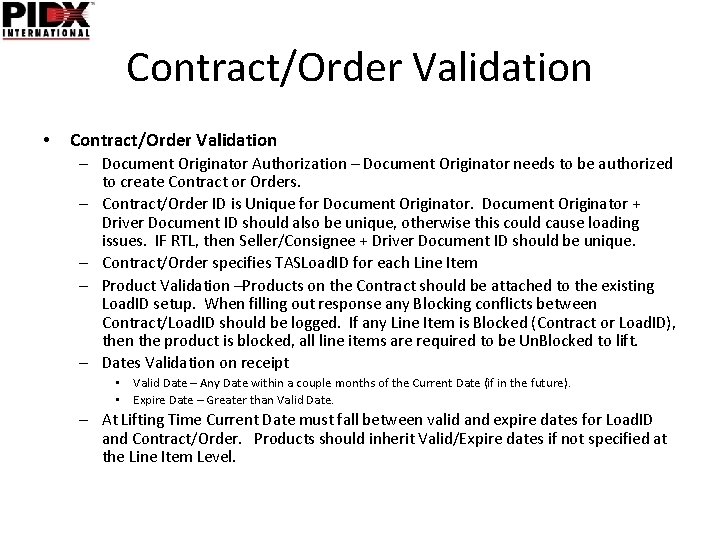
Contract/Order Validation • Contract/Order Validation – Document Originator Authorization – Document Originator needs to be authorized to create Contract or Orders. – Contract/Order ID is Unique for Document Originator + Driver Document ID should also be unique, otherwise this could cause loading issues. IF RTL, then Seller/Consignee + Driver Document ID should be unique. – Contract/Order specifies TASLoad. ID for each Line Item – Product Validation –Products on the Contract should be attached to the existing Load. ID setup. When filling out response any Blocking conflicts between Contract/Load. ID should be logged. If any Line Item is Blocked (Contract or Load. ID), then the product is blocked, all line items are required to be Un. Blocked to lift. – Dates Validation on receipt • Valid Date – Any Date within a couple months of the Current Date (if in the future). • Expire Date – Greater than Valid Date. – At Lifting Time Current Date must fall between valid and expire dates for Load. ID and Contract/Order. Products should inherit Valid/Expire dates if not specified at the Line Item Level.
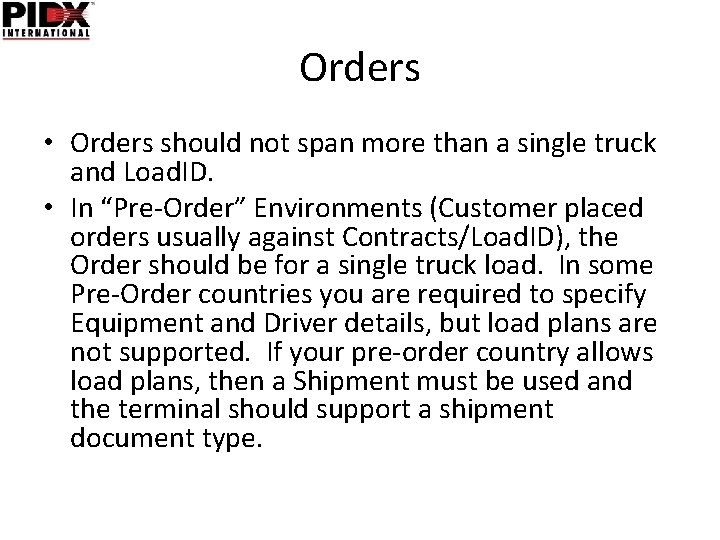
Orders • Orders should not span more than a single truck and Load. ID. • In “Pre-Order” Environments (Customer placed orders usually against Contracts/Load. ID), the Order should be for a single truck load. In some Pre-Order countries you are required to specify Equipment and Driver details, but load plans are not supported. If your pre-order country allows load plans, then a Shipment must be used and the terminal should support a shipment document type.
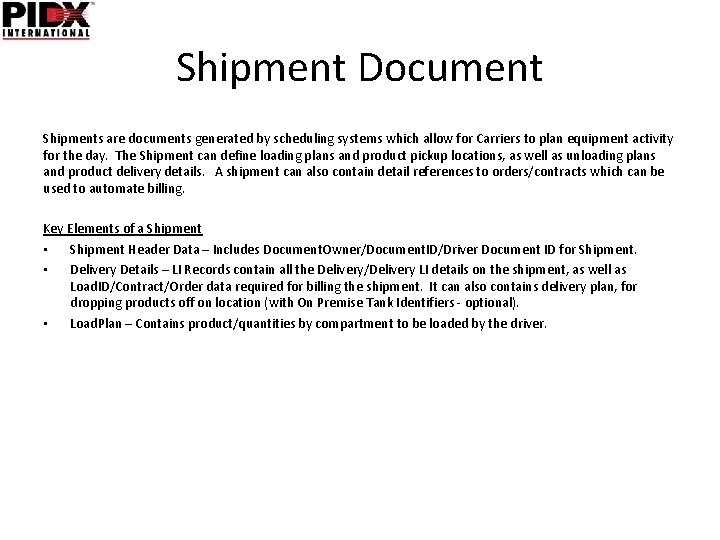
Shipment Document Shipments are documents generated by scheduling systems which allow for Carriers to plan equipment activity for the day. The Shipment can define loading plans and product pickup locations, as well as unloading plans and product delivery details. A shipment can also contain detail references to orders/contracts which can be used to automate billing. Key Elements of a Shipment • Shipment Header Data – Includes Document. Owner/Document. ID/Driver Document ID for Shipment. • Delivery Details – LI Records contain all the Delivery/Delivery LI details on the shipment, as well as Load. ID/Contract/Order data required for billing the shipment. It can also contains delivery plan, for dropping products off on location (with On Premise Tank Identifiers - optional). • Load. Plan – Contains product/quantities by compartment to be loaded by the driver.
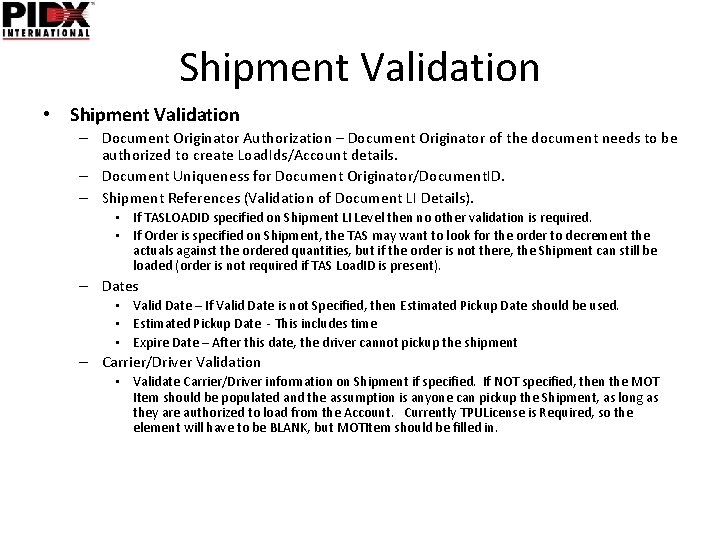
Shipment Validation • Shipment Validation – Document Originator Authorization – Document Originator of the document needs to be authorized to create Load. Ids/Account details. – Document Uniqueness for Document Originator/Document. ID. – Shipment References (Validation of Document LI Details). • If TASLOADID specified on Shipment LI Level then no other validation is required. • If Order is specified on Shipment, the TAS may want to look for the order to decrement the actuals against the ordered quantities, but if the order is not there, the Shipment can still be loaded (order is not required if TAS Load. ID is present). – Dates • Valid Date – If Valid Date is not Specified, then Estimated Pickup Date should be used. • Estimated Pickup Date - This includes time • Expire Date – After this date, the driver cannot pickup the shipment – Carrier/Driver Validation • Validate Carrier/Driver information on Shipment if specified. If NOT specified, then the MOT Item should be populated and the assumption is anyone can pickup the Shipment, as long as they are authorized to load from the Account. Currently TPULicense is Required, so the element will have to be BLANK, but MOTItem should be filled in.
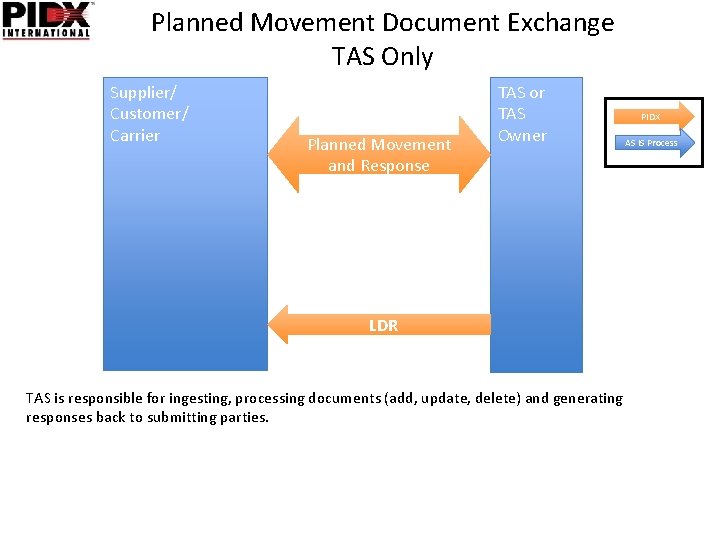
Planned Movement Document Exchange TAS Only Supplier/ Customer/ Carrier Planned Movement and Response TAS or TAS Owner LDR TAS is responsible for ingesting, processing documents (add, update, delete) and generating responses back to submitting parties. PIDX AS IS Process
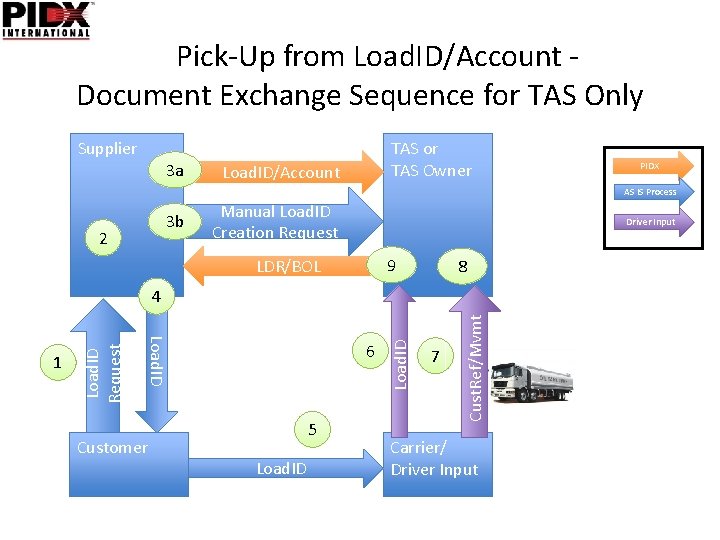
Pick-Up from Load. ID/Account Document Exchange Sequence for TAS Only Supplier 3 a TAS or TAS Owner Load. ID/Account PIDX AS IS Process 3 b 2 Manual Load. ID Creation Request Driver Input 9 LDR/BOL 8 Customer 5 Load. ID 7 Cust. Ref/Mvmt 6 Load. ID 1 Load. ID Request 4 Carrier/ Driver Input
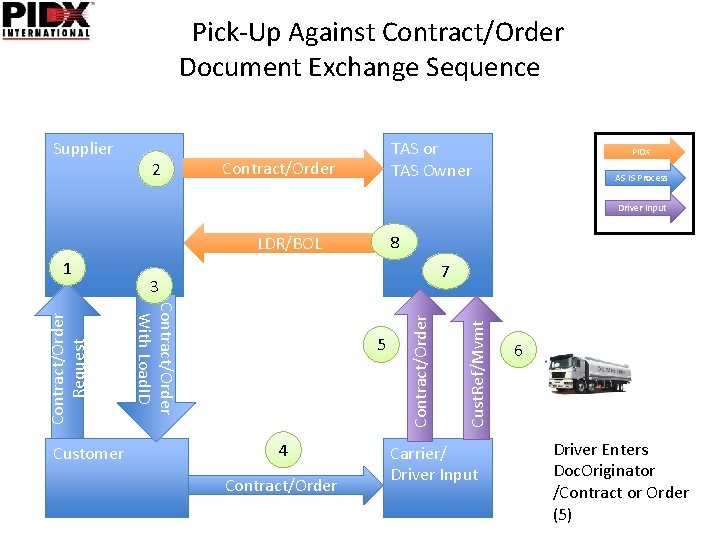
Pick-Up Against Contract/Order Document Exchange Sequence Supplier 2 TAS or TAS Owner Contract/Order PIDX AS IS Process Driver Input 8 LDR/BOL Customer 4 Contract/Order 5 Cust. Ref/Mvmt 7 3 Contract/Order With Load. ID Contract/Order Request 1 Carrier/ Driver Input 6 Driver Enters Doc. Originator /Contract or Order (5)
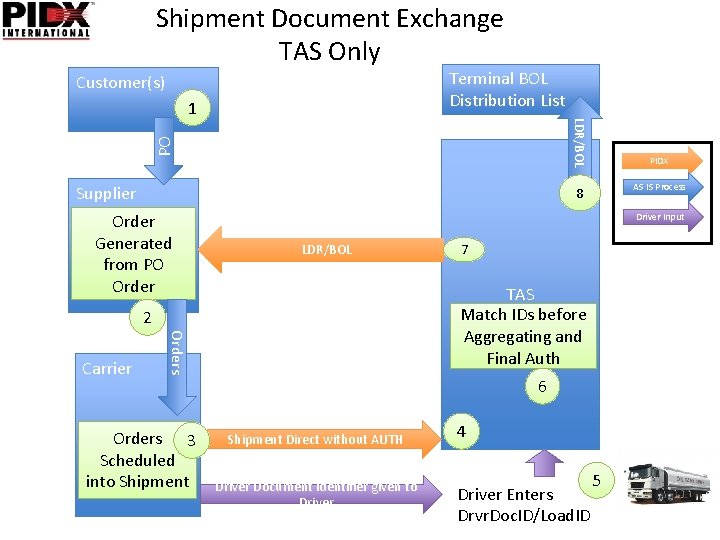
Shipment Document Exchange TAS Only Terminal BOL Distribution List Customer(s) PO LDR/BOL 1 Supplier AS IS Process 8 Order Generated from PO Order Driver Input LDR/BOL Orders 3 Scheduled into Shipment 7 TAS Match IDs before Aggregating and Final Auth 2 Carrier PIDX 6 Shipment Direct without AUTH Driver Document Identifier given to Driver 4 Driver Enters Drvr. Doc. ID/Load. ID 5
Right to Lift • Right to Lift (RTL) check is a call to a Data Clearing House (DCH) which allows suppliers to control lifting in a uniform manner across all TAS vendors. • If a TAS Vendor decides to supports Right to Lift then there additional integration options they should investigate for Planned Movements. The next slides will investigate those options and how Documents are Exchanged between Supplier/DCH/TAS.
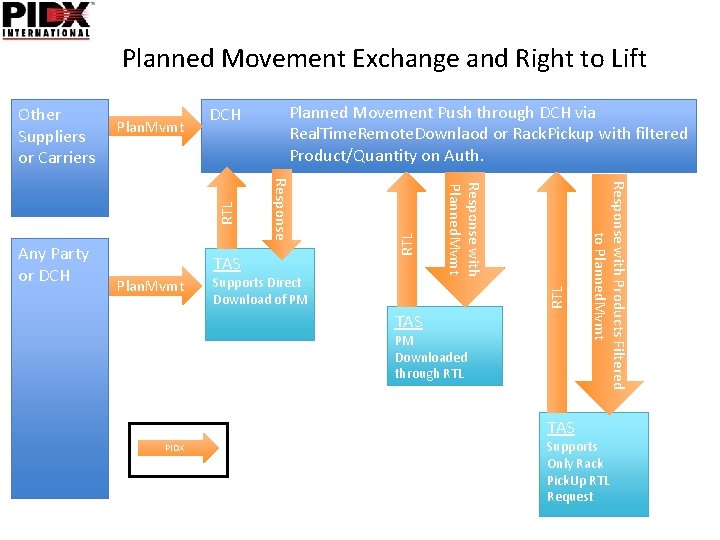
Planned Movement Exchange and Right to Lift DCH RTL Supports Direct Download of PM TAS PM Downloaded through RTL TAS PIDX Response with Products Filtered to Planned. Mvmt Plan. Mvmt Response with Planned. Mvmt TAS Response Any Party or DCH Planned Movement Push through DCH via Real. Time. Remote. Downlaod or Rack. Pickup with filtered Product/Quantity on Auth. RTL Plan. Mvmt RTL Other Suppliers or Carriers Supports Only Rack Pick. Up RTL Request
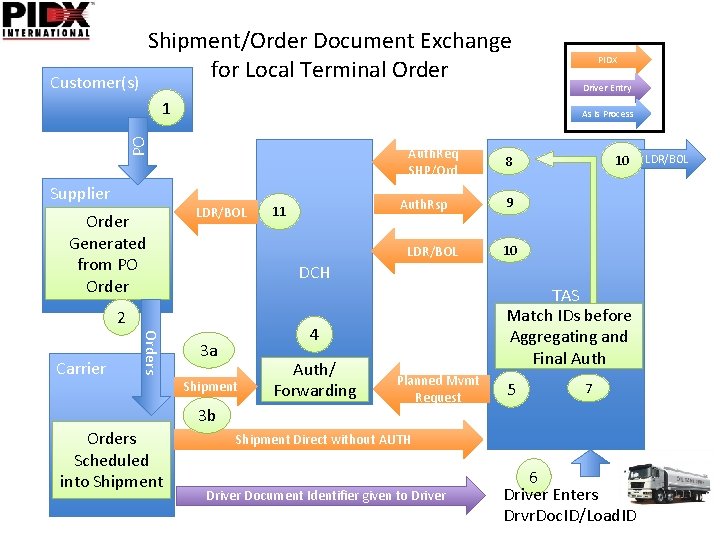
Shipment/Order Document Exchange for Local Terminal Order Customer(s) 1 Order Generated from PO Order Auth. Req SHP/Ord LDR/BOL 10 8 9 10 DCH Orders 4 3 a Shipment 3 b Orders Scheduled into Shipment Auth. Rsp 11 LDR/BOL 2 Carrier Driver Entry As Is Process PO Supplier PIDX TAS Match IDs before Aggregating and Final Auth 6 Auth/ Forwarding Planned Mvmt Request 5 7 Shipment Direct without AUTH Driver Document Identifier given to Driver 6 Driver Enters Drvr. Doc. ID/Load. ID LDR/BOL
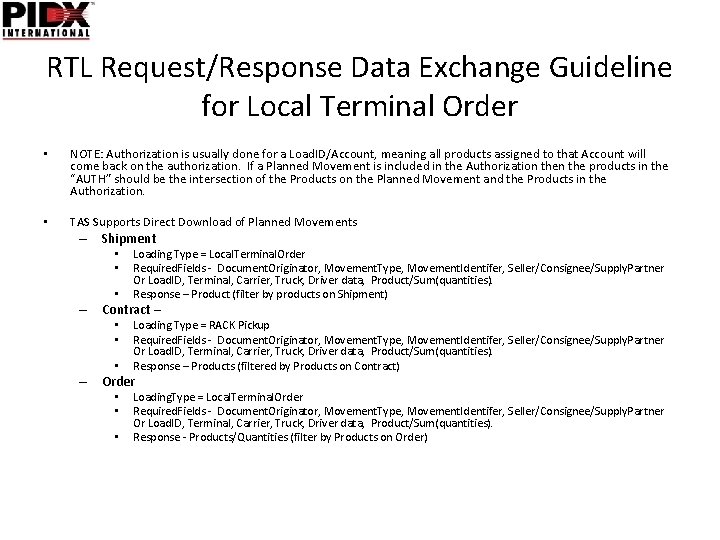
RTL Request/Response Data Exchange Guideline for Local Terminal Order • NOTE: Authorization is usually done for a Load. ID/Account, meaning all products assigned to that Account will come back on the authorization. If a Planned Movement is included in the Authorization the products in the “AUTH” should be the intersection of the Products on the Planned Movement and the Products in the Authorization. • TAS Supports Direct Download of Planned Movements – Shipment • • • Loading Type = Local. Terminal. Order Required. Fields - Document. Originator, Movement. Type, Movement. Identifer, Seller/Consignee/Supply. Partner Or Load. ID, Terminal, Carrier, Truck, Driver data, Product/Sum(quantities). Response – Product (filter by products on Shipment) – Contract – • • • Loading Type = RACK Pickup Required. Fields - Document. Originator, Movement. Type, Movement. Identifer, Seller/Consignee/Supply. Partner Or Load. ID, Terminal, Carrier, Truck, Driver data, Product/Sum(quantities). Response – Products (filtered by Products on Contract) – Order • • • Loading. Type = Local. Terminal. Order Required. Fields - Document. Originator, Movement. Type, Movement. Identifer, Seller/Consignee/Supply. Partner Or Load. ID, Terminal, Carrier, Truck, Driver data, Product/Sum(quantities). Response - Products/Quantities (filter by Products on Order)
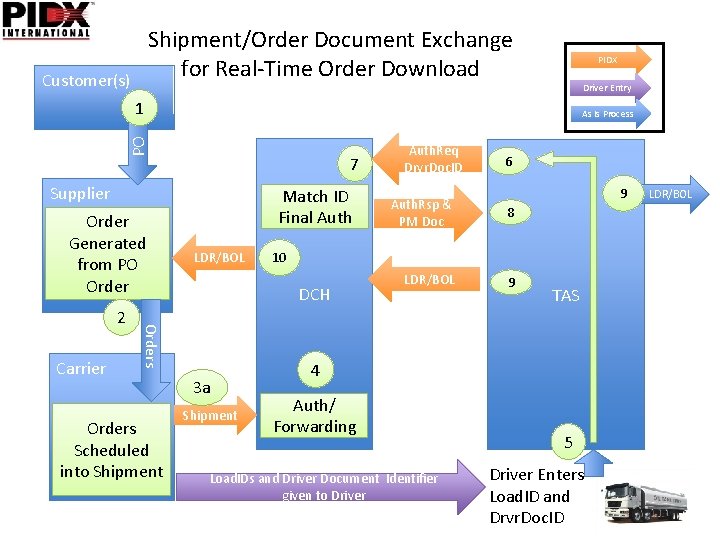
Shipment/Order Document Exchange for Real-Time Order Download Customer(s) PIDX Driver Entry 1 PO As Is Process 7 Supplier Order Generated from PO Order Carrier LDR/BOL Orders Scheduled into Shipment 3 a Shipment 6 9 Auth. Rsp & PM Doc 8 LDR/BOL 9 10 DCH Orders 2 Match ID Final Auth. Req Drvr. Doc. ID 4 TAS 6 Auth/ Forwarding Load. IDs and Driver Document Identifier given to Driver 5 Driver Enters Load. ID and Drvr. Doc. ID LDR/BOL
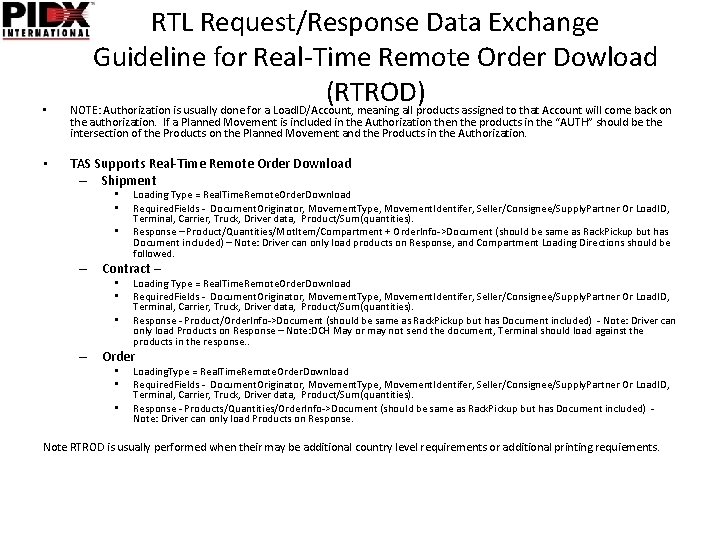
• • RTL Request/Response Data Exchange Guideline for Real-Time Remote Order Dowload (RTROD) NOTE: Authorization is usually done for a Load. ID/Account, meaning all products assigned to that Account will come back on the authorization. If a Planned Movement is included in the Authorization the products in the “AUTH” should be the intersection of the Products on the Planned Movement and the Products in the Authorization. TAS Supports Real-Time Remote Order Download – Shipment • • • Loading Type = Real. Time. Remote. Order. Download Required. Fields - Document. Originator, Movement. Type, Movement. Identifer, Seller/Consignee/Supply. Partner Or Load. ID, Terminal, Carrier, Truck, Driver data, Product/Sum(quantities). Response – Product/Quantities/Mot. Item/Compartment + Order. Info->Document (should be same as Rack. Pickup but has Document included) – Note: Driver can only load products on Response, and Compartment Loading Directions should be followed. – Contract – • • • Loading Type = Real. Time. Remote. Order. Download Required. Fields - Document. Originator, Movement. Type, Movement. Identifer, Seller/Consignee/Supply. Partner Or Load. ID, Terminal, Carrier, Truck, Driver data, Product/Sum(quantities). Response - Product/Order. Info->Document (should be same as Rack. Pickup but has Document included) - Note: Driver can only load Products on Response – Note: DCH May or may not send the document, Terminal should load against the products in the response. . – Order • • • Loading. Type = Real. Time. Remote. Order. Download Required. Fields - Document. Originator, Movement. Type, Movement. Identifer, Seller/Consignee/Supply. Partner Or Load. ID, Terminal, Carrier, Truck, Driver data, Product/Sum(quantities). Response - Products/Quantities/Order. Info->Document (should be same as Rack. Pickup but has Document included) Note: Driver can only load Products on Response. Note RTROD is usually performed when their may be additional country level requirements or additional printing requiements.
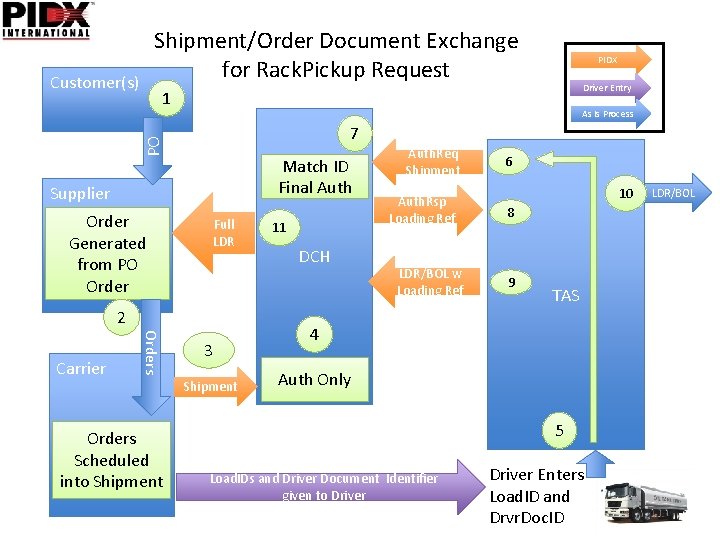
Shipment/Order Document Exchange for Rack. Pickup Request Customer(s) Driver Entry 1 As Is Process PO 7 Match ID Final Auth Supplier Order Generated from PO Order Full LDR 2 Orders Carrier PIDX Orders Scheduled into Shipment 3 Shipment 11 DCH Auth. Req Shipment Auth. Rsp Loading Ref LDR/BOL w Loading Ref 6 10 8 9 TAS 4 6 Auth Only 5 Load. IDs and Driver Document Identifier given to Driver Enters Load. ID and Drvr. Doc. ID LDR/BOL
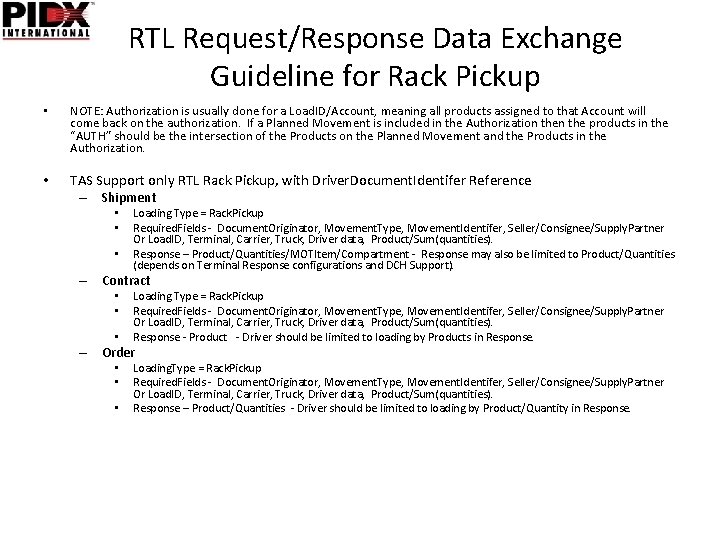
RTL Request/Response Data Exchange Guideline for Rack Pickup • NOTE: Authorization is usually done for a Load. ID/Account, meaning all products assigned to that Account will come back on the authorization. If a Planned Movement is included in the Authorization the products in the “AUTH” should be the intersection of the Products on the Planned Movement and the Products in the Authorization. • TAS Support only RTL Rack Pickup, with Driver. Document. Identifer Reference – Shipment • • • Loading Type = Rack. Pickup Required. Fields - Document. Originator, Movement. Type, Movement. Identifer, Seller/Consignee/Supply. Partner Or Load. ID, Terminal, Carrier, Truck, Driver data, Product/Sum(quantities). Response – Product/Quantities/MOTItem/Compartment - Response may also be limited to Product/Quantities (depends on Terminal Response configurations and DCH Support). – Contract • • • Loading Type = Rack. Pickup Required. Fields - Document. Originator, Movement. Type, Movement. Identifer, Seller/Consignee/Supply. Partner Or Load. ID, Terminal, Carrier, Truck, Driver data, Product/Sum(quantities). Response - Product - Driver should be limited to loading by Products in Response. – Order • • • Loading. Type = Rack. Pickup Required. Fields - Document. Originator, Movement. Type, Movement. Identifer, Seller/Consignee/Supply. Partner Or Load. ID, Terminal, Carrier, Truck, Driver data, Product/Sum(quantities). Response – Product/Quantities - Driver should be limited to loading by Product/Quantity in Response.
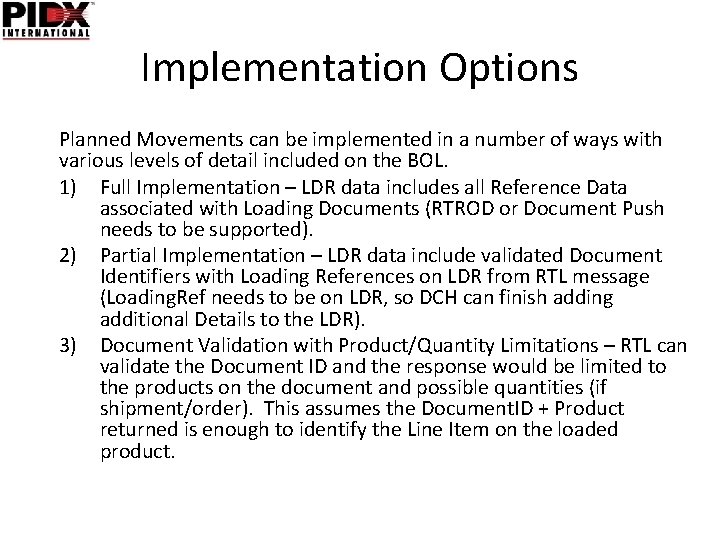
Implementation Options Planned Movements can be implemented in a number of ways with various levels of detail included on the BOL. 1) Full Implementation – LDR data includes all Reference Data associated with Loading Documents (RTROD or Document Push needs to be supported). 2) Partial Implementation – LDR data include validated Document Identifiers with Loading References on LDR from RTL message (Loading. Ref needs to be on LDR, so DCH can finish adding additional Details to the LDR). 3) Document Validation with Product/Quantity Limitations – RTL can validate the Document ID and the response would be limited to the products on the document and possible quantities (if shipment/order). This assumes the Document. ID + Product returned is enough to identify the Line Item on the loaded product.
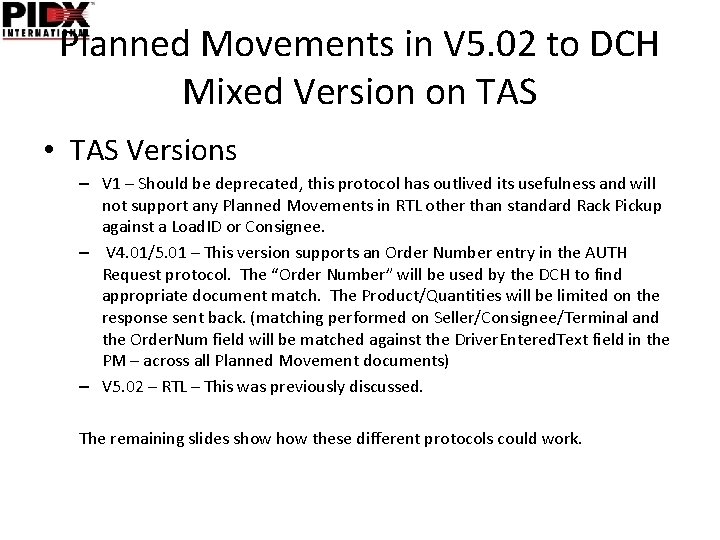
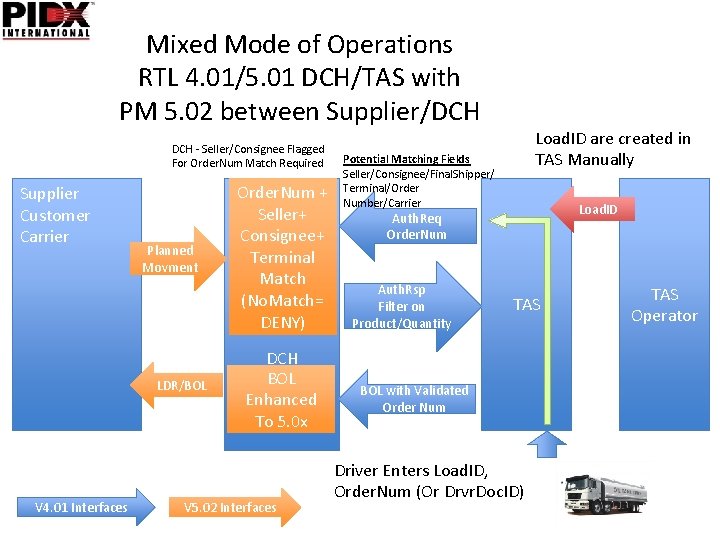
Planned Movements in V 5. 02 to DCH Mixed Version on TAS • TAS Versions – V 1 – Should be deprecated, this protocol has outlived its usefulness and will not support any Planned Movements in RTL other than standard Rack Pickup against a Load. ID or Consignee. – V 4. 01/5. 01 – This version supports an Order Number entry in the AUTH Request protocol. The “Order Number” will be used by the DCH to find appropriate document match. The Product/Quantities will be limited on the response sent back. (matching performed on Seller/Consignee/Terminal and the Order. Num field will be matched against the Driver. Entered. Text field in the PM – across all Planned Movement documents) – V 5. 02 – RTL – This was previously discussed. The remaining slides show these different protocols could work.
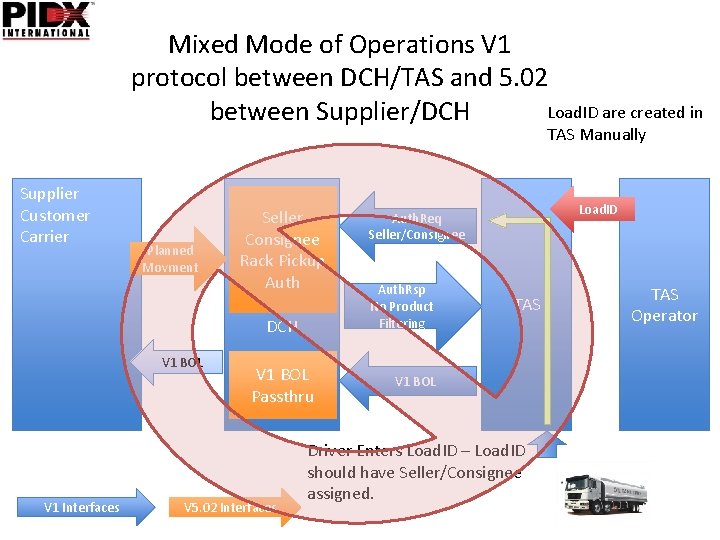
Mixed Mode of Operations V 1 protocol between DCH/TAS and 5. 02 Load. ID are created in between Supplier/DCH TAS Manually Supplier Customer Carrier Planned Movment Seller Consignee Rack Pickup Auth DCH V 1 BOL V 1 Interfaces V 1 BOL Passthru V 5. 02 Interfaces Load. ID Auth. Req Seller/Consignee Auth. Rsp No Product Filtering TAS V 1 BOL Driver Enters Load. ID – Load. ID should have Seller/Consignee assigned. TAS Operator
Mixed Mode of Operations RTL 4. 01/5. 01 DCH/TAS with PM 5. 02 between Supplier/DCH - Seller/Consignee Flagged For Order. Num Match Required Supplier Customer Carrier Planned Movment LDR/BOL V 4. 01 Interfaces Order. Num + Seller+ Consignee+ Terminal Match (No. Match= DENY) DCH BOL Enhanced To 5. 0 x V 5. 02 Interfaces Load. ID are created in TAS Manually Potential Matching Fields Seller/Consignee/Final. Shipper/ Terminal/Order Number/Carrier Load. ID Auth. Req Order. Num Auth. Rsp Filter on Product/Quantity TAS BOL with Validated Order Num Driver Enters Load. ID, Order. Num (Or Drvr. Doc. ID) TAS Operator
Documentation Clarification • It may be necessary to release Documentation addendums to clarify usage of fields and other details as the specification is implemented in each country. A notice will be released for each country where the specification has been vetted and is being used, and any special details related to country specific implementations (especially for pre-order countries).