
Slide 1 1 An Introduction to ObjectOriented Systems
Slide 1. 1 An Introduction to Object-Oriented Systems Analysis and Design with UML and the Unified Process Mc. Graw-Hill, 2004 Stephen R. Schach srs@vuse. vanderbilt. edu Copyright © 2004 by The Mc. Graw-Hill Companies, Inc. All rights reserved.
CHAPTER 1 Slide 1. 2 INTRODUCTION TO INFORMATION SYSTEMS Copyright © 2004 by The Mc. Graw-Hill Companies, Inc. All rights reserved.
Chapter Overview l l Categories of Information Systems Traditional Information System Development – – – The Requirements Phase The Analysis Phase The Design Phase The Implementation Phase The Maintenance Phase Retirement Copyright © 2004 by The Mc. Graw-Hill Companies, Inc. All rights reserved. Slide 1. 3
Chapter Overview (contd) l l l Why There Is No Planning Phase Why There Is No Testing Phase Why There Is No Documentation Phase Systems Analysis and Design Maintenance Information Technology Professionals Copyright © 2004 by The Mc. Graw-Hill Companies, Inc. All rights reserved. Slide 1. 4
Jethro’s Boot Emporium l Automated reordering system l Jethro’s formula for predicting future trends l The formula works perfectly … l … at first Copyright © 2004 by The Mc. Graw-Hill Companies, Inc. All rights reserved. Slide 1. 5
Definitions l Artifact – Component l System – Set of artifacts that achieve some outcome l Information system – System that achieves a business outcome l Computerized information system – COTS (commercial off-the-shelf) package – Custom information system Copyright © 2004 by The Mc. Graw-Hill Companies, Inc. All rights reserved. Slide 1. 6
Custom Information System l Stakeholders – Client – Users – Developers Copyright © 2004 by The Mc. Graw-Hill Companies, Inc. All rights reserved. Slide 1. 7
COTS Software l Shrinkware l Clickware l Stakeholders – Users – Developers l Enterprise Resource Planning (ERP) system – Examples: People. Soft, SAP Copyright © 2004 by The Mc. Graw-Hill Companies, Inc. All rights reserved. Slide 1. 8
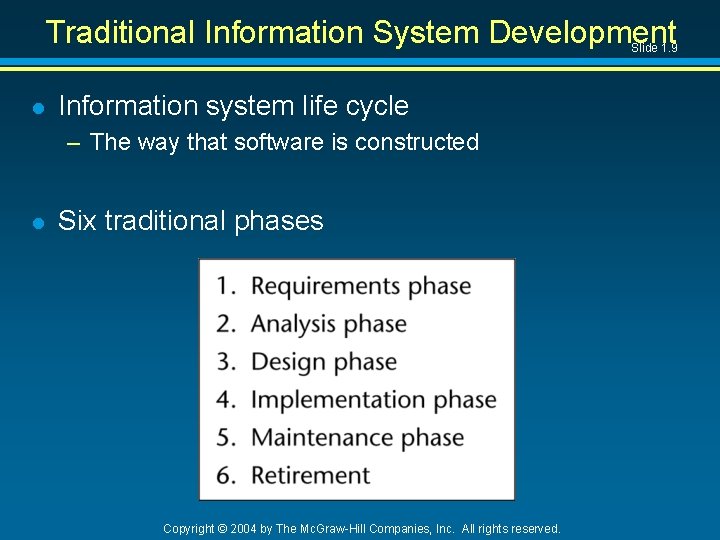
Traditional Information System Development Slide 1. 9 l Information system life cycle – The way that software is constructed l Six traditional phases Copyright © 2004 by The Mc. Graw-Hill Companies, Inc. All rights reserved.
Overview of the Traditional Phases l Requirements phase – Find the client’s requirements – Draw up the requirements document l Analysis phase – Draw up the specification document – Draw up the project management plan l Design phase – Determine the modules – Determine algorithms and data structures for each module Copyright © 2004 by The Mc. Graw-Hill Companies, Inc. All rights reserved. Slide 1. 10
Overview of the Traditional Phases (contd) Slide 1. 11 l Implementation phase – Translate the modules into a programming language – Integrate the modules l Maintenance phase – Modify the system » Remove any remaining faults » Extend the system in some way l Retirement – The system no longer provides a useful service Copyright © 2004 by The Mc. Graw-Hill Companies, Inc. All rights reserved.
Why There Is No Planning Phase Slide 1. 12 l We cannot plan until we have accurate, detailed information l There are three types of planning activities: – There is preliminary planning at the start of the project – The project management plan is drawn up after the specifications have been approved by the client – Management monitor the plan all through the project Copyright © 2004 by The Mc. Graw-Hill Companies, Inc. All rights reserved.
Why There Is No Planning Phase (contd) Slide 1. 13 l Planning activities are carried out all through the life cycle There is no separate planning phase Copyright © 2004 by The Mc. Graw-Hill Companies, Inc. All rights reserved.
Why There is No Testing Phase l Checking the information system just before delivery is much too late l An information system must be checked continually There is no separate testing phase Copyright © 2004 by The Mc. Graw-Hill Companies, Inc. All rights reserved. Slide 1. 14
Why There Is No Documentation Phase Slide 1. 15 l The documentation must be complete, correct, and up to date at all times – Personnel turnover in the information system industry – Performing a phase requires the documentation from the previous phase l Testing activities require documentation l Maintenance activities require documentation There is no separate documentation phase Copyright © 2004 by The Mc. Graw-Hill Companies, Inc. All rights reserved.
Systems Analysis and Design l Slide 1. 16 The word analysis is used in two different ways: – Analysis: Phase 2 – Systems analysis: Phases 1 and 2 l The term systems analyst is also used in two different ways – Responsible for Phases 1 and 2; or – Responsible for Phases 1, 2, and 3 l The second usage is more common – That is the way systems analyst is used in this book Copyright © 2004 by The Mc. Graw-Hill Companies, Inc. All rights reserved.
Maintenance l Bad information systems are thrown away l Good information systems are maintained for many years Copyright © 2004 by The Mc. Graw-Hill Companies, Inc. All rights reserved. Slide 1. 17
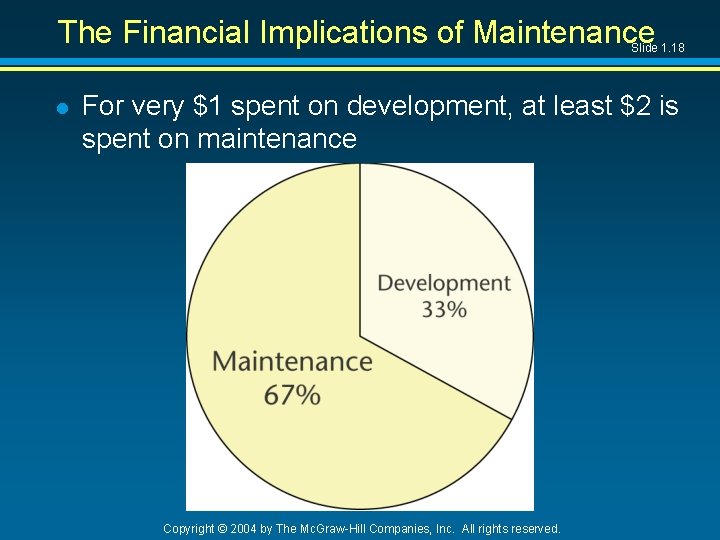
The Financial Implications of Maintenance Slide 1. 18 l For very $1 spent on development, at least $2 is spent on maintenance Copyright © 2004 by The Mc. Graw-Hill Companies, Inc. All rights reserved.
Maintenance Activities Slide 1. 19 l There are three maintenance activities: l Corrective maintenance – Fixing faults l Perfective maintenance – Adding functionality l Adoptive maintenance – Making changes because the environment changes – (Enhancement: Corrective + Perfective maintenance) Copyright © 2004 by The Mc. Graw-Hill Companies, Inc. All rights reserved.
Software Organizations l Software – Computer program (code) + documentation l Many organizations produce software – They employ systems analysts l Some organizations outsource Copyright © 2004 by The Mc. Graw-Hill Companies, Inc. All rights reserved. Slide 1. 20
Software Organizations like Microsoft and Oracle produce software – As a primary product l Slide 1. 21 Organization like General Motors and General Electric produce software – But not as a primary product Copyright © 2004 by The Mc. Graw-Hill Companies, Inc. All rights reserved.
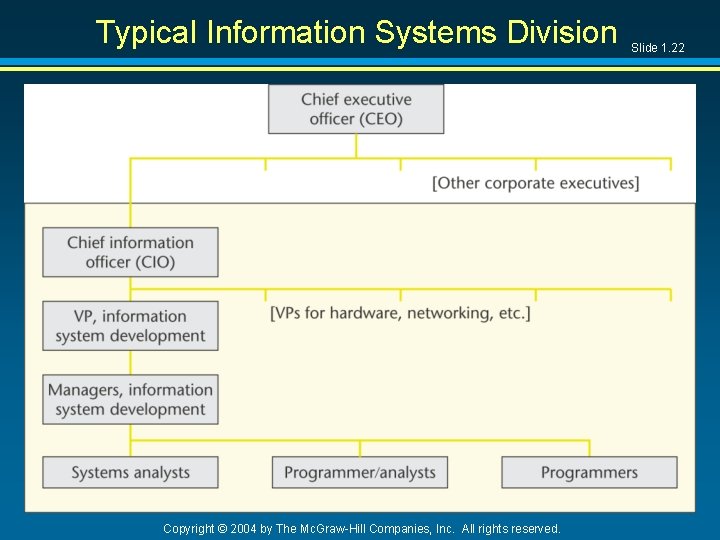
Typical Information Systems Division Copyright © 2004 by The Mc. Graw-Hill Companies, Inc. All rights reserved. Slide 1. 22
Information Technology Professionals l Technical positions – Programmer/analyst – Systems analyst l Alternative career path – Business analyst – Acquire programming skills Systems analyst Copyright © 2004 by The Mc. Graw-Hill Companies, Inc. All rights reserved. Slide 1. 23
Information Technology Professionals (contd) Slide 1. 24 l Management hierarchy – – Manager for information system development Vice-President for information system development Chief information officer (CIO) Chief executive officer (CEO) Copyright © 2004 by The Mc. Graw-Hill Companies, Inc. All rights reserved.
Essential Systems Analyst Skills Slide 1. 25 l Technical skills l Communication skills l Programming knowledge l Sufficient technical knowledge to able to consult – – Database administrator Network administrator Systems programmers Software engineers Copyright © 2004 by The Mc. Graw-Hill Companies, Inc. All rights reserved.
Ethical Issues Slide 1. 26 l Systems analysts must be ethical in every way l Example: Excerpt from the Code of Ethics of AITP “I acknowledge: That I have an obligation to my College or University, therefore, I shall uphold its ethical and moral principles. That I have an obligation to my employer whose trust I hold, therefore, I shall endeavor to discharge this obligation to the best of my ability, to guard my employer's interests, and to advise him or her wisely and honestly. I accept these obligations as a personal responsibility and as a member of this Association. I shall actively discharge these obligations and I dedicate myself to that end. ” Copyright © 2004 by The Mc. Graw-Hill Companies, Inc. All rights reserved.
- Slides: 26