
SKOPE Skeleton Framework for Performance Engineering A deep
![Execution Modeling Sk. Node Sk. Context macros[var_name] data[arr_name] exit_status for n=0: N { if](https://slidetodoc.com/presentation_image/46991e3c32505494dda61ff3070bb1de/image-20.jpg "Execution Modeling Sk. Node Sk. Context macros[var_name] data[arr_name] exit_status for n=0: N { if")

- Slides: 34
SKOPE: Skeleton Framework for Performance Engineering A deep dive
Talk Outline 1. Overview 2. Example 3. Language Definition and Intermediate Representation 4. Execution Modeling 5. Characterization 6. Hardware Modeling & Projection 7. Transformations & Data Analysis Go to "View | Header and Footer" to add your organization, sponsor, meeting name here; then, click "Apply to All" 2
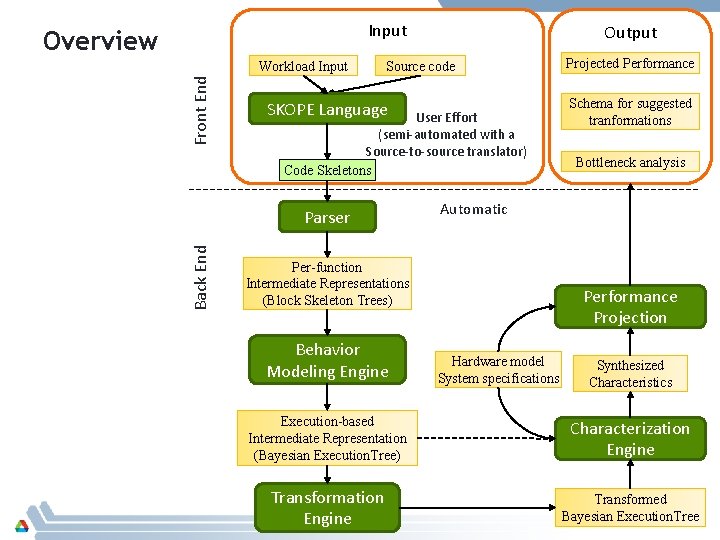
Input Overview Front End Workload Input Source code SKOPE Language User Effort (semi-automated with a Source-to-source translator) Code Skeletons Parser Back End Output Schema for suggested tranformations Bottleneck analysis Automatic Per-function Intermediate Representations (Block Skeleton Trees) Behavior Modeling Engine Projected Performance Projection Hardware model System specifications Synthesized Characteristics Execution-based Intermediate Representation (Bayesian Execution. Tree) Characterization Engine Transformed Bayesian Execution. Tree 3
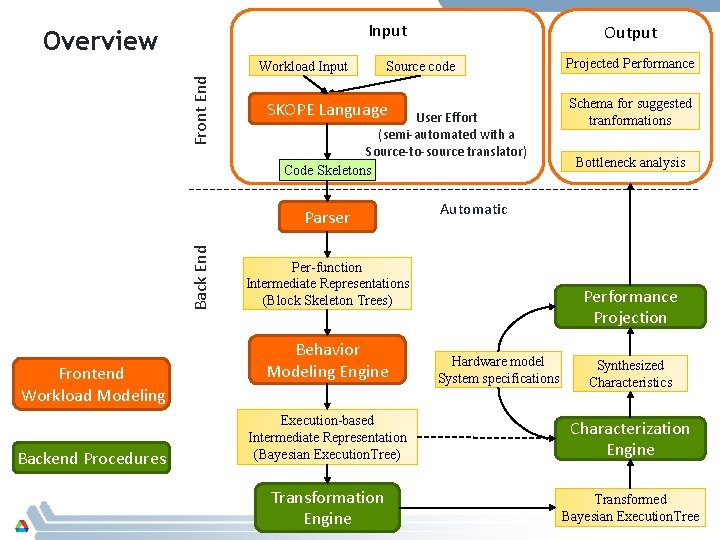
Input Overview Front End Workload Input Source code SKOPE Language User Effort (semi-automated with a Source-to-source translator) Code Skeletons Back End Parser Frontend Workload Modeling Backend Procedures Output Schema for suggested tranformations Bottleneck analysis Automatic Per-function Intermediate Representations (Block Skeleton Trees) Behavior Modeling Engine Projected Performance Projection Hardware model System specifications Synthesized Characteristics Execution-based Intermediate Representation (Bayesian Execution. Tree) Characterization Engine Transformed Bayesian Execution. Tree 4
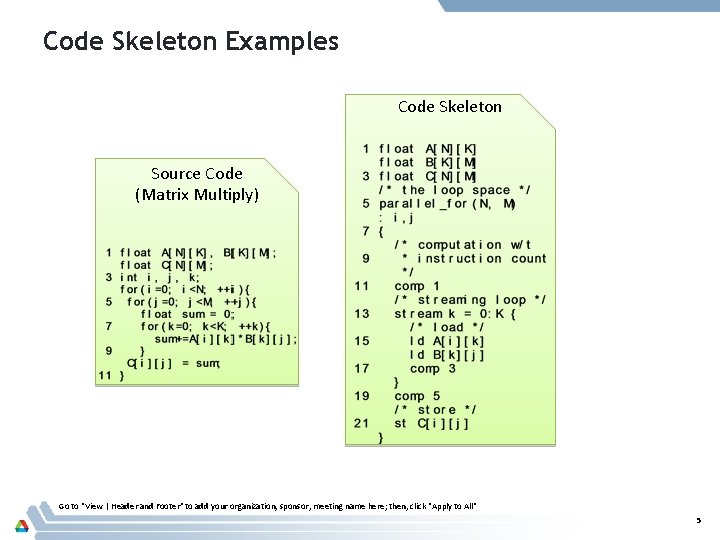
Code Skeleton Examples Code Skeleton Source Code (Matrix Multiply) Go to "View | Header and Footer" to add your organization, sponsor, meeting name here; then, click "Apply to All" 5
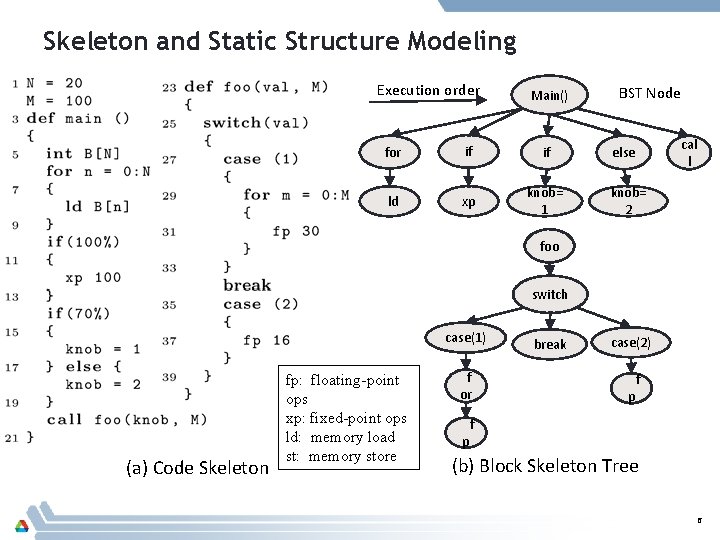
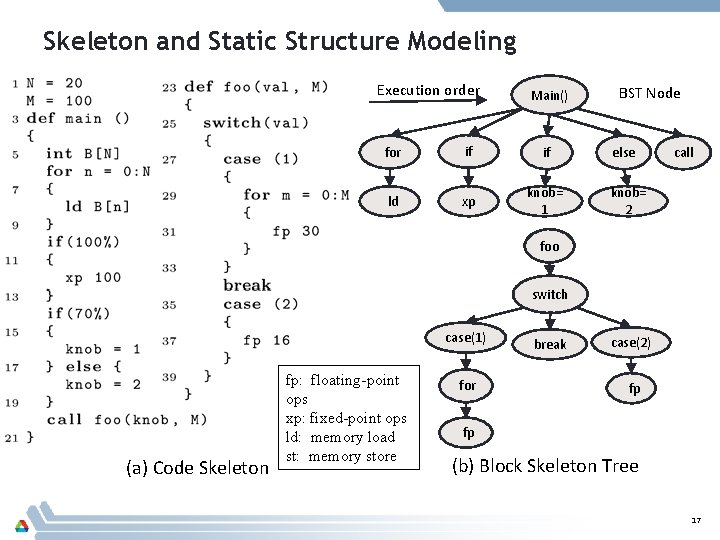
Skeleton and Static Structure Modeling Execution order Main() for if if ld xp knob= 1 BST Node cal l else knob= 2 foo switch case(1) (a) Code Skeleton fp: floating-point ops xp: fixed-point ops ld: memory load st: memory store f or p break case(2) p f f (b) Block Skeleton Tree 6
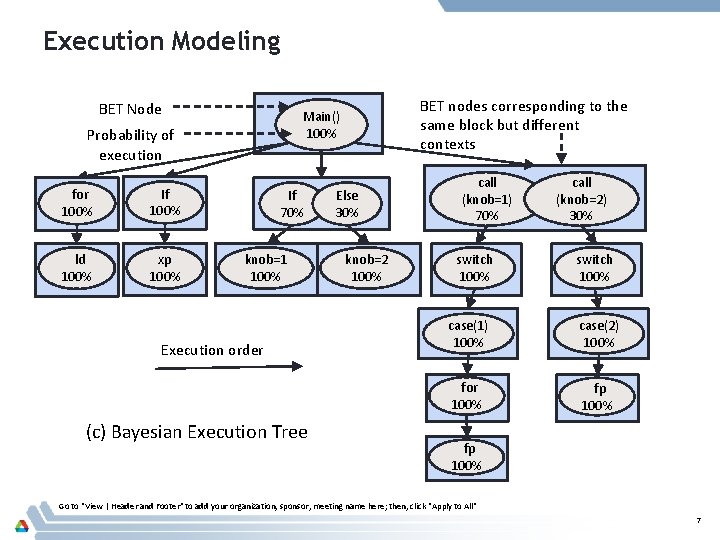
Execution Modeling BET Node Probability of execution for 100% If 100% ld 100% xp 100% BET nodes corresponding to the same block but different contexts Main() 100% If 70% knob=1 100% Execution order (c) Bayesian Execution Tree Else 30% knob=2 100% call (knob=1) 70% switch 100% call (knob=2) 30% switch 100% case(1) 100% case(2) 100% for 100% fp 100% Go to "View | Header and Footer" to add your organization, sponsor, meeting name here; then, click "Apply to All" 7
Talk Outline 1. Overview 2. Example 3. Language Definition and Intermediate Representation 4. Execution Modeling 5. Characterization 6. Hardware Modeling & Projection 7. Transformations Go to "View | Header and Footer" to add your organization, sponsor, meeting name here; then, click "Apply to All" 8
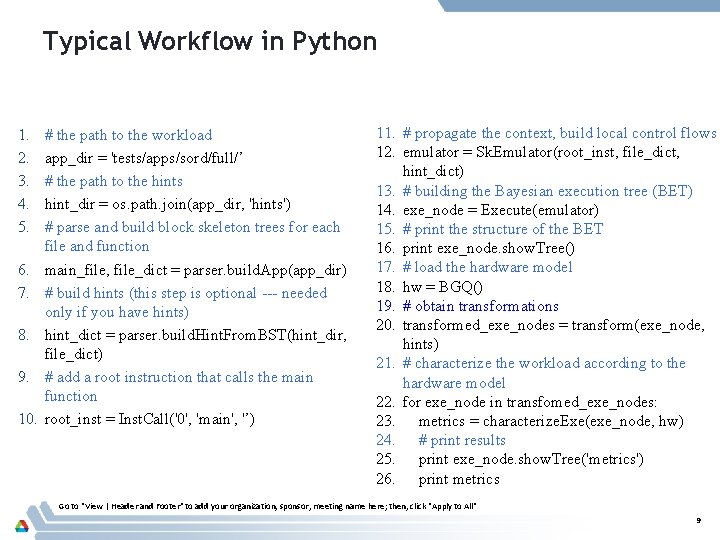
Typical Workflow in Python 1. 2. 3. 4. 5. 6. 7. 8. 9. 10. # the path to the workload app_dir = 'tests/apps/sord/full/’ # the path to the hints hint_dir = os. path. join(app_dir, 'hints') # parse and build block skeleton trees for each file and function main_file, file_dict = parser. build. App(app_dir) # build hints (this step is optional --- needed only if you have hints) hint_dict = parser. build. Hint. From. BST(hint_dir, file_dict) # add a root instruction that calls the main function root_inst = Inst. Call('0', 'main', '’) 11. # propagate the context, build local control flows 12. emulator = Sk. Emulator(root_inst, file_dict, hint_dict) 13. # building the Bayesian execution tree (BET) 14. exe_node = Execute(emulator) 15. # print the structure of the BET 16. print exe_node. show. Tree() 17. # load the hardware model 18. hw = BGQ() 19. # obtain transformations 20. transformed_exe_nodes = transform(exe_node, hints) 21. # characterize the workload according to the hardware model 22. for exe_node in transfomed_exe_nodes: 23. metrics = characterize. Exe(exe_node, hw) 24. # print results 25. print exe_node. show. Tree('metrics') 26. print metrics Go to "View | Header and Footer" to add your organization, sponsor, meeting name here; then, click "Apply to All" 9
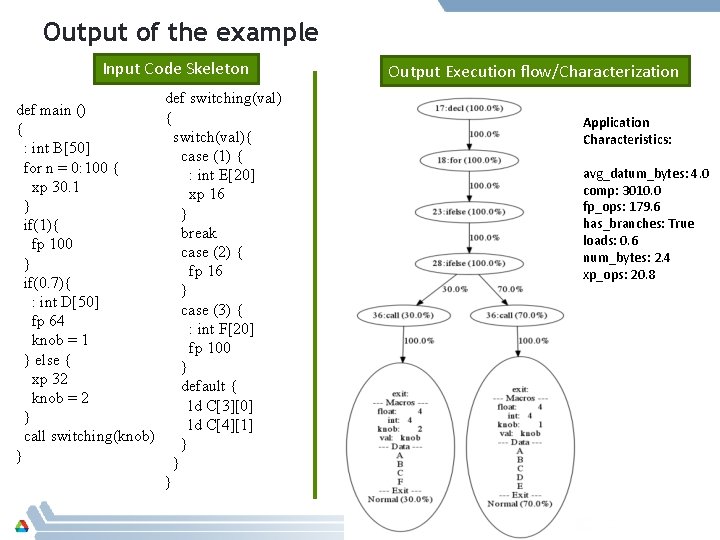
Output of the example Input Code Skeleton def switching(val) def main () { { switch(val){ : int B[50] case (1) { for n = 0: 100 { : int E[20] xp 30. 1 xp 16 } } if(1){ break fp 100 case (2) { } fp 16 if(0. 7){ } : int D[50] case (3) { fp 64 : int F[20] knob = 1 fp 100 } else { } xp 32 default { knob = 2 ld C[3][0] } ld C[4][1] call switching(knob) } } Output Execution flow/Characterization Application Characteristics: avg_datum_bytes: 4. 0 comp: 3010. 0 fp_ops: 179. 6 has_branches: True loads: 0. 6 num_bytes: 2. 4 xp_ops: 20. 8
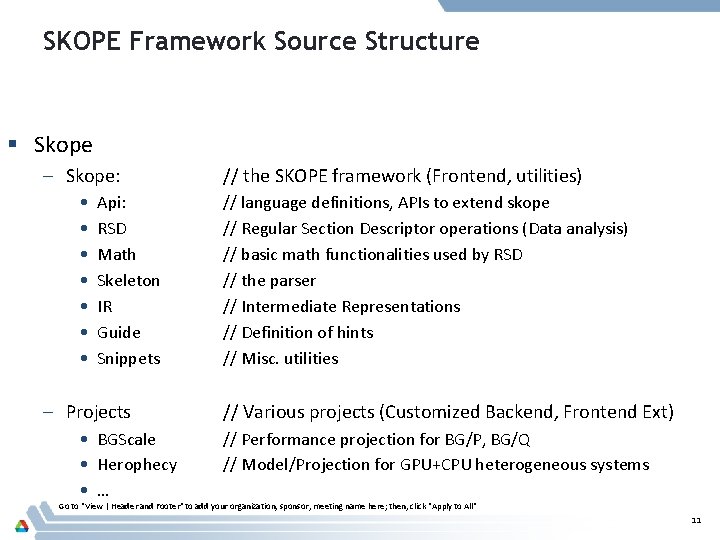
SKOPE Framework Source Structure § Skope – Skope: • • Api: RSD Math Skeleton IR Guide Snippets – Projects • BGScale • Herophecy • … // the SKOPE framework (Frontend, utilities) // language definitions, APIs to extend skope // Regular Section Descriptor operations (Data analysis) // basic math functionalities used by RSD // the parser // Intermediate Representations // Definition of hints // Misc. utilities // Various projects (Customized Backend, Frontend Ext) // Performance projection for BG/P, BG/Q // Model/Projection for GPU+CPU heterogeneous systems Go to "View | Header and Footer" to add your organization, sponsor, meeting name here; then, click "Apply to All" 11
Talk Outline 1. Overview 2. Example 3. Language Definition and Intermediate Representation 4. Execution Modeling 5. Characterization 6. Hardware Modeling & Projection 7. Transformations Go to "View | Header and Footer" to add your organization, sponsor, meeting name here; then, click "Apply to All" 12
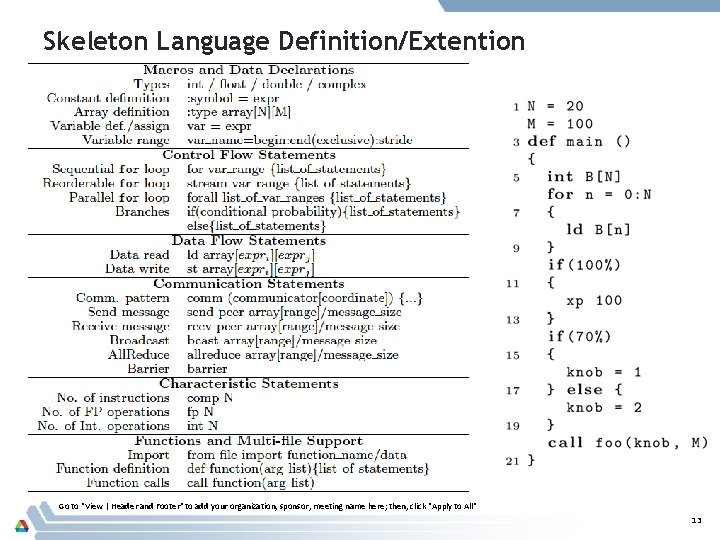
Skeleton Language Definition/Extention Go to "View | Header and Footer" to add your organization, sponsor, meeting name here; then, click "Apply to All" 13
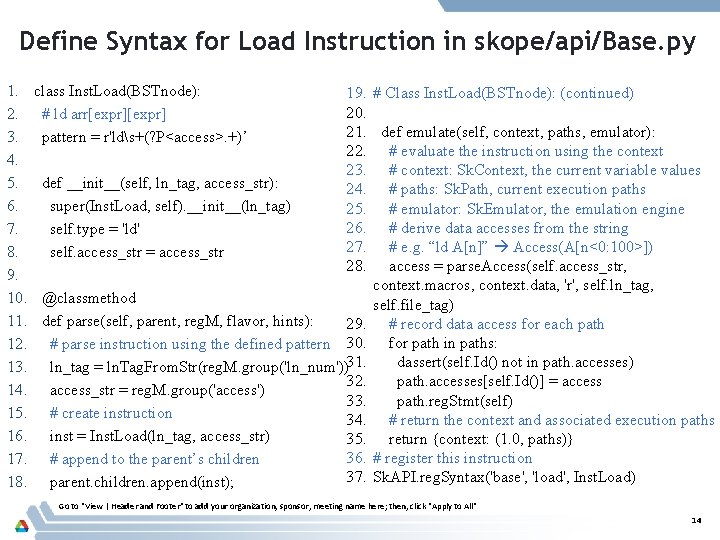
Define Syntax for Load Instruction in skope/api/Base. py 1. 2. 3. 4. 5. 6. 7. 8. 9. 10. 11. 12. 13. 14. 15. 16. 17. 18. class Inst. Load(BSTnode): # ld arr[expr] pattern = r'lds+(? P<access>. +)’ 19. # Class Inst. Load(BSTnode): (continued) 20. 21. def emulate(self, context, paths, emulator): 22. # evaluate the instruction using the context 23. # context: Sk. Context, the current variable values def __init__(self, ln_tag, access_str): 24. # paths: Sk. Path, current execution paths super(Inst. Load, self). __init__(ln_tag) 25. # emulator: Sk. Emulator, the emulation engine 26. # derive data accesses from the string self. type = 'ld' 27. # e. g. “ld A[n]” Access(A[n<0: 100>]) self. access_str = access_str 28. access = parse. Access(self. access_str, context. macros, context. data, 'r', self. ln_tag, @classmethod self. file_tag) def parse(self, parent, reg. M, flavor, hints): 29. # record data access for each path # parse instruction using the defined pattern 30. for path in paths: dassert(self. Id() not in path. accesses) ln_tag = ln. Tag. From. Str(reg. M. group('ln_num'))31. 32. path. accesses[self. Id()] = access_str = reg. M. group('access') 33. path. reg. Stmt(self) # create instruction 34. # return the context and associated execution paths inst = Inst. Load(ln_tag, access_str) 35. return {context: (1. 0, paths)} 36. # register this instruction # append to the parent’s children 37. Sk. API. reg. Syntax('base', 'load', Inst. Load) parent. children. append(inst); Go to "View | Header and Footer" to add your organization, sponsor, meeting name here; then, click "Apply to All" 14
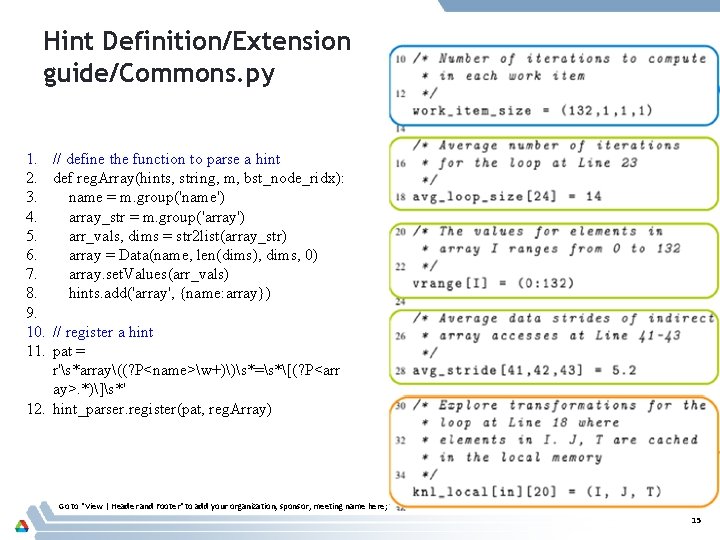
Hint Definition/Extension guide/Commons. py 1. 2. 3. 4. 5. 6. 7. 8. 9. 10. 11. // define the function to parse a hint def reg. Array(hints, string, m, bst_node_ridx): name = m. group('name') array_str = m. group('array') arr_vals, dims = str 2 list(array_str) array = Data(name, len(dims), dims, 0) array. set. Values(arr_vals) hints. add('array', {name: array}) // register a hint pat = r's*array((? P<name>w+))s*=s*[(? P<arr ay>. *)]s*' 12. hint_parser. register(pat, reg. Array) Go to "View | Header and Footer" to add your organization, sponsor, meeting name here; then, click "Apply to All" 15
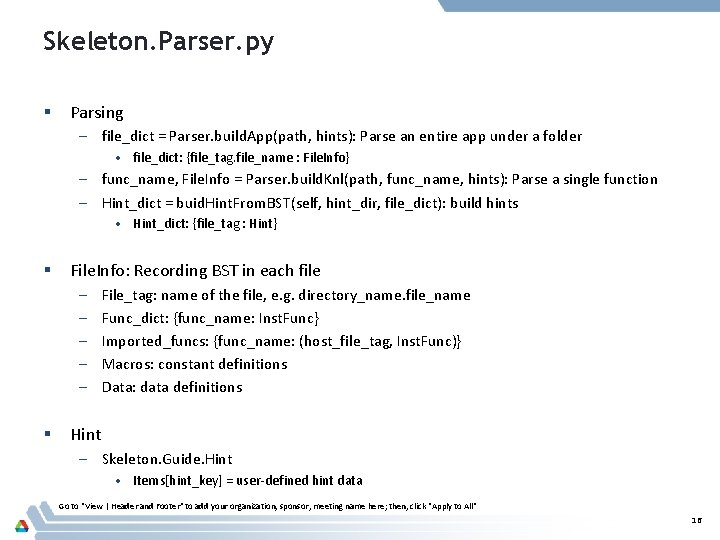
Skeleton. Parser. py § Parsing – file_dict = Parser. build. App(path, hints): Parse an entire app under a folder • file_dict: {file_tag. file_name : File. Info} – func_name, File. Info = Parser. build. Knl(path, func_name, hints): Parse a single function – Hint_dict = buid. Hint. From. BST(self, hint_dir, file_dict): build hints • Hint_dict: {file_tag : Hint} § File. Info: Recording BST in each file – – – § File_tag: name of the file, e. g. directory_name. file_name Func_dict: {func_name: Inst. Func} Imported_funcs: {func_name: (host_file_tag, Inst. Func)} Macros: constant definitions Data: data definitions Hint – Skeleton. Guide. Hint • Items[hint_key] = user-defined hint data Go to "View | Header and Footer" to add your organization, sponsor, meeting name here; then, click "Apply to All" 16
Skeleton and Static Structure Modeling Execution order Main() for if if ld xp knob= 1 BST Node else call knob= 2 foo switch case(1) (a) Code Skeleton fp: floating-point ops xp: fixed-point ops ld: memory load st: memory store for break case(2) fp fp (b) Block Skeleton Tree 17
Talk Outline 1. Overview 2. Example 3. Language Definition and Intermediate Representation 4. Execution Modeling 5. Characterization 6. Hardware Modeling & Projection 7. Transformations Go to "View | Header and Footer" to add your organization, sponsor, meeting name here; then, click "Apply to All" 18
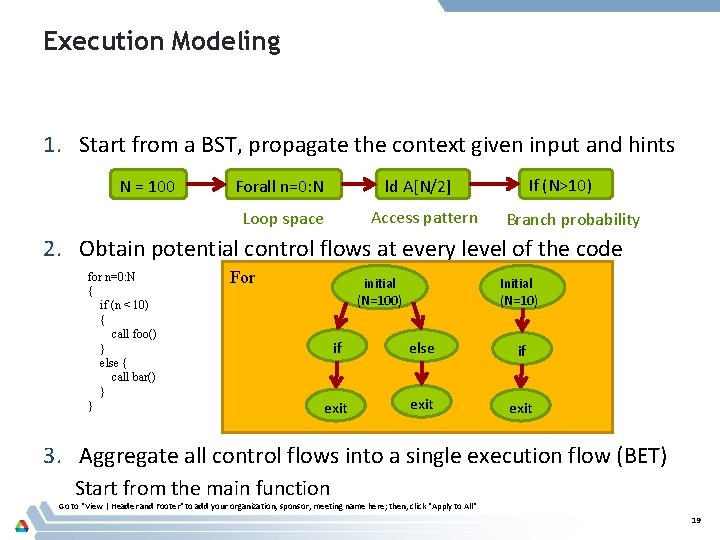
Execution Modeling 1. Start from a BST, propagate the context given input and hints N = 100 Forall n=0: N If (N>10) ld A[N/2] Access pattern Loop space Branch probability 2. Obtain potential control flows at every level of the code for n=0: N { if (n < 10) { call foo() } else { call bar() } } For initial (N=100) Initial (N=10) if else if exit 3. Aggregate all control flows into a single execution flow (BET) Start from the main function Go to "View | Header and Footer" to add your organization, sponsor, meeting name here; then, click "Apply to All" 19
Execution Modeling Sk. Node Sk. Context macros[var_name] data[arr_name] exit_status for n=0: N { if (n < 10) { call foo() } else { call bar() } } Sk. Flow. Node For initial (N=100) Sk. Path Initial (N=10) if else if exit Go to "View | Header and Footer" to add your organization, sponsor, meeting name here; then, click "Apply to All" 20
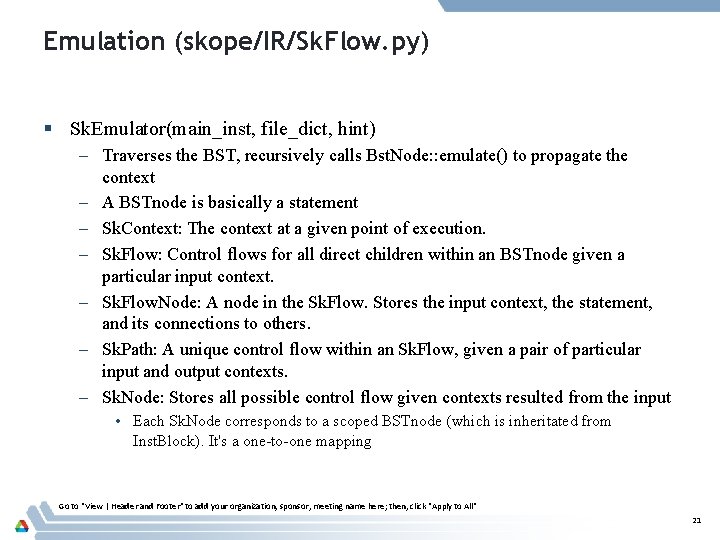
Emulation (skope/IR/Sk. Flow. py) § Sk. Emulator(main_inst, file_dict, hint) – Traverses the BST, recursively calls Bst. Node: : emulate() to propagate the context – A BSTnode is basically a statement – Sk. Context: The context at a given point of execution. – Sk. Flow: Control flows for all direct children within an BSTnode given a particular input context. – Sk. Flow. Node: A node in the Sk. Flow. Stores the input context, the statement, and its connections to others. – Sk. Path: A unique control flow within an Sk. Flow, given a pair of particular input and output contexts. – Sk. Node: Stores all possible control flow given contexts resulted from the input • Each Sk. Node corresponds to a scoped BSTnode (which is inheritated from Inst. Block). It's a one-to-one mapping Go to "View | Header and Footer" to add your organization, sponsor, meeting name here; then, click "Apply to All" 21
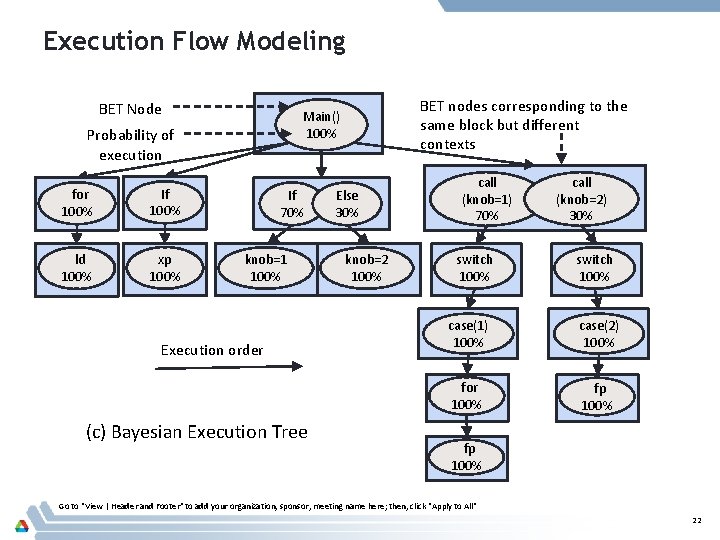
Execution Flow Modeling BET Node Probability of execution for 100% If 100% ld 100% xp 100% BET nodes corresponding to the same block but different contexts Main() 100% If 70% knob=1 100% Execution order (c) Bayesian Execution Tree Else 30% knob=2 100% call (knob=1) 70% switch 100% call (knob=2) 30% switch 100% case(1) 100% case(2) 100% for 100% fp 100% Go to "View | Header and Footer" to add your organization, sponsor, meeting name here; then, click "Apply to All" 22
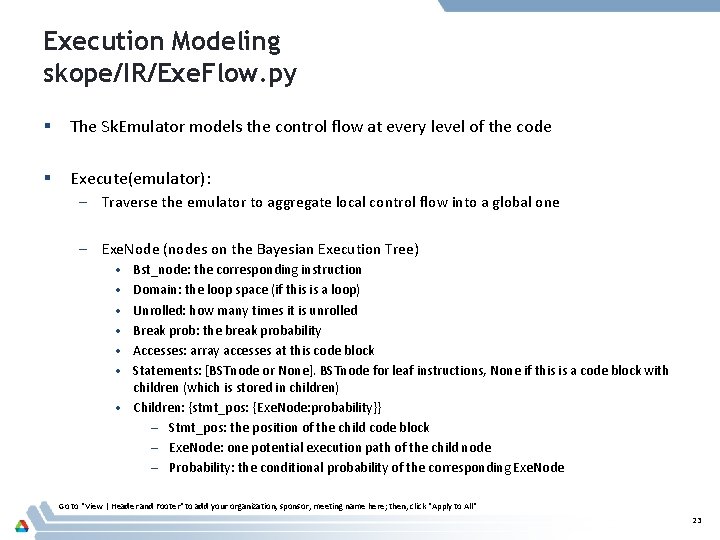
Execution Modeling skope/IR/Exe. Flow. py § The Sk. Emulator models the control flow at every level of the code § Execute(emulator): – Traverse the emulator to aggregate local control flow into a global one – Exe. Node (nodes on the Bayesian Execution Tree) • • • Bst_node: the corresponding instruction Domain: the loop space (if this is a loop) Unrolled: how many times it is unrolled Break prob: the break probability Accesses: array accesses at this code block Statements: [BSTnode or None]. BSTnode for leaf instructions, None if this is a code block with children (which is stored in children) • Children: {stmt_pos: {Exe. Node: probability}} – Stmt_pos: the position of the child code block – Exe. Node: one potential execution path of the child node – Probability: the conditional probability of the corresponding Exe. Node Go to "View | Header and Footer" to add your organization, sponsor, meeting name here; then, click "Apply to All" 23
Talk Outline 1. Overview 2. Example 3. Language Definition and Intermediate Representation 4. Execution Modeling 5. Characterization 6. Hardware Modeling & Projection 7. Transformations Go to "View | Header and Footer" to add your organization, sponsor, meeting name here; then, click "Apply to All" 24
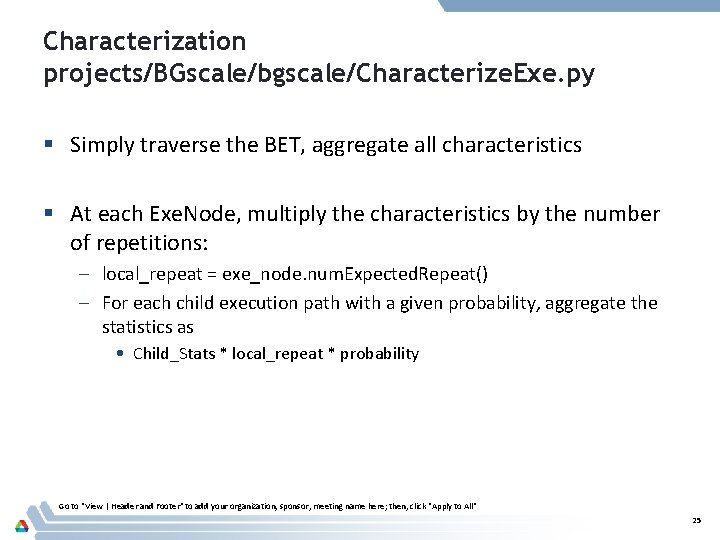
Characterization projects/BGscale/bgscale/Characterize. Exe. py § Simply traverse the BET, aggregate all characteristics § At each Exe. Node, multiply the characteristics by the number of repetitions: – local_repeat = exe_node. num. Expected. Repeat() – For each child execution path with a given probability, aggregate the statistics as • Child_Stats * local_repeat * probability Go to "View | Header and Footer" to add your organization, sponsor, meeting name here; then, click "Apply to All" 25
Hardware Modeling & Projection § Not part of SKOPE, but can be easily plugged in § Any form of hardware models – § a function which takes a number of workload characteristics and outputs performance results (performance/power/etc) Once we have the characteristics for each code block, just feed them as input to the hardware model – Hwmodel. project(characteristics) Go to "View | Header and Footer" to add your organization, sponsor, meeting name here; then, click "Apply to All" 26
Talk Outline 1. Overview 2. Example 3. Language Definition and Intermediate Representation 4. Execution Modeling 5. Characterization 6. Hardware Modeling & Projection 7. Transformations Go to "View | Header and Footer" to add your organization, sponsor, meeting name here; then, click "Apply to All" 27
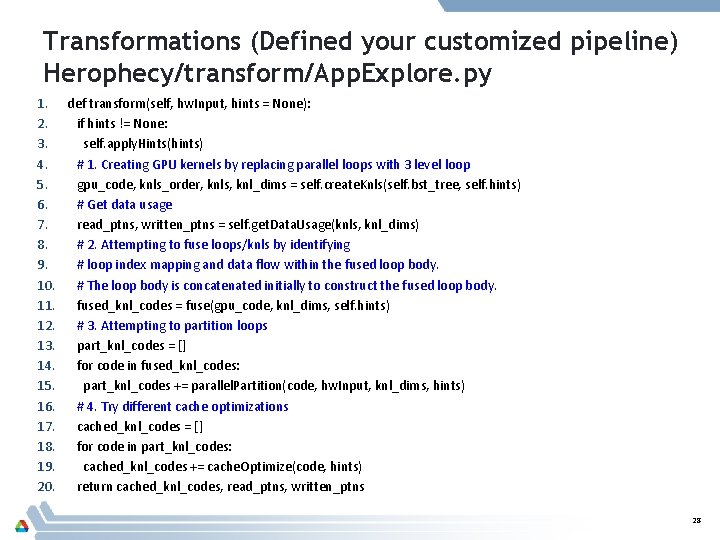
Transformations (Defined your customized pipeline) Herophecy/transform/App. Explore. py 1. def transform(self, hw. Input, hints = None): 2. if hints != None: 3. self. apply. Hints(hints) 4. # 1. Creating GPU kernels by replacing parallel loops with 3 level loop 5. gpu_code, knls_order, knls, knl_dims = self. create. Knls(self. bst_tree, self. hints) 6. # Get data usage 7. read_ptns, written_ptns = self. get. Data. Usage(knls, knl_dims) 8. # 2. Attempting to fuse loops/knls by identifying 9. # loop index mapping and data flow within the fused loop body. 10. # The loop body is concatenated initially to construct the fused loop body. 11. fused_knl_codes = fuse(gpu_code, knl_dims, self. hints) 12. # 3. Attempting to partition loops 13. part_knl_codes = [] 14. for code in fused_knl_codes: 15. part_knl_codes += parallel. Partition(code, hw. Input, knl_dims, hints) 16. # 4. Try different cache optimizations 17. cached_knl_codes = [] 18. for code in part_knl_codes: 19. cached_knl_codes += cache. Optimize(code, hints) 20. return cached_knl_codes, read_ptns, written_ptns 28
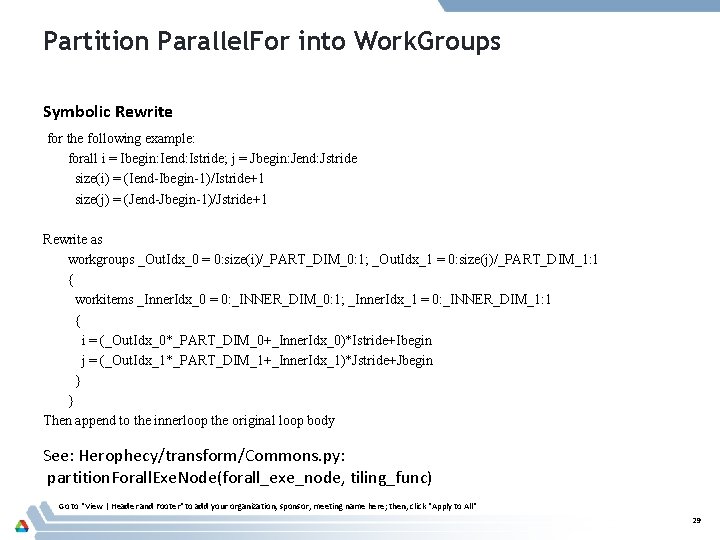
Partition Parallel. For into Work. Groups Symbolic Rewrite for the following example: forall i = Ibegin: Iend: Istride; j = Jbegin: Jend: Jstride size(i) = (Iend-Ibegin-1)/Istride+1 size(j) = (Jend-Jbegin-1)/Jstride+1 Rewrite as workgroups _Out. Idx_0 = 0: size(i)/_PART_DIM_0: 1; _Out. Idx_1 = 0: size(j)/_PART_DIM_1: 1 { workitems _Inner. Idx_0 = 0: _INNER_DIM_0: 1; _Inner. Idx_1 = 0: _INNER_DIM_1: 1 { i = (_Out. Idx_0*_PART_DIM_0+_Inner. Idx_0)*Istride+Ibegin j = (_Out. Idx_1*_PART_DIM_1+_Inner. Idx_1)*Jstride+Jbegin } } Then append to the innerloop the original loop body See: Herophecy/transform/Commons. py: partition. Forall. Exe. Node(forall_exe_node, tiling_func) Go to "View | Header and Footer" to add your organization, sponsor, meeting name here; then, click "Apply to All" 29
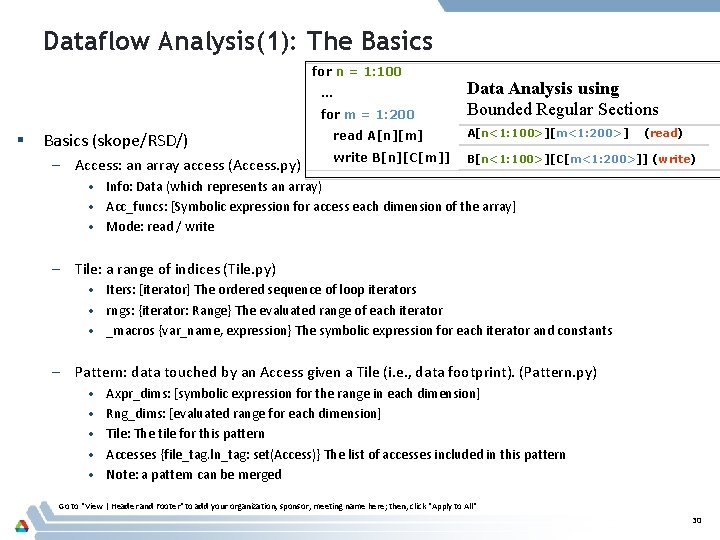
Dataflow Analysis(1): The Basics for n = 1: 100 … for m = 1: 200 § Basics (skope/RSD/) – Access: an array access (Access. py) Data Analysis using Bounded Regular Sections read A[n][m] A[n<1: 100>][m<1: 200>] (read) write B[n][C[m]] B[n<1: 100>][C[m<1: 200>]] (write) • Info: Data (which represents an array) • Acc_funcs: [Symbolic expression for access each dimension of the array] • Mode: read / write – Tile: a range of indices (Tile. py) • Iters: [iterator] The ordered sequence of loop iterators • rngs: {iterator: Range} The evaluated range of each iterator • _macros {var_name, expression} The symbolic expression for each iterator and constants – Pattern: data touched by an Access given a Tile (i. e. , data footprint). (Pattern. py) • • • Axpr_dims: [symbolic expression for the range in each dimension] Rng_dims: [evaluated range for each dimension] Tile: The tile for this pattern Accesses {file_tag. ln_tag: set(Access)} The list of accesses included in this pattern Note: a pattern can be merged Go to "View | Header and Footer" to add your organization, sponsor, meeting name here; then, click "Apply to All" 30
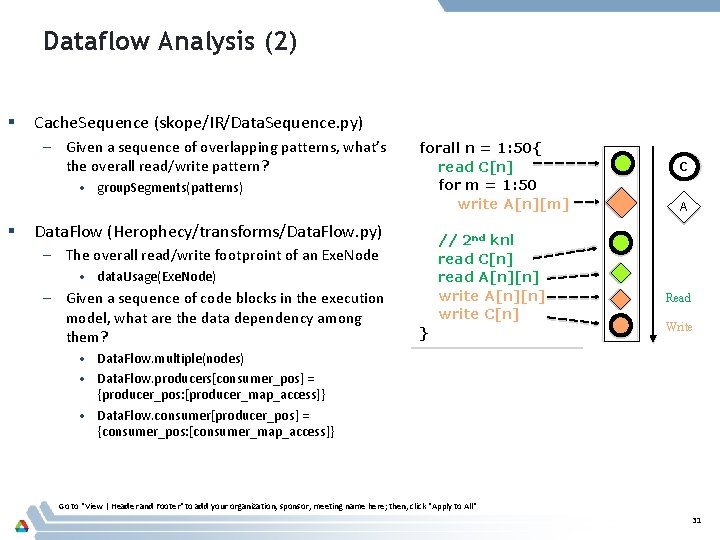
Dataflow Analysis (2) § Cache. Sequence (skope/IR/Data. Sequence. py) – Given a sequence of overlapping patterns, what’s the overall read/write pattern? • group. Segments(patterns) § forall n = 1: 50{ read C[n] for m = 1: 50 write A[n][m] Data. Flow (Herophecy/transforms/Data. Flow. py) // 2 nd knl read C[n] read A[n][n] write C[n] – The overall read/write footproint of an Exe. Node • data. Usage(Exe. Node) – Given a sequence of code blocks in the execution model, what are the data dependency among them? } C A Read Write • Data. Flow. multiple(nodes) • Data. Flow. producers[consumer_pos] = {producer_pos: [producer_map_access]} • Data. Flow. consumer[producer_pos] = {consumer_pos: [consumer_map_access]} Go to "View | Header and Footer" to add your organization, sponsor, meeting name here; then, click "Apply to All" 31
Talk Outline 1. Overview 2. Example 3. Language Definition and Intermediate Representation 4. Execution Modeling 5. Characterization 6. Hardware Modeling & Projection 7. Transformations 8. Use SKOPE for a new project Go to "View | Header and Footer" to add your organization, sponsor, meeting name here; then, click "Apply to All" 32
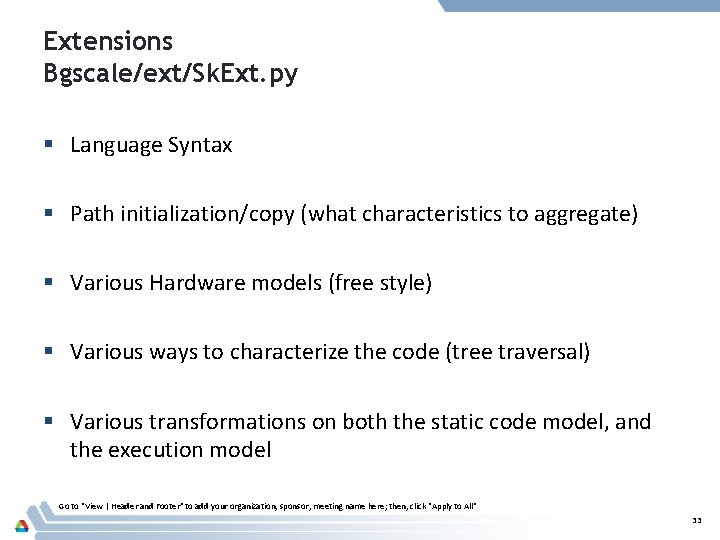
Extensions Bgscale/ext/Sk. Ext. py § Language Syntax § Path initialization/copy (what characteristics to aggregate) § Various Hardware models (free style) § Various ways to characterize the code (tree traversal) § Various transformations on both the static code model, and the execution model Go to "View | Header and Footer" to add your organization, sponsor, meeting name here; then, click "Apply to All" 33
The End Go to "View | Header and Footer" to add your organization, sponsor, meeting name here; then, click "Apply to All" 34