
SIP Tutorial Introduction to SIP Original Slides by
SIP Tutorial Introduction to SIP Original Slides by Alan Johnston and Henry Sinnreich, MCI (at VON’ 03(
Contents SIP Overview SIP in detail SIP Call Flow Scenarios SIP Security SIP Programming SIP Applications SIP Deployment 2
SIP Overview What SIP is, Multimedia Protocol Stack, Short History and Related Protocols are included.
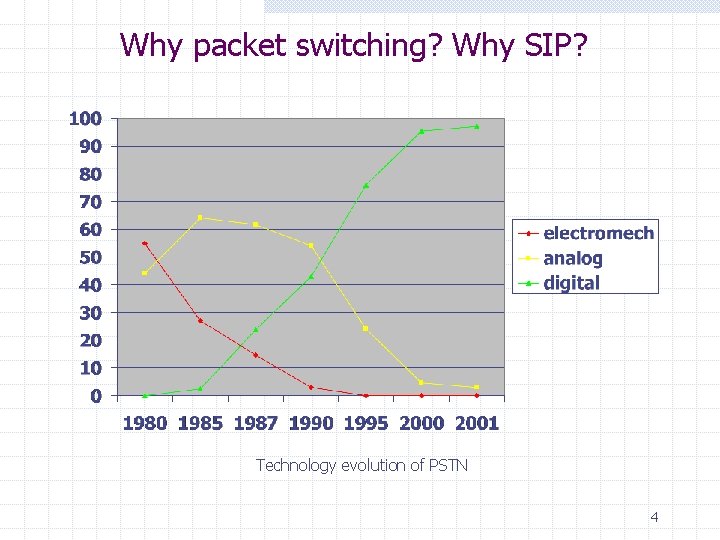
Why packet switching? Why SIP? Technology evolution of PSTN 4
Session Initiation Protocol Overview Application Layer Signaling Protocol Used to establish, modify, and terminate multimedia sessions Part of Internet Multimedia Architecture Can use UDP, TCP, TLS, SCTP, etc. Based on HTTP (Web) n n Similar text-based structure Uses URIs (Uniform Resource Indicators) Applications include (but not limited to): n Voice, video, gaming, instant messaging, presence, call control, etc. 5
Security & Privacy SIP Authentication n Challenge/Response based on shared secret - SIP Digest Mechanism also used by HTTP Used for client devices Encryption using private/public keys n Used between servers Privacy and security n SIP signaling can be encrypted w S/MIME (Secure/Multipurpose Internet Mail Extensions) n n Defined in RFC 2633 SIP can be transported over w IPSec n Defined in RFC 2401 w TLS (Transport Layer Security) n Defined in RFC 2246 6
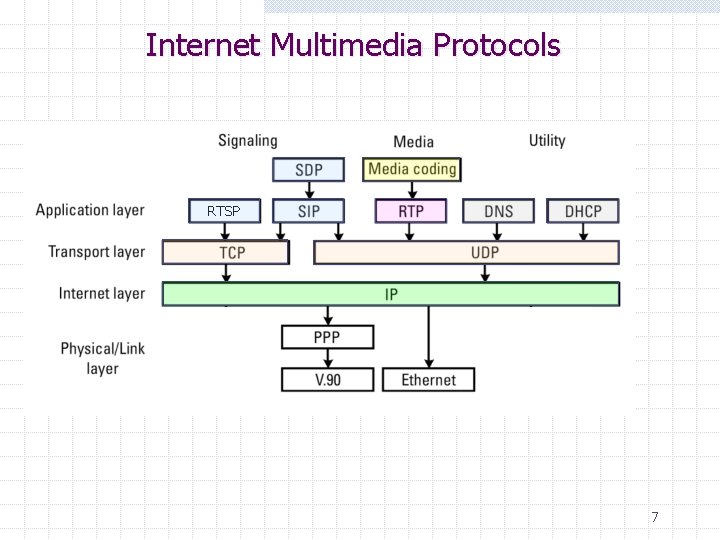
Internet Multimedia Protocols RTSP 7
A Short History of SIP Internet Engineering Task Force (IETF) protocol Inventors: M. Handley, H. Schulzrinne, E. Schooler, and J. Rosenberg Became “Proposed Standard” and RFC 2543 in March 1999 in MMUSIC WG. Separate SIP WG established in September 1999. Now new SIPPING (applications) and SIMPLE (presence and instant messaging) WGs using SIP. RFC 2543 bis-09 I-D became RFC 3261 in June 2002 n n n Added four new authors: G. Camarillo, A. Johnston, J. Peterson, and R. Sparks. Entire spec rewritten for clarity, but some new features Mostly backwards compatible with RFC 2543 8
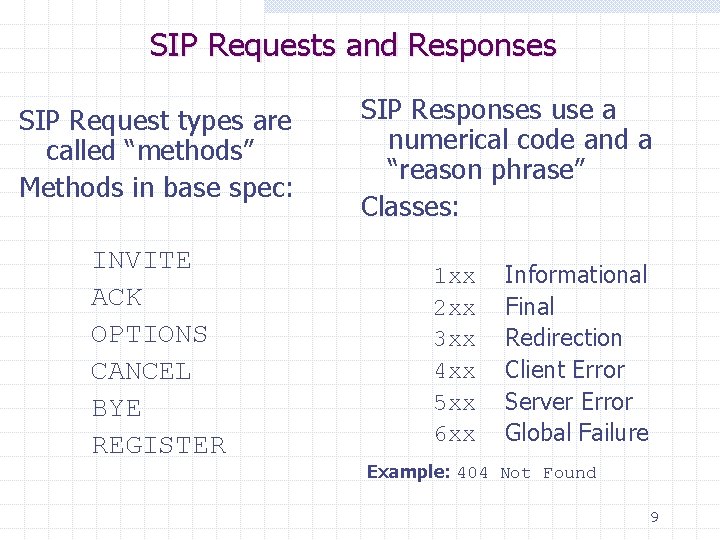
SIP Requests and Responses SIP Request types are called “methods” Methods in base spec: INVITE ACK OPTIONS CANCEL BYE REGISTER SIP Responses use a numerical code and a “reason phrase” Classes: 1 xx 2 xx 3 xx 4 xx 5 xx 6 xx Informational Final Redirection Client Error Server Error Global Failure Example: 404 Not Found 9
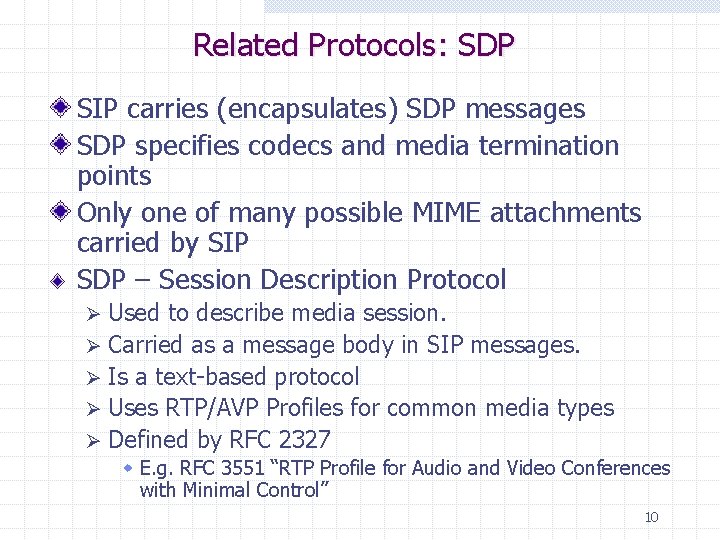
Related Protocols: SDP SIP carries (encapsulates) SDP messages SDP specifies codecs and media termination points Only one of many possible MIME attachments carried by SIP SDP – Session Description Protocol Used to describe media session. Ø Carried as a message body in SIP messages. Ø Is a text-based protocol Ø Uses RTP/AVP Profiles for common media types Ø Defined by RFC 2327 Ø w E. g. RFC 3551 “RTP Profile for Audio and Video Conferences with Minimal Control” 10
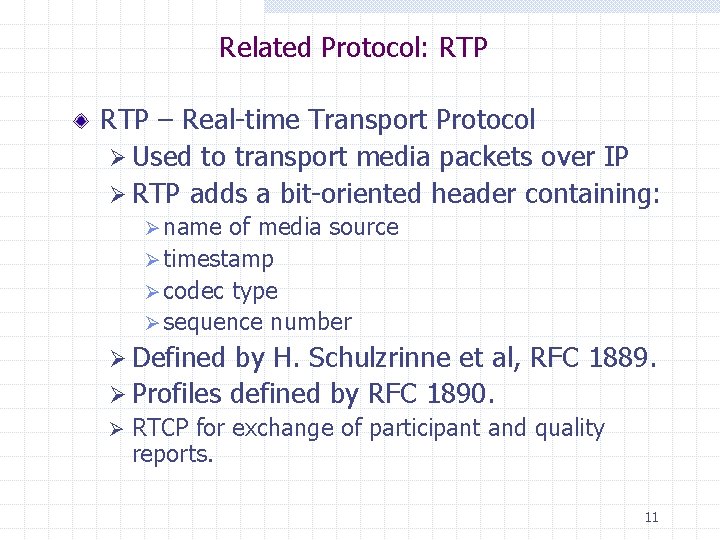
Related Protocol: RTP – Real-time Transport Protocol Ø Used to transport media packets over IP Ø RTP adds a bit-oriented header containing: Ø name of media source Ø timestamp Ø codec type Ø sequence number Ø Defined by H. Schulzrinne et al, RFC 1889. Ø Profiles defined by RFC 1890. Ø RTCP for exchange of participant and quality reports. 11
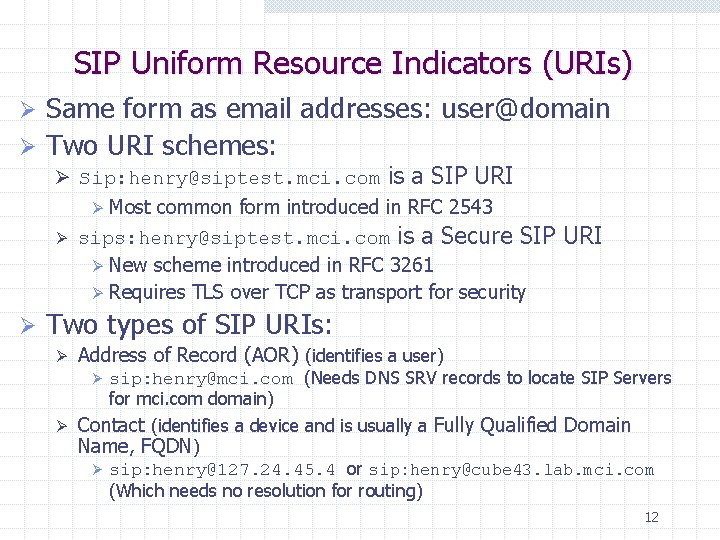
SIP Uniform Resource Indicators (URIs) Same form as email addresses: user@domain Ø Two URI schemes: Ø Ø sip: henry@siptest. mci. com is a SIP URI Ø Most common form introduced in RFC 2543 Ø sips: henry@siptest. mci. com is a Secure SIP Ø New scheme introduced in RFC 3261 Ø Requires TLS over TCP as transport for security Ø URI Two types of SIP URIs: Ø Address of Record (AOR) (identifies a user) sip: henry@mci. com (Needs DNS SRV records to locate SIP Servers for mci. com domain) Ø Contact (identifies a device and is usually a Fully Qualified Domain Name, FQDN) Ø sip: henry@127. 24. 45. 4 or sip: henry@cube 43. lab. mci. com (Which needs no resolution for routing) Ø 12
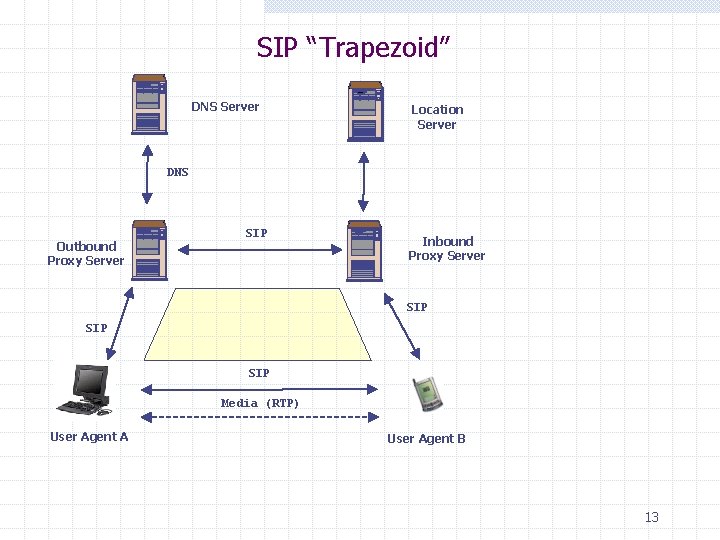
SIP “Trapezoid” DNS Server Location Server DNS Outbound Proxy Server SIP Inbound Proxy Server SIP SIP Media (RTP) User Agent A User Agent B 13
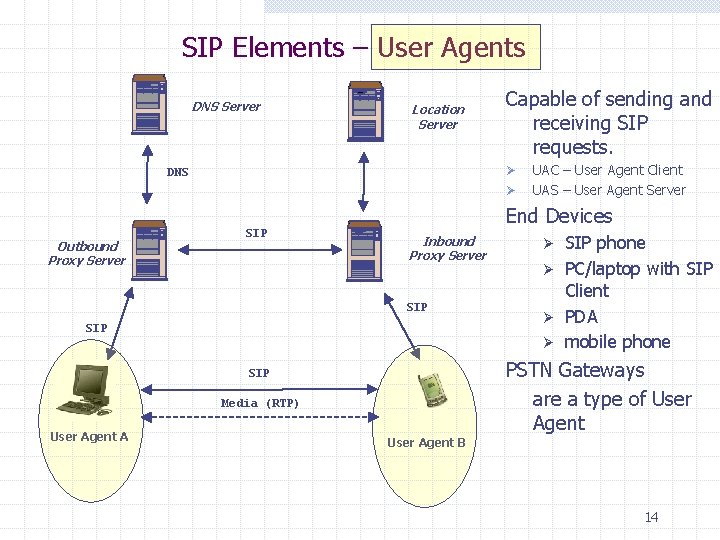
SIP Elements – User Agents DNS Server Location Server Capable of sending and receiving SIP requests. Ø DNS Ø Outbound Proxy Server SIP End Devices Inbound Proxy Server SIP SIP phone Ø PC/laptop with SIP Client Ø PDA Ø mobile phone Ø PSTN Gateways are a type of User Agent SIP Media (RTP) User Agent A UAC – User Agent Client UAS – User Agent Server User Agent B 14
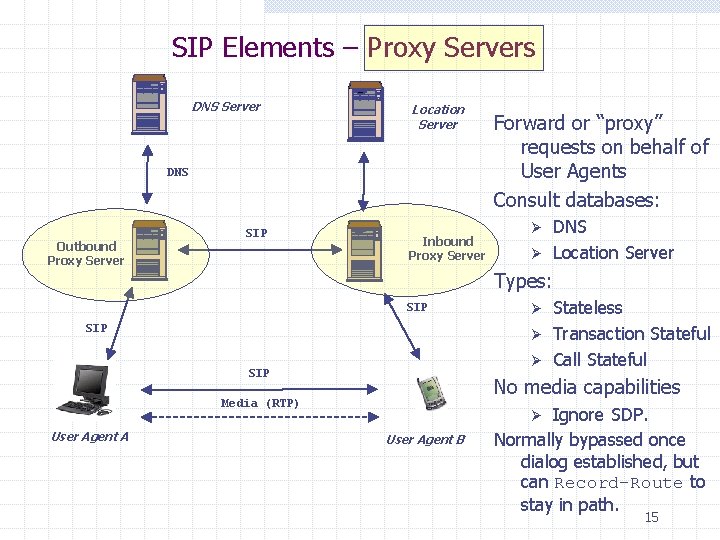
SIP Elements – Proxy Servers DNS Server Location Server DNS Outbound Proxy Server SIP Inbound Proxy Server DNS Ø Location Server Ø Types: SIP SIP Stateless Ø Transaction Stateful Ø Call Stateful Ø No media capabilities Media (RTP) User Agent A Forward or “proxy” requests on behalf of User Agents Consult databases: Ignore SDP. Normally bypassed once dialog established, but can Record-Route to stay in path. Ø User Agent B 15
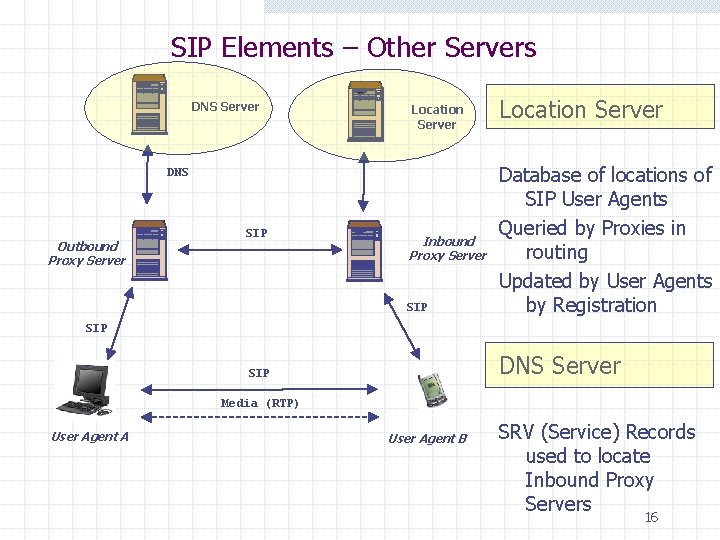
SIP Elements – Other Servers DNS Server Location Server DNS Outbound Proxy Server SIP Inbound Proxy Server SIP Location Server Database of locations of SIP User Agents Queried by Proxies in routing Updated by User Agents by Registration SIP DNS Server SIP Media (RTP) User Agent A User Agent B SRV (Service) Records used to locate Inbound Proxy Servers 16
SIP Client and Server SIP Elements are either n n User Agents (end devices that initiate and terminate media sessions) Servers (that assist in session setup) w Proxies w Registrars w Redirect servers A User Agent acts as a n n Client when it initiates a request (UAC) Server when it responds to a request (UAS) 17
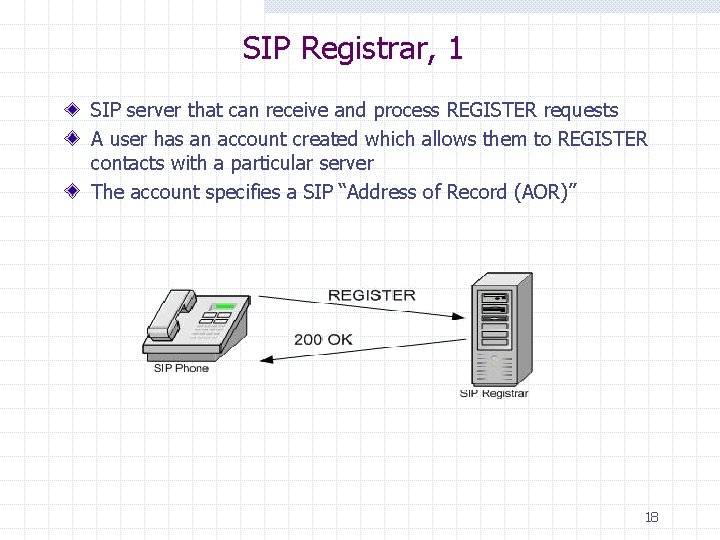
SIP Registrar, 1 SIP server that can receive and process REGISTER requests A user has an account created which allows them to REGISTER contacts with a particular server The account specifies a SIP “Address of Record (AOR)” 18
SIP Registrar, 2 SIP Registrars store the location of SIP endpoints n Each SIP endpoint Registers w with a Registrar using it’s Address of Record and Contact address w Address of Record for John Smith in From: header From: John Smith <sip: jsmith@zultys. com w Contact: header tells Registrar where to send messages Contact: John Smith <sip: jsmith@192. 168. 1. 100> SIP Proxies n n query SIP Registrars for routing information Incoming calls addressed to sip: jsmith@zultys. com w now routed by the Proxy to the Contact: header URL sip: jsmith@192. 168. 1. 100 19
Proxy Server SIP Proxy servers route SIP messages n Stateless Proxies use stateless protocols like UDP to talk to endpoints w Low Proxy overhead w Ephemeral connections, dropped as soon as message is forwarded n Stateful Proxies use TCP or other stateful protocols to set up a permanent connection w High Proxy overhead w Endpoint connection must be set up, maintained and torn down for the duration of the session 20
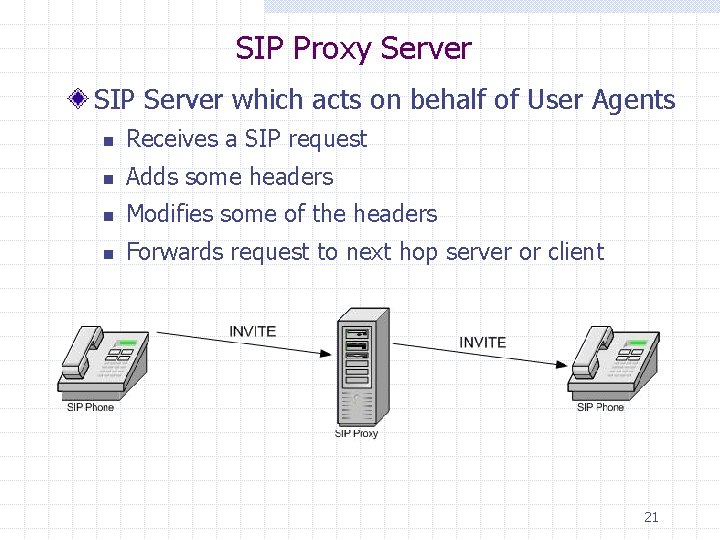
SIP Proxy Server SIP Server which acts on behalf of User Agents n Receives a SIP request n Adds some headers n Modifies some of the headers n Forwards request to next hop server or client 21
Stateless vs. Stateful Proxy Stateless Proxy n n Forwards every request downstream and response upstream Keeps no state (does not have any notion of a transaction) Never performs message retransmissions Stateless proxies scale very well w can be very fast w good for network cores Stateful Proxy n Maintains state information for the duration of either the: w Transaction (request) n Transaction Stateful w Dialogue (from INVITE to BYE) n n Dialogue Stateful Performs message retransmission 22
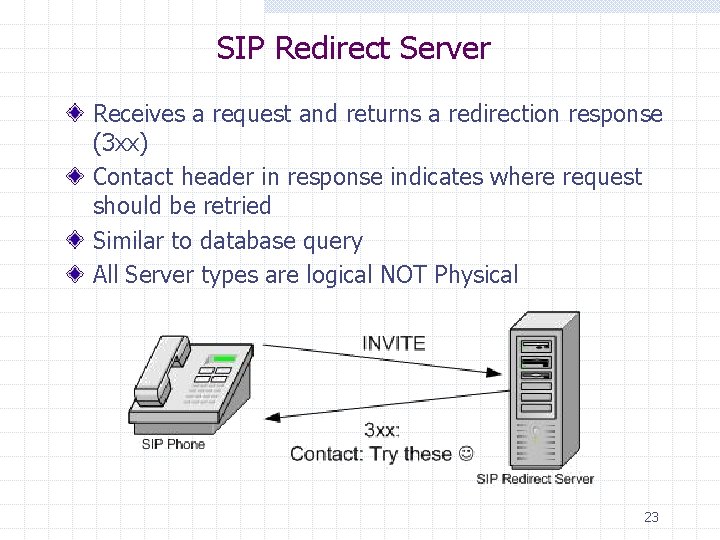
SIP Redirect Server Receives a request and returns a redirection response (3 xx) Contact header in response indicates where request should be retried Similar to database query All Server types are logical NOT Physical 23
Locating SIP Servers Manual provisioning DHCP SIP Option 120 n RFC 3361 Multicast (deprecated) DNS SRV method n n n Get local domain name automatically from DHCP server Perform SRV record query through DNS on that domain for _sip. _udp. <domain name> Send SIP REGISTER message to resolved server n phone is up and running without user intervention 24
SIP in detail Now, we are going to study SIP in detail including SIP Request, SIP Response and SIP Header
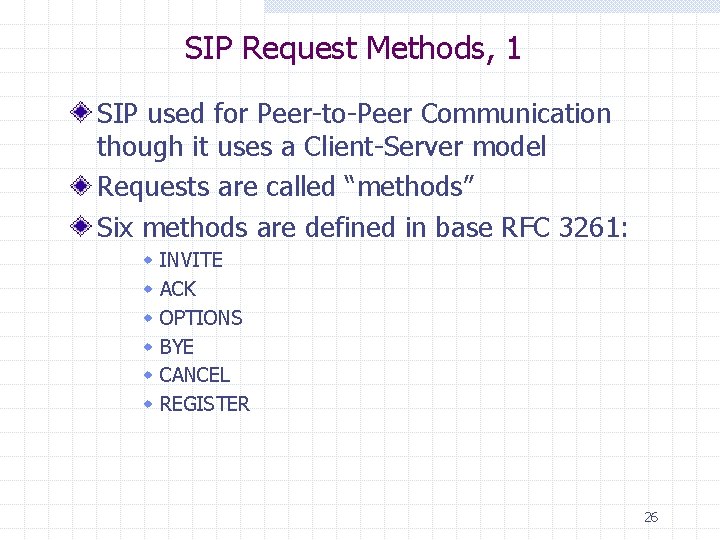
SIP Request Methods, 1 SIP used for Peer-to-Peer Communication though it uses a Client-Server model Requests are called “methods” Six methods are defined in base RFC 3261: w w w INVITE ACK OPTIONS BYE CANCEL REGISTER 26
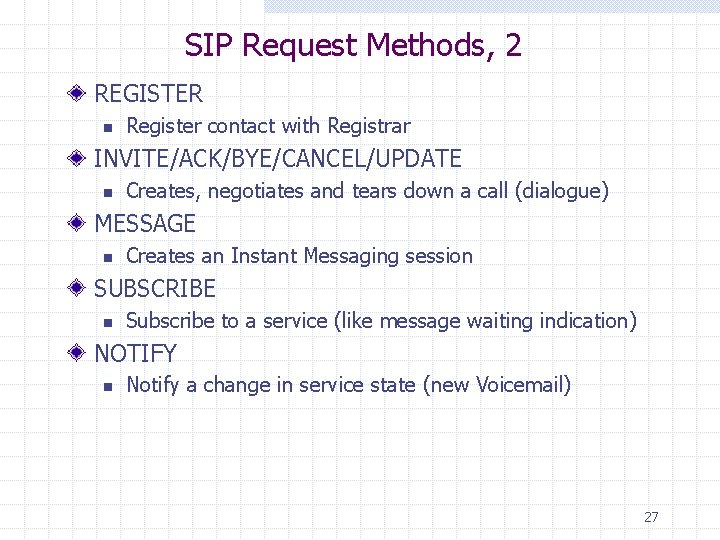
SIP Request Methods, 2 REGISTER n Register contact with Registrar INVITE/ACK/BYE/CANCEL/UPDATE n Creates, negotiates and tears down a call (dialogue) MESSAGE n Creates an Instant Messaging session SUBSCRIBE n Subscribe to a service (like message waiting indication) NOTIFY n Notify a change in service state (new Voicemail) 27
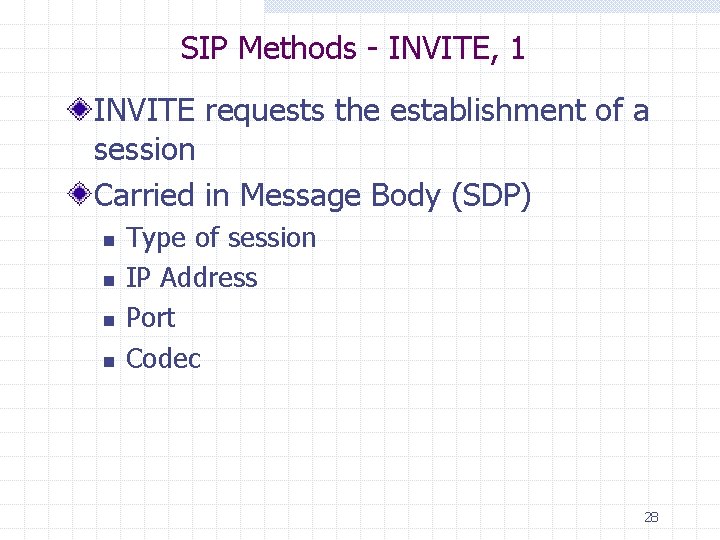
SIP Methods - INVITE, 1 INVITE requests the establishment of a session Carried in Message Body (SDP) n n Type of session IP Address Port Codec 28
SIP Methods - INVITE, 2 An INVITE during an existing session (dialogue) is called a re-INVITEs can be used to n n Place calls on or remove calls from hold Change session parameters and codecs The SIP UPDATE method is the proposed replacement for this technique 29
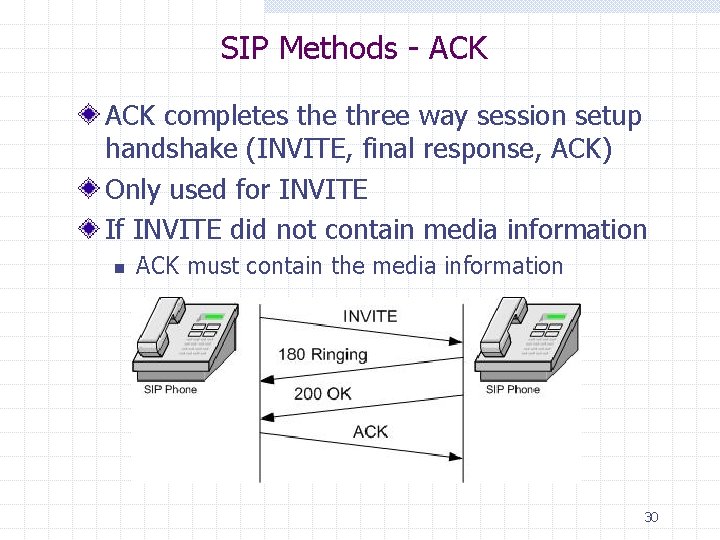
SIP Methods - ACK completes the three way session setup handshake (INVITE, final response, ACK) Only used for INVITE If INVITE did not contain media information n ACK must contain the media information 30
SIP Methods - OPTIONS requests the capabilities of another User Agent Response lists supported methods, extensions, codecs, etc. User Agent responds to OPTIONS the same as if an INVITE (e. g. if Busy, returns 486 Busy Here) Very basic presence information 31
SIP Methods – BYE and CANCEL BYE terminates an established session n User Agents stop sending media packets (RTP) CANCEL terminates a pending session. n n INVITE sent but no final response (non-1 xx) yet received. User Agents and Proxies stop processing INVITE Can be sent by a proxy or User Agent Useful for “forking proxy” w Parallel search using multiple registration Contacts. w First successful wins, rest are cancelled. 32
SIP Methods - REGISTER Registration allows a User Agent to upload current location and URLs to a Registrar can upload into Location Service Incoming requests can then be proxied or redirected to that location Built in SIP support of mobility UAs do not need static IP addresses n Obtain IP address via DHCP, REGISTER indicating new IP Address as contact 33
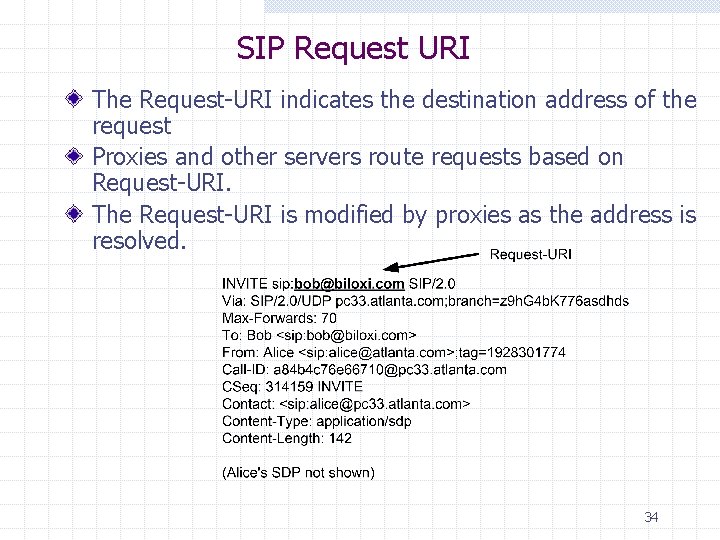
SIP Request URI The Request-URI indicates the destination address of the request Proxies and other servers route requests based on Request-URI. The Request-URI is modified by proxies as the address is resolved. 34
SIP From and To Tags are pseudo-random numbers inserted in To or From headers to uniquely identify a call leg INVITE request From header contains a tag Any User Agent or Server generating a response adds a tag to the To header in the response n To: sip: john@company. com; tag=123456 35
SIP Method - INFO Used to transport mid-call signaling information Only one pending INFO at a time Typical use - PSTN signaling message carried as MIME attachment n E. g. ISDN User-to-User information Defined in RFC 2976 36
SIP Method - REFER Indicates that recipient (identified by the Request-URI) should contact a third party using the contact information provided in the request Typical Use: Call Transfer features Allowed outside an established dialogue 37
SIP Method - PRACK Provisional Response ACKnowlegement Used to acknowledge receipt of provisional response n n n 183 Session Progress Does not apply to 100 Trying responses Only provisional responses 101 -199 may be sent reliably and acknowledged with PRACK If no PRACK sent, response retransmitted Defined in RFC 3262 38
SIP Methods – SUBSCRIBE and NOTIFY SUBSCRIBE requests notification of when a particular event occurs n Use Expires=0 to unsubscribe A NOTIFY message is sent to indicate the event status Sample Applications n n Presence Message waiting indication for voicemail Defined in RFC 3265 39
SIP Method - MESSAGE Extension to SIP for Instant Messaging (IM) MESSAGE requests n n carry the content in the form of MIME body parts use the standard MIME headers to identify the content 40
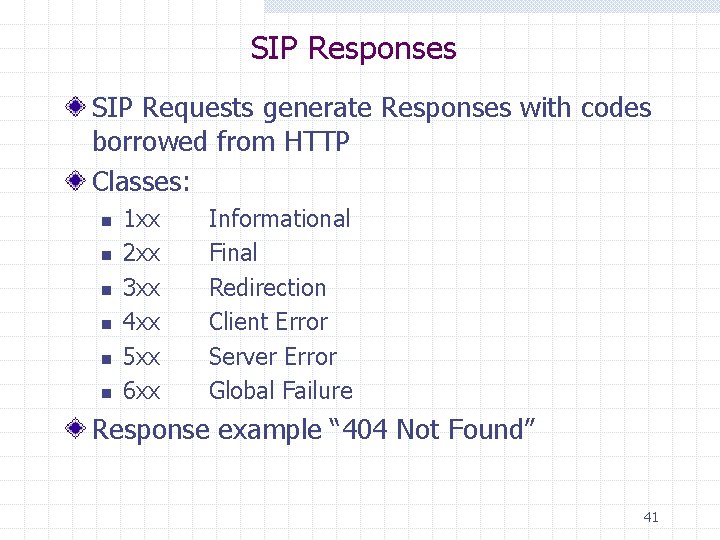
SIP Responses SIP Requests generate Responses with codes borrowed from HTTP Classes: n n n 1 xx 2 xx 3 xx 4 xx 5 xx 6 xx Informational Final Redirection Client Error Server Error Global Failure Response example “ 404 Not Found” 41
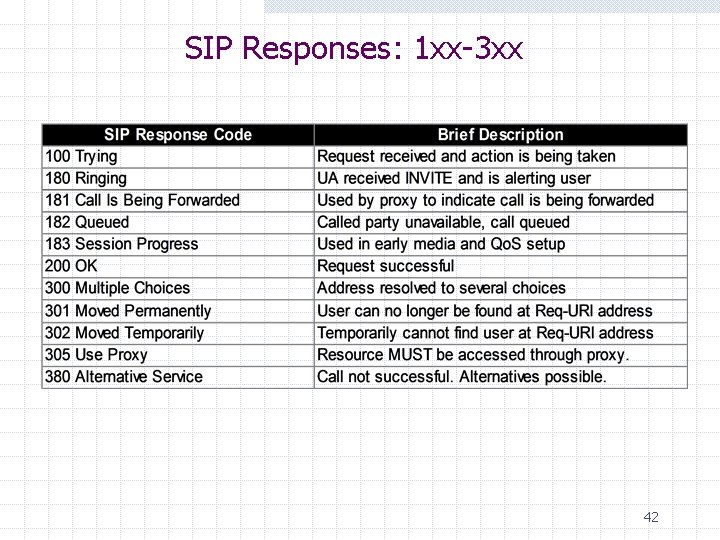
SIP Responses: 1 xx-3 xx 42
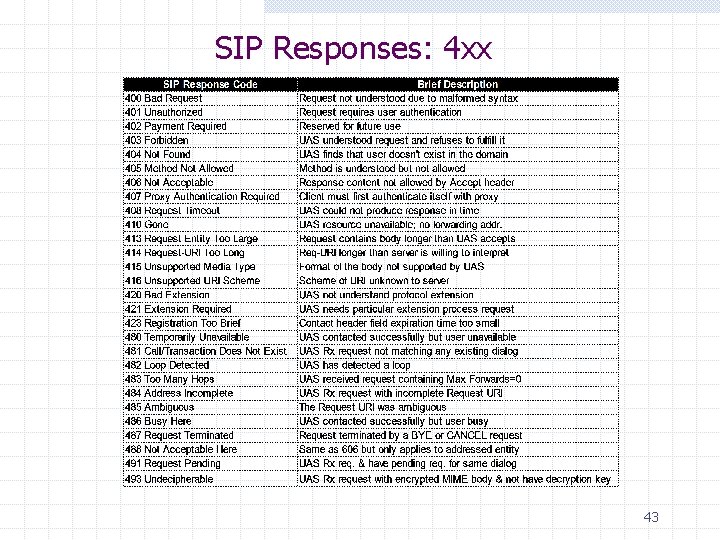
SIP Responses: 4 xx 43
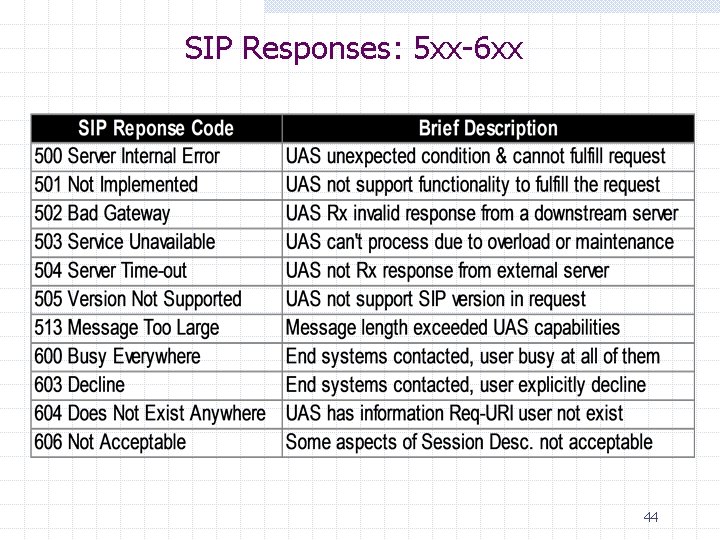
SIP Responses: 5 xx-6 xx 44
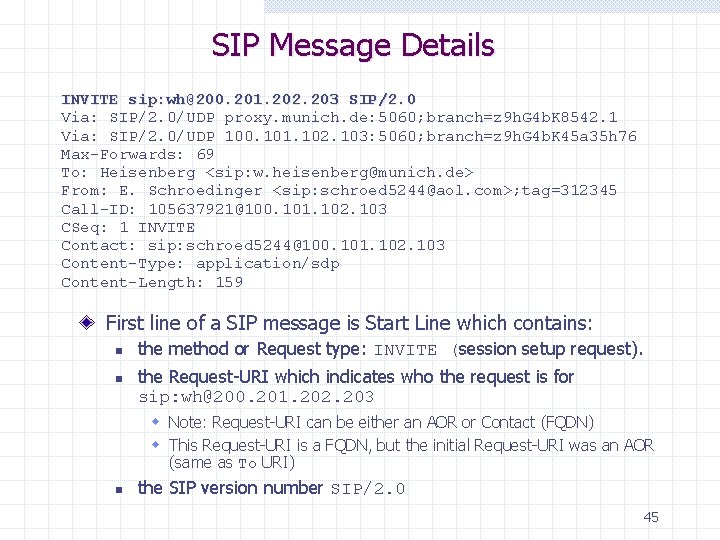
SIP Message Details INVITE sip: wh@200. 201. 202. 203 SIP/2. 0 Via: SIP/2. 0/UDP proxy. munich. de: 5060; branch=z 9 h. G 4 b. K 8542. 1 Via: SIP/2. 0/UDP 100. 101. 102. 103: 5060; branch=z 9 h. G 4 b. K 45 a 35 h 76 Max-Forwards: 69 To: Heisenberg <sip: w. heisenberg@munich. de> From: E. Schroedinger <sip: schroed 5244@aol. com>; tag=312345 Call-ID: 105637921@100. 101. 102. 103 CSeq: 1 INVITE Contact: sip: schroed 5244@100. 101. 102. 103 Content-Type: application/sdp Content-Length: 159 First line of a SIP message is Start Line which contains: n n the method or Request type: INVITE (session setup request). the Request-URI which indicates who the request is for sip: wh@200. 201. 202. 203 w Note: Request-URI can be either an AOR or Contact (FQDN) w This Request-URI is a FQDN, but the initial Request-URI was an AOR (same as To URI) n the SIP version number SIP/2. 0 45
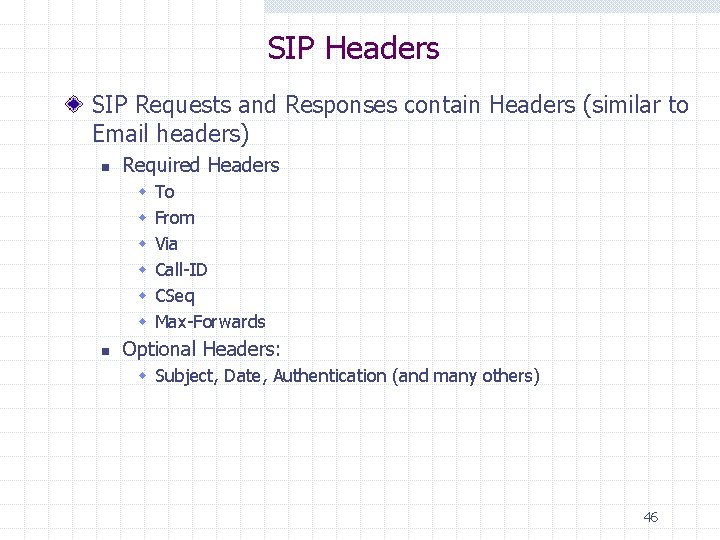
SIP Headers SIP Requests and Responses contain Headers (similar to Email headers) n Required Headers w w w n To From Via Call-ID CSeq Max-Forwards Optional Headers: w Subject, Date, Authentication (and many others) 46
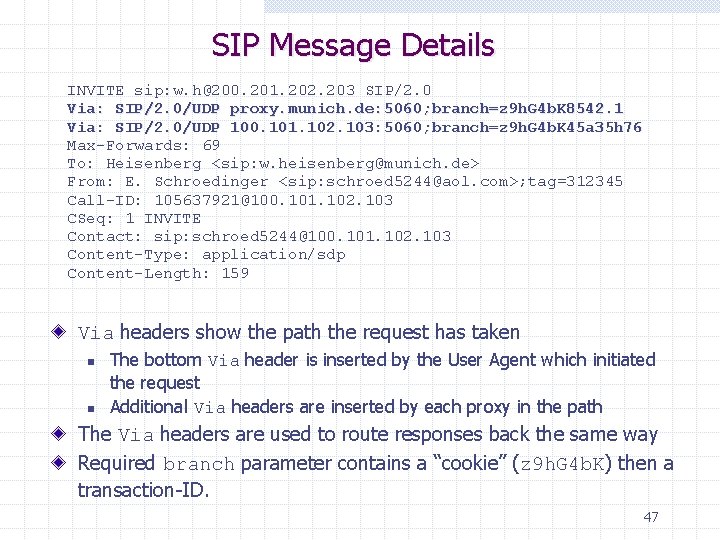
SIP Message Details INVITE sip: w. h@200. 201. 202. 203 SIP/2. 0 Via: SIP/2. 0/UDP proxy. munich. de: 5060; branch=z 9 h. G 4 b. K 8542. 1 Via: SIP/2. 0/UDP 100. 101. 102. 103: 5060; branch=z 9 h. G 4 b. K 45 a 35 h 76 Max-Forwards: 69 To: Heisenberg <sip: w. heisenberg@munich. de> From: E. Schroedinger <sip: schroed 5244@aol. com>; tag=312345 Call-ID: 105637921@100. 101. 102. 103 CSeq: 1 INVITE Contact: sip: schroed 5244@100. 101. 102. 103 Content-Type: application/sdp Content-Length: 159 Via headers show the path the request has taken n n The bottom Via header is inserted by the User Agent which initiated the request Additional Via headers are inserted by each proxy in the path The Via headers are used to route responses back the same way Required branch parameter contains a “cookie” (z 9 h. G 4 b. K) then a transaction-ID. 47
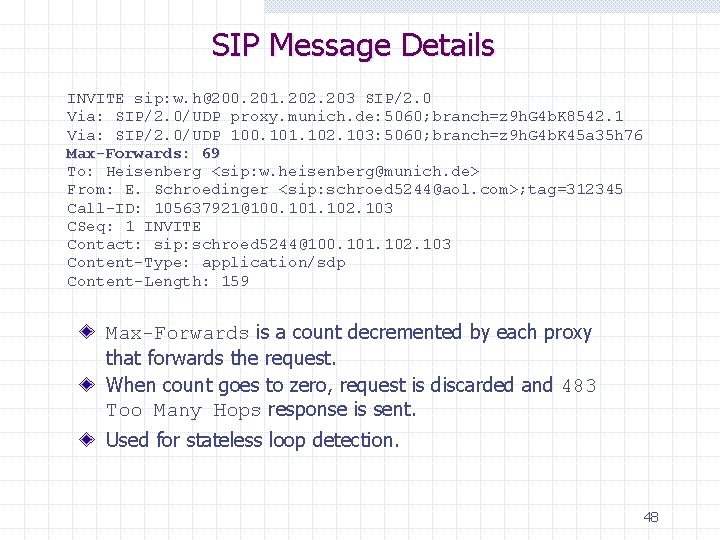
SIP Message Details INVITE sip: w. h@200. 201. 202. 203 SIP/2. 0 Via: SIP/2. 0/UDP proxy. munich. de: 5060; branch=z 9 h. G 4 b. K 8542. 1 Via: SIP/2. 0/UDP 100. 101. 102. 103: 5060; branch=z 9 h. G 4 b. K 45 a 35 h 76 Max-Forwards: 69 To: Heisenberg <sip: w. heisenberg@munich. de> From: E. Schroedinger <sip: schroed 5244@aol. com>; tag=312345 Call-ID: 105637921@100. 101. 102. 103 CSeq: 1 INVITE Contact: sip: schroed 5244@100. 101. 102. 103 Content-Type: application/sdp Content-Length: 159 Max-Forwards is a count decremented by each proxy that forwards the request. When count goes to zero, request is discarded and 483 Too Many Hops response is sent. Used for stateless loop detection. 48
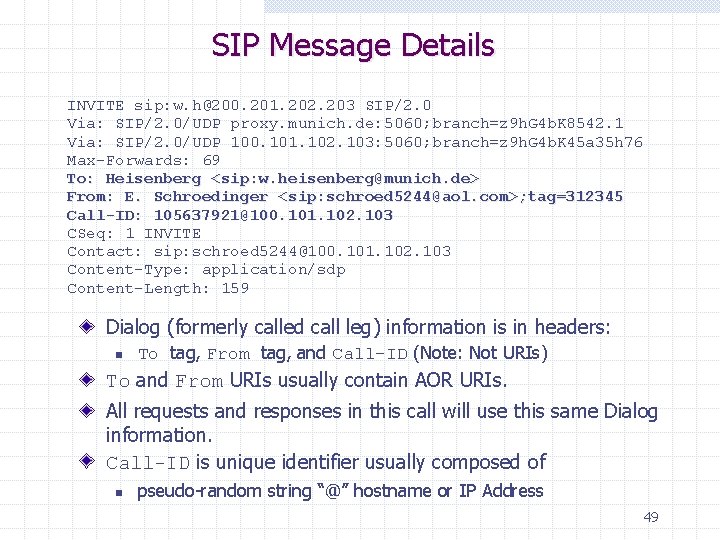
SIP Message Details INVITE sip: w. h@200. 201. 202. 203 SIP/2. 0 Via: SIP/2. 0/UDP proxy. munich. de: 5060; branch=z 9 h. G 4 b. K 8542. 1 Via: SIP/2. 0/UDP 100. 101. 102. 103: 5060; branch=z 9 h. G 4 b. K 45 a 35 h 76 Max-Forwards: 69 To: Heisenberg <sip: w. heisenberg@munich. de> From: E. Schroedinger <sip: schroed 5244@aol. com>; tag=312345 Call-ID: 105637921@100. 101. 102. 103 CSeq: 1 INVITE Contact: sip: schroed 5244@100. 101. 102. 103 Content-Type: application/sdp Content-Length: 159 Dialog (formerly called call leg) information is in headers: n To tag, From tag, and Call-ID (Note: Not URIs) To and From URIs usually contain AOR URIs. All requests and responses in this call will use this same Dialog information. Call-ID is unique identifier usually composed of n pseudo-random string “@” hostname or IP Address 49
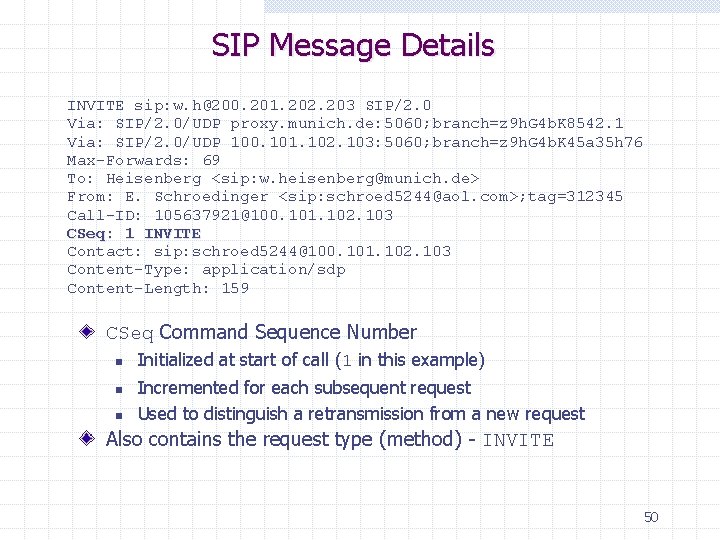
SIP Message Details INVITE sip: w. h@200. 201. 202. 203 SIP/2. 0 Via: SIP/2. 0/UDP proxy. munich. de: 5060; branch=z 9 h. G 4 b. K 8542. 1 Via: SIP/2. 0/UDP 100. 101. 102. 103: 5060; branch=z 9 h. G 4 b. K 45 a 35 h 76 Max-Forwards: 69 To: Heisenberg <sip: w. heisenberg@munich. de> From: E. Schroedinger <sip: schroed 5244@aol. com>; tag=312345 Call-ID: 105637921@100. 101. 102. 103 CSeq: 1 INVITE Contact: sip: schroed 5244@100. 101. 102. 103 Content-Type: application/sdp Content-Length: 159 CSeq Command Sequence Number n n n Initialized at start of call (1 in this example) Incremented for each subsequent request Used to distinguish a retransmission from a new request Also contains the request type (method) - INVITE 50
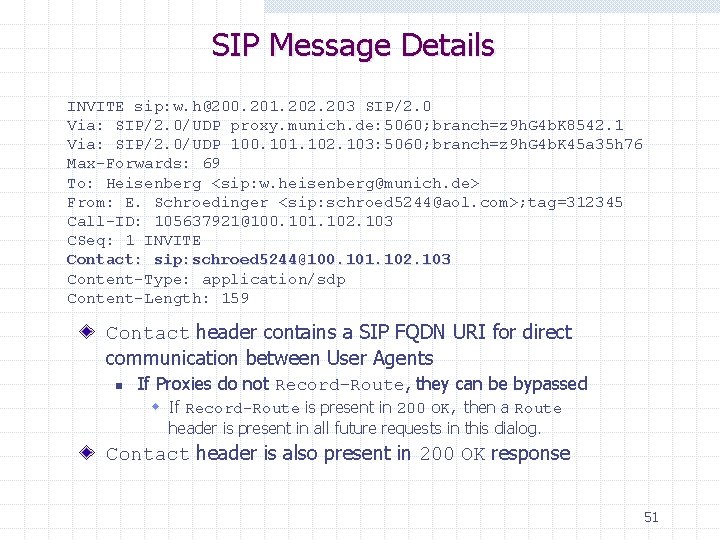
SIP Message Details INVITE sip: w. h@200. 201. 202. 203 SIP/2. 0 Via: SIP/2. 0/UDP proxy. munich. de: 5060; branch=z 9 h. G 4 b. K 8542. 1 Via: SIP/2. 0/UDP 100. 101. 102. 103: 5060; branch=z 9 h. G 4 b. K 45 a 35 h 76 Max-Forwards: 69 To: Heisenberg <sip: w. heisenberg@munich. de> From: E. Schroedinger <sip: schroed 5244@aol. com>; tag=312345 Call-ID: 105637921@100. 101. 102. 103 CSeq: 1 INVITE Contact: sip: schroed 5244@100. 101. 102. 103 Content-Type: application/sdp Content-Length: 159 Contact header contains a SIP FQDN URI for direct communication between User Agents n If Proxies do not Record-Route, they can be bypassed w If Record-Route is present in 200 OK, then a Route header is present in all future requests in this dialog. Contact header is also present in 200 OK response 51
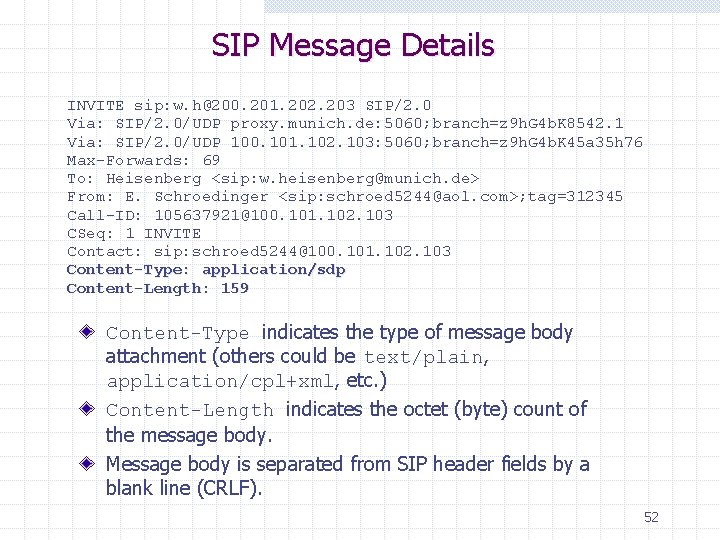
SIP Message Details INVITE sip: w. h@200. 201. 202. 203 SIP/2. 0 Via: SIP/2. 0/UDP proxy. munich. de: 5060; branch=z 9 h. G 4 b. K 8542. 1 Via: SIP/2. 0/UDP 100. 101. 102. 103: 5060; branch=z 9 h. G 4 b. K 45 a 35 h 76 Max-Forwards: 69 To: Heisenberg <sip: w. heisenberg@munich. de> From: E. Schroedinger <sip: schroed 5244@aol. com>; tag=312345 Call-ID: 105637921@100. 101. 102. 103 CSeq: 1 INVITE Contact: sip: schroed 5244@100. 101. 102. 103 Content-Type: application/sdp Content-Length: 159 Content-Type indicates the type of message body attachment (others could be text/plain, application/cpl+xml, etc. ) Content-Length indicates the octet (byte) count of the message body. Message body is separated from SIP header fields by a blank line (CRLF). 52
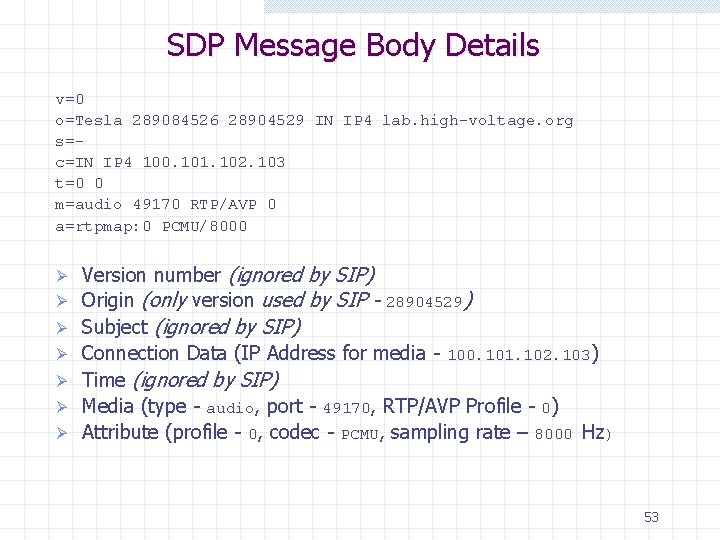
SDP Message Body Details v=0 o=Tesla 289084526 28904529 IN IP 4 lab. high-voltage. org s=c=IN IP 4 100. 101. 102. 103 t=0 0 m=audio 49170 RTP/AVP 0 a=rtpmap: 0 PCMU/8000 Ø Ø Ø Ø Version number (ignored by SIP) Origin (only version used by SIP - 28904529) Subject (ignored by SIP) Connection Data (IP Address for media - 100. 101. 102. 103) Time (ignored by SIP) Media (type - audio, port - 49170, RTP/AVP Profile - 0) Attribute (profile - 0, codec - PCMU, sampling rate – 8000 Hz) 53
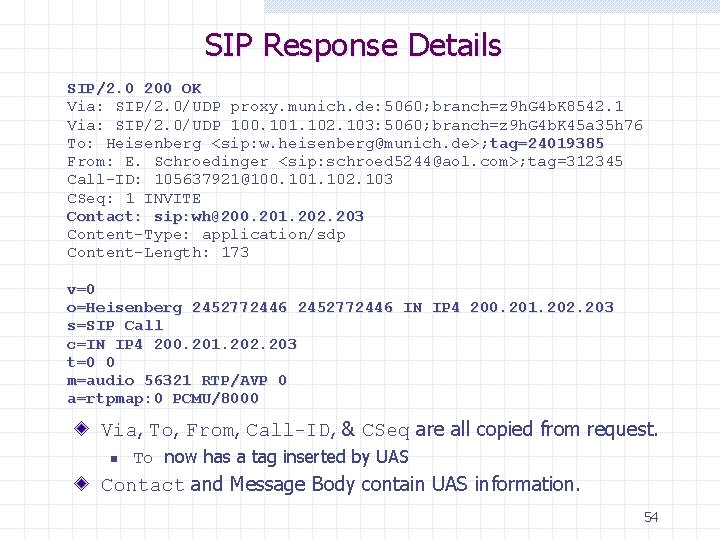
SIP Response Details SIP/2. 0 200 OK Via: SIP/2. 0/UDP proxy. munich. de: 5060; branch=z 9 h. G 4 b. K 8542. 1 Via: SIP/2. 0/UDP 100. 101. 102. 103: 5060; branch=z 9 h. G 4 b. K 45 a 35 h 76 To: Heisenberg <sip: w. heisenberg@munich. de>; tag=24019385 From: E. Schroedinger <sip: schroed 5244@aol. com>; tag=312345 Call-ID: 105637921@100. 101. 102. 103 CSeq: 1 INVITE Contact: sip: wh@200. 201. 202. 203 Content-Type: application/sdp Content-Length: 173 v=0 o=Heisenberg 2452772446 IN IP 4 200. 201. 202. 203 s=SIP Call c=IN IP 4 200. 201. 202. 203 t=0 0 m=audio 56321 RTP/AVP 0 a=rtpmap: 0 PCMU/8000 Via, To, From, Call-ID, & CSeq are all copied from request. n To now has a tag inserted by UAS Contact and Message Body contain UAS information. 54
SIP Call Flow Scenarios As followings …
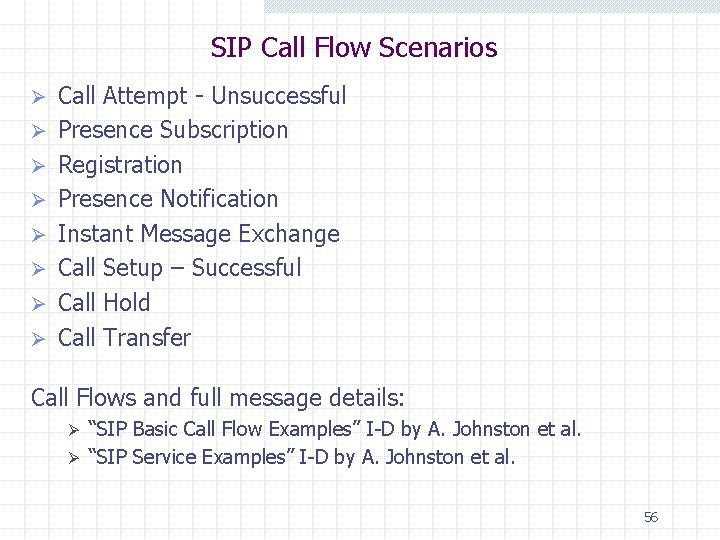
SIP Call Flow Scenarios Ø Ø Ø Ø Call Attempt - Unsuccessful Presence Subscription Registration Presence Notification Instant Message Exchange Call Setup – Successful Call Hold Call Transfer Call Flows and full message details: “SIP Basic Call Flow Examples” I-D by A. Johnston et al. Ø “SIP Service Examples” I-D by A. Johnston et al. Ø 56
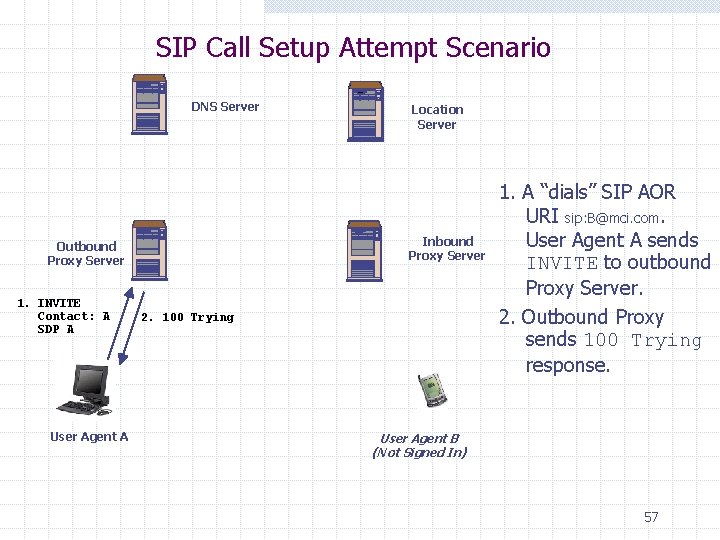
SIP Call Setup Attempt Scenario DNS Server Inbound Proxy Server Outbound Proxy Server 1. INVITE Contact: A SDP A User Agent A Location Server 2. 100 Trying 1. A “dials” SIP AOR URI sip: B@mci. com. User Agent A sends INVITE to outbound Proxy Server. 2. Outbound Proxy sends 100 Trying response. User Agent B (Not Signed In) 57
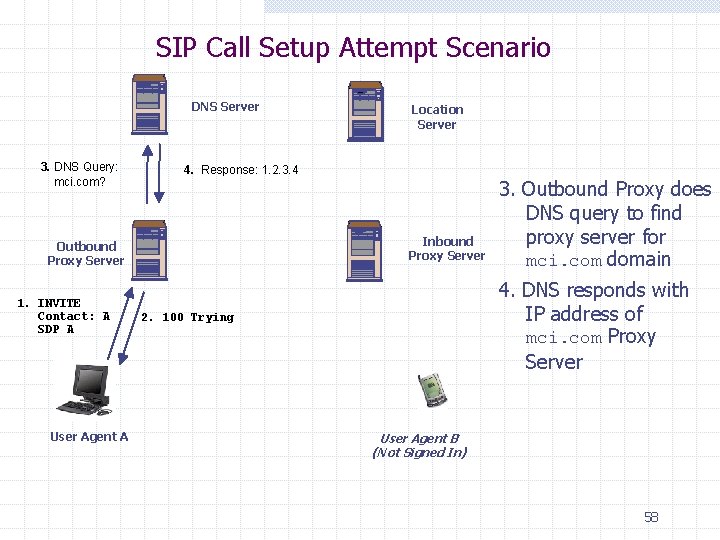
SIP Call Setup Attempt Scenario DNS Server 3. DNS Query: mci. com? 4. Response: 1. 2. 3. 4 Inbound Proxy Server Outbound Proxy Server 1. INVITE Contact: A SDP A User Agent A Location Server 3. Outbound Proxy does DNS query to find proxy server for mci. com domain 4. DNS responds with IP address of mci. com Proxy Server 2. 100 Trying User Agent B (Not Signed In) 58
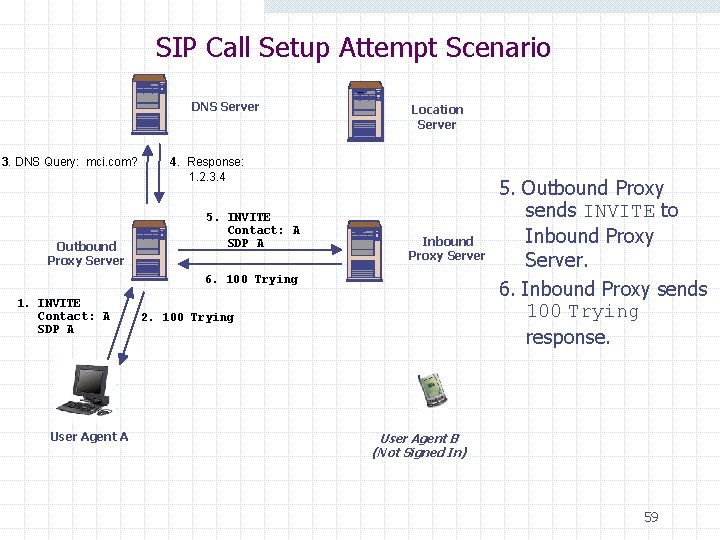
SIP Call Setup Attempt Scenario DNS Server 3. DNS Query: mci. com? Outbound Proxy Server Location Server 4. Response: 1. 2. 3. 4 5. INVITE Contact: A SDP A Inbound Proxy Server 6. 100 Trying 1. INVITE Contact: A SDP A User Agent A 2. 100 Trying 5. Outbound Proxy sends INVITE to Inbound Proxy Server. 6. Inbound Proxy sends 100 Trying response. User Agent B (Not Signed In) 59
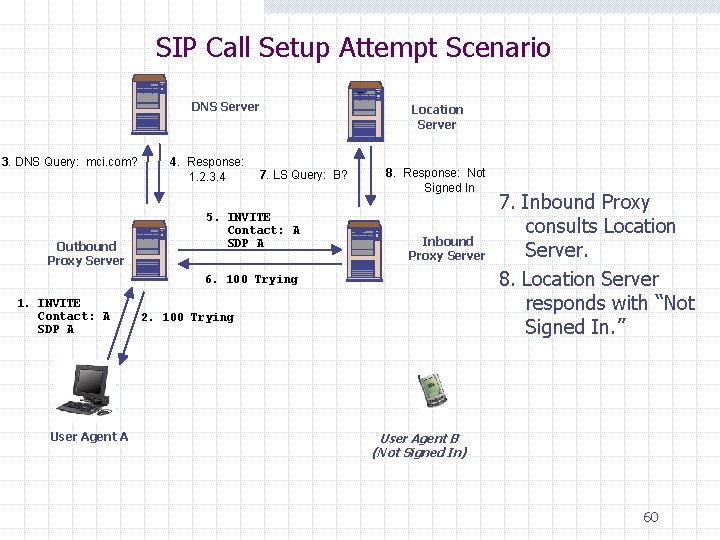
SIP Call Setup Attempt Scenario DNS Server 3. DNS Query: mci. com? Outbound Proxy Server 4. Response: 1. 2. 3. 4 7. LS Query: B? 5. INVITE Contact: A SDP A Location Server 8. Response: Not Signed In Inbound Proxy Server 6. 100 Trying 1. INVITE Contact: A SDP A User Agent A 2. 100 Trying 7. Inbound Proxy consults Location Server. 8. Location Server responds with “Not Signed In. ” User Agent B (Not Signed In) 60
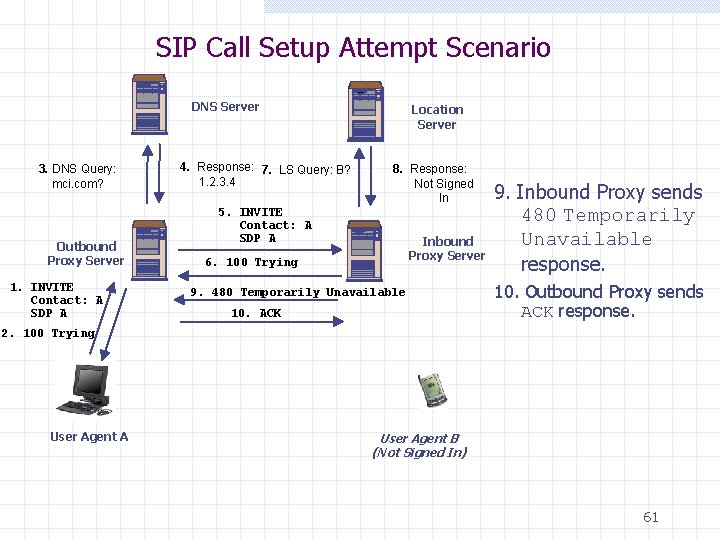
SIP Call Setup Attempt Scenario DNS Server 3. DNS Query: mci. com? Outbound Proxy Server 1. INVITE Contact: A SDP A 4. Response: 7. LS Query: B? 1. 2. 3. 4 Location Server 8. Response: Not Signed In 5. INVITE Contact: A SDP A Inbound Proxy Server 6. 100 Trying 9. 480 Temporarily Unavailable 10. ACK 9. Inbound Proxy sends 480 Temporarily Unavailable response. 10. Outbound Proxy sends ACK response. 2. 100 Trying User Agent A User Agent B (Not Signed In) 61
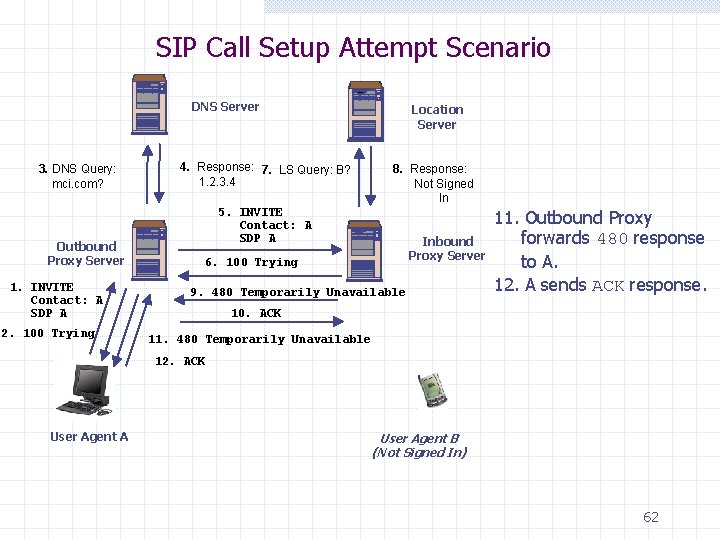
SIP Call Setup Attempt Scenario DNS Server 3. DNS Query: mci. com? Outbound Proxy Server 1. INVITE Contact: A SDP A 2. 100 Trying 4. Response: 7. LS Query: B? 1. 2. 3. 4 Location Server 8. Response: Not Signed In 5. INVITE Contact: A SDP A Inbound Proxy Server 6. 100 Trying 9. 480 Temporarily Unavailable 11. Outbound Proxy forwards 480 response to A. 12. A sends ACK response. 10. ACK 11. 480 Temporarily Unavailable 12. ACK User Agent A User Agent B (Not Signed In) 62
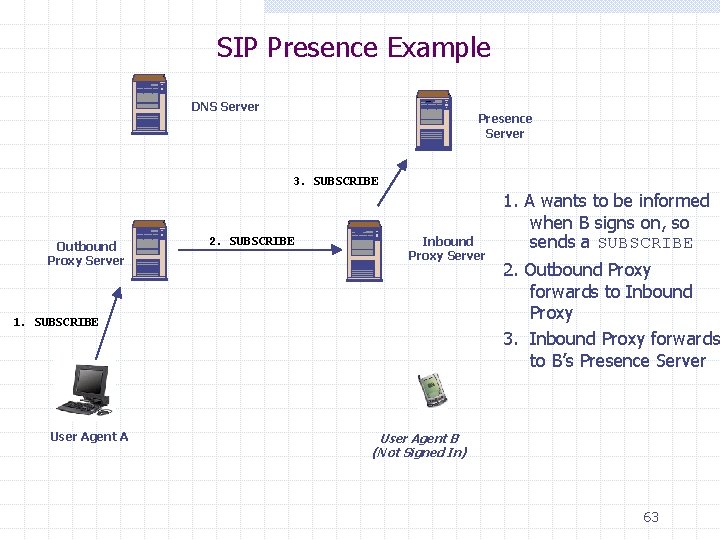
SIP Presence Example DNS Server Presence Server 3. SUBSCRIBE Outbound Proxy Server 2. SUBSCRIBE Inbound Proxy Server 1. SUBSCRIBE User Agent A 1. A wants to be informed when B signs on, so sends a SUBSCRIBE 2. Outbound Proxy forwards to Inbound Proxy 3. Inbound Proxy forwards to B’s Presence Server User Agent B (Not Signed In) 63
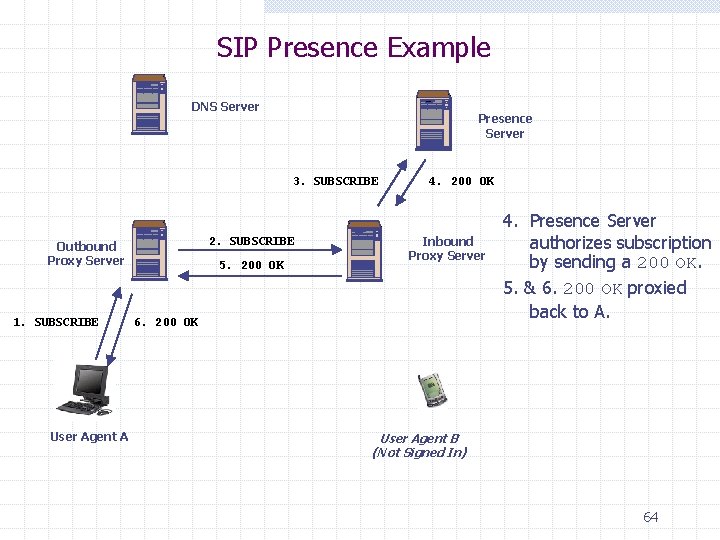
SIP Presence Example DNS Server Presence Server 3. SUBSCRIBE 2. SUBSCRIBE Outbound Proxy Server 1. SUBSCRIBE User Agent A 5. 200 OK 4. 200 OK Inbound Proxy Server 6. 200 OK 4. Presence Server authorizes subscription by sending a 200 OK. 5. & 6. 200 OK proxied back to A. User Agent B (Not Signed In) 64
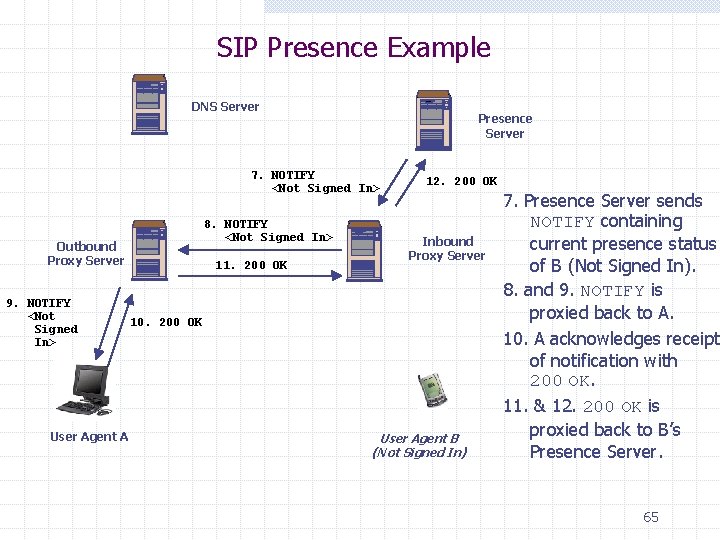
SIP Presence Example DNS Server Presence Server 7. NOTIFY <Not Signed In> 8. NOTIFY <Not Signed In> Outbound Proxy Server 9. NOTIFY <Not Signed In> User Agent A 11. 200 OK 12. 200 OK Inbound Proxy Server 10. 200 OK User Agent B (Not Signed In) 7. Presence Server sends NOTIFY containing current presence status of B (Not Signed In). 8. and 9. NOTIFY is proxied back to A. 10. A acknowledges receipt of notification with 200 OK. 11. & 12. 200 OK is proxied back to B’s Presence Server. 65
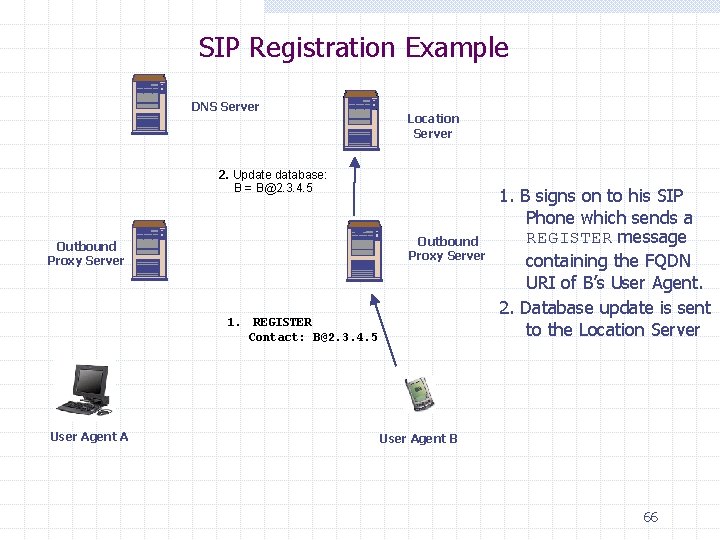
SIP Registration Example DNS Server Location Server 2. Update database: B = B@2. 3. 4. 5 Outbound Proxy Server 1. REGISTER Contact: B@2. 3. 4. 5 User Agent A 1. B signs on to his SIP Phone which sends a REGISTER message containing the FQDN URI of B’s User Agent. 2. Database update is sent to the Location Server User Agent B 66
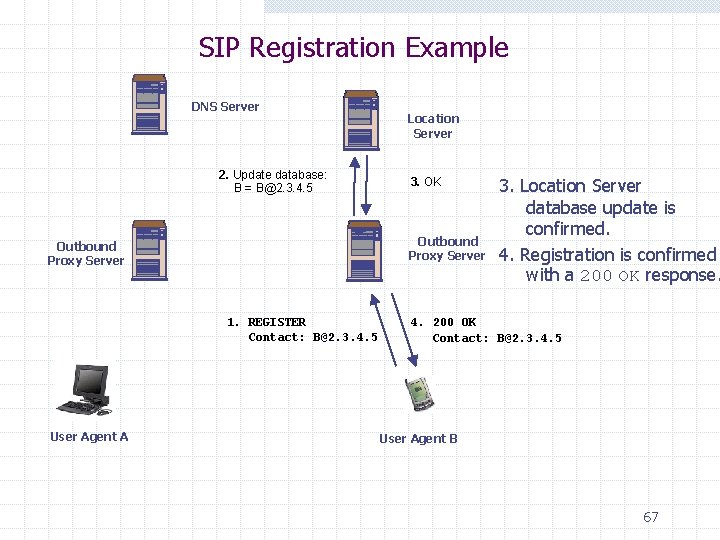
SIP Registration Example DNS Server 2. Update database: B = B@2. 3. 4. 5 3. OK Outbound Proxy Server 1. REGISTER Contact: B@2. 3. 4. 5 User Agent A Location Server 3. Location Server database update is confirmed. 4. Registration is confirmed with a 200 OK response. 4. 200 OK Contact: B@2. 3. 4. 5 User Agent B 67
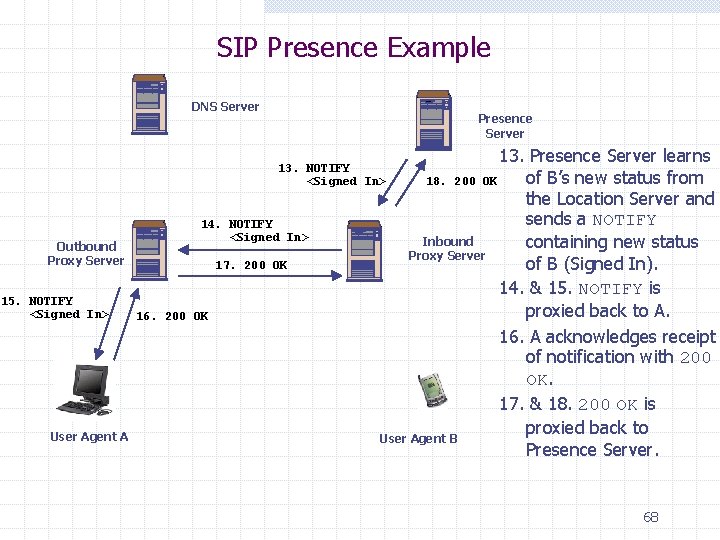
SIP Presence Example DNS Server Presence Server 13. Presence Server learns of B’s new status from 18. 200 OK the Location Server and sends a NOTIFY Inbound containing new status Proxy Server of B (Signed In). 14. & 15. NOTIFY is proxied back to A. 16. A acknowledges receipt of notification with 200 OK. 17. & 18. 200 OK is proxied back to User Agent B Presence Server. 13. NOTIFY <Signed In> Outbound Proxy Server 15. NOTIFY <Signed In> User Agent A 14. NOTIFY <Signed In> 17. 200 OK 16. 200 OK 68
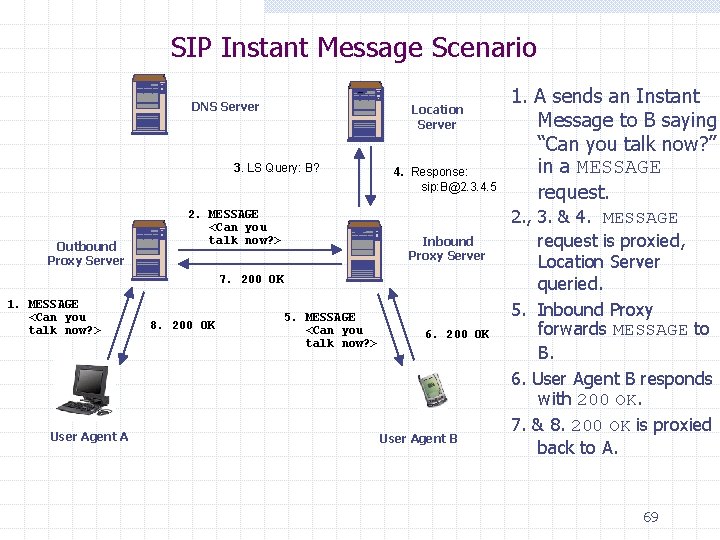
SIP Instant Message Scenario DNS Server Location Server 3. LS Query: B? Outbound Proxy Server 2. MESSAGE <Can you talk now? > 4. Response: sip: B@2. 3. 4. 5 Inbound Proxy Server 7. 200 OK 1. MESSAGE <Can you talk now? > User Agent A 8. 200 OK 5. MESSAGE <Can you talk now? > 6. 200 OK User Agent B 1. A sends an Instant Message to B saying “Can you talk now? ” in a MESSAGE request. 2. , 3. & 4. MESSAGE request is proxied, Location Server queried. 5. Inbound Proxy forwards MESSAGE to B. 6. User Agent B responds with 200 OK. 7. & 8. 200 OK is proxied back to A. 69
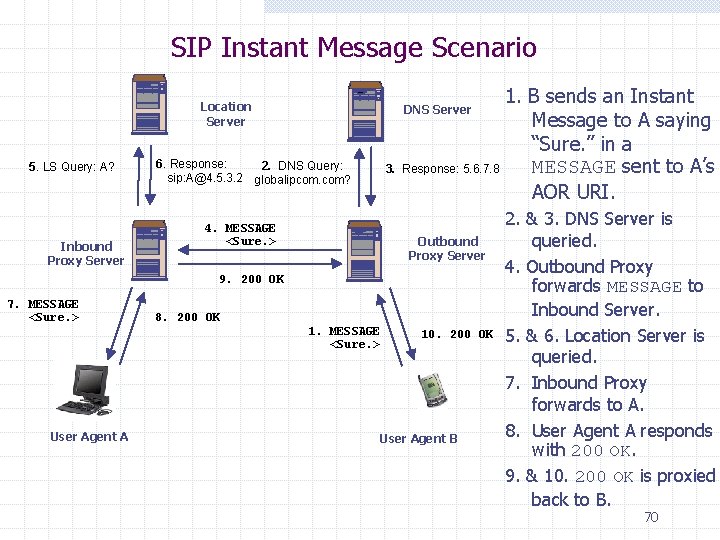
SIP Instant Message Scenario Location Server 5. LS Query: A? Inbound Proxy Server 1. B sends an Instant Message to A saying “Sure. ” in a MESSAGE sent to A’s Response: 5. 6. 7. 8 AOR URI. DNS Server 6. Response: 2. DNS Query: sip: A@4. 5. 3. 2 globalipcom. com? 3. 4. MESSAGE <Sure. > Outbound Proxy Server 9. 200 OK 7. MESSAGE <Sure. > User Agent A 8. 200 OK 1. MESSAGE <Sure. > 10. 200 OK User Agent B 2. & 3. DNS Server is queried. 4. Outbound Proxy forwards MESSAGE to Inbound Server. 5. & 6. Location Server is queried. 7. Inbound Proxy forwards to A. 8. User Agent A responds with 200 OK. 9. & 10. 200 OK is proxied back to B. 70
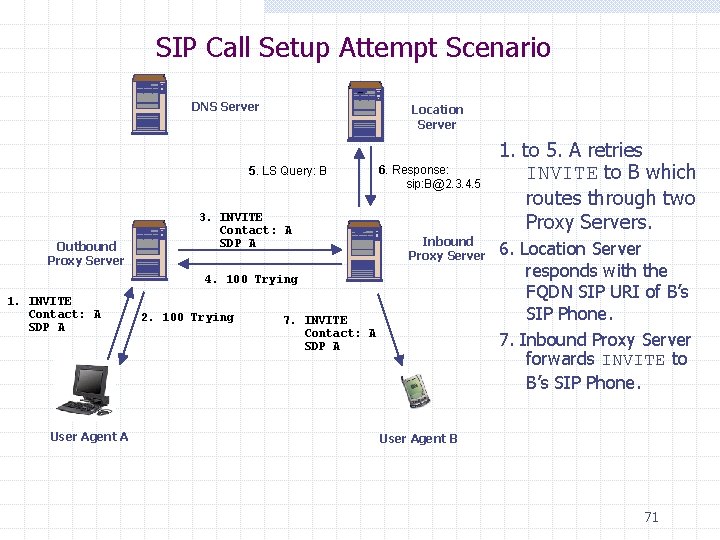
SIP Call Setup Attempt Scenario DNS Server Location Server 5. LS Query: B Outbound Proxy Server 3. INVITE Contact: A SDP A 6. Response: sip: B@2. 3. 4. 5 Inbound Proxy Server 4. 100 Trying 1. INVITE Contact: A SDP A User Agent A 2. 100 Trying 7. INVITE Contact: A SDP A 1. to 5. A retries INVITE to B which routes through two Proxy Servers. 6. Location Server responds with the FQDN SIP URI of B’s SIP Phone. 7. Inbound Proxy Server forwards INVITE to B’s SIP Phone. User Agent B 71
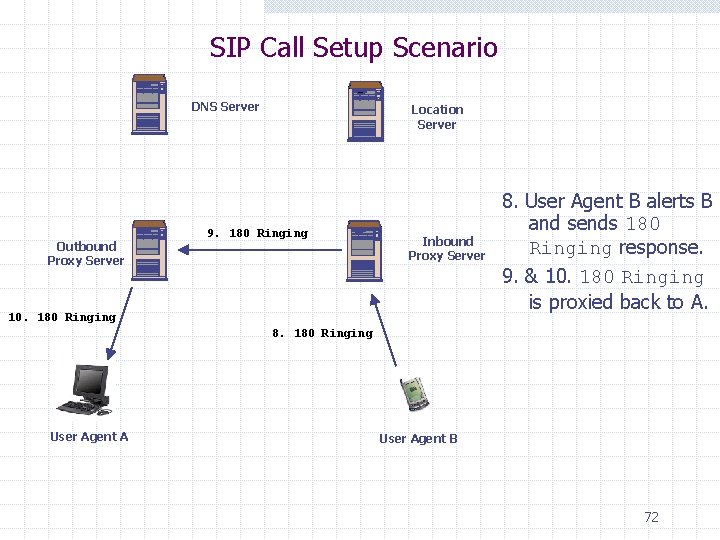
SIP Call Setup Scenario DNS Server Outbound Proxy Server Location Server 9. 180 Ringing Inbound Proxy Server 10. 180 Ringing 8. User Agent B alerts B and sends 180 Ringing response. 9. & 10. 180 Ringing is proxied back to A. 8. 180 Ringing User Agent A User Agent B 72
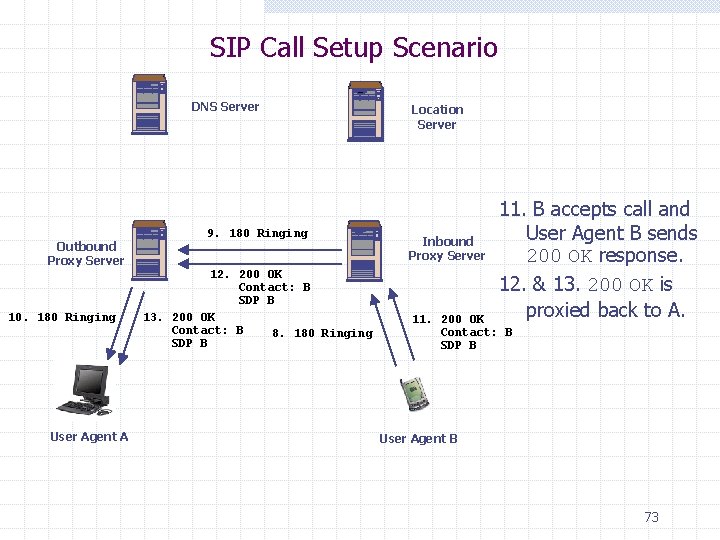
SIP Call Setup Scenario DNS Server Outbound Proxy Server 10. 180 Ringing User Agent A 9. 180 Ringing 12. 200 OK Contact: B SDP B 13. 200 OK Contact: B 8. 180 Ringing SDP B Location Server Inbound Proxy Server 11. B accepts call and User Agent B sends 200 OK response. 12. & 13. 200 OK is proxied back to A. 11. 200 OK Contact: B SDP B User Agent B 73
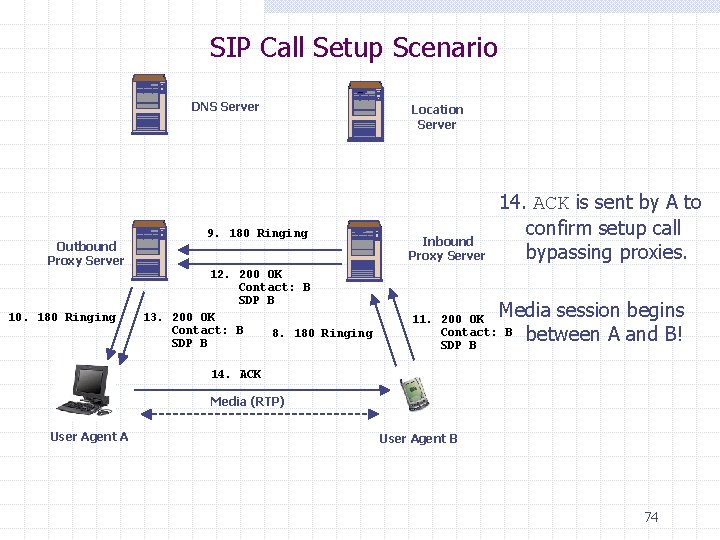
SIP Call Setup Scenario DNS Server Outbound Proxy Server 10. 180 Ringing 9. 180 Ringing 12. 200 OK Contact: B SDP B 13. 200 OK Contact: B 8. 180 Ringing SDP B Location Server Inbound Proxy Server 14. ACK is sent by A to confirm setup call bypassing proxies. Media session begins between A and B! 11. 200 OK Contact: B SDP B 14. ACK Media (RTP) User Agent A User Agent B 74
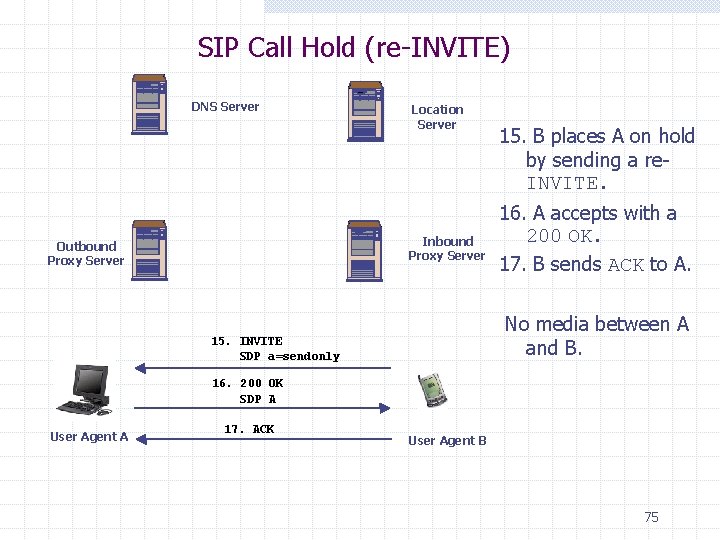
SIP Call Hold (re-INVITE) DNS Server Location Server Inbound Proxy Server Outbound Proxy Server 15. B places A on hold by sending a re. INVITE. 16. A accepts with a 200 OK. 17. B sends ACK to A. No media between A and B. 15. INVITE SDP a=sendonly 16. 200 OK SDP A User Agent A 17. ACK User Agent B 75
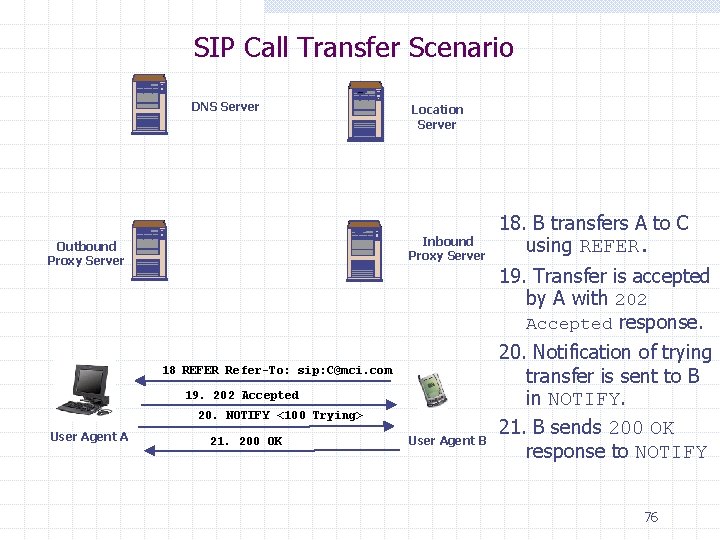
SIP Call Transfer Scenario DNS Server Location Server Inbound Proxy Server Outbound Proxy Server 19. Transfer is accepted by A with 202 Accepted response. 18 REFER Refer-To: sip: C@mci. com 19. 202 Accepted 20. NOTIFY <100 Trying> User Agent A 18. B transfers A to C using REFER. 21. 200 OK User Agent B 20. Notification of trying transfer is sent to B in NOTIFY. 21. B sends 200 OK response to NOTIFY 76
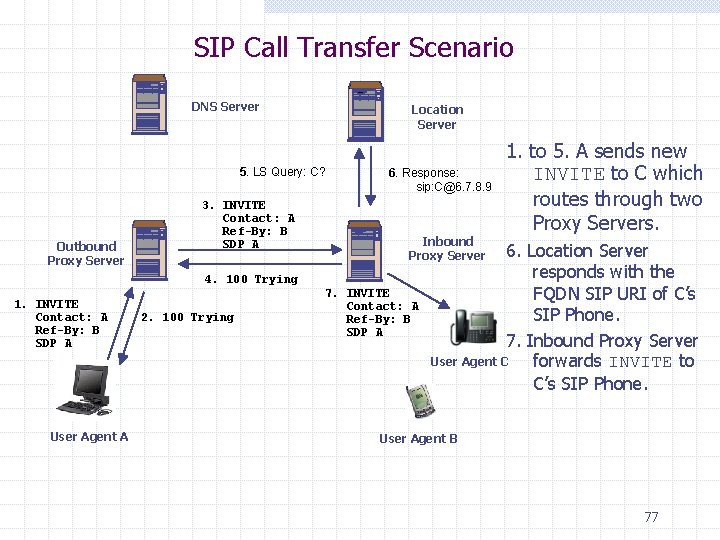
SIP Call Transfer Scenario DNS Server Location Server 5. LS Query: C? Outbound Proxy Server 3. INVITE Contact: A Ref-By: B SDP A 6. Response: sip: C@6. 7. 8. 9 Inbound Proxy Server 4. 100 Trying 1. INVITE Contact: A Ref-By: B SDP A User Agent A 2. 100 Trying 7. INVITE Contact: A Ref-By: B SDP A 1. to 5. A sends new INVITE to C which routes through two Proxy Servers. 6. Location Server responds with the FQDN SIP URI of C’s SIP Phone. 7. Inbound Proxy Server User Agent C forwards INVITE to C’s SIP Phone. User Agent B 77
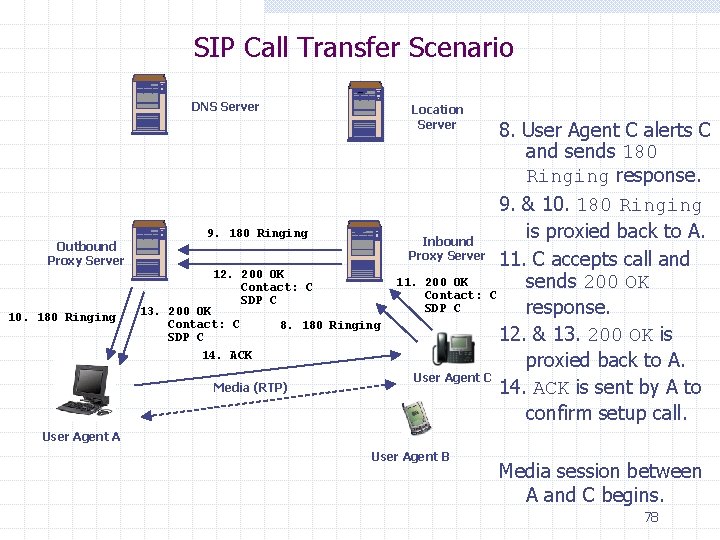
SIP Call Transfer Scenario DNS Server Outbound Proxy Server Location Server 9. 180 Ringing 12. 200 OK Contact: C SDP C 10. 180 Ringing 13. 200 OK Contact: C SDP C 14. ACK 8. 180 Ringing Media (RTP) 8. User Agent C alerts C and sends 180 Ringing response. 9. & 10. 180 Ringing is proxied back to A. Inbound Proxy Server 11. C accepts call and 11. 200 OK sends 200 OK Contact: C SDP C response. 12. & 13. 200 OK is proxied back to A. User Agent C 14. ACK is sent by A to confirm setup call. User Agent A User Agent B Media session between A and C begins. 78
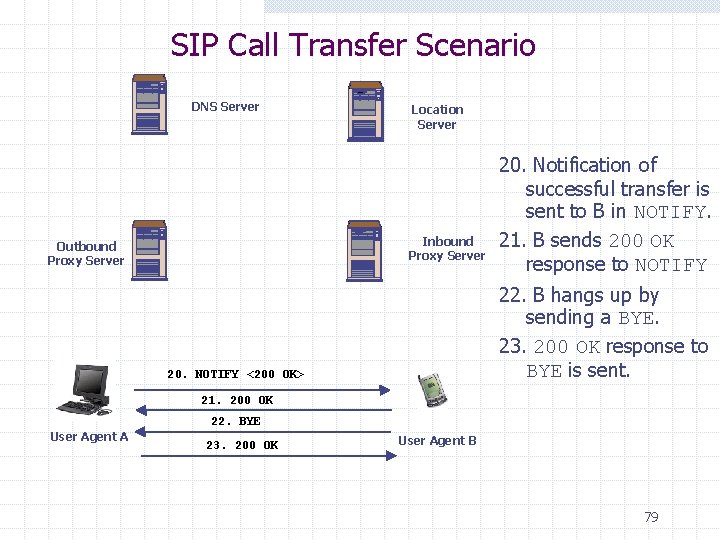
SIP Call Transfer Scenario DNS Server Location Server Inbound Proxy Server Outbound Proxy Server 20. Notification of successful transfer is sent to B in NOTIFY. 21. B sends 200 OK response to NOTIFY 22. B hangs up by sending a BYE. 23. 200 OK response to BYE is sent. 20. NOTIFY <200 OK> 21. 200 OK 22. BYE User Agent A 23. 200 OK User Agent B 79
SIP Security
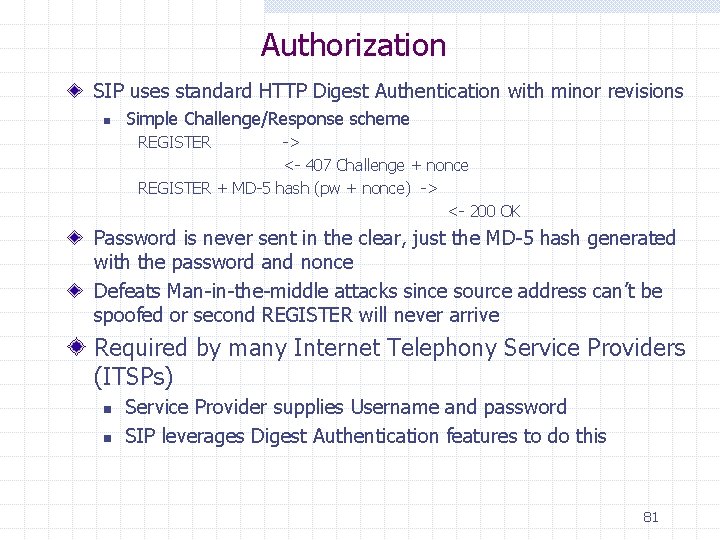
Authorization SIP uses standard HTTP Digest Authentication with minor revisions n Simple Challenge/Response scheme REGISTER -> <- 407 Challenge + nonce REGISTER + MD-5 hash (pw + nonce) -> <- 200 OK Password is never sent in the clear, just the MD-5 hash generated with the password and nonce Defeats Man-in-the-middle attacks since source address can’t be spoofed or second REGISTER will never arrive Required by many Internet Telephony Service Providers (ITSPs) n n Service Provider supplies Username and password SIP leverages Digest Authentication features to do this 81
TLS and sips: Implementation of TLS is mandatory for proxies, redirect servers and registrars The ; transport=tls URI parameter value is deprecated A sips: URI scheme (otherwise identical to the sip: scheme) indicates that all hops between the requestor and the resource identified by the URI must be encrypted with TLS. If the request is retargeted once the resource is reached, it must use secured transports. 82
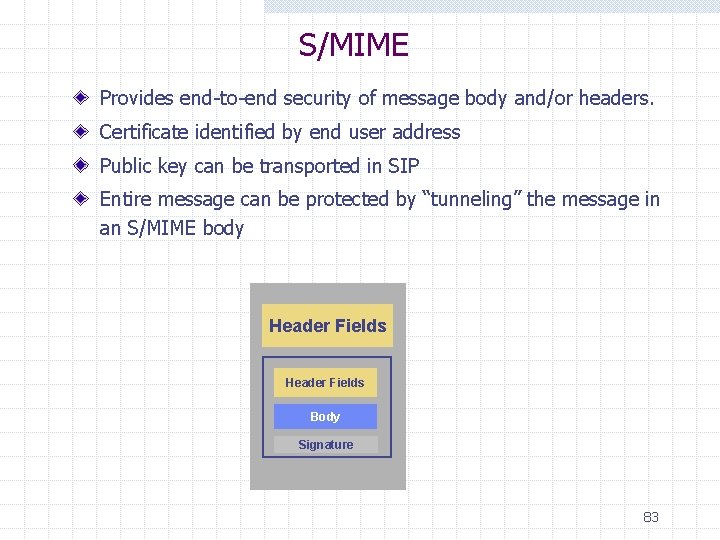
S/MIME Provides end-to-end security of message body and/or headers. Certificate identified by end user address Public key can be transported in SIP Entire message can be protected by “tunneling” the message in an S/MIME body Header Fields Body Signature 83
Attacks : denial of service Denial of service n n Network Protocol (SIP INVITE) Systems / Applications Phone Availability n n n Requires: power Alternatives (Business Continuity/Disaster Recovery) ? E 911 (laws and technical aspect) GSM PSTN-to-GSM 84
Attacks : fraud Call-ID spoofing User rights takeover n Fake authentication server 85
Attacks: interception Interception n “Who talks with who” (Network sniffing, Servers (SIP, CDR, etc) LAN n n Physical access to the LAN ARP attacks Unauthenticated devices (phones and servers) Different layers (MAC address, user, physical port, etc) Where to intercept ? n n Where is the user located ? Networks crossed ? 86
Attacks : systems Systems n n Mostly none is hardened by default Worms, exploits, Trojan horses Attacks : phone (S)IP phone n Startup w DHCP, TFTP, etc. n Physical access w Hidden configuration tabs n n n TCP/IP stacks Firmware/configuration Trojan horse/rootkit 87
Defense Signaling: SIP n Secure SIP vs SS 7 (physical security) Transport: Secure RTP (with Mi. KEY) Network: Qo. S [LLQ] (and rate-limit) Firewall: application level filtering Phone: signed firmware Identification: TLS n Clients by the server n Servers by the client 3 P: project, security processes and policies 88
SIP Programming
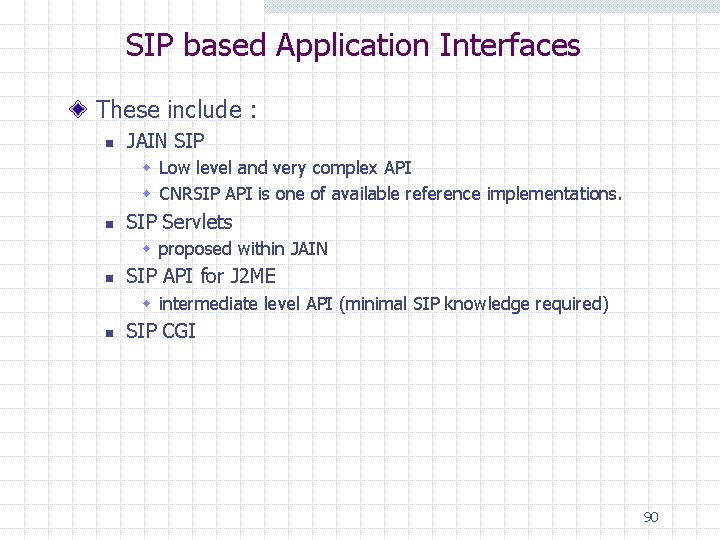
SIP based Application Interfaces These include : n JAIN SIP w Low level and very complex API w CNRSIP API is one of available reference implementations. n SIP Servlets w proposed within JAIN n SIP API for J 2 ME w intermediate level API (minimal SIP knowledge required) n SIP CGI 90
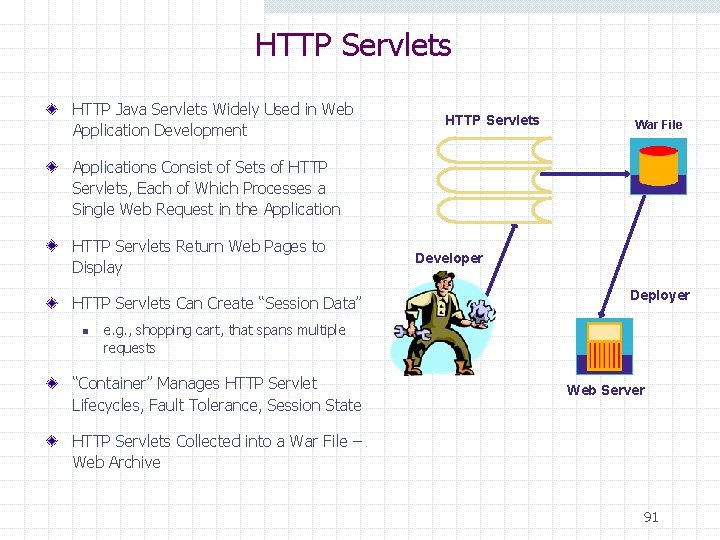
HTTP Servlets HTTP Java Servlets Widely Used in Web Application Development HTTP Servlets War File Applications Consist of Sets of HTTP Servlets, Each of Which Processes a Single Web Request in the Application HTTP Servlets Return Web Pages to Display HTTP Servlets Can Create “Session Data” n Developer Deployer e. g. , shopping cart, that spans multiple requests “Container” Manages HTTP Servlet Lifecycles, Fault Tolerance, Session State Web Server HTTP Servlets Collected into a War File – Web Archive 91
SIP Servlet API Java extension API for SIP servers Similar in spirit to HTTP servlet API Server matches incoming messages against local rules in order to decide which servlet to pass message to The API gives full control to servlets to handle SIP messages, e. g. n has full access to headers and body n proxy or redirect requests n respond to or reject requests n forward responses upstream n initiate requests Servers may choose to provide constrained environment to selected servlets (e. g. using sandbox security model) 92
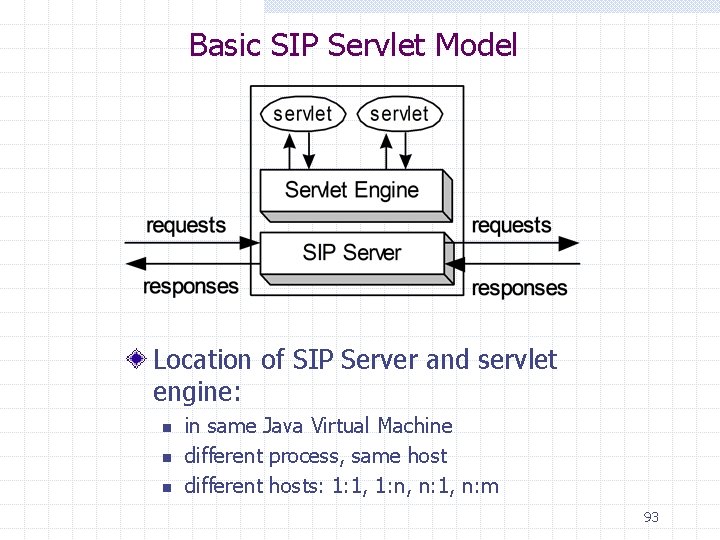
Basic SIP Servlet Model Location of SIP Server and servlet engine: n n n in same Java Virtual Machine different process, same host different hosts: 1: 1, 1: n, n: 1, n: m 93
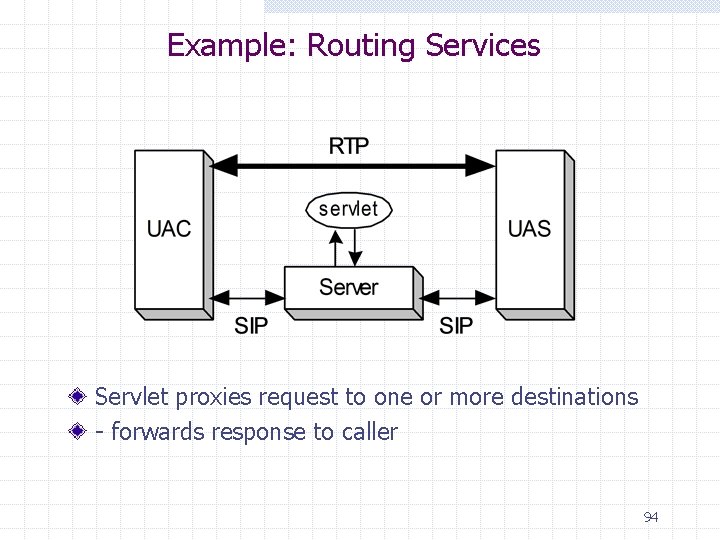
Example: Routing Services Servlet proxies request to one or more destinations - forwards response to caller 94
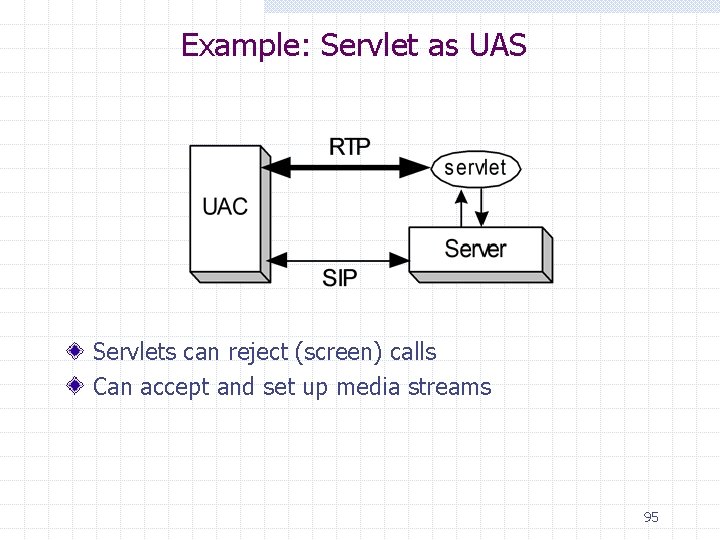
Example: Servlet as UAS Servlets can reject (screen) calls Can accept and set up media streams 95
Benefits of Servlet Model Powerful: n Full access to SIP signaling Performance: n No need to fork new process for each request n The same servlet can handle many requests simultaneously Safety: type checked; no pointers; exception handling Convenience: n high level abstractions. n Tight integration with server: logging, security, location database Lifecycle model allows servlets to n maintain state, e. g. database connections n manage timers Access to wide range of APIs 96
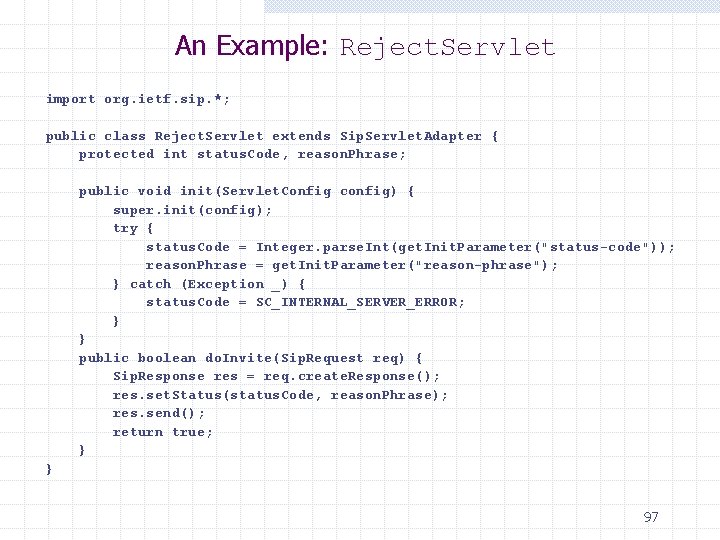
An Example: Reject. Servlet import org. ietf. sip. *; public class Reject. Servlet extends Sip. Servlet. Adapter { protected int status. Code, reason. Phrase; public void init(Servlet. Config config) { super. init(config); try { status. Code = Integer. parse. Int(get. Init. Parameter("status-code")); reason. Phrase = get. Init. Parameter("reason-phrase"); } catch (Exception _) { status. Code = SC_INTERNAL_SERVER_ERROR; } } public boolean do. Invite(Sip. Request req) { Sip. Response res = req. create. Response(); res. set. Status(status. Code, reason. Phrase); res. send(); return true; } } 97
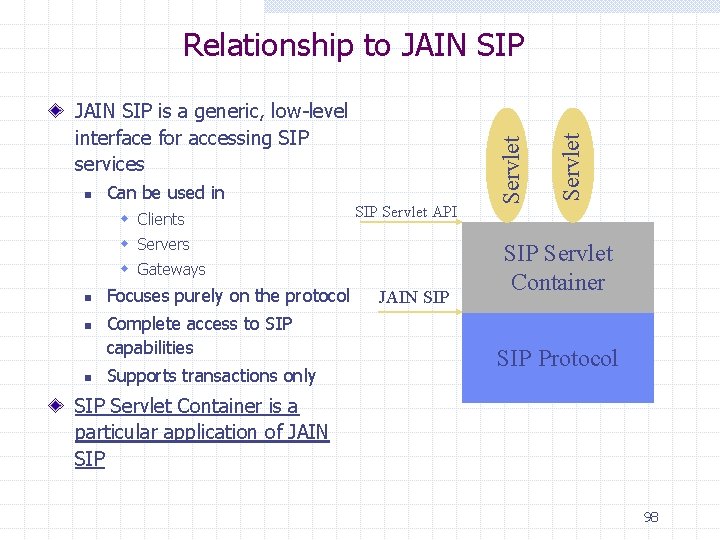
n Can be used in w Clients SIP Servlet API w Servers w Gateways n n n Focuses purely on the protocol Complete access to SIP capabilities Supports transactions only JAIN SIP Servlet JAIN SIP is a generic, low-level interface for accessing SIP services Servlet Relationship to JAIN SIP Servlet Container SIP Protocol SIP Servlet Container is a particular application of JAIN SIP 98
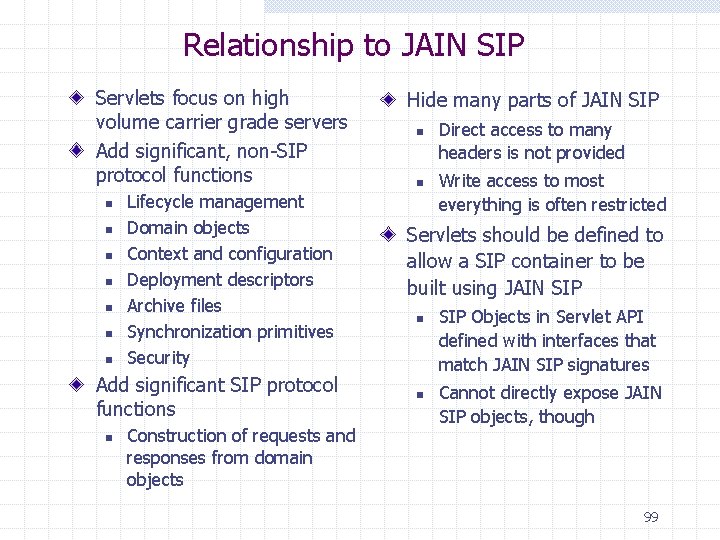
Relationship to JAIN SIP Servlets focus on high volume carrier grade servers Add significant, non-SIP protocol functions n n n n Lifecycle management Domain objects Context and configuration Deployment descriptors Archive files Synchronization primitives Security Add significant SIP protocol functions n Construction of requests and responses from domain objects Hide many parts of JAIN SIP n n Direct access to many headers is not provided Write access to most everything is often restricted Servlets should be defined to allow a SIP container to be built using JAIN SIP n n SIP Objects in Servlet API defined with interfaces that match JAIN SIP signatures Cannot directly expose JAIN SIP objects, though 99
SIP CGI Almost identical to HTTP CGI Language independent ( Perl, Tcl, C, C++, . . . ) Any binary may be executed as a separate program Suitable for services that contains substantial web content Passes message parameters through environmental variables to a separate program. More flexible but more risky Feb. 1, 2001: RFC 3050 (Common Gateway Interface for SIP) published 100
SIP Applications
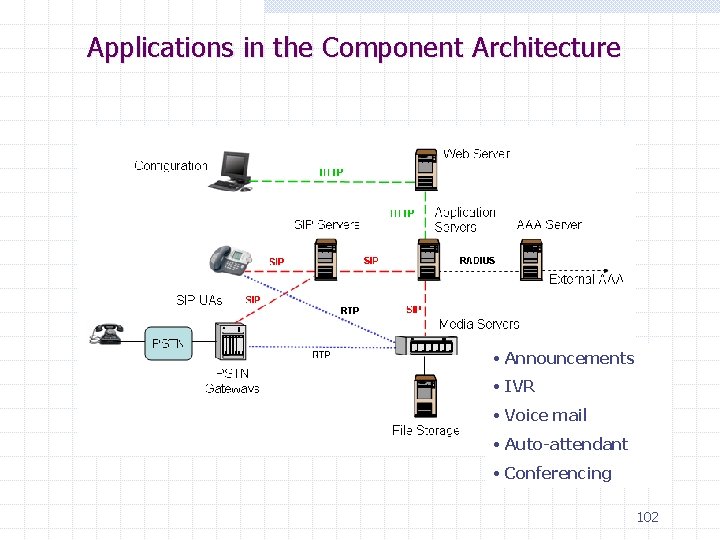
Applications in the Component Architecture • Announcements • IVR • Voice mail • Auto-attendant • Conferencing 102
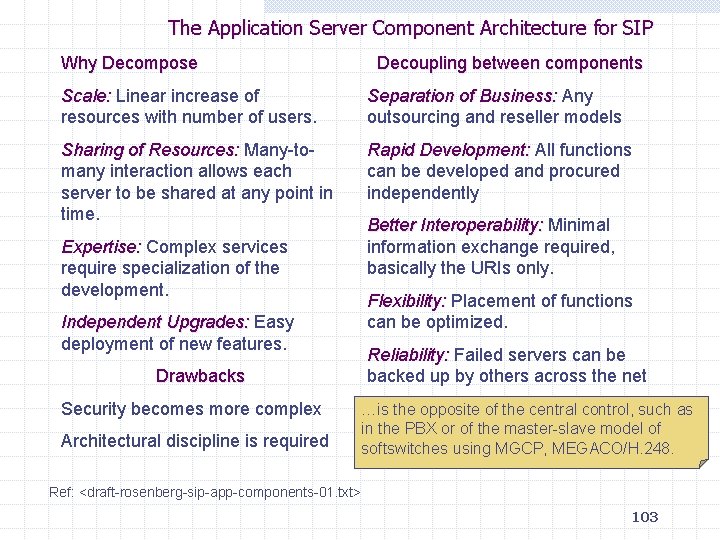
The Application Server Component Architecture for SIP Why Decompose Decoupling between components Scale: Linear increase of resources with number of users. Separation of Business: Any outsourcing and reseller models Sharing of Resources: Many-tomany interaction allows each server to be shared at any point in time. Rapid Development: All functions can be developed and procured independently Expertise: Complex services require specialization of the development. Independent Upgrades: Easy deployment of new features. Drawbacks Security becomes more complex Architectural discipline is required Better Interoperability: Minimal information exchange required, basically the URIs only. Flexibility: Placement of functions can be optimized. Reliability: Failed servers can be backed up by others across the net …is the opposite of the central control, such as in the PBX or of the master-slave model of softswitches using MGCP, MEGACO/H. 248. Ref: <draft-rosenberg-sip-app-components-01. txt> 103
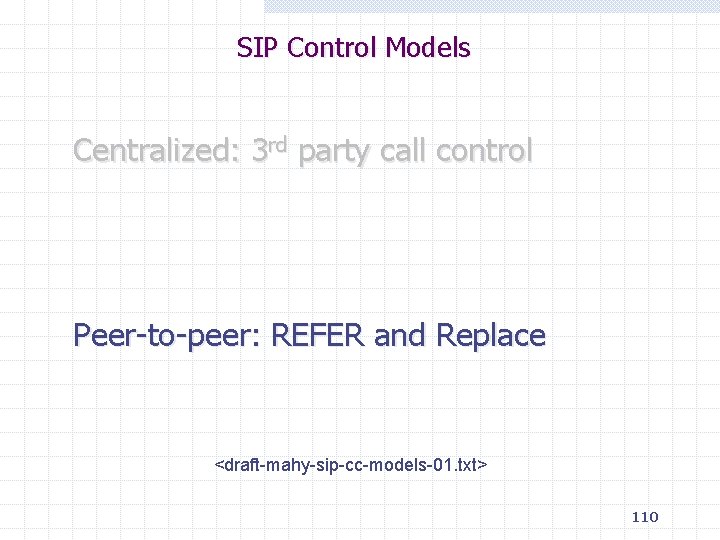
SIP Control Models Centralized: 3 rd party call control Peer-to-peer: REFER and Replace 104
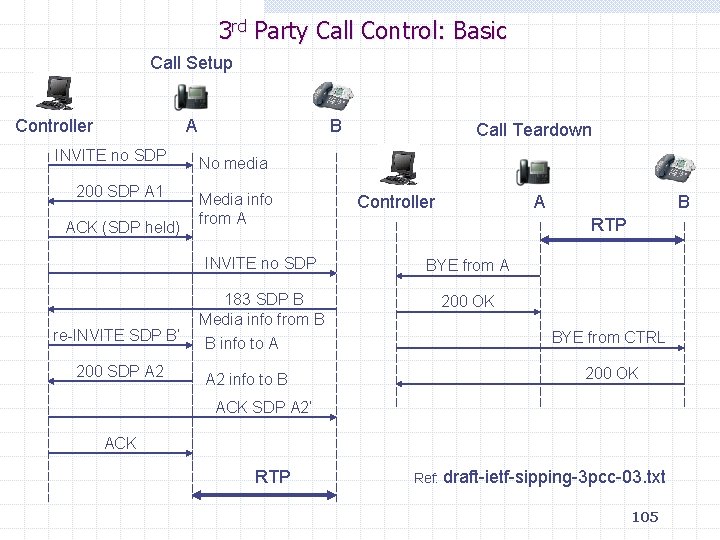
3 rd Party Call Control: Basic Call Setup Controller A INVITE no SDP 200 SDP A 1 ACK (SDP held) re-INVITE SDP B’ 200 SDP A 2 B Call Teardown No media Media info from A Controller A RTP INVITE no SDP BYE from A 183 SDP B Media info from B B info to A 200 OK A 2 info to B B BYE from CTRL 200 OK ACK SDP A 2’ ACK RTP Ref: draft-ietf-sipping-3 pcc-03. txt 105
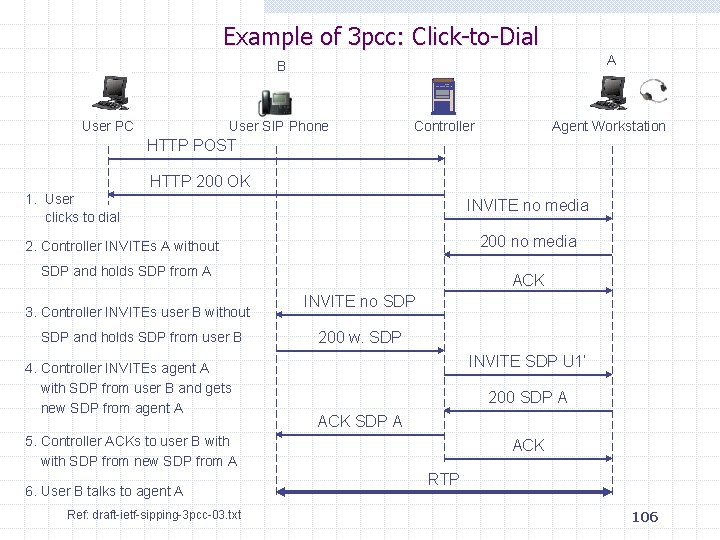
Example of 3 pcc: Click-to-Dial A B User PC User SIP Phone Controller Agent Workstation HTTP POST HTTP 200 OK 1. User clicks to dial INVITE no media 200 no media 2. Controller INVITEs A without SDP and holds SDP from A 3. Controller INVITEs user B without SDP and holds SDP from user B 4. Controller INVITEs agent A with SDP from user B and gets new SDP from agent A ACK INVITE no SDP 200 w. SDP INVITE SDP U 1’ 200 SDP A ACK SDP A 5. Controller ACKs to user B with SDP from new SDP from A 6. User B talks to agent A Ref: draft-ietf-sipping-3 pcc-03. txt ACK RTP 106
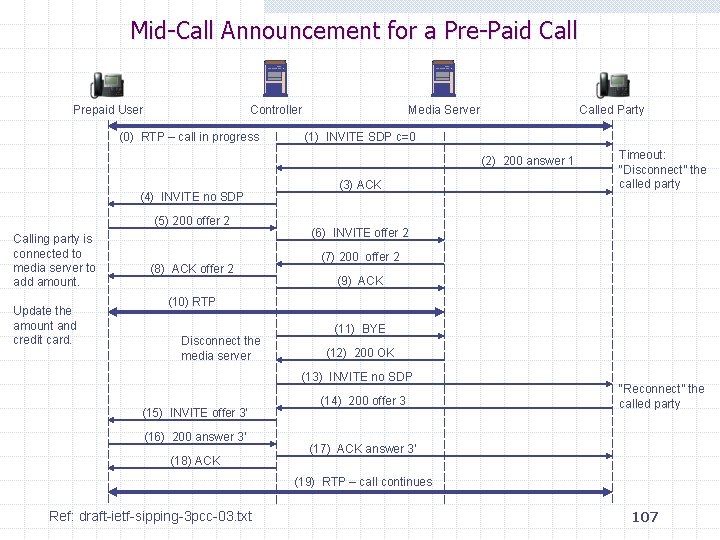
Mid-Call Announcement for a Pre-Paid Call Prepaid User Controller (0) RTP – call in progress Media Server Called Party (1) INVITE SDP c=0 (2) 200 answer 1 (4) INVITE no SDP (5) 200 offer 2 Calling party is connected to media server to add amount. Update the amount and credit card. (8) ACK offer 2 (3) ACK Timeout: “Disconnect” the called party (6) INVITE offer 2 (7) 200 offer 2 (9) ACK (10) RTP Disconnect the media server (11) BYE (12) 200 OK (13) INVITE no SDP (15) INVITE offer 3’ (16) 200 answer 3’ (18) ACK (14) 200 offer 3 “Reconnect” the called party (17) ACK answer 3’ (19) RTP – call continues Ref: draft-ietf-sipping-3 pcc-03. txt 107
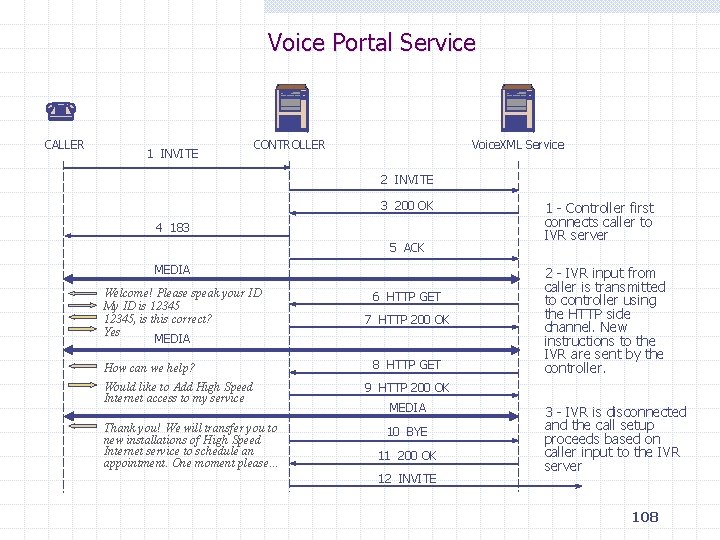
Voice Portal Service CALLER 1 INVITE CONTROLLER Voice. XML Service 2 INVITE 3 200 OK 4 183 5 ACK MEDIA Welcome! Please speak your ID My ID is 12345, is this correct? Yes MEDIA How can we help? Would like to Add High Speed Internet access to my service Thank you! We will transfer you to new installations of High Speed Internet service to schedule an appointment. One moment please… 6 HTTP GET 7 HTTP 200 OK 8 HTTP GET 1 - Controller first connects caller to IVR server 2 - IVR input from caller is transmitted to controller using the HTTP side channel. New instructions to the IVR are sent by the controller. 9 HTTP 200 OK MEDIA 10 BYE 11 200 OK 12 INVITE 3 - IVR is disconnected and the call setup proceeds based on caller input to the IVR server 108
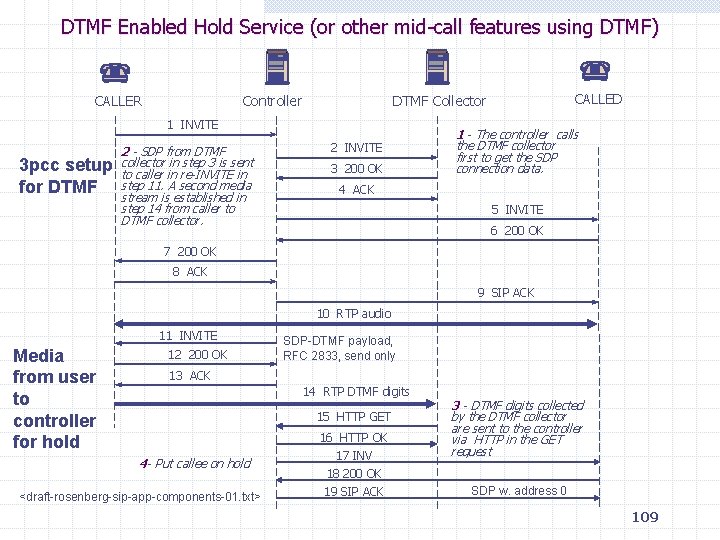
DTMF Enabled Hold Service (or other mid-call features using DTMF) CALLER Controller 1 INVITE 3 pcc setup for DTMF 2 - SDP from DTMF collector in step 3 is sent to caller in re-INVITE in step 11. A second media stream is established in step 14 from caller to DTMF collector. CALLED DTMF Collector 2 INVITE 3 200 OK 1 - The controller calls the DTMF collector first to get the SDP connection data. 4 ACK 5 INVITE 6 200 OK 7 200 OK 8 ACK 9 SIP ACK 10 RTP audio 11 INVITE Media from user to controller for hold 12 200 OK SDP-DTMF payload, RFC 2833, send only 13 ACK 14 RTP DTMF digits 15 HTTP GET 4 - Put callee on hold <draft-rosenberg-sip-app-components-01. txt> 16 HTTP OK 17 INV 18 200 OK 19 SIP ACK 3 - DTMF digits collected by the DTMF collector are sent to the controller via HTTP in the GET request SDP w. address 0 109
SIP Control Models Centralized: 3 rd party call control Peer-to-peer: REFER and Replace <draft-mahy-sip-cc-models-01. txt> 110
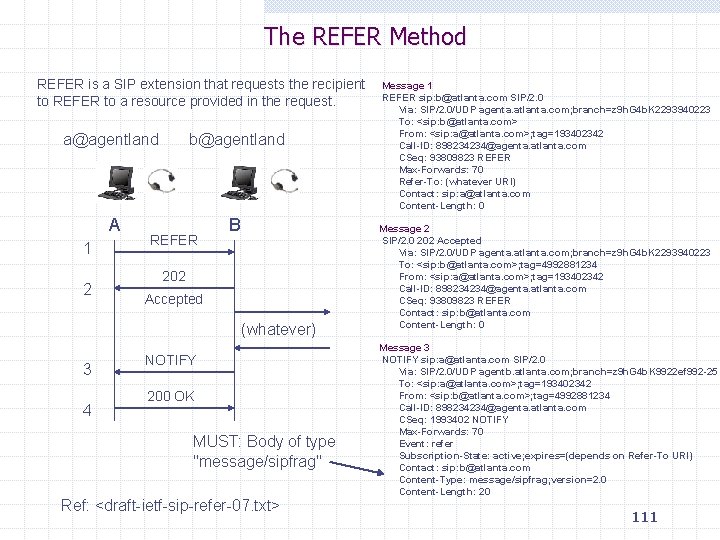
The REFER Method REFER is a SIP extension that requests the recipient to REFER to a resource provided in the request. a@agentland b@agentland A B 1 2 REFER 202 Accepted (whatever) 3 4 NOTIFY 200 OK MUST: Body of type "message/sipfrag" Ref: <draft-ietf-sip-refer-07. txt> Message 1 REFER sip: b@atlanta. com SIP/2. 0 Via: SIP/2. 0/UDP agenta. atlanta. com; branch=z 9 h. G 4 b. K 2293940223 To: <sip: b@atlanta. com> From: <sip: a@atlanta. com>; tag=193402342 Call-ID: 898234234@agenta. atlanta. com CSeq: 93809823 REFER Max-Forwards: 70 Refer-To: (whatever URI) Contact: sip: a@atlanta. com Content-Length: 0 Message 2 SIP/2. 0 202 Accepted Via: SIP/2. 0/UDP agenta. atlanta. com; branch=z 9 h. G 4 b. K 2293940223 To: <sip: b@atlanta. com>; tag=4992881234 From: <sip: a@atlanta. com>; tag=193402342 Call-ID: 898234234@agenta. atlanta. com CSeq: 93809823 REFER Contact: sip: b@atlanta. com Content-Length: 0 Message 3 NOTIFY sip: a@atlanta. com SIP/2. 0 Via: SIP/2. 0/UDP agentb. atlanta. com; branch=z 9 h. G 4 b. K 9922 ef 992 -25 To: <sip: a@atlanta. com>; tag=193402342 From: <sip: b@atlanta. com>; tag=4992881234 Call-ID: 898234234@agenta. atlanta. com CSeq: 1993402 NOTIFY Max-Forwards: 70 Event: refer Subscription-State: active; expires=(depends on Refer-To URI) Contact: sip: b@atlanta. com Content-Type: message/sipfrag; version=2. 0 Content-Length: 20 111
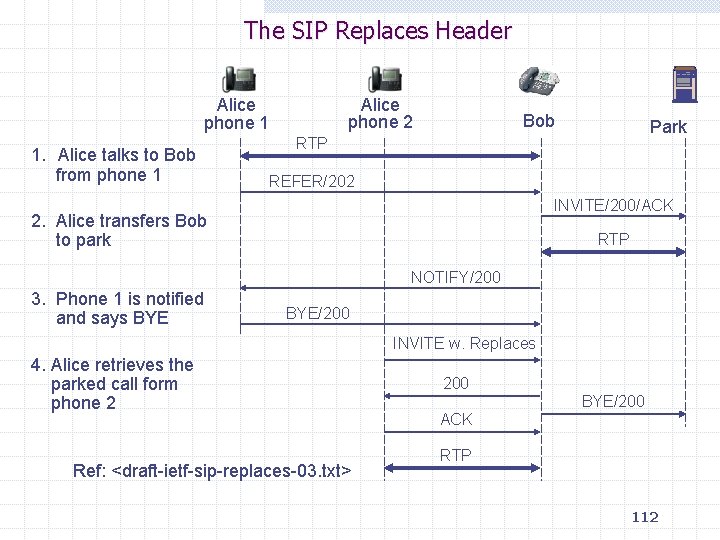
The SIP Replaces Header Alice phone 2 Alice phone 1 1. Alice talks to Bob from phone 1 Bob Park RTP REFER/202 INVITE/200/ACK 2. Alice transfers Bob to park RTP NOTIFY/200 3. Phone 1 is notified and says BYE/200 INVITE w. Replaces 4. Alice retrieves the parked call form phone 2 Ref: <draft-ietf-sip-replaces-03. txt> 200 BYE/200 ACK RTP 112
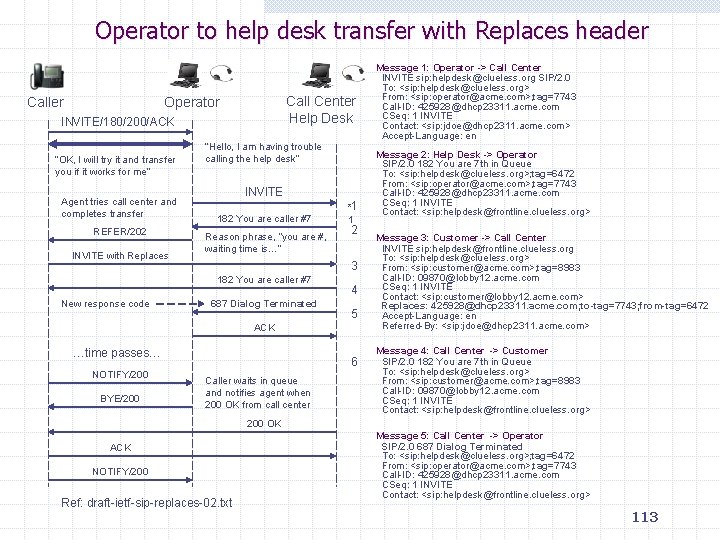
Operator to help desk transfer with Replaces header Call Center Help Desk Operator INVITE/180/200/ACK “OK, I will try it and transfer you if it works for me” Agent tries call center and completes transfer REFER/202 INVITE with Replaces “Hello, I am having trouble calling the help desk” INVITE 182 You are caller #7 Reason phrase, “you are #, waiting time is…” 2 3 182 You are caller #7 New response code *1 1 687 Dialog Terminated 4 5 ACK …time passes… NOTIFY/200 BYE/200 6 Caller waits in queue and notifies agent when 200 OK from call center Message 1: Operator -> Call Center INVITE sip: helpdesk@clueless. org SIP/2. 0 To: <sip: helpdesk@clueless. org> From: <sip: operator@acme. com>; tag=7743 Call-ID: 425928@dhcp 23311. acme. com CSeq: 1 INVITE Contact: <sip: jdoe@dhcp 2311. acme. com> Accept-Language: en Message 2: Help Desk -> Operator SIP/2. 0 182 You are 7 th in Queue To: <sip: helpdesk@clueless. org>; tag=6472 From: <sip: operator@acme. com>; tag=7743 Call-ID: 425928@dhcp 23311. acme. com CSeq: 1 INVITE Contact: <sip: helpdesk@frontline. clueless. org> Message 3: Customer -> Call Center INVITE sip: helpdesk@frontline. clueless. org To: <sip: helpdesk@clueless. org> From: <sip: customer@acme. com>; tag=8983 Call-ID: 09870@lobby 12. acme. com CSeq: 1 INVITE Contact: <sip: customer@lobby 12. acme. com> Replaces: 425928@dhcp 23311. acme. com; to-tag=7743; from-tag=6472 Accept-Language: en Referred-By: <sip: jdoe@dhcp 2311. acme. com> Message 4: Call Center -> Customer SIP/2. 0 182 You are 7 th in Queue To: <sip: helpdesk@clueless. org> From: <sip: customer@acme. com>; tag=8983 Call-ID: 09870@lobby 12. acme. com CSeq: 1 INVITE Contact: <sip: helpdesk@frontline. clueless. org> 200 OK ACK NOTIFY/200 Ref: draft-ietf-sip-replaces-02. txt Message 5: Call Center -> Operator SIP/2. 0 687 Dialog Terminated To: <sip: helpdesk@clueless. org>; tag=6472 From: <sip: operator@acme. com>; tag=7743 Call-ID: 425928@dhcp 23311. acme. com CSeq: 1 INVITE Contact: <sip: helpdesk@frontline. clueless. org> 113
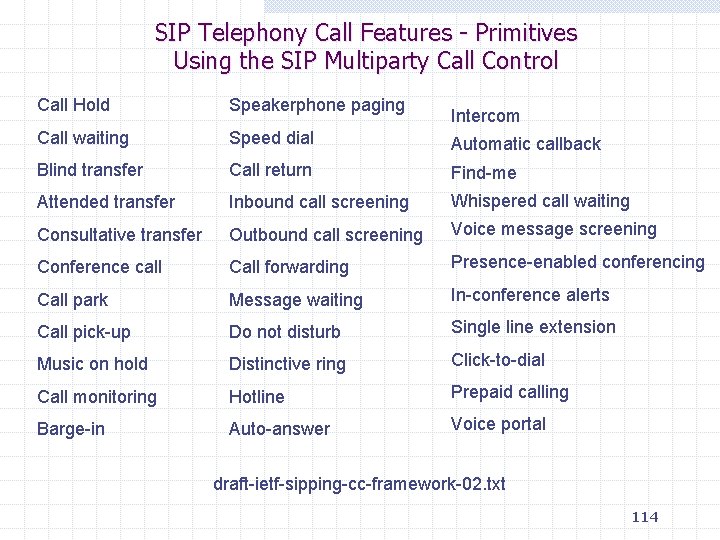
SIP Telephony Call Features - Primitives Using the SIP Multiparty Call Control Call Hold Speakerphone paging Call waiting Speed dial Automatic callback Blind transfer Call return Find-me Attended transfer Inbound call screening Whispered call waiting Consultative transfer Outbound call screening Voice message screening Conference call Call forwarding Presence-enabled conferencing Call park Message waiting In-conference alerts Call pick-up Do not disturb Single line extension Music on hold Distinctive ring Click-to-dial Call monitoring Hotline Prepaid calling Barge-in Auto-answer Voice portal Intercom draft-ietf-sipping-cc-framework-02. txt 114
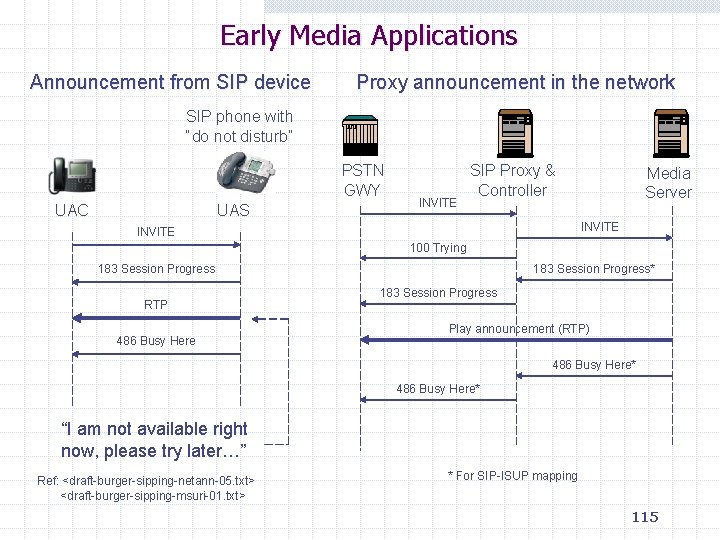
Early Media Applications Announcement from SIP device Proxy announcement in the network SIP phone with “do not disturb” PSTN GWY UAC UAS INVITE SIP Proxy & Controller Media Server INVITE 100 Trying 183 Session Progress RTP 486 Busy Here 183 Session Progress* 183 Session Progress Play announcement (RTP) 486 Busy Here* “I am not available right now, please try later…” Ref: <draft-burger-sipping-netann-05. txt> <draft-burger-sipping-msuri-01. txt> * For SIP-ISUP mapping 115
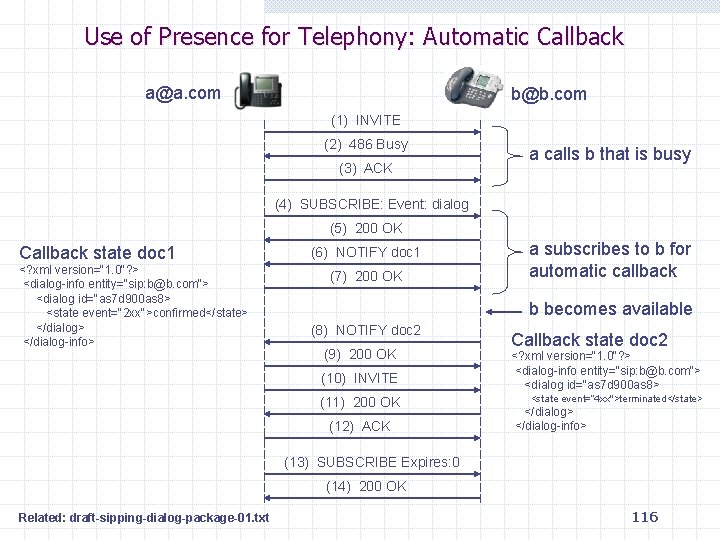
Use of Presence for Telephony: Automatic Callback a@a. com b@b. com (1) INVITE (2) 486 Busy (3) ACK a calls b that is busy (4) SUBSCRIBE: Event: dialog (5) 200 OK Callback state doc 1 <? xml version="1. 0"? > <dialog-info entity="sip: b@b. com"> <dialog id="as 7 d 900 as 8> <state event="2 xx">confirmed</state> </dialog-info> (6) NOTIFY doc 1 (7) 200 OK a subscribes to b for automatic callback b becomes available (8) NOTIFY doc 2 (9) 200 OK (10) INVITE (11) 200 OK (12) ACK Callback state doc 2 <? xml version="1. 0"? > <dialog-info entity="sip: b@b. com"> <dialog id="as 7 d 900 as 8> <state event=“ 4 xx">terminated</state> </dialog-info> (13) SUBSCRIBE Expires: 0 (14) 200 OK Related: draft-sipping-dialog-package-01. txt 116
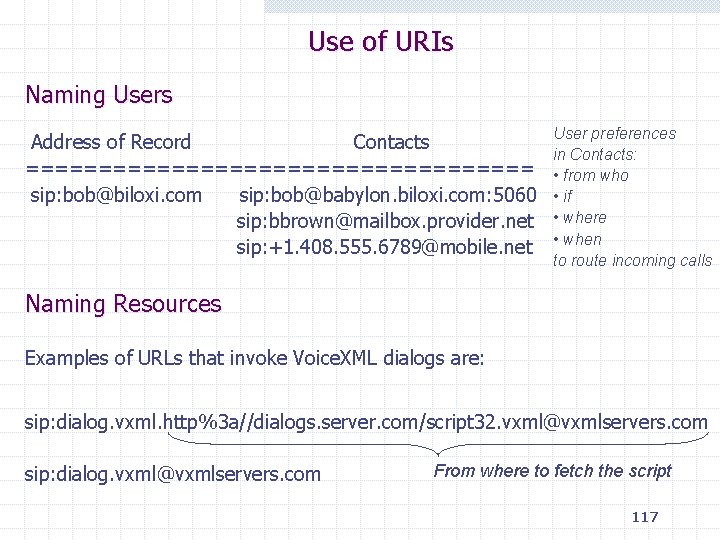
Use of URIs Naming Users Address of Record Contacts ================== sip: bob@biloxi. com sip: bob@babylon. biloxi. com: 5060 sip: bbrown@mailbox. provider. net sip: +1. 408. 555. 6789@mobile. net User preferences in Contacts: • from who • if • where • when to route incoming calls Naming Resources Examples of URLs that invoke Voice. XML dialogs are: sip: dialog. vxml. http%3 a//dialogs. server. com/script 32. vxml@vxmlservers. com sip: dialog. vxml@vxmlservers. com From where to fetch the script 117
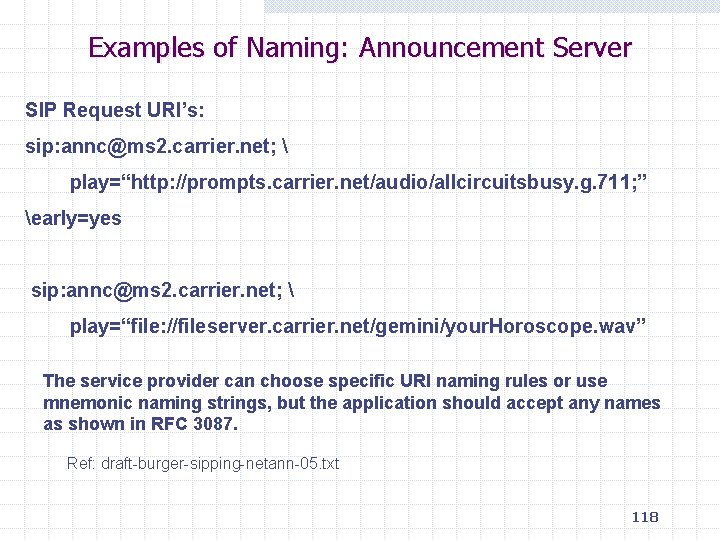
Examples of Naming: Announcement Server SIP Request URI’s: sip: annc@ms 2. carrier. net; play=“http: //prompts. carrier. net/audio/allcircuitsbusy. g. 711; ” early=yes sip: annc@ms 2. carrier. net; play=“file: //fileserver. carrier. net/gemini/your. Horoscope. wav” The service provider can choose specific URI naming rules or use mnemonic naming strings, but the application should accept any names as shown in RFC 3087. Ref: draft-burger-sipping-netann-05. txt 118
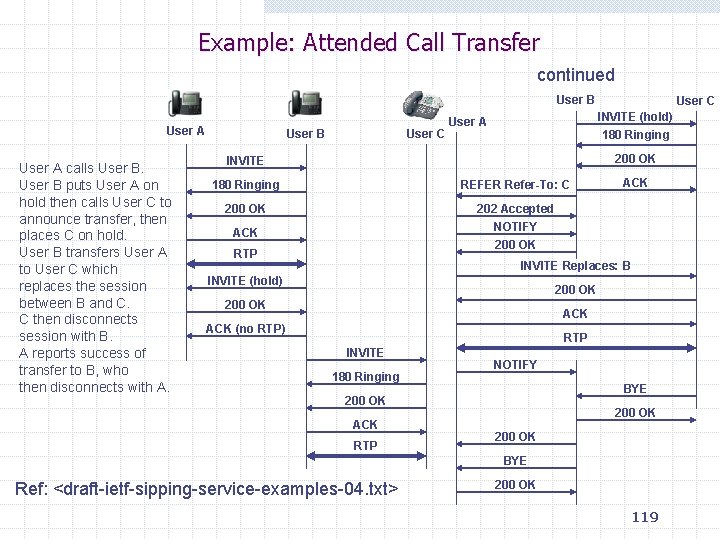
Example: Attended Call Transfer continued User B User A calls User B puts User A on hold then calls User C to announce transfer, then places C on hold. User B transfers User A to User C which replaces the session between B and C. C then disconnects session with B. A reports success of transfer to B, who then disconnects with A. User B User C INVITE (hold) 180 Ringing User A 200 OK INVITE 180 Ringing REFER Refer-To: C 200 OK 202 Accepted NOTIFY 200 OK ACK RTP ACK INVITE Replaces: B INVITE (hold) 200 OK ACK (no RTP) RTP INVITE 180 Ringing NOTIFY BYE 200 OK ACK RTP 200 OK BYE Ref: <draft-ietf-sipping-service-examples-04. txt> 200 OK 119
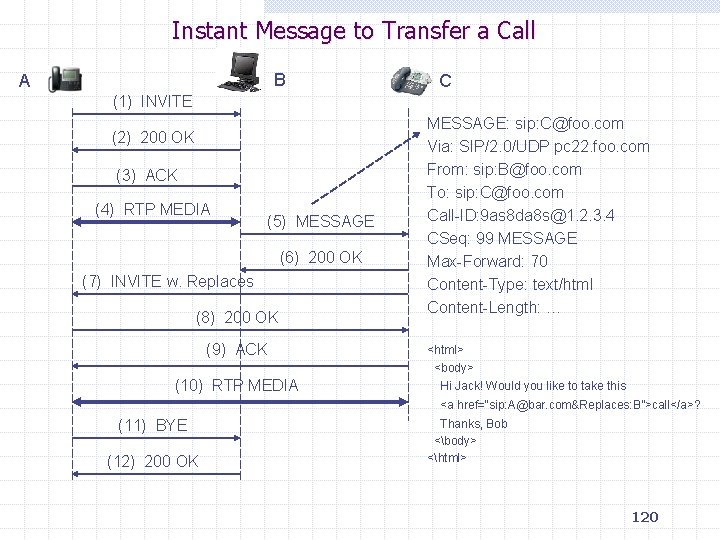
Instant Message to Transfer a Call B A C (1) INVITE (2) 200 OK (3) ACK (4) RTP MEDIA (5) MESSAGE (6) 200 OK (7) INVITE w. Replaces (8) 200 OK (9) ACK (10) RTP MEDIA MESSAGE: sip: C@foo. com Via: SIP/2. 0/UDP pc 22. foo. com From: sip: B@foo. com To: sip: C@foo. com Call-ID: 9 as 8 da 8 s@1. 2. 3. 4 CSeq: 99 MESSAGE Max-Forward: 70 Content-Type: text/html Content-Length: … <html> <body> Hi Jack! Would you like to take this <a href=“sip: A@bar. com&Replaces: B”>call</a>? (11) BYE (12) 200 OK Thanks, Bob <body> <html> 120
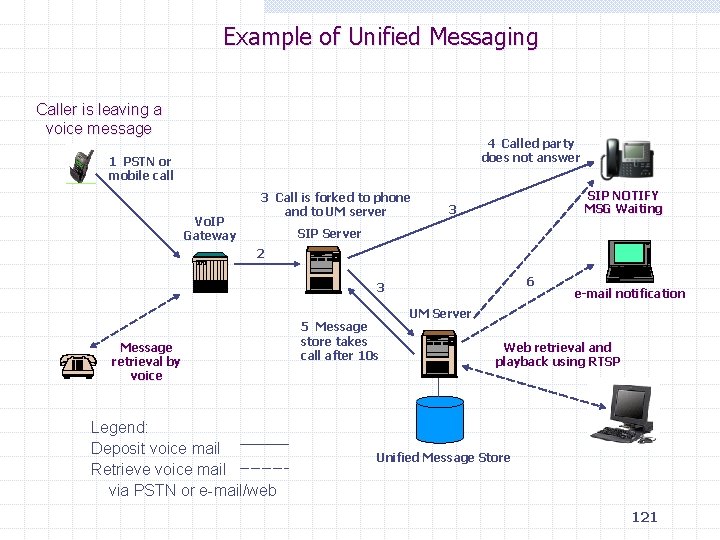
Example of Unified Messaging Caller is leaving a voice message 4 Called party does not answer 1 PSTN or mobile call Vo. IP Gateway 3 Call is forked to phone and to UM server SIP NOTIFY MSG Waiting 3 SIP Server 2 6 3 Message retrieval by voice Legend: Deposit voice mail Retrieve voice mail via PSTN or e-mail/web 5 Message store takes call after 10 s e-mail notification UM Server Web retrieval and playback using RTSP Unified Message Store 121
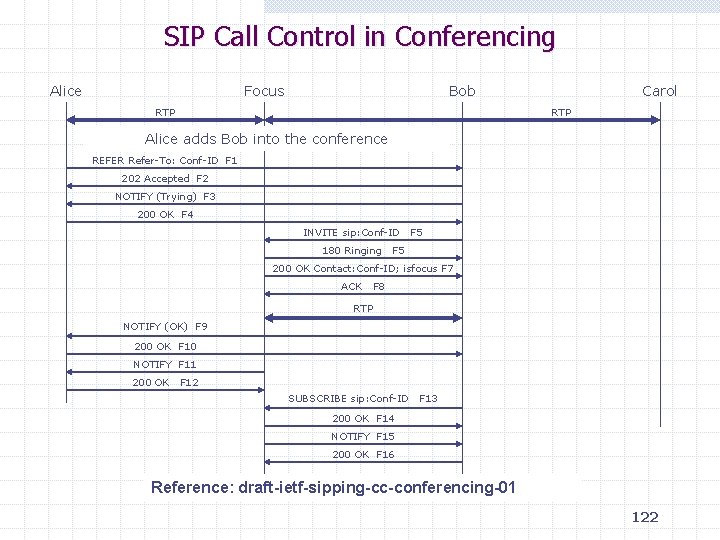
SIP Call Control in Conferencing Alice Focus Bob RTP Carol RTP Alice adds Bob into the conference REFER Refer-To: Conf-ID F 1 202 Accepted F 2 NOTIFY (Trying) F 3 200 OK F 4 INVITE sip: Conf-ID 180 Ringing F 5 200 OK Contact: Conf-ID; isfocus F 7 ACK F 8 RTP NOTIFY (OK) F 9 200 OK F 10 NOTIFY F 11 200 OK F 12 SUBSCRIBE sip: Conf-ID F 13 200 OK F 14 NOTIFY F 15 200 OK F 16 Reference: draft-ietf-sipping-cc-conferencing-01 122
SIP Deployment
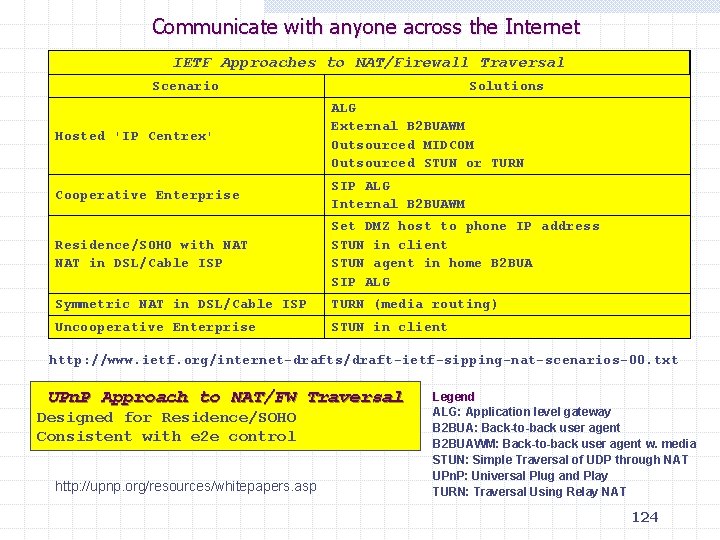
Communicate with anyone across the Internet IETF Approaches to NAT/Firewall Traversal Scenario Solutions Hosted 'IP Centrex' ALG External B 2 BUAWM Outsourced MIDCOM Outsourced STUN or TURN Cooperative Enterprise SIP ALG Internal B 2 BUAWM Residence/SOHO with NAT in DSL/Cable ISP Set DMZ host to phone IP address STUN in client STUN agent in home B 2 BUA SIP ALG Symmetric NAT in DSL/Cable ISP TURN (media routing) Uncooperative Enterprise STUN in client http: //www. ietf. org/internet-drafts/draft-ietf-sipping-nat-scenarios-00. txt UPn. P Approach to NAT/FW Traversal Designed for Residence/SOHO Consistent with e 2 e control http: //upnp. org/resources/whitepapers. asp Legend ALG: Application level gateway B 2 BUA: Back-to-back user agent B 2 BUAWM: Back-to-back user agent w. media STUN: Simple Traversal of UDP through NAT UPn. P: Universal Plug and Play TURN: Traversal Using Relay NAT 124
The B 2 BUA Dilemma and Challenges Back-to-back user agents (B 2 BUA) perform useful functions, but B 2 BUA contradict the e 2 e principle (IETF SIP/SIPPING mailing lists) and breaks the e 2 e security between users. All media streams need to pass the B 2 BUA: Precautions are required Keep-alive traffic load. Compromises: Maintain transparency Full end user control Provide CALEA 125
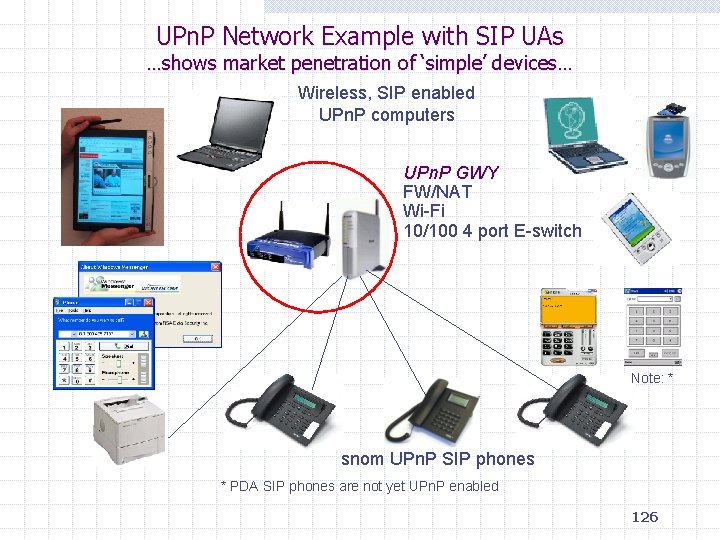
UPn. P Network Example with SIP UAs …shows market penetration of ‘simple’ devices… Wireless, SIP enabled UPn. P computers UPn. P GWY FW/NAT Wi-Fi 10/100 4 port E-switch Note: * snom UPn. P SIP phones * PDA SIP phones are not yet UPn. P enabled 126
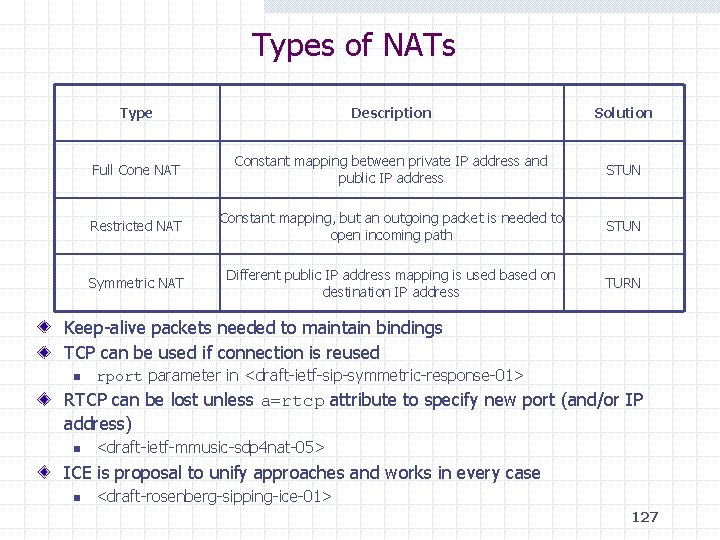
Types of NATs Type Description Solution Full Cone NAT Constant mapping between private IP address and public IP address STUN Restricted NAT Constant mapping, but an outgoing packet is needed to open incoming path STUN Symmetric NAT Different public IP address mapping is used based on destination IP address TURN Keep-alive packets needed to maintain bindings TCP can be used if connection is reused n rport parameter in <draft-ietf-sip-symmetric-response-01> RTCP can be lost unless a=rtcp attribute to specify new port (and/or IP address) n <draft-ietf-mmusic-sdp 4 nat-05> ICE is proposal to unify approaches and works in every case n <draft-rosenberg-sipping-ice-01> 127
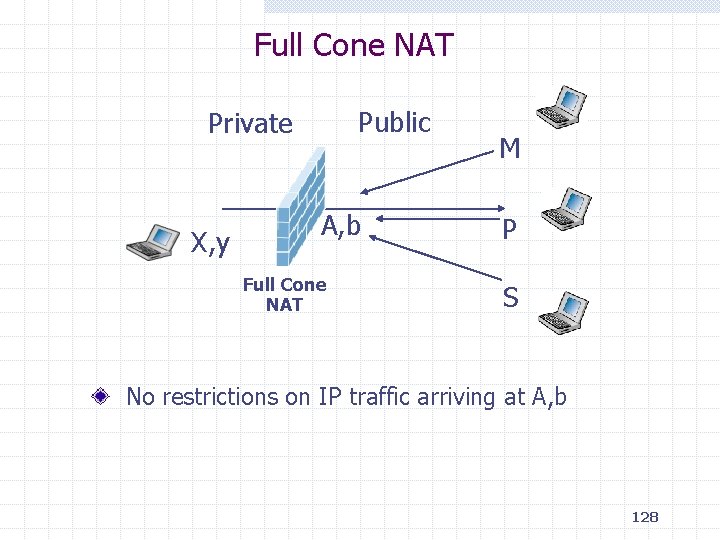
Full Cone NAT Public Private X, y A, b Full Cone NAT M P S No restrictions on IP traffic arriving at A, b 128
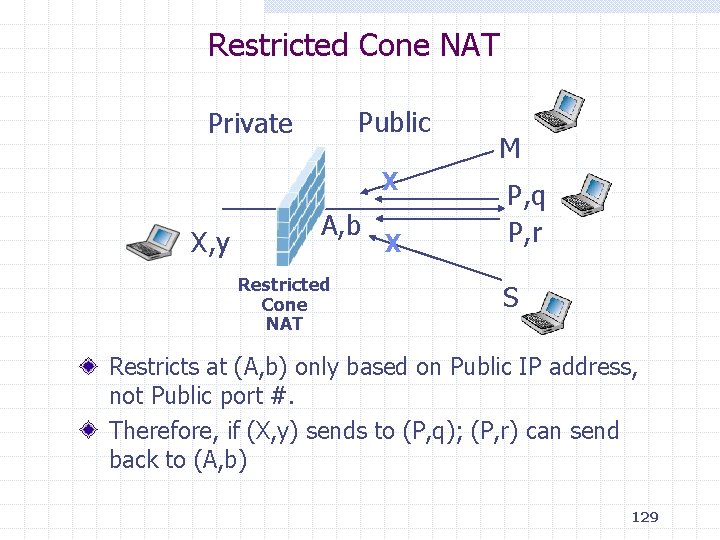
Restricted Cone NAT Public Private X X, y A, b Restricted Cone NAT X M P, q P, r S Restricts at (A, b) only based on Public IP address, not Public port #. Therefore, if (X, y) sends to (P, q); (P, r) can send back to (A, b) 129
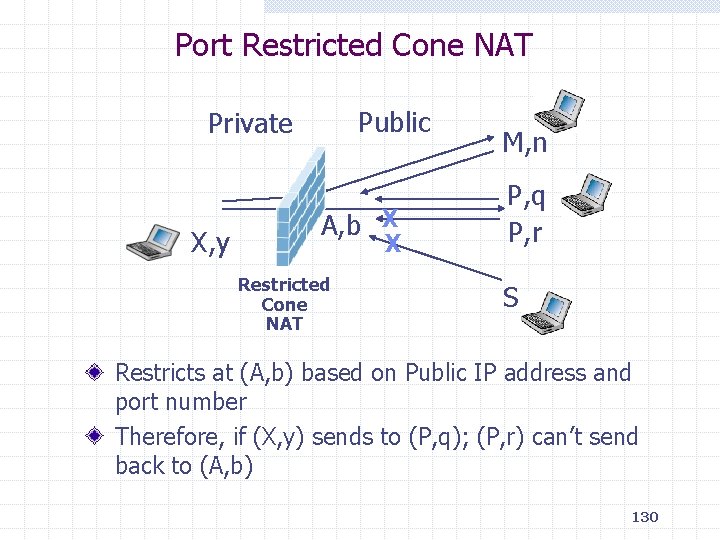
Port Restricted Cone NAT Public Private X, y A, b X X Restricted Cone NAT M, n P, q P, r S Restricts at (A, b) based on Public IP address and port number Therefore, if (X, y) sends to (P, q); (P, r) can’t send back to (A, b) 130
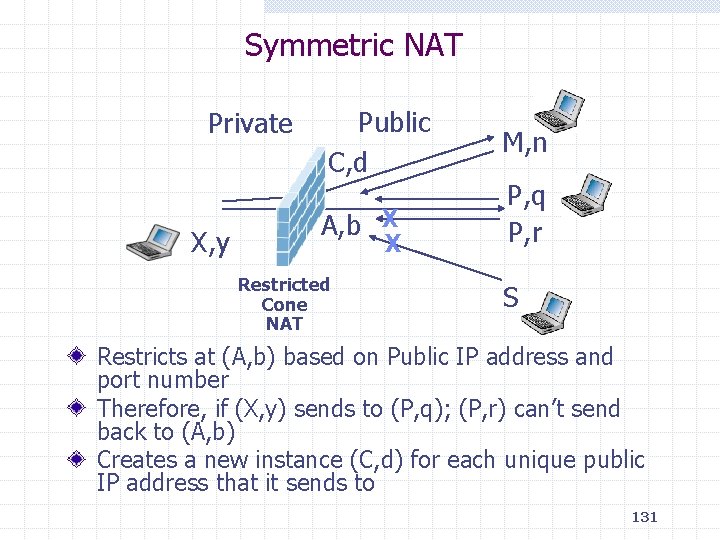
Symmetric NAT Private X, y Public C, d A, b X X Restricted Cone NAT M, n P, q P, r S Restricts at (A, b) based on Public IP address and port number Therefore, if (X, y) sends to (P, q); (P, r) can’t send back to (A, b) Creates a new instance (C, d) for each unique public IP address that it sends to 131
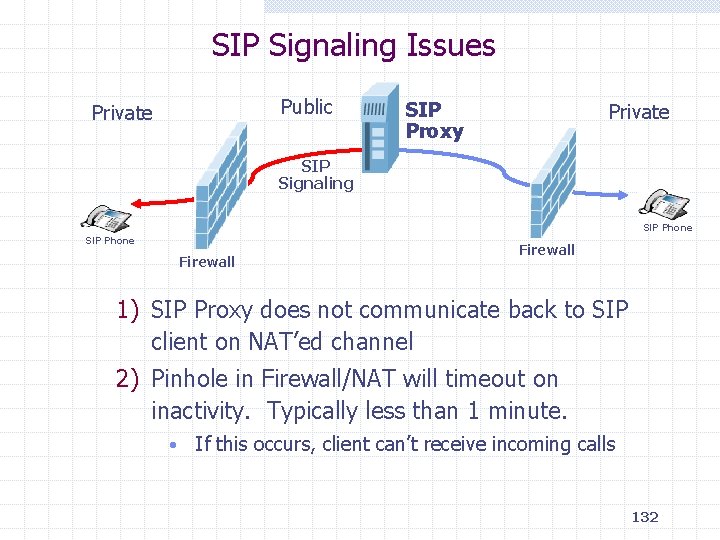
SIP Signaling Issues Public Private SIP Proxy Private SIP Signaling SIP Phone Firewall 1) SIP Proxy does not communicate back to SIP client on NAT’ed channel 2) Pinhole in Firewall/NAT will timeout on inactivity. Typically less than 1 minute. • If this occurs, client can’t receive incoming calls 132
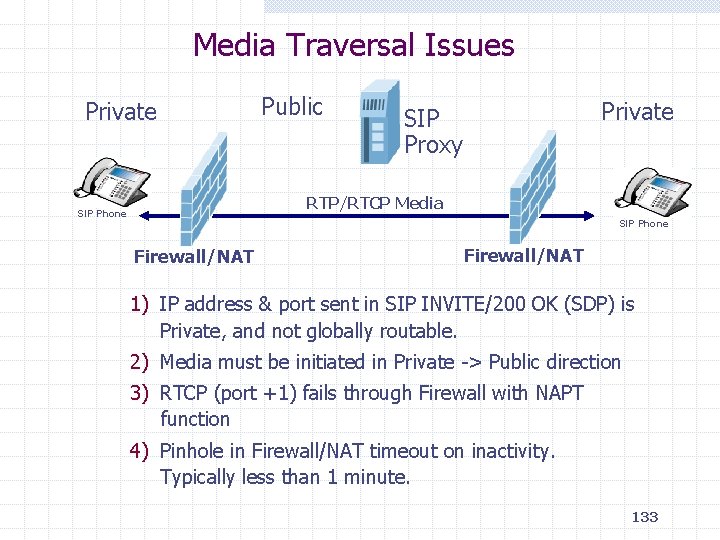
Media Traversal Issues Private Public Private SIP Proxy RTP/RTCP Media SIP Phone Firewall/NAT 1) IP address & port sent in SIP INVITE/200 OK (SDP) is Private, and not globally routable. 2) Media must be initiated in Private -> Public direction 3) RTCP (port +1) fails through Firewall with NAPT function 4) Pinhole in Firewall/NAT timeout on inactivity. Typically less than 1 minute. 133
Application Level Gateway Solution Firewall/NAT is SIP aware, and modifies messages appropriately Application Level Gateways (ALG) have serious Limitations which include scalability and speed to deploy new applications Requires an upgrade to the installed base of Firewall and NATs 134
![STUN Solution Private Public [A, b] STUN Client A, b X, y S, t](http://slidetodoc.com/presentation_image_h2/ee5d63b993843d41070e5ce2310ca733/image-135.jpg "STUN Solution Private Public [A, b] STUN Client A, b X, y S, t")
STUN Solution Private Public [A, b] STUN Client A, b X, y S, t STUN Server NAT IETF RFC 3489 Protocol for determining public IP address allocated by NAT Does not work with ‘Symmetric’ NAT used by most corporations For non-symmetric NATs, does not require a NAT upgrade Does not work if both clients are behind same NAT Not an end-to-end solution, ie all clients need STUN support SIP clients now coming out with STUN support Adds complexity to SIP clients and proxies 135
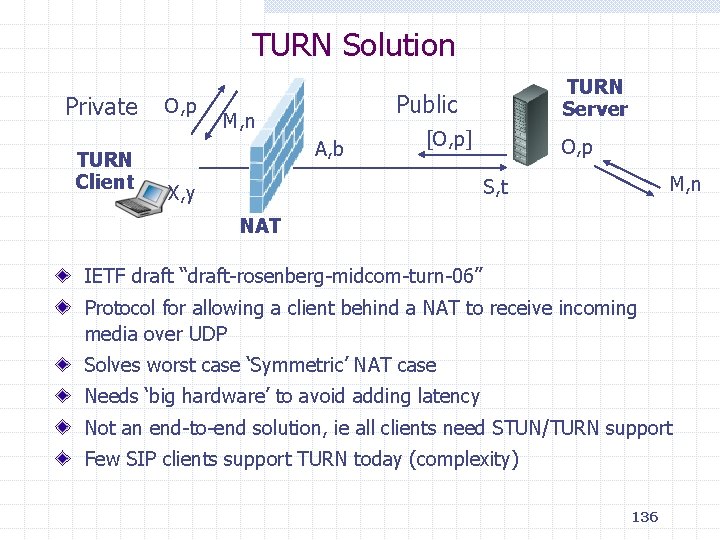
TURN Solution Private TURN Client O, p TURN Server Public M, n A, b [O, p] O, p M, n S, t X, y NAT IETF draft “draft-rosenberg-midcom-turn-06” Protocol for allowing a client behind a NAT to receive incoming media over UDP Solves worst case ‘Symmetric’ NAT case Needs ‘big hardware’ to avoid adding latency Not an end-to-end solution, ie all clients need STUN/TURN support Few SIP clients support TURN today (complexity) 136
ICE Solution Interactive Connectivity Establishment (ICE) IETF draft “draft-ietf-mmusic-ice-03” Allows peers to discover NAT types and client capabilities Will utilize existing protocols such as STUN and TURN Adds significant complexity to a SIP client Limited client support Works with all types of NATs Requires each peer to support a traversal method 137
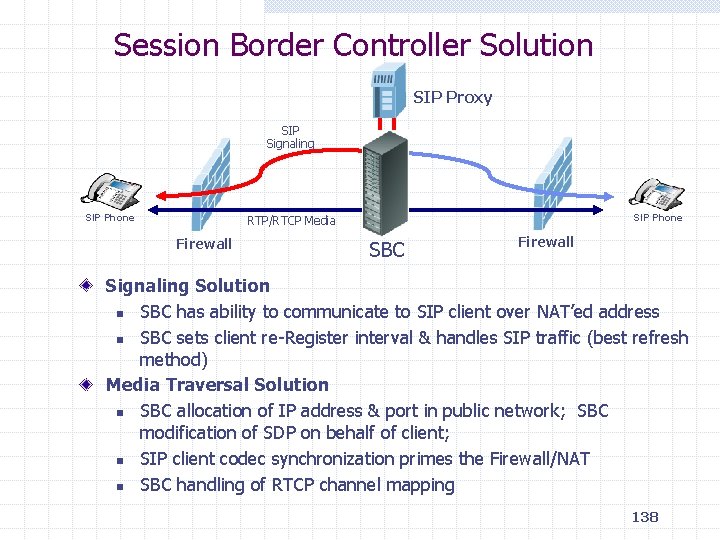
Session Border Controller Solution SIP Proxy SIP Signaling SIP Phone RTP/RTCP Media Firewall SBC Firewall Signaling Solution n SBC has ability to communicate to SIP client over NAT’ed address n SBC sets client re-Register interval & handles SIP traffic (best refresh method) Media Traversal Solution n SBC allocation of IP address & port in public network; SBC modification of SDP on behalf of client; n SIP client codec synchronization primes the Firewall/NAT n SBC handling of RTCP channel mapping 138
Global SIP/IMS deployment needs IPv 6 Introduction of SIP-based peer-to-peer services is an important step after current client-server based services. IP Multimedia Subsystem (IMS) is a service infrastructure based on the use of Session Initiation Protocol (SIP). n n 3 GPP Release 5 and 6 specifications 3 GPP 2 specifications In order to make peer-to-peer services work between different operators' networks, IPv 6 is needed - peer-to-peer services work well only with public IP addresses. n n Small scale IMS deployment / piloting can be started with IPv 4. IPv 6 is vital for wider scale, global IMS deployment. 139
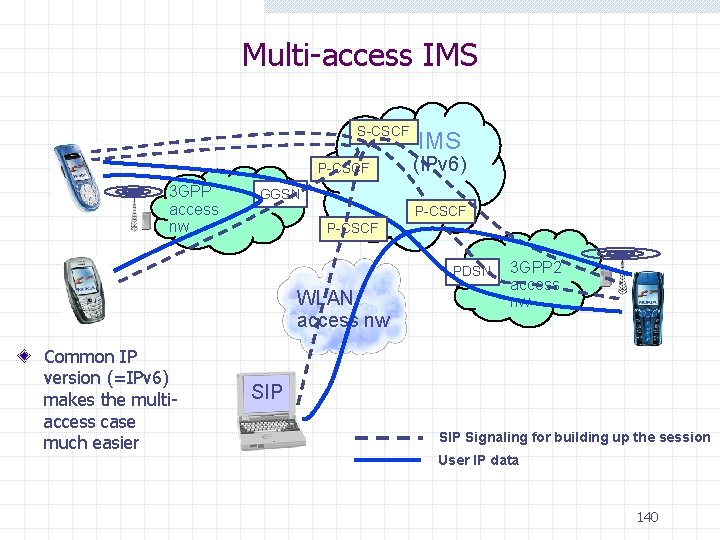
Multi-access IMS S-CSCF P-CSCF 3 GPP access nw IMS (IPv 6) GGSN P-CSCF PDSN WLAN access nw Common IP version (=IPv 6) makes the multiaccess case much easier 3 GPP 2 access nw SIP Signaling for building up the session User IP data 140
- Slides: 140