
Simplify Payables Payments Mekorma MultiBatch Management MMM Simplify
Simplify Payables Payments Mekorma Multi-Batch Management (MMM) Simplify System Administration GP Power Tools Presented by Ora Goldman, CEO, Mekorma Tweet During today’s meeting: @GPUG, #GPUGColorado, #GPUGMekorma 1
Mekorma Multi-Batch Management (MMM) Builds, prints and posts Payables Check and EFT batches across all checkbooks and companies from one window. 2
Mekorma Multi-Batch Management (MMM) Solves: Loss of Productivity Loss of Accuracy Employee Frustration 3
Benefits of MMM • Automates AP process • Reduces AP processing time • Runs across companies/across checkbooks • Can be run in any company • Allows you to create batches automatically based on criteria • Multiple types of criteria can be used to create check/EFT batches • Batches are built, processed, and posted on one screen 4
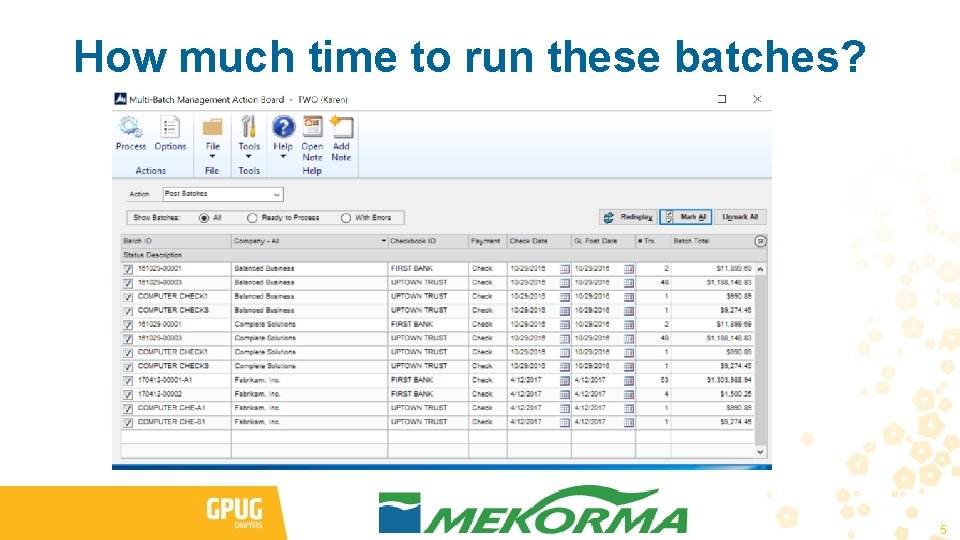
How much time to run these batches? 5
Mekorma Multi-Batch Management DEMO 6
MMM Action Review • Check Selection • Requesting Approval or Printing Edit Lists • Printing Checks • EFT Remittance Processing • Posting • Generating EFT files • Generating Safe Pay files 7
MMM Leverages Dynamics • Respects all business rules for selecting, printing, posting • Batches can be edited by Edit Check Batch • Batches can go through Mekorma MICR approval system. 8
MMM Benefits • Makes payables life easier • Saves time • Makes payables more accurate • Helps you do more with less • Installation is a breeze/Setup is simple • Extremely affordable 9
Introductory MMM Pricing • This is an add-on for those using Mekorma MICR • Up to 20 batches a month for $50 • Over 20 batches a month - Introductory Pricing of $0. 99 per batch with all fees waived until 01/01/2017 • All clients on product before 01/01/2017 will keep introductory price for 1 year. 10
MMM Q&A 11
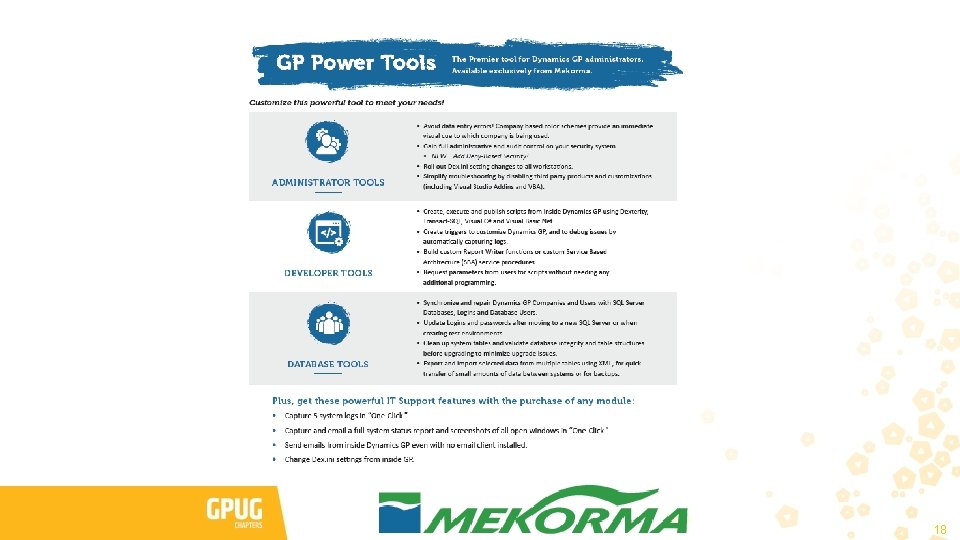
GP Power Tools 12
GP Power Tools Demonstration Agenda Usability Enhancements Resources and Security Troubleshooting Scripting and Customization Database Maintenance 13
GP Power Tools Usability Enhancements Company Visual Cues Color Coding Company ID in Window Title Long Company Names Password Expiry Warning Window Inside of visible space 14
GP Power Tools Troubleshooting Capturing Screenshots Capturing System Logs 15
GP Power Tools Database Maintenance • Run before your upgrade! • Clean Up Dynamics Utilities Tables—e. g. phantom companies • Validate Company Account Framework • Fix Database Table Structure Errors • Plus, run when upgrading or creating test environments! • Synchronize SQL Logins and Databases 16
GP Power Tools Security Access with Security Profiler Deny Based Security 17
18
Portal Links GP Power Tools Portal http: //Winthrop. DC. com/GPPT Support Debugging Tool Portal (Retired) http: //aka. ms/SDT Note: SDT Portal still has useful information and examples Resource Information and Security Features https: //blogs. msdn. microsoft. com/developingfordynamicsgp/2010/08/30/update-how-toidentify-the-security-tasks-and-security-roles-using-the-support-debugging-tool/ 19
Blogs David Musgrave’s Winthrop Development Consultants Blog http: //www. winthropdc. com/blog The Dynamics GP Geek blog (by Béat Bucher) http: //dyngpbeat. wordpress. com/ Developing for Microsoft Dynamics GP Blog – retired (by David Musgrave & the Developer Support Team) http: //blogs. msdn. com/Developing. For. Dynamics. GP/ or http: //aka. ms/Dev 4 Dyn. GP 20
- Slides: 20