
Simple Arrays Eric Roberts CS 106 A February
Simple Arrays Eric Roberts CS 106 A February 10, 2010
Once upon a time. . .
Cryptograms • A cryptogram is a puzzle in which a message is encoded by replacing each letter in the original text with some other letter. The substitution pattern remains the same throughout the message. Your job in solving a cryptogram is to figure out this correspondence. • One of the most famous cryptograms was written by Edgar Allan Poe in his short story “The Gold Bug. ” • In this story, Poe describes the technique of assuming that the most common letters in the coded message correspond to the most common letters in English, which are E, T, A, O, I, N, S, H, R, D, L, and U. Edgar Allan Poe (1809 -1849)
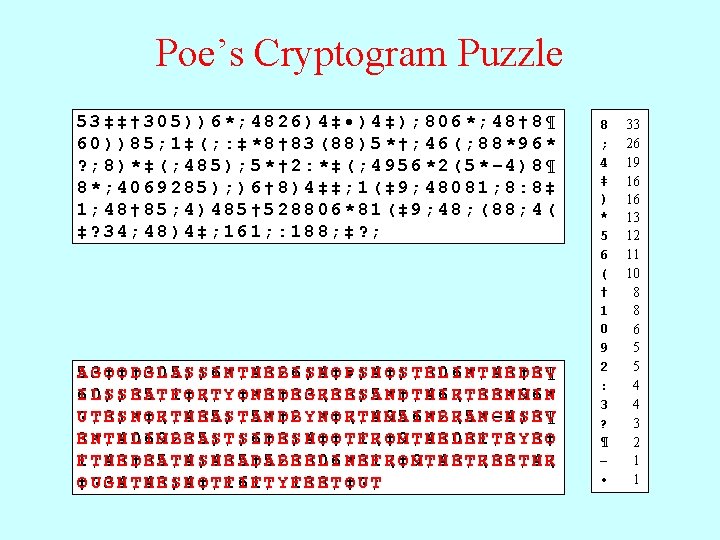
Poe’s Cryptogram Puzzle 53‡‡† 305))6*; 4826)4‡ • )4‡); 806*; 48† 8¶ 60))85; 1‡(; : ‡*8† 83(88)5*†; 46(; 88*96* ? ; 8)*‡(; 485); 5*† 2: *‡(; 4956*2(5*– 4)8¶ 8*; 4069285); )6† 8)4‡‡; 1(‡ 9; 48081; 8: 8‡ 1; 48† 85; 4)485† 528806*81(‡ 9; 48; (88; 4( ‡? 34; 48)4‡; 161; : 188; ‡? ; AG 5 3 O ‡O ‡D †G 3 L 0 A 5 S )S )I 6 N *T ; H 4 E 8 B 2 I 6 S )H 4 O ‡P • S )H 4 O ‡S )T ; E 8 L 0 I 6 N *T ; H 4 E 8 D †E 8 V ¶ 6 L I 0 S )S )E 8 A 5 T ; F 1 O ‡R (T ; Y : O ‡N *E 8 D †E 8 G 3 R (E 8 E 8 S )A 5 N *D †T ; H 4 I 6 R (T ; E 8 E 8 N *M 9 I 6 N * ? T U ; E 8 S )N *O ‡R (T ; H 4 E 8 A 5 S )T ; A 5 N *D †B 2 Y : N *O ‡R (T ; H 4 M 9 A 5 I 6 N *B 2 R (A 5 N *C –H 4 S )E 8 V ¶ 8 N E *T ; H 4 L 0 I 6 M 9 B 2 E 8 A 5 S )T ; S )I 6 D †E 8 S )H 4 O ‡O ‡T ; F 1 R (O ‡M 9 T ; H 4 E 8 L 0 E 8 F 1 T ; E 8 Y : E 8 O ‡ 1 T F ; H 4 E 8 D †E 8 A 5 T ; H 4 S )H 4 E 8 A 5 D †A 5 B 2 E 8 E 8 L 0 I 6 N *E 8 F 1 R (O ‡M 9 T ; H 4 E 8 T ; R (E 8 E 8 T ; H 4 R ( ‡U O ? G 3 H 4 T ; H 4 E 8 S )H 4 O ‡T ; F 1 I 6 F 1 T ; Y : F 1 E 8 E 8 T ; O ‡U ? T ; 8 ; 4 ‡ ) * 5 6 ( † 1 0 9 2 : 3 ? ¶ – • 33 26 19 16 16 13 12 11 10 8 8 6 5 5 4 4 3 2 1 1
Simple Arrays
Introduction to Arrays • An array is a collection of individual data values with two distinguishing characteristics: 1. An array is ordered. You must be able to count off the values: here is the first, here is the second, and so on. 2. An array is homogeneous. Every value in the array must have the same type. • The individual values in an array are called elements. The type of those elements (which must be the same because arrays are homogeneous) is called the element type. The number of elements is called the length of the array. • Each element is identified by its position number in the array, which is called its index. In Java, index numbers always begin with 0 and therefore extends up to one less than the length of the array.
Declaring an Array Variable • As with any other variable, array variables must be declared before you use them. In Java, the most common syntax for declaring an array variable looks like this: type[] name = new type[n]; where type is the element type, name is the array name, and n is an integer expression indicating the number of elements. • This declaration syntax combines two operations. The part of the line to the left of the equal sign declares the variable; the part to the right creates an array value with the specified number of elements and then assigns it to the array variable. • Even though the two operations are distinct, it will help you avoid errors if you make a habit of initializing your arrays when you declare them.
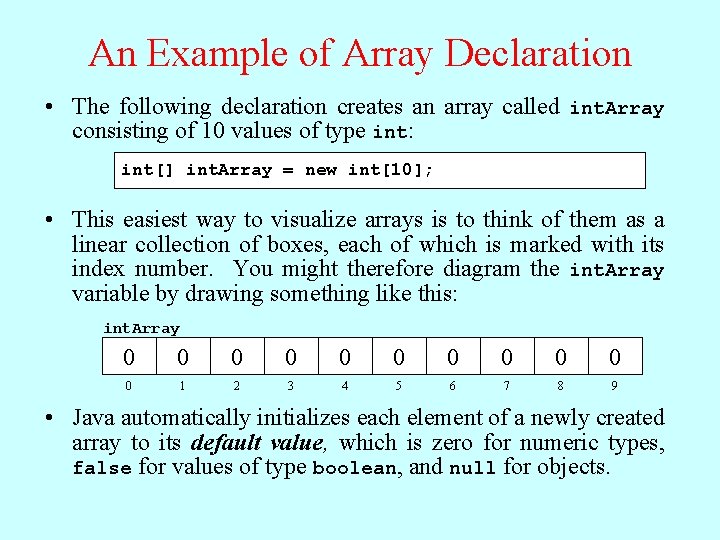
An Example of Array Declaration • The following declaration creates an array called int. Array consisting of 10 values of type int: int[] int. Array = new int[10]; • This easiest way to visualize arrays is to think of them as a linear collection of boxes, each of which is marked with its index number. You might therefore diagram the int. Array variable by drawing something like this: int. Array 0 0 0 1 2 3 4 5 6 7 8 9 • Java automatically initializes each element of a newly created array to its default value, which is zero for numeric types, false for values of type boolean, and null for objects.
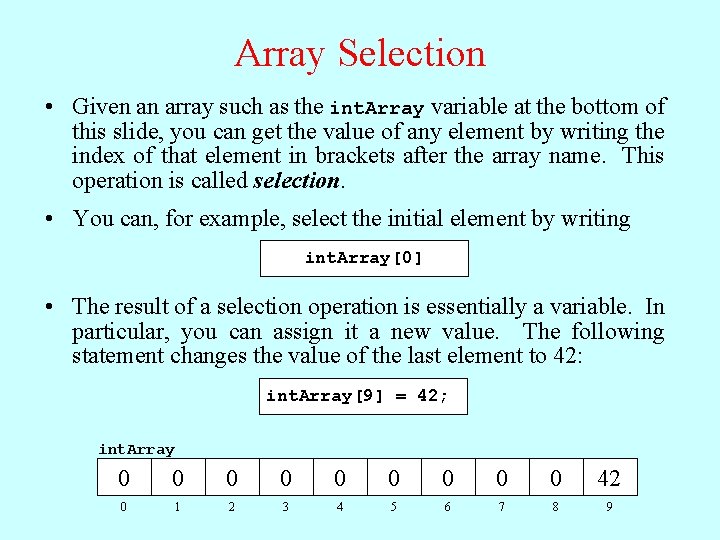
Array Selection • Given an array such as the int. Array variable at the bottom of this slide, you can get the value of any element by writing the index of that element in brackets after the array name. This operation is called selection. • You can, for example, select the initial element by writing int. Array[0] • The result of a selection operation is essentially a variable. In particular, you can assign it a new value. The following statement changes the value of the last element to 42: int. Array[9] = 42; int. Array 0 0 0 0 0 42 0 1 2 3 4 5 6 7 8 9
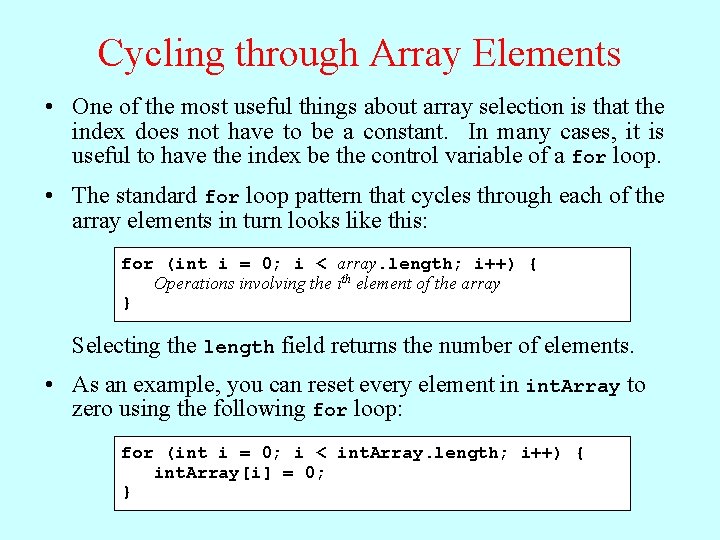
Cycling through Array Elements • One of the most useful things about array selection is that the index does not have to be a constant. In many cases, it is useful to have the index be the control variable of a for loop. • The standard for loop pattern that cycles through each of the array elements in turn looks like this: for (int i = 0; i < array. length; i++) { Operations involving the ith element of the array } Selecting the length field returns the number of elements. • As an example, you can reset every element in int. Array to zero using the following for loop: for (int i = 0; i < int. Array. length; i++) { int. Array[i] = 0; }
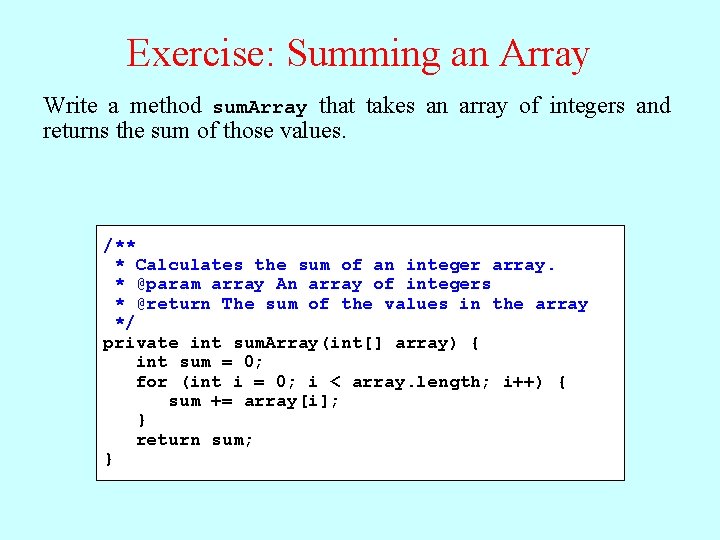
Exercise: Summing an Array Write a method sum. Array that takes an array of integers and returns the sum of those values. /** * Calculates the sum of an integer array. * @param array An array of integers * @return The sum of the values in the array */ private int sum. Array(int[] array) { int sum = 0; for (int i = 0; i < array. length; i++) { sum += array[i]; } return sum; }
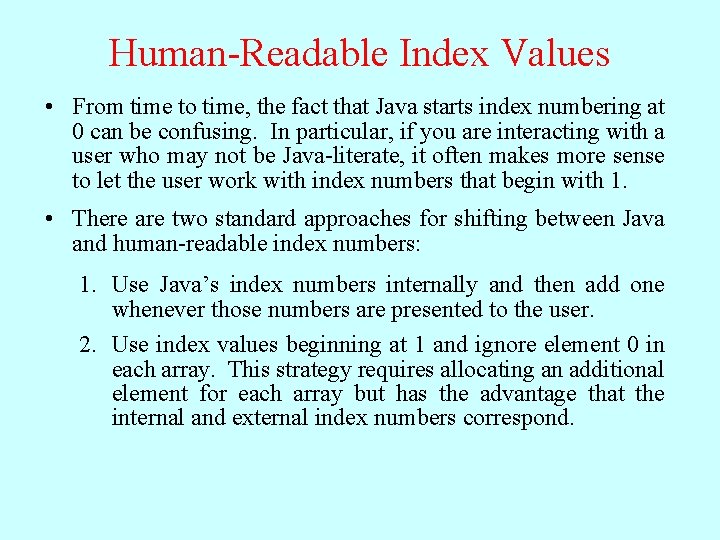
Human-Readable Index Values • From time to time, the fact that Java starts index numbering at 0 can be confusing. In particular, if you are interacting with a user who may not be Java-literate, it often makes more sense to let the user work with index numbers that begin with 1. • There are two standard approaches for shifting between Java and human-readable index numbers: 1. Use Java’s index numbers internally and then add one whenever those numbers are presented to the user. 2. Use index values beginning at 1 and ignore element 0 in each array. This strategy requires allocating an additional element for each array but has the advantage that the internal and external index numbers correspond.
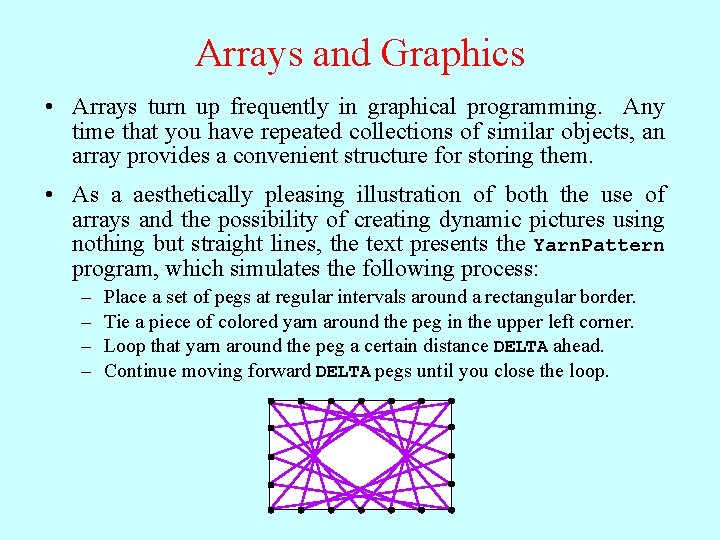
Arrays and Graphics • Arrays turn up frequently in graphical programming. Any time that you have repeated collections of similar objects, an array provides a convenient structure for storing them. • As a aesthetically pleasing illustration of both the use of arrays and the possibility of creating dynamic pictures using nothing but straight lines, the text presents the Yarn. Pattern program, which simulates the following process: – – Place a set of pegs at regular intervals around a rectangular border. Tie a piece of colored yarn around the peg in the upper left corner. Loop that yarn around the peg a certain distance DELTA ahead. Continue moving forward DELTA pegs until you close the loop.
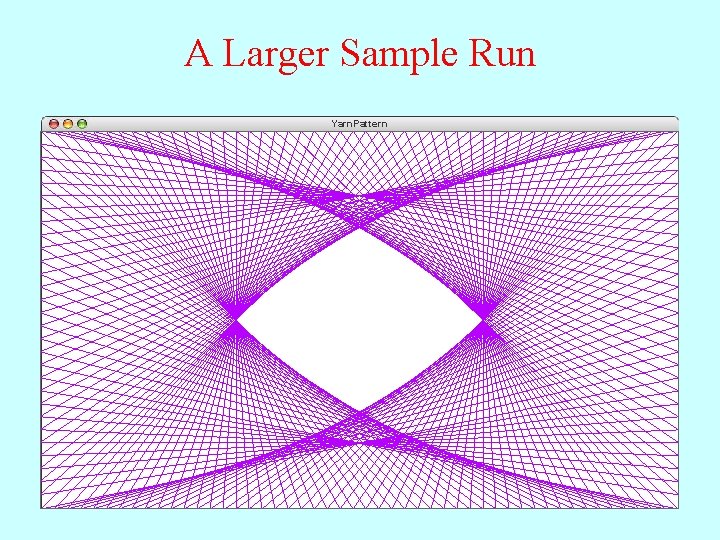
A Larger Sample Run Yarn. Pattern
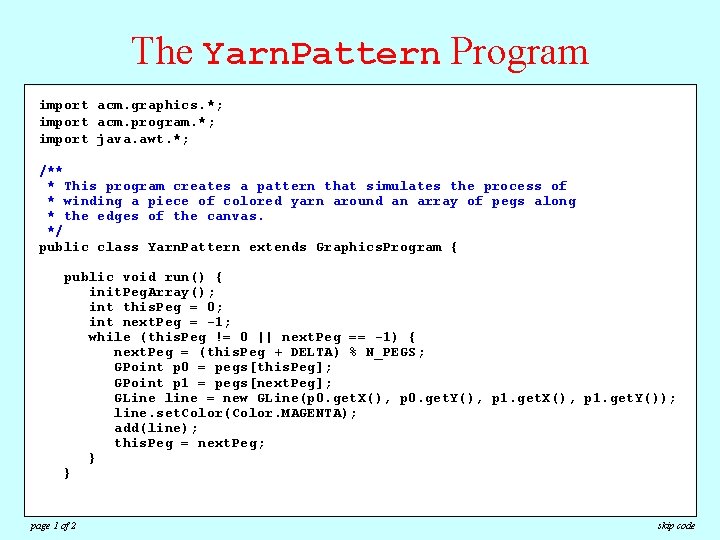
The Yarn. Pattern Program import acm. graphics. *; import acm. program. *; import java. awt. *; /** * This program creates a pattern that simulates the process of * winding a piece of colored yarn around an array of pegs along * the edges of the canvas. */ public class Yarn. Pattern extends Graphics. Program { public void run() { init. Peg. Array(); int this. Peg = 0; int next. Peg = -1; while (this. Peg != 0 || next. Peg == -1) { next. Peg = (this. Peg + DELTA) % N_PEGS; GPoint p 0 = pegs[this. Peg]; GPoint p 1 = pegs[next. Peg]; GLine line = new GLine(p 0. get. X(), p 0. get. Y(), p 1. get. X(), p 1. get. Y()); line. set. Color(Color. MAGENTA); add(line); this. Peg = next. Peg; } } page 1 of 2 skip code
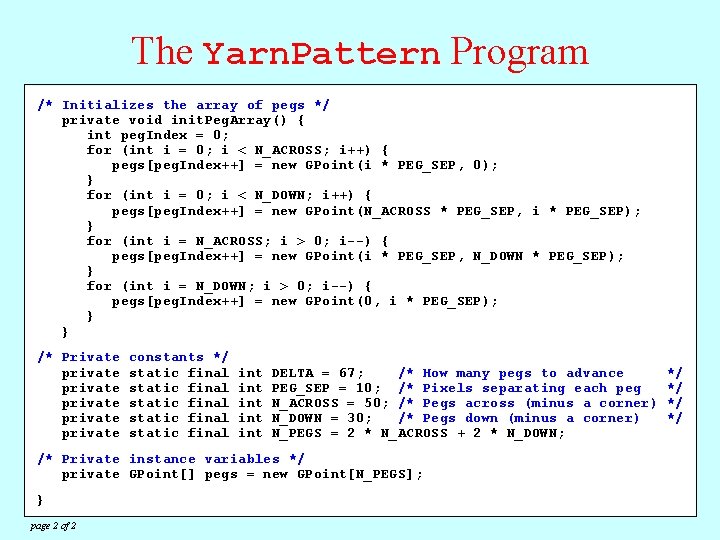
The Yarn. Pattern Program /* Initializes the array of pegs */ import acm. graphics. *; private void init. Peg. Array() { import acm. program. *; peg. Index = 0; importint java. awt. *; for (int i = 0; i < N_ACROSS; i++) { pegs[peg. Index++] = new GPoint(i * PEG_SEP, 0); /** } program creates a pattern that simulates the process of * This for (int i = 0; < N_DOWN; { an array of pegs along * winding a piece of icolored yarni++) around pegs[peg. Index++] = new GPoint(N_ACROSS * PEG_SEP, i * PEG_SEP); * the edges of the canvas. } */ (int. Yarn. Pattern i = N_ACROSS; i > 0; i--) { publicfor class extends Graphics. Program { pegs[peg. Index++] = new GPoint(i * PEG_SEP, N_DOWN * PEG_SEP); } public void run() { for (int i = N_DOWN; i > 0; i--) { init. Peg. Array(); = new GPoint(0, i * PEG_SEP); intpegs[peg. Index++] this. Peg = 0; }int next. Peg = -1; } while (this. Peg != 0 || next. Peg == -1) { = (this. Peg + DELTA) % N_PEGS; /* Privatenext. Peg constants */ GPoint p 0 = pegs[this. Peg]; private static final int DELTA = 67; /* How many pegs to advance */ = pegs[next. Peg]; private. GPoint staticp 1 final int PEG_SEP = 10; /* Pixels separating each peg */ GLine line = new GLine(p 0. get. X(), p 0. get. Y(), p 1. get. X(), p 1. get. Y()); private static final int N_ACROSS = 50; /* Pegs across (minus a corner) */ privateline. set. Color(Color. MAGENTA); static final int N_DOWN = 30; /* Pegs down (minus a corner) */ add(line); private static final int N_PEGS = 2 * N_ACROSS + 2 * N_DOWN; this. Peg = next. Peg; } /* Private instance variables */ } private GPoint[] pegs = new GPoint[N_PEGS]; } page 2 of 2
A Digression on the ++ Operator • The Yarn. Pattern program illustrates a new form of the ++ operator in the various statements with the following form: pegs[peg. Index++] = new GPoint(x, y); • The peg. Index++ expression adds one to peg. Index just as if has all along. The question is what value is used as the index, which depends on where the ++ operator appears: – If the ++ operator comes after a variable, the variable is incremented after the value of the expression is determined. Thus, in this example, the expression pegs[peg. Index++] therefore selects the element of the array at the current value of peg. Index and then adds one to peg. Index afterwards, which moves it on to the next index position. – If the ++ operator comes before a variable, the variable is incremented first and the new value is used in the surrounding context. • The -- operator behaves similarly but subtracts one from the variable instead.
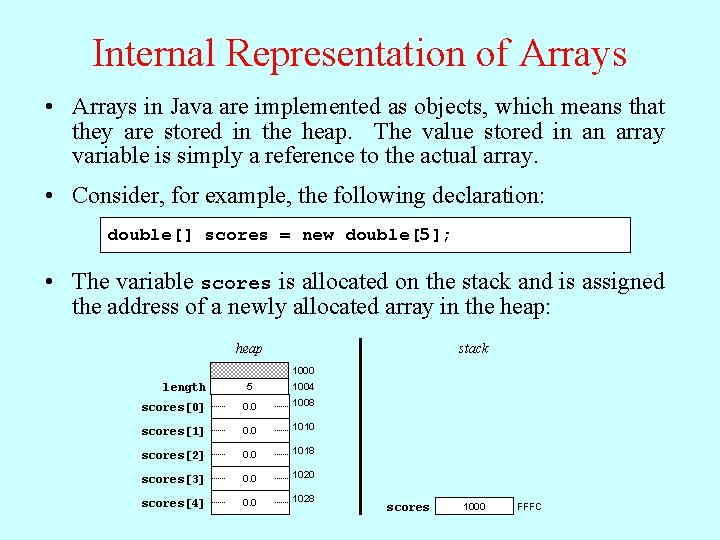
Internal Representation of Arrays • Arrays in Java are implemented as objects, which means that they are stored in the heap. The value stored in an array variable is simply a reference to the actual array. • Consider, for example, the following declaration: double[] scores = new double[5]; • The variable scores is allocated on the stack and is assigned the address of a newly allocated array in the heap: heap stack 1000 length 5 1004 scores[0] 0. 0 1008 scores[1] 0. 0 1010 scores[2] 0. 0 1018 scores[3] 0. 0 1020 scores[4] 0. 0 1028 scores 1000 FFFC
Passing Arrays as Parameters • When you pass an array as a parameter to a method or return a method as a result, only the reference to the array is actually passed between the methods. • The effect of Java’s strategy for representing arrays internally is that the elements of an array are effectively shared between the caller and callee. If a method changes an element of an array passed as a parameter, that change will persist after the method returns. • The next slide contains a simulated version of a program that performs the following actions: 1. Generates an array containing the integers 0 to N-1. 2. Prints out the elements in the array. 3. Reverses the elements in the array. 4. Prints out the reversed array on the console.
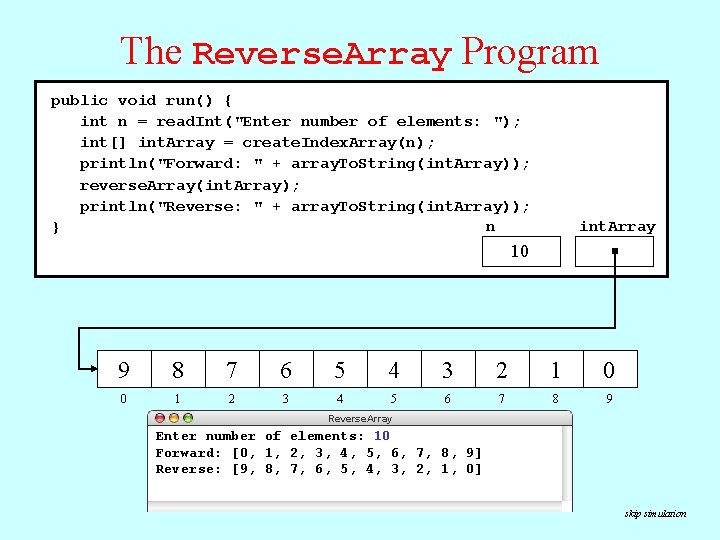
The Reverse. Array Program public void run() { int n = read. Int("Enter number of elements: "); private String array. To. String(int[] array) int[]reverse. Array(int[] void create. Index. Array(int array) n) {{ { int[] int. Array = create. Index. Array(n); String str for int[] (int array i = ==""; 0; new i < int[n]; array. length / 2; i++) { println("Forward: " + array. To. String(int. Array)); private void swap. Elements(int[] array, p 1, int p 2) { for (int i++)int { forswap. Elements(array, ( intii==0; 0; ii<<array. length; n; i, i++ array. length ) { - i - 1); reverse. Array(int. Array); int temp array[p 1]; (i > =0) } if array[i] = str i; += ", "; println("Reverse: " + array. To. String(int. Array)); array[p 1] = array[p 2]; str += array[i]; } } n int. Array } array[p 2] = temp; } return array; in array i array } return "[" + str + "]"; 10 temp p 1 p 2 array } } 5 4 3 2 1 0 10 9345678012 str i 109 array 0 0 10 0123456789 0, 4 5, 6 7, 0, 1, 1 2, 2 3, 3 4, 5 6, 7 8, 8 9 90 180 270 063 054 540 630 720 810 09 0 1 2 3 4 5 6 7 8 9 Reverse. Array Enter number of elements: 10 Forward: [0, 1, 2, 3, 4, 5, 6, 7, 8, 9] Reverse: [9, 8, 7, 6, 5, 4, 3, 2, 1, 0] skip simulation
Using Arrays for Tabulation • Arrays turn out to be useful when you have a set of data values and need to count how many values fall into each of a set of ranges. This process is called tabulation. • Tabulation uses arrays in a slightly different way from those applications that use them to store a list of data. When you implement a tabulation program, you use each data value to compute an index into an integer array that keeps track of how many values fall into that category. • The example of tabulation used in the text is a program that counts how many times each of the 26 letters appears in a sequence of text lines. Such a program would be very useful in solving codes and ciphers, as described on the next slide.
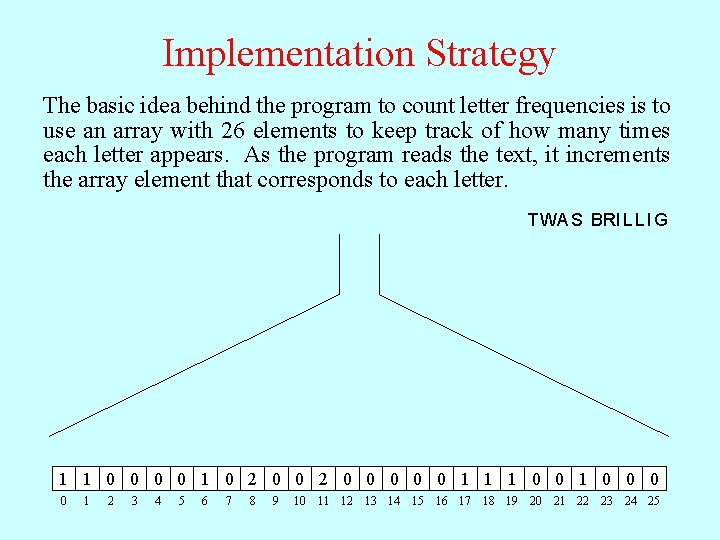
Implementation Strategy The basic idea behind the program to count letter frequencies is to use an array with 26 elements to keep track of how many times each letter appears. As the program reads the text, it increments the array element that corresponds to each letter. T W A S B RI L L I G 10 10 0 2 0 0 0 120 0 0 10 10 1 1 0 0 0 10 0 0 1 2 3 4 5 6 7 8 9 10 11 12 13 14 15 16 17 18 19 20 21 22 23 24 25
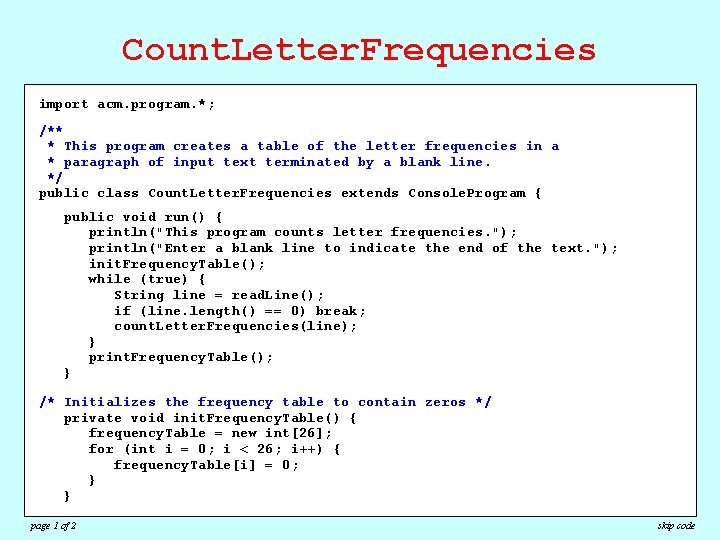
Count. Letter. Frequencies import acm. program. *; /** * This program creates a table of the letter frequencies in a * paragraph of input text terminated by a blank line. */ public class Count. Letter. Frequencies extends Console. Program { public void run() { println("This program counts letter frequencies. "); println("Enter a blank line to indicate the end of the text. "); init. Frequency. Table(); while (true) { String line = read. Line(); if (line. length() == 0) break; count. Letter. Frequencies(line); } print. Frequency. Table(); } /* Initializes the frequency table to contain zeros */ private void init. Frequency. Table() { frequency. Table = new int[26]; for (int i = 0; i < 26; i++) { frequency. Table[i] = 0; } } page 1 of 2 skip code
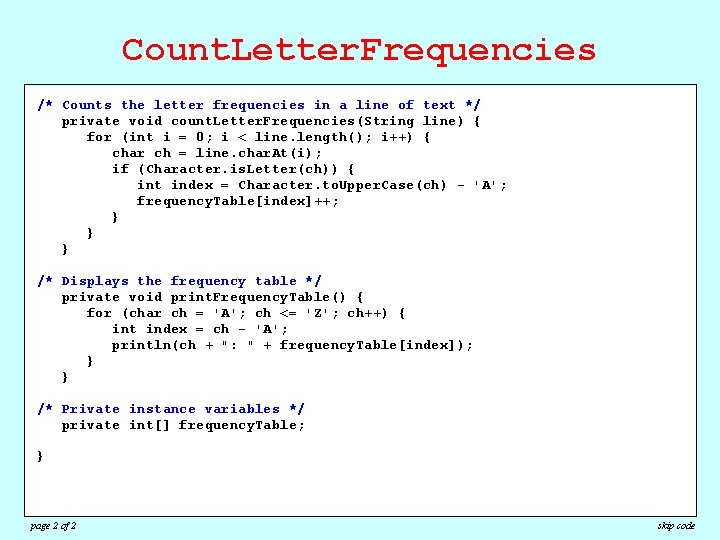
Count. Letter. Frequencies import acm. program. *; /* Counts the letter frequencies in a line of text */ private void count. Letter. Frequencies(String line) { /** for (int i = 0; i < line. length(); i++) { * This program a table of the letter frequencies in a char ch creates = line. char. At(i); * paragraph of input text terminated by a blank line. if (Character. is. Letter(ch)) { */ int index = Character. to. Upper. Case(ch) - 'A'; public class Count. Letter. Frequencies extends Console. Program { frequency. Table[index]++; public} void run() { }println("This program counts letter frequencies. "); } println("Enter a blank line to indicate the end of the text. "); init. Frequency. Table(); while the (true) { /* Displays frequency table */ String line = read. Line(); private void print. Frequency. Table() { (line. length() break; for if (char ch = 'A'; ch==<=0)'Z'; ch++) { count. Letter. Frequencies(line); int index = ch - 'A'; } println(ch + ": " + frequency. Table[index]); }print. Frequency. Table(); }} /* Private Initializes the frequency to contain zeros */ /* instance variables table */ private int[] void init. Frequency. Table() { private frequency. Table; frequency. Table = new int[26]; for (int i = 0; i < 26; i++) { } frequency. Table[i] = 0; } } page 2 of 2 skip code
The End
- Slides: 25