
Silk Route A framework for publishing relational data
Silk. Route: A framework for publishing relational data in XML In ACM Transactions on Databases, 2002 By Mary Fernández, AT&T Labs - Research Dan Suciu, Univ. of Washington Yada Kadiyska, Univ. of Washington Atsuyuki Morishima, Univ. of Tsukuba Wang-Chiew Tan, Univ. of Pennsylvania Presented by Yaniv Kaplan Original slides by M. Fernández, D. Suciu and W. C. Tan
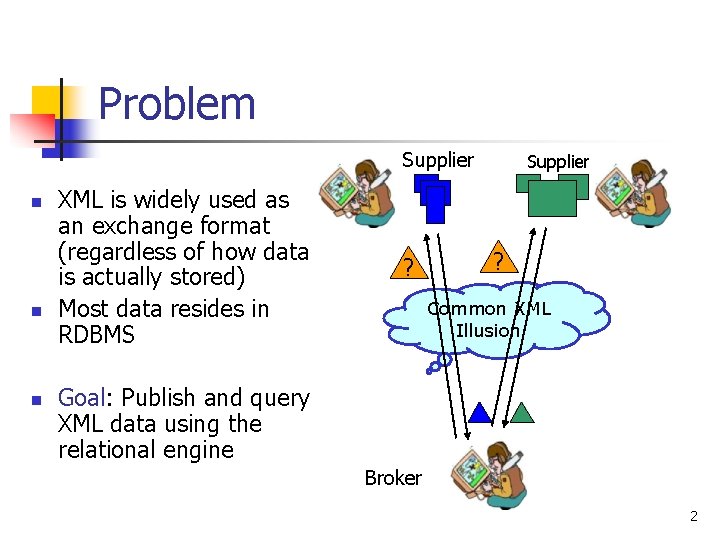
Problem Supplier n n n XML is widely used as an exchange format (regardless of how data is actually stored) Most data resides in RDBMS ? Supplier ? Common XML Illusion Goal: Publish and query XML data using the relational engine Broker 2
Requirements n n n Generality: support general mappings from relations to XML Selectivity: only the required fragments of the XML view should be materialized Efficiency: results should be quickly obtained 3
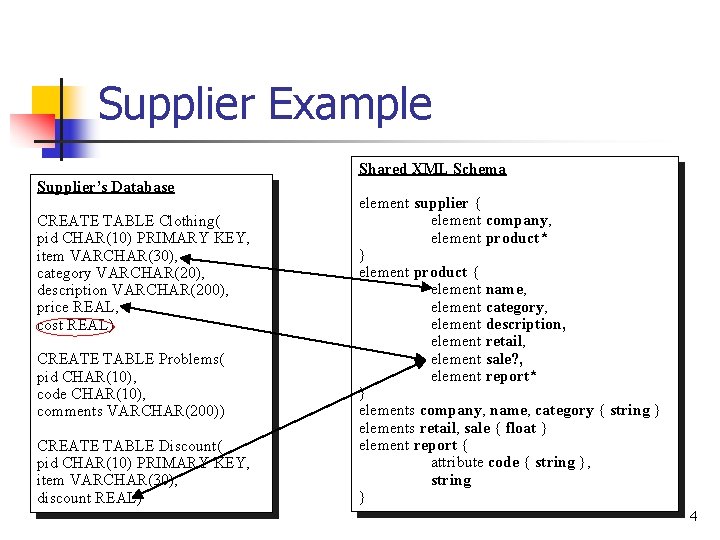
Supplier Example Shared XML Schema Supplier’s Database CREATE TABLE Clothing( pid CHAR(10) PRIMARY KEY, item VARCHAR(30), category VARCHAR(20), description VARCHAR(200), price REAL, cost REAL) CREATE TABLE Problems( pid CHAR(10), code CHAR(10), comments VARCHAR(200)) CREATE TABLE Discount( pid CHAR(10) PRIMARY KEY, item VARCHAR(30), discount REAL) element supplier { element company, element product* } element product { element name, element category, element description, element retail, element sale? , element report* } elements company, name, category { string } elements retail, sale { float } element report { attribute code { string }, string } 4
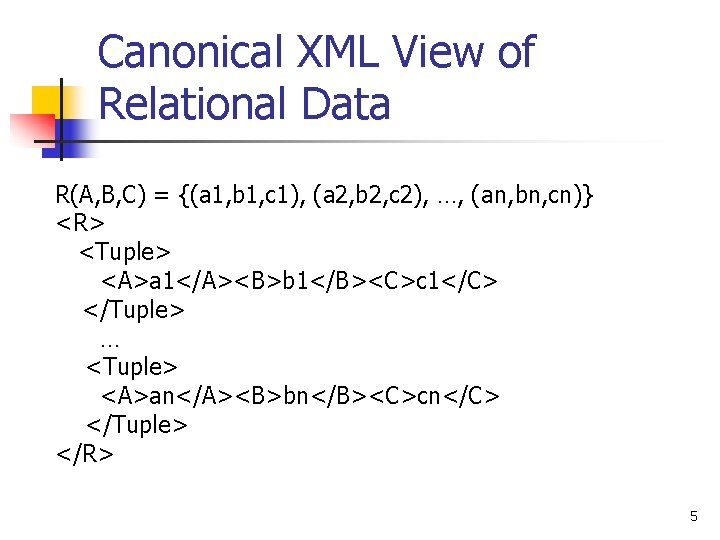
Canonical XML View of Relational Data R(A, B, C) = {(a 1, b 1, c 1), (a 2, b 2, c 2), …, (an, bn, cn)} <R> <Tuple> <A>a 1</A><B>b 1</B><C>c 1</C> </Tuple> … <Tuple> <A>an</A><B>bn</B><C>cn</C> </Tuple> </R> 5
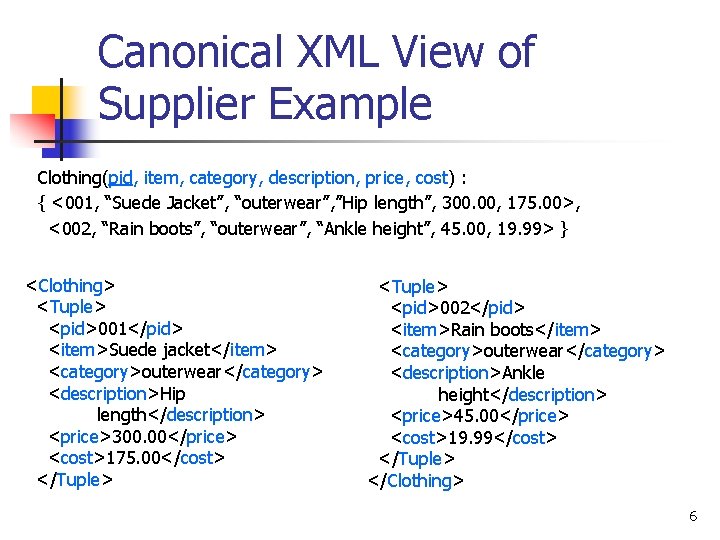
Canonical XML View of Supplier Example Clothing(pid, item, category, description, price, cost) : { <001, “Suede Jacket”, “outerwear”, ”Hip length”, 300. 00, 175. 00>, <002, “Rain boots”, “outerwear”, “Ankle height”, 45. 00, 19. 99> } <Clothing> <Tuple> <pid>001</pid> <item>Suede jacket</item> <category>outerwear</category> <description>Hip length</description> <price>300. 00</price> <cost>175. 00</cost> </Tuple> <pid>002</pid> <item>Rain boots</item> <category>outerwear</category> <description>Ankle height</description> <price>45. 00</price> <cost>19. 99</cost> </Tuple> </Clothing> 6
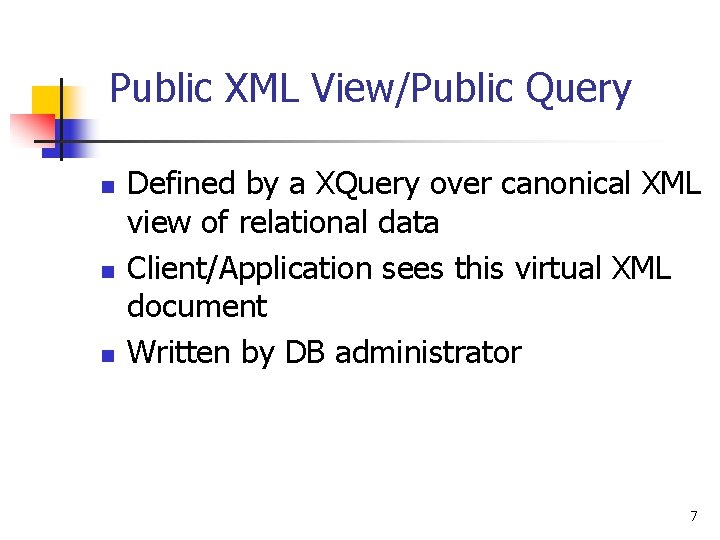
Public XML View/Public Query n n n Defined by a XQuery over canonical XML view of relational data Client/Application sees this virtual XML document Written by DB administrator 7
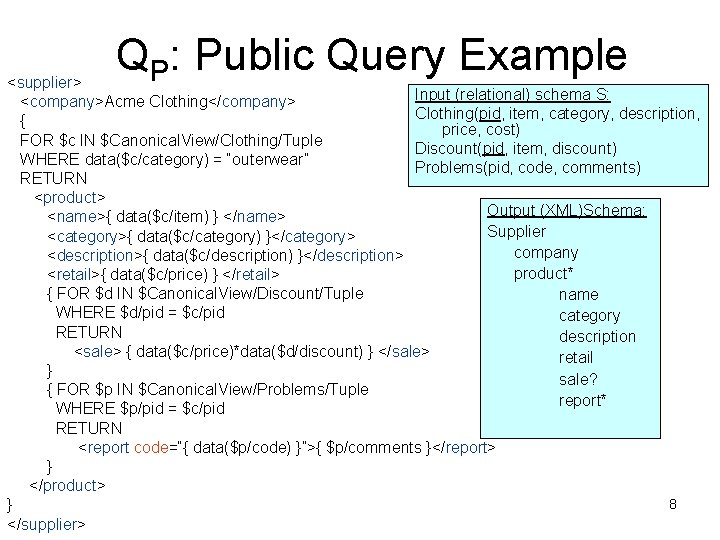
QP: Public Query Example <supplier> Input (relational) schema S: <company>Acme Clothing</company> Clothing(pid, item, category, description, { price, cost) FOR $c IN $Canonical. View/Clothing/Tuple Discount(pid, item, discount) WHERE data($c/category) = “outerwear” Problems(pid, code, comments) RETURN <product> Output (XML)Schema: <name>{ data($c/item) } </name> Supplier <category>{ data($c/category) }</category> company <description>{ data($c/description) }</description> product* <retail>{ data($c/price) } </retail> { FOR $d IN $Canonical. View/Discount/Tuple name WHERE $d/pid = $c/pid category RETURN description <sale> { data($c/price)*data($d/discount) } </sale> retail } sale? { FOR $p IN $Canonical. View/Problems/Tuple report* WHERE $p/pid = $c/pid RETURN <report code=“{ data($p/code) }”>{ $p/comments }</report> } </product> 8 } </supplier>
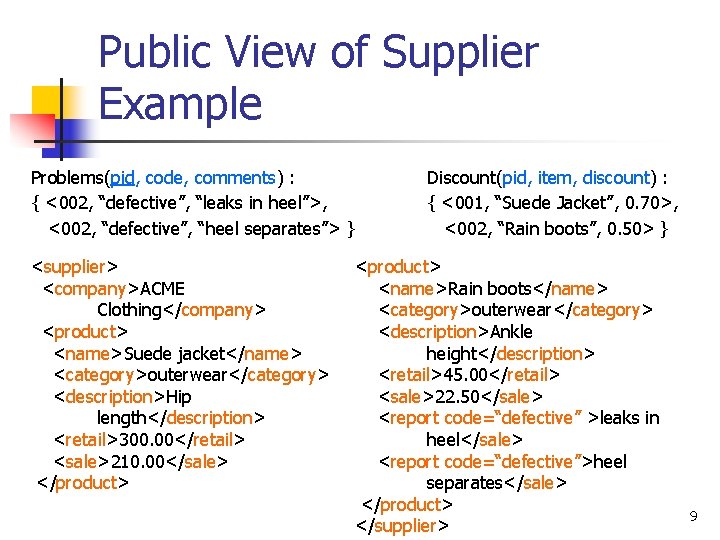
Public View of Supplier Example Problems(pid, code, comments) : { <002, “defective”, “leaks in heel”>, <002, “defective”, “heel separates”> } <supplier> <company>ACME Clothing</company> <product> <name>Suede jacket</name> <category>outerwear</category> <description>Hip length</description> <retail>300. 00</retail> <sale>210. 00</sale> </product> Discount(pid, item, discount) : { <001, “Suede Jacket”, 0. 70>, <002, “Rain boots”, 0. 50> } <product> <name>Rain boots</name> <category>outerwear</category> <description>Ankle height</description> <retail>45. 00</retail> <sale>22. 50</sale> <report code=“defective” >leaks in heel</sale> <report code=“defective”>heel separates</sale> </product> </supplier> 9
Application Query n n Written by a client or application A XQuery over the public XML view 10
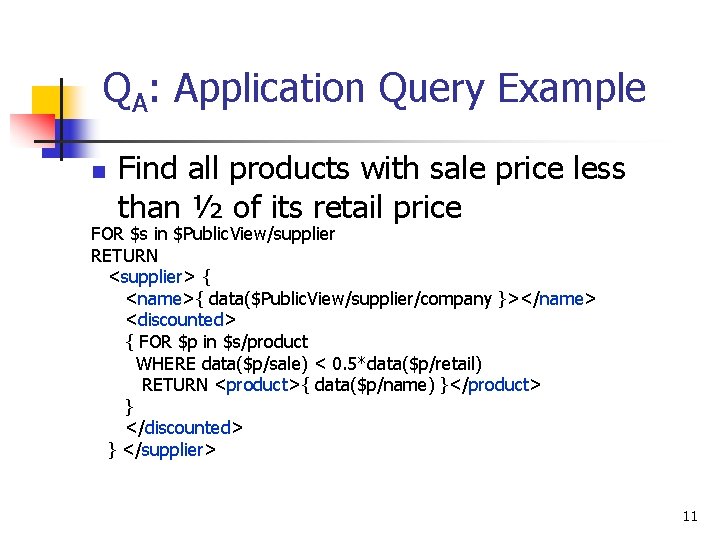
QA: Application Query Example n Find all products with sale price less than ½ of its retail price FOR $s in $Public. View/supplier RETURN <supplier> { <name>{ data($Public. View/supplier/company }></name> <discounted> { FOR $p in $s/product WHERE data($p/sale) < 0. 5*data($p/retail) RETURN <product>{ data($p/name) }</product> } </discounted> } </supplier> 11
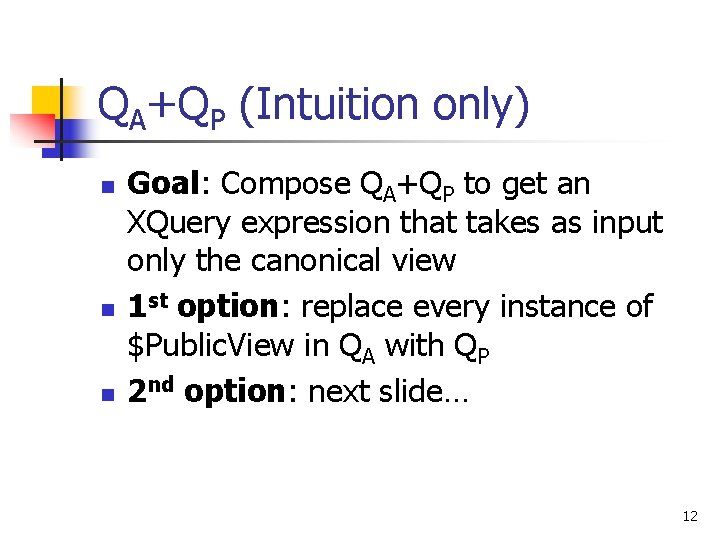
QA+QP (Intuition only) n n n Goal: Compose QA+QP to get an XQuery expression that takes as input only the canonical view 1 st option: replace every instance of $Public. View in QA with QP 2 nd option: next slide… 12
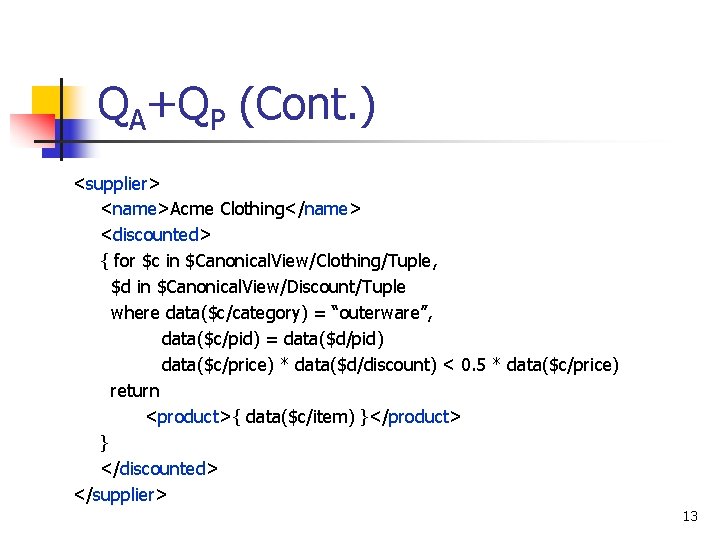
QA+QP (Cont. ) <supplier> <name>Acme Clothing</name> <discounted> { for $c in $Canonical. View/Clothing/Tuple, $d in $Canonical. View/Discount/Tuple where data($c/category) = “outerware”, data($c/pid) = data($d/pid) data($c/price) * data($d/discount) < 0. 5 * data($c/price) return <product>{ data($c/item) }</product> } </discounted> </supplier> 13
View Forest/Tree n n n Internal abstraction of how an XML document can be materialized using SQL queries over relational tables Also an abstraction of XQuery to SQL translation Nodes correspond to XML hierarchy; internal nodes – elements/attributes, leafs – element/attribute type Each node “holds” an SQL query to retrieve all elements of node type The trick: connect elements in correct parent-sibling relation Compositional 14
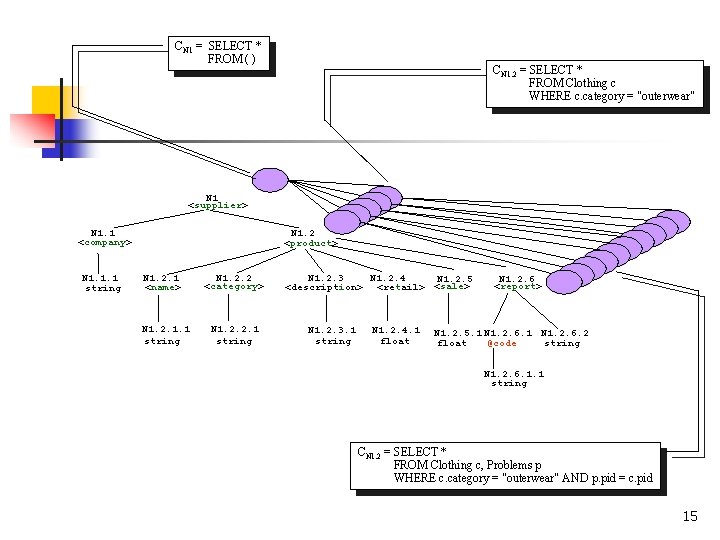
CN 1 = SELECT * FROM ( ) CN 1. 2 = SELECT * FROM Clothing c WHERE c. category = "outerwear" N 1 <supplier> N 1. 1 <company> N 1. 1. 1 string N 1. 2 <product> N 1. 2. 1 <name> N 1. 2. 1. 1 string N 1. 2. 2 <category> N 1. 2. 2. 1 string N 1. 2. 3 N 1. 2. 4 N 1. 2. 5 <description> <retail> <sale> N 1. 2. 3. 1 string N 1. 2. 4. 1 float N 1. 2. 6 <report> N 1. 2. 5. 1 N 1. 2. 6. 2 @code float string N 1. 2. 6. 1. 1 string CN 1. 2 = SELECT * FROM Clothing c, Problems p WHERE c. category = "outerwear" AND p. pid = c. pid 15
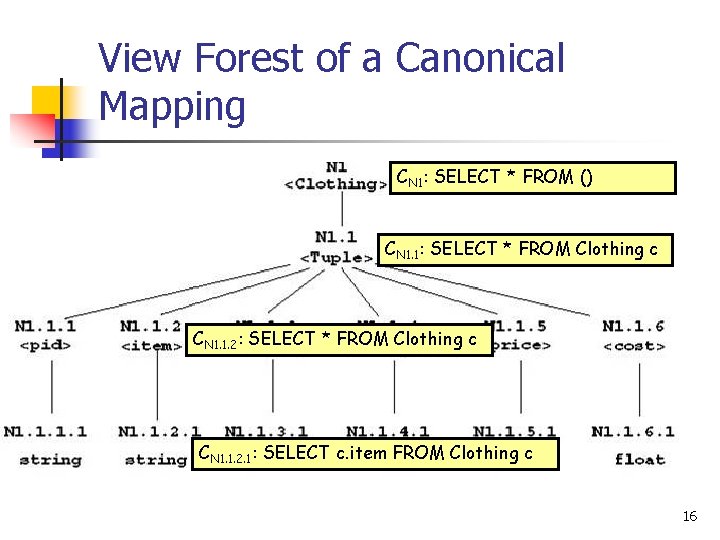
View Forest of a Canonical Mapping CN 1: SELECT * FROM () CN 1. 1: SELECT * FROM Clothing c CN 1. 1. 2. 1: SELECT c. item FROM Clothing c 16
Main Modules n n n View Composer: compose QA ± Qp to get a query that refers only to the canonical XML documents, i. e. relations Query Planner: creates one or more SQL queries XML Generator: massages tabular results into XML format 17
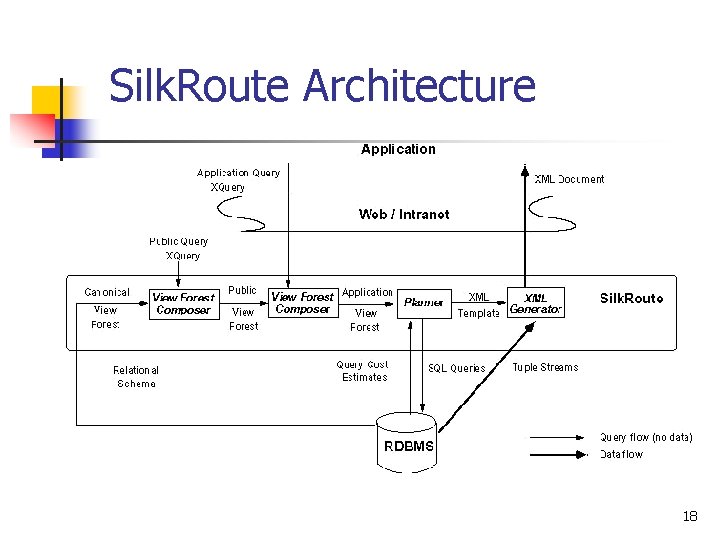
Silk. Route Architecture 18
View Forest of QA? n n If we can obtain the view forest of QA, we can compute the XML result of QA using only SQL queries Can we always translate QA into a view forest? 19
XQuery. Core n n A subset of XQuery Core Language given in W 3 C XQuery Formal semantics No recursive functions, no operators that depend on “orderness” of XML. E. g. , n << m (returns true if node n precedes node m in document order) Every XQuery. Core expression can be translated into a view forest QA ± Qp can be translated into a view forest 20
Property of View Forest Composition Algorithm (VFCA) n n Let Q be a XQuery. Core expression defined over the view forests X 1, …, Xn The output of VFCA(Q, X 1, …, Xn) is a view forest VQ such that for all relation instances I over the relation schema S VQ(I) = Q(X 1(I), …, Xn(I)) n Note that each Xi is either a canonical view forest or a view forest of a XQuery. Core expression defined directly or indirectly over the canonical view forest of S 21
Computing VFCA(Q, X 1, …, Xn) n Refer to paper for details… 22
Query Planner n n n Takes a view forest and returns one or more SQL queries to send to the relational engine Idea: partition the view forest Extreme strategies: Fully partitioned strategy vs. unified strategy Many SQL queries and connect calls to RDBMS vs. one big SQL query and only one connect call to RDBMS Optimal strategy usually lies somewhere in between 23
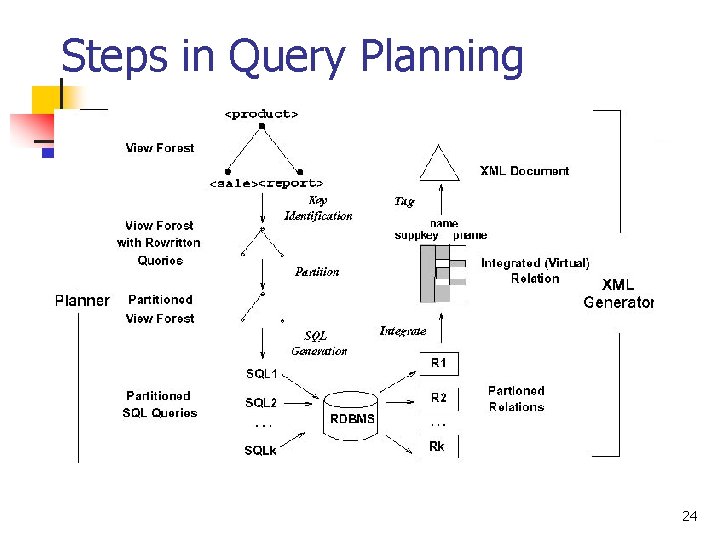
Steps in Query Planning 24
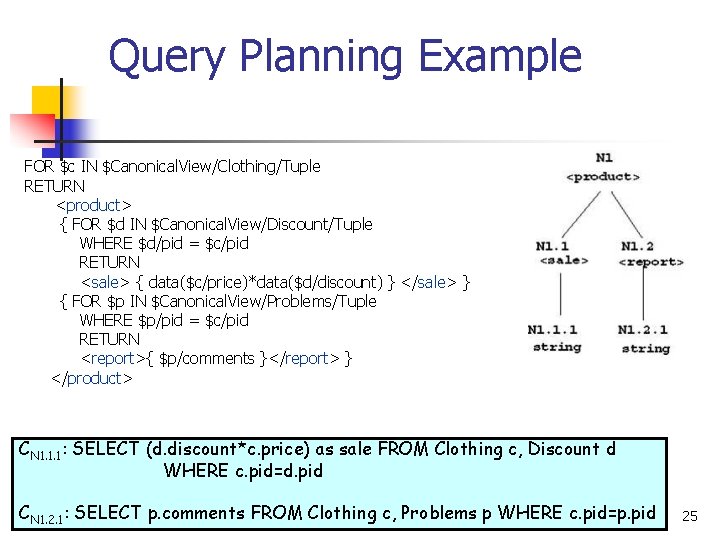
Query Planning Example FOR $c IN $Canonical. View/Clothing/Tuple RETURN <product> { FOR $d IN $Canonical. View/Discount/Tuple WHERE $d/pid = $c/pid RETURN <sale> { data($c/price)*data($d/discount) } </sale> } { FOR $p IN $Canonical. View/Problems/Tuple WHERE $p/pid = $c/pid RETURN <report>{ $p/comments }</report> } </product> CN 1. 1. 1: SELECT (d. discount*c. price) as sale FROM Clothing c, Discount d WHERE c. pid=d. pid CN 1. 2. 1: SELECT p. comments FROM Clothing c, Problems p WHERE c. pid=p. pid 25
Step I. Identify keys n Identify and add keys to every SELECT clause in view forest SELECT A FROM E 1 x 1, …, Ek xk SELECT A , key(E 1) , … , key(Ek) FROM E 1 x 1, …, Ek xk n n Keys are used to merge data from multiple tuple streams efficiently If tuple streams are sorted on keys, the XML result can be constructed by making one pass through the tuple streams 26
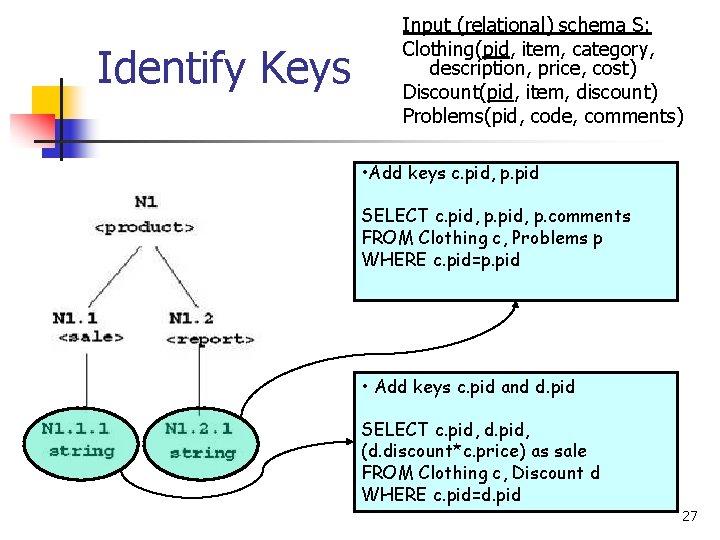
Identify Keys Input (relational) schema S: Clothing(pid, item, category, description, price, cost) Discount(pid, item, discount) Problems(pid, code, comments) • Add keys c. pid, p. pid SELECT c. pid, p. comments FROM Clothing c, Problems p WHERE c. pid=p. pid • Add keys c. pid and d. pid SELECT c. pid, d. pid, (d. discount*c. price) as sale FROM Clothing c, Discount d WHERE c. pid=d. pid 27
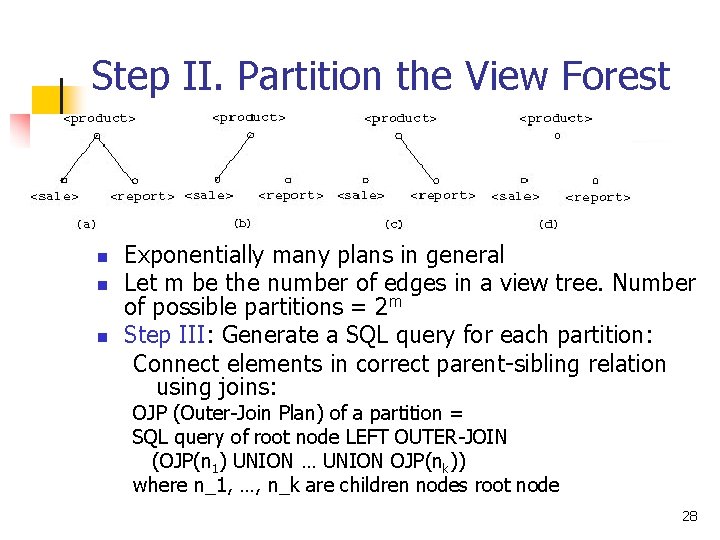
Step II. Partition the View Forest n n n Exponentially many plans in general Let m be the number of edges in a view tree. Number of possible partitions = 2 m Step III: Generate a SQL query for each partition: Connect elements in correct parent-sibling relation using joins: OJP (Outer-Join Plan) of a partition = SQL query of root node LEFT OUTER-JOIN (OJP(n 1) UNION … UNION OJP(nk)) where n_1, …, n_k are children nodes root node 28
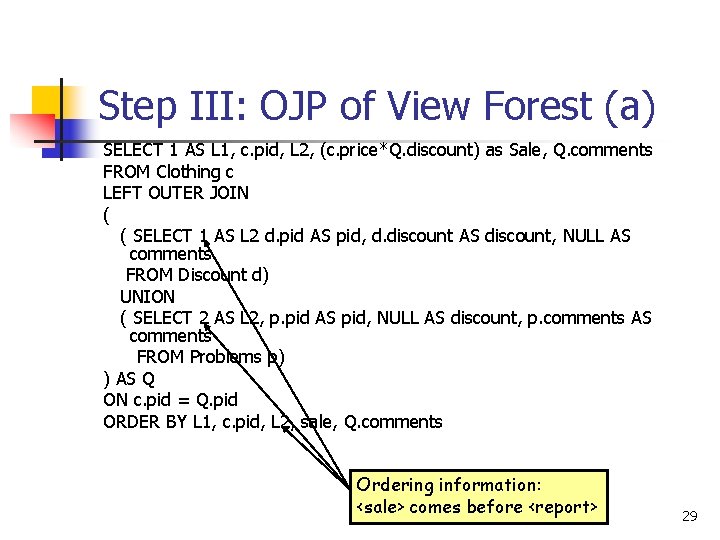
Step III: OJP of View Forest (a) SELECT 1 AS L 1, c. pid, L 2, (c. price*Q. discount) as Sale, Q. comments FROM Clothing c LEFT OUTER JOIN ( ( SELECT 1 AS L 2 d. pid AS pid, d. discount AS discount, NULL AS comments FROM Discount d) UNION ( SELECT 2 AS L 2, p. pid AS pid, NULL AS discount, p. comments AS comments FROM Problems p) ) AS Q ON c. pid = Q. pid ORDER BY L 1, c. pid, L 2, sale, Q. comments Ordering information: <sale> comes before <report> 29
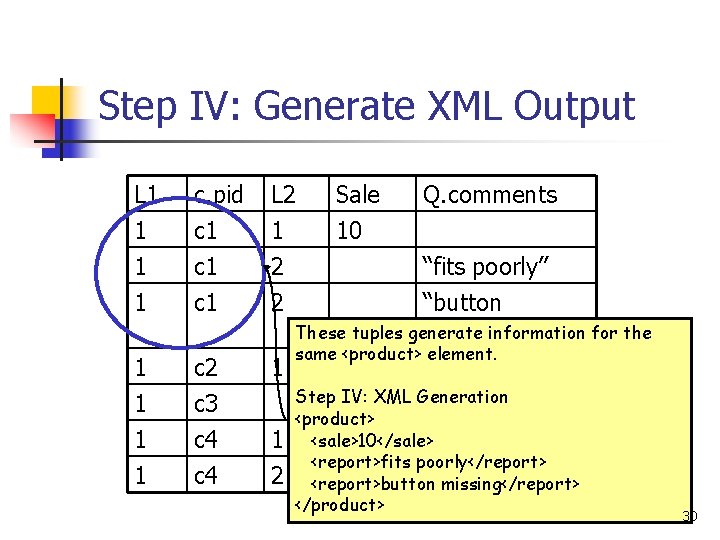
Step IV: Generate XML Output L 1 1 c. pid c 1 c 1 L 2 1 2 2 1 1 c 2 c 3 c 4 1 Sale 10 Q. comments “fits poorly” “button These tuples generate information for the missing” 1 2 same <product> element. 120 Step IV: XML Generation <product> <sale>10</sale> 56 <report>fits poorly</report> “zipper jams” <report>button missing</report> </product> 30
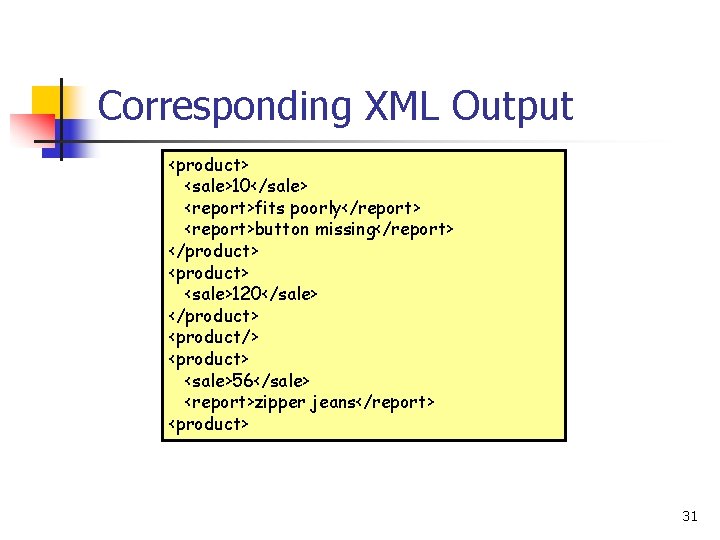
Corresponding XML Output <product> <sale>10</sale> <report>fits poorly</report> <report>button missing</report> </product> <sale>120</sale> </product> <product/> <product> <sale>56</sale> <report>zipper jeans</report> <product> 31
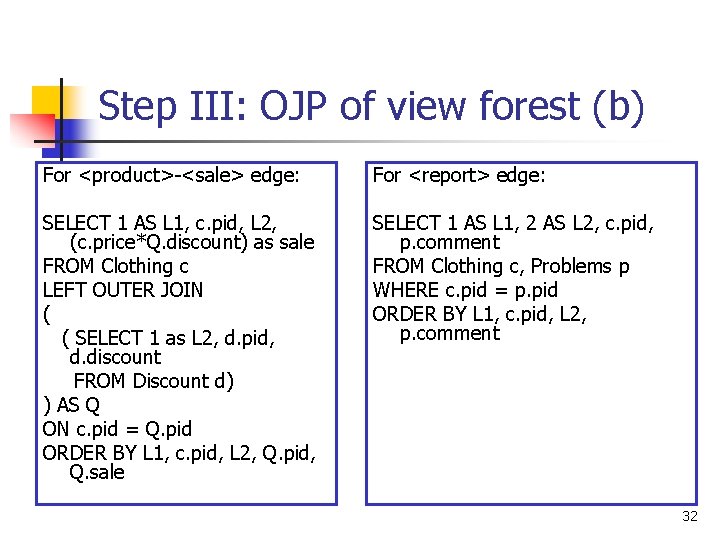
Step III: OJP of view forest (b) For <product>-<sale> edge: For <report> edge: SELECT 1 AS L 1, c. pid, L 2, (c. price*Q. discount) as sale FROM Clothing c LEFT OUTER JOIN ( ( SELECT 1 as L 2, d. pid, d. discount FROM Discount d) ) AS Q ON c. pid = Q. pid ORDER BY L 1, c. pid, L 2, Q. pid, Q. sale SELECT 1 AS L 1, 2 AS L 2, c. pid, p. comment FROM Clothing c, Problems p WHERE c. pid = p. pid ORDER BY L 1, c. pid, L 2, p. comment 32
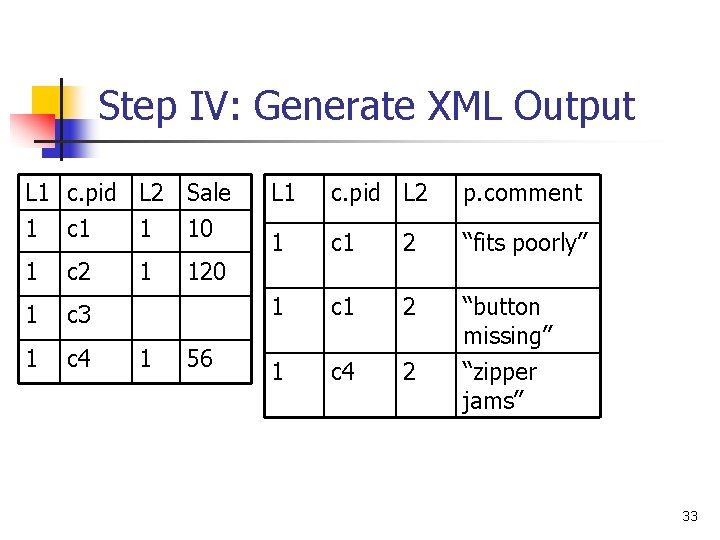
Step IV: Generate XML Output L 1 c. pid L 2 Sale 1 c 1 1 10 1 c 2 1 c 3 1 c 4 1 1 L 1 c. pid L 2 p. comment 1 c 1 2 “fits poorly” 1 c 1 2 “button missing” 1 c 4 2 “zipper jams” 120 56 33
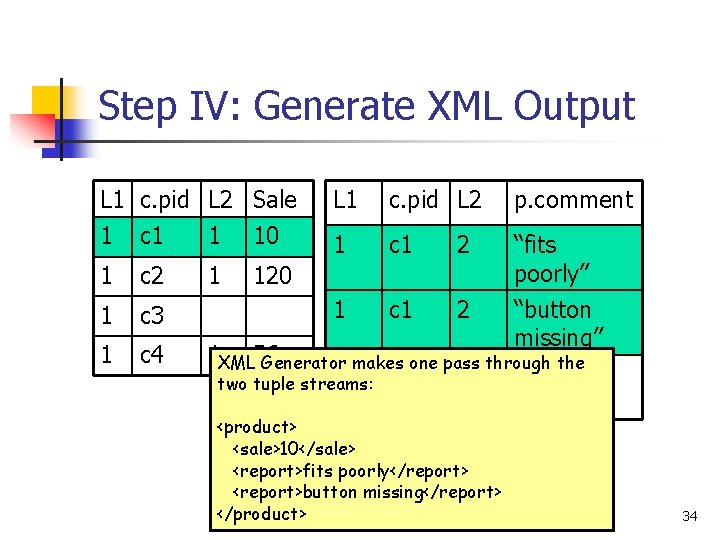
Step IV: Generate XML Output L 1 c. pid L 2 Sale 1 c 1 1 10 1 c 2 1 c 3 1 c 4 1 L 1 c. pid L 2 p. comment 1 c 1 2 “fits poorly” “button missing” 120 1 XML 56 Generator makes one pass through the 1 c 4 2 “zipper two tuple streams: jams” <product> <sale>10</sale> <report>fits poorly</report> <report>button missing</report> </product> 34
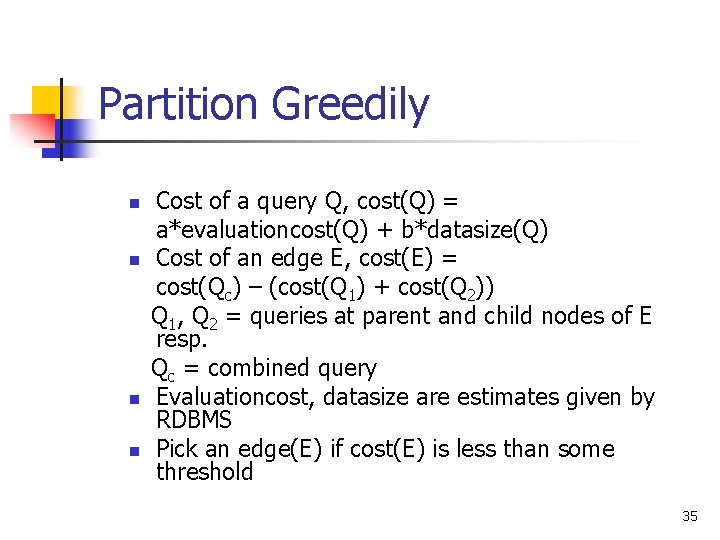
Partition Greedily n n Cost of a query Q, cost(Q) = a*evaluationcost(Q) + b*datasize(Q) Cost of an edge E, cost(E) = cost(Qc) – (cost(Q 1) + cost(Q 2)) Q 1, Q 2 = queries at parent and child nodes of E resp. Qc = combined query Evaluationcost, datasize are estimates given by RDBMS Pick an edge(E) if cost(E) is less than some threshold 35
We can go on and on… n n n n VFCA View Forest/Tree details View Tree reductions Other alternatives to OJP Experimental results Other available systems Silk. Route is available at silkroute. sourceforge. net 36
- Slides: 36