
Signal Archiving System Setup and Test September 2016
Signal Archiving System Setup and Test September 2016 RISP /IBS Seung Hee Nam Control Group , September 2016, RISP / IBS 1
Contents • Archiver Appliance – Archiving System Configuration – Single Node Archiver Appliance Setup and Test – Multiple archiver appliance Setup and Test Control Group , September 2016, RISP / IBS 2
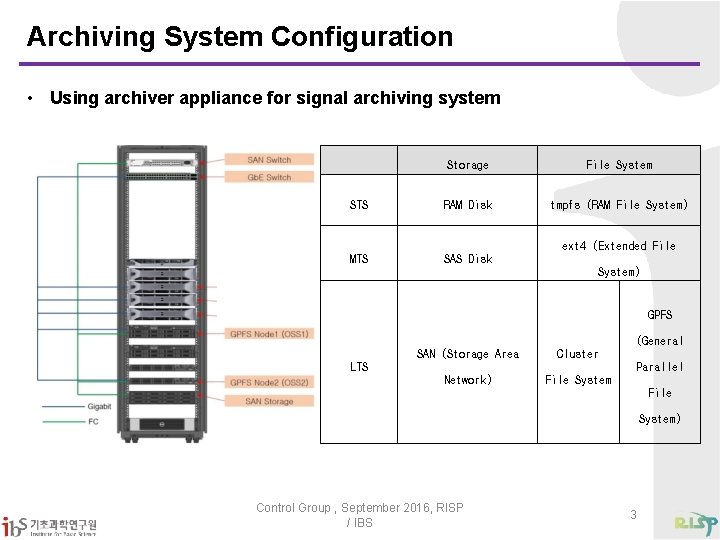
Archiving System Configuration • Using archiver appliance for signal archiving system Storage File System STS RAM Disk tmpfs (RAM File System) MTS SAS Disk ext 4 (Extended File System) GPFS (General SAN (Storage Area Cluster LTS Parallel Network) File System) Control Group , September 2016, RISP / IBS 3
Single Node Archiver Appliance Test • Test Environment (GPFS Node 1) – Intel(R) Xeon(R) CPU E 5 -2650 v 2 2. 6 GHz(16 -core) – STS : tmpfs / MTS : SAS / LTS : GPFS • Test IOC – – Operating speed : 10 Hz PV number : 5000 (double type) IOC number : 9 Total 45000 PV • Archiving Mode Test – Scan mode – Monitor mode Control Group , September 2016, RISP / IBS 4
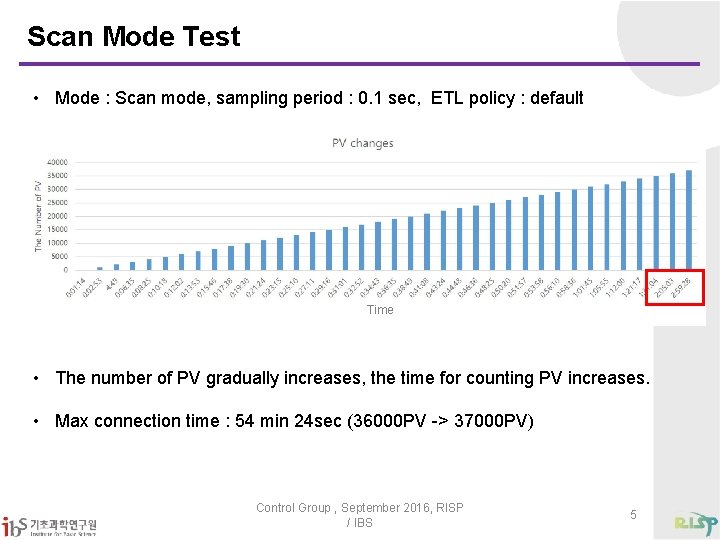
Scan Mode Test • Mode : Scan mode, sampling period : 0. 1 sec, ETL policy : default Time • The number of PV gradually increases, the time for counting PV increases. • Max connection time : 54 min 24 sec (36000 PV -> 37000 PV) Control Group , September 2016, RISP / IBS 5
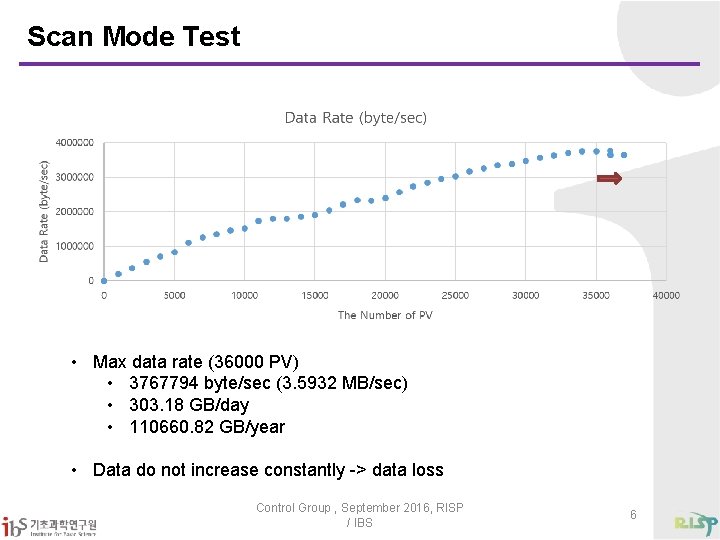
Scan Mode Test • Max data rate (36000 PV) • 3767794 byte/sec (3. 5932 MB/sec) • 303. 18 GB/day • 110660. 82 GB/year • Data do not increase constantly -> data loss Control Group , September 2016, RISP / IBS 6
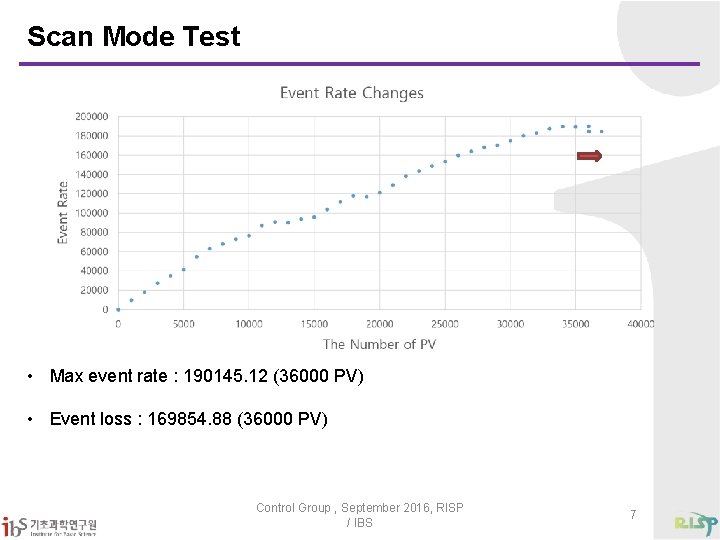
Scan Mode Test • Max event rate : 190145. 12 (36000 PV) • Event loss : 169854. 88 (36000 PV) Control Group , September 2016, RISP / IBS 7
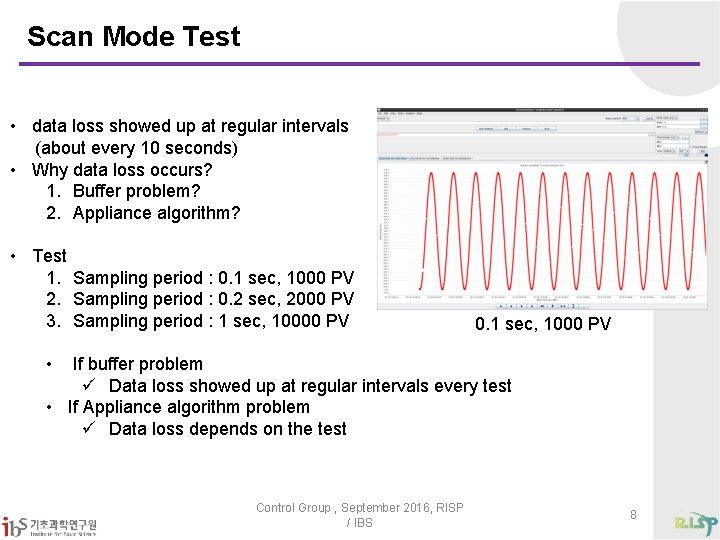
Scan Mode Test • data loss showed up at regular intervals (about every 10 seconds) • Why data loss occurs? 1. Buffer problem? 2. Appliance algorithm? • Test 1. Sampling period : 0. 1 sec, 1000 PV 2. Sampling period : 0. 2 sec, 2000 PV 3. Sampling period : 1 sec, 10000 PV 0. 1 sec, 1000 PV • If buffer problem ü Data loss showed up at regular intervals every test • If Appliance algorithm problem ü Data loss depends on the test Control Group , September 2016, RISP / IBS 8
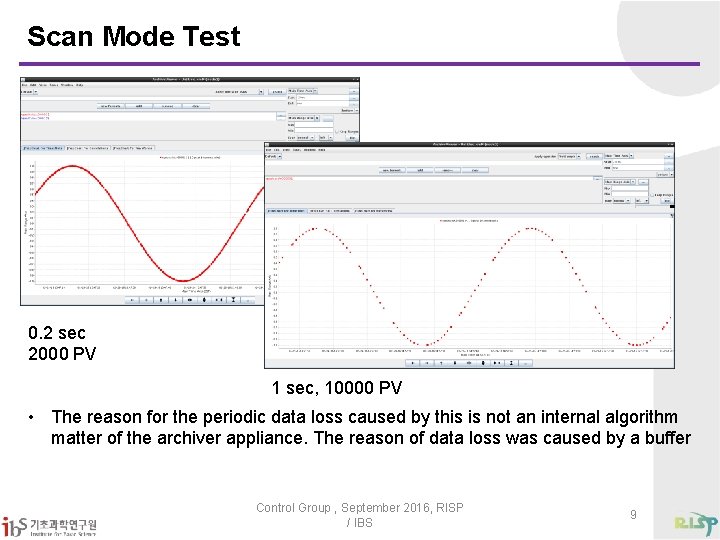
Scan Mode Test 0. 2 sec 2000 PV 1 sec, 10000 PV • The reason for the periodic data loss caused by this is not an internal algorithm matter of the archiver appliance. The reason of data loss was caused by a buffer Control Group , September 2016, RISP / IBS 9
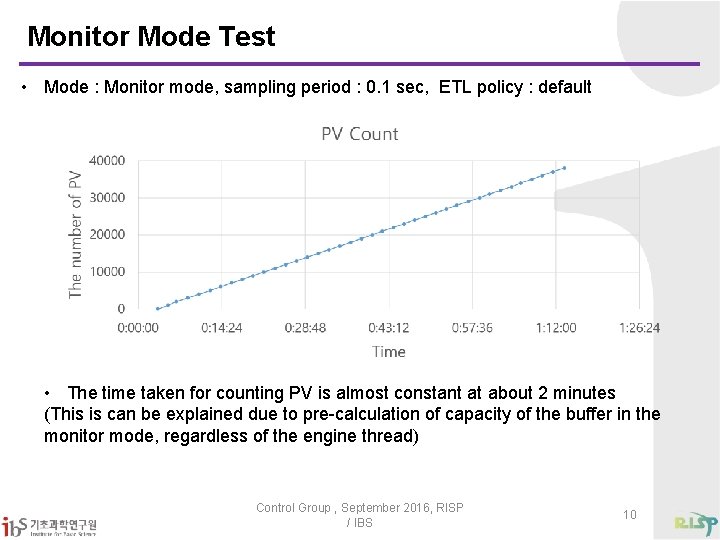
Monitor Mode Test • Mode : Monitor mode, sampling period : 0. 1 sec, ETL policy : default • The time taken for counting PV is almost constant at about 2 minutes (This is can be explained due to pre-calculation of capacity of the buffer in the monitor mode, regardless of the engine thread) Control Group , September 2016, RISP / IBS 10
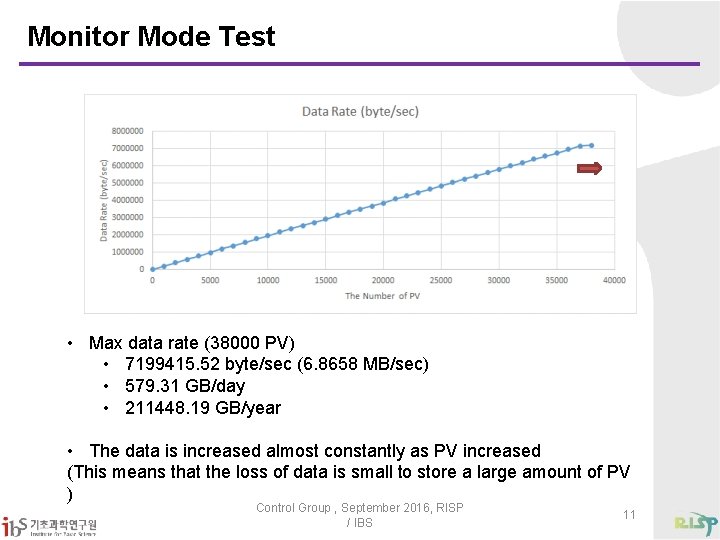
Monitor Mode Test • Max data rate (38000 PV) • 7199415. 52 byte/sec (6. 8658 MB/sec) • 579. 31 GB/day • 211448. 19 GB/year • The data is increased almost constantly as PV increased (This means that the loss of data is small to store a large amount of PV ) Control Group , September 2016, RISP / IBS 11
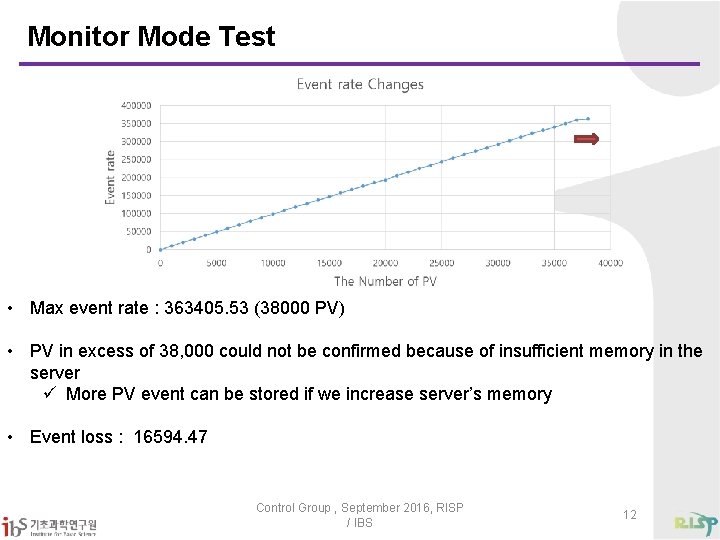
Monitor Mode Test • Max event rate : 363405. 53 (38000 PV) • PV in excess of 38, 000 could not be confirmed because of insufficient memory in the server ü More PV event can be stored if we increase server’s memory • Event loss : 16594. 47 Control Group , September 2016, RISP / IBS 12
Single Node Test Conclusion • Data loss can be solved this way One can increase buffer capacity by shortening sampling period (Archiver appliance can be set as minimum sampling period 0. 1 and maximum sampling period 86400) Using the Multiple archiver appliance • Conclusion – Monitor mode has better performance than scan mode, and it is suitable for the storage of large amounts of data. However, the monitor mode has also node down due to insufficient system memory, therefore it is necessary to design the node memory and use multiple archiver appliance. Control Group , September 2016, RISP / IBS 13
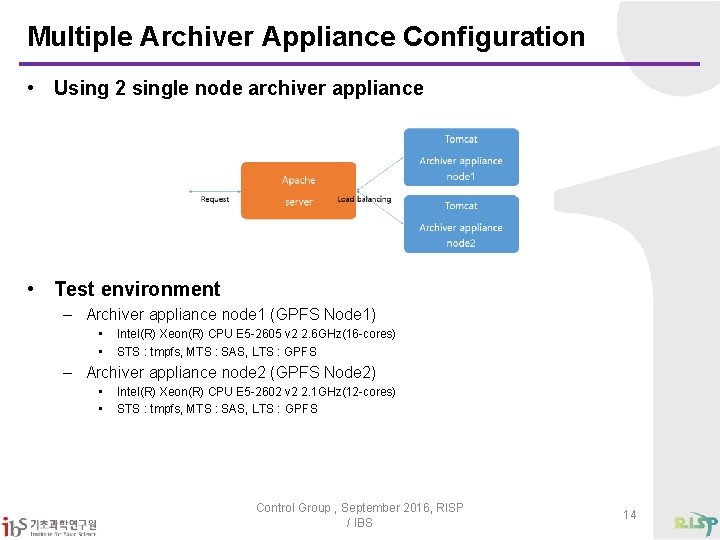
Multiple Archiver Appliance Configuration • Using 2 single node archiver appliance • Test environment – Archiver appliance node 1 (GPFS Node 1) • • Intel(R) Xeon(R) CPU E 5 -2605 v 2 2. 6 GHz(16 -cores) STS : tmpfs, MTS : SAS, LTS : GPFS – Archiver appliance node 2 (GPFS Node 2) • • Intel(R) Xeon(R) CPU E 5 -2602 v 2 2. 1 GHz(12 -cores) STS : tmpfs, MTS : SAS, LTS : GPFS Control Group , September 2016, RISP / IBS 14
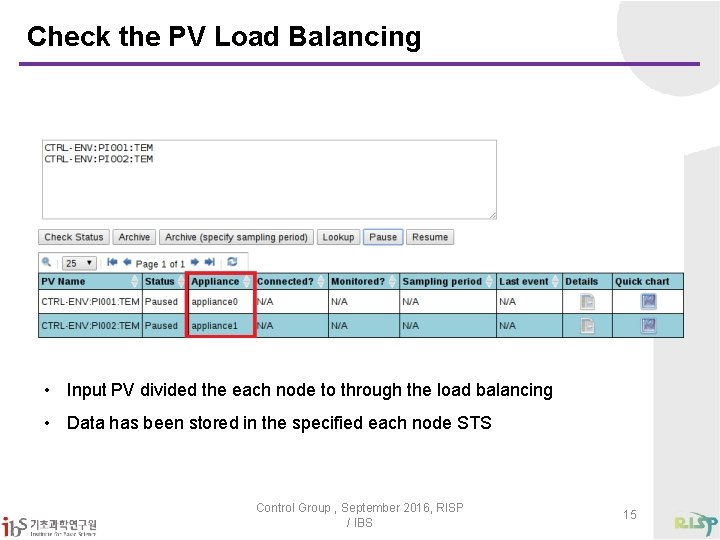
Check the PV Load Balancing • Input PV divided the each node to through the load balancing • Data has been stored in the specified each node STS Control Group , September 2016, RISP / IBS 15
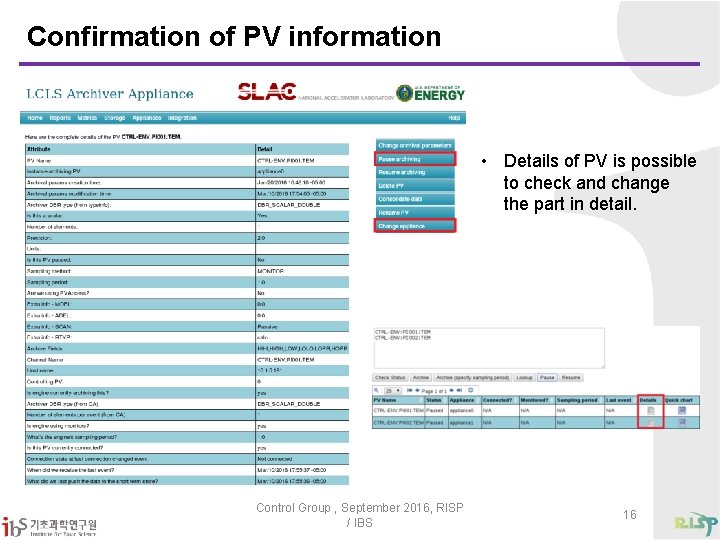
Confirmation of PV information • Details of PV is possible to check and change the part in detail. Control Group , September 2016, RISP / IBS 16
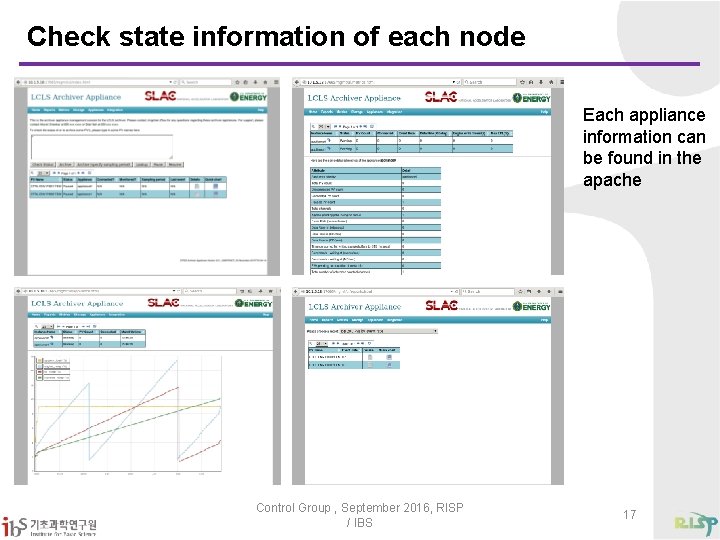
Check state information of each node Each appliance information can be found in the apache Control Group , September 2016, RISP / IBS 17
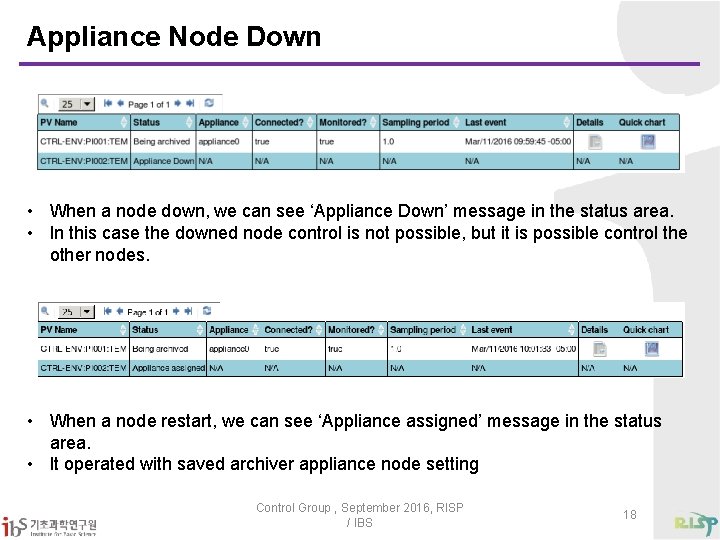
Appliance Node Down • When a node down, we can see ‘Appliance Down’ message in the status area. • In this case the downed node control is not possible, but it is possible control the other nodes. • When a node restart, we can see ‘Appliance assigned’ message in the status area. • It operated with saved archiver appliance node setting Control Group , September 2016, RISP / IBS 18
Goal • Lossless data store service for RAON archiving system • 24/7 days data service • Fast response for large amount of data Control Group , September 2016, RISP / IBS 19

Q&A ( namsh@ibs. re. kr) Thank you Control Group , September 2016, RISP / IBS 20
- Slides: 20