
Sherlock Community Meeting Sherlock filesystems partitions and limits

![Estimating resources requirements, htop [mpiercy@sherlock-ln 03 login_node ~/TF]$ sbatch TF_mnist. sbatch Submitted batch job](https://slidetodoc.com/presentation_image/033569d426938fe11cd3867a61c2b0b0/image-10.jpg "Estimating resources requirements, htop [mpiercy@sherlock-ln 03 login_node ~/TF]$ sbatch TF_mnist. sbatch Submitted batch job")

- Slides: 16
Sherlock Community Meeting Sherlock filesystems, partitions and limits Sherlock/SLURM user tips February 7, 2018
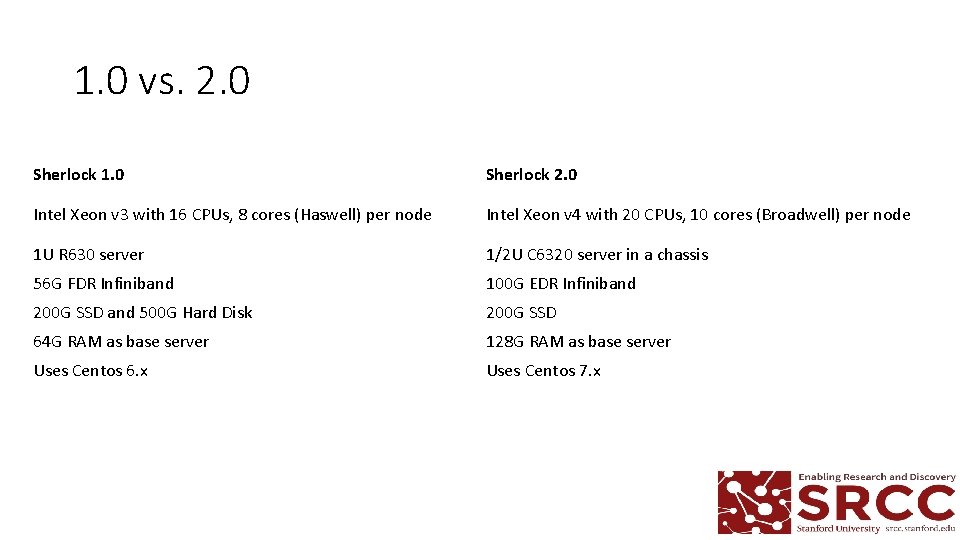
1. 0 vs. 2. 0 Sherlock 1. 0 Sherlock 2. 0 Intel Xeon v 3 with 16 CPUs, 8 cores (Haswell) per node Intel Xeon v 4 with 20 CPUs, 10 cores (Broadwell) per node 1 U R 630 server 1/2 U C 6320 server in a chassis 56 G FDR Infiniband 100 G EDR Infiniband 200 G SSD and 500 G Hard Disk 200 G SSD 64 G RAM as base server 128 G RAM as base server Uses Centos 6. x Uses Centos 7. x
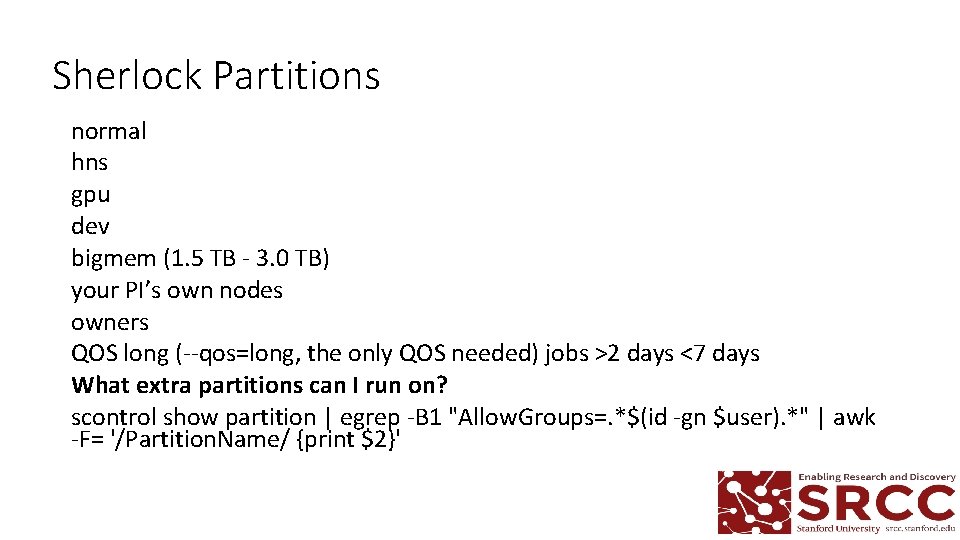
Sherlock Partitions normal hns gpu dev bigmem (1. 5 TB - 3. 0 TB) your PI’s own nodes owners QOS long (--qos=long, the only QOS needed) jobs >2 days <7 days What extra partitions can I run on? scontrol show partition | egrep -B 1 "Allow. Groups=. *$(id -gn $user). *" | awk -F= '/Partition. Name/ {print $2}'
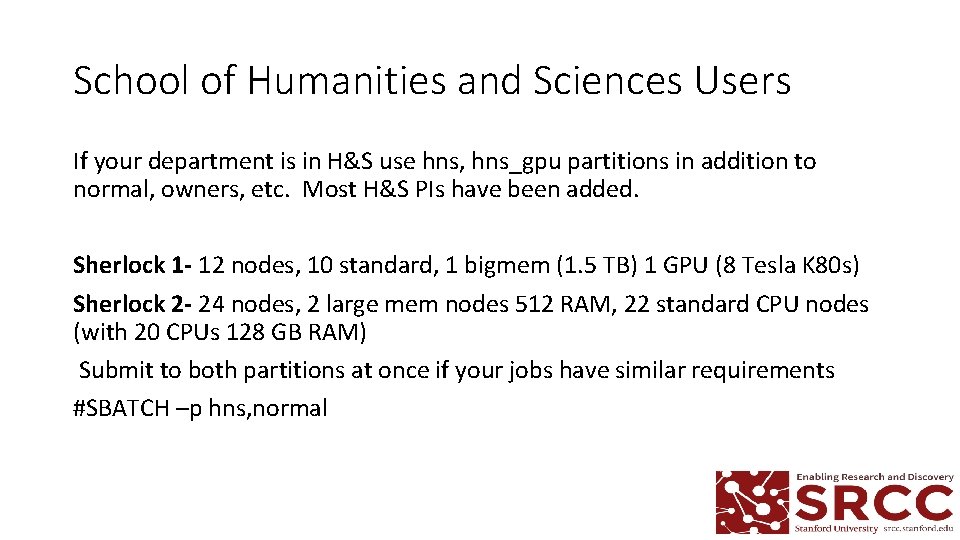
School of Humanities and Sciences Users If your department is in H&S use hns, hns_gpu partitions in addition to normal, owners, etc. Most H&S PIs have been added. Sherlock 1 - 12 nodes, 10 standard, 1 bigmem (1. 5 TB) 1 GPU (8 Tesla K 80 s) Sherlock 2 - 24 nodes, 2 large mem nodes 512 RAM, 22 standard CPU nodes (with 20 CPUs 128 GB RAM) Submit to both partitions at once if your jobs have similar requirements #SBATCH –p hns, normal
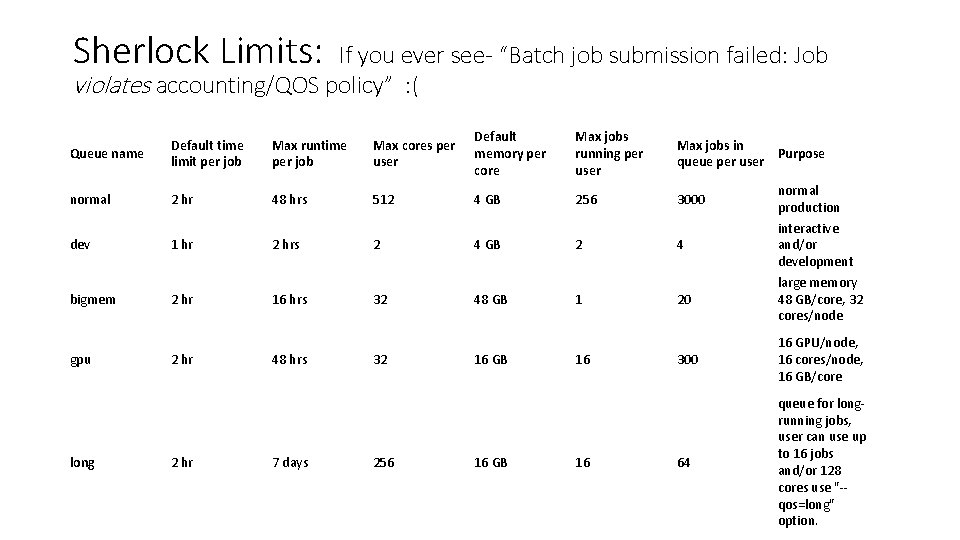
Sherlock Limits: If you ever see- “Batch job submission failed: Job violates accounting/QOS policy” : ( Queue name Default time limit per job Max runtime per job Max cores per user Default memory per core Max jobs running per user Max jobs in Purpose queue per user normal 2 hr 48 hrs 512 4 GB 256 3000 dev 1 hr 2 hrs 2 4 GB 2 4 bigmem 2 hr 16 hrs 32 48 GB 1 20 gpu long 2 hr 48 hrs 7 days 32 256 16 GB 16 normal production interactive and/or development large memory 48 GB/core, 32 cores/node 300 16 GPU/node, 16 cores/node, 16 GB/core 64 queue for longrunning jobs, user can use up to 16 jobs and/or 128 cores use "-qos=long" option.
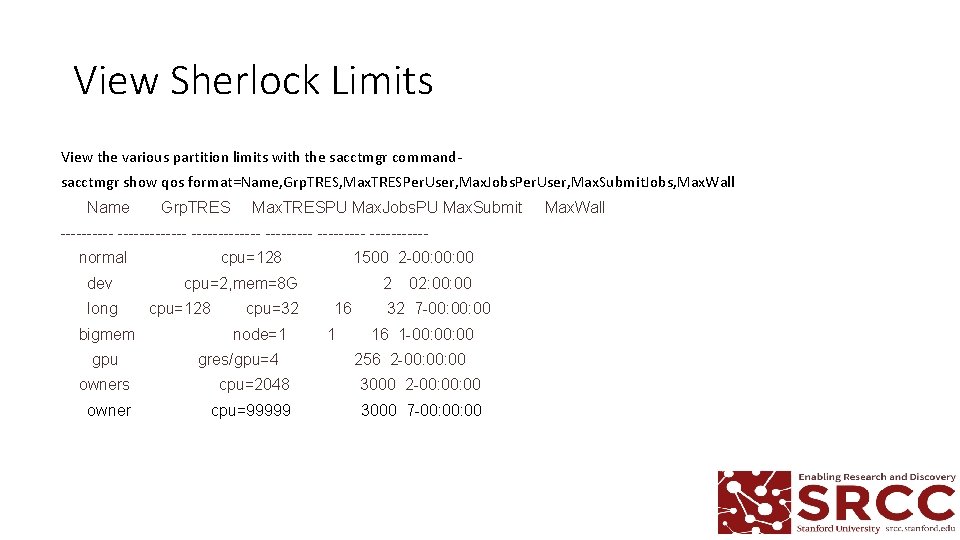
View Sherlock Limits View the various partition limits with the sacctmgr commandsacctmgr show qos format=Name, Grp. TRES, Max. TRESPer. User, Max. Jobs. Per. User, Max. Submit. Jobs, Max. Wall Name Grp. TRES Max. TRESPU Max. Jobs. PU Max. Submit Max. Wall ------------- --------- normal cpu=128 1500 2 -00: 00 dev cpu=2, mem=8 G 2 02: 00 long cpu=128 cpu=32 16 32 7 -00: 00 bigmem node=1 1 16 1 -00: 00 gpu gres/gpu=4 256 2 -00: 00 owners cpu=2048 3000 2 -00: 00 owner cpu=99999 3000 7 -00: 00
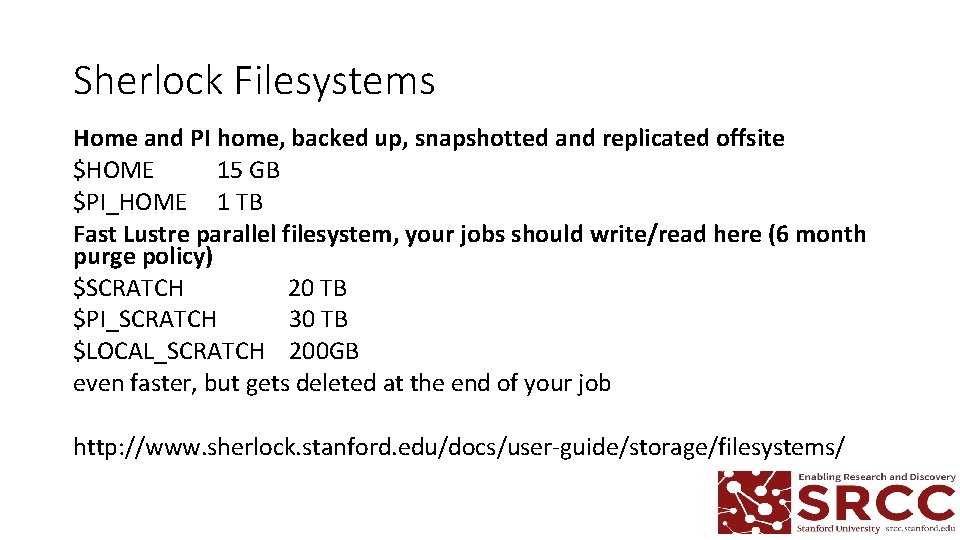
Sherlock Filesystems Home and PI home, backed up, snapshotted and replicated offsite $HOME 15 GB $PI_HOME 1 TB Fast Lustre parallel filesystem, your jobs should write/read here (6 month purge policy) $SCRATCH 20 TB $PI_SCRATCH 30 TB $LOCAL_SCRATCH 200 GB even faster, but gets deleted at the end of your job http: //www. sherlock. stanford. edu/docs/user-guide/storage/filesystems/
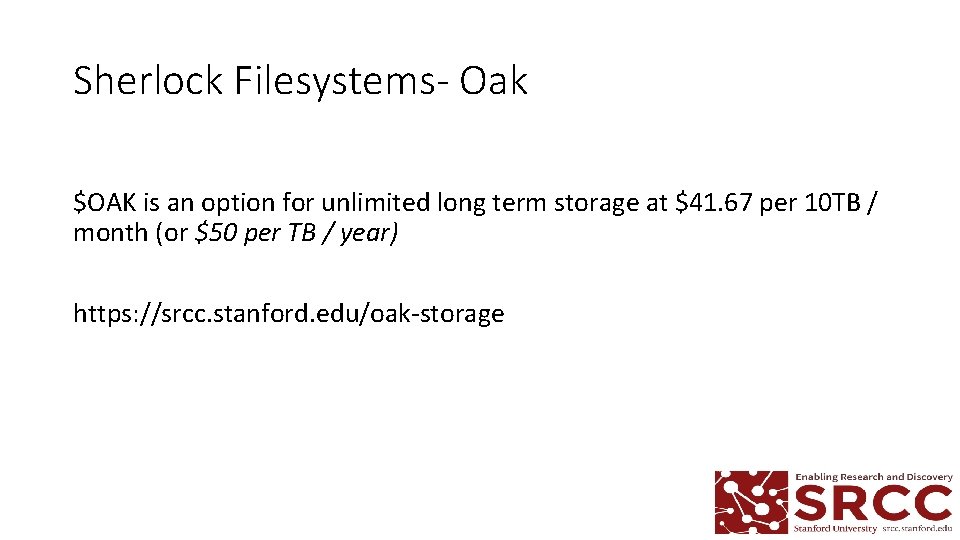
Sherlock Filesystems- Oak $OAK is an option for unlimited long term storage at $41. 67 per 10 TB / month (or $50 per TB / year) https: //srcc. stanford. edu/oak-storage
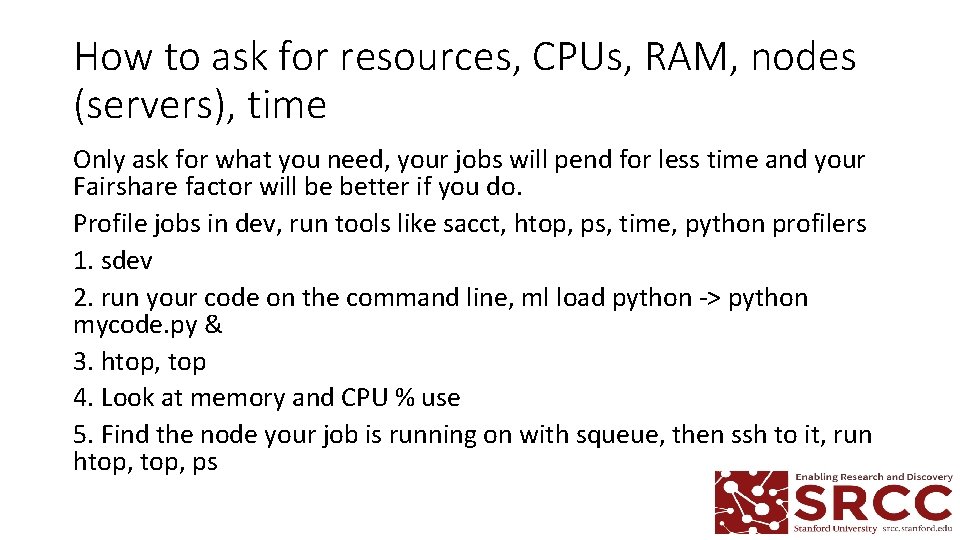
How to ask for resources, CPUs, RAM, nodes (servers), time Only ask for what you need, your jobs will pend for less time and your Fairshare factor will be better if you do. Profile jobs in dev, run tools like sacct, htop, ps, time, python profilers 1. sdev 2. run your code on the command line, ml load python -> python mycode. py & 3. htop, top 4. Look at memory and CPU % use 5. Find the node your job is running on with squeue, then ssh to it, run htop, ps
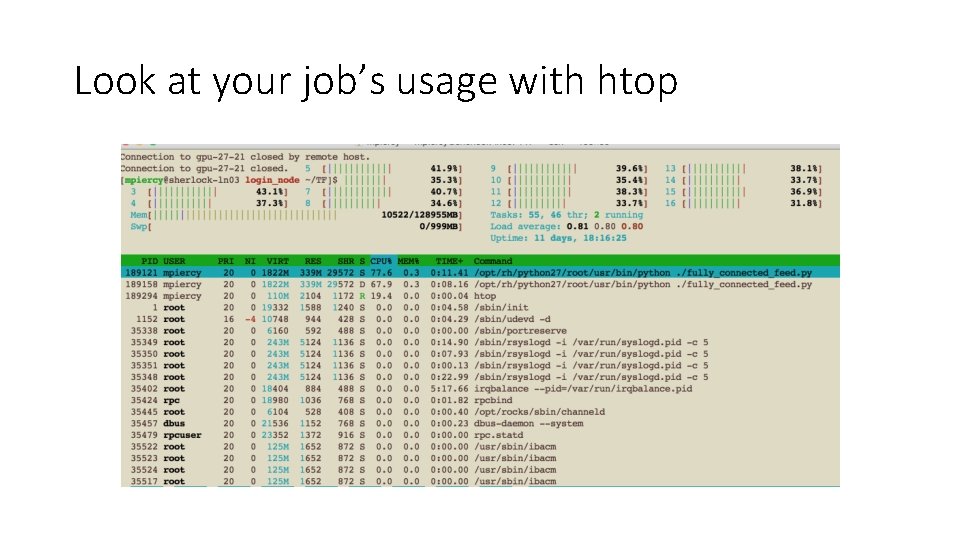
Estimating resources requirements, htop [mpiercy@sherlock-ln 03 login_node ~/TF]$ sbatch TF_mnist. sbatch Submitted batch job 20244339 [mpiercy@sherlock-ln 03 login_node ~/TF]$ squeue -u $USER JOBID PARTITION NAME USER ST TIME NODES NODELIST(REASON) 20244339 hns_gpu TF_mnist mpiercy R 0: 04 1 gpu-27 -21 [mpiercy@sherlock-ln 03 login_node ~/TF]$ ssh mpiercy@gpu-27 -21 Can ssh to the server only of you have a job running on it. use nvidia-smi -l 1 for GPU nodes
Look at your job’s usage with htop
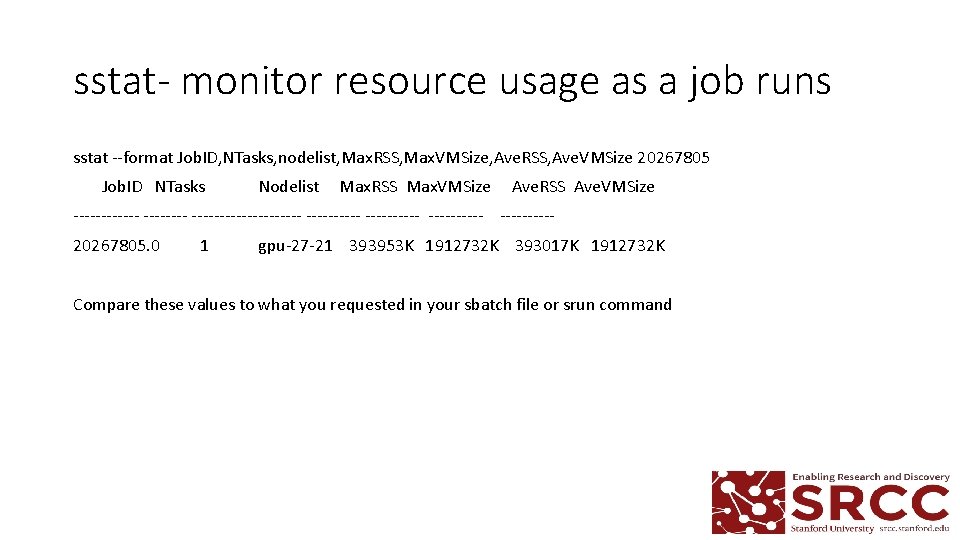
sstat- monitor resource usage as a job runs sstat --format Job. ID, NTasks, nodelist, Max. RSS, Max. VMSize, Ave. RSS, Ave. VMSize 20267805 Job. ID NTasks Nodelist Max. RSS Max. VMSize Ave. RSS Ave. VMSize ---------------- ---------- 20267805. 0 1 gpu-27 -21 393953 K 1912732 K 393017 K 1912732 K Compare these values to what you requested in your sbatch file or srun command
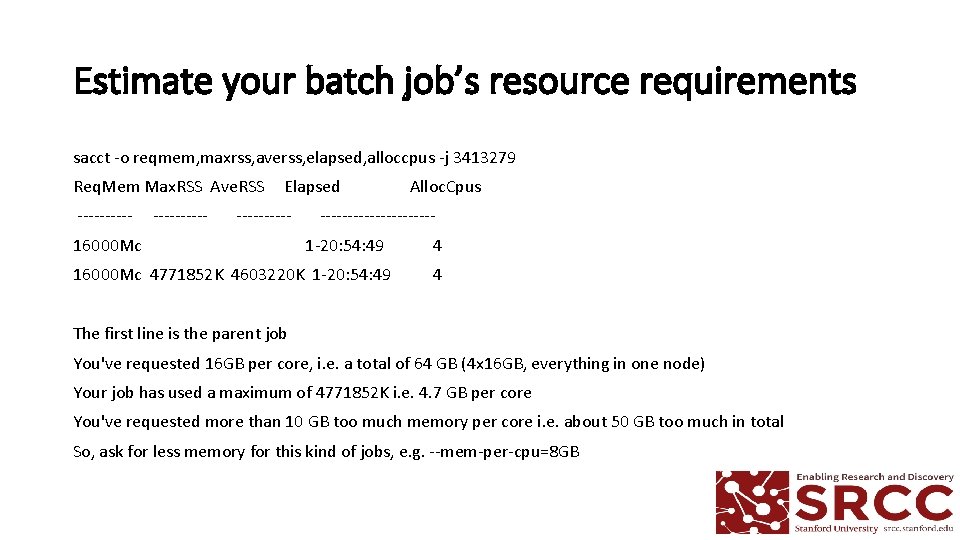
Estimate your batch job’s resource requirements sacct -o reqmem, maxrss, averss, elapsed, alloccpus -j 3413279 Req. Mem Max. RSS Ave. RSS Elapsed Alloc. Cpus ---------------- 16000 Mc 1 -20: 54: 49 16000 Mc 4771852 K 4603220 K 1 -20: 54: 49 4 4 The first line is the parent job You've requested 16 GB per core, i. e. a total of 64 GB (4 x 16 GB, everything in one node) Your job has used a maximum of 4771852 K i. e. 4. 7 GB per core You've requested more than 10 GB too much memory per core i. e. about 50 GB too much in total So, ask for less memory for this kind of jobs, e. g. --mem-per-cpu=8 GB
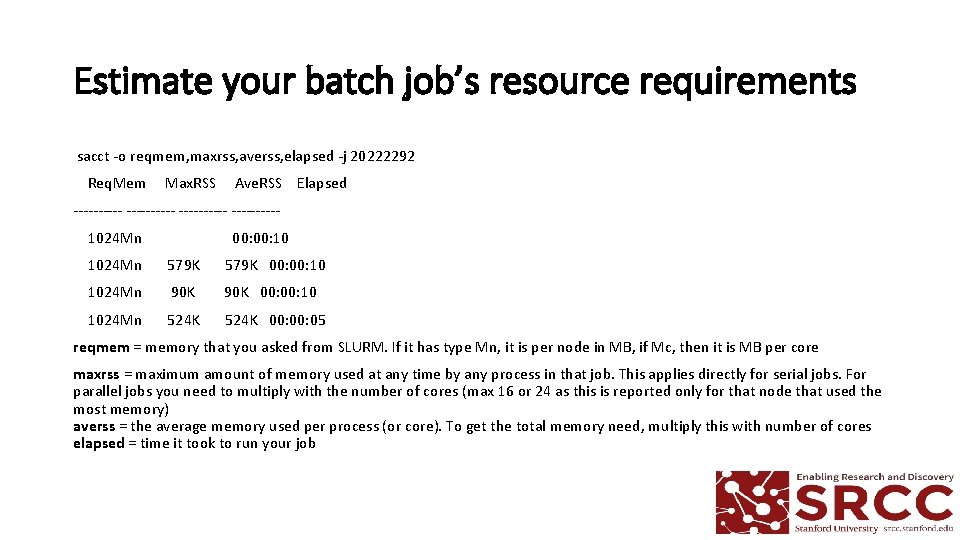
Estimate your batch job’s resource requirements sacct -o reqmem, maxrss, averss, elapsed -j 20222292 Req. Mem Max. RSS Ave. RSS Elapsed ---------- 1024 Mn 00: 10 1024 Mn 579 K 00: 10 1024 Mn 90 K 00: 10 1024 Mn 524 K 00: 05 reqmem = memory that you asked from SLURM. If it has type Mn, it is per node in MB, if Mc, then it is MB per core maxrss = maximum amount of memory used at any time by any process in that job. This applies directly for serial jobs. For parallel jobs you need to multiply with the number of cores (max 16 or 24 as this is reported only for that node that used the most memory) averss = the average memory used per process (or core). To get the total memory need, multiply this with number of cores elapsed = time it took to run your job
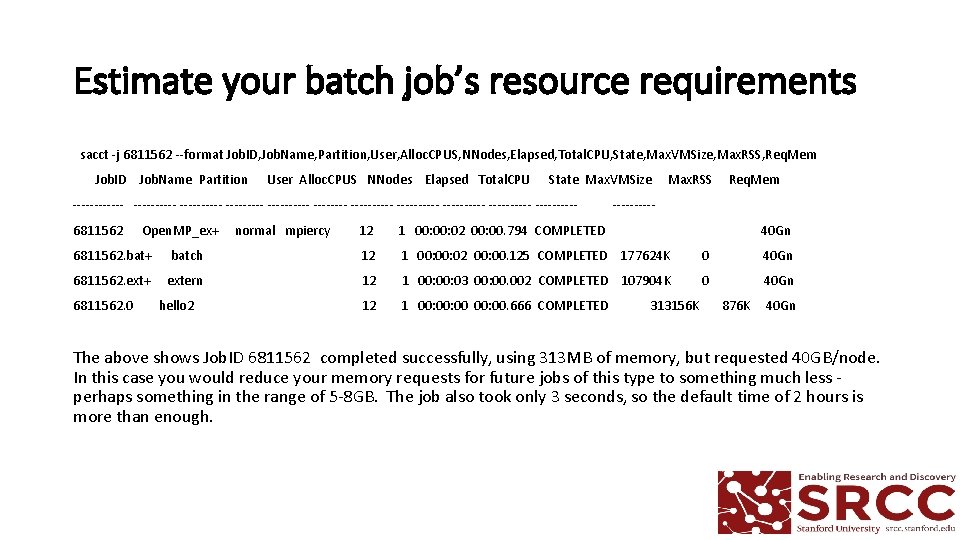
Estimate your batch job’s resource requirements sacct -j 6811562 --format Job. ID, Job. Name, Partition, User, Alloc. CPUS, NNodes, Elapsed, Total. CPU, State, Max. VMSize, Max. RSS, Req. Mem Job. ID Job. Name Partition User Alloc. CPUS NNodes Elapsed Total. CPU State Max. VMSize Max. RSS Req. Mem ------------------------------ ----- 6811562 Open. MP_ex+ normal mpiercy 12 1 00: 02 00: 00. 794 COMPLETED 40 Gn 6811562. bat+ batch 12 1 00: 02 00: 00. 125 COMPLETED 177624 K 0 40 Gn 6811562. ext+ extern 12 1 00: 03 00: 00. 002 COMPLETED 107904 K 0 40 Gn 6811562. 0 hello 2 12 1 00: 00. 666 COMPLETED 313156 K 876 K 40 Gn The above shows Job. ID 6811562 completed successfully, using 313 MB of memory, but requested 40 GB/node. In this case you would reduce your memory requests for future jobs of this type to something much less - perhaps something in the range of 5 -8 GB. The job also took only 3 seconds, so the default time of 2 hours is more than enough.
More info http: //www. sherlock. stanford. edu/docs/ Our Grouphttps: //srcc. stanford. edu/ Questionssrcc-support@stanford. edu Slideshttps: //srcc. stanford. edu/sherlock-community-meeting-slides