
Shading Languages Yungfeng Chiu Agenda Introduction Pixars Render
![Fixed Function Example Texture[0] = <normal. Map>; Color. Op[0] = Dot. Product 3; Target[0]](https://slidetodoc.com/presentation_image_h/05cb1b3926f15c140838949d42f8b968/image-26.jpg "Fixed Function Example Texture[0] = <normal. Map>; Color. Op[0] = Dot. Product 3; Target[0]")
![Open. GL Fixed Function Vertex (object) Normal Vertex (clip) Transform [MVP], [MV]-T Color Secondary.](https://slidetodoc.com/presentation_image_h/05cb1b3926f15c140838949d42f8b968/image-29.jpg "Open. GL Fixed Function Vertex (object) Normal Vertex (clip) Transform [MVP], [MV]-T Color Secondary.")
![Open. GL Fixed Function Fragment Color Secondary. Color Tex. Coord[n] Tex n TE n](https://slidetodoc.com/presentation_image_h/05cb1b3926f15c140838949d42f8b968/image-31.jpg "Open. GL Fixed Function Fragment Color Secondary. Color Tex. Coord[n] Tex n TE n")
![GL 2 Fragment Processor Color Secondary. Color Tex. Coord[n] z (|ze|, f ) Uniform](https://slidetodoc.com/presentation_image_h/05cb1b3926f15c140838949d42f8b968/image-32.jpg "GL 2 Fragment Processor Color Secondary. Color Tex. Coord[n] z (|ze|, f ) Uniform")
- Slides: 43
Shading Languages Yung-feng Chiu
Agenda • Introduction • Pixar’s Render. Man, MS’s HLSL, NV’s Cg. FX, ATI’s Render. Monkey • Demos • . fx file • Comparsion 2
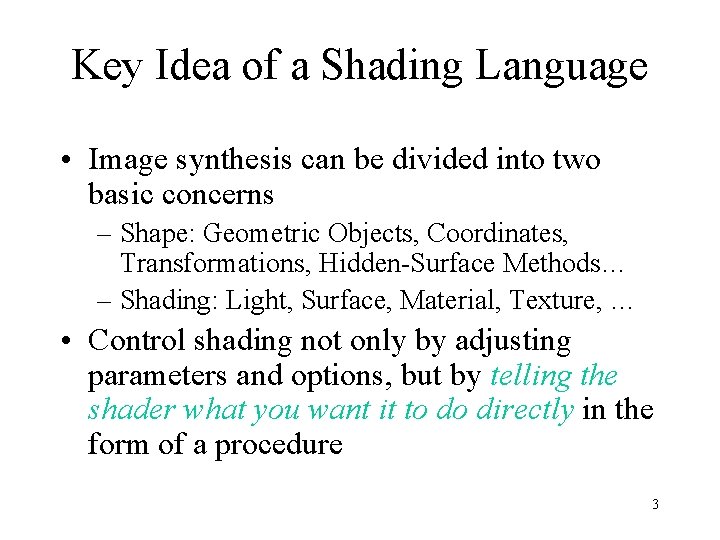
Key Idea of a Shading Language • Image synthesis can be divided into two basic concerns – Shape: Geometric Objects, Coordinates, Transformations, Hidden-Surface Methods… – Shading: Light, Surface, Material, Texture, … • Control shading not only by adjusting parameters and options, but by telling the shader what you want it to do directly in the form of a procedure 3
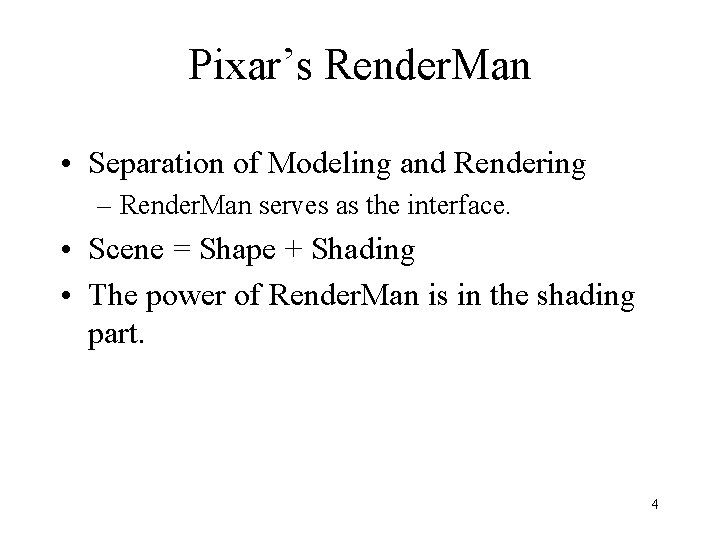
Pixar’s Render. Man • Separation of Modeling and Rendering – Render. Man serves as the interface. • Scene = Shape + Shading • The power of Render. Man is in the shading part. 4
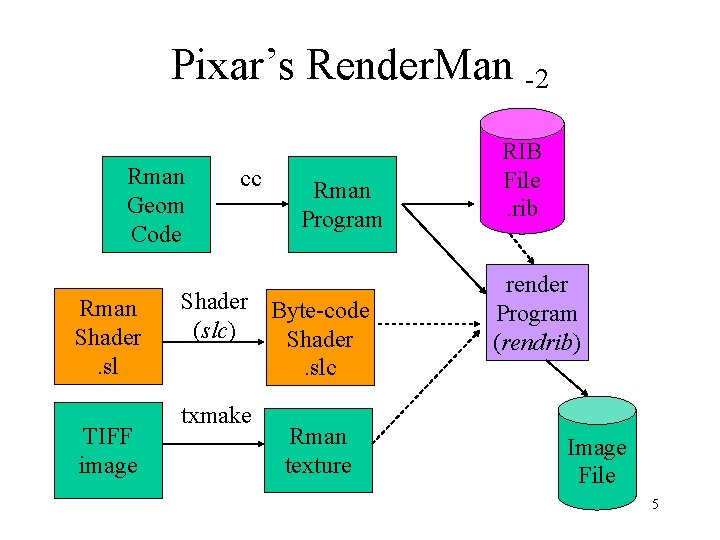
Pixar’s Render. Man -2 Rman Geom Code Rman Shader. sl TIFF image cc Rman Program Shader Byte-code (slc) Shader. slc txmake Rman texture RIB File. rib render Program (rendrib) Image File 5
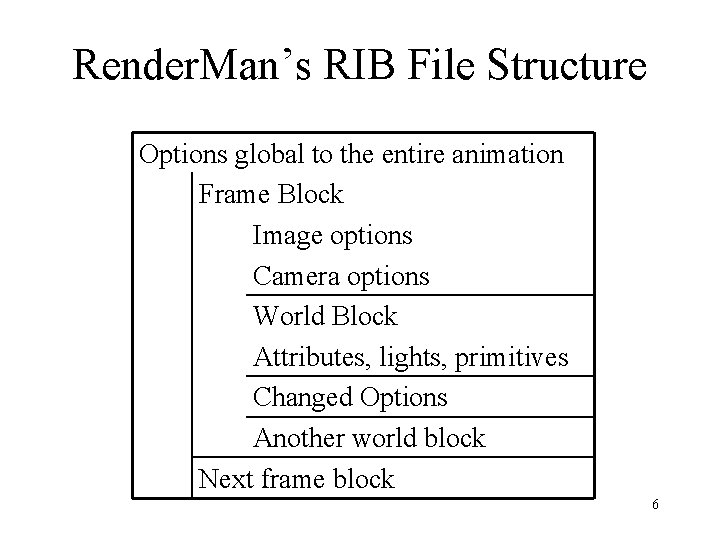
Render. Man’s RIB File Structure Options global to the entire animation Frame Block Image options Camera options World Block Attributes, lights, primitives Changed Options Another world block Next frame block 6
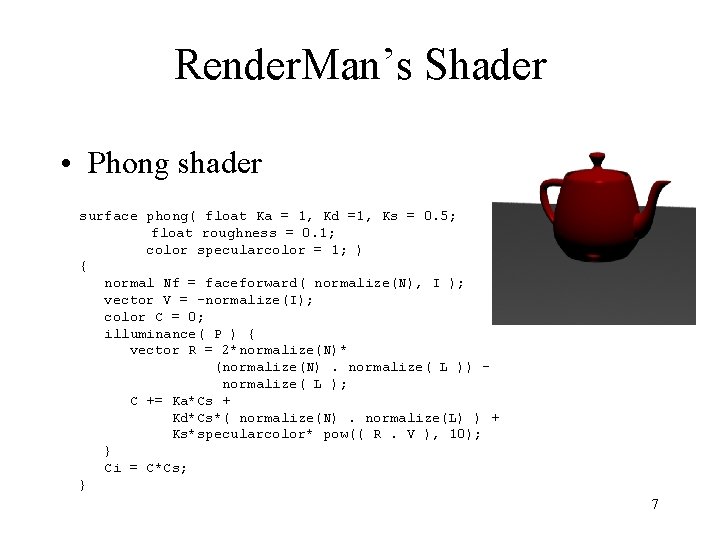
Render. Man’s Shader • Phong shader surface phong( float Ka = 1, Kd =1, Ks = 0. 5; float roughness = 0. 1; color specularcolor = 1; ) { normal Nf = faceforward( normalize(N), I ); vector V = -normalize(I); color C = 0; illuminance( P ) { vector R = 2*normalize(N)* (normalize(N). normalize( L )) normalize( L ); C += Ka*Cs + Kd*Cs*( normalize(N). normalize(L) ) + Ks*specularcolor* pow(( R. V ), 10); } Ci = C*Cs; } 7
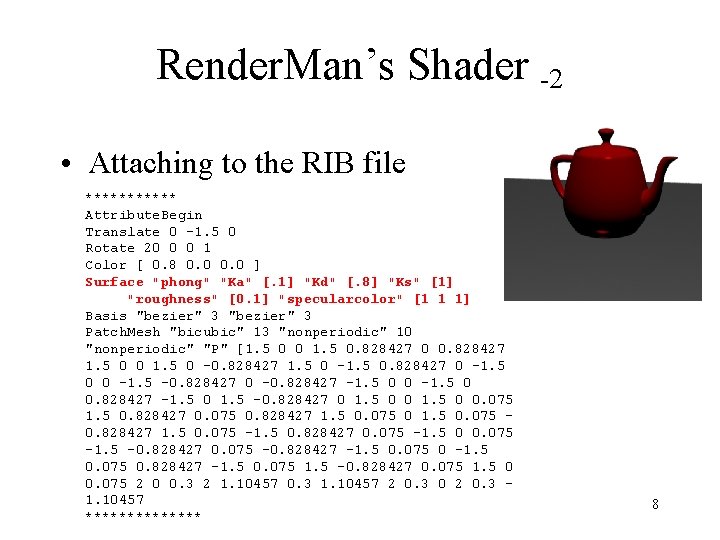
Render. Man’s Shader -2 • Attaching to the RIB file ****** Attribute. Begin Translate 0 -1. 5 0 Rotate 20 0 0 1 Color [ 0. 8 0. 0 ] Surface "phong" "Ka" [. 1] "Kd" [. 8] "Ks" [1] "roughness" [0. 1] "specularcolor" [1 1 1] Basis "bezier" 3 Patch. Mesh "bicubic" 13 "nonperiodic" 10 "nonperiodic" "P" [1. 5 0 0 1. 5 0. 828427 0 0. 828427 1. 5 0 0 1. 5 0 -0. 828427 1. 5 0 -1. 5 0. 828427 0 -1. 5 0 0 -1. 5 -0. 828427 0 -0. 828427 -1. 5 0 1. 5 -0. 828427 0 1. 5 0 0. 075 1. 5 0. 828427 0. 075 0. 828427 1. 5 0. 075 -1. 5 0. 828427 0. 075 -1. 5 0 0. 075 -1. 5 -0. 828427 0. 075 -0. 828427 -1. 5 0. 075 1. 5 -0. 828427 0. 075 1. 5 0 0. 075 2 0 0. 3 2 1. 10457 0. 3 1. 10457 2 0. 3 0 2 0. 3 1. 10457 ******* 8
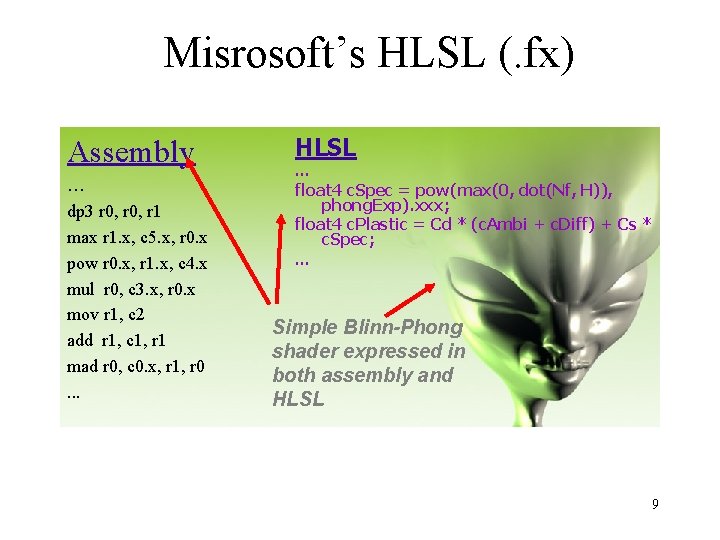
Misrosoft’s HLSL (. fx) Assembly … dp 3 r 0, r 1 max r 1. x, c 5. x, r 0. x pow r 0. x, r 1. x, c 4. x mul r 0, c 3. x, r 0. x mov r 1, c 2 add r 1, c 1, r 1 mad r 0, c 0. x, r 1, r 0. . . HLSL … float 4 c. Spec = pow(max(0, dot(Nf, H)), phong. Exp). xxx; float 4 c. Plastic = Cd * (c. Ambi + c. Diff) + Cs * c. Spec; … Simple Blinn-Phong shader expressed in both assembly and HLSL 9
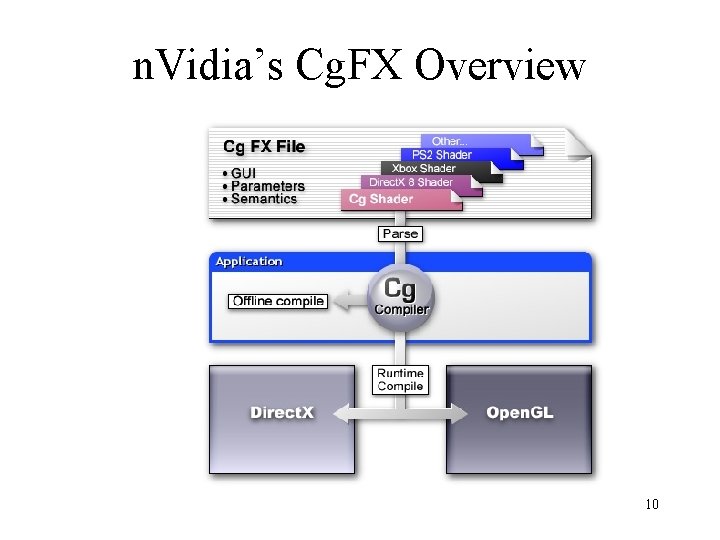
n. Vidia’s Cg. FX Overview 10
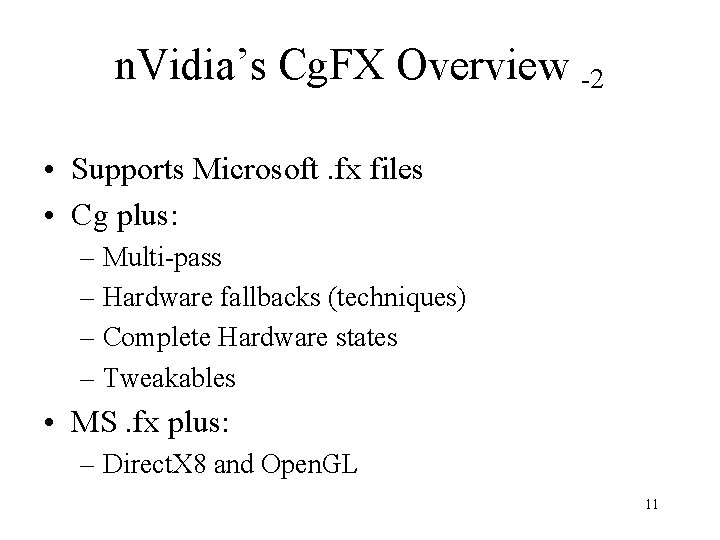
n. Vidia’s Cg. FX Overview -2 • Supports Microsoft. fx files • Cg plus: – Multi-pass – Hardware fallbacks (techniques) – Complete Hardware states – Tweakables • MS. fx plus: – Direct. X 8 and Open. GL 11
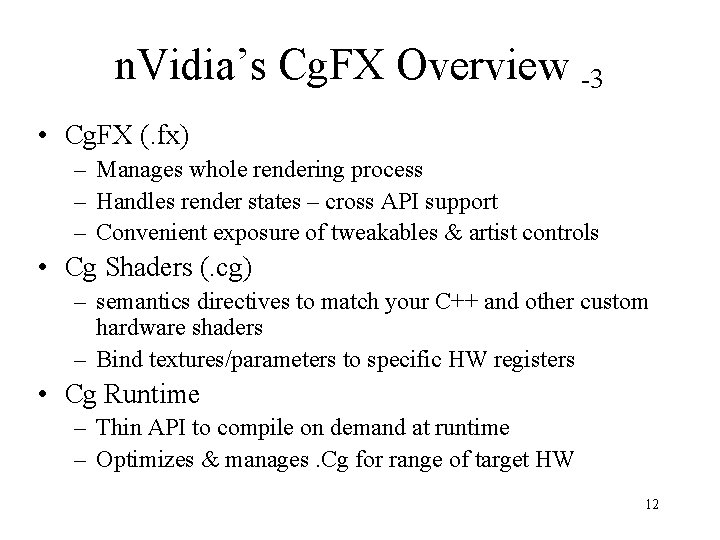
n. Vidia’s Cg. FX Overview -3 • Cg. FX (. fx) – Manages whole rendering process – Handles render states – cross API support – Convenient exposure of tweakables & artist controls • Cg Shaders (. cg) – semantics directives to match your C++ and other custom hardware shaders – Bind textures/parameters to specific HW registers • Cg Runtime – Thin API to compile on demand at runtime – Optimizes & manages. Cg for range of target HW 12
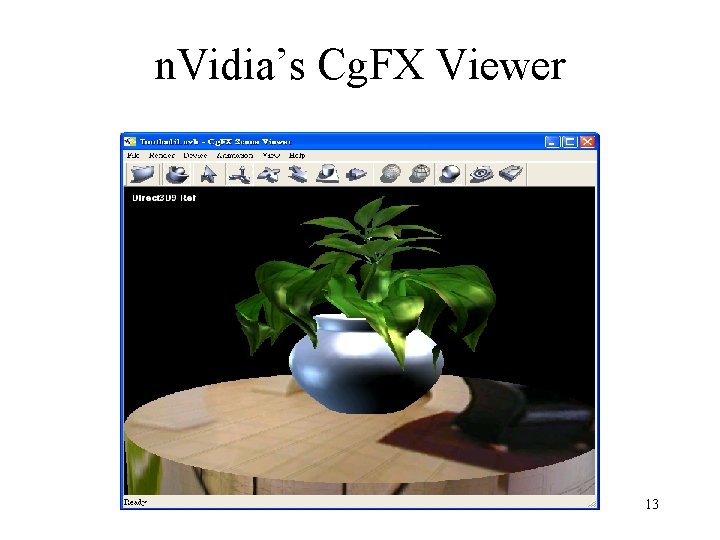
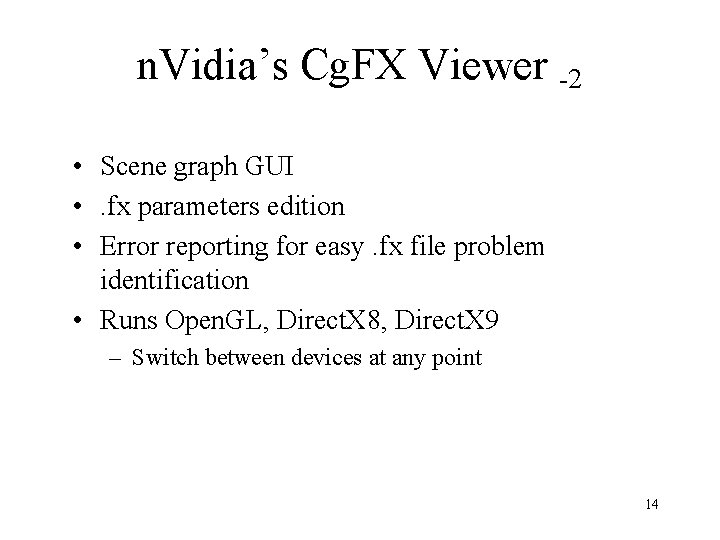
n. Vidia’s Cg. FX Viewer 13
n. Vidia’s Cg. FX Viewer -2 • Scene graph GUI • . fx parameters edition • Error reporting for easy. fx file problem identification • Runs Open. GL, Direct. X 8, Direct. X 9 – Switch between devices at any point 14
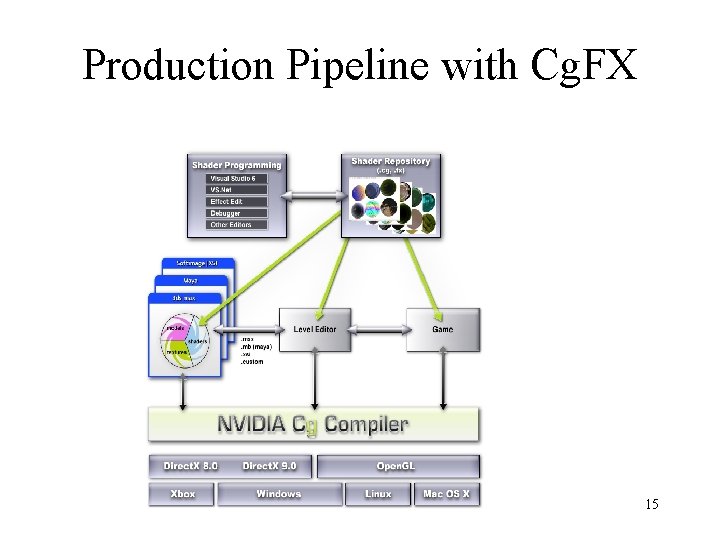
Production Pipeline with Cg. FX 15
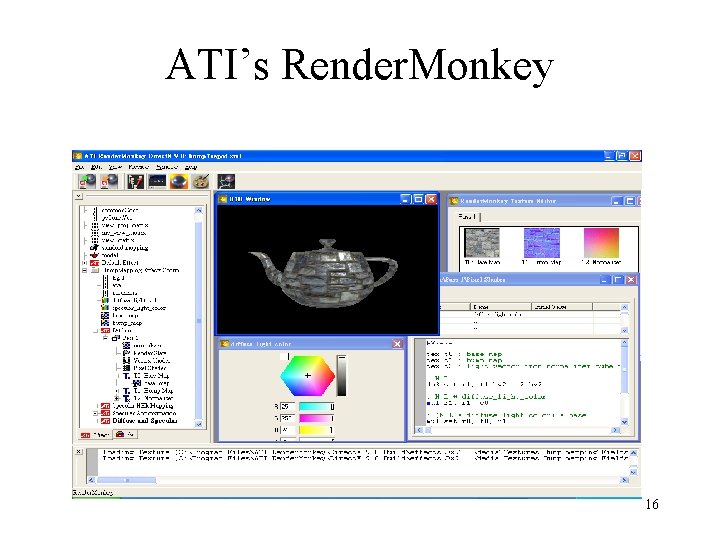
ATI’s Render. Monkey 16
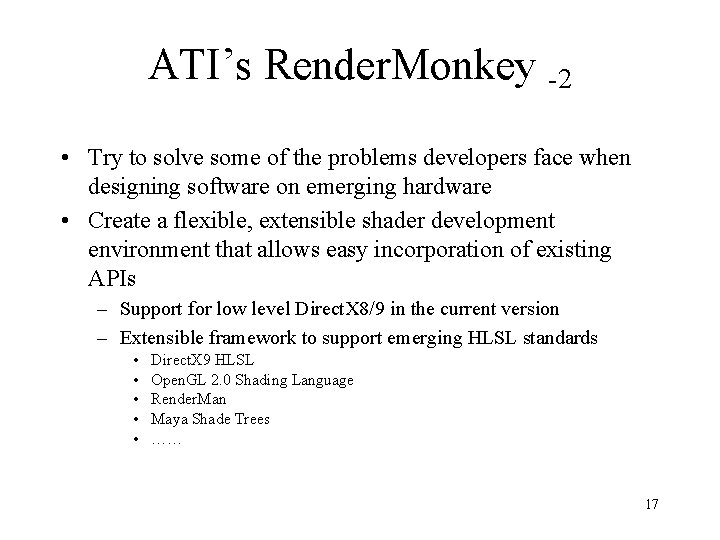
ATI’s Render. Monkey -2 • Try to solve some of the problems developers face when designing software on emerging hardware • Create a flexible, extensible shader development environment that allows easy incorporation of existing APIs – Support for low level Direct. X 8/9 in the current version – Extensible framework to support emerging HLSL standards • • • Direct. X 9 HLSL Open. GL 2. 0 Shading Language Render. Man Maya Shade Trees …… 17
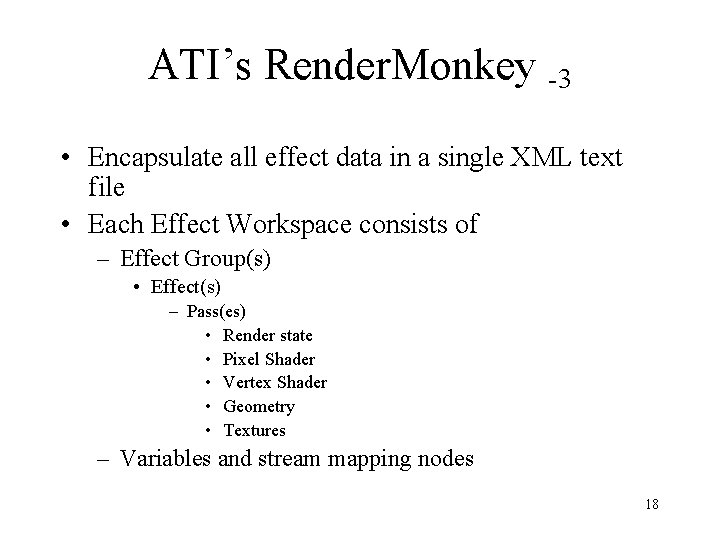
ATI’s Render. Monkey -3 • Encapsulate all effect data in a single XML text file • Each Effect Workspace consists of – Effect Group(s) • Effect(s) – Pass(es) • Render state • Pixel Shader • Vertex Shader • Geometry • Textures – Variables and stream mapping nodes 18
Demos ! 19
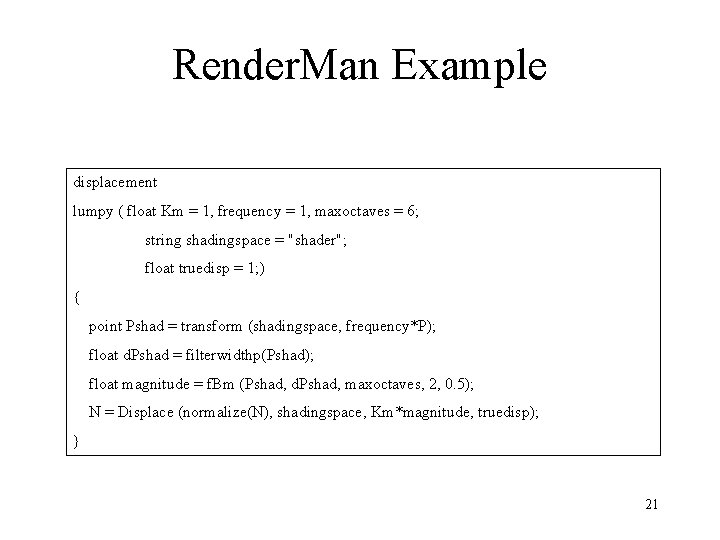
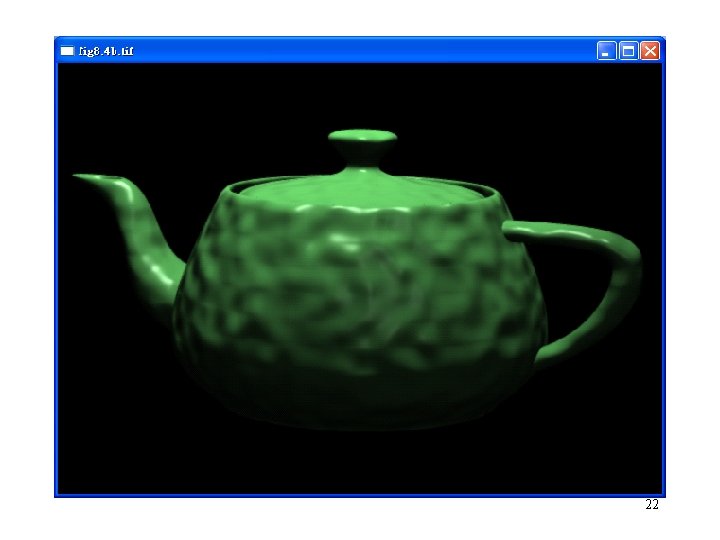
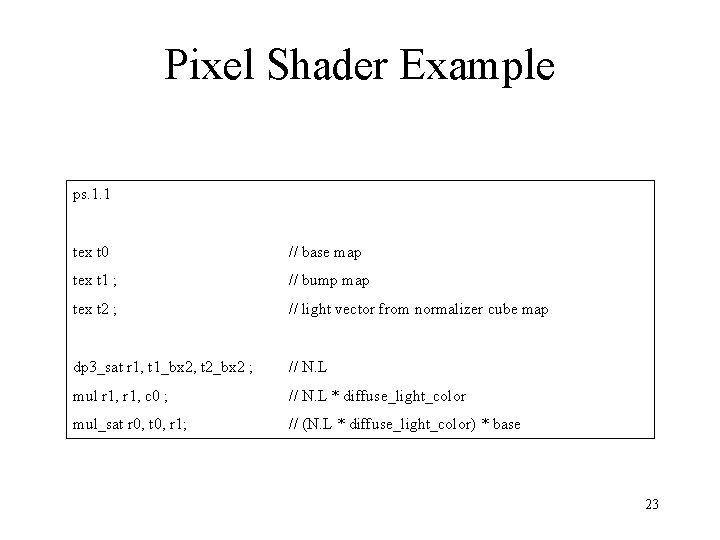
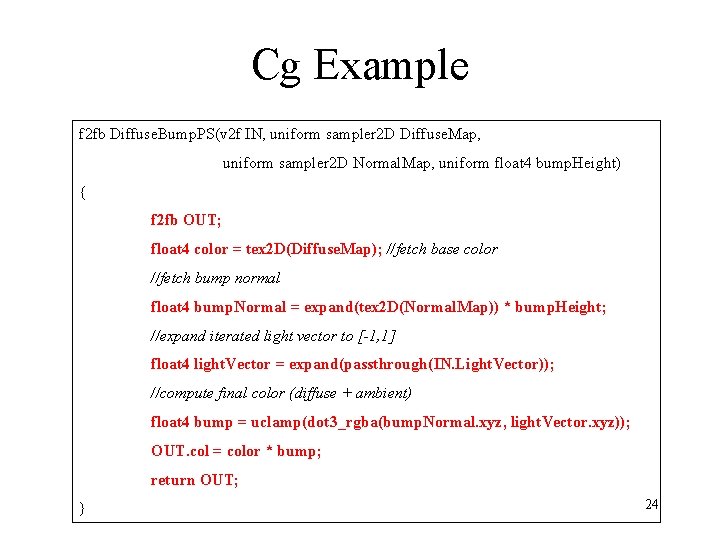
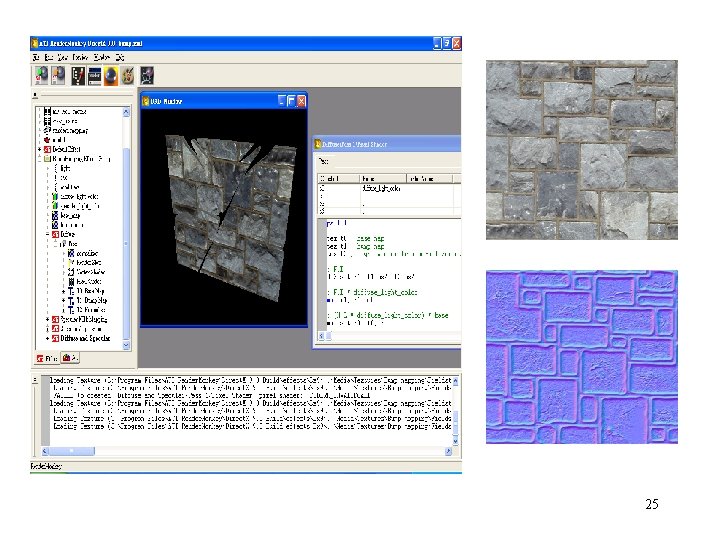
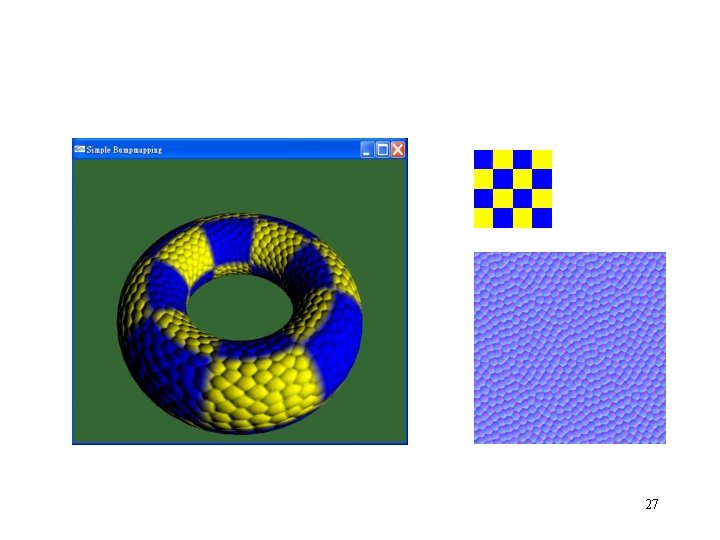
Bump Map Example • Bump mapping simulates detail with a surface normal that varies across a surface 20
Render. Man Example displacement lumpy ( float Km = 1, frequency = 1, maxoctaves = 6; string shadingspace = "shader"; float truedisp = 1; ) { point Pshad = transform (shadingspace, frequency*P); float d. Pshad = filterwidthp(Pshad); float magnitude = f. Bm (Pshad, d. Pshad, maxoctaves, 2, 0. 5); N = Displace (normalize(N), shadingspace, Km*magnitude, truedisp); } 21
22
Pixel Shader Example ps. 1. 1 tex t 0 // base map tex t 1 ; // bump map tex t 2 ; // light vector from normalizer cube map dp 3_sat r 1, t 1_bx 2, t 2_bx 2 ; // N. L mul r 1, c 0 ; // N. L * diffuse_light_color mul_sat r 0, t 0, r 1; // (N. L * diffuse_light_color) * base 23
Cg Example f 2 fb Diffuse. Bump. PS(v 2 f IN, uniform sampler 2 D Diffuse. Map, uniform sampler 2 D Normal. Map, uniform float 4 bump. Height) { f 2 fb OUT; float 4 color = tex 2 D(Diffuse. Map); //fetch base color //fetch bump normal float 4 bump. Normal = expand(tex 2 D(Normal. Map)) * bump. Height; //expand iterated light vector to [-1, 1] float 4 light. Vector = expand(passthrough(IN. Light. Vector)); //compute final color (diffuse + ambient) float 4 bump = uclamp(dot 3_rgba(bump. Normal. xyz, light. Vector. xyz)); OUT. col = color * bump; return OUT; } 24
25
Fixed Function Example Texture[0] = <normal. Map>; Color. Op[0] = Dot. Product 3; Target[0] = Texture 2 D; Alpha. Op[0] = Select. Arg 1; Min. Filter[0] = Linear; Color. Arg 1[0] = Texture; Mag. Filter[0] = Linear; Color. Arg 2[0] = Diffuse; Mip. Filter[0] = Linear; Alpha. Arg 1[0] = Texture; Alpha. Arg 2[0] = Diffuse; Texture[1] = <diffuse. Texture>; Target[1] = Texture 2 D; Color. Op[1] = Modulate; Min. Filter[1] = Linear; Color. Arg 1[1] = Current; Mag. Filter[1] = Linear; Color. Arg 2[1] = Texture; Mip. Filter[1] = Linear; Alpha. Op[1] = Select. Arg 1; 26
27
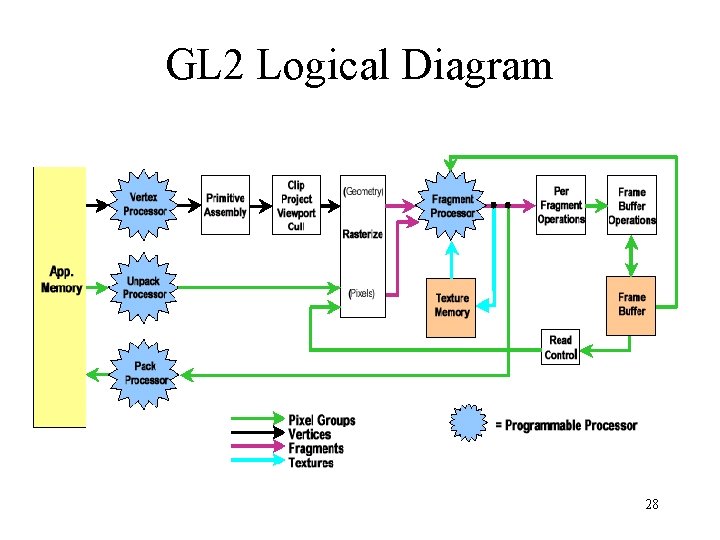
GL 2 Logical Diagram 28
Open. GL Fixed Function Vertex (object) Normal Vertex (clip) Transform [MVP], [MV]-T Color Secondary. Color Vertex (eye) Lighting [0, 1] Tex. Coordn Edge. Flag Texgen Texture Matrixn Front&Back Color Front&Back Secondary. Color Tex. Coordn Edge. Flag 29
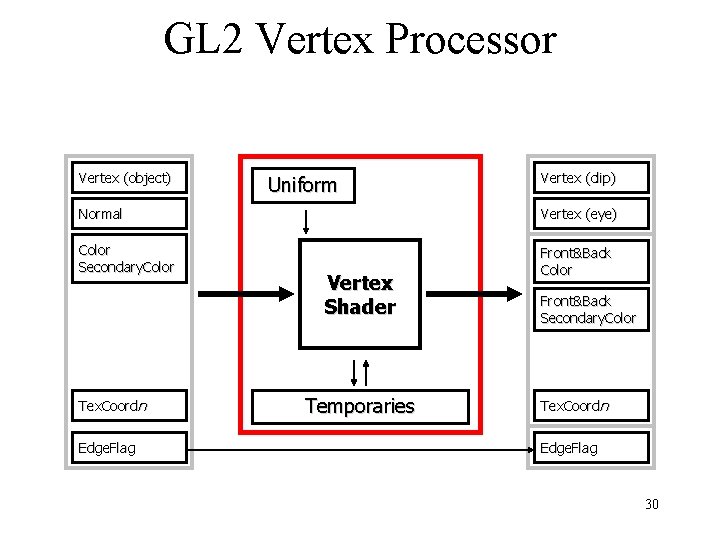
GL 2 Vertex Processor Vertex (object) Uniform Vertex (clip) Normal Vertex (eye) Color Secondary. Color Front&Back Color Tex. Coordn Edge. Flag Vertex Shader Temporaries Front&Back Secondary. Color Tex. Coordn Edge. Flag 30
Open. GL Fixed Function Fragment Color Secondary. Color Tex. Coord[n] Tex n TE n Sum [0, 1] Fog Color z (|ze|, f ) Depth Coord Front. Facing 31
GL 2 Fragment Processor Color Secondary. Color Tex. Coord[n] z (|ze|, f ) Uniform Texture Fragment Shader Depth Coord Front. Facing Color Depth Temporaries Coord Front. Facing 32
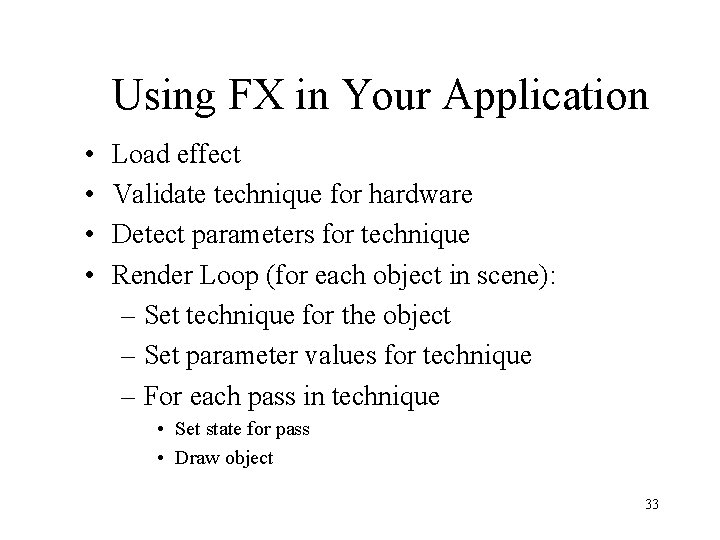
Using FX in Your Application • • Load effect Validate technique for hardware Detect parameters for technique Render Loop (for each object in scene): – Set technique for the object – Set parameter values for technique – For each pass in technique • Set state for pass • Draw object 33
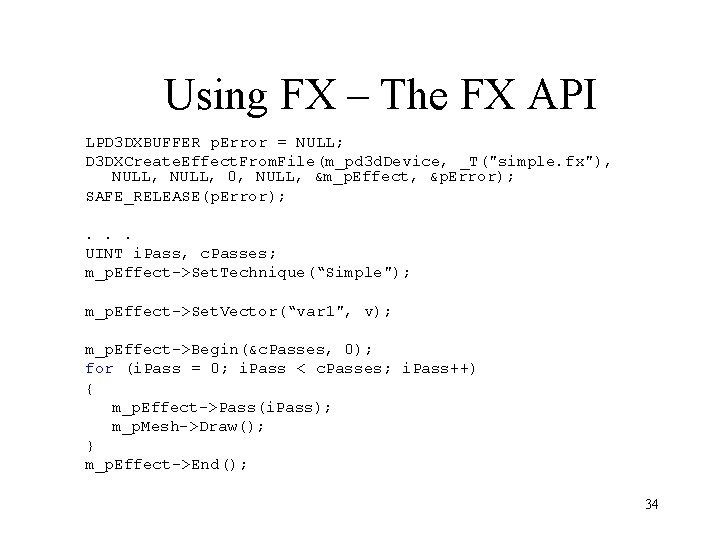
Using FX – The FX API LPD 3 DXBUFFER p. Error = NULL; D 3 DXCreate. Effect. From. File(m_pd 3 d. Device, _T("simple. fx"), NULL, 0, NULL, &m_p. Effect, &p. Error); SAFE_RELEASE(p. Error); . . . UINT i. Pass, c. Passes; m_p. Effect->Set. Technique(“Simple"); m_p. Effect->Set. Vector(“var 1", v); m_p. Effect->Begin(&c. Passes, 0); for (i. Pass = 0; i. Pass < c. Passes; i. Pass++) { m_p. Effect->Pass(i. Pass); m_p. Mesh->Draw(); } m_p. Effect->End(); 34
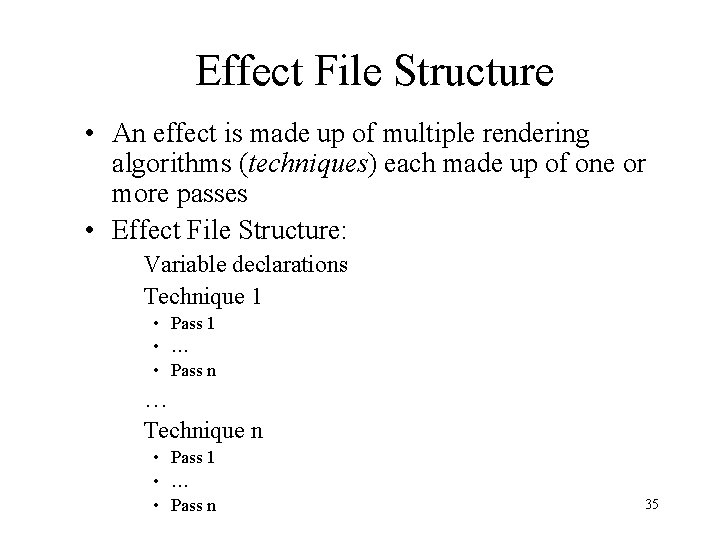
Effect File Structure • An effect is made up of multiple rendering algorithms (techniques) each made up of one or more passes • Effect File Structure: Variable declarations Technique 1 • Pass 1 • … • Pass n … Technique n • Pass 1 • … • Pass n 35
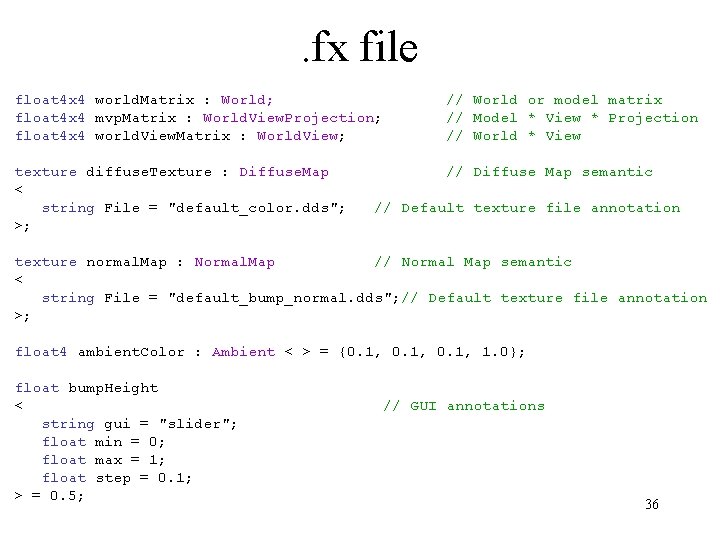
. fx file float 4 x 4 world. Matrix : World; float 4 x 4 mvp. Matrix : World. View. Projection; float 4 x 4 world. View. Matrix : World. View; // World or model matrix // Model * View * Projection // World * View texture diffuse. Texture : Diffuse. Map < string File = "default_color. dds"; >; // Diffuse Map semantic // Default texture file annotation texture normal. Map : Normal. Map // Normal Map semantic < string File = "default_bump_normal. dds"; // Default texture file annotation >; float 4 ambient. Color : Ambient < > = {0. 1, 1. 0}; float bump. Height < string gui = "slider"; float min = 0; float max = 1; float step = 0. 1; > = 0. 5; // GUI annotations 36
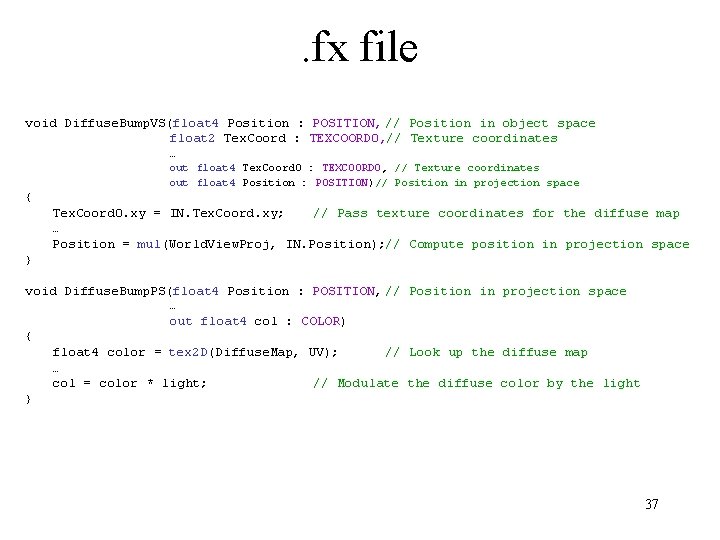
. fx file void Diffuse. Bump. VS(float 4 Position : POSITION, // Position in object space float 2 Tex. Coord : TEXCOORD 0, // Texture coordinates … out float 4 Tex. Coord 0 : TEXCOORD 0, // Texture coordinates out float 4 Position : POSITION)// Position in projection space { Tex. Coord 0. xy = IN. Tex. Coord. xy; // Pass texture coordinates for the diffuse map … Position = mul(World. View. Proj, IN. Position); // Compute position in projection space } void Diffuse. Bump. PS(float 4 Position : POSITION, // Position in projection space … out float 4 col : COLOR) { float 4 color = tex 2 D(Diffuse. Map, UV); // Look up the diffuse map … col = color * light; // Modulate the diffuse color by the light } 37
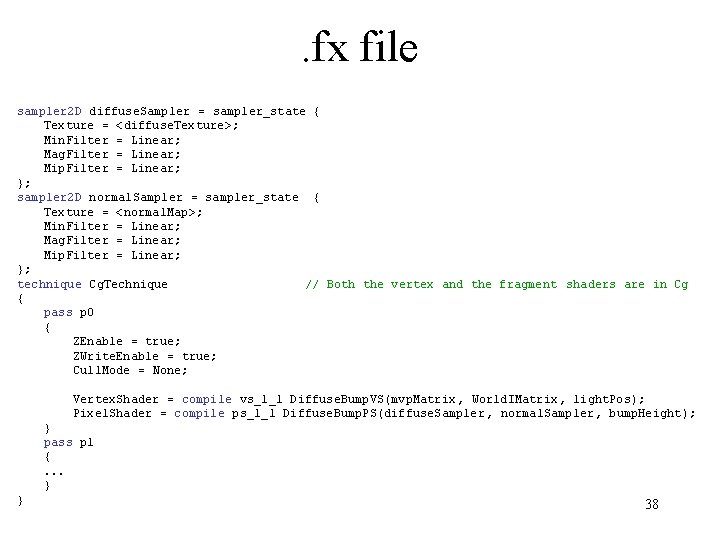
. fx file sampler 2 D diffuse. Sampler = sampler_state { Texture = <diffuse. Texture>; Min. Filter = Linear; Mag. Filter = Linear; Mip. Filter = Linear; }; sampler 2 D normal. Sampler = sampler_state { Texture = <normal. Map>; Min. Filter = Linear; Mag. Filter = Linear; Mip. Filter = Linear; }; technique Cg. Technique // Both the vertex and the fragment shaders are in Cg { pass p 0 { ZEnable = true; ZWrite. Enable = true; Cull. Mode = None; Vertex. Shader = compile vs_1_1 Diffuse. Bump. VS(mvp. Matrix, World. IMatrix, light. Pos); Pixel. Shader = compile ps_1_1 Diffuse. Bump. PS(diffuse. Sampler , normal. Sampler, bump. Height); } pass p 1 {. . . } } 38
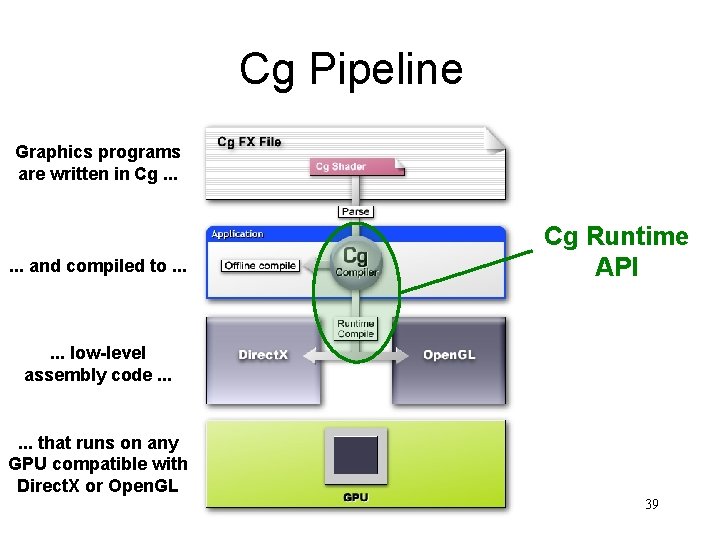
Cg Pipeline Graphics programs are written in Cg. . . and compiled to. . . Cg Runtime API . . . low-level assembly code. . . that runs on any GPU compatible with Direct. X or Open. GL 39
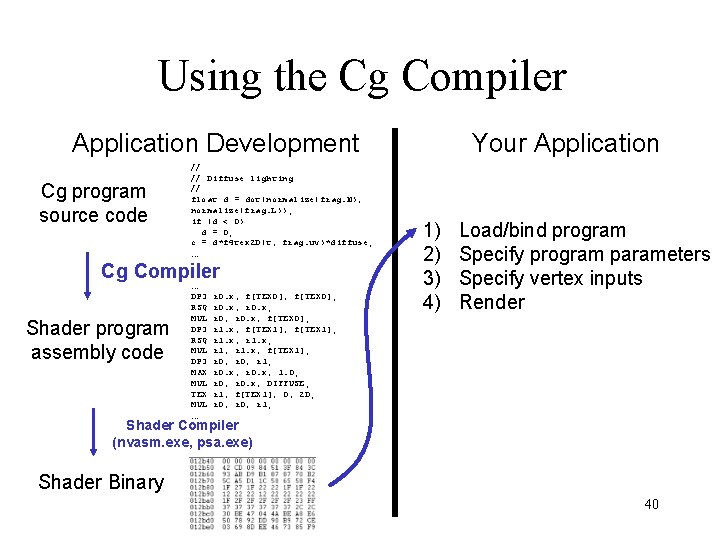
Using the Cg Compiler Application Development Cg program source code // // Diffuse lighting // float d = dot(normalize(frag. N), normalize(frag. L)); if (d < 0) d = 0; c = d*f 4 tex 2 D(t, frag. uv)*diffuse; … Cg Compiler Shader program assembly code … DP 3 RSQ MUL DP 3 MAX MUL TEX MUL … r 0. x, f[TEX 0]; r 0. x, r 0. x; r 0, r 0. x, f[TEX 0]; r 1. x, f[TEX 1]; r 1. x, r 1. x; r 1, r 1. x, f[TEX 1]; r 0, r 1; r 0. x, 1. 0; r 0, r 0. x, DIFFUSE; r 1, f[TEX 1], 0, 2 D; r 0, r 1; Your Application 1) 2) 3) 4) Load/bind program Specify program parameters Specify vertex inputs Render Shader Compiler (nvasm. exe, psa. exe) Shader Binary 40
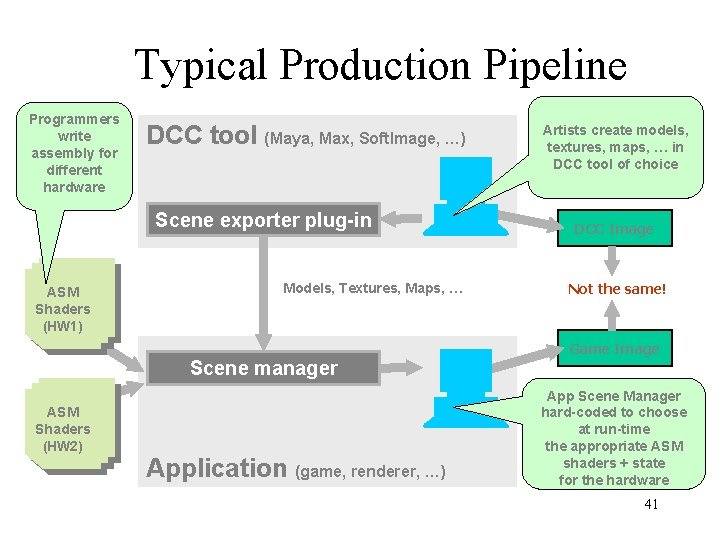
Typical Production Pipeline Programmers write assembly for different hardware DCC tool (Maya, Max, Soft. Image, …) Scene exporter plug-in ASM Shaders (HW 1) Models, Textures, Maps, … Artists create models, textures, maps, … in DCC tool of choice DCC Image Not the same! Game Image Scene manager ASM Shaders (HW 2) Application (game, renderer, …) App Scene Manager hard-coded to choose at run-time the appropriate ASM shaders + state for the hardware 41
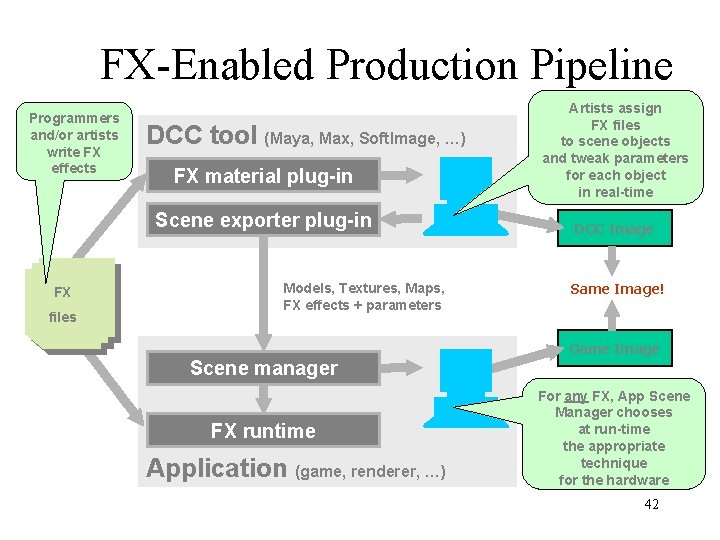
FX-Enabled Production Pipeline Programmers and/or artists write FX effects DCC tool (Maya, Max, Soft. Image, …) FX material plug-in Scene exporter plug-in FX files Models, Textures, Maps, FX effects + parameters Artists assign FX files to scene objects and tweak parameters for each object in real-time DCC Image Same Image! Game Image Scene manager FX runtime Application (game, renderer, …) For any FX, App Scene Manager chooses at run-time the appropriate technique for the hardware 42
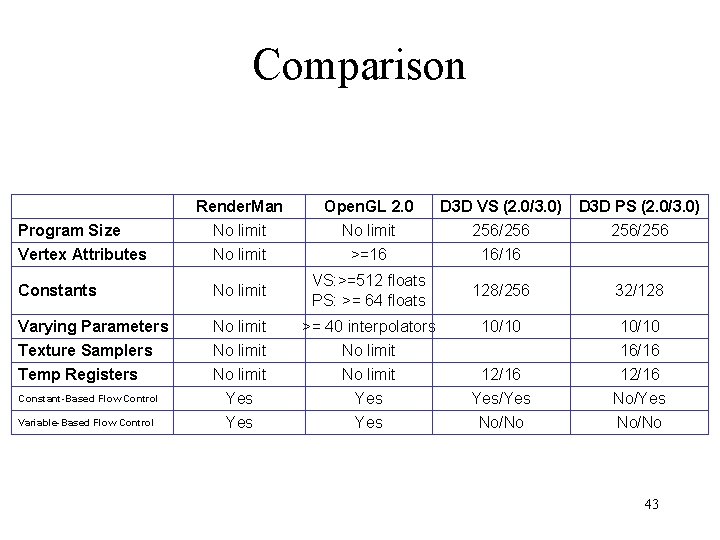
Comparison Render. Man No limit Open. GL 2. 0 No limit D 3 D VS (2. 0/3. 0) 256/256 Vertex Attributes No limit >=16 16/16 Constants No limit VS: >=512 floats PS: >= 64 floats 128/256 32/128 Varying Parameters No limit >= 40 interpolators 10/10 Texture Samplers Temp Registers No limit Yes Yes 12/16 Yes/Yes No/No 16/16 12/16 No/Yes No/No Program Size Constant-Based Flow Control Variable-Based Flow Control D 3 D PS (2. 0/3. 0) 256/256 43