
SGT Beans EasyToUse Graphics Toolkit for Java Applications
SGT Beans Easy-To-Use Graphics Toolkit for Java Applications Donald W. Denbo 2003 -10 -23 UW/JISAO-NOAA/PMEL NOAATech 2004, Silver Spring, MD
Introduction • The Scientific Graphics Toolkit Java. Beans (SGT Beans) is a collection of Java classes that provide Java. Beans compatible access to SGT. • Java. Beans makes SGT’s capabilities more accessible to developers. • SGT Beans reduces the learning curve needed to produce graphics applications. • SGT Beans can be used with several Java IDEs (Net. Beans, JBuilder, etc. ). 2003 -10 -23 NOAATech 2004, Silver Spring, MD 2
History • SGT was developed to allow a NOAAServer user to interactively preview data and overlay plots. • SGT presently used with … – Ocean. Share, a collaborative tool for in situ data visualization – nc. Browse, a net. CDF file browser – Climate Data Portal client, an application for browsing distributed data • SGT has had ~17, 000 downloads from 5, 800 unique sites in 70 countries. 2003 -10 -23 NOAATech 2004, Silver Spring, MD 3
Other Users of SGT • Buoy Data, Morska Bioloska Postaja (Marine Biology Station) • Computational Physics Laboratory, University of Edinburgh • A Utility in JOELib, Computational Chemistry, University of Tübingen • “Coordinated, Interactive Data Visualization for Neutron Scattering Data”, Mikkelson et. al. • Dezo. org has created SGT applet plots. • “An Interactive Program for Determining Junction Depths in Diffused Silicon Devices”, Myers et. al. • Übungsunterlagen 2002, Wasserspeicher 2003 -10 -23 NOAATech 2004, Silver Spring, MD 4
Outline • • • SGT Bean design goals Demonstration of SGT Bean application. Architecture – – – • Page Data. Model Panel. Model SGT Bean code examples 1. Time series. Plotting data from a net. CDF file. 2. Add grid plot. Refactor net. CDF reader. 3. Overlay vectors and add printing, Panel. Model edit, etc. • What Next? 2003 -10 -23 NOAATech 2004, Silver Spring, MD 5
Design Goals • Create easy-to-use Java. Beans from the SGT classes. • Java. Beans will enable beginner and intermediate developers a quick entry into SGT graphics. • SGT Beans will handle most events and provide tools to easily customize the appearance of the plot. 2003 -10 -23 NOAATech 2004, Silver Spring, MD 6
SGT Beans Demonstration Start Demonstration 2003 -10 -23 NOAATech 2004, Silver Spring, MD 7
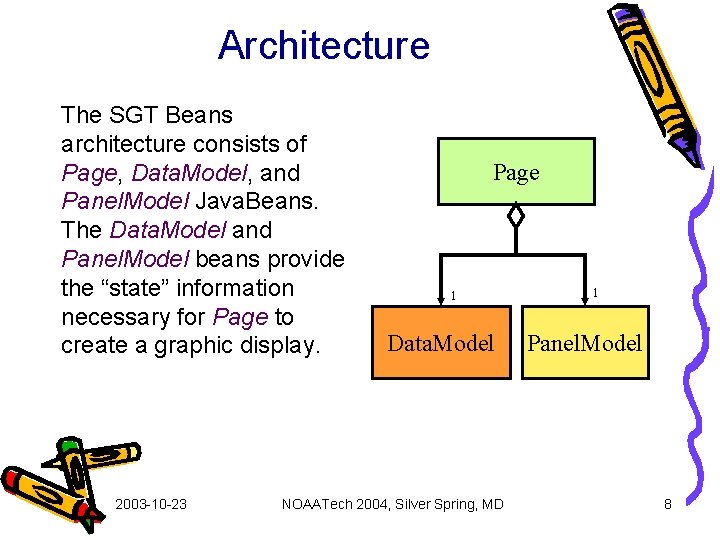
Architecture The SGT Beans architecture consists of Page, Data. Model, and Panel. Model Java. Beans. The Data. Model and Panel. Model beans provide the “state” information necessary for Page to create a graphic display. 2003 -10 -23 Page 1 Data. Model NOAATech 2004, Silver Spring, MD 1 Panel. Model 8

Page Java. Bean • Visual Java. Bean. Page can be added to any swing container. • Page can have any number of Panels placed inside it. Each Panel provides an independent graphical display of data from the Data. Model. • The location and size of the Panels are specified in the Panel. Model. 2003 -10 -23 NOAATech 2004, Silver Spring, MD 9
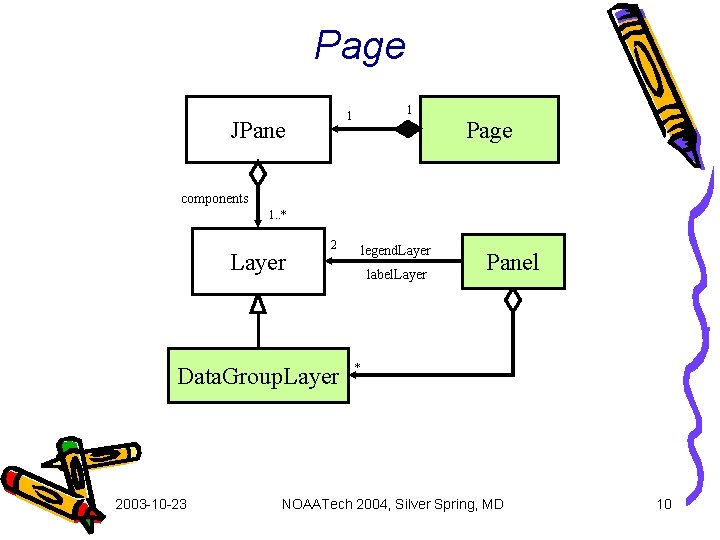
Page 1 1 JPane Page components 1. . * Layer 2 Data. Group. Layer 2003 -10 -23 legend. Layer label. Layer Panel * NOAATech 2004, Silver Spring, MD 10
Panel. Model Java. Bean • Non-visual Java. Bean. • Panel. Model maintains: – location and size of Panels on Page – Axis. Groups and their positions on a Panel – Legend position on a Panel – Titles and annotation positions on a Panel 2003 -10 -23 NOAATech 2004, Silver Spring, MD 11
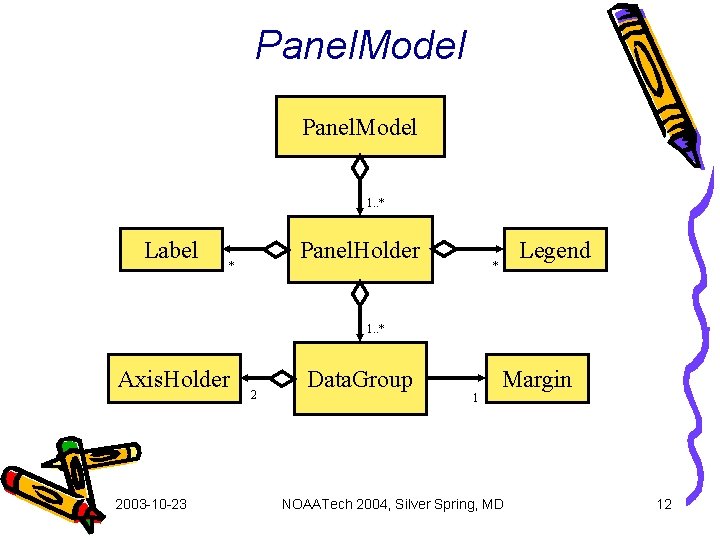
Panel. Model 1. . * Label Panel. Holder * Legend * 1. . * Axis. Holder 2003 -10 -23 2 Data. Group 1 Margin NOAATech 2004, Silver Spring, MD 12

Data. Model Java. Bean • Non-visual Java. Bean. • Data. Model uses information from the Panel. Model to specify the connection between data and Panel/Axis. Group. • Contains the SGTData and Attribute objects. 2003 -10 -23 NOAATech 2004, Silver Spring, MD 13
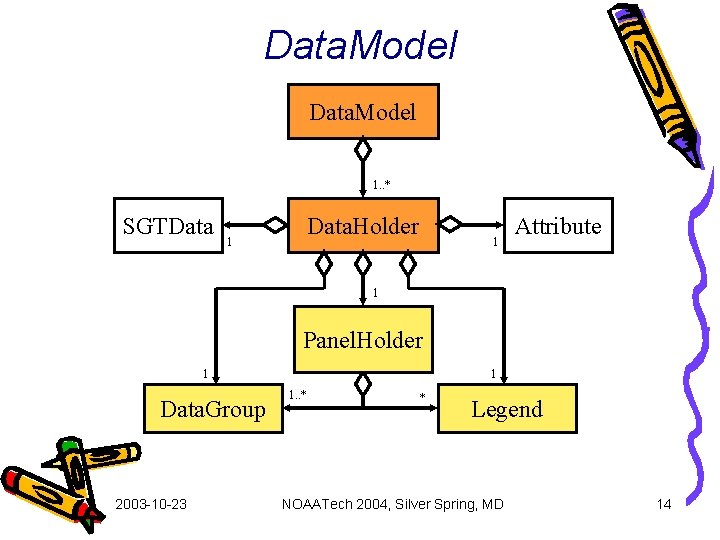
Data. Model 1. . * SGTData 1 Data. Holder 1 Attribute 1 Panel. Holder 1 Data. Group 2003 -10 -23 1 1. . * * Legend NOAATech 2004, Silver Spring, MD 14
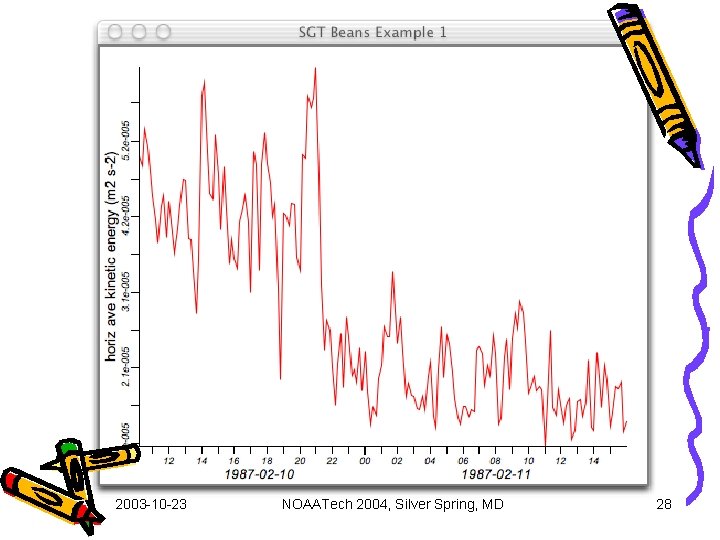
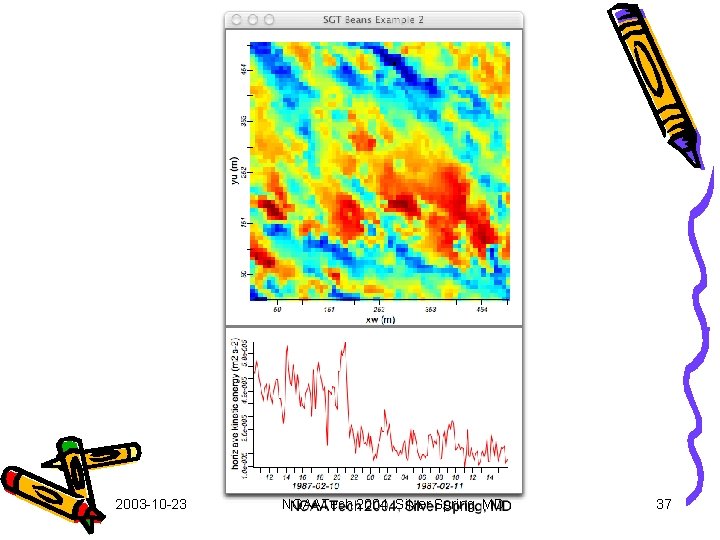
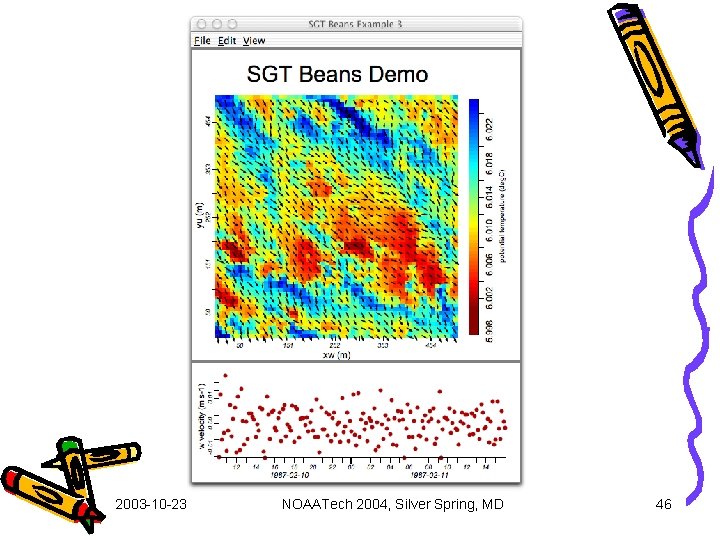
SGT Beans Code Examples • Example 1: Time Series – Read time series from net. CDF file into Simple. Line object. – Create graph using Page, Data. Model, and Panel. Model. – Load Panel. Model from SBExample 1. xml. • Example 2: Add Grid Plot – Read grid from net. CDF file into Simple. Grid object. – Load Panel. Model from SBExample 2. xml. • Example 3: Overlay Vectors and Add Interactivity – – Read vector from net. CDF file into SGTVector object. Load Panel. Model from SBExample 3. xml. Add color map Legend. Add printing, class browsing, zoom reset, Panel. Model edit. 2003 -10 -23 NOAATech 2004, Silver Spring, MD 15
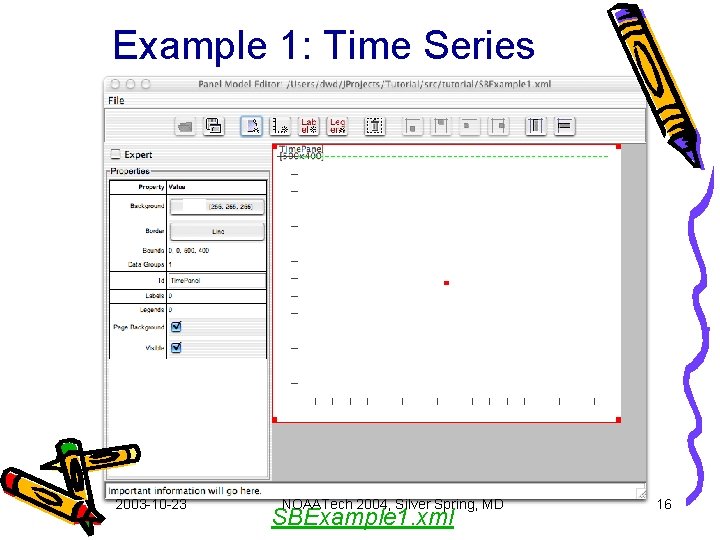
Example 1: Time Series 2003 -10 -23 NOAATech 2004, Silver Spring, MD SBExample 1. xml 16
SBExample 1 class 2003 -10 -23 NOAATech 2004, Silver Spring, MD 17
Constuctor 2003 -10 -23 NOAATech 2004, Silver Spring, MD 18
create. Graphic() 2003 -10 -23 NOAATech 2004, Silver Spring, MD 19
create. Graphic() (cont) 2003 -10 -23 NOAATech 2004, Silver Spring, MD 20
Nc. Simple. Reader 1 2003 -10 -23 NOAATech 2004, Silver Spring, MD 21
get. Time. Series() implementation 2003 -10 -23 NOAATech 2004, Silver Spring, MD 22
Set shape and read Arrays 2003 -10 -23 NOAATech 2004, Silver Spring, MD 23
Extract variable and axis values 2003 -10 -23 NOAATech 2004, Silver Spring, MD 24
Parse time units. 2003 -10 -23 NOAATech 2004, Silver Spring, MD 25
Parse time offset, create Geo. Date. Array 2003 -10 -23 NOAATech 2004, Silver Spring, MD 26
Create Simple. Line and return 2003 -10 -23 NOAATech 2004, Silver Spring, MD 27
2003 -10 -23 NOAATech 2004, Silver Spring, MD 28
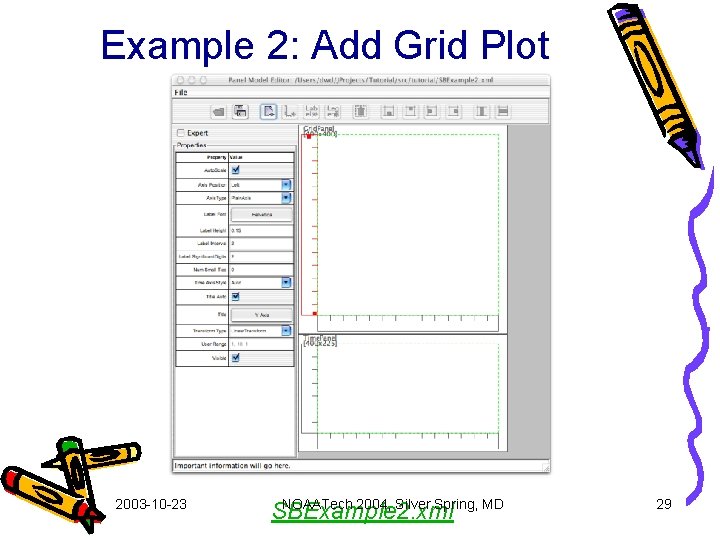
Example 2: Add Grid Plot 2003 -10 -23 NOAATech 2004, Silver Spring, MD SBExample 2. xml 29
SBExample 2 modifications 2003 -10 -23 NOAATech 2004, Silver Spring, MD 30
Add Grid to Page 2003 -10 -23 NOAATech 2004, Silver Spring, MD 31
Add create. Grid. Attribute() 2003 -10 -23 NOAATech 2004, Silver Spring, MD 32
Nc. Simple. Reader 2 - Add get. Grid() 2003 -10 -23 NOAATech 2004, Silver Spring, MD 33
Get shape and x & y axis data 2003 -10 -23 NOAATech 2004, Silver Spring, MD 34
Adjust shape and get data grid 2003 -10 -23 NOAATech 2004, Silver Spring, MD 35
Create Simple. Grid and return 2003 -10 -23 NOAATech 2004, Silver Spring, MD 36
2003 -10 -23 NOAATech 2004, Silver Spring, MD 37
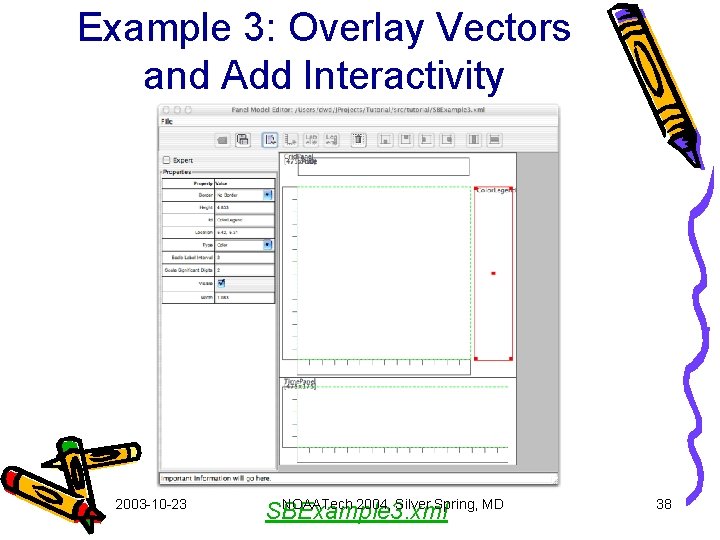
Example 3: Overlay Vectors and Add Interactivity 2003 -10 -23 NOAATech 2004, Silver Spring, MD SBExample 3. xml 38
SBExample 3 modifications 2003 -10 -23 NOAATech 2004, Silver Spring, MD 39
Add Grid Legend 2003 -10 -23 NOAATech 2004, Silver Spring, MD 40
Add Printing 2003 -10 -23 NOAATech 2004, Silver Spring, MD 41
Reset Zoom and Open JClass. Tree 2003 -10 -23 NOAATech 2004, Silver Spring, MD 42
Edit Printer Layout and Panel. Model 2003 -10 -23 NOAATech 2004, Silver Spring, MD 43
Nc. Simple. Reader 3 - Add get. Vector() 2003 -10 -23 NOAATech 2004, Silver Spring, MD 44

Modify get. Geo. Date. Array 2003 -10 -23 NOAATech 2004, Silver Spring, MD 45
2003 -10 -23 NOAATech 2004, Silver Spring, MD 46
What next? • Add Layout. Manager support to position Panels when Page is resized. This requires creating a graphical wizard to set Spring. Layout properties. • Add Annotation object support. Annotations include line, oval, point, text, and rectangle objects. • Enhance IDE compatibility with popular tools. • Continue fixing bugs, as they are found, and adding new useful features. 2003 -10 -23 NOAATech 2004, Silver Spring, MD 47
References • SGT Beans – “Plug and Play Scientific Graphics with SGT”, NOAAResearch Web. Shop 2003, Longmont, CO – SGT home page • nc. Browse – “nc. Browse: A Graphical net. CDF/OPe. NDAP Browser”, 11 th ESIP Technical Meeting - OPe. NDAP Session, Boulder, CO – nc. Browse home page • Ocean. Share – “Fisheries Oceanography Collaboration Software”, 18 th AMS International Conference on IIPS, Orlando, FL – Collaboration home page • Climate Data Portal – Climate Data Portal home page 2003 -10 -23 NOAATech 2004, Silver Spring, MD 48
- Slides: 48