
SG Technologies Smart Meter Water Meter Overview Water
- Slides: 11
SG Technologies Smart Meter
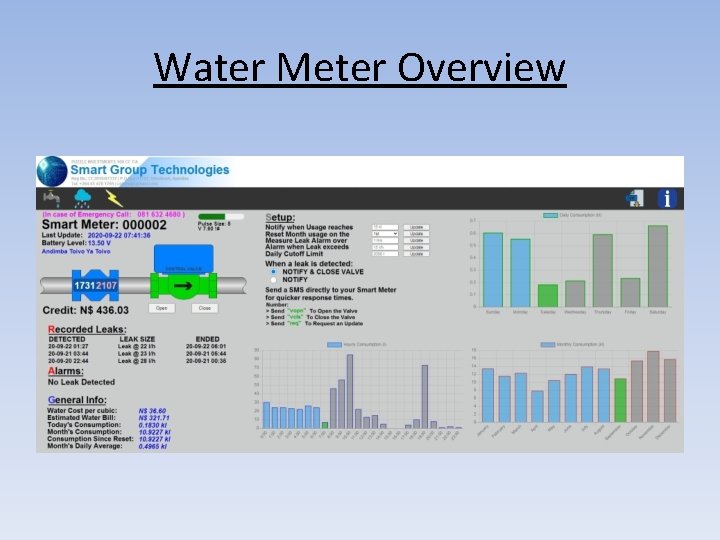
Water Meter Overview
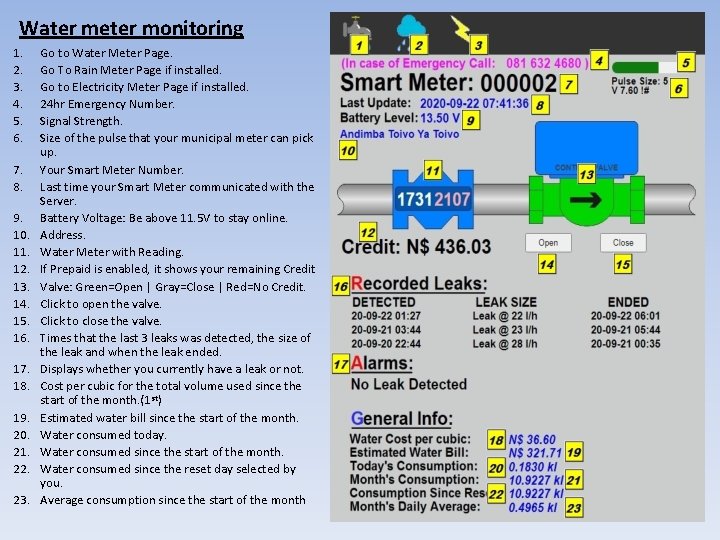
Water meter monitoring 1. 2. 3. 4. 5. 6. 7. 8. 9. 10. 11. 12. 13. 14. 15. 16. 17. 18. 19. 20. 21. 22. 23. Go to Water Meter Page. Go To Rain Meter Page if installed. Go to Electricity Meter Page if installed. 24 hr Emergency Number. Signal Strength. Size of the pulse that your municipal meter can pick up. Your Smart Meter Number. Last time your Smart Meter communicated with the Server. Battery Voltage: Be above 11. 5 V to stay online. Address. Water Meter with Reading. If Prepaid is enabled, it shows your remaining Credit Valve: Green=Open | Gray=Close | Red=No Credit. Click to open the valve. Click to close the valve. Times that the last 3 leaks was detected, the size of the leak and when the leak ended. Displays whether you currently have a leak or not. Cost per cubic for the total volume used since the start of the month. (1 st) Estimated water bill since the start of the month. Water consumed today. Water consumed since the start of the month. Water consumed since the reset day selected by you. Average consumption since the start of the month
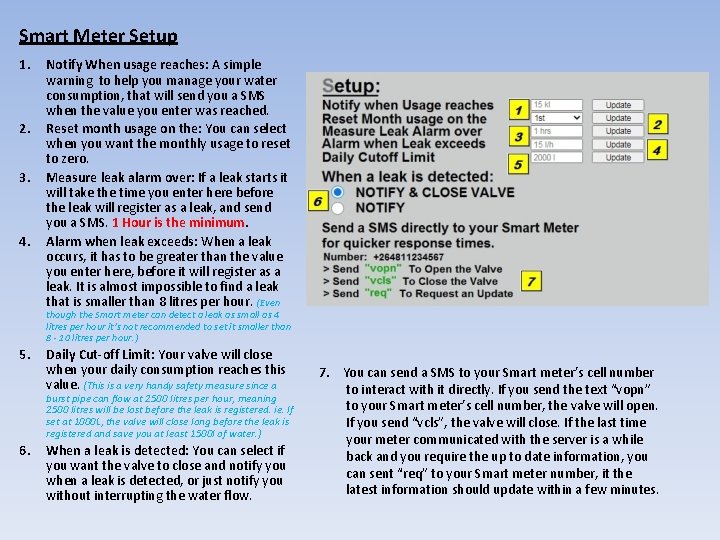
Smart Meter Setup 1. 2. 3. 4. Notify When usage reaches: A simple warning to help you manage your water consumption, that will send you a SMS when the value you enter was reached. Reset month usage on the: You can select when you want the monthly usage to reset to zero. Measure leak alarm over: If a leak starts it will take the time you enter here before the leak will register as a leak, and send you a SMS. 1 Hour is the minimum. Alarm when leak exceeds: When a leak occurs, it has to be greater than the value you enter here, before it will register as a leak. It is almost impossible to find a leak that is smaller than 8 litres per hour. (Even though the Smart meter can detect a leak as small as 4 litres per hour it’s not recommended to set it smaller than 8 - 10 litres per hour. ) 5. Daily Cut-off Limit: Your valve will close when your daily consumption reaches this value. (This is a very handy safety measure since a burst pipe can flow at 2500 litres per hour, meaning 2500 litres will be lost before the leak is registered. ie. If set at 1000 L, the valve will close long before the leak is registered and save you at least 1500 l of water. ) 6. When a leak is detected: You can select if you want the valve to close and notify you when a leak is detected, or just notify you without interrupting the water flow. 7. You can send a SMS to your Smart meter’s cell number to interact with it directly. If you send the text “vopn” to your Smart meter’s cell number, the valve will open. If you send “vcls”, the valve will close. If the last time your meter communicated with the server is a while back and you require the up to date information, you can sent “req” to your Smart meter number, it the latest information should update within a few minutes.
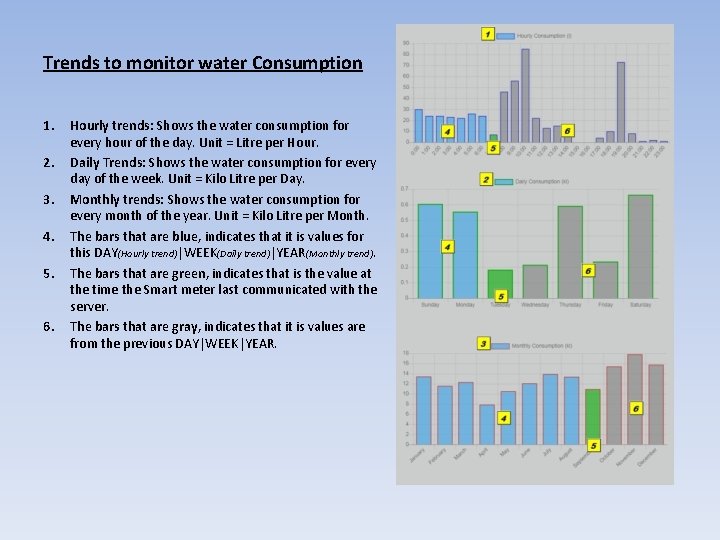
Trends to monitor water Consumption 1. 2. 3. 4. 5. 6. Hourly trends: Shows the water consumption for every hour of the day. Unit = Litre per Hour. Daily Trends: Shows the water consumption for every day of the week. Unit = Kilo Litre per Day. Monthly trends: Shows the water consumption for every month of the year. Unit = Kilo Litre per Month. The bars that are blue, indicates that it is values for this DAY(Hourly trend)|WEEK(Daily trend)|YEAR(Monthly trend). The bars that are green, indicates that is the value at the time the Smart meter last communicated with the server. The bars that are gray, indicates that it is values are from the previous DAY|WEEK|YEAR.
Rain Meter Overview
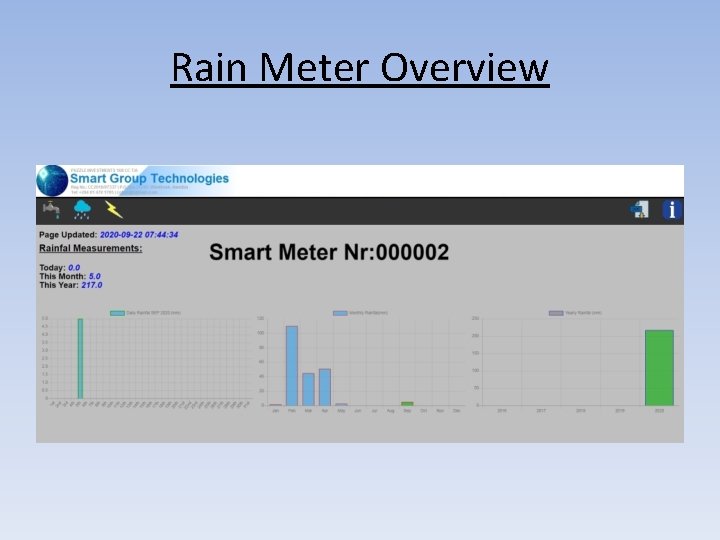
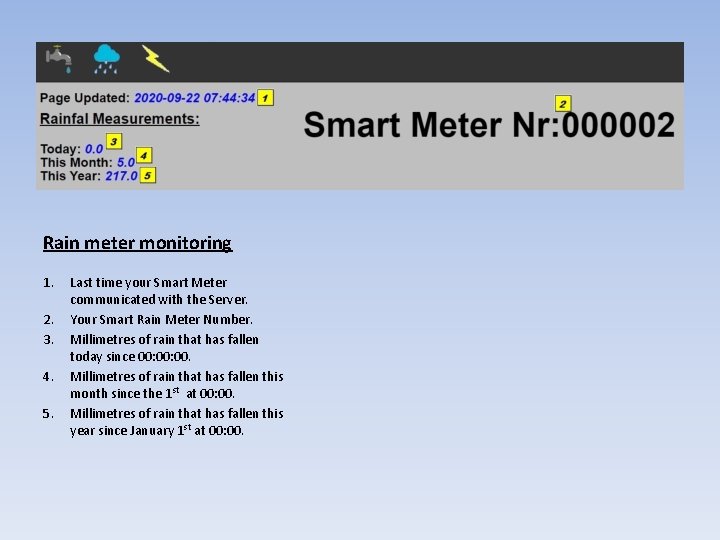
Rain meter monitoring 1. 2. 3. 4. 5. Last time your Smart Meter communicated with the Server. Your Smart Rain Meter Number. Millimetres of rain that has fallen today since 00: 00. Millimetres of rain that has fallen this month since the 1 st at 00: 00. Millimetres of rain that has fallen this year since January 1 st at 00: 00.
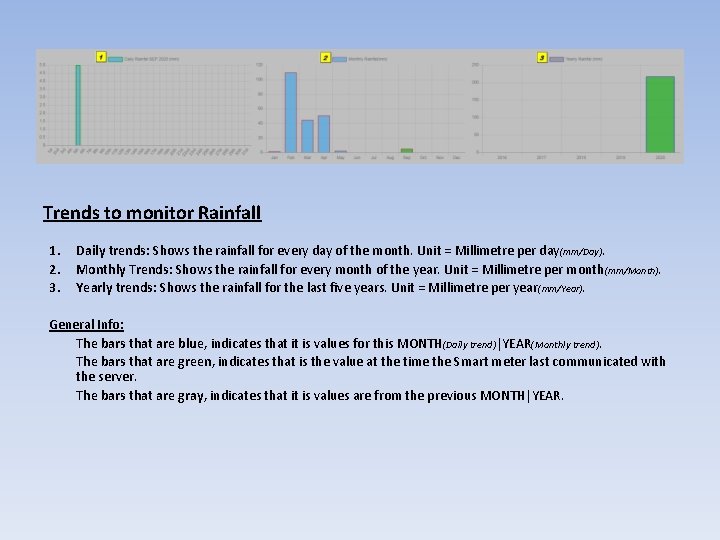
Trends to monitor Rainfall 1. 2. 3. Daily trends: Shows the rainfall for every day of the month. Unit = Millimetre per day (mm/Day). Monthly Trends: Shows the rainfall for every month of the year. Unit = Millimetre per month (mm/Month). Yearly trends: Shows the rainfall for the last five years. Unit = Millimetre per year(mm/Year). General Info: The bars that are blue, indicates that it is values for this MONTH(Daily trend)|YEAR(Monthly trend). The bars that are green, indicates that is the value at the time the Smart meter last communicated with the server. The bars that are gray, indicates that it is values are from the previous MONTH|YEAR.
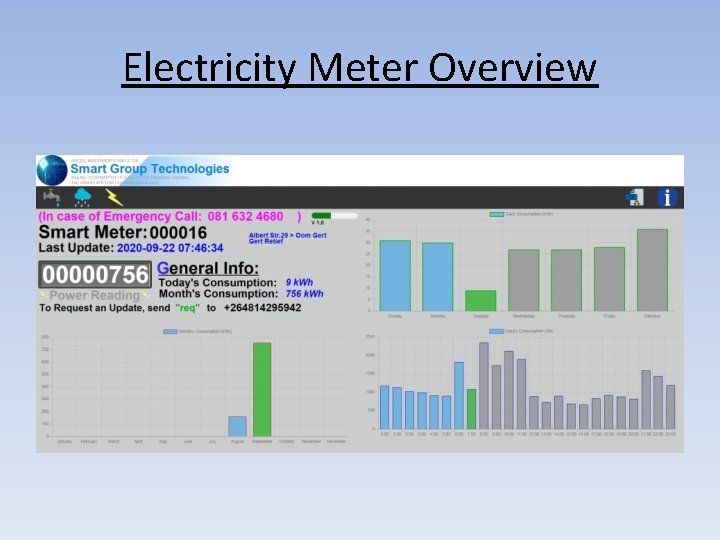
Electricity Meter Overview
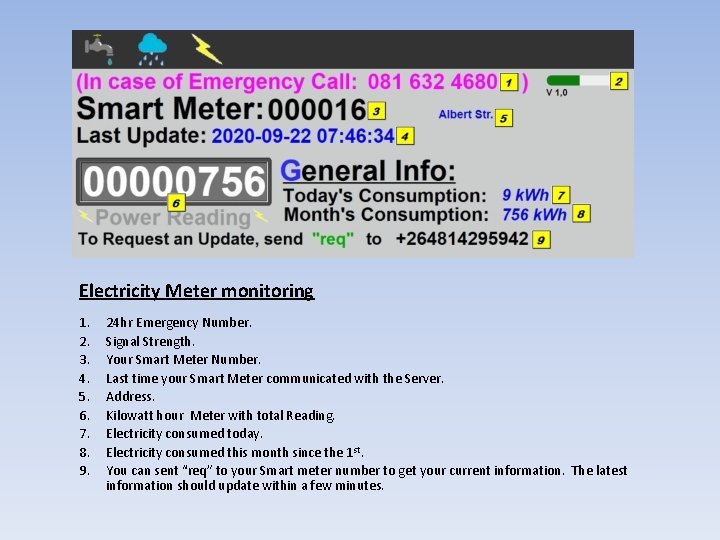
Electricity Meter monitoring 1. 2. 3. 4. 5. 6. 7. 8. 9. 24 hr Emergency Number. Signal Strength. Your Smart Meter Number. Last time your Smart Meter communicated with the Server. Address. Kilowatt hour Meter with total Reading. Electricity consumed today. Electricity consumed this month since the 1 st. You can sent “req” to your Smart meter number to get your current information. The latest information should update within a few minutes.
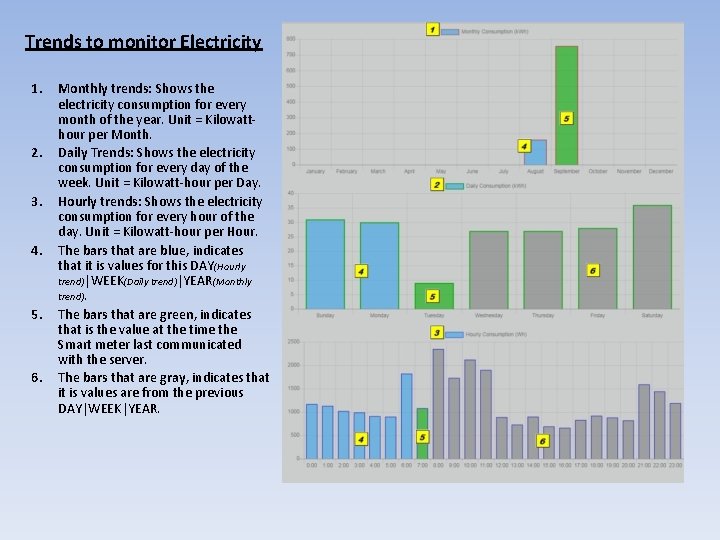
Trends to monitor Electricity 1. 2. 3. 4. 5. 6. Monthly trends: Shows the electricity consumption for every month of the year. Unit = Kilowatthour per Month. Daily Trends: Shows the electricity consumption for every day of the week. Unit = Kilowatt-hour per Day. Hourly trends: Shows the electricity consumption for every hour of the day. Unit = Kilowatt-hour per Hour. The bars that are blue, indicates that it is values for this DAY(Hourly trend)|WEEK(Daily trend)|YEAR(Monthly trend). The bars that are green, indicates that is the value at the time the Smart meter last communicated with the server. The bars that are gray, indicates that it is values are from the previous DAY|WEEK|YEAR.