
Setup of a Service VM as an IPv

- Slides: 12
Setup of a Service VM as an IPv 6 v. Router Bin Hu, AT&T Meenakshi Kaushik, Cisco Sridhar Gaddam, Red. Hat
Content • Goal • Design • Underlay Network Topology • Setup Steps • Topology from Horizon UI after Setup • Gaps in ODL and Workaround • Lessons Learned of Setup in a Single Laptop Environment • Marching to Brahmaputra • Acknowledgement 11/10/2015 OPNFV Proof-of-Concepts 2
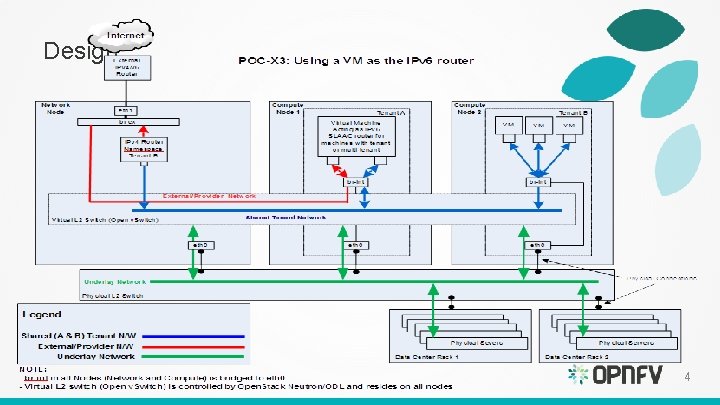
Goal A Service VM in Open. Stack+ODL environment that is capable of (1) advertising IPv 6 Router Advertisements (RA) to the VMs on the internal network (2) IPv 6 Forwarding (i. e. , North-South traffic), i. e. capability of an IPv 6 v. Router • Gap Analysis • Expand IPv 6 v. Router capability to any VM – Allow for any 3 rd-party solution, e. g. IPv 6 v. Router VNF as an alternative of Neutron Router or ODL Router – Allow for open innovation 11/10/2015 OPNFV Proof-of-Concepts 3
Design 4
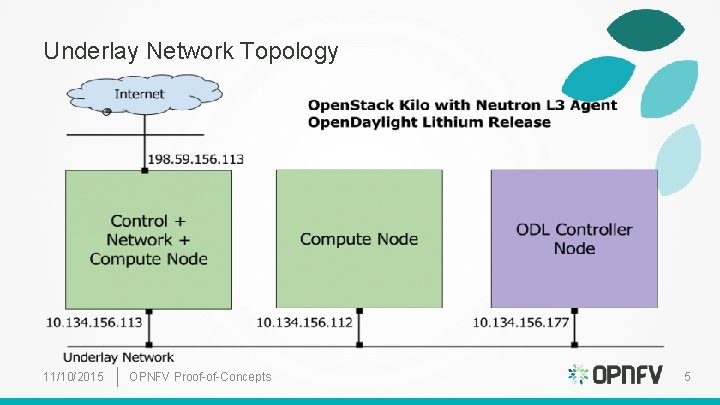
Underlay Network Topology 11/10/2015 OPNFV Proof-of-Concepts 5
Setup Steps (1 of 2) • https: //wiki. opnfv. org/ipv 6_opnfv_project/bottomup_exercise • Step 0: set up infrastructure – Prepare 3 hosts with 8 GB RAM and 40 GB each • 4 GB RAM and 20 GB storage minimum – Set up underlay networks and external access network • Step 1: set up ODL controller in ODL Controller Node – https: //wiki. opnfv. org/ipv 6_opnfv_project/bringup_odl_controller 11/10/2015 OPNFV Proof-of-Concepts 6
Setup Steps (2 of 2) • Step 2: set up OS Controller Node • • – https: //wiki. opnfv. org/ipv 6_opnfv_project/setup_osodl_ctrlnwcom_node Step 3: set up OS Compute Node – https: //wiki. opnfv. org/ipv 6_opnfv_project/setup_osodl_compute_node Step 4: create networks, subnets, and spawn and configure VMs in integrated OS+ODL environment to complete experiment – https: //wiki. opnfv. org/ipv 6_opnfv_project/create_networks 11/10/2015 OPNFV Proof-of-Concepts 7
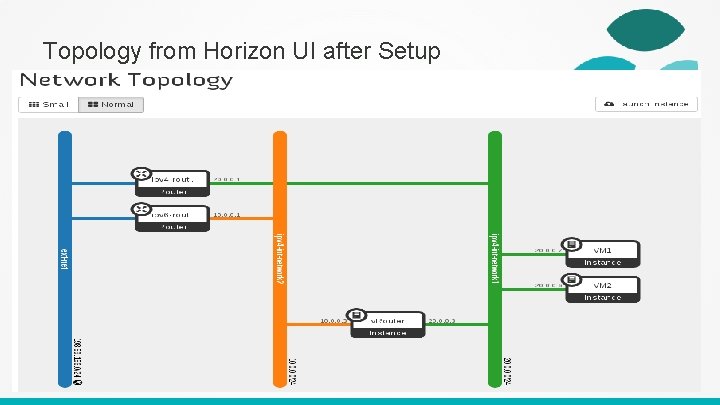
Topology from Horizon UI after Setup 11/10/2015 OPNFV Proof-of-Concepts 8
Gaps in ODL and Workaround Gap IPv 6 Router is not supported in ODL and lack of IPv 6 IPAM - ODL net-virt provider in Lithium release only supports IPv 4 Router. - Support for IPv 6 Router is planned using Routing Manager as part of Beryllium Release. Workaround - Use neutron-l 3 -agent instead of odl-l 3 for L 3 connectivity Use ODL for L 2 switch Security Group is not supported in ODL - Completely disable Security Group feature in Neutron ML 2 Port Security Extension is not relevant any more Shared tenant networks are not supported in ODL - Single tenant for network mapping ODL net-virt provider doesn’t support IPv 6 - Java exception - Use manual configuration Expected to be fixed in Beryllium 11/10/2015 OPNFV Proof-of-Concepts 9
Lessons Learned of Setup in a Single Laptop Environment • RAM Size – 32 GB RAM preferred in a single laptop – 8 GB RAM and 40 GB storage for each node – 4 GB RAM and 20 GB storage minimum for each node • Tricks of Network Setup in Virtual Box – Internal Network, Host-Only, Bridged, NAT Network – 32 -bit / 64 -bit, Windows / Linux • External, routable IP address for a laptop to different locations 11/10/2015 OPNFV Proof-of-Concepts 10
Marching to Brahmaputra • To document Gap Analysis (User’s Guide) • To document setup instructions (Install Guide) • Deployment workflow: – Installer deploys core package of Brahmaputra, including testing – Disable odl-l 3 and enable neutron-l 3 -agent (due to ODL gaps) – Our Step 4 instructions to set up IPv 6 v. Router 11/10/2015 OPNFV Proof-of-Concepts 11
Acknowledgement • All additional contributors of IPv 6 project, particularly – Mark Medina (Clear. Path) for initial network design – Jonne Soininen (Nokia) for SME in IPv 6 area – Iben Rodriguez (Spirent) for providing VCT Lab infrastructure, and help at every step of lab setup – Cristian Valean (Cloud Base Solutions) for lab setup, access and support – Hannes Frederic Sowa (Red. Hat) for SME in IPv 6 in Linux kernel – Prakash Ramchandran (Huawei) for active participation and testing 11/10/2015 OPNFV Proof-of-Concepts 12