
Server Load Balancing Alteon Web Switch Moon Sang

Server Load Balancing Alteon Web Switch Moon Sang Won swmoon@encom. co. kr 1
목 차 • Server Load Balancing 의 필요성 • Server Load Balancing 의 이해 • Server Load Balancing 기본구성 • Terminology • Load Balancing Algorithm • Server Load Balancing Processing • Server Load Balancing Configuration • Information / Statistics View • 점검사항 • Redundancy SLB 구현사례 2
Server load Balancing의 필요성 • Internet Server Traffic 의 급증 - Internet 응답속도 지연 - Server 효율성 저하 - Service 신뢰성 상실 • Internet Traffic 극복 - Server Load Balancing 필요성 제기 3

Server Load Balancing의 기본구성 Gateway 210. 219. 67. 126 Internet L 4 interface 210. 219. 67. 120 Virtual IP 210. 219. 67. 124 Real 1 210. 219. 67. 121 Real 2 210. 219. 67. 122 Real 3 210. 219. 67. 123 5
Terminology • VIP, VMAC, Vport - Virtual Server IP address, Virtual MAC address, TCP/UDP port • RIP, RMAC, Rport - Real Server IP address, Real MAC address, TCP/UDP port • CIP, CMAC, Cport - Client IP address, Client MAC address, TCP/UDP port • Session - TCP conection, UDP session, IP flow 6
Terminology • Client ports - Client processing을 적용할 수 있는 switch port - 각각의 session을 server로 할당 / VIP를 RIP로 변환 • Server ports - Server processing을 적용할 수 있는 switch port / RIP를 VIP로 변환 • Health Check - Server의 이상유무를 수시로 점검하는 기능 ( http, tcp, ftp, icmp. . . ) 7
Load Balancing Algorithm • Round Robin - Real server로 session을 순차적을 맺어주는 방식 • Least Connection - real server의 open 세션 수를 고려한 다음, 가장 적은 수의 open session을 가진 real server로 session을 맺어 주는 방식. - 각 real server들이 서로 상이한 resource와 connection에 부수되 는 시간과 데이터 양이 서로 다른 환경에서 활용할 수 있다. 8
Load Balancing Algorithm • Hash - Clients와 Server 간에 한번 성립된 session을 계속해서 유지해 주는 방식으로 특정 client는 특정 server로만 접속하게 된다. - clients source IP address (32 bit) 값을 real server의 대수 로 나눈 나머지 값으로 connection할 server 결정 • Minimum Missies - Hash Algorithm과 거의 유사 - 역시 clients source IP address (32 bit) 값을 real server의 대수로 나눈 나머지 값으로 connection할 server 결정 - 그러나, 이 Algorithm은 Cache Redirection에 주로 사용하도록 권장 9
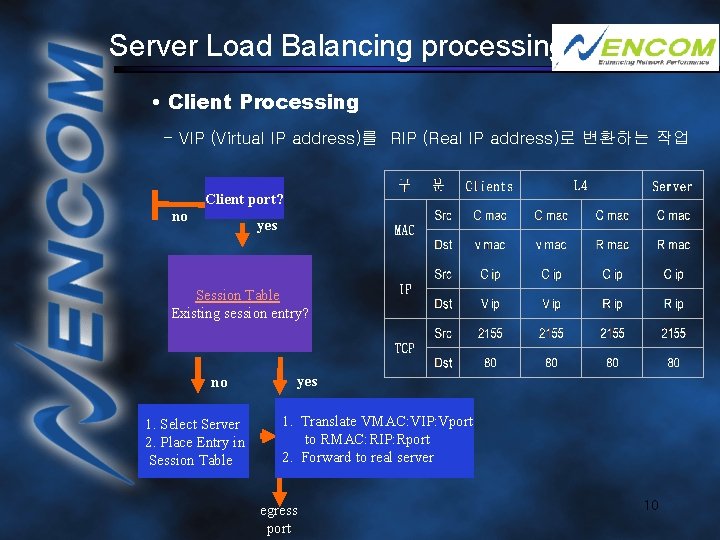
Server Load Balancing processing • Client Processing - VIP (Virtual IP address)를 RIP (Real IP address)로 변환하는 작업 Client port? no yes Session Table Existing session entry? no 1. Select Server 2. Place Entry in Session Table yes 1. Translate VMAC: VIP: Vport to RMAC: RIP: Rport 2. Forward to real server egress port 10
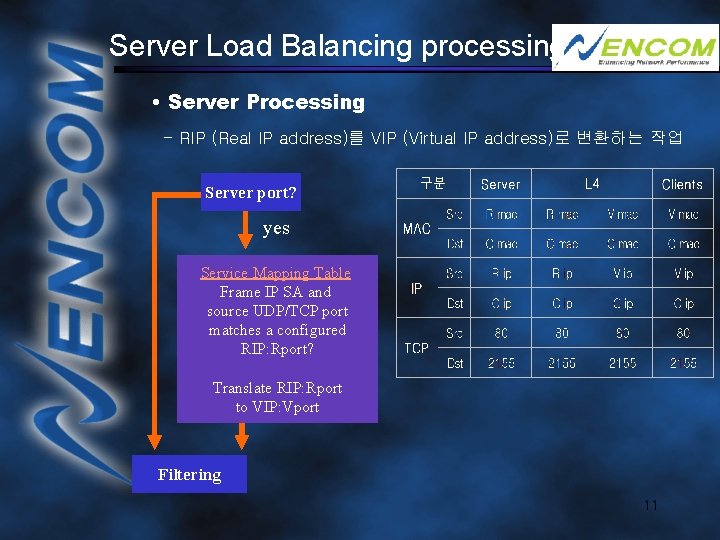
Server Load Balancing processing • Server Processing - RIP (Real IP address)를 VIP (Virtual IP address)로 변환하는 작업 Server port? yes Service Mapping Table Frame IP SA and source UDP/TCP port matches a configured RIP: Rport? Translate RIP: Rport to VIP: Vport Filtering 11
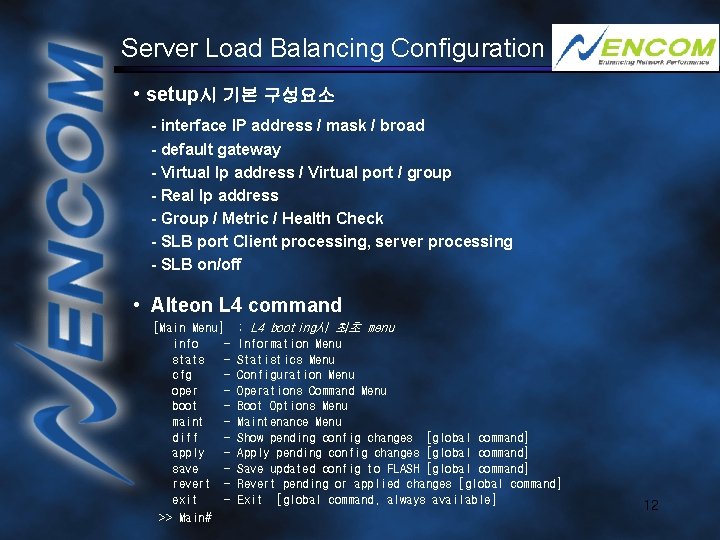
Server Load Balancing Configuration • setup시 기본 구성요소 - interface IP address / mask / broad - default gateway - Virtual Ip address / Virtual port / group - Real Ip address - Group / Metric / Health Check - SLB port Client processing, server processing - SLB on/off • Alteon L 4 command [Main Menu] info stats cfg oper boot maint diff apply save revert exit >> Main# ; L 4 booting시 최초 menu Information Menu Statistics Menu Configuration Menu Operations Command Menu Boot Options Menu Maintenance Menu Show pending config changes [global command] Apply pending config changes [global command] Save updated config to FLASH [global command] Revert pending or applied changes [global command] Exit [global command, always available] 12
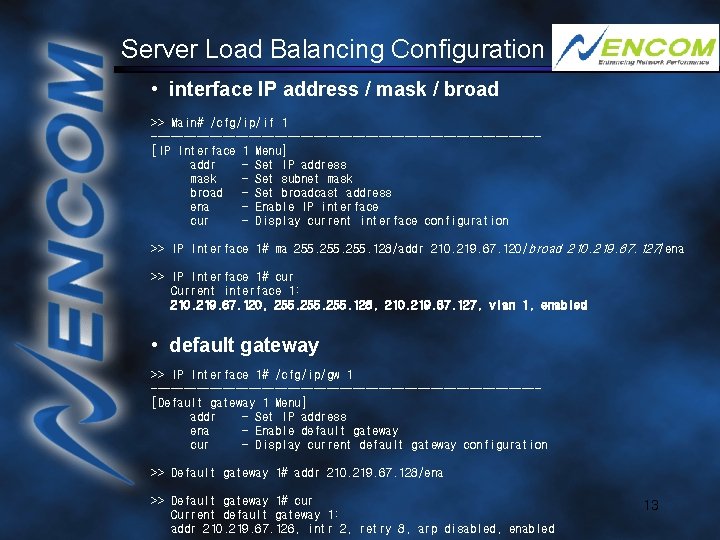
Server Load Balancing Configuration • interface IP address / mask / broad >> Main# /cfg/ip/if 1 ------------------------------[IP Interface 1 Menu] addr - Set IP address mask - Set subnet mask broad - Set broadcast address ena - Enable IP interface cur - Display current interface configuration >> IP Interface 1# ma 255. 128/addr 210. 219. 67. 120/broad 210. 219. 67. 127/ena >> IP Interface 1# cur Current interface 1: 210. 219. 67. 120, 255. 128, 210. 219. 67. 127, vlan 1, enabled • default gateway >> IP Interface 1# /cfg/ip/gw 1 ------------------------------[Default gateway 1 Menu] addr - Set IP address ena - Enable default gateway cur - Display current default gateway configuration >> Default gateway 1# addr 210. 219. 67. 128/ena >> Default gateway 1# cur Current default gateway 1: addr 210. 219. 67. 126, intr 2, retry 8, arp disabled, enabled 13
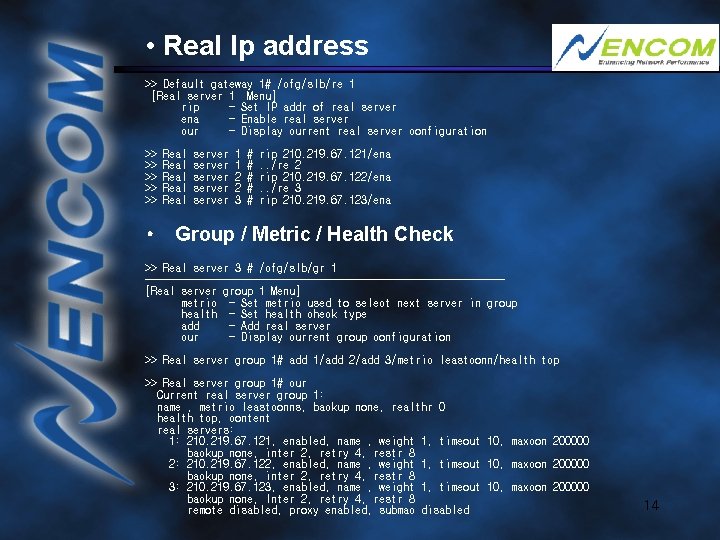
• Real Ip address >> Default gateway 1# /cfg/slb/re 1 [Real server 1 Menu] rip - Set IP addr of real server ena - Enable real server cur - Display current real server configuration >> >> >> Real Real server server 1 1 2 2 3 # # # rip 210. 219. 67. 121/ena. . /re 2 rip 210. 219. 67. 122/ena. . /re 3 rip 210. 219. 67. 123/ena • Group / Metric / Health Check >> Real server 3 # /cfg/slb/gr 1 ------------------------------[Real server group 1 Menu] metric - Set metric used to select next server in group health - Set health check type add - Add real server cur - Display current group configuration >> Real server group 1# add 1/add 2/add 3/metric leastconn/health tcp >> Real server group 1# cur Current real server group 1: name , metric leastconns, backup none, realthr 0 health tcp, content real servers: 1: 210. 219. 67. 121, enabled, name , weight 1, timeout 10, maxcon 200000 backup none, inter 2, retry 4, restr 8 2: 210. 219. 67. 122, enabled, name , weight 1, timeout 10, maxcon 200000 backup none, inter 2, retry 4, restr 8 3: 210. 219. 67. 123, enabled, name , weight 1, timeout 10, maxcon 200000 backup none, Inter 2, retry 4, restr 8 remote disabled, proxy enabled, submac disabled 14
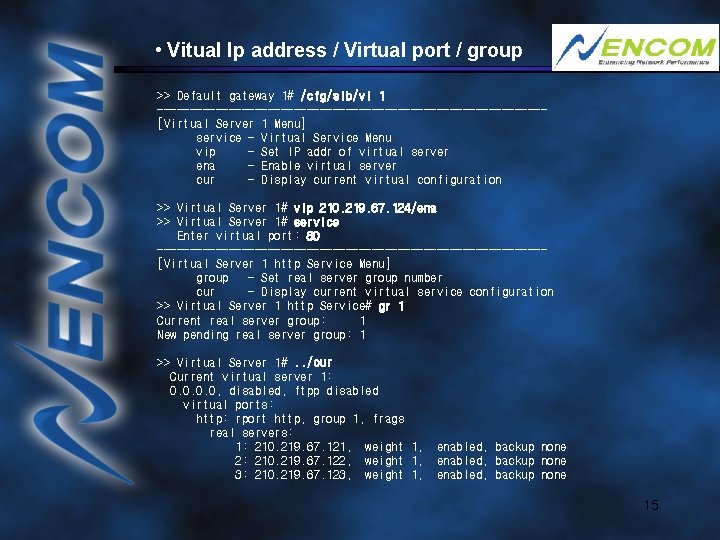
• Vitual Ip address / Virtual port / group >> Default gateway 1# /cfg/slb/vi 1 ------------------------------[Virtual Server 1 Menu] service - Virtual Service Menu vip - Set IP addr of virtual server ena - Enable virtual server cur - Display current virtual configuration >> Virtual Server 1# vip 210. 219. 67. 124/ena >> Virtual Server 1# service Enter virtual port: 80 ------------------------------[Virtual Server 1 http Service Menu] group - Set real server group number cur - Display current virtual service configuration >> Virtual Server 1 http Service# gr 1 Current real server group: 1 New pending real server group: 1 >> Virtual Server 1#. . /cur Current virtual server 1: 0. 0, disabled, ftpp disabled virtual ports: http: rport http, group 1, frags real servers: 1: 210. 219. 67. 121, weight 1, 2: 210. 219. 67. 122, weight 1, 3: 210. 219. 67. 123, weight 1, enabled, backup none 15
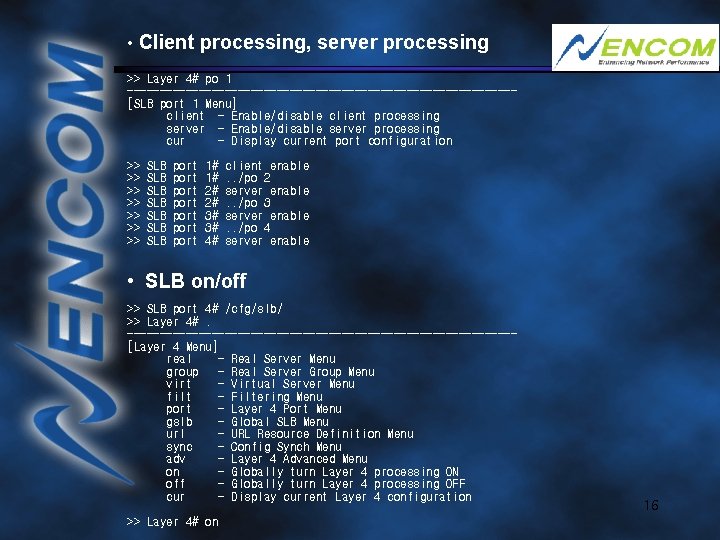
• Client processing, server processing >> Layer 4# po 1 ------------------------------[SLB port 1 Menu] client - Enable/disable client processing server - Enable/disable server processing cur - Display current port configuration >> >> SLB SLB port port 1# 1# 2# 2# 3# 3# 4# client enable. . /po 2 server enable. . /po 3 server enable. . /po 4 server enable • SLB on/off >> SLB port 4# /cfg/slb/ >> Layer 4#. ------------------------------[Layer 4 Menu] real - Real Server Menu group - Real Server Group Menu virt - Virtual Server Menu filt - Filtering Menu port - Layer 4 Port Menu gslb - Global SLB Menu url - URL Resource Definition Menu sync - Config Synch Menu adv - Layer 4 Advanced Menu on - Globally turn Layer 4 processing ON off - Globally turn Layer 4 processing OFF cur - Display current Layer 4 configuration >> Layer 4# on 16
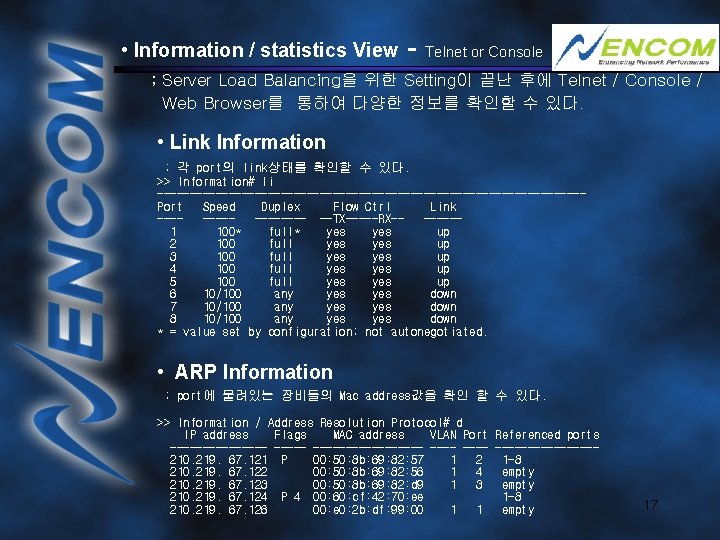
• Information / statistics View - Telnet or Console ; Server Load Balancing을 위한 Setting이 끝난 후에 Telnet / Console / Web Browser를 통하여 다양한 정보를 확인할 수 있다. • Link Information ; 각 port의 link상태를 확인할 수 있다. >> Information# li ---------------------------------Port Speed Duplex Flow Ctrl Link -------- --TX-----RX------1 100* full* yes up 2 100 full yes up 3 100 full yes up 4 100 full yes up 5 100 full yes up 6 10/100 any yes down 7 10/100 any yes down 8 10/100 any yes down * = value set by configuration; not autonegotiated. • ARP Information ; port에 물려있는 장비들의 Mac address값을 확인 할 수 있다. >> Information / Address Resolution Protocol# d IP address Flags MAC address VLAN Port Referenced ports ----------- --------210. 219. 67. 121 P 00: 50: 8 b: 69: 82: 57 1 2 1 -8 210. 219. 67. 122 00: 50: 8 b: 69: 82: 56 1 4 empty 210. 219. 67. 123 00: 50: 8 b: 69: 82: d 9 1 3 empty 210. 219. 67. 124 P 4 00: 60: cf: 42: 70: ee 1 -8 210. 219. 67. 126 00: e 0: 2 b: df: 99: 00 1 1 empty 17
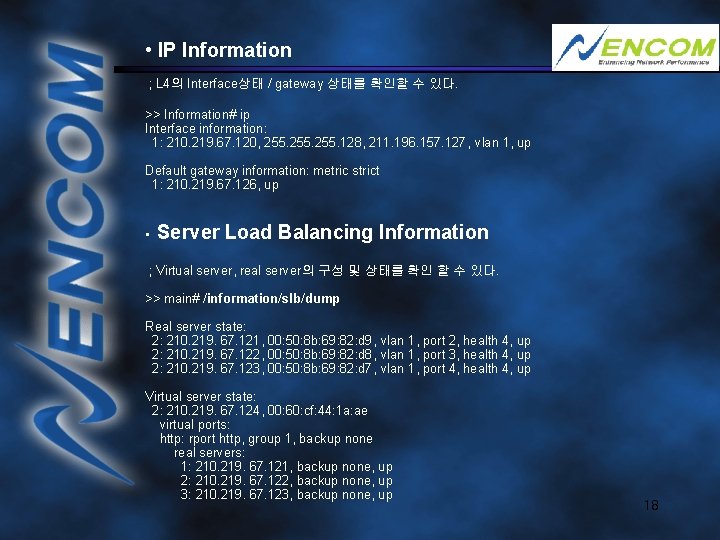
• IP Information ; L 4의 Interface상태 / gateway 상태를 확인할 수 있다. >> Information# ip Interface information: 1: 210. 219. 67. 120, 255. 128, 211. 196. 157. 127, vlan 1, up Default gateway information: metric strict 1: 210. 219. 67. 126, up • Server Load Balancing Information ; Virtual server, real server의 구성 및 상태를 확인 할 수 있다. >> main# /information/slb/dump Real server state: 2: 210. 219. 67. 121, 00: 50: 8 b: 69: 82: d 9, vlan 1, port 2, health 4, up 2: 210. 219. 67. 122, 00: 50: 8 b: 69: 82: d 8, vlan 1, port 3, health 4, up 2: 210. 219. 67. 123, 00: 50: 8 b: 69: 82: d 7, vlan 1, port 4, health 4, up Virtual server state: 2: 210. 219. 67. 124, 00: 60: cf: 44: 1 a: ae virtual ports: http: rport http, group 1, backup none real servers: 1: 210. 219. 67. 121, backup none, up 2: 210. 219. 67. 122, backup none, up 3: 210. 219. 67. 123, backup none, up 18
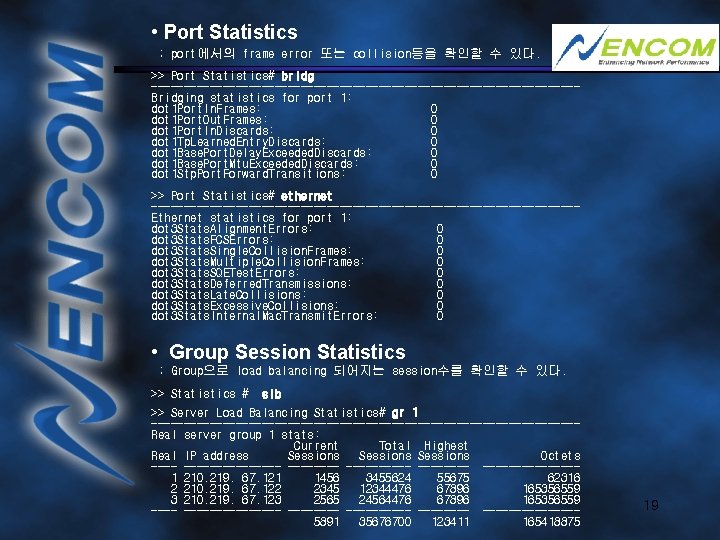
• Port Statistics ; port에서의 frame error 또는 collision등을 확인할 수 있다. >> Port Statistics# bridg ---------------------------------Bridging statistics for port 1: dot 1 Port. In. Frames: 0 dot 1 Port. Out. Frames: 0 dot 1 Port. In. Discards: 0 dot 1 Tp. Learned. Entry. Discards: 0 dot 1 Base. Port. Delay. Exceeded. Discards: 0 dot 1 Base. Port. Mtu. Exceeded. Discards: 0 dot 1 Stp. Port. Forward. Transitions: 0 >> Port Statistics# ethernet ---------------------------------Ethernet statistics for port 1: dot 3 Stats. Alignment. Errors: 0 dot 3 Stats. FCSErrors: 0 dot 3 Stats. Single. Collision. Frames: 0 dot 3 Stats. Multiple. Collision. Frames: 0 dot 3 Stats. SQETest. Errors: 0 dot 3 Stats. Deferred. Transmissions: 0 dot 3 Stats. Late. Collisions: 0 dot 3 Stats. Excessive. Collisions: 0 dot 3 Stats. Internal. Mac. Transmit. Errors: 0 • Group Session Statistics ; Group으로 load balancing 되어지는 session수를 확인할 수 있다. >> Statistics # slb >> Server Load Balancing Statistics# gr 1 ---------------------------------Real server group 1 stats: Current Total Highest Real IP address Sessions Octets ---------- --------------1 210. 219. 67. 121 1456 3455624 55675 62316 2 210. 219. 67. 122 2345 12344476 67896 165356559 3 210. 219. 67. 123 2565 24564476 67896 165356559 ---------- --------------5891 35676700 123411 165418875 19
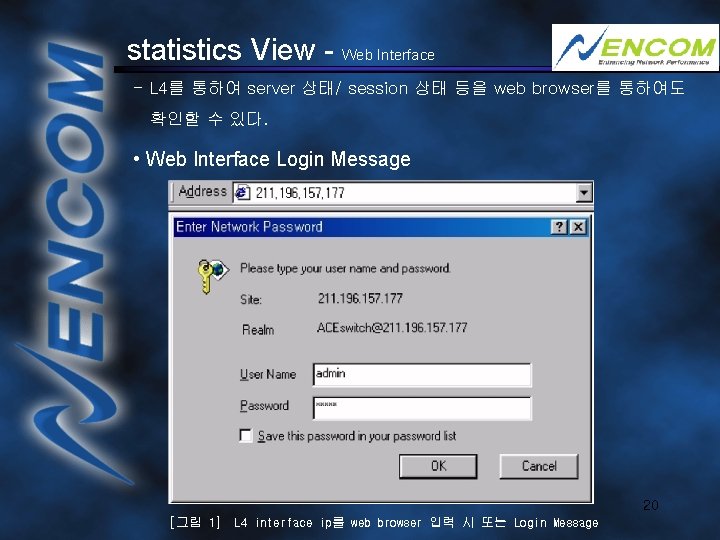
statistics View - Web Interface - L 4를 통하여 server 상태/ session 상태 등을 web browser를 통하여도 확인할 수 있다. • Web Interface Login Message 20 [그림 1] L 4 interface ip를 web browser 입력 시 또는 Login Message
![• Alteon H/W Information [그림 2] Login 후 Alteon 장비에 대한 기본 Information](http://slidetodoc.com/presentation_image_h2/4c1e671941102ccd7105ac1f36eb9a46/image-21.jpg "• Alteon H/W Information [그림 2] Login 후 Alteon 장비에 대한 기본 Information")
• Alteon H/W Information [그림 2] Login 후 Alteon 장비에 대한 기본 Information 21
![• Port Statistics [그림 3] Port의 상태표시 22](http://slidetodoc.com/presentation_image_h2/4c1e671941102ccd7105ac1f36eb9a46/image-22.jpg "• Port Statistics [그림 3] Port의 상태표시 22")
• Port Statistics [그림 3] Port의 상태표시 22
![• Session Statistics [그림 4] 각 Server로의 Session 상태 표시 23](http://slidetodoc.com/presentation_image_h2/4c1e671941102ccd7105ac1f36eb9a46/image-23.jpg "• Session Statistics [그림 4] 각 Server로의 Session 상태 표시 23")
• Session Statistics [그림 4] 각 Server로의 Session 상태 표시 23
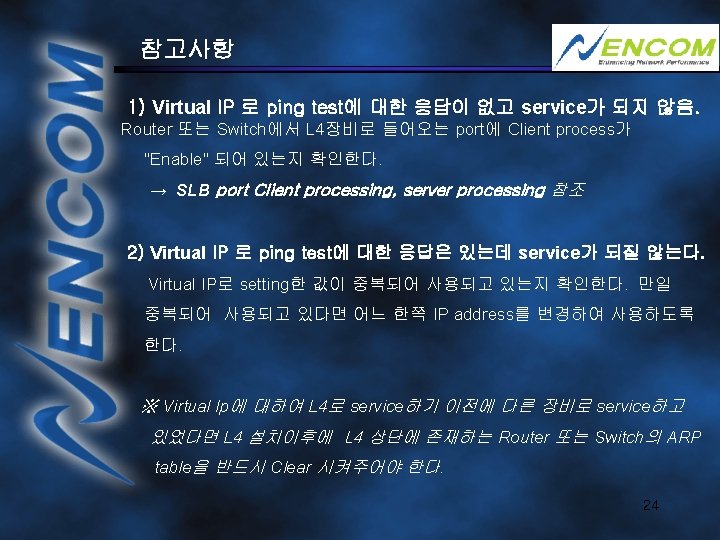
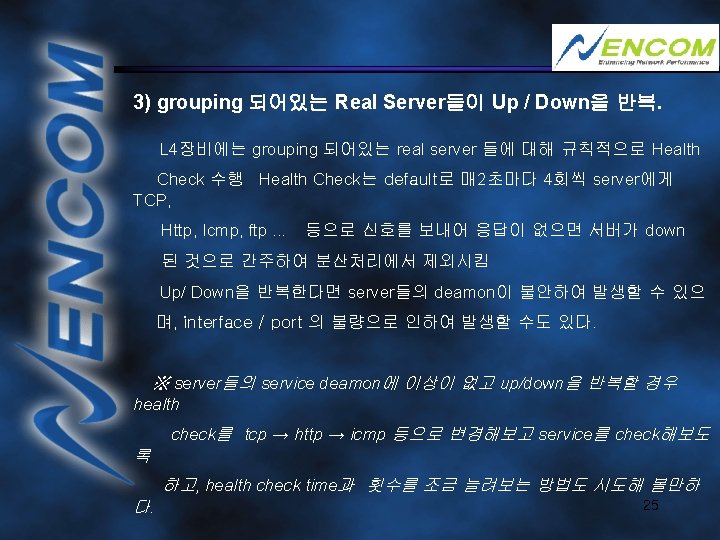
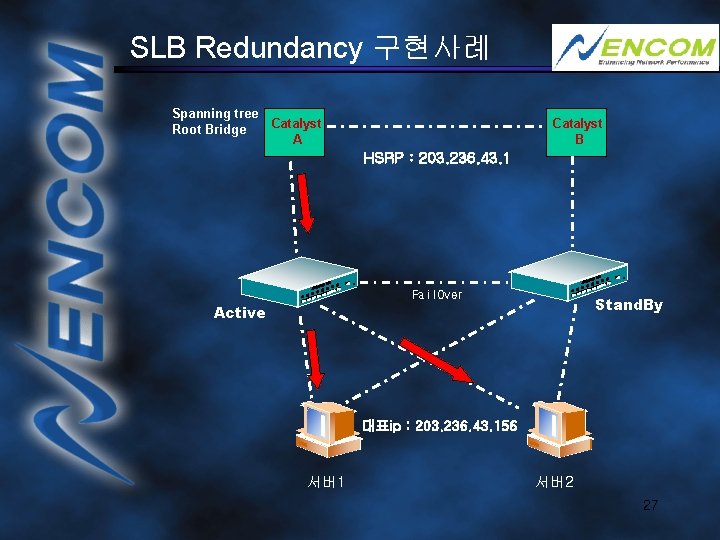
SLB Redundancy 구현사례 Spanning tree Catalyst Root Bridge A Catalyst B HSRP : 203. 236. 43. 1 Fail. Over Stand. By Active 대표ip : 203. 236. 43. 156 서버1 서버2 27
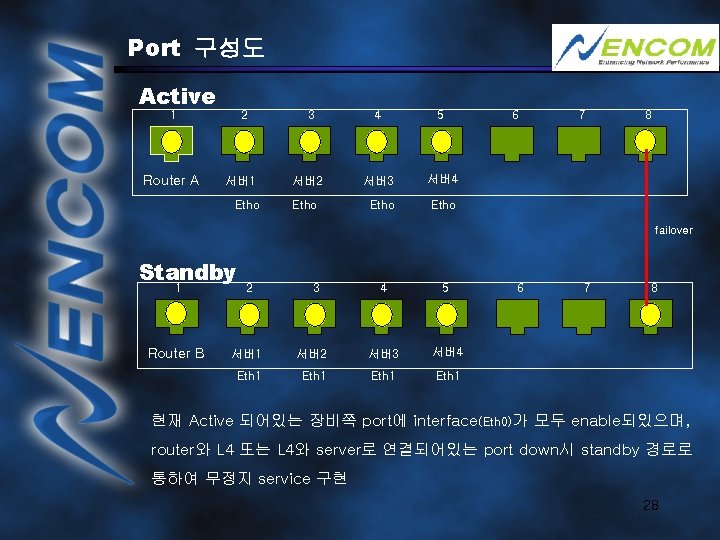
Port 구성도 Active 1 2 3 4 5 Router A 서버1 서버2 서버3 서버4 Etho 6 7 8 failover Standby 1 2 Router B 서버1 Eth 1 3 4 5 서버2 서버3 서버4 Eth 1 6 7 8 현재 Active 되어있는 장비쪽 port에 interface(Eth 0)가 모두 enable되있으며, router와 L 4 또는 L 4와 server로 연결되어있는 port down시 standby 경로로 통하여 무정지 service 구현 28
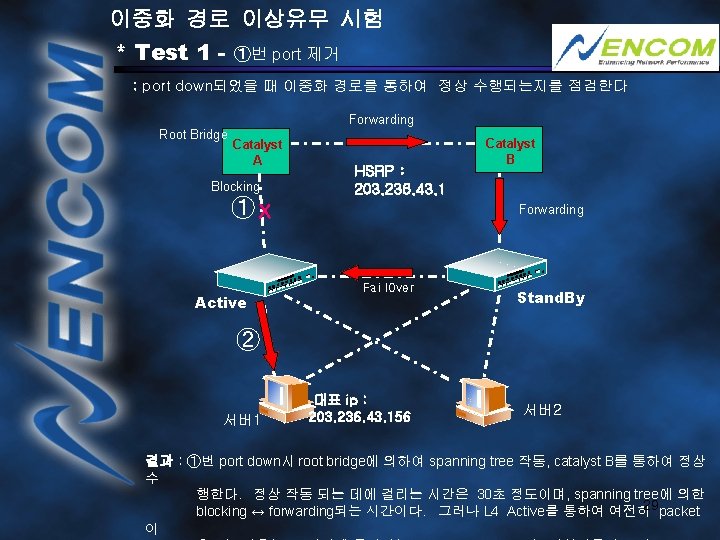
이중화 경로 이상유무 시험 * Test 1 - ①번 port 제거 ; port down되었을 때 이중화 경로를 통하여 정상 수행되는지를 점검한다 Forwarding Root Bridge Catalyst A Blocking ①X Active HSRP : 203. 236. 43. 1 Catalyst B Forwarding Fail. Over Stand. By ② 서버1 대표 ip : 203. 236. 43. 156 서버2 결과 : ①번 port down시 root bridge에 의하여 spanning tree 작동, catalyst B를 통하여 정상 수 행한다. 정상 작동 되는 데에 걸리는 시간은 30초 정도이며, spanning tree에 의한 29 packet blocking ↔ forwarding되는 시간이다. 그러나 L 4 Active를 통하여 여전히 이
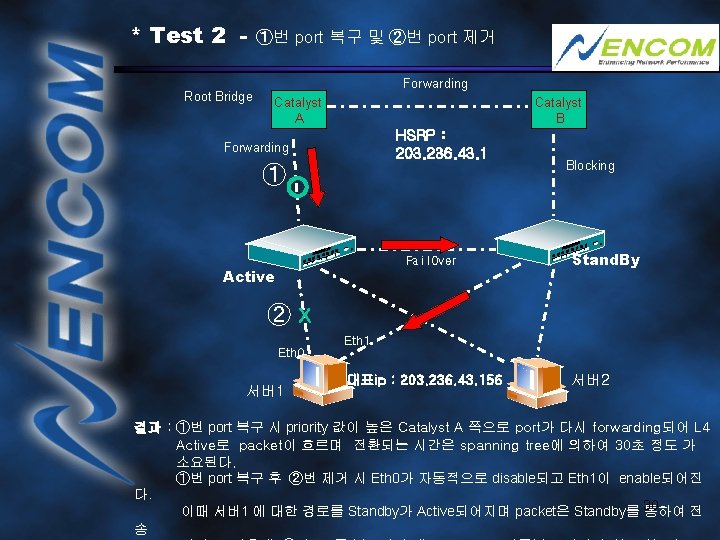
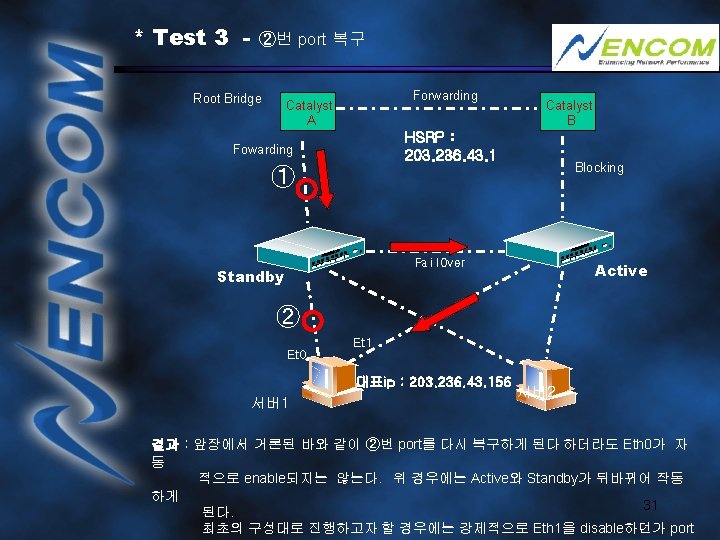
* Test 2 Root Bridge ①번 port 복구 및 ②번 port 제거 Forwarding Catalyst A Catalyst B HSRP : 203. 236. 43. 1 Forwarding ① Fail. Over Active Blocking Stand. By ②X Eth 0 서버1 Eth 1 대표ip : 203. 236. 43. 156 서버2 결과 : ①번 port 복구 시 priority 값이 높은 Catalyst A 쪽으로 port가 다시 forwarding되어 L 4 Active로 packet이 흐르며 전환되는 시간은 spanning tree에 의하여 30초 정도 가 소요된다. ①번 port 복구 후 ②번 제거 시 Eth 0가 자동적으로 disable되고 Eth 1이 enable되어진 다. 이때 서버1 에 대한 경로를 Standby가 Active되어지며 packet은 Standby를 30 통하여 전 송

Thank you 32
- Slides: 32