
Servelts BY PAVAN D M INTRODUCTION Servlets are

Servelts BY: PAVAN D. M.
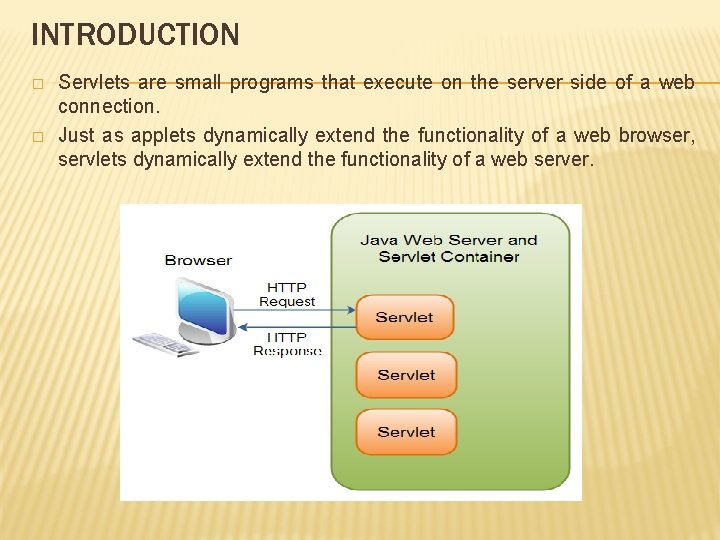
INTRODUCTION � � Servlets are small programs that execute on the server side of a web connection. Just as applets dynamically extend the functionality of a web browser, servlets dynamically extend the functionality of a web server.
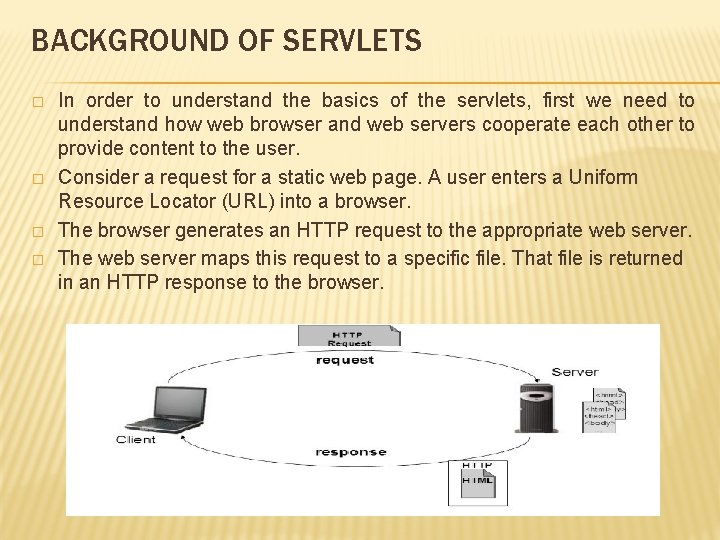
BACKGROUND OF SERVLETS � � In order to understand the basics of the servlets, first we need to understand how web browser and web servers cooperate each other to provide content to the user. Consider a request for a static web page. A user enters a Uniform Resource Locator (URL) into a browser. The browser generates an HTTP request to the appropriate web server. The web server maps this request to a specific file. That file is returned in an HTTP response to the browser.
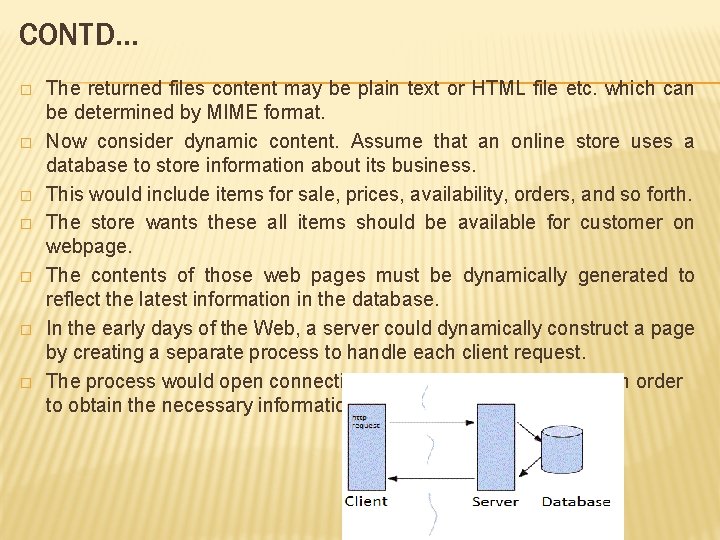
CONTD… � � � � The returned files content may be plain text or HTML file etc. which can be determined by MIME format. Now consider dynamic content. Assume that an online store uses a database to store information about its business. This would include items for sale, prices, availability, orders, and so forth. The store wants these all items should be available for customer on webpage. The contents of those web pages must be dynamically generated to reflect the latest information in the database. In the early days of the Web, a server could dynamically construct a page by creating a separate process to handle each client request. The process would open connections to one or more databases in order to obtain the necessary information.
CONTD… It communicated with the web server via an interface known as the Common Gateway Interface (CGI). � CGI allowed the separate process to read data from the HTTP request and write data to the HTTP response. � A variety of different languages were used to build CGI programs. These included C, C++, and Perl. However, CGI suffered serious performance problems. 1) It was expensive in terms of processor and memory resources to create a separate process for each client request. 2) It was also expensive to open and close database connections for each client request. 3) the CGI programs were not platform-independent. Because of these issues the new technique is introduced by SUN-MS i. e. Servelts. �
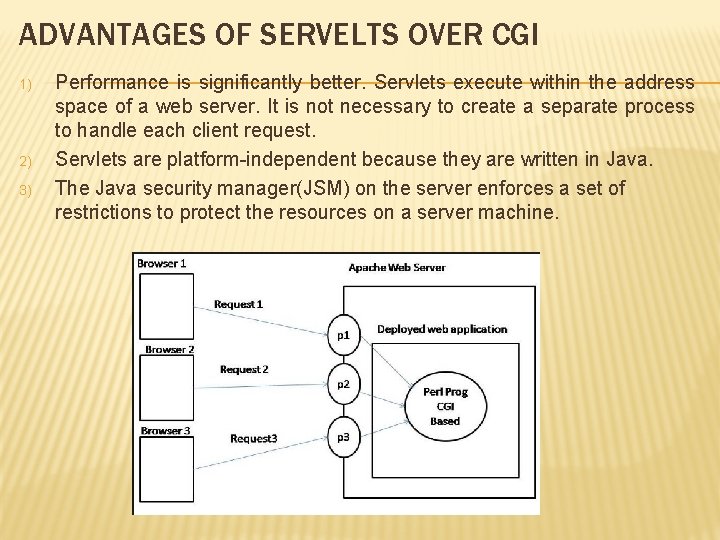
ADVANTAGES OF SERVELTS OVER CGI 1) 2) 3) Performance is significantly better. Servlets execute within the address space of a web server. It is not necessary to create a separate process to handle each client request. Servlets are platform-independent because they are written in Java. The Java security manager(JSM) on the server enforces a set of restrictions to protect the resources on a server machine.

SERVLETS LIFECYCLE Three methods are central to the life cycle of a servlet. These are init( ), service( ), and destroy( ). They are implemented by every servlet and are invoked at specific times by the server.
CONTD… � � � First, assume that a user enters a Uniform Resource Locator (URL) to a web browser. The browser then generates an HTTP request for this URL. This request is then sent to the appropriate server. Second, this HTTP request is received by the web server. The server maps this request to a particular servlet. The servlet is dynamically retrieved and loaded into the address space of the server. Third, the server invokes the init( ) method of the servlet. This method is invoked only when the servlet is first loaded into memory. It is possible to pass initialization parameters to the servlet so it may configure itself. Fourth, the server invokes the service( ) method of the servlet. This method is called to process the HTTP request. You will see that it is possible for the servlet to read data that has been provided in the HTTP request. The servlet remains in the server’s address space and is available to process any other HTTP requests received from clients. The service( ) method is called for each HTTP request. Finally, the server may decide to unload the servlet from its memory. The server calls the destroy( ) method to relinquish any resources such as file handles that are allocated for the servlet. The memory allocated for the servlet and its objects can then be garbage collected.
USING TOMCAT FOR SERVLET DEVELOPMENT � � � � To create servlets, you will need access to a servlet development environment. The one used by this chapter is Tomcat is an open-source product maintained by the Jakarta Project of the Apache Software Foundation. It contains the class libraries, documentation, and runtime support that you will need to create and test servlets. You can download Tomcat current version from jakarta. apache. org. Install the TOMCAT in any location in your machine. You may need to set the environmental variable JAVA_HOME to the top-level directory in which the Java Development Kit is installed. To start Tomcat, select Configure Tomcat in the Start | Programs menu, and then press Start in the Tomcat Properties dialog. When you are done testing servlets, you can stop Tomcat by pressing Stop in the Tomcat Properties dialog. D: apache-tomcat-7. 0. 52 -windows-x 86apache-tomcat-7. 0. 52bin D: apache-tomcat-7. 0. 52 -windows-x 86apache-tomcat-7. 0. 52lib contains servlet-api. jar. This JAR file contains the classes and interfaces that are needed to build servlets.
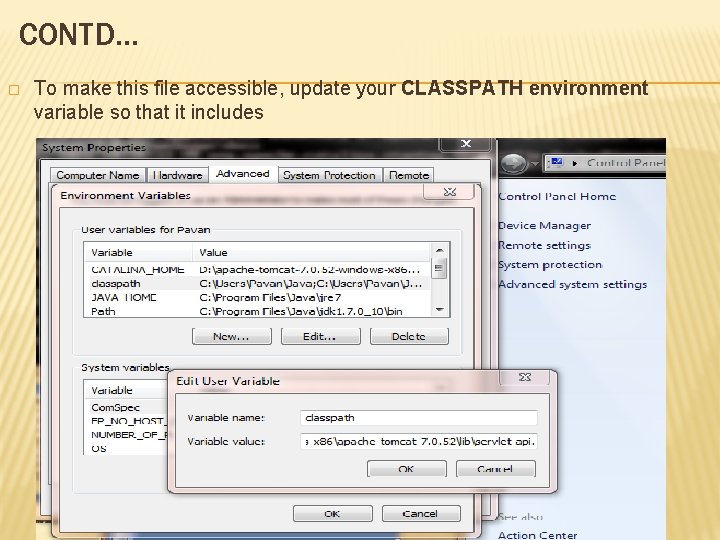
CONTD… � To make this file accessible, update your CLASSPATH environment variable so that it includes
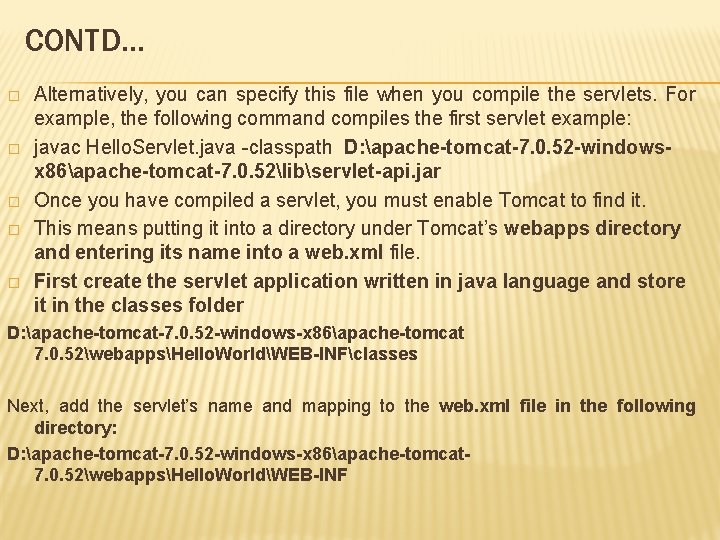
CONTD… � � � Alternatively, you can specify this file when you compile the servlets. For example, the following command compiles the first servlet example: javac Hello. Servlet. java -classpath D: apache-tomcat-7. 0. 52 -windowsx 86apache-tomcat-7. 0. 52libservlet-api. jar Once you have compiled a servlet, you must enable Tomcat to find it. This means putting it into a directory under Tomcat’s webapps directory and entering its name into a web. xml file. First create the servlet application written in java language and store it in the classes folder D: apache-tomcat-7. 0. 52 -windows-x 86apache-tomcat 7. 0. 52webappsHello. WorldWEB-INFclasses Next, add the servlet’s name and mapping to the web. xml file in the following directory: D: apache-tomcat-7. 0. 52 -windows-x 86apache-tomcat 7. 0. 52webappsHello. WorldWEB-INF
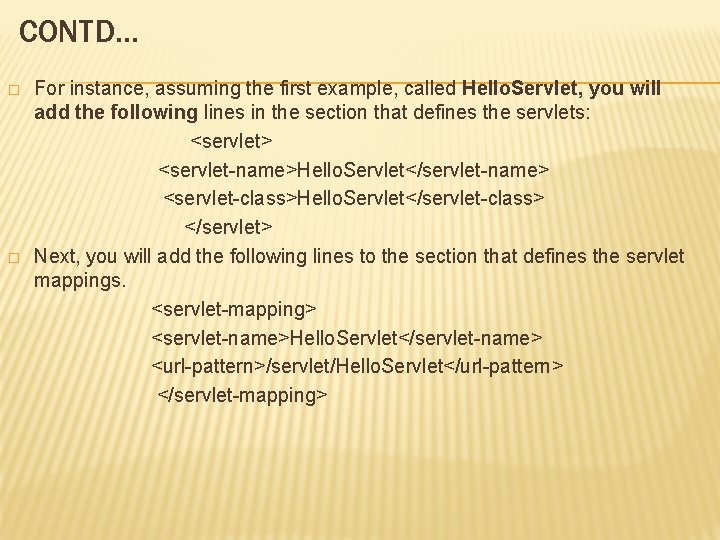
CONTD… � � For instance, assuming the first example, called Hello. Servlet, you will add the following lines in the section that defines the servlets: <servlet> <servlet-name>Hello. Servlet</servlet-name> <servlet-class>Hello. Servlet</servlet-class> </servlet> Next, you will add the following lines to the section that defines the servlet mappings. <servlet-mapping> <servlet-name>Hello. Servlet</servlet-name> <url-pattern>/servlet/Hello. Servlet</url-pattern> </servlet-mapping>
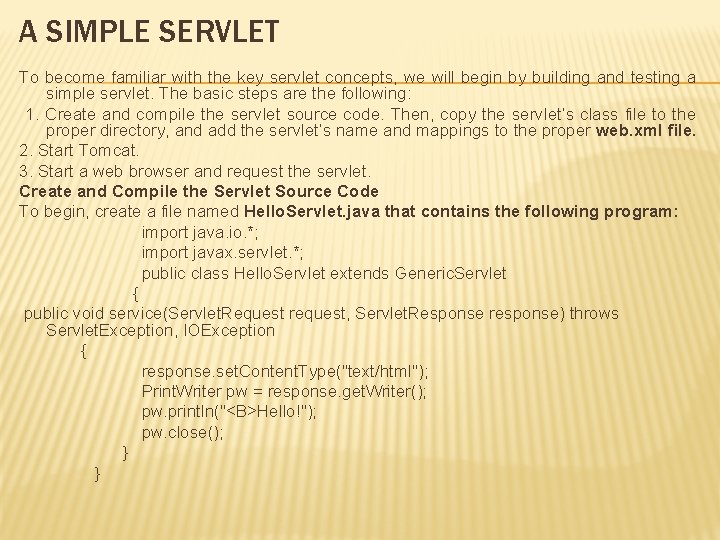
A SIMPLE SERVLET To become familiar with the key servlet concepts, we will begin by building and testing a simple servlet. The basic steps are the following: 1. Create and compile the servlet source code. Then, copy the servlet’s class file to the proper directory, and add the servlet’s name and mappings to the proper web. xml file. 2. Start Tomcat. 3. Start a web browser and request the servlet. Create and Compile the Servlet Source Code To begin, create a file named Hello. Servlet. java that contains the following program: import java. io. *; import javax. servlet. *; public class Hello. Servlet extends Generic. Servlet { public void service(Servlet. Request request, Servlet. Response response) throws Servlet. Exception, IOException { response. set. Content. Type("text/html"); Print. Writer pw = response. get. Writer(); pw. println("<B>Hello!"); pw. close(); } }
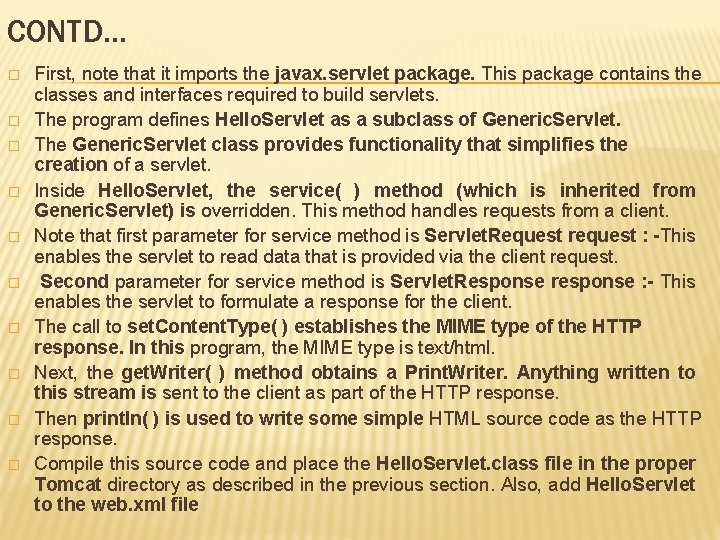
CONTD… � � � � � First, note that it imports the javax. servlet package. This package contains the classes and interfaces required to build servlets. The program defines Hello. Servlet as a subclass of Generic. Servlet. The Generic. Servlet class provides functionality that simplifies the creation of a servlet. Inside Hello. Servlet, the service( ) method (which is inherited from Generic. Servlet) is overridden. This method handles requests from a client. Note that first parameter for service method is Servlet. Request request : -This enables the servlet to read data that is provided via the client request. Second parameter for service method is Servlet. Response response : - This enables the servlet to formulate a response for the client. The call to set. Content. Type( ) establishes the MIME type of the HTTP response. In this program, the MIME type is text/html. Next, the get. Writer( ) method obtains a Print. Writer. Anything written to this stream is sent to the client as part of the HTTP response. Then println( ) is used to write some simple HTML source code as the HTTP response. Compile this source code and place the Hello. Servlet. class file in the proper Tomcat directory as described in the previous section. Also, add Hello. Servlet to the web. xml file
CONTD… Start Tomcat as explained earlier. Tomcat must be running before you try to execute a servlet. Start a Web Browser and Request the Servlet Start a web browser and enter the URL shown here: http: //localhost: 8080/servlets-examples/servlet/Hello. Servlet �
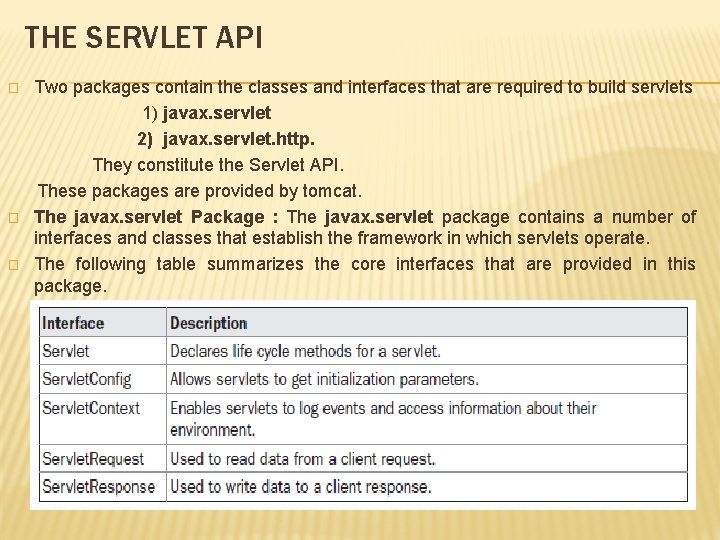
THE SERVLET API � � � Two packages contain the classes and interfaces that are required to build servlets 1) javax. servlet 2) javax. servlet. http. They constitute the Servlet API. These packages are provided by tomcat. The javax. servlet Package : The javax. servlet package contains a number of interfaces and classes that establish the framework in which servlets operate. The following table summarizes the core interfaces that are provided in this package.
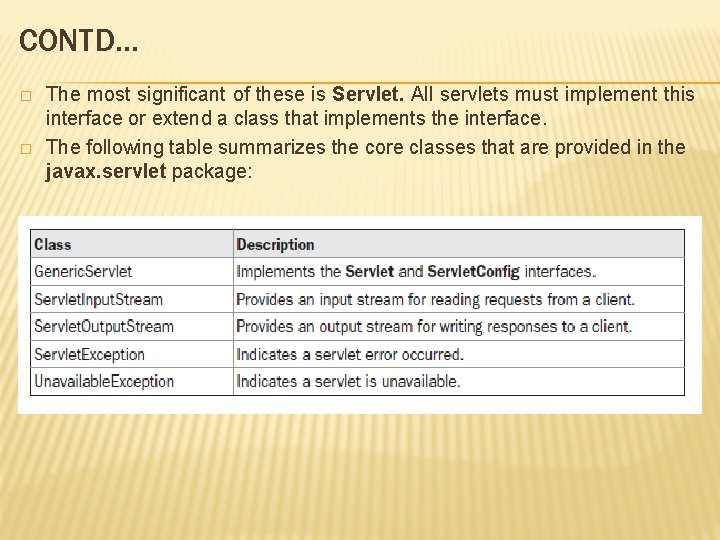
CONTD… � � The most significant of these is Servlet. All servlets must implement this interface or extend a class that implements the interface. The following table summarizes the core classes that are provided in the javax. servlet package:
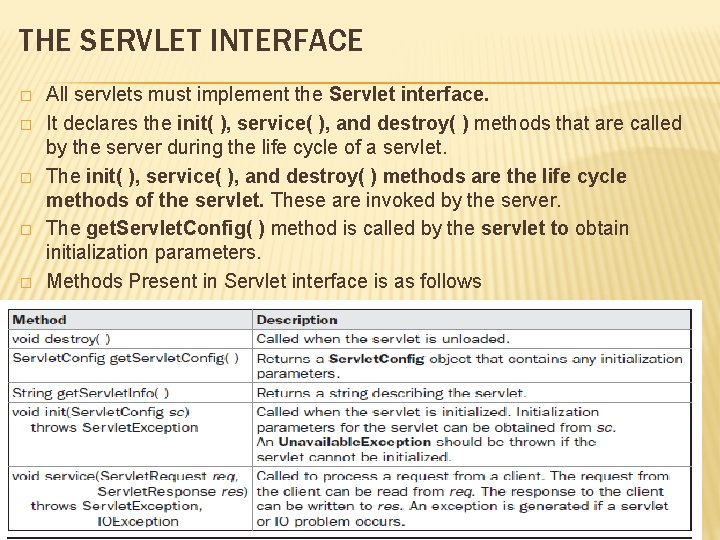
THE SERVLET INTERFACE � � � All servlets must implement the Servlet interface. It declares the init( ), service( ), and destroy( ) methods that are called by the server during the life cycle of a servlet. The init( ), service( ), and destroy( ) methods are the life cycle methods of the servlet. These are invoked by the server. The get. Servlet. Config( ) method is called by the servlet to obtain initialization parameters. Methods Present in Servlet interface is as follows
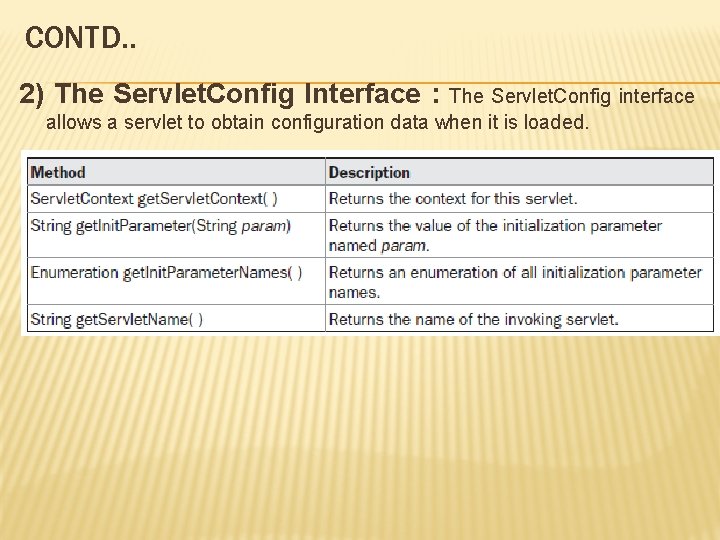
CONTD. . 2) The Servlet. Config Interface : The Servlet. Config interface allows a servlet to obtain configuration data when it is loaded.
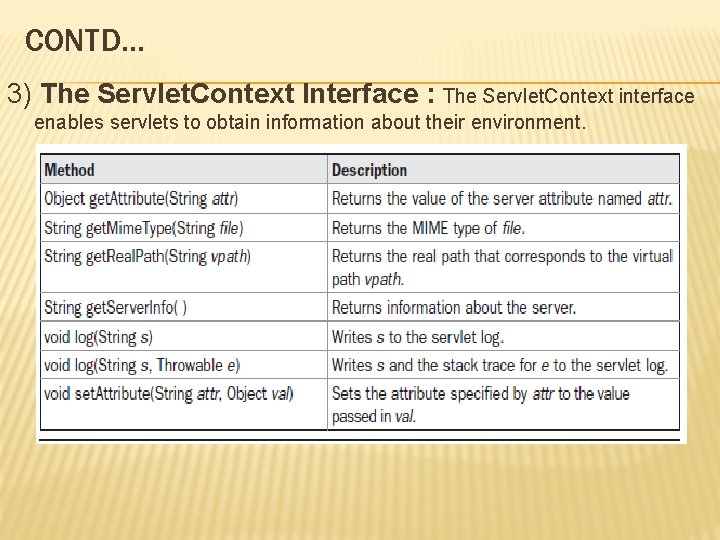
CONTD… 3) The Servlet. Context Interface : The Servlet. Context interface enables servlets to obtain information about their environment.
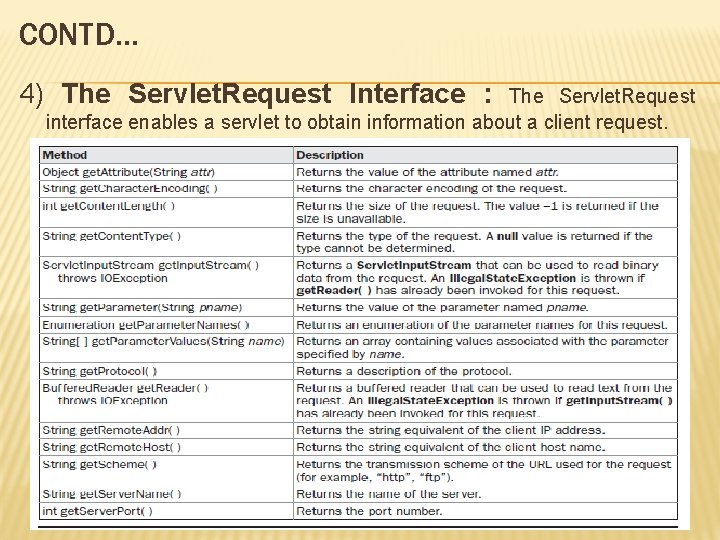
CONTD… 4) The Servlet. Request Interface : The Servlet. Request interface enables a servlet to obtain information about a client request.
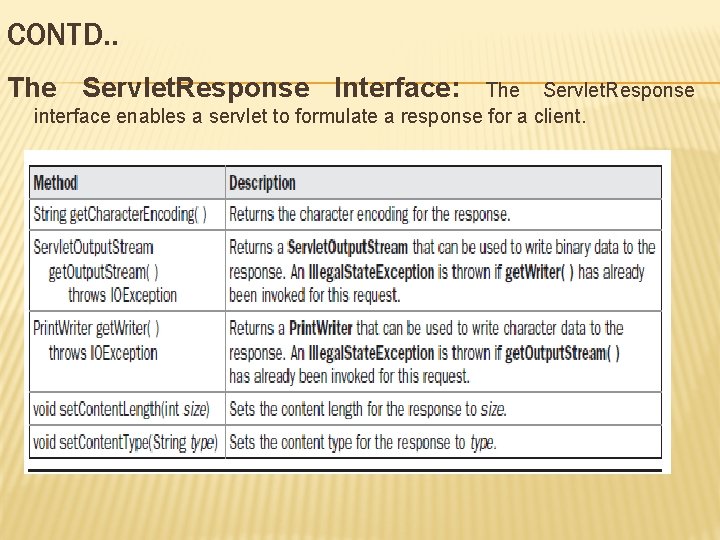
CONTD. . The Servlet. Response Interface: The Servlet. Response interface enables a servlet to formulate a response for a client.
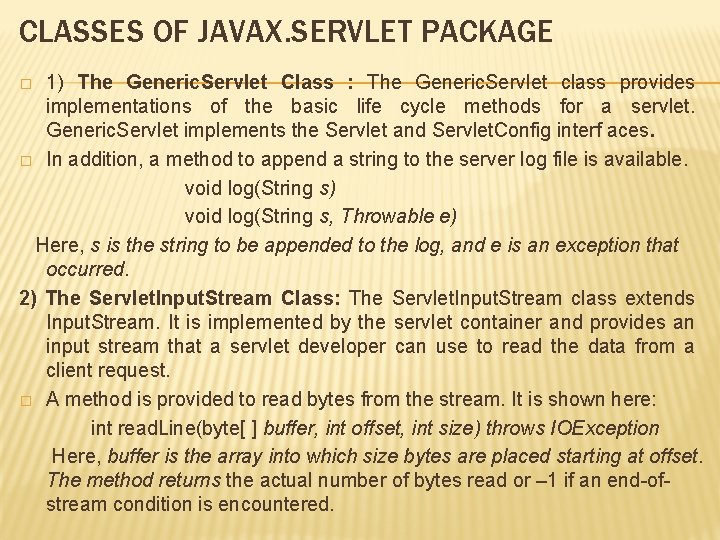
CLASSES OF JAVAX. SERVLET PACKAGE 1) The Generic. Servlet Class : The Generic. Servlet class provides implementations of the basic life cycle methods for a servlet. Generic. Servlet implements the Servlet and Servlet. Config interf aces. � In addition, a method to append a string to the server log file is available. void log(String s) void log(String s, Throwable e) Here, s is the string to be appended to the log, and e is an exception that occurred. 2) The Servlet. Input. Stream Class: The Servlet. Input. Stream class extends Input. Stream. It is implemented by the servlet container and provides an input stream that a servlet developer can use to read the data from a client request. � A method is provided to read bytes from the stream. It is shown here: int read. Line(byte[ ] buffer, int offset, int size) throws IOException Here, buffer is the array into which size bytes are placed starting at offset. The method returns the actual number of bytes read or – 1 if an end-ofstream condition is encountered. �
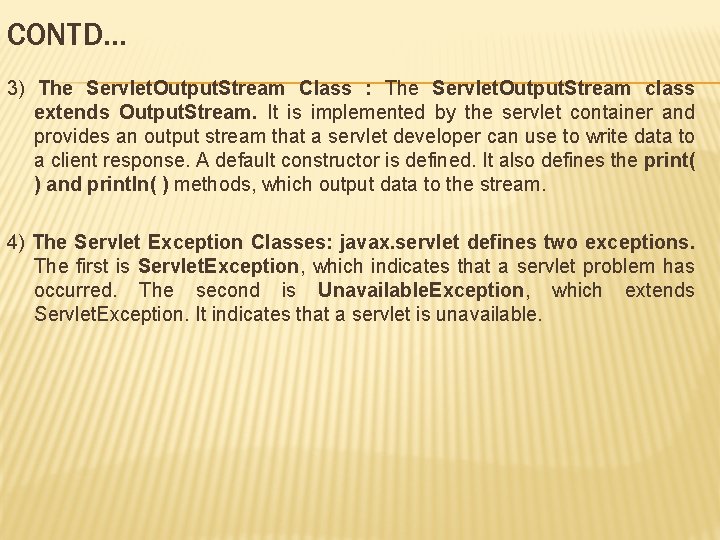
CONTD… 3) The Servlet. Output. Stream Class : The Servlet. Output. Stream class extends Output. Stream. It is implemented by the servlet container and provides an output stream that a servlet developer can use to write data to a client response. A default constructor is defined. It also defines the print( ) and println( ) methods, which output data to the stream. 4) The Servlet Exception Classes: javax. servlet defines two exceptions. The first is Servlet. Exception, which indicates that a servlet problem has occurred. The second is Unavailable. Exception, which extends Servlet. Exception. It indicates that a servlet is unavailable.
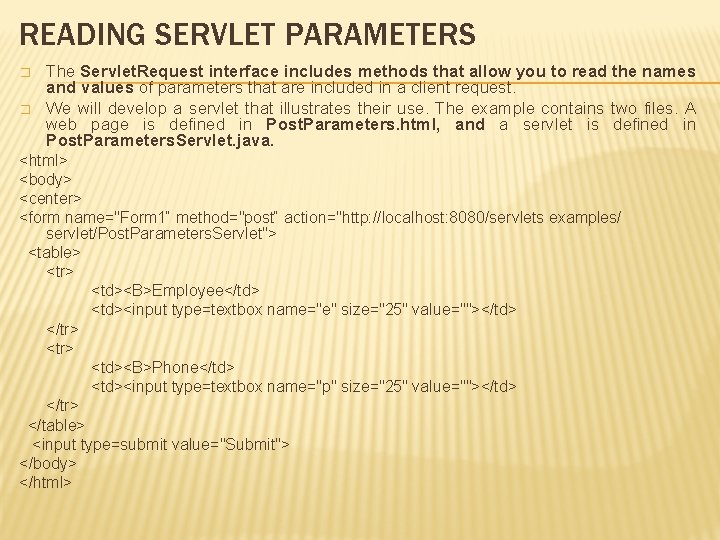
READING SERVLET PARAMETERS � � The Servlet. Request interface includes methods that allow you to read the names and values of parameters that are included in a client request. We will develop a servlet that illustrates their use. The example contains two files. A web page is defined in Post. Parameters. html, and a servlet is defined in Post. Parameters. Servlet. java. <html> <body> <center> <form name="Form 1“ method="post“ action="http: //localhost: 8080/servlets examples/ servlet/Post. Parameters. Servlet"> <table> <tr> <td><B>Employee</td> <td><input type=textbox name="e" size="25" value=""></td> </tr> <td><B>Phone</td> <td><input type=textbox name="p" size="25" value=""></td> </tr> </table> <input type=submit value="Submit"> </body> </html>
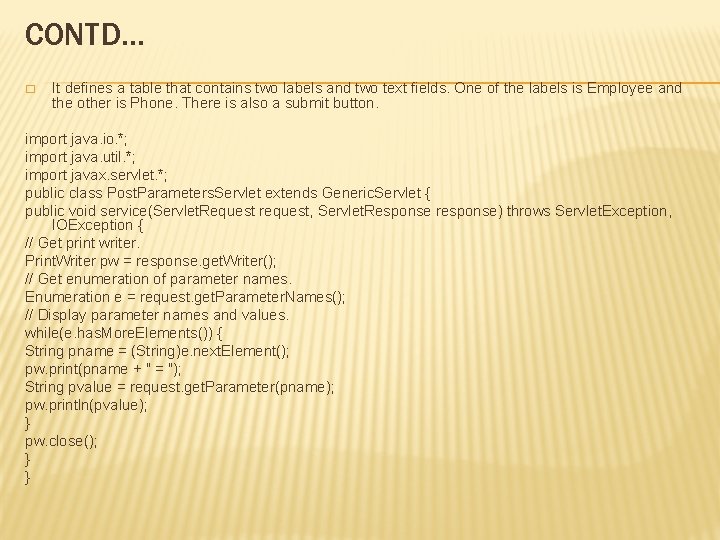
CONTD… � It defines a table that contains two labels and two text fields. One of the labels is Employee and the other is Phone. There is also a submit button. import java. io. *; import java. util. *; import javax. servlet. *; public class Post. Parameters. Servlet extends Generic. Servlet { public void service(Servlet. Request request, Servlet. Response response) throws Servlet. Exception, IOException { // Get print writer. Print. Writer pw = response. get. Writer(); // Get enumeration of parameter names. Enumeration e = request. get. Parameter. Names(); // Display parameter names and values. while(e. has. More. Elements()) { String pname = (String)e. next. Element(); pw. print(pname + " = "); String pvalue = request. get. Parameter(pname); pw. println(pvalue); } pw. close(); } }
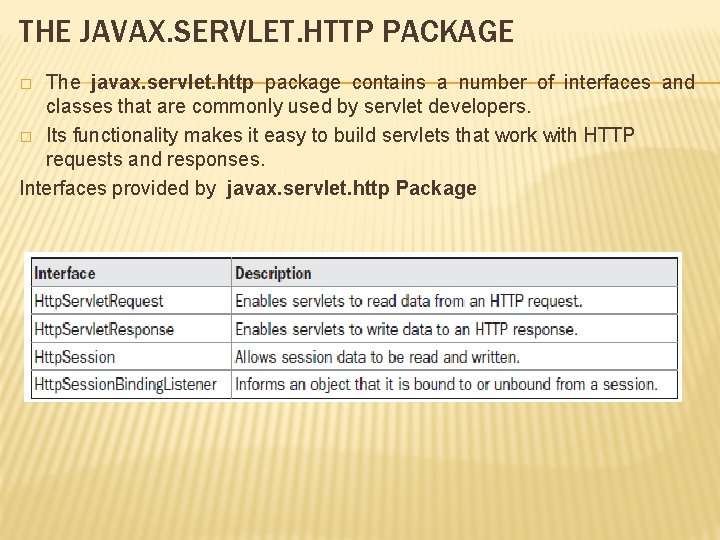
THE JAVAX. SERVLET. HTTP PACKAGE The javax. servlet. http package contains a number of interfaces and classes that are commonly used by servlet developers. � Its functionality makes it easy to build servlets that work with HTTP requests and responses. Interfaces provided by javax. servlet. http Package �
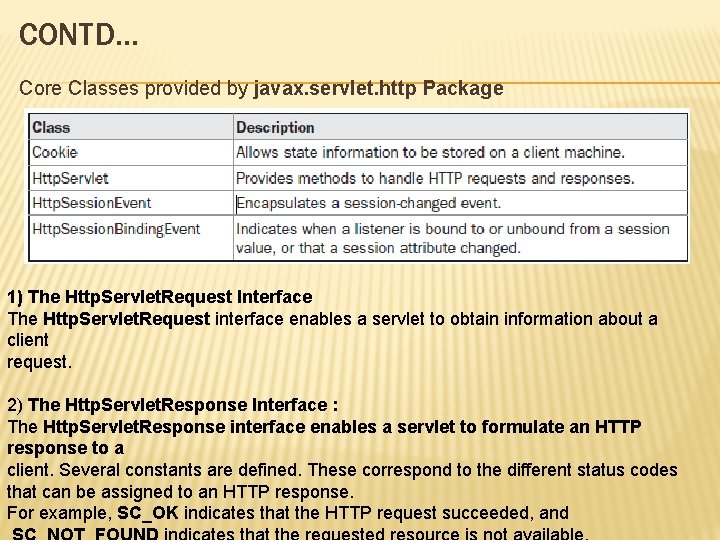
CONTD… Core Classes provided by javax. servlet. http Package 1) The Http. Servlet. Request Interface The Http. Servlet. Request interface enables a servlet to obtain information about a client request. 2) The Http. Servlet. Response Interface : The Http. Servlet. Response interface enables a servlet to formulate an HTTP response to a client. Several constants are defined. These correspond to the different status codes that can be assigned to an HTTP response. For example, SC_OK indicates that the HTTP request succeeded, and
CONTD… 3) The Http. Session Interface : The Http. Session interface enables a servlet to read and write the state information that is associated with an HTTP session. 4) The Http. Session. Binding. Listener Interface : Http. Session. Binding. Listener interface is implemented by objects that need to be notified when they are bound to or unbound from an HTTP session. The methods that are invoked when an object is bound or unbound are void value. Bound(Http. Session. Binding. Event e) void value. Unbound(Http. Session. Binding. Event e) Here, e is the event object that describes the binding.
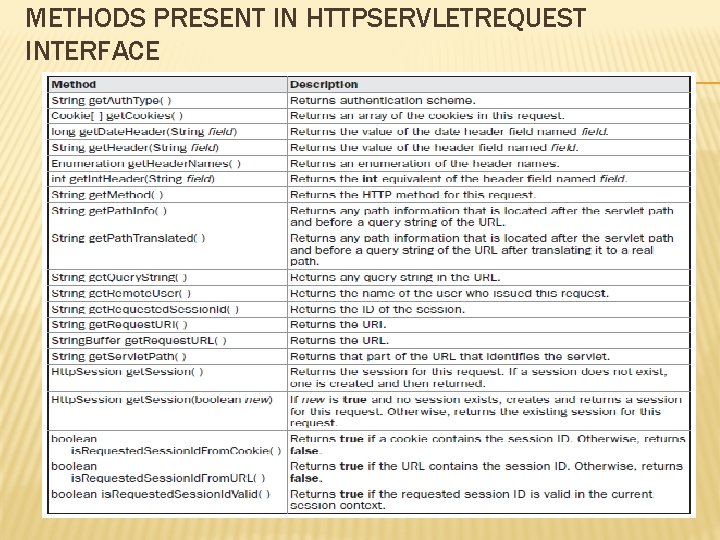
METHODS PRESENT IN HTTPSERVLETREQUEST INTERFACE
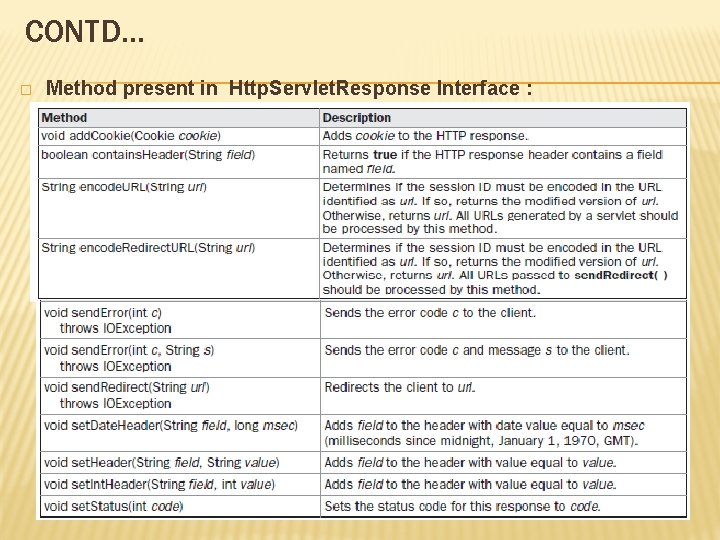
CONTD… � Method present in Http. Servlet. Response Interface :

CONTD… � Methods Present in The Http. Session Interface
CLASSES OF JAVAX. SERVLET. HTTP PACKAGE The Cookie Class: The Cookie class encapsulates a cookie. A cookie is stored on a client and contains state information. Cookies are valuable for tracking user activities. For example, assume that a user visits an online store. A cookie can save the user’s name, address, and other information. The user does not need to enter this data each time he or she visits the store. � A servlet can write a cookie to a user’s machine via the add. Cookie( ) method of the Http. Servlet. Response interface. � The data for that cookie is then included in the header of the HTTP response that is sent to the browser. � The names and values of cookies are stored on the user’s machine. Some of the information that is saved for each cookie includes the following: • The name of the cookie • The value of the cookie • The expiration date of the cookie • The domain and path of the cookie 1)
CONTD… The expiration date determines when this cookie is deleted from the user’s machine. � If an expiration date is not explicitly assigned to a cookie, it is deleted when the current browser session ends. Otherwise, the cookie is saved in a file on the user’s machine. � The domain and path of the cookie determine when it is included in the header of an HTTP request. � There is one constructor for Cookie. It has the signature shown here: Cookie(String name, String value) Here, the name and value of the cookie are supplied as arguments to the constructor These are some methods present in cookie class �
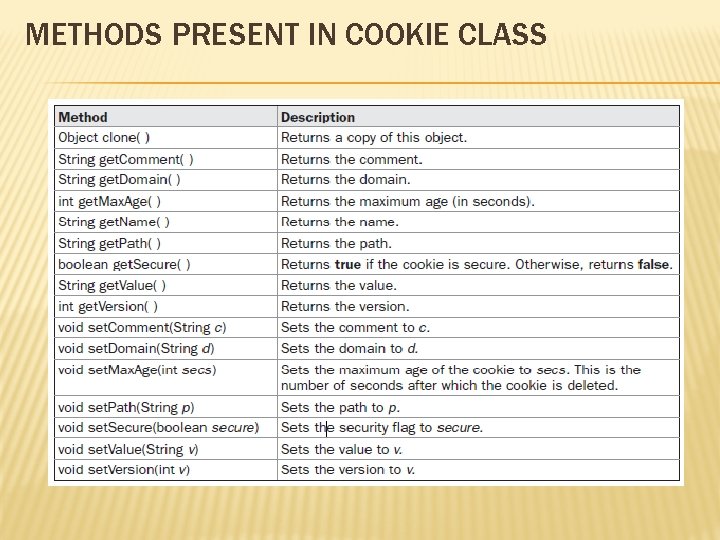
METHODS PRESENT IN COOKIE CLASS
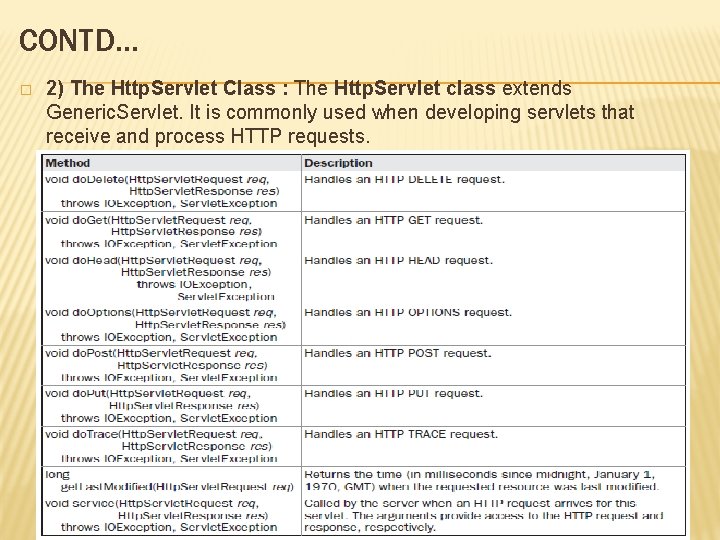
CONTD… � 2) The Http. Servlet Class : The Http. Servlet class extends Generic. Servlet. It is commonly used when developing servlets that receive and process HTTP requests.
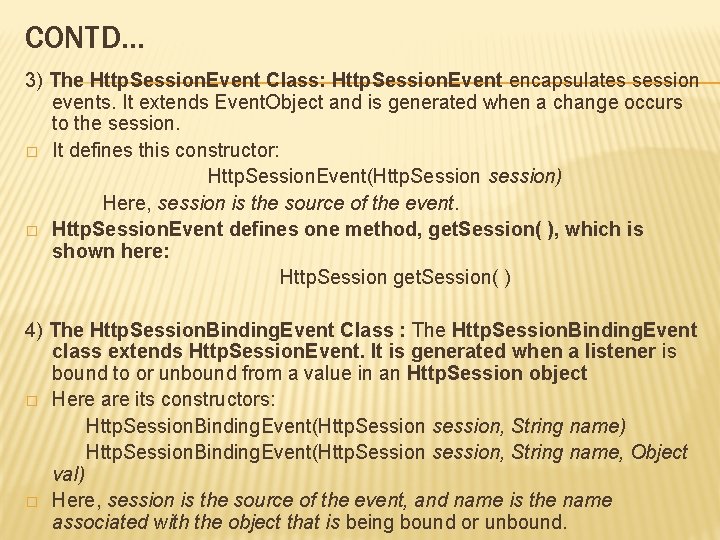
CONTD… 3) The Http. Session. Event Class: Http. Session. Event encapsulates session events. It extends Event. Object and is generated when a change occurs to the session. � It defines this constructor: Http. Session. Event(Http. Session session) Here, session is the source of the event. � Http. Session. Event defines one method, get. Session( ), which is shown here: Http. Session get. Session( ) 4) The Http. Session. Binding. Event Class : The Http. Session. Binding. Event class extends Http. Session. Event. It is generated when a listener is bound to or unbound from a value in an Http. Session object � Here are its constructors: Http. Session. Binding. Event(Http. Session session, String name) Http. Session. Binding. Event(Http. Session session, String name, Object val) � Here, session is the source of the event, and name is the name associated with the object that is being bound or unbound.
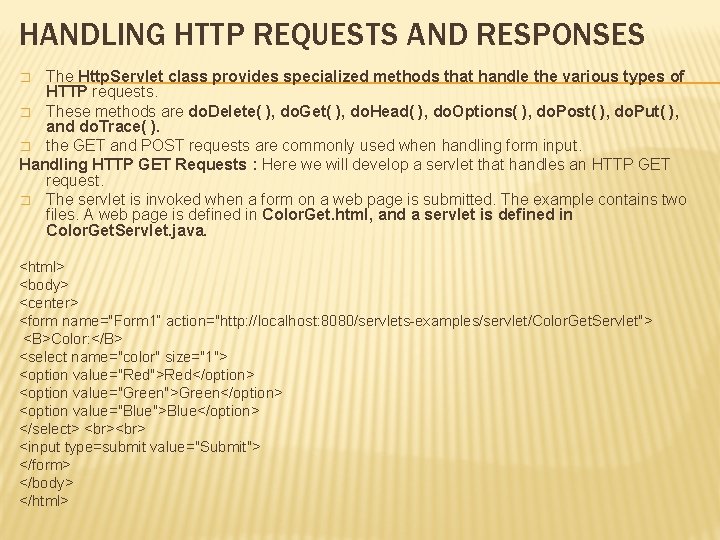
HANDLING HTTP REQUESTS AND RESPONSES The Http. Servlet class provides specialized methods that handle the various types of HTTP requests. � These methods are do. Delete( ), do. Get( ), do. Head( ), do. Options( ), do. Post( ), do. Put( ), and do. Trace( ). � the GET and POST requests are commonly used when handling form input. Handling HTTP GET Requests : Here we will develop a servlet that handles an HTTP GET request. � The servlet is invoked when a form on a web page is submitted. The example contains two files. A web page is defined in Color. Get. html, and a servlet is defined in Color. Get. Servlet. java. � <html> <body> <center> <form name="Form 1“ action="http: //localhost: 8080/servlets-examples/servlet/Color. Get. Servlet"> <B>Color: </B> <select name="color" size="1"> <option value="Red">Red</option> <option value="Green">Green</option> <option value="Blue">Blue</option> </select> <input type=submit value="Submit"> </form> </body> </html>
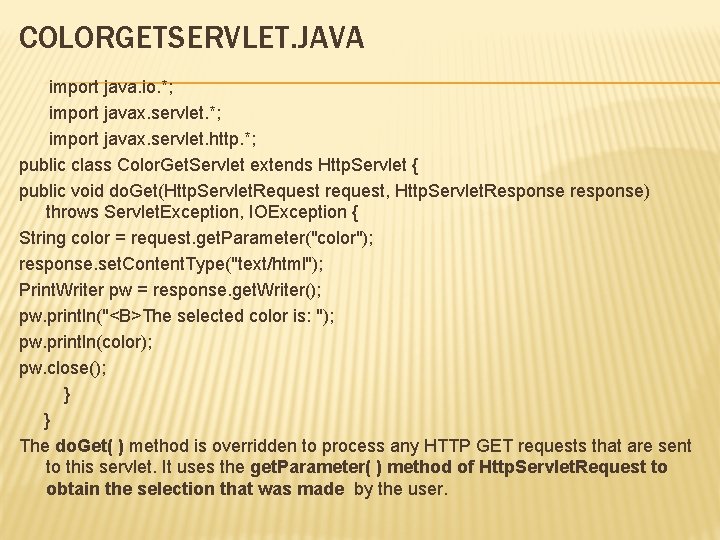
COLORGETSERVLET. JAVA import java. io. *; import javax. servlet. http. *; public class Color. Get. Servlet extends Http. Servlet { public void do. Get(Http. Servlet. Request request, Http. Servlet. Response response) throws Servlet. Exception, IOException { String color = request. get. Parameter("color"); response. set. Content. Type("text/html"); Print. Writer pw = response. get. Writer(); pw. println("<B>The selected color is: "); pw. println(color); pw. close(); } } The do. Get( ) method is overridden to process any HTTP GET requests that are sent to this servlet. It uses the get. Parameter( ) method of Http. Servlet. Request to obtain the selection that was made by the user.
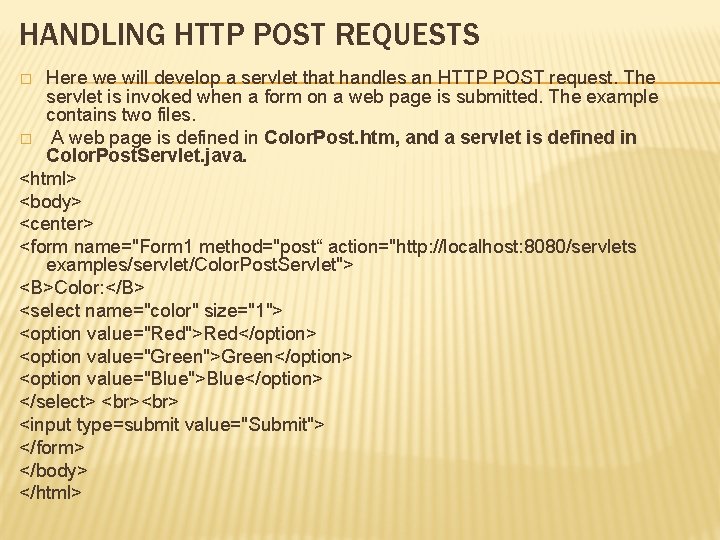
HANDLING HTTP POST REQUESTS Here we will develop a servlet that handles an HTTP POST request. The servlet is invoked when a form on a web page is submitted. The example contains two files. � A web page is defined in Color. Post. htm, and a servlet is defined in Color. Post. Servlet. java. <html> <body> <center> <form name="Form 1 method="post“ action="http: //localhost: 8080/servlets examples/servlet/Color. Post. Servlet"> <B>Color: </B> <select name="color" size="1"> <option value="Red">Red</option> <option value="Green">Green</option> <option value="Blue">Blue</option> </select> <input type=submit value="Submit"> </form> </body> </html> �
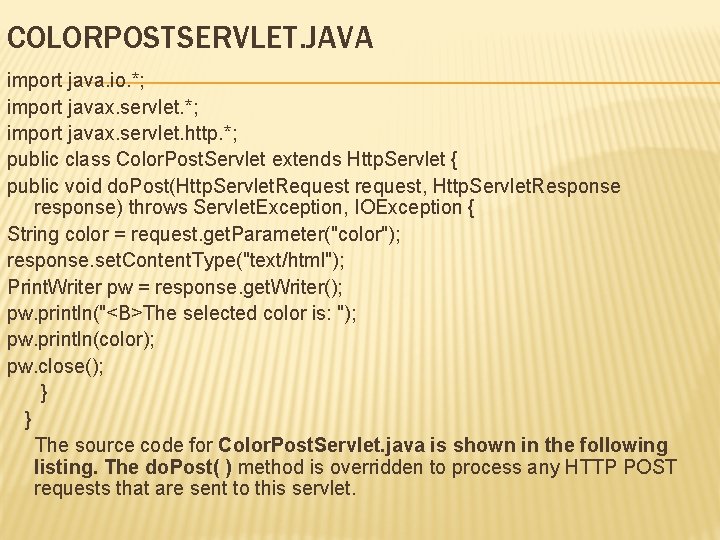
COLORPOSTSERVLET. JAVA import java. io. *; import javax. servlet. http. *; public class Color. Post. Servlet extends Http. Servlet { public void do. Post(Http. Servlet. Request request, Http. Servlet. Response response) throws Servlet. Exception, IOException { String color = request. get. Parameter("color"); response. set. Content. Type("text/html"); Print. Writer pw = response. get. Writer(); pw. println("<B>The selected color is: "); pw. println(color); pw. close(); } } The source code for Color. Post. Servlet. java is shown in the following listing. The do. Post( ) method is overridden to process any HTTP POST requests that are sent to this servlet.
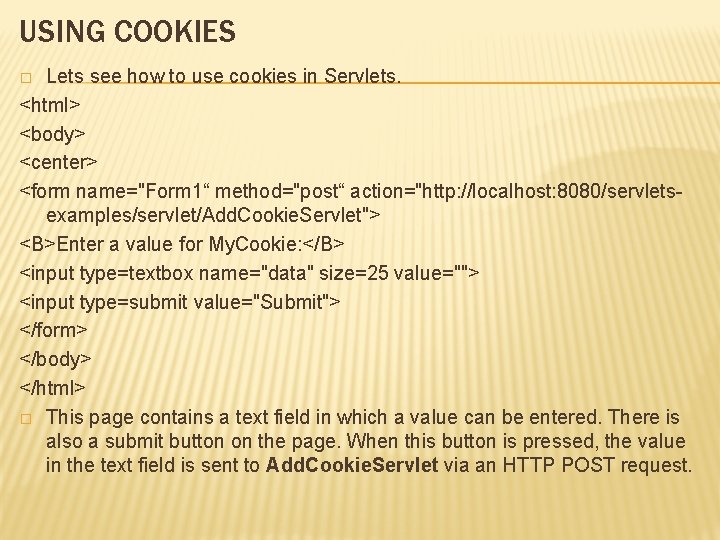
USING COOKIES Lets see how to use cookies in Servlets. <html> <body> <center> <form name="Form 1“ method="post“ action="http: //localhost: 8080/servletsexamples/servlet/Add. Cookie. Servlet"> <B>Enter a value for My. Cookie: </B> <input type=textbox name="data" size=25 value=""> <input type=submit value="Submit"> </form> </body> </html> � This page contains a text field in which a value can be entered. There is also a submit button on the page. When this button is pressed, the value in the text field is sent to Add. Cookie. Servlet via an HTTP POST request. �
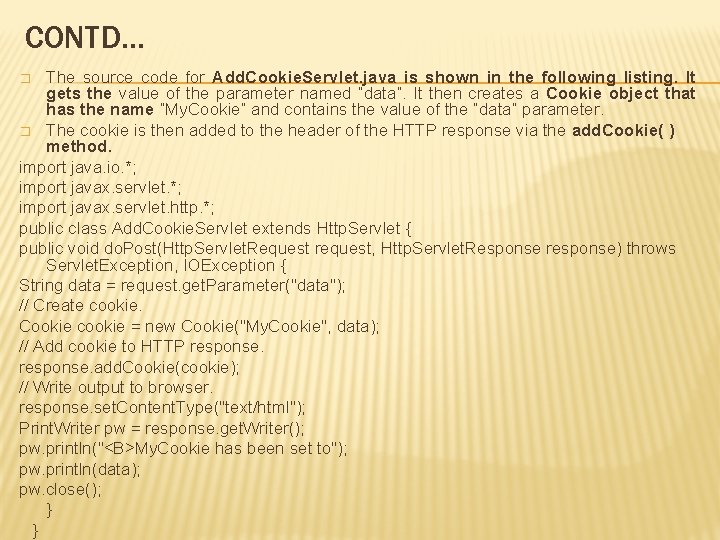
CONTD… The source code for Add. Cookie. Servlet. java is shown in the following listing. It gets the value of the parameter named “data”. It then creates a Cookie object that has the name “My. Cookie” and contains the value of the “data” parameter. � The cookie is then added to the header of the HTTP response via the add. Cookie( ) method. import java. io. *; import javax. servlet. http. *; public class Add. Cookie. Servlet extends Http. Servlet { public void do. Post(Http. Servlet. Request request, Http. Servlet. Response response) throws Servlet. Exception, IOException { String data = request. get. Parameter("data"); // Create cookie. Cookie cookie = new Cookie("My. Cookie", data); // Add cookie to HTTP response. add. Cookie(cookie); // Write output to browser. response. set. Content. Type("text/html"); Print. Writer pw = response. get. Writer(); pw. println("<B>My. Cookie has been set to"); pw. println(data); pw. close(); } } �
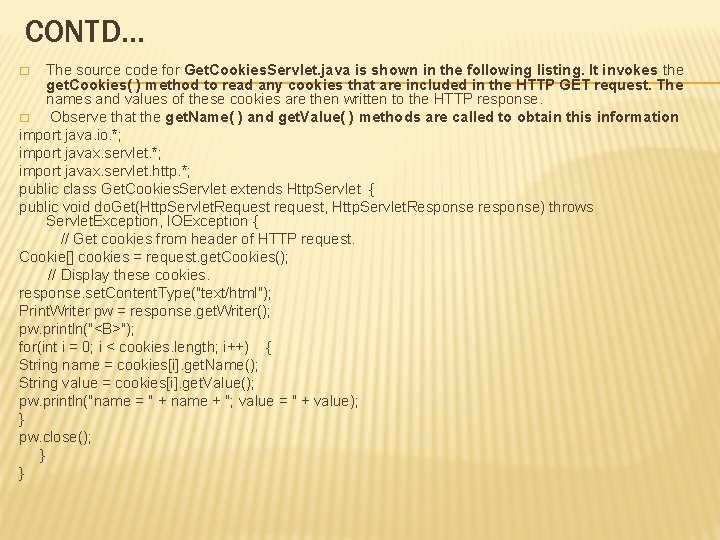
CONTD… The source code for Get. Cookies. Servlet. java is shown in the following listing. It invokes the get. Cookies( ) method to read any cookies that are included in the HTTP GET request. The names and values of these cookies are then written to the HTTP response. � Observe that the get. Name( ) and get. Value( ) methods are called to obtain this information import java. io. *; import javax. servlet. http. *; public class Get. Cookies. Servlet extends Http. Servlet { public void do. Get(Http. Servlet. Request request, Http. Servlet. Response response) throws Servlet. Exception, IOException { // Get cookies from header of HTTP request. Cookie[] cookies = request. get. Cookies(); // Display these cookies. response. set. Content. Type("text/html"); Print. Writer pw = response. get. Writer(); pw. println("<B>"); for(int i = 0; i < cookies. length; i++) { String name = cookies[i]. get. Name(); String value = cookies[i]. get. Value(); pw. println("name = " + name + "; value = " + value); } pw. close(); } } �
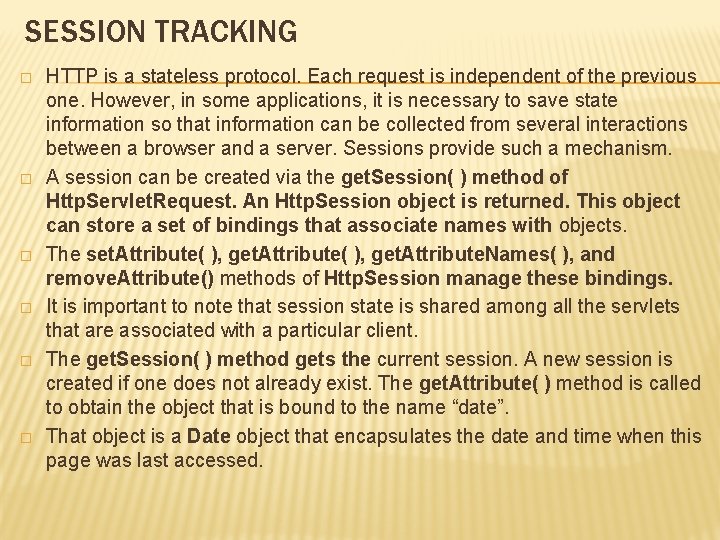
SESSION TRACKING � � � HTTP is a stateless protocol. Each request is independent of the previous one. However, in some applications, it is necessary to save state information so that information can be collected from several interactions between a browser and a server. Sessions provide such a mechanism. A session can be created via the get. Session( ) method of Http. Servlet. Request. An Http. Session object is returned. This object can store a set of bindings that associate names with objects. The set. Attribute( ), get. Attribute. Names( ), and remove. Attribute() methods of Http. Session manage these bindings. It is important to note that session state is shared among all the servlets that are associated with a particular client. The get. Session( ) method gets the current session. A new session is created if one does not already exist. The get. Attribute( ) method is called to obtain the object that is bound to the name “date”. That object is a Date object that encapsulates the date and time when this page was last accessed.
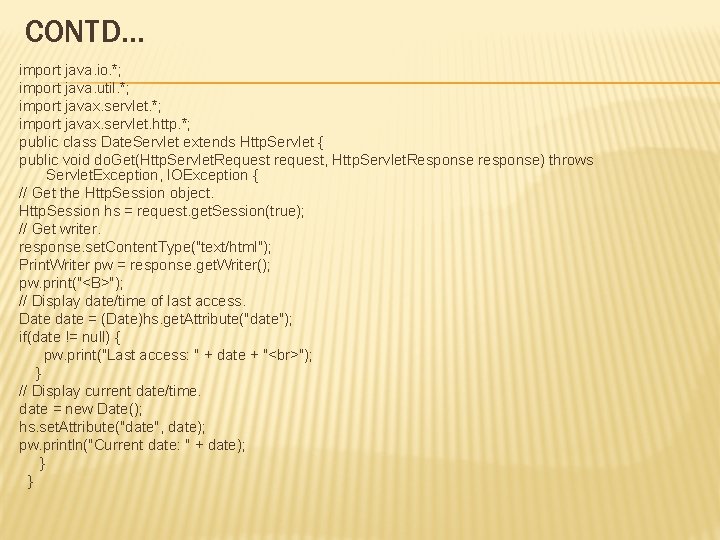
CONTD… import java. io. *; import java. util. *; import javax. servlet. http. *; public class Date. Servlet extends Http. Servlet { public void do. Get(Http. Servlet. Request request, Http. Servlet. Response response) throws Servlet. Exception, IOException { // Get the Http. Session object. Http. Session hs = request. get. Session(true); // Get writer. response. set. Content. Type("text/html"); Print. Writer pw = response. get. Writer(); pw. print("<B>"); // Display date/time of last access. Date date = (Date)hs. get. Attribute("date"); if(date != null) { pw. print("Last access: " + date + " "); } // Display current date/time. date = new Date(); hs. set. Attribute("date", date); pw. println("Current date: " + date); } }
- Slides: 46