
Serial Communication Interface Ta Kim Nicholas Earnhart Razid
- Slides: 47
Serial Communication Interface Ta Kim Nicholas Earnhart Razid Ahmad ME 6405 – Fall 2008 November 6, 2008
Outline n n n n Serial vs Parallel Communication Synchronous vs Asynchronous Data Format Baud rate Register descriptions Implementation Specific Features Examples
Introduction to Data Transmission n “transfer of data from point-to-point” ¡ n http: //en. wikipedia. org/wiki/Data_transmis sion PURPOSE: It provides a method for electronic devices to communicate with each other Ta Kim
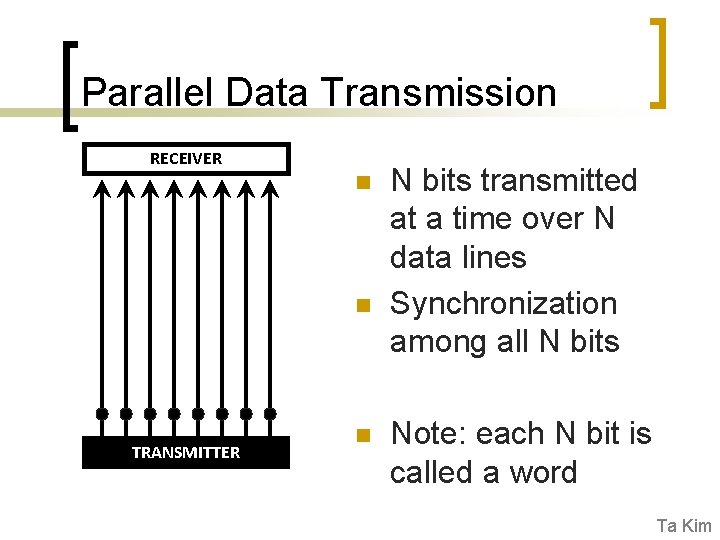
Parallel Data Transmission RECEIVER n n TRANSMITTER n N bits transmitted at a time over N data lines Synchronization among all N bits Note: each N bit is called a word Ta Kim
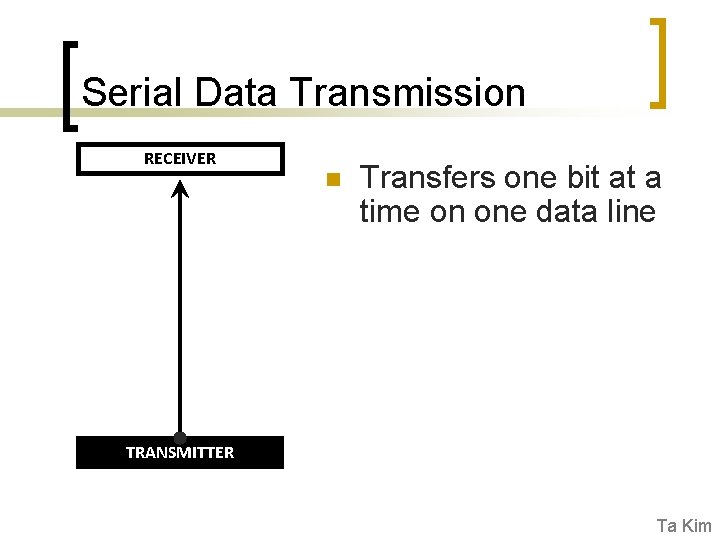
Serial Data Transmission RECEIVER n Transfers one bit at a time on one data line TRANSMITTER Ta Kim
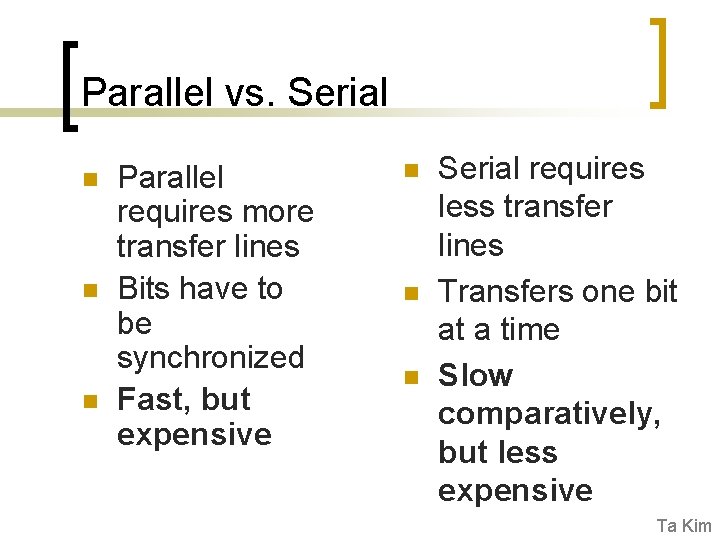
Parallel vs. Serial n n n Parallel requires more transfer lines Bits have to be synchronized Fast, but expensive n n n Serial requires less transfer lines Transfers one bit at a time Slow comparatively, but less expensive Ta Kim
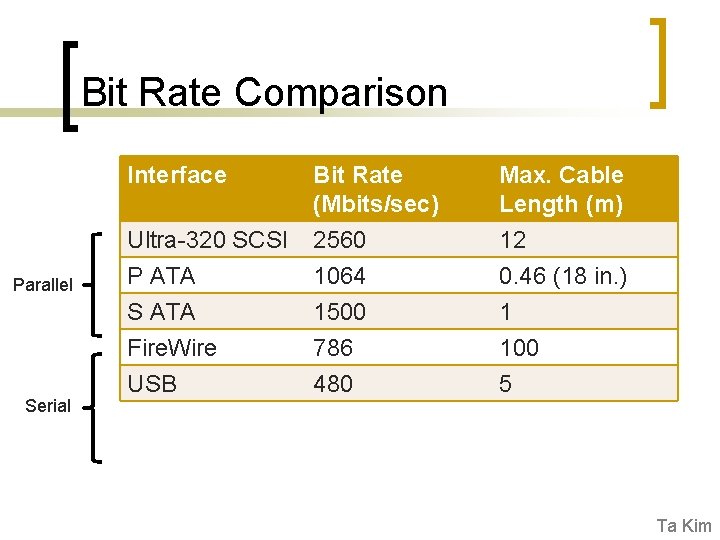
Bit Rate Comparison Parallel Serial Interface Bit Rate (Mbits/sec) Max. Cable Length (m) Ultra-320 SCSI P ATA S ATA Fire. Wire USB 2560 1064 1500 786 480 12 0. 46 (18 in. ) 1 100 5 Ta Kim
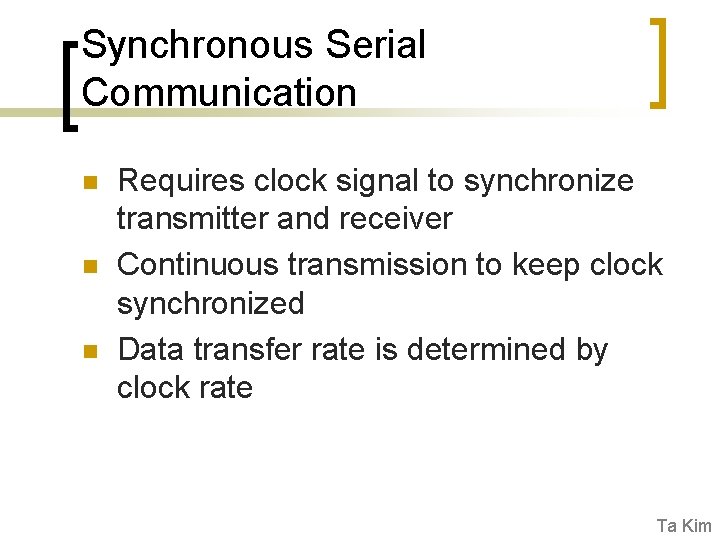
Synchronous Serial Communication n Requires clock signal to synchronize transmitter and receiver Continuous transmission to keep clock synchronized Data transfer rate is determined by clock rate Ta Kim
Asynchronous Serial Communication n Transmitter and Receiver operate independently ¡ ¡ n n Transmitter sends data at any time Receiver is ready to accept data at all times No need for clock signals …but during transmission, format and transfer rate of data must match Ta Kim
Asynchronous Transmission n n Word contains information that specifies the beginning and end of word to synchronize transmitter and receiver while exchanging data Bit transfer rate is determined programmer (but also limited by interface) and must match between transmitter and receiver Ta Kim
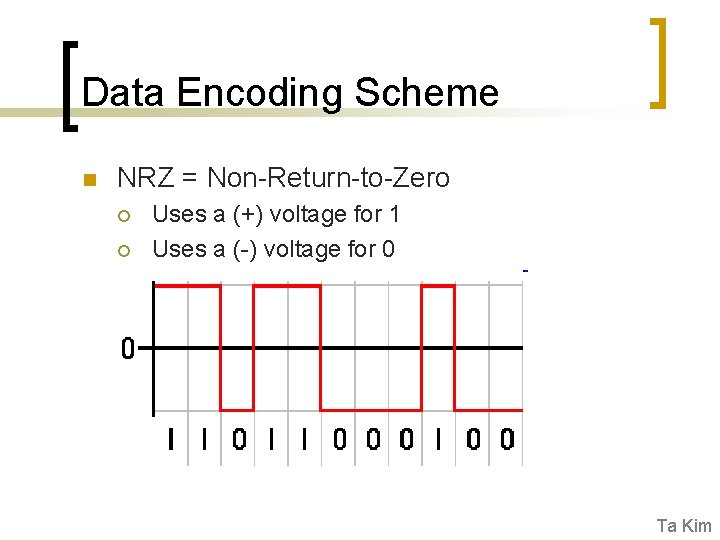
Data Encoding Scheme n NRZ = Non-Return-to-Zero ¡ ¡ Uses a (+) voltage for 1 Uses a (-) voltage for 0 Ta Kim
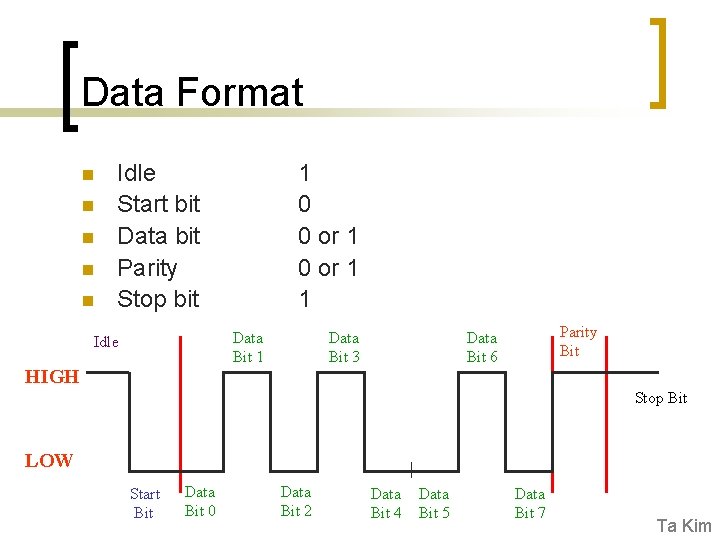
Data Format n n Start bit – indicates the beginning of word Data bit – data user is transmitting Parity bit – checks integrity of data Stop bit – indicates the end of word Ta Kim
Data Format n n n Idle Start bit Data bit Parity Stop bit 1 0 0 or 1 1 Data Bit 1 Idle HIGH Data Bit 3 Parity Bit Data Bit 6 Stop Bit LOW Start Bit Data Bit 0 Data Bit 2 Data Bit 4 Data Bit 5 Data Bit 7 Ta Kim
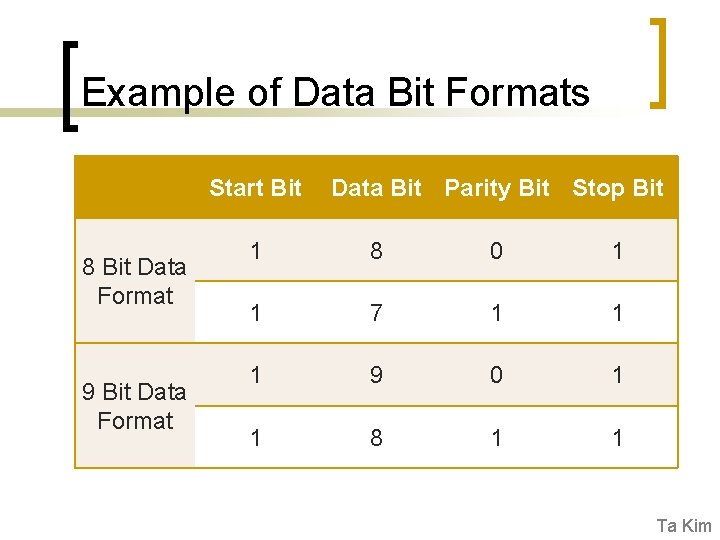
Example of Data Bit Formats Start Bit 8 Bit Data Format 9 Bit Data Format Data Bit Parity Bit Stop Bit 1 8 0 1 1 7 1 1 1 9 0 1 1 8 1 1 Ta Kim
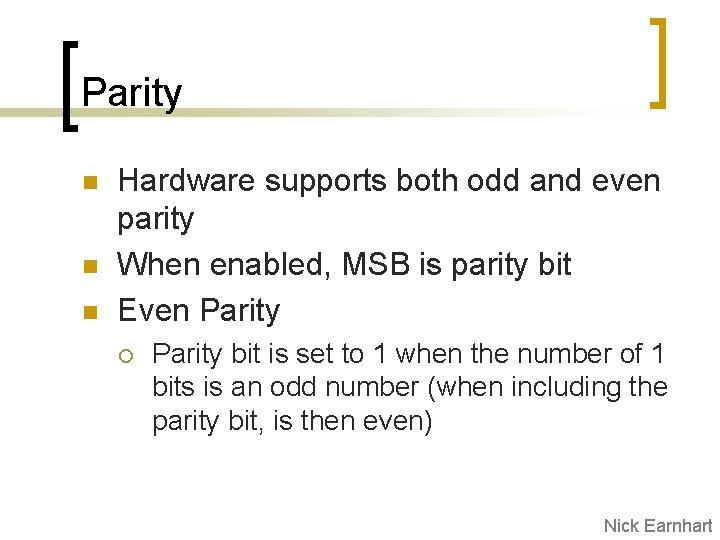
Parity n n n Hardware supports both odd and even parity When enabled, MSB is parity bit Even Parity ¡ Parity bit is set to 1 when the number of 1 bits is an odd number (when including the parity bit, is then even) Nick Earnhart
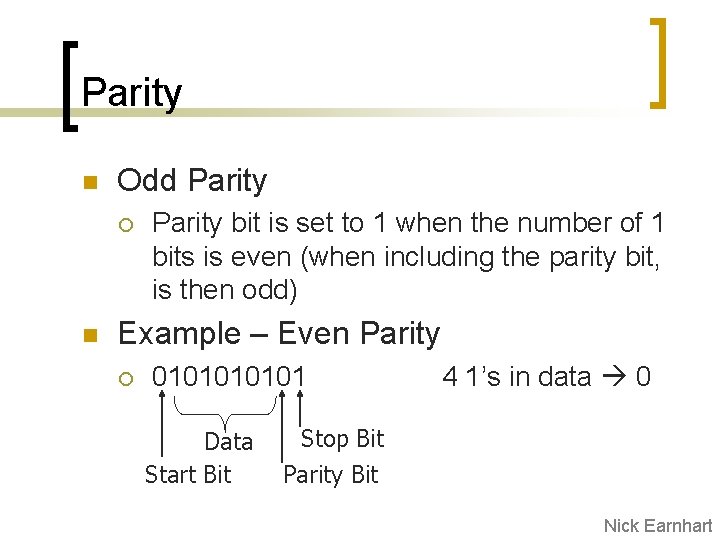
Parity n Odd Parity ¡ n Parity bit is set to 1 when the number of 1 bits is even (when including the parity bit, is then odd) Example – Even Parity ¡ 010101 Data Start Bit 4 1’s in data 0 Stop Bit Parity Bit Nick Earnhart
Error and Issues n n Noise Detection Overrun Framing Error Parity Error Nick Earnhart
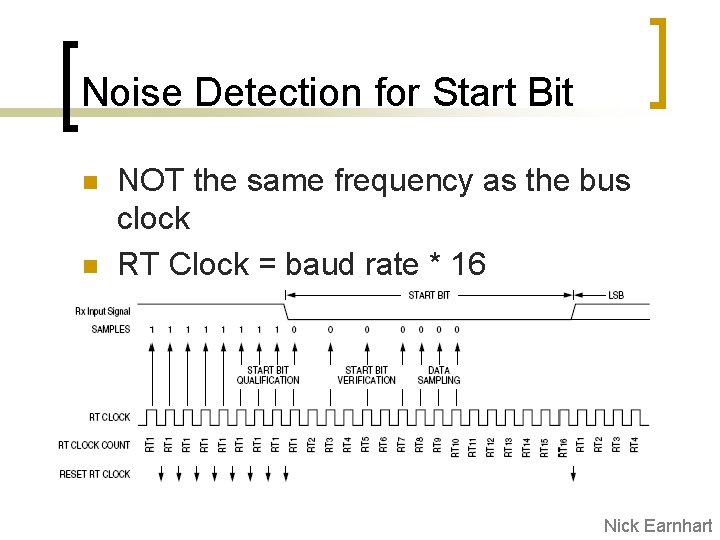
Noise Detection for Start Bit n n NOT the same frequency as the bus clock RT Clock = baud rate * 16 Nick Earnhart
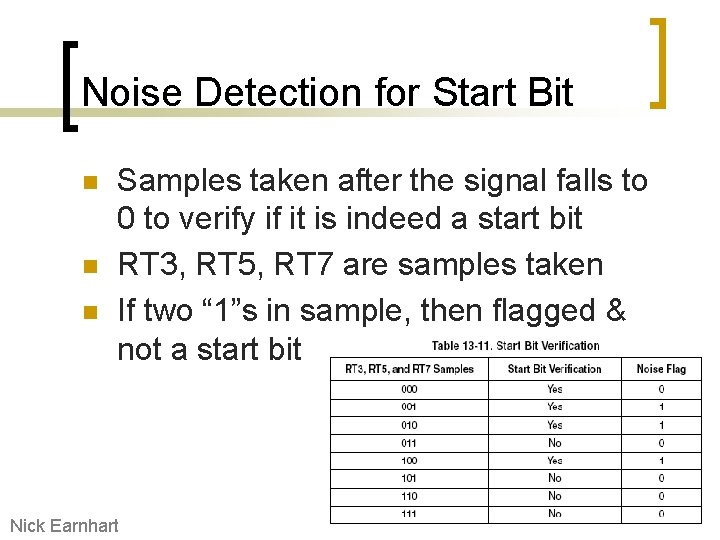
Noise Detection for Start Bit n n n Samples taken after the signal falls to 0 to verify if it is indeed a start bit RT 3, RT 5, RT 7 are samples taken If two “ 1”s in sample, then flagged & not a start bit Nick Earnhart
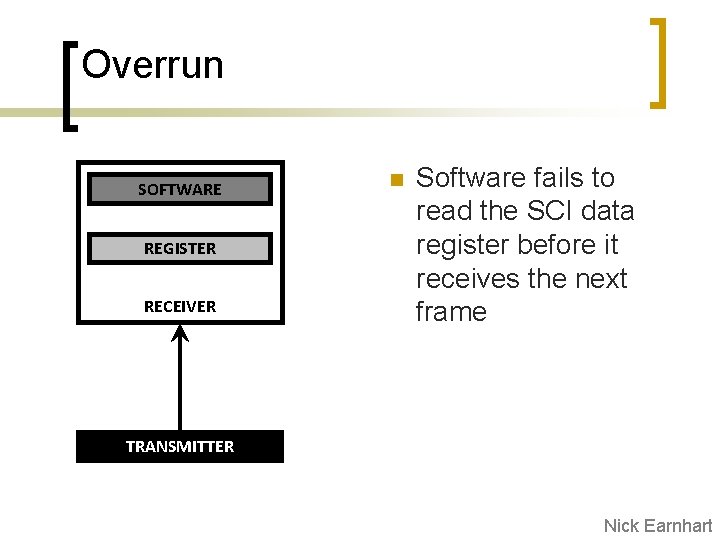
Overrun SOFTWARE REGISTER RECEIVER n Software fails to read the SCI data register before it receives the next frame TRANSMITTER Nick Earnhart
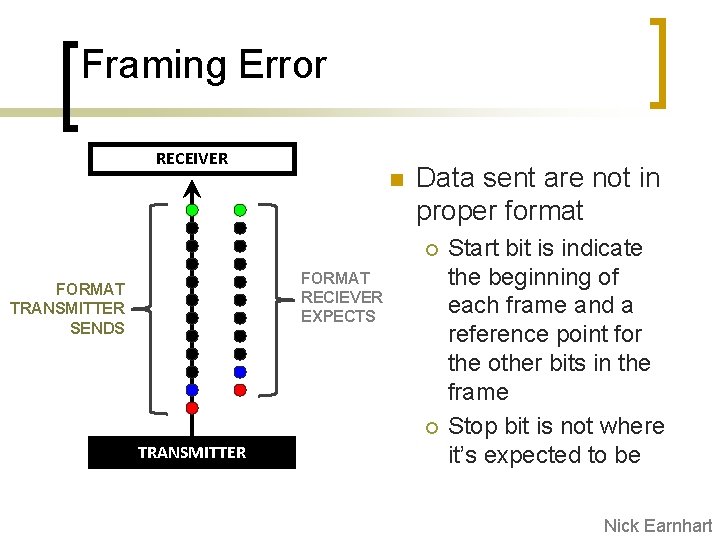
Framing Error RECEIVER n Data sent are not in proper format ¡ FORMAT RECIEVER EXPECTS FORMAT TRANSMITTER SENDS ¡ TRANSMITTER Start bit is indicate the beginning of each frame and a reference point for the other bits in the frame Stop bit is not where it’s expected to be Nick Earnhart
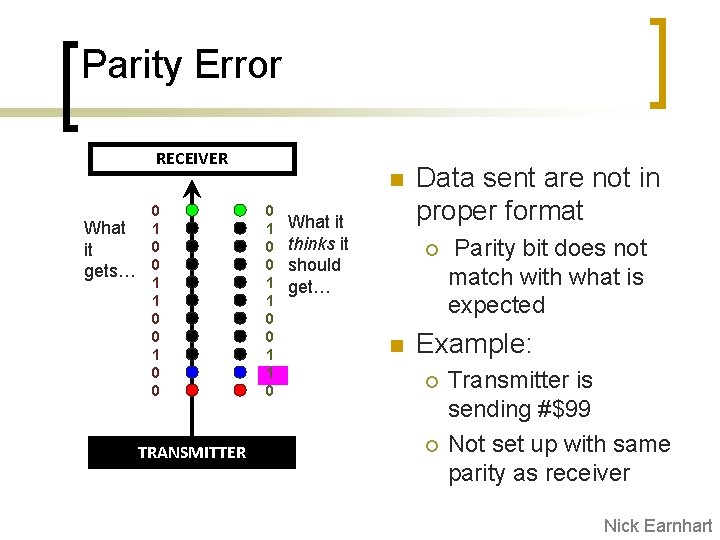
Parity Error RECEIVER What it gets… 0 1 0 0 TRANSMITTER n 0 1 0 0 1 1 0 What it thinks it should get… Data sent are not in proper format ¡ n Parity bit does not match with what is expected Example: ¡ ¡ Transmitter is sending #$99 Not set up with same parity as receiver Nick Earnhart
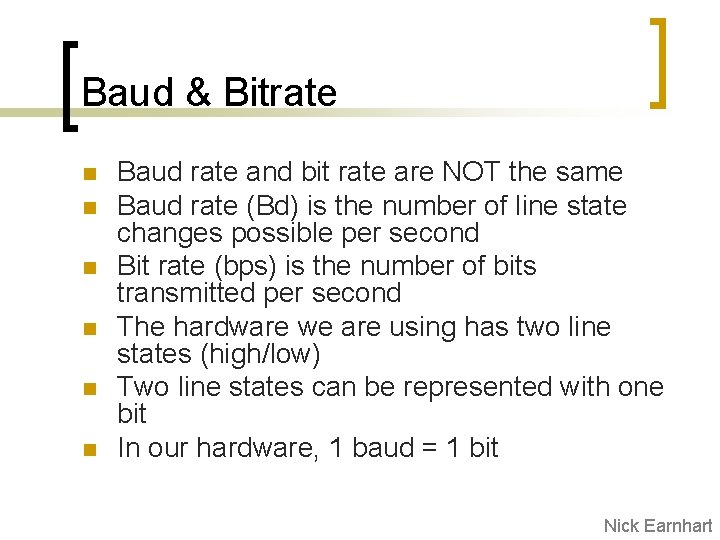
Baud & Bitrate n n n Baud rate and bit rate are NOT the same Baud rate (Bd) is the number of line state changes possible per second Bit rate (bps) is the number of bits transmitted per second The hardware we are using has two line states (high/low) Two line states can be represented with one bit In our hardware, 1 baud = 1 bit Nick Earnhart
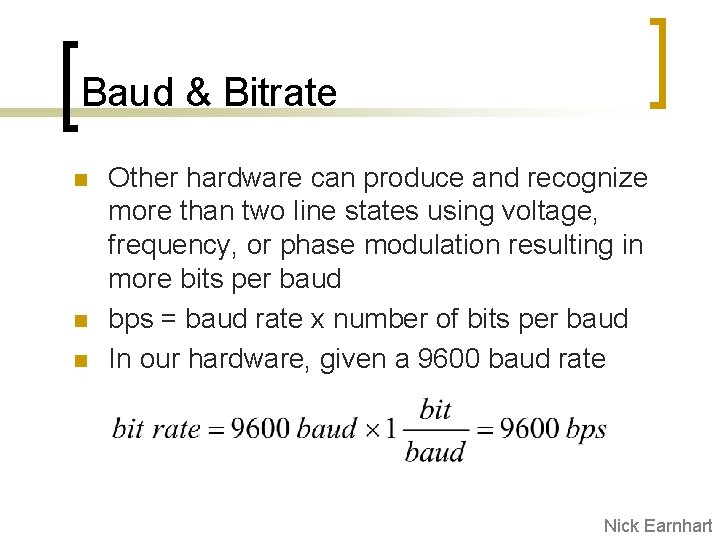
Baud & Bitrate n n n Other hardware can produce and recognize more than two line states using voltage, frequency, or phase modulation resulting in more bits per baud bps = baud rate x number of bits per baud In our hardware, given a 9600 baud rate Nick Earnhart
Baud & Bitrate n n n Not all bits transmitted are data Start/stop/parity bits are transmission overhead Throughput = data transmission excluding overhead A useful unit for describing throughput is characters per second (cps) A standard character is one byte of data ¡ ¡ cps is not the same as bytes per second is ambiguous on whether overhead is subtracted out or not. Nick Earnhart
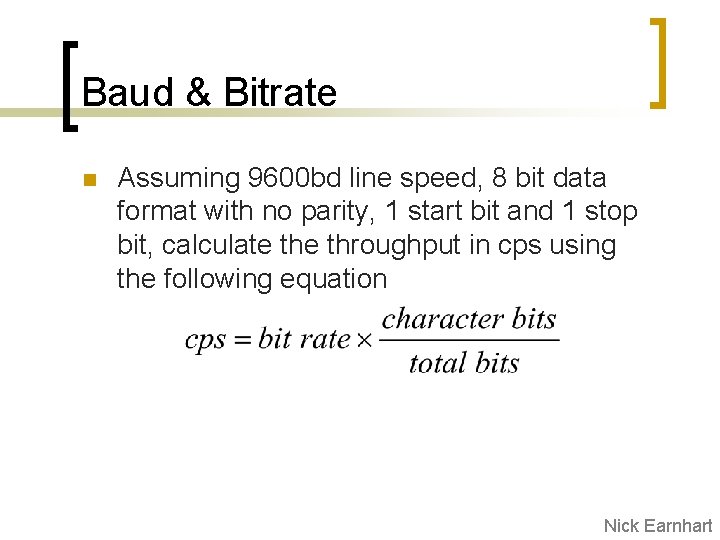
Baud & Bitrate n Assuming 9600 bd line speed, 8 bit data format with no parity, 1 start bit and 1 stop bit, calculate throughput in cps using the following equation Nick Earnhart
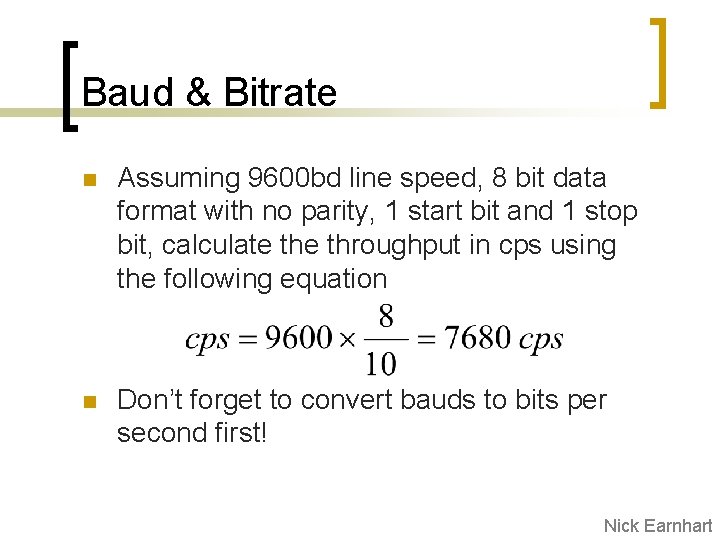
Baud & Bitrate n Assuming 9600 bd line speed, 8 bit data format with no parity, 1 start bit and 1 stop bit, calculate throughput in cps using the following equation n Don’t forget to convert bauds to bits per second first! Nick Earnhart
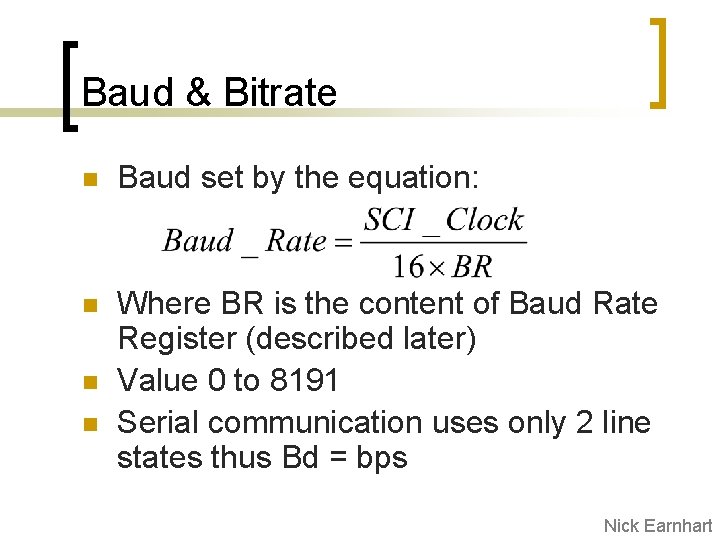
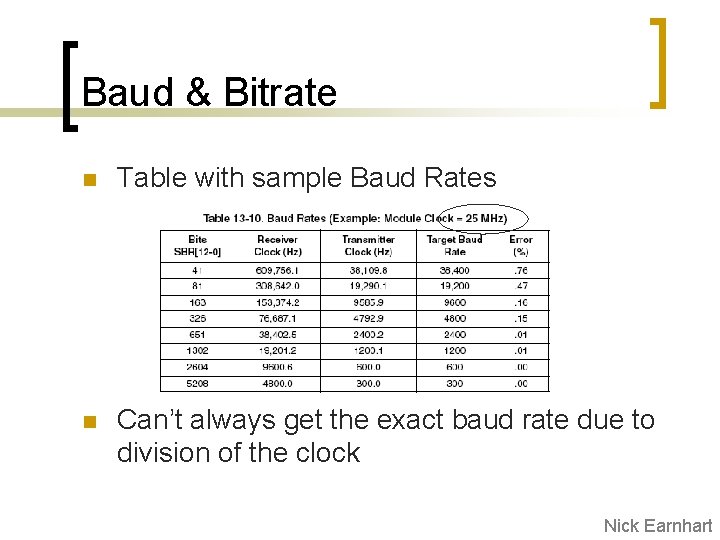
Baud & Bitrate n Baud set by the equation: n Where BR is the content of Baud Rate Register (described later) Value 0 to 8191 Serial communication uses only 2 line states thus Bd = bps n n Nick Earnhart
Baud & Bitrate n Table with sample Baud Rates n Can’t always get the exact baud rate due to division of the clock Nick Earnhart
Implementation Specific Features (S 12 SCIV 2) n n n n n Full Duplex 13 -bit baud rate selection 8 - or 9 -bit data format Separate Tx. D and Rx. D enable Programmable output parity and Hardware parity checking Two receiver wake up methods Interrupt driven operation with 8 flags 8 registers used to control SCI ($00 C 8$00 CF) Uses Port S pins 0 & 1 for RXD and TXD respectively Razid Ahmad
Register descriptions n n n Key settings will be discussed in detail Safe to use defaults for all other settings Summarizes pages 383 -393 in Family Reference Manual Razid Ahmad
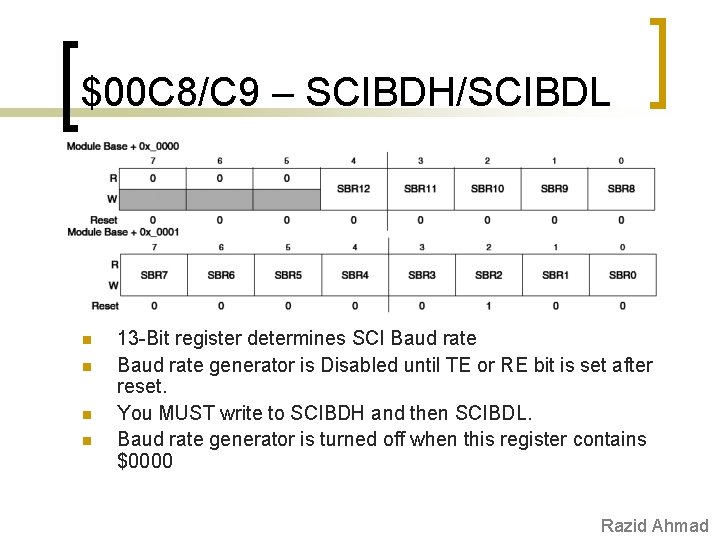
$00 C 8/C 9 – SCIBDH/SCIBDL n n 13 -Bit register determines SCI Baud rate generator is Disabled until TE or RE bit is set after reset. You MUST write to SCIBDH and then SCIBDL. Baud rate generator is turned off when this register contains $0000 Razid Ahmad
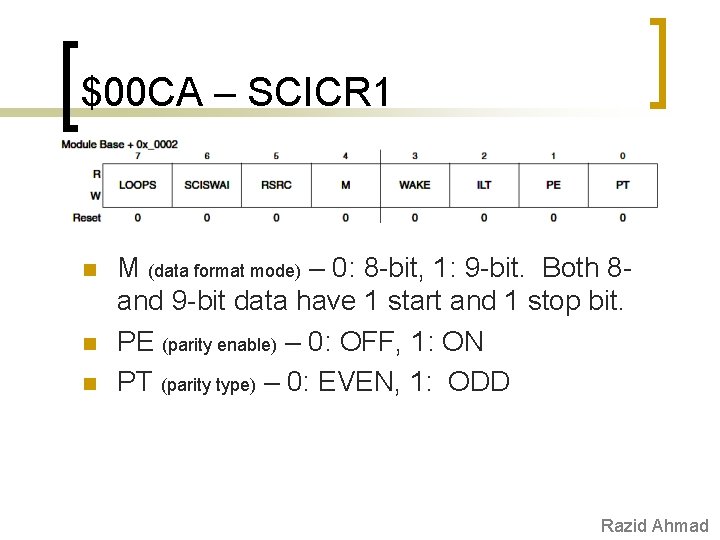
$00 CA – SCICR 1 n n n M (data format mode) – 0: 8 -bit, 1: 9 -bit. Both 8 and 9 -bit data have 1 start and 1 stop bit. PE (parity enable) – 0: OFF, 1: ON PT (parity type) – 0: EVEN, 1: ODD Razid Ahmad
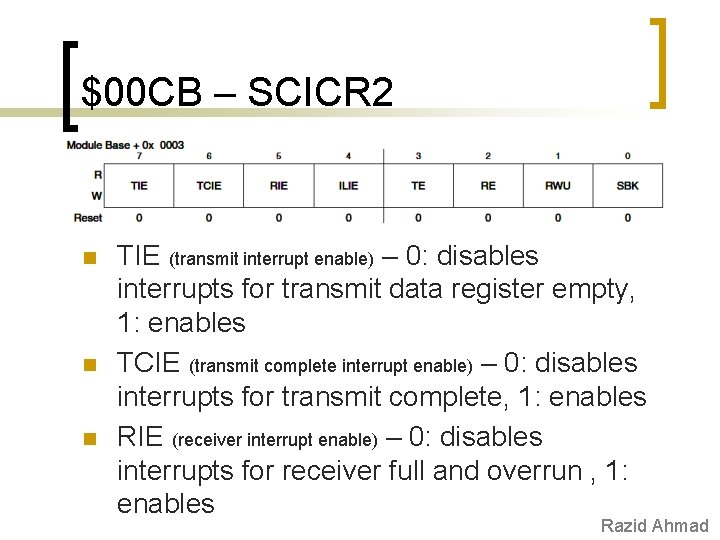
$00 CB – SCICR 2 n n n TIE (transmit interrupt enable) – 0: disables interrupts for transmit data register empty, 1: enables TCIE (transmit complete interrupt enable) – 0: disables interrupts for transmit complete, 1: enables RIE (receiver interrupt enable) – 0: disables interrupts for receiver full and overrun , 1: enables Razid Ahmad
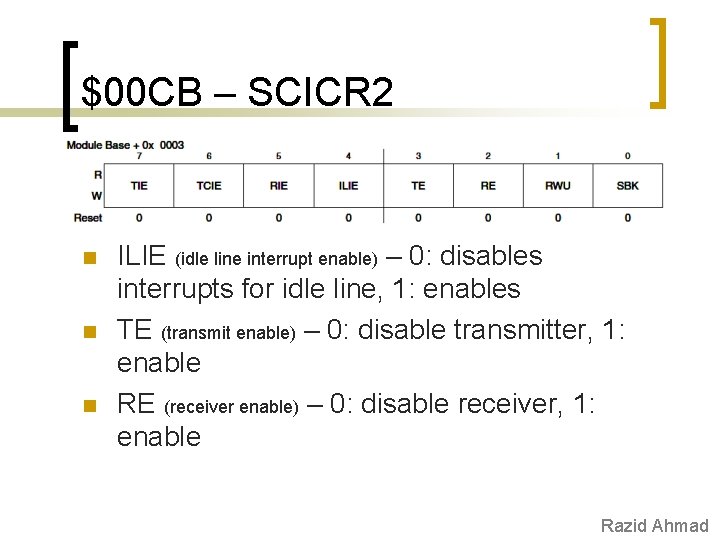
$00 CB – SCICR 2 n n n ILIE (idle line interrupt enable) – 0: disables interrupts for idle line, 1: enables TE (transmit enable) – 0: disable transmitter, 1: enable RE (receiver enable) – 0: disable receiver, 1: enable Razid Ahmad
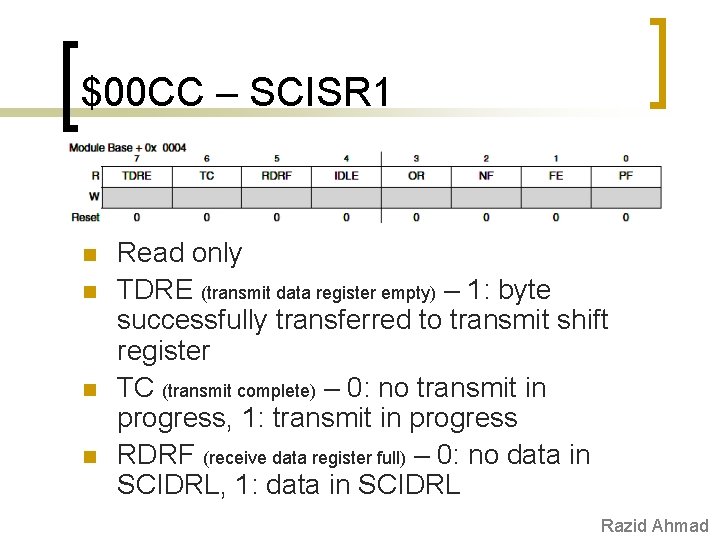
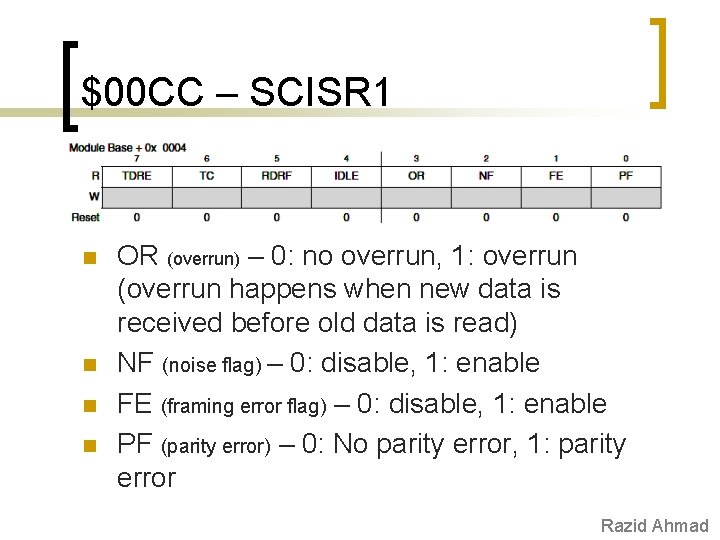
$00 CC – SCISR 1 n n Read only TDRE (transmit data register empty) – 1: byte successfully transferred to transmit shift register TC (transmit complete) – 0: no transmit in progress, 1: transmit in progress RDRF (receive data register full) – 0: no data in SCIDRL, 1: data in SCIDRL Razid Ahmad
$00 CC – SCISR 1 n n OR (overrun) – 0: no overrun, 1: overrun (overrun happens when new data is received before old data is read) NF (noise flag) – 0: disable, 1: enable FE (framing error flag) – 0: disable, 1: enable PF (parity error) – 0: No parity error, 1: parity error Razid Ahmad
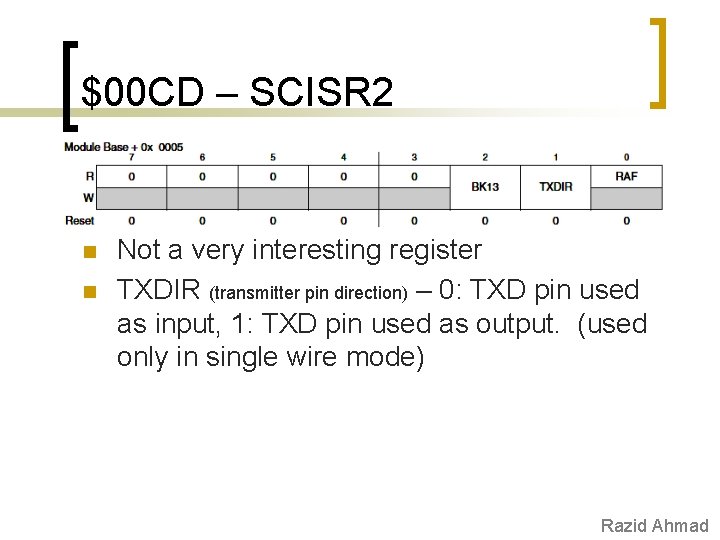
$00 CD – SCISR 2 n n Not a very interesting register TXDIR (transmitter pin direction) – 0: TXD pin used as input, 1: TXD pin used as output. (used only in single wire mode) Razid Ahmad
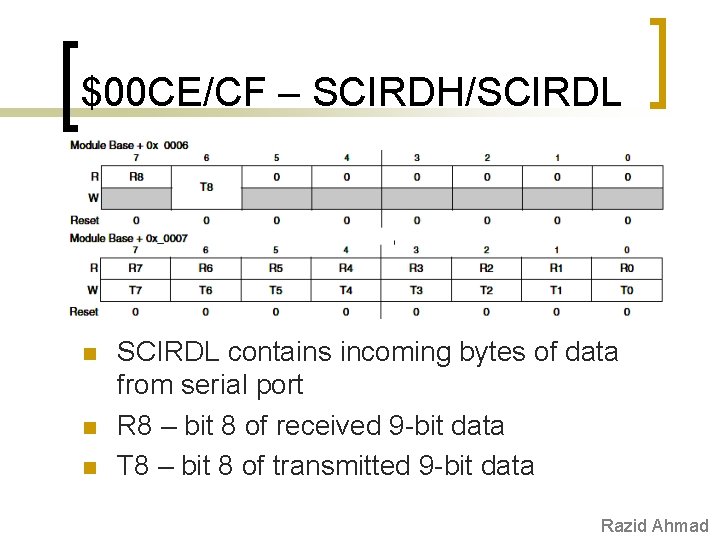
$00 CE/CF – SCIRDH/SCIRDL n n n SCIRDL contains incoming bytes of data from serial port R 8 – bit 8 of received 9 -bit data T 8 – bit 8 of transmitted 9 -bit data Razid Ahmad
SCI is easy n n SCI module makes it easy to send/receive data SCI module encodes data into standard NRZ format! Hardest part is setting up baud rate Can use either flag based or interrupt based logic to drive SCI ¡ n One interrupt vector associated with all 8 flags SCIDRH/SCIDRL are like two registers in one. ¡ ¡ Read this register to receive data Write to this register to send data Razid Ahmad
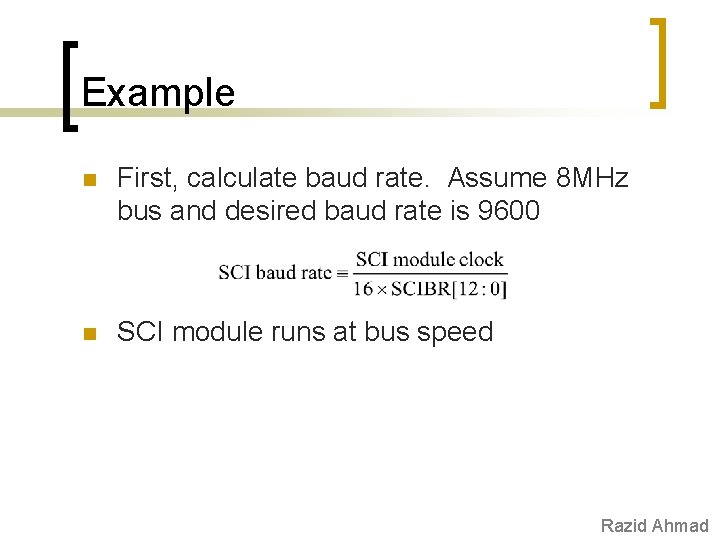
Example n First, calculate baud rate. Assume 8 MHz bus and desired baud rate is 9600 n SCI module runs at bus speed Razid Ahmad
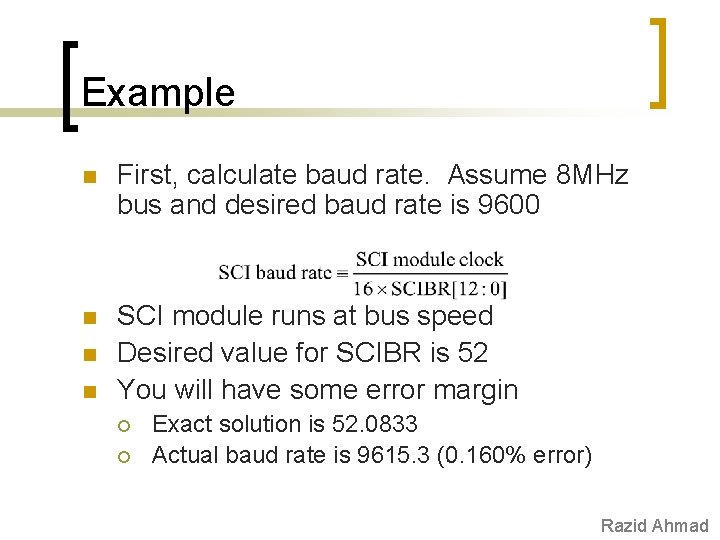
Example n First, calculate baud rate. Assume 8 MHz bus and desired baud rate is 9600 n SCI module runs at bus speed Desired value for SCIBR is 52 You will have some error margin n n ¡ ¡ Exact solution is 52. 0833 Actual baud rate is 9615. 3 (0. 160% error) Razid Ahmad
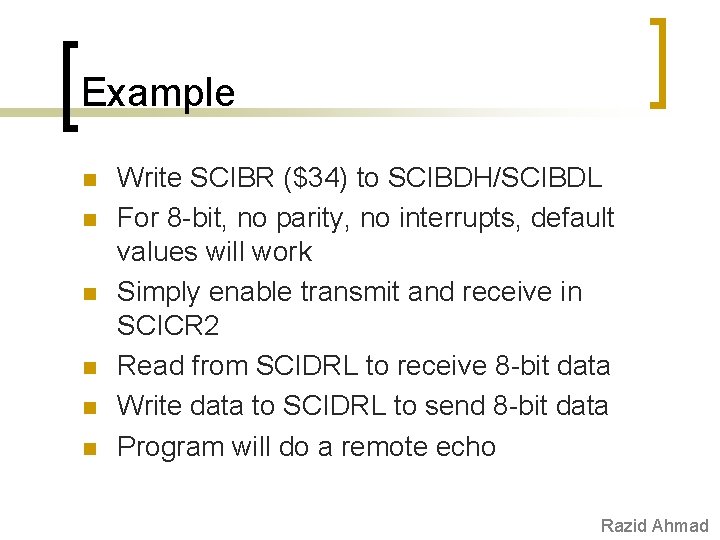
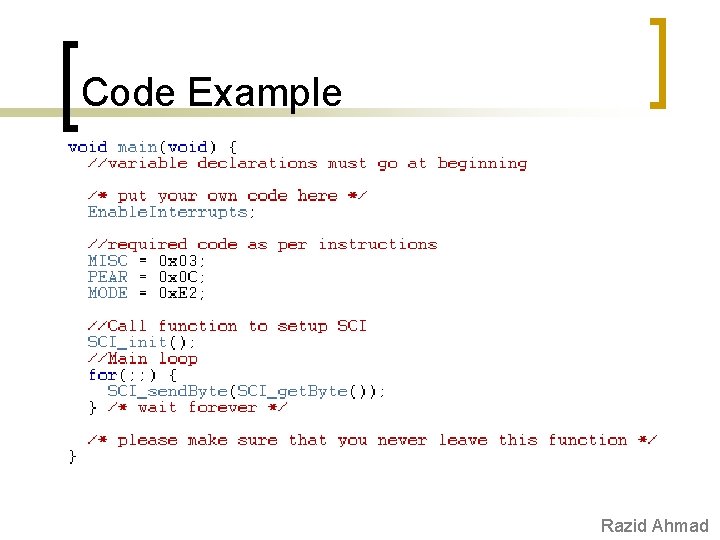
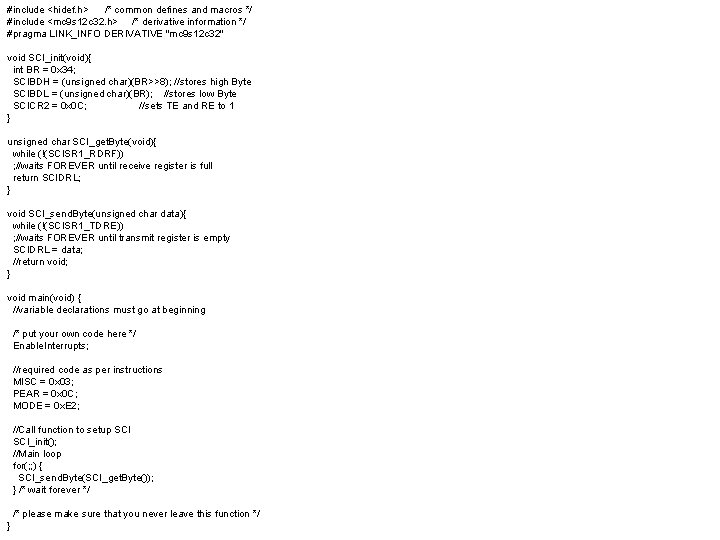
Example n n n Write SCIBR ($34) to SCIBDH/SCIBDL For 8 -bit, no parity, no interrupts, default values will work Simply enable transmit and receive in SCICR 2 Read from SCIDRL to receive 8 -bit data Write data to SCIDRL to send 8 -bit data Program will do a remote echo Razid Ahmad
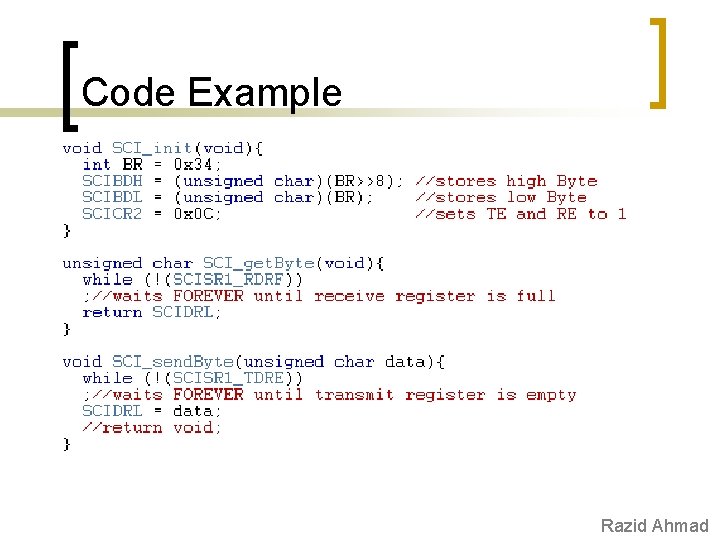
Code Example Razid Ahmad
Code Example Razid Ahmad
References n n n MC 9 S 12 C Family Reference Manual Previous semester slides Wikipedia
#include <hidef. h> /* common defines and macros */ #include <mc 9 s 12 c 32. h> /* derivative information */ #pragma LINK_INFO DERIVATIVE "mc 9 s 12 c 32" void SCI_init(void){ int BR = 0 x 34; SCIBDH = (unsigned char)(BR>>8); //stores high Byte SCIBDL = (unsigned char)(BR); //stores low Byte SCICR 2 = 0 x 0 C; //sets TE and RE to 1 } unsigned char SCI_get. Byte(void){ while (!(SCISR 1_RDRF)) ; //waits FOREVER until receive register is full return SCIDRL; } void SCI_send. Byte(unsigned char data){ while (!(SCISR 1_TDRE)) ; //waits FOREVER until transmit register is empty SCIDRL = data; //return void; } void main(void) { //variable declarations must go at beginning /* put your own code here */ Enable. Interrupts; //required code as per instructions MISC = 0 x 03; PEAR = 0 x 0 C; MODE = 0 x. E 2; //Call function to setup SCI_init(); //Main loop for(; ; ) { SCI_send. Byte(SCI_get. Byte()); } /* wait forever */ /* please make sure that you never leave this function */ }