
Serial Communication Interface Brian Guerriero Jon Rogers Robert

Serial Communication Interface Brian Guerriero Jon Rogers Robert Thiets October 26, 2006 ME 6405 Mechatronics Serial Communication Interface 1
Presentation Outline ØTypes of Data Transmission • Parallel • Serial Ø Serial Communication • Synchronous • Asynchronous ØBaud and Bit Rates ØAsynchronous Serial Transmission ØSerial Communication With the HC 11 ØExamples of data words are transmitted October 26, 2006 ME 6405 Mechatronics Serial Communication Interface 2

Types of Data Transmission Parallel Data Transmission ♦Simultaneous transmission Receiver ♦Requires separate data lines ♦Bits must stay synchronized ♦Fast ♦Expensive ♦Example: Printer connections One Word Transmitter October 26, 2006 ME 6405 Mechatronics Serial Communication Interface 3

Types of Data Transmission Serial Data Transmission ♦Transfers one bit at a time Receiver ♦Requires only one data line Bits must stay synchronized ♦Slow compared to parallel transmission ♦Less Expensive One Word ♦Example: USB Transmitter October 26, 2006 ME 6405 Mechatronics Serial Communication Interface 4

Serial Data Communication ♦ Two basic types of Serial Data Communication: – Synchronous Communication – Asynchronous Communication October 26, 2006 ME 6405 Mechatronics Serial Communication Interface 5
Synchronous Communication ♦ Transmitter and receiver have their clocks synchronized ♦ Data rates are dependent on clock rates ♦ Continuously transmitting characters to remain in sync. October 26, 2006 ME 6405 Mechatronics Serial Communication Interface 6
Asynchronous Communication ♦ NO synchronization – No need to send idle characters ♦ Transmitter and receiver operate independently – Transmitter can send data at any time – Receiver is always ready to accept data ♦ Requires a start and stop bit to identify each byte of data ♦ How does receiver know that data is arriving? – If the line is idle, it is sending a constant ‚ 1‘ (mark state) – The receiver is able to recognize a jump from ‚ 1‘ to ‚ 0‘ with the start bit and is alerted that data is about to be sent. October 26, 2006 ME 6405 Mechatronics Serial Communication Interface 7
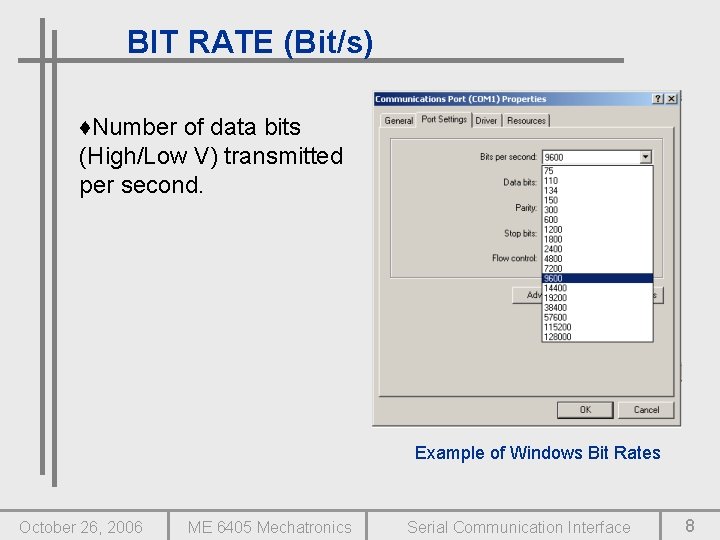
BIT RATE (Bit/s) ♦Number of data bits (High/Low V) transmitted per second. Example of Windows Bit Rates October 26, 2006 ME 6405 Mechatronics Serial Communication Interface 8
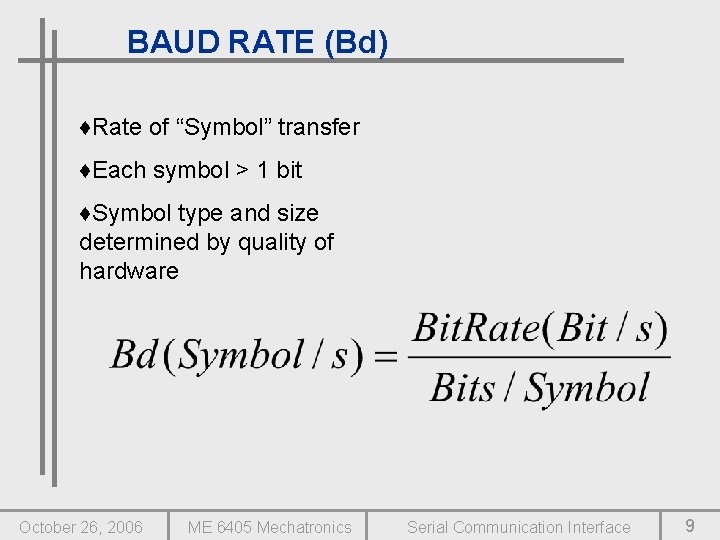
BAUD RATE (Bd) ♦Rate of “Symbol” transfer ♦Each symbol > 1 bit ♦Symbol type and size determined by quality of hardware October 26, 2006 ME 6405 Mechatronics Serial Communication Interface 9
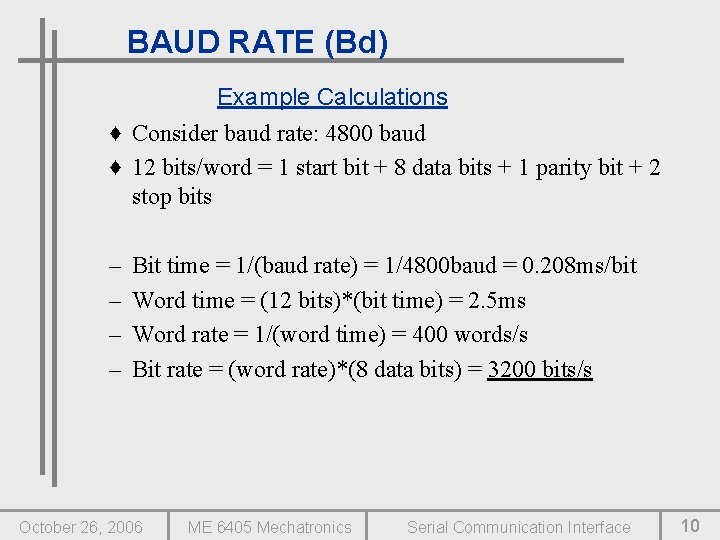
BAUD RATE (Bd) Example Calculations ♦ Consider baud rate: 4800 baud ♦ 12 bits/word = 1 start bit + 8 data bits + 1 parity bit + 2 stop bits – – Bit time = 1/(baud rate) = 1/4800 baud = 0. 208 ms/bit Word time = (12 bits)*(bit time) = 2. 5 ms Word rate = 1/(word time) = 400 words/s Bit rate = (word rate)*(8 data bits) = 3200 bits/s October 26, 2006 ME 6405 Mechatronics Serial Communication Interface 10

Asynchronous Serial Transmission ♦Bits are transmitted in a specified format ♦Defined by settings on transmitter and receiver: -Start Bit -Data Bits -Parity Bits -Stop Bits Example of Windows setting October 26, 2006 ME 6405 Mechatronics Serial Communication Interface 11
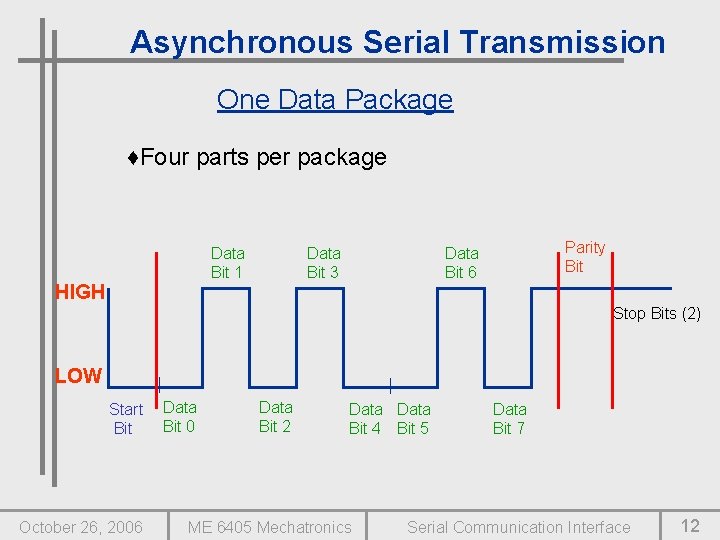
Asynchronous Serial Transmission One Data Package ♦Four parts per package Data Bit 1 HIGH Data Bit 3 Parity Bit Data Bit 6 Stop Bits (2) LOW Start Bit October 26, 2006 Data Bit 0 Data Bit 2 Data Bit 4 Bit 5 ME 6405 Mechatronics Data Bit 7 Serial Communication Interface 12

Asynchronous Serial Transmission Start Bits ♦Start bit drops from 1 to 0 to signal start of transmission Previously HIGH Start Bit Now LOW October 26, 2006 ME 6405 Mechatronics Serial Communication Interface 13

Asynchronous Serial Transmission Data Bits ♦The content of the package Ex: This transmitted word is 10111001, or $B 9 ♦Usually 8 bits ♦LSB sent First LSB Data Bit 0 Data Bit 3 Bit 4 Bit 5 Data Bit 1 October 26, 2006 MSB Data Bit 2 FLOW ME 6405 Mechatronics Data Bit 7 Data Bit 6 Serial Communication Interface 14

Asynchronous Serial Transmission Parity Bit ♦ Used to check for errors ♦ Helps verify signal integrity ♦ 2 Types: -Even: makes sum of all bits INCLUDING parity bit EVEN -Odd: makes sum of all bits INCLUDING parity bit ODD ♦ Not applicable to HC 11 October 26, 2006 ME 6405 Mechatronics Parity Bit (H or L) Data Bit 7 Serial Communication Interface 15
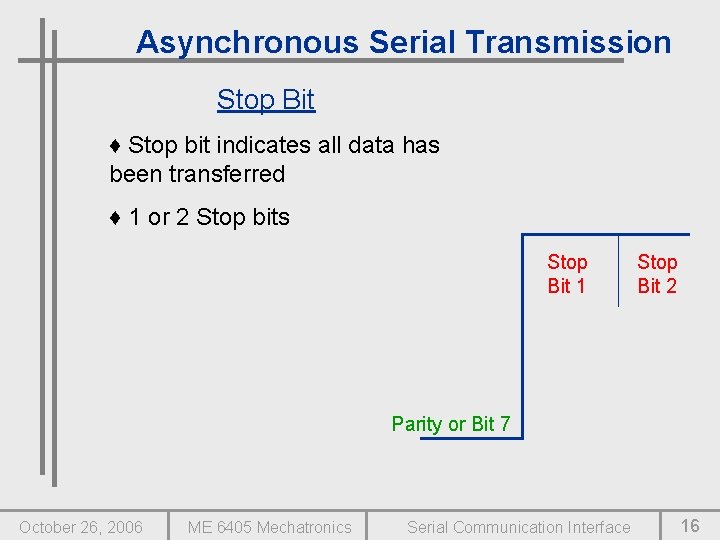
Asynchronous Serial Transmission Stop Bit ♦ Stop bit indicates all data has been transferred ♦ 1 or 2 Stop bits Stop Bit 1 Stop Bit 2 Parity or Bit 7 October 26, 2006 ME 6405 Mechatronics Serial Communication Interface 16
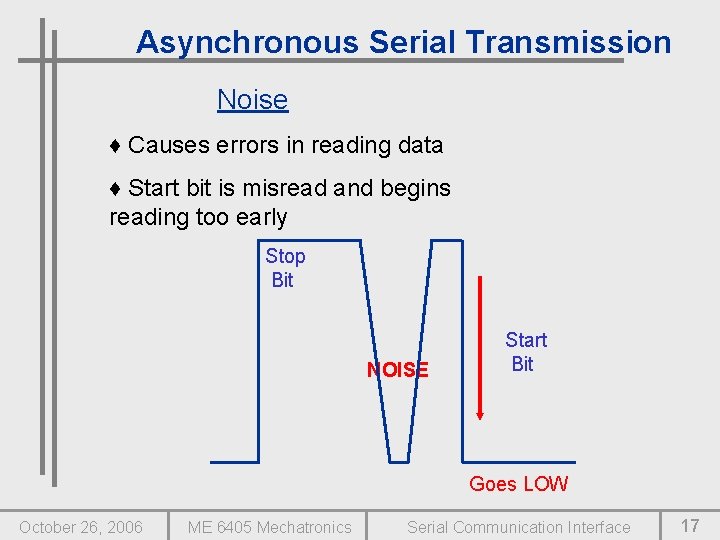
Asynchronous Serial Transmission Noise ♦ Causes errors in reading data ♦ Start bit is misread and begins reading too early Stop Bit NOISE Start Bit Goes LOW October 26, 2006 ME 6405 Mechatronics Serial Communication Interface 17
HC 11 SCI Registers ♦ 5 Main Registers: – BAUD: Sets bit rate for SCI – SCCR 1: Sets control bits for the 9 -bit character format and the receiver wake up feature – SCCR 2: Main control register – SCSR: Status Register – SCDR: Main Data Register October 26, 2006 ME 6405 Mechatronics Serial Communication Interface 18
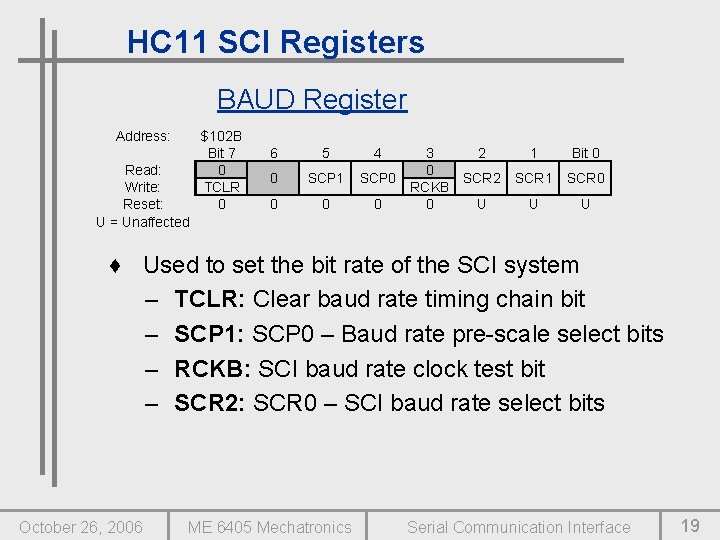
HC 11 SCI Registers BAUD Register Address: Read: Write: Reset: U = Unaffected $102 B Bit 7 0 TCLR 0 6 5 4 0 SCP 1 SCP 0 0 3 2 0 SCR 2 RCKB 0 U 1 Bit 0 SCR 1 SCR 0 U U ♦ Used to set the bit rate of the SCI system – TCLR: Clear baud rate timing chain bit – SCP 1: SCP 0 – Baud rate pre-scale select bits – RCKB: SCI baud rate clock test bit – SCR 2: SCR 0 – SCI baud rate select bits October 26, 2006 ME 6405 Mechatronics Serial Communication Interface 19
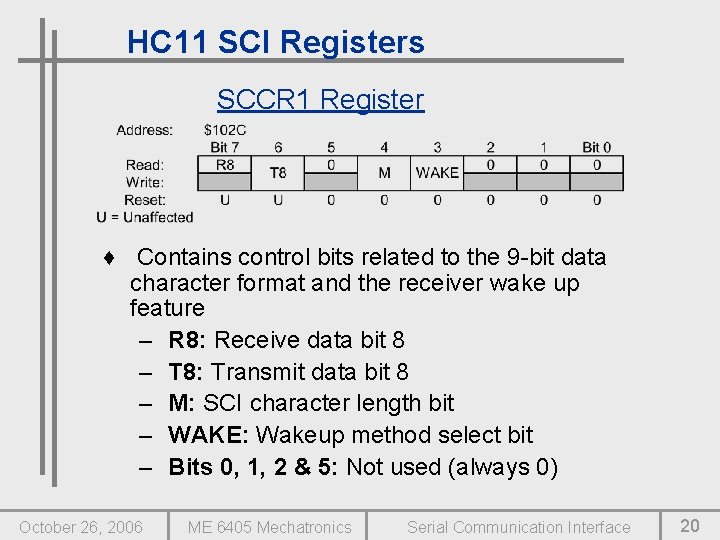
HC 11 SCI Registers SCCR 1 Register ♦ Contains control bits related to the 9 -bit data character format and the receiver wake up feature – R 8: Receive data bit 8 – T 8: Transmit data bit 8 – M: SCI character length bit – WAKE: Wakeup method select bit – Bits 0, 1, 2 & 5: Not used (always 0) October 26, 2006 ME 6405 Mechatronics Serial Communication Interface 20
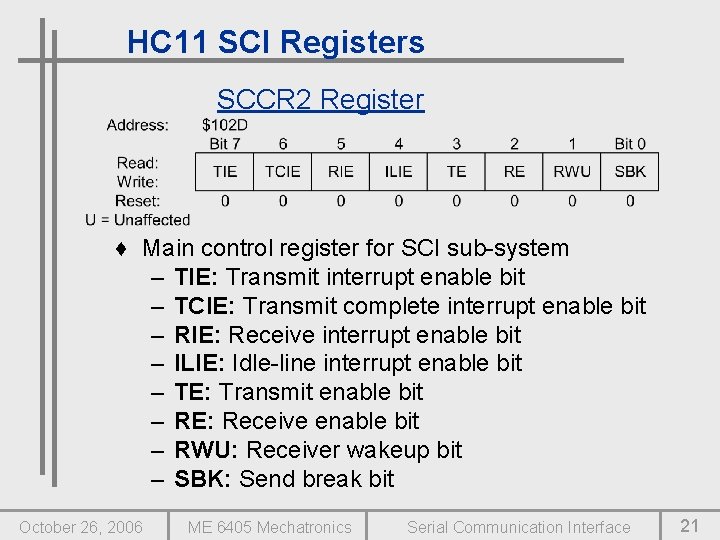
HC 11 SCI Registers SCCR 2 Register ♦ Main control register for SCI sub-system – TIE: Transmit interrupt enable bit – TCIE: Transmit complete interrupt enable bit – RIE: Receive interrupt enable bit – ILIE: Idle-line interrupt enable bit – TE: Transmit enable bit – RE: Receive enable bit – RWU: Receiver wakeup bit – SBK: Send break bit October 26, 2006 ME 6405 Mechatronics Serial Communication Interface 21
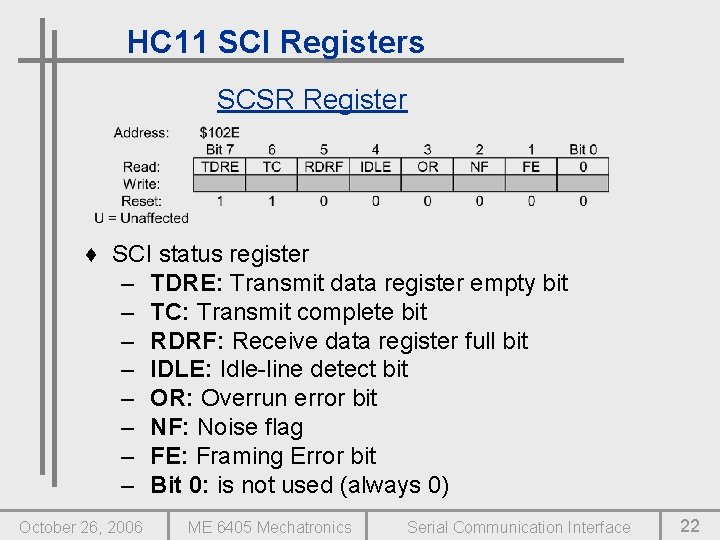
HC 11 SCI Registers SCSR Register ♦ SCI status register – TDRE: Transmit data register empty bit – TC: Transmit complete bit – RDRF: Receive data register full bit – IDLE: Idle-line detect bit – OR: Overrun error bit – NF: Noise flag – FE: Framing Error bit – Bit 0: is not used (always 0) October 26, 2006 ME 6405 Mechatronics Serial Communication Interface 22
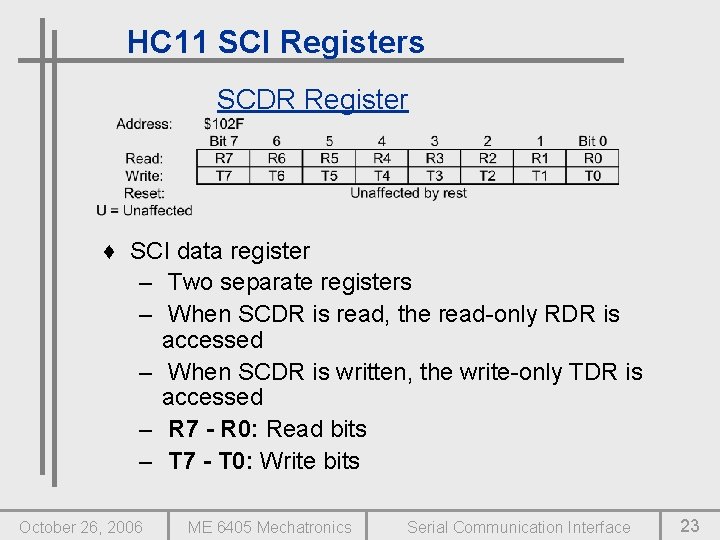
HC 11 SCI Registers SCDR Register ♦ SCI data register – Two separate registers – When SCDR is read, the read-only RDR is accessed – When SCDR is written, the write-only TDR is accessed – R 7 - R 0: Read bits – T 7 - T 0: Write bits October 26, 2006 ME 6405 Mechatronics Serial Communication Interface 23
Auxiliary Port D ♦ SCI uses the 2 least significant bits of Port D ♦ These bits are used for receiving and transmitting data ♦ Data direction register does not control Port D while SCI is in use but it is important since it will have control when the SCI operation is aborted ♦ SPCR register controls the Port D wire-OR mode bit, which controls the driver functions of the Port D pins, even if they are being used by the SCI October 26, 2006 ME 6405 Mechatronics Serial Communication Interface 24
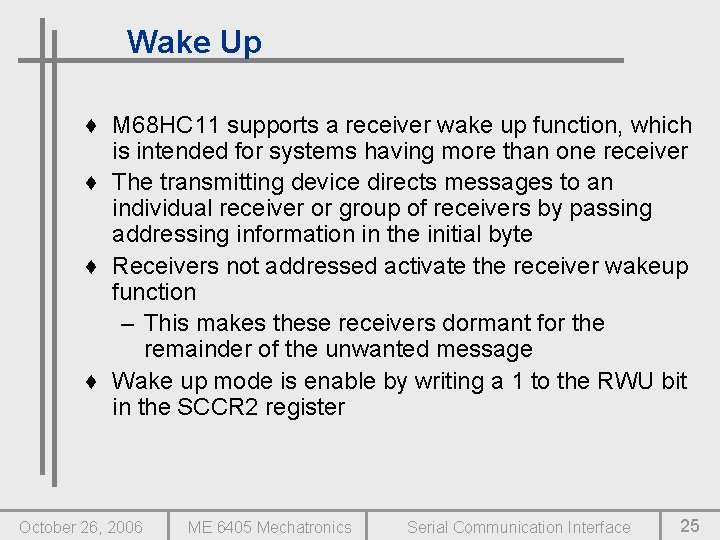
Wake Up ♦ M 68 HC 11 supports a receiver wake up function, which is intended for systems having more than one receiver ♦ The transmitting device directs messages to an individual receiver or group of receivers by passing addressing information in the initial byte ♦ Receivers not addressed activate the receiver wakeup function – This makes these receivers dormant for the remainder of the unwanted message ♦ Wake up mode is enable by writing a 1 to the RWU bit in the SCCR 2 register October 26, 2006 ME 6405 Mechatronics Serial Communication Interface 25
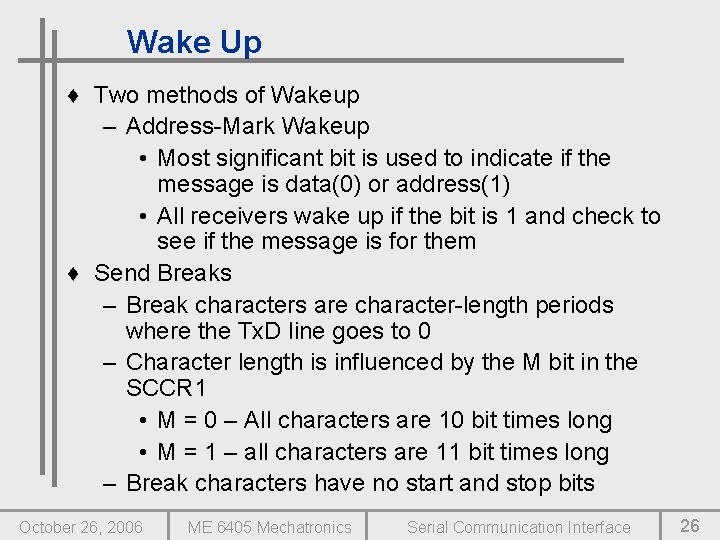
Wake Up ♦ Two methods of Wakeup – Address-Mark Wakeup • Most significant bit is used to indicate if the message is data(0) or address(1) • All receivers wake up if the bit is 1 and check to see if the message is for them ♦ Send Breaks – Break characters are character-length periods where the Tx. D line goes to 0 – Character length is influenced by the M bit in the SCCR 1 • M = 0 – All characters are 10 bit times long • M = 1 – all characters are 11 bit times long – Break characters have no start and stop bits October 26, 2006 ME 6405 Mechatronics Serial Communication Interface 26
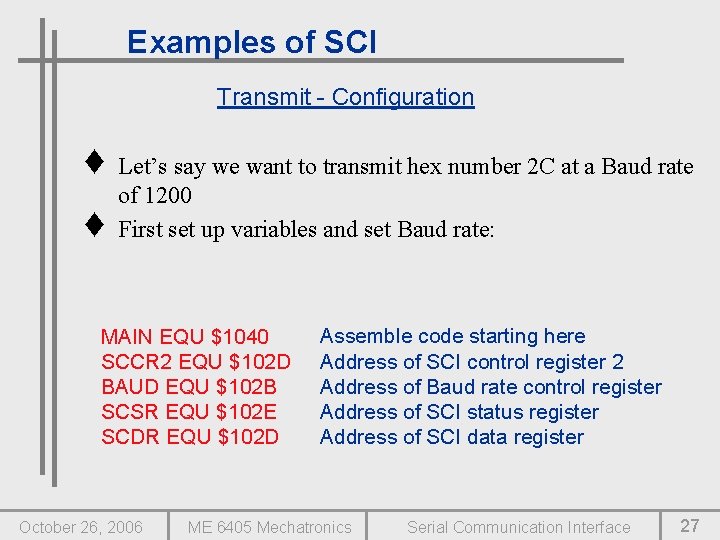
Examples of SCI Transmit - Configuration ♦ ♦ Let’s say we want to transmit hex number 2 C at a Baud rate of 1200 First set up variables and set Baud rate: MAIN EQU $1040 SCCR 2 EQU $102 D BAUD EQU $102 B SCSR EQU $102 E SCDR EQU $102 D October 26, 2006 Assemble code starting here Address of SCI control register 2 Address of Baud rate control register Address of SCI status register Address of SCI data register ME 6405 Mechatronics Serial Communication Interface 27
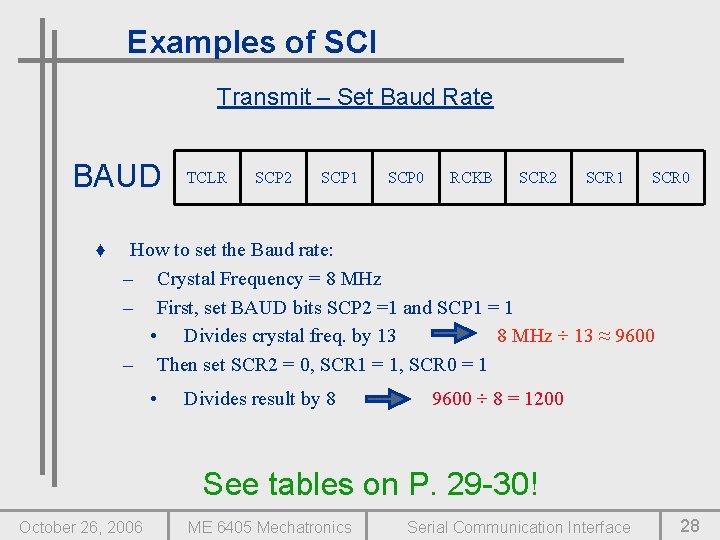
Examples of SCI Transmit – Set Baud Rate BAUD ♦ TCLR SCP 2 SCP 1 SCP 0 RCKB SCR 2 SCR 1 SCR 0 How to set the Baud rate: – Crystal Frequency = 8 MHz – First, set BAUD bits SCP 2 =1 and SCP 1 = 1 • Divides crystal freq. by 13 8 MHz ÷ 13 ≈ 9600 – Then set SCR 2 = 0, SCR 1 = 1, SCR 0 = 1 • Divides result by 8 9600 ÷ 8 = 1200 See tables on P. 29 -30! October 26, 2006 ME 6405 Mechatronics Serial Communication Interface 28
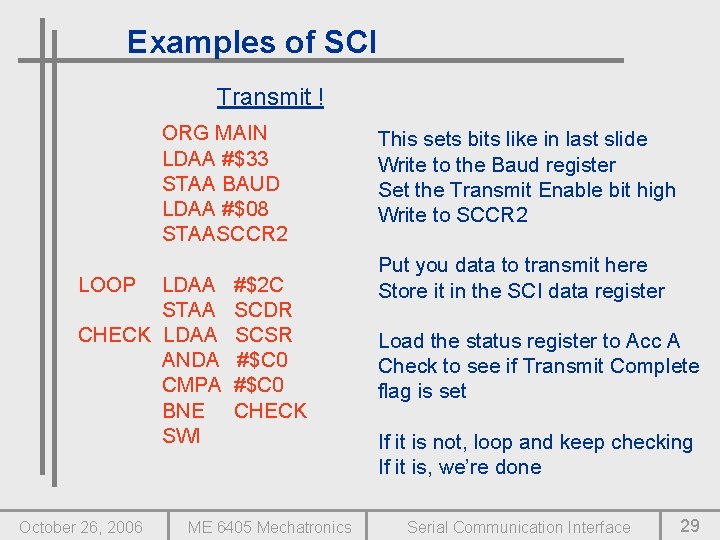
Examples of SCI Transmit ! ORG MAIN LDAA #$33 STAA BAUD LDAA #$08 STAASCCR 2 LOOP LDAA STAA CHECK LDAA ANDA CMPA BNE SWI October 26, 2006 #$2 C SCDR SCSR #$C 0 CHECK ME 6405 Mechatronics This sets bits like in last slide Write to the Baud register Set the Transmit Enable bit high Write to SCCR 2 Put you data to transmit here Store it in the SCI data register Load the status register to Acc A Check to see if Transmit Complete flag is set If it is not, loop and keep checking If it is, we’re done Serial Communication Interface 29
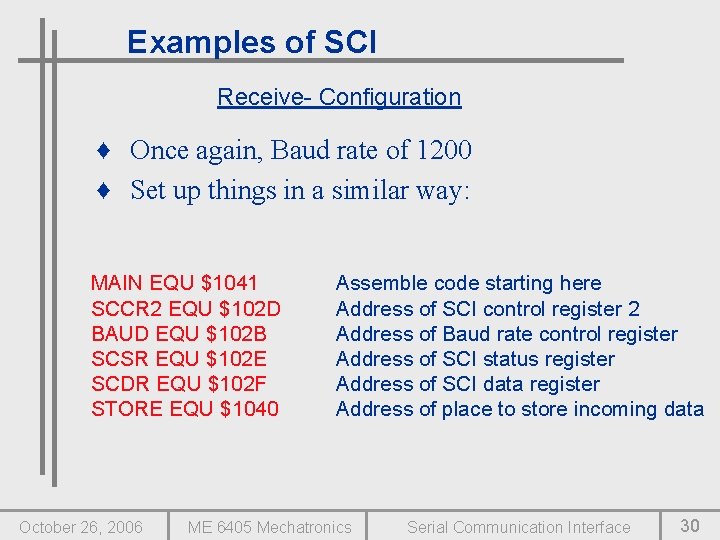
Examples of SCI Receive- Configuration ♦ Once again, Baud rate of 1200 ♦ Set up things in a similar way: MAIN EQU $1041 SCCR 2 EQU $102 D BAUD EQU $102 B SCSR EQU $102 E SCDR EQU $102 F STORE EQU $1040 October 26, 2006 Assemble code starting here Address of SCI control register 2 Address of Baud rate control register Address of SCI status register Address of SCI data register Address of place to store incoming data ME 6405 Mechatronics Serial Communication Interface 30
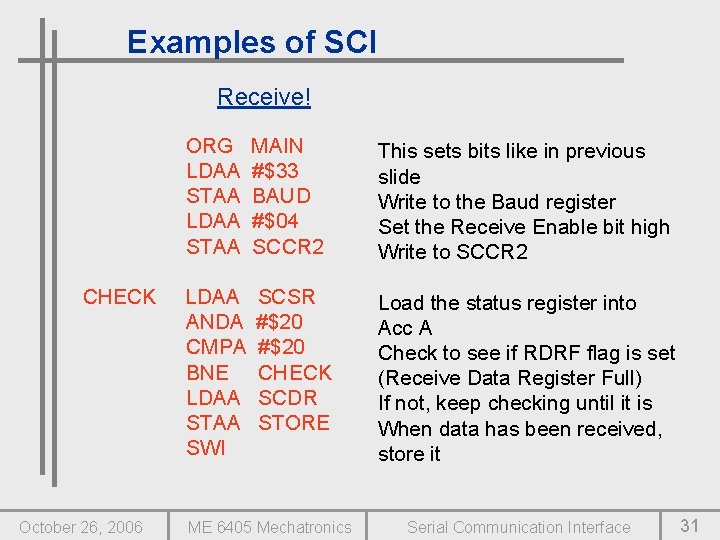
Examples of SCI Receive! CHECK October 26, 2006 ORG LDAA STAA MAIN #$33 BAUD #$04 SCCR 2 This sets bits like in previous slide Write to the Baud register Set the Receive Enable bit high Write to SCCR 2 LDAA ANDA CMPA BNE LDAA STAA SWI SCSR #$20 CHECK SCDR STORE Load the status register into Acc A Check to see if RDRF flag is set (Receive Data Register Full) If not, keep checking until it is When data has been received, store it ME 6405 Mechatronics Serial Communication Interface 31
Questions ? October 26, 2006 ME 6405 Mechatronics Serial Communication Interface 32
- Slides: 32