
Sentaurs TCAD Tutorial Santander 24 th June 2015



- Slides: 53
Sentaurs TCAD Tutorial – Santander, 24 th June 2015 1 Sentaurus TCAD Tutorial With specific focus on Radiation Detector issues Francisco Rogelio Palomo Pinto Dept. Ingeniería Electrónica, Escuela Superior de Ingenieros, Universidad de Sevilla, Spain Pablo Fernández-Martínez Centro Nacional de Microelectrónica (IMB-CNM- CSIC) 26 th RD 50 Workshop Santander 24 th June 2015 IMB-CNM (CSIC) Universidad de Sevilla
Sentaurs TCAD Tutorial – Santander, 24 th June 2015 I. Sentaurus TCAD as a FEM Simulation Suite I- Synopsys Sentaurus TCAD as a Finite Element Simulation Suite IMB-CNM (CSIC) Universidad de Sevilla 2
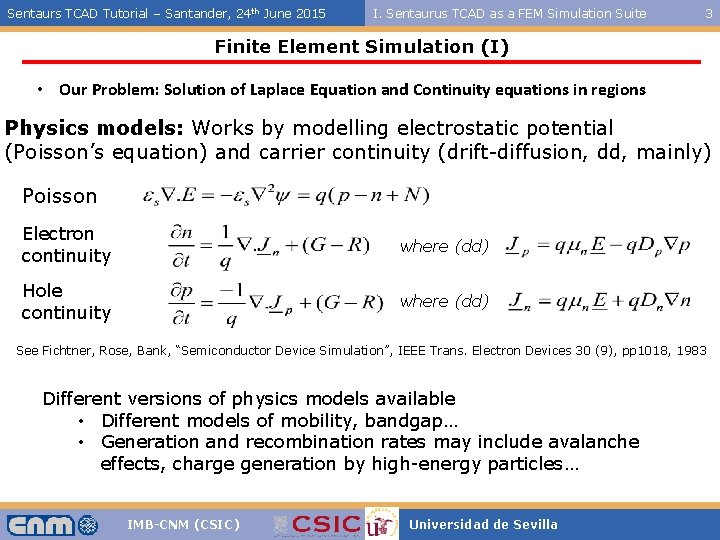
Sentaurs TCAD Tutorial – Santander, 24 th June 2015 I. Sentaurus TCAD as a FEM Simulation Suite 3 Finite Element Simulation (I) • Our Problem: Solution of Laplace Equation and Continuity equations in regions Physics models: Works by modelling electrostatic potential (Poisson’s equation) and carrier continuity (drift-diffusion, dd, mainly) Poisson Electron continuity where (dd) Hole continuity where (dd) See Fichtner, Rose, Bank, “Semiconductor Device Simulation”, IEEE Trans. Electron Devices 30 (9), pp 1018, 1983 Different versions of physics models available • Different models of mobility, bandgap… • Generation and recombination rates may include avalanche effects, charge generation by high-energy particles… IMB-CNM (CSIC) Universidad de Sevilla
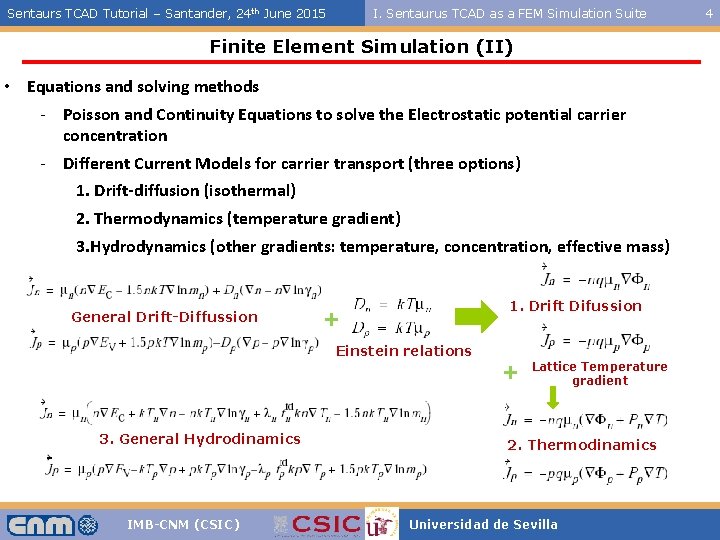
Sentaurs TCAD Tutorial – Santander, 24 th June 2015 I. Sentaurus TCAD as a FEM Simulation Suite Finite Element Simulation (II) • Equations and solving methods - Poisson and Continuity Equations to solve the Electrostatic potential carrier concentration - Different Current Models for carrier transport (three options) 1. Drift-diffusion (isothermal) 2. Thermodynamics (temperature gradient) 3. Hydrodynamics (other gradients: temperature, concentration, effective mass) General Drift-Diffussion 1. Drift Difussion + Einstein relations + 3. General Hydrodinamics IMB-CNM (CSIC) Lattice Temperature gradient 2. Thermodinamics Universidad de Sevilla 4
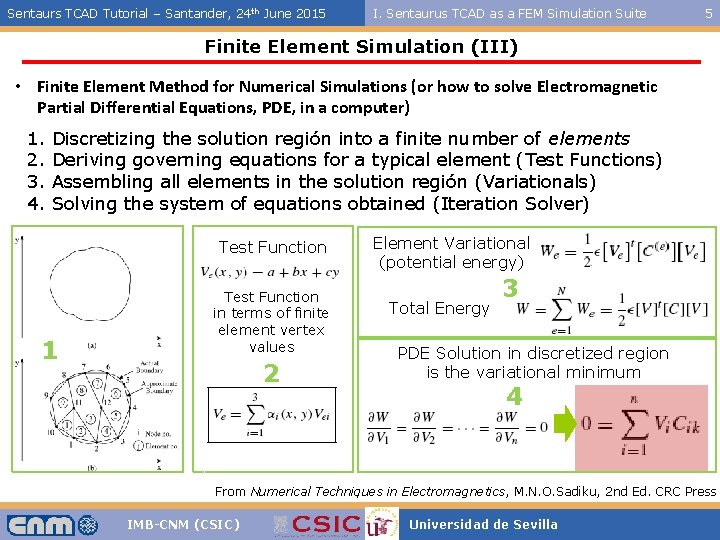
Sentaurs TCAD Tutorial – Santander, 24 th June 2015 I. Sentaurus TCAD as a FEM Simulation Suite 5 Finite Element Simulation (III) • Finite Element Method for Numerical Simulations (or how to solve Electromagnetic Partial Differential Equations, PDE, in a computer) 1. 2. 3. 4. Discretizing the solution región into a finite number of elements Deriving governing equations for a typical element (Test Functions) Assembling all elements in the solution región (Variationals) Solving the system of equations obtained (Iteration Solver) Test Function 1 Test Function in terms of finite element vertex values 2 Element Variational (potential energy) Total Energy 3 PDE Solution in discretized region is the variational minimum 4 From Numerical Techniques in Electromagnetics, M. N. O. Sadiku, 2 nd Ed. CRC Press IMB-CNM (CSIC) Universidad de Sevilla
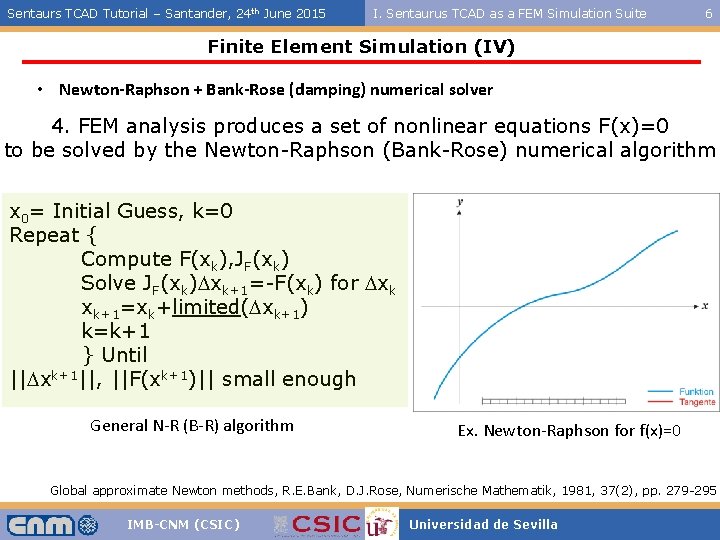
Sentaurs TCAD Tutorial – Santander, 24 th June 2015 I. Sentaurus TCAD as a FEM Simulation Suite 6 Finite Element Simulation (IV) • Newton-Raphson + Bank-Rose (damping) numerical solver 4. FEM analysis produces a set of nonlinear equations F(x)=0 to be solved by the Newton-Raphson (Bank-Rose) numerical algorithm x 0= Initial Guess, k=0 Repeat { Compute F(xk), JF(xk) Solve JF(xk)Dxk+1=-F(xk) for Dxk xk+1=xk+limited(Dxk+1) k=k+1 } Until ||Dxk+1||, ||F(xk+1)|| small enough General N-R (B-R) algorithm Ex. Newton-Raphson for f(x)=0 Global approximate Newton methods, R. E. Bank, D. J. Rose, Numerische Mathematik, 1981, 37(2), pp. 279 -295 IMB-CNM (CSIC) Universidad de Sevilla
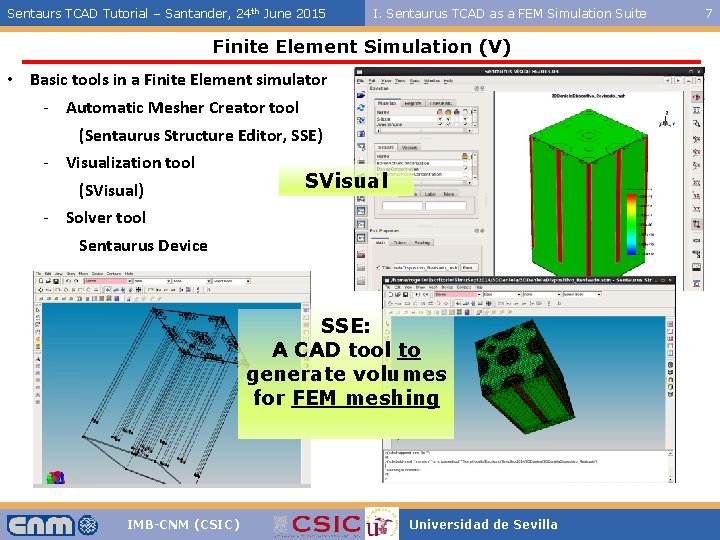
Sentaurs TCAD Tutorial – Santander, 24 th June 2015 I. Sentaurus TCAD as a FEM Simulation Suite Finite Element Simulation (V) • Basic tools in a Finite Element simulator - Automatic Mesher Creator tool (Sentaurus Structure Editor, SSE) - Visualization tool SVisual (SVisual) - Solver tool Sentaurus Device SSE: A CAD tool to generate volumes for FEM meshing IMB-CNM (CSIC) Universidad de Sevilla 7
Sentaurs TCAD Tutorial – Santander, 24 th June 2015 II. Working with Structures: S. Structure Editor II- Working with Structures: Sentaurus Structure Editor & Sentaurus Visual IMB-CNM (CSIC) Universidad de Sevilla 8
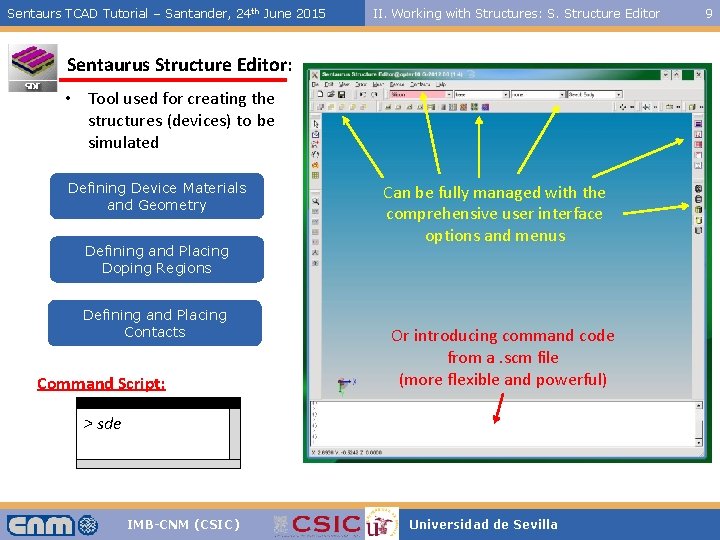
Sentaurs TCAD Tutorial – Santander, 24 th June 2015 II. Working with Structures: S. Structure Editor Sentaurus Structure Editor: • Tool used for creating the structures (devices) to be simulated Defining Device Materials and Geometry Defining and Placing Doping Regions Defining and Placing Contacts Command Script: Can be fully managed with the comprehensive user interface options and menus Or introducing command code from a. scm file (more flexible and powerful) > sde IMB-CNM (CSIC) Universidad de Sevilla 9
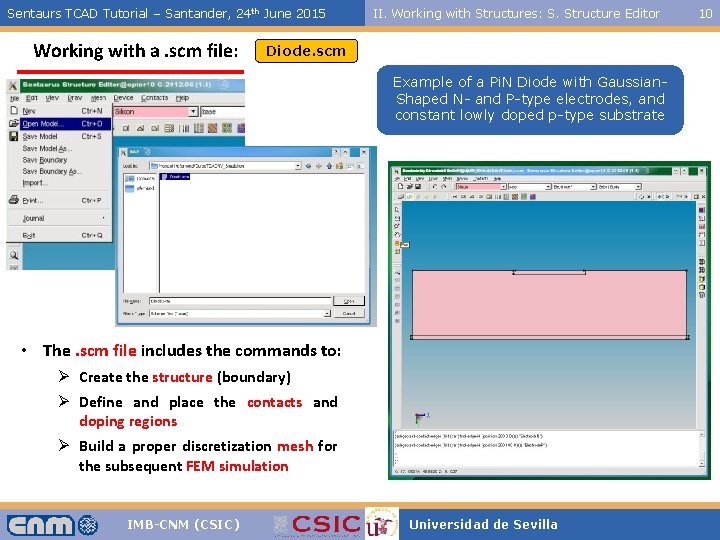
Sentaurs TCAD Tutorial – Santander, 24 th June 2015 Working with a. scm file: II. Working with Structures: S. Structure Editor Diode. scm Example of a Pi. N Diode with Gaussian. Shaped N- and P-type electrodes, and constant lowly doped p-type substrate • The. scm file includes the commands to: Ø Create the structure (boundary) Ø Define and place the contacts and doping regions Ø Build a proper discretization mesh for the subsequent FEM simulation IMB-CNM (CSIC) Universidad de Sevilla 10
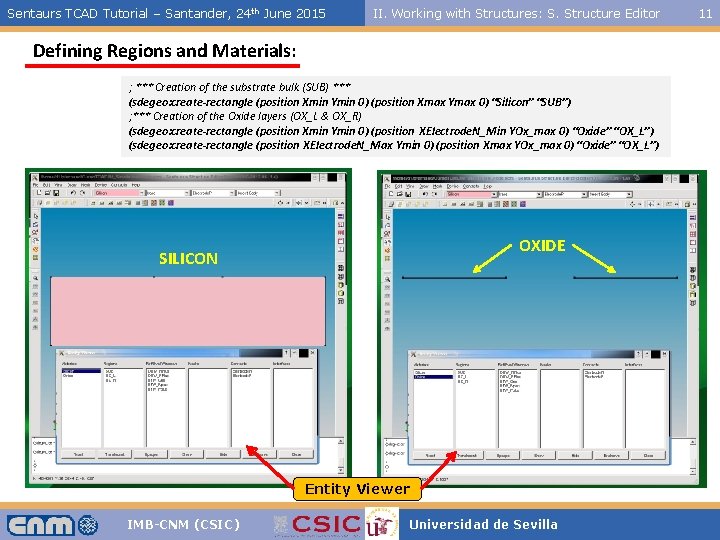
Sentaurs TCAD Tutorial – Santander, 24 th June 2015 II. Working with Structures: S. Structure Editor Defining Regions and Materials: ; *** Creation of the substrate bulk (SUB) *** (sdegeo: create-rectangle (position Xmin Ymin 0) (position Xmax Ymax 0) “Silicon” “SUB”) ; *** Creation of the Oxide layers (OX_L & OX_R) (sdegeo: create-rectangle (position Xmin Ymin 0) (position XElectrode. N_Min YOx_max 0) “Oxide” “OX_L”) (sdegeo: create-rectangle (position XElectrode. N_Max Ymin 0) (position Xmax YOx_max 0) “Oxide” “OX_L”) OXIDE SILICON Entity Viewer IMB-CNM (CSIC) Universidad de Sevilla 11
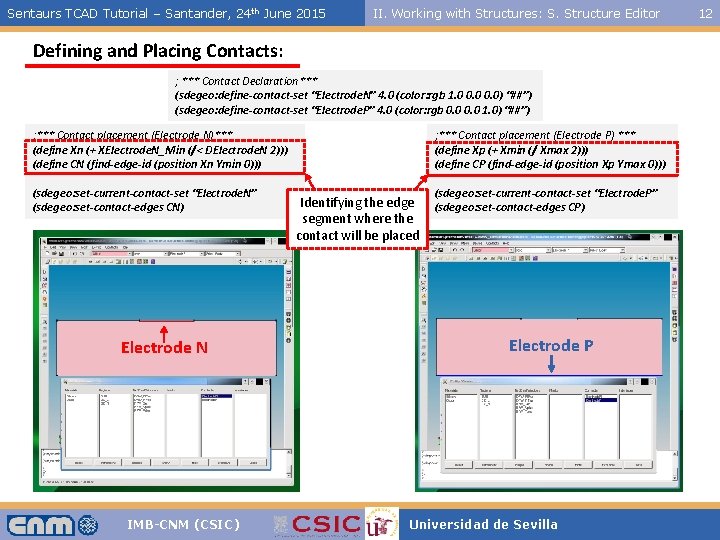
Sentaurs TCAD Tutorial – Santander, 24 th June 2015 II. Working with Structures: S. Structure Editor Defining and Placing Contacts: ; *** Contact Declaration*** (sdegeo: define-contact-set “Electrode. N” 4. 0 (color: rgb 1. 0 0. 0) “##”) (sdegeo: define-contact-set “Electrode. P” 4. 0 (color: rgb 0. 0 1. 0) “##”) ; *** Contact placement (Electrode N)*** (define Xn (+ XElectrode. N_Min (/< DElectrode. N 2))) (define CN (find-edge-id (position Xn Ymin 0))) (sdegeo: set-current-contact-set “Electrode. N” (sdegeo: set-contact-edges CN) Electrode N IMB-CNM (CSIC) ; *** Contact placement (Electrode P) *** (define Xp (+ Xmin (/ Xmax 2))) (define CP (find-edge-id (position Xp Ymax 0))) Identifying the edge segment where the contact will be placed (sdegeo: set-current-contact-set “Electrode. P” (sdegeo: set-contact-edges CP) Electrode P Universidad de Sevilla 12
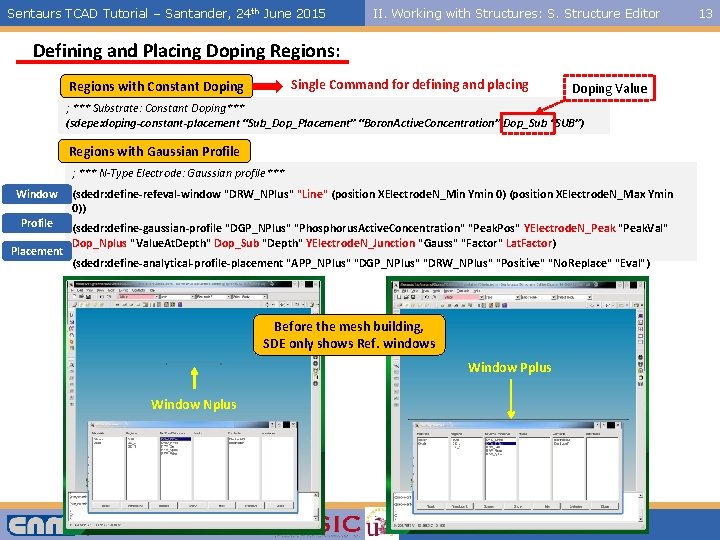
Sentaurs TCAD Tutorial – Santander, 24 th June 2015 II. Working with Structures: S. Structure Editor Defining and Placing Doping Regions: Single Command for defining and placing Regions with Constant Doping Value ; *** Substrate: Constant Doping*** (sdepe: doping-constant-placement “Sub_Dop_Placement” “Boron. Active. Concentration” Dop_Sub “SUB”) Regions with Gaussian Profile ; *** N-Type Electrode: Gaussian profile*** Window (sdedr: define-refeval-window "DRW_NPlus" "Line" (position XElectrode. N_Min Ymin 0) (position XElectrode. N_Max Ymin 0)) Profile (sdedr: define-gaussian-profile "DGP_NPlus" "Phosphorus. Active. Concentration" "Peak. Pos" YElectrode. N_Peak "Peak. Val" Dop_Nplus "Value. At. Depth" Dop_Sub "Depth" YElectrode. N_Junction "Gauss" "Factor" Lat. Factor) Placement (sdedr: define-analytical-profile-placement "APP_NPlus" "DGP_NPlus" "DRW_NPlus" "Positive" "No. Replace" "Eval") Before the mesh building, SDE only shows Ref. windows Window Pplus Window Nplus IMB-CNM (CSIC) Universidad de Sevilla 13
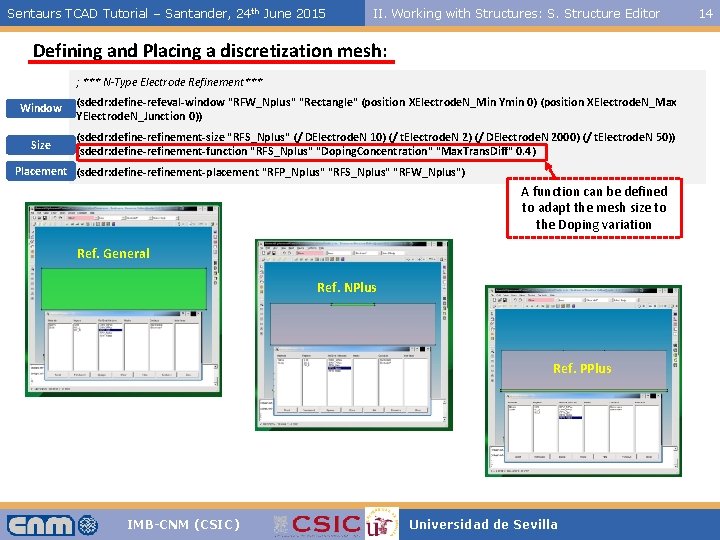
Sentaurs TCAD Tutorial – Santander, 24 th June 2015 II. Working with Structures: S. Structure Editor Defining and Placing a discretization mesh: ; *** N-Type Electrode Refinement*** Window (sdedr: define-refeval-window "RFW_Nplus" "Rectangle" (position XElectrode. N_Min Ymin 0) (position XElectrode. N_Max YElectrode. N_Junction 0)) Size (sdedr: define-refinement-size "RFS_Nplus" (/ DElectrode. N 10) (/ t. Electrode. N 2) (/ DElectrode. N 2000) (/ t. Electrode. N 50)) (sdedr: define-refinement-function "RFS_Nplus" "Doping. Concentration" "Max. Trans. Diff" 0. 4) Placement (sdedr: define-refinement-placement "RFP_Nplus" "RFS_Nplus" "RFW_Nplus") A function can be defined to adapt the mesh size to the Doping variation Ref. General Ref. NPlus Ref. PPlus IMB-CNM (CSIC) Universidad de Sevilla 14
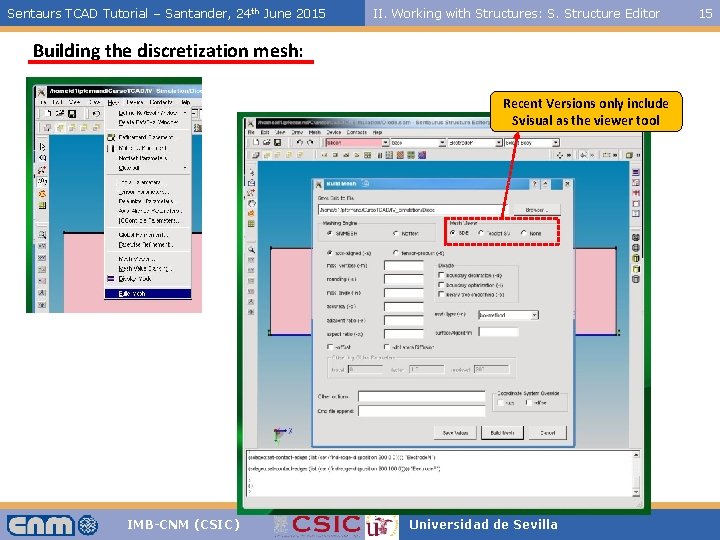
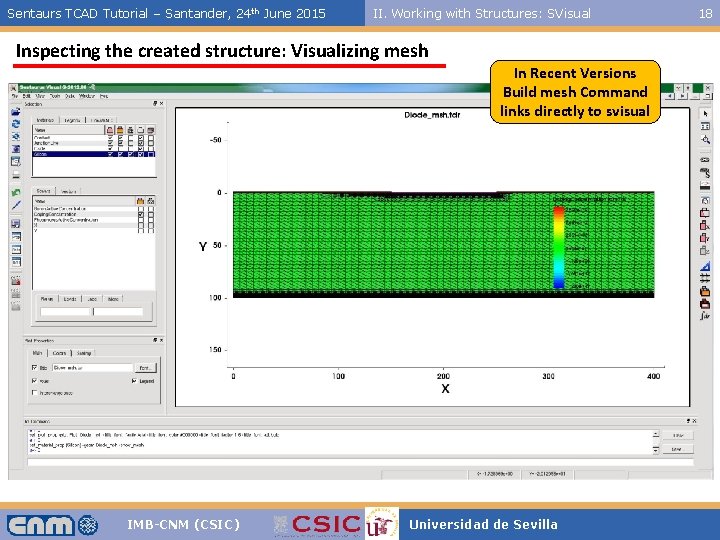
Sentaurs TCAD Tutorial – Santander, 24 th June 2015 II. Working with Structures: S. Structure Editor Building the discretization mesh: Recent Versions only include Svisual as the viewer tool IMB-CNM (CSIC) Universidad de Sevilla 15
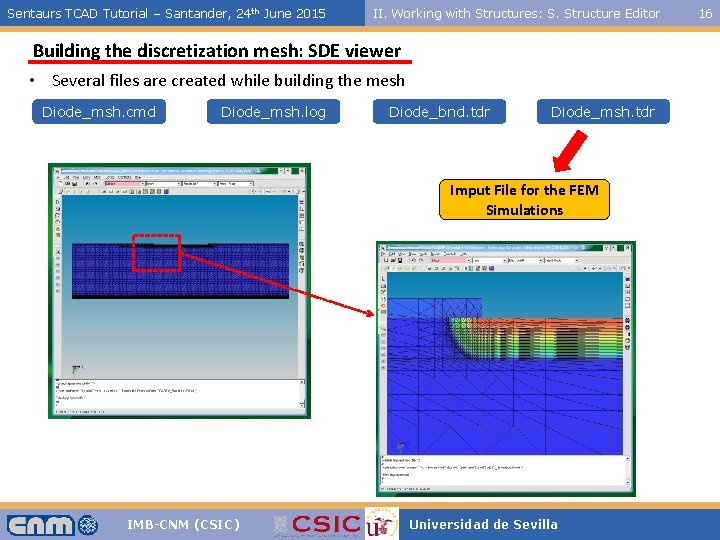
Sentaurs TCAD Tutorial – Santander, 24 th June 2015 II. Working with Structures: S. Structure Editor Building the discretization mesh: SDE viewer • Several files are created while building the mesh Diode_msh. cmd Diode_msh. log Diode_bnd. tdr Diode_msh. tdr Imput File for the FEM Simulations IMB-CNM (CSIC) Universidad de Sevilla 16
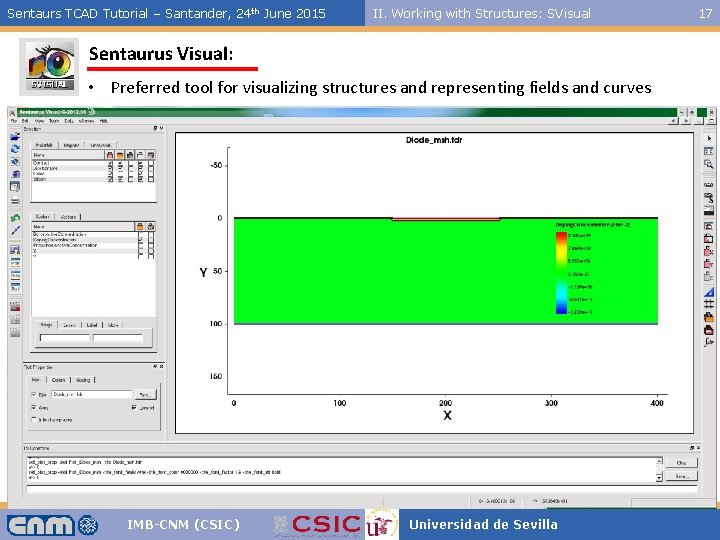
Sentaurs TCAD Tutorial – Santander, 24 th June 2015 II. Working with Structures: SVisual Sentaurus Visual: • Preferred tool for visualizing structures and representing fields and curves IMB-CNM (CSIC) Universidad de Sevilla 17
Sentaurs TCAD Tutorial – Santander, 24 th June 2015 II. Working with Structures: SVisual Inspecting the created structure: Visualizing mesh In Recent Versions Build mesh Command links directly to svisual IMB-CNM (CSIC) Universidad de Sevilla 18
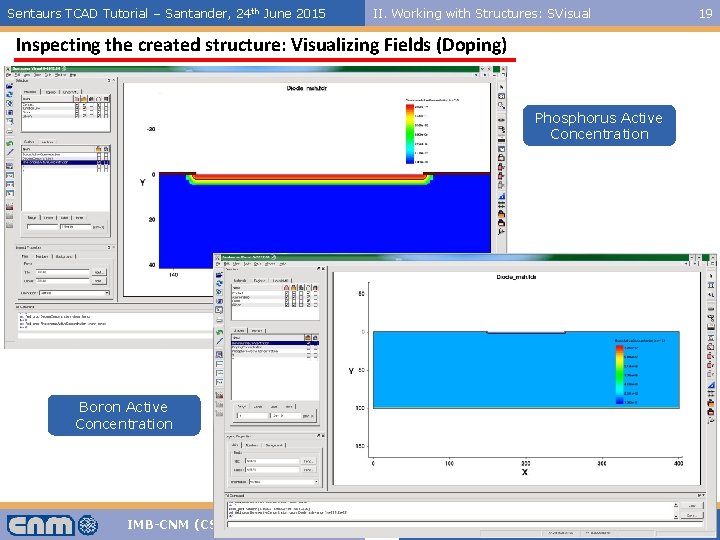
Sentaurs TCAD Tutorial – Santander, 24 th June 2015 II. Working with Structures: SVisual Inspecting the created structure: Visualizing Fields (Doping) Phosphorus Active Concentration Boron Active Concentration IMB-CNM (CSIC) Universidad de Sevilla 19
Sentaurs TCAD Tutorial – Santander, 24 th June 2015 III. FEM Simulations: SDevice III- Finite Element Method Simulations: Sentaurus Device IMB-CNM (CSIC) Universidad de Sevilla 20
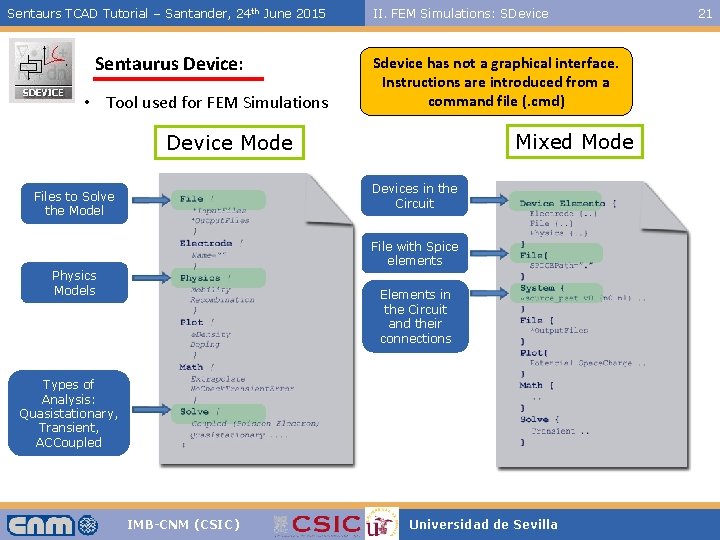
Sentaurs TCAD Tutorial – Santander, 24 th June 2015 Sentaurus Device: • Tool used for FEM Simulations II. FEM Simulations: SDevice Sdevice has not a graphical interface. Instructions are introduced from a command file (. cmd) Mixed Mode Devices in the Circuit Files to Solve the Model File with Spice elements Physics Models Elements in the Circuit and their connections Types of Analysis: Quasistationary, Transient, ACCoupled IMB-CNM (CSIC) Universidad de Sevilla 21
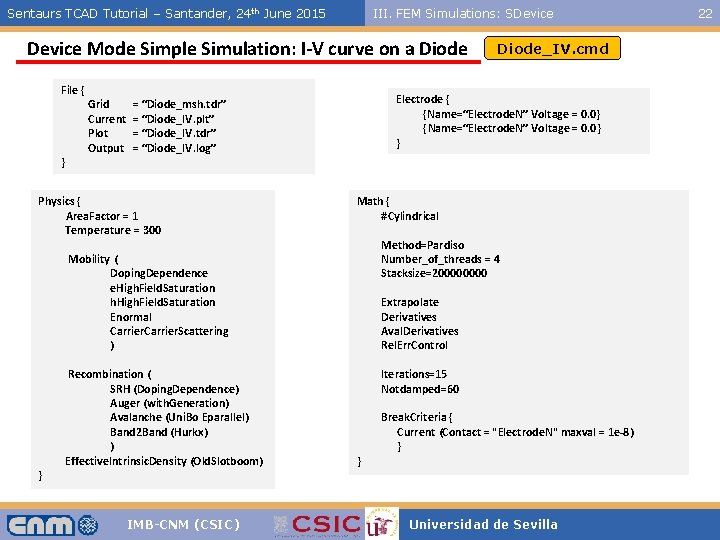
Sentaurs TCAD Tutorial – Santander, 24 th June 2015 III. FEM Simulations: SDevice Mode Simple Simulation: I-V curve on a Diode File { } Grid Current Plot Output Electrode { {Name=“Electrode. N” Voltage = 0. 0} } = “Diode_msh. tdr” = “Diode_IV. plt” = “Diode_IV. tdr” = “Diode_IV. log” Physics { Area. Factor = 1 Temperature = 300 Math { #Cylindrical Method=Pardiso Number_of_threads = 4 Stacksize=20000 Mobility ( Doping. Dependence e. High. Field. Saturation h. High. Field. Saturation Enormal Carrier. Scattering ) } Recombination ( SRH (Doping. Dependence) Auger (with. Generation) Avalanche (Uni. Bo Eparallel) Band 2 Band (Hurkx) ) Effective. Intrinsic. Density (Old. Slotboom) IMB-CNM (CSIC) Diode_IV. cmd Extrapolate Derivatives Aval. Derivatives Rel. Err. Control Iterations=15 Notdamped=60 } Break. Criteria { Current (Contact = "Electrode. N" maxval = 1 e-8) } Universidad de Sevilla 22
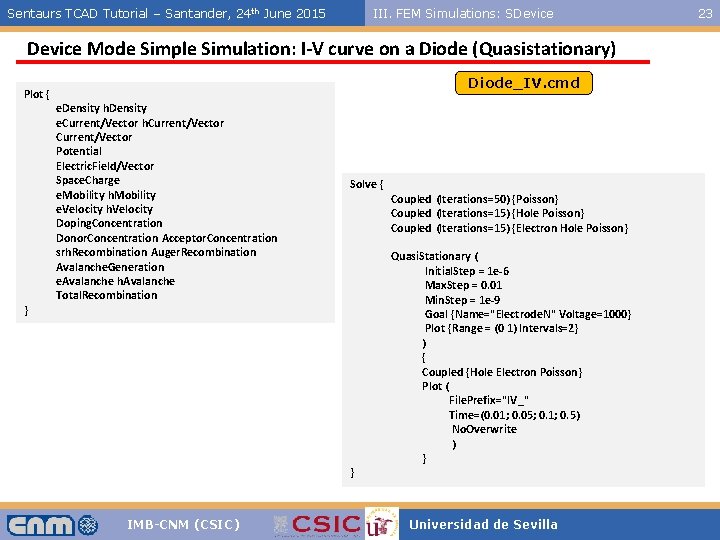
Sentaurs TCAD Tutorial – Santander, 24 th June 2015 III. FEM Simulations: SDevice Mode Simple Simulation: I-V curve on a Diode (Quasistationary) Plot { } Diode_IV. cmd e. Density h. Density e. Current/Vector h. Current/Vector Potential Electric. Field/Vector Space. Charge e. Mobility h. Mobility e. Velocity h. Velocity Doping. Concentration Donor. Concentration Acceptor. Concentration srh. Recombination Auger. Recombination Avalanche. Generation e. Avalanche h. Avalanche Total. Recombination Solve { } IMB-CNM (CSIC) Coupled (Iterations=50) {Poisson} Coupled (Iterations=15) {Hole Poisson} Coupled (Iterations=15) {Electron Hole Poisson} Quasi. Stationary ( Initial. Step = 1 e-6 Max. Step = 0. 01 Min. Step = 1 e-9 Goal {Name="Electrode. N" Voltage=1000} Plot {Range = (0 1) Intervals=2} ) { Coupled {Hole Electron Poisson} Plot ( File. Prefix="IV_" Time=(0. 01; 0. 05; 0. 1; 0. 5) No. Overwrite ) } Universidad de Sevilla 23
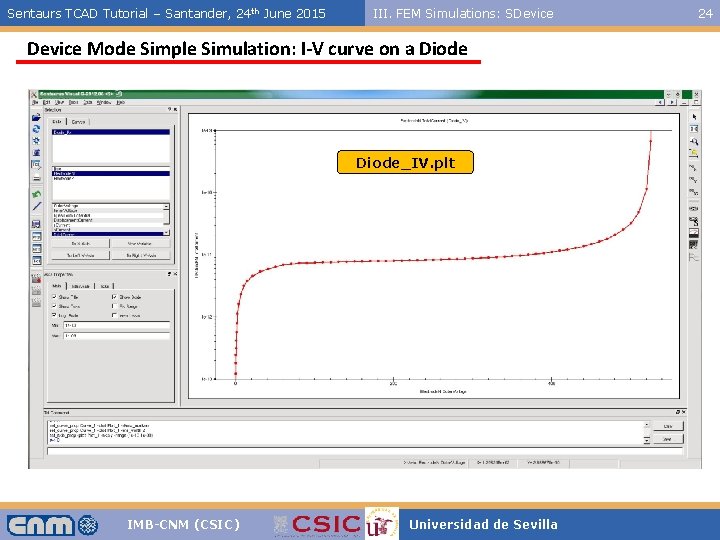
Sentaurs TCAD Tutorial – Santander, 24 th June 2015 III. FEM Simulations: SDevice Mode Simple Simulation: I-V curve on a Diode_IV. plt IMB-CNM (CSIC) Universidad de Sevilla 24
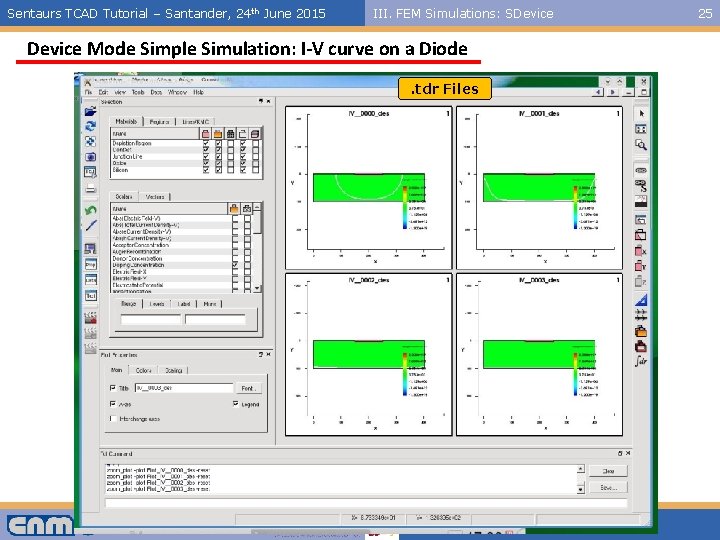
Sentaurs TCAD Tutorial – Santander, 24 th June 2015 III. FEM Simulations: SDevice Mode Simple Simulation: I-V curve on a Diode. tdr Files IMB-CNM (CSIC) Universidad de Sevilla 25
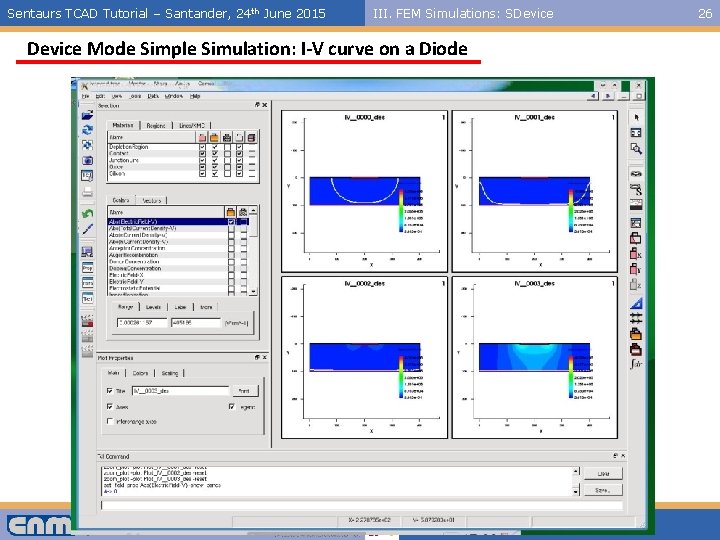
Sentaurs TCAD Tutorial – Santander, 24 th June 2015 III. FEM Simulations: SDevice Mode Simple Simulation: I-V curve on a Diode IMB-CNM (CSIC) Universidad de Sevilla 26
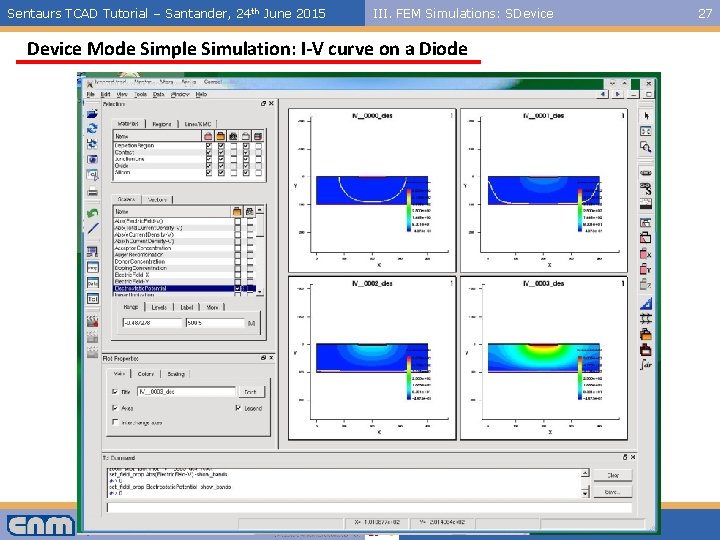
Sentaurs TCAD Tutorial – Santander, 24 th June 2015 III. FEM Simulations: SDevice Mode Simple Simulation: I-V curve on a Diode IMB-CNM (CSIC) Universidad de Sevilla 27
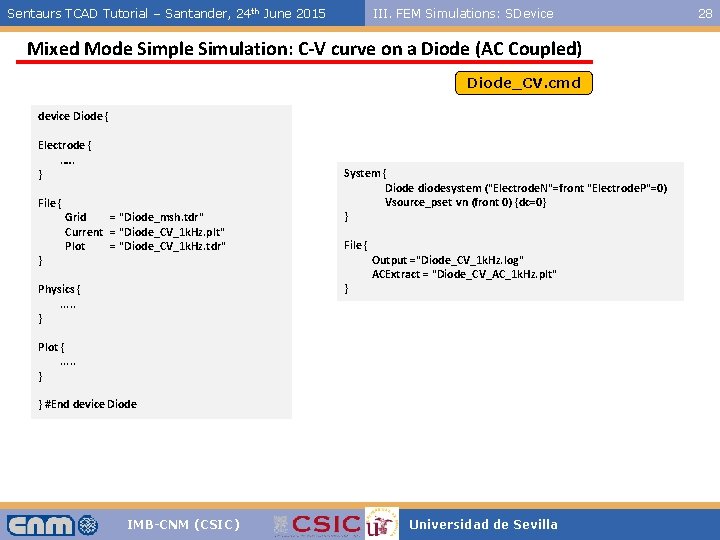
Sentaurs TCAD Tutorial – Santander, 24 th June 2015 III. FEM Simulations: SDevice Mixed Mode Simple Simulation: C-V curve on a Diode (AC Coupled) Diode_CV. cmd device Diode { Electrode {. …. } File { } Grid = "Diode_msh. tdr" Current = "Diode_CV_1 k. Hz. plt" Plot = "Diode_CV_1 k. Hz. tdr" System { Diode diodesystem ("Electrode. N"=front "Electrode. P"=0) Vsource_pset vn (front 0) {dc=0} } File { } Physics {. . . } Output ="Diode_CV_1 k. Hz. log" ACExtract = "Diode_CV_AC_1 k. Hz. plt" Plot {. . . } } #End device Diode IMB-CNM (CSIC) Universidad de Sevilla 28
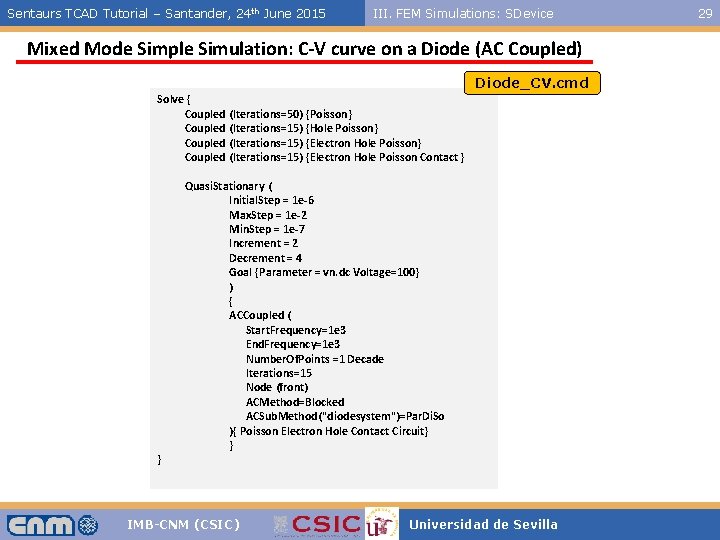
Sentaurs TCAD Tutorial – Santander, 24 th June 2015 III. FEM Simulations: SDevice Mixed Mode Simple Simulation: C-V curve on a Diode (AC Coupled) Diode_CV. cmd Solve { Coupled (Iterations=50) {Poisson} Coupled (Iterations=15) {Hole Poisson} Coupled (Iterations=15) {Electron Hole Poisson Contact} } Quasi. Stationary ( Initial. Step = 1 e-6 Max. Step = 1 e-2 Min. Step = 1 e-7 Increment = 2 Decrement = 4 Goal {Parameter = vn. dc Voltage=100} ) { ACCoupled ( Start. Frequency=1 e 3 End. Frequency=1 e 3 Number. Of. Points =1 Decade Iterations=15 Node (front) ACMethod=Blocked ACSub. Method("diodesystem")=Par. Di. So ){ Poisson Electron Hole Contact Circuit} } IMB-CNM (CSIC) Universidad de Sevilla 29
Sentaurs TCAD Tutorial – Santander, 24 th June 2015 III. FEM Simulations: SDevice Mixed Mode Simple Simulation: C-V curve on a Diode (AC Coupled) IMB-CNM (CSIC) Universidad de Sevilla 30
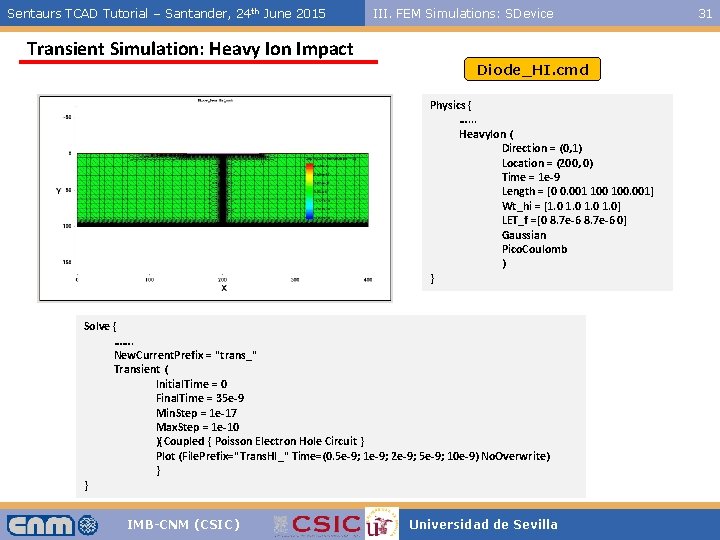
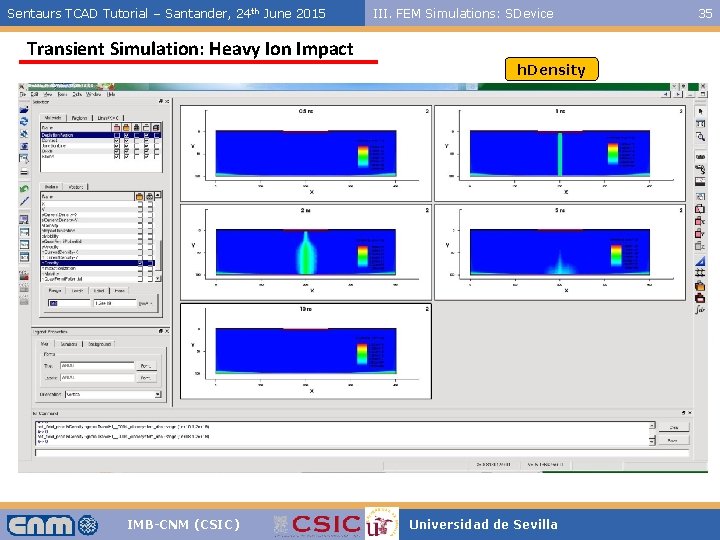
Sentaurs TCAD Tutorial – Santander, 24 th June 2015 III. FEM Simulations: SDevice Transient Simulation: Heavy Ion Impact Diode_HI. cmd Physics { …. . . Heavy. Ion ( Direction = (0, 1) Location = (200, 0) Time = 1 e-9 Length = [0 0. 001 100. 001] Wt_hi = [1. 0 1. 0] LET_f =[0 8. 7 e-6 0] Gaussian Pico. Coulomb ) } Solve { ……. New. Current. Prefix = "trans_" Transient ( Initial. Time = 0 Final. Time = 35 e-9 Min. Step = 1 e-17 Max. Step = 1 e-10 ){Coupled { Poisson Electron Hole Circuit } Plot (File. Prefix="Trans. HI_" Time=(0. 5 e-9; 1 e-9; 2 e-9; 5 e-9; 10 e-9) No. Overwrite) } } IMB-CNM (CSIC) Universidad de Sevilla 31
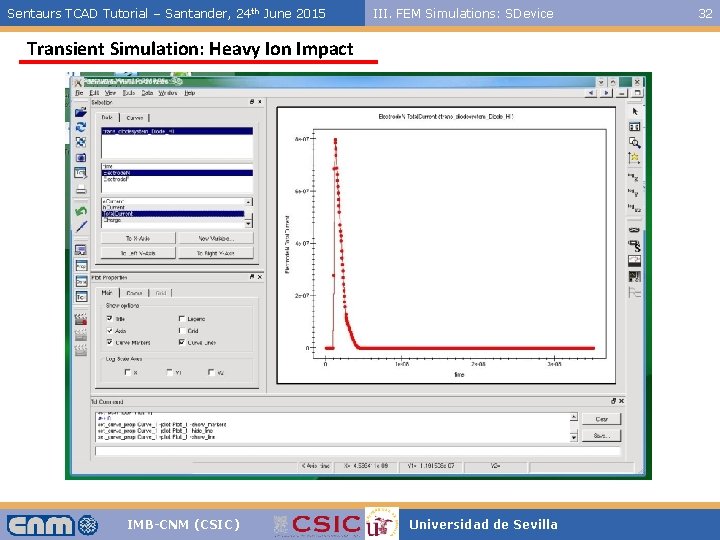
Sentaurs TCAD Tutorial – Santander, 24 th June 2015 III. FEM Simulations: SDevice Transient Simulation: Heavy Ion Impact IMB-CNM (CSIC) Universidad de Sevilla 32
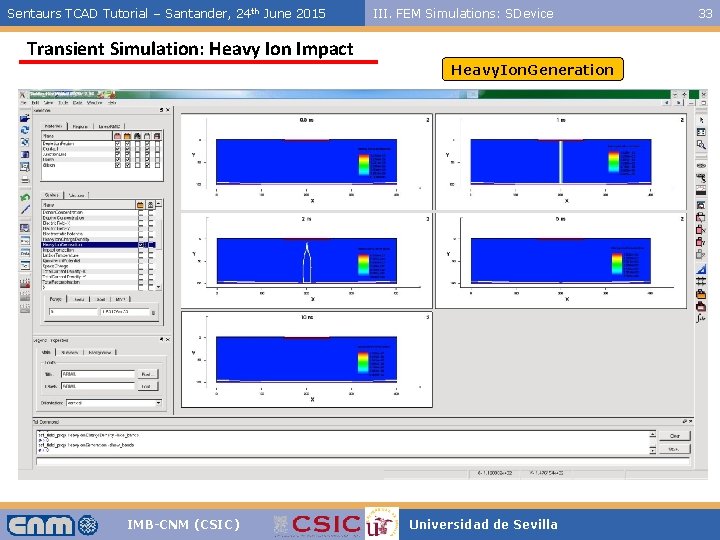
Sentaurs TCAD Tutorial – Santander, 24 th June 2015 III. FEM Simulations: SDevice Transient Simulation: Heavy Ion Impact Heavy. Ion. Generation IMB-CNM (CSIC) Universidad de Sevilla 33
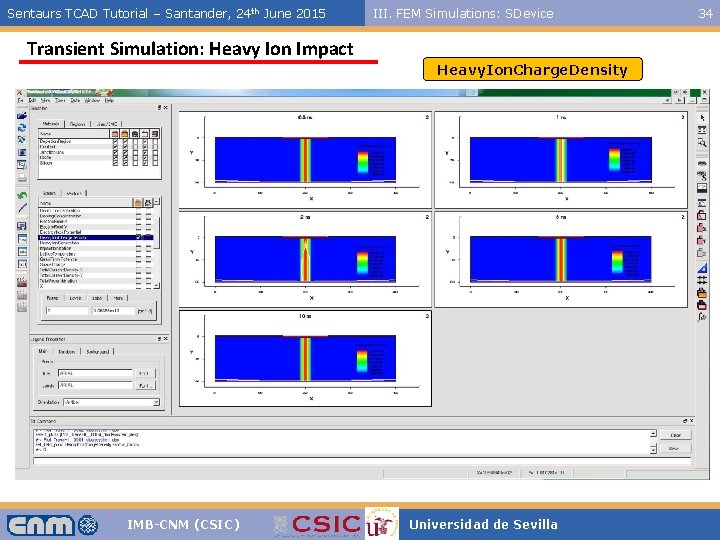
Sentaurs TCAD Tutorial – Santander, 24 th June 2015 III. FEM Simulations: SDevice Transient Simulation: Heavy Ion Impact Heavy. Ion. Charge. Density IMB-CNM (CSIC) Universidad de Sevilla 34
Sentaurs TCAD Tutorial – Santander, 24 th June 2015 III. FEM Simulations: SDevice Transient Simulation: Heavy Ion Impact h. Density IMB-CNM (CSIC) Universidad de Sevilla 35
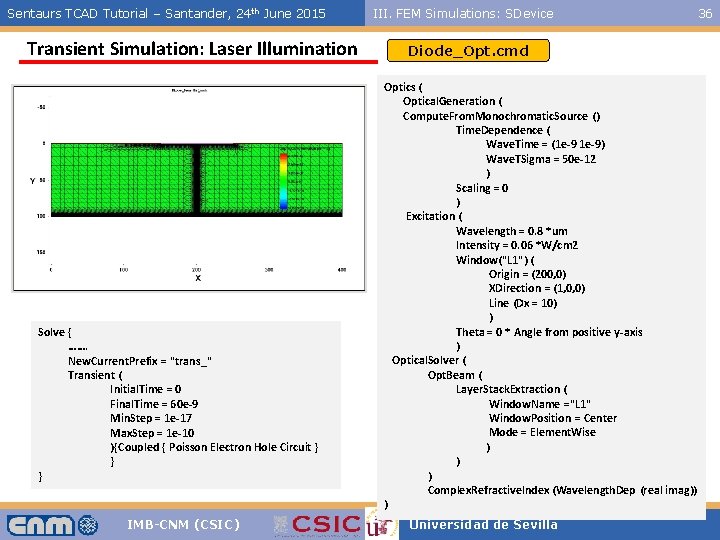
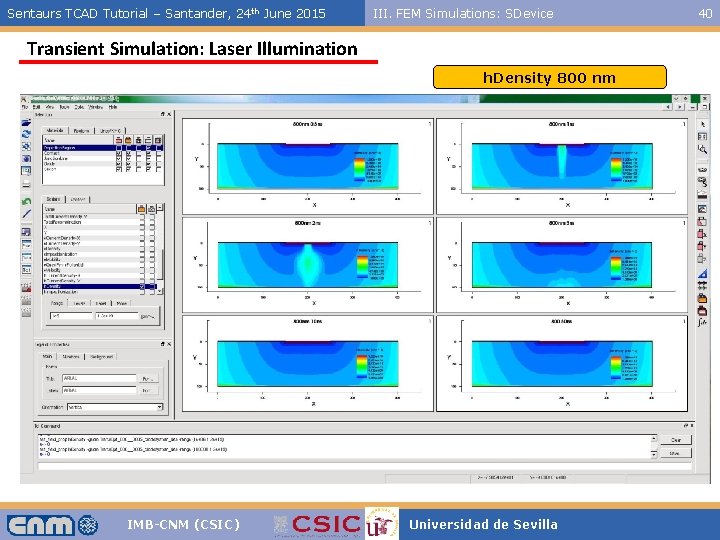
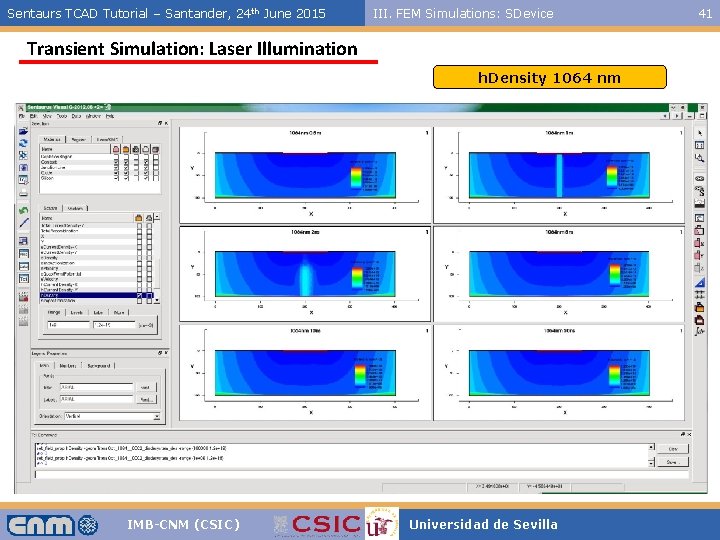
Sentaurs TCAD Tutorial – Santander, 24 th June 2015 Transient Simulation: Laser Illumination Solve { ……. New. Current. Prefix = "trans_" Transient ( Initial. Time = 0 Final. Time = 60 e-9 Min. Step = 1 e-17 Max. Step = 1 e-10 ){Coupled { Poisson Electron Hole Circuit } } } IMB-CNM (CSIC) III. FEM Simulations: SDevice Diode_Opt. cmd Optics ( Optical. Generation ( Compute. From. Monochromatic. Source () Time. Dependence ( Wave. Time = (1 e-9) Wave. TSigma = 50 e-12 ) Scaling = 0 ) Excitation ( Wavelength = 0. 8 *um Intensity = 0. 06 *W/cm 2 Window("L 1") ( Origin = (200, 0) XDirection = (1, 0, 0) Line (Dx = 10) ) Theta = 0 * Angle from positive y-axis ) Optical. Solver ( Opt. Beam ( Layer. Stack. Extraction ( Window. Name ="L 1" Window. Position = Center Mode = Element. Wise ) ) ) Complex. Refractive. Index (Wavelength. Dep (real imag)) ) Universidad de Sevilla 36
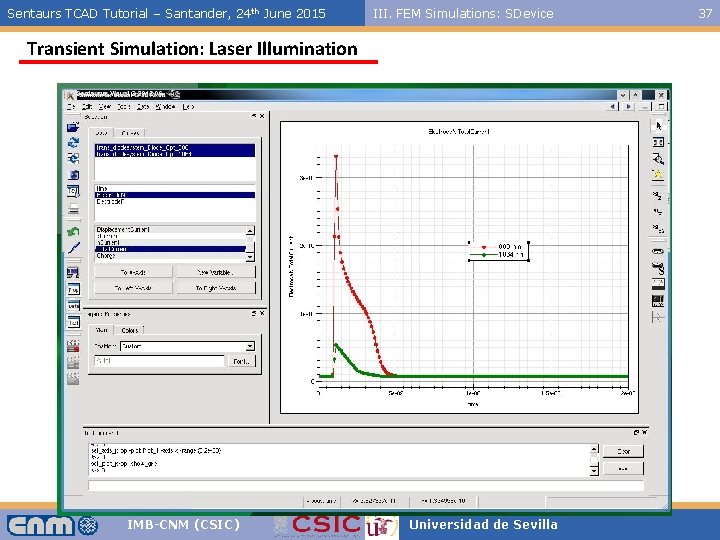
Sentaurs TCAD Tutorial – Santander, 24 th June 2015 III. FEM Simulations: SDevice Transient Simulation: Laser Illumination IMB-CNM (CSIC) Universidad de Sevilla 37
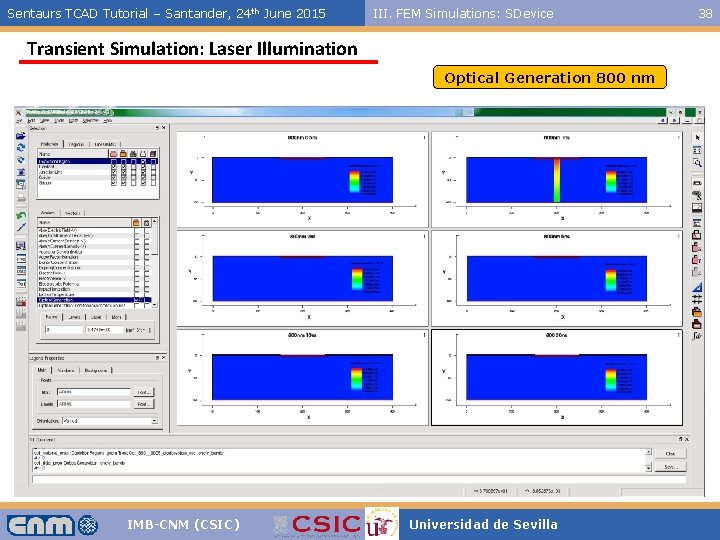
Sentaurs TCAD Tutorial – Santander, 24 th June 2015 III. FEM Simulations: SDevice Transient Simulation: Laser Illumination Optical Generation 800 nm IMB-CNM (CSIC) Universidad de Sevilla 38
Sentaurs TCAD Tutorial – Santander, 24 th June 2015 III. FEM Simulations: SDevice Transient Simulation: Laser Illumination Optical Generation 1064 nm IMB-CNM (CSIC) Universidad de Sevilla 39
Sentaurs TCAD Tutorial – Santander, 24 th June 2015 III. FEM Simulations: SDevice Transient Simulation: Laser Illumination h. Density 800 nm IMB-CNM (CSIC) Universidad de Sevilla 40
Sentaurs TCAD Tutorial – Santander, 24 th June 2015 III. FEM Simulations: SDevice Transient Simulation: Laser Illumination h. Density 1064 nm IMB-CNM (CSIC) Universidad de Sevilla 41
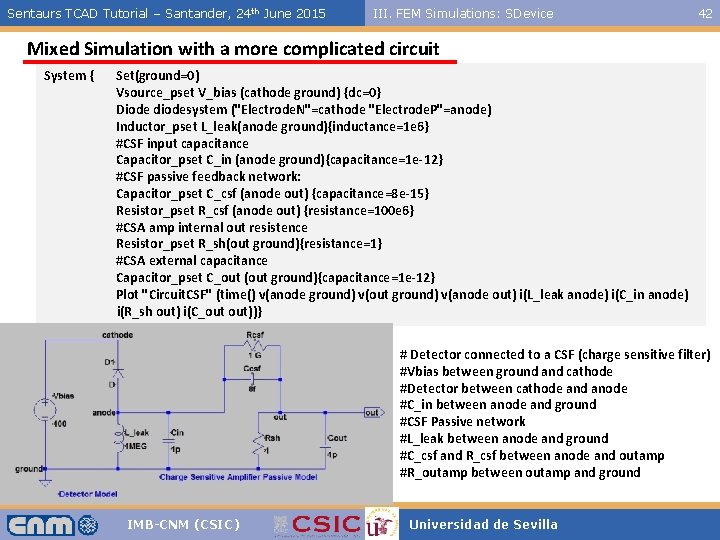
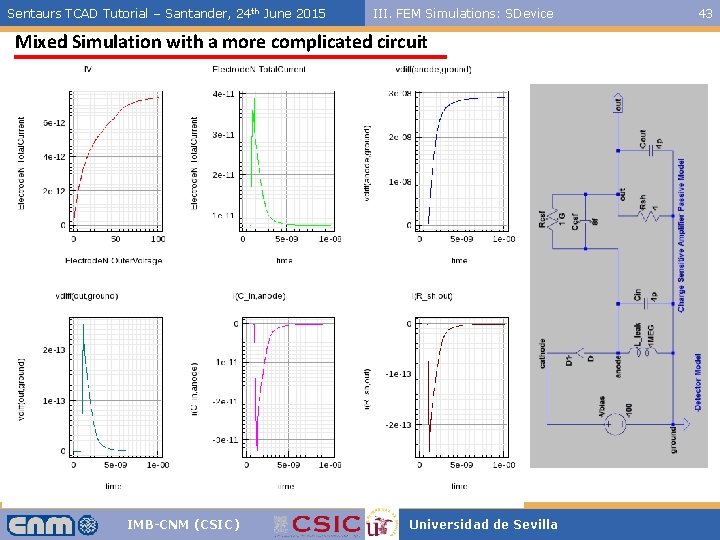
Sentaurs TCAD Tutorial – Santander, 24 th June 2015 III. FEM Simulations: SDevice 42 Mixed Simulation with a more complicated circuit System { Set(ground=0) Vsource_pset V_bias (cathode ground) {dc=0} Diode diodesystem ("Electrode. N"=cathode "Electrode. P"=anode) Inductor_pset L_leak(anode ground){inductance=1 e 6} #CSF input capacitance Capacitor_pset C_in (anode ground){capacitance=1 e-12} #CSF passive feedback network: Capacitor_pset C_csf (anode out) {capacitance=8 e-15} Resistor_pset R_csf (anode out) {resistance=100 e 6} #CSA amp internal out resistence Resistor_pset R_sh(out ground){resistance=1} #CSA external capacitance Capacitor_pset C_out (out ground){capacitance=1 e-12} Plot "Circuit. CSF" (time() v(anode ground) v(out ground) v(anode out) i(L_leak anode) i(C_in anode) i(R_sh out) i(C_out out))} # Detector connected to a CSF (charge sensitive filter) #Vbias between ground and cathode #Detector between cathode and anode #C_in between anode and ground #CSF Passive network #L_leak between anode and ground #C_csf and R_csf between anode and outamp #R_outamp between outamp and ground IMB-CNM (CSIC) Universidad de Sevilla
Sentaurs TCAD Tutorial – Santander, 24 th June 2015 III. FEM Simulations: SDevice Mixed Simulation with a more complicated circuit IMB-CNM (CSIC) Universidad de Sevilla 43
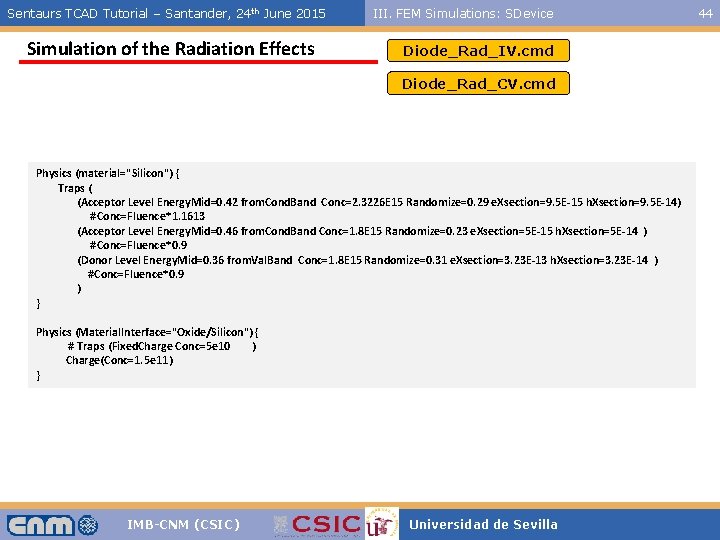
Sentaurs TCAD Tutorial – Santander, 24 th June 2015 Simulation of the Radiation Effects III. FEM Simulations: SDevice Diode_Rad_IV. cmd Diode_Rad_CV. cmd Physics (material="Silicon") { Traps ( (Acceptor Level Energy. Mid=0. 42 from. Cond. Band Conc=2. 3226 E 15 Randomize=0. 29 e. Xsection=9. 5 E-15 h. Xsection=9. 5 E-14) #Conc=Fluence*1. 1613 (Acceptor Level Energy. Mid=0. 46 from. Cond. Band Conc=1. 8 E 15 Randomize=0. 23 e. Xsection=5 E-15 h. Xsection=5 E-14 ) #Conc=Fluence*0. 9 (Donor Level Energy. Mid=0. 36 from. Val. Band Conc=1. 8 E 15 Randomize=0. 31 e. Xsection=3. 23 E-13 h. Xsection=3. 23 E-14 ) #Conc=Fluence*0. 9 ) } Physics (Material. Interface="Oxide/Silicon") { # Traps (Fixed. Charge Conc=5 e 10 ) Charge(Conc=1. 5 e 11) } IMB-CNM (CSIC) Universidad de Sevilla 44
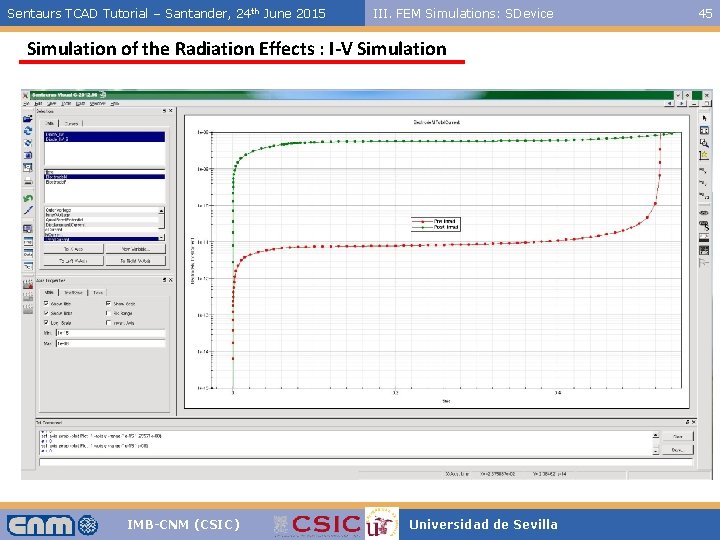
Sentaurs TCAD Tutorial – Santander, 24 th June 2015 III. FEM Simulations: SDevice Simulation of the Radiation Effects : I-V Simulation IMB-CNM (CSIC) Universidad de Sevilla 45
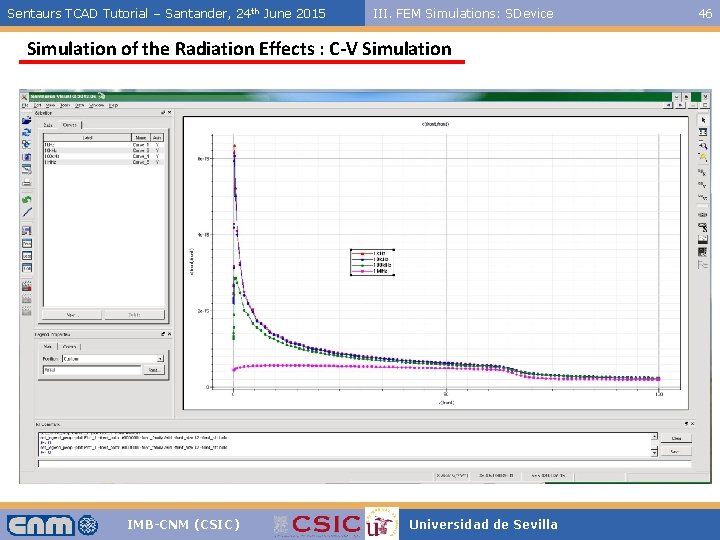
Sentaurs TCAD Tutorial – Santander, 24 th June 2015 III. FEM Simulations: SDevice Simulation of the Radiation Effects : C-V Simulation IMB-CNM (CSIC) Universidad de Sevilla 46
Sentaurs TCAD Tutorial – Santander, 24 th June 2015 IV. Additional Tools: SWorkbench & SProcess IV- Additional Tools: Sentaurus Workbench & Sentaurus Process IMB-CNM (CSIC) Universidad de Sevilla 47
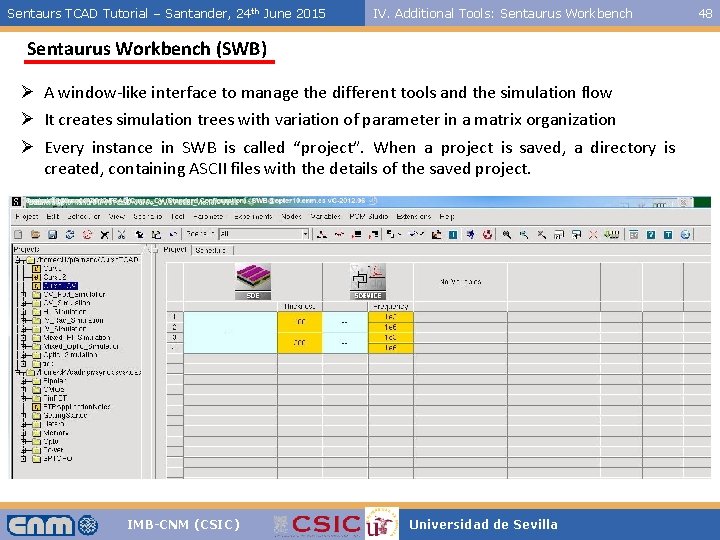
Sentaurs TCAD Tutorial – Santander, 24 th June 2015 IV. Additional Tools: Sentaurus Workbench (SWB) Ø A window-like interface to manage the different tools and the simulation flow Ø It creates simulation trees with variation of parameter in a matrix organization Ø Every instance in SWB is called “project”. When a project is saved, a directory is created, containing ASCII files with the details of the saved project. IMB-CNM (CSIC) Universidad de Sevilla 48
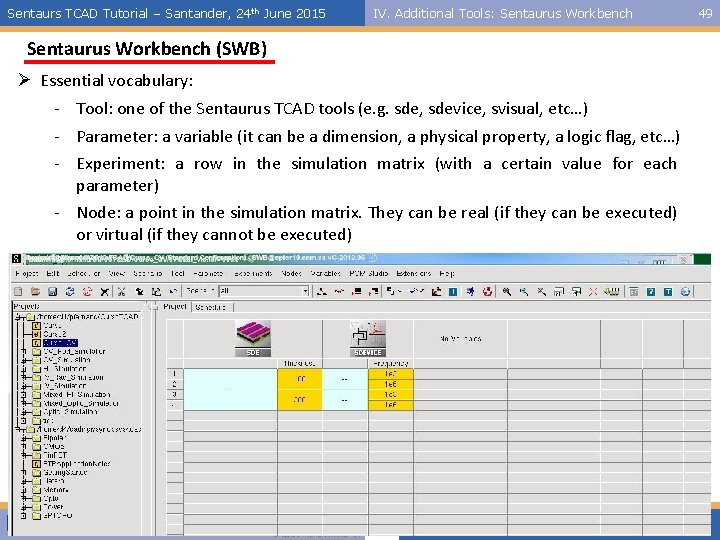
Sentaurs TCAD Tutorial – Santander, 24 th June 2015 IV. Additional Tools: Sentaurus Workbench (SWB) Ø Essential vocabulary: - Tool: one of the Sentaurus TCAD tools (e. g. sde, sdevice, svisual, etc…) - Parameter: a variable (it can be a dimension, a physical property, a logic flag, etc…) - Experiment: a row in the simulation matrix (with a certain value for each parameter) - Node: a point in the simulation matrix. They can be real (if they can be executed) or virtual (if they cannot be executed) IMB-CNM (CSIC) Universidad de Sevilla 49
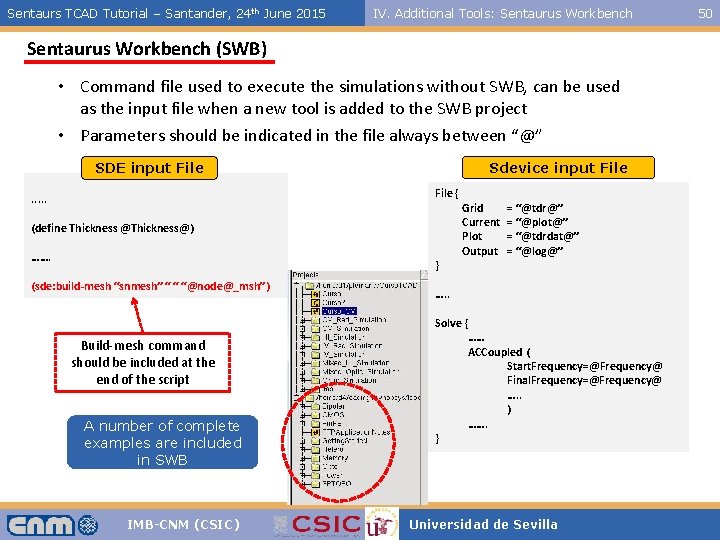
Sentaurs TCAD Tutorial – Santander, 24 th June 2015 IV. Additional Tools: Sentaurus Workbench (SWB) • Command file used to execute the simulations without SWB, can be used as the input file when a new tool is added to the SWB project • Parameters should be indicated in the file always between “@” Sdevice input File SDE input File { . . . (define Thickness @Thickness@) ……. } (sde: build-mesh “snmesh” “ “ “@node@_msh”) Build-mesh command should be included at the end of the script A number of complete examples are included in SWB IMB-CNM (CSIC) Grid Current Plot Output = “@tdr@” = “@plot@” = “@tdrdat@” = “@log@” …. . Solve { …… ACCoupled ( Start. Frequency=@Frequency@ Final. Frequency=@Frequency@ …. . ) ……. } Universidad de Sevilla 50
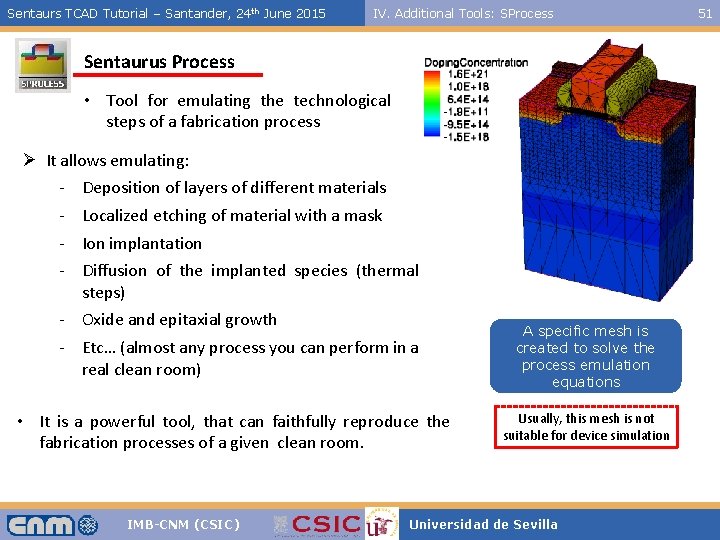
Sentaurs TCAD Tutorial – Santander, 24 th June 2015 IV. Additional Tools: SProcess Sentaurus Process • Tool for emulating the technological steps of a fabrication process Ø It allows emulating: - Deposition of layers of different materials - Localized etching of material with a mask - Ion implantation - Diffusion of the implanted species (thermal steps) - Oxide and epitaxial growth - Etc… (almost any process you can perform in a real clean room) • It is a powerful tool, that can faithfully reproduce the fabrication processes of a given clean room. IMB-CNM (CSIC) A specific mesh is created to solve the process emulation equations Usually, this mesh is not suitable for device simulation Universidad de Sevilla 51
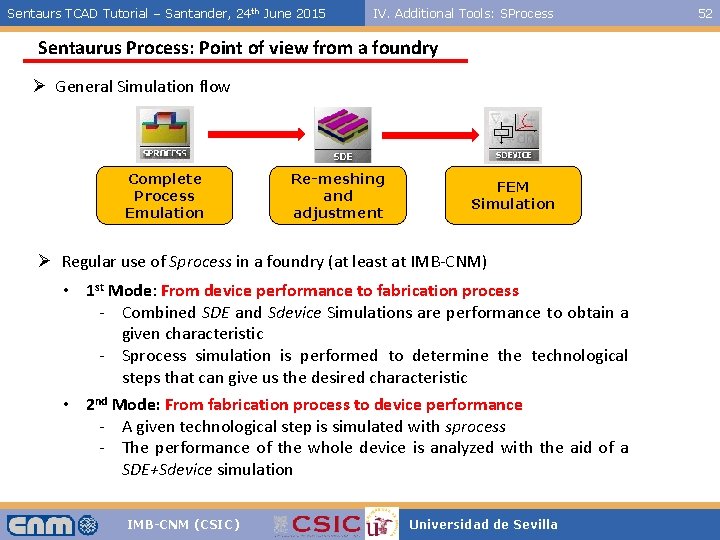
Sentaurs TCAD Tutorial – Santander, 24 th June 2015 IV. Additional Tools: SProcess Sentaurus Process: Point of view from a foundry Ø General Simulation flow Complete Process Emulation Re-meshing and adjustment FEM Simulation Ø Regular use of Sprocess in a foundry (at least at IMB-CNM) • 1 st Mode: From device performance to fabrication process - Combined SDE and Sdevice Simulations are performance to obtain a given characteristic - Sprocess simulation is performed to determine the technological steps that can give us the desired characteristic • 2 nd Mode: From fabrication process to device performance - A given technological step is simulated with sprocess - The performance of the whole device is analyzed with the aid of a SDE+Sdevice simulation IMB-CNM (CSIC) Universidad de Sevilla 52
Sentaurs TCAD Tutorial – Santander, 24 th June 2015 IV. Additional Tools: SProcess Thanks for your attention fpalomo@us. es pablo. fernandez@imb-cnm. csic. es IMB-CNM (CSIC) Universidad de Sevilla 53