
Senior Project Database Design and Usability Evaluation Stephanie
Senior Project Database: Design and Usability Evaluation Stephanie Cheng Rachelle Hom Ronald Mg Hoang Bao CSC 484 – Winter 2005
Senior Project Center Concept l l l Students who are interested in beginning their senior project, but don’t know where to start Students who are looking for supplemental help during their senior project Resource where students may come together to collaborate and share ideas
Senior Project Center Environment l l Brainstorming area and software Research station Presentation/video conference room Publishing area
Overview l l From the data collection about the Senior Project Center: – 78% of students surveyed felt it was NOT easy to start their senior project. Among the difficulties was finding a topic. – 63% of students felt it was beneficial to work with a partner, but there is no official tool to make finding partners a simple task for students. Hence, we decided to focus on one of the most important aspects of the Senior Project Center: the Senior Project Database Search

Senior Project Database Search l A web based tool that allows users to: 1. 2. 3. Find a senior project topic and/or partner Post a senior project topic and/or partner Discussion board Targeted audience: – – Students Professors Companies Communities
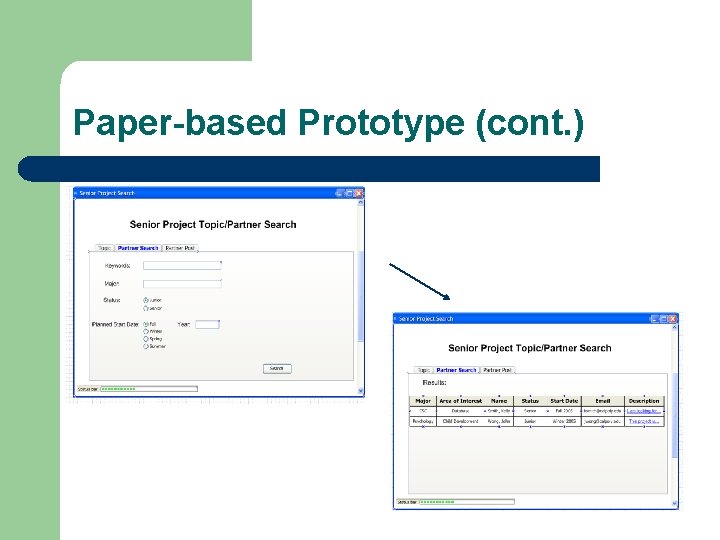
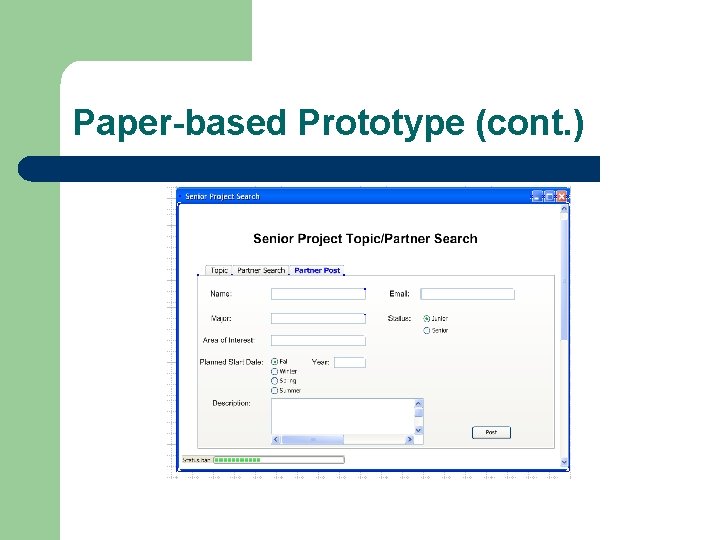
Design Approach l First we created a paper-based prototype of our Senior Project Database Search using Microsoft Visio l Goals: – – – Simple Intuitive Easy to use

Paper-based Prototype
Paper-based Prototype (cont. )
Paper-based Prototype (cont. )
Preliminary Feedback l Questions we asked users about the paperbased prototype during data collection – – – Is there enough information on each panel? Is it easy to understand? What changes would you recommend?
Preliminary Feedback (cont. ) l Positive aspects: – – – l Negative aspect: – l Intuitive layout, in logical order Good flow of information Low learning curve Wanted to be able to post topics similar to being able to post a search for a senior project partner (we added this change to the next prototype) Overall feedback was positive; felt that it would be a good addition to the Senior Project Center.
Interactive Prototype l Used Dream. Weaver MX to develop webbased prototype l Based on the positive feedback, we kept a similar layout to the paper-based prototype
Usability Study of Interactive Prototype l Short questionnaires about the look and feel, intuitiveness, general impression, etc. – l Environment of data collection: – – l Used ranking scale when possible to keep results as objective as possible. Informal In test subjects’ homes “Quick and dirty” method due to time constraint.

Result of Usability Study
Result of Usability Study (cont. )

Suggested Changes l l l Colors are not uniform Need more content on help page Search fields are a little disorganized
Final Prototype with revisions based on usability study – – – l Made color scheme more uniform Added a more extensive help page Re-organized search fields Demonstration: http: //www. calpoly. edu/~rhom/main. html
Usability Evaluation Plan for Complete System l Observe users as they perform a set of tasks 1. 2. 3. 4. 5. Find a senior project topic Find a senior project partner Post a senior project topic Post a search for senior project partners Log into the discussion board and ask a question l Note the difficulties they are having l Note the time it takes for the users to complete each task l Ask users to rank their overall satisfaction with the Senior Project Database Search
Further Work l Possible continuation of our work – The database could be implement through senior projects or CSC 366 projects l A completed and functional version of Senior Project Database Search is feasible. l The Senior Project Database Search could serve as an important part of the future Learning Commons.
Conclusion l l Questions? Thank you!
- Slides: 20