
Seminar on Linuxbased embedded systems Root File system
Seminar on Linux-based embedded systems Root File system for Raspberry Pi Aalto University 13 th Dec 2013 Presenter: Bastian Arjun Shajit (338303)
Agenda 1. Introduction 2. Types of File system 3. Selecting a Root file system 4. Performance Comparison 5. Summary 2
What is a File system ? • Gargantuan amount of data stored as 1 s and 0 s on storage media (conceivable by machine) • Impossible to understand files/folders from the sea of binary data. • File system was designed as a novel way to organize such data easily understandable by all users. 3
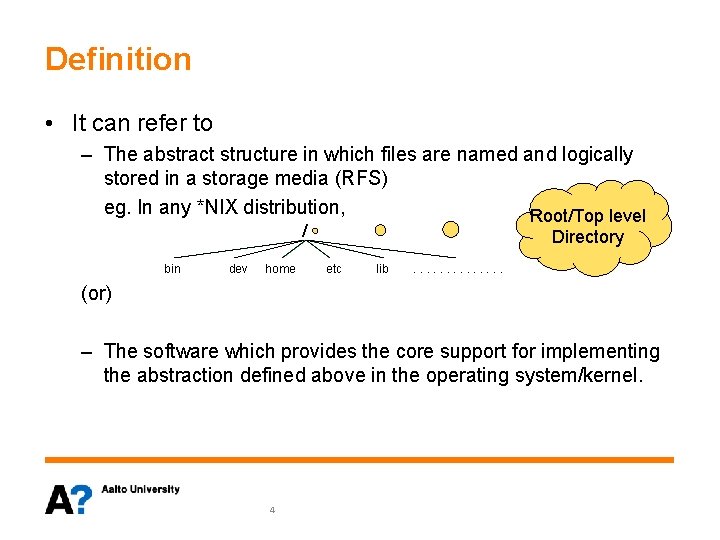
Definition • It can refer to – The abstract structure in which files are named and logically stored in a storage media (RFS) eg. In any *NIX distribution, Root/Top level / bin dev home Directory etc lib . . . (or) – The software which provides the core support for implementing the abstraction defined above in the operating system/kernel. 4
Agenda 1. Introduction 2. Types of File system 3. Selecting a Root file system 4. Performance Comparison 5. Summary 5

Block-device File Systems • Considers storage device as a simple linear collection of blocks or sectors. – Size of blocks vary (512, 1024 …) • Have two main operation : Read & Write • Type of Devices: – LBA devices (HDDs) – FTL devices (USB flash drive, SD, SSDs etc). • In case of bad blocks, the FTL or hardware (for LBA devices) takes care of hiding from user. • File system drivers : ext 2, ext 3, ext 4, FAT, NTFS, Reiser. FS etc. 6
Flash File Systems • Mainly used on Raw Flash Devices • Linux provides MTD as a primitive translation Layer. • How are they Different? – – – They are not block devices Mostly raw NAND / NOR storage media. They consist of ERASEBLOCKS Have 3 main operation : Read, Write & Eraseblock Each block has limited lifespan (1000 s of write cycles) • Needs write to be spread. 7
Flash File Systems II • FTL devices Vs Raw Flash device – FTL devices has a micro-controller which runs FTL firmware. • Helps to emulate a block device. • Why FFS is unique? – – Needs to spread write Perform Garbage collection Bad blocks handling Better reliability compared to FTL (Since FTL is vendor specific) • E. g. UBIFS, JFFS 2 etc. 8
In-Memory File system • Uses primary memory e. g. RAM • Features: – Has higher I/O performance – Volatile Memory • E. g, ramfs, tmpfs, ramdisk. • Why not ramdisk? – It emulates block device in RAM. – Block device store recently accessed files in caches. Hence using ramdisk creates a large memory foot print – Hard limit on max size of ram disk. 9
User Space File system • Mainly intended for block devices. • Resides in the user space. • Overhead of communicating to and from kernel and User space. • Distinct Advantage: – A bad user space file-system can never cause a system crash. • E. g. ntfs-3 g 10
Compressed Read-only File systems • • Read-only filesystem Data Stored in compressed format. Especially useful in low memory systems E. g. – Cramfs: • Metadata not stored (No time stamps or user permissions) • Possible security issues. • Max file system size = 256 MB – Squashfs • stores metadata information. • Max filesystem size = 2^64. 11
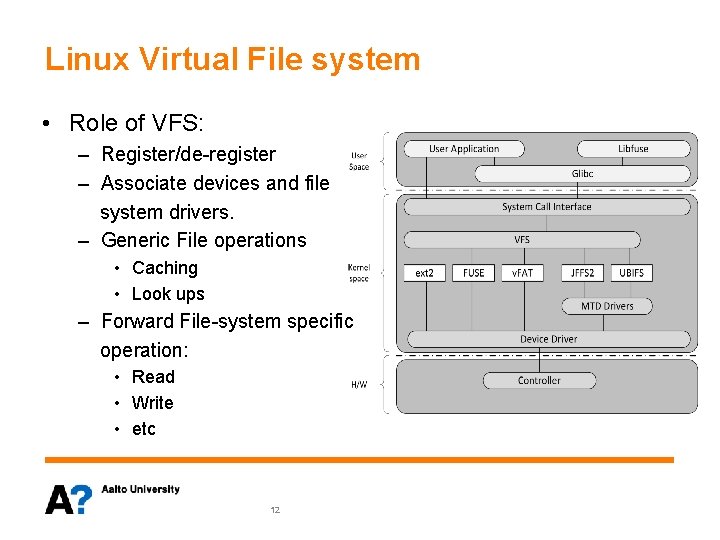
Linux Virtual File system • Role of VFS: – Register/de-register – Associate devices and file system drivers. – Generic File operations • Caching • Look ups – Forward File-system specific operation: • Read • Write • etc 12
Agenda 1. Introduction 2. Types of File system 3. Selecting a Root file system 4. Performance Comparison 5. Summary 13
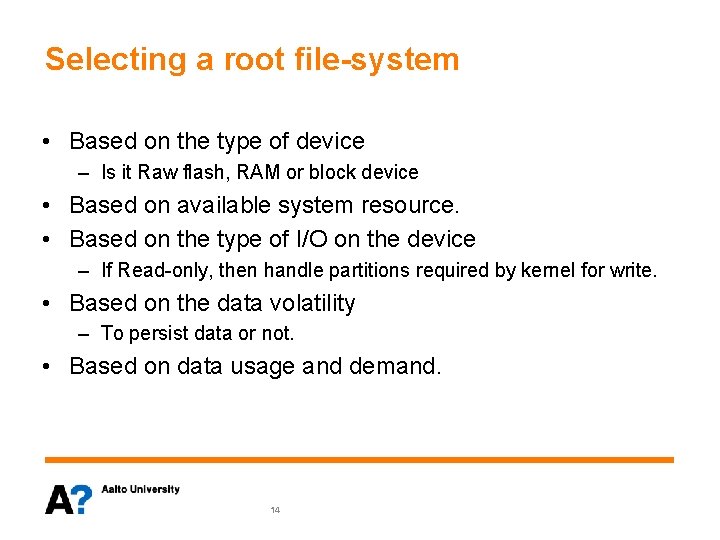
Selecting a root file-system • Based on the type of device – Is it Raw flash, RAM or block device • Based on available system resource. • Based on the type of I/O on the device – If Read-only, then handle partitions required by kernel for write. • Based on the data volatility – To persist data or not. • Based on data usage and demand. 14
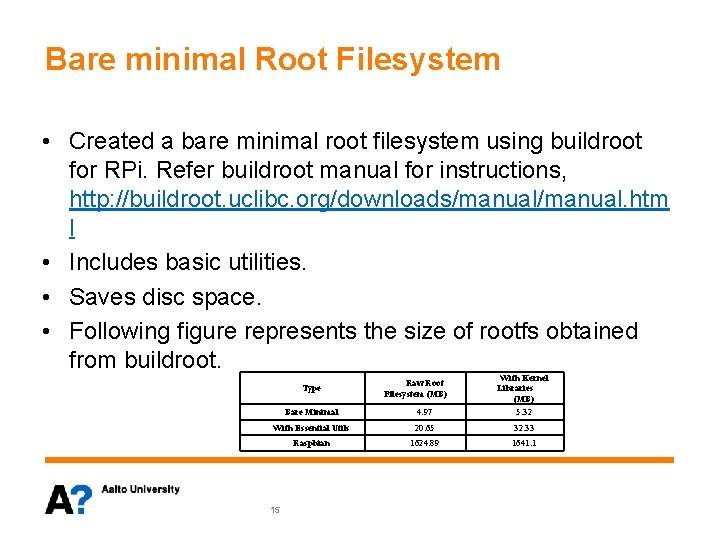
Bare minimal Root Filesystem • Created a bare minimal root filesystem using buildroot for RPi. Refer buildroot manual for instructions, http: //buildroot. uclibc. org/downloads/manual. htm l • Includes basic utilities. • Saves disc space. • Following figure represents the size of rootfs obtained from buildroot. Bare Minimal 4. 97 With Kernel Libraries (MB) 5. 32 With Essential Utils 20. 65 32. 33 Raspbian 1624. 89 1641. 1 Type 15 Raw Root Filesystem (MB)
Agenda 1. Introduction 2. Types of File system 3. Selecting a Root file system 4. Performance Comparison 5. Summary 16
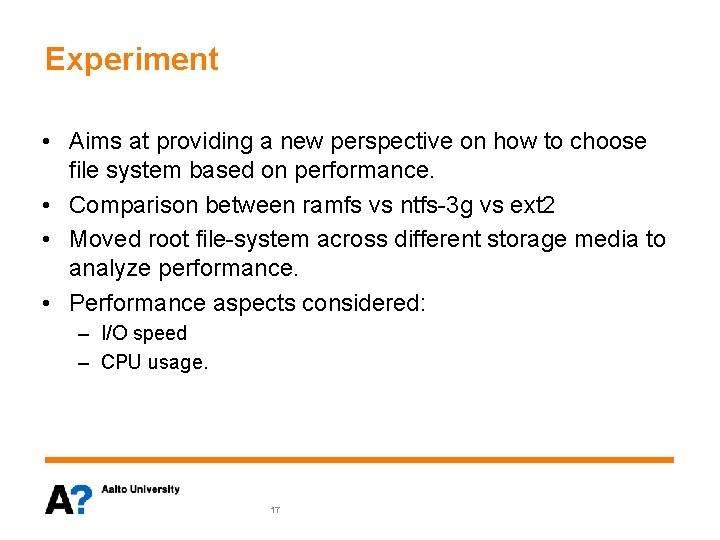
Experiment • Aims at providing a new perspective on how to choose file system based on performance. • Comparison between ramfs vs ntfs-3 g vs ext 2 • Moved root file-system across different storage media to analyze performance. • Performance aspects considered: – I/O speed – CPU usage. 17
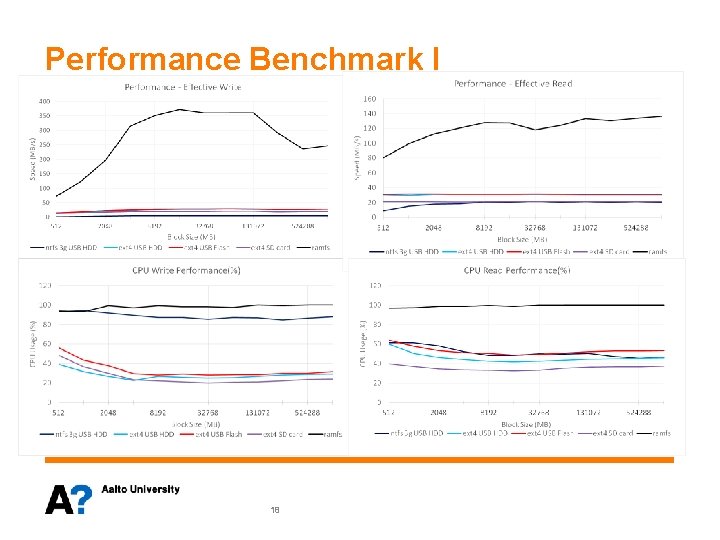
Performance Benchmark I 18
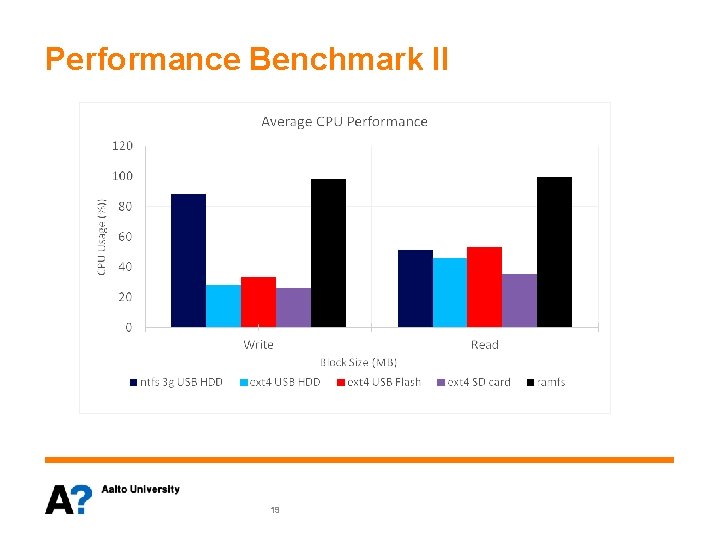
Performance Benchmark II 19
Agenda 1. Introduction 2. Types of File system 3. Selecting a Root file system 4. Performance Comparison 5. Summary 20
Summary • Successfully created a bare minimal and fully loaded root file system. • There isn’t “One file system to rule them all”. • Varying requirement give rise to numerous possibilities and a mix & match of different file systems can perhaps solve the need of the hour. • Many file systems were not analyzed – Raw flash device unavailability to test flash file systems. – Failed experiments with squashfs. – Out of scope file-systems like msdos, nfs, smbfs, cifs. 21

Thank you !!! 22
- Slides: 22