
Selection CIS 40 Introduction to Programming in Python
- Slides: 22
Selection CIS 40 – Introduction to Programming in Python De Anza College Clare Nguyen
Intro • So far our code has run from beginning to end by following one path of execution. • Now we learn to write code that presents the computer with several execution paths, and the computer will select one path based on a condition that it evaluates. • The condition can come from a user input or a calculation result, or it can come from data in a file, from a device, or from an error that’s been detected. • We will start with boolean logic, which is how computers make decisions, then we cover the instructions that tell the computer to make selections.
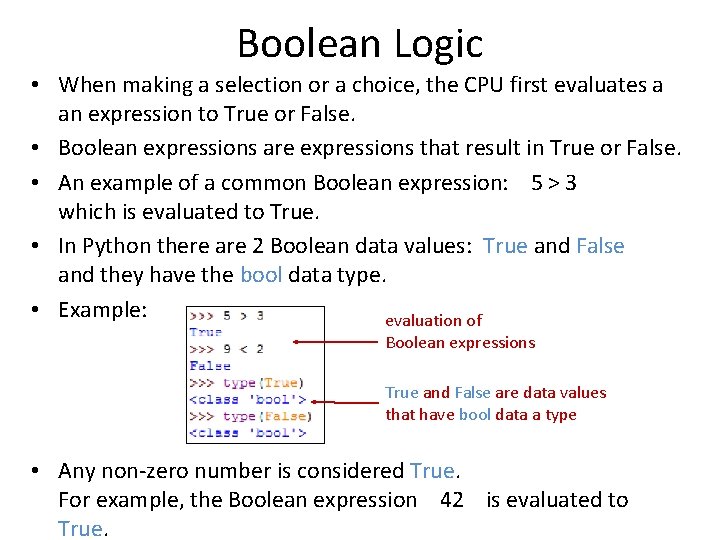
Boolean Logic • When making a selection or a choice, the CPU first evaluates a an expression to True or False. • Boolean expressions are expressions that result in True or False. • An example of a common Boolean expression: 5 > 3 which is evaluated to True. • In Python there are 2 Boolean data values: True and False and they have the bool data type. • Example: evaluation of Boolean expressions True and False are data values that have bool data a type • Any non-zero number is considered True. For example, the Boolean expression 42 is evaluated to True.
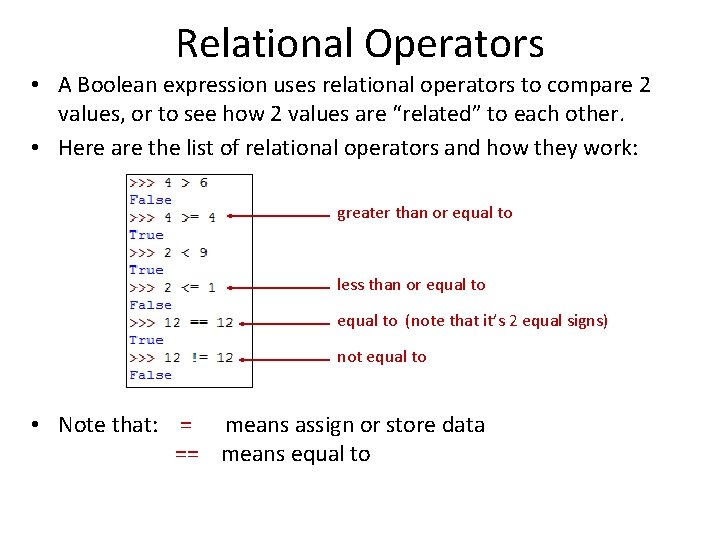
Relational Operators • A Boolean expression uses relational operators to compare 2 values, or to see how 2 values are “related” to each other. • Here are the list of relational operators and how they work: greater than or equal to less than or equal to (note that it’s 2 equal signs) not equal to • Note that: = means assign or store data == means equal to
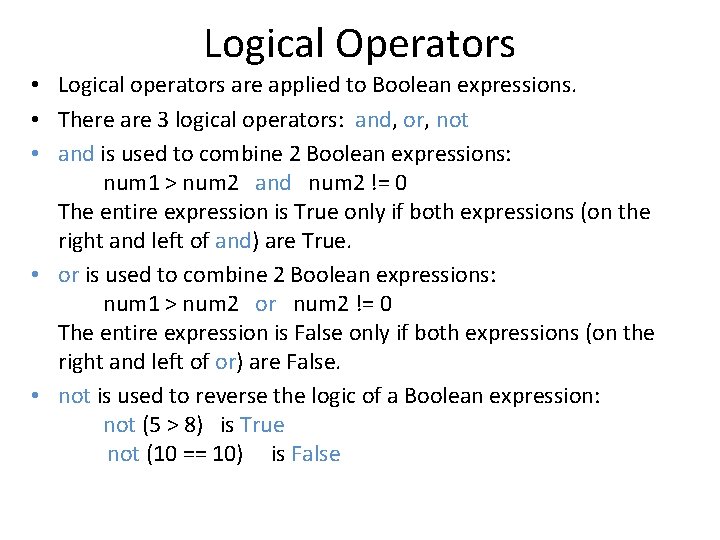
Logical Operators • Logical operators are applied to Boolean expressions. • There are 3 logical operators: and, or, not • and is used to combine 2 Boolean expressions: num 1 > num 2 and num 2 != 0 The entire expression is True only if both expressions (on the right and left of and) are True. • or is used to combine 2 Boolean expressions: num 1 > num 2 or num 2 != 0 The entire expression is False only if both expressions (on the right and left of or) are False. • not is used to reverse the logic of a Boolean expression: not (5 > 8) is True not (10 == 10) is False
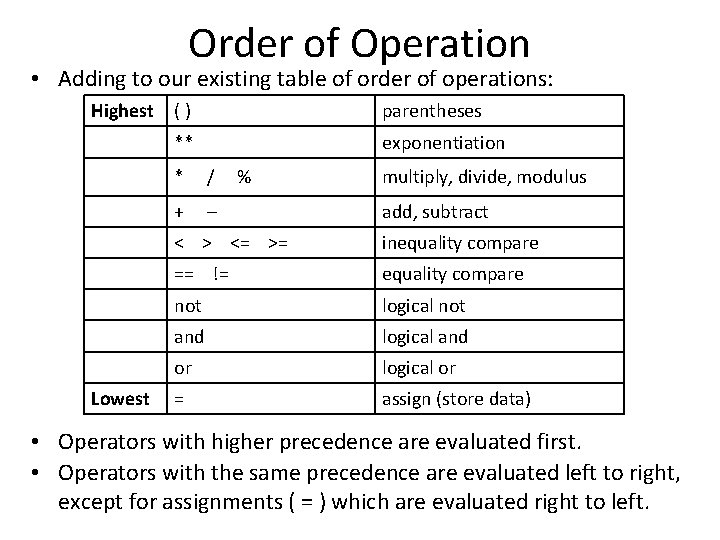
Order of Operation • Adding to our existing table of order of operations: Highest Lowest () parentheses ** exponentiation * / + – % multiply, divide, modulus add, subtract < > <= >= inequality compare == != equality compare not logical not and logical and or logical or = assign (store data) • Operators with higher precedence are evaluated first. • Operators with the same precedence are evaluated left to right, except for assignments ( = ) which are evaluated right to left.
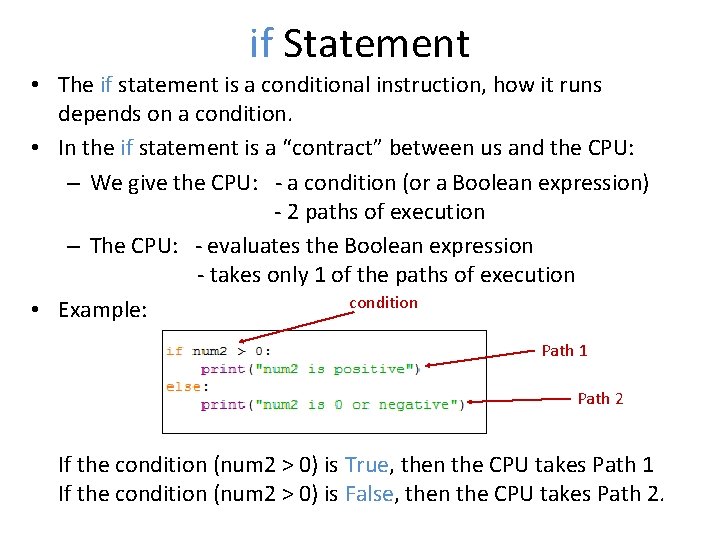
if Statement • The if statement is a conditional instruction, how it runs depends on a condition. • In the if statement is a “contract” between us and the CPU: – We give the CPU: - a condition (or a Boolean expression) - 2 paths of execution – The CPU: - evaluates the Boolean expression - takes only 1 of the paths of execution condition • Example: Path 1 Path 2 If the condition (num 2 > 0) is True, then the CPU takes Path 1 If the condition (num 2 > 0) is False, then the CPU takes Path 2.
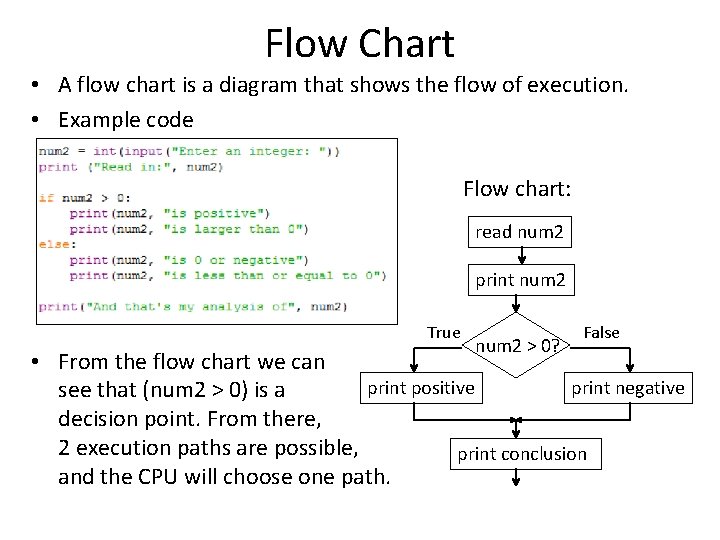
Flow Chart • A flow chart is a diagram that shows the flow of execution. • Example code Flow chart: read num 2 print num 2 True num 2 > 0? False • From the flow chart we can print positive print negative see that (num 2 > 0) is a decision point. From there, 2 execution paths are possible, print conclusion and the CPU will choose one path.
Demo Click for a video demo of how the if statement works
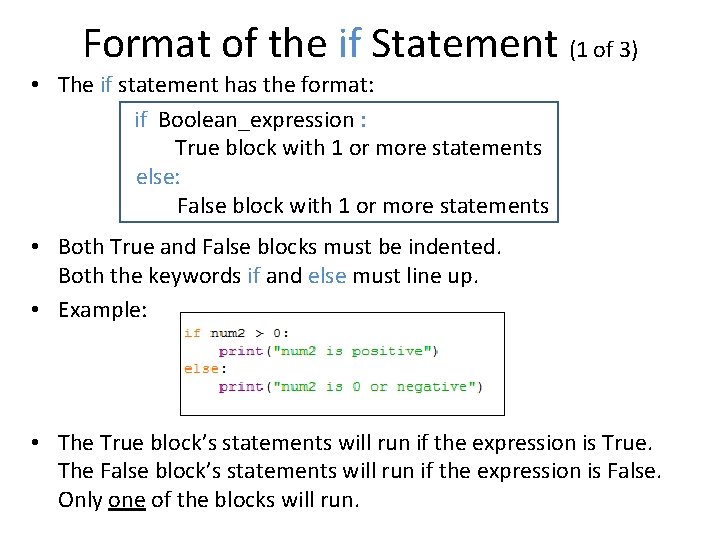
Format of the if Statement (1 of 3) • The if statement has the format: if Boolean_expression : True block with 1 or more statements else: False block with 1 or more statements • Both True and False blocks must be indented. Both the keywords if and else must line up. • Example: • The True block’s statements will run if the expression is True. The False block’s statements will run if the expression is False. Only one of the blocks will run.
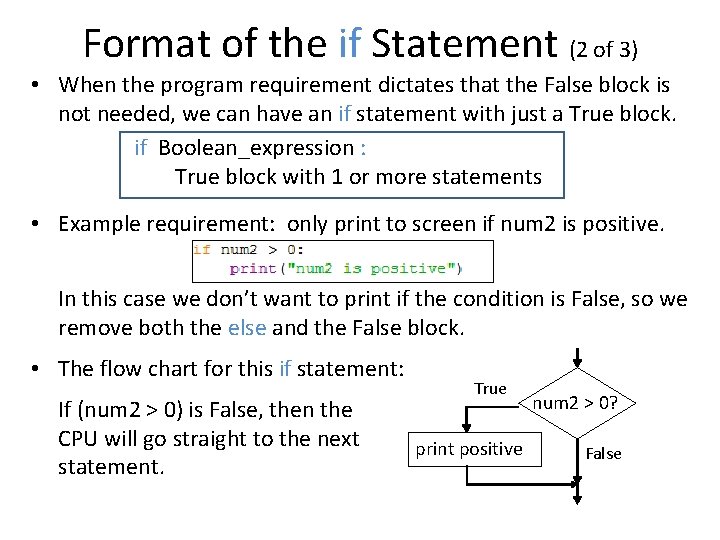
Format of the if Statement (2 of 3) • When the program requirement dictates that the False block is not needed, we can have an if statement with just a True block. if Boolean_expression : True block with 1 or more statements • Example requirement: only print to screen if num 2 is positive. In this case we don’t want to print if the condition is False, so we remove both the else and the False block. • The flow chart for this if statement: If (num 2 > 0) is False, then the CPU will go straight to the next statement. True print positive num 2 > 0? False
Demo Click for a video demo of an if statement that only has a True block
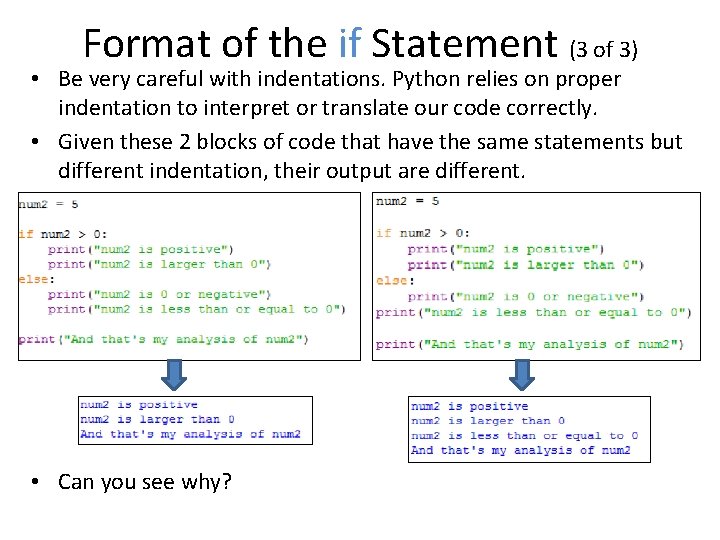
Format of the if Statement (3 of 3) • Be very careful with indentations. Python relies on proper indentation to interpret or translate our code correctly. • Given these 2 blocks of code that have the same statements but different indentation, their output are different. • Can you see why?
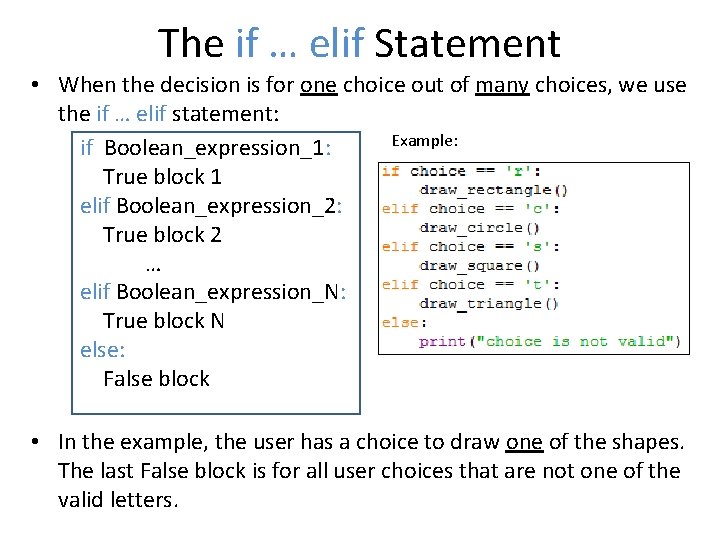
The if … elif Statement • When the decision is for one choice out of many choices, we use the if … elif statement: Example: if Boolean_expression_1: True block 1 elif Boolean_expression_2: True block 2 … elif Boolean_expression_N: True block N else: False block • In the example, the user has a choice to draw one of the shapes. The last False block is for all user choices that are not one of the valid letters.
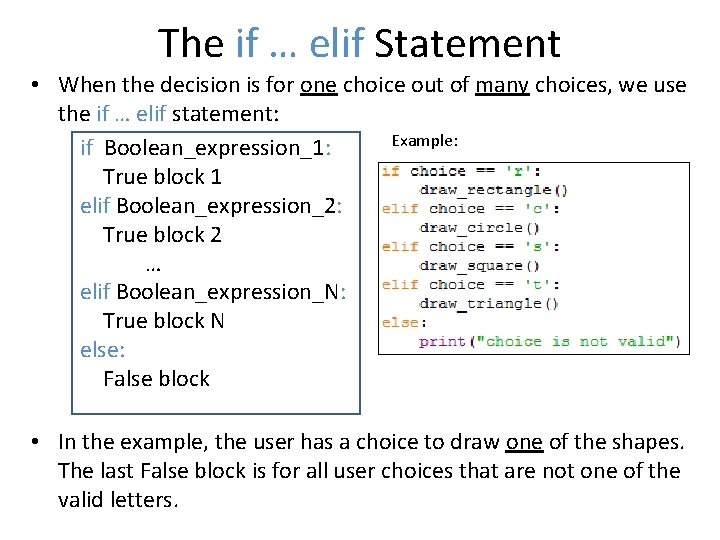
The if … elif Statement • When the decision is for one choice out of many choices, we use the if … elif statement: Example: if Boolean_expression_1: True block 1 elif Boolean_expression_2: True block 2 … elif Boolean_expression_N: True block N else: False block • In the example, the user has a choice to draw one of the shapes. The last False block is for all user choices that are not one of the valid letters.
Demo Click for a video demo of the if … elif statement
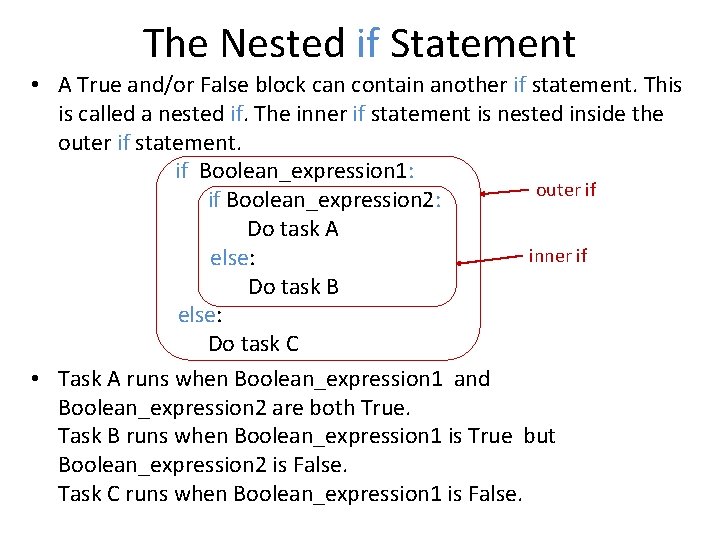
The Nested if Statement • A True and/or False block can contain another if statement. This is called a nested if. The inner if statement is nested inside the outer if statement. if Boolean_expression 1: outer if if Boolean_expression 2: Do task A inner if else: Do task B else: Do task C • Task A runs when Boolean_expression 1 and Boolean_expression 2 are both True. Task B runs when Boolean_expression 1 is True but Boolean_expression 2 is False. Task C runs when Boolean_expression 1 is False.
Demo Click for a video demo of the nested if statement
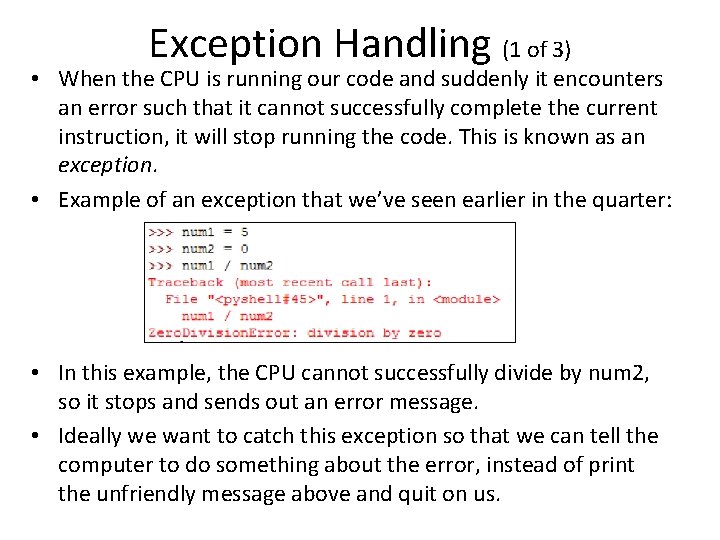
Exception Handling (1 of 3) • When the CPU is running our code and suddenly it encounters an error such that it cannot successfully complete the current instruction, it will stop running the code. This is known as an exception. • Example of an exception that we’ve seen earlier in the quarter: • In this example, the CPU cannot successfully divide by num 2, so it stops and sends out an error message. • Ideally we want to catch this exception so that we can tell the computer to do something about the error, instead of print the unfriendly message above and quit on us.
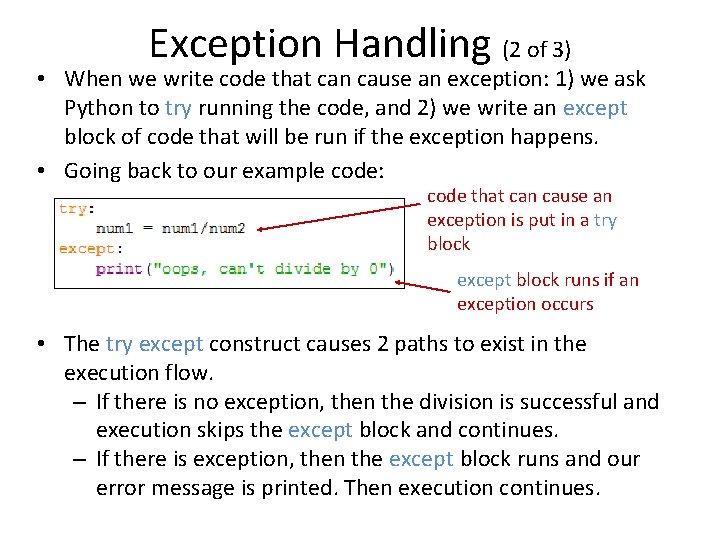
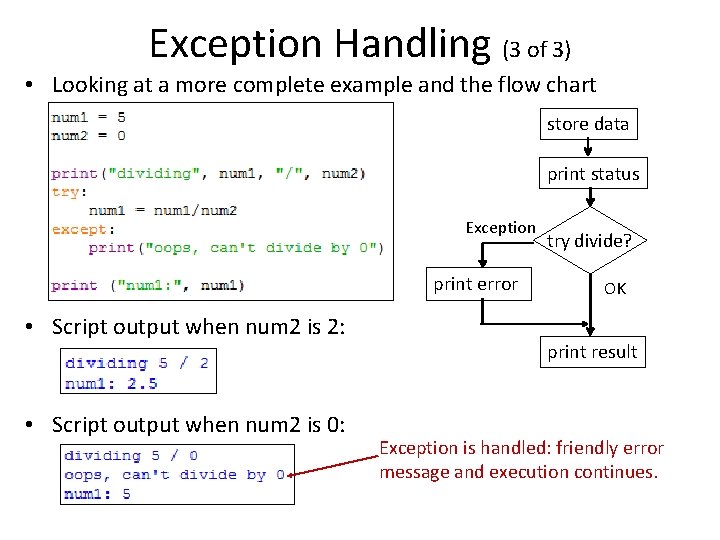
Exception Handling (2 of 3) • When we write code that can cause an exception: 1) we ask Python to try running the code, and 2) we write an except block of code that will be run if the exception happens. • Going back to our example code: code that can cause an exception is put in a try block except block runs if an exception occurs • The try except construct causes 2 paths to exist in the execution flow. – If there is no exception, then the division is successful and execution skips the except block and continues. – If there is exception, then the except block runs and our error message is printed. Then execution continues.
Exception Handling (3 of 3) • Looking at a more complete example and the flow chart store data print status Exception print error • Script output when num 2 is 2: • Script output when num 2 is 0: try divide? OK print result Exception is handled: friendly error message and execution continues.
What’s Next • In this module we learned to write code that can make choices based on conditions that occur during run time. • This makes the code more adaptable and more user friendly. • In the next module we learn the last construct in programming, loops, so that we can make the code even “smarter. ”