
Selamat Datang di Programming Essentials in Python Instruktur
- Slides: 51
Selamat Datang di “Programming Essentials in Python” Instruktur: Hendi Hermawan, S. T. , M. T. I. hendiananta@gmail. com / 085710098205 1
Profil Hendi Hermawan, S. T. , M. T. I. • hendiananta@gmail. com / 085710098205 • Dosen: • • Teknik Informatika, UMB, 2004 -2010 Multimedia, STDI Interstudi, 2010 -2014 Teknik Informatika, STTI NIIT I-Tech, 2005 -2014 Teknik Informatika, Univ. Pembangunan Jaya, 2014 -skg • Instruktur Cisco Academy Indonesia • Founder depokhosting. com 2
Boolean values, Conditional execution, loop, lists and list processing, logical and bitwise operators Modul 3 3
In this module, you will learn about: • Boolean values; • If-elif-else instructions; • The while and for loops; • Flow control; • Logical and bitwise operations; • Lists and arrays. 4
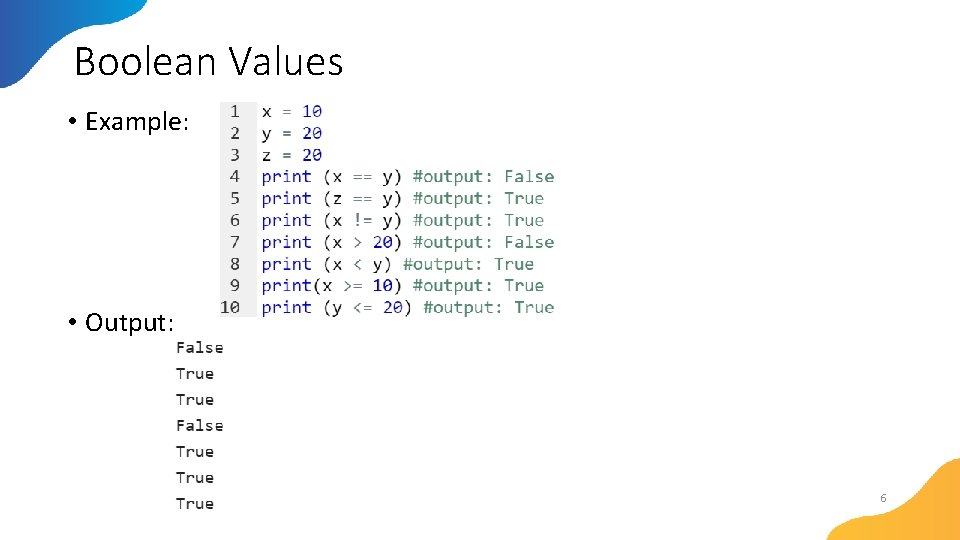
Boolean Values Python supports the usual logical conditions from mathematics: • Equals: a == b • Not Equals: a != b • Less than: a < b • Less than or equal to: a <= b • Greater than: a > b • Greater than or equal to: a >= b 5
Boolean Values • Example: • Output: 6
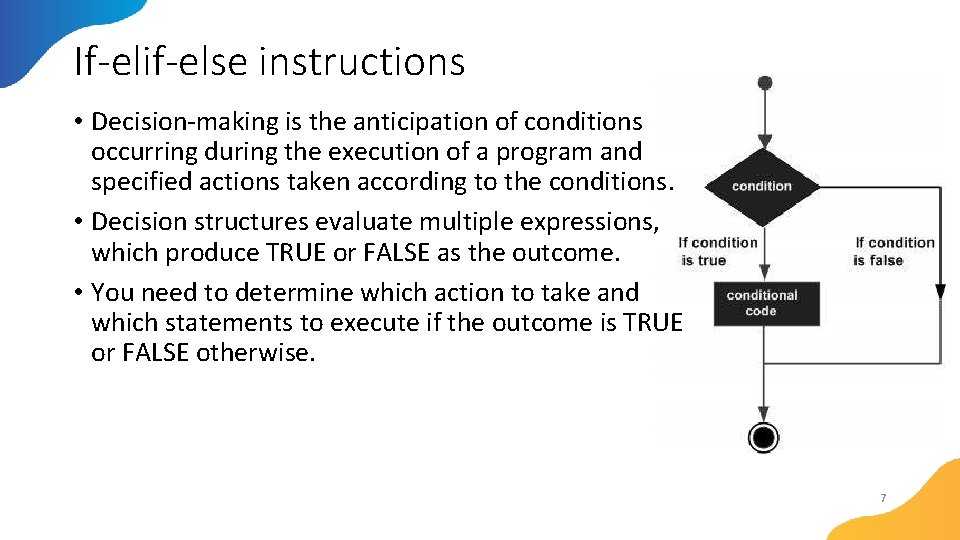
If-elif-else instructions • Decision-making is the anticipation of conditions occurring during the execution of a program and specified actions taken according to the conditions. • Decision structures evaluate multiple expressions, which produce TRUE or FALSE as the outcome. • You need to determine which action to take and which statements to execute if the outcome is TRUE or FALSE otherwise. 7
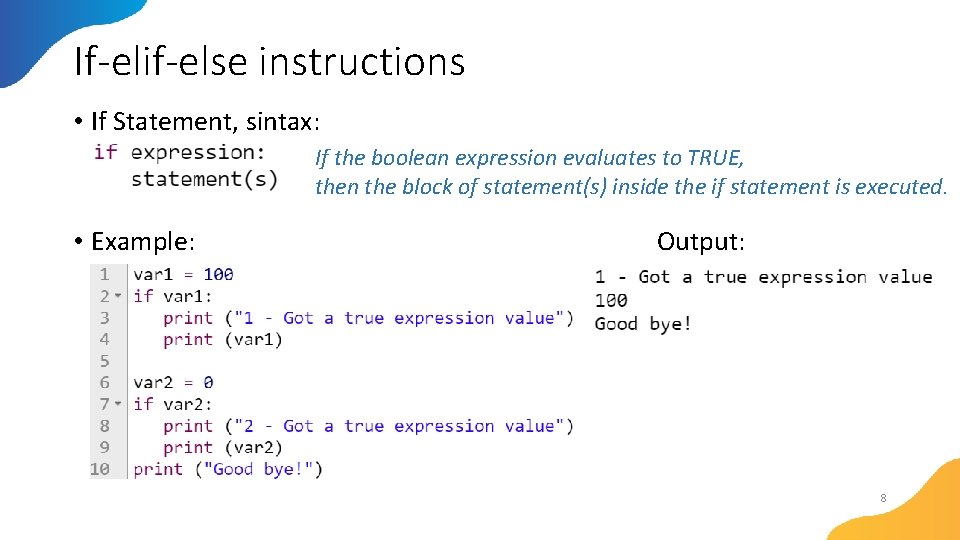
If-elif-else instructions • If Statement, sintax: If the boolean expression evaluates to TRUE, then the block of statement(s) inside the if statement is executed. • Example: Output: 8
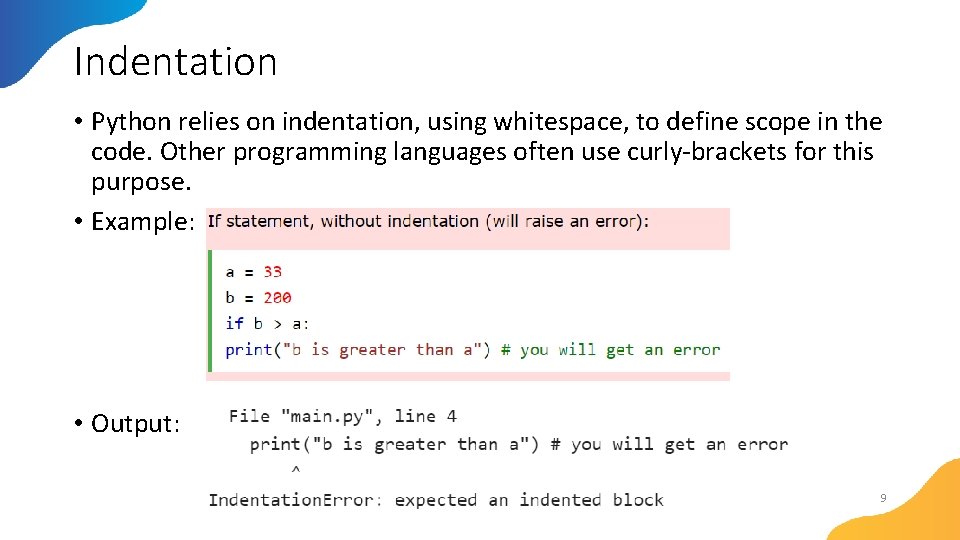
Indentation • Python relies on indentation, using whitespace, to define scope in the code. Other programming languages often use curly-brackets for this purpose. • Example: • Output: 9
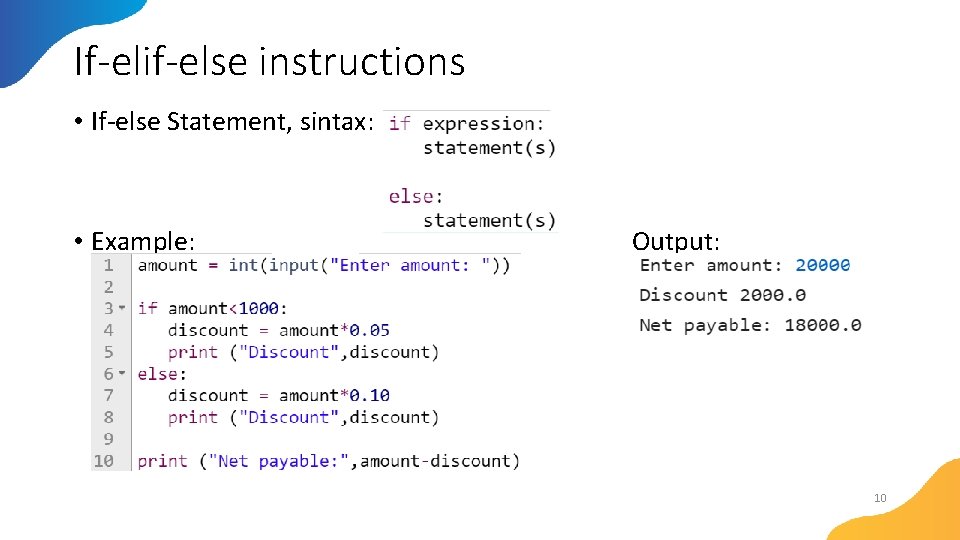
If-elif-else instructions • If-else Statement, sintax: • Example: Output: 10
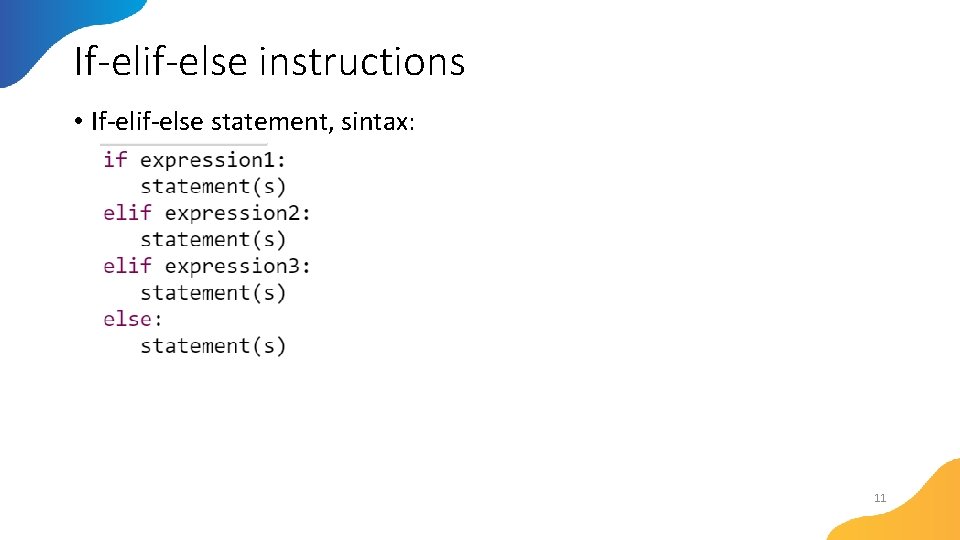
If-elif-else instructions • If-elif-else statement, sintax: 11
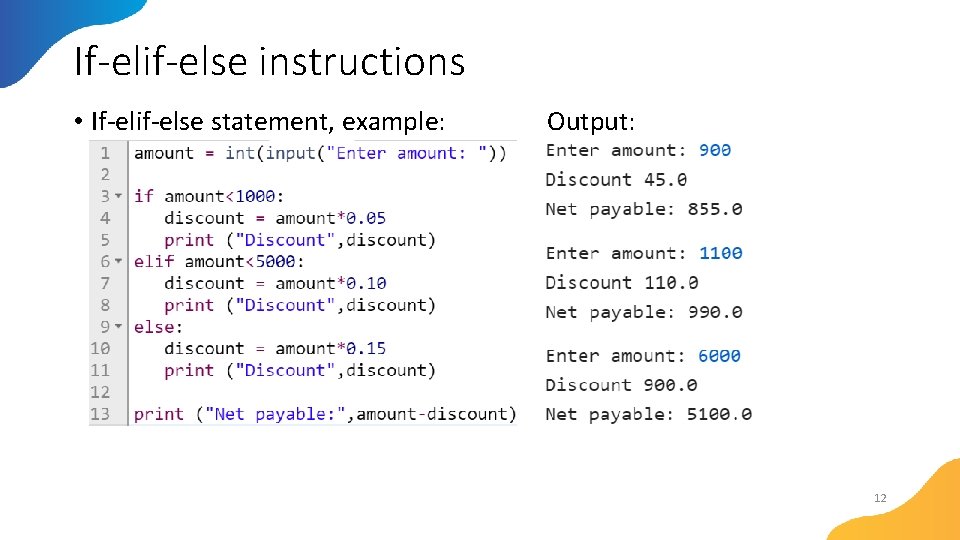
If-elif-else instructions • If-elif-else statement, example: Output: 12
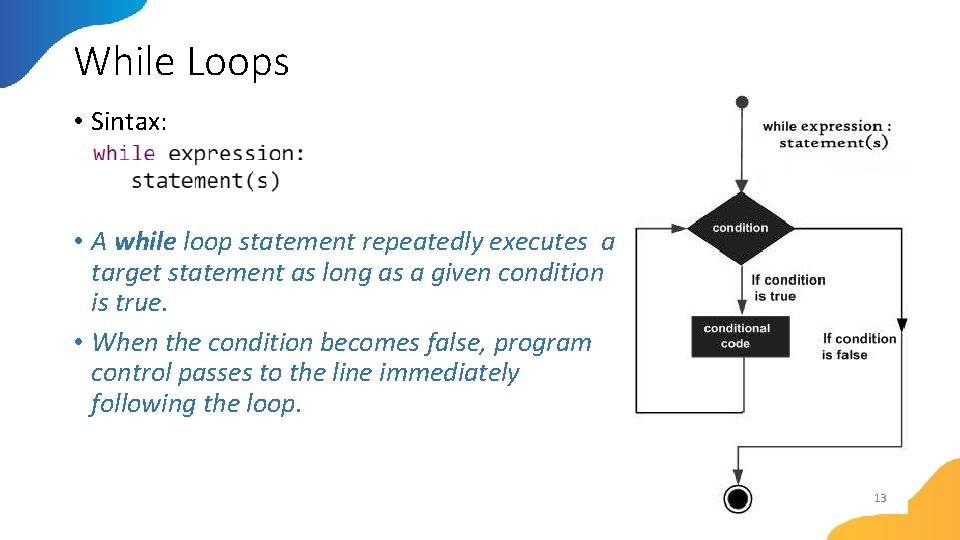
While Loops • Sintax: • A while loop statement repeatedly executes a target statement as long as a given condition is true. • When the condition becomes false, program control passes to the line immediately following the loop. 13
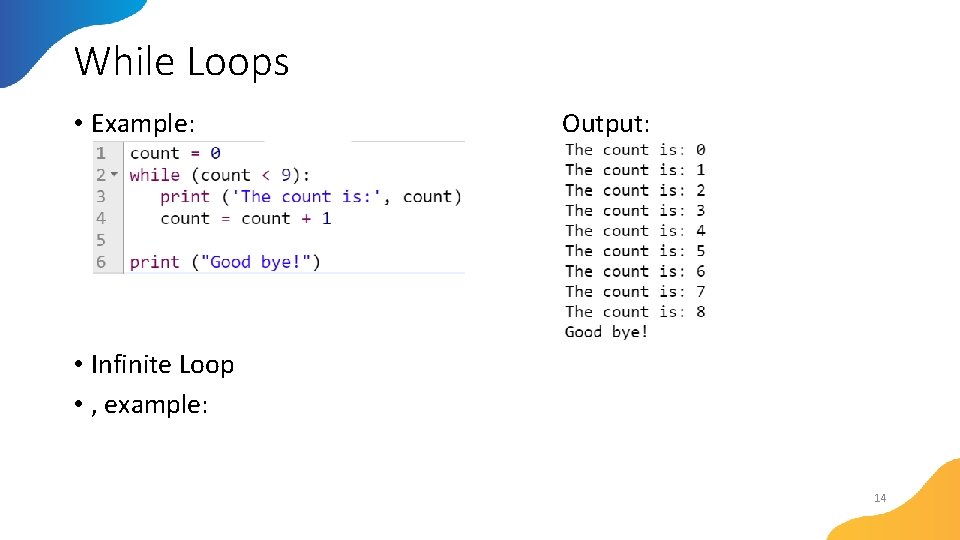
While Loops • Example: Output: • Infinite Loop • , example: 14
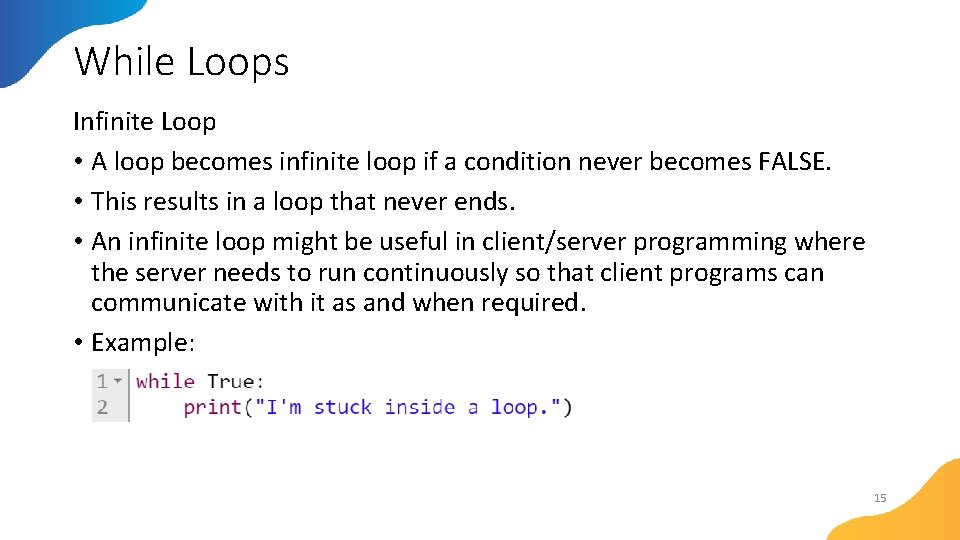
While Loops Infinite Loop • A loop becomes infinite loop if a condition never becomes FALSE. • This results in a loop that never ends. • An infinite loop might be useful in client/server programming where the server needs to run continuously so that client programs can communicate with it as and when required. • Example: 15
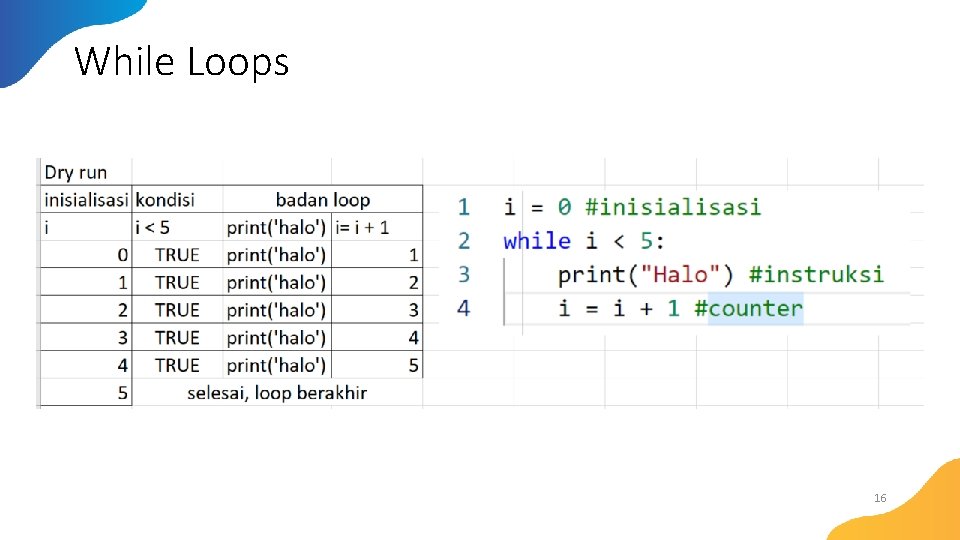
While Loops 16
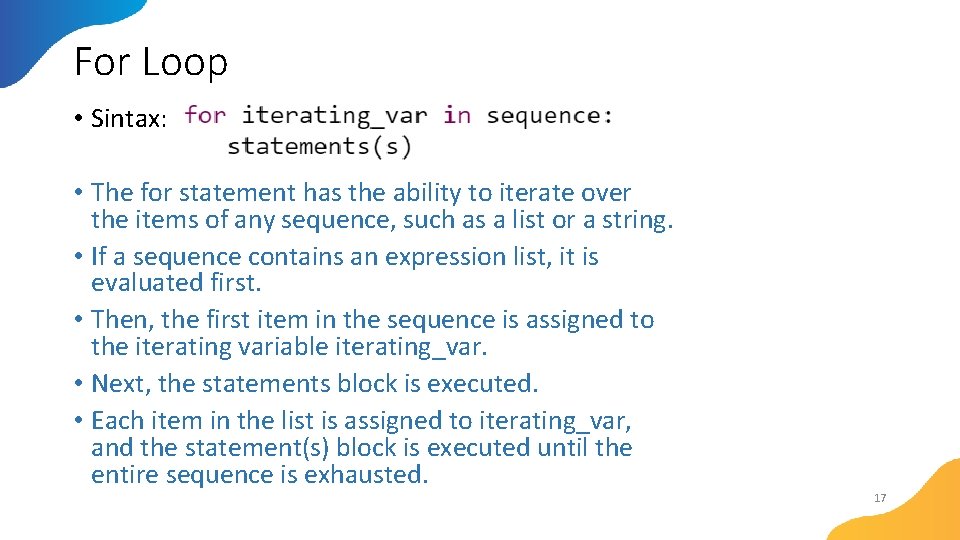
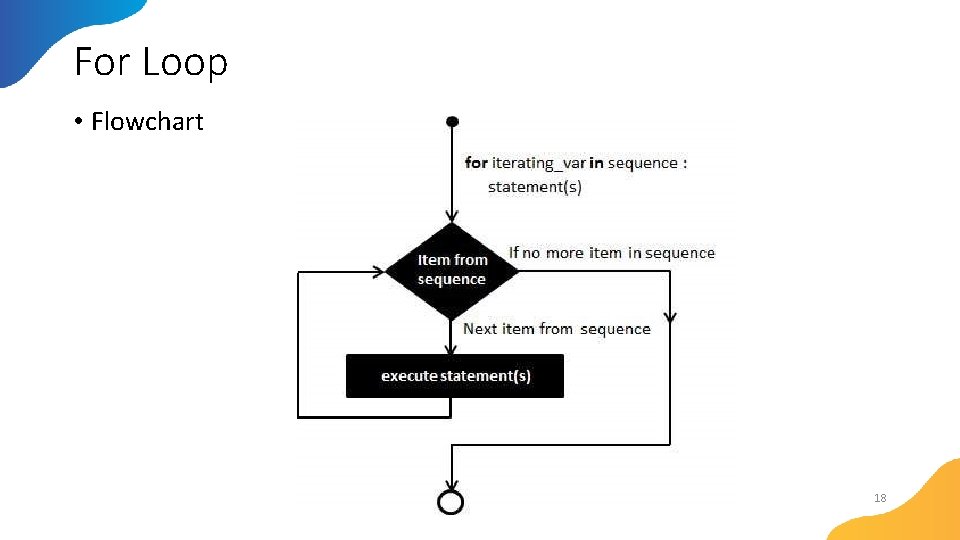
For Loop • Sintax: • The for statement has the ability to iterate over the items of any sequence, such as a list or a string. • If a sequence contains an expression list, it is evaluated first. • Then, the first item in the sequence is assigned to the iterating variable iterating_var. • Next, the statements block is executed. • Each item in the list is assigned to iterating_var, and the statement(s) block is executed until the entire sequence is exhausted. 17
For Loop • Flowchart 18
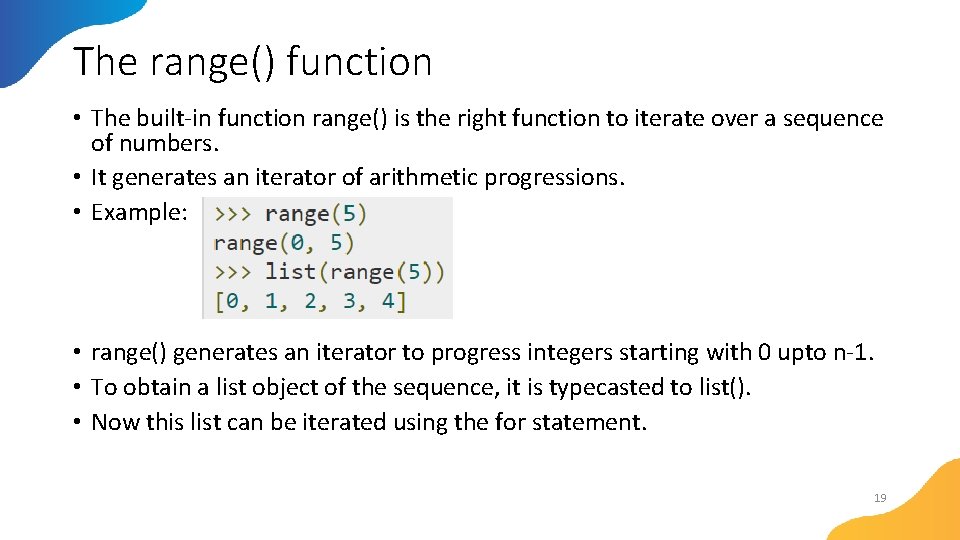
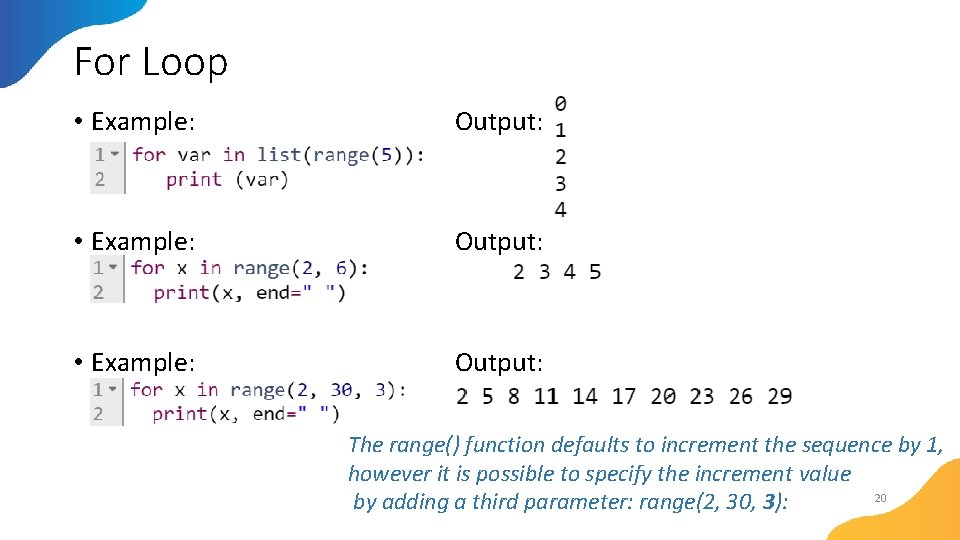
The range() function • The built-in function range() is the right function to iterate over a sequence of numbers. • It generates an iterator of arithmetic progressions. • Example: • range() generates an iterator to progress integers starting with 0 upto n-1. • To obtain a list object of the sequence, it is typecasted to list(). • Now this list can be iterated using the for statement. 19
For Loop • Example: Output: The range() function defaults to increment the sequence by 1, however it is possible to specify the increment value 20 by adding a third parameter: range(2, 30, 3):
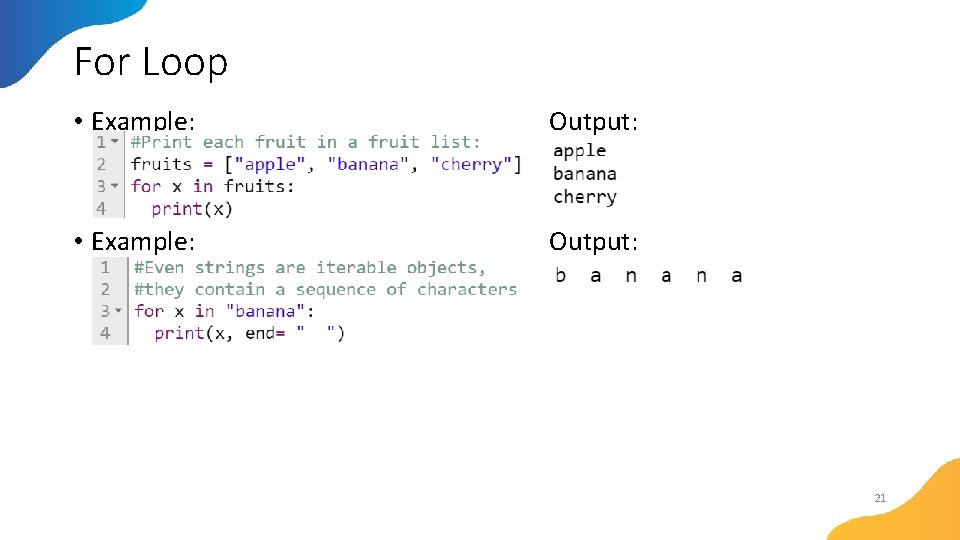
For Loop • Example: Output: 21
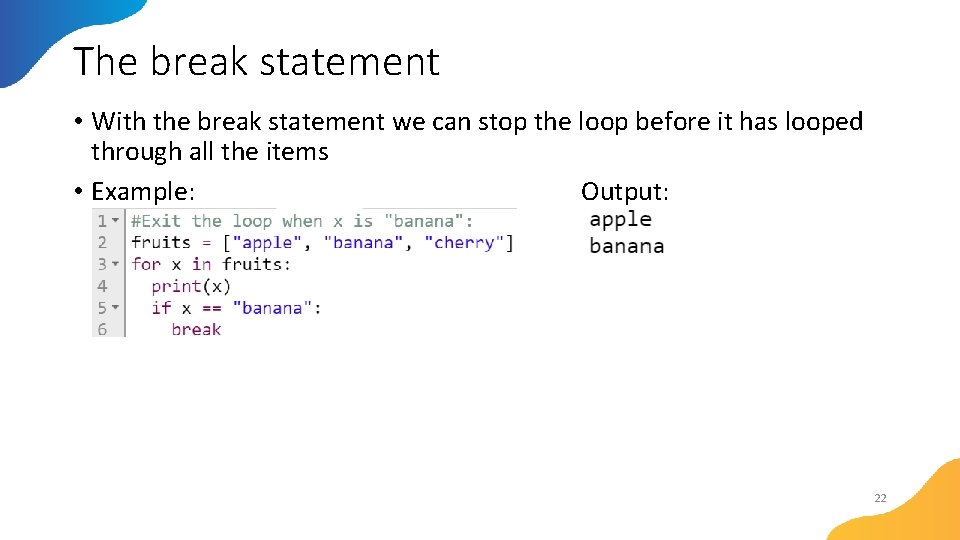
The break statement • With the break statement we can stop the loop before it has looped through all the items • Example: Output: 22
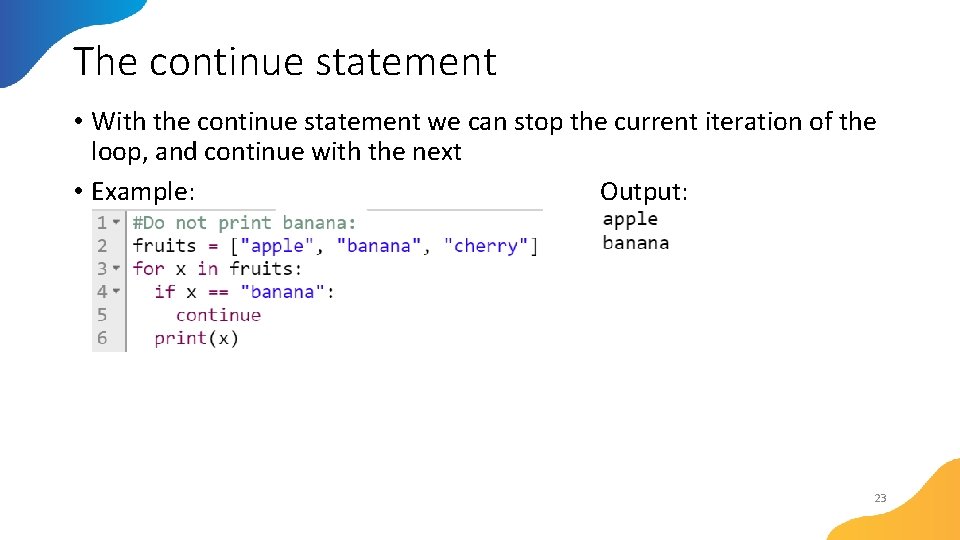
The continue statement • With the continue statement we can stop the current iteration of the loop, and continue with the next • Example: Output: 23
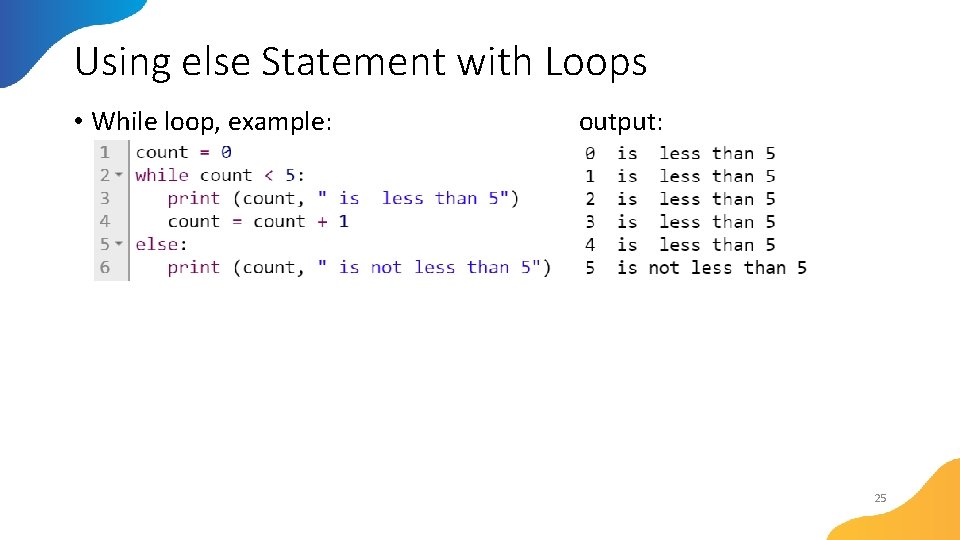
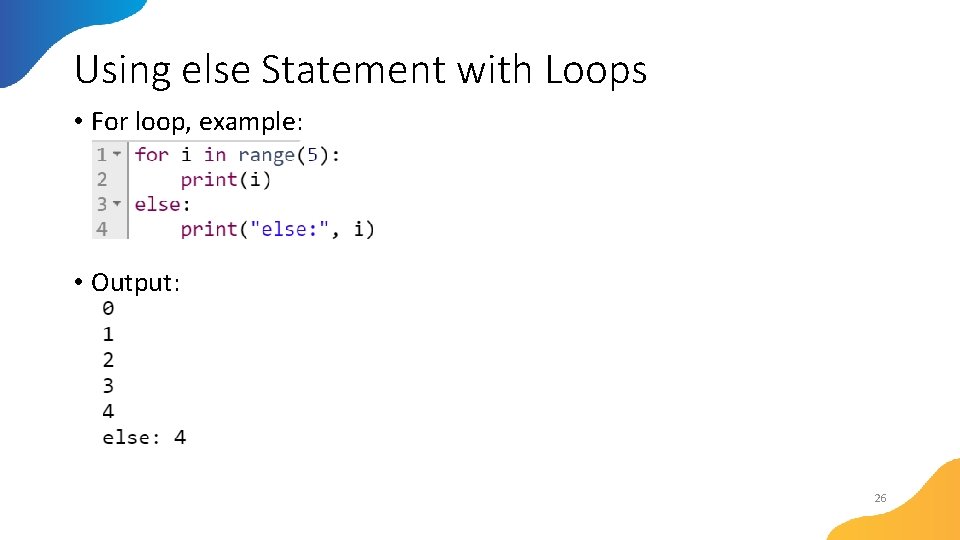
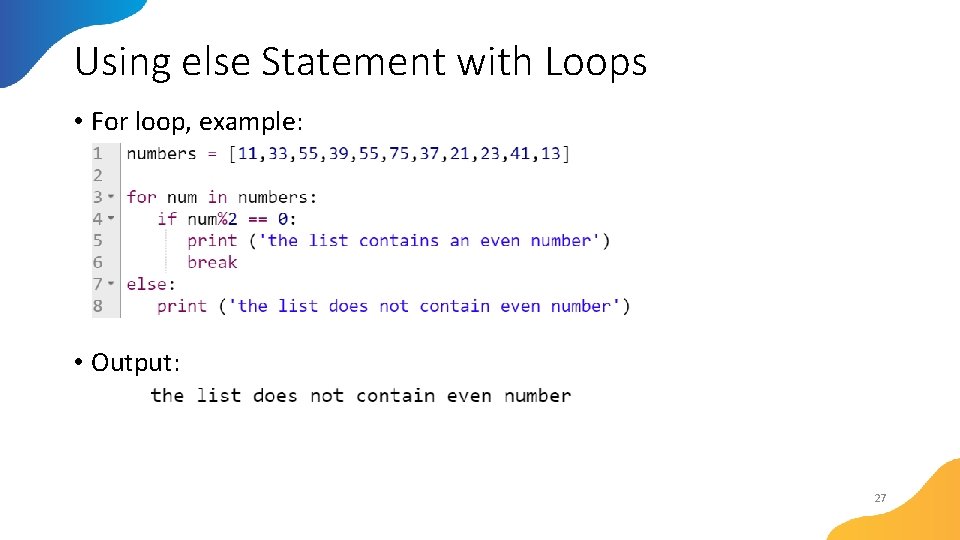
Using else Statement with Loops • If the else statement is used with a for loop, the else statement is executed when the loop has exhausted iterating the list. • If the else statement is used with a while loop, the else statement is executed when the condition becomes false. 24
Using else Statement with Loops • While loop, example: output: 25
Using else Statement with Loops • For loop, example: • Output: 26
Using else Statement with Loops • For loop, example: • Output: 27
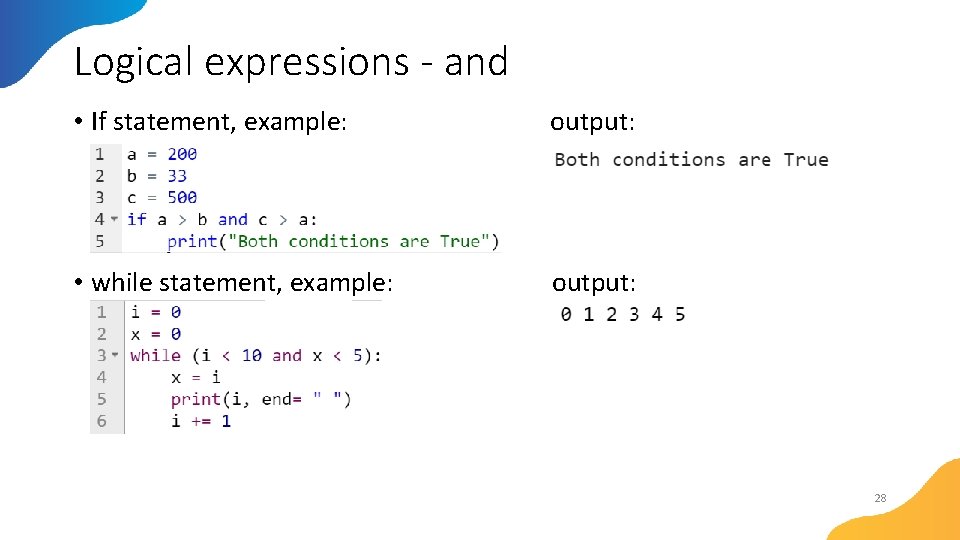
Logical expressions - and • If statement, example: output: • while statement, example: output: 28
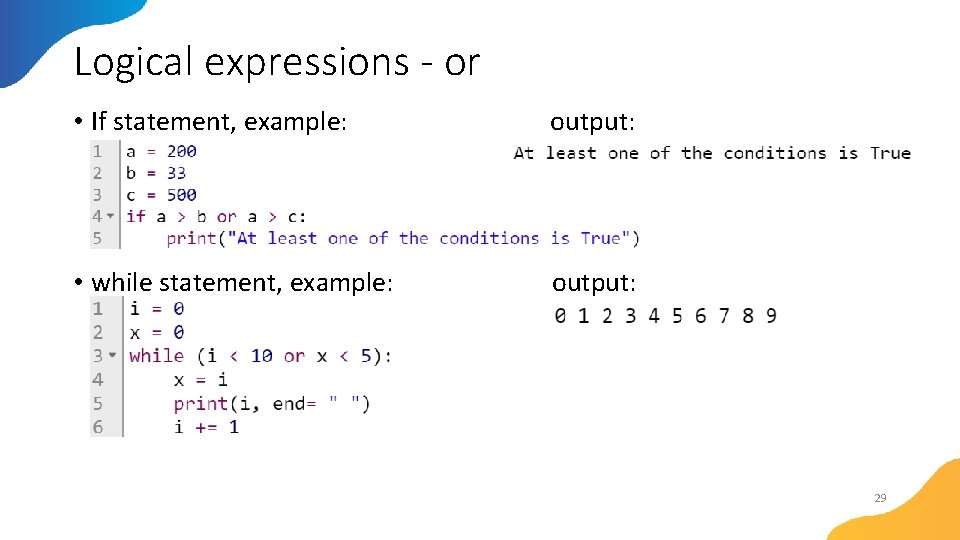
Logical expressions - or • If statement, example: output: • while statement, example: output: 29
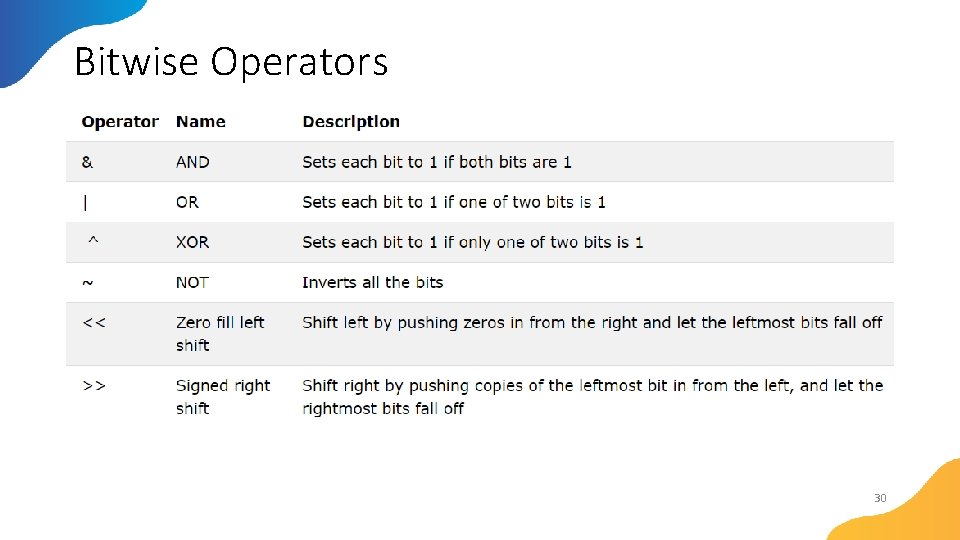
Bitwise Operators 30
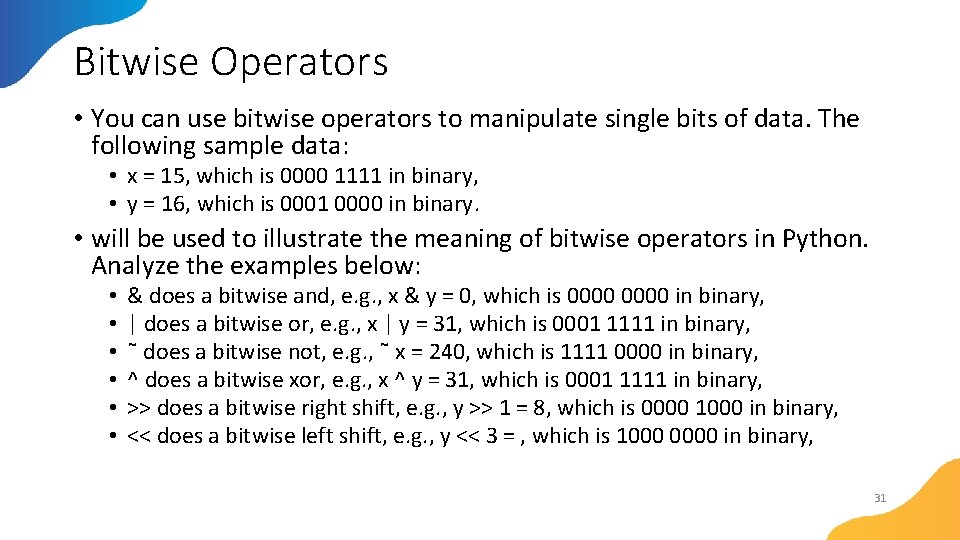
Bitwise Operators • You can use bitwise operators to manipulate single bits of data. The following sample data: • x = 15, which is 0000 1111 in binary, • y = 16, which is 0001 0000 in binary. • will be used to illustrate the meaning of bitwise operators in Python. Analyze the examples below: • • • & does a bitwise and, e. g. , x & y = 0, which is 0000 in binary, | does a bitwise or, e. g. , x | y = 31, which is 0001 1111 in binary, ˜ does a bitwise not, e. g. , ˜ x = 240, which is 1111 0000 in binary, ^ does a bitwise xor, e. g. , x ^ y = 31, which is 0001 1111 in binary, >> does a bitwise right shift, e. g. , y >> 1 = 8, which is 0000 1000 in binary, << does a bitwise left shift, e. g. , y << 3 = , which is 1000 0000 in binary, 31
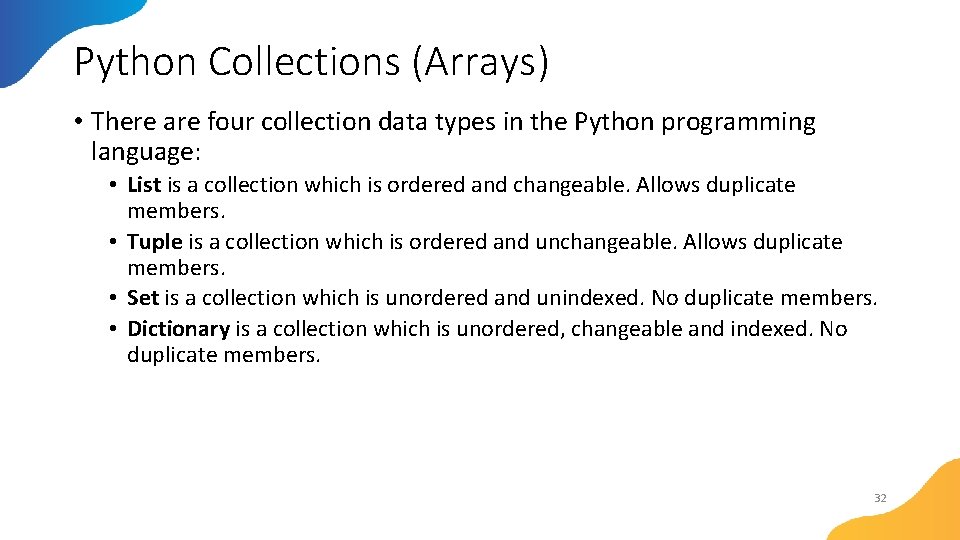
Python Collections (Arrays) • There are four collection data types in the Python programming language: • List is a collection which is ordered and changeable. Allows duplicate members. • Tuple is a collection which is ordered and unchangeable. Allows duplicate members. • Set is a collection which is unordered and unindexed. No duplicate members. • Dictionary is a collection which is unordered, changeable and indexed. No duplicate members. 32
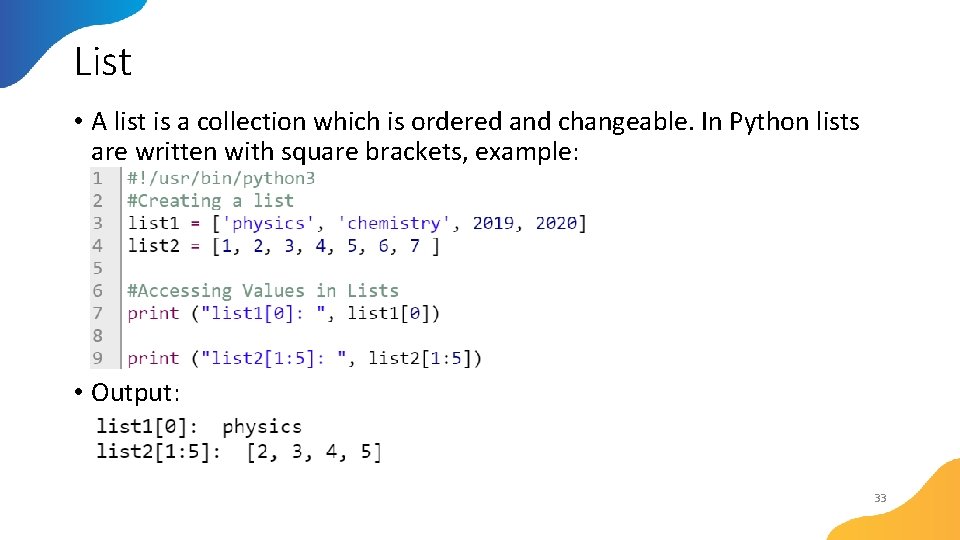
List • A list is a collection which is ordered and changeable. In Python lists are written with square brackets, example: • Output: 33
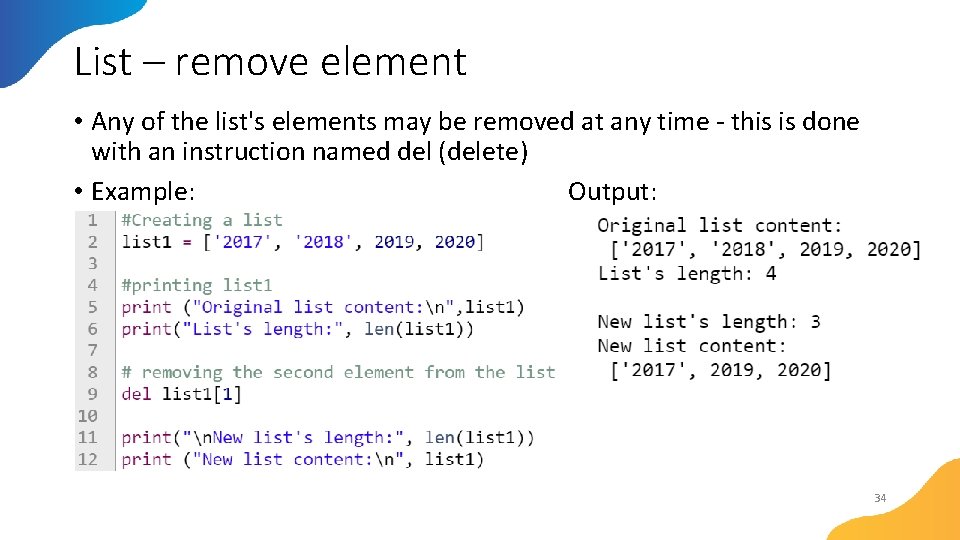
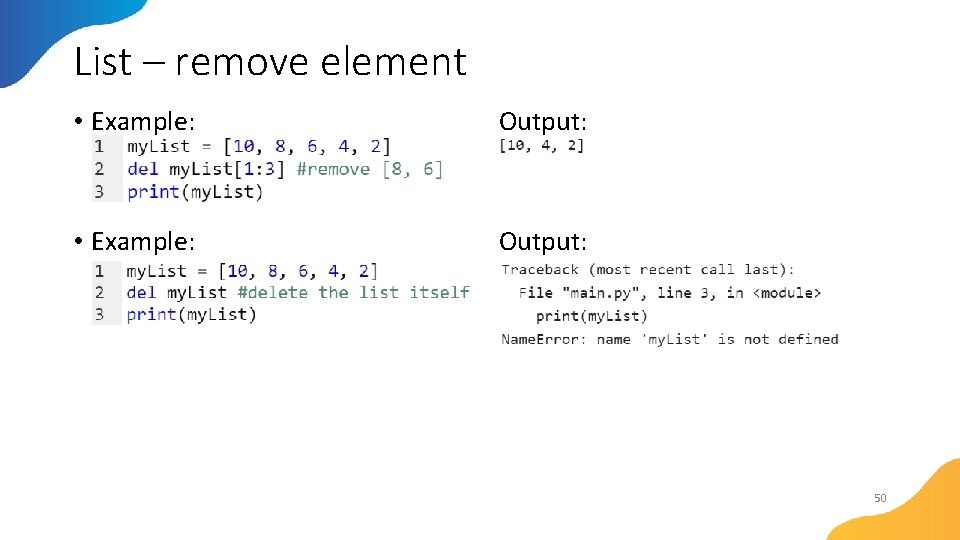
List – remove element • Any of the list's elements may be removed at any time - this is done with an instruction named del (delete) • Example: Output: 34
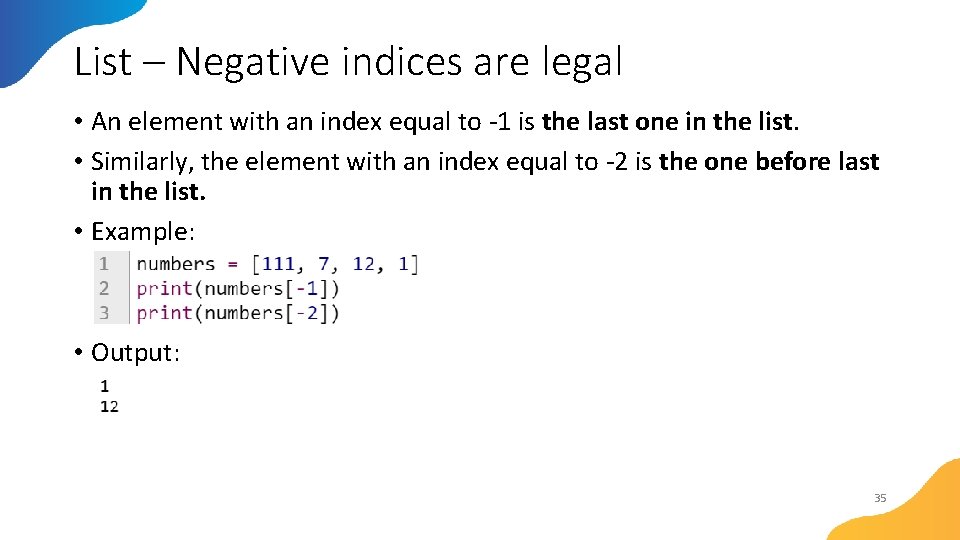
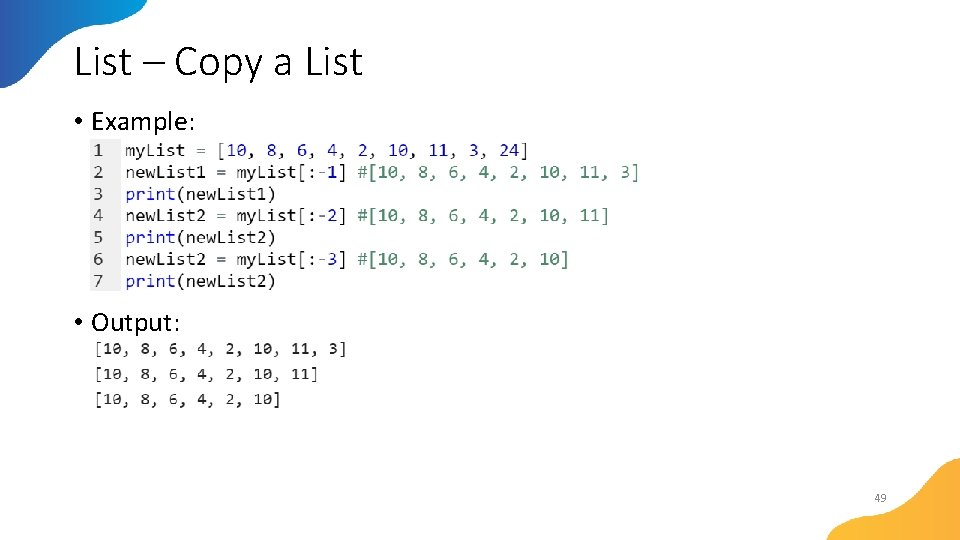
List – Negative indices are legal • An element with an index equal to -1 is the last one in the list. • Similarly, the element with an index equal to -2 is the one before last in the list. • Example: • Output: 35
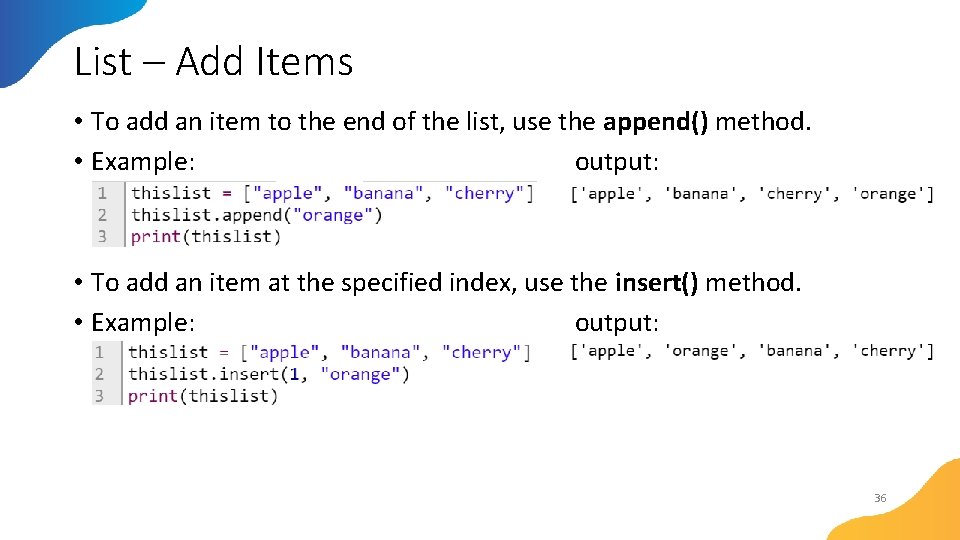
List – Add Items • To add an item to the end of the list, use the append() method. • Example: output: • To add an item at the specified index, use the insert() method. • Example: output: 36
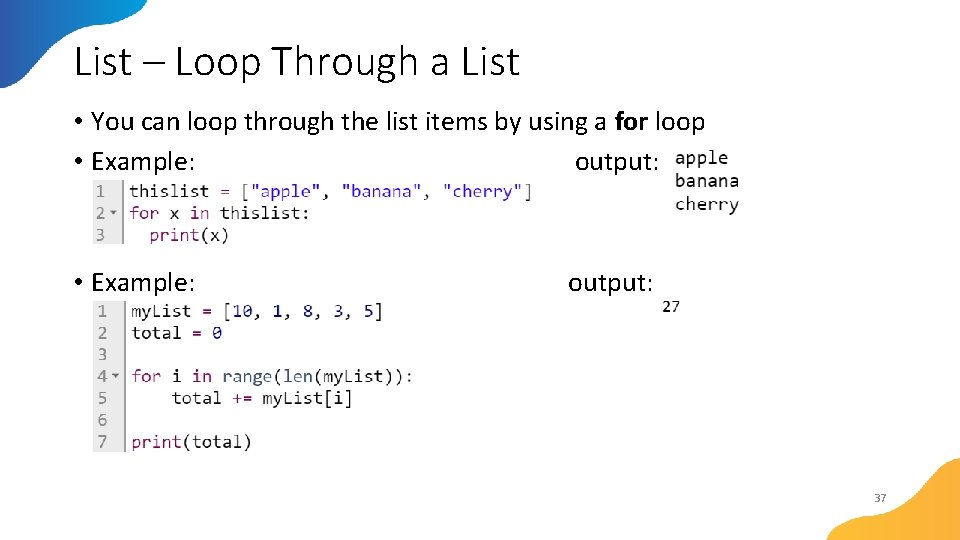
List – Loop Through a List • You can loop through the list items by using a for loop • Example: output: • Example: output: 37
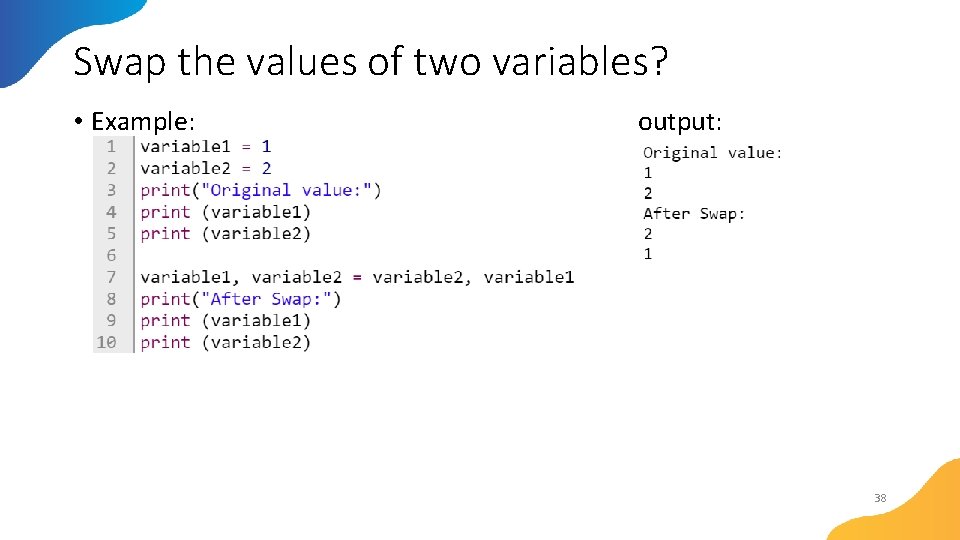
Swap the values of two variables? • Example: output: 38
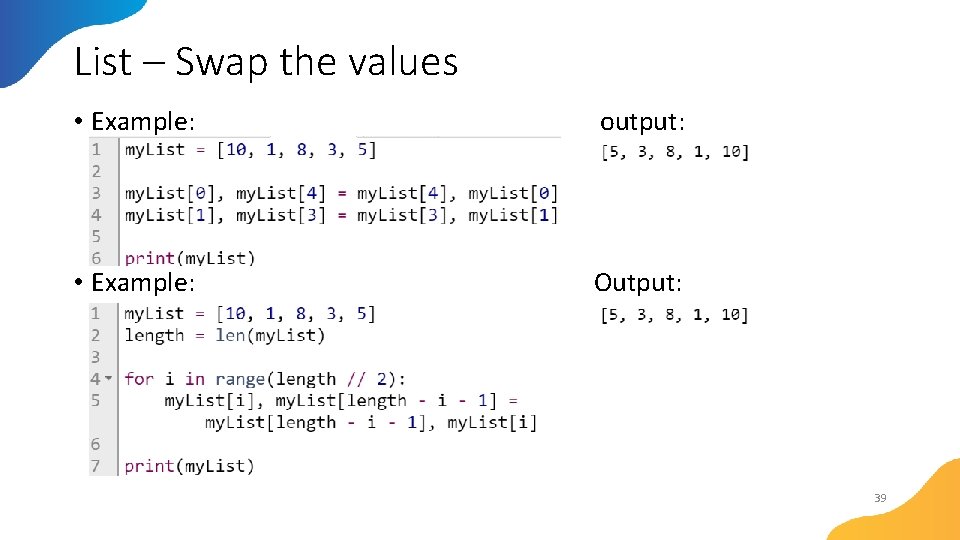
List – Swap the values • Example: output: • Example: Output: 39
List – The Bubble Sort • Now that you can effectively juggle the elements of lists, it's time to learn how to sort them • Let's say that a list can be sorted in two ways: • increasing (or more precisely - non-decreasing) - if in every pair of adjacent elements, the former element is not greater than the latter; • decreasing (or more precisely - non-increasing) - if in every pair of adjacent elements, the former element is not less than the latter. • In the following sections, we'll sort the list in increasing order, so that the numbers will be ordered from the smallest to the largest. 40
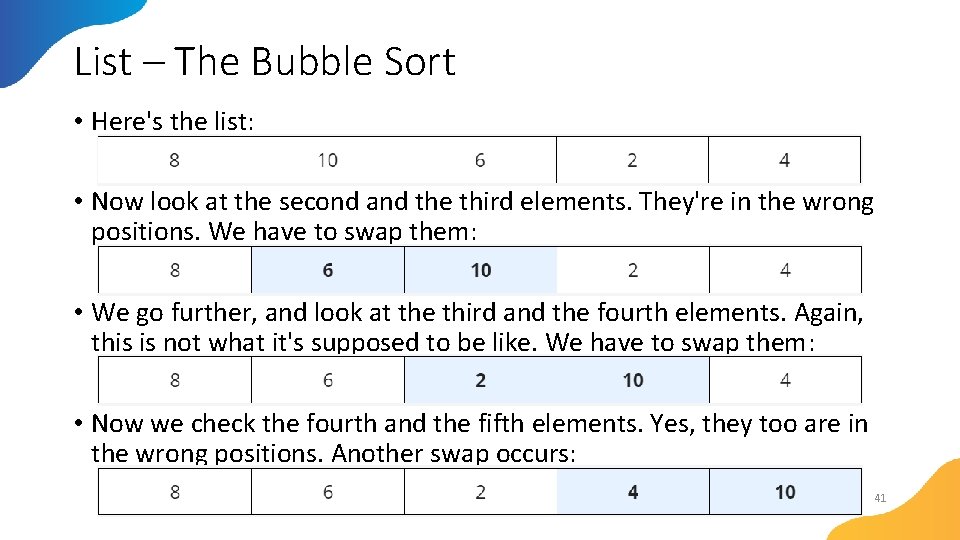
List – The Bubble Sort • Here's the list: • Now look at the second and the third elements. They're in the wrong positions. We have to swap them: • We go further, and look at the third and the fourth elements. Again, this is not what it's supposed to be like. We have to swap them: • Now we check the fourth and the fifth elements. Yes, they too are in the wrong positions. Another swap occurs: 41
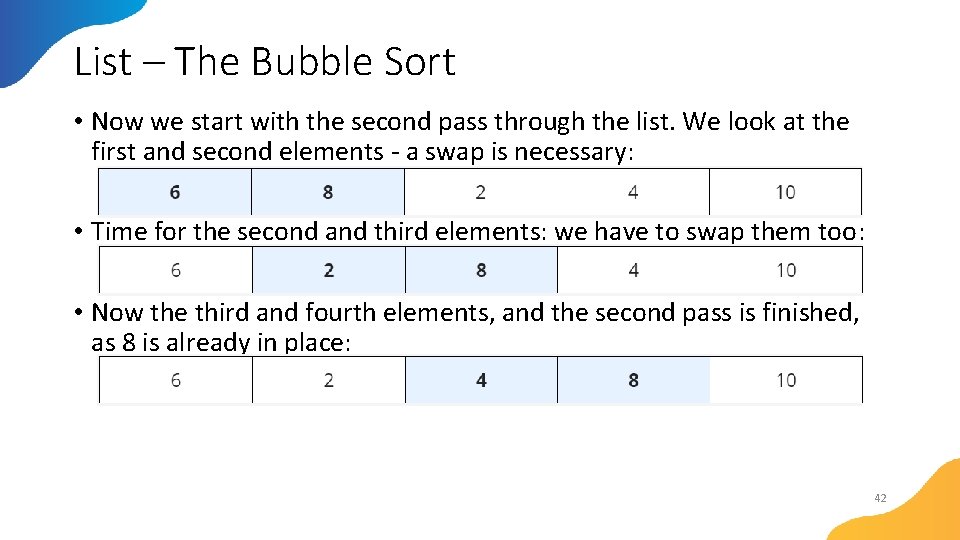
List – The Bubble Sort • Now we start with the second pass through the list. We look at the first and second elements - a swap is necessary: • Time for the second and third elements: we have to swap them too: • Now the third and fourth elements, and the second pass is finished, as 8 is already in place: 42
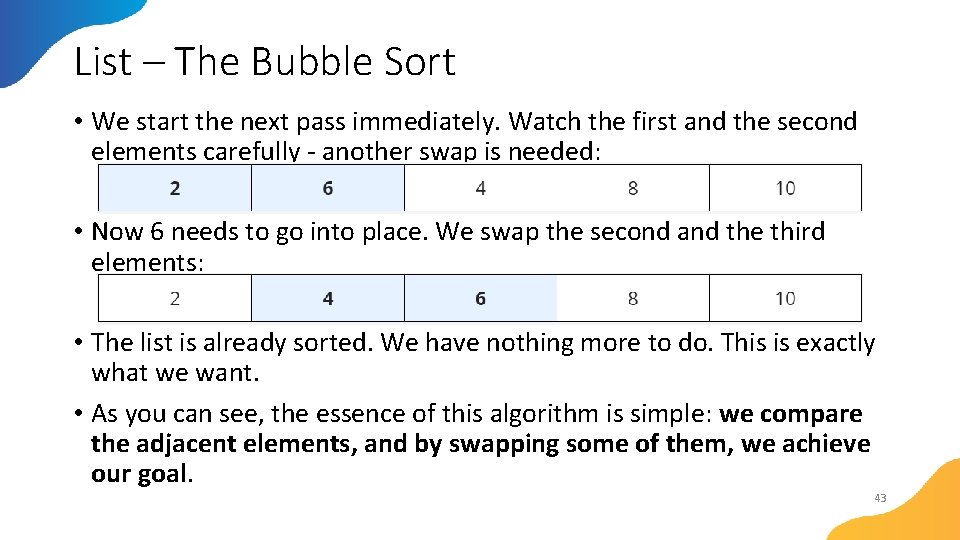
List – The Bubble Sort • We start the next pass immediately. Watch the first and the second elements carefully - another swap is needed: • Now 6 needs to go into place. We swap the second and the third elements: • The list is already sorted. We have nothing more to do. This is exactly what we want. • As you can see, the essence of this algorithm is simple: we compare the adjacent elements, and by swapping some of them, we achieve our goal. 43
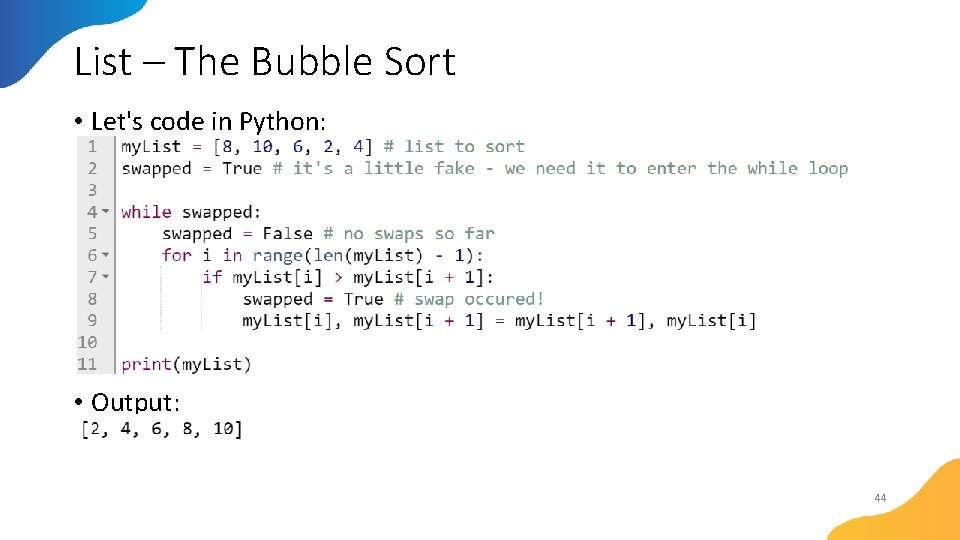
List – The Bubble Sort • Let's code in Python: • Output: 44
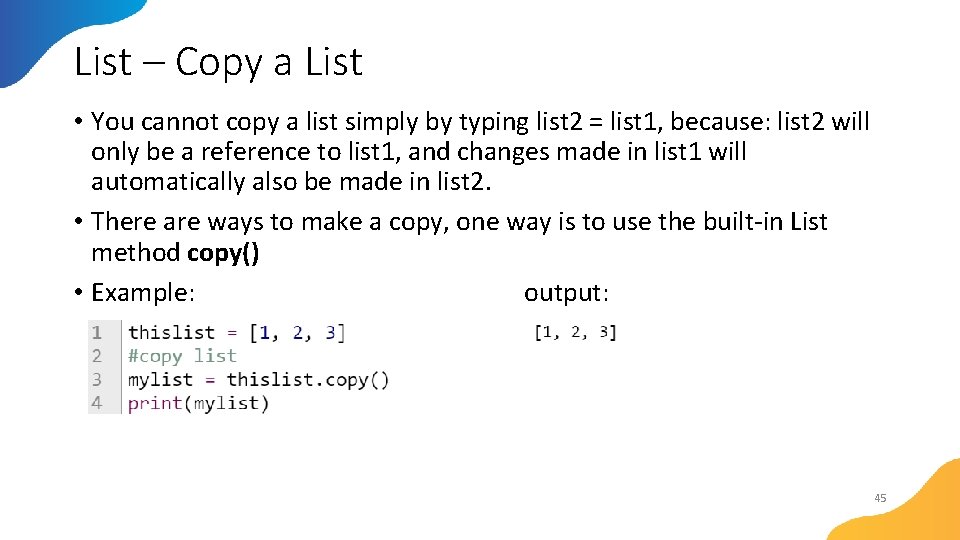
List – Copy a List • You cannot copy a list simply by typing list 2 = list 1, because: list 2 will only be a reference to list 1, and changes made in list 1 will automatically also be made in list 2. • There are ways to make a copy, one way is to use the built-in List method copy() • Example: output: 45
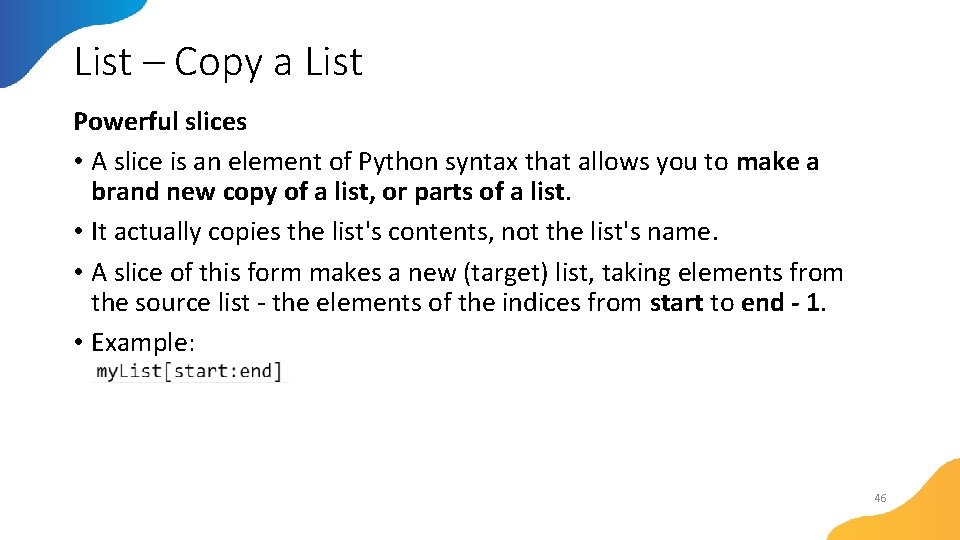
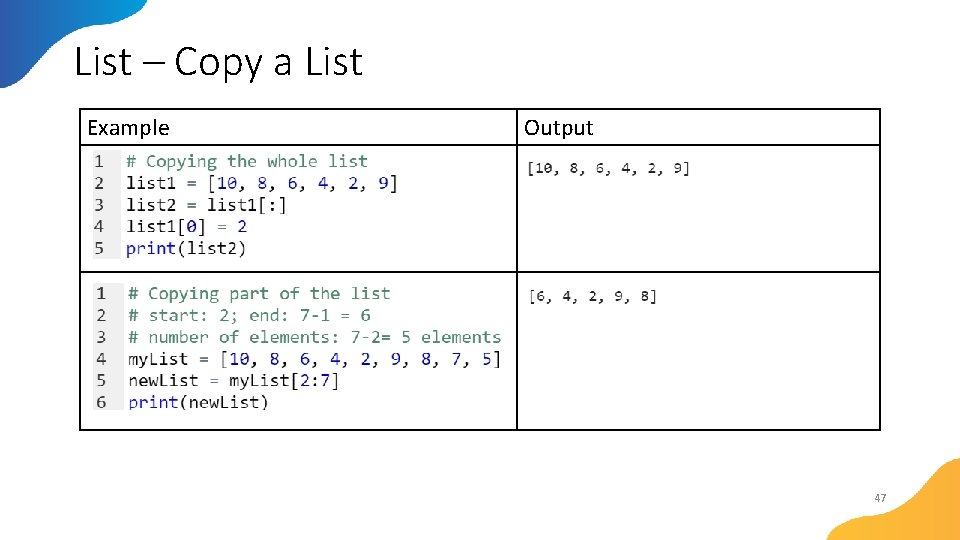
List – Copy a List Powerful slices • A slice is an element of Python syntax that allows you to make a brand new copy of a list, or parts of a list. • It actually copies the list's contents, not the list's name. • A slice of this form makes a new (target) list, taking elements from the source list - the elements of the indices from start to end - 1. • Example: 46
List – Copy a List Example Output 47
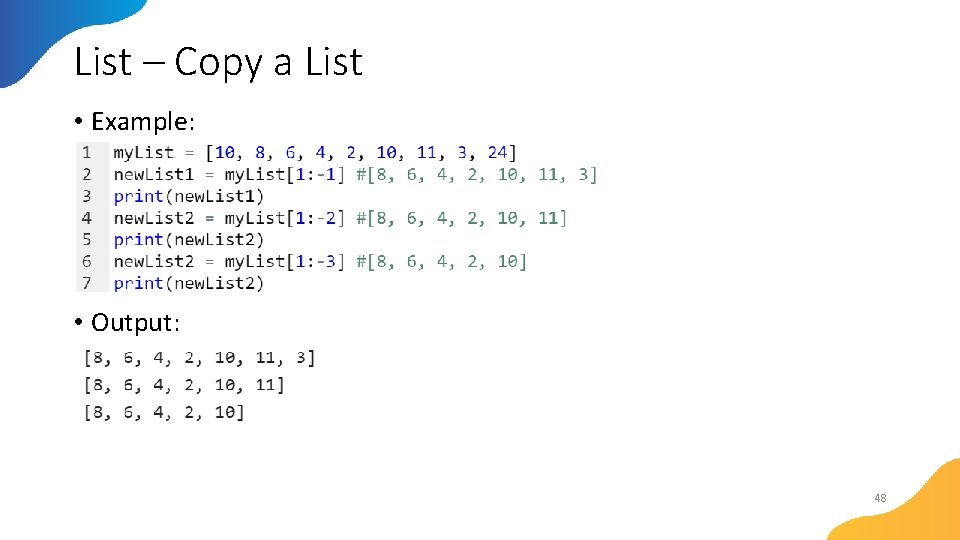
List – Copy a List • Example: • Output: 48
List – Copy a List • Example: • Output: 49
List – remove element • Example: Output: 50
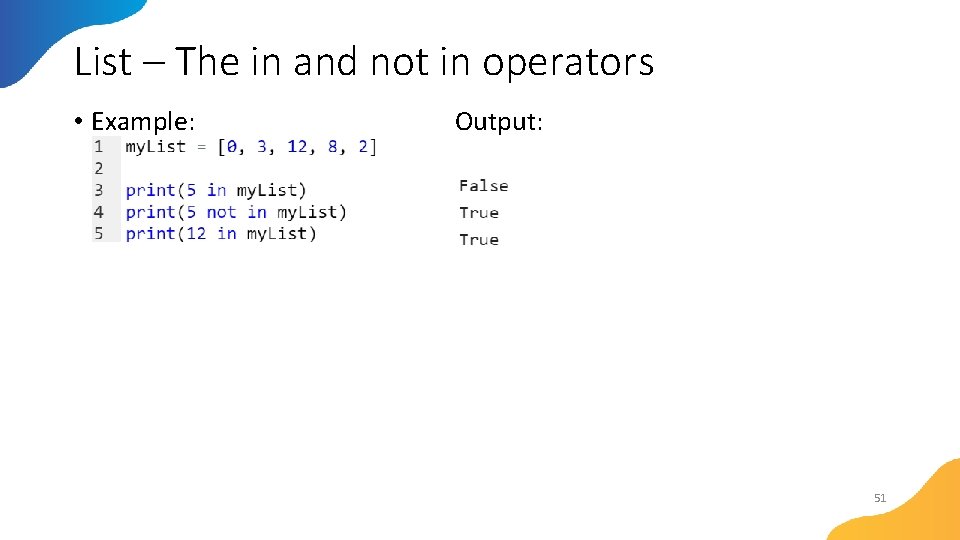
List – The in and not in operators • Example: Output: 51