
See Soft A Visualization Tool Topics for discussion
- Slides: 19
See. Soft A Visualization Tool.
Topics for discussion: • Why was the software developed? • What data does it Visualizes? • How does it visualize the data? (What are the key features? ) • Where are some of its uses? • Some field experience. • What are it’s short comings?
Why was the System Developed ?
To understand the line level statistics collected from tools like • Version Control Systems. • Change Management Systems. • Static Analyzers. • Dynamic Analyzers.
So what data does See. Soft visualize?
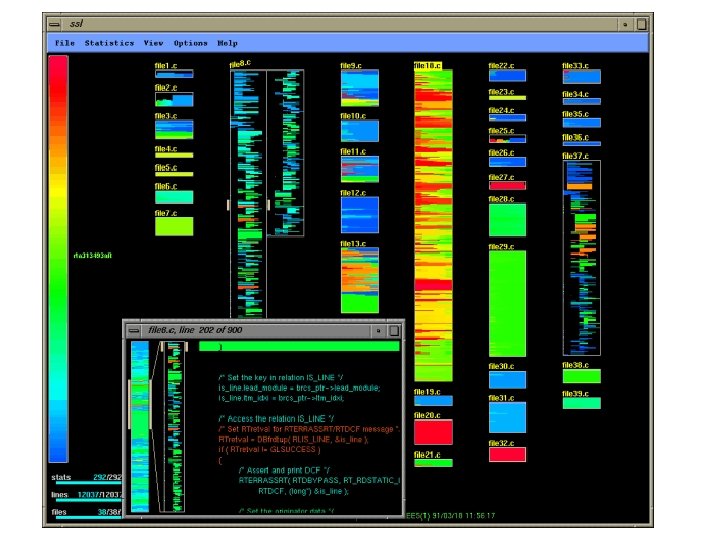
• Source code and control data and text meta data file and function size access history bug locations and fixes • Code data and structure data structures, data flow, code profiles, function call graphs • Code execution data and algorithm animation, communication and message passing, control flow, memory and resource utilization • Code and Human interaction process software development process (code, developers, users)
How does it represents all that data? (What are the key features)
The 4 key-ideas are • Reduced Representation • Coloring by Statistics • Direct Manipulation • Capability to read actual code
. What are the different measuring statistics used? • Age • Programmer • Number of times the line was executed. • Modification Request.
Uses? ?
• We can know things like age of the file. • The age of the code. • When each file was last changed. • When each code was last changed • Which code was added as a result of what MR. • Which files have been changed most often. • And what files are being modified the most as a result of the bug fixing MRs. • Who did what, where and when
Applications: • Code discovery • New developer training • Project management • Quality assurance and system testing • Software analysis and archeological studies • Code coverage analysis • Code execution optimization
Some field experiences : • Favorable Responses. • To gain Familiarity • Change control • Balance of Load • System development
What are the new application areas that are being considered ? 1. Display of large amount of Texts. 2. Visualization of Directories and files.
What are the limitations of this system ? • Only 50, 000 lines of code can be displayed • Difficult to use with the monochrome devices
HCI Metrics • Fairly easy to learn. • Easy to use. • User satisfaction? • Highly Retentive. • Error – recovery is easy.
Any Questions?
Thanks (Phew !!!!)