
Security Systems BU Communication Systems How to configure
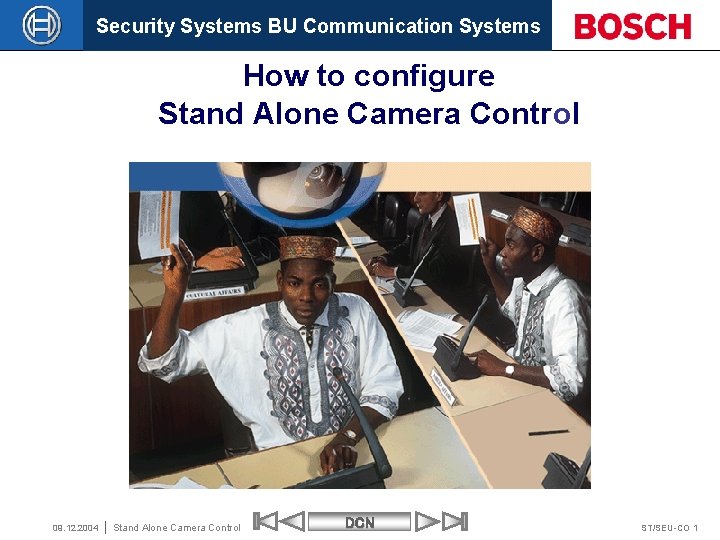
Security Systems BU Communication Systems How to configure Stand Alone Camera Control 09. 12. 2004 Stand Alone Camera Control DCN ST/SEU-CO 1
Security Systems BU Communication Systems This presentation is intended to guide the installer step by step through camera control installation. 09. 12. 2004 Stand Alone Camera Control DCN ST/SEU-CO 2
Security Systems BU Communication Systems Standalone DCN system with Camera Control • Direct Camera Control • With Allegiant Video Switcher 09. 12. 2004 Stand Alone Camera Control DCN ST/SEU-CO 3
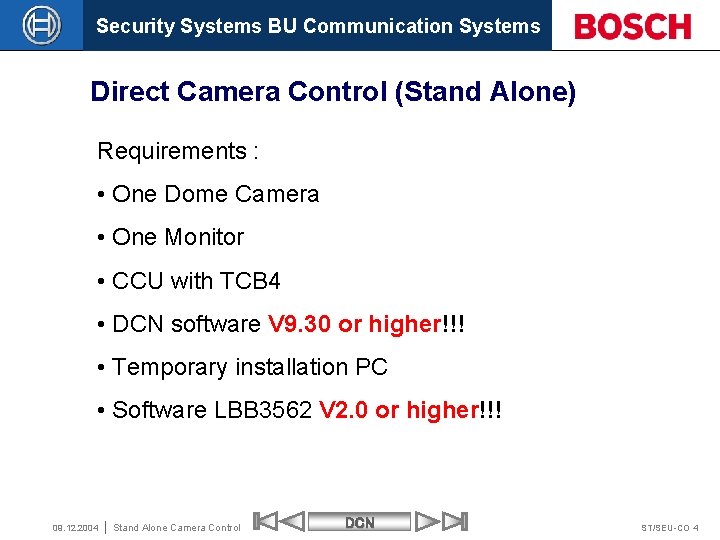
Security Systems BU Communication Systems Direct Camera Control (Stand Alone) Requirements : • One Dome Camera • One Monitor • CCU with TCB 4 • DCN software V 9. 30 or higher!!! • Temporary installation PC • Software LBB 3562 V 2. 0 or higher!!! 09. 12. 2004 Stand Alone Camera Control DCN ST/SEU-CO 4

Security Systems BU Communication Systems Step 1 Connect PC and Monitor to Dome Camera Temporary PC RS 232 Auto. Dome Camera with one Comport Make sure that the Dome camera has an address. 09. 12. 2004 Stand Alone Camera Control DCN ST/SEU-CO 5

Security Systems BU Communication Systems Step 2 Install virtual keyboard software LTC 5138/00 Virtual Keyboard Program Temporary PC RS 232 Auto. Dome Camera with one Comport 09. 12. 2004 Stand Alone Camera Control DCN ST/SEU-CO 6
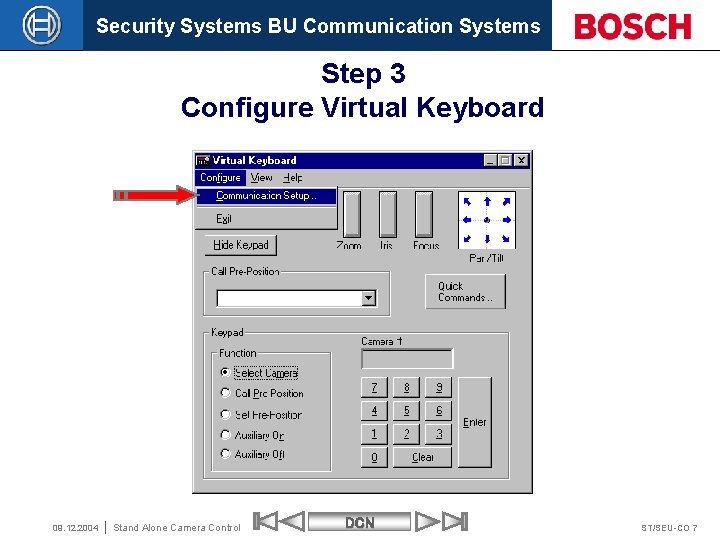
Security Systems BU Communication Systems Step 3 Configure Virtual Keyboard 09. 12. 2004 Stand Alone Camera Control DCN ST/SEU-CO 7
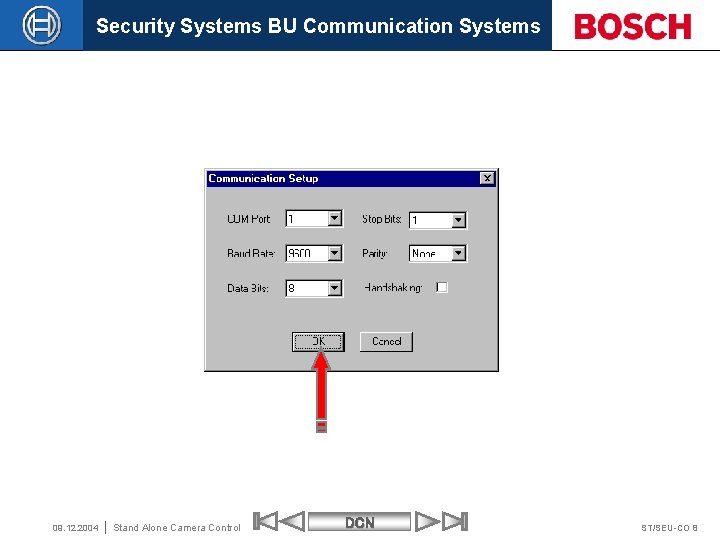
Security Systems BU Communication Systems 09. 12. 2004 Stand Alone Camera Control DCN ST/SEU-CO 8
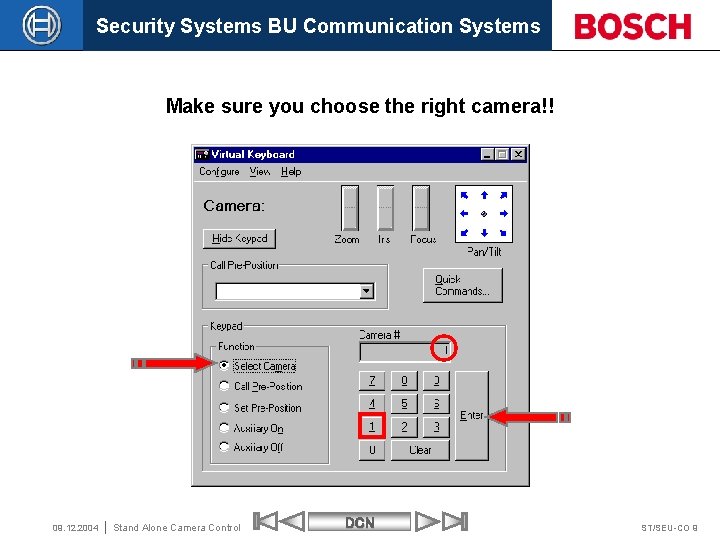
Security Systems BU Communication Systems Make sure you choose the right camera!! 09. 12. 2004 Stand Alone Camera Control DCN ST/SEU-CO 9
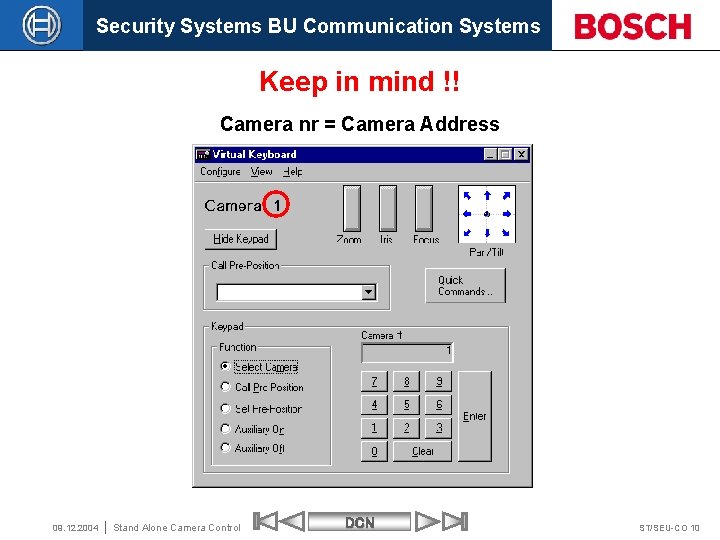
Security Systems BU Communication Systems Keep in mind !! Camera nr = Camera Address 09. 12. 2004 Stand Alone Camera Control DCN ST/SEU-CO 10
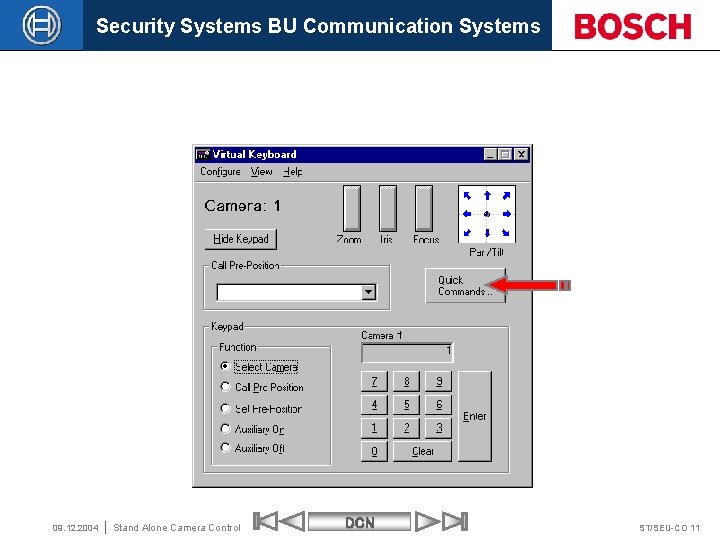
Security Systems BU Communication Systems 09. 12. 2004 Stand Alone Camera Control DCN ST/SEU-CO 11
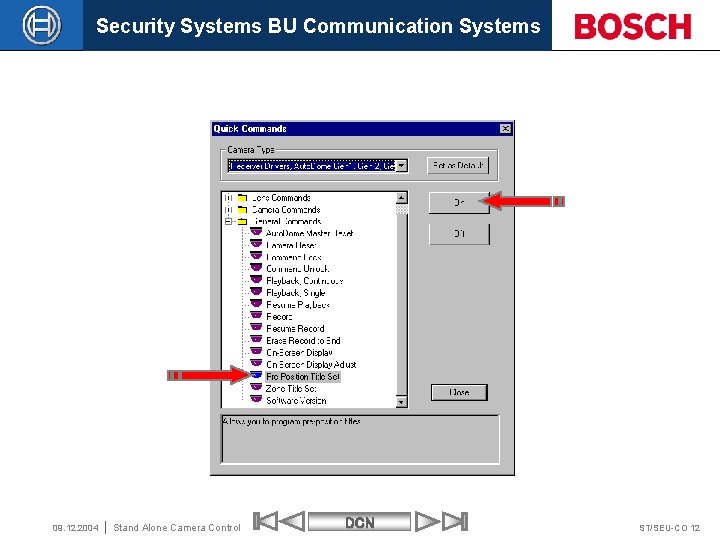
Security Systems BU Communication Systems 09. 12. 2004 Stand Alone Camera Control DCN ST/SEU-CO 12
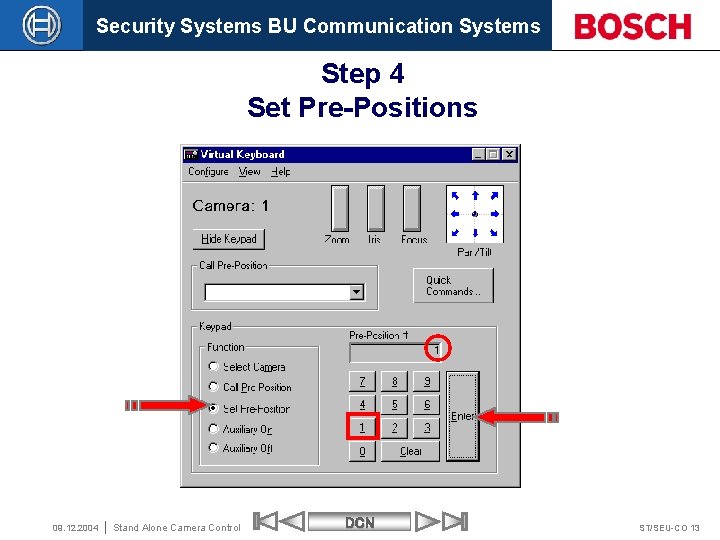
Security Systems BU Communication Systems Step 4 Set Pre-Positions 09. 12. 2004 Stand Alone Camera Control DCN ST/SEU-CO 13
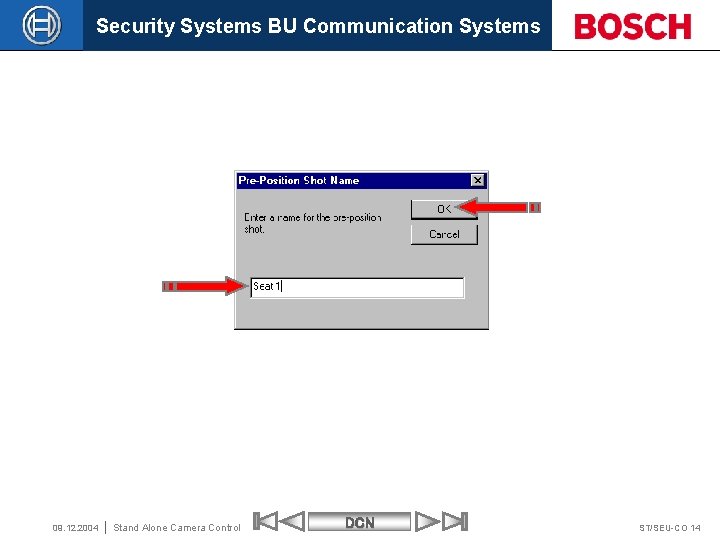
Security Systems BU Communication Systems 09. 12. 2004 Stand Alone Camera Control DCN ST/SEU-CO 14
Security Systems BU Communication Systems Repeat Step 4 to set all Pre-Positions Set the highest Pre-Position as overview 09. 12. 2004 Stand Alone Camera Control DCN ST/SEU-CO 15
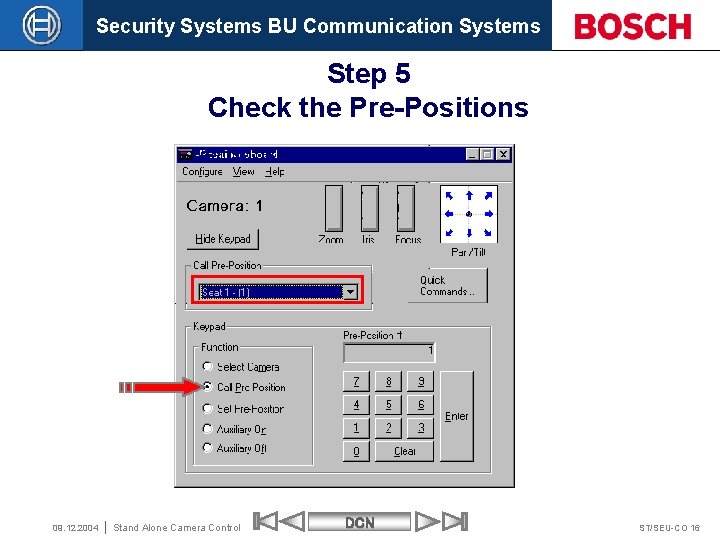
Security Systems BU Communication Systems Step 5 Check the Pre-Positions 09. 12. 2004 Stand Alone Camera Control DCN ST/SEU-CO 16
Security Systems BU Communication Systems If you were not successful setting up the pre -positions please don’t continue with the next steps. First make sure that the pre-positions are set. 09. 12. 2004 Stand Alone Camera Control DCN ST/SEU-CO 17
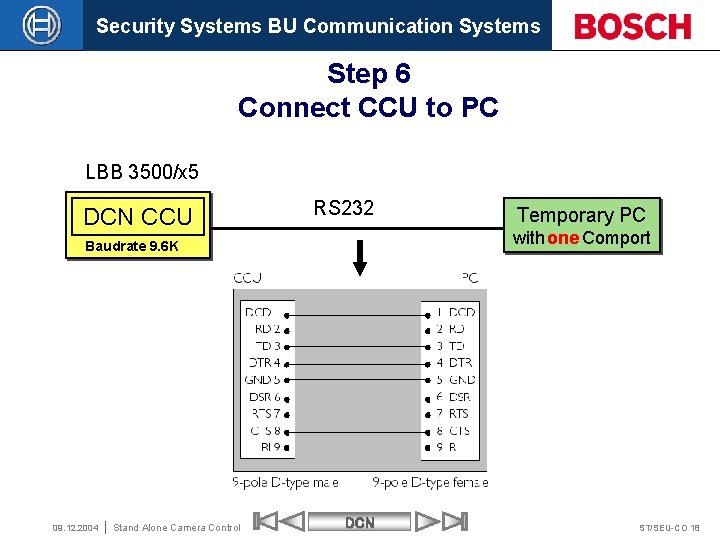
Security Systems BU Communication Systems Step 6 Connect CCU to PC LBB 3500/x 5 DCN CCU RS 232 with one Comport Baudrate 9. 6 K 09. 12. 2004 Stand Alone Camera Control Temporary PC DCN ST/SEU-CO 18
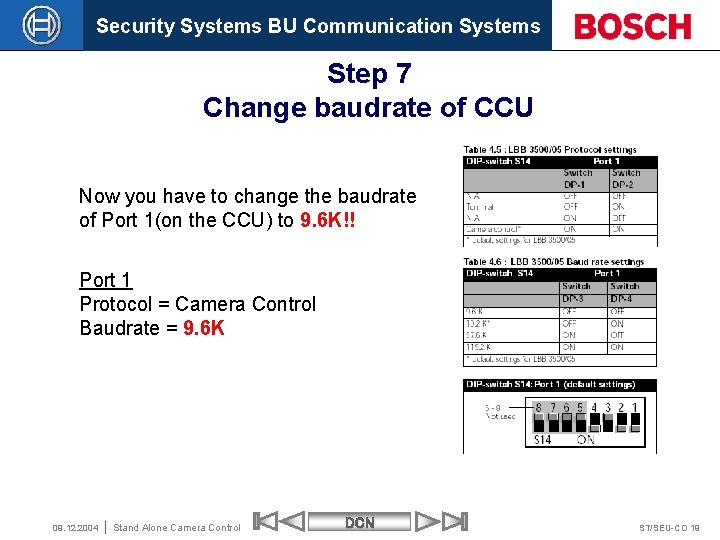
Security Systems BU Communication Systems Step 7 Change baudrate of CCU Now you have to change the baudrate of Port 1(on the CCU) to 9. 6 K!! Port 1 Protocol = Camera Control Baudrate = 9. 6 K 09. 12. 2004 Stand Alone Camera Control DCN ST/SEU-CO 19
Security Systems BU Communication Systems If you are using the LBB 3500/15 or /35 make sure you connect the RS 232 cable to Port 2. 09. 12. 2004 Stand Alone Camera Control DCN ST/SEU-CO 21
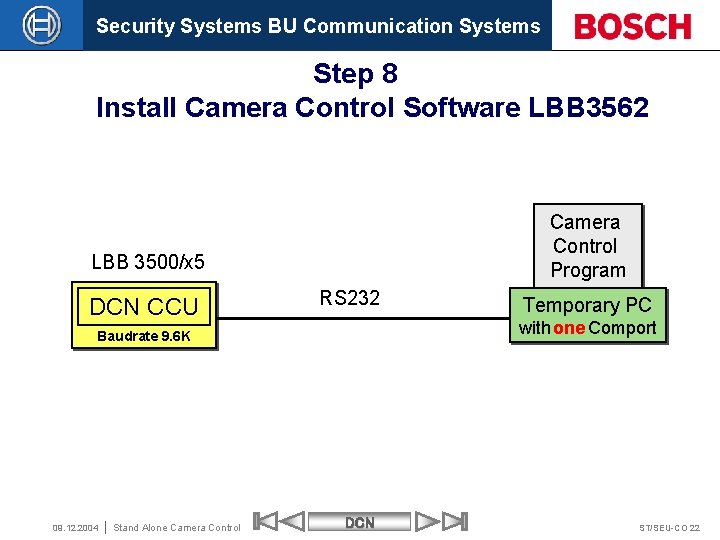
Security Systems BU Communication Systems Step 8 Install Camera Control Software LBB 3562 Camera Control Program LBB 3500/x 5 DCN CCU RS 232 with one Comport Baudrate 9. 6 K 09. 12. 2004 Stand Alone Camera Control Temporary PC DCN ST/SEU-CO 22
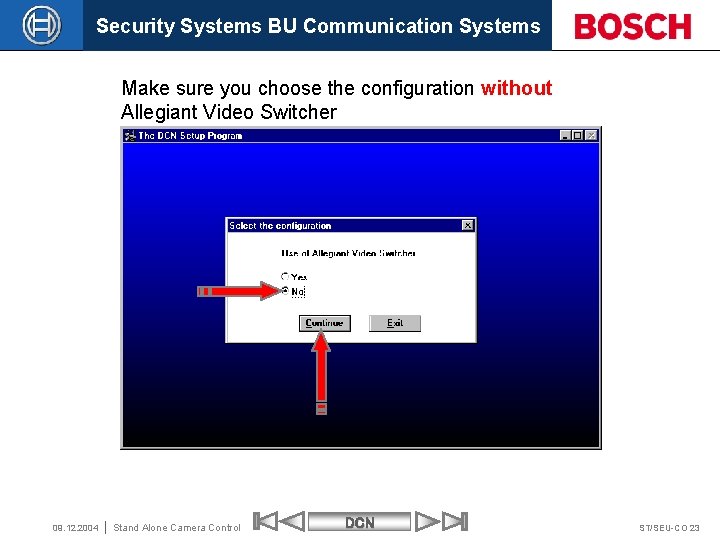
Security Systems BU Communication Systems Make sure you choose the configuration without Allegiant Video Switcher 09. 12. 2004 Stand Alone Camera Control DCN ST/SEU-CO 23
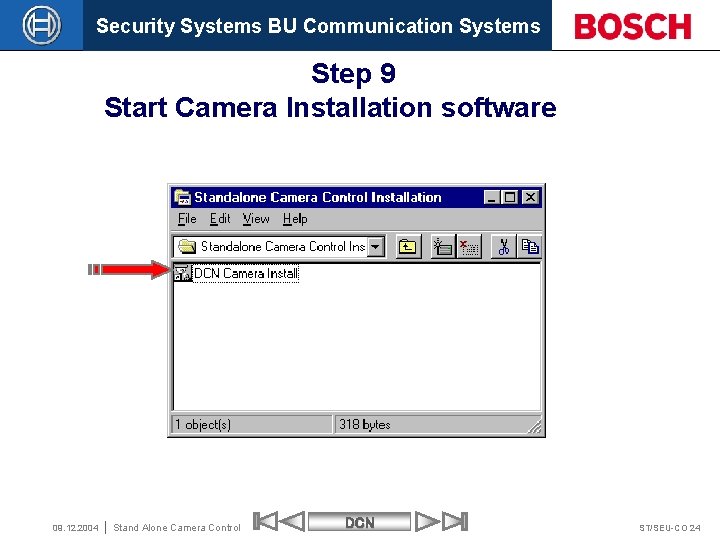
Security Systems BU Communication Systems Step 9 Start Camera Installation software 09. 12. 2004 Stand Alone Camera Control DCN ST/SEU-CO 24
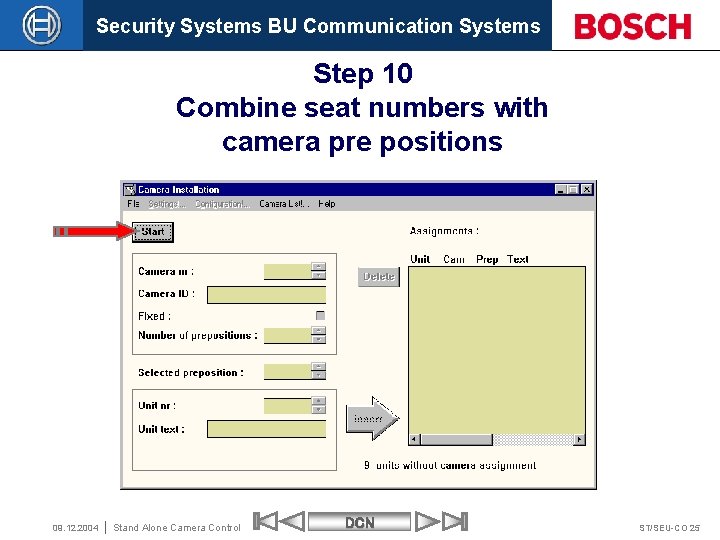
Security Systems BU Communication Systems Step 10 Combine seat numbers with camera pre positions 09. 12. 2004 Stand Alone Camera Control DCN ST/SEU-CO 25
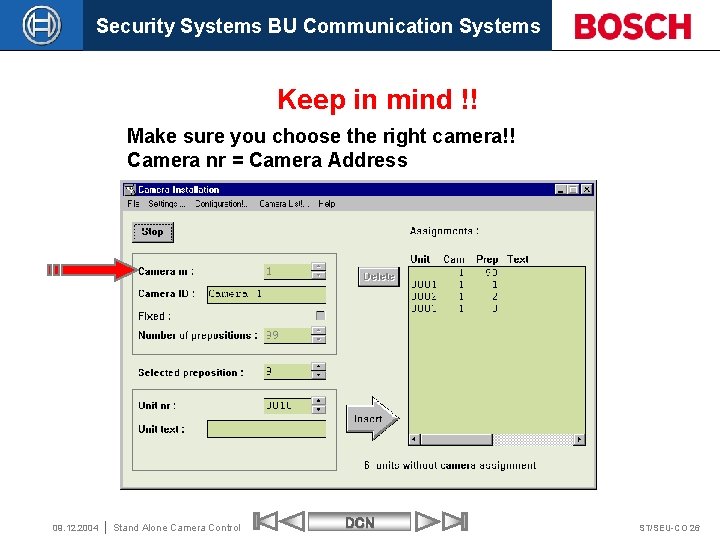
Security Systems BU Communication Systems Keep in mind !! Make sure you choose the right camera!! Camera nr = Camera Address 09. 12. 2004 Stand Alone Camera Control DCN ST/SEU-CO 26

Security Systems BU Communication Systems 09. 12. 2004 Stand Alone Camera Control DCN ST/SEU-CO 27

Security Systems BU Communication Systems 5 09. 12. 2004 Stand Alone Camera Control DCN ST/SEU-CO 28
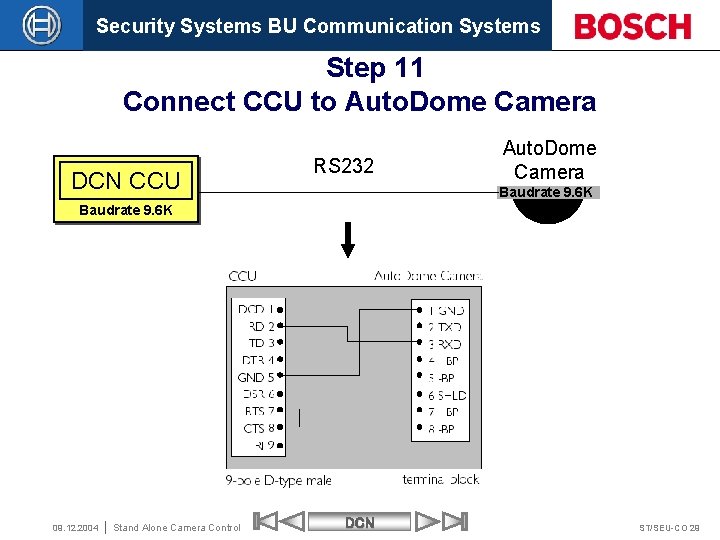
Security Systems BU Communication Systems Step 11 Connect CCU to Auto. Dome Camera DCN CCU RS 232 Auto. Dome Camera Baudrate 9. 6 K 09. 12. 2004 Stand Alone Camera Control DCN ST/SEU-CO 29
Security Systems BU Communication Systems © Robert Bosch Gmb. H reserves all rights even in the event of industrial property rights. We reserve all rights of disposal such as copying and passing on to third parties. 09. 12. 2004 Stand Alone Camera Control DCN ST/SEU-CO 30

Security Systems BU Communication Systems With use of Allegiant Video Switcher Requirements : • Allegiant switcher • Video Switcher keyboard • Fixed and /or Auto. Dome cameras • Monitor(s) • DCN software V 8. 00 or higher • Temporary installation PC with two Comports • Software LBB 3562 V 1. 0 or higher 09. 12. 2004 Stand Alone Camera Control DCN ST/SEU-CO 31
Security Systems BU Communication Systems Keep in mind If you have DCN software V 9. 30 or higher then you need LBB 3562 V 2. 0 or higher Otherwise it will not work. 09. 12. 2004 Stand Alone Camera Control DCN ST/SEU-CO 32

Security Systems BU Communication Systems Step 1 Connect Camera(s), Monitor(s) and Keyboard to Video Switcher 09. 12. 2004 Stand Alone Camera Control DCN ST/SEU-CO 33
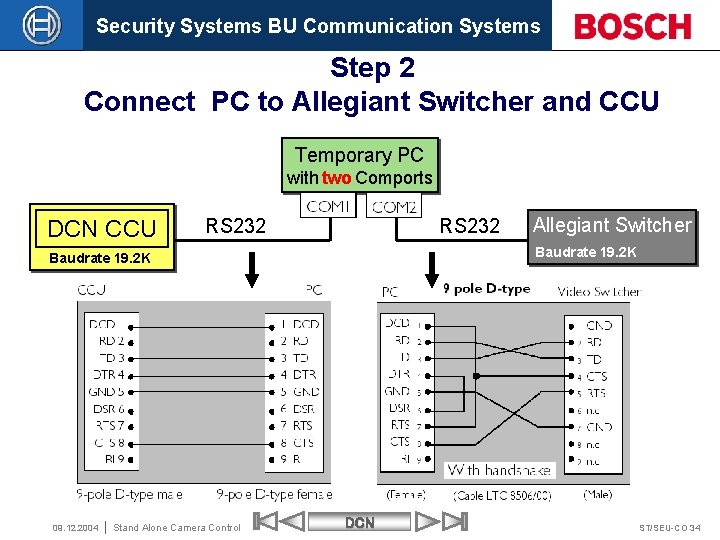
Security Systems BU Communication Systems Step 2 Connect PC to Allegiant Switcher and CCU Temporary PC with two Comports DCN CCU RS 232 Baudrate 19. 2 K 09. 12. 2004 Stand Alone Camera Control Allegiant Switcher DCN ST/SEU-CO 34
Security Systems BU Communication Systems Keep in mind !! The default COM port settings are: Com 1 for communication with the CCU Com 2 for communication with the Video Switcher 09. 12. 2004 Stand Alone Camera Control DCN ST/SEU-CO 35

Security Systems BU Communication Systems Step 3 CCU protocol and Serial Port settings LBB 3500/05 Make sure that the port you use of the CCU is set to : Protocol = Camera Control Baudrate = 19. 2 K Keep in mind !! The default setting for the LBB 3500/05 is : Port 1 Protocol = Camera Control Baudrate = 19. 2 K 09. 12. 2004 Stand Alone Camera Control DCN ST/SEU-CO 36

Security Systems BU Communication Systems LBB 3500/15 & LBB 3500/35 Keep in mind !! The default settings for the LBB 3500/15 &LBB 3500/35 is : Port 1 Protocol = Full Baudrate = 115. 2 K Port 2 Protocol = Camera Control Baudrate = 19. 2 K 09. 12. 2004 Stand Alone Camera Control DCN ST/SEU-CO 37

Security Systems BU Communication Systems If you are using the LBB 3500/15 or /35 make sure you connect the RS 232 cable to Port 2. 09. 12. 2004 Stand Alone Camera Control DCN ST/SEU-CO 38
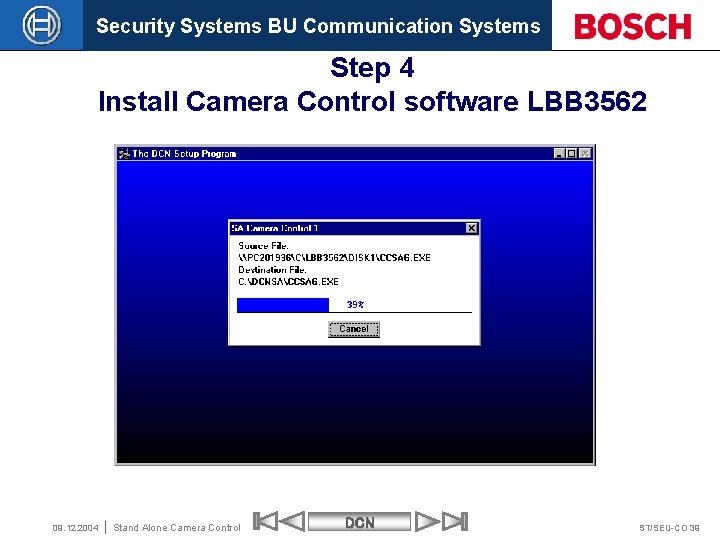
Security Systems BU Communication Systems Step 4 Install Camera Control software LBB 3562 09. 12. 2004 Stand Alone Camera Control DCN ST/SEU-CO 39
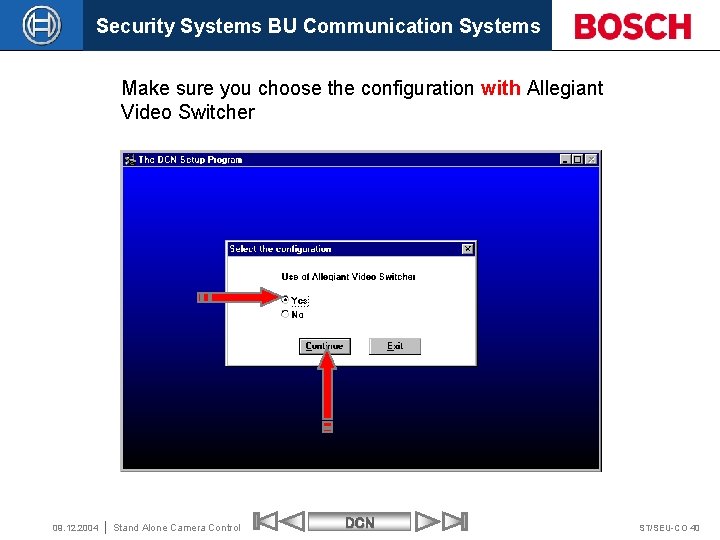
Security Systems BU Communication Systems Make sure you choose the configuration with Allegiant Video Switcher 09. 12. 2004 Stand Alone Camera Control DCN ST/SEU-CO 40
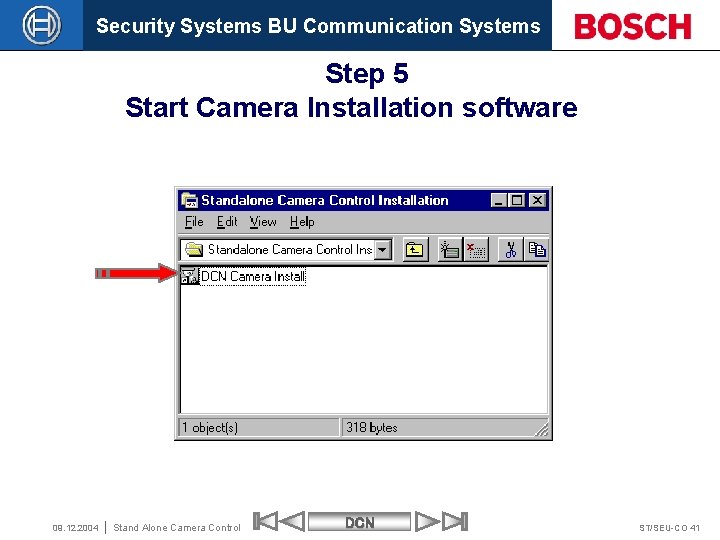
Security Systems BU Communication Systems Step 5 Start Camera Installation software 09. 12. 2004 Stand Alone Camera Control DCN ST/SEU-CO 41
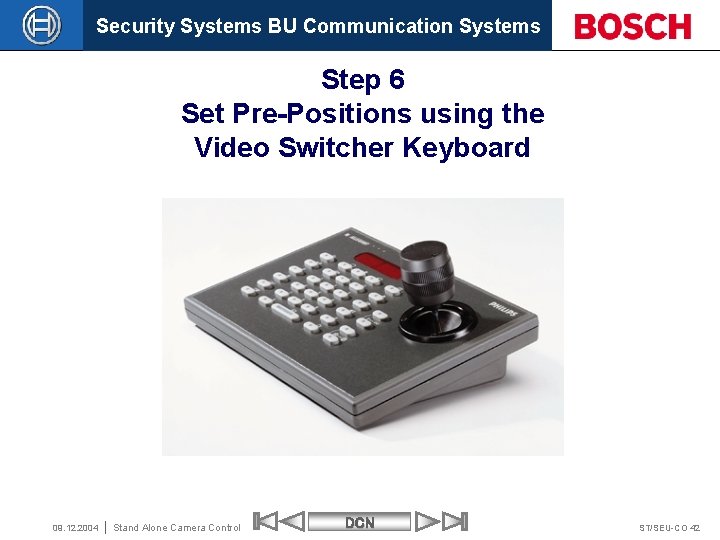
Security Systems BU Communication Systems Step 6 Set Pre-Positions using the Video Switcher Keyboard 09. 12. 2004 Stand Alone Camera Control DCN ST/SEU-CO 42
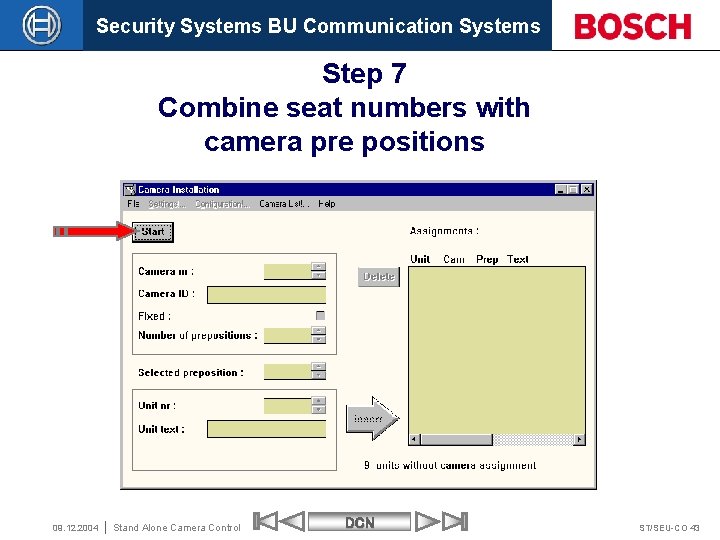
Security Systems BU Communication Systems Step 7 Combine seat numbers with camera pre positions 09. 12. 2004 Stand Alone Camera Control DCN ST/SEU-CO 43
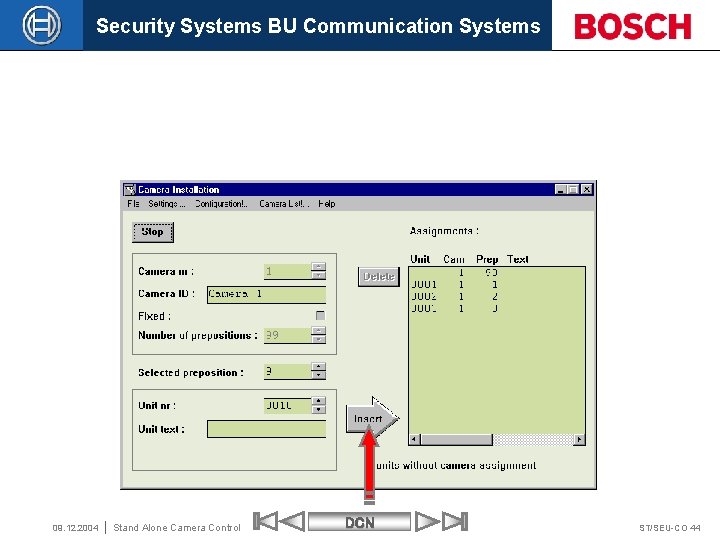
Security Systems BU Communication Systems 09. 12. 2004 Stand Alone Camera Control DCN ST/SEU-CO 44
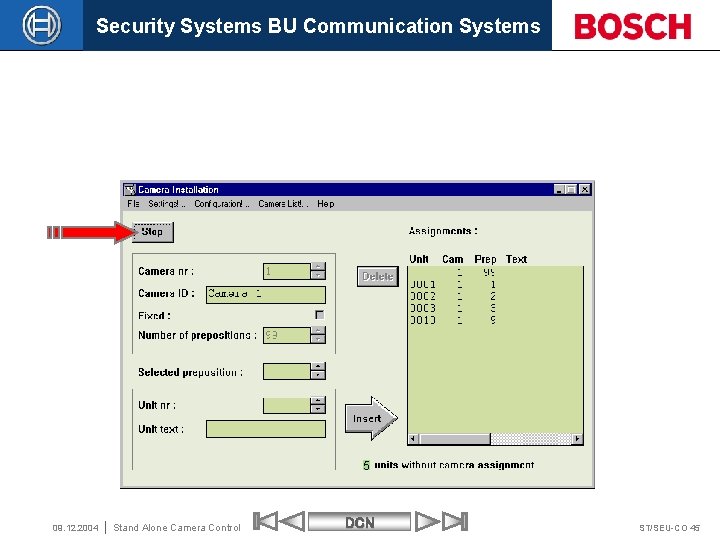
Security Systems BU Communication Systems 5 09. 12. 2004 Stand Alone Camera Control DCN ST/SEU-CO 45
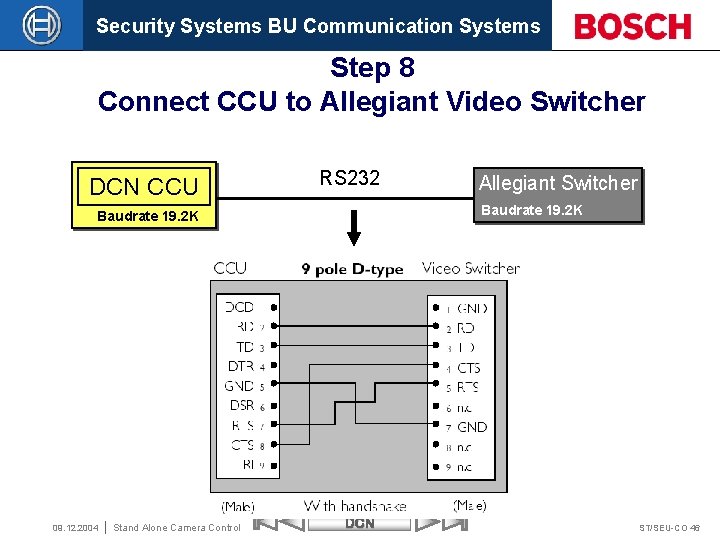
Security Systems BU Communication Systems Step 8 Connect CCU to Allegiant Video Switcher DCN CCU RS 232 Baudrate 19. 2 K 09. 12. 2004 Stand Alone Camera Control Allegiant Switcher DCN ST/SEU-CO 46

Security Systems BU Communication Systems How to configure Stand Alone Camera Control End of section Robert Bosch Gmb. H All rights are reserved. Reproduction or passing on to third parties in whole or in parts is prohibited without the written consent of the copyright owner. 09. 12. 2004 Stand Alone Camera Control DCN ST/SEU-CO 47
- Slides: 46