
Security Awareness Chapter 5 Wireless Network Security Objectives
Security Awareness Chapter 5 Wireless Network Security
Objectives After completing this chapter you should be able to do the following: • Explain what a network is and the different types of networks • List the different attacks that can be launched against a wireless network • Give the steps necessary to secure a wireless network Security Awareness, 3 rd Edition 2
How Networks Work • Understand the basics of how a networks – – What is a network? How does it transmit data? Different types of networks Devices typically found on a home wireless network Security Awareness, 3 rd Edition 3
What Is a Computer Network? • Purpose of a computer network is to share – Information – Devices such as printers • Home network – Single Internet connection – Shared printer – Easier to perform backups Security Awareness, 3 rd Edition 4
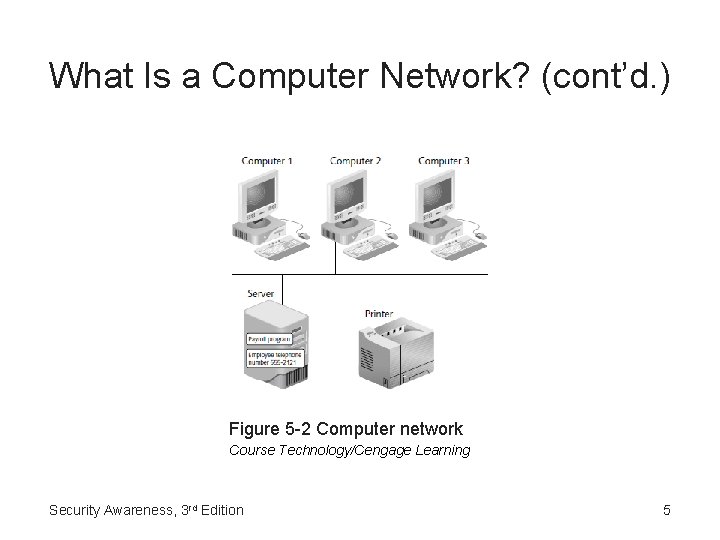
What Is a Computer Network? (cont’d. ) Figure 5 -2 Computer network Course Technology/Cengage Learning Security Awareness, 3 rd Edition 5
Transmitting Across a Network • Sending and receiving devices must follow same set of standards (protocols) • Transmission Control Protocol/Internet Protocol (TCP/IP) – Most common set of protocols used today • IP address – Series of four sets of digits separated by periods – Static or dynamic Security Awareness, 3 rd Edition 6
Transmitting Across a Network (cont’d. ) • Media Access Control (MAC) address – Physical address – 12 characters separated by either dashes or colons • Packets – Small units of data sent through network Security Awareness, 3 rd Edition 7
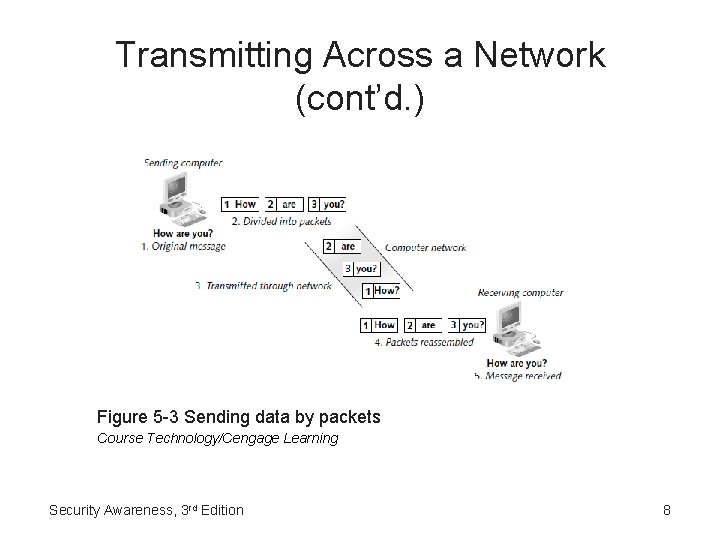
Transmitting Across a Network (cont’d. ) Figure 5 -3 Sending data by packets Course Technology/Cengage Learning Security Awareness, 3 rd Edition 8
Types of Networks • Two types of classifications – Distance-based • Local area network (LAN) • Wide area network (WAN) • Personal area network (PAN) – Type of connection • Wired • Wireless local area network (WLAN) • Wi-Fi (Wireless Fidelity) Security Awareness, 3 rd Edition 9
Network Devices • Network interface card (NIC) adapter – Hardware device that connects a computer to a wired network • Router – Hardware device – Responsible for sending packets through the network toward their destination • Firewall – Can repel attacks through filtering the data packets as they arrive at the perimeter of the network Security Awareness, 3 rd Edition 10
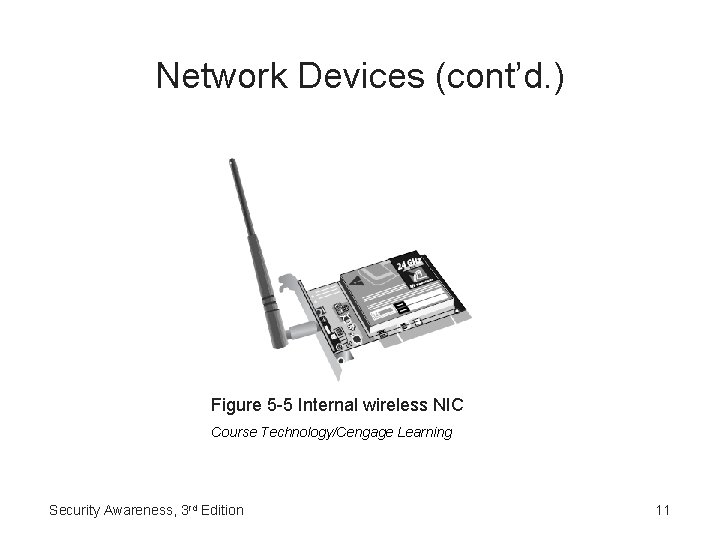
Network Devices (cont’d. ) Figure 5 -5 Internal wireless NIC Course Technology/Cengage Learning Security Awareness, 3 rd Edition 11
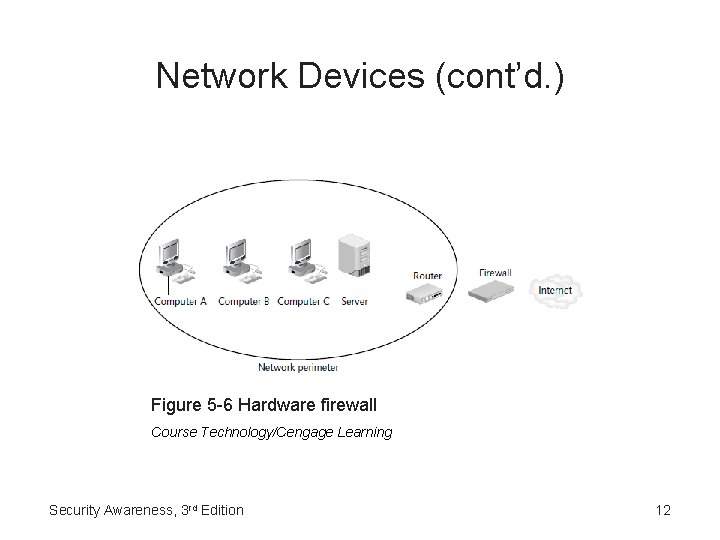
Network Devices (cont’d. ) Figure 5 -6 Hardware firewall Course Technology/Cengage Learning Security Awareness, 3 rd Edition 12
Network Devices (cont’d. ) • Network Attached Storage (NAS) device – Dedicated hard disk-based file storage device – Provides centralized and consolidated disk storage available to network user • Access point (AP) – Acts as the ‘‘base station’’ for the wireless network – Acts as a ‘‘bridge’’ between the wireless and wired networks • Wireless gateway – Combine the features of an AP, firewall, and router in a single hardware device Security Awareness, 3 rd Edition 13
Attacks on Wireless Networks • Three-step process – Discovering the wireless network – Connecting to the network – Launching assaults Security Awareness, 3 rd Edition 14
Discovering • Beaconing – At regular intervals, a wireless router sends a signal to announce its presence • Scanning – Wireless device looks for the incoming beacon information • Wireless location mapping – Also known as war driving – Finding a beacon from a wireless network and recording information about it Security Awareness, 3 rd Edition 15
Discovering (cont’d. ) • Tools needed for war driving – Mobile computing device – Wireless NIC adapter – Antenna • Omnidirectional antenna – Global positioning system (GPS) receiver – Software Security Awareness, 3 rd Edition 16
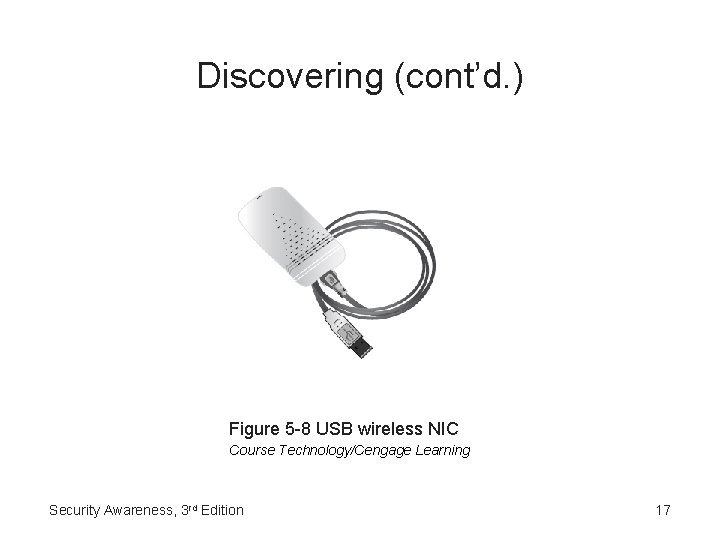
Discovering (cont’d. ) Figure 5 -8 USB wireless NIC Course Technology/Cengage Learning Security Awareness, 3 rd Edition 17
Connecting • Service Set Identifier (SSID) – ‘‘Network name’’ and can be any alphanumeric string from 2 to 32 characters • Wireless networks are designed to freely distribute rd 3 their SSID • Once a wireless device receives a beacon with the SSID, it can then attempt to join the network – Virtually nothing that an attacker must do in order to connect Security Awareness, 3 rd Edition 18
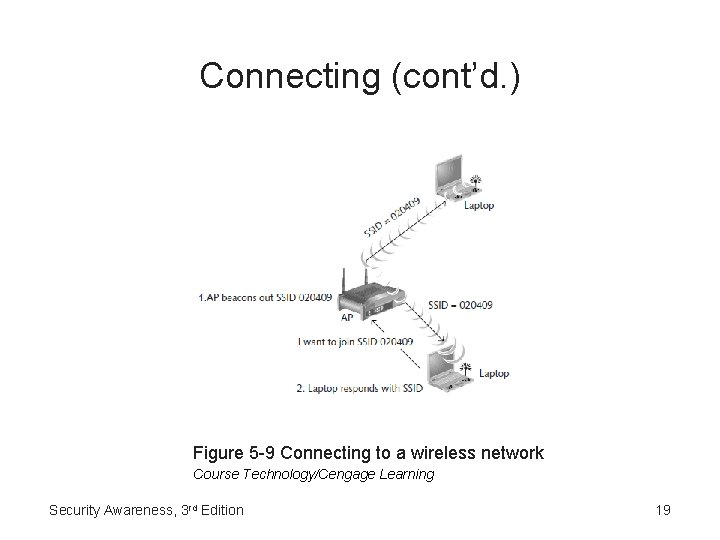
Connecting (cont’d. ) Figure 5 -9 Connecting to a wireless network Course Technology/Cengage Learning Security Awareness, 3 rd Edition 19
Connecting (cont’d. ) • Some wireless security sources encourage users to configure APs to prevent the beacon from including the SSID – Does not provide protection Security Awareness, 3 rd Edition 20
Launching Assaults • Eavesdropping – Attackers can easily view the contents of transmissions from hundreds of feet away – Even if they have not connected to the wireless network Security Awareness, 3 rd Edition 21
Launching Assaults (cont’d. ) • Wired Equivalent Privacy (WEP) – Ensure that only authorized parties can view transmitted wireless information – Encrypts information into ciphertext – Contains a serious flaw – Attacker can discover a WEP key in less than one minute Security Awareness, 3 rd Edition 22
Launching Assaults (cont’d. ) • Stealing data – Once connected attacker treated as “trusted user” – Has access to any shared data • Injecting malware – “Trusted user” enters from behind the network’s firewall – Can easily inject malware • Storing illegal content – Can set up storage on user’s computer and store content Security Awareness, 3 rd Edition 23
Launching Assaults (cont’d. ) • Launching denial of service (Do. S) attacks – Denial of service (Do. S) attack • Designed to prevent a device from performing its intended function – Wireless Do. S attacks • Designed to deny wireless devices access to the wireless router itself – Packet generator • Create fake packets; flood wireless network with traffic – Disassociation frames • Communication from a wireless device that indicates the device wishes to end the wireless connection rd Security Awareness, 3 Edition 24
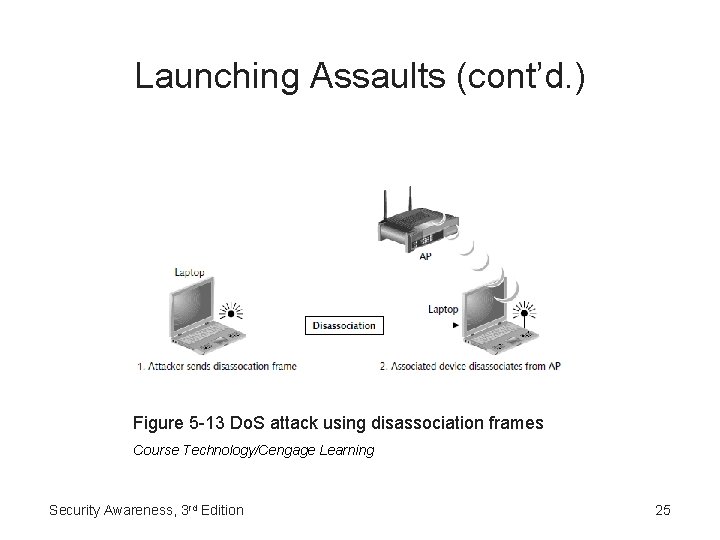
Launching Assaults (cont’d. ) Figure 5 -13 Do. S attack using disassociation frames Course Technology/Cengage Learning Security Awareness, 3 rd Edition 25
Launching Assaults (cont’d. ) • Impersonating a legitimate network – Attackers will often impersonate legitimate networks in restaurants, coffee shops, airports, etc. – Does not require wireless router – Ad hoc or peer-to-peer network – Once the connection is made • Attacker might be able to directly inject malware into the user’s computer or steal data Security Awareness, 3 rd Edition 26
Wireless Network Defenses • Secure the home wireless network • Use an unprotected public wireless network in the most secure manner possible Security Awareness, 3 rd Edition 27
Securing a Home Wireless Network • Locking down the wireless router – Create username and password – Do not use default password – Typical settings on the wireless router login security screen • • Router Password Access Server Wireless Access Web Remote Management Security Awareness, 3 rd Edition 28
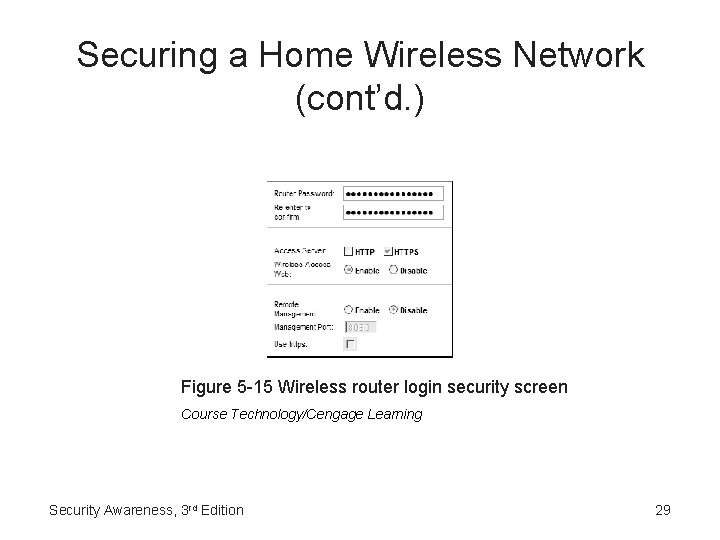
Securing a Home Wireless Network (cont’d. ) Figure 5 -15 Wireless router login security screen Course Technology/Cengage Learning Security Awareness, 3 rd Edition 29
Securing a Home Wireless Network (cont’d. ) • Limiting users – Restrict who can access network by MAC address • MAC address filter – Dynamic Host Configuration Protocol (DHCP) rd 3 • Wireless routers distribute IP addresses to network devices • Properly configuring settings • DHCP lease Security Awareness, 3 rd Edition 30
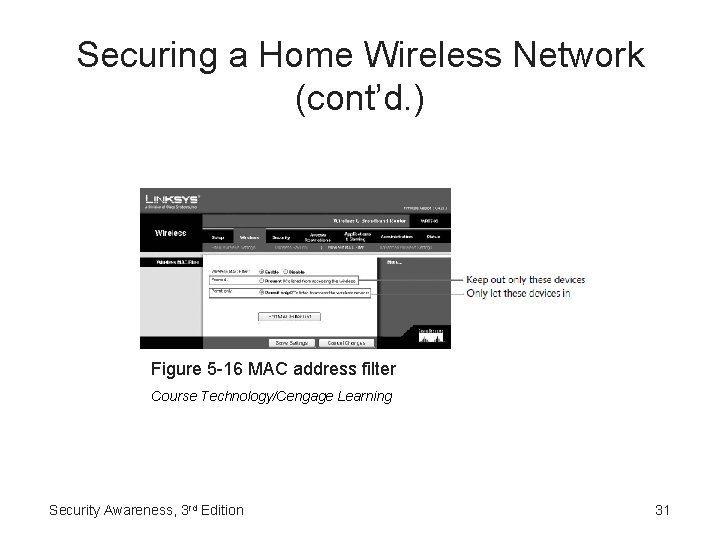
Securing a Home Wireless Network (cont’d. ) Figure 5 -16 MAC address filter Course Technology/Cengage Learning Security Awareness, 3 rd Edition 31
Securing a Home Wireless Network (cont’d. ) • Turning on Wi-Fi protected access 2 (WPA 2) – Personal security model – Designed for single users or small office settings – Parts • Wi-Fi Protected Access (WPA) • Wi-Fi Protected Access 2 (WPA 2) – To turn on WPA 2 • Choose security mode • Select WPA Algorithm • Enter shared key Security Awareness, 3 rd Edition 32
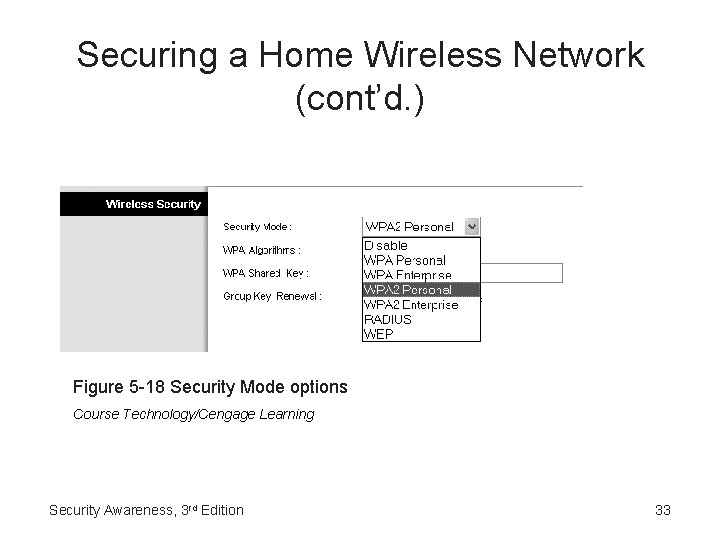
Securing a Home Wireless Network (cont’d. ) Figure 5 -18 Security Mode options Course Technology/Cengage Learning Security Awareness, 3 rd Edition 33
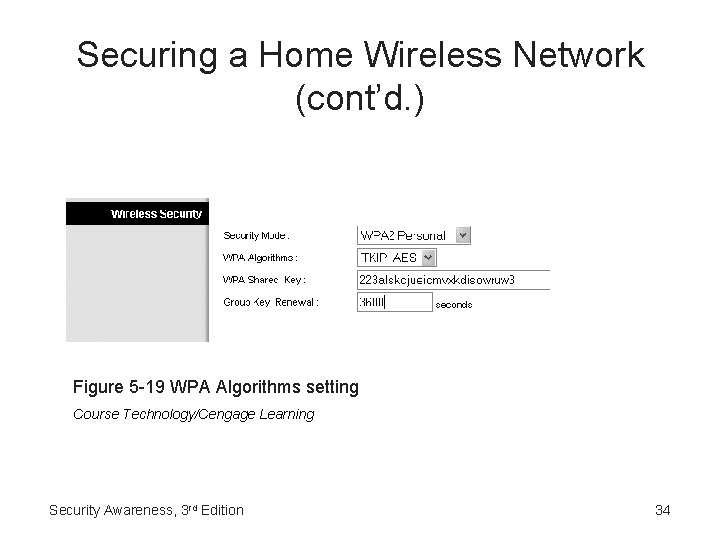
Securing a Home Wireless Network (cont’d. ) Figure 5 -19 WPA Algorithms setting Course Technology/Cengage Learning Security Awareness, 3 rd Edition 34
Securing a Home Wireless Network (cont’d. ) • Configuring network settings – Network Address Translation (NAT) • Hides the IP addresses of network devices from attackers • Private addresses • NAT removes the private IP address from the sender’s packet and replaces it with an alias IP address – Port address translation (PAT) • Each packet is sent to a different port number Security Awareness, 3 rd Edition 35
Securing a Home Wireless Network (cont’d. ) – Virtual local area networks (VLANs) • Segment users or network equipment in logical groupings • Creates a separate virtual network for each user of the wireless network – Demilitarized Zone (DMZ) • Separate network that sits outside the secure network perimeter • Limits outside access to the DMZ network only Security Awareness, 3 rd Edition 36
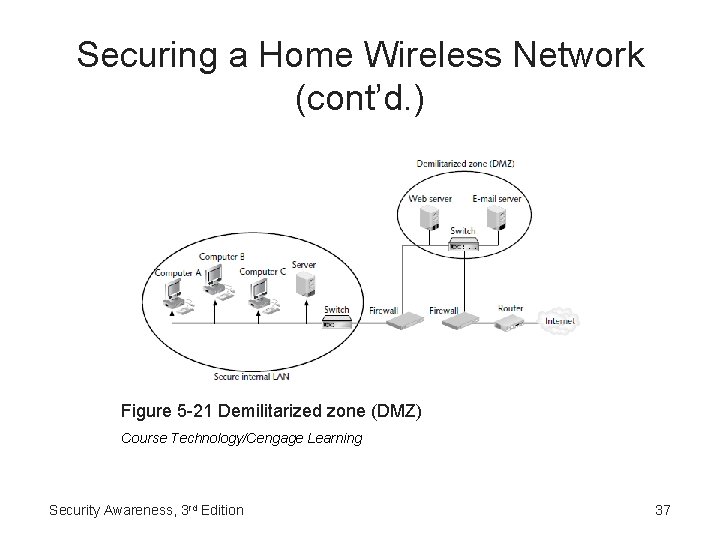
Securing a Home Wireless Network (cont’d. ) Figure 5 -21 Demilitarized zone (DMZ) Course Technology/Cengage Learning Security Awareness, 3 rd Edition 37
Securing a Home Wireless Network (cont’d. ) – Port forwarding • More secure than DMZ • Opens only the ports that need to be available Security Awareness, 3 rd Edition 38
Using a Public Wireless Network Securely • Turning on a personal firewall – Runs as a program on the user’s local computer – Operates according to a rule base – Rule options • Allow • Block • Prompt – Stateless packet filtering – Stateful packet filtering • Provides more protection Security Awareness, 3 rd Edition 39
Using a Public Wireless Network Securely (cont’d. ) • Virtual Private Networks (VPNs) – Uses an unsecured public network as if it were a secure private network – Encrypts all data that is transmitted between the remote device and the network – Advantages • • Full protection Transparency Authentication Industry standards Security Awareness, 3 rd Edition 40
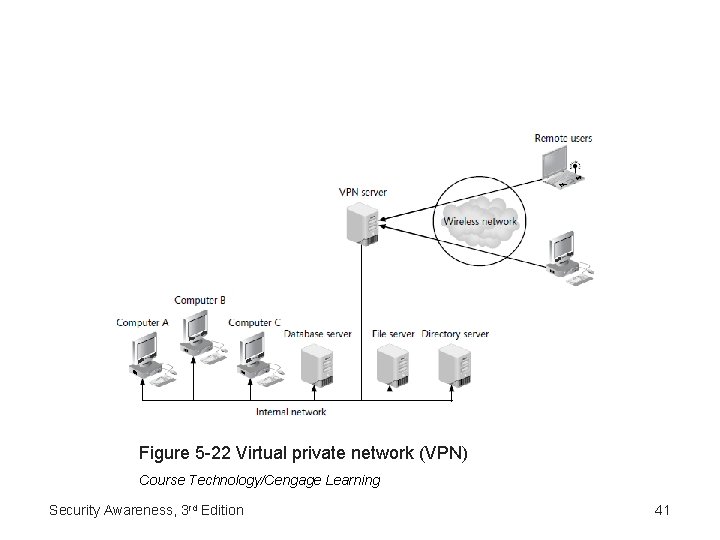
Figure 5 -22 Virtual private network (VPN) Course Technology/Cengage Learning Security Awareness, 3 rd Edition 41
Summary • Most home users install wireless networks • Attacking a wireless network involves three main steps – Discovery – Connection – Attack • Secure home wireless network • Use good security when using public wireless networks Security Awareness, 3 rd Edition 42
- Slides: 42