
Secure Design Principles Concept of Information Systems by
Secure Design Principles Concept of Information Systems by Erlan Bakiev, Ph. D.
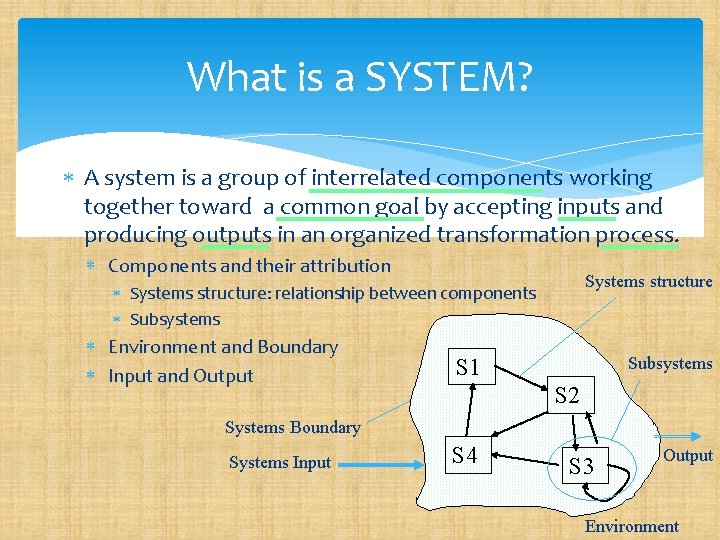
What is a SYSTEM? A system is a group of interrelated components working together toward a common goal by accepting inputs and producing outputs in an organized transformation process. Components and their attribution Systems structure: relationship between components Subsystems Environment and Boundary Input and Output Subsystems S 1 S 2 Systems Boundary Systems Input S 4 S 3 Output Environment

Abstract Concept of a Systems INPUT PROCESS FEEDBACK OUTPUT
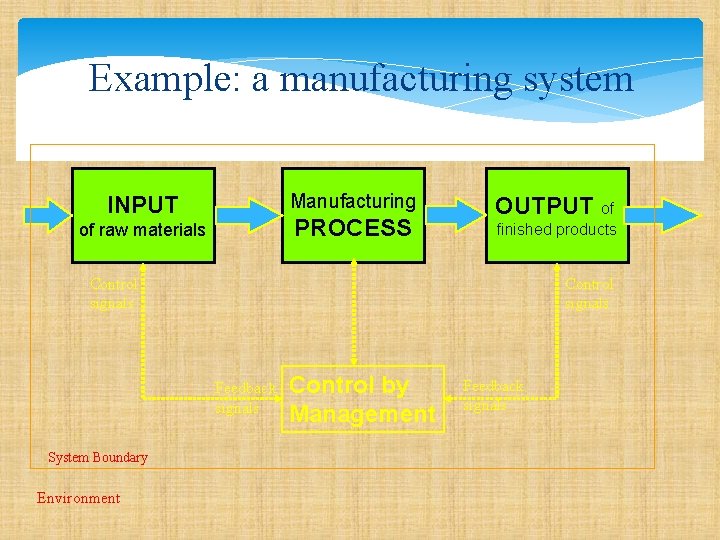
Example: a manufacturing system Manufacturing INPUT PROCESS of raw materials OUTPUT of finished products Control signals Feedback signals System Boundary Environment Control by Management Feedback signals
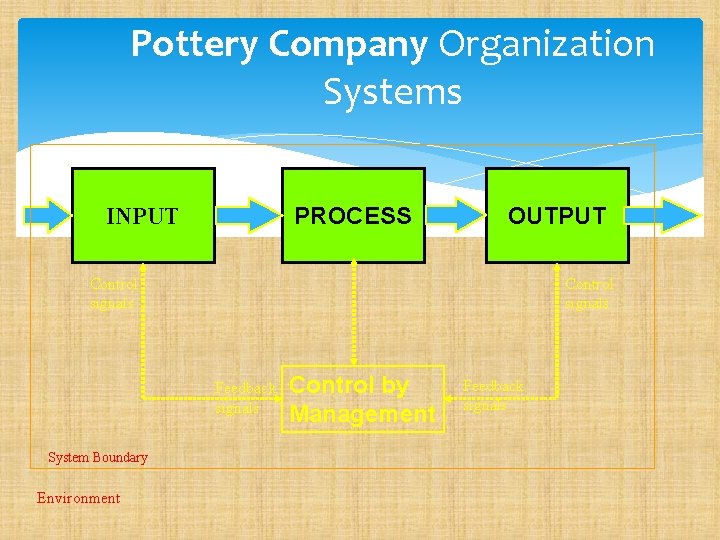
Pottery Company Organization Systems PROCESS INPUT OUTPUT Control signals Feedback signals System Boundary Environment Control by Management Feedback signals
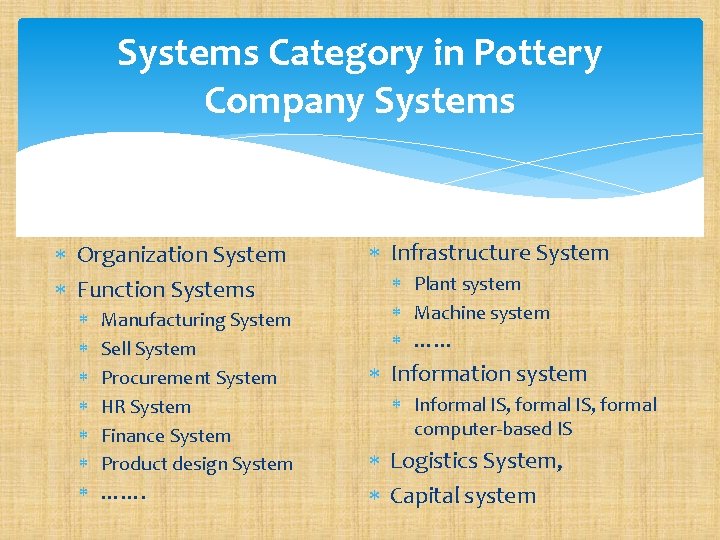
Systems Category in Pottery Company Systems Organization System Function Systems Manufacturing System Sell System Procurement System HR System Finance System Product design System ……. Infrastructure System Plant system Machine system …… Information system Informal IS, formal computer-based IS Logistics System, Capital system
What is an Information Systems? An information system can be any organized combination of people, hardware, software, communications network, and data resources that collects, transforms, and disseminates information in an organization
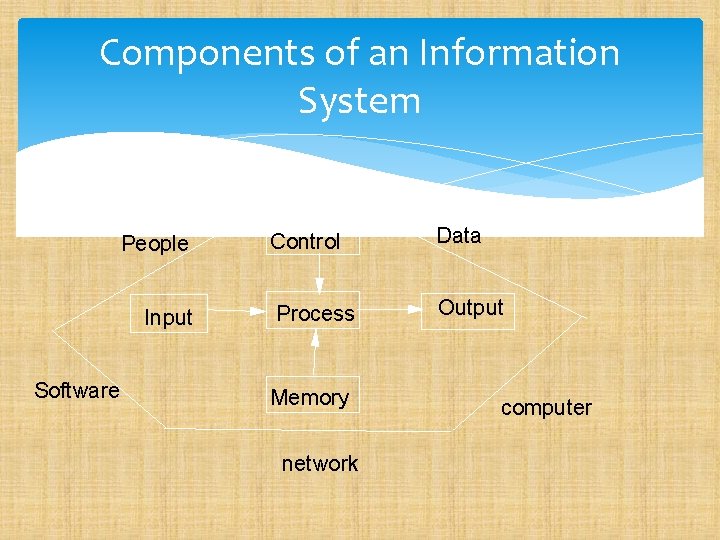
Components of an Information System People Input Software Control Data Process Output Memory network computer
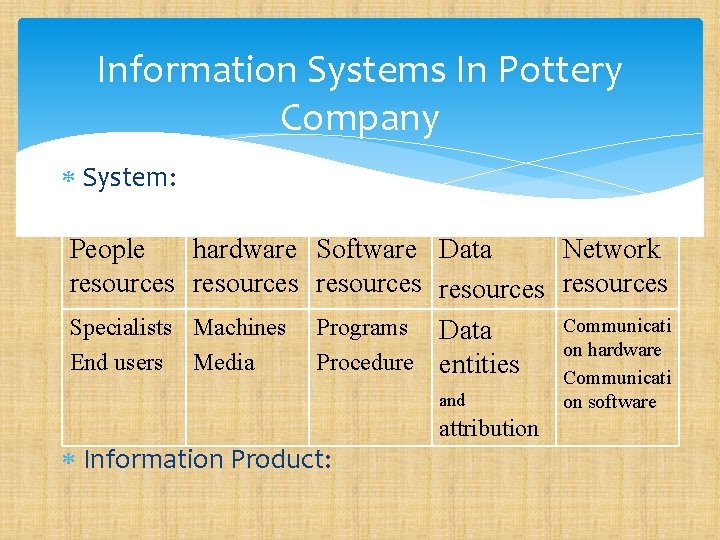
Information Systems In Pottery Company System: People hardware Software Data Network resources resources Communicati Specialists Machines Programs Data on hardware End users Media Procedure entities Communicati and Information Product: attribution on software
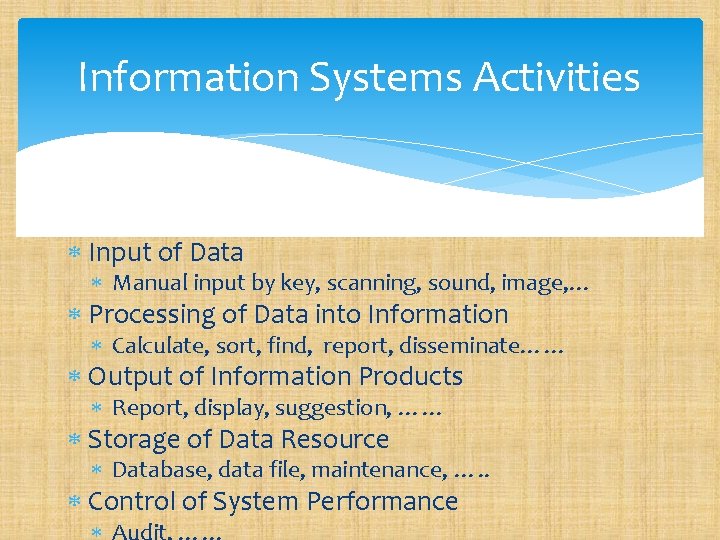
Information Systems Activities Input of Data Manual input by key, scanning, sound, image, … Processing of Data into Information Calculate, sort, find, report, disseminate…… Output of Information Products Report, display, suggestion, …… Storage of Data Resource Database, data file, maintenance, …. . Control of System Performance Audit, ……
DATA & INFORMATION & KWONLEDGE DATA: Streams of raw facts representing events such as business transactions, simple observations of the state of the world Easily structured Easily captured on machines Often quantified Easily transferred
DATA & INFORMATION & KWONLEDGE INFORMATION: Data endowed with relevance and purpose, or, Clusters of facts meaningful & useful to human beings in processes such as making decisions. Requires unit of analysis Need consensus on the meaning Human mediation necessary
DATA & INFORMATION & KWONLEDGE KNOWLEDGE Information from the human mind (includes reflection, synthesis, context ), which guide human behavior in correct way. Information synthesized and contextualized to provide value. Hard to structure Difficult to capture on machining Hard to transfer
The CIA Triad and Other Models Every security book written in the last several years mentions the CIA triad—Confidentiality, Integrity, and Availability. This venerable, well-established conceptual model, though very data-centric, is often useful in helping people think about security in terms of the most important aspects of information protection.
Confidentiality refers to the restriction of access to data only to those who are authorized to use it. Generally speaking, this means a single set of data is accessible to one or more authorized people or systems, and nobody else can see it.
Integrity Integrity, which is particularly relevant to data, refers to the assurance that the data has not been altered in an unauthorized way. Integrity controls are meant to ensure that a set of data can’t be modified (or deleted entirely) by an unauthorized party. Part
Additional Concepts Alternatives to the CIA triad that include other aspects of security have been proposed by various thought leaders in the security profession: Donn B. Parker proposed a set of six elements, known as the Parkerian Hexad, or the six atomic elements of information: Control (or Physical Possession), Authenticity, and Utility, Accountability, Non-Repudiation, and Legality
Additional Concepts The U. S. Department of Defense defined “Five Pillars of Information Assurance, ”: Authenticity and Non-Repudiation along with the CIA triad. The Organization for Economic Co-operation and Development (OECD) published guidelines: Awareness, Responsibility, Response, Ethics, Democracy, Risk Assessment, Security Design and Implementation, Security Management, and Reassessment
The best-known attributes of security defined in the preceding models: • Confidentiality • Integrity • Availability • Accountability • Accuracy • Authenticity • Awareness • Completeness • Consistency • Control • Democracy • Ethics • Legality • Non-repudiation • Ownership • Physical Possession • Reassessment • Relevance • Responsibility • Risk Assessment • Security Design and Implementation • Security Management • Timeliness • Utility
Defense Models The best way to defend against threats to the assets you want to protect? 1. Build a defensive perimeter around those assets and trust everyone who has access inside 2. Use many different types and levels of security controls in a layered defense-indepth approach
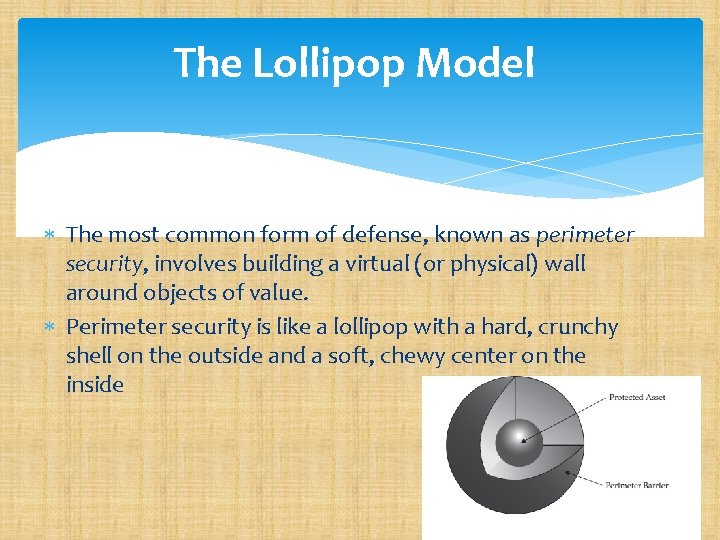
The Lollipop Model The most common form of defense, known as perimeter security, involves building a virtual (or physical) wall around objects of value. Perimeter security is like a lollipop with a hard, crunchy shell on the outside and a soft, chewy center on the inside
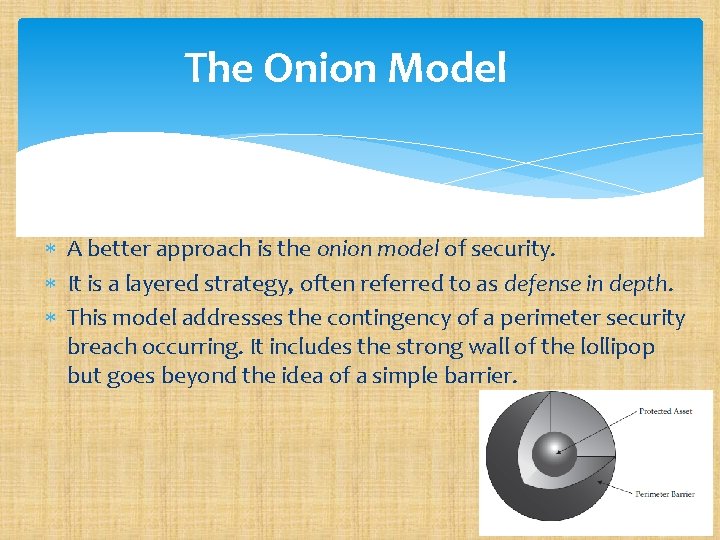
The Onion Model A better approach is the onion model of security. It is a layered strategy, often referred to as defense in depth. This model addresses the contingency of a perimeter security breach occurring. It includes the strong wall of the lollipop but goes beyond the idea of a simple barrier.
Zones of Trust Some communications are trusted completely—the services they rely on assume that the sender and recipient are on the same level, as if they were running on a single system. Some are trusted incompletely—they involve less trusted networks and systems, so communications should be filtered. Some networks (like the Internet or wireless hot spots) are untrusted. These definitions of trust levels of networks and computer systems are known as zones of trust.

Zones of Trust
Best Practices for Network Defense It only takes one careless end user to infect an entire network. If you are an administrator, it is clear that all the good intentions and friendly newsletters will not assure a reasonable level of computer security. You must stop malicious mobile code from arriving on the desktop in the first place, close holes, and make sure the users’ computers are appropriately configured. There are many countermeasures you can implement to minimize the risk of a successful attack: securing the physical environment, hardening the operating systems, keeping patches updated, using an antivirus scanner, using a firewall, securing network share permissions, using encryptions, securing applications, backing up the system, creating a computer security defense plan implementing ARP poisoning defenses.
Secure the Physical Environment A basic part of any computer security plan is the physical aspect. Servers should be protected behind a locked door, but regular PCs need physical protection too. PCs and laptops might need to be physically secured to their desks. There are several different kinds of lockdown devices If anyone leaves their laptop on their desk overnight, it should be secured.
Password Protect Booting This can usually be set in the CMOS/BIOS and is called a user or boot password. This is especially important for portable computers, such as laptops and tablets and smartphones. Smallform-factor PCs are the most likely candidates to be stolen. Since most portable devices often contain personal or confidential information, password-protecting the boot sequence might keep a nontechnical thief from easily seeing the data on the hard drive or storage RAM. If a boot-up password is reset on a tablet or smartphone, often it requires that the data be erased too, so confidentiality and privacy are assured.
Keep Patches Updated An attacker’s best friend is an unpatched system. In most cases, the vulnerabilities used are widely known, and the affected vendors have already released patches for system administrators to apply. Unfortunately, a large percentage of the world does not regularly apply patches, and attacks against unpatched systems are widely successful. A solid patch management plan is essential for protecting any platform, regardless of operating system and regardless of whether or not it is connected directly to the Internet.
Use an Antivirus Scanner (with Real-Time Scanning) In today’s world, an antivirus (AV) scanner is essential. It should be deployed on your desktop, with forced, automatic updates, and it should be enabled for real-time protection. Although deploying an AV scanner on your e-mail gateway is a good secondary or adjunct choice, if you only have the money to deploy an AV scanner in one location, choose the desktop. Why? Because no matter how the malware comes in (whether by email, storage device, wireless, macro, Internet, tablet/smartphone, P 2 P, or IM), it must execute on the desktop to start harming.
Use Firewall Software Almost as important as an AV scanner is the firewall. Firewalls have come a long way since their days of simple port filtering. Today’s devices are stateful inspection systems capable of analyzing threats occurring anywhere in layers three through seven with software that runs directly on the computer. Firewalls are able to collate separate events into one threat description (such as a port scan) and can identify the attack by name (such as a teardrop fragmentation attack).
Secure Network Share Permissions One of the most common ways an attacker or worm breaks into a system is through a network share (such as Net. BIOS or SMB) with no password or a weak password. Folders and files accessed remotely over the network should have discretionary ACLs (DACLs) applied using the principle of least privilege and should have complex passwords.
Secure Applications Managing your applications and their security should be a top priority of any administrator. Applications can be managed by configuring application security, installing applications to nonstandard directories and ports, locking down applications, securing P 2 P services, and making sure your application programmers code securely.
Blocking Dangerous File Types Blocking dangerous file attachments is the best way to prevent exploits, given today’s preferred method of e-mailing viruses and worms. The biggest question is “What constitutes a dangerous file type? ” The truth is that almost any file type can be used maliciously, so the better question is “What are the popularly used malicious file types? ” Even that list isn’t small. Table 4 -1 shows the Windows file types that are commonly blocked in organizations that are concerned
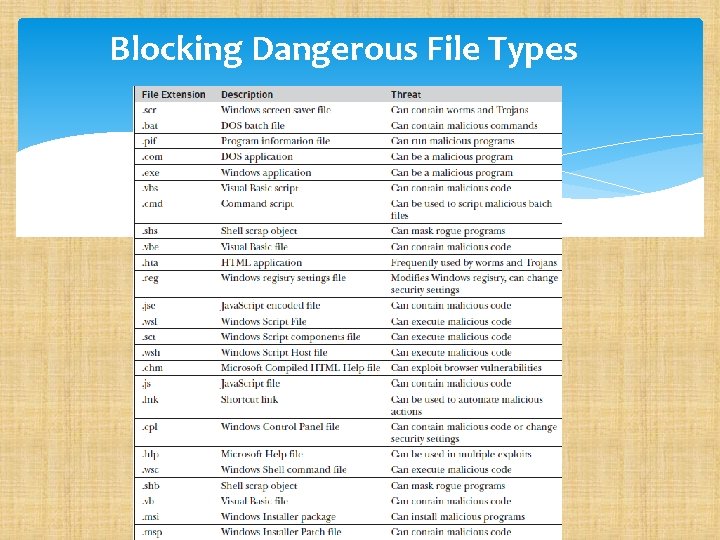
Blocking Dangerous File Types
Back Up the System With the notable exception of stolen confidential information, the most common symptom of damage from malware is modified, corrupted, or deleted files. Worms and viruses often delete files, format hard drives, or intentionally corrupt data. Even malware that does nothing intentionally wrong to a system’s files is maliciously modifying a system just by being present. Security experts cannot always repair the damage and put the system back to the way it was prior to the exploit. This means it’s important to keep regular, tested backups of your system. The backup should include all your data files at a minimum, and a complete system backup ensures a quicker recovery in the event of a catastrophic exploit event.
- Slides: 35