
Section 4 Storage Security and Management Managing the

- Slides: 29
Section 4 : Storage Security and Management Managing the Storage Infrastructure Chapter 16 EMC Proven Professional The #1 Certification Program in the information storage and management industry © 2009 EMC Corporation. All rights reserved.
Storage Infrastructure Management o Managing storage infrastructure is a key to ensure continuity of business o Establishing management processes and implementing appropriate tools is essential to meeting service levels proactively o Management activities include availability, capacity, performance, and security management o Monitoring is the most important aspects that forms the basis for storage management o Continuous monitoring enables availability and scalability by taking proactive measures © 2009 EMC Corporation. All rights reserved.
Lesson: Monitoring the Storage Infrastructure Upon completion of this lesson, you will be able to: o Discuss the major storage infrastructure components that should be monitored o Describe what is to be monitored for the various storage infrastructure components o Discuss alerting of events © 2009 EMC Corporation. All rights reserved.
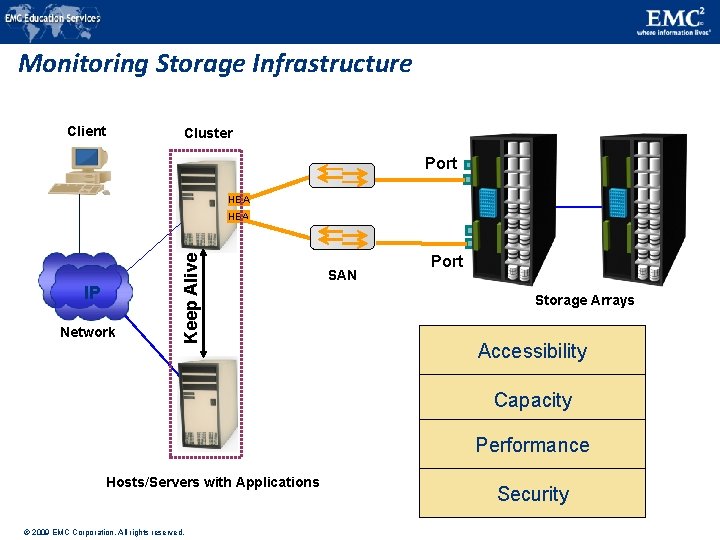
Monitoring Storage Infrastructure Client Cluster Port HBA IP Network Keep Alive HBA SAN Port Storage Arrays Accessibility Capacity Performance Hosts/Servers with Applications © 2009 EMC Corporation. All rights reserved. Security
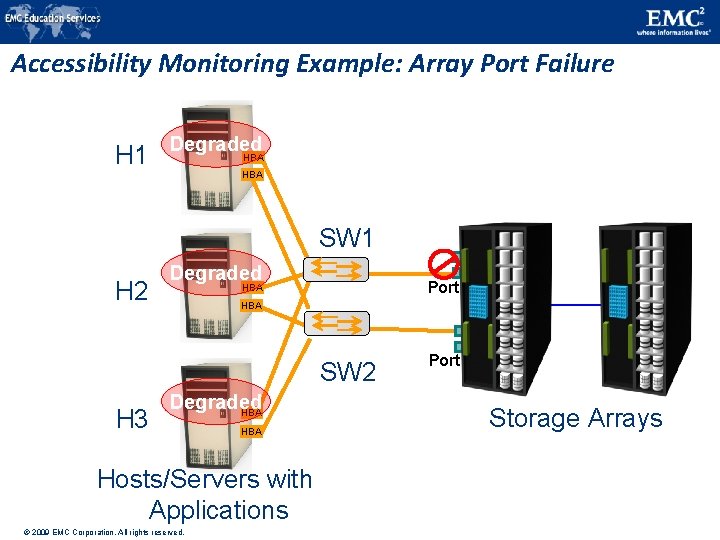
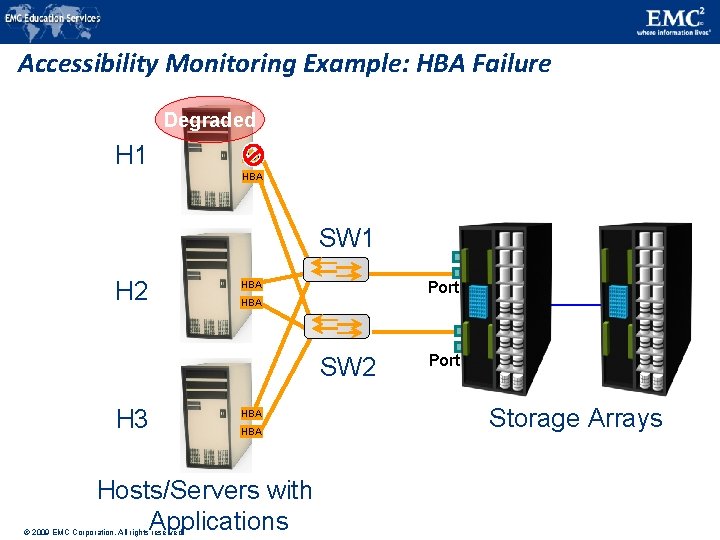
Parameters Monitored – Accessibility o Accessibility refers to the availability of a component to perform a desired operation o Why monitor accessibility of different components? o Failure of any hardware/software component can lead to outage of a number of different components o Example: HBA failure could cause degraded access to a number of devices in multi-path environment or loss of data access in single path environment o Monitoring accessibility involves o Checking availability status of the hardware or software components through predefined alerts © 2009 EMC Corporation. All rights reserved.
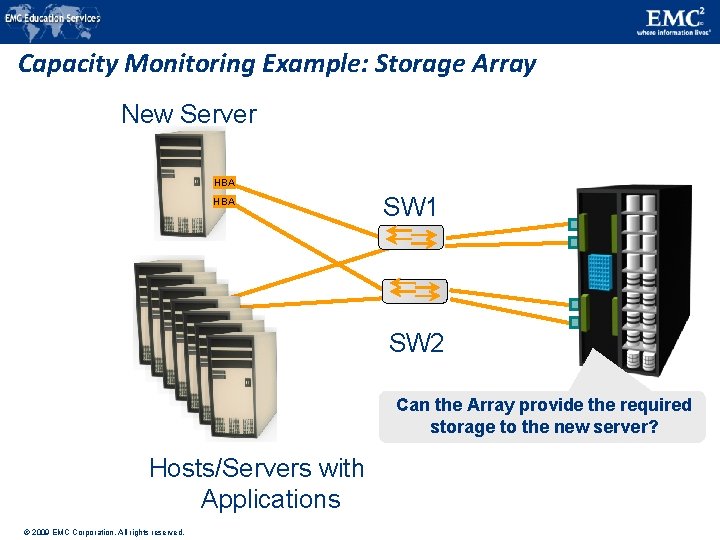
Parameters Monitored – Capacity o Capacity refers to the amount of storage infrastructure resources available o Why monitor capacity? o Capacity monitoring prevents outages before they can occur o Inadequate capacity may lead to degraded performance or affect application/service availability o More preventive and predictive in nature o Report indicates 90% of all the ports have been utilized in SAN, a new switch must be added if more arrays/servers are to be added © 2009 EMC Corporation. All rights reserved.
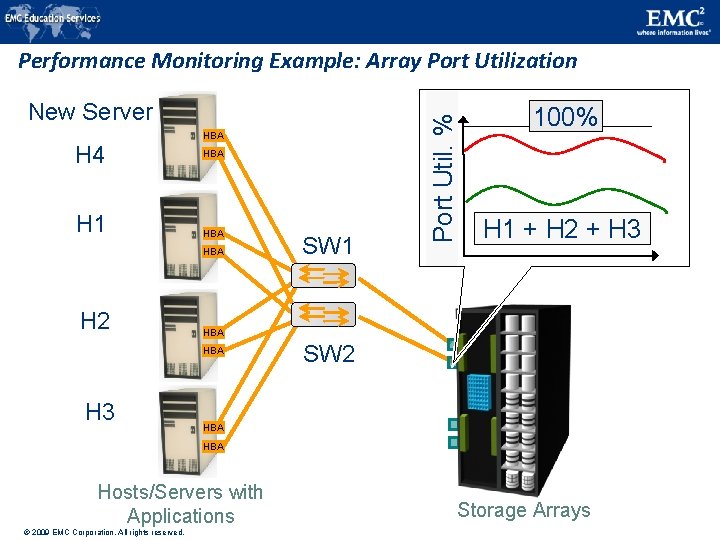
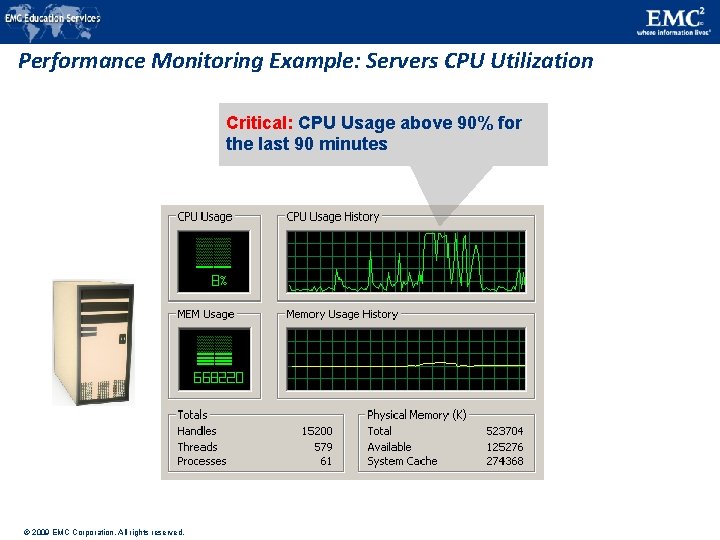
Parameters Monitored – Performance o Performance monitoring evaluates how efficiently different components are performing o Why monitor Performance metrics? o Want all data center components to work efficiently/optimally o Helps to identify performance bottlenecks o Measures and analyzes the ability to perform at a certain predefined level o Examples o Number of I/Os to disks o Application response time o Network utilization o Server CPU utilization © 2009 EMC Corporation. All rights reserved.
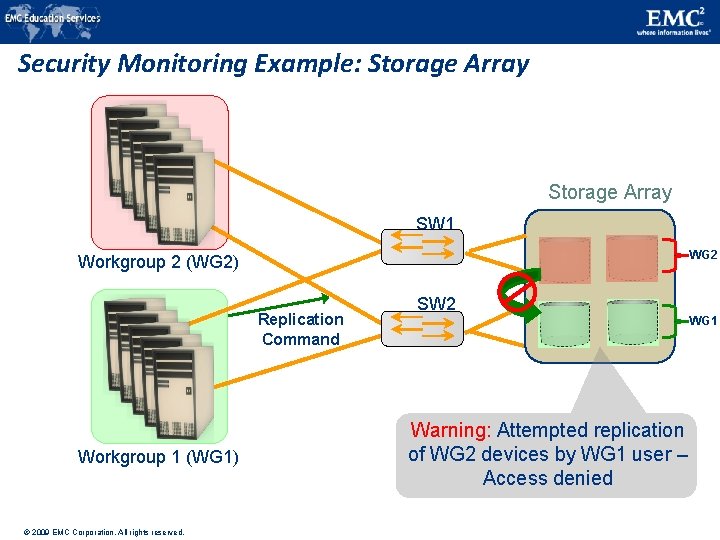
Parameters Monitored – Security o Monitoring security helps to track and prevent unauthorized access o Why monitor security? o Need to be protected for confidentiality, integrity and availability o To meet regulatory compliance o Examples o Tracking and reporting changes made to zoning configurations o Physical security through badge readers, scanners and cameras Monitoring Environmental parameters –Temperature, humidity, airflow, hazards (water, smoke, etc. ) –Voltage – power supply © 2009 EMC Corporation. All rights reserved.
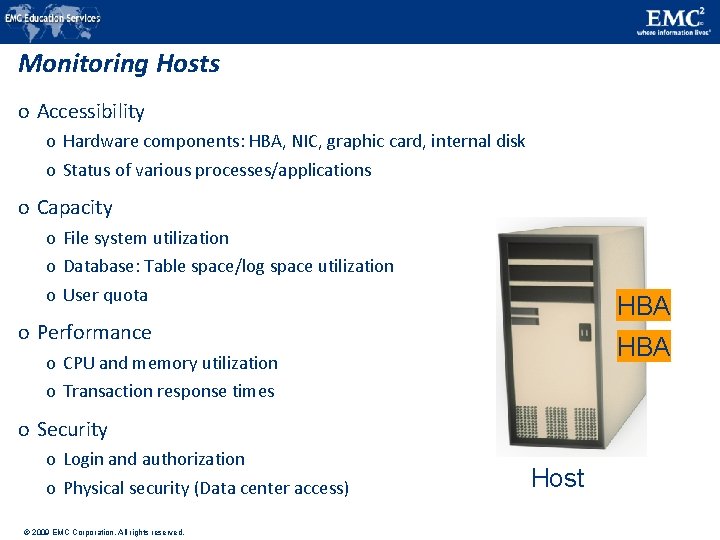
Monitoring Hosts o Accessibility o Hardware components: HBA, NIC, graphic card, internal disk o Status of various processes/applications o Capacity o File system utilization o Database: Table space/log space utilization o User quota HBA o Performance HBA o CPU and memory utilization o Transaction response times o Security o Login and authorization o Physical security (Data center access) © 2009 EMC Corporation. All rights reserved. Host
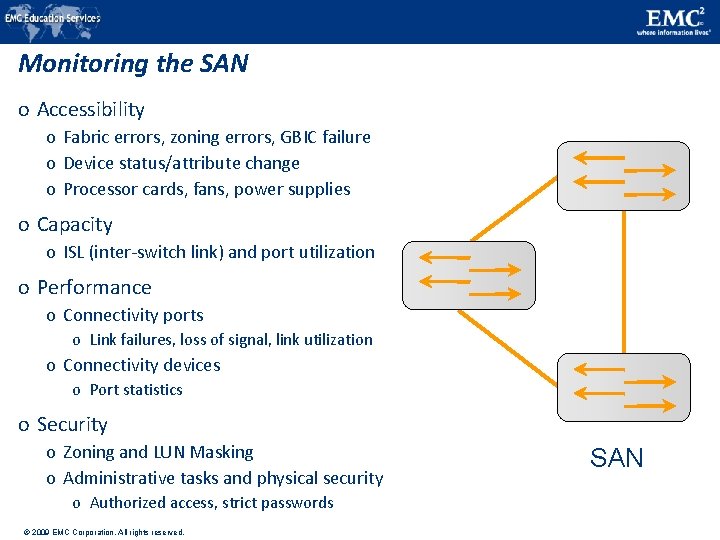
Monitoring the SAN o Accessibility o Fabric errors, zoning errors, GBIC failure o Device status/attribute change o Processor cards, fans, power supplies o Capacity o ISL (inter-switch link) and port utilization o Performance o Connectivity ports o Link failures, loss of signal, link utilization o Connectivity devices o Port statistics o Security o Zoning and LUN Masking o Administrative tasks and physical security o Authorized access, strict passwords © 2009 EMC Corporation. All rights reserved. SAN
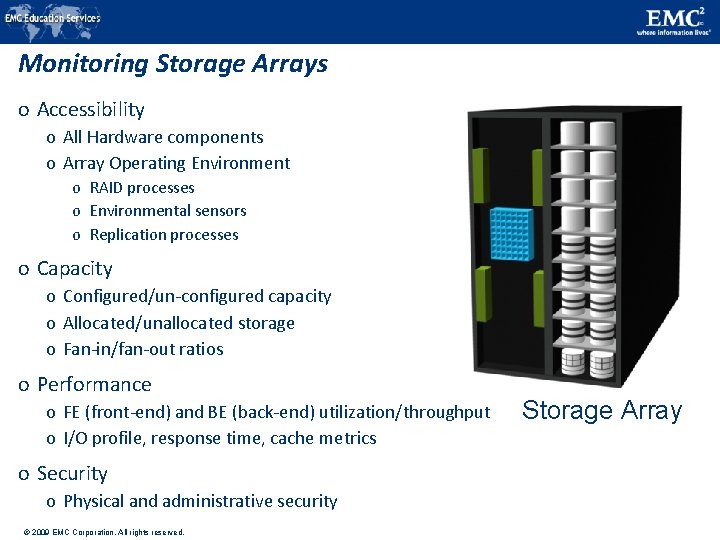
Monitoring Storage Arrays o Accessibility o All Hardware components o Array Operating Environment o RAID processes o Environmental sensors o Replication processes o Capacity o Configured/un-configured capacity o Allocated/unallocated storage o Fan-in/fan-out ratios o Performance o FE (front-end) and BE (back-end) utilization/throughput o I/O profile, response time, cache metrics o Security o Physical and administrative security © 2009 EMC Corporation. All rights reserved. Storage Array
Accessibility Monitoring Example: Array Port Failure H 1 Degraded HBA SW 1 H 2 Degraded Port HBA SW 2 H 3 Degraded HBA Hosts/Servers with Applications © 2009 EMC Corporation. All rights reserved. Port Storage Arrays
Accessibility Monitoring Example: HBA Failure Degraded H 1 HBA SW 1 H 2 Port HBA SW 2 H 3 HBA Hosts/Servers with Applications © 2009 EMC Corporation. All rights reserved. Port Storage Arrays
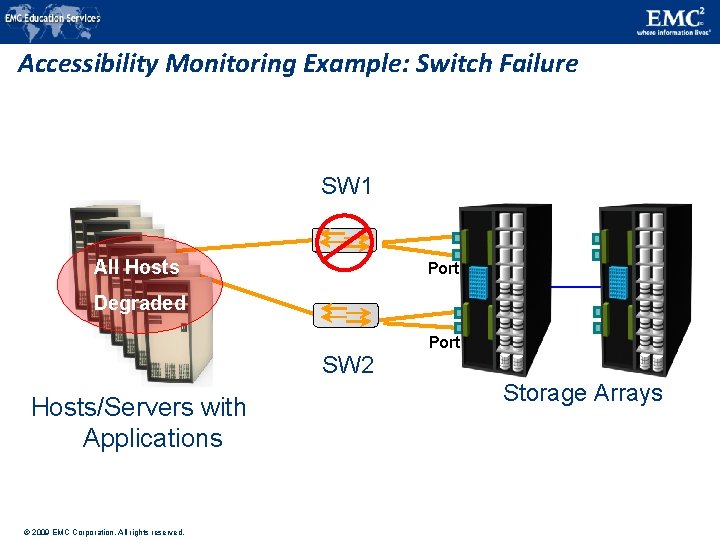
Accessibility Monitoring Example: Switch Failure SW 1 All Hosts Port Degraded Port SW 2 Hosts/Servers with Applications © 2009 EMC Corporation. All rights reserved. Storage Arrays
Capacity Monitoring Example: Storage Array New Server HBA SW 1 SW 2 Can the Array provide the required storage to the new server? Hosts/Servers with Applications © 2009 EMC Corporation. All rights reserved.
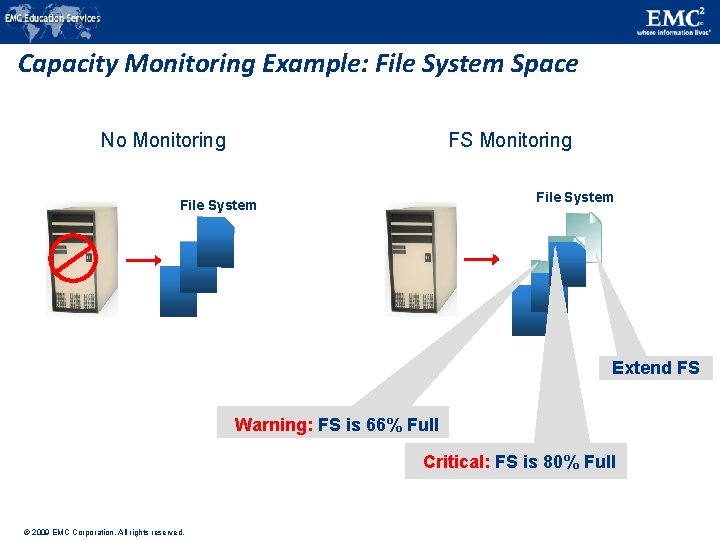
Capacity Monitoring Example: File System Space No Monitoring FS Monitoring File System Extend FS Warning: FS is 66% Full Critical: FS is 80% Full © 2009 EMC Corporation. All rights reserved.
New Server HBA H 4 H 1 HBA HBA H 2 100% H 1 + H 2 + H 3 HBA H 3 SW 1 Port Util. % Performance Monitoring Example: Array Port Utilization SW 2 HBA Hosts/Servers with Applications © 2009 EMC Corporation. All rights reserved. Storage Arrays
Performance Monitoring Example: Servers CPU Utilization Critical: CPU Usage above 90% for the last 90 minutes © 2009 EMC Corporation. All rights reserved.
Security Monitoring Example: Storage Array SW 1 WG 2 Workgroup 2 (WG 2) Replication Command Workgroup 1 (WG 1) © 2009 EMC Corporation. All rights reserved. SW 2 WG 1 Warning: Attempted replication of WG 2 devices by WG 1 user – Access denied
Alerting of Events o Alerting is an integral part of monitoring o Monitoring tools enables administrators to assign different severity levels for different events o Level of alerts based on severity o Information alert: Provide useful information and may not require administrator intervention o Creation of zone or LUN o Warning alerts: Require administrative attention o File systems becoming full/Soft media errors o Fatal alert: Require immediate administrative attention o Power failures/Disk failures/Memory failures/Switch failures © 2009 EMC Corporation. All rights reserved.
Lesson Summary Key concepts covered in this module are: o Storage infrastructure components that should be monitored o Parameters of monitoring: o Accessibility o Capacity o Performance o Security o Monitoring examples Additional Task Research on key requirements of a data center © 2009 EMC Corporation. All rights reserved.
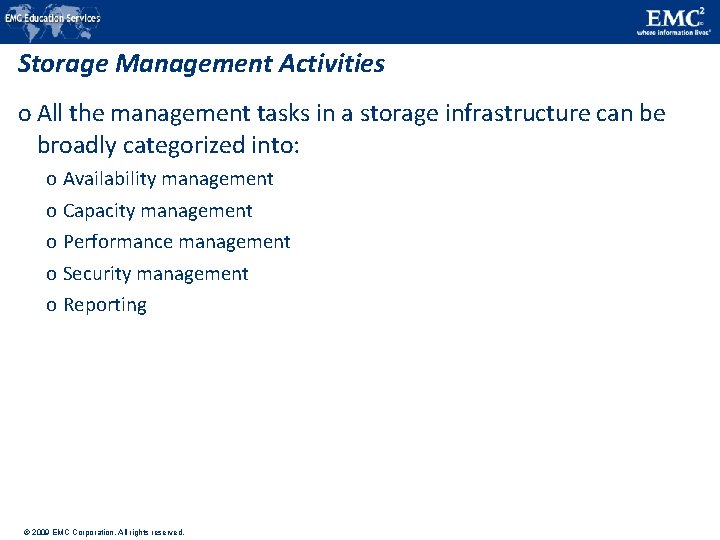
Storage Management Activities o All the management tasks in a storage infrastructure can be broadly categorized into: o Availability management o Capacity management o Performance management o Security management o Reporting © 2009 EMC Corporation. All rights reserved.
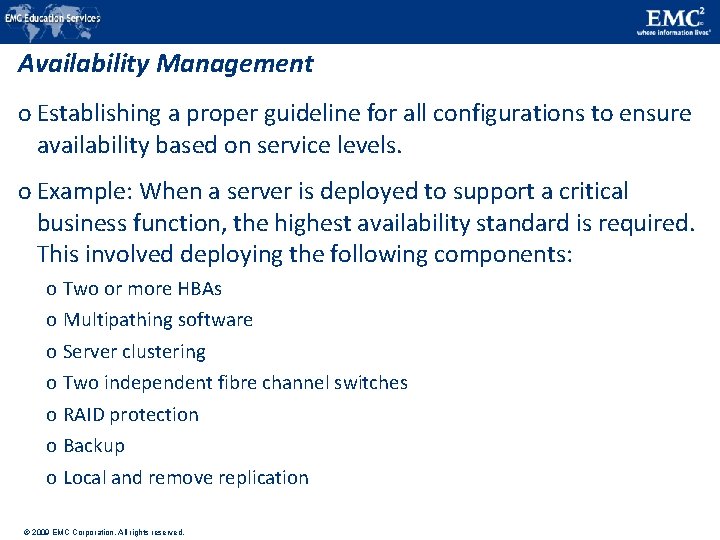
Availability Management o Establishing a proper guideline for all configurations to ensure availability based on service levels. o Example: When a server is deployed to support a critical business function, the highest availability standard is required. This involved deploying the following components: o Two or more HBAs o Multipathing software o Server clustering o Two independent fibre channel switches o RAID protection o Backup o Local and remove replication © 2009 EMC Corporation. All rights reserved.
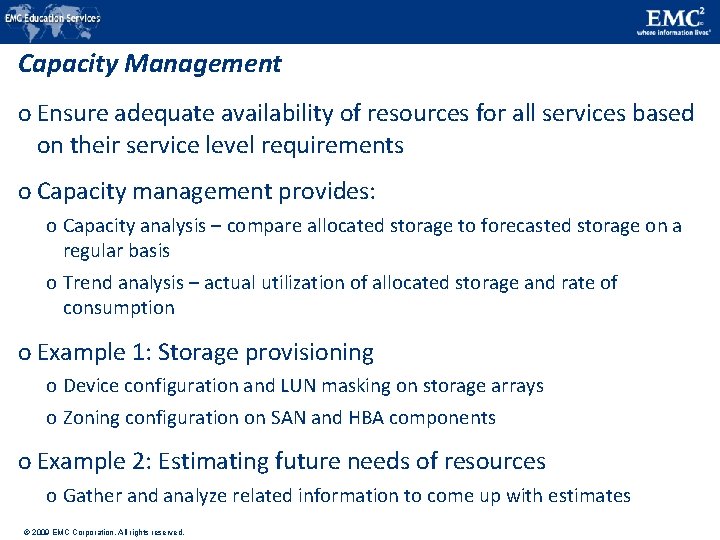
Capacity Management o Ensure adequate availability of resources for all services based on their service level requirements o Capacity management provides: o Capacity analysis – compare allocated storage to forecasted storage on a regular basis o Trend analysis – actual utilization of allocated storage and rate of consumption o Example 1: Storage provisioning o Device configuration and LUN masking on storage arrays o Zoning configuration on SAN and HBA components o Example 2: Estimating future needs of resources o Gather and analyze related information to come up with estimates © 2009 EMC Corporation. All rights reserved.
Performance Management o Ensures the optimal operational efficiencies of all components o Performance analysis is performed on existing storage infrastructure components o Provides information whether a component is meeting expected performance levels o When a new application or server is to be deployed, every components involved must be validated for adequate performance capabilities as defined by the service levels. o Server: volume configuration, database design, application layout on multiple HBAs, multipathing software o SAN: designing sufficient ISLs in a multi-switch fabric with adequate bandwidth o Storage arrays: selecting appropriate RAID type and LUN layout, front-end and back-end ports, LUN masking © 2009 EMC Corporation. All rights reserved.
Security Management o Prevents unauthorized access and configuration of storage infrastructure components o Example: When deploying a new application or server o Managing user accounts and access policies o Zoning configuration in the SAN o LUN masking © 2009 EMC Corporation. All rights reserved.
Reporting o Keeping track and gathering information from various components / processes o This information is compiled to generate reports for: o Trend analysis and capacity planning – current and historic information about utilization of storage, file system, database tablespace, ports o Configuration or asset management – device allocation, local and remote replicas, fabric configuration, list of equipment with details such as their value, purchase date, lease status and maintenance record o Chargeback – allocation and utilization of storage infrastructure components by various departments / user groups. o Performance – performance of various storage infrastructure components © 2009 EMC Corporation. All rights reserved.
Storage Infrastructure Management Challenges o Large number and variety of storage arrays, networks, servers, databases and applications o Variety of storage devices varying in capacity, performance and protection methodologies o Deployment of both SAN and IP networks for storage devices o Servers with different operating systems: UNIX, LINUX, Windows, mainframe o Interoperability issues between devices from multiple vendors o Multiple vendor-specific tools to monitor devices from different vendors © 2009 EMC Corporation. All rights reserved.
#1 IT company For more information visit © 2009 EMC Corporation. All rights reserved. http: //education. EMC. com