
Section 3 Business Continuity Introduction to Business Continuity
Section 3 : Business Continuity Introduction to Business Continuity
What is Business Continuity (BC) • Business Continuity is preparing for, responding to, and recovering from an application outage that adversely affects business operations • Business Continuity solutions address unavailability and degraded application performance • Business Continuity is an integrated and enterprise wide process and set of activities to ensure “information availability”
What is Information Availability (IA) • IA refers to the ability of an infrastructure to function according to business expectations during its specified time of operation • IA can be defined in terms of three parameters: – Reliability • The components delivering the information should be able to function without failure, under stated conditions, for a specified amount of time – Accessibility • Information should be accessible at the right place and to the right user – Timeliness • Information must be available whenever required
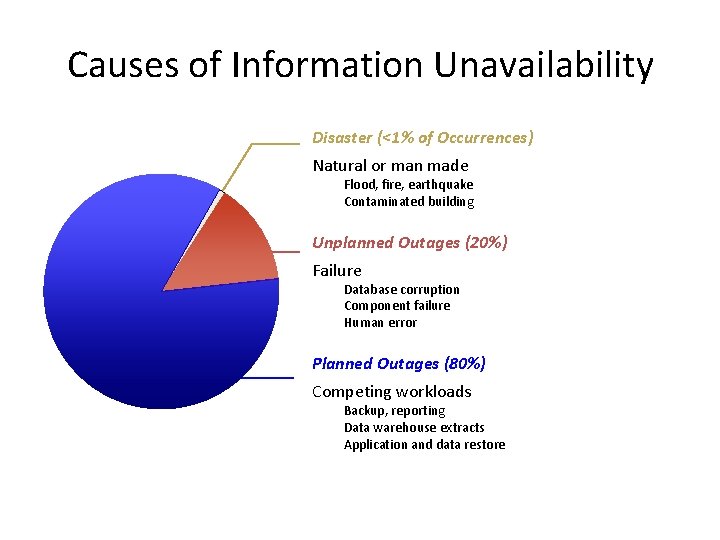
Causes of Information Unavailability Disaster (<1% of Occurrences) Natural or man made Flood, fire, earthquake Contaminated building Unplanned Outages (20%) Failure Database corruption Component failure Human error Planned Outages (80%) Competing workloads Backup, reporting Data warehouse extracts Application and data restore
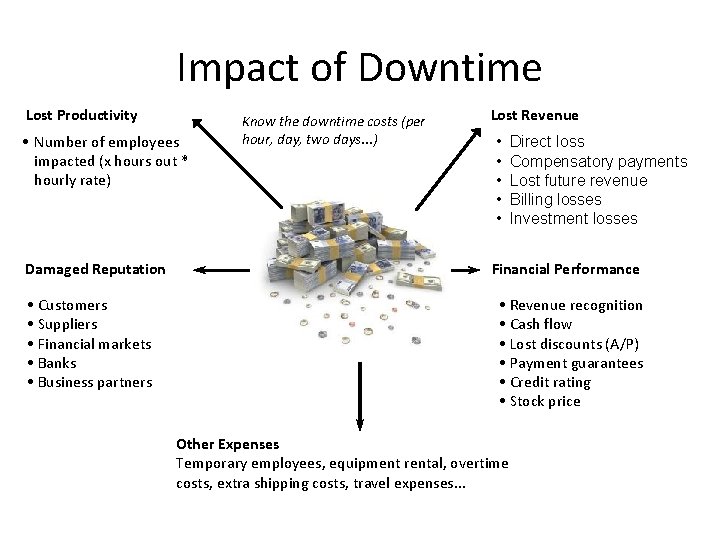
Impact of Downtime Lost Productivity • Number of employees impacted (x hours out * hourly rate) Damaged Reputation • Customers • Suppliers • Financial markets • Banks • Business partners Know the downtime costs (per hour, day, two days. . . ) Lost Revenue • • • Direct loss Compensatory payments Lost future revenue Billing losses Investment losses Financial Performance • Revenue recognition • Cash flow • Lost discounts (A/P) • Payment guarantees • Credit rating • Stock price Other Expenses Temporary employees, equipment rental, overtime costs, extra shipping costs, travel expenses. . .
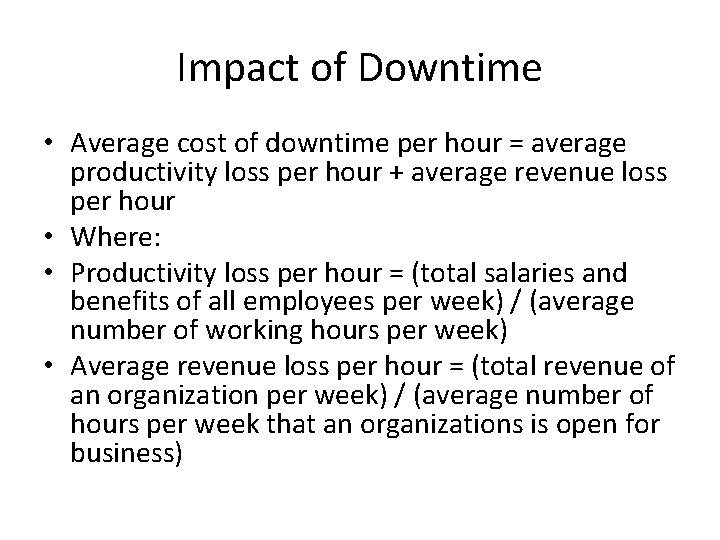
Impact of Downtime • Average cost of downtime per hour = average productivity loss per hour + average revenue loss per hour • Where: • Productivity loss per hour = (total salaries and benefits of all employees per week) / (average number of working hours per week) • Average revenue loss per hour = (total revenue of an organization per week) / (average number of hours per week that an organizations is open for business)
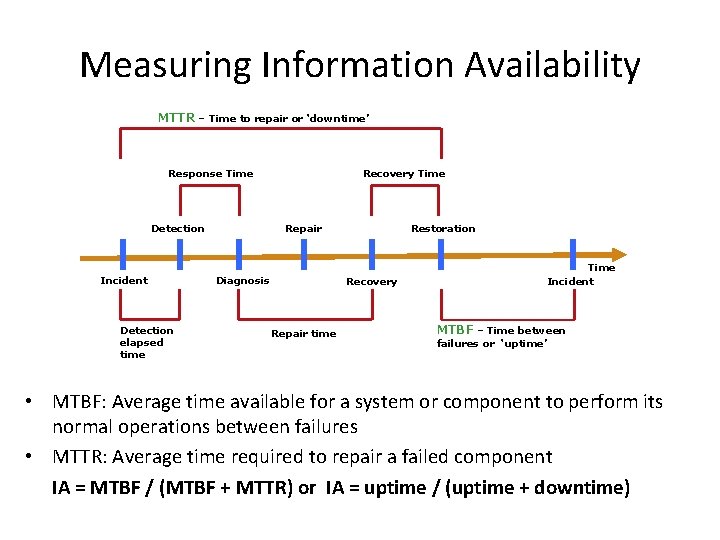
Measuring Information Availability MTTR – Time to repair or ‘downtime’ Response Time Detection Incident Detection elapsed time Recovery Time Repair Diagnosis Restoration Recovery Repair time Time Incident MTBF – Time between failures or ‘uptime’ • MTBF: Average time available for a system or component to perform its normal operations between failures • MTTR: Average time required to repair a failed component IA = MTBF / (MTBF + MTTR) or IA = uptime / (uptime + downtime)
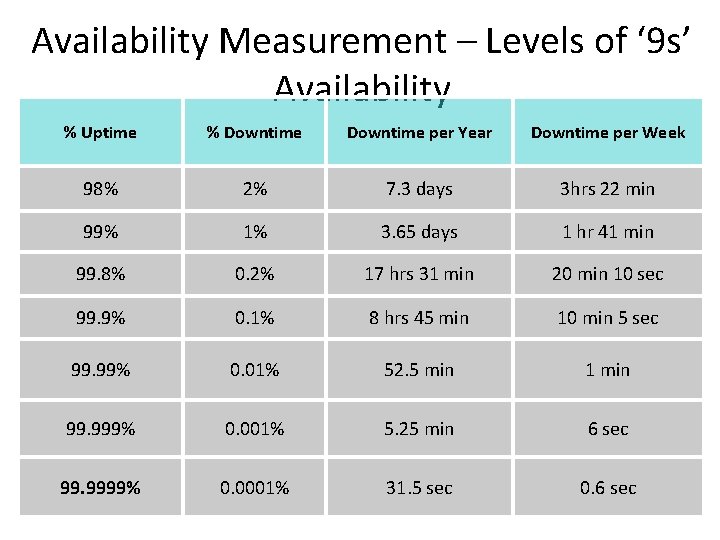
Availability Measurement – Levels of ‘ 9 s’ Availability % Uptime % Downtime per Year Downtime per Week 98% 2% 7. 3 days 3 hrs 22 min 99% 1% 3. 65 days 1 hr 41 min 99. 8% 0. 2% 17 hrs 31 min 20 min 10 sec 99. 9% 0. 1% 8 hrs 45 min 10 min 5 sec 99. 99% 0. 01% 52. 5 min 1 min 99. 999% 0. 001% 5. 25 min 6 sec 99. 9999% 0. 0001% 31. 5 sec 0. 6 sec
BC Terminologies • Disaster recovery – Coordinated process of restoring systems, data, and infrastructure required to support ongoing business operations in the event of a disaster – Restoring previous copy of data and applying logs to that copy to bring it to a known point of consistency – Generally implies use of backup technology • Disaster restart – Process of restarting from disaster using mirrored consistent copies of data and applications – Generally implies use of replication technologies
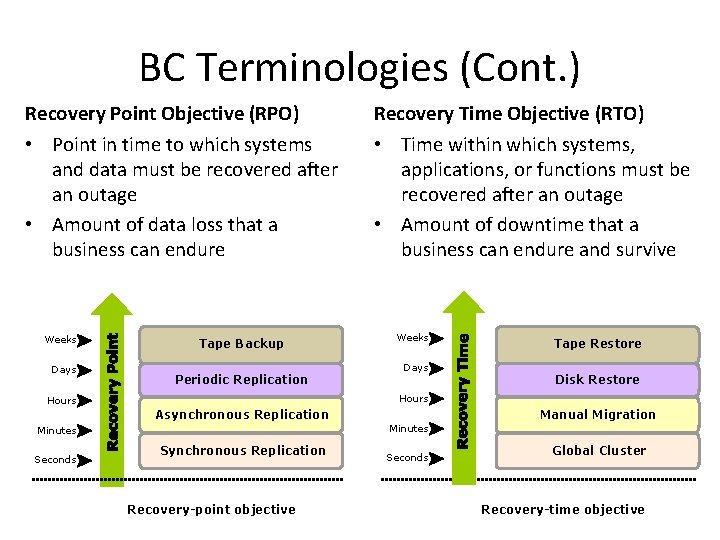
BC Terminologies (Cont. ) Recovery Point Objective (RPO) • Point in time to which systems and data must be recovered after an outage • Amount of data loss that a business can endure Weeks Days Tape Backup Periodic Replication Recovery Time Objective (RTO) • Time within which systems, applications, or functions must be recovered after an outage • Amount of downtime that a business can endure and survive Weeks Days Disk Restore Hours Manual Migration Asynchronous Replication Minutes Seconds Tape Restore Synchronous Replication Recovery-point objective Seconds Global Cluster Recovery-time objective

Business Continuity Planning (BCP) Process • Identifying the critical business functions • Collecting data on various business processes within those functions • Business Impact Analysis (BIA) – Risk Analysis • Assessing, prioritizing, mitigating, and managing risk • Designing and developing contingency plans and disaster recovery plan (DR Plan) • Testing, training and maintenance

Business Continuity (BC) Planning Lifecycle BC planning must follow a disciplined approach like any other planning process. Organizations today dedicate specialized resources to develop and maintain BC plans. From the conceptualization to the realization of the BC plan, a lifecycle of activities can be defined for the BC process. The BC planning lifecycle includes five stages: 1. Establishing objectives 2. Analyzing 3. Designing and developing 4. Implementing 5. Training, testing, assessing, and maintaining
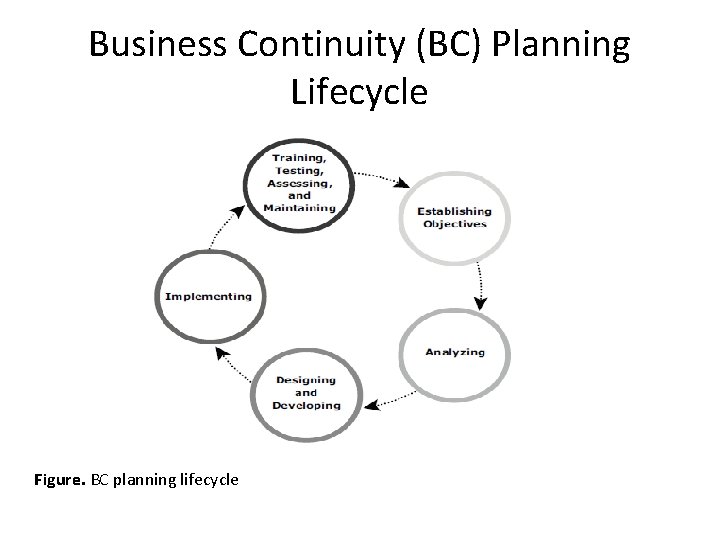
Business Continuity (BC) Planning Lifecycle Figure. BC planning lifecycle
Establishing objectives • Determine BC requirements. • Estimate the scope and budget to achieve requirements. • Select a BC team by considering subject matter experts from all areas of the business, whether internal or external. • Create BC policies.
Analyzing • Collect information on data profiles, business processes, infrastructure support, dependencies, and frequency of using business infrastructure. • Identify critical business needs and assign recovery priorities. • Create a risk analysis for critical areas and mitigation strategies. • Conduct a Business Impact Analysis (BIA). • Create a cost and benefit analysis based on the consequences of data unavailability. • Evaluate options.
Designing and developing • Define the team structure and assign individual roles and responsibilities. For example, different teams are formed for activities such as emergency response, damage assessment, and infrastructure and application recovery. • Design data protection strategies and develop infrastructure. • Develop contingency scenarios. • Develop emergency response procedures. • Detail recovery and restart procedures.
Implementing • Implement risk management and mitigation procedures that include backup, replication, and management of resources. • Prepare the disaster recovery sites that can be utilized if a disaster affects the primary data center. • Implement redundancy for every resource in a data center to avoid single points of failure.
• • Training, testing, assessing, and maintaining Train the employees who are responsible for backup and replication of business-critical data on a regular basis or whenever there is a modification in the BC plan. Train employees on emergency response procedures when disasters are declared. Train the recovery team on recovery procedures based on contingency scenarios. Perform damage assessment processes and review recovery plans. Test the BC plan regularly to evaluate its performance and identify its limitations. Assess the performance reports and identify limitations. Update the BC plans and recovery/restart procedures to reflect regular changes within the data center.
BC Technology Solutions • The following are the solutions and supporting technologies that enable business continuity and uninterrupted data availability: – Fault tolerant configuration • To avoid single-point of failure – Multi-pathing software – Backup and replication • Backup recovery • Local replication • Remote replication
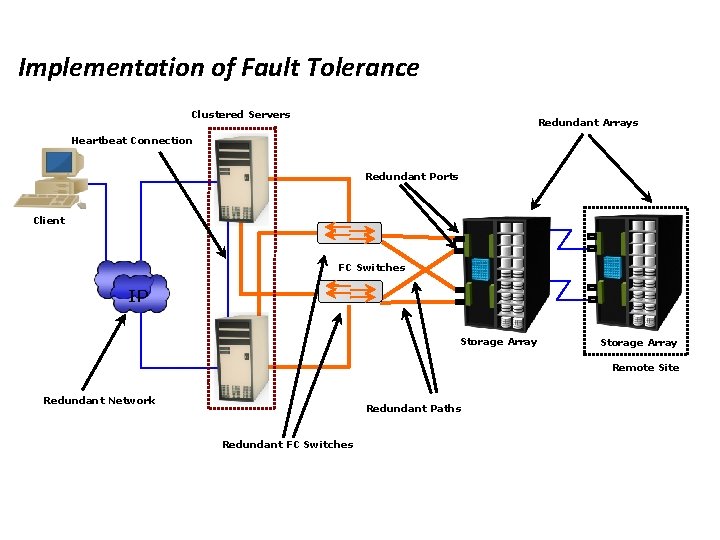
Implementation of Fault Tolerance Clustered Servers Redundant Arrays Heartbeat Connection Redundant Ports Client FC Switches IP Storage Array Remote Site Redundant Network Redundant Paths Redundant FC Switches
Multi-pathing Software • Configuration of multiple paths increases data availability • Even with multiple paths, if a path fails I/O will not reroute unless system recognizes that it has an alternate path • Multi-pathing software helps to recognize and utilizes alternate I/O path to data • Multi-pathing software also provide the load balancing • Load balancing improves I/O performance and data path utilization
Backup and Replication • Local Replication – Data from the production devices is copied to replica devices within the same array – The replicas can then be used for restore operations in the event of data corruption or other events • Remote Replication – Data from the production devices is copied to replica devices on a remote array – In the event of a failure, applications can continue to run from the target device • Backup/Restore – Backup to tape has been a predominant method to ensure business continuity – Frequency of backup is depend on RPO/RTO requirements
What is a Backup? • Backup is an additional copy of data that can be used for restore and recovery purposes • The Backup copy is used when the primary copy is lost or corrupted • This Backup copy can be created by: – Simply coping data (there can be one or more copies) – Mirroring data (the copy is always updated with whatever is written to the primary copy)
It’s All About Recovery • Businesses back up their data to enable its recovery in case of potential loss • Businesses also back up their data to comply with regulatory requirements • Backup purposes: – Disaster Recovery • Restores production data to an operational state after disaster – Operational • Restore data in the event of data loss or logical corruptions that may occur during routine processing – Archival • Preserve transaction records, email, and other business work products for regulatory compliance
Backup/Recovery Considerations • Customer business needs determine: – What are the restore requirements – RPO & RTO? – Where and when will the restores occur? – What are the most frequent restore requests? – Which data needs to be backed up? – How frequently should data be backed up? • hourly, daily, weekly, monthly – How long will it take to backup? – How many copies to create? – How long to retain backup copies?
Other Considerations: Data • Location • Number and size of files
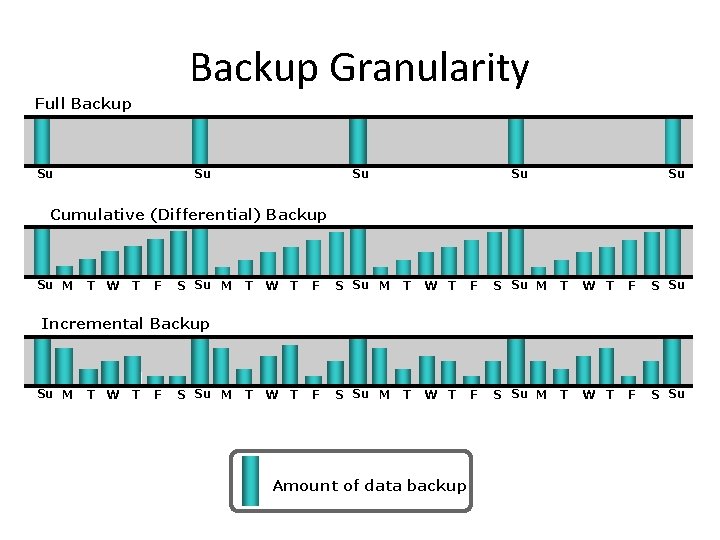
Backup Granularity Full Backup Su Su Su Cumulative (Differential) Backup Su M T W T F S Su T W T F S Su M T W T F S Su Incremental Backup Su M T W T F S Su M Amount of data backup
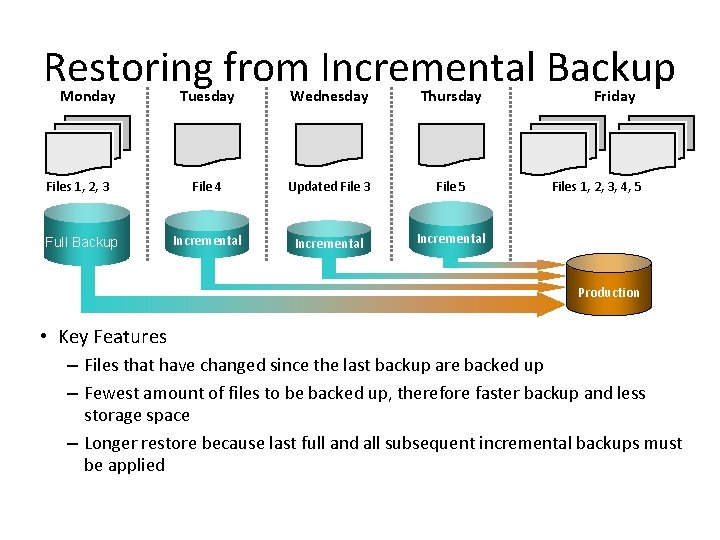
Restoring from Incremental Backup Monday Tuesday Wednesday Thursday Files 1, 2, 3 File 4 Updated File 3 File 5 Full Backup Incremental Friday Files 1, 2, 3, 4, 5 Production • Key Features – Files that have changed since the last backup are backed up – Fewest amount of files to be backed up, therefore faster backup and less storage space – Longer restore because last full and all subsequent incremental backups must be applied
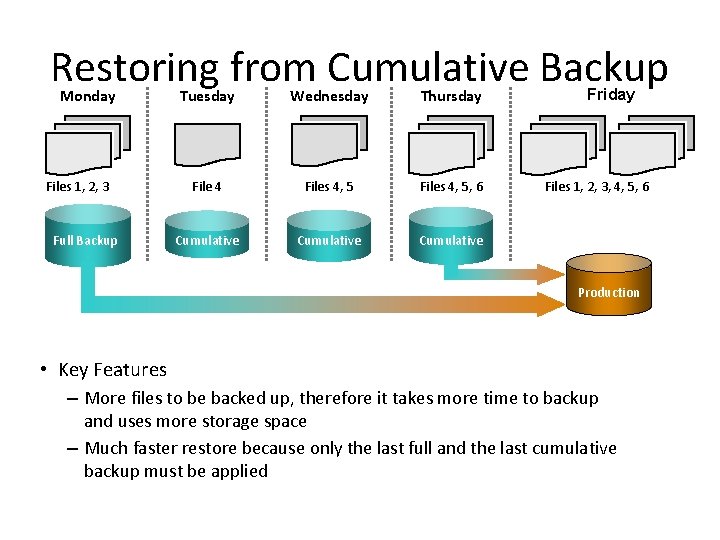
Restoring from Cumulative Backup Monday Files 1, 2, 3 Full Backup Tuesday Wednesday Thursday File 4 Files 4, 5, 6 Cumulative Friday Files 1, 2, 3, 4, 5, 6 Production • Key Features – More files to be backed up, therefore it takes more time to backup and uses more storage space – Much faster restore because only the last full and the last cumulative backup must be applied
Backup Methods • Cold or offline • Hot or online
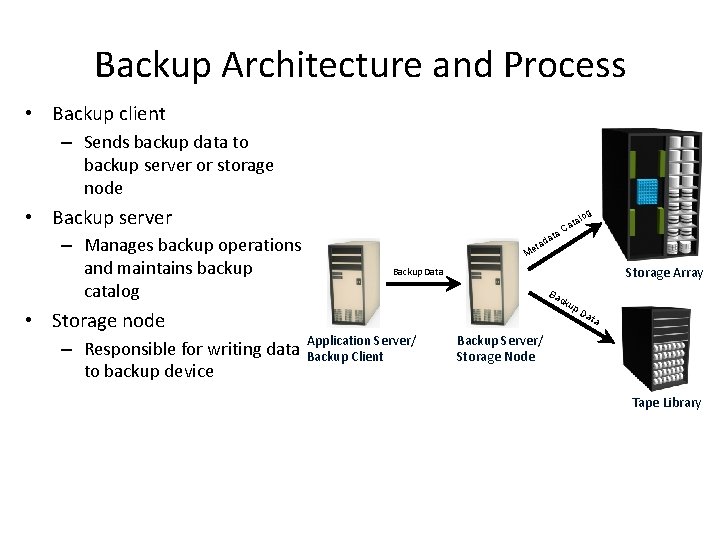
Backup Architecture and Process • Backup client – Sends backup data to backup server or storage node • Backup server – Manages backup operations and maintains backup catalog • Storage node – Responsible for writing data to backup device log ata ta Ca d eta M Storage Array Backup Data Ba c ku Application Server/ Backup Client p. D ata Backup Server/ Storage Node Tape Library
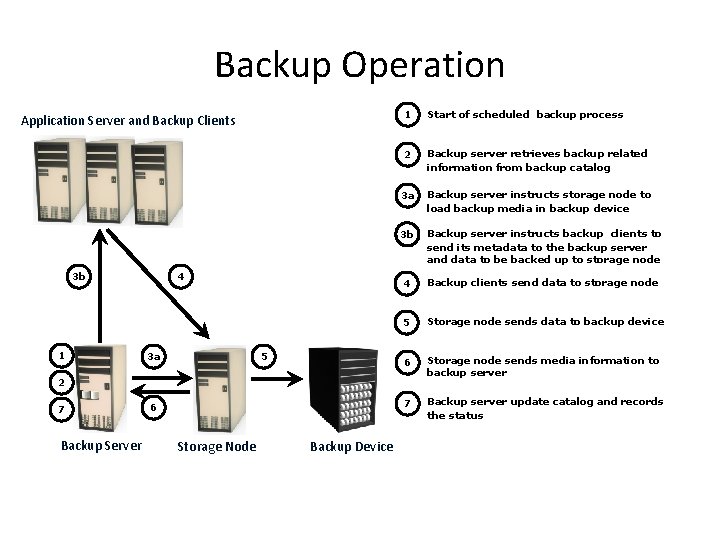
Backup Operation Application Server and Backup Clients 3 b 1 4 3 a 5 1 Start of scheduled backup process 2 Backup server retrieves backup related information from backup catalog 3 a Backup server instructs storage node to load backup media in backup device 3 b Backup server instructs backup clients to send its metadata to the backup server and data to be backed up to storage node 4 Backup clients send data to storage node 5 Storage node sends data to backup device 6 Storage node sends media information to backup server 7 Backup server update catalog and records the status 2 7 Backup Server 6 Storage Node Backup Device
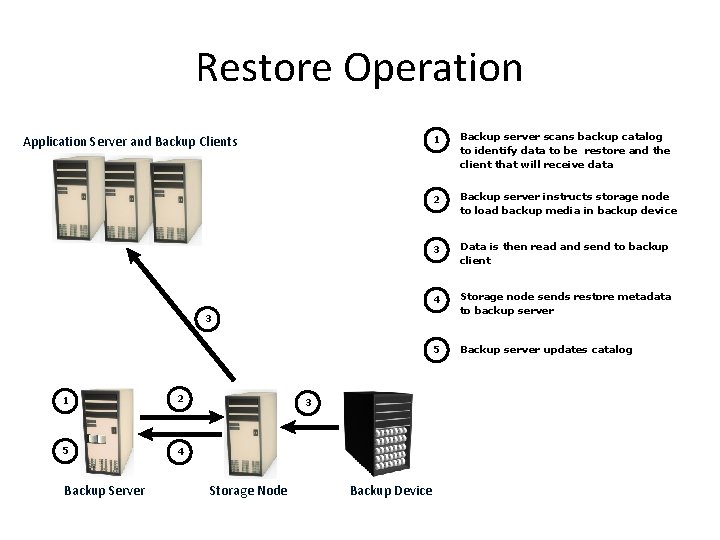
Restore Operation Application Server and Backup Clients 1 Backup server scans backup catalog to identify data to be restore and the client that will receive data 2 Backup server instructs storage node to load backup media in backup device 3 Data is then read and send to backup client 4 Storage node sends restore metadata to backup server 5 Backup server updates catalog 3 1 2 5 4 Backup Server 3 Storage Node Backup Device
Lesson Summary Key points covered in this lesson: • Purposes for Backup • Considerations for backup and recovery • Backup granularity – Full, Cumulative, Incremental • Backup methods • Backup/recovery process and operation
Lesson: Backup/Recovery Topologies & Technologies Upon completion of this lesson, you be able to: • Describe backup topologies – Direct backup – LAN and LAN free backup – Mixed backup • Detail backup in NAS environment • Describe backup technologies – Backup to tape – Backup to disk – Backup to virtual tape
Backup Topologies • There are 3 basic backup topologies: – Direct Attached Based Backup – LAN Based Backup – SAN Based Backup – Mixed backup
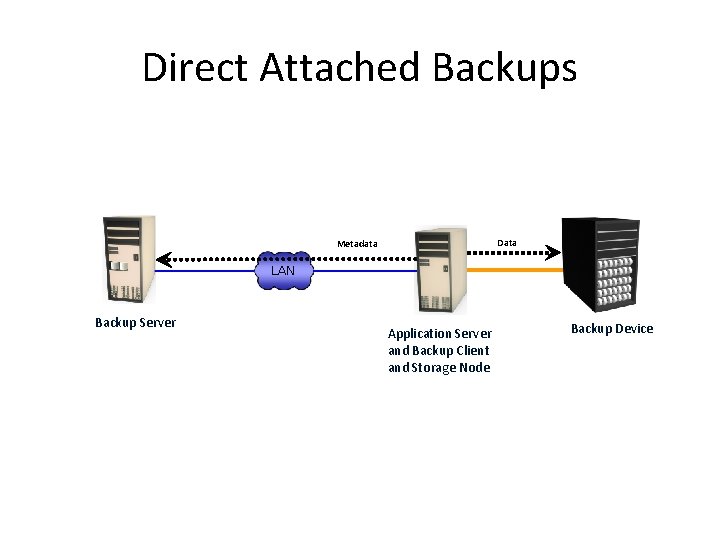
Direct Attached Backups Data Metadata LAN Backup Server Application Server and Backup Client and Storage Node Backup Device
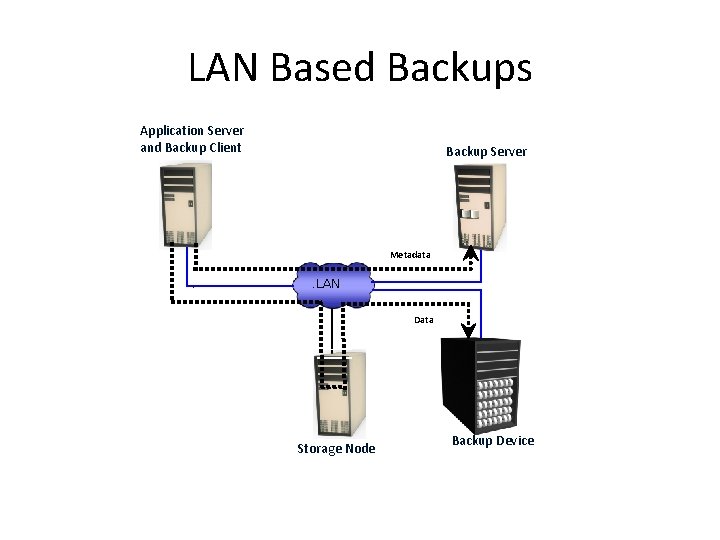
LAN Based Backups Application Server and Backup Client Backup Server Metadata LAN Data Storage Node Backup Device
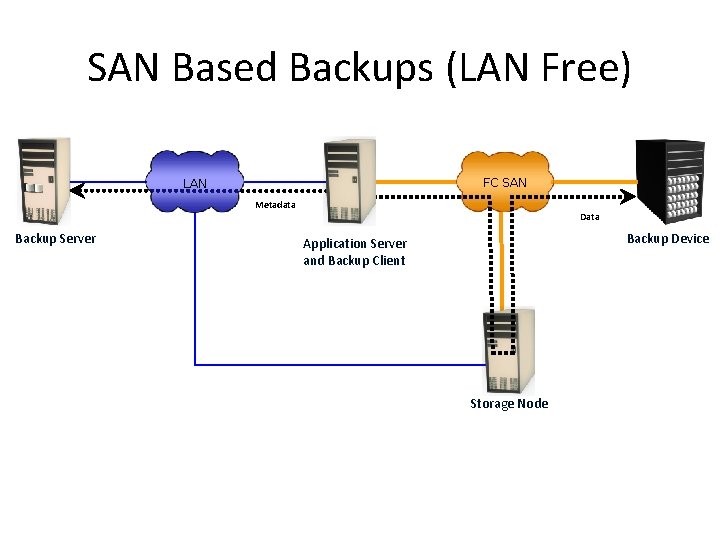
SAN Based Backups (LAN Free) FC SAN LAN Metadata Backup Server Data Backup Device Application Server and Backup Client Storage Node
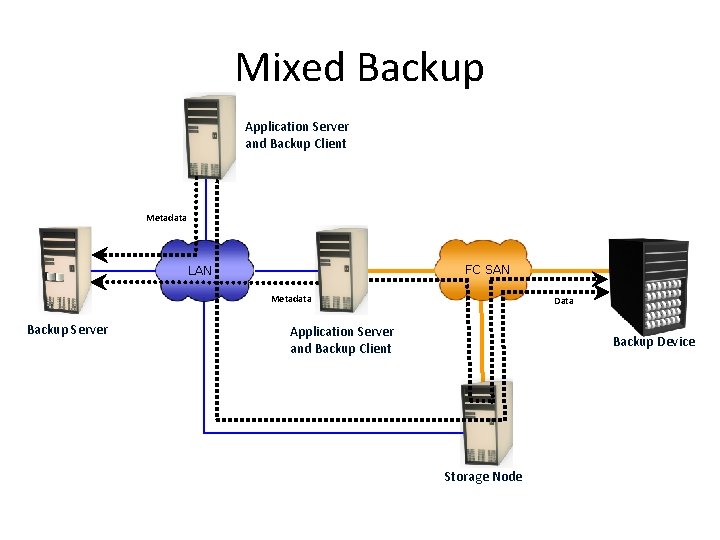
Mixed Backup Application Server and Backup Client Metadata FC SAN LAN Metadata Backup Server Data Application Server and Backup Client Backup Device Storage Node
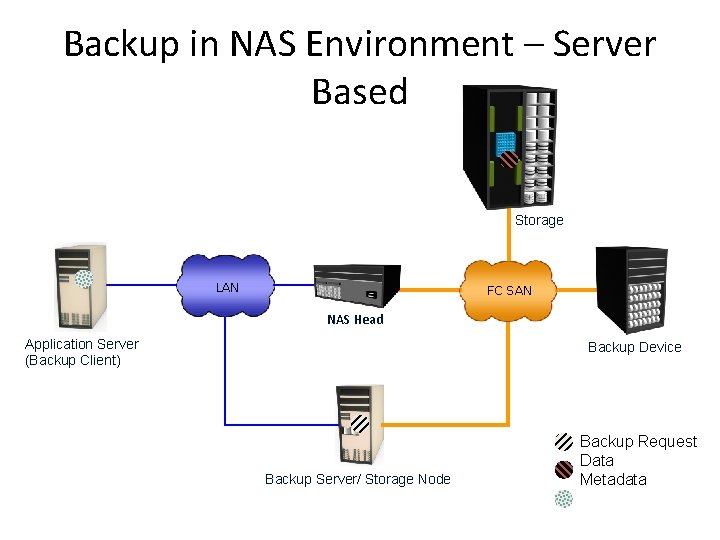
Backup in NAS Environment – Server Based Storage LAN FC SAN NAS Head Application Server (Backup Client) Backup Device Backup Server/ Storage Node Backup Request Data Metadata
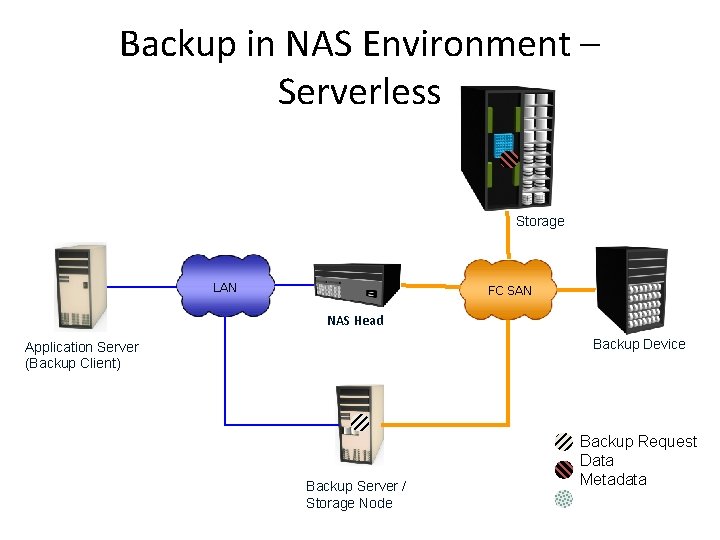
Backup in NAS Environment – Serverless Storage LAN FC SAN NAS Head Backup Device Application Server (Backup Client) Backup Server / Storage Node Backup Request Data Metadata
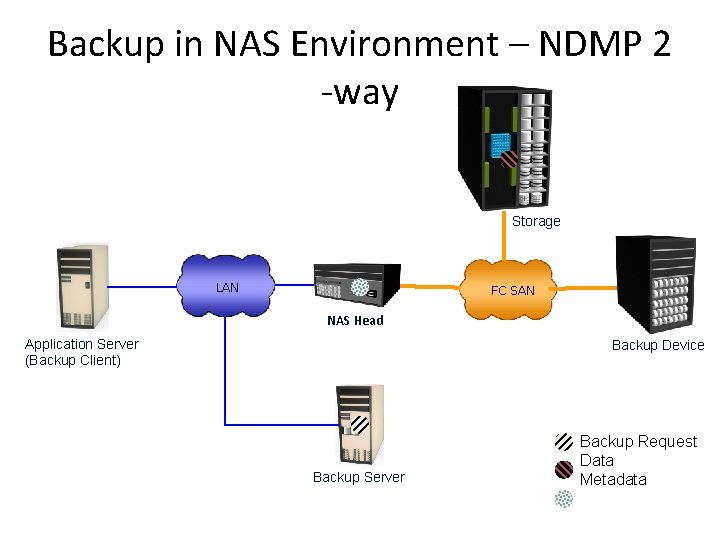
Backup in NAS Environment – NDMP 2 -way Storage LAN FC SAN NAS Head Application Server (Backup Client) Backup Device Backup Server Backup Request Data Metadata
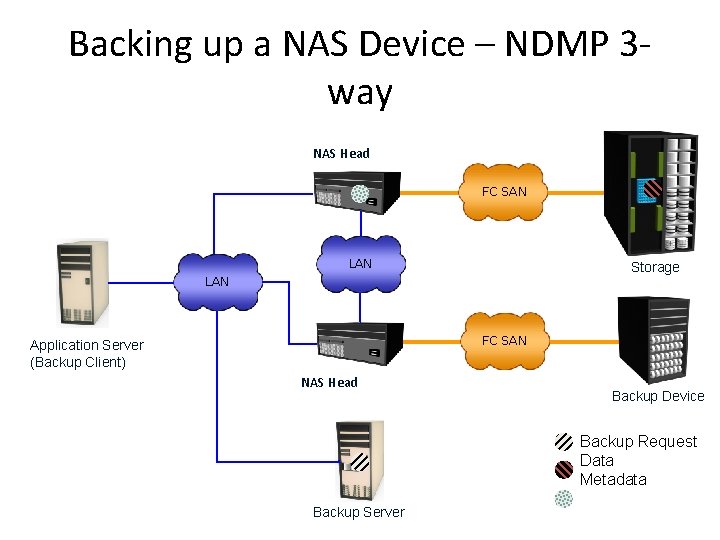
Backing up a NAS Device – NDMP 3 way NAS Head FC SAN LAN Storage LAN FC SAN Application Server (Backup Client) NAS Head Backup Device Backup Request Data Metadata Backup Server
Backup Technology options • Backup to Tape – Physical tape library • Backup to Disk • Backup to virtual tape – Virtual tape library
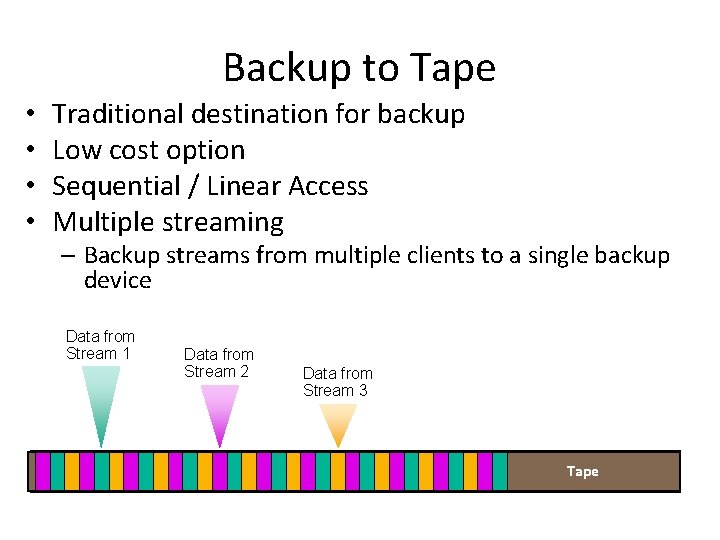
Backup to Tape • • Traditional destination for backup Low cost option Sequential / Linear Access Multiple streaming – Backup streams from multiple clients to a single backup device Data from Stream 1 Data from Stream 2 Data from Stream 3 Tape
Backup to Disk • • • Ease of implementation Fast access More Reliable Random Access Multiple hosts access Enhanced overall backup and recovery performance
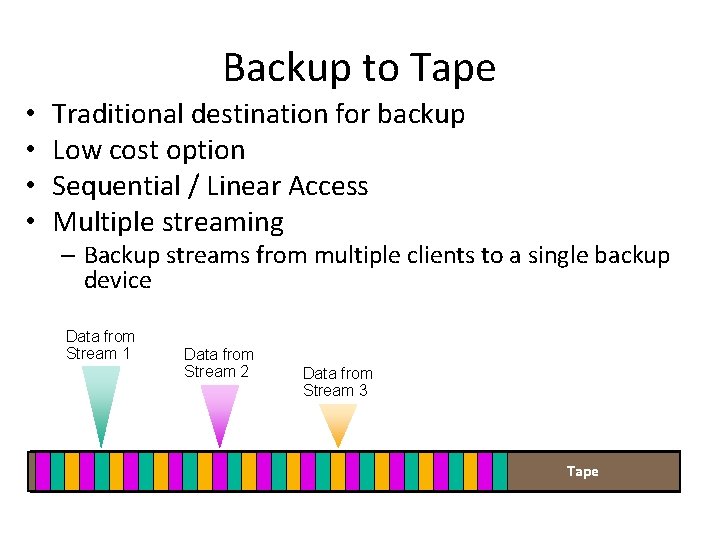
Backup to Tape • • Traditional destination for backup Low cost option Sequential / Linear Access Multiple streaming – Backup streams from multiple clients to a single backup device Data from Stream 1 Data from Stream 2 Data from Stream 3 Tape
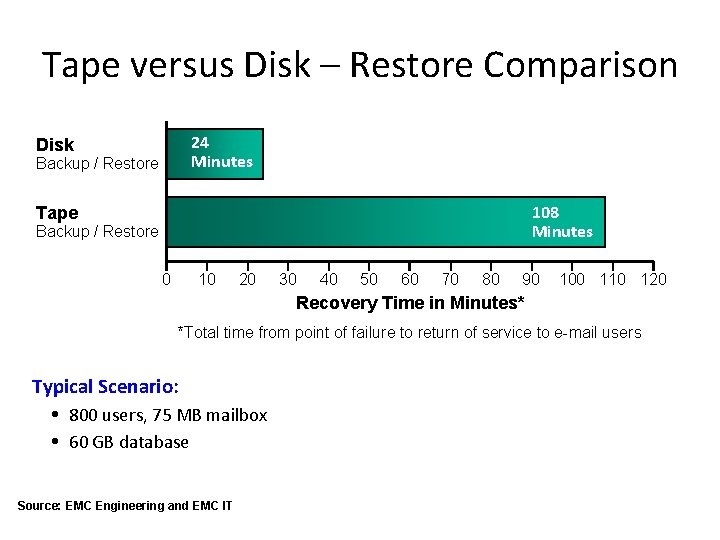
Tape versus Disk – Restore Comparison 24 Minutes Disk Backup / Restore 108 Minutes Tape Backup / Restore 0 10 20 30 40 50 60 70 80 90 100 110 120 Recovery Time in Minutes* *Total time from point of failure to return of service to e-mail users Typical Scenario: 800 users, 75 MB mailbox 60 GB database Source: EMC Engineering and EMC IT
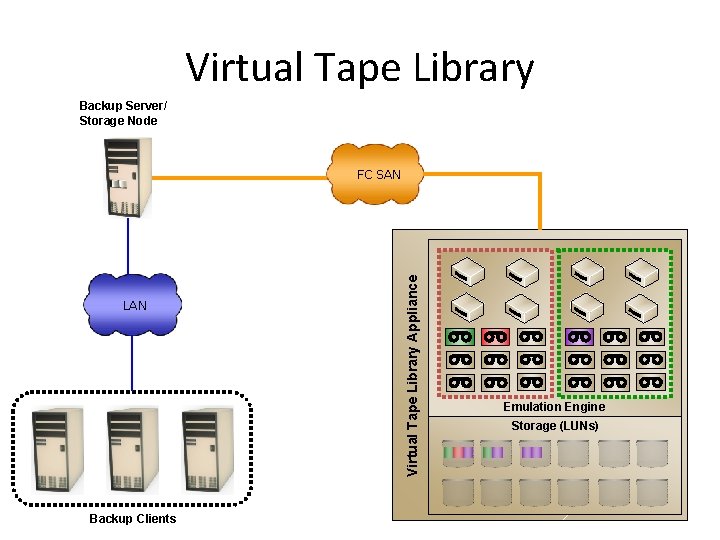
Virtual Tape Library Backup Server/ Storage Node LAN Backup Clients Virtual Tape Library Appliance FC SAN Emulation Engine Storage (LUNs)
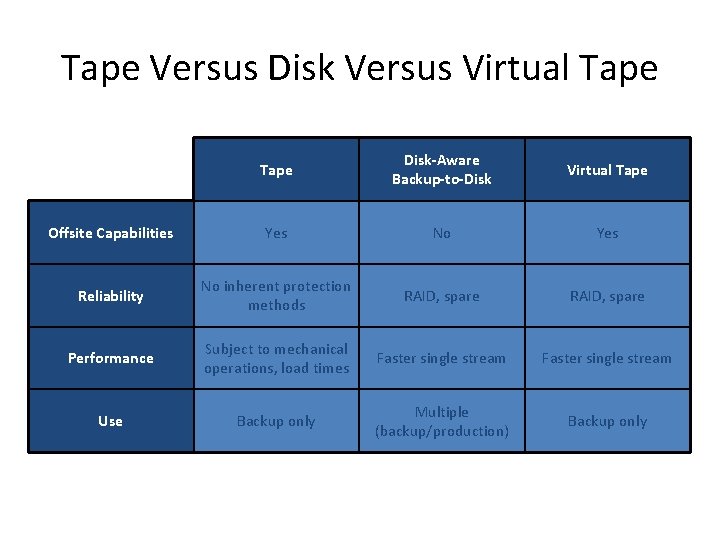
Tape Versus Disk Versus Virtual Tape Disk-Aware Backup-to-Disk Virtual Tape Offsite Capabilities Yes No Yes Reliability No inherent protection methods RAID, spare Performance Subject to mechanical operations, load times Faster single stream Use Backup only Multiple (backup/production) Backup only
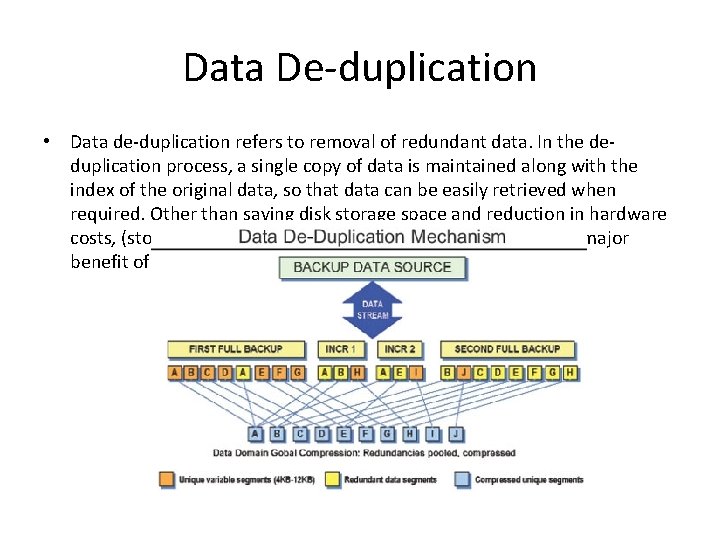
Data De-duplication • Data de-duplication refers to removal of redundant data. In the deduplication process, a single copy of data is maintained along with the index of the original data, so that data can be easily retrieved when required. Other than saving disk storage space and reduction in hardware costs, (storage hardware, cooling, backup media, etc), another major benefit of data de-duplication is bandwidth optimization.
Lesson Summary Key points covered in this lesson: • Backup topologies – Direct attached, LAN and SAN based backup – Backup in NAS environment • • Backup to Tape Backup to Disk Backup to virtual tape Comparison among tape, disk and virtual tape backup
- Slides: 53