
Section 2 10 1 import java awt event

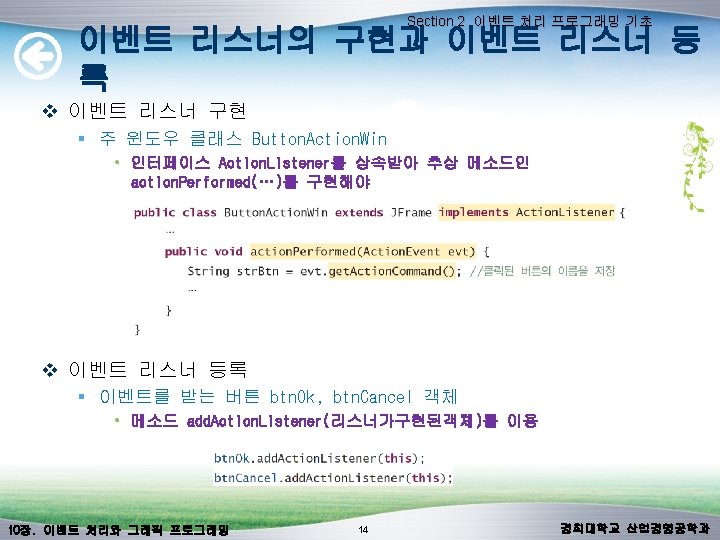
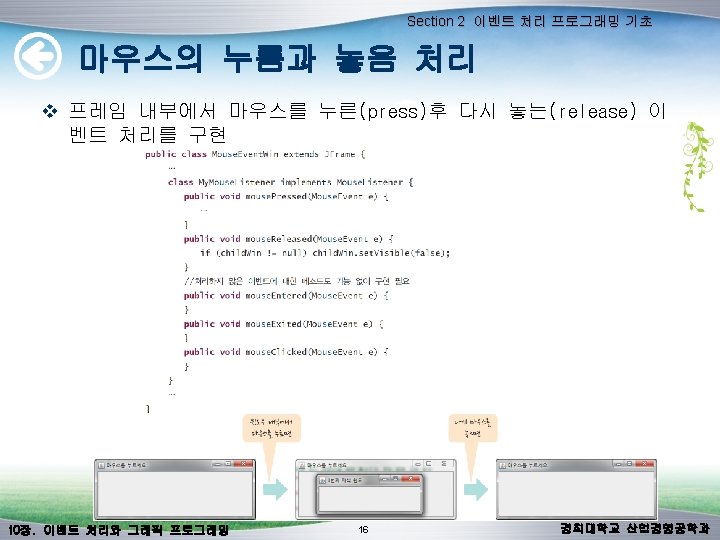
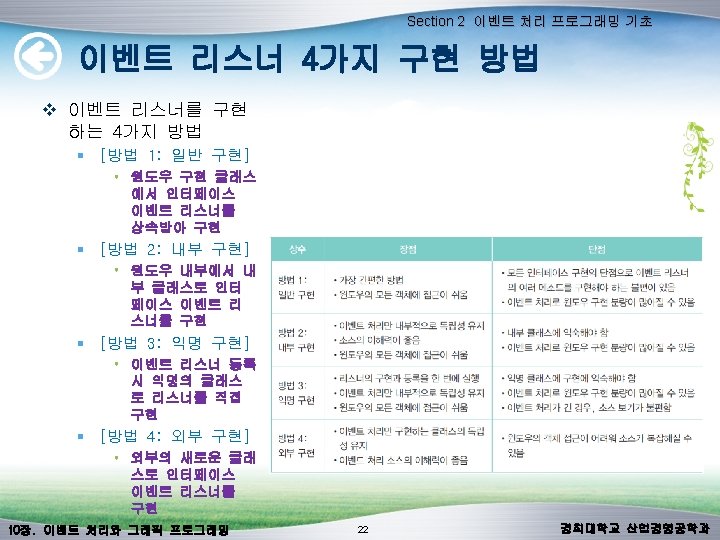
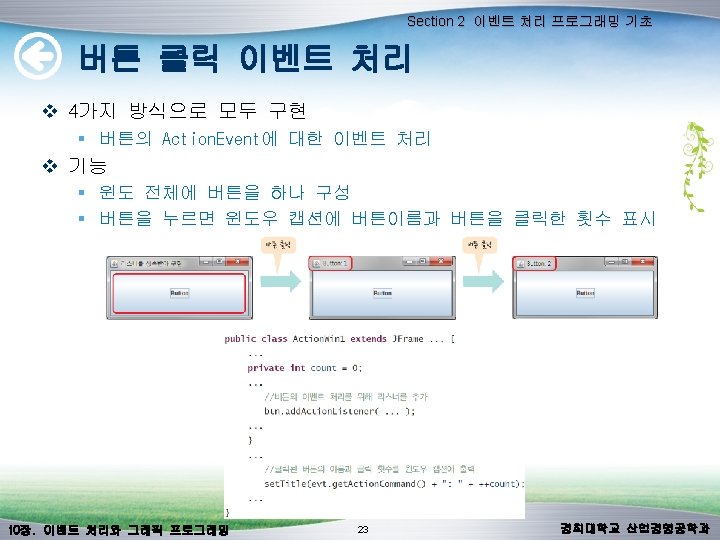
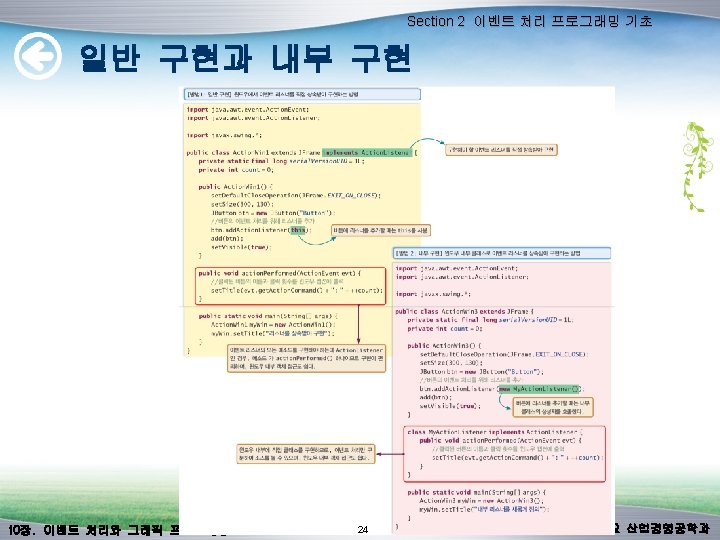
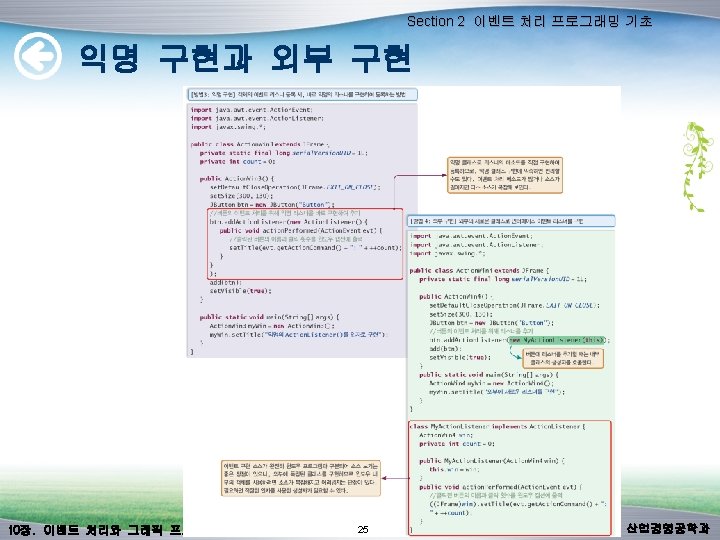

- Slides: 64
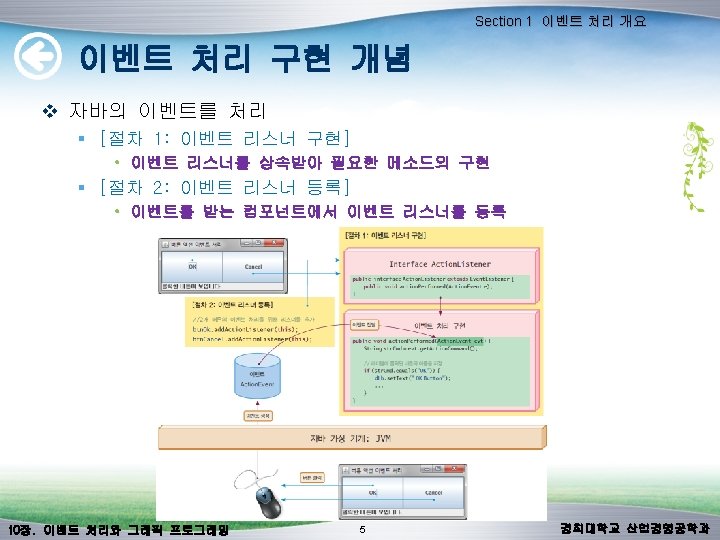
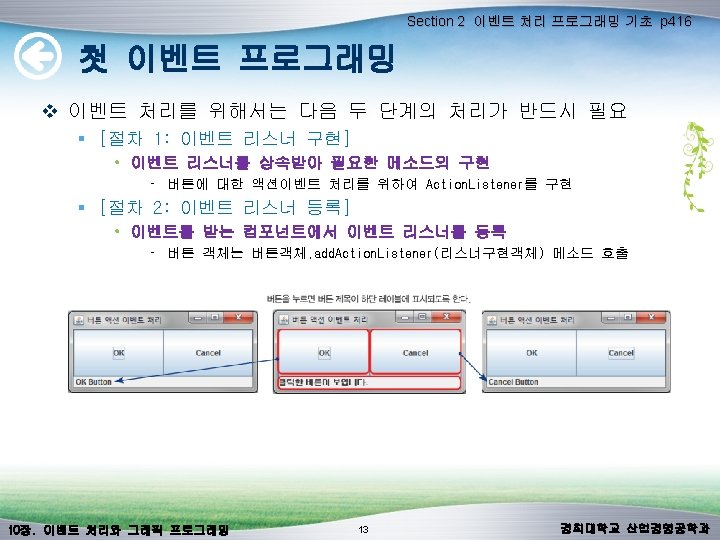
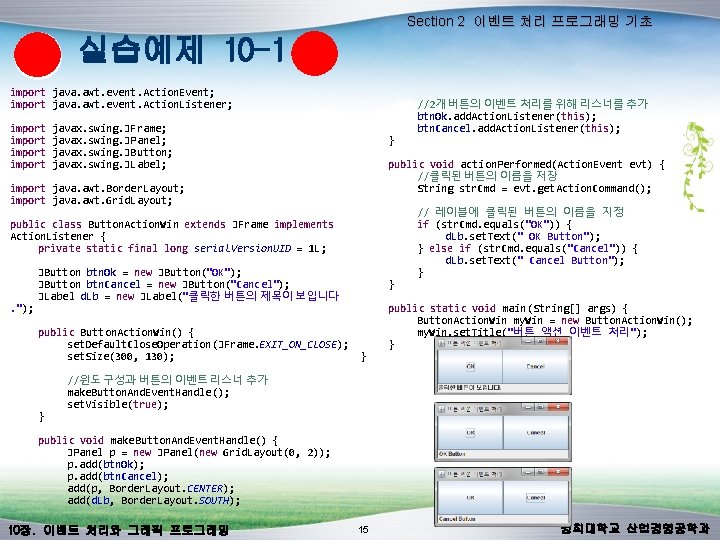
Section 2 이벤트 처리 프로그래밍 기초 실습예제 10 -1 import java. awt. event. Action. Event; import java. awt. event. Action. Listener; import javax. swing. JFrame; import javax. swing. JPanel; import javax. swing. JButton; import javax. swing. JLabel; import java. awt. Border. Layout; import java. awt. Grid. Layout; public class Button. Action. Win extends JFrame implements Action. Listener { private static final long serial. Version. UID = 1 L; JButton btn. Ok = new JButton("OK"); JButton btn. Cancel = new JButton("Cancel"); JLabel d. Lb = new JLabel("클릭한 버튼의 제목이 보입니다. "); public Button. Action. Win() { set. Default. Close. Operation(JFrame. EXIT_ON_CLOSE); set. Size(300, 130); } } } //2개 버튼의 이벤트 처리를 위해 리스너를 추가 btn. Ok. add. Action. Listener(this); btn. Cancel. add. Action. Listener(this); public void action. Performed(Action. Event evt) { //클릭된 버튼의 이름을 저장 String str. Cmd = evt. get. Action. Command(); } // 레이블에 클릭된 버튼의 이름을 지정 if (str. Cmd. equals("OK")) { d. Lb. set. Text(" OK Button"); } else if (str. Cmd. equals("Cancel")) { d. Lb. set. Text(" Cancel Button"); } public static void main(String[] args) { Button. Action. Win my. Win = new Button. Action. Win(); my. Win. set. Title("버튼 액션 이벤트 처리"); } //윈도 구성과 버튼의 이벤트 리스너 추가 make. Button. And. Event. Handle(); set. Visible(true); public void make. Button. And. Event. Handle() { JPanel p = new JPanel(new Grid. Layout(0, 2)); p. add(btn. Ok); p. add(btn. Cancel); add(p, Border. Layout. CENTER); add(d. Lb, Border. Layout. SOUTH); 10장. 이벤트 처리와 그래픽 프로그래밍 15 경희대학교 산업경영공학과
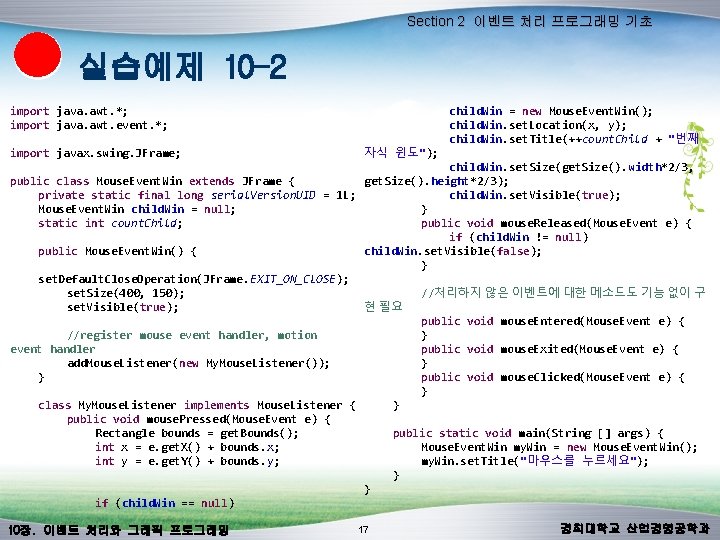
Section 2 이벤트 처리 프로그래밍 기초 실습예제 10 -2 import java. awt. *; child. Win = new Mouse. Event. Win(); import java. awt. event. *; child. Win. set. Location(x, y); child. Win. set. Title(++count. Child + "번째 import javax. swing. JFrame; 자식 윈도"); child. Win. set. Size(get. Size(). width*2/3, public class Mouse. Event. Win extends JFrame { get. Size(). height*2/3); private static final long serial. Version. UID = 1 L; child. Win. set. Visible(true); } Mouse. Event. Win child. Win = null; public void mouse. Released(Mouse. Event e) { static int count. Child; if (child. Win != null) child. Win. set. Visible(false); public Mouse. Event. Win() { } set. Default. Close. Operation(JFrame. EXIT_ON_CLOSE); //처리하지 않은 이벤트에 대한 메소드도 기능 없이 구 set. Size(400, 150); set. Visible(true); 현 필요 public void mouse. Entered(Mouse. Event e) { } //register mouse event handler, motion public void mouse. Exited(Mouse. Event e) { event handler } add. Mouse. Listener(new My. Mouse. Listener()); public void mouse. Clicked(Mouse. Event e) { } } } class My. Mouse. Listener implements Mouse. Listener { public void mouse. Pressed(Mouse. Event e) { public static void main(String [] args) { Rectangle bounds = get. Bounds(); Mouse. Event. Win my. Win = new Mouse. Event. Win(); int x = e. get. X() + bounds. x; my. Win. set. Title("마우스를 누르세요"); int y = e. get. Y() + bounds. y; } } if (child. Win == null) 10장. 이벤트 처리와 그래픽 프로그래밍 17 경희대학교 산업경영공학과
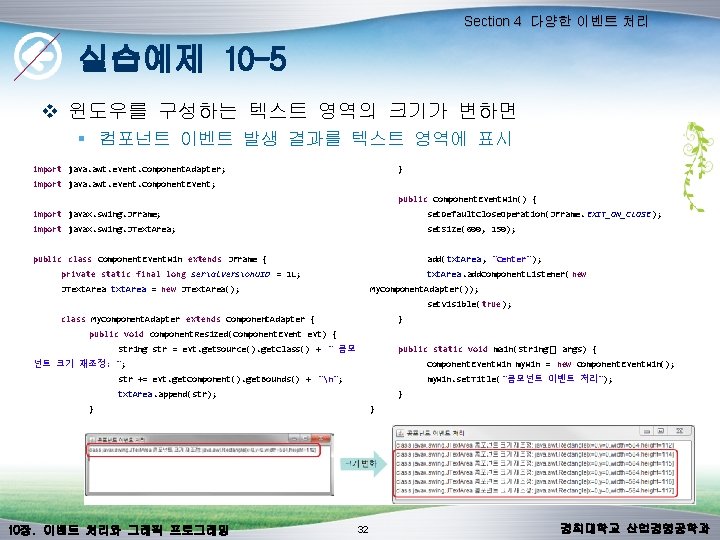
Section 4 다양한 이벤트 처리 실습예제 10 -5 v 윈도우를 구성하는 텍스트 영역의 크기가 변하면 § 컴포넌트 이벤트 발생 결과를 텍스트 영역에 표시 import java. awt. event. Component. Adapter; } import java. awt. event. Component. Event; public Component. Event. Win() { import javax. swing. JFrame; set. Default. Close. Operation(JFrame. EXIT_ON_CLOSE); import javax. swing. JText. Area; set. Size(600, 150); public class Component. Event. Win extends JFrame { add(txt. Area, "Center"); private static final long serial. Version. UID = 1 L; txt. Area. add. Component. Listener( new JText. Area txt. Area = new JText. Area(); My. Component. Adapter()); set. Visible(true); class My. Component. Adapter extends Component. Adapter { } public void component. Resized(Component. Event evt) { String str = evt. get. Source(). get. Class() + " 콤포 public static void main(String[] args) { 넌트 크기 재조정: "; Component. Event. Win my. Win = new Component. Event. Win(); str += evt. get. Component(). get. Bounds() + "n"; my. Win. set. Title("콤포넌트 이벤트 처리"); txt. Area. append(str); } } 10장. 이벤트 처리와 그래픽 프로그래밍 } 32 경희대학교 산업경영공학과
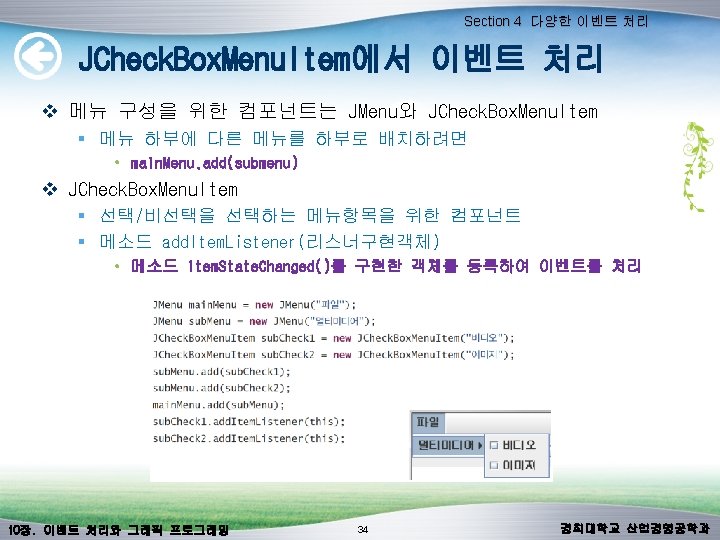
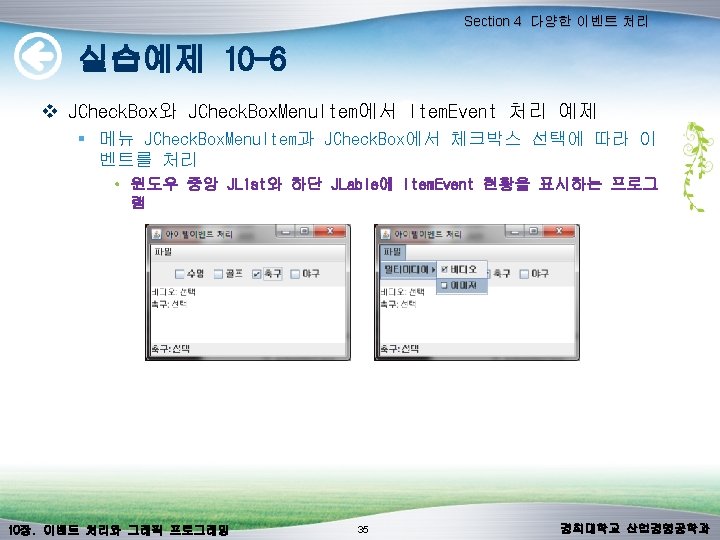
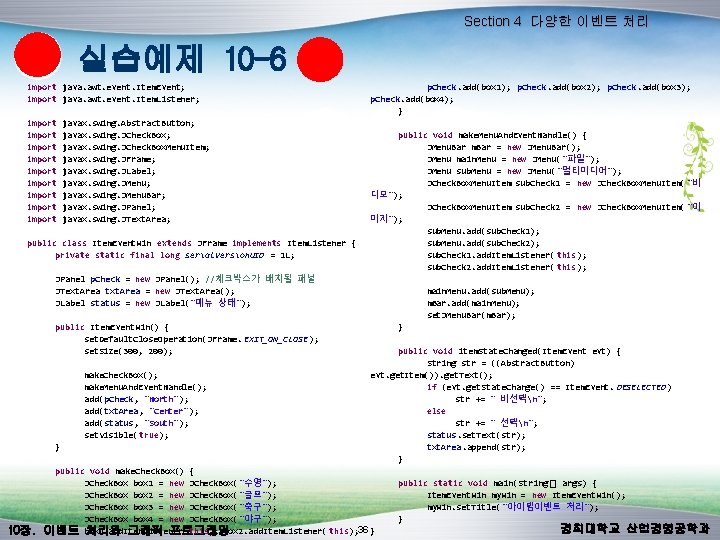
Section 4 다양한 이벤트 처리 실습예제 10 -6 import java. awt. event. Item. Event; p. Check. add(box 1); p. Check. add(box 2); p. Check. add(box 3); import java. awt. event. Item. Listener; p. Check. add(box 4); } import javax. swing. Abstract. Button; import javax. swing. JCheck. Box; public void make. Menu. And. Event. Handle() { import javax. swing. JCheck. Box. Menu. Item; JMenu. Bar m. Bar = new JMenu. Bar(); import javax. swing. JFrame; JMenu main. Menu = new JMenu("파일"); import javax. swing. JLabel; JMenu sub. Menu = new JMenu("멀티미디어"); import javax. swing. JMenu; JCheck. Box. Menu. Item sub. Check 1 = new JCheck. Box. Menu. Item( "비 import javax. swing. JMenu. Bar; 디오"); import javax. swing. JPanel; JCheck. Box. Menu. Item sub. Check 2 = new JCheck. Box. Menu. Item( "이 import javax. swing. JText. Area; 미지"); sub. Menu. add(sub. Check 1); public class Item. Event. Win extends JFrame implements Item. Listener { sub. Menu. add(sub. Check 2); private static final long serial. Version. UID = 1 L; sub. Check 1. add. Item. Listener( this); sub. Check 2. add. Item. Listener( this); JPanel p. Check = new JPanel(); //체크박스가 배치될 패널 JText. Area txt. Area = new JText. Area(); main. Menu. add(sub. Menu); JLabel status = new JLabel("메뉴 상태"); m. Bar. add(main. Menu); set. JMenu. Bar(m. Bar); public Item. Event. Win() { } set. Default. Close. Operation(JFrame. EXIT_ON_CLOSE); set. Size(300, 200); public void item. State. Changed(Item. Event evt) { String str = ((Abstract. Button) make. Check. Box(); evt. get. Item()). get. Text(); make. Menu. And. Event. Handle(); if (evt. get. State. Change() == Item. Event. DESELECTED) add(p. Check, "North"); str += " 비선택n"; add(txt. Area, "Center"); else add(status, "South"); str += " 선택n"; set. Visible(true); status. set. Text(str); } txt. Area. append(str); } public void make. Check. Box() { JCheck. Box box 1 = new JCheck. Box("수영"); public static void main(String[] args) { JCheck. Box box 2 = new JCheck. Box("골프"); Item. Event. Win my. Win = new Item. Event. Win(); JCheck. Box box 3 = new JCheck. Box("축구"); my. Win. set. Title("아이템이벤트 처리"); JCheck. Box box 4 = new JCheck. Box("야구"); } 경희대학교 산업경영공학과 10장. 이벤트 box 1. add. Item. Listener( 처리와 그래픽 프로그래밍 this); box 2. add. Item. Listener( this); 36 }
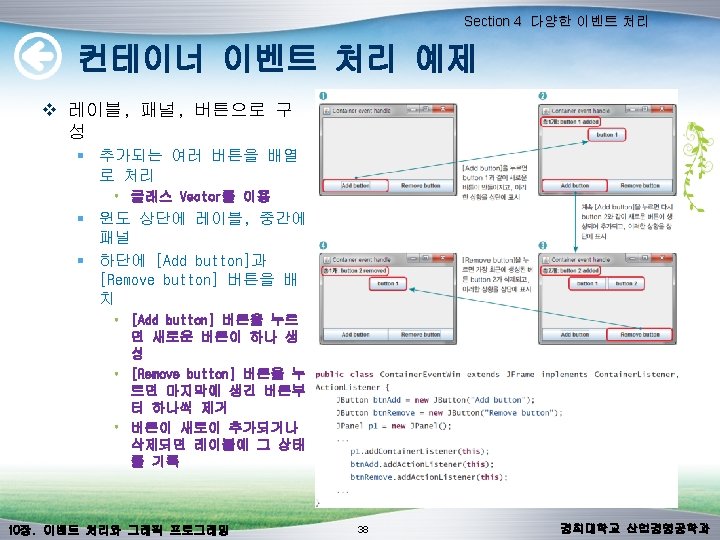
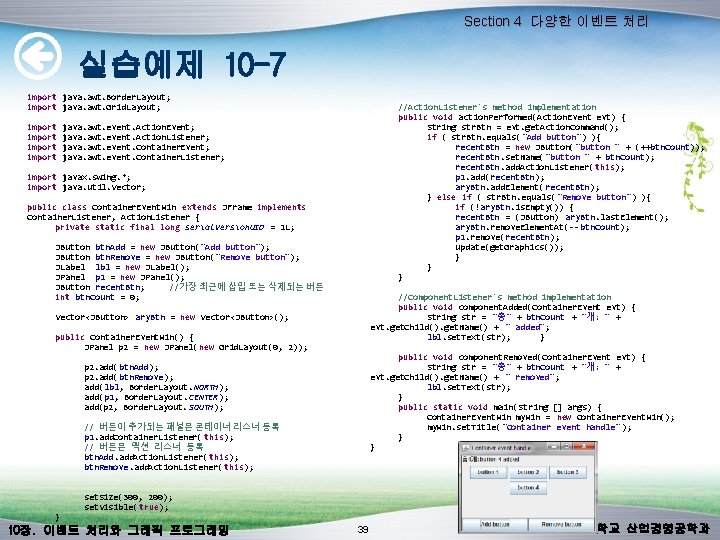
Section 4 다양한 이벤트 처리 실습예제 10 -7 //Action. Listener's method implementation public void action. Performed(Action. Event evt) { String str. Btn = evt. get. Action. Command(); if ( str. Btn. equals( "Add button") ){ recent. Btn = new JButton("button " + (++btn. Count)); recent. Btn. set. Name("button " + btn. Count); recent. Btn. add. Action. Listener( this); p 1. add(recent. Btn); ary. Btn. add. Element(recent. Btn); } else if ( str. Btn. equals( "Remove button") ){ if (!ary. Btn. is. Empty()) { recent. Btn = (JButton) ary. Btn. last. Element(); ary. Btn. remove. Element. At(-- btn. Count); p 1. remove(recent. Btn); update(get. Graphics()); } } } //Component. Listener's method implementation public void component. Added(Container. Event evt) { String str = "총" + btn. Count + "개: " + evt. get. Child(). get. Name() + " added"; lbl. set. Text(str); } public void component. Removed(Container. Event evt) { String str = "총" + btn. Count + "개: " + evt. get. Child(). get. Name() + " removed"; lbl. set. Text(str); } public static void main(String [] args) { Container. Event. Win my. Win = new Container. Event. Win(); my. Win. set. Title("Container event handle" ); } } import java. awt. Border. Layout; import java. awt. Grid. Layout; import java. awt. event. Action. Event; import java. awt. event. Action. Listener; import java. awt. event. Container. Event; import java. awt. event. Container. Listener; import javax. swing. *; import java. util. Vector; public class Container. Event. Win extends JFrame implements Container. Listener, Action. Listener { private static final long serial. Version. UID = 1 L; JButton btn. Add = new JButton("Add button"); JButton btn. Remove = new JButton("Remove button"); JLabel lbl = new JLabel(); JPanel p 1 = new JPanel(); JButton recent. Btn; //가장 최근에 삽입 또는 삭제되는 버튼 int btn. Count = 0; Vector<JButton> ary. Btn = new Vector<JButton>(); public Container. Event. Win() { JPanel p 2 = new JPanel(new Grid. Layout(0, 2)); p 2. add(btn. Add); p 2. add(btn. Remove); add(lbl, Border. Layout. NORTH); add(p 1, Border. Layout. CENTER); add(p 2, Border. Layout. SOUTH); // 버튼이 추가되는 패널은 콘테이너 리스너 등록 p 1. add. Container. Listener( this); // 버튼은 액션 리스너 등록 btn. Add. add. Action. Listener( this); btn. Remove. add. Action. Listener( this); } set. Size(300, 200); set. Visible(true); 10장. 이벤트 처리와 그래픽 프로그래밍 39 경희대학교 산업경영공학과
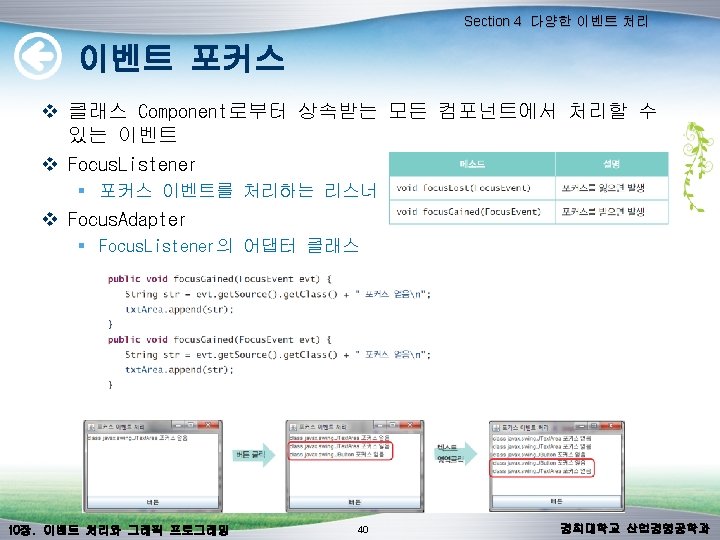
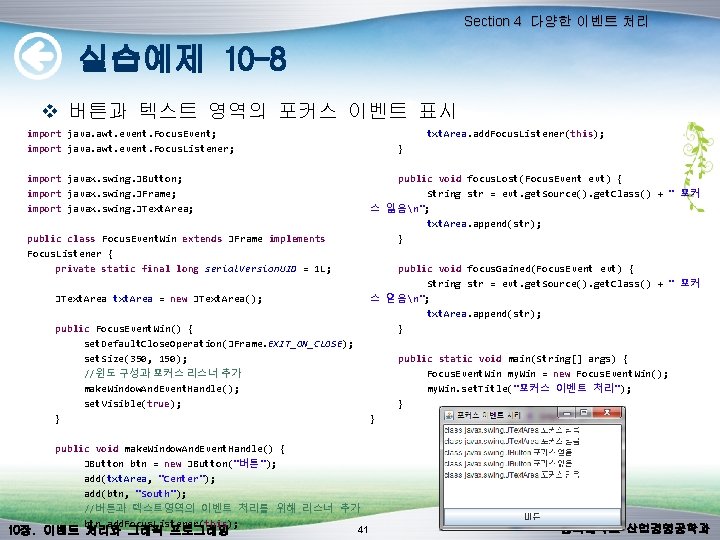
Section 4 다양한 이벤트 처리 실습예제 10 -8 v 버튼과 텍스트 영역의 포커스 이벤트 표시 txt. Area. add. Focus. Listener(this); import java. awt. event. Focus. Event; } import java. awt. event. Focus. Listener; public void focus. Lost(Focus. Event evt) { import javax. swing. JButton; String str = evt. get. Source(). get. Class() + " 포커 import javax. swing. JFrame; 스 잃음n"; import javax. swing. JText. Area; txt. Area. append(str); } public class Focus. Event. Win extends JFrame implements Focus. Listener { public void focus. Gained(Focus. Event evt) { private static final long serial. Version. UID = 1 L; String str = evt. get. Source(). get. Class() + " 포커 스 얻음n"; JText. Area txt. Area = new JText. Area(); txt. Area. append(str); } public Focus. Event. Win() { set. Default. Close. Operation(JFrame. EXIT_ON_CLOSE); public static void main(String[] args) { set. Size(350, 150); Focus. Event. Win my. Win = new Focus. Event. Win(); //윈도 구성과 포커스 리스너 추가 my. Win. set. Title("포커스 이벤트 처리"); make. Window. And. Event. Handle(); } set. Visible(true); } } public void make. Window. And. Event. Handle() { JButton btn = new JButton("버튼"); add(txt. Area, "Center"); add(btn, "South"); //버튼과 텍스트영역의 이벤트 처리를 위해 리스너 추가 btn. add. Focus. Listener(this); 경희대학교 산업경영공학과 41 10장. 이벤트 처리와 그래픽 프로그래밍
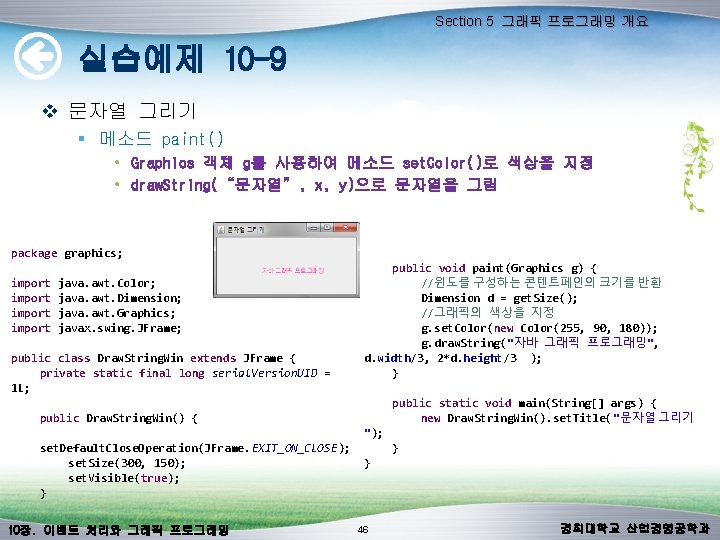
Section 5 그래픽 프로그래밍 개요 실습예제 10 -9 v 문자열 그리기 § 메소드 paint() • Graphics 객체 g를 사용하여 메소드 set. Color()로 색상을 지정 • draw. String(“문자열”, x, y)으로 문자열을 그림 package graphics; import java. awt. Color; import java. awt. Dimension; import java. awt. Graphics; import javax. swing. JFrame; public class Draw. String. Win extends JFrame { private static final long serial. Version. UID = 1 L; public Draw. String. Win() { set. Default. Close. Operation(JFrame. EXIT_ON_CLOSE); set. Size(300, 150); set. Visible(true); } 10장. 이벤트 처리와 그래픽 프로그래밍 public void paint(Graphics g) { //윈도를 구성하는 콘텐트페인의 크기를 반환 Dimension d = get. Size(); //그래픽의 색상을 지정 g. set. Color(new Color(255, 90, 180)); g. draw. String("자바 그래픽 프로그래밍", d. width/3, 2*d. height/3 ); } public static void main(String[] args) { new Draw. String. Win(). set. Title("문자열 그리기 "); } } 46 경희대학교 산업경영공학과
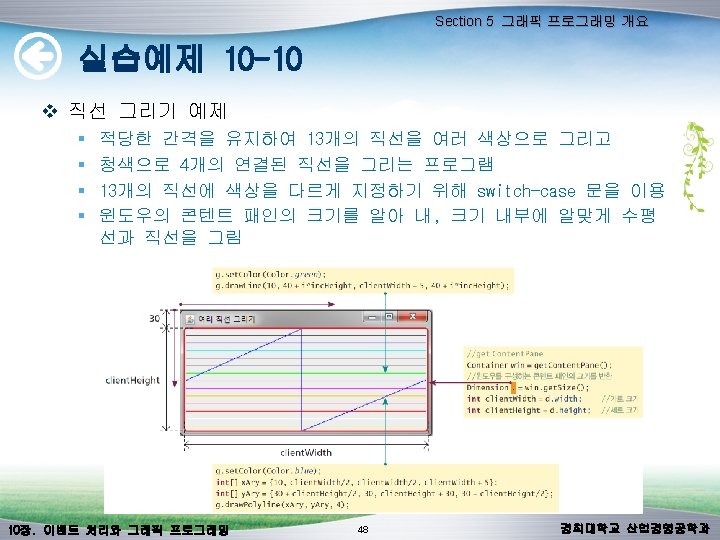
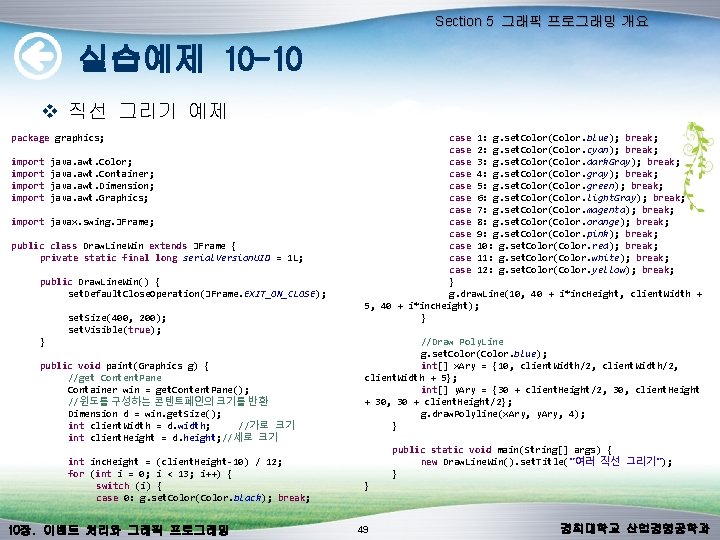
Section 5 그래픽 프로그래밍 개요 실습예제 10 -10 v 직선 그리기 예제 package graphics; import java. awt. Color; import java. awt. Container; import java. awt. Dimension; import java. awt. Graphics; import javax. swing. JFrame; public class Draw. Line. Win extends JFrame { private static final long serial. Version. UID = 1 L; public Draw. Line. Win() { set. Default. Close. Operation(JFrame. EXIT_ON_CLOSE); set. Size(400, 200); set. Visible(true); } public void paint(Graphics g) { //get Content. Pane Container win = get. Content. Pane(); //윈도를 구성하는 콘텐트페인의 크기를 반환 Dimension d = win. get. Size(); int client. Width = d. width; //가로 크기 int client. Height = d. height; //세로 크기 int inc. Height = (client. Height-10) / 12; for (int i = 0; i < 13; i++) { switch (i) { case 0: g. set. Color(Color. black); break; 10장. 이벤트 처리와 그래픽 프로그래밍 case 1: g. set. Color(Color. blue); break; case 2: g. set. Color(Color. cyan); break; case 3: g. set. Color(Color. dark. Gray); break; case 4: g. set. Color(Color. gray); break; case 5: g. set. Color(Color. green); break; case 6: g. set. Color(Color. light. Gray); break; case 7: g. set. Color(Color. magenta); break; case 8: g. set. Color(Color. orange); break; case 9: g. set. Color(Color. pink); break; case 10: g. set. Color(Color. red); break; case 11: g. set. Color(Color. white); break; case 12: g. set. Color(Color. yellow); break; } g. draw. Line(10, 40 + i*inc. Height, client. Width + 5, 40 + i*inc. Height); } //Draw Poly. Line g. set. Color(Color. blue); int[] x. Ary = {10, client. Width/2, client. Width + 5}; int[] y. Ary = {30 + client. Height/2, 30, client. Height + 30, 30 + client. Height/2}; g. draw. Polyline(x. Ary, y. Ary, 4); } public static void main(String[] args) { new Draw. Line. Win(). set. Title("여러 직선 그리기"); } } 49 경희대학교 산업경영공학과
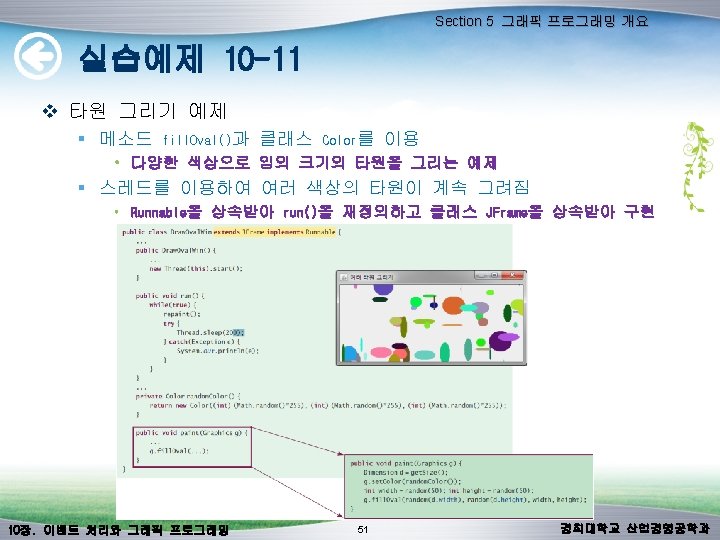
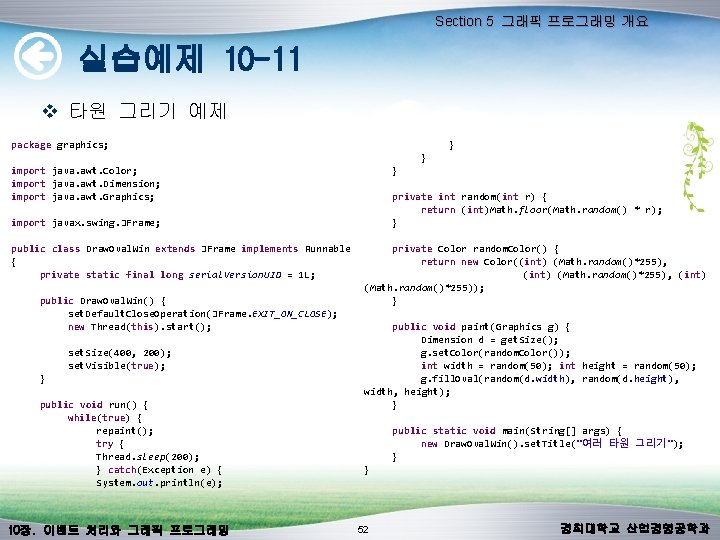
Section 5 그래픽 프로그래밍 개요 실습예제 10 -11 v 타원 그리기 예제 } package graphics; } } import java. awt. Color; import java. awt. Dimension; private int random(int r) { import java. awt. Graphics; return (int)Math. floor(Math. random() * r); } import javax. swing. JFrame; private Color random. Color() { public class Draw. Oval. Win extends JFrame implements Runnable return new Color((int) (Math. random()*255), { (int) (Math. random()*255), (int) private static final long serial. Version. UID = 1 L; (Math. random()*255)); } public Draw. Oval. Win() { set. Default. Close. Operation(JFrame. EXIT_ON_CLOSE); public void paint(Graphics g) { new Thread(this). start(); Dimension d = get. Size(); g. set. Color(random. Color()); set. Size(400, 200); int width = random(50); int height = random(50); set. Visible(true); g. fill. Oval(random(d. width), random(d. height), } width, height); public void run() { } while(true) { repaint(); public static void main(String[] args) { try { new Draw. Oval. Win(). set. Title("여러 타원 그리기"); Thread. sleep(200); } } catch(Exception e) { } System. out. println(e); 10장. 이벤트 처리와 그래픽 프로그래밍 52 경희대학교 산업경영공학과
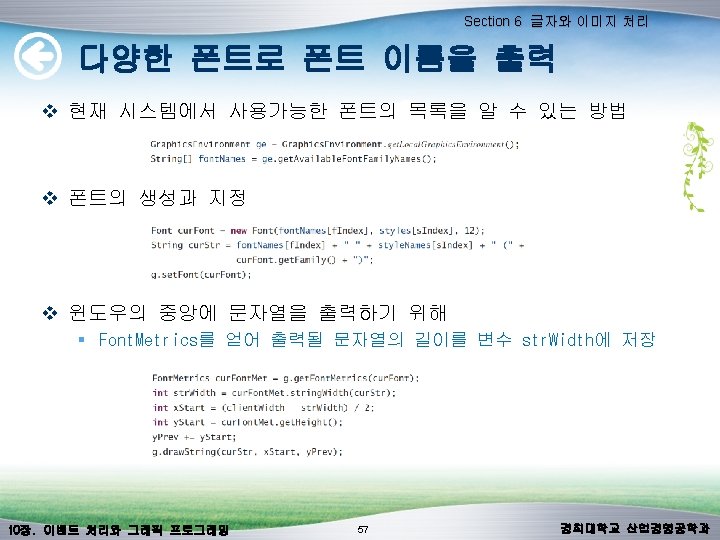
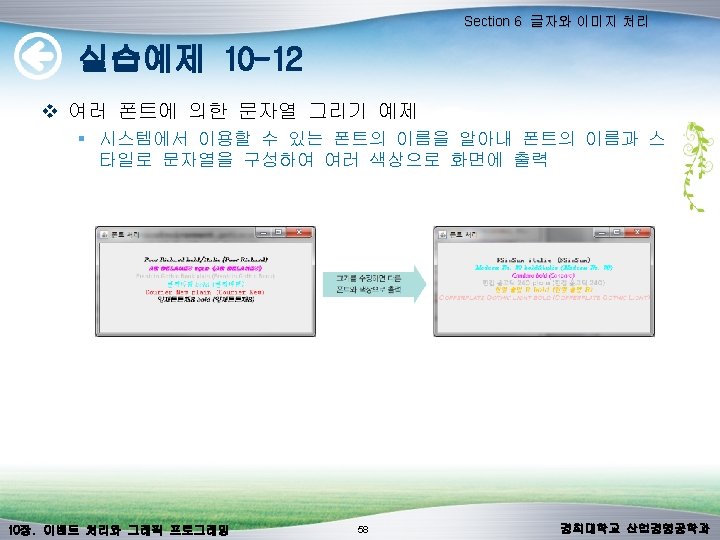
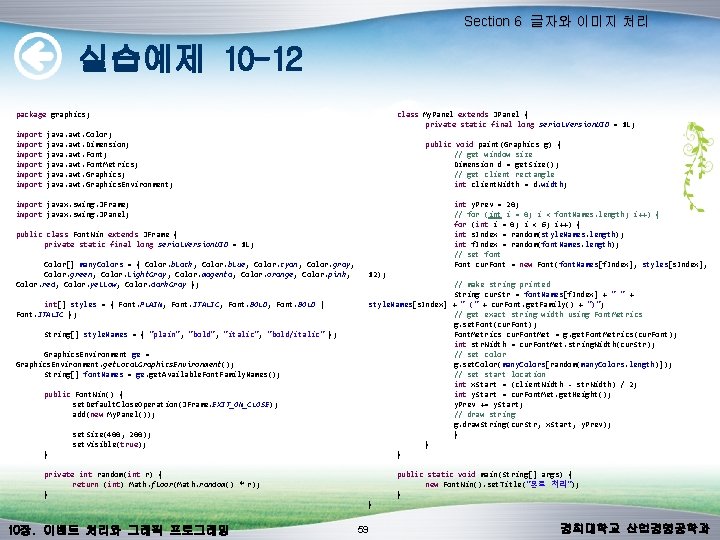
Section 6 글자와 이미지 처리 실습예제 10 -12 package graphics; import java. awt. Color; import java. awt. Dimension; import java. awt. Font. Metrics; import java. awt. Graphics. Environment; import javax. swing. JFrame; import javax. swing. JPanel; public class Font. Win extends JFrame { private static final long serial. Version. UID = 1 L; Color[] many. Colors = { Color. black, Color. blue, Color. cyan, Color. gray, Color. green, Color. light. Gray, Color. magenta, Color. orange, Color. pink, Color. red, Color. yellow, Color. dark. Gray }; int[] styles = { Font. PLAIN, Font. ITALIC, Font. BOLD | Font. ITALIC }; String[] style. Names = { "plain", "bold", "italic", "bold/italic" }; Graphics. Environment ge = Graphics. Environment. get. Local. Graphics. Environment(); String[] font. Names = ge. get. Available. Font. Family. Names(); public Font. Win() { set. Default. Close. Operation(JFrame. EXIT_ON_CLOSE); add(new My. Panel()); set. Size(400, 200); set. Visible(true); } private int random(int r) { return (int) Math. floor(Math. random() * r); } 10장. 이벤트 처리와 그래픽 프로그래밍 class My. Panel extends JPanel { private static final long serial. Version. UID = 1 L; public void paint(Graphics g) { // get window size Dimension d = get. Size(); // get client rectangle int client. Width = d. width; int y. Prev = 20; // for (int i = 0; i < font. Names. length; i++) { for (int i = 0; i < 6; i++) { int s. Index = random(style. Names. length); int f. Index = random(font. Names. length); // set font Font cur. Font = new Font(font. Names[f. Index], styles[s. Index], 12); // make string printed String cur. Str = font. Names[f. Index] + " " + style. Names[s. Index] + " (" + cur. Font. get. Family() + ")"; // get exact string width using Font. Metrics g. set. Font(cur. Font); Font. Metrics cur. Font. Met = g. get. Font. Metrics(cur. Font); int str. Width = cur. Font. Met. string. Width(cur. Str); // set color g. set. Color(many. Colors[random(many. Colors. length)]); // set start location int x. Start = (client. Width - str. Width) / 2; int y. Start = cur. Font. Met. get. Height(); y. Prev += y. Start; // draw string g. draw. String(cur. Str, x. Start, y. Prev); } } } public static void main(String[] args) { new Font. Win(). set. Title("폰트 처리"); } } 59 경희대학교 산업경영공학과
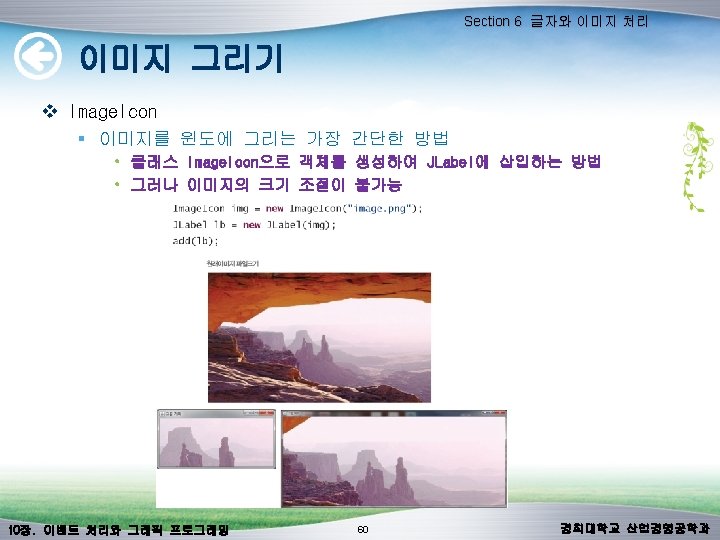
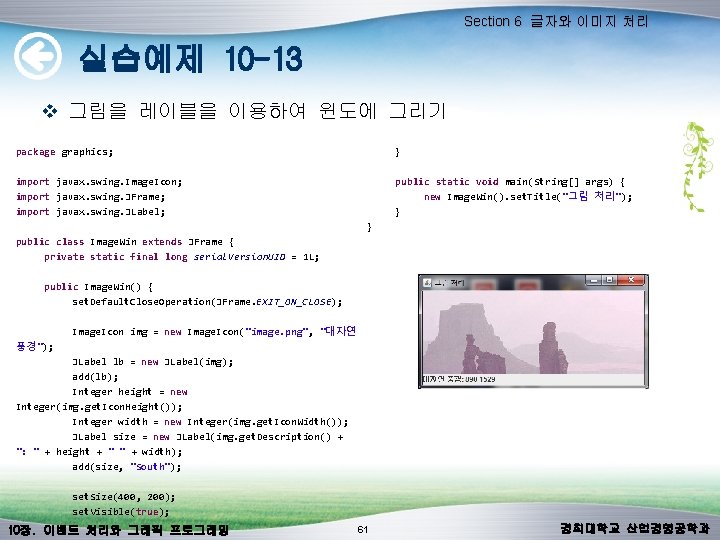
Section 6 글자와 이미지 처리 실습예제 10 -13 v 그림을 레이블을 이용하여 윈도에 그리기 } package graphics; import javax. swing. Image. Icon; import javax. swing. JFrame; import javax. swing. JLabel; public class Image. Win extends JFrame { private static final long serial. Version. UID = 1 L; public Image. Win() { set. Default. Close. Operation(JFrame. EXIT_ON_CLOSE); public static void main(String[] args) { new Image. Win(). set. Title("그림 처리"); } } Image. Icon img = new Image. Icon("image. png", "대자연 풍경"); JLabel lb = new JLabel(img); add(lb); Integer height = new Integer(img. get. Icon. Height()); Integer width = new Integer(img. get. Icon. Width()); JLabel size = new JLabel(img. get. Description() + ": " + height + " " + width); add(size, "South"); set. Size(400, 200); set. Visible(true); 10장. 이벤트 처리와 그래픽 프로그래밍 61 경희대학교 산업경영공학과
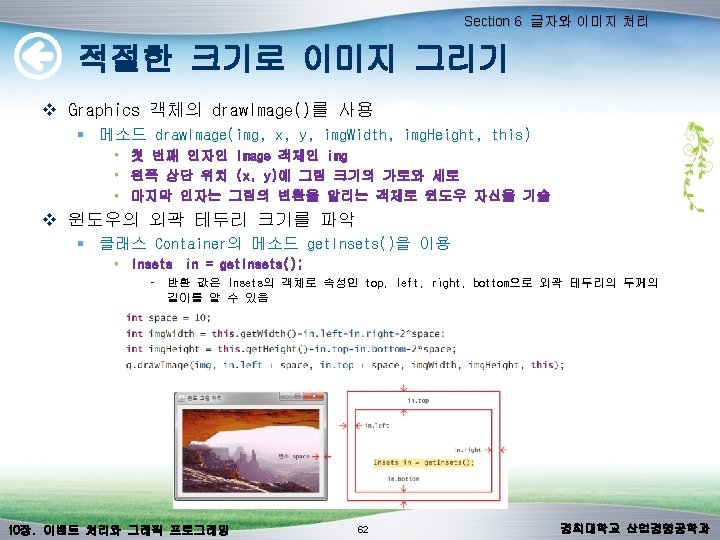
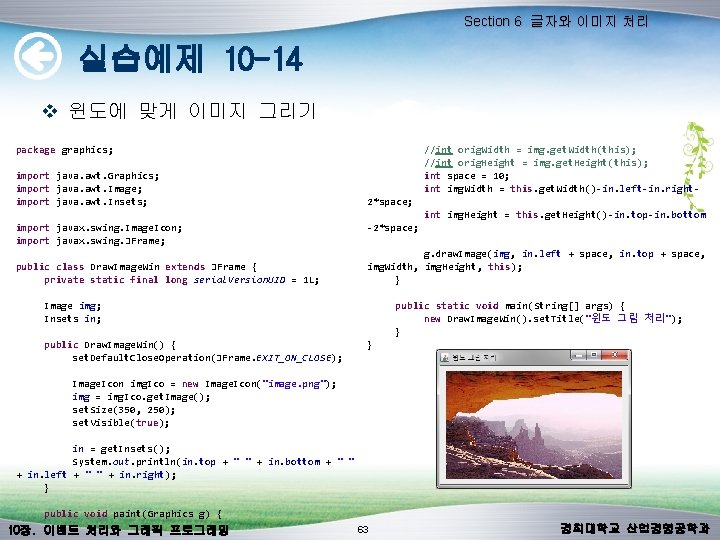
Section 6 글자와 이미지 처리 실습예제 10 -14 v 윈도에 맞게 이미지 그리기 //int orig. Width = img. get. Width(this); //int orig. Height = img. get. Height(this); int space = 10; int img. Width = this. get. Width()-in. left-in. right- package graphics; import java. awt. Graphics; import java. awt. Image; import java. awt. Insets; import javax. swing. Image. Icon; import javax. swing. JFrame; public class Draw. Image. Win extends JFrame { private static final long serial. Version. UID = 1 L; Image img; Insets in; public Draw. Image. Win() { set. Default. Close. Operation(JFrame. EXIT_ON_CLOSE); 2*space; int img. Height = this. get. Height()-in. top-in. bottom -2*space; g. draw. Image(img, in. left + space, in. top + space, img. Width, img. Height, this); } public static void main(String[] args) { new Draw. Image. Win(). set. Title("윈도 그림 처리"); } } Image. Icon img. Ico = new Image. Icon("image. png"); img = img. Ico. get. Image(); set. Size(350, 250); set. Visible(true); in = get. Insets(); System. out. println(in. top + " " + in. bottom + " " + in. left + " " + in. right); } public void paint(Graphics g) { 10장. 이벤트 처리와 그래픽 프로그래밍 63 경희대학교 산업경영공학과