
Section 1 Microprocessors course Dr S O Fatemi


- Slides: 83
• Section 1 Microprocessors course Dr. S. O. Fatemi By: Mahdi Hassanpour 3/12/2021 Mahdi Hassanpour
Contents: Introduction Block Diagram and Pin Description of the 8051 Registers Some Simple Instructions Structure of Assembly language and Running an 8051 program Memory mapping in 8051 Flag bits and the PSW register Addressing Modes 16 -bit, BCD and Signed Arithmetic in 8051 Stack in the 8051 LOOP and JUMP Instructions CALL Instructions I/O Port Programming 3/12/2021 Mahdi Hassanpour
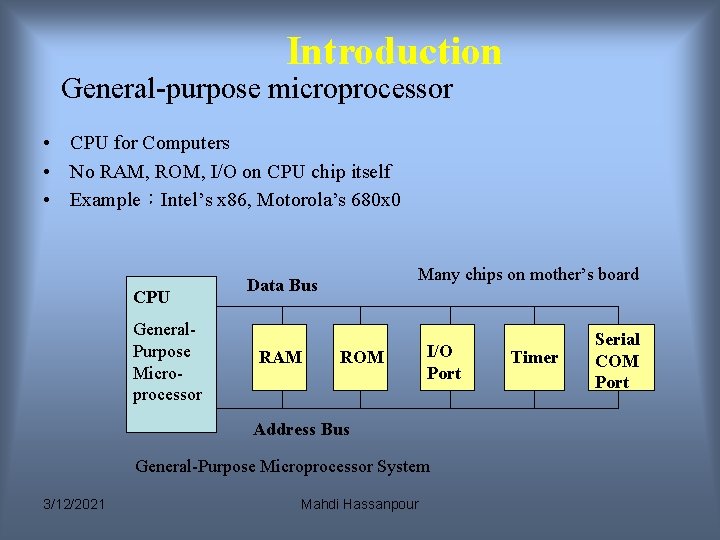
Introduction General-purpose microprocessor • CPU for Computers • No RAM, ROM, I/O on CPU chip itself • Example:Intel’s x 86, Motorola’s 680 x 0 CPU General. Purpose Microprocessor Many chips on mother’s board Data Bus RAM ROM I/O Port Address Bus General-Purpose Microprocessor System 3/12/2021 Mahdi Hassanpour Timer Serial COM Port
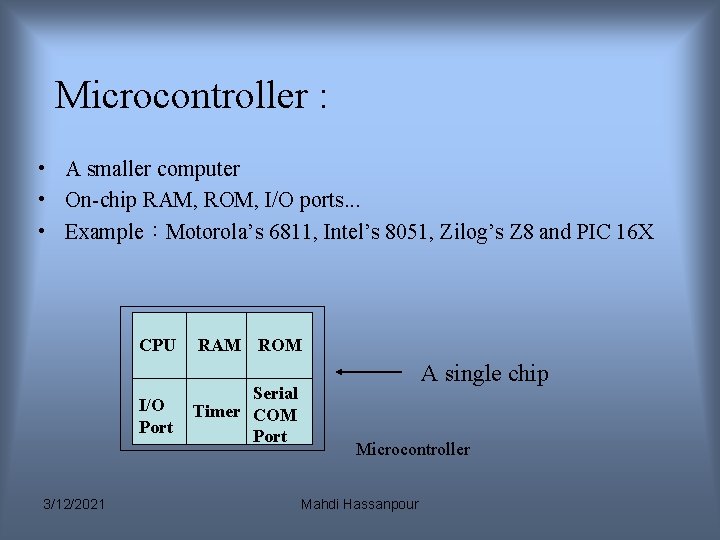
Microcontroller : • A smaller computer • On-chip RAM, ROM, I/O ports. . . • Example:Motorola’s 6811, Intel’s 8051, Zilog’s Z 8 and PIC 16 X CPU I/O Port 3/12/2021 RAM ROM Serial Timer COM Port A single chip Microcontroller Mahdi Hassanpour
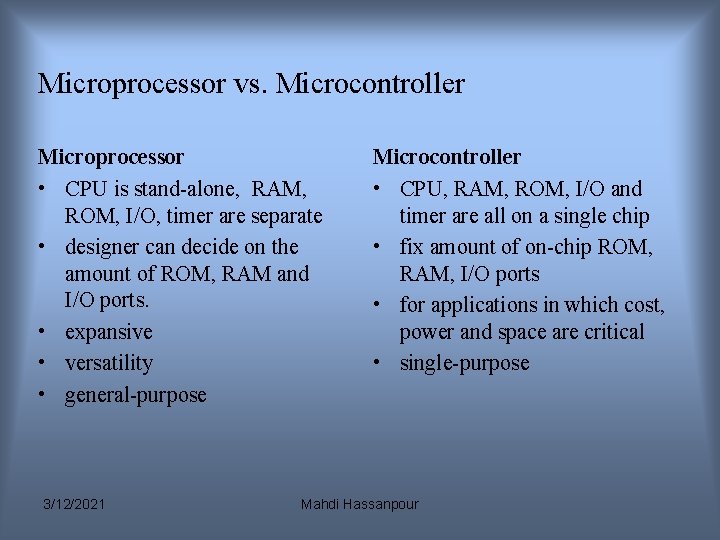
Microprocessor vs. Microcontroller Microprocessor • CPU is stand-alone, RAM, ROM, I/O, timer are separate • designer can decide on the amount of ROM, RAM and I/O ports. • expansive • versatility • general-purpose 3/12/2021 Microcontroller • CPU, RAM, ROM, I/O and timer are all on a single chip • fix amount of on-chip ROM, RAM, I/O ports • for applications in which cost, power and space are critical • single-purpose Mahdi Hassanpour
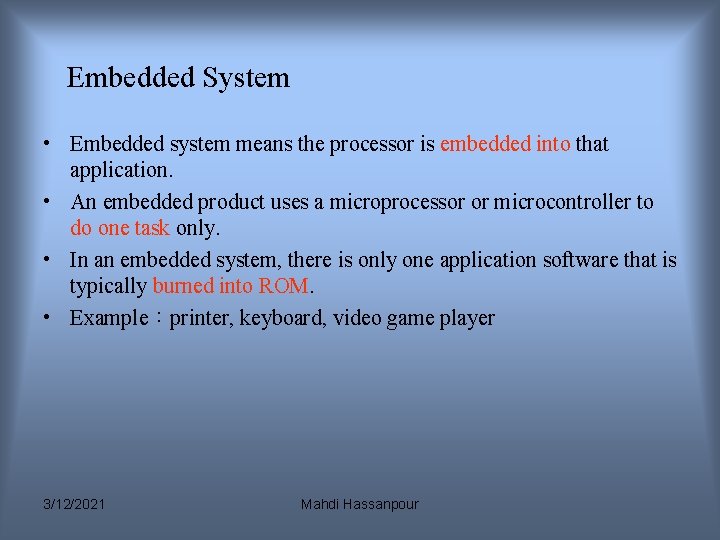
Embedded System • Embedded system means the processor is embedded into that application. • An embedded product uses a microprocessor or microcontroller to do one task only. • In an embedded system, there is only one application software that is typically burned into ROM. • Example:printer, keyboard, video game player 3/12/2021 Mahdi Hassanpour
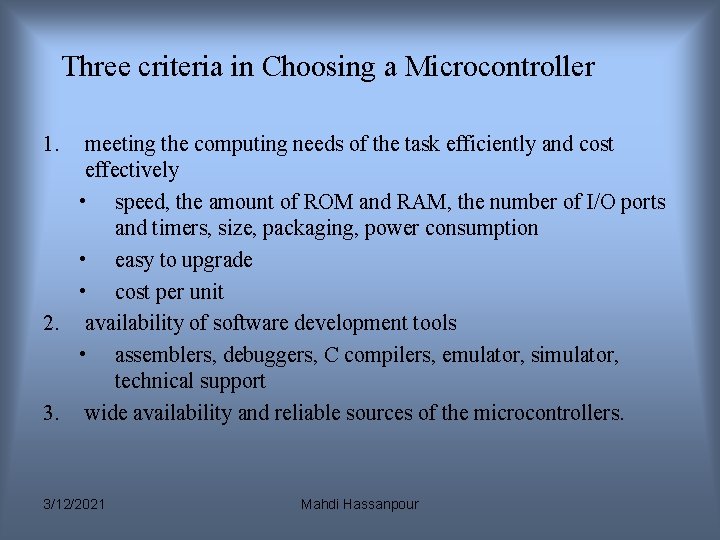
Three criteria in Choosing a Microcontroller 1. meeting the computing needs of the task efficiently and cost effectively • speed, the amount of ROM and RAM, the number of I/O ports and timers, size, packaging, power consumption • easy to upgrade • cost per unit 2. availability of software development tools • assemblers, debuggers, C compilers, emulator, simulator, technical support 3. wide availability and reliable sources of the microcontrollers. 3/12/2021 Mahdi Hassanpour
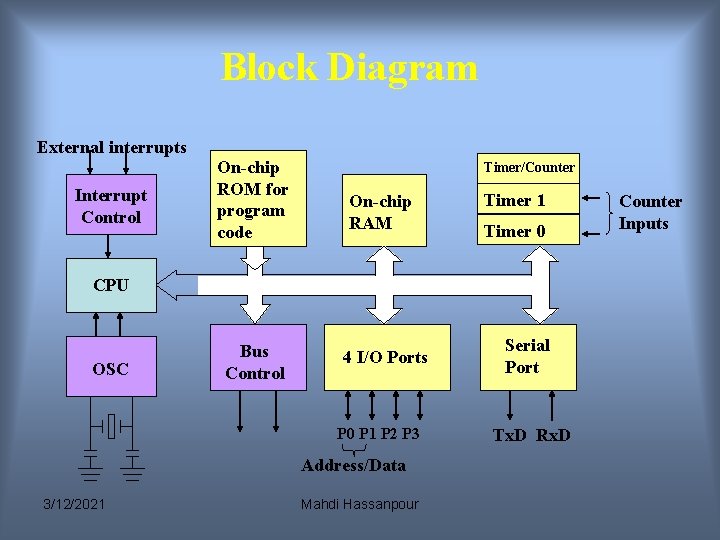
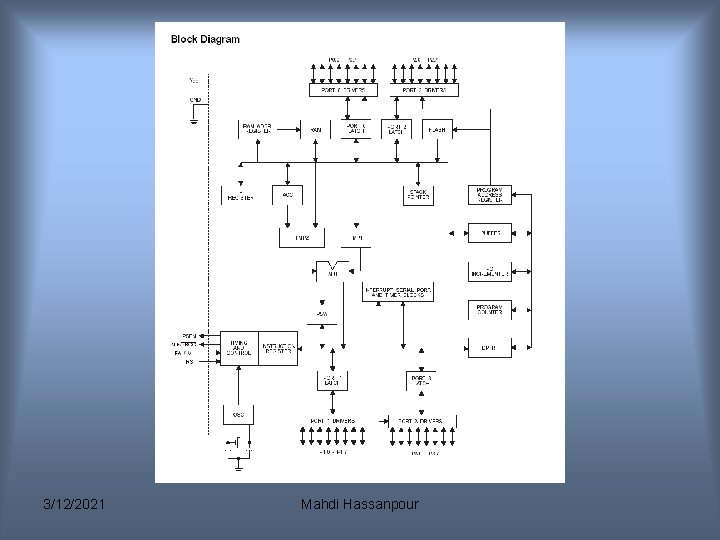
Block Diagram External interrupts Interrupt Control On-chip ROM for program code Timer/Counter On-chip RAM Timer 1 Timer 0 CPU OSC Bus Control 4 I/O Ports P 0 P 1 P 2 P 3 Address/Data 3/12/2021 Mahdi Hassanpour Serial Port Tx. D Rx. D Counter Inputs
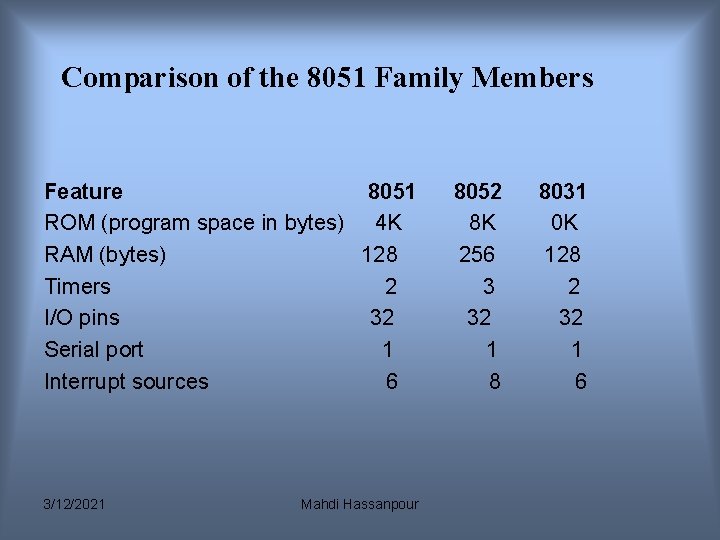
Comparison of the 8051 Family Members Feature 8051 ROM (program space in bytes) 4 K RAM (bytes) 128 Timers 2 I/O pins 32 Serial port 1 Interrupt sources 6 3/12/2021 Mahdi Hassanpour 8052 8 K 256 3 32 1 8 8031 0 K 128 2 32 1 6
3/12/2021 Mahdi Hassanpour
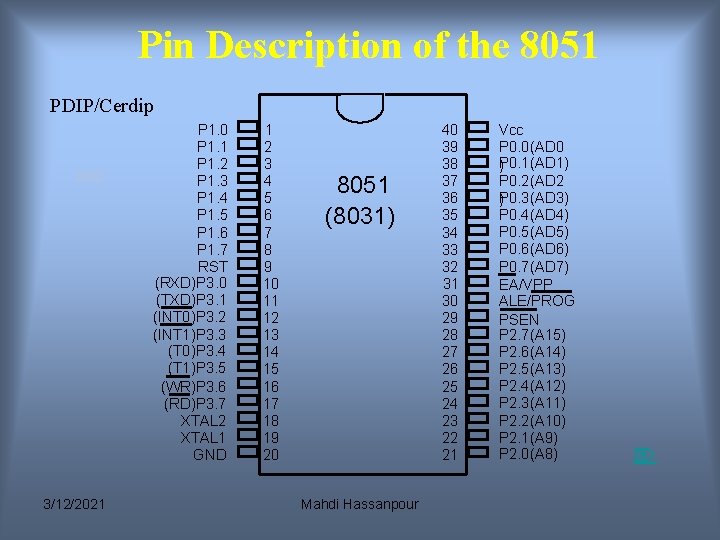
Pin Description of the 8051 PDIP/Cerdip P 1. 0 P 1. 1 P 1. 2 P 1. 3 P 1. 4 P 1. 5 P 1. 6 P 1. 7 RST (RXD)P 3. 0 (TXD)P 3. 1 (INT 0)P 3. 2 (INT 1)P 3. 3 (T 0)P 3. 4 (T 1)P 3. 5 (WR)P 3. 6 (RD)P 3. 7 XTAL 2 XTAL 1 GND 3/12/2021 1 2 3 4 5 6 7 8 9 10 11 12 13 14 15 16 17 18 19 20 8051 (8031) Mahdi Hassanpour 40 39 38 37 36 35 34 33 32 31 30 29 28 27 26 25 24 23 22 21 Vcc P 0. 0(AD 0 P ) 0. 1(AD 1) P 0. 2(AD 2 P ) 0. 3(AD 3) P 0. 4(AD 4) P 0. 5(AD 5) P 0. 6(AD 6) P 0. 7(AD 7) EA/VPP ALE/PROG PSEN P 2. 7(A 15) P 2. 6(A 14) P 2. 5(A 13) P 2. 4(A 12) P 2. 3(A 11) P 2. 2(A 10) P 2. 1(A 9) P 2. 0(A 8)
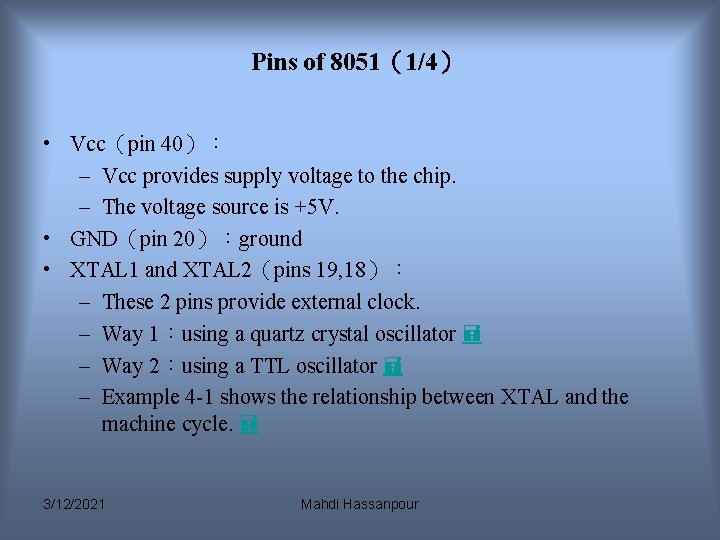
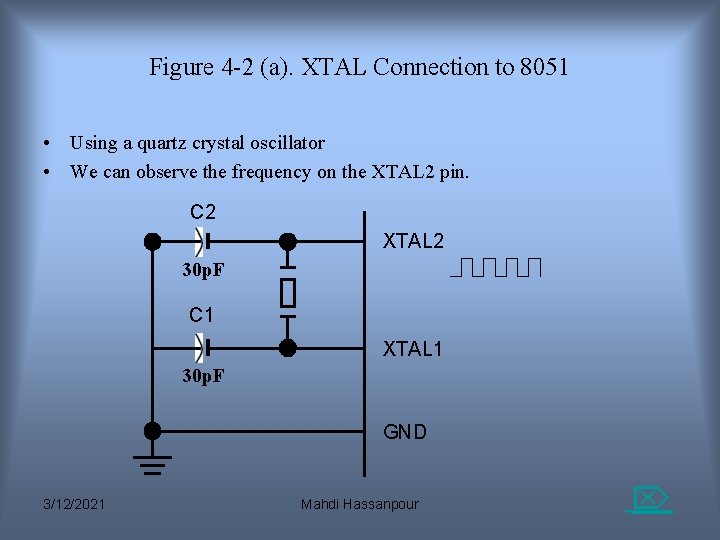
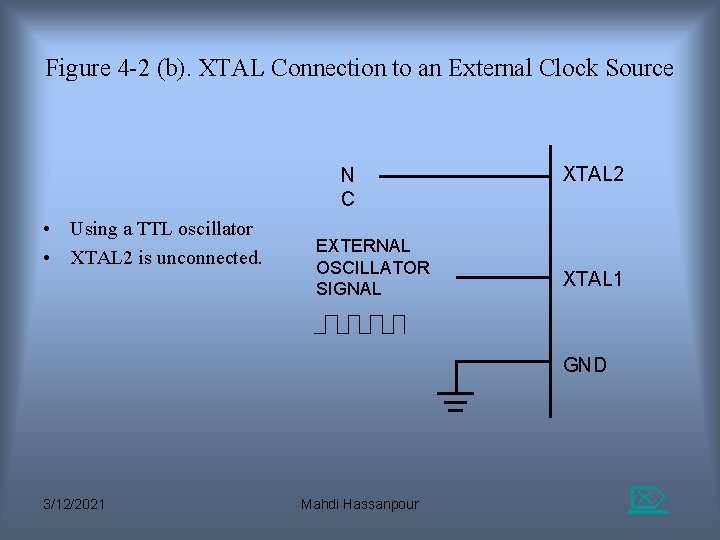
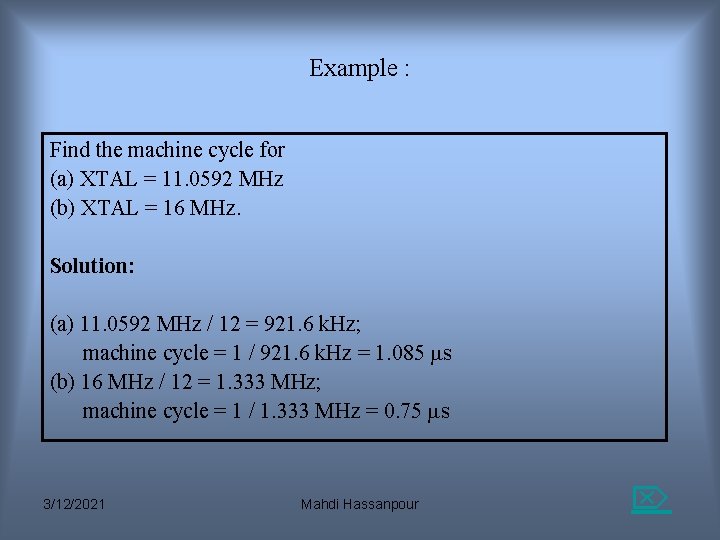
Pins of 8051(1/4) • Vcc(pin 40): – Vcc provides supply voltage to the chip. – The voltage source is +5 V. • GND(pin 20):ground • XTAL 1 and XTAL 2(pins 19, 18): – These 2 pins provide external clock. – Way 1:using a quartz crystal oscillator – Way 2:using a TTL oscillator – Example 4 -1 shows the relationship between XTAL and the machine cycle. 3/12/2021 Mahdi Hassanpour
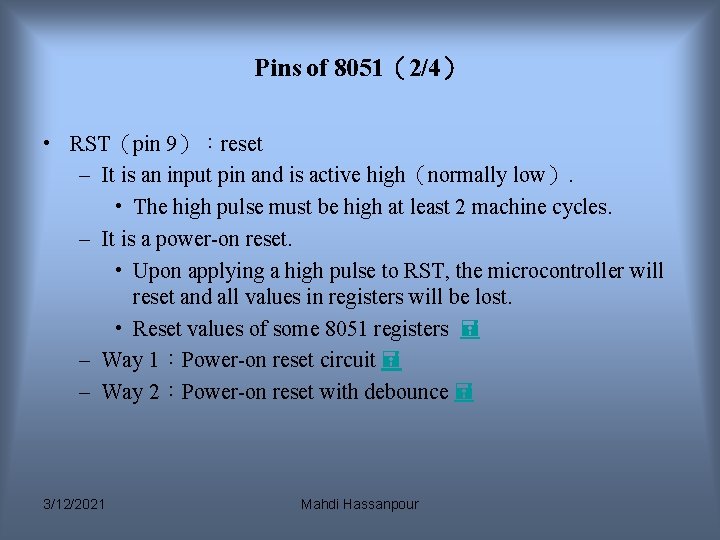
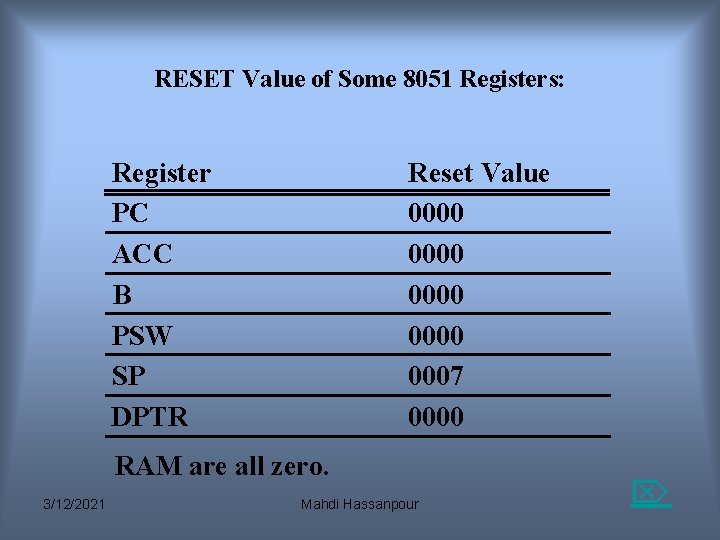
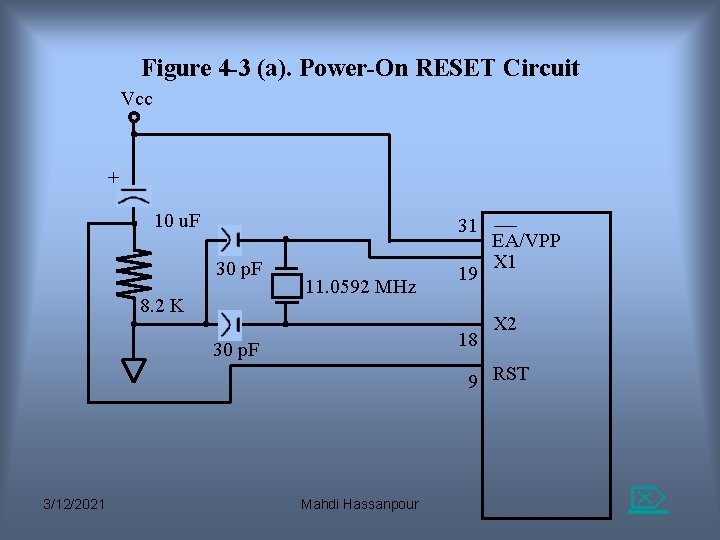
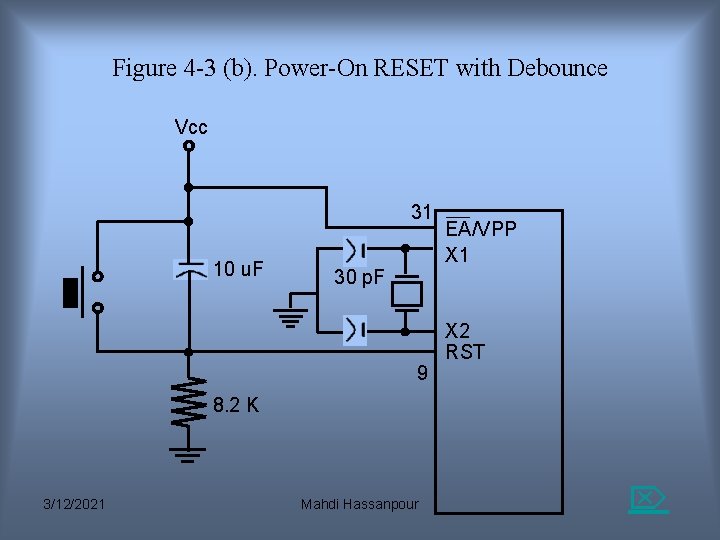
Pins of 8051(2/4) • RST(pin 9):reset – It is an input pin and is active high(normally low). • The high pulse must be high at least 2 machine cycles. – It is a power-on reset. • Upon applying a high pulse to RST, the microcontroller will reset and all values in registers will be lost. • Reset values of some 8051 registers – Way 1:Power-on reset circuit – Way 2:Power-on reset with debounce 3/12/2021 Mahdi Hassanpour
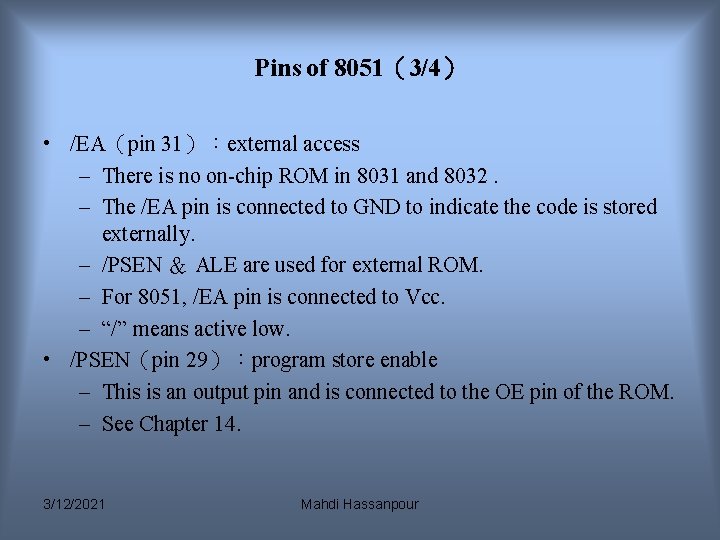
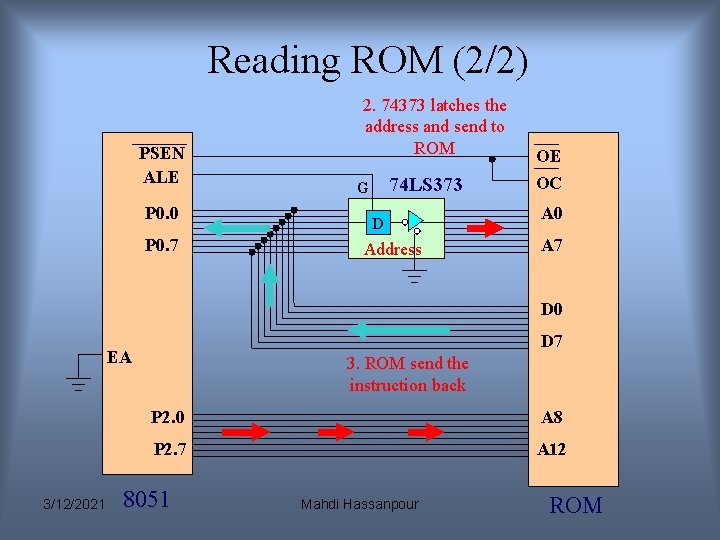
Pins of 8051(3/4) • /EA(pin 31):external access – There is no on-chip ROM in 8031 and 8032. – The /EA pin is connected to GND to indicate the code is stored externally. – /PSEN & ALE are used for external ROM. – For 8051, /EA pin is connected to Vcc. – “/” means active low. • /PSEN(pin 29):program store enable – This is an output pin and is connected to the OE pin of the ROM. – See Chapter 14. 3/12/2021 Mahdi Hassanpour
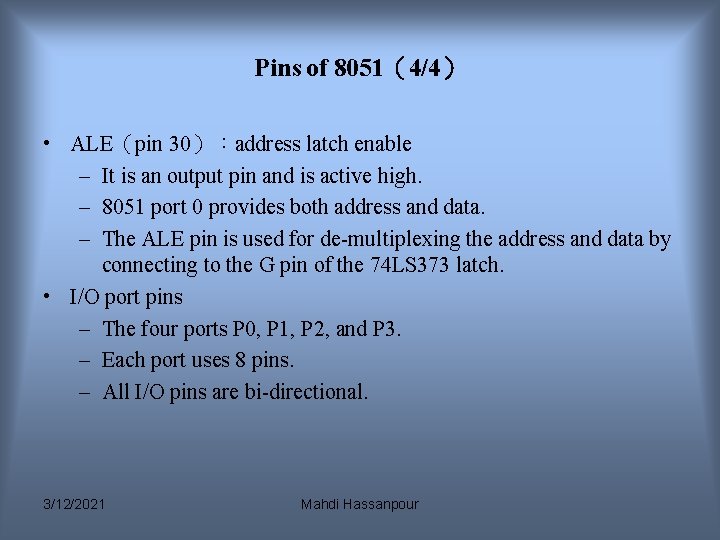
Pins of 8051(4/4) • ALE(pin 30):address latch enable – It is an output pin and is active high. – 8051 port 0 provides both address and data. – The ALE pin is used for de-multiplexing the address and data by connecting to the G pin of the 74 LS 373 latch. • I/O port pins – The four ports P 0, P 1, P 2, and P 3. – Each port uses 8 pins. – All I/O pins are bi-directional. 3/12/2021 Mahdi Hassanpour
Figure 4 -2 (a). XTAL Connection to 8051 • Using a quartz crystal oscillator • We can observe the frequency on the XTAL 2 pin. C 2 XTAL 2 30 p. F C 1 XTAL 1 30 p. F GND 3/12/2021 Mahdi Hassanpour
Figure 4 -2 (b). XTAL Connection to an External Clock Source N C • Using a TTL oscillator • XTAL 2 is unconnected. EXTERNAL OSCILLATOR SIGNAL XTAL 2 XTAL 1 GND 3/12/2021 Mahdi Hassanpour
Example : Find the machine cycle for (a) XTAL = 11. 0592 MHz (b) XTAL = 16 MHz. Solution: (a) 11. 0592 MHz / 12 = 921. 6 k. Hz; machine cycle = 1 / 921. 6 k. Hz = 1. 085 s (b) 16 MHz / 12 = 1. 333 MHz; machine cycle = 1 / 1. 333 MHz = 0. 75 s 3/12/2021 Mahdi Hassanpour
RESET Value of Some 8051 Registers: Register PC ACC B PSW SP DPTR Reset Value 0000 0007 0000 RAM are all zero. 3/12/2021 Mahdi Hassanpour
Figure 4 -3 (a). Power-On RESET Circuit Vcc + 10 u. F 31 30 p. F 8. 2 K 11. 0592 MHz 19 18 30 p. F EA/VPP X 1 X 2 9 RST 3/12/2021 Mahdi Hassanpour
Figure 4 -3 (b). Power-On RESET with Debounce Vcc 31 10 u. F 30 p. F 9 EA/VPP X 1 X 2 RST 8. 2 K 3/12/2021 Mahdi Hassanpour
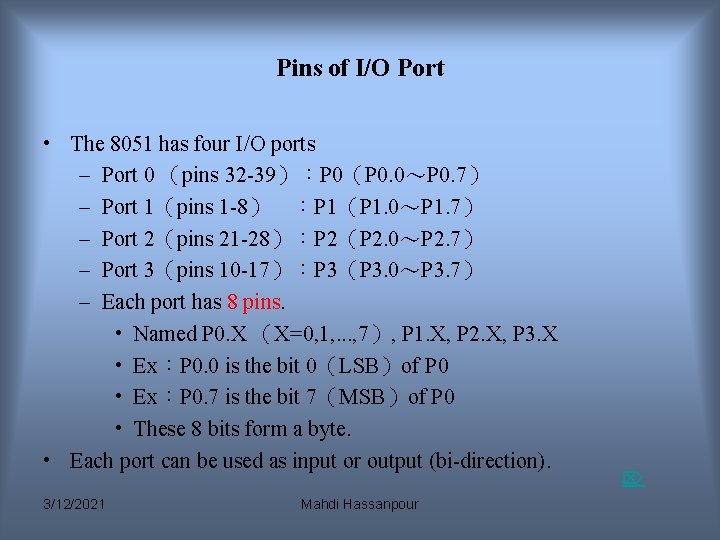
Pins of I/O Port • The 8051 has four I/O ports – Port 0 (pins 32 -39):P 0(P 0. 0~P 0. 7) – Port 1(pins 1 -8) :P 1(P 1. 0~P 1. 7) – Port 2(pins 21 -28):P 2(P 2. 0~P 2. 7) – Port 3(pins 10 -17):P 3(P 3. 0~P 3. 7) – Each port has 8 pins. • Named P 0. X (X=0, 1, . . . , 7), P 1. X, P 2. X, P 3. X • Ex:P 0. 0 is the bit 0(LSB)of P 0 • Ex:P 0. 7 is the bit 7(MSB)of P 0 • These 8 bits form a byte. • Each port can be used as input or output (bi-direction). 3/12/2021 Mahdi Hassanpour
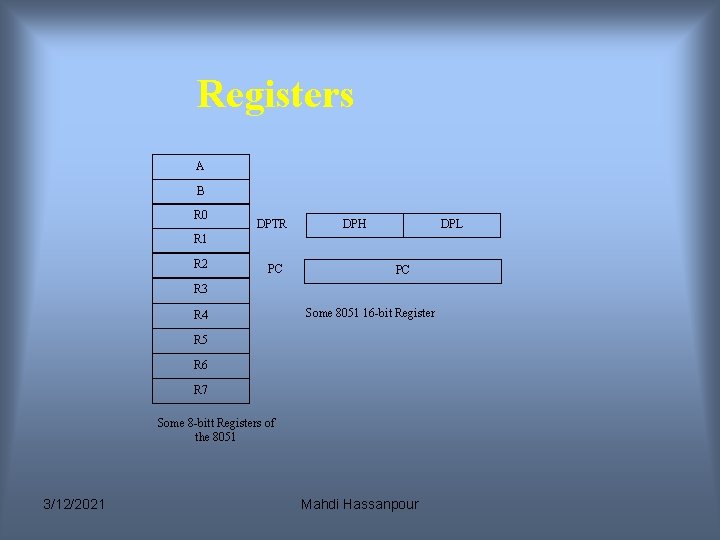
Registers A B R 0 DPTR DPH DPL R 1 R 2 PC PC R 3 R 4 Some 8051 16 -bit Register R 5 R 6 R 7 Some 8 -bitt Registers of the 8051 3/12/2021 Mahdi Hassanpour
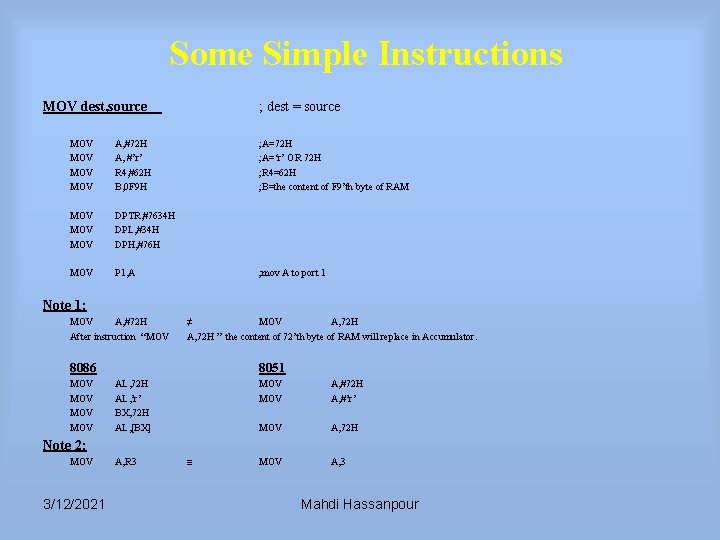
Some Simple Instructions MOV dest, source MOV MOV A, #72 H A, #’r’ R 4, #62 H B, 0 F 9 H MOV MOV DPTR, #7634 H DPL, #34 H DPH, #76 H MOV P 1, A ; dest = source ; A=72 H ; A=‘r’ OR 72 H ; R 4=62 H ; B=the content of F 9’th byte of RAM ; mov A to port 1 Note 1: MOV A, #72 H After instruction “MOV ≠ MOV A, 72 H ” the content of 72’th byte of RAM will replace in Accumulator. 8086 MOV MOV 8051 AL, 72 H AL, ’r’ BX, 72 H AL, [BX] MOV A, #72 H A, #’r’ MOV A, 72 H MOV A, 3 Note 2: MOV 3/12/2021 A, R 3 ≡ Mahdi Hassanpour
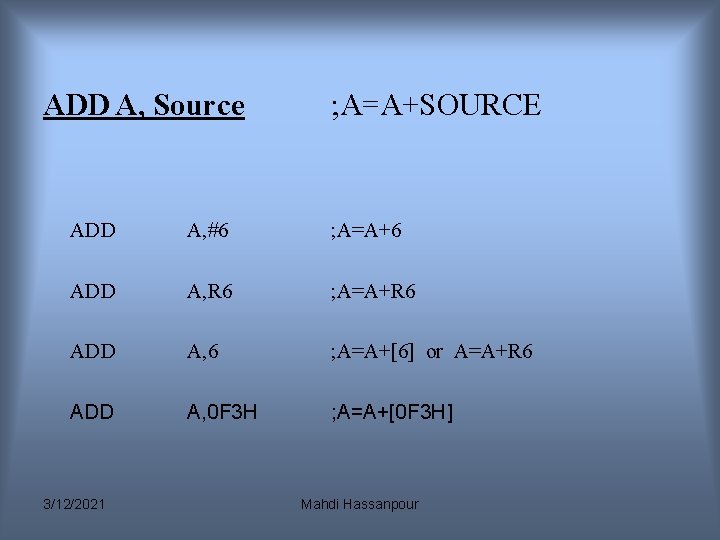
ADD A, Source ; A=A+SOURCE ADD A, #6 ; A=A+6 ADD A, R 6 ; A=A+R 6 ADD A, 6 ; A=A+[6] or A=A+R 6 ADD A, 0 F 3 H ; A=A+[0 F 3 H] 3/12/2021 Mahdi Hassanpour
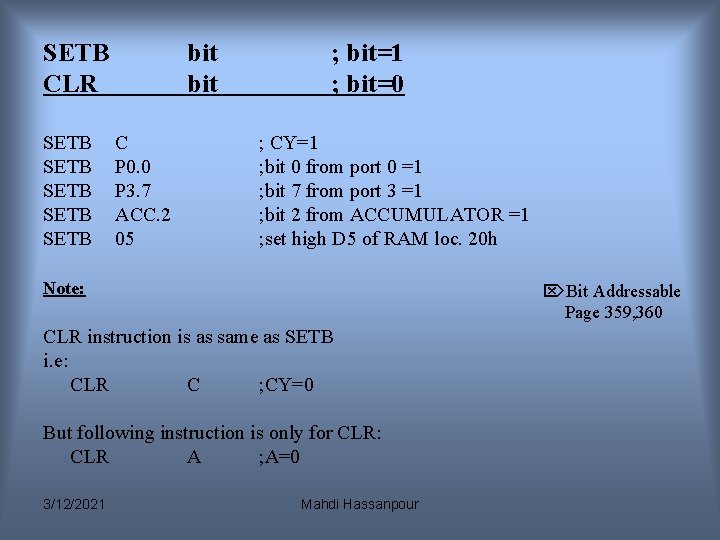
SETB CLR SETB SETB bit C P 0. 0 P 3. 7 ACC. 2 05 ; bit=1 ; bit=0 ; CY=1 ; bit 0 from port 0 =1 ; bit 7 from port 3 =1 ; bit 2 from ACCUMULATOR =1 ; set high D 5 of RAM loc. 20 h Note: Bit Addressable Page 359, 360 CLR instruction is as same as SETB i. e: CLR C ; CY=0 But following instruction is only for CLR: CLR A ; A=0 3/12/2021 Mahdi Hassanpour
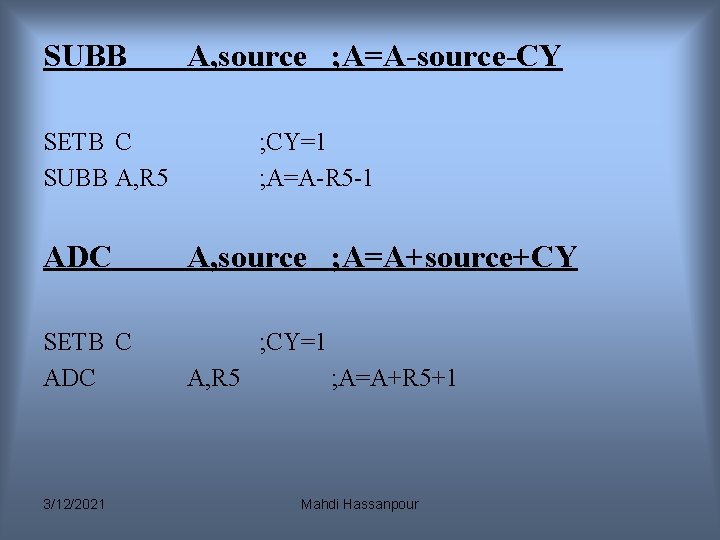
SUBB A, source ; A=A-source-CY SETB C SUBB A, R 5 ADC SETB C ADC 3/12/2021 ; CY=1 ; A=A-R 5 -1 A, source ; A=A+source+CY ; CY=1 A, R 5 ; A=A+R 5+1 Mahdi Hassanpour
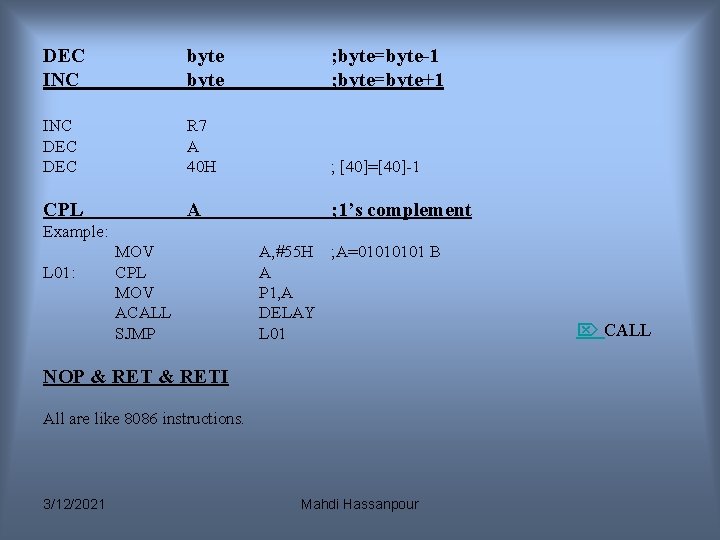
DEC INC byte ; byte=byte-1 ; byte=byte+1 INC DEC R 7 A 40 H ; [40]=[40]-1 CPL A ; 1’s complement Example: L 01: MOV CPL MOV ACALL SJMP A, #55 H ; A=0101 B A P 1, A DELAY L 01 NOP & RETI All are like 8086 instructions. 3/12/2021 Mahdi Hassanpour CALL
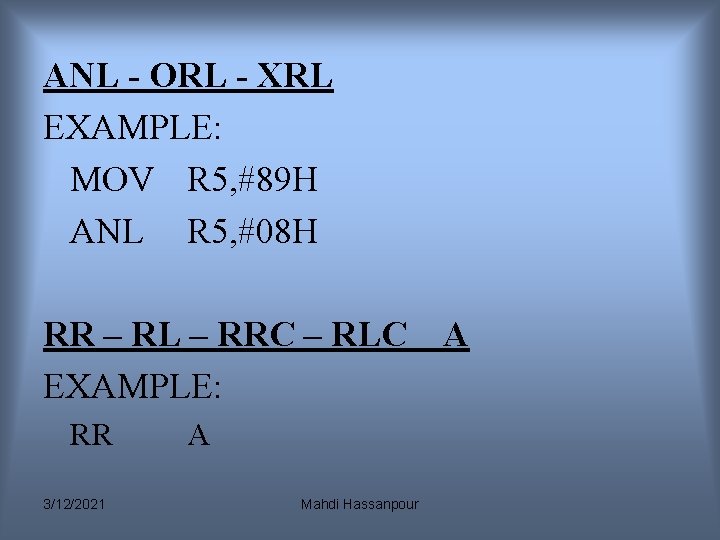
ANL - ORL - XRL EXAMPLE: MOV R 5, #89 H ANL R 5, #08 H RR – RL – RRC – RLC EXAMPLE: RR 3/12/2021 A Mahdi Hassanpour A
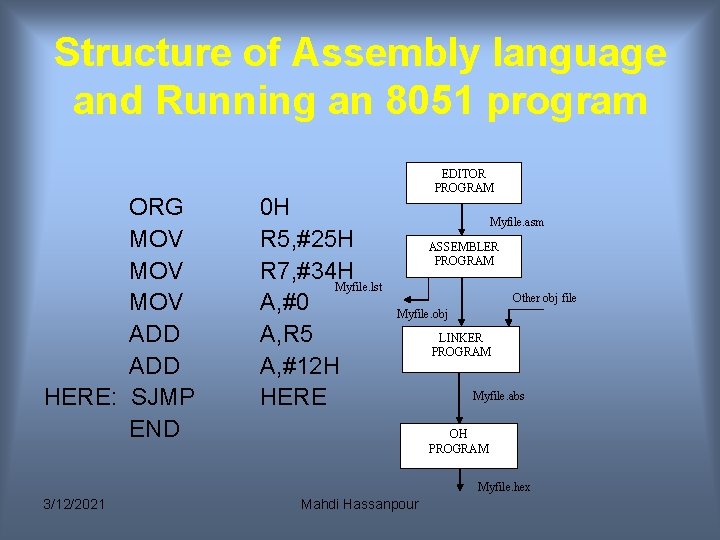
Structure of Assembly language and Running an 8051 program ORG MOV MOV ADD HERE: SJMP END 0 H R 5, #25 H R 7, #34 H Myfile. lst A, #0 A, R 5 A, #12 H HERE EDITOR PROGRAM Myfile. asm ASSEMBLER PROGRAM Other obj file Myfile. obj LINKER PROGRAM Myfile. abs OH PROGRAM Myfile. hex 3/12/2021 Mahdi Hassanpour
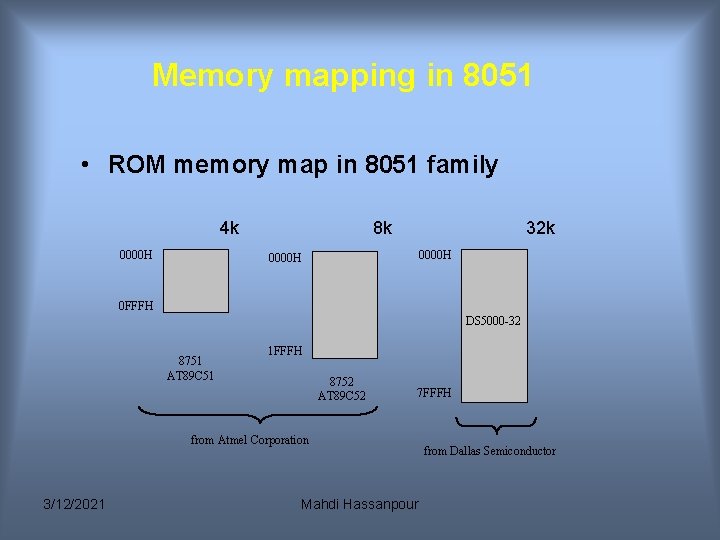
Memory mapping in 8051 • ROM memory map in 8051 family 4 k 0000 H 8 k 32 k 0000 H 0 FFFH DS 5000 -32 8751 AT 89 C 51 1 FFFH 8752 AT 89 C 52 7 FFFH from Atmel Corporation 3/12/2021 Mahdi Hassanpour from Dallas Semiconductor
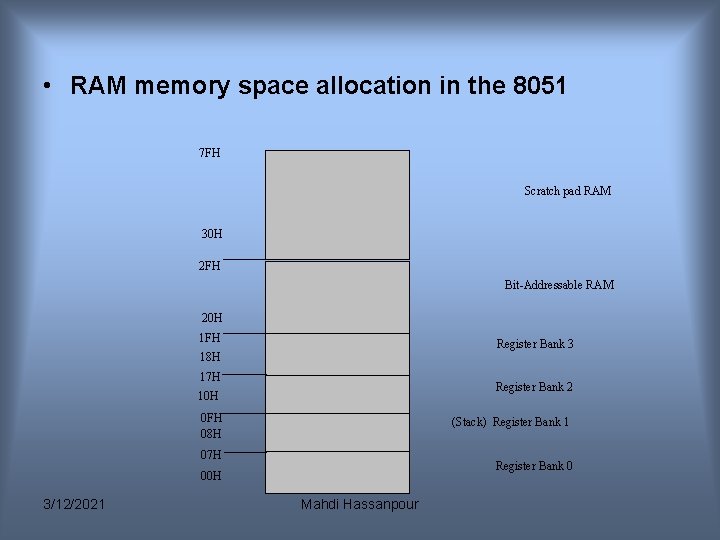
• RAM memory space allocation in the 8051 7 FH Scratch pad RAM 30 H 2 FH Bit-Addressable RAM 20 H 1 FH Register Bank 3 18 H 17 H Register Bank 2 10 H 0 FH 08 H (Stack) Register Bank 1 07 H Register Bank 0 00 H 3/12/2021 Mahdi Hassanpour
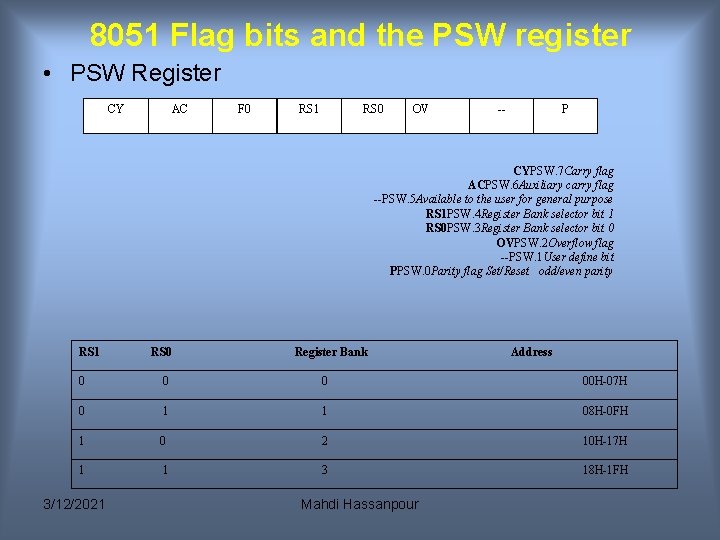
8051 Flag bits and the PSW register • PSW Register CY AC F 0 RS 1 RS 0 OV -- P CYPSW. 7 Carry flag ACPSW. 6 Auxiliary carry flag --PSW. 5 Available to the user for general purpose RS 1 PSW. 4 Register Bank selector bit 1 RS 0 PSW. 3 Register Bank selector bit 0 OVPSW. 2 Overflow flag --PSW. 1 User define bit PPSW. 0 Parity flag Set/Reset odd/even parity RS 1 RS 0 Register Bank Address 0 00 H-07 H 0 1 1 08 H-0 FH 1 0 2 10 H-17 H 1 1 3 18 H-1 FH 3/12/2021 Mahdi Hassanpour
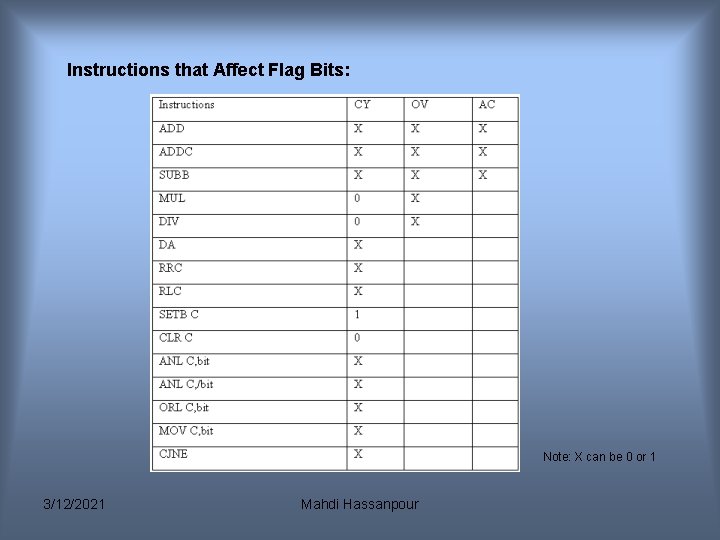
Instructions that Affect Flag Bits: Note: X can be 0 or 1 3/12/2021 Mahdi Hassanpour
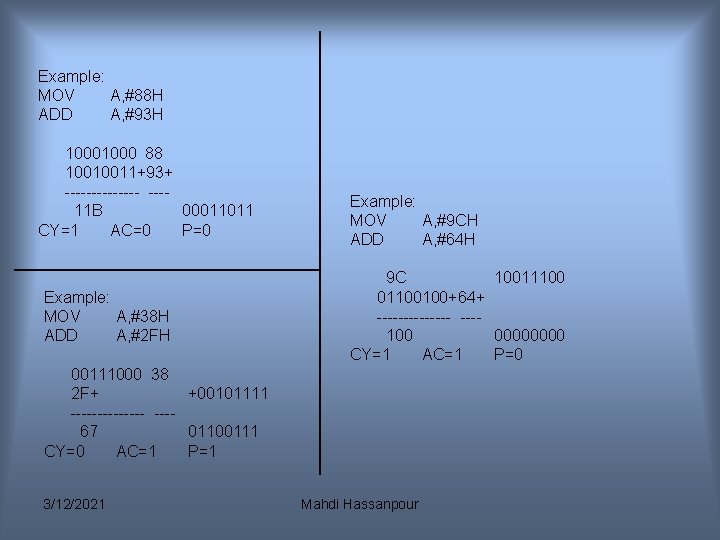
Example: MOV A, #88 H ADD A, #93 H 1000 88 10010011+93+ ------- ---11 B 00011011 CY=1 AC=0 P=0 Example: MOV A, #38 H ADD A, #2 FH Example: MOV A, #9 CH ADD A, #64 H 9 C 10011100 01100100+64+ ------- ---100 0000 CY=1 AC=1 P=0 00111000 38 2 F+ +00101111 ------- ---67 01100111 CY=0 AC=1 P=1 3/12/2021 Mahdi Hassanpour
Addressing Modes • • • Immediate Register Direct Register Indirect Indexed 3/12/2021 Mahdi Hassanpour
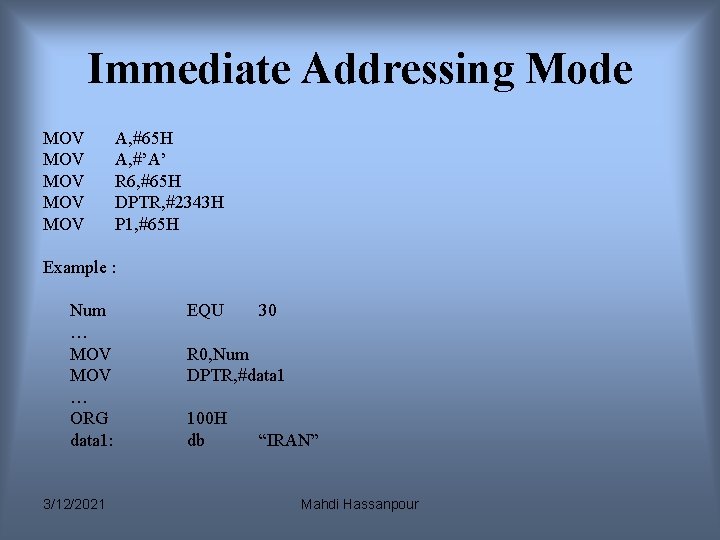
Immediate Addressing Mode MOV MOV MOV A, #65 H A, #’A’ R 6, #65 H DPTR, #2343 H P 1, #65 H Example : Num … MOV … ORG data 1: 3/12/2021 EQU 30 R 0, Num DPTR, #data 1 100 H db “IRAN” Mahdi Hassanpour
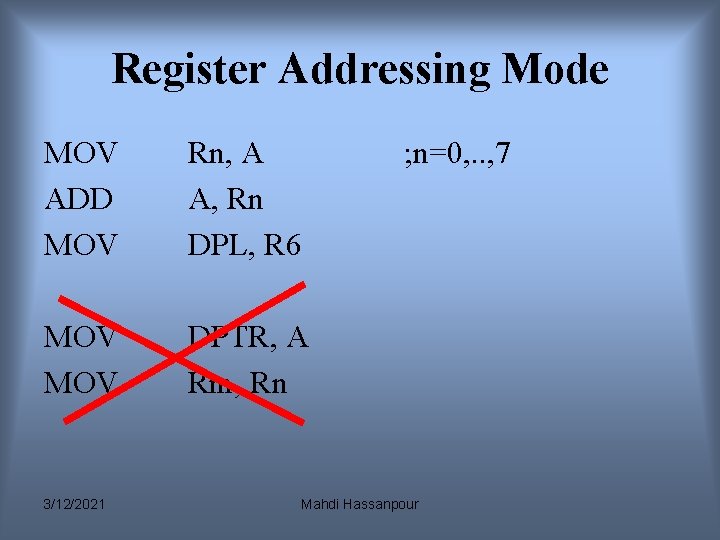
Register Addressing Mode MOV ADD MOV Rn, A A, Rn DPL, R 6 MOV DPTR, A Rm, Rn 3/12/2021 ; n=0, . . , 7 Mahdi Hassanpour
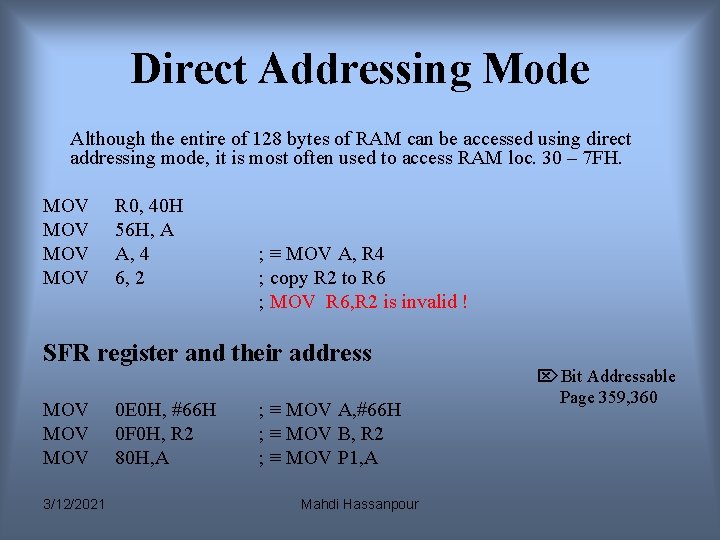
Direct Addressing Mode Although the entire of 128 bytes of RAM can be accessed using direct addressing mode, it is most often used to access RAM loc. 30 – 7 FH. MOV MOV R 0, 40 H 56 H, A A, 4 6, 2 ; ≡ MOV A, R 4 ; copy R 2 to R 6 ; MOV R 6, R 2 is invalid ! SFR register and their address MOV MOV 3/12/2021 0 E 0 H, #66 H 0 F 0 H, R 2 80 H, A ; ≡ MOV A, #66 H ; ≡ MOV B, R 2 ; ≡ MOV P 1, A Mahdi Hassanpour Bit Addressable Page 359, 360
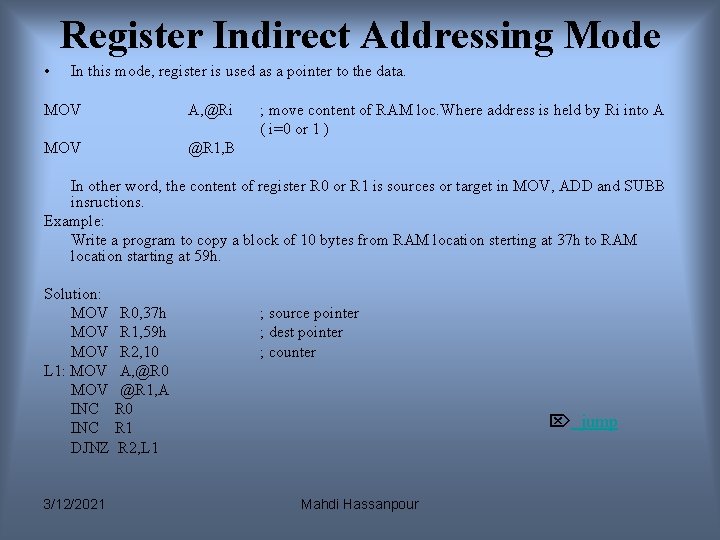
Register Indirect Addressing Mode • In this mode, register is used as a pointer to the data. MOV A, @Ri MOV @R 1, B ; move content of RAM loc. Where address is held by Ri into A ( i=0 or 1 ) In other word, the content of register R 0 or R 1 is sources or target in MOV, ADD and SUBB insructions. Example: Write a program to copy a block of 10 bytes from RAM location sterting at 37 h to RAM location starting at 59 h. Solution: MOV R 0, 37 h MOV R 1, 59 h MOV R 2, 10 L 1: MOV A, @R 0 MOV @R 1, A INC R 0 INC R 1 DJNZ R 2, L 1 3/12/2021 ; source pointer ; dest pointer ; counter jump Mahdi Hassanpour
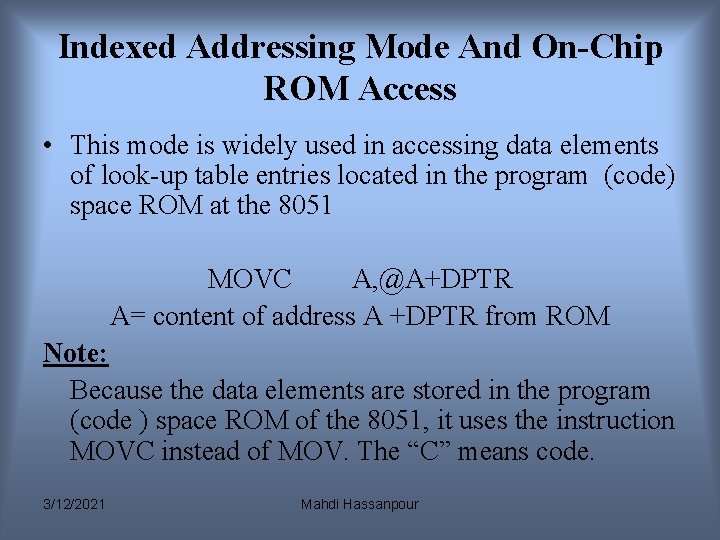
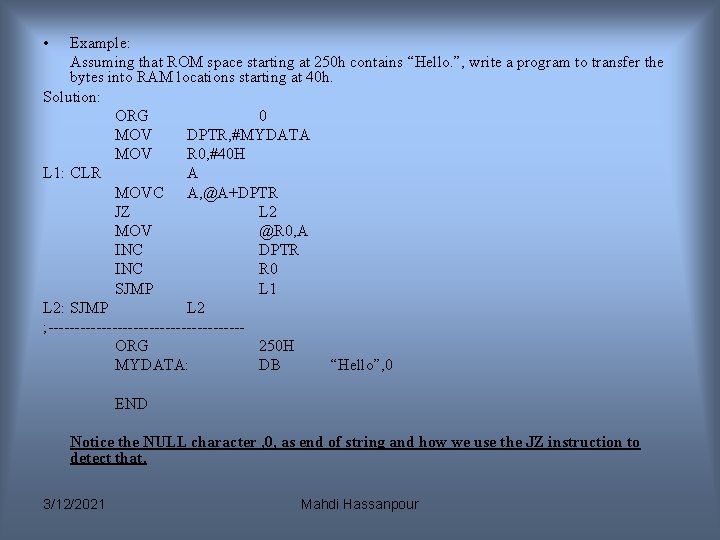
Indexed Addressing Mode And On-Chip ROM Access • This mode is widely used in accessing data elements of look-up table entries located in the program (code) space ROM at the 8051 MOVC A, @A+DPTR A= content of address A +DPTR from ROM Note: Because the data elements are stored in the program (code ) space ROM of the 8051, it uses the instruction MOVC instead of MOV. The “C” means code. 3/12/2021 Mahdi Hassanpour
• Example: Assuming that ROM space starting at 250 h contains “Hello. ”, write a program to transfer the bytes into RAM locations starting at 40 h. Solution: ORG 0 MOV DPTR, #MYDATA MOV R 0, #40 H L 1: CLR A MOVC A, @A+DPTR JZ L 2 MOV @R 0, A INC DPTR INC R 0 SJMP L 1 L 2: SJMP L 2 ; ------------------ORG 250 H MYDATA: DB “Hello”, 0 END Notice the NULL character , 0, as end of string and how we use the JZ instruction to detect that. 3/12/2021 Mahdi Hassanpour
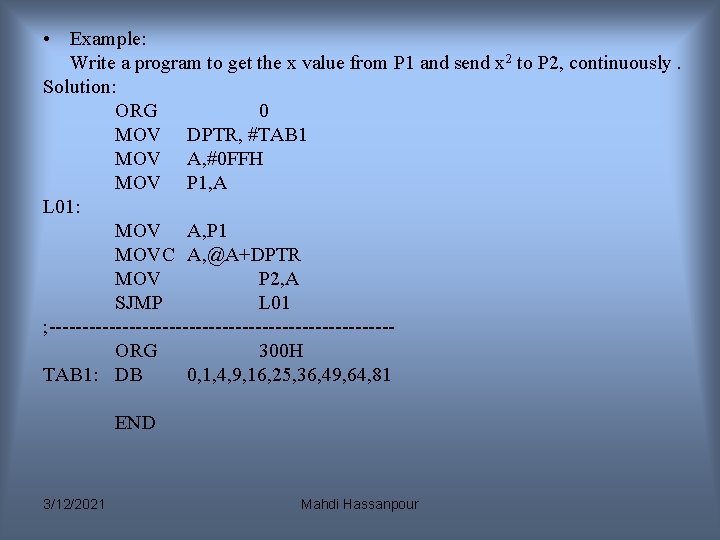
• Example: Write a program to get the x value from P 1 and send x 2 to P 2, continuously. Solution: ORG 0 MOV DPTR, #TAB 1 MOV A, #0 FFH MOV P 1, A L 01: MOV A, P 1 MOVC A, @A+DPTR MOV P 2, A SJMP L 01 ; --------------------------ORG 300 H TAB 1: DB 0, 1, 4, 9, 16, 25, 36, 49, 64, 81 END 3/12/2021 Mahdi Hassanpour
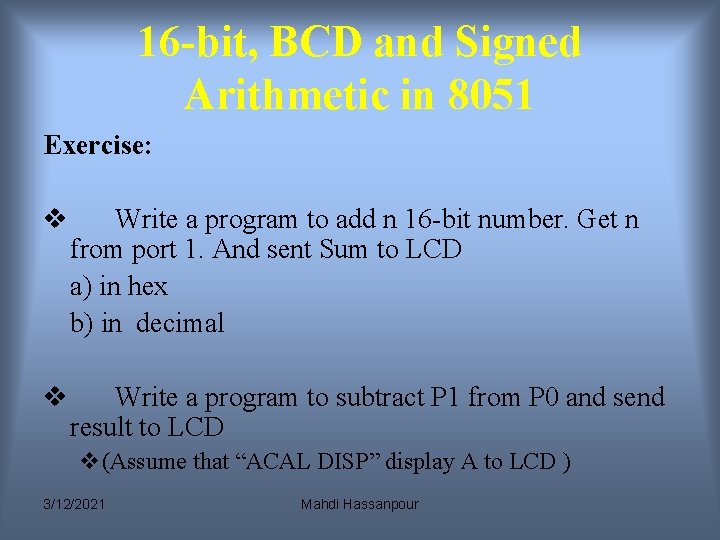
16 -bit, BCD and Signed Arithmetic in 8051 Exercise: v Write a program to add n 16 -bit number. Get n from port 1. And sent Sum to LCD a) in hex b) in decimal v Write a program to subtract P 1 from P 0 and send result to LCD v(Assume that “ACAL DISP” display A to LCD ) 3/12/2021 Mahdi Hassanpour
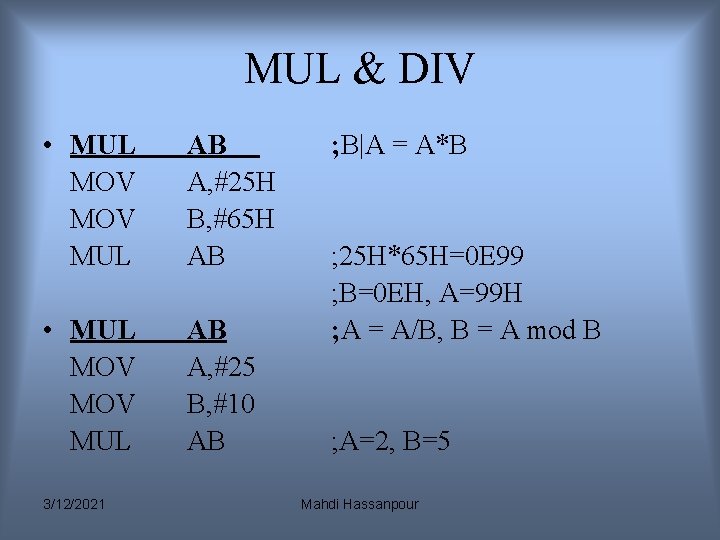
MUL & DIV • MUL MOV MUL AB A, #25 H B, #65 H AB • MUL MOV MUL AB A, #25 B, #10 AB 3/12/2021 ; B|A = A*B ; 25 H*65 H=0 E 99 ; B=0 EH, A=99 H ; A = A/B, B = A mod B ; A=2, B=5 Mahdi Hassanpour
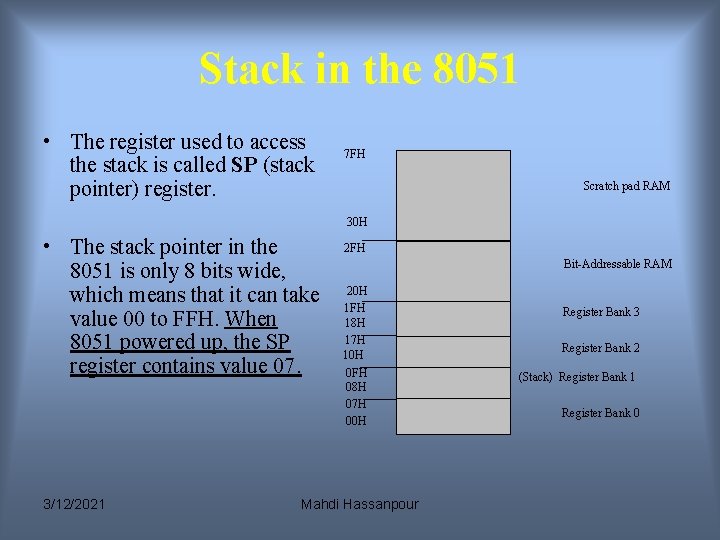
Stack in the 8051 • The register used to access the stack is called SP (stack pointer) register. 7 FH Scratch pad RAM 30 H • The stack pointer in the 8051 is only 8 bits wide, which means that it can take value 00 to FFH. When 8051 powered up, the SP register contains value 07. 3/12/2021 2 FH Bit-Addressable RAM 20 H 1 FH 18 H 17 H 10 H 0 FH 08 H 07 H 00 H Mahdi Hassanpour Register Bank 3 Register Bank 2 (Stack) Register Bank 1 Register Bank 0
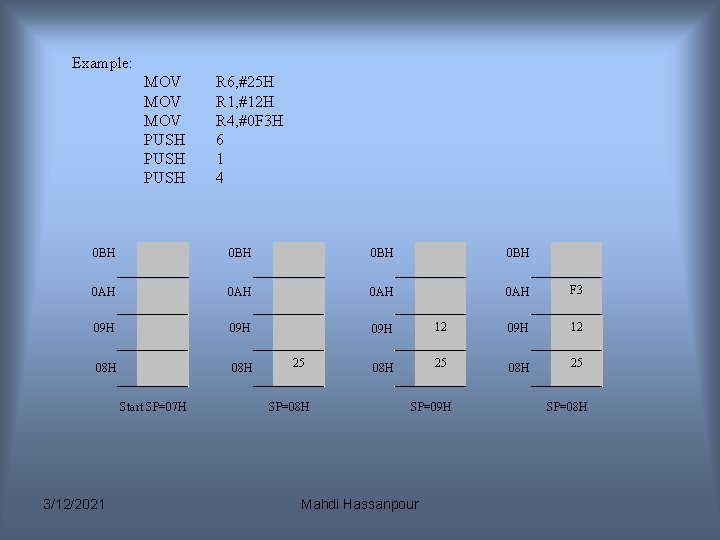
Example: MOV MOV PUSH R 6, #25 H R 1, #12 H R 4, #0 F 3 H 6 1 4 0 BH 0 BH 0 AH 0 AH F 3 09 H 09 H 12 08 H 08 H 25 Start SP=07 H 3/12/2021 25 SP=08 H SP=09 H Mahdi Hassanpour SP=08 H
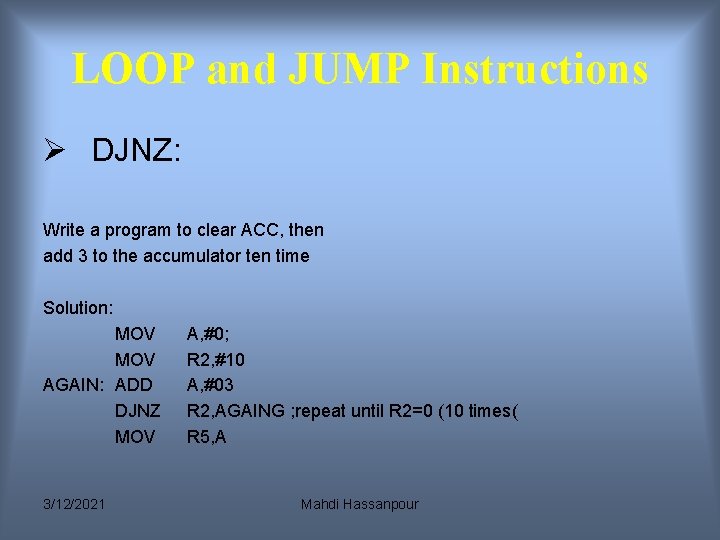
LOOP and JUMP Instructions Ø DJNZ: Write a program to clear ACC, then add 3 to the accumulator ten time Solution: MOV AGAIN: ADD DJNZ MOV 3/12/2021 A, #0; R 2, #10 A, #03 R 2, AGAING ; repeat until R 2=0 (10 times( R 5, A Mahdi Hassanpour
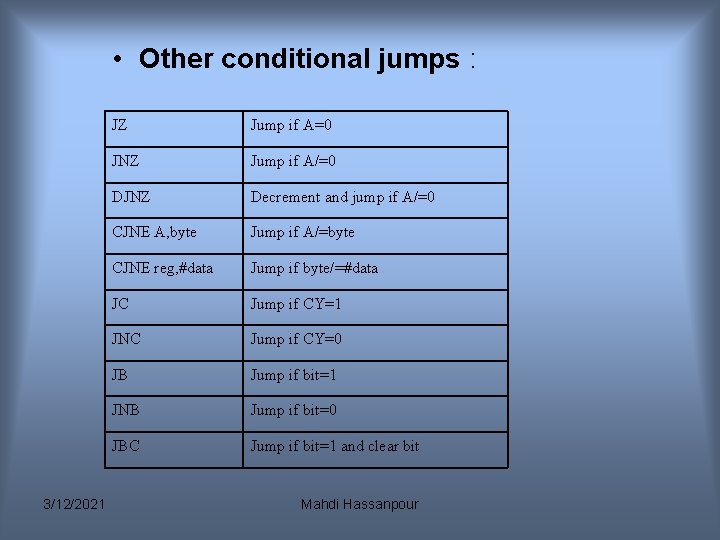
• Other conditional jumps : 3/12/2021 JZ Jump if A=0 JNZ Jump if A/=0 DJNZ Decrement and jump if A/=0 CJNE A, byte Jump if A/=byte CJNE reg, #data Jump if byte/=#data JC Jump if CY=1 JNC Jump if CY=0 JB Jump if bit=1 JNB Jump if bit=0 JBC Jump if bit=1 and clear bit Mahdi Hassanpour
SJMP and LJMP: LJMP(long jump( LJMP is an unconditional jump. It is a 3 -byte instruction in which the first byte is the opcode, and the second and third bytes represent the 16 -bit address of the target location. The 20 byte target address allows a jump to any memory location from 0000 to FFFFH. SJMP(short jump( In this 2 -byte instruction. The first byte is the opcode and the second byte is the relative address of the target location. The relative address range of 00 -FFH is divided into forward and backward jumps, that is , within -128 to +127 bytes of memory relative to the address of the current PC. 3/12/2021 Mahdi Hassanpour
CJNE , JNC Exercise: Write a program that compare R 0, R 1. If R 0>R 1 then send 1 to port 2, else if R 0<R 1 then send 0 FFh to port 2, else send 0 to port 2. 3/12/2021 Mahdi Hassanpour
CALL Instructions Another control transfer instruction is the CALL instruction, which is used to call a subroutine. • LCALL(long call( In this 3 -byte instruction, the first byte is the opcode an the second and third bytes are used for the address of target subroutine. Therefore, LCALL can be used to call subroutines located anywhere within the 64 K byte address space of the 8051. 3/12/2021 Mahdi Hassanpour
• ACALL (absolute call( ACALL is 2 -byte instruction in contrast to LCALL, which is 13 bytes. Since ACALL is a 2 -byte instruction, the target address of the subroutine must be within 2 K bytes address because only 11 bits of the 2 bytes are used for the address. There is no difference between ACALL and LCALL in terms of saving the program counter on the stack or the function of the RET instruction. The only difference is that the target address for LCALL can be anywhere within the 64 K byte address space of the 8051 while the target address of ACALL must be within a 2 Kbyte range. 3/12/2021 Mahdi Hassanpour
I/O Port Programming Port 1(pins 1 -8) • Port 1 is denoted by P 1. – P 1. 0 ~ P 1. 7 • We use P 1 as examples to show the operations on ports. – P 1 as an output port (i. e. , write CPU data to the external pin) – P 1 as an input port (i. e. , read pin data into CPU bus) 3/12/2021 Mahdi Hassanpour
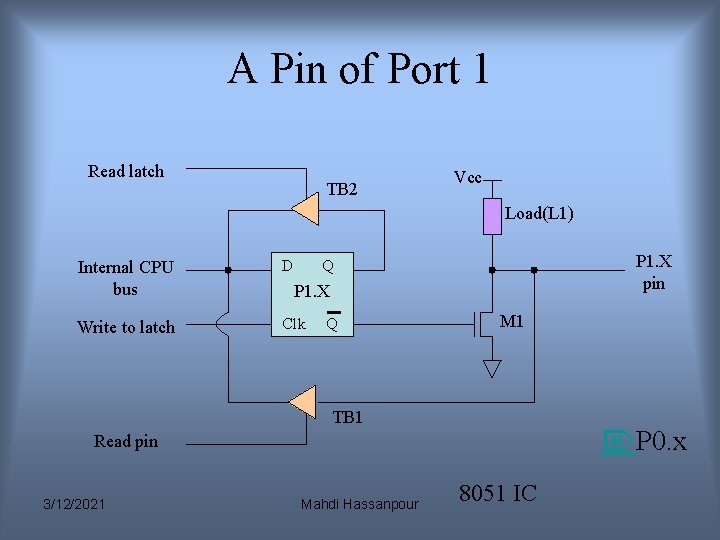
A Pin of Port 1 Read latch TB 2 Vcc Load(L 1) Internal CPU bus D Write to latch Clk P 1. X pin Q P 1. X Q M 1 TB 1 P 0. x Read pin 3/12/2021 Mahdi Hassanpour 8051 IC
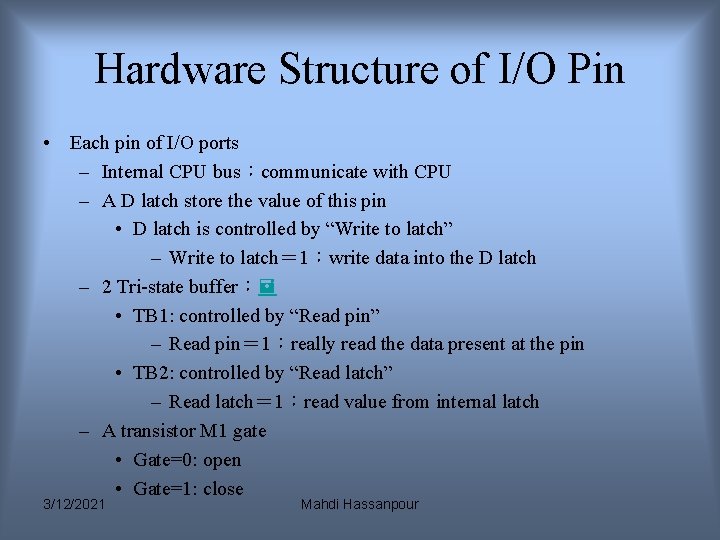
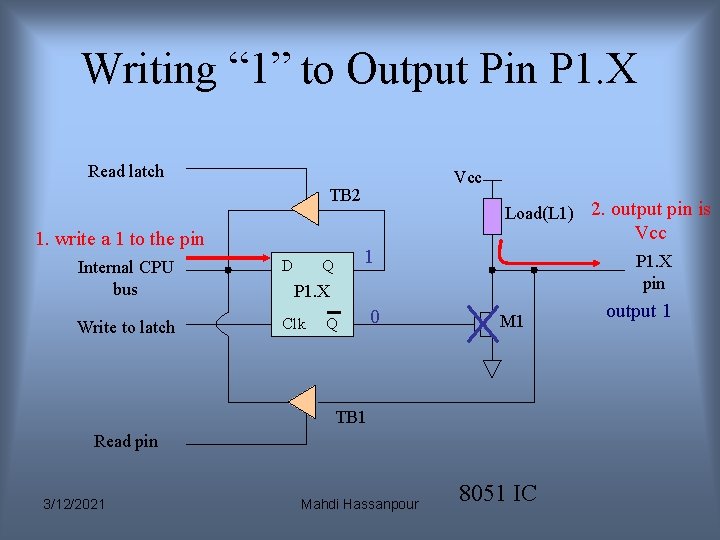
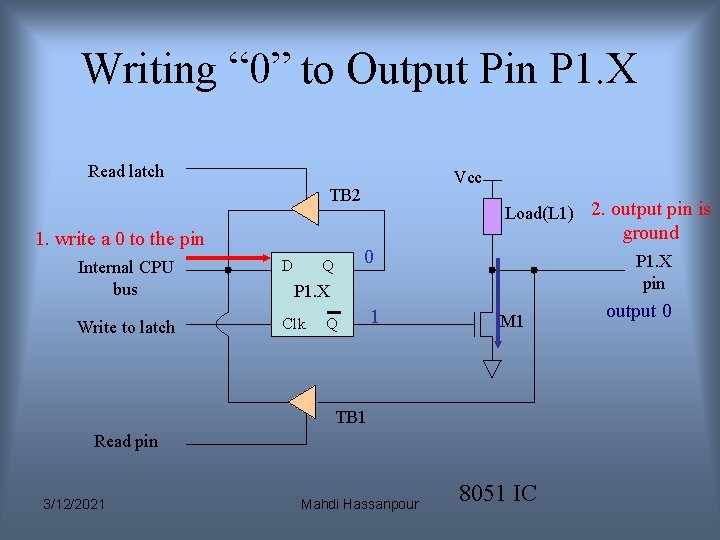
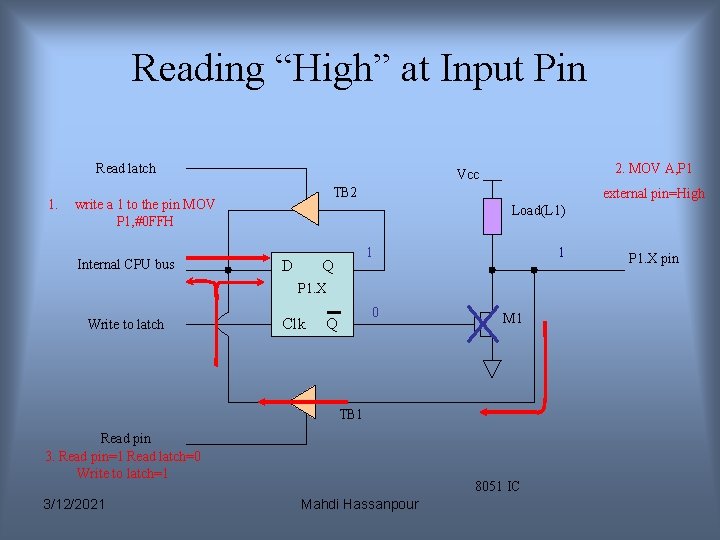
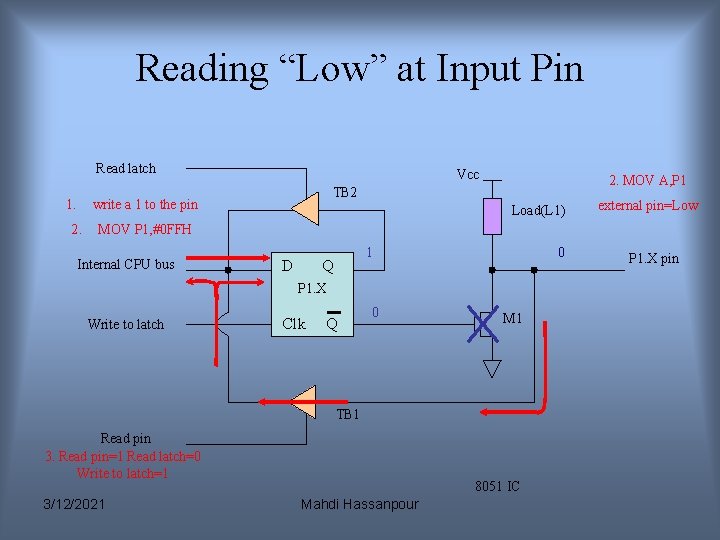
Hardware Structure of I/O Pin • Each pin of I/O ports – Internal CPU bus:communicate with CPU – A D latch store the value of this pin • D latch is controlled by “Write to latch” – Write to latch= 1:write data into the D latch – 2 Tri-state buffer: • TB 1: controlled by “Read pin” – Read pin= 1:really read the data present at the pin • TB 2: controlled by “Read latch” – Read latch= 1:read value from internal latch – A transistor M 1 gate • Gate=0: open • Gate=1: close 3/12/2021 Mahdi Hassanpour
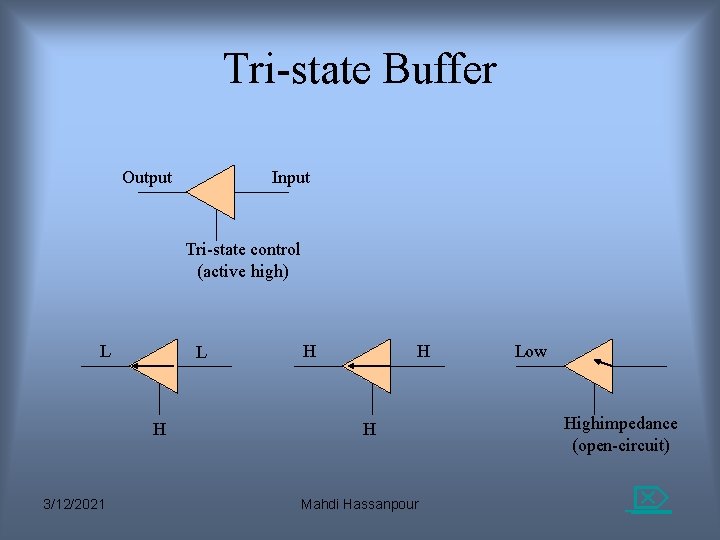
Tri-state Buffer Output Input Tri-state control (active high) L L H 3/12/2021 H H H Mahdi Hassanpour Low Highimpedance (open-circuit)
Writing “ 1” to Output Pin P 1. X Read latch Vcc TB 2 Load(L 1) 2. output pin is Vcc 1. write a 1 to the pin Internal CPU bus D Write to latch Clk 1 Q P 1. X pin P 1. X Q 0 M 1 TB 1 Read pin 3/12/2021 Mahdi Hassanpour 8051 IC output 1
Writing “ 0” to Output Pin P 1. X Read latch Vcc TB 2 Load(L 1) 2. output pin is ground 1. write a 0 to the pin Internal CPU bus D Write to latch Clk 0 Q P 1. X pin P 1. X Q 1 M 1 TB 1 Read pin 3/12/2021 Mahdi Hassanpour 8051 IC output 0
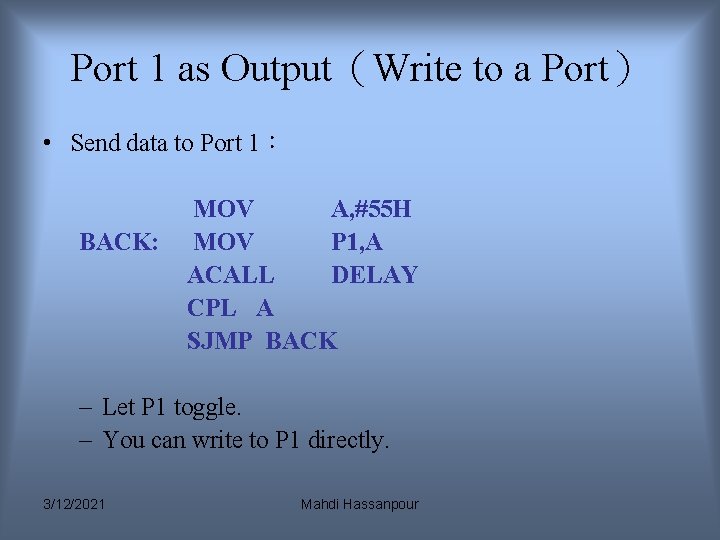
Port 1 as Output(Write to a Port) • Send data to Port 1: BACK: MOV A, #55 H MOV P 1, A ACALL DELAY CPL A SJMP BACK – Let P 1 toggle. – You can write to P 1 directly. 3/12/2021 Mahdi Hassanpour
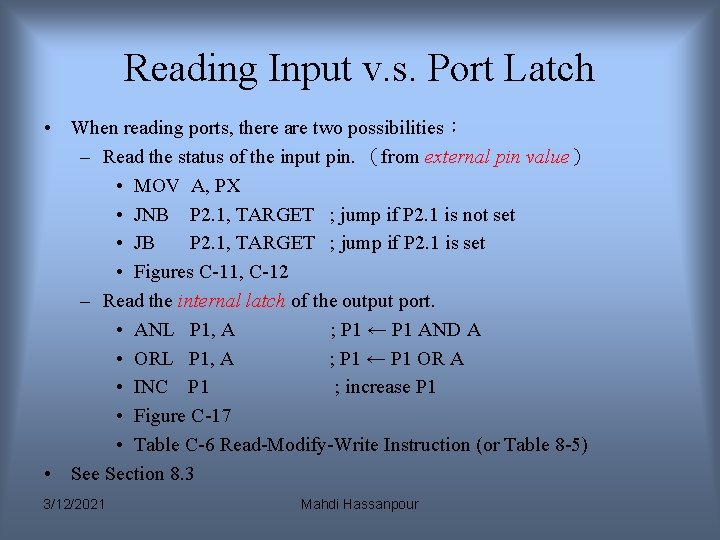
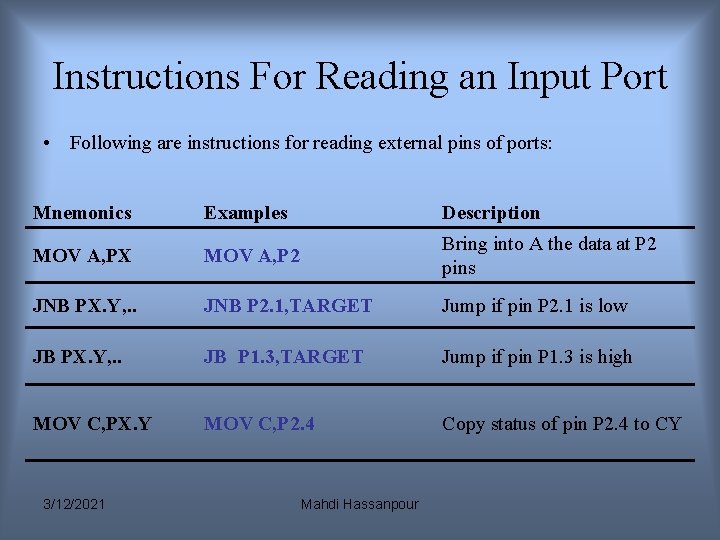
Reading Input v. s. Port Latch • When reading ports, there are two possibilities: – Read the status of the input pin. (from external pin value) • MOV A, PX • JNB P 2. 1, TARGET ; jump if P 2. 1 is not set • JB P 2. 1, TARGET ; jump if P 2. 1 is set • Figures C-11, C-12 – Read the internal latch of the output port. • ANL P 1, A ; P 1 ← P 1 AND A • ORL P 1, A ; P 1 ← P 1 OR A • INC P 1 ; increase P 1 • Figure C-17 • Table C-6 Read-Modify-Write Instruction (or Table 8 -5) • See Section 8. 3 3/12/2021 Mahdi Hassanpour
Reading “High” at Input Pin Read latch 1. TB 2 write a 1 to the pin MOV P 1, #0 FFH Internal CPU bus 2. MOV A, P 1 Vcc external pin=High Load(L 1) D 1 Q 1 P 1. X Write to latch Clk 0 Q M 1 TB 1 Read pin 3. Read pin=1 Read latch=0 Write to latch=1 3/12/2021 8051 IC Mahdi Hassanpour P 1. X pin
Reading “Low” at Input Pin Read latch 1. Vcc write a 1 to the pin 2. MOV A, P 1 TB 2 Load(L 1) external pin=Low MOV P 1, #0 FFH Internal CPU bus D 1 Q 0 P 1. X Write to latch Clk Q 0 M 1 TB 1 Read pin 3. Read pin=1 Read latch=0 Write to latch=1 3/12/2021 8051 IC Mahdi Hassanpour P 1. X pin
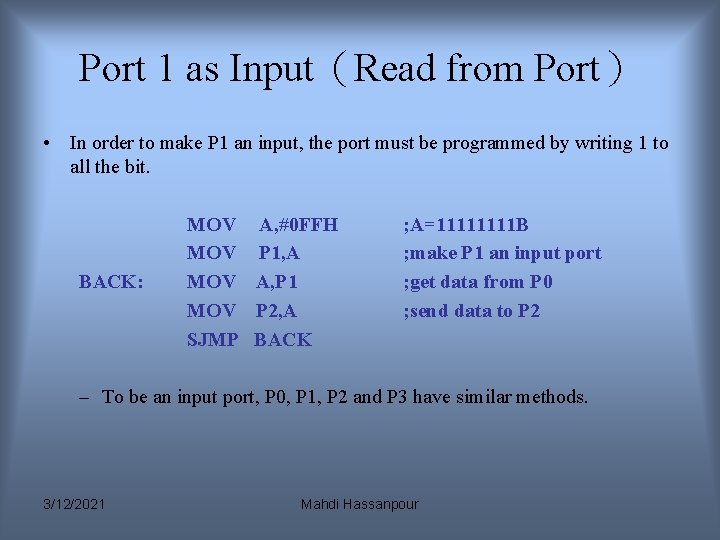
Port 1 as Input(Read from Port) • In order to make P 1 an input, the port must be programmed by writing 1 to all the bit. BACK: MOV MOV SJMP A, #0 FFH P 1, A A, P 1 P 2, A BACK ; A=1111 B ; make P 1 an input port ; get data from P 0 ; send data to P 2 – To be an input port, P 0, P 1, P 2 and P 3 have similar methods. 3/12/2021 Mahdi Hassanpour
Instructions For Reading an Input Port • Following are instructions for reading external pins of ports: Mnemonics Examples Description MOV A, PX MOV A, P 2 Bring into A the data at P 2 pins JNB PX. Y, . . JNB P 2. 1, TARGET Jump if pin P 2. 1 is low JB PX. Y, . . JB P 1. 3, TARGET Jump if pin P 1. 3 is high MOV C, PX. Y MOV C, P 2. 4 Copy status of pin P 2. 4 to CY 3/12/2021 Mahdi Hassanpour
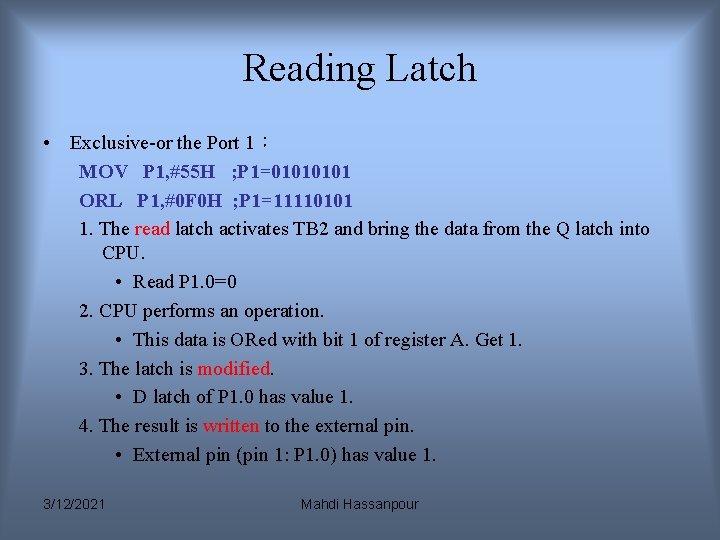
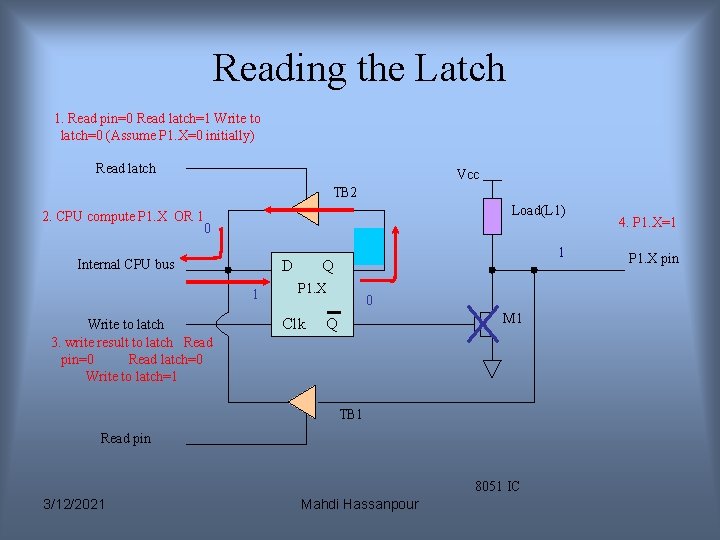
Reading Latch • Exclusive-or the Port 1: MOV P 1, #55 H ; P 1=0101 ORL P 1, #0 F 0 H ; P 1=11110101 1. The read latch activates TB 2 and bring the data from the Q latch into CPU. • Read P 1. 0=0 2. CPU performs an operation. • This data is ORed with bit 1 of register A. Get 1. 3. The latch is modified. • D latch of P 1. 0 has value 1. 4. The result is written to the external pin. • External pin (pin 1: P 1. 0) has value 1. 3/12/2021 Mahdi Hassanpour
Reading the Latch 1. Read pin=0 Read latch=1 Write to latch=0 (Assume P 1. X=0 initially) Read latch Vcc TB 2 Load(L 1) 2. CPU compute P 1. X OR 1 0 Internal CPU bus D 1 Write to latch 3. write result to latch Read pin=0 Read latch=0 Write to latch=1 0 Q P 1. X Clk 1 0 M 1 Q TB 1 Read pin 8051 IC 3/12/2021 Mahdi Hassanpour 4. P 1. X=1 P 1. X pin
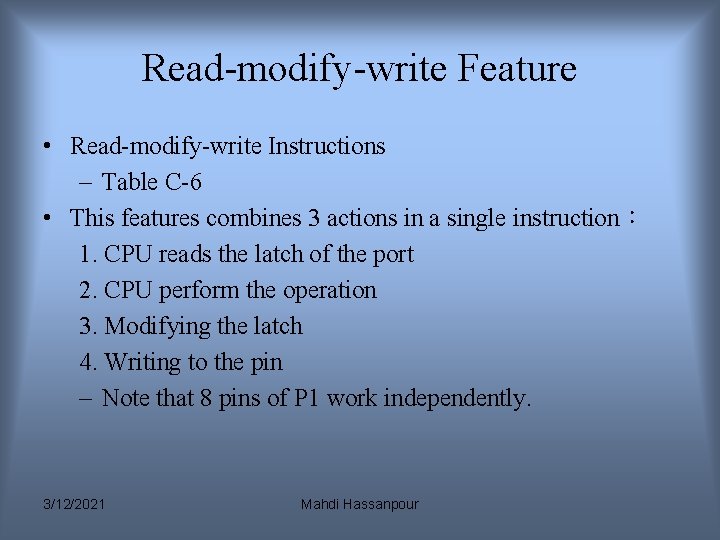
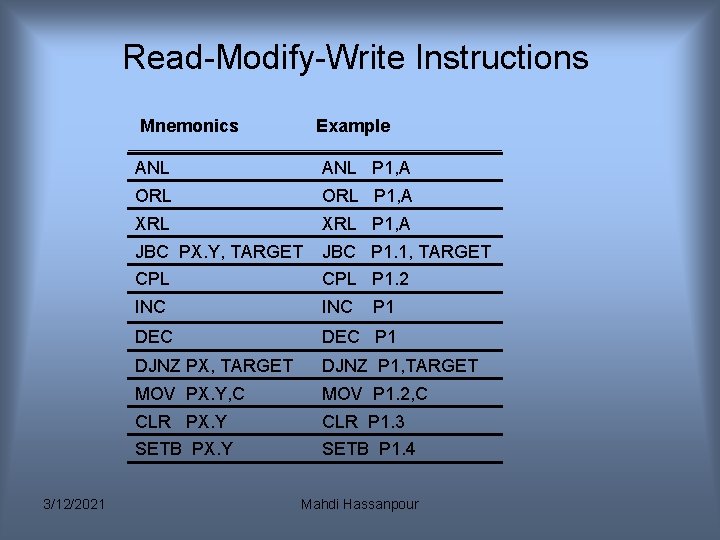
Read-modify-write Feature • Read-modify-write Instructions – Table C-6 • This features combines 3 actions in a single instruction: 1. CPU reads the latch of the port 2. CPU perform the operation 3. Modifying the latch 4. Writing to the pin – Note that 8 pins of P 1 work independently. 3/12/2021 Mahdi Hassanpour
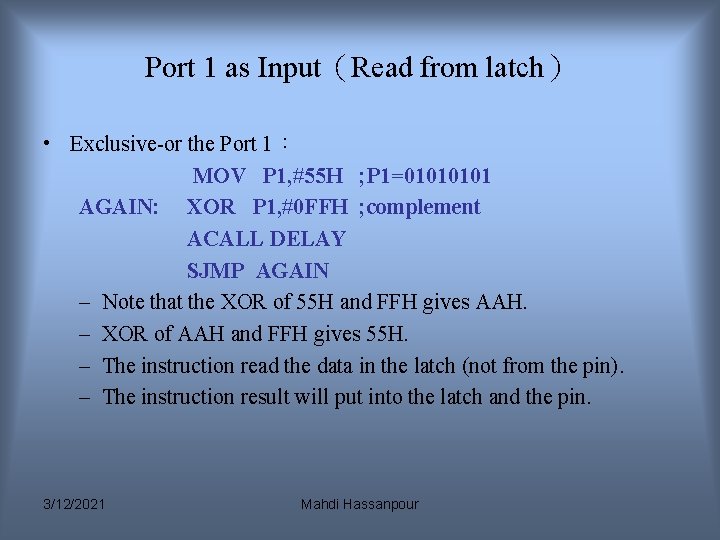
Port 1 as Input(Read from latch) • Exclusive-or the Port 1: MOV P 1, #55 H ; P 1=0101 AGAIN: XOR P 1, #0 FFH ; complement ACALL DELAY SJMP AGAIN – Note that the XOR of 55 H and FFH gives AAH. – XOR of AAH and FFH gives 55 H. – The instruction read the data in the latch (not from the pin). – The instruction result will put into the latch and the pin. 3/12/2021 Mahdi Hassanpour
Read-Modify-Write Instructions Mnemonics 3/12/2021 Example ANL P 1, A ORL P 1, A XRL P 1, A JBC PX. Y, TARGET JBC P 1. 1, TARGET CPL P 1. 2 INC DEC P 1 DJNZ PX, TARGET DJNZ P 1, TARGET MOV PX. Y, C MOV P 1. 2, C CLR PX. Y CLR P 1. 3 SETB PX. Y SETB P 1. 4 P 1 Mahdi Hassanpour
You are able to answer this Questions: • How to write the data to a pin? • How to read the data from the pin? – Read the value present at the external pin. • Why we need to set the pin first? – Read the value come from the latch(not from the external pin). • Why the instruction is called read-modify write? 3/12/2021 Mahdi Hassanpour
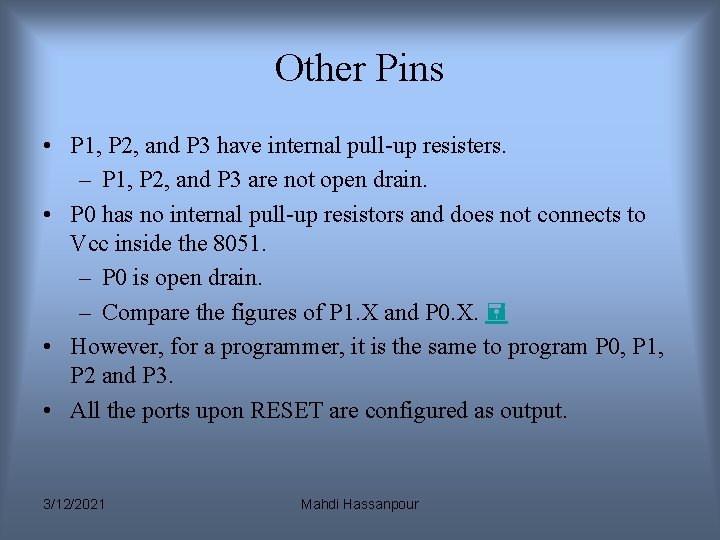
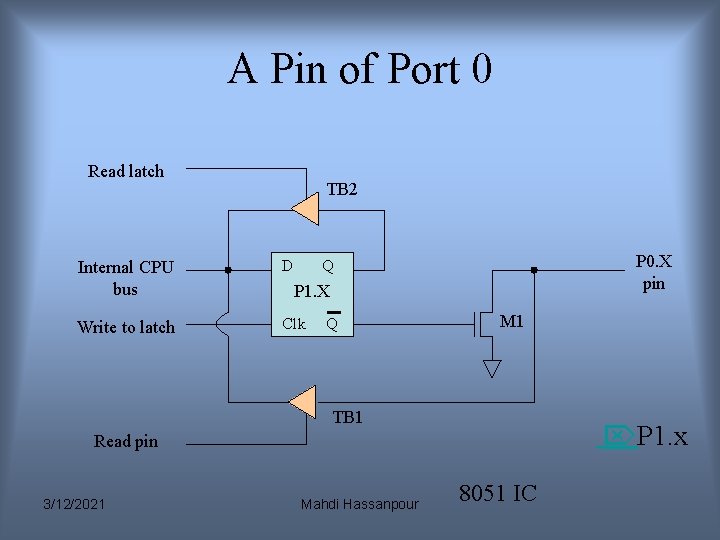
Other Pins • P 1, P 2, and P 3 have internal pull-up resisters. – P 1, P 2, and P 3 are not open drain. • P 0 has no internal pull-up resistors and does not connects to Vcc inside the 8051. – P 0 is open drain. – Compare the figures of P 1. X and P 0. X. • However, for a programmer, it is the same to program P 0, P 1, P 2 and P 3. • All the ports upon RESET are configured as output. 3/12/2021 Mahdi Hassanpour
A Pin of Port 0 Read latch TB 2 Internal CPU bus D Write to latch Clk P 0. X pin Q P 1. X Q M 1 TB 1 P 1. x Read pin 3/12/2021 Mahdi Hassanpour 8051 IC
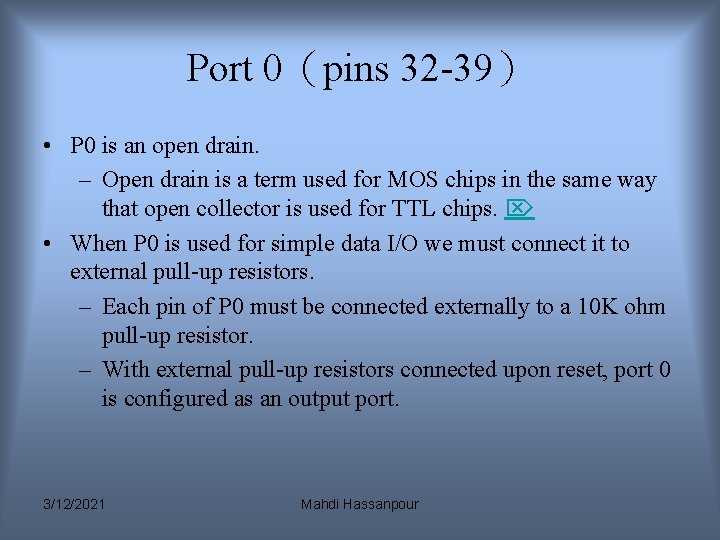
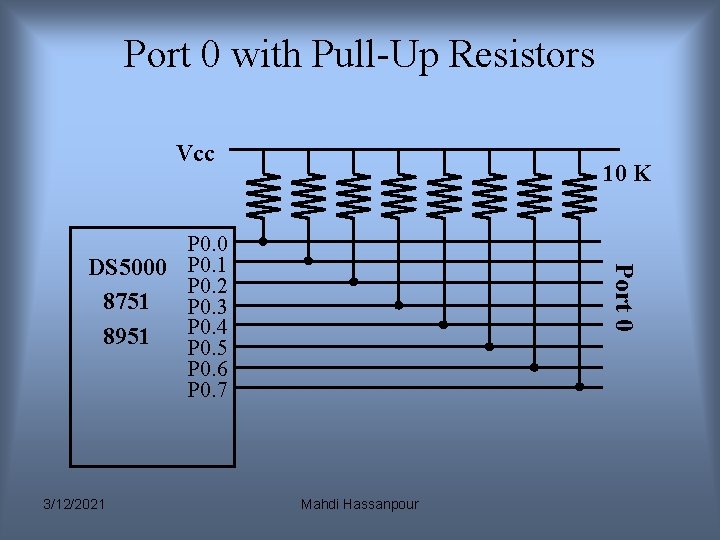
Port 0(pins 32 -39) • P 0 is an open drain. – Open drain is a term used for MOS chips in the same way that open collector is used for TTL chips. • When P 0 is used for simple data I/O we must connect it to external pull-up resistors. – Each pin of P 0 must be connected externally to a 10 K ohm pull-up resistor. – With external pull-up resistors connected upon reset, port 0 is configured as an output port. 3/12/2021 Mahdi Hassanpour
Port 0 with Pull-Up Resistors Vcc 10 K 3/12/2021 Port 0 P 0. 0 DS 5000 P 0. 1 P 0. 2 8751 P 0. 3 P 0. 4 8951 P 0. 5 P 0. 6 P 0. 7 Mahdi Hassanpour
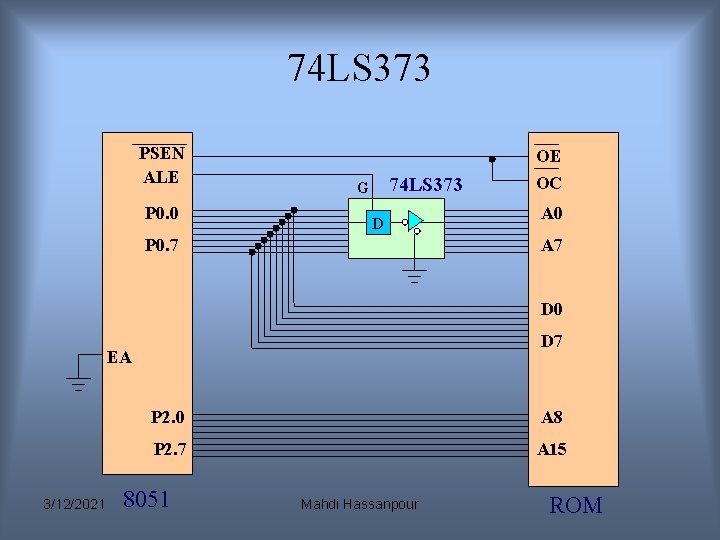
Dual Role of Port 0 • When connecting an 8051/8031 to an external memory, the 8051 uses ports to send addresses and read instructions. – 8031 is capable of accessing 64 K bytes of external memory. – 16 -bit address:P 0 provides both address A 0 -A 7, P 2 provides address A 8 -A 15. – Also, P 0 provides data lines D 0 -D 7. • When P 0 is used for address/data multiplexing, it is connected to the 74 LS 373 to latch the address. – There is no need for external pull-up resistors as shown in Chapter 14. 3/12/2021 Mahdi Hassanpour
74 LS 373 PSEN ALE P 0. 0 74 LS 373 G D P 0. 7 OE OC A 0 A 7 D 0 D 7 EA 3/12/2021 P 2. 0 A 8 P 2. 7 A 15 8051 Mahdi Hassanpour ROM
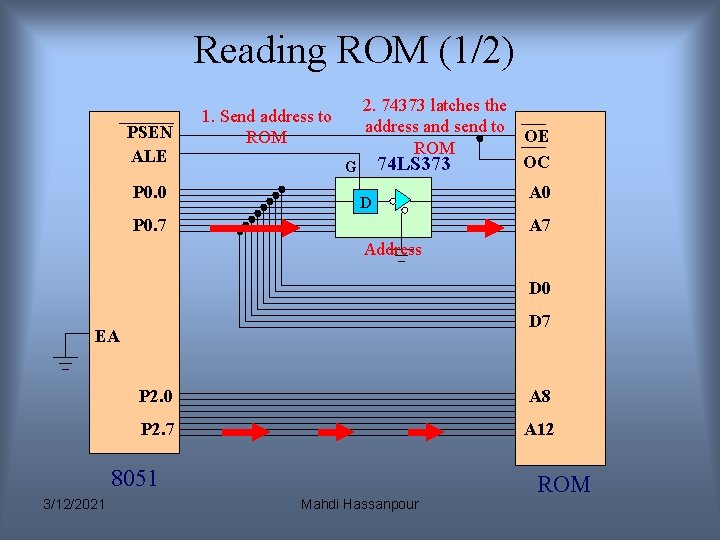
Reading ROM (1/2) P 0. 0 2. 74373 latches the address and send to OE ROM OC G 74 LS 373 A 0 P 0. 7 A 7 PSEN ALE 1. Send address to ROM D Address D 0 D 7 EA P 2. 0 A 8 P 2. 7 A 12 8051 3/12/2021 Mahdi Hassanpour ROM
Reading ROM (2/2) PSEN ALE P 0. 0 P 0. 7 2. 74373 latches the address and send to ROM 74 LS 373 G D Address OE OC A 0 A 7 D 0 D 7 EA 3/12/2021 3. ROM send the instruction back P 2. 0 A 8 P 2. 7 A 12 8051 Mahdi Hassanpour ROM
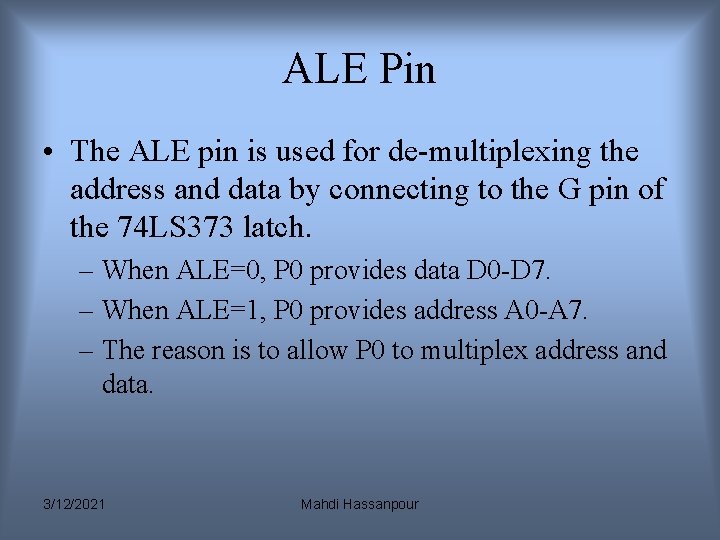
ALE Pin • The ALE pin is used for de-multiplexing the address and data by connecting to the G pin of the 74 LS 373 latch. – When ALE=0, P 0 provides data D 0 -D 7. – When ALE=1, P 0 provides address A 0 -A 7. – The reason is to allow P 0 to multiplex address and data. 3/12/2021 Mahdi Hassanpour
Port 2(pins 21 -28) • Port 2 does not need any pull-up resistors since it already has pull-up resistors internally. • In an 8031 -based system, P 2 are used to provide address A 8 -A 15. 3/12/2021 Mahdi Hassanpour
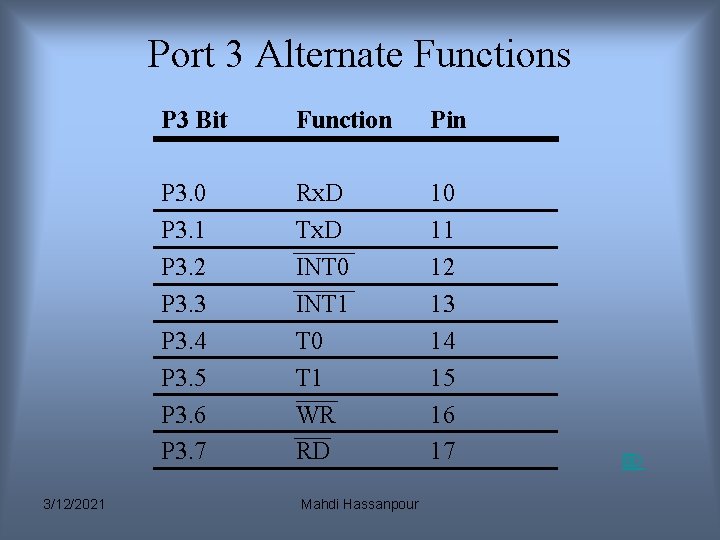
Port 3(pins 10 -17) • Port 3 does not need any pull-up resistors since it already has pull-up resistors internally. • Although port 3 is configured as an output port upon reset, this is not the way it is most commonly used. • Port 3 has the additional function of providing signals. – Serial communications signal:Rx. D, Tx. D(Chapter 10) – External interrupt:/INT 0, /INT 1(Chapter 11) – Timer/counter:T 0, T 1(Chapter 9) – External memory accesses in 8031 -based system:/WR, /RD(Chapter 14) 3/12/2021 Mahdi Hassanpour
Port 3 Alternate Functions 3/12/2021 P 3 Bit Function Pin P 3. 0 P 3. 1 P 3. 2 P 3. 3 P 3. 4 P 3. 5 P 3. 6 P 3. 7 Rx. D Tx. D INT 0 INT 1 T 0 T 1 WR RD 10 11 12 13 14 15 16 17 Mahdi Hassanpour