
Searching the Florida Vendor Bid System VBS Vendor
Searching the Florida Vendor Bid System (VBS) Vendor Meeting: March 18, 2010
Agenda q Overview q Registering for Notifications q Searching in VBS q VBS Tips & Tricks q SPURSView q Contact Us 3/18/2010 2
Overview q The Vendor Bid System (VBS) is a place for state agencies, universities, and water management districts to post announcements, solicitations and public meeting notices per Florida Administrative Code (F. A. C. ) requirements q http: //vbs. dms. state. fl. us/vbs/main_menu q Rule 60 A-1. 021, F. A. C. Electronic Posting of Decisions and Intended Decisions 3/18/2010 3
Overview q Who uses VBS? Ø Agency customers who post solicitation notices, single source notices, or public meetings Ø Vendor customers who wish to be notified of upcoming business opportunities 3/18/2010 4
Overview: VBS Benefits q Why should vendors use VBS? Ø Agencies are required by Rule 60 A-1. 021 to post all bids for public view in VBS Ø State of Florida guarantees the validity of all bids posted in VBS Ø MFMP vendors receive automatic notifications of new bids posted in VBS • Based on commodity codes Ø VBS is one of three bidding tools available to vendors at no charge Øe. Quote ØSourcing 3/18/2010 5
Agenda q Overview q Registering for Notifications q Searching in VBS q VBS Tips & Tricks q SPURSView q Contact Us 3/18/2010 6
Registering for Notifications q VBS Notifications Ø When vendors register in the Vendor Information Portal (VIP) and select ‘Yes’ for solicitations, they automatically register for VBS e-mail notifications - https: //vendor. myfloridamarketplace. com - Based on the commodity codes selected in their VIP account -Sent to the VIP main contact e-mail address Ø Vendors receive VBS notifications for all new and modified advertisements posted for a commodity code (notifications are not sent for single sources or agency decisions) Ø To change notification settings, vendors update their contact information in their MFMP VIP account 3/18/2010 7
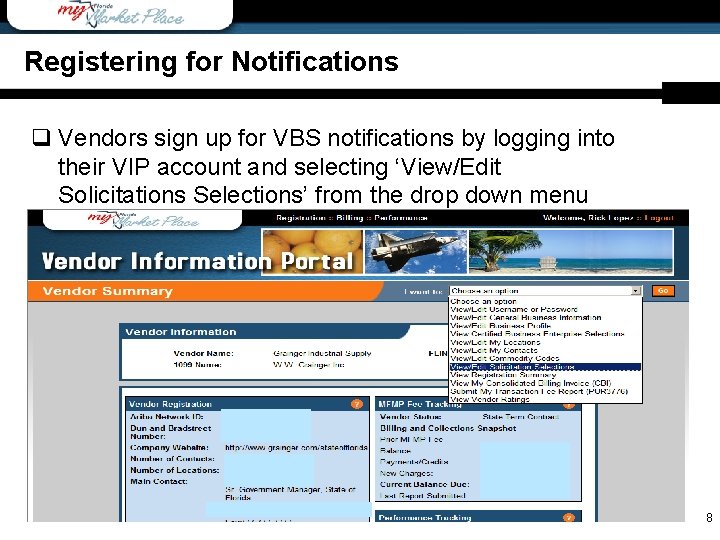
Registering for Notifications q Vendors sign up for VBS notifications by logging into their VIP account and selecting ‘View/Edit Solicitations Selections’ from the drop down menu 3/18/2010 8
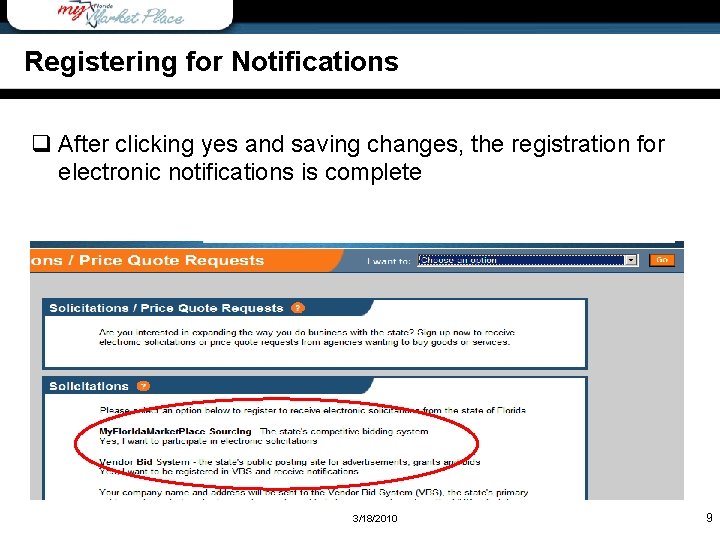
Overview Registering for Notifications q After clicking yes and saving changes, the registration for electronic notifications is complete 3/18/2010 9
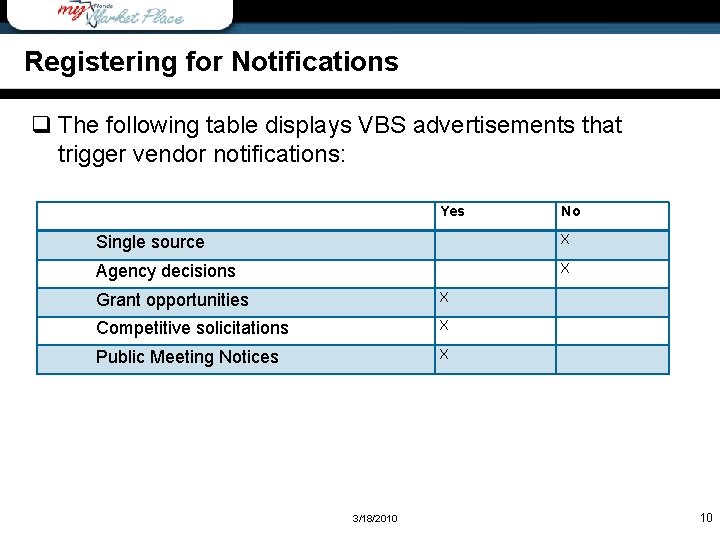
Registering for Notifications q The following table displays VBS advertisements that trigger vendor notifications: Yes No Single source X Agency decisions X Grant opportunities X Competitive solicitations X Public Meeting Notices X 3/18/2010 10
Agenda q Overview q Registering for Notifications q Searching in VBS q VBS Tips & Tricks q SPURSView q Contact Us 3/18/2010 11
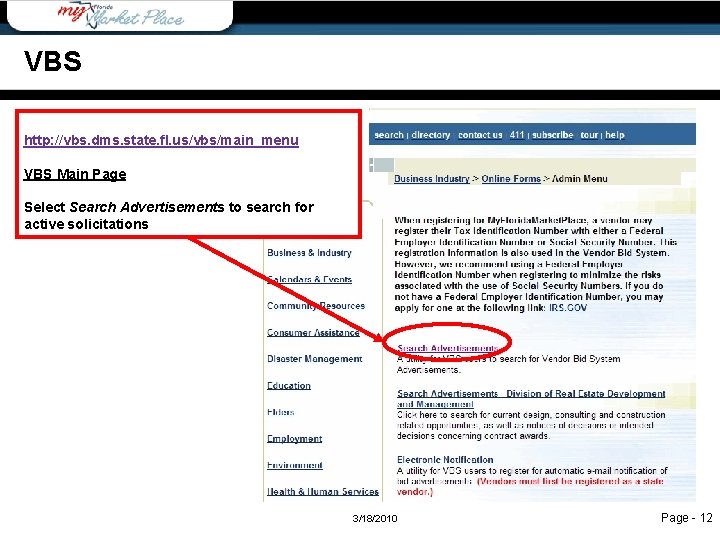
VBS http: //vbs. dms. state. fl. us/vbs/main_menu VBS Main Page Select Search Advertisements to search for active solicitations 3/18/2010 Page - 12
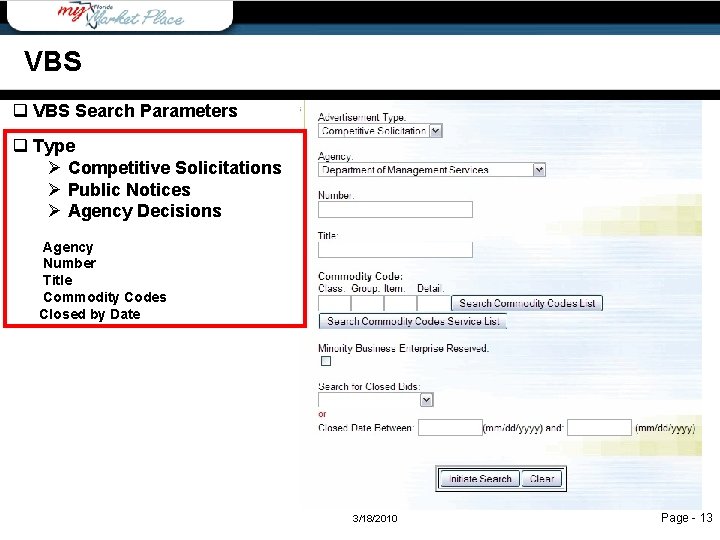
VBS q VBS Search Parameters q Type Ø Competitive Solicitations Ø Public Notices Ø Agency Decisions Agency Number Title Commodity Codes Closed by Date 3/18/2010 Page - 13
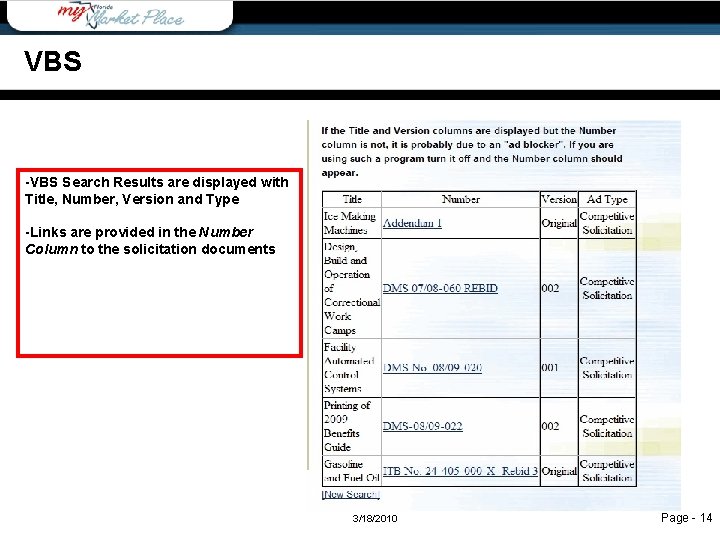
VBS -VBS Search Results are displayed with Title, Number, Version and Type -Links are provided in the Number Column to the solicitation documents 3/18/2010 Page - 14
VBS q Now, let’s punch-out to VBS and perform a search. We’ll review: Ø Open solicitations Ø Closed solicitations Ø Agency decisions Ø http: //vbs. dms. state. fl. us/vbs/main_menu 3/18/2010 15
Agenda q Overview q Registering for Notifications q Searching in VBS q VBS Tips & Tricks q SPURSView q Contact Us 3/18/2010 16
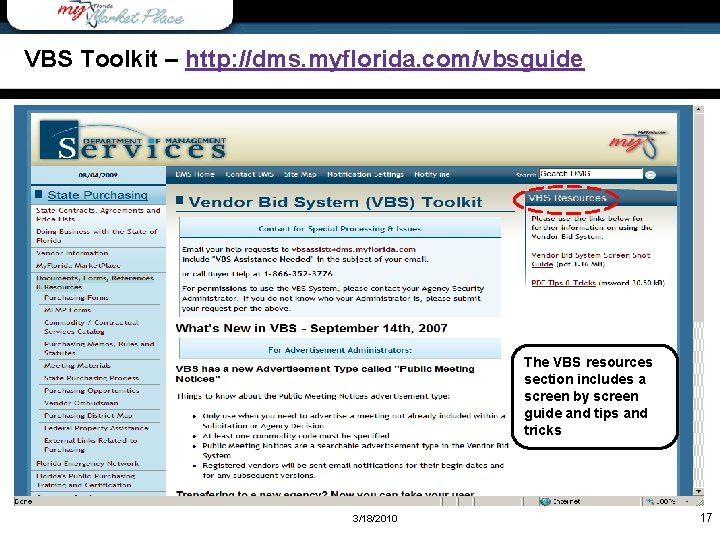
Wrap-Up VBS Toolkit – http: //dms. myflorida. com/vbsguide The VBS resources section includes a screen by screen guide and tips and tricks 3/18/2010 17
VBS Helpful Hints q VBS notifications are sent to the VIP main account’s e-mail address and are driven by commodity codes Ø Consider creating a general e-mail account as the main contact email address Ø This ensures multiple parties have access to notifications received by the state Ø Easy to forward on internally by region, location or notification type Ø Eliminates the need to update contact information if an employee leaves your organization Ø Make sure commodity codes are up-to-date and accurate Ø If you offer a new product/service and have not updated the commodity codes, you could miss out on a bid opportunity 3/18/2010 18
Responding to Bids: General Tips q The instructions for preparing a bid response will vary based on the solicitation type (ITB, RFP, or ITN) q Respondents should review the instructions with the evaluation criteria established in the solicitation to ensure that all critical elements are addressed q Provide a professional looking response q If there are questions, contact the agency solicitation contact listed in the actual solicitation q Utilize the checklist provided in the solicitation to confirm compliance with the basic requirements q Allow enough time to have someone in your organization review the proposed response (preferably someone not associated with the preparation) 3/18/2010 19
Responding to Bids: Tips Common Pitfalls q Submission of incomplete or unsigned documents q Exceeding established page limits for response q Not participating in mandatory meeting/site visit q Relying on information that is ‘heard’ rather than getting the information is writing from the solicitation owner q The most common pitfall is not allowing enough time to prepare and submit the bid 3/18/2010 20
Agenda q Overview q Registering for Notifications q Searching in VBS q VBS Tips & Tricks q SPURSView q Contact Us 3/18/2010 21
SPURSView q SPURSView is a public portal Ø Offers insight into agency purchasing activities Ø Contains a search for commodity codes Ø Allows for searches for Certified Business Enterprises (CBEs) 3/18/2010 22
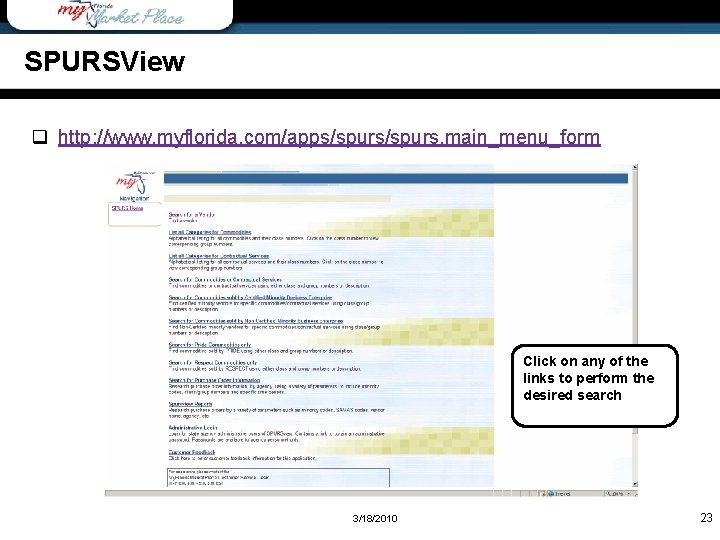
SPURSView q http: //www. myflorida. com/apps/spurs. main_menu_form Click on any of the links to perform the desired search 3/18/2010 23
SPURSview q Now, let’s punch-out to SPURSView and perform a search. We’ll review: Ø Commodity code searches Ø Purchase Order (PO) information Ø http: //www. myflorida. com/apps/spurs. main_menu_form 3/18/2010 24
Agenda q Overview q Registering for Notifications q Searching in VBS q VBS Tips & Tricks q SPURSView q Contact Us 3/18/2010 25
Resources q Solicitation specific questions Ø Contact the Agency Contract Administrator / Purchasing Office responsible for the solicitation- this information is available in the solicitation documents Ø http: //dms. myflorida. com/agencypurchasingofficials q For technical questions concerning solicitations, please contact Vendor Help at: Vendor. Help@myfloridamarketplace. com or 1 -866 -352 -3776 Ø Hours: Monday – Friday, 8: 00 am – 5: 30 pm EDT q Vendor toolkit: http: //dms. myflorida. com/vendortoolkit 3/18/2010 Page - 26
Resources q For general State Term Contract (STC) information, please contact the Division of State Purchasing: Ø 850 -488 -8440 Ø http: //dms. myflorida. com/contracts q For questions about becoming a certified minority vendor, please contact the DMS Office of Supplier Diversity (OSD): Ø OSDHelp@dms. myflorida. com Ø http: //www. osd. dms. state. fl. us Ø 850 -487 -0915 3/18/2010 Page - 27
Resources SPURSview q Today’s presentation is available on MFMP vendor toolkit Ø http: //dms. myflorida. com/vendormeetings q Future teleconferences: Ø 4/7/2010: MFMP Overview Ø 5/12/2010: How to Find Business Opportunities • Register at http: //dms. myflorida. com/vendormeetings q Questions / Comments q Be on the lookout for a participant survey! 3/18/2010 Page - 28
Wrap-Up Questions? 3/18/2010 29
- Slides: 29