
SEA Improving Scientific Software Architecture Agnostic Docker Build
SEA Improving Scientific Software Architecture Agnostic Docker Build Systems Julio Suarez April 2019 © 2018 Arm Limited
Outline • General Education. • • Application Stack. Workload Isolation. Virtual Machines vs. Containers. Docker Basics. • Docker Best Practices For Multi-Arch. • • Motivation. Examples. • Multi-Arch Registries. 2 © 2019 Arm Limited

Basic Components of an Application Stack § An App Stack has two main components: • Kernel Space (The OS) – – – • User Space – – – 3 Closest to the HW Device Drivers Process Creation/Scheduling Memory management Security Applications Background services/daemons User Space Libraries § Contains wrappers for system calls for making requests to the kernel. © 2019 Arm Limited
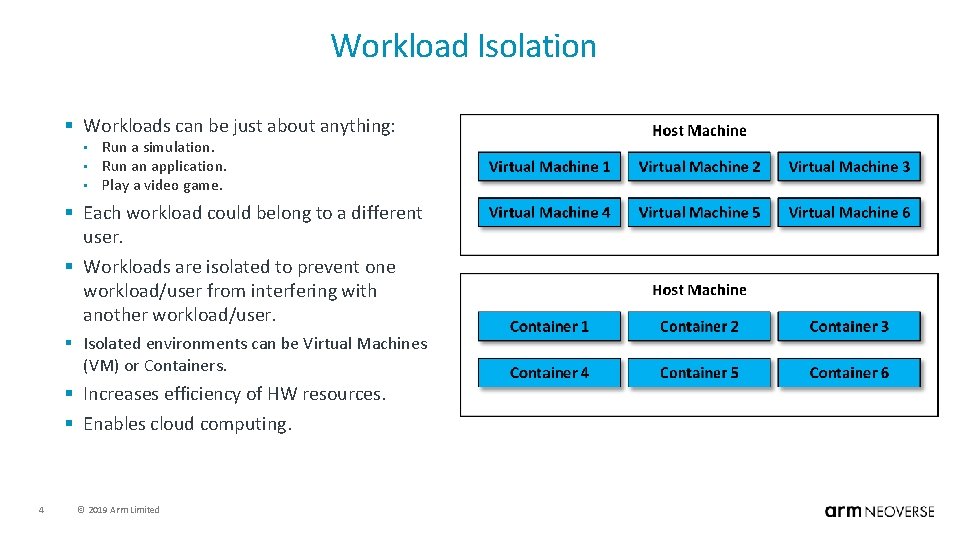
Workload Isolation § Workloads can be just about anything: • • • Run a simulation. Run an application. Play a video game. § Each workload could belong to a different user. § Workloads are isolated to prevent one workload/user from interfering with another workload/user. § Isolated environments can be Virtual Machines (VM) or Containers. § Increases efficiency of HW resources. § Enables cloud computing. 4 © 2019 Arm Limited

Virtual Machines Vs. Containers 5 © 2019 Arm Limited
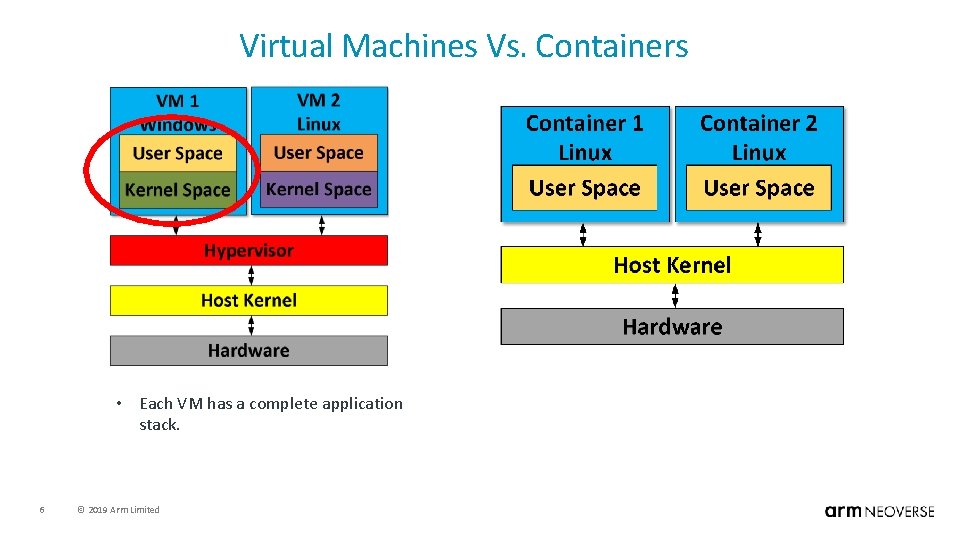
Virtual Machines Vs. Containers • Each VM has a complete application stack. 6 © 2019 Arm Limited
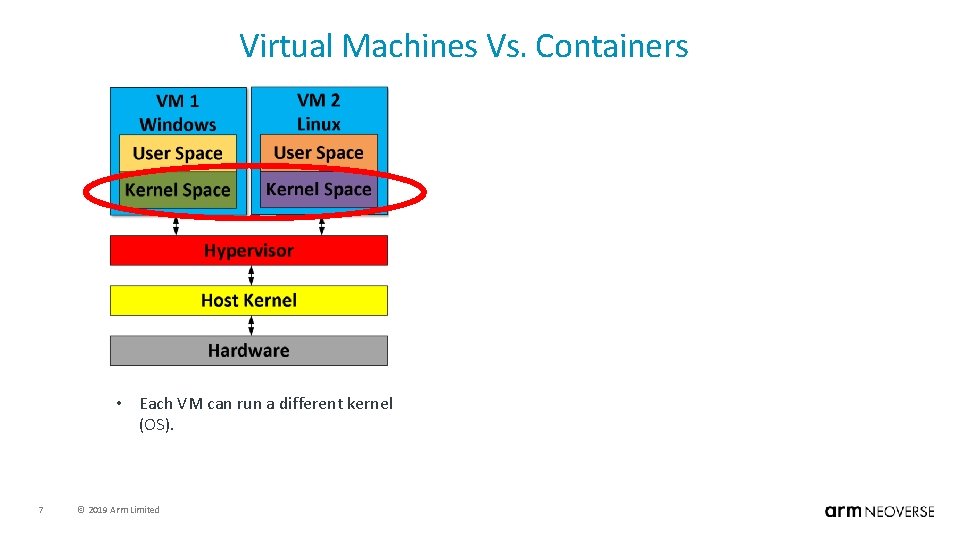
Virtual Machines Vs. Containers • Each VM can run a different kernel (OS). 7 © 2019 Arm Limited
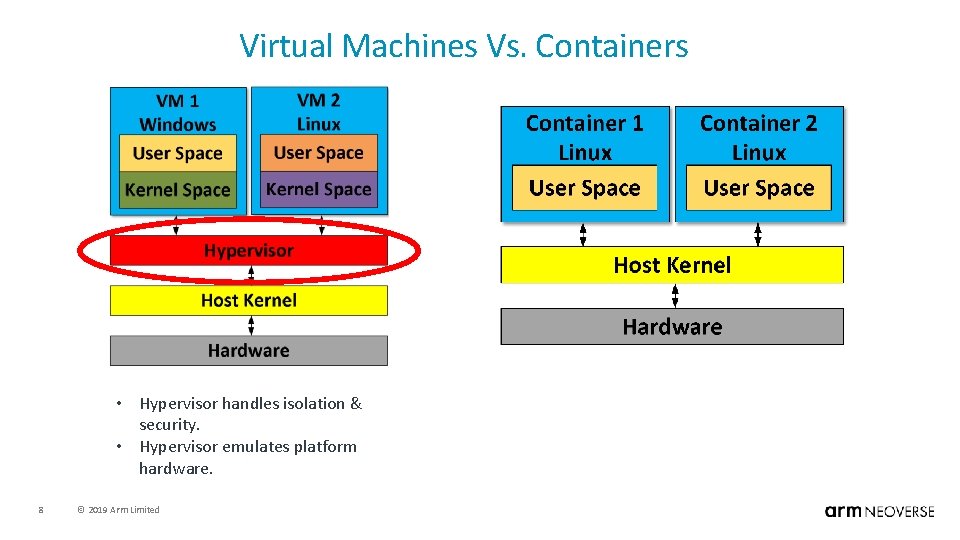
Virtual Machines Vs. Containers • Hypervisor handles isolation & security. • Hypervisor emulates platform hardware. 8 © 2019 Arm Limited
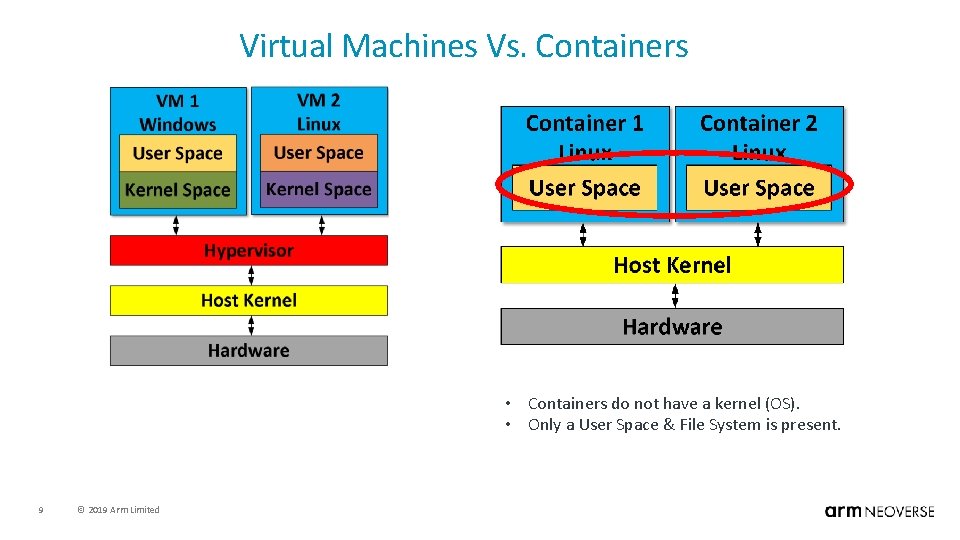
Virtual Machines Vs. Containers • Containers do not have a kernel (OS). • Only a User Space & File System is present. 9 © 2019 Arm Limited
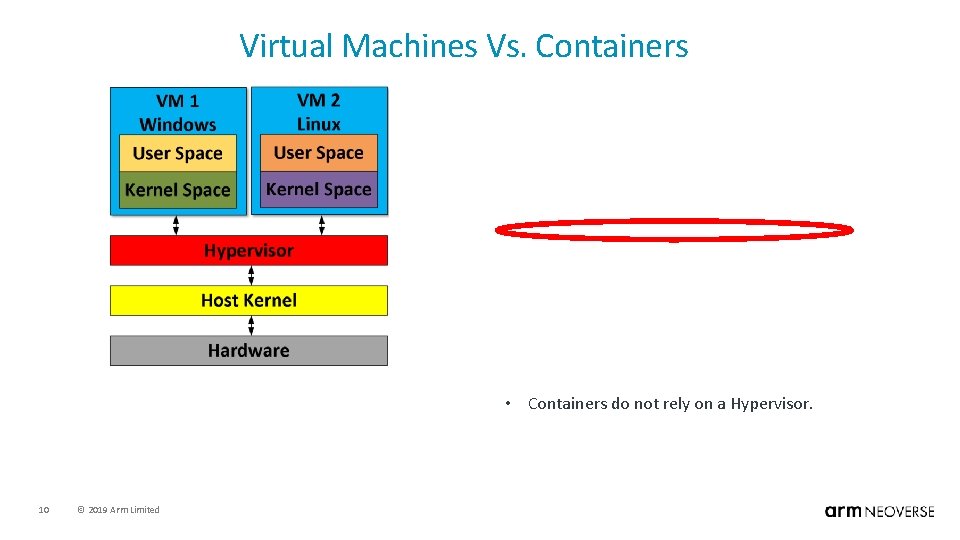
Virtual Machines Vs. Containers • Containers do not rely on a Hypervisor. 10 © 2019 Arm Limited
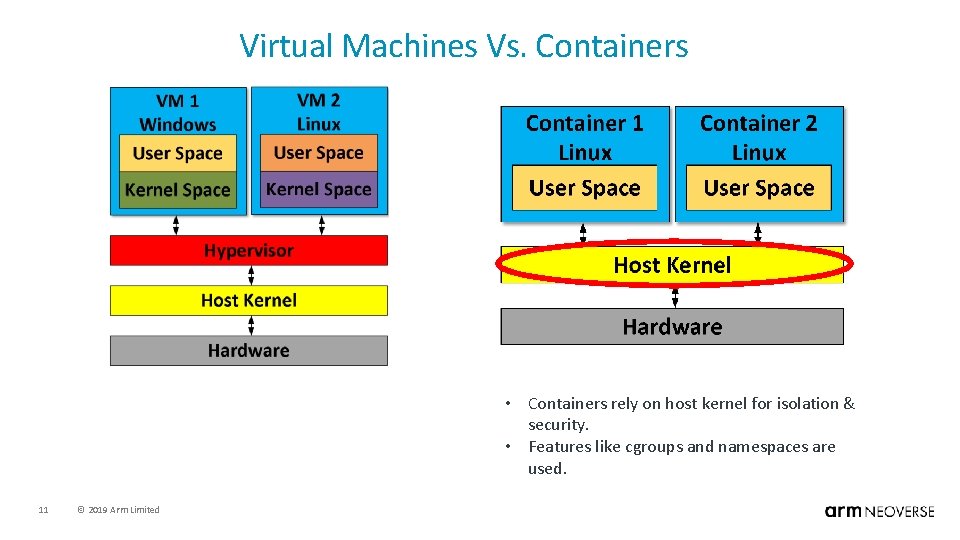
Virtual Machines Vs. Containers • Containers rely on host kernel for isolation & security. • Features like cgroups and namespaces are used. 11 © 2019 Arm Limited
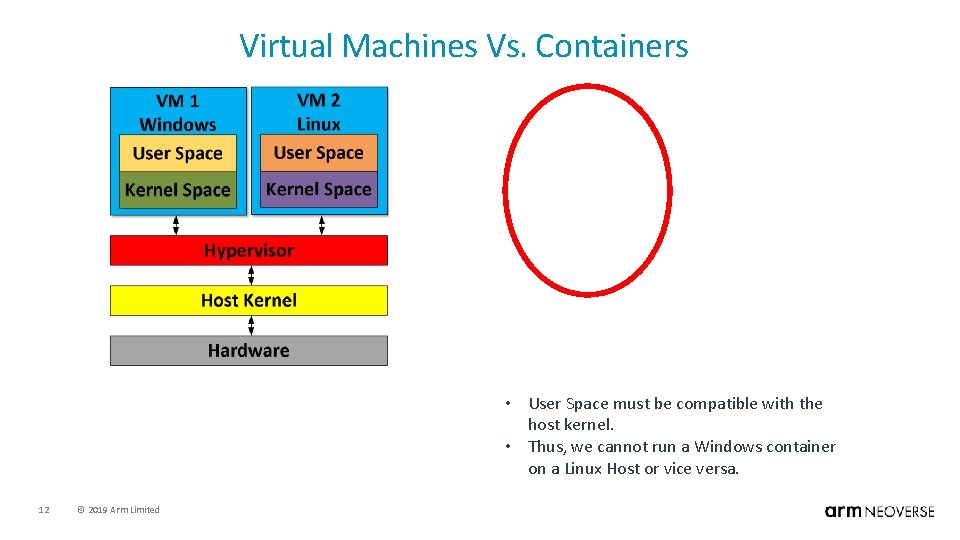
Virtual Machines Vs. Containers • User Space must be compatible with the host kernel. • Thus, we cannot run a Windows container on a Linux Host or vice versa. 12 © 2019 Arm Limited
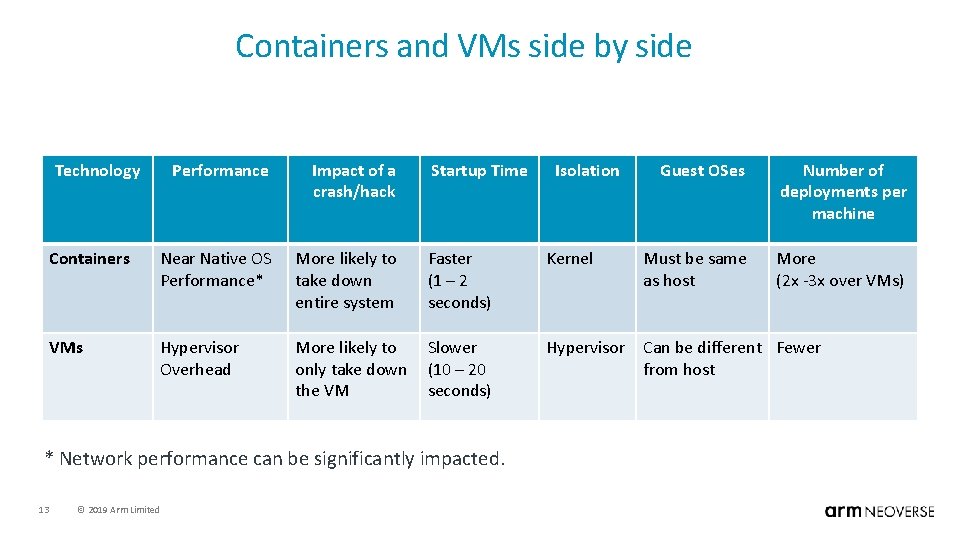
Containers and VMs side by side Technology Performance Impact of a crash/hack Startup Time Containers Near Native OS Performance* More likely to take down entire system Faster (1 – 2 seconds) Kernel VMs Hypervisor Overhead More likely to only take down the VM Slower (10 – 20 seconds) Hypervisor Can be different Fewer from host * Network performance can be significantly impacted. 13 © 2019 Arm Limited Isolation Guest OSes Number of deployments per machine Must be same as host More (2 x -3 x over VMs)
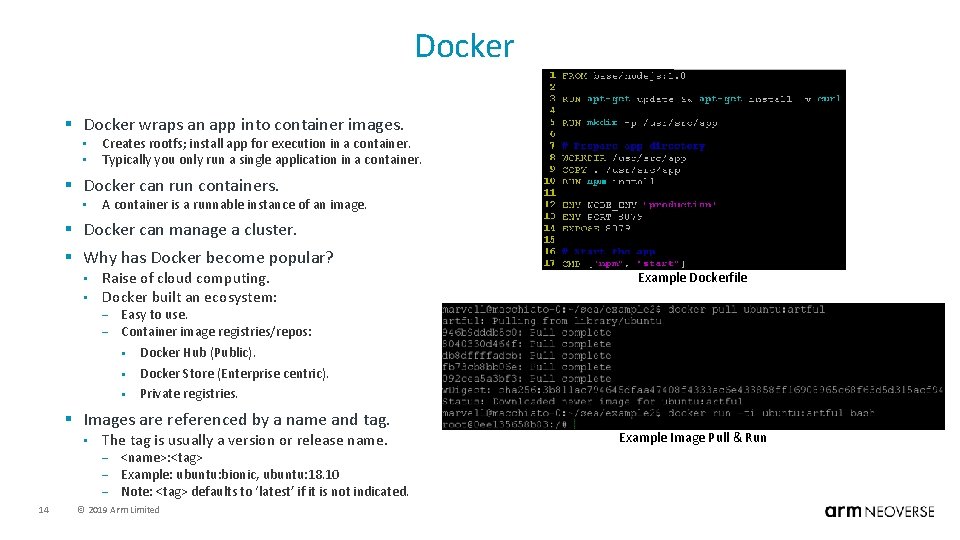
Docker § Docker wraps an app into container images. • • Creates rootfs; install app for execution in a container. Typically you only run a single application in a container. § Docker can run containers. • A container is a runnable instance of an image. § Docker can manage a cluster. § Why has Docker become popular? • • Raise of cloud computing. Docker built an ecosystem: – – Easy to use. Container image registries/repos: § Docker Hub (Public). § Docker Store (Enterprise centric). § Private registries. § Images are referenced by a name and tag. • The tag is usually a version or release name. – – – 14 Example Dockerfile <name>: <tag> Example: ubuntu: bionic, ubuntu: 18. 10 Note: <tag> defaults to ‘latest’ if it is not indicated. © 2019 Arm Limited Example Image Pull & Run
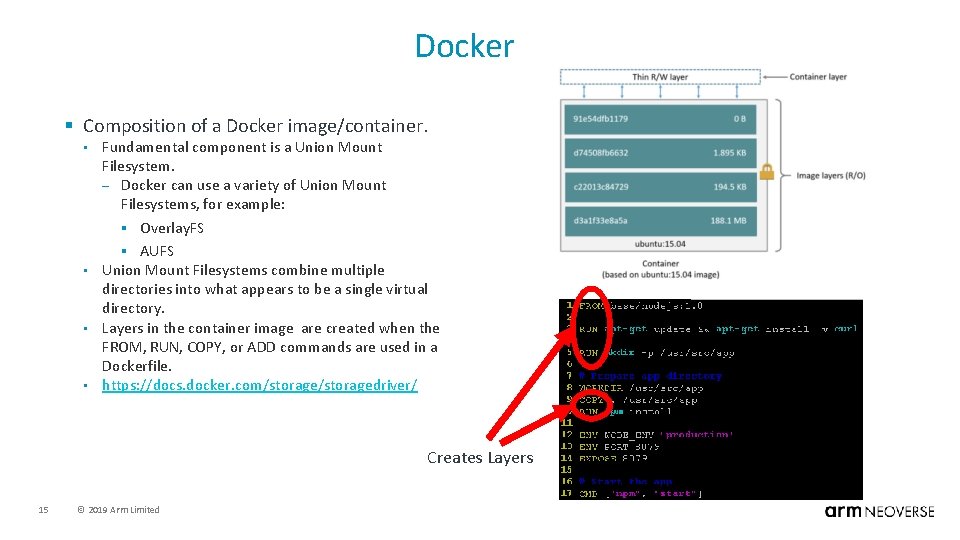
Docker § Composition of a Docker image/container. Fundamental component is a Union Mount Filesystem. – Docker can use a variety of Union Mount Filesystems, for example: § Overlay. FS § AUFS • Union Mount Filesystems combine multiple directories into what appears to be a single virtual directory. • Layers in the container image are created when the FROM, RUN, COPY, or ADD commands are used in a Dockerfile. • https: //docs. docker. com/storagedriver/ • Creates Layers 15 © 2019 Arm Limited
Docker • Common commands. docker build – Builds a docker image based on what is in a Dockerfile. – You can think of a Dockerfile as an container image recipe. • docker pull – Will pull a prebuilt image from a registry. § By default it pulls from Docker. Hub. • docker push • – Will push an image from a local host to a registry. § Can push the a Docker. Hub personal account. docker run – Start a container based on an image. § If the image is not present on the local host, a ‘docker pull‘ will run to download the image. • docker save • – • Packages an existing image into a tarball that can be transferred to another machine. docker load – Will untar a docker image tarball and make it usable on the host. • Commands documentation. • 16 https: //docs. docker. com/engine/reference/commandline/docker/ © 2019 Arm Limited
Outline • General Education. • • Application Stack. Workload Isolation. Virtual Machines vs. Containers. Docker Basics. • Docker Best Practices For Multi-Arch. • • Motivation. Examples. • Multi-Arch Registries. 17 © 2019 Arm Limited
Before We Start • The following scenarios are contrived. • Allows us to illustrate the main points with the fewest commands and lines of code. • To see examples with a real open source project, see the following blog: • 18 https: //community. arm. com/tools/b/blog/posts/architecture-agnostic-container-build-systems © 2019 Arm Limited
What Do We Mean By Architecture Agnostic? • The ability to build and run containers regardless of the underlaying HW architecture. • This is done by being careful with how a container build system is setup. • Why Bother? • Computing is becoming more heterogenous. – – • In this heterogenous env, developers & operators should not have to worry about the HW. – – • Cloud native app developers should only focus on their app. Devops engineers should only focus on meeting required service level agreements. It’s not difficult. – 19 Multi-Arch Clouds (e. g. AWS, Packet). Edge devices come in a variety of architectures. You just have to be a little mindful of what you’re doing. © 2019 Arm Limited
What Do We Mean By Architecture Agnostic? • Important caveats about architecture agnostic container systems. • • In reality, we’re just creating the illusion of an architecture agnostic system. A single container image is not architecture agnostic. – • An architecture agnostic registry is just a matter of configuration. – • We just design our container image build system to handle different architectures better/smarter. We just configure our image registry to handle different architectures better/smarter. We cannot cross build container images (at least not easily). – – Arm container images must be built an on Arm system. x 86 container images must be built on an x 86 system. • Ok, so where do we start? • • We start with Dockerfiles. They are the fundamental component to creating docker images. All examples shown are running an on Arm (aarch 64) machine (Marvell Macchiato. Bin). – 20 https: //www. solid-run. com/marvell-armada-family/macchiatobin/ © 2019 Arm Limited
Creating Containers From Dockerfile • Dockerfiles will typically be stored in a repo. • Docker images can be pushed into a registry (like Docker hub), so that the images don’t have to be built every time. 21 © 2019 Arm Limited
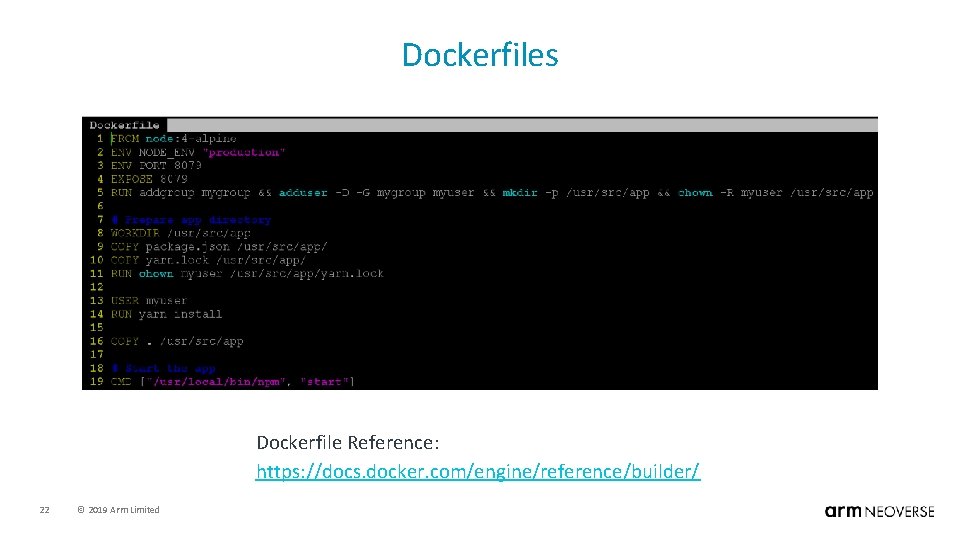
Dockerfiles Dockerfile Reference: https: //docs. docker. com/engine/reference/builder/ 22 © 2019 Arm Limited
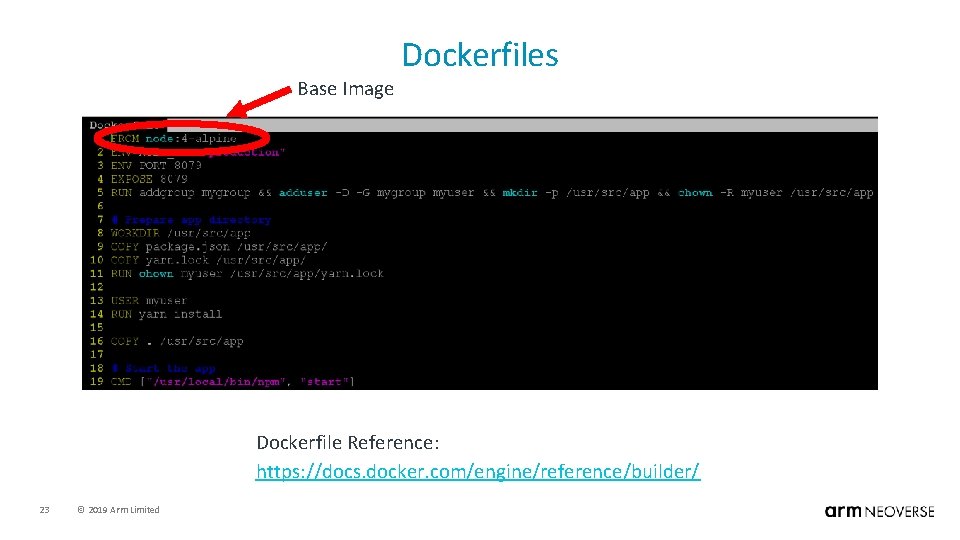
Base Image Dockerfiles Dockerfile Reference: https: //docs. docker. com/engine/reference/builder/ 23 © 2019 Arm Limited
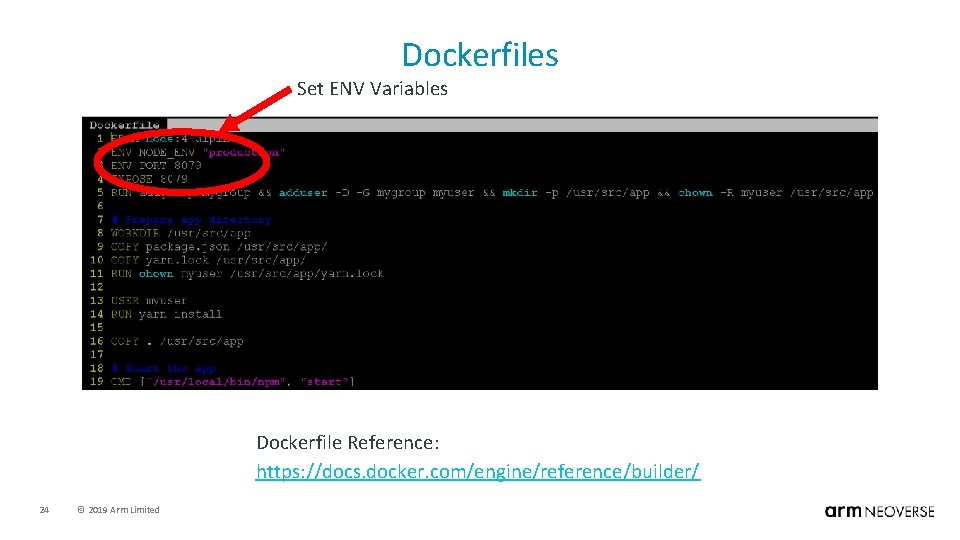
Dockerfiles Set ENV Variables Dockerfile Reference: https: //docs. docker. com/engine/reference/builder/ 24 © 2019 Arm Limited
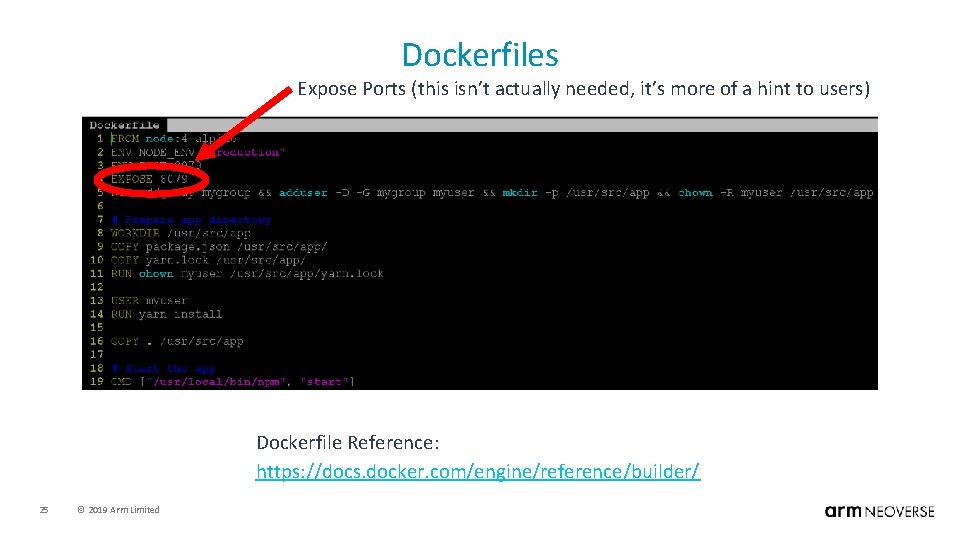
Dockerfiles Expose Ports (this isn’t actually needed, it’s more of a hint to users) Dockerfile Reference: https: //docs. docker. com/engine/reference/builder/ 25 © 2019 Arm Limited
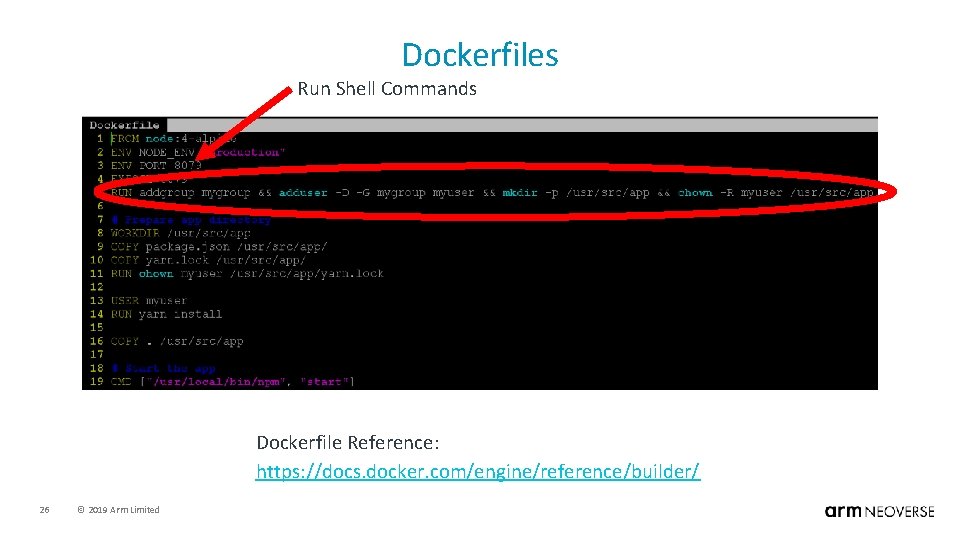
Dockerfiles Run Shell Commands Dockerfile Reference: https: //docs. docker. com/engine/reference/builder/ 26 © 2019 Arm Limited
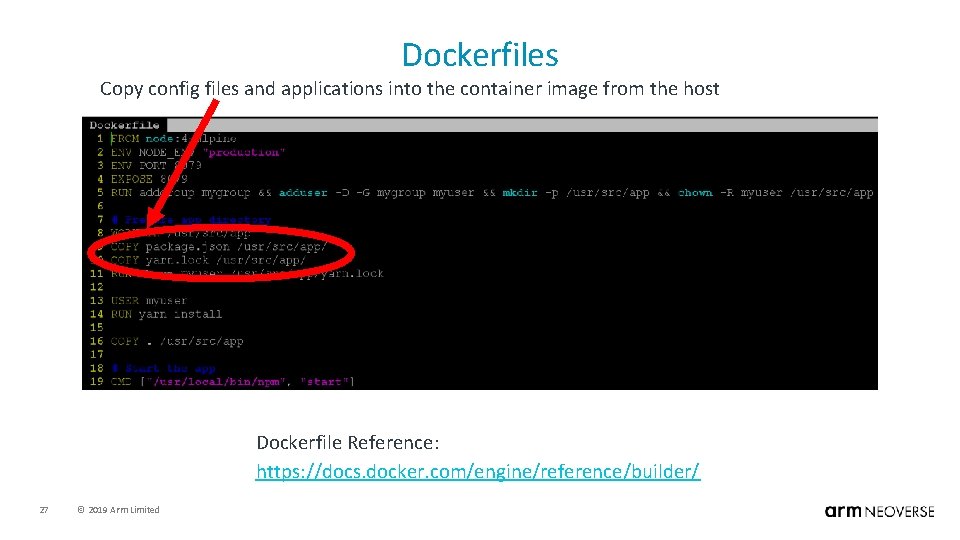
Dockerfiles Copy config files and applications into the container image from the host Dockerfile Reference: https: //docs. docker. com/engine/reference/builder/ 27 © 2019 Arm Limited
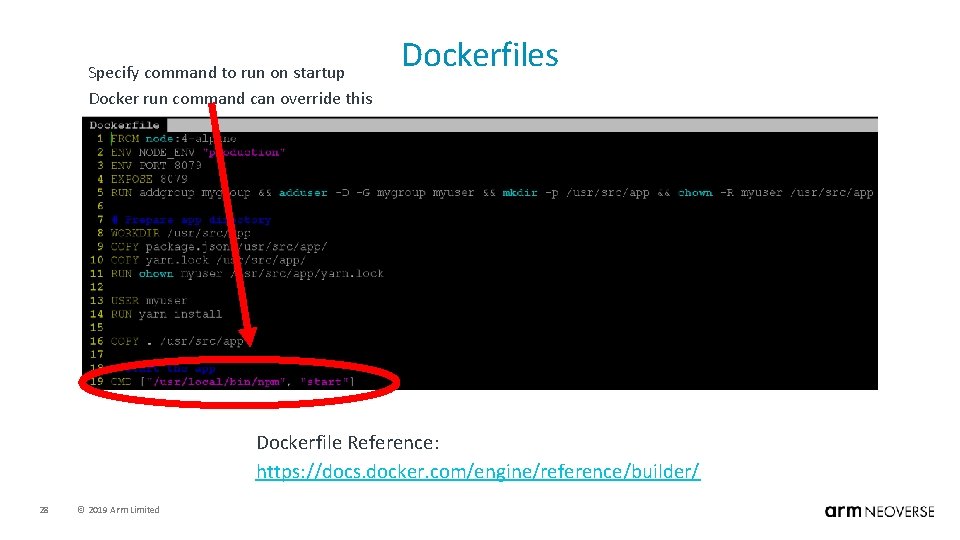
Specify command to run on startup Docker run command can override this Dockerfile Reference: https: //docs. docker. com/engine/reference/builder/ 28 © 2019 Arm Limited
Dockerfiles • When docker build is executed on a Dockerfile, a few things happen: • • A container is started from the base image defined in the FROM statement. The commands in the Dockerfile are executed. – – • • • 29 Some commands are executed on the host. Some commands are executed inside of the container. § For example, “RUN apt install xxxx”, will actually install the package xxxx in the running container. § Some commands will add layers to the container. After all Dockerfile commands are executed, the container is stopped. The stopped container along with its newly added layers is not deleted yet. The container is saved/converted into a container image. © 2019 Arm Limited
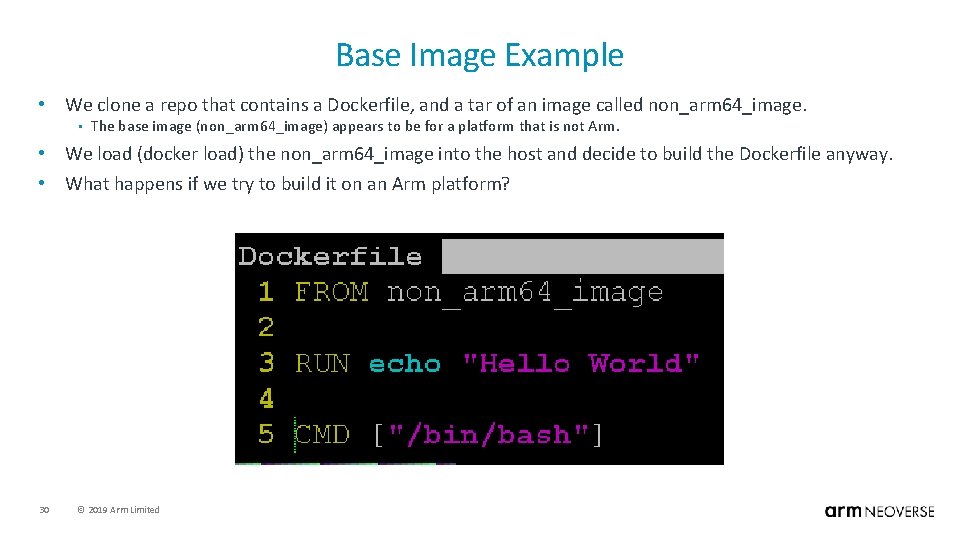
Base Image Example • We clone a repo that contains a Dockerfile, and a tar of an image called non_arm 64_image. • The base image (non_arm 64_image) appears to be for a platform that is not Arm. • We load (docker load) the non_arm 64_image into the host and decide to build the Dockerfile anyway. • What happens if we try to build it on an Arm platform? 30 © 2019 Arm Limited
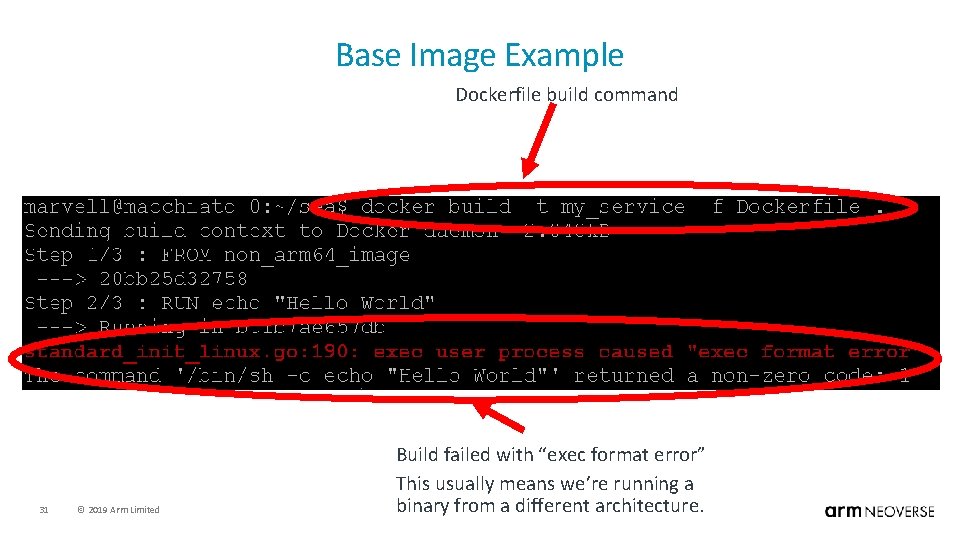
Base Image Example Dockerfile build command 31 © 2019 Arm Limited Build failed with “exec format error” This usually means we’re running a binary from a different architecture.
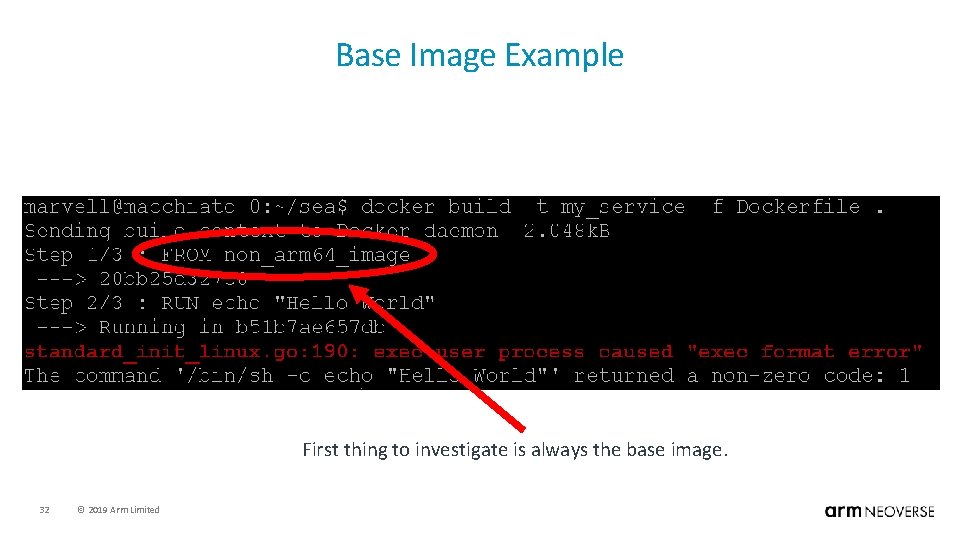
Base Image Example First thing to investigate is always the base image. 32 © 2019 Arm Limited
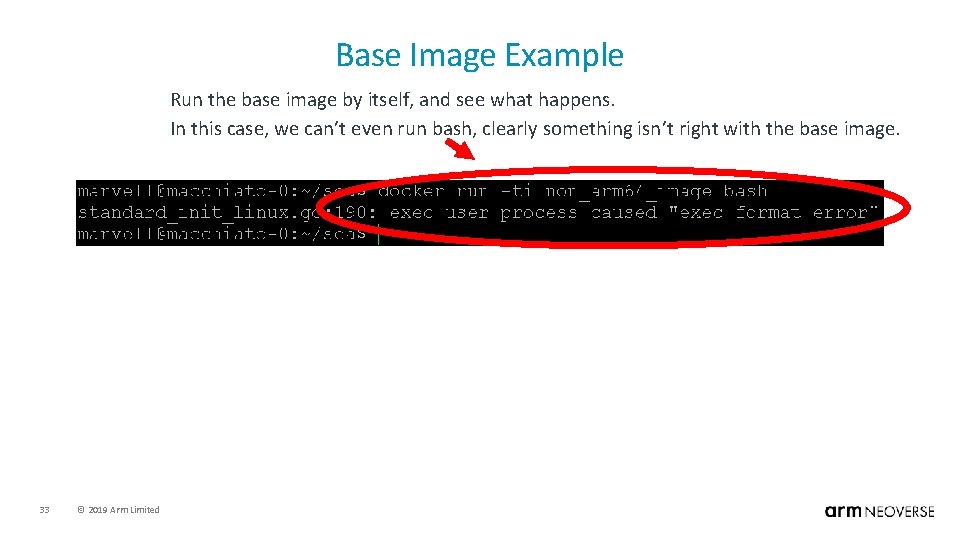
Base Image Example Run the base image by itself, and see what happens. In this case, we can’t even run bash, clearly something isn’t right with the base image. 33 © 2019 Arm Limited
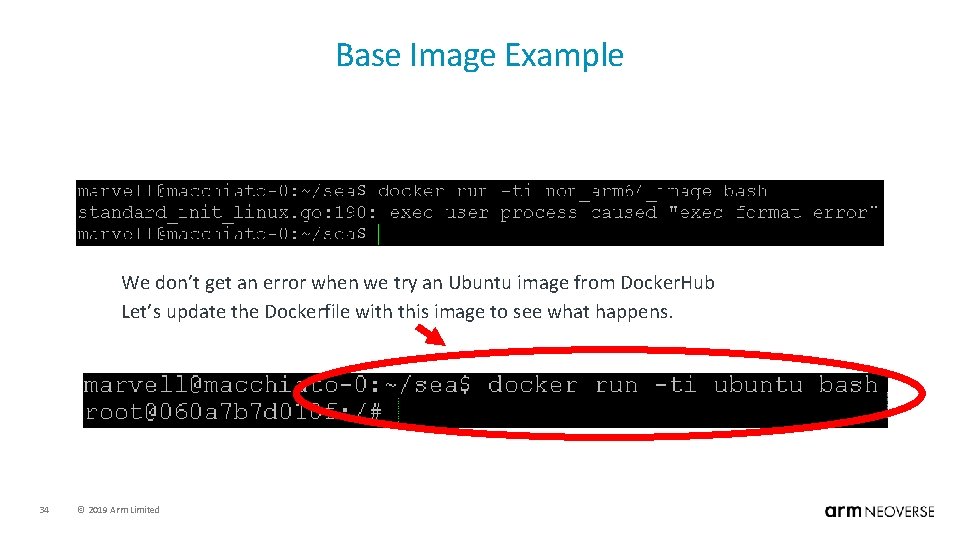
Base Image Example We don’t get an error when we try an Ubuntu image from Docker. Hub Let’s update the Dockerfile with this image to see what happens. 34 © 2019 Arm Limited
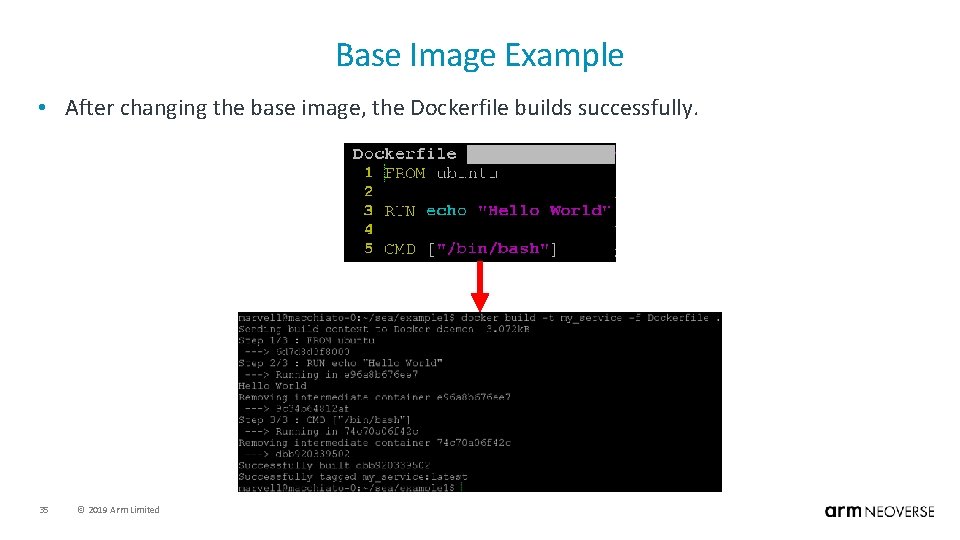
Base Image Example • After changing the base image, the Dockerfile builds successfully. 35 © 2019 Arm Limited
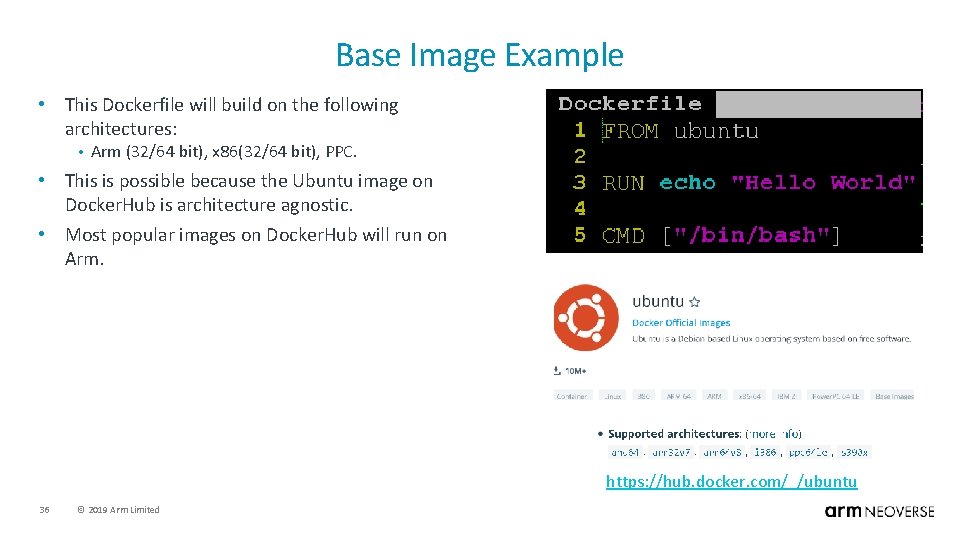
Base Image Example • This Dockerfile will build on the following architectures: • Arm (32/64 bit), x 86(32/64 bit), PPC. • This is possible because the Ubuntu image on Docker. Hub is architecture agnostic. • Most popular images on Docker. Hub will run on Arm. https: //hub. docker. com/_/ubuntu 36 © 2019 Arm Limited
Base Image Takeaways • Check The Base Image: • Make sure the base image architecture matches your build machine architecture. – – • After all, we cannot cross build (or cross run) container images. Suggestion: § Run the base image by itself before attempting to build an image with it. If the base image is from Dockerhub, check it’s information page. – Example: Ubuntu Image on Dockerhub: § https: //hub. docker. com/_/ubuntu • The good news: • 37 Most standard/popular images on Dockerhub support many different architectures. © 2019 Arm Limited
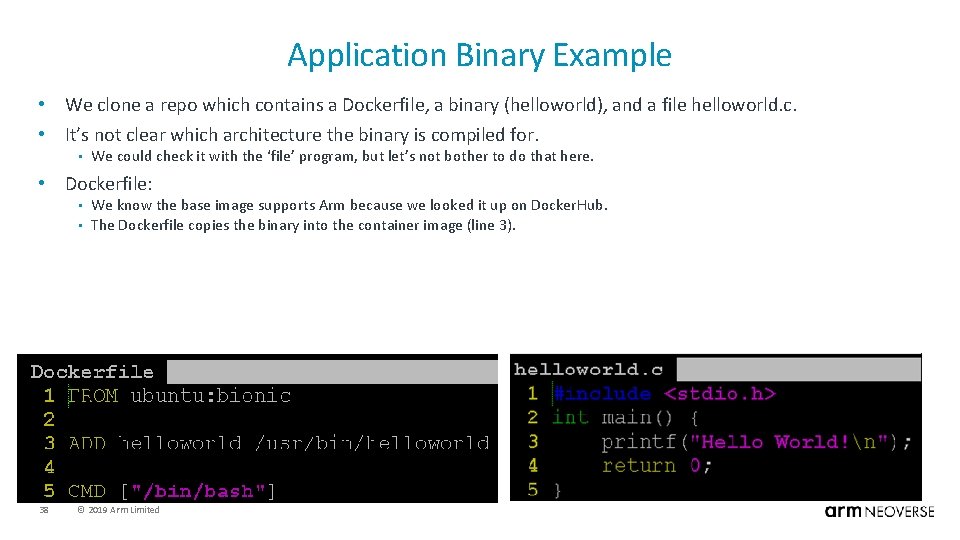
Application Binary Example • We clone a repo which contains a Dockerfile, a binary (helloworld), and a file helloworld. c. • It’s not clear which architecture the binary is compiled for. • We could check it with the ‘file’ program, but let’s not bother to do that here. • Dockerfile: • • 38 We know the base image supports Arm because we looked it up on Docker. Hub. The Dockerfile copies the binary into the container image (line 3). © 2019 Arm Limited
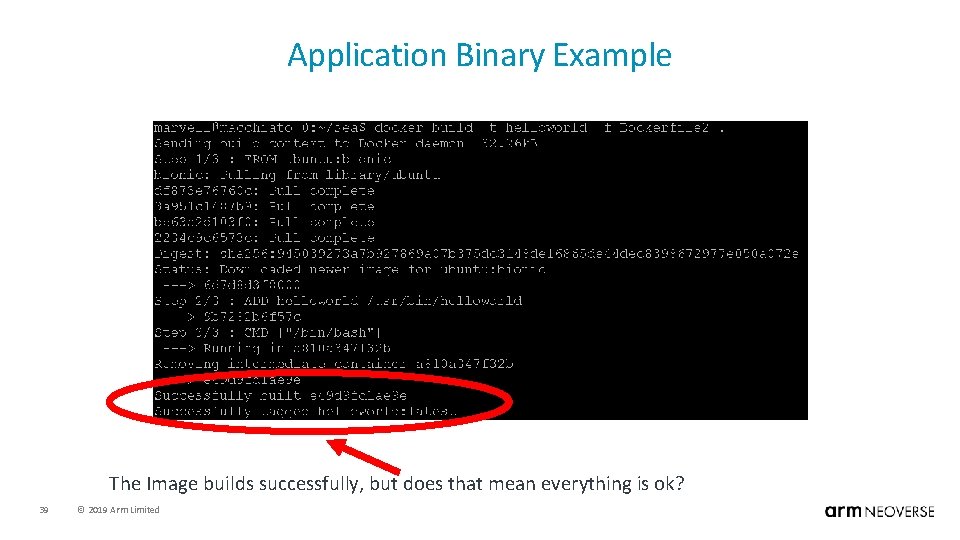
Application Binary Example The Image builds successfully, but does that mean everything is ok? 39 © 2019 Arm Limited
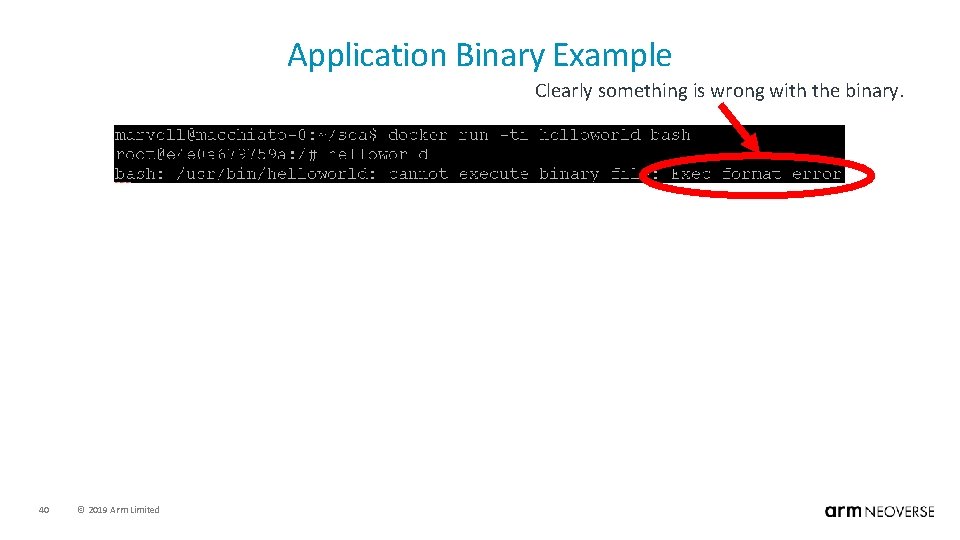
Application Binary Example Clearly something is wrong with the binary. 40 © 2019 Arm Limited
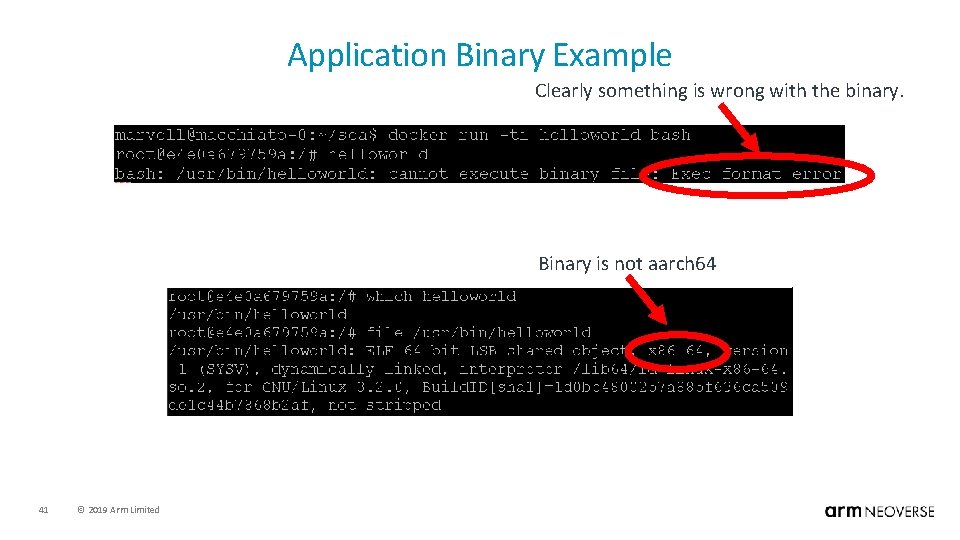
Application Binary Example Clearly something is wrong with the binary. Binary is not aarch 64 41 © 2019 Arm Limited
Application Binary Example • The prebuilt binary is for x 86. • Since we have the source code for the helloworld app, we should compile an Arm and x 86 version of the app. Then we can select the binary when we build the container image. • In our case, we’ll build helloworld-arm 64 & helloworld-x 86. • On an Arm platform, or by cross compiling : – • gcc helloworld. c -o helloworld-arm 64 On x 86 platform: – gcc helloworld. c -o helloworld-x 86 • Next, rewrite the Dockerfile so that the binary can be selected. 42 © 2019 Arm Limited
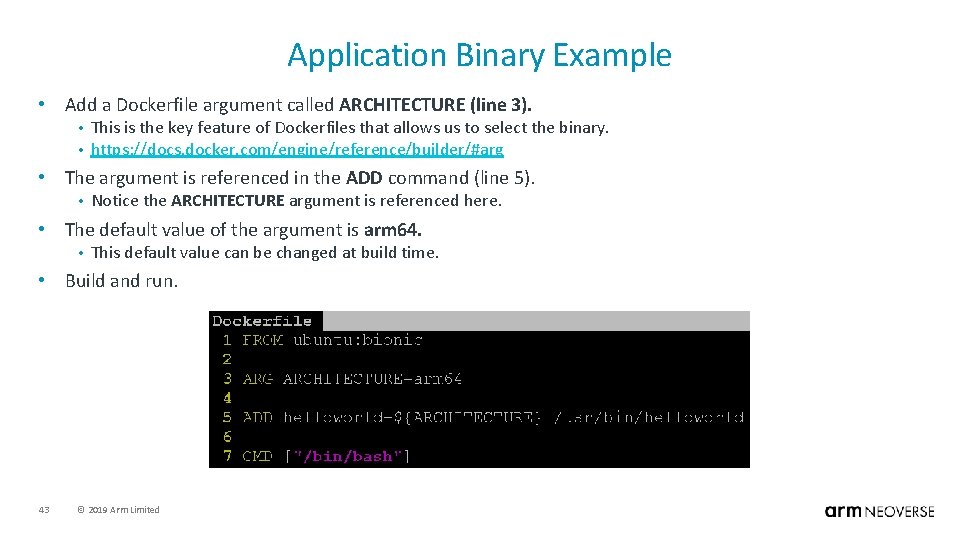
Application Binary Example • Add a Dockerfile argument called ARCHITECTURE (line 3). • • This is the key feature of Dockerfiles that allows us to select the binary. https: //docs. docker. com/engine/reference/builder/#arg • The argument is referenced in the ADD command (line 5). • Notice the ARCHITECTURE argument is referenced here. • The default value of the argument is arm 64. • This default value can be changed at build time. • Build and run. 43 © 2019 Arm Limited
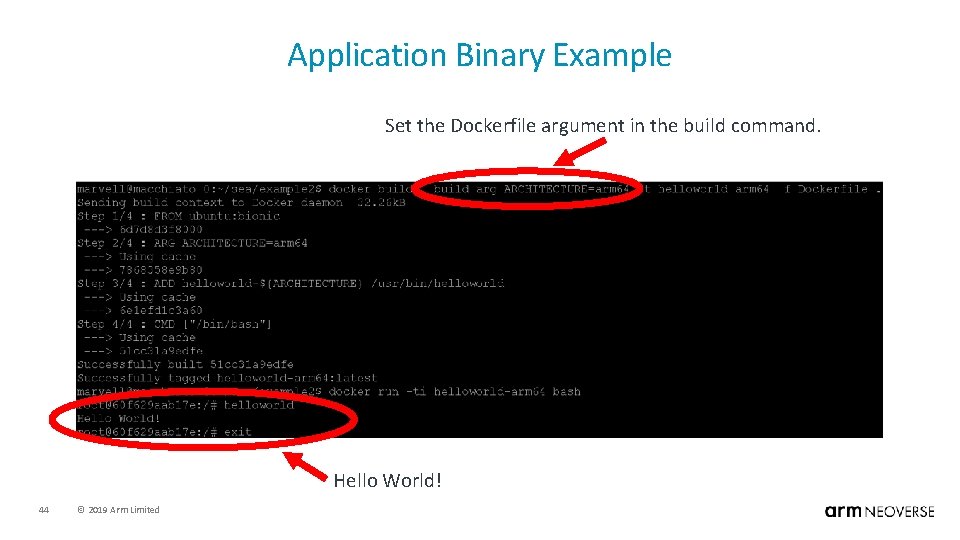
Application Binary Example Set the Dockerfile argument in the build command. Hello World! 44 © 2019 Arm Limited
Application Binary Example • Issues with this approach. • Requires binaries to be pushed to the code repo. Although this works, it’s not the best solution because binaries will increase the size of the code repo. § A Git repo will keep all versions of the binary in its history. § Git was not designed to store binaries. – In the long run, this approach is unsustainable. – • A better approach would be to use Make to build the binaries on the host before building the container image. • This would eliminate the need to push binaries into the Git repo. • An even better approach: • 45 Eliminate the need for Make by building the binaries in the Dockerfile. Let’s try this next. © 2019 Arm Limited
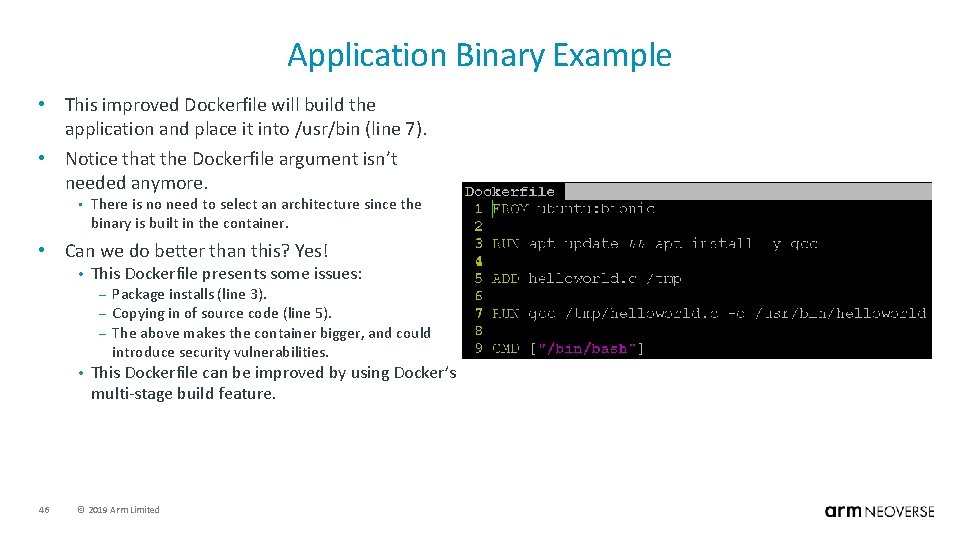
Application Binary Example • This improved Dockerfile will build the application and place it into /usr/bin (line 7). • Notice that the Dockerfile argument isn’t needed anymore. • There is no need to select an architecture since the binary is built in the container. • Can we do better than this? Yes! • This Dockerfile presents some issues: – – – • 46 Package installs (line 3). Copying in of source code (line 5). The above makes the container bigger, and could introduce security vulnerabilities. This Dockerfile can be improved by using Docker’s multi-stage build feature. © 2019 Arm Limited
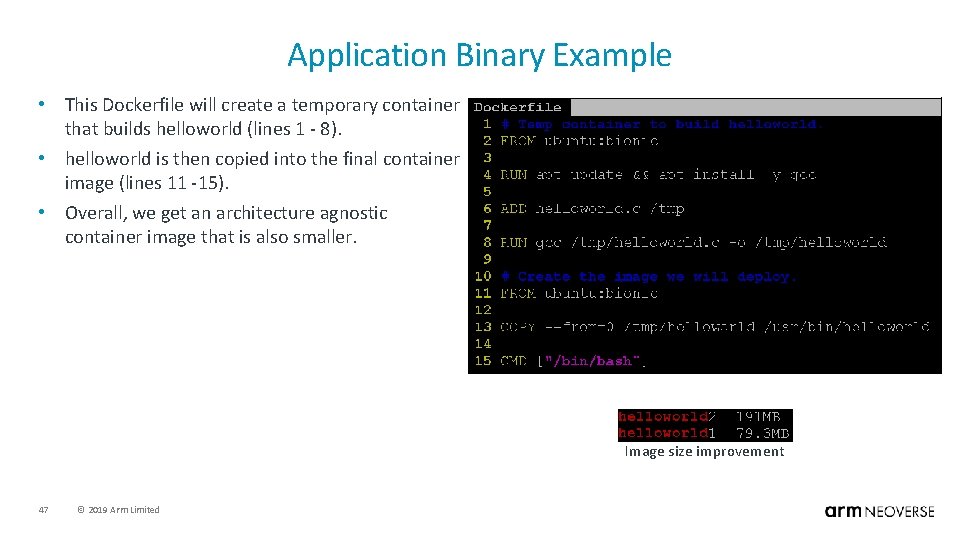
Application Binary Example • This Dockerfile will create a temporary container that builds helloworld (lines 1 - 8). • helloworld is then copied into the final container image (lines 11 -15). • Overall, we get an architecture agnostic container image that is also smaller. Image size improvement 47 © 2019 Arm Limited
Application Binary Takeaways • Avoid using prebuilt binaries that are stored in your repo. • This is bad practice in any code project, not just container projects. • Build the binaries at container image build time. • • • Use Make to build binaries and container images (ok). Build the binaries within the Dockerfile (better). Use Docker’s multi-stage build feature (Recommended). • Another option; avoid building binaries: • • 48 Download binaries from a release server. Install applications from a package repo. © 2019 Arm Limited
Outline • General Education. • • Application Stack. Workload Isolation. Virtual Machines vs. Containers. Docker Basics. • Docker Best Practices For Multi-Arch. • • Motivation. Examples. • Multi-Arch Registries. 49 © 2019 Arm Limited
Registries • In the following slides we’ll lightly touch “multi-arch” registries. • For a deeper dive into the subject with examples, see the following blog post: – https: //community. arm. com/tools/b/blog/posts/deploying-multi-architecture-docker-registry • A registry is a server that hosts prebuilt Docker images. • • • Docker. Hub Docker Store Users can also host a private registry. – – Useful for having complete control over the distribution and use of your images. Private registries are typically run from a container. § https: //hub. docker. com/_/registry § https: //docs. docker. com/registry/ • Pulling from different registries. • 50 The docker pull command is how we indicate which registry to pull from. – ‘docker pull <registry_dns_name_or_ip>: <port>/<image_name>: <tag>’ § If the registry DNS name or IP address is not included, it’s assumed the image will be pulled from Docker. Hub. – This is why the command ‘docker pull ubuntu: bionic’ pull from Docker. Hub. © 2019 Arm Limited
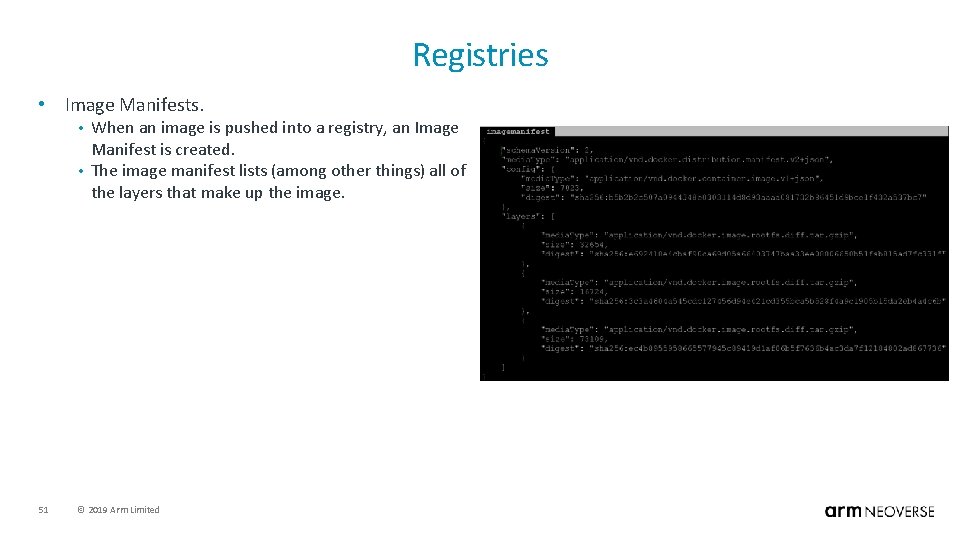
Registries • Image Manifests. When an image is pushed into a registry, an Image Manifest is created. • The image manifest lists (among other things) all of the layers that make up the image. • 51 © 2019 Arm Limited
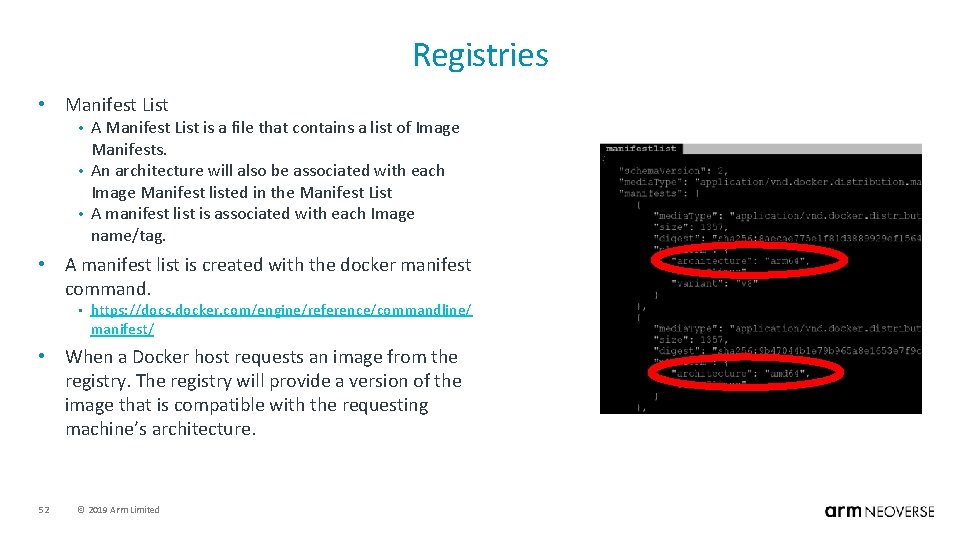
Registries • Manifest List A Manifest List is a file that contains a list of Image Manifests. • An architecture will also be associated with each Image Manifest listed in the Manifest List • A manifest list is associated with each Image name/tag. • • A manifest list is created with the docker manifest command. • https: //docs. docker. com/engine/reference/commandline/ manifest/ • When a Docker host requests an image from the registry. The registry will provide a version of the image that is compatible with the requesting machine’s architecture. 52 © 2019 Arm Limited
Questions 53 © 2019 Arm Limited

The Cloud to Edge Infrastructure Foundation for a World of 1 T Intelligent Devices Thank You!
- Slides: 54