
Scientific Computing with the NAG Toolbox for MATLAB

Scientific Computing with the NAG Toolbox for MATLAB John Muddle UK Academic Account Manager NAG Ltd, Oxford December 1 st 2015 Experts in numerical algorithms and HPC services

NAG at Sheffield University § Unlimited use under Linux, Windows and Mac (32 -bit and 64 -bit) As long as for academic or research purposes Installation may be on any university, staff or student machine § Products All NAG Libraries: Fortran, C, SMP, Python, Java, . NET, Toolbox for MATLAB § How do you get the software? Help yourself from: http: //www. nag. co. uk/downloads/index. asp Request licence keys via support@nag. co. uk using your university e-mail address please e. g. xxxx@sheffield. ac. uk § Full access to NAG Support Send support requests to support@nag. co. uk Scientific Computing with the NAG Toolbox for MATLAB 2
Objectives of today Aim to: § Extend your practical MATLAB programming abilities § Gain an overview of the contents of the NAG mathematical library § Understand how to find information about relevant NAG routines § Use NAG routines in helping to solve simple but realistic problems Scientific Computing with the NAG Toolbox for MATLAB 3
Slides These slides are available as Power. Point or PDF: http: //monet. nag. co. uk/nag_toolbox_training/sheffield/MATLAB Scientific Computing with the NAG Toolbox for MATLAB 4
Introduction to NAG § Numerical Algorithms Group - Founded 1970 Co-operative software project: Birmingham, Leeds, Manchester, Nottingham, Oxford, and Atlas Laboratory § Incorporated as NAG Ltd. in 1976 Not-for-profit Based in Oxford, with offices in Manchester, Chicago, Tokyo Scientific Computing with the NAG Toolbox for MATLAB 5
What do NAG do? § Mathematical algorithm development § § Collaboration Software engineering – production of software libraries HPC services Consultancy Implementation / porting Scientific Computing with the NAG Toolbox for MATLAB 6
A definition of Numerical Analysis § “The study of methods for obtaining approximate solutions to mathematical problems” – T. Hopkins and C. Phillips, 1988 But beware of assuming that “approximation” is a pejorative term Scientific Computing with the NAG Toolbox for MATLAB 7
What are numerical analysts concerned with? § Accuracy of algorithms Problems due to floating-point arithmetic Error analysis - how are errors propagated? § Stability Sensitivity of a computed solution to changes in input data § Efficiency Which methods avoid unnecessary computation? § Speed Desirable – but beware – “how fast do you want the wrong answer? ” Scientific Computing with the NAG Toolbox for MATLAB 8
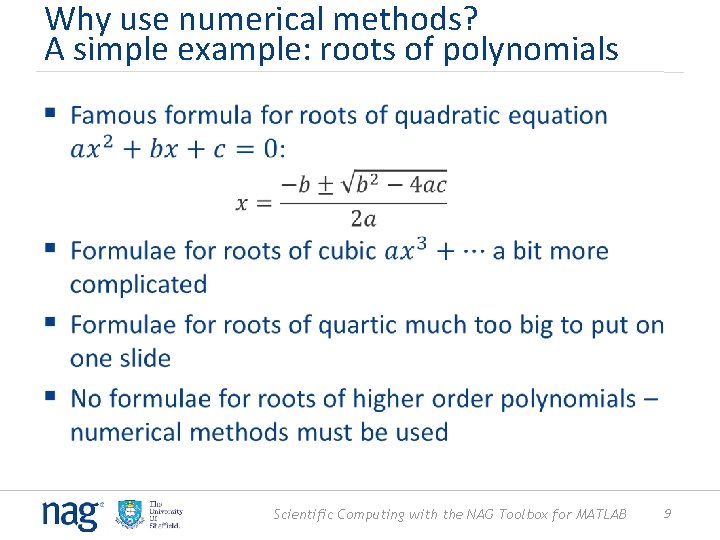
Why use numerical methods? A simple example: roots of polynomials § Scientific Computing with the NAG Toolbox for MATLAB 9
How do we decide what goes into libraries? § Typically we get functionality requests from customers via technical support calls via salespeople § We maintain a database of requests § Probability of responding is weighted by number of requests, importance of customers, and difficulty of job Scientific Computing with the NAG Toolbox for MATLAB 10
What’s so hard about that then? § Computer arithmetic makes things tricky. § Many people assume that computers are completely accurate when it comes to operations on real numbers. § Usually they are not! § Numbers have finite precision § Also a finite size § They are subject to rounding error. e. g. on a (hypothetical) decimal machine with 3 digits: a = 5. 55 b = 6. 56 c = 12. 1 a+b-c = 0. 00 (due to rounding) instead of 0. 01 in exact arithmetic § We must also worry about overflow and underflow Scientific Computing with the NAG Toolbox for MATLAB 11
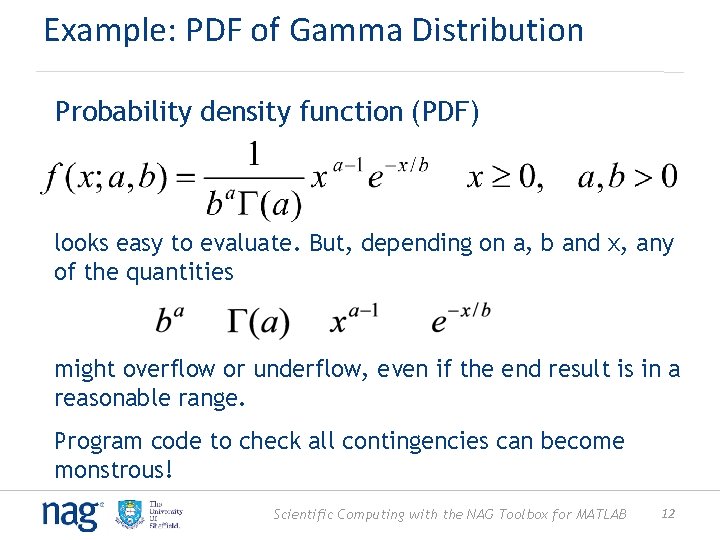
Example: PDF of Gamma Distribution Probability density function (PDF) looks easy to evaluate. But, depending on a, b and x, any of the quantities might overflow or underflow, even if the end result is in a reasonable range. Program code to check all contingencies can become monstrous! Scientific Computing with the NAG Toolbox for MATLAB 12
We also have to worry about performance § Tune up code Use benchmarking programs Use high-performance math libraries like ACML or MKL where possible § Investigate possibilities for parallelism Open. MP (for NAG SMP Library) MPI (for NAG Cluster Parallel Library) § But correctness is most important How fast do you want the wrong answer? Scientific Computing with the NAG Toolbox for MATLAB 13
Why is software testing important? Six reasons not to test: § “It takes too long – I’ve no time to do it” Fine – but be aware it may take longer later § “It costs too much” It generally costs more to fix things later § “This code will only be used for a short time” That’s what they said about Windows notepad § “My code always works first time” You’ve got to be kidding § “It’s someone else’s responsibility” Bad attitude! § “I’m starting a new job next month” Let’s hope you don’t last long in that one either Scientific Computing with the NAG Toolbox for MATLAB 14
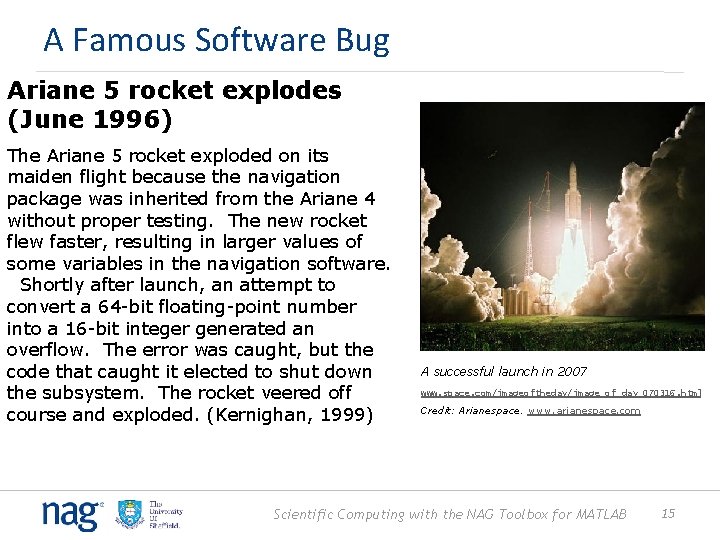
A Famous Software Bug Ariane 5 rocket explodes (June 1996) The Ariane 5 rocket exploded on its maiden flight because the navigation package was inherited from the Ariane 4 without proper testing. The new rocket flew faster, resulting in larger values of some variables in the navigation software. Shortly after launch, an attempt to convert a 64 -bit floating-point number into a 16 -bit integer generated an overflow. The error was caught, but the code that caught it elected to shut down the subsystem. The rocket veered off course and exploded. (Kernighan, 1999) A successful launch in 2007 www. space. com/imageoftheday/image_of_day_070316. html Credit: Arianespace. www. arianespace. com Scientific Computing with the NAG Toolbox for MATLAB 15
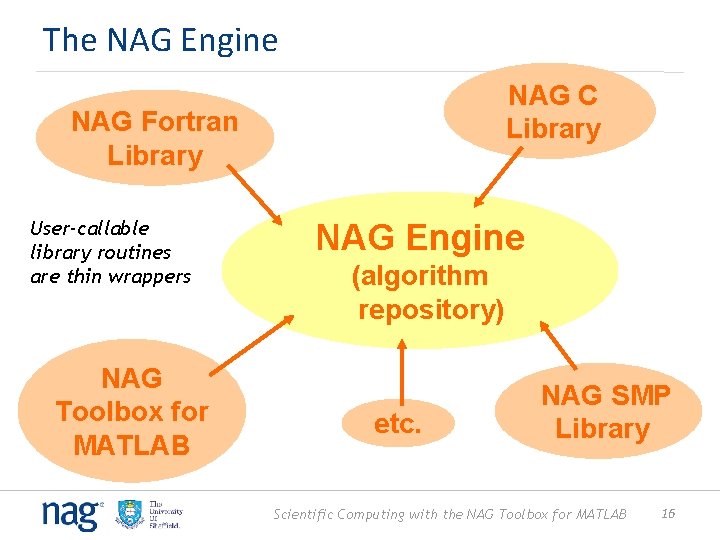
The NAG Engine NAG C Library NAG Fortran Library User-callable library routines are thin wrappers NAG Toolbox for MATLAB NAG Engine (algorithm repository) etc. NAG SMP Library Scientific Computing with the NAG Toolbox for MATLAB 16
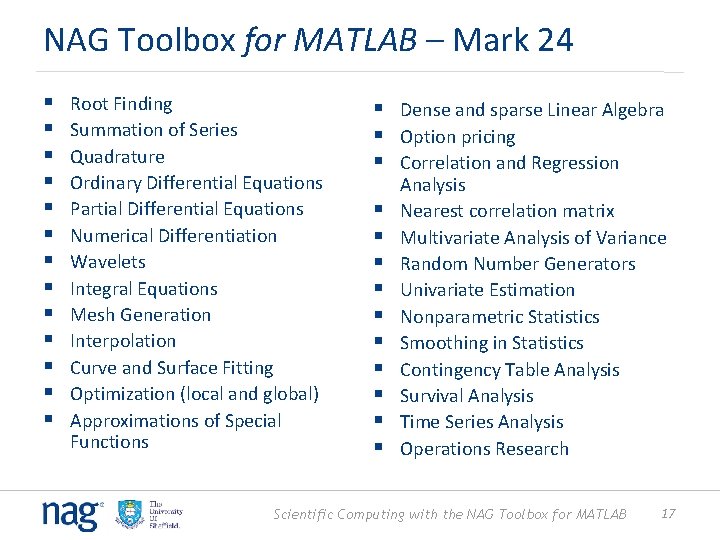
NAG Toolbox for MATLAB – Mark 24 § § § § Root Finding Summation of Series Quadrature Ordinary Differential Equations Partial Differential Equations Numerical Differentiation Wavelets Integral Equations Mesh Generation Interpolation Curve and Surface Fitting Optimization (local and global) Approximations of Special Functions § Dense and sparse Linear Algebra § Option pricing § Correlation and Regression § § § § § Analysis Nearest correlation matrix Multivariate Analysis of Variance Random Number Generators Univariate Estimation Nonparametric Statistics Smoothing in Statistics Contingency Table Analysis Survival Analysis Time Series Analysis Operations Research Scientific Computing with the NAG Toolbox for MATLAB 17
Installation of the NAG Toolbox Get a version of the NAG Toolbox appropriate to your copy of MATLAB from: http: //www. nag. co. uk/downloads/mbdownloads. asp You will need a licence key – try the first one below: MBW 6 I 24 DD TRIAL 2016/01/04 "R 6 kunal 0 pgtb. Wdaflgu 1 iwmk. IR" MBW 3223 DC TRIAL 2016/01/04 "60 gn+dd. Iimgk 40 l. KGn. ZSg 2+k. Ez" MBL 6 A 24 DN TRIAL 2016/01/04 "Chghxp. ANiu. Ho 3 xi. J 1 d. RDo. Ehluk" MBMI 624 DD TRIAL 2016/01/04 "9 Xh. GMe 8 Ba=+ptxg. Ynlt 4 e. DYe. ON" Scientific Computing with the NAG Toolbox for MATLAB 18
Check correct installation To check that you have the NAG Toolbox installed, in MATLAB command window type a 00 aa To check you have the licence key installed, type a 00 ac (return value 1 indicates key found). Scientific Computing with the NAG Toolbox for MATLAB 19
NAG Toolbox for MATLAB § The NAG Toolbox (like all NAG libraries) is divided into chapters, each devoted to a branch of mathematics or statistics. Each has a 1 or 3 -character name and a title e. g. S – Special Functions or F 03 – Determinants § All routines in the Toolbox have five-character names, beginning with the characters of the chapter name, e. g. d 01 aj. § There also long names that are more descriptive – e. g. c 02 ag() = nag_zeros_poly_real() Scientific Computing with the NAG Toolbox for MATLAB 20
NAG Toolbox for MATLAB § Documentation has an informative introduction to each chapter: Technical background to the area. Assistance in choosing the appropriate routine § And a document for each routine with: Description of method and references Specification of arguments Explanation of error exit Remarks on accuracy An example to illustrate use of routine, some enhanced with graphics Scientific Computing with the NAG Toolbox for MATLAB 21
NAG Documentation § Documentation is available through the MATLAB help system. § In newer versions of MATLAB the NAG documentation may be a little harder to find. Click the F 1 key, then choose “Supplemental Software”, then open the “NAG Toolbox” folder § You can also find NAG Toolbox documentation online: www. nag. co. uk/numeric/MB/manual 64_24_1/html Scientific Computing with the NAG Toolbox for MATLAB 22
NAG Toolbox for MATLAB § Let’s take a look. . . Scientific Computing with the NAG Toolbox for MATLAB 23
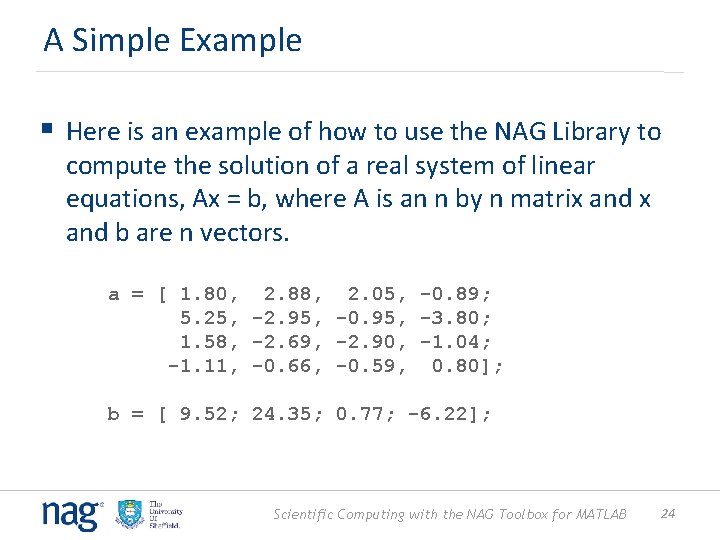
A Simple Example § Here is an example of how to use the NAG Library to compute the solution of a real system of linear equations, Ax = b, where A is an n by n matrix and b are n vectors. a = [ 1. 80, 2. 88, 2. 05, -0. 89; 5. 25, -2. 95, -0. 95, -3. 80; 1. 58, -2. 69, -2. 90, -1. 04; -1. 11, -0. 66, -0. 59, 0. 80]; b = [ 9. 52; 24. 35; 0. 77; -6. 22]; Scientific Computing with the NAG Toolbox for MATLAB 24
![A Simple Example § And we call it like this: [lu, ipiv, x, info]](http://slidetodoc.com/presentation_image_h2/8de21abf495cc6b6c99fbe15a56b7b40/image-25.jpg "A Simple Example § And we call it like this: [lu, ipiv, x, info]")
A Simple Example § And we call it like this: [lu, ipiv, x, info] = f 07 aa(a, b); x x = 1. 0000 -1. 0000 3. 0000 -5. 0000 § Here the NAG routine f 07 aa takes two arguments, the matrix of coefficients, A, and the vector representing the right-hand side, b. Scientific Computing with the NAG Toolbox for MATLAB 25
Try the c 02 ag example program § Scientific Computing with the NAG Toolbox for MATLAB 26
What do we expect § Scientific Computing with the NAG Toolbox for MATLAB 27
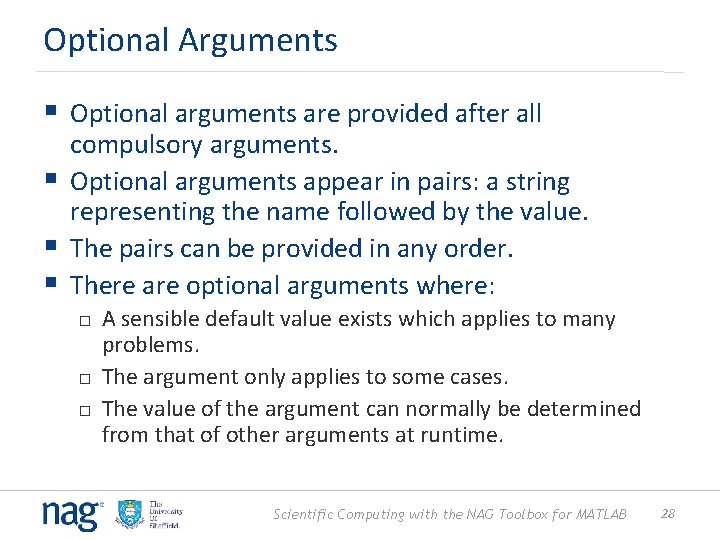
Optional Arguments § Optional arguments are provided after all compulsory arguments. § Optional arguments appear in pairs: a string representing the name followed by the value. § The pairs can be provided in any order. § There are optional arguments where: A sensible default value exists which applies to many problems. The argument only applies to some cases. The value of the argument can normally be determined from that of other arguments at runtime. Scientific Computing with the NAG Toolbox for MATLAB 28
Optional arguments § For example, in the system of equations given in the previous section, it is obvious that n, the size of the matrix A, is 4. § However we can tell MATLAB that n is 3, in which case it will solve the system represented by the topleft 3 x 3 section of A, and the first three elements of b. § And so we would call like this … Scientific Computing with the NAG Toolbox for MATLAB 29
![Optional arguments [lu, ipiv, x, info] = f 07 aa(a, b, 'n', nag_int(3)); x](http://slidetodoc.com/presentation_image_h2/8de21abf495cc6b6c99fbe15a56b7b40/image-30.jpg "Optional arguments [lu, ipiv, x, info] = f 07 aa(a, b, 'n', nag_int(3)); x")
Optional arguments [lu, ipiv, x, info] = f 07 aa(a, b, 'n', nag_int(3)); x x = 4. 1631 -2. 1249 3. 9737 -6. 2200 § The last element of x can (should) be ignored. Since b was a 4 x 1 matrix on input, it will be a 4 x 1 matrix on output, even though the last element is not being used. Scientific Computing with the NAG Toolbox for MATLAB 30
![Arguments § A similar outcome can be achieved by: [lu, ipiv, x, info] =](http://slidetodoc.com/presentation_image_h2/8de21abf495cc6b6c99fbe15a56b7b40/image-31.jpg "Arguments § A similar outcome can be achieved by: [lu, ipiv, x, info] =")
Arguments § A similar outcome can be achieved by: [lu, ipiv, x, info] = f 07 aa(a(1: 3, 1: 3), b(1: 3)); x x = 4. 1631 -2. 1249 3. 9737 § Here x is of appropriate size. Scientific Computing with the NAG Toolbox for MATLAB 31
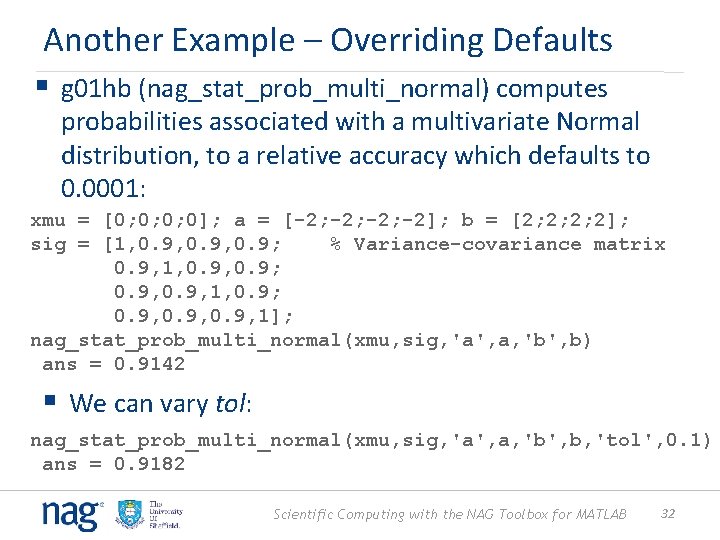
Another Example – Overriding Defaults § g 01 hb (nag_stat_prob_multi_normal) computes probabilities associated with a multivariate Normal distribution, to a relative accuracy which defaults to 0. 0001: xmu = [0; 0; 0; 0]; a = [-2; -2; -2]; b = [2; 2; 2; 2]; sig = [1, 0. 9, 0. 9; % Variance-covariance matrix 0. 9, 1, 0. 9; 0. 9, 1]; nag_stat_prob_multi_normal(xmu, sig, 'a', a, 'b', b) ans = 0. 9142 § We can vary tol: nag_stat_prob_multi_normal(xmu, sig, 'a', a, 'b', b, 'tol', 0. 1) ans = 0. 9182 Scientific Computing with the NAG Toolbox for MATLAB 32
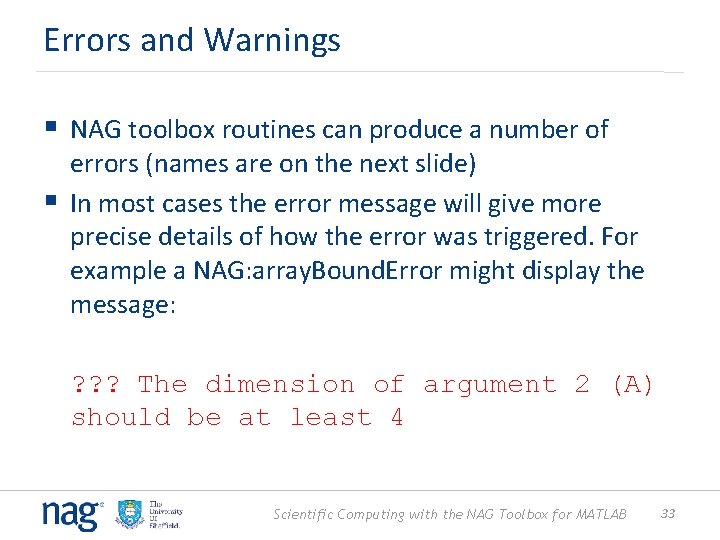
Errors and Warnings § NAG toolbox routines can produce a number of errors (names are on the next slide) § In most cases the error message will give more precise details of how the error was triggered. For example a NAG: array. Bound. Error might display the message: ? ? ? The dimension of argument 2 (A) should be at least 4 Scientific Computing with the NAG Toolbox for MATLAB 33
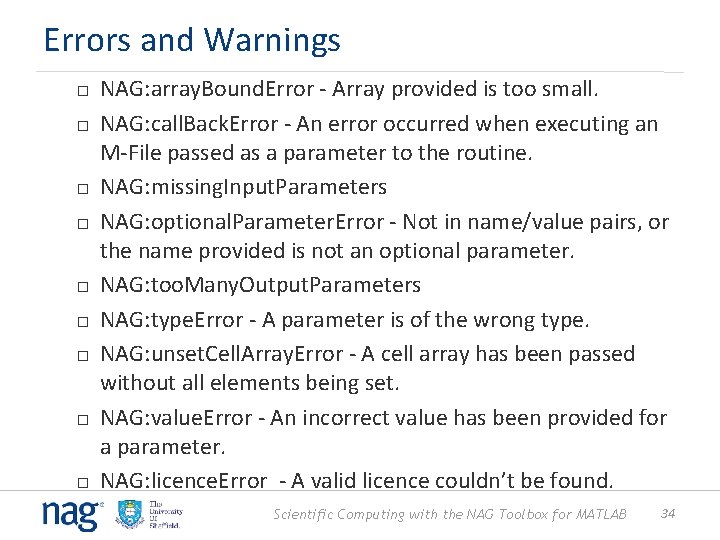
Errors and Warnings NAG: array. Bound. Error - Array provided is too small. NAG: call. Back. Error - An error occurred when executing an M-File passed as a parameter to the routine. NAG: missing. Input. Parameters NAG: optional. Parameter. Error - Not in name/value pairs, or the name provided is not an optional parameter. NAG: too. Many. Output. Parameters NAG: type. Error - A parameter is of the wrong type. NAG: unset. Cell. Array. Error - A cell array has been passed without all elements being set. NAG: value. Error - An incorrect value has been provided for a parameter. NAG: licence. Error - A valid licence couldn’t be found. Scientific Computing with the NAG Toolbox for MATLAB 34
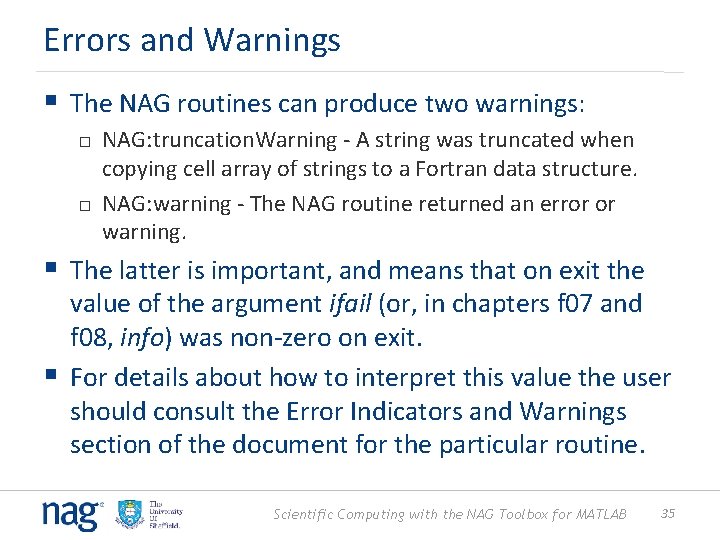
Errors and Warnings § The NAG routines can produce two warnings: NAG: truncation. Warning - A string was truncated when copying cell array of strings to a Fortran data structure. NAG: warning - The NAG routine returned an error or warning. § The latter is important, and means that on exit the value of the argument ifail (or, in chapters f 07 and f 08, info) was non-zero on exit. § For details about how to interpret this value the user should consult the Error Indicators and Warnings section of the document for the particular routine. Scientific Computing with the NAG Toolbox for MATLAB 35
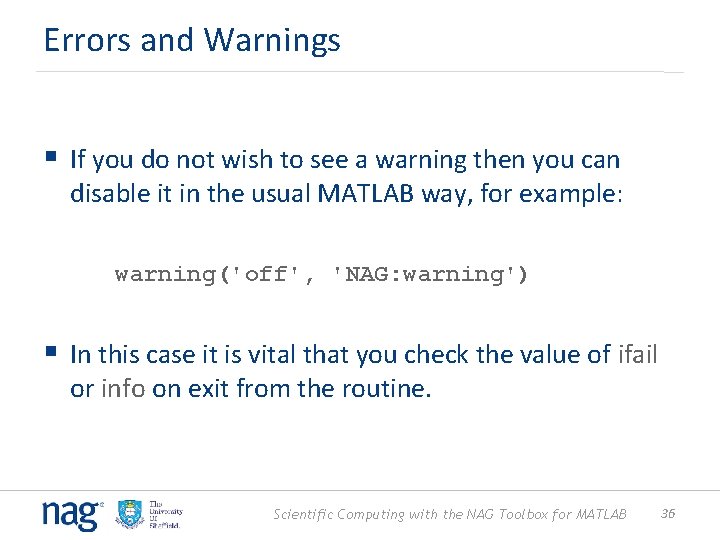
Errors and Warnings § If you do not wish to see a warning then you can disable it in the usual MATLAB way, for example: warning('off', 'NAG: warning') § In this case it is vital that you check the value of ifail or info on exit from the routine. Scientific Computing with the NAG Toolbox for MATLAB 36
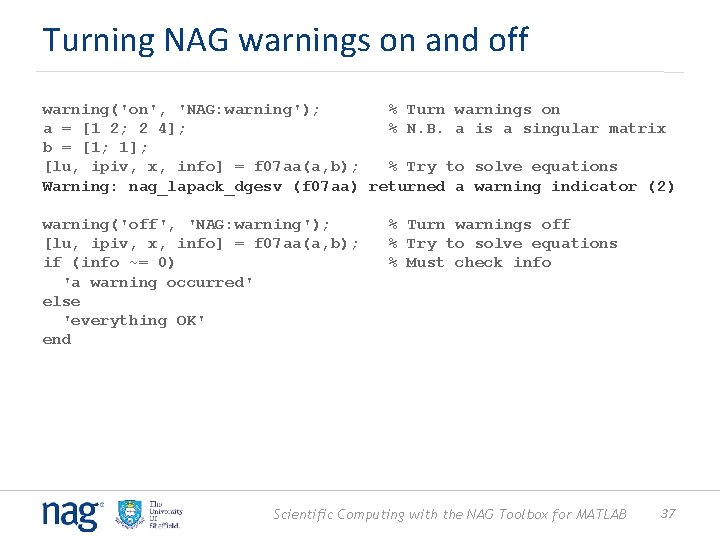
Turning NAG warnings on and off warning('on', 'NAG: warning'); % Turn warnings on a = [1 2; 2 4]; % N. B. a is a singular matrix b = [1; 1]; [lu, ipiv, x, info] = f 07 aa(a, b); % Try to solve equations Warning: nag_lapack_dgesv (f 07 aa) returned a warning indicator (2) warning('off', 'NAG: warning'); [lu, ipiv, x, info] = f 07 aa(a, b); if (info ~= 0) 'a warning occurred' else 'everything OK' end % Turn warnings off % Try to solve equations % Must check info Scientific Computing with the NAG Toolbox for MATLAB 37
Types § The interfaces to NAG routines in the Toolbox are quite precise about the types of their arguments. § Since MATLAB assumes by default that every number is a double users need to convert their input data to the appropriate type if it is an integer, a complex number or a logical. § Similarly, in M-Files called by a NAG routine, the user must ensure that the results returned are of the appropriate type. This is to ensure the correct alignment between the MATLAB and Fortran types. Scientific Computing with the NAG Toolbox for MATLAB 38
MATLAB Data Types - Complex § The complex function constructs a complex result from real and imaginary parts. § The statement c = complex(x, y) returns the complex result x + yi, where x and y are identically sized real arrays or scalars of the same data type. § y is optional, and without this argument a complex variable is retuned with zero imaginary part. § You can test a variable with the isreal function, which returns false if the variable is complex. Scientific Computing with the NAG Toolbox for MATLAB 39
MATLAB Data Types - Integers § There also 8 integer data types in MATLAB: int 8, int 16, int 32, int 64, uint 8, uint 16, uint 32, uint 64 § The number refers to the number of bits that are used to store the value. uint* are unsigned integers. § For example the int 32 function: myint = int 32(n) § You can find the range of values supported by these data types with intmin and intmax: >> [intmin(‘int 8’) intmax(‘int 8’)] ans = -128 127 Scientific Computing with the NAG Toolbox for MATLAB 40
Integers § Integers used by the NAG Toolbox are chosen to be compatible with those used internally by MATLAB, and will be int 32 or int 64 Scientific Computing with the NAG Toolbox for MATLAB 41
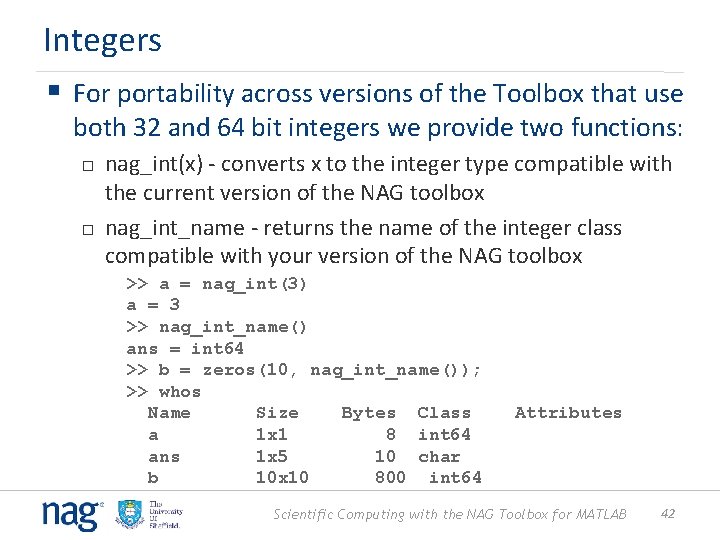
Integers § For portability across versions of the Toolbox that use both 32 and 64 bit integers we provide two functions: nag_int(x) - converts x to the integer type compatible with the current version of the NAG toolbox nag_int_name - returns the name of the integer class compatible with your version of the NAG toolbox >> a = nag_int(3) a = 3 >> nag_int_name() ans = int 64 >> b = zeros(10, nag_int_name()); >> whos Name Size Bytes Class a 1 x 1 8 int 64 ans 1 x 5 10 char b 10 x 10 800 int 64 Attributes Scientific Computing with the NAG Toolbox for MATLAB 42
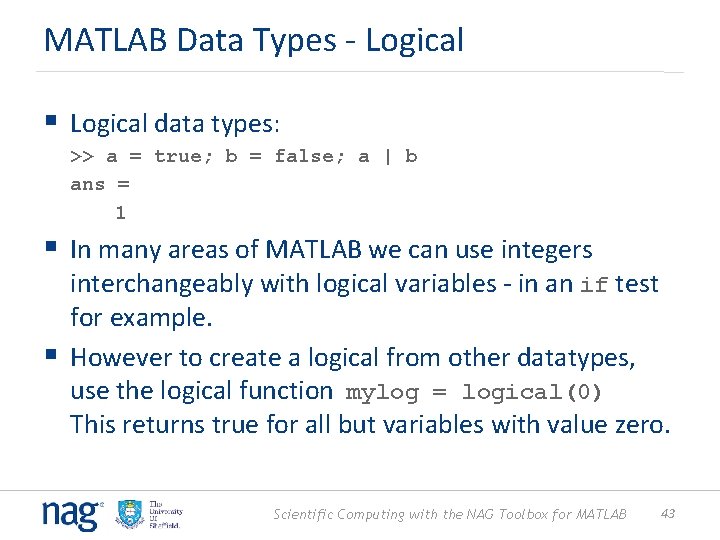
MATLAB Data Types - Logical § Logical data types: >> a = true; b = false; a | b ans = 1 § In many areas of MATLAB we can use integers interchangeably with logical variables - in an if test for example. § However to create a logical from other datatypes, use the logical function mylog = logical(0) This returns true for all but variables with value zero. Scientific Computing with the NAG Toolbox for MATLAB 43
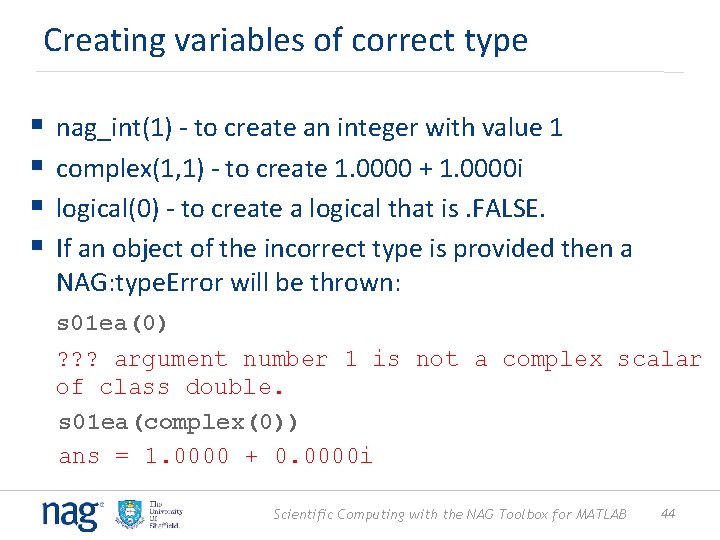
Creating variables of correct type § § nag_int(1) - to create an integer with value 1 complex(1, 1) - to create 1. 0000 + 1. 0000 i logical(0) - to create a logical that is. FALSE. If an object of the incorrect type is provided then a NAG: type. Error will be thrown: s 01 ea(0) ? ? ? argument number 1 is not a complex scalar of class double. s 01 ea(complex(0)) ans = 1. 0000 + 0. 0000 i Scientific Computing with the NAG Toolbox for MATLAB 44
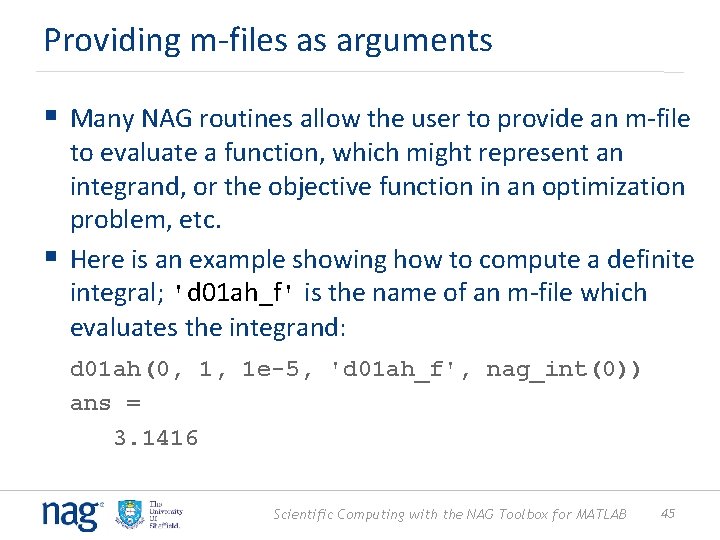
Providing m-files as arguments § Many NAG routines allow the user to provide an m-file to evaluate a function, which might represent an integrand, or the objective function in an optimization problem, etc. § Here is an example showing how to compute a definite integral; 'd 01 ah_f' is the name of an m-file which evaluates the integrand: d 01 ah(0, 1, 1 e-5, 'd 01 ah_f', nag_int(0)) ans = 3. 1416 Scientific Computing with the NAG Toolbox for MATLAB 45
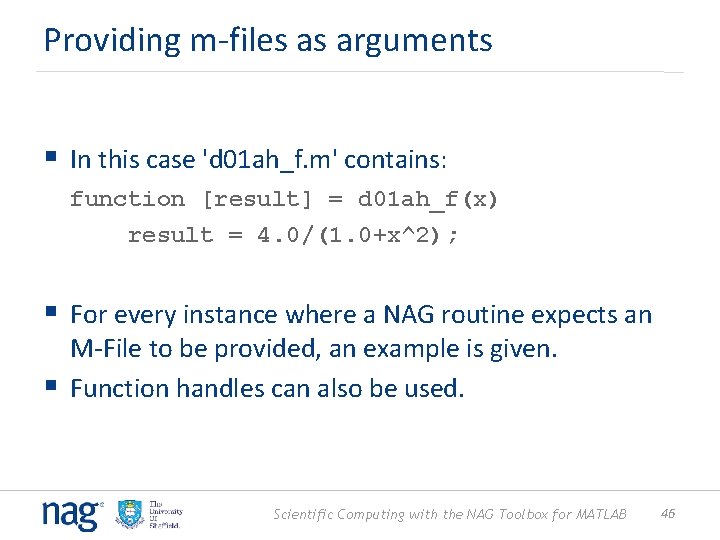
Providing m-files as arguments § In this case 'd 01 ah_f. m' contains: function [result] = d 01 ah_f(x) result = 4. 0/(1. 0+x^2); § For every instance where a NAG routine expects an M-File to be provided, an example is given. § Function handles can also be used. Scientific Computing with the NAG Toolbox for MATLAB 46
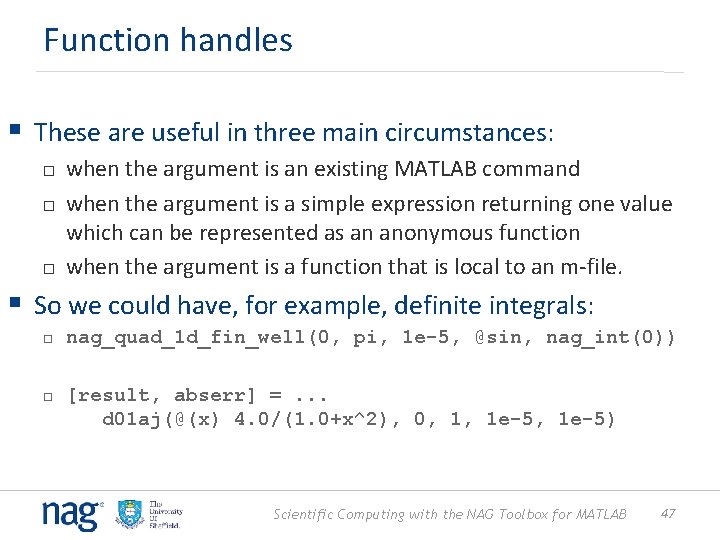
Function handles § These are useful in three main circumstances: when the argument is an existing MATLAB command when the argument is a simple expression returning one value which can be represented as an anonymous function when the argument is a function that is local to an m-file. § So we could have, for example, definite integrals: nag_quad_1 d_fin_well(0, pi, 1 e-5, @sin, nag_int(0)) [result, abserr] =. . . d 01 aj(@(x) 4. 0/(1. 0+x^2), 0, 1, 1 e-5) Scientific Computing with the NAG Toolbox for MATLAB 47
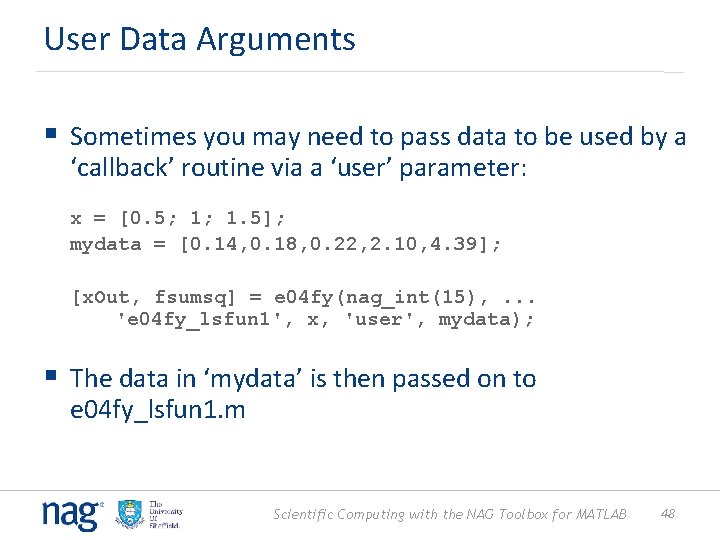
User Data Arguments § Sometimes you may need to pass data to be used by a ‘callback’ routine via a ‘user’ parameter: x = [0. 5; 1; 1. 5]; mydata = [0. 14, 0. 18, 0. 22, 2. 10, 4. 39]; [x. Out, fsumsq] = e 04 fy(nag_int(15), . . . 'e 04 fy_lsfun 1', x, 'user', mydata); § The data in ‘mydata’ is then passed on to e 04 fy_lsfun 1. m Scientific Computing with the NAG Toolbox for MATLAB 48
FUNCTIONALITY AND DEMOS: Curve and surface fitting 49
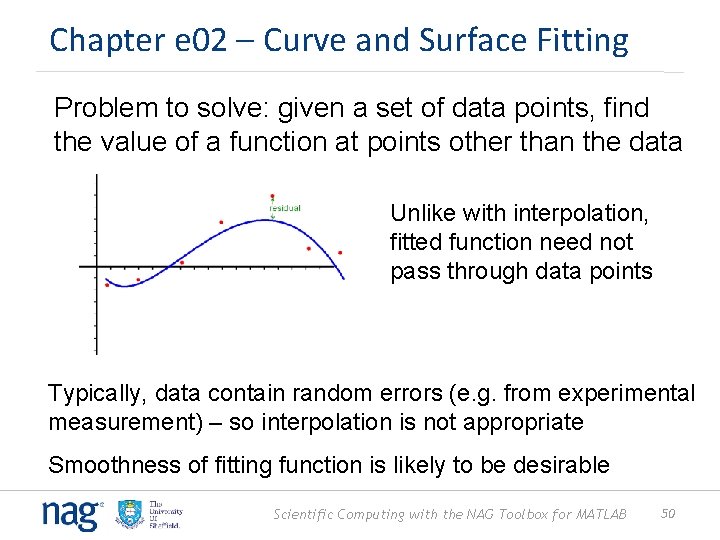
Chapter e 02 – Curve and Surface Fitting Problem to solve: given a set of data points, find the value of a function at points other than the data Unlike with interpolation, fitted function need not pass through data points Typically, data contain random errors (e. g. from experimental measurement) – so interpolation is not appropriate Smoothness of fitting function is likely to be desirable Scientific Computing with the NAG Toolbox for MATLAB 50
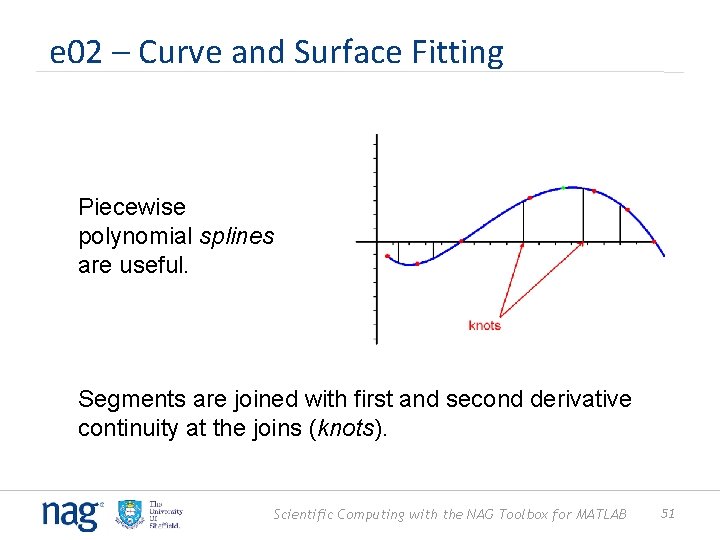
e 02 – Curve and Surface Fitting Piecewise polynomial splines are useful. Segments are joined with first and second derivative continuity at the joins (knots). Scientific Computing with the NAG Toolbox for MATLAB 51
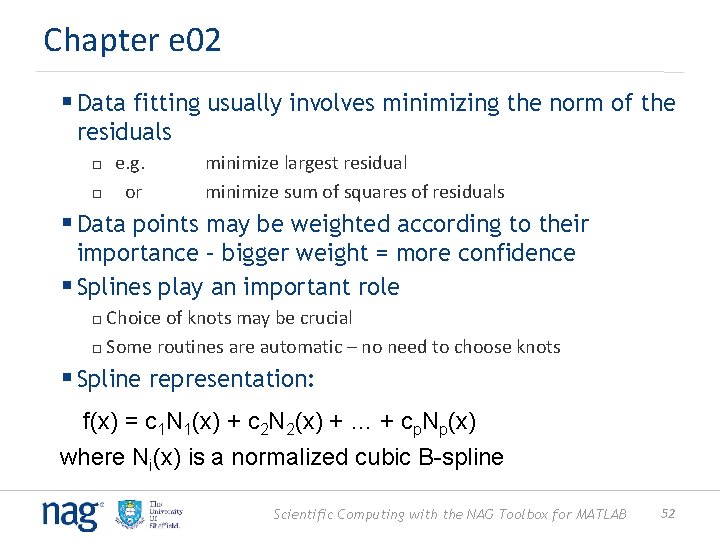
Chapter e 02 § Data fitting usually involves minimizing the norm of the residuals e. g. or minimize largest residual minimize sum of squares of residuals § Data points may be weighted according to their importance – bigger weight = more confidence § Splines play an important role Choice of knots may be crucial Some routines are automatic – no need to choose knots § Spline representation: f(x) = c 1 N 1(x) + c 2 N 2(x) + … + cp. Np(x) where Ni(x) is a normalized cubic B-spline Scientific Computing with the NAG Toolbox for MATLAB 52
Fitting examples – e 02 be and e 02 dc § e 02 be/e 02 dc compute spline approximations to sets of data values, given on an interval (1 D) or rectangular grid in the x-y plane (2 D). § The knots (where the individual splines meet) of the spline are located automatically. § A single argument, s, is specified to control the trade -off between closeness of fit and smoothness of fit. “Small” s closer fit. § In theory, a value of s = 0 will produce an interpolating spline. < run e 02 be and e 02 dc demos here> Scientific Computing with the NAG Toolbox for MATLAB 53
FUNCTIONALITY AND DEMOS: Optimization 54
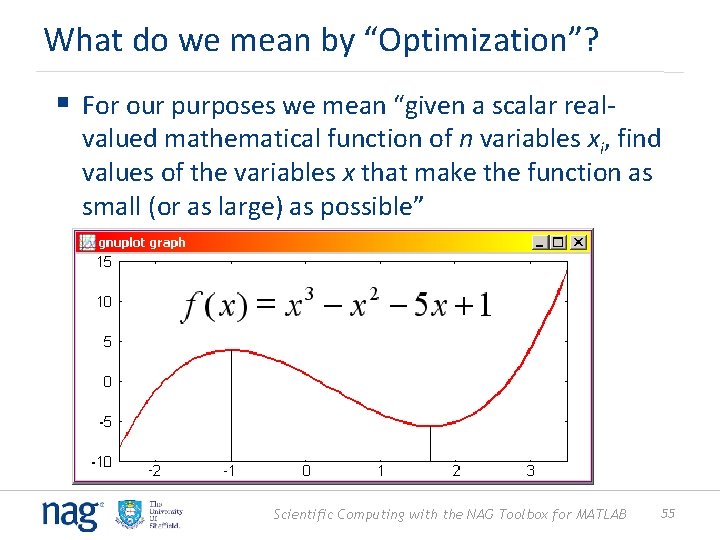
What do we mean by “Optimization”? § For our purposes we mean “given a scalar real- valued mathematical function of n variables xi, find values of the variables x that make the function as small (or as large) as possible” Scientific Computing with the NAG Toolbox for MATLAB 55
How do we do it? § We systematically choose values of the variables xi from within the set of values that are allowed. § Sometimes all values are allowed (unconstrained optimization) § Sometimes some values are forbidden (constrained optimization) e. g. -3 <= x 1 <= 3 or x 2 > 0 § Typically the user must supply a starting point x Scientific Computing with the NAG Toolbox for MATLAB 56
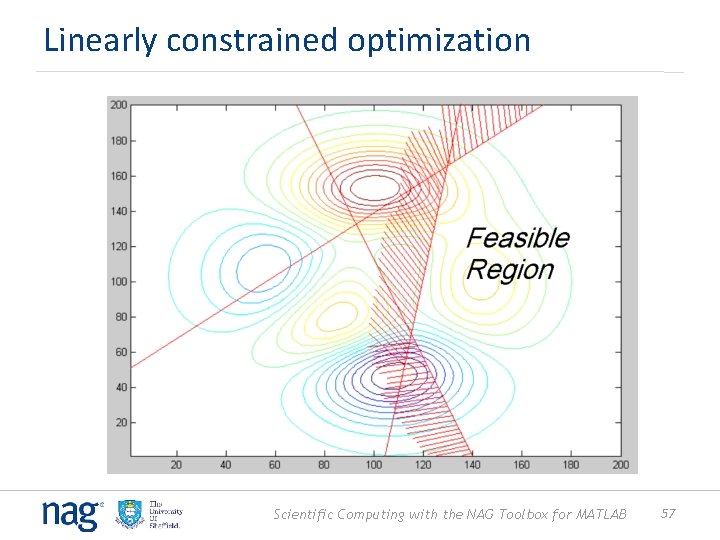
Linearly constrained optimization Scientific Computing with the NAG Toolbox for MATLAB 57
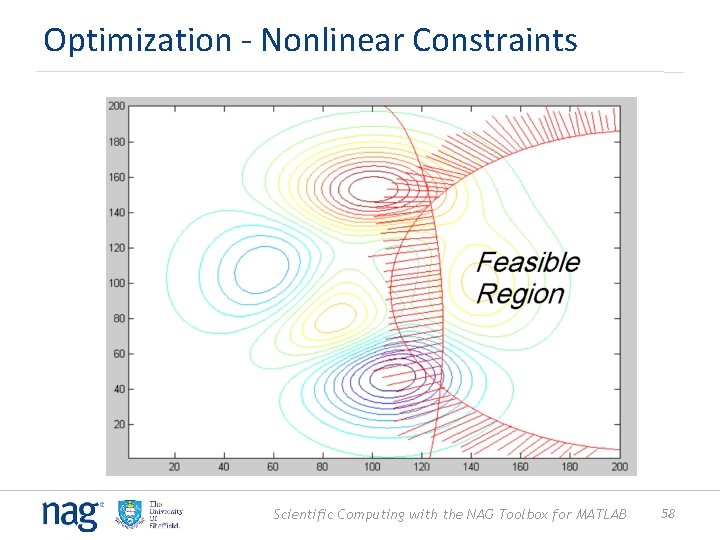
Optimization - Nonlinear Constraints Scientific Computing with the NAG Toolbox for MATLAB 58 58
e 04 Routine Classification § Number of variables: Single variable f(x) Multiple variable f(x) § Type of objective: Linear Quadratic or sum of squares Nonlinear § Constraints: None Simple bounds Linear Nonlinear Scientific Computing with the NAG Toolbox for MATLAB 59
Are derivatives necessary? § Some algorithms require them § Some don’t § Some prefer them but can manage without They may use finite difference estimates <run steepest_descent_demo and e 04 uc_demo here> Scientific Computing with the NAG Toolbox for MATLAB 60
NAG Optimization § Problems categorized according to properties of objective function: linear nonlinear sum of squares of nonlinear functions quadratic § It is important to choose a method appropriate to your problem type, for efficiency and the best chance of success. Scientific Computing with the NAG Toolbox for MATLAB 61
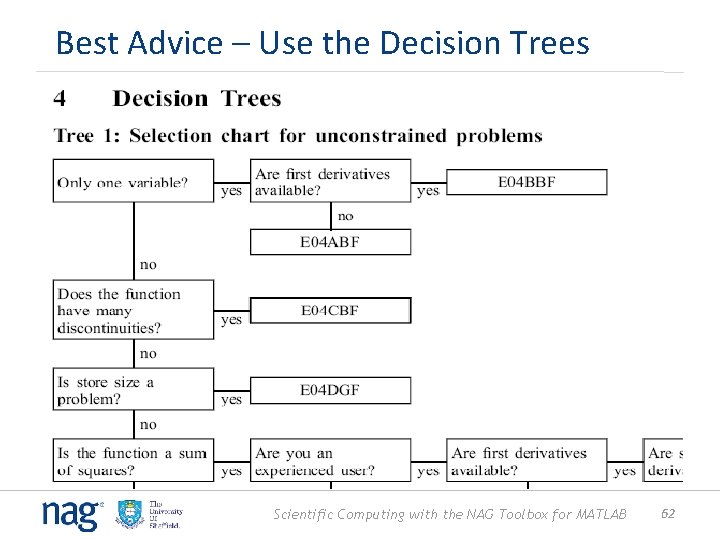
Best Advice – Use the Decision Trees Scientific Computing with the NAG Toolbox for MATLAB 62
Run the e 04 uc demo yourself § Go to the NAG Toolbox demos page in MATLAB § Find Minimization (e 04 uc_demo) and click the ‘Run’ link § Try adding linear constraints Click twice on the contour plot to set a line Click once more to determine which side of the line is feasible (the other side will turn yellow) § Change the function from Rosenbrock to Peaks § Try using various different starting points and observe what happens Scientific Computing with the NAG Toolbox for MATLAB 63
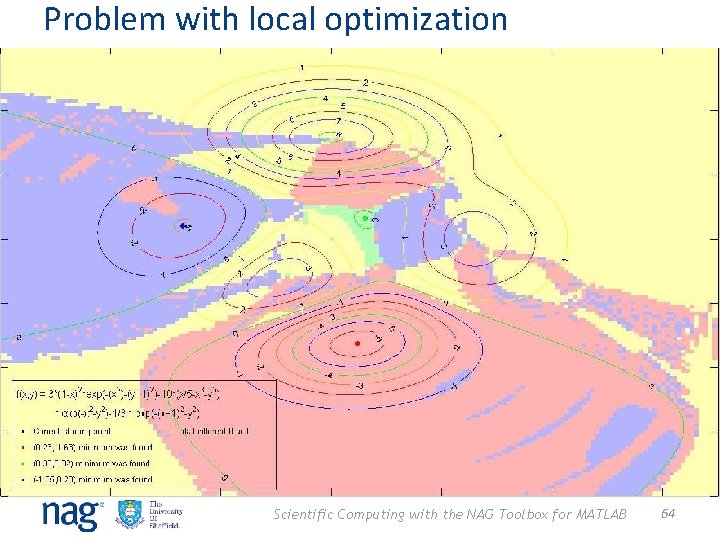
Problem with local optimization Scientific Computing with the NAG Toolbox for MATLAB 64
Hence - Global Optimization § Multilevel Coordinate Search MCS - a “box splitting” method Arnold Neumaier (Vienna) § Particle Swarm Optimization No assumptions about differentiability etc. No guarantees about finding optimal solution Can be useful for “noisy” problems § Multi-Start e 05 uc Choose a large set of start positions depending on problem size and how many threads available Based on solid foundation of local optimizer e 04 uc Maybe try the demo Global_Minimization (e 05 jb_demo) Scientific Computing with the NAG Toolbox for MATLAB 65
Continue with exercises § Try more questions from the exercise sheets Scientific Computing with the NAG Toolbox for MATLAB 66
FUNCTIONALITY AND DEMOS: Random numbers 67
Chapter g 05 – Random Numbers Random numbers – used to model real-life processes. Humans are bad at choosing them. § e. g. faking a random sequence of coin tosses is very difficult: HTHHTHTTHTHHTTTHTTHTHHTHTH … § Most people would choose a sequence easily proved not to be random Therefore good algorithms are required. Scientific Computing with the NAG Toolbox for MATLAB 68
Chapter g 05 – Random Numbers Random numbers from non-uniform distributions § Generated from uniform numbers § Transformation methods § Rejection methods § Table search methods § Normal (Gaussian) distribution § Student’s t distribution § Beta and Exponential § Chi-Squared and Binomial § Geometric, Poisson, F, Gamma, … Scientific Computing with the NAG Toolbox for MATLAB 69
Pseudo- versus Quasi-Random Numbers Pseudo-random numbers: • generated systematically § e. g. multiplicative congruential ni = a ni-1 mod m § properties close to true random numbers § (assuming that a and m are chosen wisely) § negligible correlation between consecutive numbers Quasi-random numbers: § not statistically independent § give more even distribution in space (“looks more random”) § useful for Monte Carlo integration Scientific Computing with the NAG Toolbox for MATLAB 70
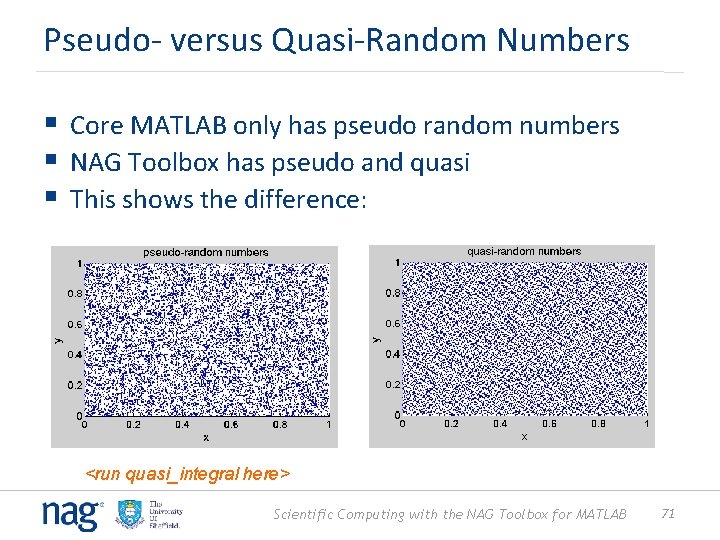
Pseudo- versus Quasi-Random Numbers § Core MATLAB only has pseudo random numbers § NAG Toolbox has pseudo and quasi § This shows the difference: <run quasi_integral here> Scientific Computing with the NAG Toolbox for MATLAB 71
Mesh generation / PDE solution app § In the NAG demo list, find the ‘Mesh Generation’ app (it is at the bottom of the list of demos) § Run the app (you will probably need to read the documentation too!) Scientific Computing with the NAG Toolbox for MATLAB 72
EXAMPLES: Nearest Correlation Matrix 73
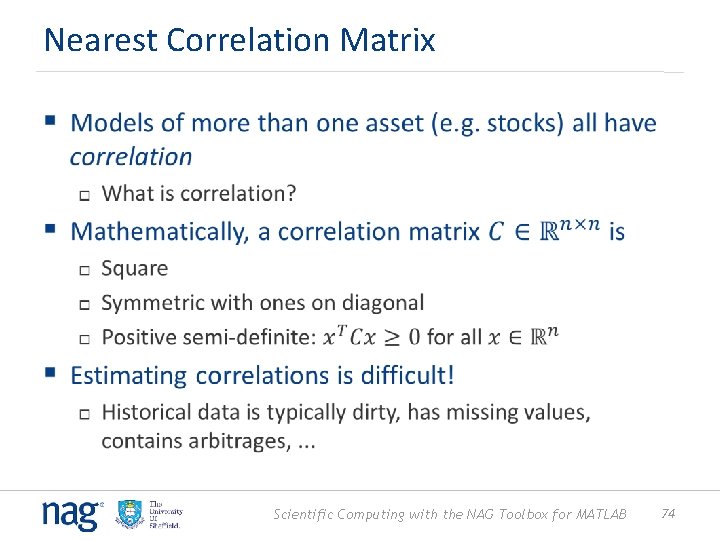
Nearest Correlation Matrix § Scientific Computing with the NAG Toolbox for MATLAB 74
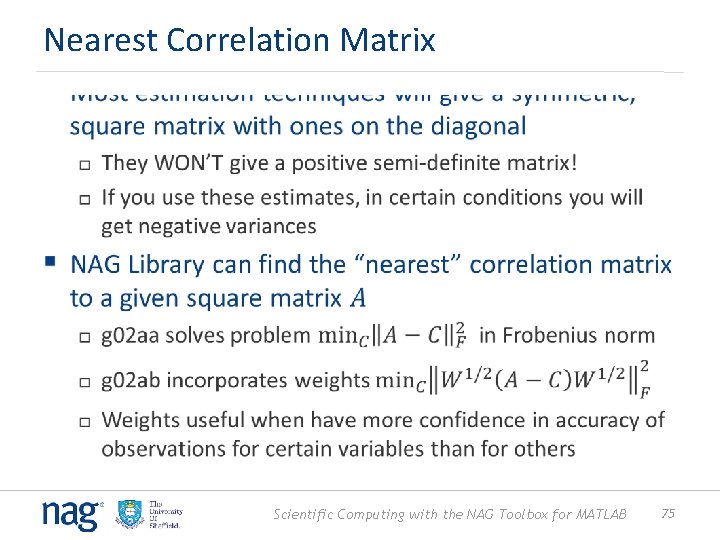
Nearest Correlation Matrix § Scientific Computing with the NAG Toolbox for MATLAB 75
Various other demos in the NAG Toolbox Including: § Root finding § Quadrature § Global optimization § Time Series Scientific Computing with the NAG Toolbox for MATLAB 76
Continue with exercises § Try the ODE IVP question if you haven’t already Scientific Computing with the NAG Toolbox for MATLAB 77
Other versions of NAG Libraries § § NAG C/C++ Library NAG Fortran Library NAG C# /. NET Library Also callable from Microsoft Excel Visual Basic Java Python … and others Scientific Computing with the NAG Toolbox for MATLAB 78
Hands-on exercise material Exercise questions can be found here: http: //monet. nag. co. uk/nag_toolbox_training/MATLAB/toolbox_questions Start off with the first question sheet – short questions § Try whichever you like Work alone or in pairs if you prefer Scientific Computing with the NAG Toolbox for MATLAB 79
- Slides: 79