
SBS Inspection Database Features Benefits Setup and Use

SBS Inspection Database Features, Benefits, Set-up and Use

SBS Inspection Database 4 Simple program to manage part / process inspections 8 Incoming or Receiving Inspections = = purchased material third party processes (Plating, anodizing, welding, etc. ) 8 In-process inspections 8 Final product inspections 4 Real-time SPC charts (Statistical Process Control) 8 Accept / Reject notices in real time 4 Create a detailed inspection data repository 4 Generate First Article Inspection Reports (FAIR) 4 Create Inspection or Test Plans 8 Define part specific parameters to be measured 8 Define Acceptance criteria 4 Manage Control Plans linked to Inspection Plans 4 Request and Schedule Inspections 8 Great for inspection labs or inspection tools with critical capacity 4 Collect and analyze data 8 Rich set of reports for statistical analysis www. Sunday. Biz. Sys. com Sunday Business Systems
Features 4 Test plans ensure 8 Provide clear Acceptance criteria for each part or assembly 8 Inspections are performed uniformly and consistently 4 Control plans 4 Data Collection options 8 Simple data collection = Automated Accept / Reject messages 8 Data Collection with SPC limits applied = Automated Accept / Reject messages for Spec or Control limit violations 8 Data Collection with SPC Charts displayed = = Automated Accept / Reject messages for Spec or Control limit violations SPC Charts displayed after each entry 4 Secure 8 password entry 8 Grant privileges to limit access www. Sunday. Biz. Sys. com Sunday Business Systems

Benefits 4 Real time control of inspection results 4 Analyze inspection data to drive process / process improvement 4 Ensure compliance to customer requirements 4 Improve inspection efficiency 4 Improve product traceability 4 Eliminate mistakes 4 Secure data repository www. Sunday. Biz. Sys. com Sunday Business Systems

Privilege based employee login www. Sunday. Biz. Sys. com Sunday Business Systems
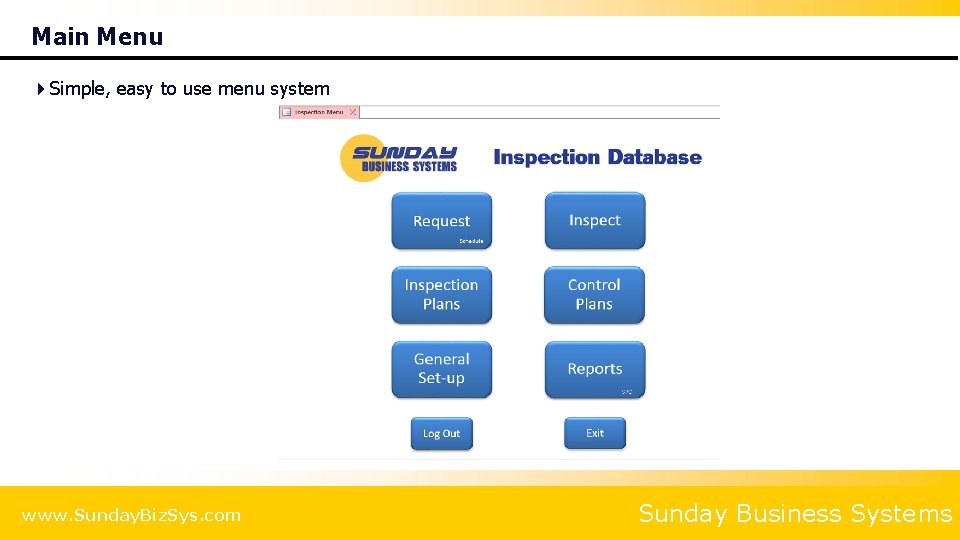
Main Menu 4 Simple, easy to use menu system www. Sunday. Biz. Sys. com Sunday Business Systems

Inspection DB Process Flow Real-Time SPC Chart www. Sunday. Biz. Sys. com Sunday Business Systems

CREATE AN INSPECTION PLAN www. Sunday. Biz. Sys. com Sunday Business Systems

The Inspection Plan 4 Inspection Plan 8 A list of Parameters to be measured or tested = = = Contains Specification limits Contains Control limits (if applicable) Contains flags to apply SPC limits and display simple control charts 8 May be associated to a Part Number that is inspected = The same plan gets executed each time a part is inspected 8 Note that Yellow fields are required (mandatory entry) 8 May be linked to your Control Plan (from the Control Plan form) www. Sunday. Biz. Sys. com Sunday Business Systems

Create an Inspection Plan Feature to be measured Order in which to measure www. Sunday. Biz. Sys. com Inspection Plan header information Measurement Limits (acceptance Criteria) Apply Limits / generate warning messages Display control chart after data entry Sunday Business Systems

Inspection Plan Detail Term Definition Parameter A brief description of the feature or call-out to be measured Sort Order The order in which the inspection parameters will be listed in the data collection form Lower Valid Limit A value less than the lower valid limit will not be allowed (Prevents data entry errors) Upper Valid Limit A value greater than the upper valid limit will not be allowed (Prevents data entry errors) LSL Lower specification limit USL Upper specification limit LCL Lower control limit UCL Upper control limit Apply SPC? Will apply control and specification limits to data entry and will automatically produce reject Warnings (Unchecked) will not apply control and specification limits. No warnings will be generated Display SPC chart? Will display a simple control chart after each entry (Unchecked) will not display a control chart www. Sunday. Biz. Sys. com Sunday Business Systems

Associate an Inspection Plan to a Part Number 4 Each Part number may have one or more Inspection plans associated to it 4 Inspection plans will automatically populate the data collection subform 4 Parts may be edited in the Main Menu set-up form or from the Inspection Plan Set-up form www. Sunday. Biz. Sys. com Sunday Business Systems

Associate an Inspection Plan to a Part Number Select existing Inspection Plan Click to expand www. Sunday. Biz. Sys. com Sunday Business Systems
REQUEST AN INSPECTION www. Sunday. Biz. Sys. com Sunday Business Systems

Inspection Request 4 Used for scheduling a measurement tool or an entire Lab 4 A request may be entered 8 Queue may then be analyzed, prioritized, and scheduled 8 Requests may be assigned to different measurement equipment or machines 4 Inspection may be built from 1. An inspection plan associated with a part 2. Any existing inspection plan 3. Manually entered inspection parameters 4 Note that yellow fields are mandatory www. Sunday. Biz. Sys. com Sunday Business Systems
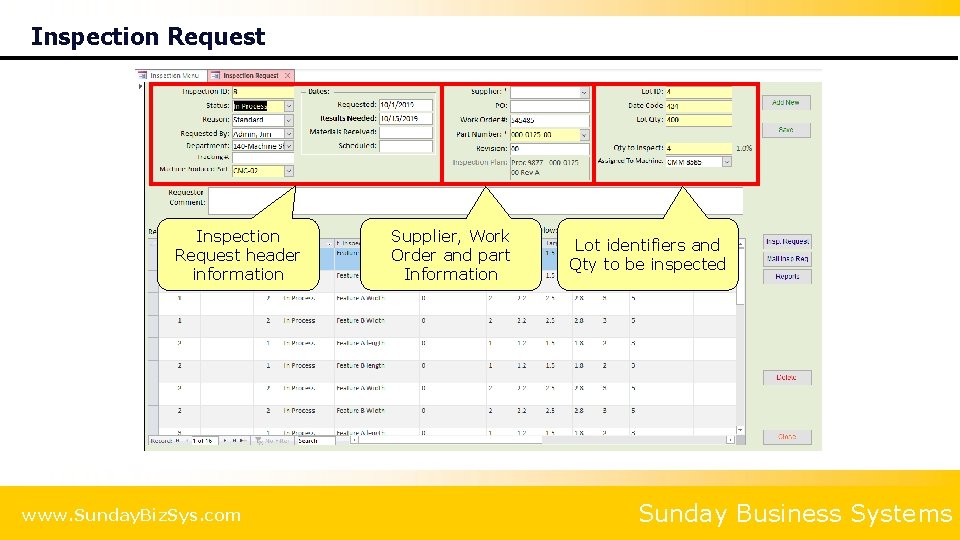
Inspection Request header information www. Sunday. Biz. Sys. com Supplier, Work Order and part Information Lot identifiers and Qty to be inspected Sunday Business Systems

Inspection Request System will automatically write the data collection plan if a test plan is associated with the part # www. Sunday. Biz. Sys. com Sunday Business Systems
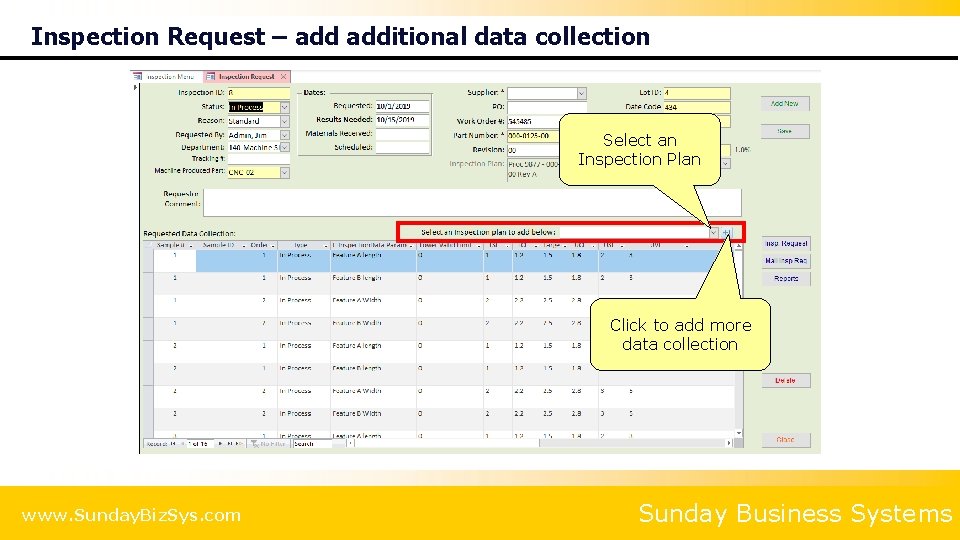
Inspection Request – additional data collection Select an Inspection Plan Click to add more data collection www. Sunday. Biz. Sys. com Sunday Business Systems

Inspection Request – manually specify data collection Manually enter data to be collected any spec. / control limits www. Sunday. Biz. Sys. com Sunday Business Systems

Review inspection request View Inspection Request Report Email Inspection Request Report www. Sunday. Biz. Sys. com Sunday Business Systems

Inspection Schedule 4 Inspection Requests may be scheduled and reviewed www. Sunday. Biz. Sys. com Sunday Business Systems
INSPECT AND COLLECT DATA www. Sunday. Biz. Sys. com Sunday Business Systems

Inspect and Collect Data Inspection details www. Sunday. Biz. Sys. com Inspection Status buttons Form filters Sunday Business Systems

Inspect and Collect Data Enter measurement values www. Sunday. Biz. Sys. com Sunday Business Systems
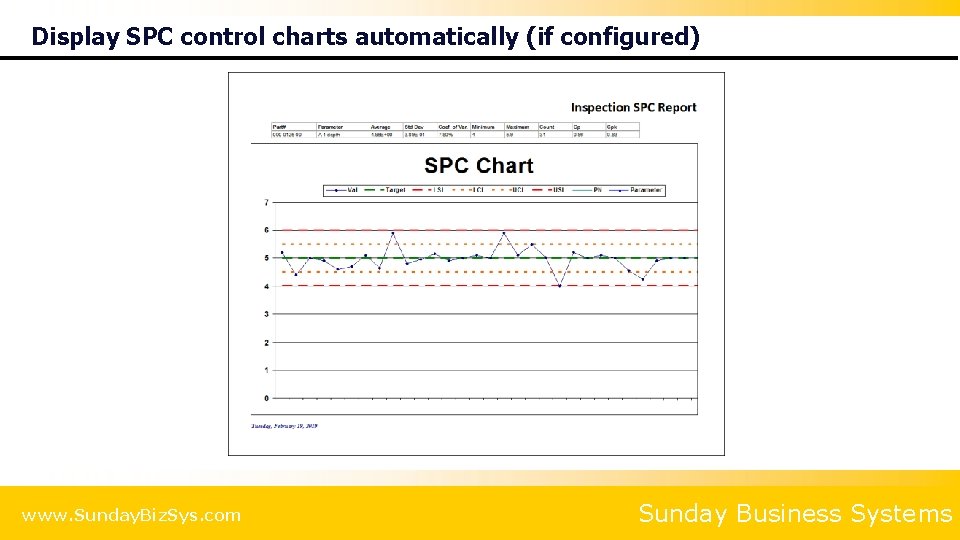
Display SPC control charts automatically (if configured) www. Sunday. Biz. Sys. com Sunday Business Systems

Inspect and Collect Data Click complete for finish the inspection and Accept the results Click Approve to enter your electronic signature to approve and lock the inspection www. Sunday. Biz. Sys. com Sunday Business Systems

Inspect and Collect Data View this Inspection Report email this Inspection Report View Detailed SPC reports View general inspection reports www. Sunday. Biz. Sys. com Sunday Business Systems
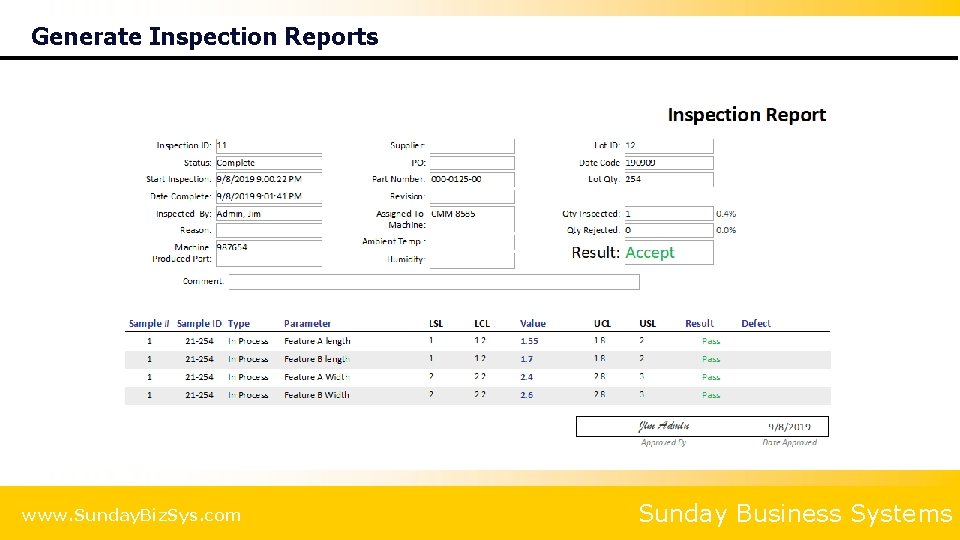
Generate Inspection Reports www. Sunday. Biz. Sys. com Sunday Business Systems
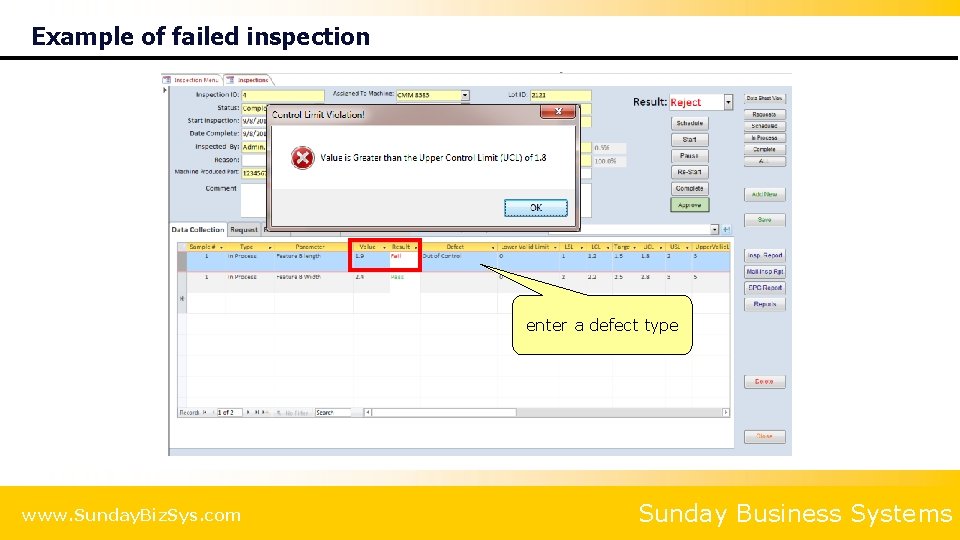
Example of failed inspection enter a defect type www. Sunday. Biz. Sys. com Sunday Business Systems
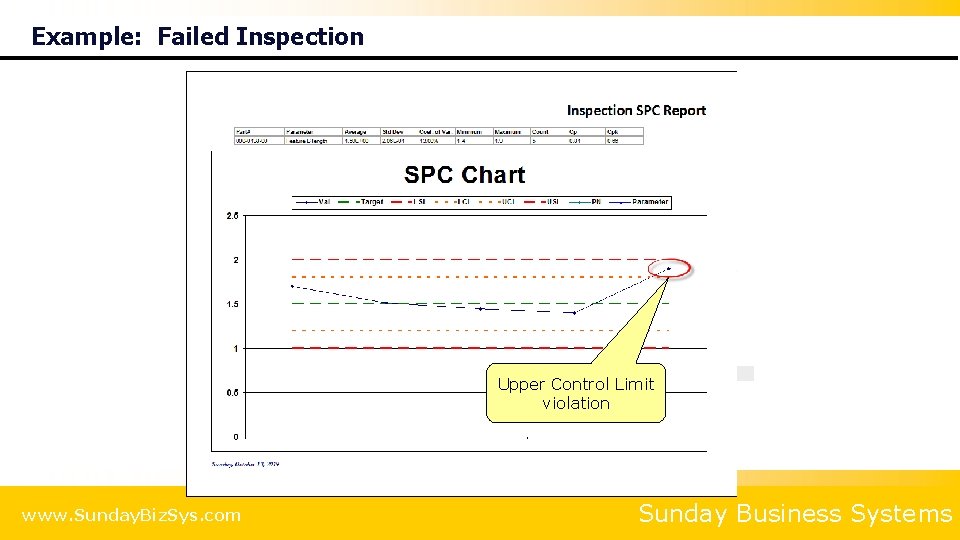
Example: Failed Inspection Upper Control Limit violation www. Sunday. Biz. Sys. com Sunday Business Systems
CONTROL PLANS Build detailed Control Plans Link plan items to Inspection Plans www. Sunday. Biz. Sys. com Sunday Business Systems
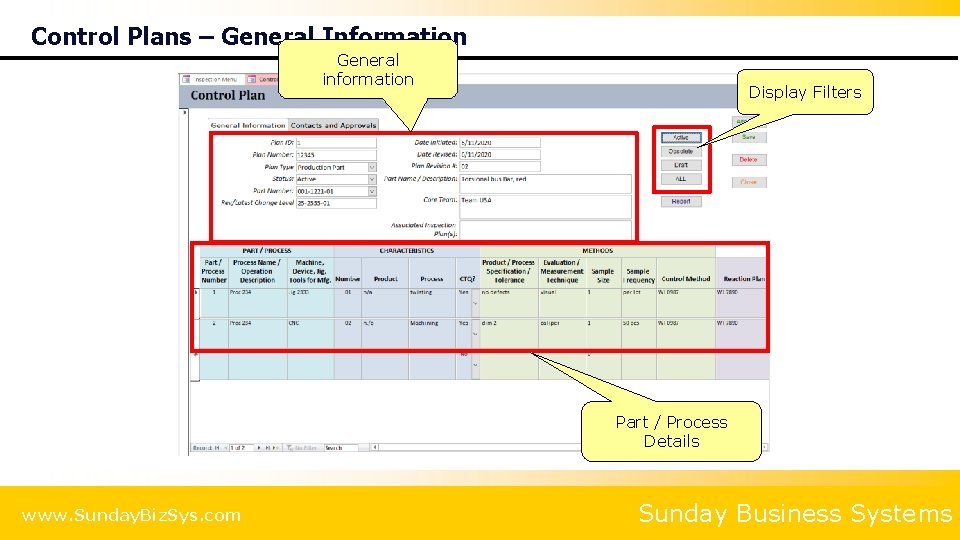
Control Plans – General Information General information Display Filters Part / Process Details www. Sunday. Biz. Sys. com Sunday Business Systems
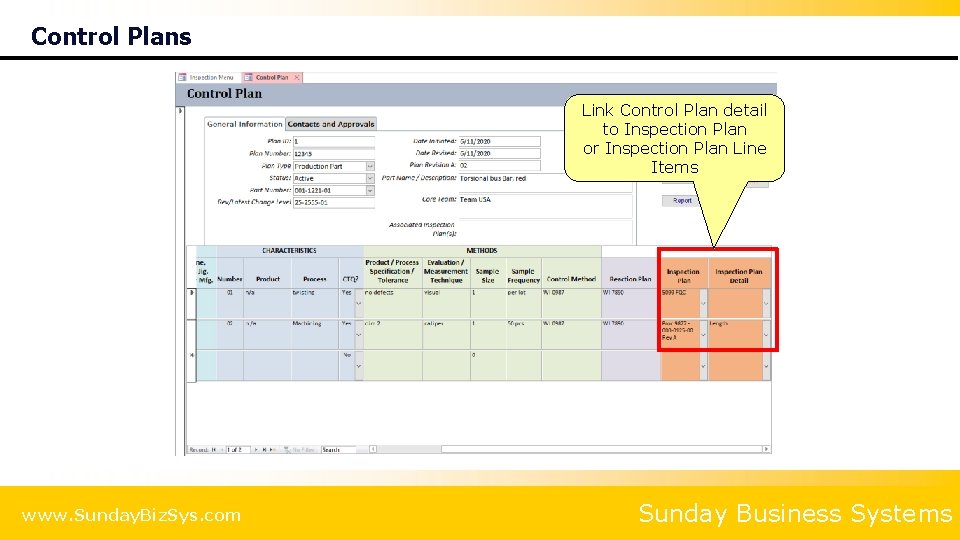
Control Plans Link Control Plan detail to Inspection Plan or Inspection Plan Line Items www. Sunday. Biz. Sys. com Sunday Business Systems
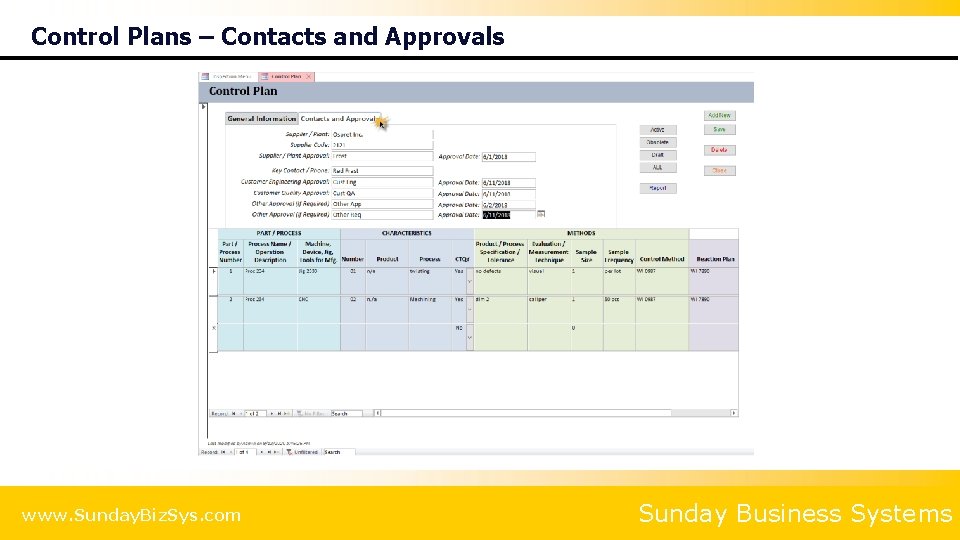
Control Plans – Contacts and Approvals www. Sunday. Biz. Sys. com Sunday Business Systems

REPORTS www. Sunday. Biz. Sys. com Sunday Business Systems

Configurable Inspection Reports www. Sunday. Biz. Sys. com Sunday Business Systems
SET-UP AND CONFIGURATION Build drop-down lists Set configuration parameters www. Sunday. Biz. Sys. com Sunday Business Systems

General Set-up www. Sunday. Biz. Sys. com Sunday Business Systems
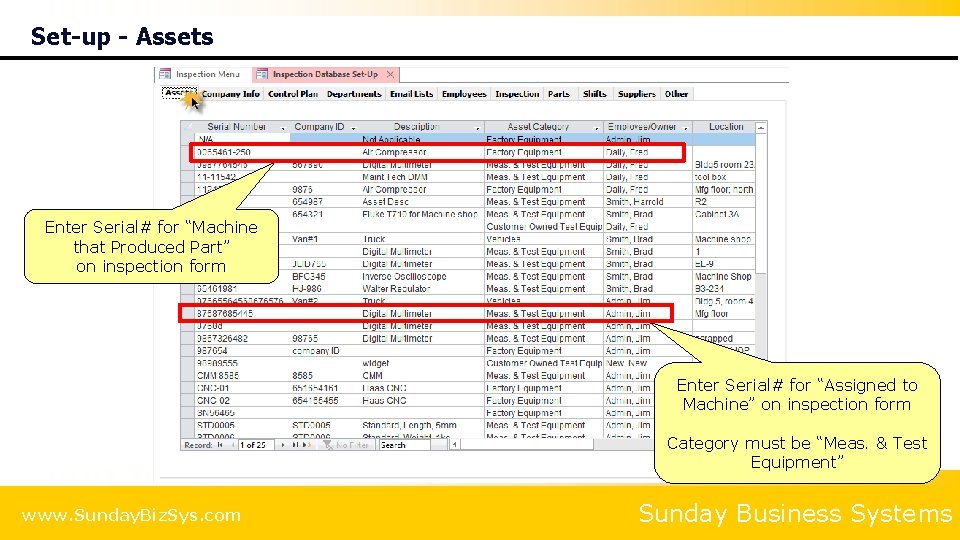
Set-up - Assets Enter Serial# for “Machine that Produced Part” on inspection form Enter Serial# for “Assigned to Machine” on inspection form Category must be “Meas. & Test Equipment” www. Sunday. Biz. Sys. com Sunday Business Systems
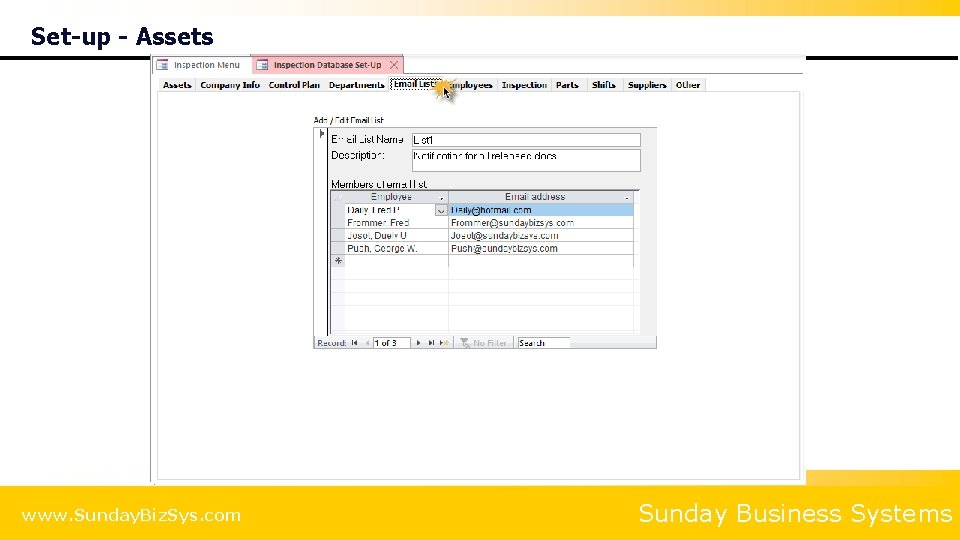
Set-up - Assets www. Sunday. Biz. Sys. com Sunday Business Systems

Set-up - Employees Log in password and Privileges www. Sunday. Biz. Sys. com Sunday Business Systems
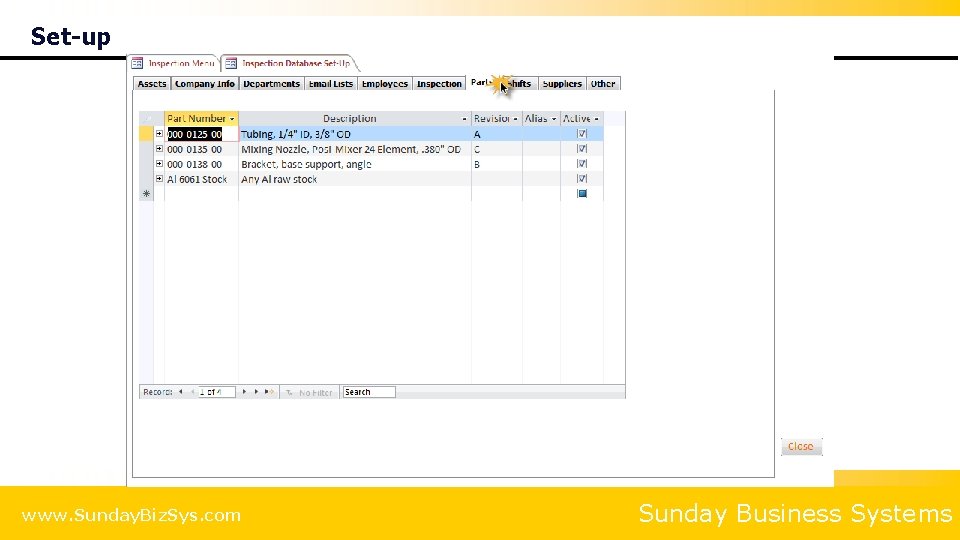
Set-up www. Sunday. Biz. Sys. com Sunday Business Systems
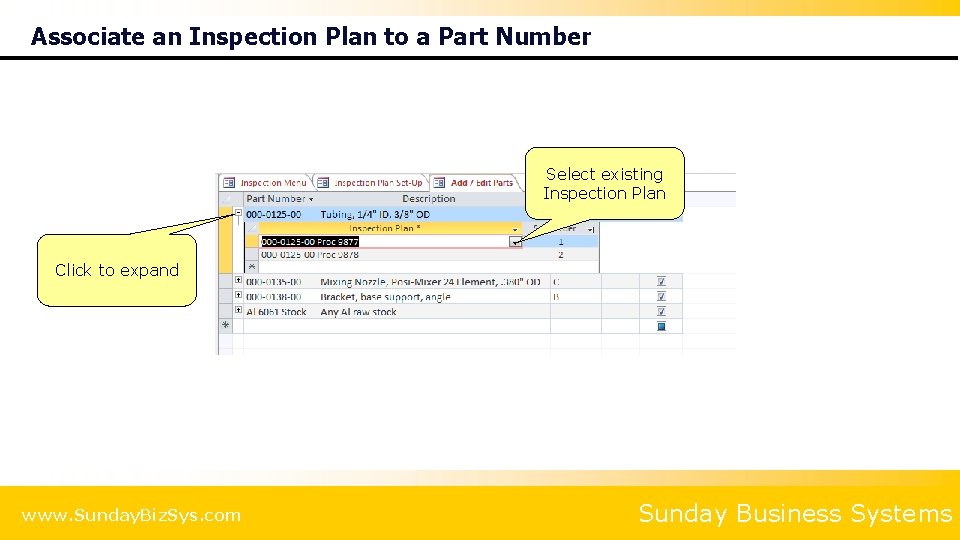
Associate an Inspection Plan to a Part Number Select existing Inspection Plan Click to expand www. Sunday. Biz. Sys. com Sunday Business Systems
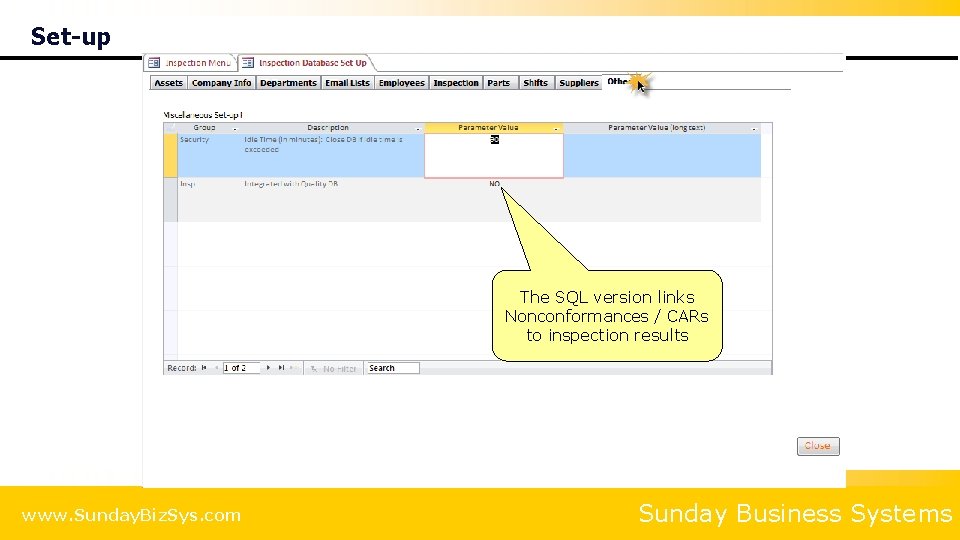
Set-up The SQL version links Nonconformances / CARs to inspection results www. Sunday. Biz. Sys. com Sunday Business Systems
Summary 4 The SBS Inspection Database is a cost effective tool to 8 Collect Data on = Incoming inspection = In-Process inspection = Final Inspection 8 Generate real time SPC charts 8 Manage your Control Plan 8 Analyze performance and develop improvement strategies 8 Save time and effort www. Sunday. Biz. Sys. com Sunday Business Systems
Additional Services 4 Data Import Service 8 Import legacy data from excel spreadsheets into your Database 4 Training Services 8 SBS offers instructor led, Web. Ex based, interactive training sessions 4 Customization 8 Talk to us about customizing the software to meet your needs! www. Sunday. Biz. Sys. com Sunday Business Systems

About SBS 4 Sunday Business Systems 8 Engaged in software sales and consulting services 8 Since 2004 4 Applies Lean Manufacturing principles to Quality Management Systems 4 Sells affordable and efficient software solutions to help implement ISO 9001: 2015 QMS 8 Document Control 8 Corrective and Preventive Actions 8 Risk Management 8 Audit Management 8 Employee Training 8 Control of calibrated equipment 8 Vendor Management 8 SPC 8 Communication / Continual improvement www. Sunday. Biz. Sys. com Sunday Business Systems

Fueling Small Business Efficiency Visit www. Sunday. Biz. Sys. com for: • Additional information • Free product demos • Pricing • Links to purchase software © 2019 Sunday Business Systems. All rights reserved. This presentation is for informational purposes only. Sunday Business Systems MAKES NO WARRANTIES, EXPRESS OR IMPLIED, IN THIS SUMMARY. Microsoft is a registered trademark of Microsoft Corporation in the United States and/or other countries.
- Slides: 48