
Sat Link 3 with Iridium Copyright OTT Hydromet

- Slides: 36
Sat. Link 3 with Iridium © Copyright OTT Hydromet 2016
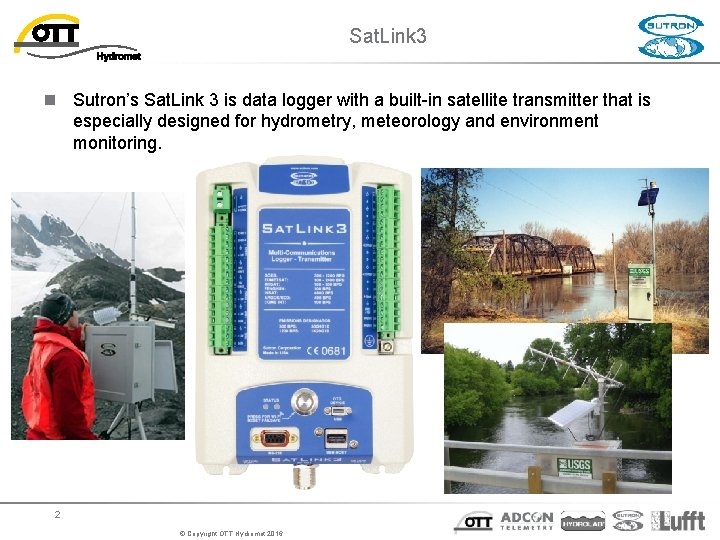
Sat. Link 3 n Sutron’s Sat. Link 3 is data logger with a built-in satellite transmitter that is especially designed for hydrometry, meteorology and environment monitoring. 2 © Copyright OTT Hydromet 2016
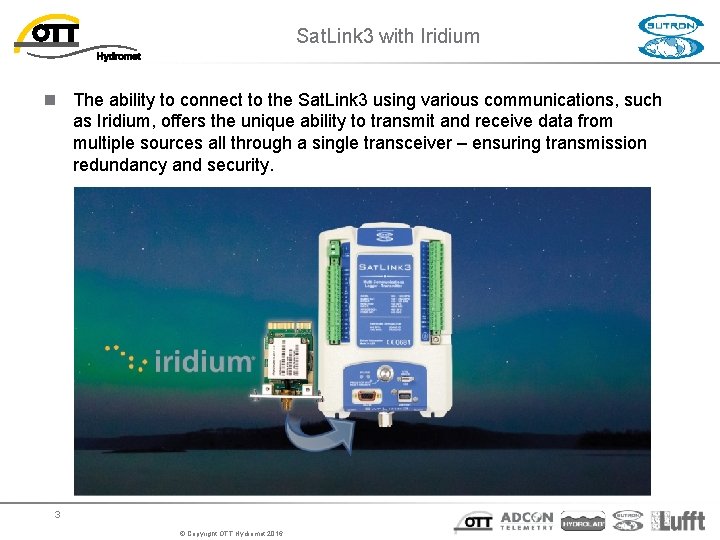
Sat. Link 3 with Iridium n The ability to connect to the Sat. Link 3 using various communications, such as Iridium, offers the unique ability to transmit and receive data from multiple sources all through a single transceiver – ensuring transmission redundancy and security. 3 © Copyright OTT Hydromet 2016
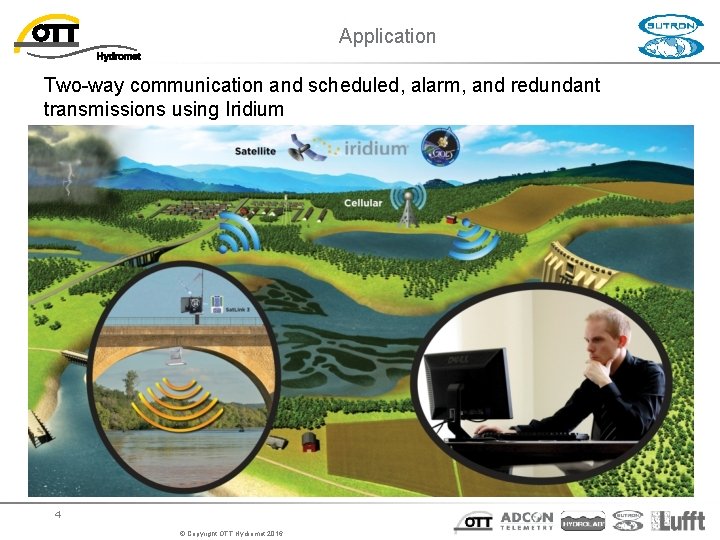
Application Two-way communication and scheduled, alarm, and redundant transmissions using Iridium 4 © Copyright OTT Hydromet 2016
Sat. Link 3 with Iridium – Key Benefits n More frequent transmission schedule for event monitoring n n Transmit via GOES most of the time and then go to Iridium under certain alarm conditions While in alarm collect and transmit more data more often n Two way communication to reduce maintenance costs, improve data capture, and allow for additional data products from the field n n n Reduce maintenance costs - reduction of a single field visit alone can cover the annual Iridium or cell communications costs for some stations. Improve data capture - the ability to “ask” for data that may be missing improves data capture so that data records are complete and do not have any gaps. Allow additional data products from the field - the ability to change a station setup remotely or ask for data not normally transmitted often provides valuable data to support scientific or emergency operations. n Redundant transmissions communication n Transmit via GOES and Iridium © Copyright OTT Hydromet 2016
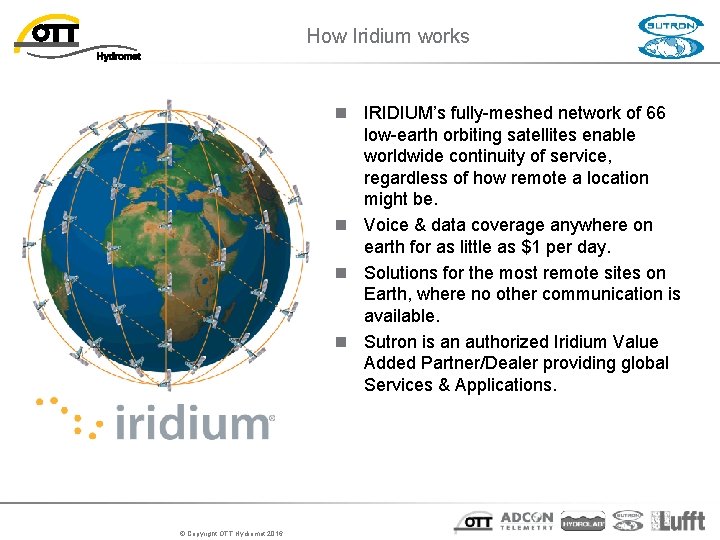
How Iridium works n IRIDIUM’s fully-meshed network of 66 low-earth orbiting satellites enable worldwide continuity of service, regardless of how remote a location might be. n Voice & data coverage anywhere on earth for as little as $1 per day. n Solutions for the most remote sites on Earth, where no other communication is available. n Sutron is an authorized Iridium Value Added Partner/Dealer providing global Services & Applications. © Copyright OTT Hydromet 2016
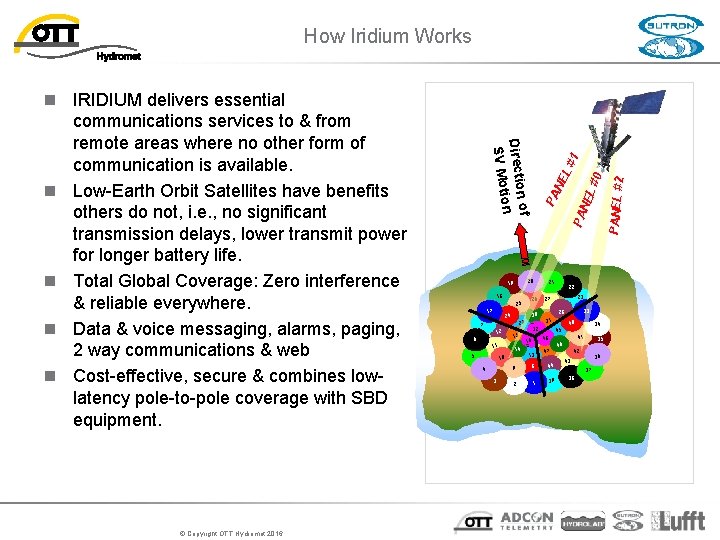
How Iridium Works © Copyright OTT Hydromet 2016 18 25 6 29 11 5 15 14 10 4 3 PA 21 13 8 2 1 33 28 40 34 45 41 48 9 23 31 32 16 22 27 47 44 39 35 46 42 36 43 37 38 PANEL #2 NE L# 0 L# NE 26 30 24 7 12 PA 20 19 17 1 n of Directio on SV Moti n IRIDIUM delivers essential communications services to & from remote areas where no other form of communication is available. n Low-Earth Orbit Satellites have benefits others do not, i. e. , no significant transmission delays, lower transmit power for longer battery life. n Total Global Coverage: Zero interference & reliable everywhere. n Data & voice messaging, alarms, paging, 2 way communications & web n Cost-effective, secure & combines lowlatency pole-to-pole coverage with SBD equipment.
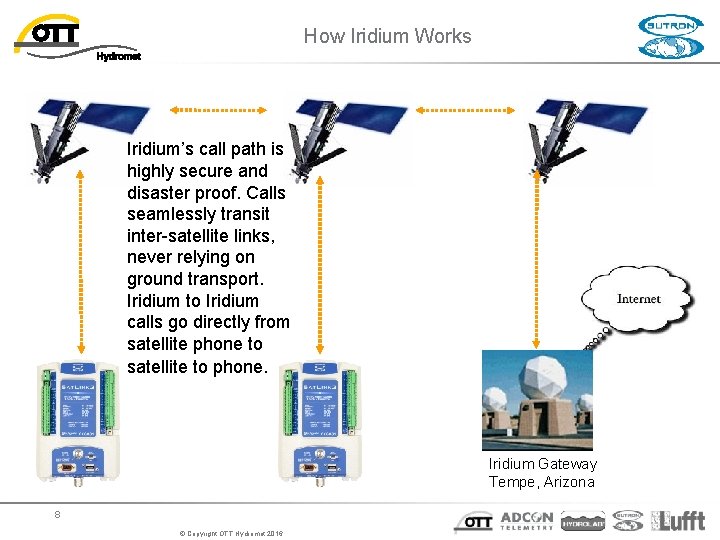
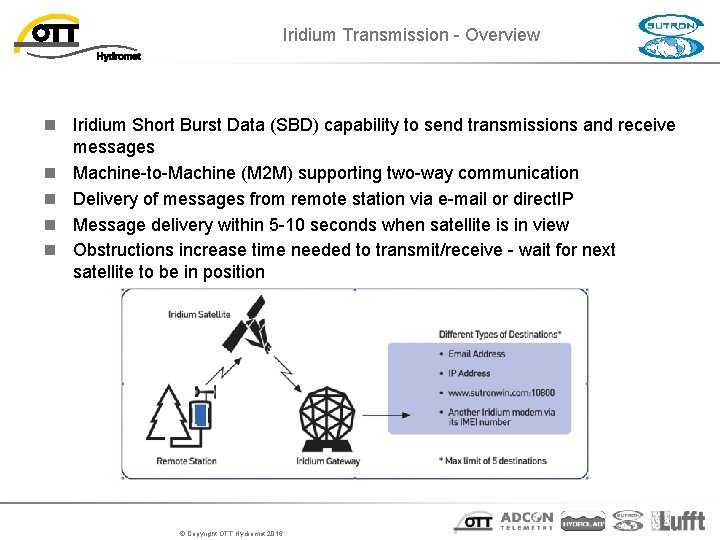
How Iridium Works Iridium’s call path is highly secure and disaster proof. Calls seamlessly transit inter-satellite links, never relying on ground transport. Iridium to Iridium calls go directly from satellite phone to satellite to phone. Iridium Gateway Tempe, Arizona 8 © Copyright OTT Hydromet 2016
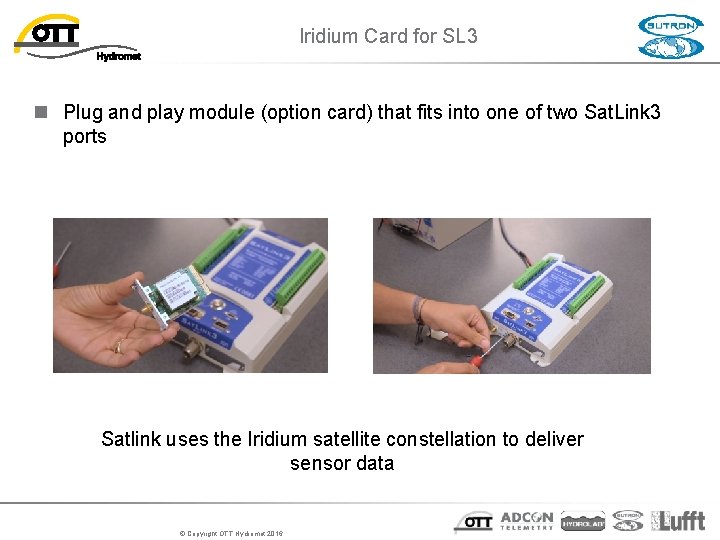
Iridium Card for SL 3 n Plug and play module (option card) that fits into one of two Sat. Link 3 ports Satlink uses the Iridium satellite constellation to deliver sensor data © Copyright OTT Hydromet 2016
SBD Iridium Transmission - Overview – Short Burst Data n Iridium Short Burst Data (SBD) capability to send transmissions and receive messages n Machine-to-Machine (M 2 M) supporting two-way communication n Delivery of messages from remote station via e-mail or direct. IP n Message delivery within 5 -10 seconds when satellite is in view n Obstructions increase time needed to transmit/receive - wait for next satellite to be in position © Copyright OTT Hydromet 2016
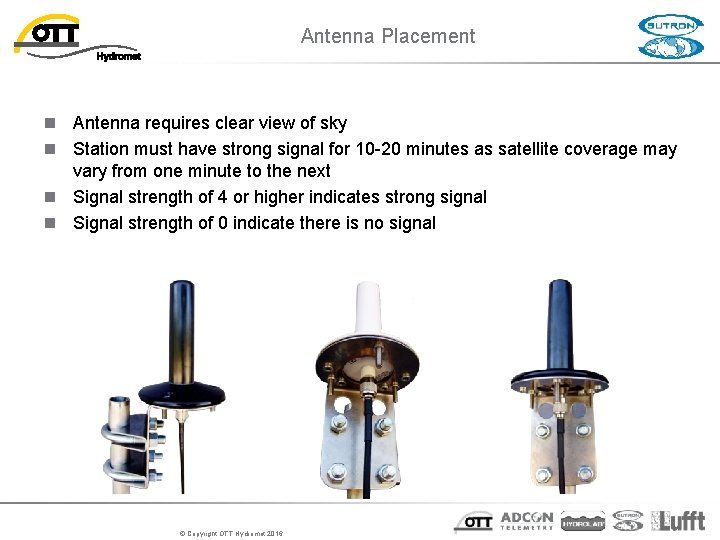
Antenna Placement n Antenna requires clear view of sky n Station must have strong signal for 10 -20 minutes as satellite coverage may vary from one minute to the next n Signal strength of 4 or higher indicates strong signal n Signal strength of 0 indicate there is no signal © Copyright OTT Hydromet 2016
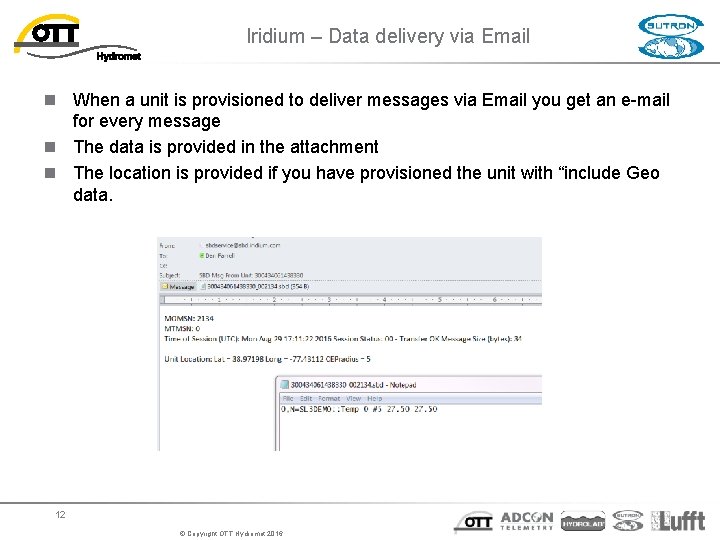
Iridium – Data delivery via Email n When a unit is provisioned to deliver messages via Email you get an e-mail for every message n The data is provided in the attachment n The location is provided if you have provisioned the unit with “include Geo data. 12 © Copyright OTT Hydromet 2016
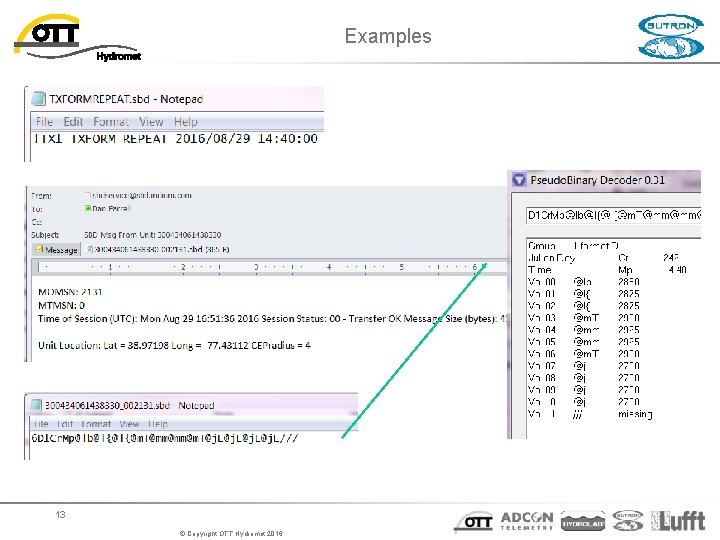
Examples 13 © Copyright OTT Hydromet 2016
n DELIVERY DESTINATIONS: This is where the SBD device should deliver its data. One destination is required and up to 5 are supported. Wildcard characters cannot be used. Examples of valid destinations (by delivery method) are shown below: - Direct IP: 168. 45. 34. 4: 10921 (NOTE: The port is required) - E-mail: Tom@Vendor. Domain. com - SBD Device: 300040100001230 INCLUDE GEO DATA: Geo data is the last known good location (latitude and longitude) of the device. When this option is enabled, Geo Data is included in the messages content. By default it is enabled for all the delivery destinations. MO ACK: Mobile Originated (MO) Acknowledgement. This setting is used in conjunction with a Direct IP Delivery Destination. The default setting is off. When checked on, the Gateway expects to receive an acknowledgement from the receiving server that it has received the message. If the Gateway does not receive an acknowledgement, it will attempt to re-deliver the message for 12 hours. No other messages will be delivered to the receiving server until the first message is acknowledged. ***Don’t use this*** 14 © Copyright OTT Hydromet 2016
n MOBILE TERMINATED (MT) DETAILS: provide white list capability for inbound messages. You can specify any combination of E-mail, Domain, or Direct IP sources which are permitted to send data to the destination IMEI. Up to 10 MT Filters are supported. Once an entry is specified for an IMEI, all MT payloads from sources not listed will be rejected. Wildcard characters are supported. Some examples of correctly formatted e-mail filters are shown below: - E-mail Address: Tom@Vendor. Domain. com - Wildcard: *Smith@Vendor. Domain. com, Tom@Backup. Domain. * Some examples of correctly formatted filters are shown below: - Domain: Vendor. Domain. com - Wildcard: *Domain. com Some examples of correctly formatted IP addresses are shown below: - IP Address: 168. 45. 34. 4 - Wildcard: *. 45. 34. 9, 168. 45. 34. * 15 © Copyright OTT Hydromet 2016
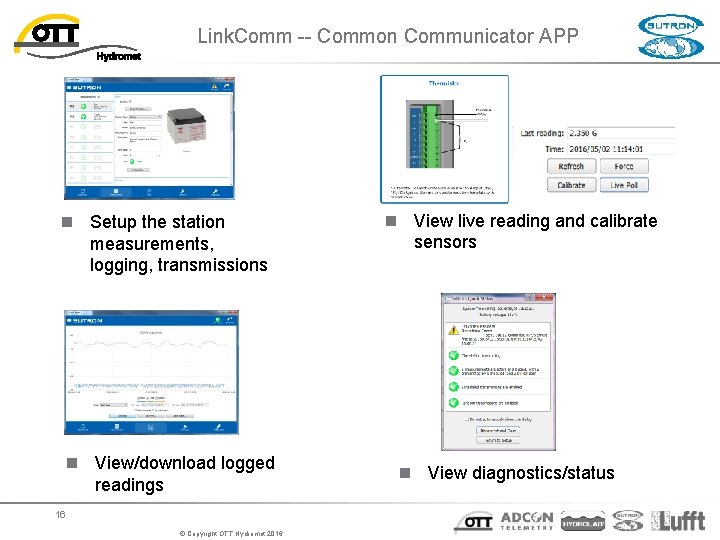
Link. Comm -- Common Communicator APP n Setup the station measurements, logging, transmissions n View/download logged readings 16 © Copyright OTT Hydromet 2016 n View live reading and calibrate sensors n View diagnostics/status
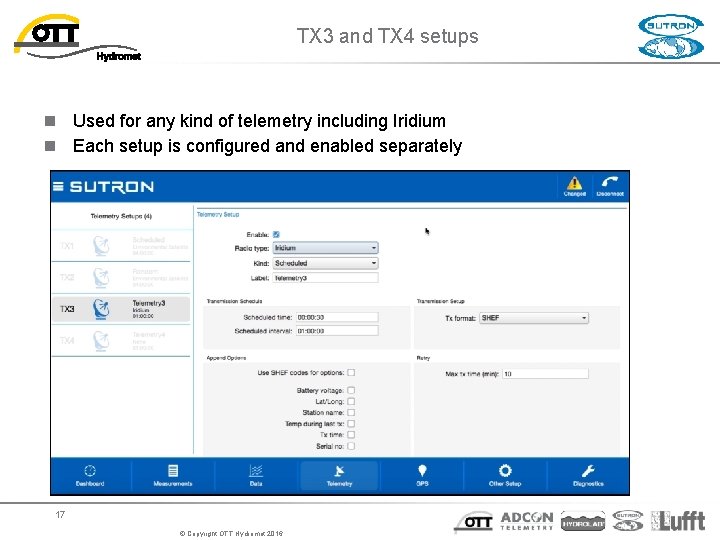
TX 3 and TX 4 setups n Used for any kind of telemetry including Iridium n Each setup is configured and enabled separately 17 © Copyright OTT Hydromet 2016
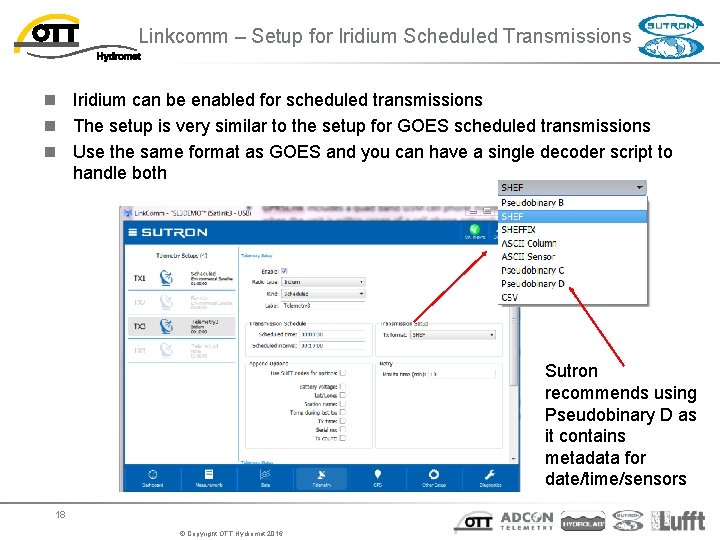
Linkcomm – Setup for Iridium Scheduled Transmissions n Iridium can be enabled for scheduled transmissions n The setup is very similar to the setup for GOES scheduled transmissions n Use the same format as GOES and you can have a single decoder script to handle both Sutron recommends using Pseudobinary D as it contains metadata for date/time/sensors 18 © Copyright OTT Hydromet 2016
Iridium Transmissions n Scheduled n n n Scheduled time: when modem is turned on. Modem acquires connection (typ. < 1 minute) and then completes the data transfer. Transmissions may be delayed by a random time of up to 30 seconds. Scheduled interval: how often transmissions occur NOTE: Iridium transmissions do not happen at the exact time they were schduled for. 19 © Copyright OTT Hydromet 2016
Iridium Alarm Transmissions n Tx In/Out– send data as soon as data goes in and out of alarm n Setting Tx Data Content to Last ensures the reading that caused the alarm is transmitted n Tx In Onlyn Setting Alarm logging to every reading and Tx Content to Last where the number of values should equal the number of measurements that will occur within the alarm transmission interval, e. g. , alarm transmission interval is 30 minutes, measurement interval is 5 minutes, the n umber of values should be 6 – Assumes logging interval is different than schedule interval for measurement 20 © Copyright OTT Hydromet 2016
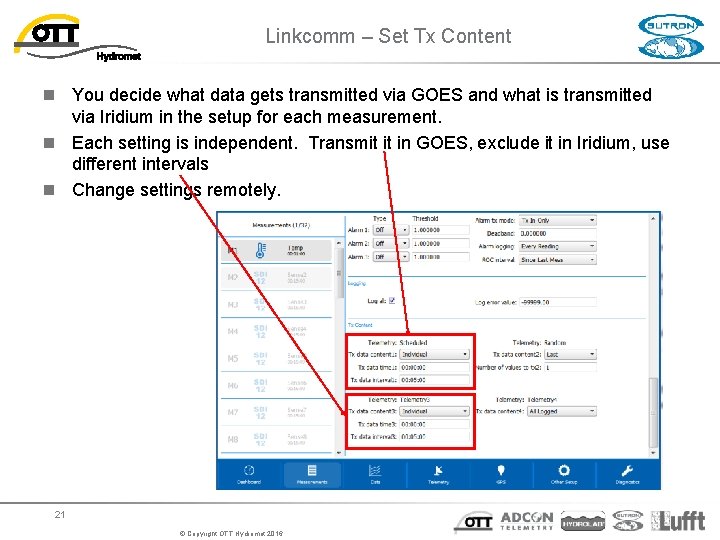
Linkcomm – Set Tx Content n You decide what data gets transmitted via GOES and what is transmitted via Iridium in the setup for each measurement. n Each setting is independent. Transmit it in GOES, exclude it in Iridium, use different intervals n Change settings remotely. 21 © Copyright OTT Hydromet 2016
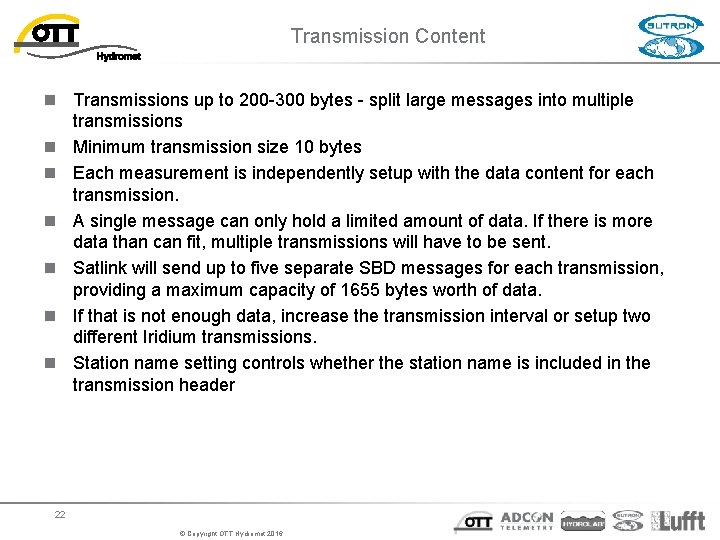
Transmission Content n Transmissions up to 200 -300 bytes - split large messages into multiple transmissions n Minimum transmission size 10 bytes n Each measurement is independently setup with the data content for each transmission. n A single message can only hold a limited amount of data. If there is more data than can fit, multiple transmissions will have to be sent. n Satlink will send up to five separate SBD messages for each transmission, providing a maximum capacity of 1655 bytes worth of data. n If that is not enough data, increase the transmission interval or setup two different Iridium transmissions. n Station name setting controls whether the station name is included in the transmission header 22 © Copyright OTT Hydromet 2016
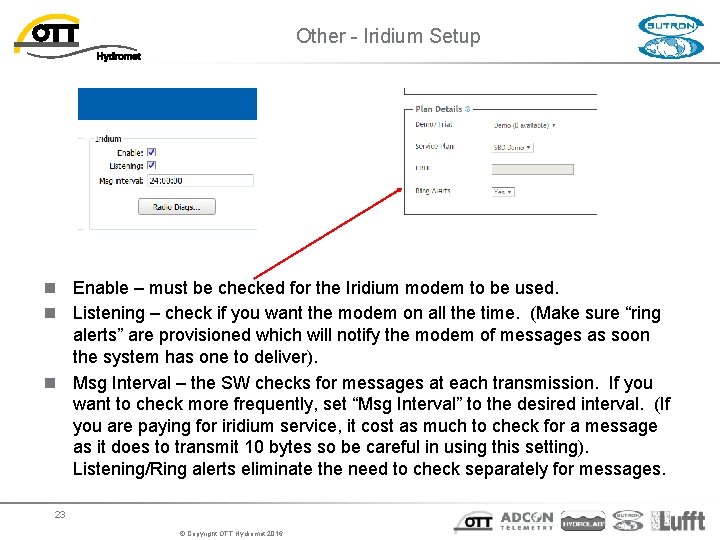
Other - Iridium Setup n Enable – must be checked for the Iridium modem to be used. n Listening – check if you want the modem on all the time. (Make sure “ring alerts” are provisioned which will notify the modem of messages as soon the system has one to deliver). n Msg Interval – the SW checks for messages at each transmission. If you want to check more frequently, set “Msg Interval” to the desired interval. (If you are paying for iridium service, it cost as much to check for a message as it does to transmit 10 bytes so be careful in using this setting). Listening/Ring alerts eliminate the need to check separately for messages. 23 © Copyright OTT Hydromet 2016
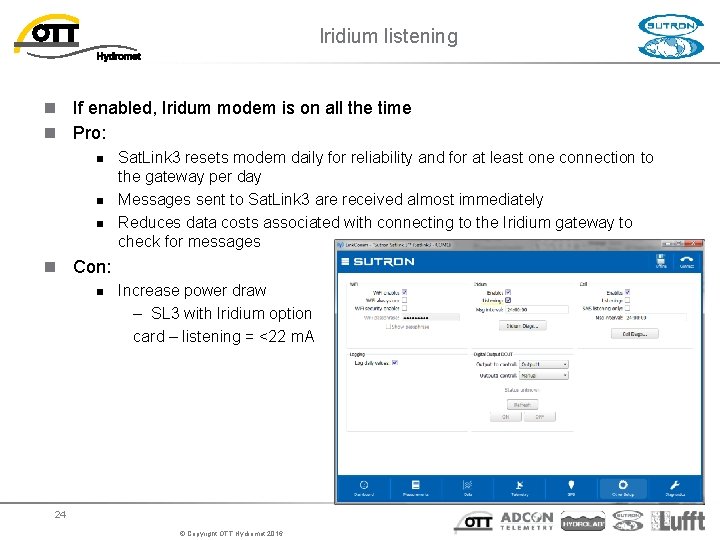
Iridium listening n If enabled, Iridum modem is on all the time n Pro: n n n Sat. Link 3 resets modem daily for reliability and for at least one connection to the gateway per day Messages sent to Sat. Link 3 are received almost immediately Reduces data costs associated with connecting to the Iridium gateway to check for messages n Con: n Increase power draw – SL 3 with Iridium option card – listening = <22 m. A 24 © Copyright OTT Hydromet 2016
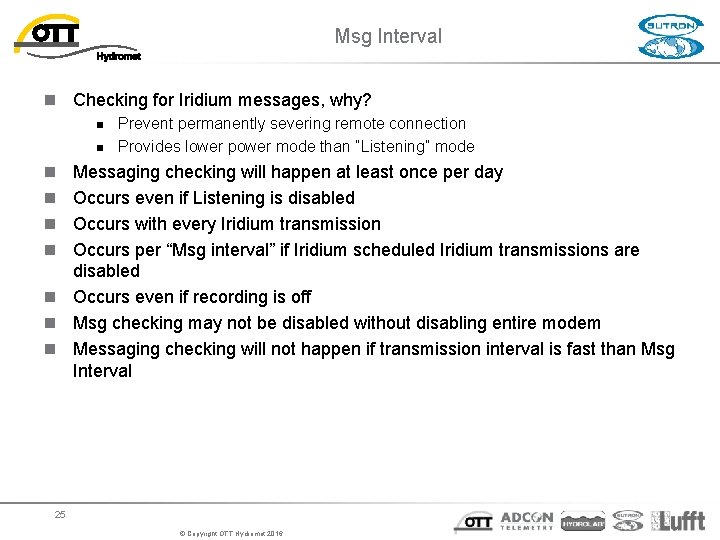
Msg Interval n Checking for Iridium messages, why? n n Prevent permanently severing remote connection Provides lower power mode than “Listening” mode n n Messaging checking will happen at least once per day Occurs even if Listening is disabled Occurs with every Iridium transmission Occurs per “Msg interval” if Iridium scheduled Iridium transmissions are disabled n Occurs even if recording is off n Msg checking may not be disabled without disabling entire modem n Messaging checking will not happen if transmission interval is fast than Msg Interval 25 © Copyright OTT Hydromet 2016
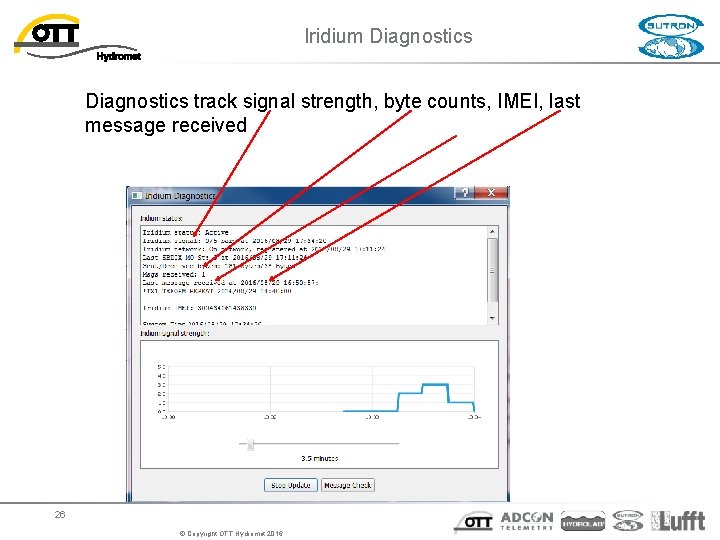
Iridium Diagnostics track signal strength, byte counts, IMEI, last message received 26 © Copyright OTT Hydromet 2016
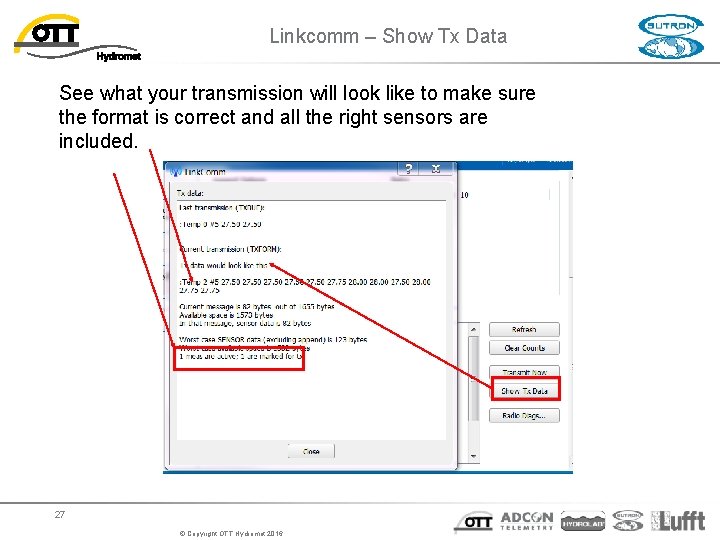
Linkcomm – Show Tx Data See what your transmission will look like to make sure the format is correct and all the right sensors are included. 27 © Copyright OTT Hydromet 2016
Sending Messages to Sat. Link 3 n Satlink with Iridium can have messages sent to it via emails that get routed through the Iridium system. n n If listening is enabled – receives messages immediately If listening is disabled – Sat. Link 3 checks for messages when it makes a transmission Can be setup to periodically check for messages Sat. Link 3 will always check every 24 hours 28 © Copyright OTT Hydromet 2016
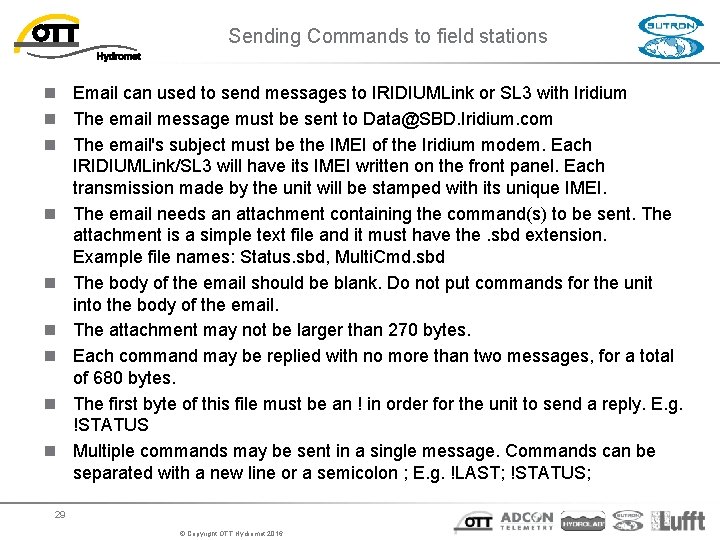
Sending Commands to field stations n Email can used to send messages to IRIDIUMLink or SL 3 with Iridium n The email message must be sent to Data@SBD. Iridium. com n The email's subject must be the IMEI of the Iridium modem. Each IRIDIUMLink/SL 3 will have its IMEI written on the front panel. Each transmission made by the unit will be stamped with its unique IMEI. n The email needs an attachment containing the command(s) to be sent. The attachment is a simple text file and it must have the. sbd extension. Example file names: Status. sbd, Multi. Cmd. sbd n The body of the email should be blank. Do not put commands for the unit into the body of the email. n The attachment may not be larger than 270 bytes. n Each command may be replied with no more than two messages, for a total of 680 bytes. n The first byte of this file must be an ! in order for the unit to send a reply. E. g. !STATUS n Multiple commands may be sent in a single message. Commands can be separated with a new line or a semicolon ; E. g. !LAST; !STATUS; 29 © Copyright OTT Hydromet 2016
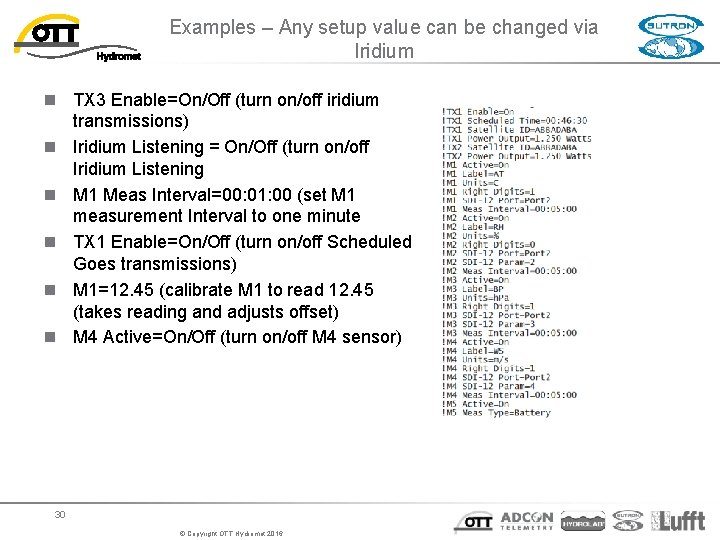
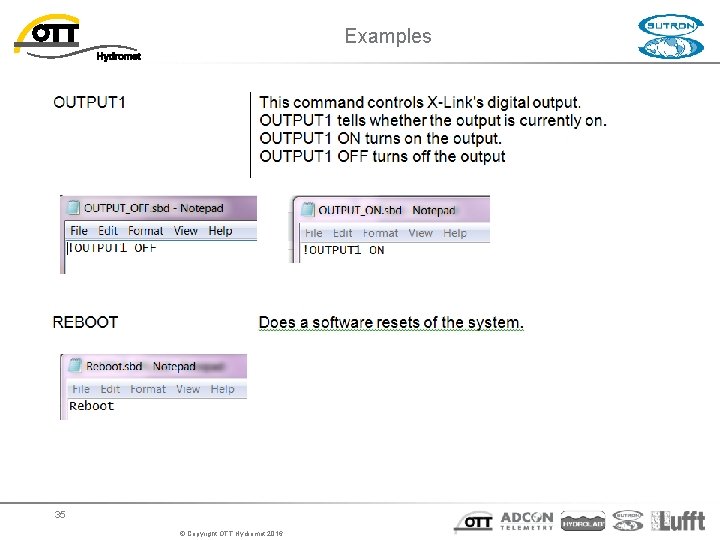
Examples – Any setup value can be changed via Iridium n TX 3 Enable=On/Off (turn on/off iridium transmissions) n Iridium Listening = On/Off (turn on/off Iridium Listening n M 1 Meas Interval=00: 01: 00 (set M 1 measurement Interval to one minute n TX 1 Enable=On/Off (turn on/off Scheduled Goes transmissions) n M 1=12. 45 (calibrate M 1 to read 12. 45 (takes reading and adjusts offset) n M 4 Active=On/Off (turn on/off M 4 sensor) 30 © Copyright OTT Hydromet 2016
Email Messages n Messages are treated like command line input with a few differences n n n n Some commands cannot be executed via a message (e. g. log download). Other commands may have a differently formatted output (in order to reduce message size). Email message must be sent to Data@SBD. Iridium. com, where the subject line is the IMEI of the Iridium modem Email needs an attachment containing the command(s) to be sent, the body of the email should be blank Attachment is a simple text file, no larger than 270 bytes, with a. sbd extension Each command may be replied with no more than two messages, for a total of 680 bytes. The first byte of this file must be an ! in order for Satlink to send a reply. E. g. !STATUS Multiple commands may be sent in a single message. Commands can be separated with a new line or a semicolon ; E. g. !LAST; !STATUS; 31 © Copyright OTT Hydromet 2016
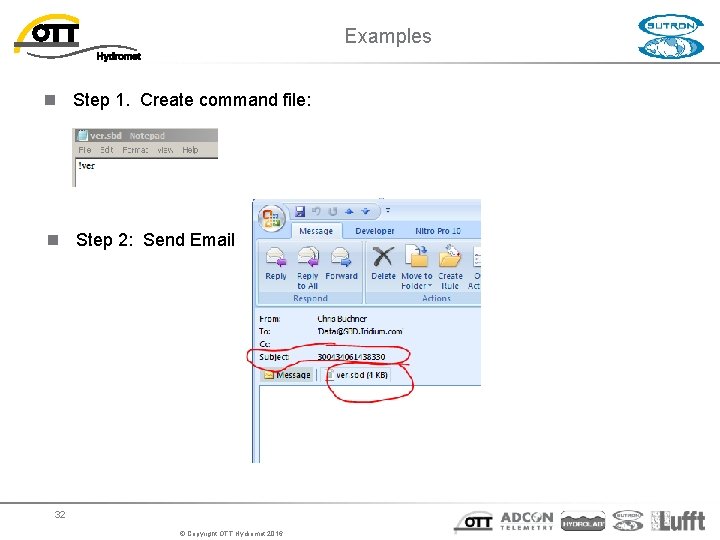
Examples n Step 1. Create command file: n Step 2: Send Email 32 © Copyright OTT Hydromet 2016
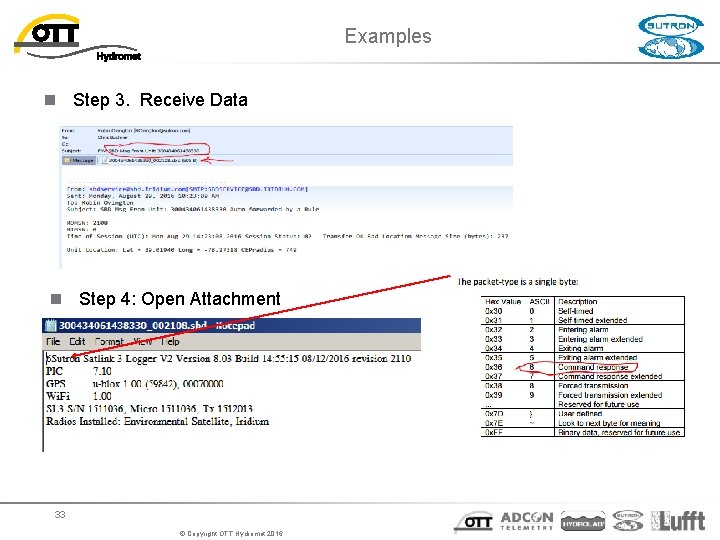
Examples n Step 3. Receive Data n Step 4: Open Attachment 33 © Copyright OTT Hydromet 2016
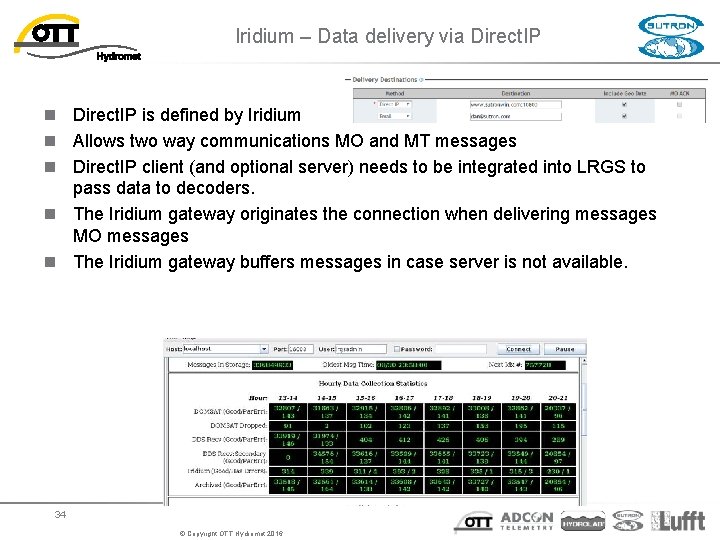
Iridium – Data delivery via Direct. IP n Direct. IP is defined by Iridium n Allows two way communications MO and MT messages n Direct. IP client (and optional server) needs to be integrated into LRGS to pass data to decoders. n The Iridium gateway originates the connection when delivering messages MO messages n The Iridium gateway buffers messages in case server is not available. 34 © Copyright OTT Hydromet 2016
Examples 35 © Copyright OTT Hydromet 2016
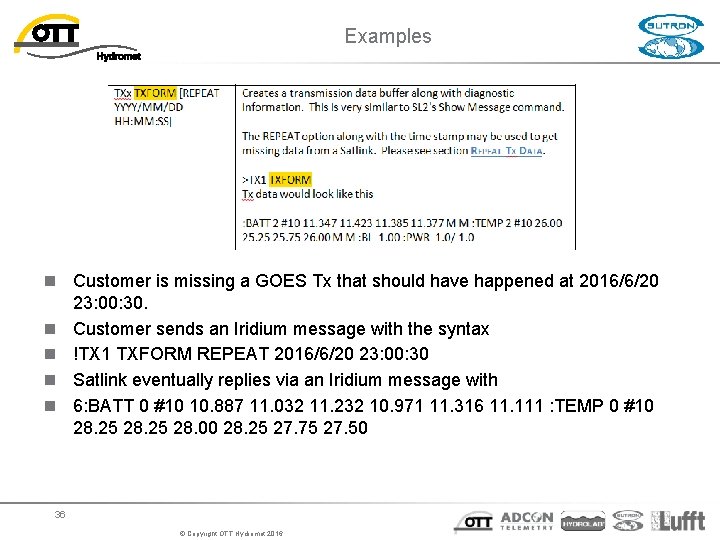
Examples n Customer is missing a GOES Tx that should have happened at 2016/6/20 23: 00: 30. n Customer sends an Iridium message with the syntax n !TX 1 TXFORM REPEAT 2016/6/20 23: 00: 30 n Satlink eventually replies via an Iridium message with n 6: BATT 0 #10 10. 887 11. 032 11. 232 10. 971 11. 316 11. 111 : TEMP 0 #10 28. 25 28. 00 28. 25 27. 75 27. 50 36 © Copyright OTT Hydromet 2016