
SAP TERP 10 Preparation Presentation 0 Dr Gbor
SAP TERP 10 Preparation Presentation 0 Dr. Gábor Pauler, Associate Professor, Private Entrepeneur Tax Reg. No. : 63673852 -3 -22 Bank account: 50400113 -11065546 Location: 1 st Széchenyi str. 7666 Pogány, Hungary Tel: +36 -309 -015 -488 E-mail: pauler@t-online. hu
Content of the Presentation Introduction Course agenda Availability of course materials Grading Setting up connection to UCC Magdeburg Server SAP Scenarios Definition Usage Troubleshooting References List of Object/GUI symbols
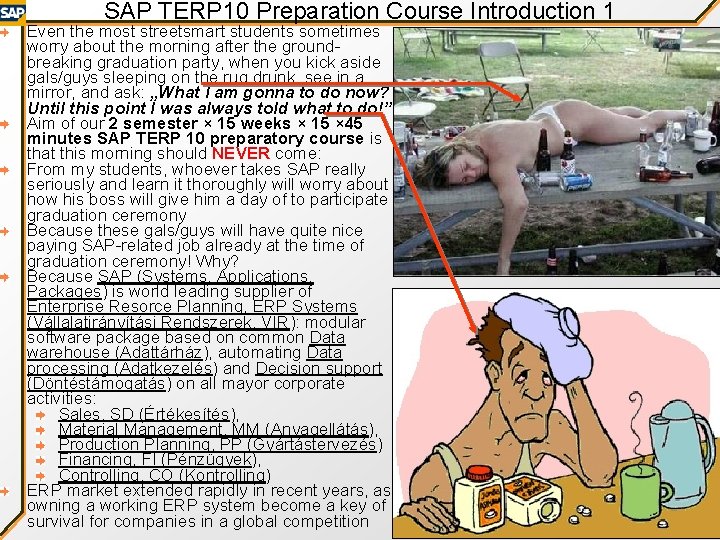
SAP TERP 10 Preparation Course Introduction 1 Even the most streetsmart students sometimes worry about the morning after the groundbreaking graduation party, when you kick aside gals/guys sleeping on the rug drunk, see in a mirror, and ask: „What I am gonna to do now? Until this point I was always told what to do!” Aim of our 2 semester × 15 weeks × 15 × 45 minutes SAP TERP 10 preparatory course is that this morning should NEVER come: From my students, whoever takes SAP really seriously and learn it thoroughly will worry about how his boss will give him a day of to participate graduation ceremony Because these gals/guys will have quite nice paying SAP-related job already at the time of graduation ceremony! Why? Because SAP (Systems, Applications, Packages) is world leading supplier of Enterprise Resorce Planning, ERP Systems (Vállalatirányítási Rendszerek, VIR): modular software package based on common Data warehouse (Adattárház), automating Data processing (Adatkezelés) and Decision support (Döntéstámogatás) on all mayor corporate activities: Sales, SD (Értékesítés), Material Management, MM (Anyagellátás), Production Planning, PP (Gyártástervezés) Financing, FI (Pénzügyek), Controlling, CO (Kontrolling) ERP market extended rapidly in recent years, as owning a working ERP system become a key of survival for companies in a global competition
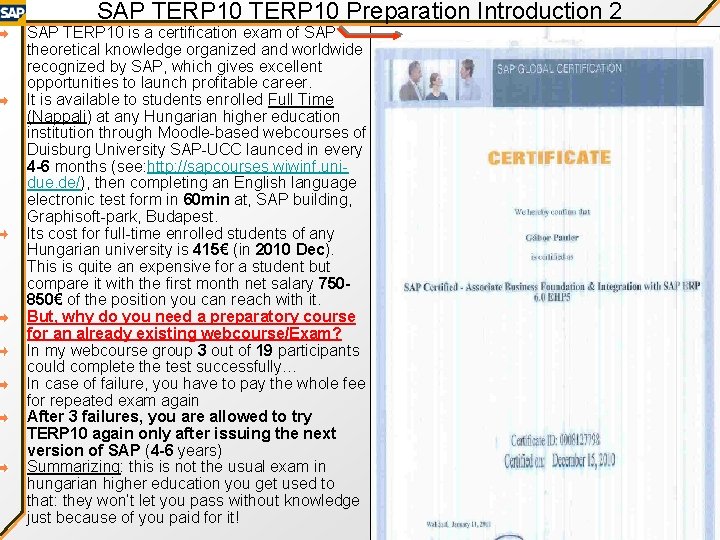
SAP TERP 10 Preparation Introduction 2 SAP TERP 10 is a certification exam of SAP theoretical knowledge organized and worldwide recognized by SAP, which gives excellent opportunities to launch profitable career. It is available to students enrolled Full Time (Nappali) at any Hungarian higher education institution through Moodle-based webcourses of Duisburg University SAP-UCC launced in every 4 -6 months (see: http: //sapcourses. wiwinf. unidue. de/), then completing an English language electronic test form in 60 min at, SAP building, Graphisoft-park, Budapest. Its cost for full-time enrolled students of any Hungarian university is 415€ (in 2010 Dec). This is quite an expensive for a student but compare it with the first month net salary 750850€ of the position you can reach with it. But, why do you need a preparatory course for an already existing webcourse/Exam? In my webcourse group 3 out of 19 participants could complete the test successfully… In case of failure, you have to pay the whole fee for repeated exam again After 3 failures, you are allowed to try TERP 10 again only after issuing the next version of SAP (4 -6 years) Summarizing: this is not the usual exam in hungarian higher education you get used to that: they won’t let you pass without knowledge just because of you paid for it!
SAP TERP 10 Preparation Introduction 3 Why TERP 10 is so hard? First of all, there are damn lot of course materials: you should read, understand learn 1600 pages of full-text material in PDF, plus it requires ca. 30 days× 6 hours practicing with SAP GUI, and ca. 11 days × 16 hours memorization for the final test (NOT just reading through once while listening Lady Gaga in the meantime…) Evaluation of the course material of Duisburg University: There are pretty good practice tasks, But is English is sometime not really straightforward for Hungarian ear as this was written by Pakistani authors in Germany, There were several authors of several chapters and they are not fully synchronized, Software handling is very hard to follow, as there are not enogh screenshots of a damn difficult user interface There are optional materials in „small letters” which are still requested in the exam, Big overview maps of topics are sometimes available only in unreadable inferior resolution There are trial test sequences, but sometimes they are faulty, There are some test questions which are not covered by course material How the current preparatory course can help you? : Our course material is also in English, as the test is in English, and most companies request you handling SAP in English or German, BUT this is written by Hungarian logic, and will be presented, explained, and consulted in Hungarian! Instead of full-text PDF textbooks, we provide more interactive non-full text PPTs whith thorough software handling screenshots and animations, while short form Notes of course material is provided in Word DOC Overview maps essential for final phase of memorization are prepared by the innovative Hungarian Prezi software (see: http: //prezi. com/ ) where resolution of maps can be changed more flexibly, enabling rapid shifting from details to whole picture

Course Agenda Unit Presentation Quiz % Practice Home Assign. % - - Install SAP GUI 5 Set SAP GUI 5 Create semi 5 Procurement: set organiz, and master finished mat 10 Semester 1: 15 weeks× 4× 45 min 0 Introduction, Basic info - 1 SAP history, architecture, SOA + 2 Procurement: Organization, + Plot 3 Procurement: Process + 10 Procurement: Invoicing 4 Mat. planning: Master data + 10 Mat. planning: BOM, Routings 10 5 Mat. planning: SOP, MRP + 10 Mat. planning: Sales order 10 6 PLM: Master data + 10 PLM: Material classification Product structure 5 SAP IDES, GUI Flex report Re-run MRP 10 Semester 2: 15 weeks× 4× 45 min 7 PP: Manufacturing execution + 5 PP: Manufacturing execution 8 MM: Warehouse managmt. + 5 MM: Warehouse managmt. - 5 9 SD: Sales scenario + 5 SD: Sales scenario 5 10 HCM: Personell managmt. + 5 HCM: Personell managmt. HCM case study 11 FI: Financial accounting + 12 CO: Managerial accounting + 10 CO: Managerial accounting. CO homework 10 13 PS: Project system 10 + 10 FI: Financial accounting PP: Manuf. exec. SD case study PS Case study 5 5 10
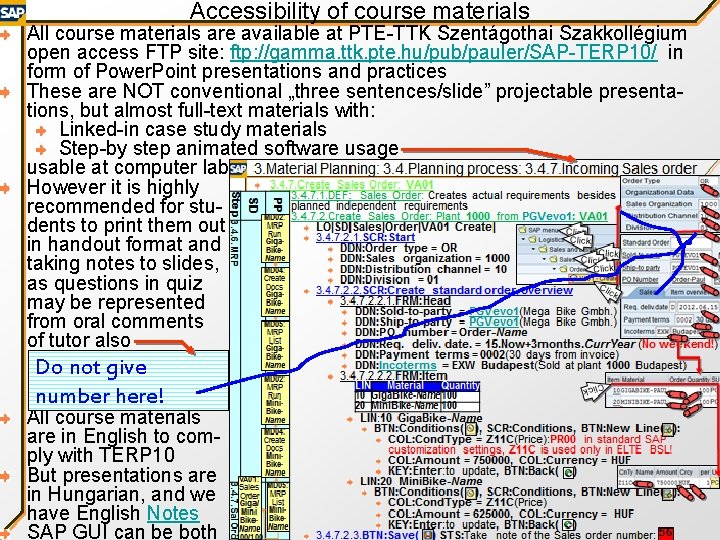
Accessibility of course materials All course materials are available at PTE-TTK Szentágothai Szakkollégium open access FTP site: ftp: //gamma. ttk. pte. hu/pub/pauler/SAP-TERP 10/ in form of Power. Point presentations and practices These are NOT conventional „three sentences/slide” projectable presentations, but almost full-text materials with: Linked-in case study materials Step-by step animated software usage usable at computer lab However it is highly recommended for students to print them out in handout format and taking notes to slides, as questions in quiz may be represented from oral comments of tutor also Do not give number here! All course materials are in English to comply with TERP 10 But presentations are in Hungarian, and we have English Notes SAP GUI can be both
Grading Mid-semester requirements: 2 × 25 points = 50 points from 2 group project presentations (+12 extra points/presentation/person for understandable english language presentation): Try to find real company/institution with serial production/ non-virtual service involving material flow Alternatively you can try to set up an innovative startup End-of-semester rquirements: 50 points from oral exam with pre-published set of 20 jump-in questions (basic terms) + pre bublished set of 20 topics (separate for advanced and basic students) Grading limits: 0. . 49 points: Fail (1), not recommended to try TERP 10 50. . 59 points: Sufficit (2), not recommended to try TERP 10 60. . 69 points: Medium (3), not recommended to try TERP 10 70. . 79 points: Fair (4) 80. . 100 points: Excellent (5) Consultation possibilities: Wednesdays 13. 30 -14. 00, room F 104, Department of Information technology, Faculty of science, please arrange meeting in advance by E-mail: pauler@t-online. hu Tracking partial results, messages from tutor at mid-semester: Please ask for joining to the closed FB group Hungassembly https: //www. facebook. com/groups/317137848667105/
Content of the Presentation Introduction Course agenda Availability of course materials Grading Setting up connection to UCC Magdeburg Server SAP Scenarios Definition Usage Troubleshooting References List of Object/GUI symbols

Set up connection of SAP GUI to UCC Magdeburg IDES Server 1 DEF: UCC Magdeburg IDES Server: SAP IDES tutorial server tailed to German settings and with sample data. We will use this to learn handling of SAP modules and ABAP-programming Preliminary activity setting up connection from home/ wifi connection: You have to do it once in a day from an IP you are using: https: //s 01 z. ucc. ovgu. de/remote_acce ss# BTN: Start login TBX: User = U 1 HU 001? ? ? TBX: Password = ? ? ? BTN: Activate XXX (You will need SAP UCC U-user to open your IP, which will be granted for you via e-mail after course registration) Clic k Click
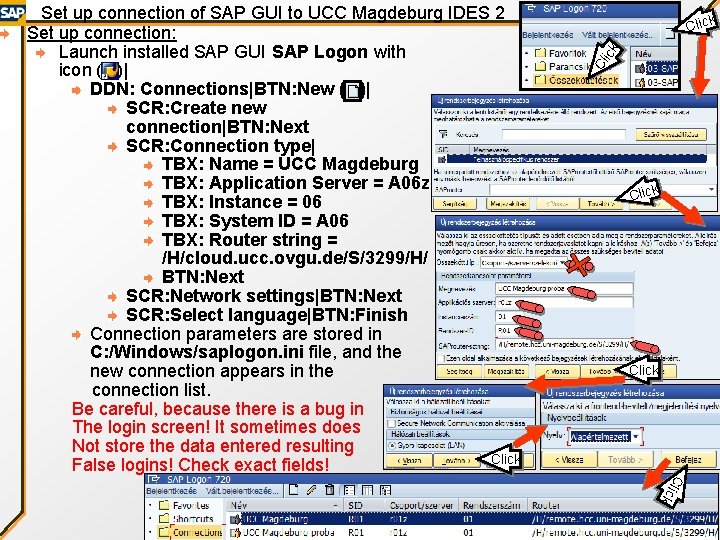
Cl ic k Click ck Cli Set up connection of SAP GUI to UCC Magdeburg IDES 2 Set up connection: Launch installed SAP GUI SAP Logon with icon ( )| DDN: Connections|BTN: New ( )| SCR: Create new connection|BTN: Next SCR: Connection type| TBX: Name = UCC Magdeburg TBX: Application Server = A 06 z TBX: Instance = 06 TBX: System ID = A 06 TBX: Router string = /H/cloud. ucc. ovgu. de/S/3299/H/ BTN: Next SCR: Network settings|BTN: Next SCR: Select language|BTN: Finish Connection parameters are stored in C: /Windows/saplogon. ini file, and the new connection appears in the connection list. Be careful, because there is a bug in The login screen! It sometimes does Not store the data entered resulting Click False logins! Check exact fields!

Set up connection of SAP GUI to UCC Magdeburg IDES Server 3 Click k Clic k Cl ic Login to UCC Magdeburg: SAP Logon|DDN: Connection = UCC Magdeburg| BTN: Connect| TBX: Mandant = 912 TBX: User = PTTK-NEPTID (Only the first 6 chars!) TBX: Password = ttkhallg (You have to change it at first login, then you should remember your own password) TBX: Language = EN (English) KEY: Enter
Definition of SAP Scenarios (Szcenárió, Forgatókönyv) mean complex business processes executed through series of Transactions (Tranzakció, SAP-program), used to teach working of SAPmodules. Each scenario has: Precondition (Előfeltétel): what other scenarios are necsessary to run previously Organizational background (Szervezeti háttér): what kind of organizational structure neccessary to run the scenario Plot (Akcióterv): a plan of what changes/goals the scenario should complete Master data input (Törzsadat bevitel): static, slowly changing data is necessary to set Business Process (Üzleti folyamat ): at wich milestone, which transaction from which module should be launced at wich settings Output (Eredmény): displaying/reporting results You will experience running the scenarios that SAP R/3 GUI is sometimes shockingly complex and overcomplicated. Why is that? At each Data Warehouse (Adattárház) effective Data Storage Structure (Adattárolási struktúra) can be seen on Entity Relationship Diagram, ERD (Egyedkapcsolati diagramm) of the underlying Normalized (Nomalizált) Relational database (Relációs adatbázis) is completely different from optimal structure of electronic Forms (Űrlapok) at GUI: how user can conveniently overview business processes The structural difference is usually bridged by 100 s of View Table SQL Queries (Nézettáblás SQL lekérdezések), which collect data source of forms from database tables, AND write back changes made by user on forms into database tables. However they are expensive to develope Therefore structure of forms of SAP transactions called Dynpro (Dinpró) are much more close to storage structure than optimal structure of users process overview, so even the most simple business processes (eg. Ordering a raw material, or selling some finished product) are performed sometimes series of 10 -30 transactions! Of course there are utilities in SAP to assemble series of Dynpros to perform business processes, but this is still very far from Wizards (Varázsló) usual in other software, which lead unexperienced user through the whole process with explanations and advices of Logic interdependencies (Logikai összefüggések) of data. Why? Developing wizards is damn expensive, and there should be 100000 s of them SAP R/3 is for big companies, where single process is distributed among 20 -30 employees doing just 1 phase of it, so they have to learn only 1 -2 transactions

Usage of SAP Scenarios Instead wizards, there are SAP Tutor simulations, but they You should take note just play scenarios like a movie, from one set of data, them in the red text without any interactivity or explanations boxes 140000531 How we present SAP scenarios in our course material to in your PPT file and make it more understandable: We will use 3 parallel views on save it, as SAP soour slides: metimes remembers At left: We can see the onoing process at flowchart the last code in the In the middle: There is the explanation of settings of next transaction, transactions and data interdependencies sometimes not! At right: There is animated screenshots of handling of Click current transaction Practicing scenarios, we should follow the rules below: Transactions should be launched from SAP menu, instead of writing their code in the textbox. The latter is faster, but at the former we will have better picture about the – sometimes irrational – complex structure of SAP menu of 1000 s of items Use Technical Names (Műszaki nevek): to show transaction Click codes in SAP menu also, set at SAP GUI|Kiegészítések|Beállí-tások (Extensions|Options) menu, checking Műszaki nevek használata (Display tecnical names) checkbox Many students will create damn many objects on the same server, so there should be a strict naming convention to Click avoid confusion, using the PTTK-User. Name-Object. Name Click schema Do not use objects created by utehr user, as SAP will block even reading data (irrationally…) if more users try to use something simultaneosly, only 1 user can work with that! SAP many times creates new objects, which has no name just identified by a continously incrementing numeric key starting with 2 -digit prefix showing the function of the key (eg. A sales order is coded by 140000000531).
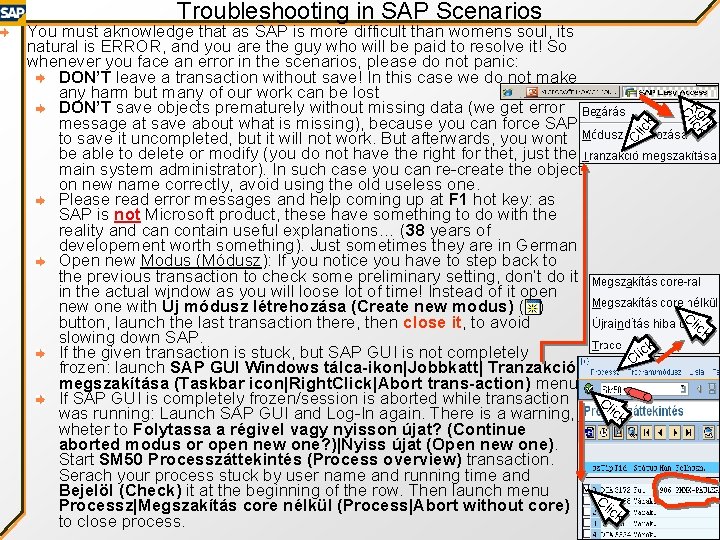
Troubleshooting in SAP Scenarios ick Cl ht Rglick C You must aknowledge that as SAP is more difficult than womens soul, its natural is ERROR, and you are the guy who will be paid to resolve it! So whenever you face an error in the scenarios, please do not panic: DON’T leave a transaction without save! In this case we do not make any harm but many of our work can be lost DON’T save objects prematurely without missing data (we get error message at save about what is missing), because you can force SAP to save it uncompleted, but it will not work. But afterwards, you wont be able to delete or modify (you do not have the right for thet, just the main system administrator). In such case you can re-create the object on new name correctly, avoid using the old useless one. Please read error messages and help coming up at F 1 hot key: as SAP is not Microsoft product, these have something to do with the reality and can contain useful explanations… (38 years of developement worth something). Just sometimes they are in German Open new Modus (Módusz): If you notice you have to step back to the previous transaction to check some preliminary setting, don’t do it in the actual window as you will loose lot of time! Instead of it open new one with Új módusz létrehozása (Create new modus) ( ) button, launch the last transaction there, then close it, to avoid slowing down SAP. ick If the given transaction is stuck, but SAP GUI is not completely l C frozen: launch SAP GUI Windows tálca-ikon|Jobbkatt| Tranzakció megszakítása (Taskbar icon|Right. Click|Abort trans-action) menu If SAP GUI is completely frozen/session is aborted while transaction Cl ick was running: Launch SAP GUI and Log-In again. There is a warning, wheter to Folytassa a régivel vagy nyisson újat? (Continue aborted modus or open new one? )|Nyiss újat (Open new one). Start SM 50 Processzáttekintés (Process overview) transaction. Serach your process stuck by user name and running time and Bejelöl (Check) it at the beginning of the row. Then launch menu Processz|Megszakítás core nélkül (Process|Abort without core) Click to close process. Cl ick
References http: //www. sap-img. com/abap. htm http: //erpgenie. com/ http: //help. sap. com/search/sap_trex. jsp http: //sap. ittoolbox. com/groups/technical-functional/sap-abap/
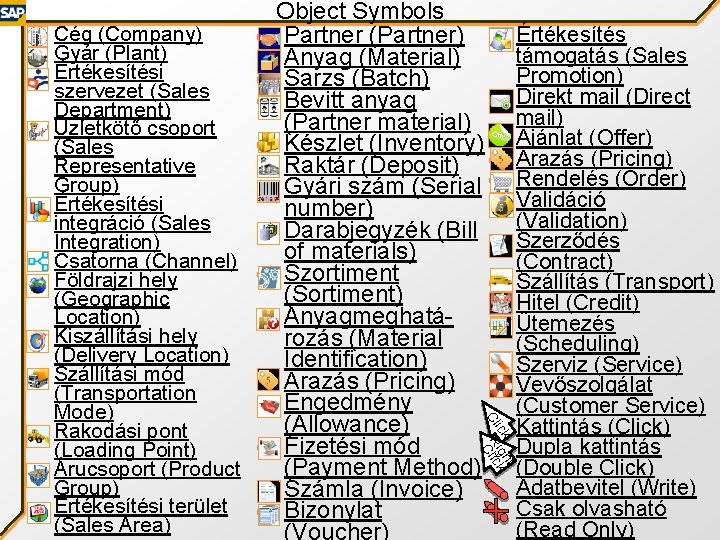
Értékesítés támogatás (Sales Promotion) Direkt mail (Direct mail) Ajánlat (Offer) Árazás (Pricing) Rendelés (Order) Validáció (Validation) Szerződés (Contract) Szállítás (Transport) Hitel (Credit) Ütemezés (Scheduling) Szerviz (Service) Vevőszolgálat (Customer Service) Kattintás (Click) Dupla kattintás (Double Click) Adatbevitel (Write) Csak olvasható (Read Only) t ick igh k Cl RClic Cég (Company) Gyár (Plant) Értékesítési szervezet (Sales Department) Üzletkötő csoport (Sales Representative Group) Értékesítési integráció (Sales Integration) Csatorna (Channel) Földrajzi hely (Geographic Location) Kiszállítási hely (Delivery Location) Szállítási mód (Transportation Mode) Rakodási pont (Loading Point) Árucsoport (Product Group) Értékesítési terület (Sales Area) Object Symbols Partner (Partner) Anyag (Material) Sarzs (Batch) Bevitt anyag (Partner material) Készlet (Inventory) Raktár (Deposit) Gyári szám (Serial number) Darabjegyzék (Bill of materials) Szortiment (Sortiment) Anyagmeghatározás (Material Identification) Árazás (Pricing) Engedmény (Allowance) Fizetési mód (Payment Method) Számla (Invoice) Bizonylat (Voucher)
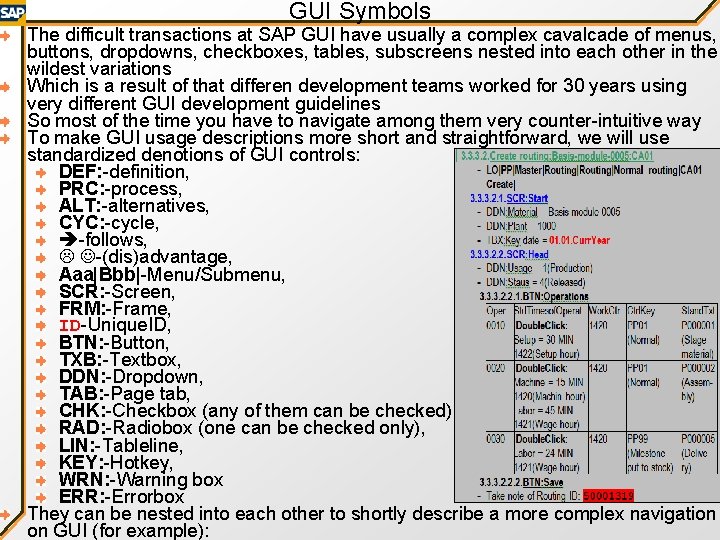
GUI Symbols The difficult transactions at SAP GUI have usually a complex cavalcade of menus, buttons, dropdowns, checkboxes, tables, subscreens nested into each other in the wildest variations Which is a result of that differen development teams worked for 30 years using very different GUI development guidelines So most of the time you have to navigate among them very counter-intuitive way To make GUI usage descriptions more short and straightforward, we will use standardized denotions of GUI controls: DEF: -definition, PRC: -process, ALT: -alternatives, CYC: -cycle, -follows, -(dis)advantage, Aaa|Bbb|-Menu/Submenu, SCR: -Screen, FRM: -Frame, ID-Unique. ID, BTN: -Button, TXB: -Textbox, DDN: -Dropdown, TAB: -Page tab, CHK: -Checkbox (any of them can be checked) RAD: -Radiobox (one can be checked only), LIN: -Tableline, KEY: -Hotkey, WRN: -Warning box ERR: -Errorbox They can be nested into each other to shortly describe a more complex navigation on GUI (for example):
- Slides: 18