
sanos Server Appliance Network Operating System Technical Overview

- Slides: 67
sanos Server Appliance Network Operating System Technical Overview Copyright (C) 2003 -2004 Michael Ringgaard, jbox. dk, All rights reserved.
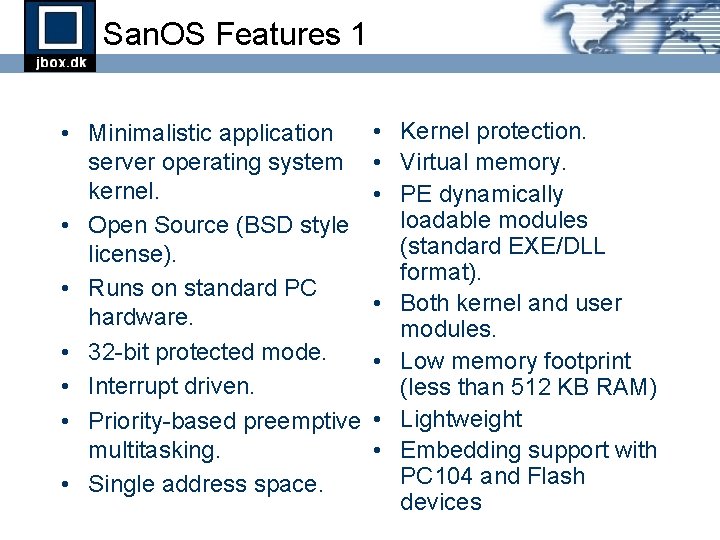
San. OS Features 1 • Minimalistic application server operating system kernel. • Open Source (BSD style license). • Runs on standard PC hardware. • 32 -bit protected mode. • Interrupt driven. • Priority-based preemptive multitasking. • Single address space. • Kernel protection. • Virtual memory. • PE dynamically loadable modules (standard EXE/DLL format). • Both kernel and user modules. • Low memory footprint (less than 512 KB RAM) • Lightweight • Embedding support with PC 104 and Flash devices
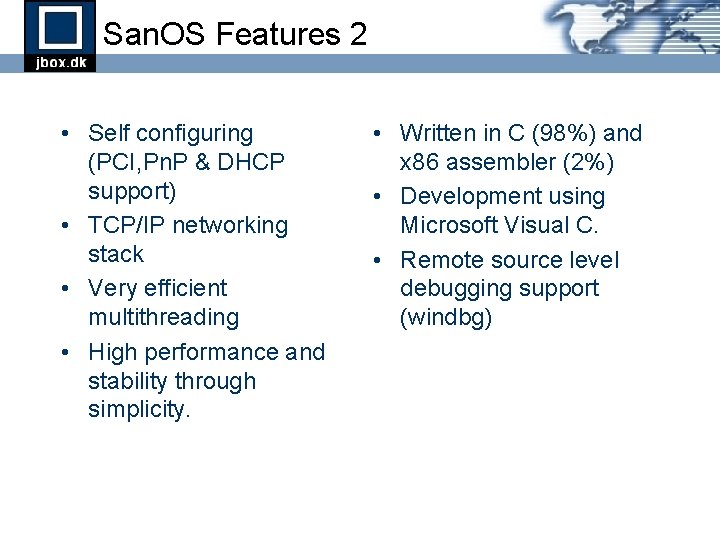
San. OS Features 2 • Self configuring (PCI, Pn. P & DHCP support) • TCP/IP networking stack • Very efficient multithreading • High performance and stability through simplicity. • Written in C (98%) and x 86 assembler (2%) • Development using Microsoft Visual C. • Remote source level debugging support (windbg)
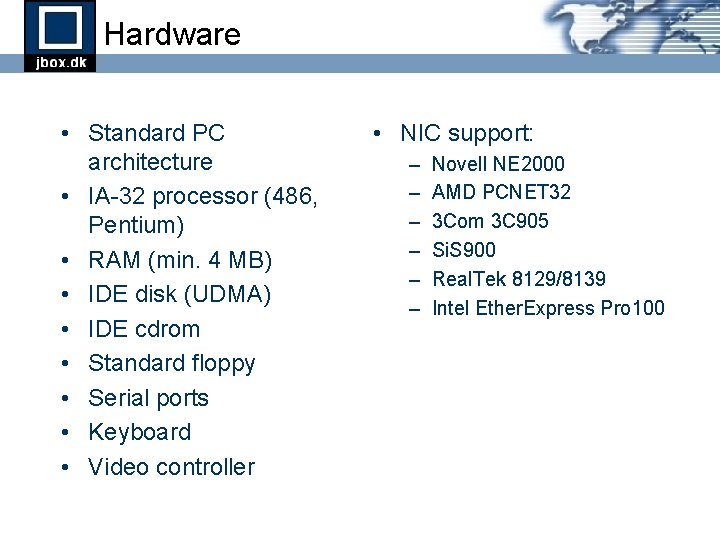
Hardware • Standard PC architecture • IA-32 processor (486, Pentium) • RAM (min. 4 MB) • IDE disk (UDMA) • IDE cdrom • Standard floppy • Serial ports • Keyboard • Video controller • NIC support: – – – Novell NE 2000 AMD PCNET 32 3 Com 3 C 905 Si. S 900 Real. Tek 8129/8139 Intel Ether. Express Pro 100
Core Operating System Services • System booting and application loading • Memory Management – Virtual memory mapping – Physical memory allocation and paging – Heap allocation and module loading and linking • Thread Control – Thread scheduling and trap handling – Thread context – Thread synchronization and timers • I/O Management – – I/O bus and unit enumeration Block devices and filesystems Stream devices Packet devices (NIC) and networking (TCP/IP)
Overview Part 1: Architecture Part 2: Boot Process Part 3: Memory Management Part 4: Thread Control Part 5: I/O Management
Part 1 Architecture
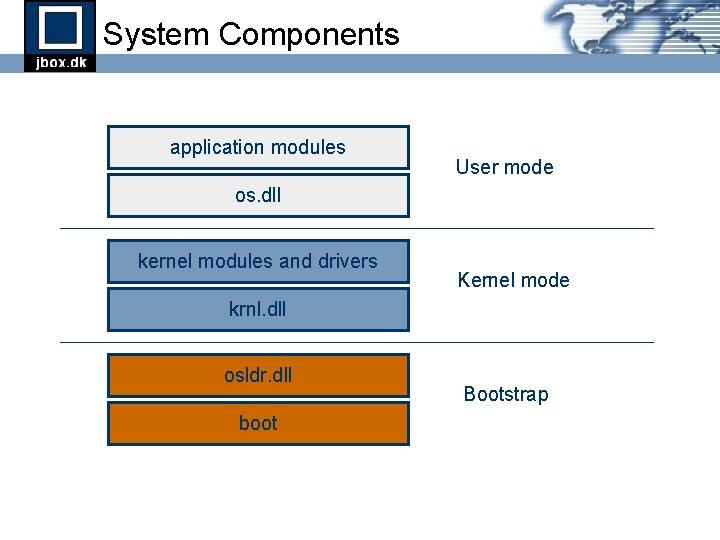
System Components application modules User mode os. dll kernel modules and drivers Kernel mode krnl. dll osldr. dll boot Bootstrap
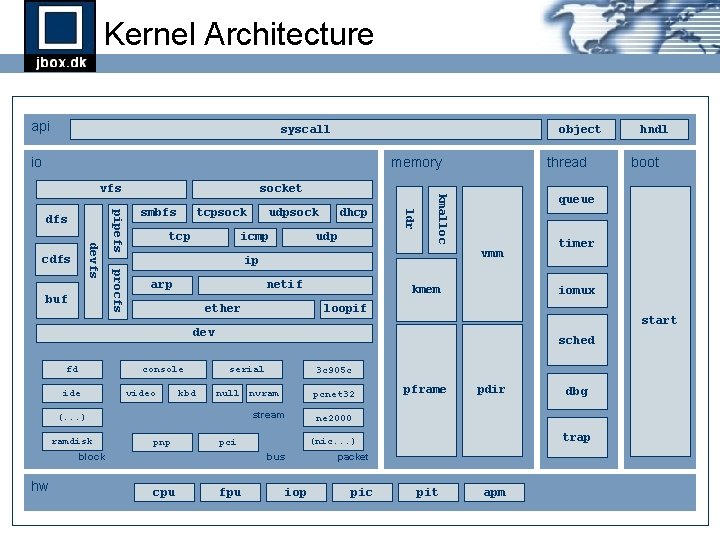
Kernel Architecture api syscall object io memory tcpsock tcp udpsock icmp dhcp udp ldr buf smbfs arp netif ether kmem console ide video kbd loopif start sched serial 3 c 905 c null nvram pcnet 32 stream (. . . ) ramdisk pnp fpu pdir dbg trap (nic. . . ) bus cpu pframe ne 2000 pci block hw timer iomux dev fd packet iop pic boot queue vmm ip procfs devfs cdfs pipefs dfs socket kmalloc vfs thread hndl pit apm
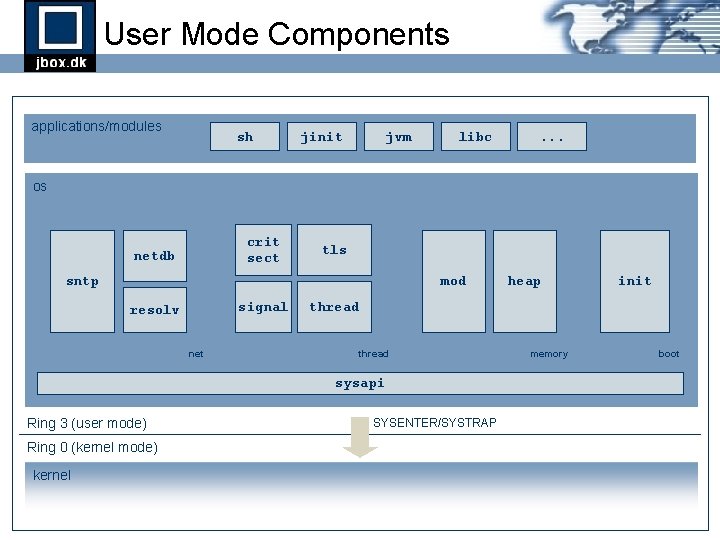
User Mode Components applications/modules sh jinit jvm libc . . . os crit sect netdb tls sntp mod signal resolv net Ring 0 (kernel mode) kernel init thread sysapi Ring 3 (user mode) heap SYSENTER/SYSTRAP memory boot
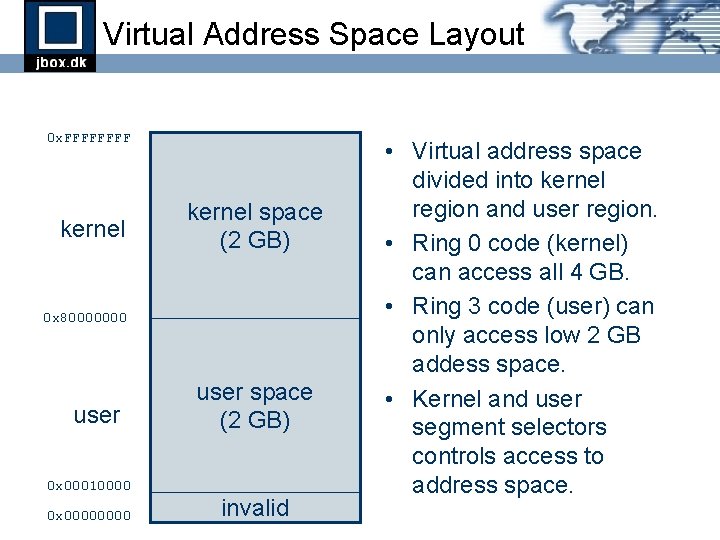
Virtual Address Space Layout 0 x. FFFF kernel space (2 GB) 0 x 80000000 user space (2 GB) 0 x 00010000 0 x 0000 invalid • Virtual address space divided into kernel region and user region. • Ring 0 code (kernel) can access all 4 GB. • Ring 3 code (user) can only access low 2 GB addess space. • Kernel and user segment selectors controls access to address space.
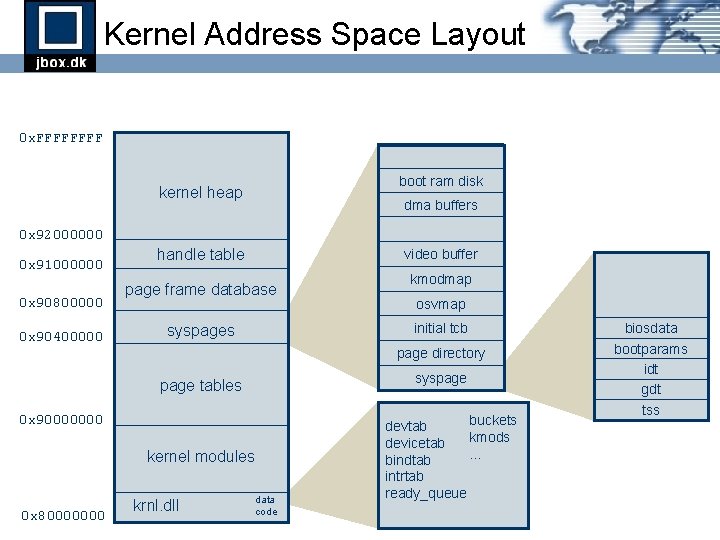
Kernel Address Space Layout 0 x. FFFF boot ram disk kernel heap dma buffers 0 x 92000000 0 x 91000000 0 x 90800000 0 x 90400000 handle table video buffer page frame database osvmap initial tcb syspages page directory syspage tables 0 x 90000000 kernel modules 0 x 80000000 kmodmap krnl. dll data code buckets devtab kmods devicetab. . . bindtab intrtab ready_queue biosdata bootparams idt gdt tss
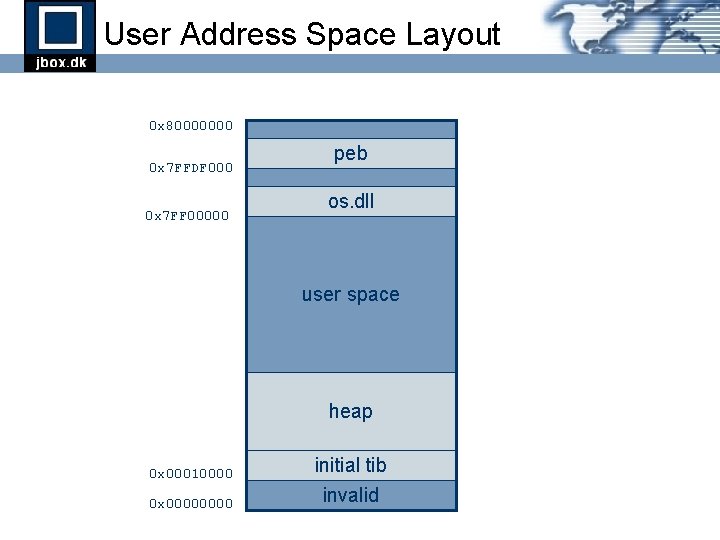
User Address Space Layout 0 x 80000000 0 x 7 FFDF 000 0 x 7 FF 00000 peb os. dll user space heap 0 x 00010000 0 x 0000 initial tib invalid
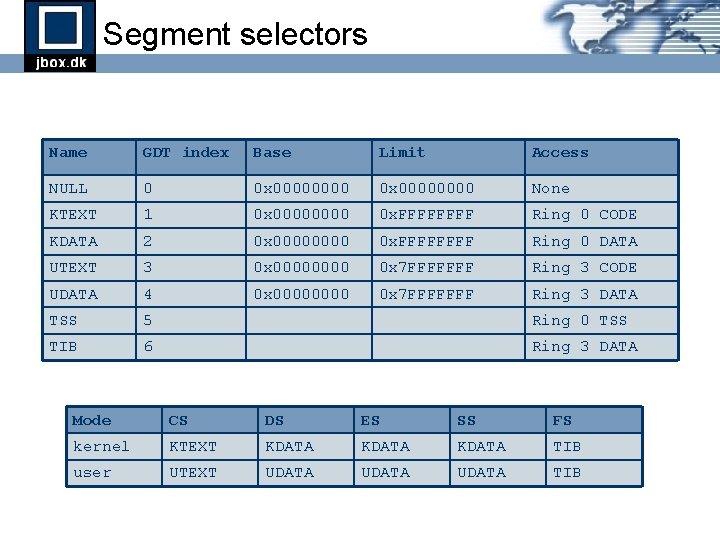
Segment selectors Name GDT index Base Limit Access NULL 0 0 x 00000000 None KTEXT 1 0 x 0000 0 x. FFFF Ring 0 CODE KDATA 2 0 x 0000 0 x. FFFF Ring 0 DATA UTEXT 3 0 x 0000 0 x 7 FFFFFFF Ring 3 CODE UDATA 4 0 x 0000 0 x 7 FFFFFFF Ring 3 DATA TSS 5 Ring 0 TSS TIB 6 Ring 3 DATA Mode CS DS ES SS FS kernel KTEXT KDATA TIB user UTEXT UDATA TIB
Part 2 Boot Process
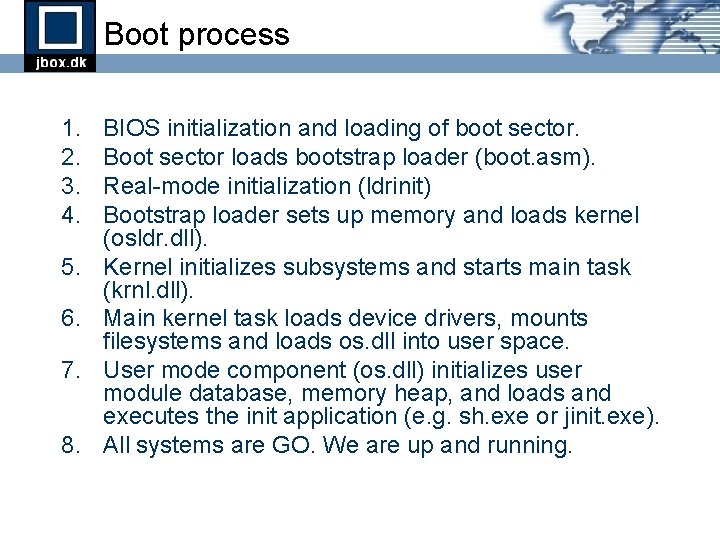
Boot process 1. 2. 3. 4. 5. 6. 7. 8. BIOS initialization and loading of boot sector. Boot sector loads bootstrap loader (boot. asm). Real-mode initialization (ldrinit) Bootstrap loader sets up memory and loads kernel (osldr. dll). Kernel initializes subsystems and starts main task (krnl. dll). Main kernel task loads device drivers, mounts filesystems and loads os. dll into user space. User mode component (os. dll) initializes user module database, memory heap, and loads and executes the init application (e. g. sh. exe or jinit. exe). All systems are GO. We are up and running.
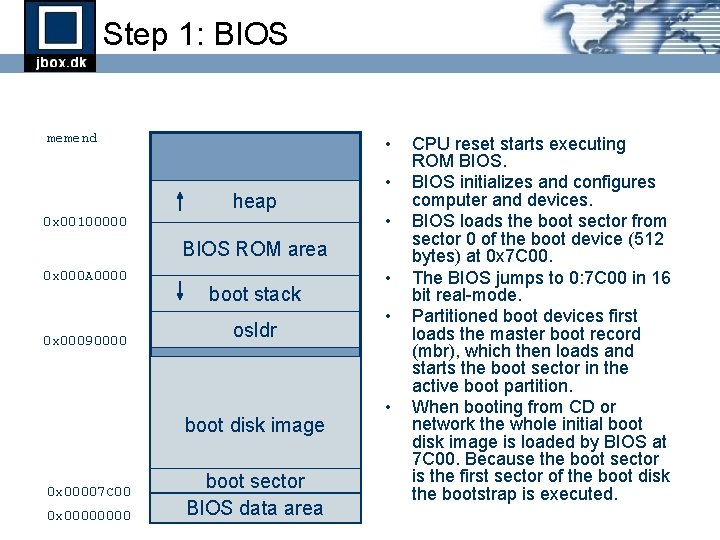
Step 1: BIOS memend • heap 0 x 00100000 • • BIOS ROM area 0 x 000 A 0000 0 x 00090000 boot stack osldr boot disk image 0 x 00007 C 00 0 x 0000 boot sector BIOS data area • • • CPU reset starts executing ROM BIOS initializes and configures computer and devices. BIOS loads the boot sector from sector 0 of the boot device (512 bytes) at 0 x 7 C 00. The BIOS jumps to 0: 7 C 00 in 16 bit real-mode. Partitioned boot devices first loads the master boot record (mbr), which then loads and starts the boot sector in the active boot partition. When booting from CD or network the whole initial boot disk image is loaded by BIOS at 7 C 00. Because the boot sector is the first sector of the boot disk the bootstrap is executed.
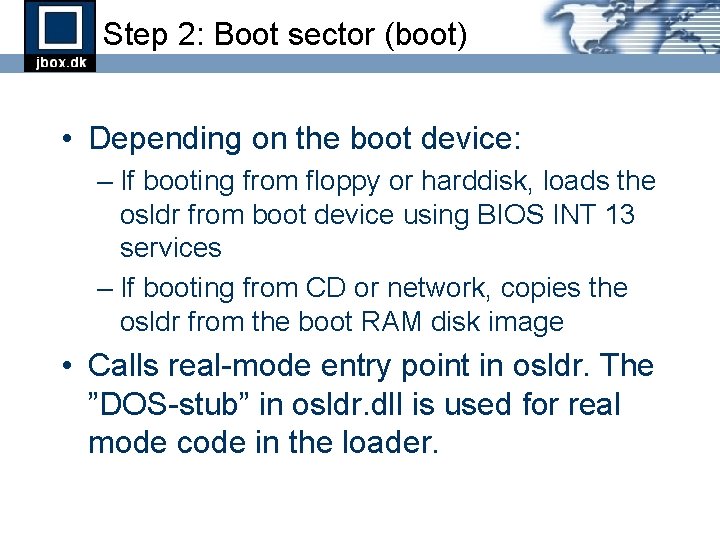
Step 2: Boot sector (boot) • Depending on the boot device: – If booting from floppy or harddisk, loads the osldr from boot device using BIOS INT 13 services – If booting from CD or network, copies the osldr from the boot RAM disk image • Calls real-mode entry point in osldr. The ”DOS-stub” in osldr. dll is used for real mode code in the loader.
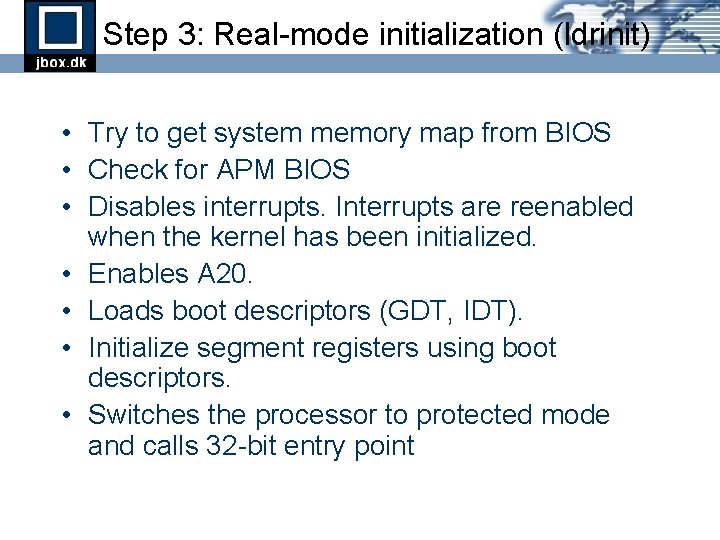
Step 3: Real-mode initialization (ldrinit) • Try to get system memory map from BIOS • Check for APM BIOS • Disables interrupts. Interrupts are reenabled when the kernel has been initialized. • Enables A 20. • Loads boot descriptors (GDT, IDT). • Initialize segment registers using boot descriptors. • Switches the processor to protected mode and calls 32 -bit entry point
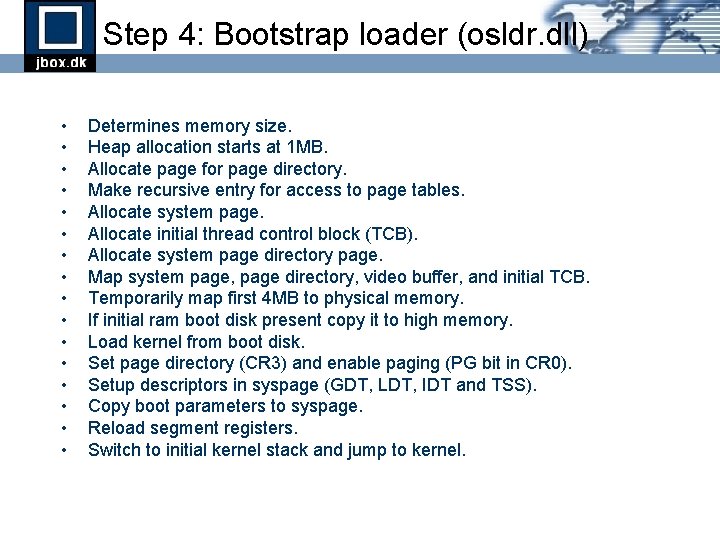
Step 4: Bootstrap loader (osldr. dll) • • • • Determines memory size. Heap allocation starts at 1 MB. Allocate page for page directory. Make recursive entry for access to page tables. Allocate system page. Allocate initial thread control block (TCB). Allocate system page directory page. Map system page, page directory, video buffer, and initial TCB. Temporarily map first 4 MB to physical memory. If initial ram boot disk present copy it to high memory. Load kernel from boot disk. Set page directory (CR 3) and enable paging (PG bit in CR 0). Setup descriptors in syspage (GDT, LDT, IDT and TSS). Copy boot parameters to syspage. Reload segment registers. Switch to initial kernel stack and jump to kernel.
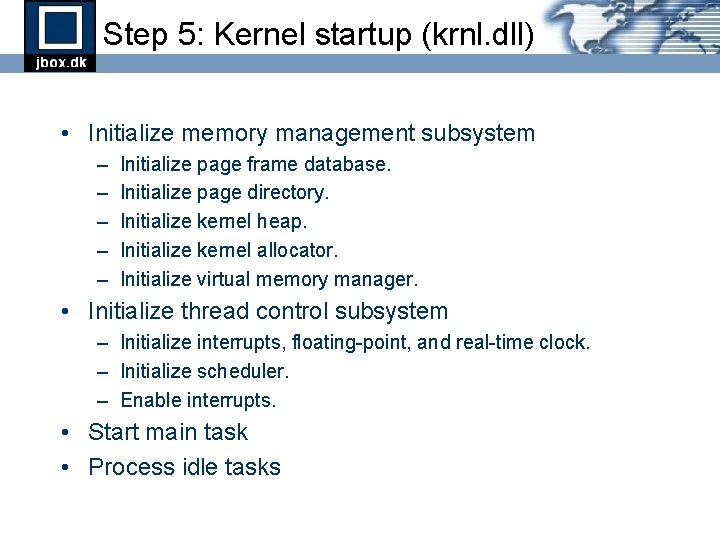
Step 5: Kernel startup (krnl. dll) • Initialize memory management subsystem – – – Initialize page frame database. Initialize page directory. Initialize kernel heap. Initialize kernel allocator. Initialize virtual memory manager. • Initialize thread control subsystem – Initialize interrupts, floating-point, and real-time clock. – Initialize scheduler. – Enable interrupts. • Start main task • Process idle tasks
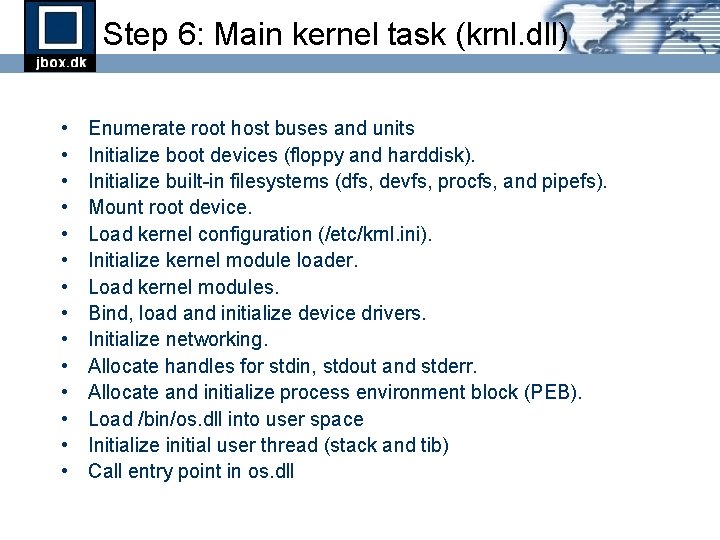
Step 6: Main kernel task (krnl. dll) • • • • Enumerate root host buses and units Initialize boot devices (floppy and harddisk). Initialize built-in filesystems (dfs, devfs, procfs, and pipefs). Mount root device. Load kernel configuration (/etc/krnl. ini). Initialize kernel module loader. Load kernel modules. Bind, load and initialize device drivers. Initialize networking. Allocate handles for stdin, stdout and stderr. Allocate and initialize process environment block (PEB). Load /bin/os. dll into user space Initialize initial user thread (stack and tib) Call entry point in os. dll
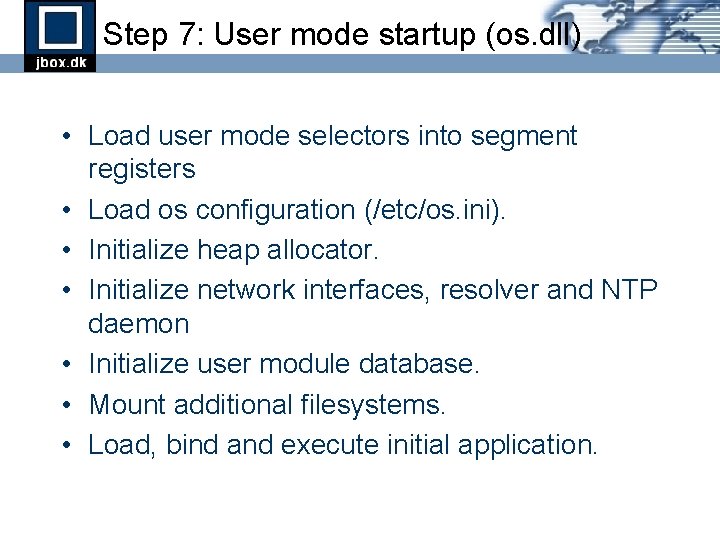
Step 7: User mode startup (os. dll) • Load user mode selectors into segment registers • Load os configuration (/etc/os. ini). • Initialize heap allocator. • Initialize network interfaces, resolver and NTP daemon • Initialize user module database. • Mount additional filesystems. • Load, bind and execute initial application.
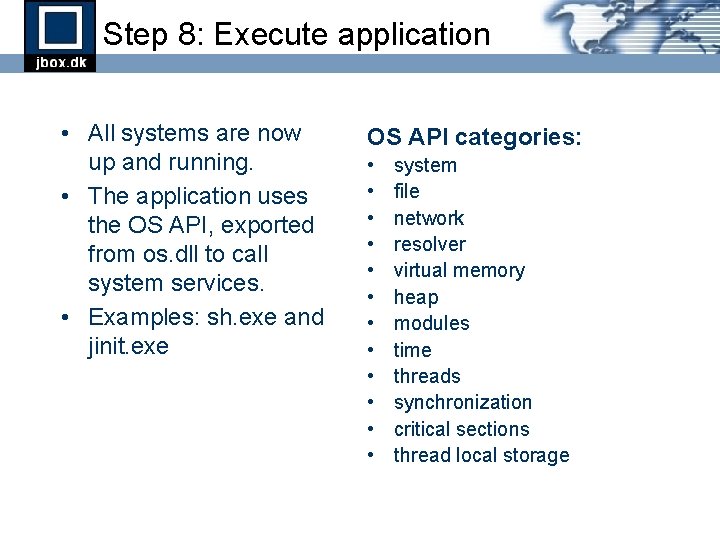
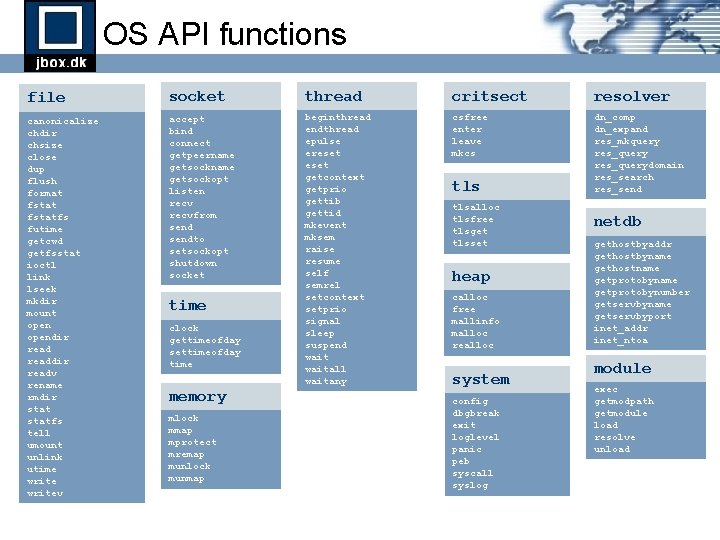
Step 8: Execute application • All systems are now up and running. • The application uses the OS API, exported from os. dll to call system services. • Examples: sh. exe and jinit. exe OS API categories: • • • system file network resolver virtual memory heap modules time threads synchronization critical sections thread local storage
OS API functions file socket thread critsect resolver canonicalize chdir chsize close dup flush format fstatfs futime getcwd getfsstat ioctl link lseek mkdir mount opendir readdir readv rename rmdir statfs tell umount unlink utime writev accept bind connect getpeername getsockopt listen recvfrom sendto setsockopt shutdown socket beginthread endthread epulse ereset getcontext getprio gettib gettid mkevent mksem raise resume self semrel setcontext setprio signal sleep suspend waitall waitany csfree enter leave mkcs dn_comp dn_expand res_mkquery res_querydomain res_search res_send time clock gettimeofday settimeofday time memory mlock mmap mprotect mremap munlock munmap tlsalloc tlsfree tlsget tlsset heap calloc free mallinfo malloc realloc system config dbgbreak exit loglevel panic peb syscall syslog netdb gethostbyaddr gethostbyname gethostname getprotobynumber getservbyname getservbyport inet_addr inet_ntoa module exec getmodpath getmodule load resolve unload
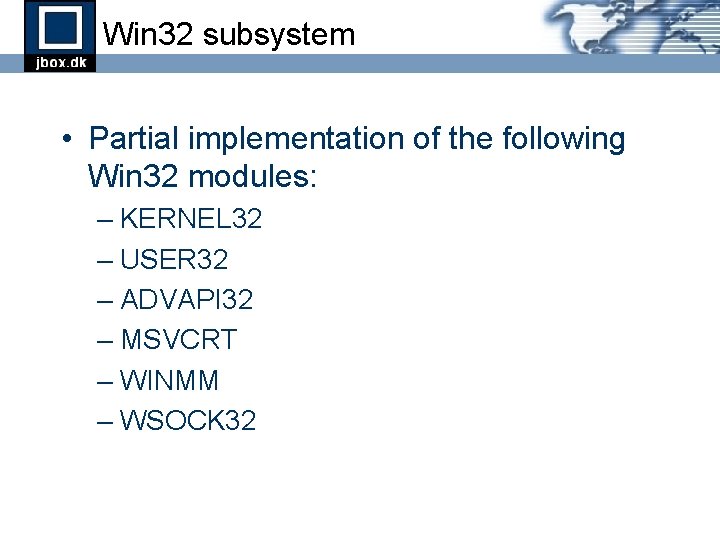
Win 32 subsystem • Partial implementation of the following Win 32 modules: – KERNEL 32 – USER 32 – ADVAPI 32 – MSVCRT – WINMM – WSOCK 32
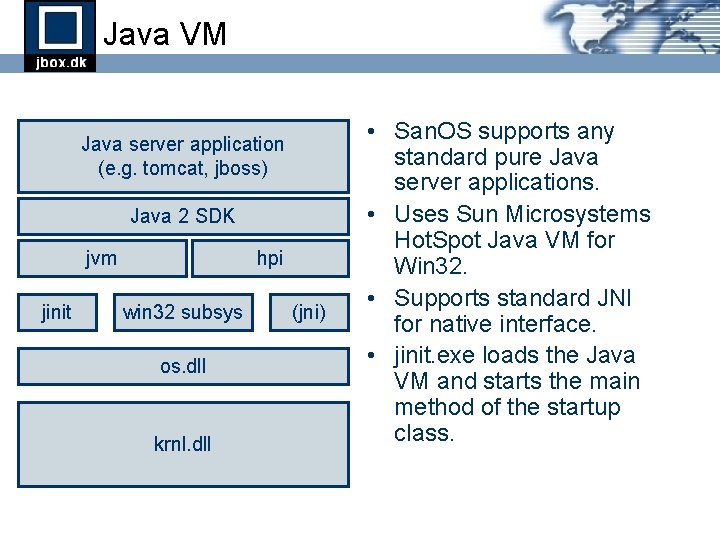
Java VM Java server application (e. g. tomcat, jboss) Java 2 SDK jvm jinit hpi win 32 subsys os. dll krnl. dll (jni) • San. OS supports any standard pure Java server applications. • Uses Sun Microsystems Hot. Spot Java VM for Win 32. • Supports standard JNI for native interface. • jinit. exe loads the Java VM and starts the main method of the startup class.
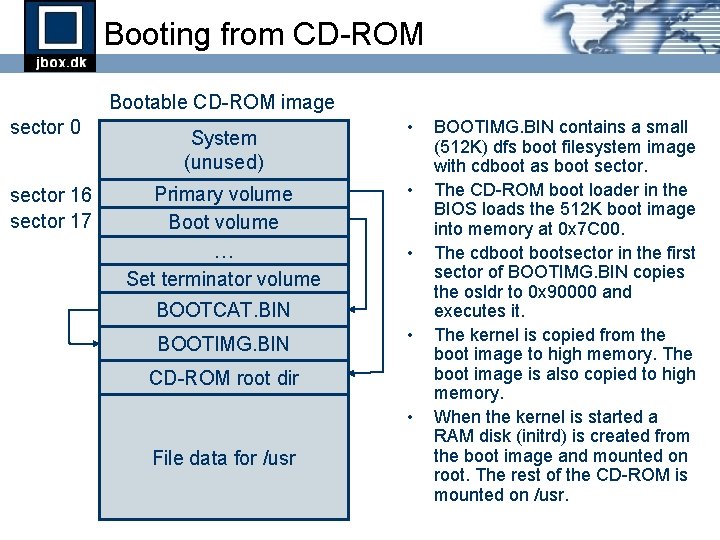
Booting from CD-ROM Bootable CD-ROM image sector 0 sector 16 sector 17 System (unused) Primary volume Boot volume … Set terminator volume • • • BOOTCAT. BIN BOOTIMG. BIN • CD-ROM root dir • File data for /usr BOOTIMG. BIN contains a small (512 K) dfs boot filesystem image with cdboot as boot sector. The CD-ROM boot loader in the BIOS loads the 512 K boot image into memory at 0 x 7 C 00. The cdbootsector in the first sector of BOOTIMG. BIN copies the osldr to 0 x 90000 and executes it. The kernel is copied from the boot image to high memory. The boot image is also copied to high memory. When the kernel is started a RAM disk (initrd) is created from the boot image and mounted on root. The rest of the CD-ROM is mounted on /usr.
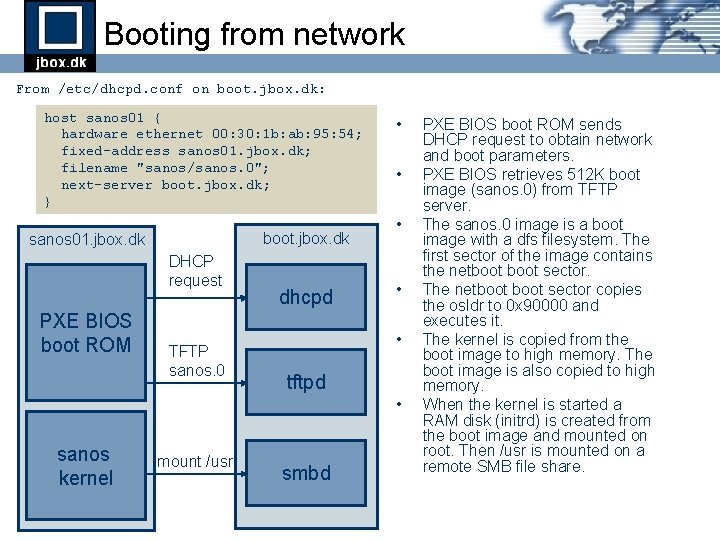
Booting from network From /etc/dhcpd. conf on boot. jbox. dk: host sanos 01 { hardware ethernet 00: 30: 1 b: ab: 95: 54; fixed-address sanos 01. jbox. dk; filename "sanos/sanos. 0"; next-server boot. jbox. dk; } boot. jbox. dk sanos 01. jbox. dk DHCP request PXE BIOS boot ROM TFTP sanos. 0 dhcpd • • • tftpd • sanos kernel mount /usr smbd PXE BIOS boot ROM sends DHCP request to obtain network and boot parameters. PXE BIOS retrieves 512 K boot image (sanos. 0) from TFTP server. The sanos. 0 image is a boot image with a dfs filesystem. The first sector of the image contains the netboot sector. The netboot sector copies the osldr to 0 x 90000 and executes it. The kernel is copied from the boot image to high memory. The boot image is also copied to high memory. When the kernel is started a RAM disk (initrd) is created from the boot image and mounted on root. Then /usr is mounted on a remote SMB file share.
Part 3 Memory Management
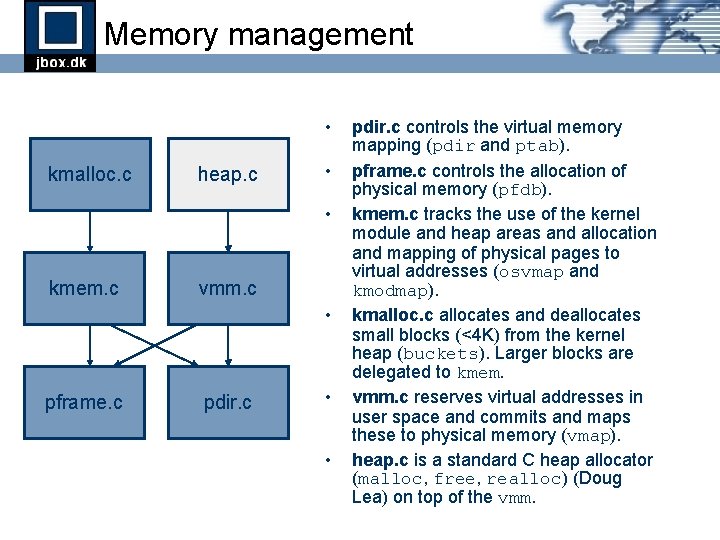
Memory management • kmalloc. c heap. c • • kmem. c vmm. c • pframe. c pdir. c • • pdir. c controls the virtual memory mapping (pdir and ptab). pframe. c controls the allocation of physical memory (pfdb). kmem. c tracks the use of the kernel module and heap areas and allocation and mapping of physical pages to virtual addresses (osvmap and kmodmap). kmalloc. c allocates and deallocates small blocks (<4 K) from the kernel heap (buckets). Larger blocks are delegated to kmem. vmm. c reserves virtual addresses in user space and commits and maps these to physical memory (vmap). heap. c is a standard C heap allocator (malloc, free, realloc) (Doug Lea) on top of the vmm.
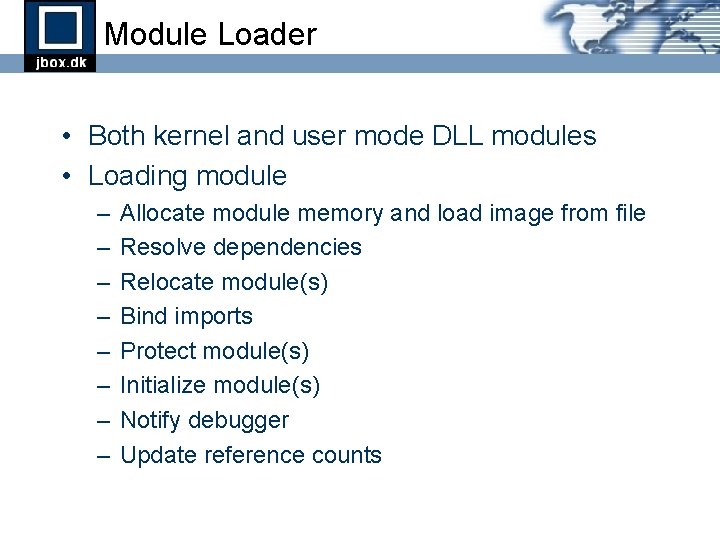
Module Loader • Both kernel and user mode DLL modules • Loading module – – – – Allocate module memory and load image from file Resolve dependencies Relocate module(s) Bind imports Protect module(s) Initialize module(s) Notify debugger Update reference counts
Part 4 Thread Control
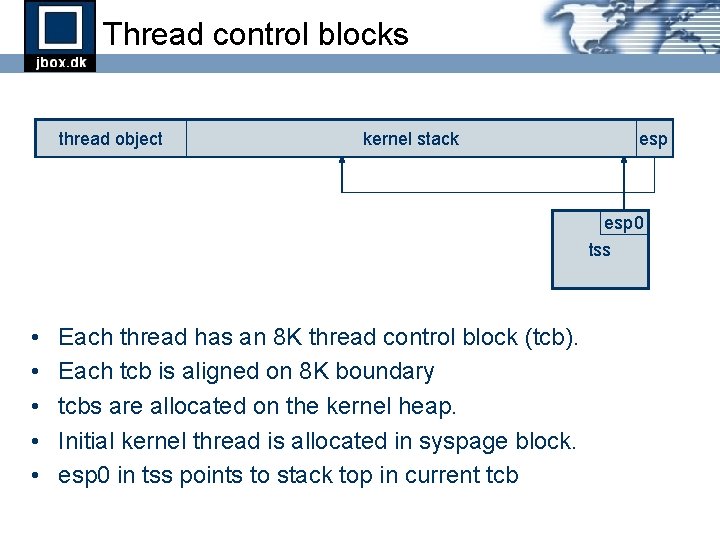
Thread control blocks thread object kernel stack esp 0 tss • • • Each thread has an 8 K thread control block (tcb). Each tcb is aligned on 8 K boundary tcbs are allocated on the kernel heap. Initial kernel thread is allocated in syspage block. esp 0 in tss points to stack top in current tcb
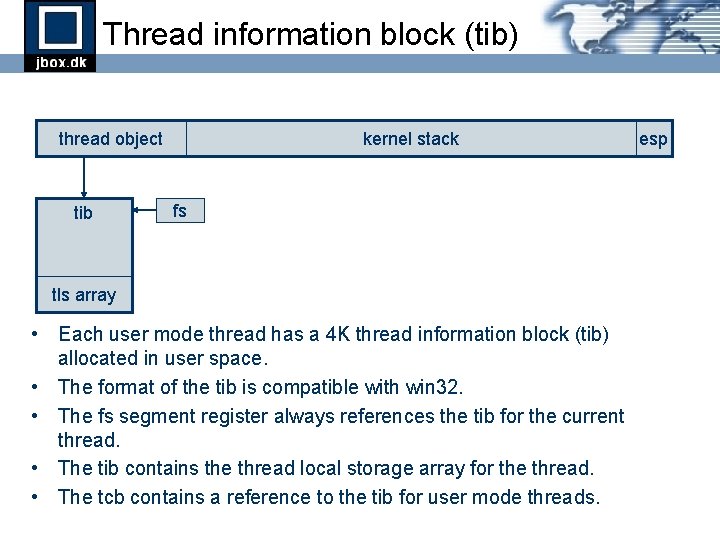
Thread information block (tib) thread object tib kernel stack fs tls array • Each user mode thread has a 4 K thread information block (tib) allocated in user space. • The format of the tib is compatible with win 32. • The fs segment register always references the tib for the current thread. • The tib contains the thread local storage array for the thread. • The tcb contains a reference to the tib for user mode threads. esp
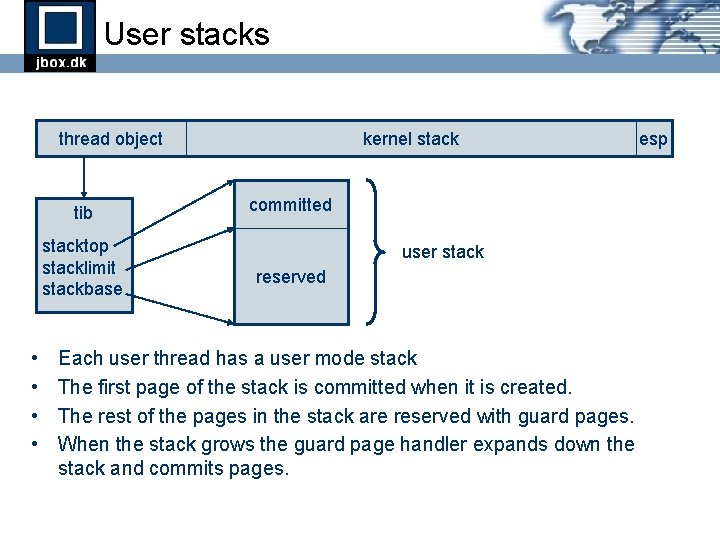
User stacks thread object tib stacktop stacklimit stackbase • • kernel stack committed user stack reserved Each user thread has a user mode stack The first page of the stack is committed when it is created. The rest of the pages in the stack are reserved with guard pages. When the stack grows the guard page handler expands down the stack and commits pages. esp
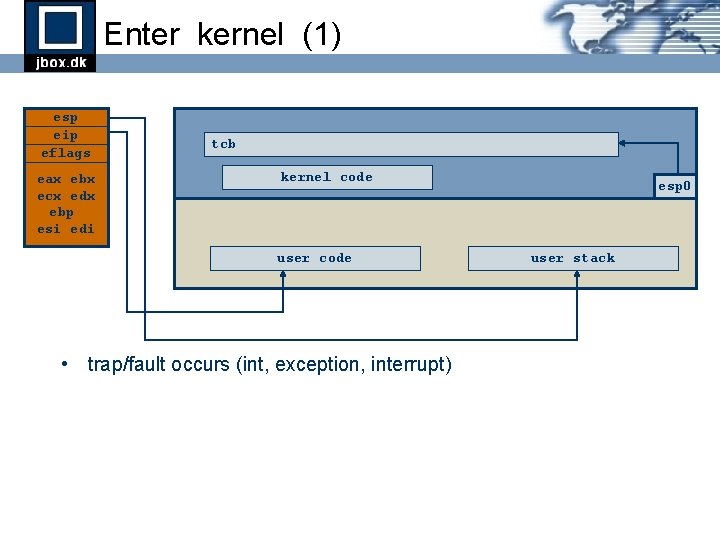
Enter kernel (1) esp eip eflags eax ebx ecx edx ebp esi edi tcb kernel code user code • trap/fault occurs (int, exception, interrupt) esp 0 user stack
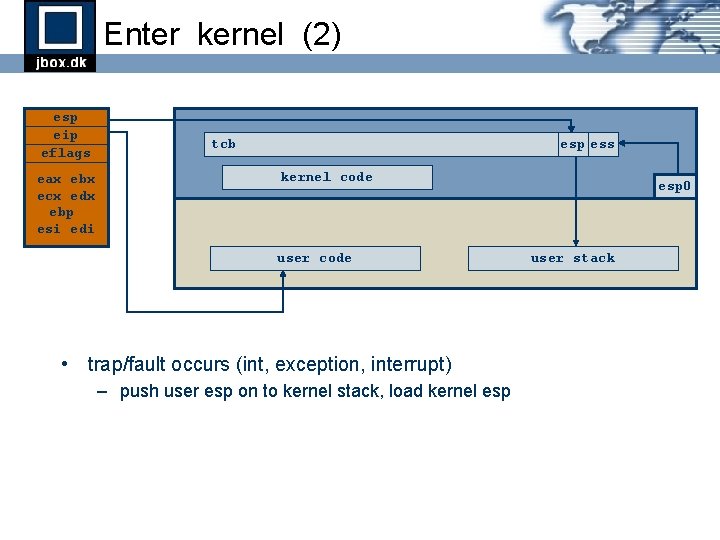
Enter kernel (2) esp eip eflags eax ebx ecx edx ebp esi edi tcb esp ess kernel code user code • trap/fault occurs (int, exception, interrupt) – push user esp on to kernel stack, load kernel esp 0 user stack
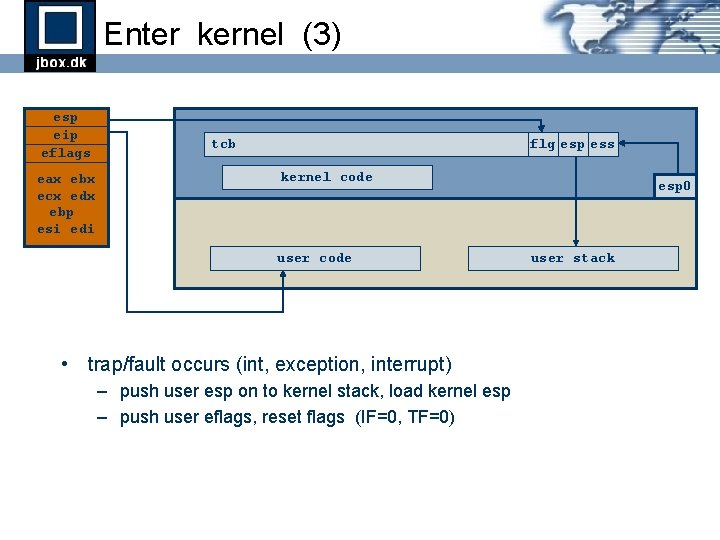
Enter kernel (3) esp eip eflags eax ebx ecx edx ebp esi edi tcb flg esp ess kernel code user code • trap/fault occurs (int, exception, interrupt) – push user esp on to kernel stack, load kernel esp – push user eflags, reset flags (IF=0, TF=0) esp 0 user stack
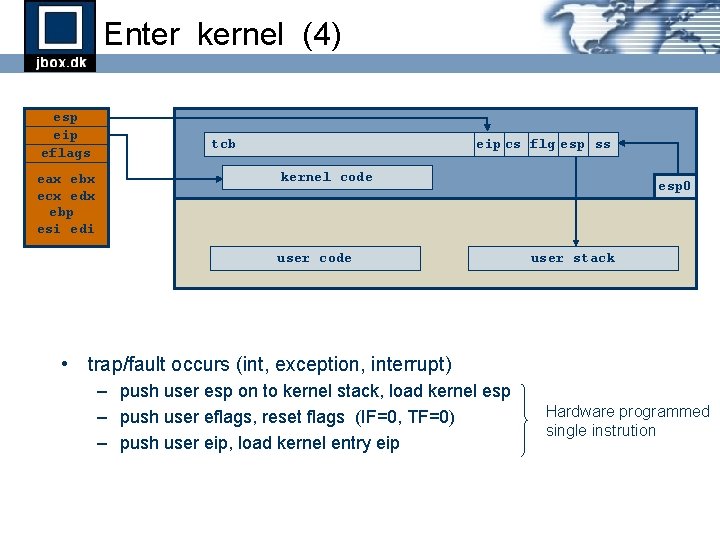
Enter kernel (4) esp eip eflags eax ebx ecx edx ebp esi edi tcb eip cs flg esp ss kernel code user code esp 0 user stack • trap/fault occurs (int, exception, interrupt) – push user esp on to kernel stack, load kernel esp – push user eflags, reset flags (IF=0, TF=0) – push user eip, load kernel entry eip Hardware programmed single instrution
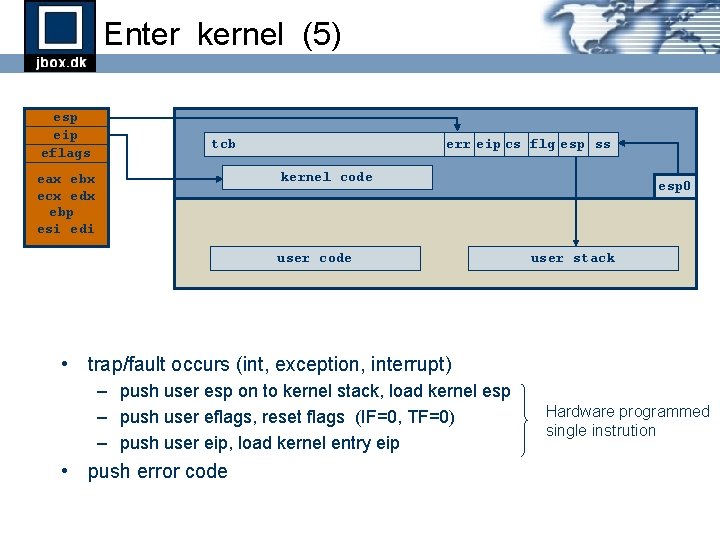
Enter kernel (5) esp eip eflags tcb err eip cs flg esp ss kernel code eax ebx ecx edx ebp esi edi user code esp 0 user stack • trap/fault occurs (int, exception, interrupt) – push user esp on to kernel stack, load kernel esp – push user eflags, reset flags (IF=0, TF=0) – push user eip, load kernel entry eip • push error code Hardware programmed single instrution
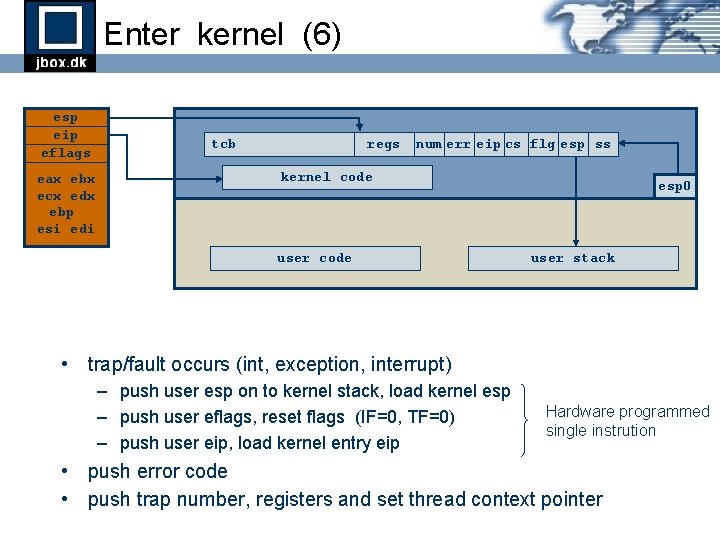
Enter kernel (6) esp eip eflags eax ebx ecx edx ebp esi edi tcb regs num err eip cs flg esp ss kernel code user code esp 0 user stack • trap/fault occurs (int, exception, interrupt) – push user esp on to kernel stack, load kernel esp – push user eflags, reset flags (IF=0, TF=0) – push user eip, load kernel entry eip Hardware programmed single instrution • push error code • push trap number, registers and set thread context pointer
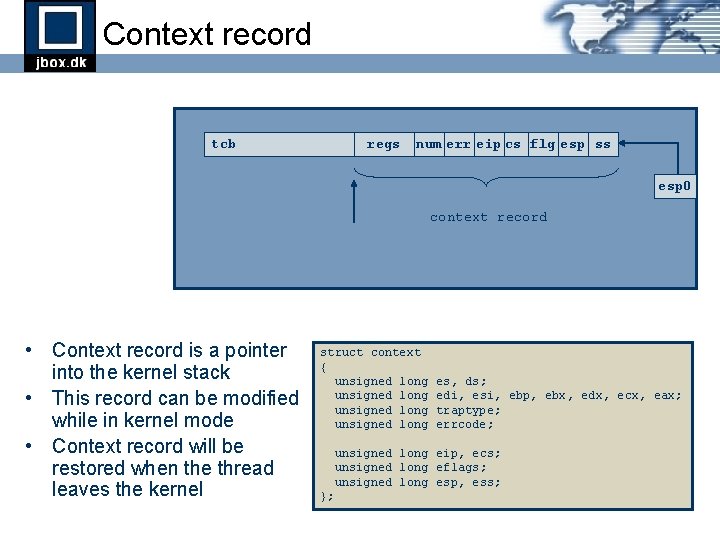
Context record tcb regs num err eip cs flg esp ss esp 0 context record • Context record is a pointer into the kernel stack • This record can be modified while in kernel mode • Context record will be restored when the thread leaves the kernel struct context { unsigned long es, ds; edi, esi, ebp, ebx, edx, ecx, eax; traptype; errcode; unsigned long eip, ecs; unsigned long eflags; unsigned long esp, ess; };
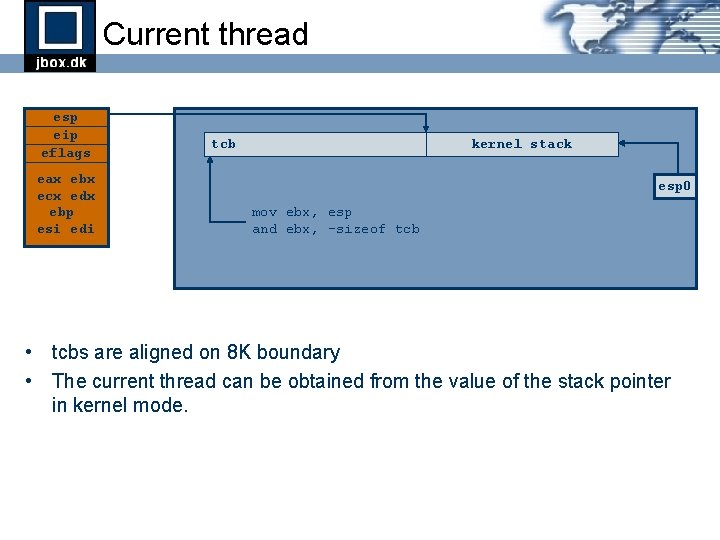
Current thread esp eip eflags eax ebx ecx edx ebp esi edi tcb kernel stack esp 0 mov ebx, esp and ebx, -sizeof tcb • tcbs are aligned on 8 K boundary • The current thread can be obtained from the value of the stack pointer in kernel mode.
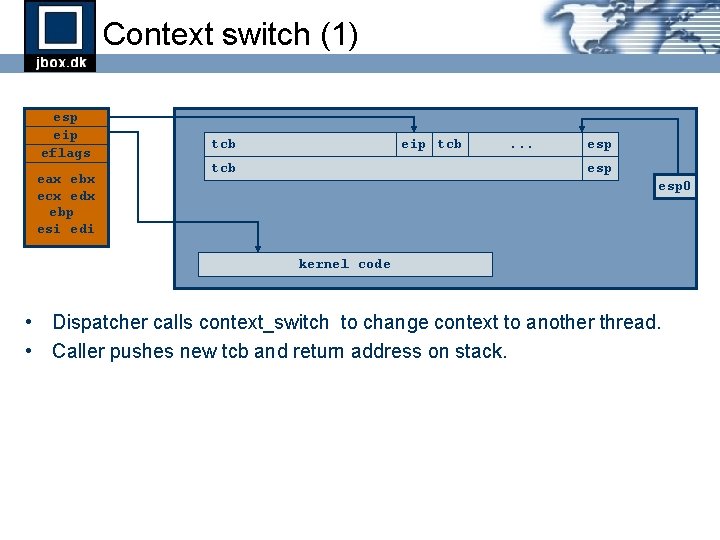
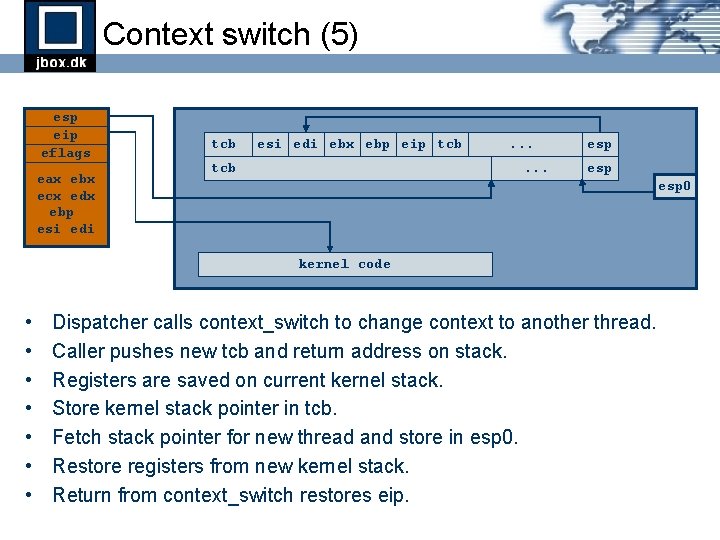
Context switch (1) esp eip eflags eax ebx ecx edx ebp esi edi tcb eip tcb . . . esp esp 0 kernel code • Dispatcher calls context_switch to change context to another thread. • Caller pushes new tcb and return address on stack.
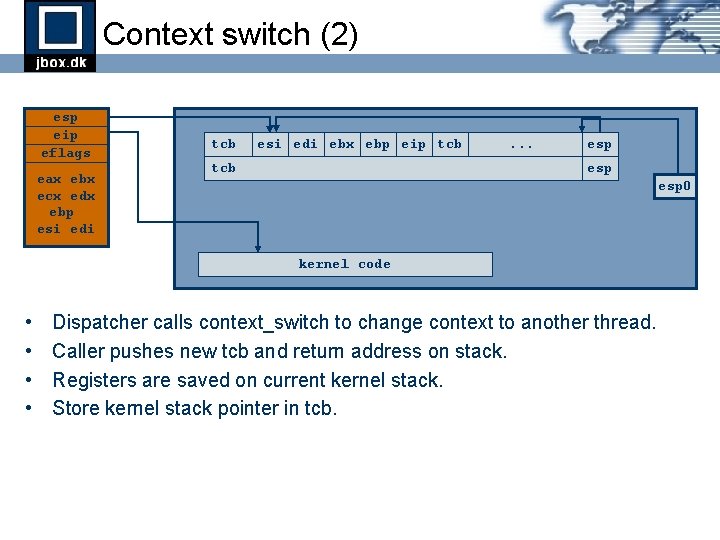
Context switch (2) esp eip eflags eax ebx ecx edx ebp esi edi tcb esi edi ebx ebp eip tcb . . . esp esp 0 kernel code • • Dispatcher calls context_switch to change context to another thread. Caller pushes new tcb and return address on stack. Registers are saved on current kernel stack. Store kernel stack pointer in tcb.
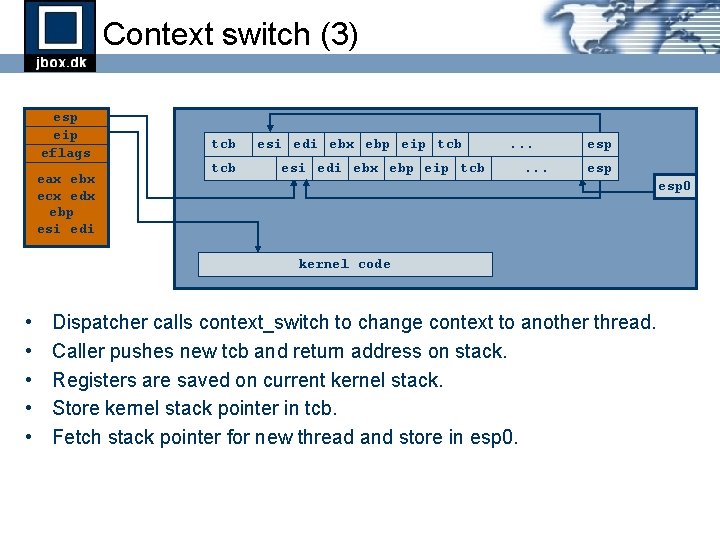
Context switch (3) esp eip eflags eax ebx ecx edx ebp esi edi tcb esi edi ebx ebp eip tcb . . . esp esp 0 kernel code • • • Dispatcher calls context_switch to change context to another thread. Caller pushes new tcb and return address on stack. Registers are saved on current kernel stack. Store kernel stack pointer in tcb. Fetch stack pointer for new thread and store in esp 0.
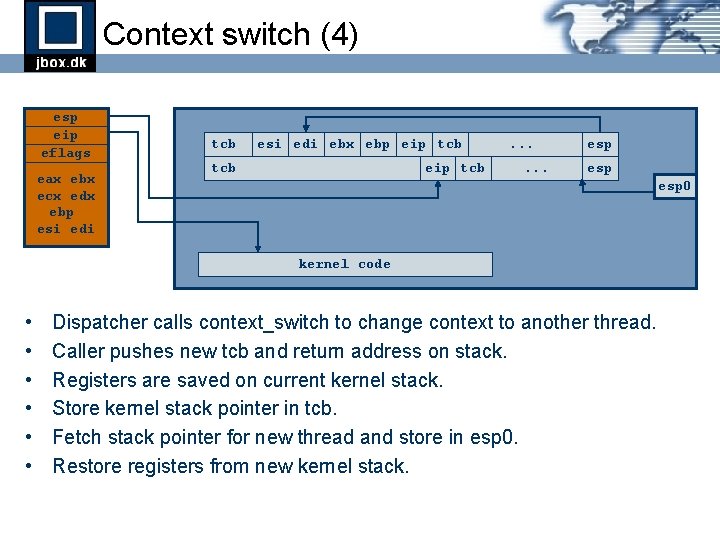
Context switch (4) esp eip eflags eax ebx ecx edx ebp esi edi tcb esi edi ebx ebp eip tcb . . . esp esp 0 kernel code • • • Dispatcher calls context_switch to change context to another thread. Caller pushes new tcb and return address on stack. Registers are saved on current kernel stack. Store kernel stack pointer in tcb. Fetch stack pointer for new thread and store in esp 0. Restore registers from new kernel stack.
Context switch (5) esp eip eflags eax ebx ecx edx ebp esi edi tcb esi edi ebx ebp eip tcb . . . esp esp 0 kernel code • • Dispatcher calls context_switch to change context to another thread. Caller pushes new tcb and return address on stack. Registers are saved on current kernel stack. Store kernel stack pointer in tcb. Fetch stack pointer for new thread and store in esp 0. Restore registers from new kernel stack. Return from context_switch restores eip.
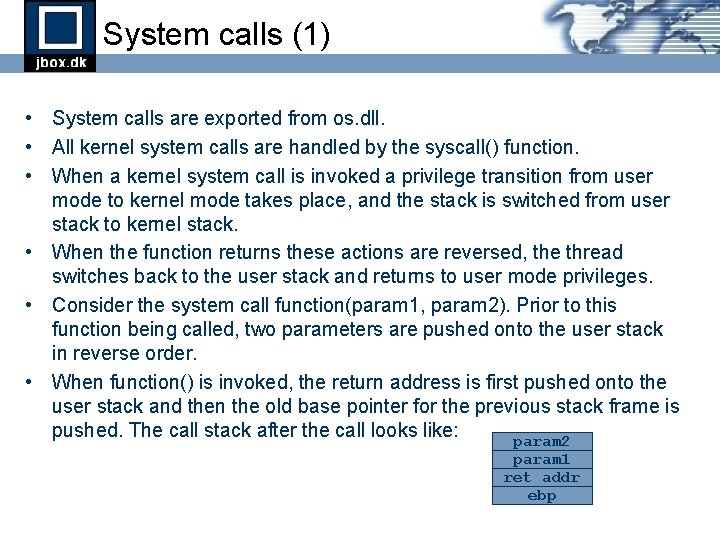
System calls (1) • System calls are exported from os. dll. • All kernel system calls are handled by the syscall() function. • When a kernel system call is invoked a privilege transition from user mode to kernel mode takes place, and the stack is switched from user stack to kernel stack. • When the function returns these actions are reversed, the thread switches back to the user stack and returns to user mode privileges. • Consider the system call function(param 1, param 2). Prior to this function being called, two parameters are pushed onto the user stack in reverse order. • When function() is invoked, the return address is first pushed onto the user stack and then the old base pointer for the previous stack frame is pushed. The call stack after the call looks like: param 2 param 1 ret addr ebp
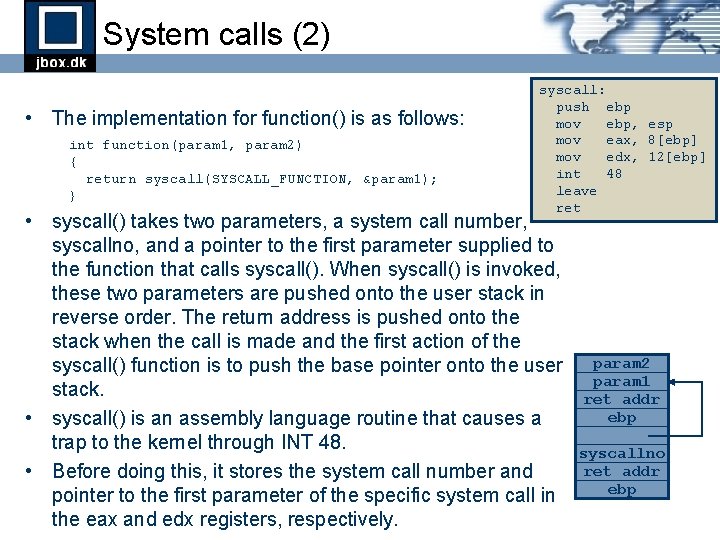
System calls (2) • The implementation for function() is as follows: int function(param 1, param 2) { return syscall(SYSCALL_FUNCTION, ¶m 1); } syscall: push ebp mov ebp, esp mov eax, 8[ebp] mov edx, 12[ebp] int 48 leave ret • syscall() takes two parameters, a system call number, syscallno, and a pointer to the first parameter supplied to the function that calls syscall(). When syscall() is invoked, these two parameters are pushed onto the user stack in reverse order. The return address is pushed onto the stack when the call is made and the first action of the syscall() function is to push the base pointer onto the user stack. • syscall() is an assembly language routine that causes a trap to the kernel through INT 48. • Before doing this, it stores the system call number and pointer to the first parameter of the specific system call in the eax and edx registers, respectively. param 2 param 1 ret addr ebp syscallno ret addr ebp
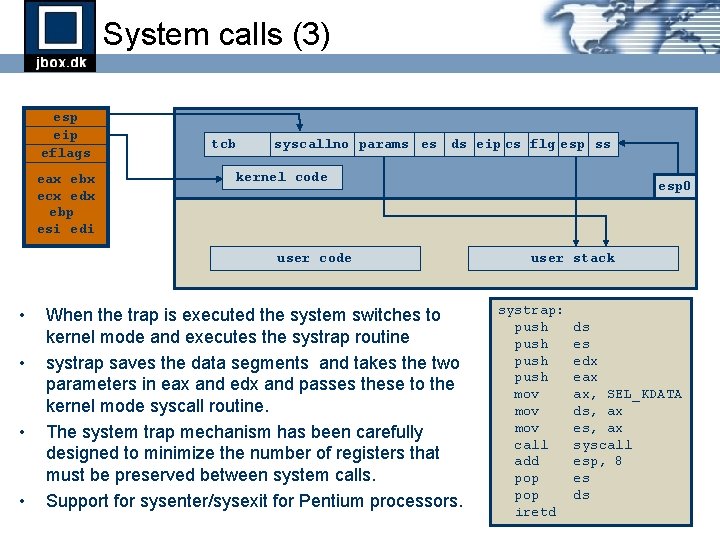
System calls (3) esp eip eflags eax ebx ecx edx ebp esi edi tcb syscallno params es ds eip cs flg esp ss kernel code user code • • When the trap is executed the system switches to kernel mode and executes the systrap routine systrap saves the data segments and takes the two parameters in eax and edx and passes these to the kernel mode syscall routine. The system trap mechanism has been carefully designed to minimize the number of registers that must be preserved between system calls. Support for sysenter/sysexit for Pentium processors. esp 0 user stack systrap: push mov mov call add pop iretd ds es edx eax ax, SEL_KDATA ds, ax es, ax syscall esp, 8 es ds
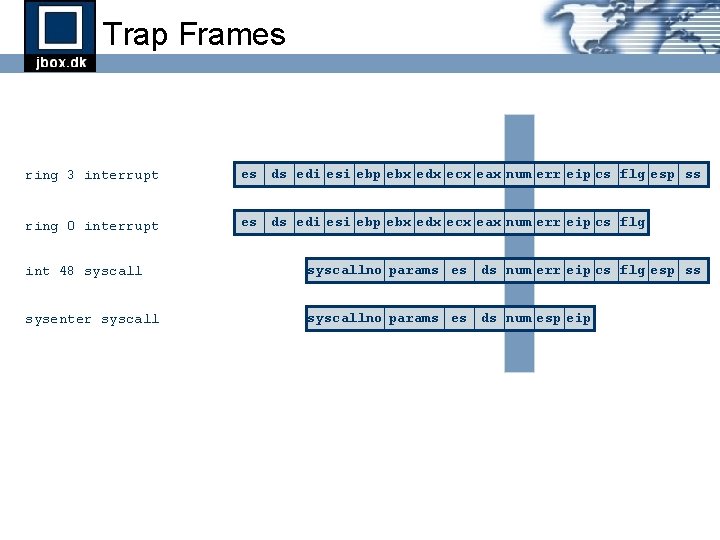
Trap Frames ring 3 interrupt es ds edi esi ebp ebx edx ecx eax num err eip cs flg esp ss ring 0 interrupt es ds edi esi ebp ebx edx ecx eax num err eip cs flg int 48 syscallno params es ds num err eip cs flg esp ss sysenter syscallno params es ds num esp eip
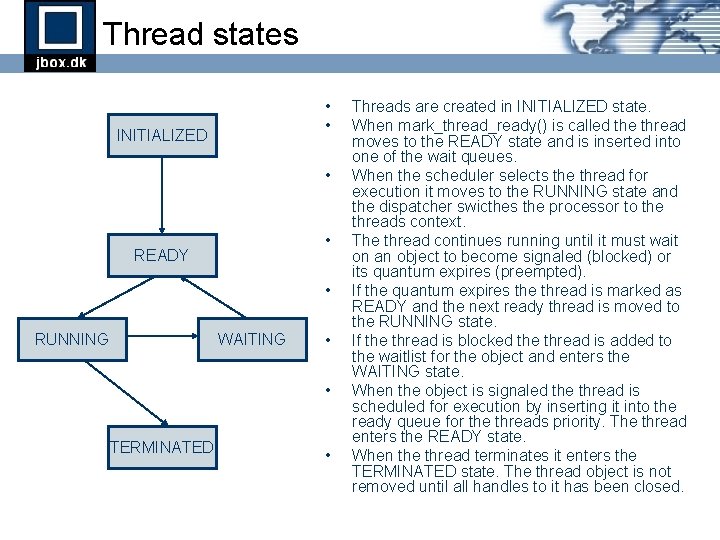
Thread states • • INITIALIZED • • READY • RUNNING WAITING • • TERMINATED • Threads are created in INITIALIZED state. When mark_thread_ready() is called the thread moves to the READY state and is inserted into one of the wait queues. When the scheduler selects the thread for execution it moves to the RUNNING state and the dispatcher swicthes the processor to the threads context. The thread continues running until it must wait on an object to become signaled (blocked) or its quantum expires (preempted). If the quantum expires the thread is marked as READY and the next ready thread is moved to the RUNNING state. If the thread is blocked the thread is added to the waitlist for the object and enters the WAITING state. When the object is signaled the thread is scheduled for execution by inserting it into the ready queue for the threads priority. The thread enters the READY state. When the thread terminates it enters the TERMINATED state. The thread object is not removed until all handles to it has been closed.
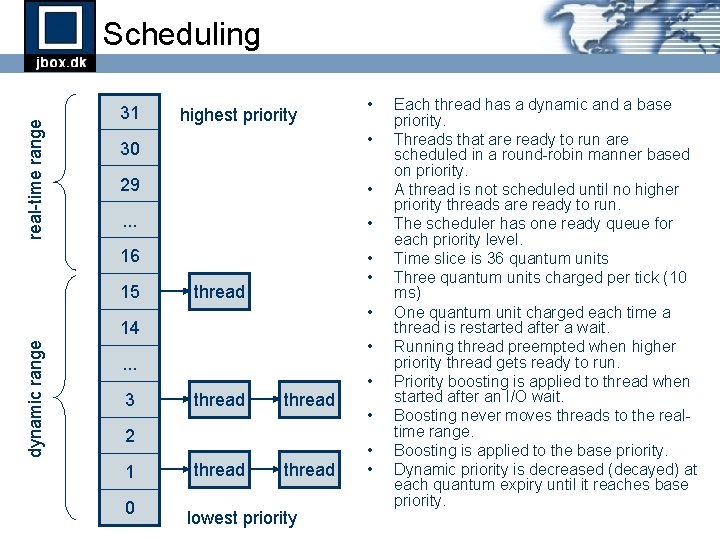
real-time range Scheduling 31 highest priority • 30 29 • . . . • 16 • • 15 thread • 14 dynamic range • • . . . 3 thread 2 1 0 thread lowest priority • • Each thread has a dynamic and a base priority. Threads that are ready to run are scheduled in a round-robin manner based on priority. A thread is not scheduled until no higher priority threads are ready to run. The scheduler has one ready queue for each priority level. Time slice is 36 quantum units Three quantum units charged per tick (10 ms) One quantum unit charged each time a thread is restarted after a wait. Running thread preempted when higher priority thread gets ready to run. Priority boosting is applied to thread when started after an I/O wait. Boosting never moves threads to the realtime range. Boosting is applied to the base priority. Dynamic priority is decreased (decayed) at each quantum expiry until it reaches base priority.
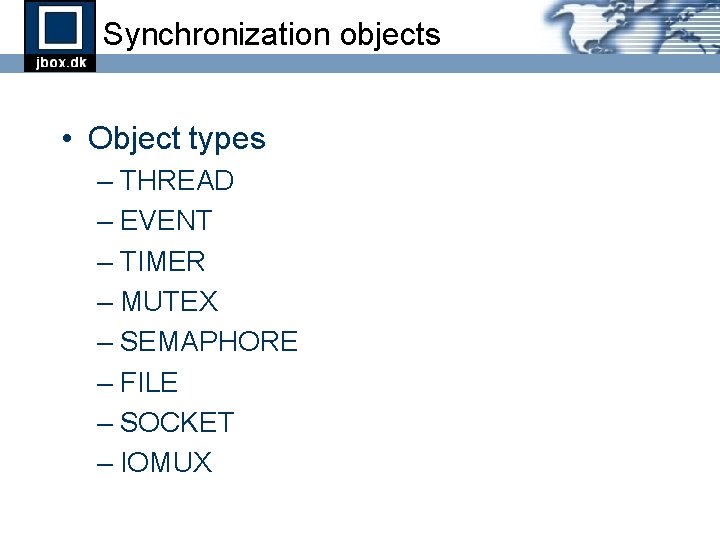
Synchronization objects • Object types – THREAD – EVENT – TIMER – MUTEX – SEMAPHORE – FILE – SOCKET – IOMUX
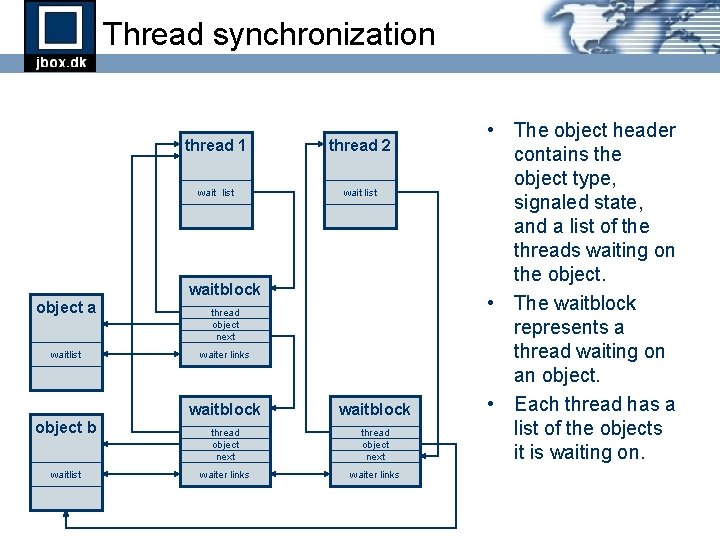
Thread synchronization thread 1 thread 2 wait list waitblock object a waitlist object b waitlist thread object next waiter links waitblock thread object next waiter links • The object header contains the object type, signaled state, and a list of the threads waiting on the object. • The waitblock represents a thread waiting on an object. • Each thread has a list of the objects it is waiting on.
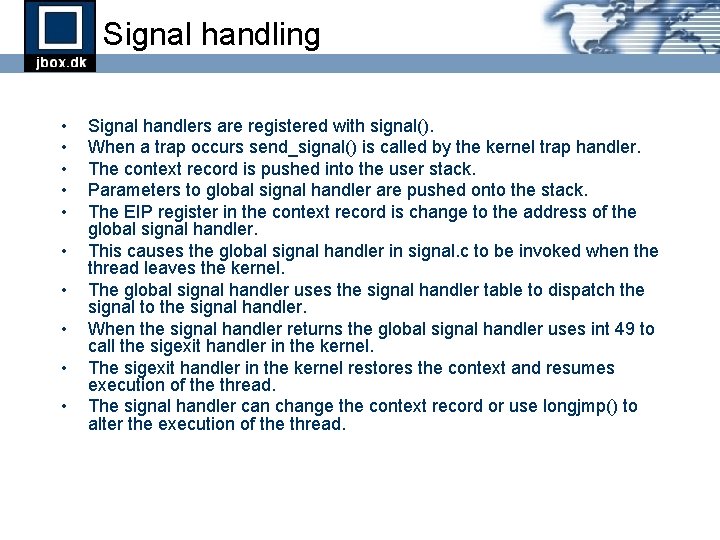
Signal handling • • • Signal handlers are registered with signal(). When a trap occurs send_signal() is called by the kernel trap handler. The context record is pushed into the user stack. Parameters to global signal handler are pushed onto the stack. The EIP register in the context record is change to the address of the global signal handler. This causes the global signal handler in signal. c to be invoked when the thread leaves the kernel. The global signal handler uses the signal handler table to dispatch the signal to the signal handler. When the signal handler returns the global signal handler uses int 49 to call the sigexit handler in the kernel. The sigexit handler in the kernel restores the context and resumes execution of the thread. The signal handler can change the context record or use longjmp() to alter the execution of the thread.
Part 5 I/O Management
I/O Components • Device Drivers • Device Manager • Virtual File System layer and filesystems • Socket interface and networking • I/O multiplexing
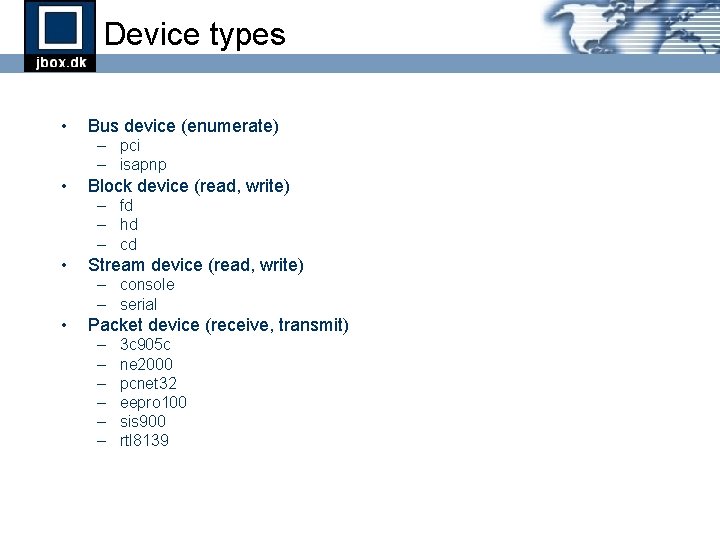
Device types • Bus device (enumerate) – pci – isapnp • Block device (read, write) – fd – hd – cd • Stream device (read, write) – console – serial • Packet device (receive, transmit) – – – 3 c 905 c ne 2000 pcnet 32 eepro 100 sis 900 rtl 8139
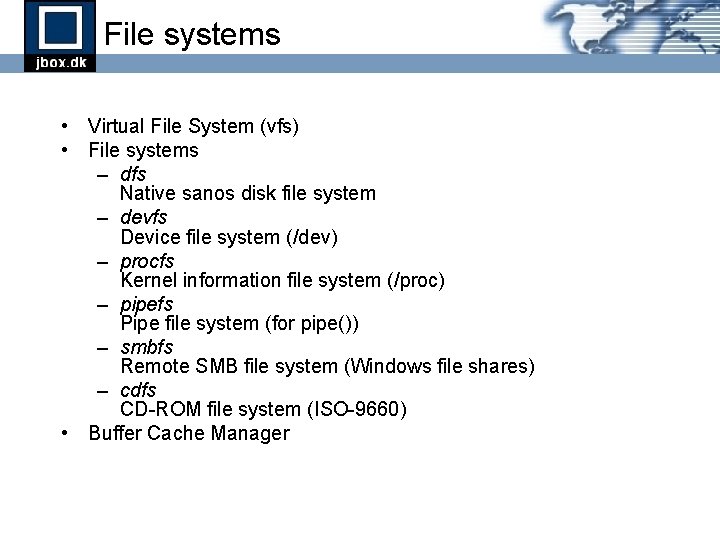
File systems • Virtual File System (vfs) • File systems – dfs Native sanos disk file system – devfs Device file system (/dev) – procfs Kernel information file system (/proc) – pipefs Pipe file system (for pipe()) – smbfs Remote SMB file system (Windows file shares) – cdfs CD-ROM file system (ISO-9660) • Buffer Cache Manager
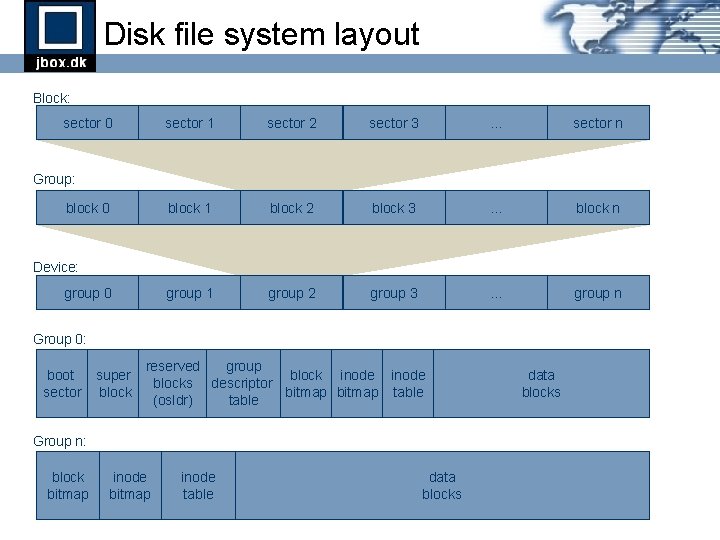
Disk file system layout Block: sector 0 sector 1 sector 2 sector 3 . . . sector n block 1 block 2 block 3 . . . block n group 1 group 2 group 3 . . . group n Group: block 0 Device: group 0 Group 0: boot sector super block reserved group block inode blocks descriptor bitmap table (osldr) table Group n: block bitmap inode table data blocks
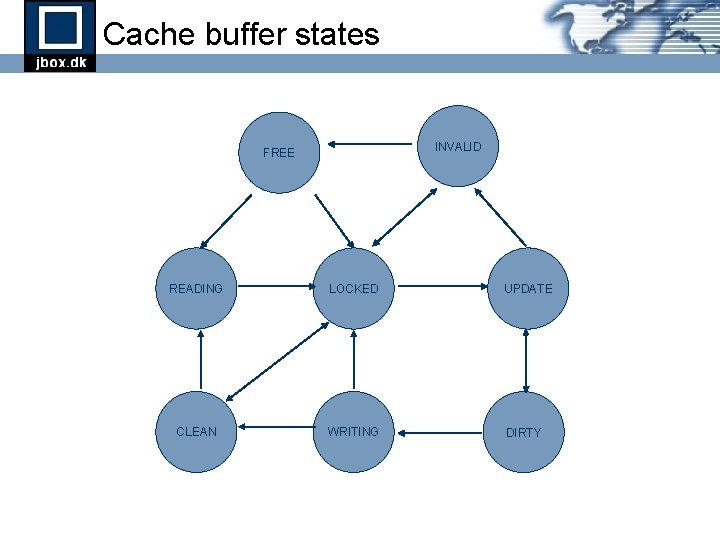
Cache buffer states INVALID FREE READING LOCKED UPDATE CLEAN WRITING DIRTY
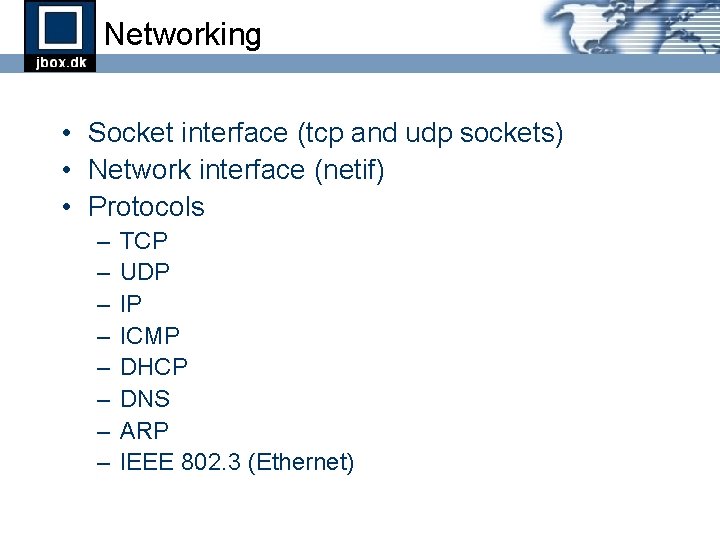
Networking • Socket interface (tcp and udp sockets) • Network interface (netif) • Protocols – – – – TCP UDP IP ICMP DHCP DNS ARP IEEE 802. 3 (Ethernet)
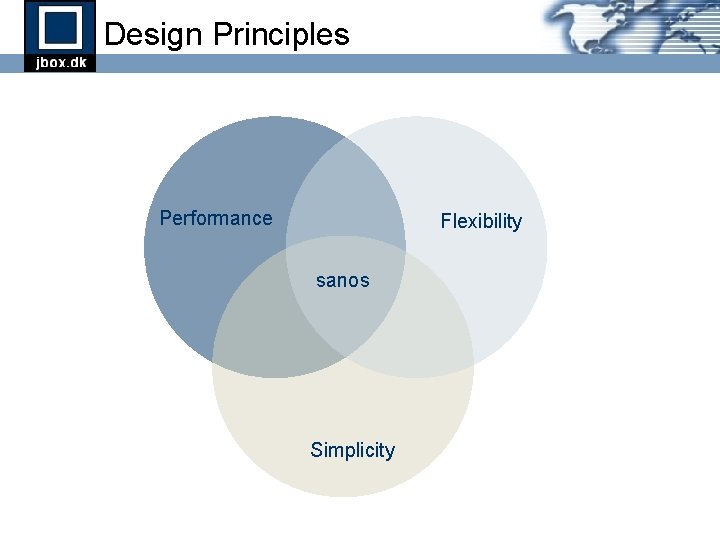
Design Principles Performance Flexibility sanos Simplicity
Logo