
SAMPLE WORKFLOW 1 Technology SetUp This activity can
- Slides: 4
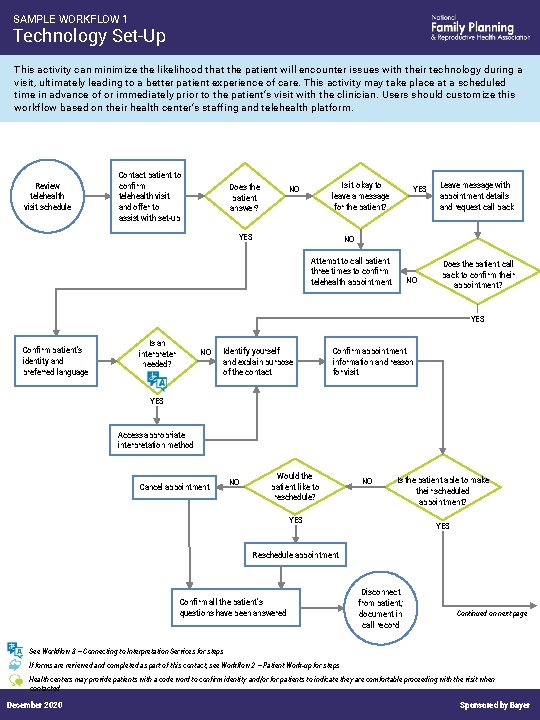
SAMPLE WORKFLOW 1 Technology Set-Up This activity can minimize the likelihood that the patient will encounter issues with their technology during a visit, ultimately leading to a better patient experience of care. This activity may take place at a scheduled time in advance of or immediately prior to the patient’s visit with the clinician. Users should customize this workflow based on their health center’s staffing and telehealth platform. Review telehealth visit schedule Contact patient to confirm telehealth visit and offer to assist with set-up Does the patient answer? Is it okay to leave a message for the patient? NO YES Leave message with appointment details and request call back NO Attempt to call patient three times to confirm telehealth appointment NO Does the patient call back to confirm their appointment? YES Confirm patient’s identity and preferred language Is an interpreter needed? NO Identify yourself and explain purpose of the contact Confirm appointment information and reason for visit YES Access appropriate interpretation method Cancel appointment NO Would the patient like to reschedule? NO Is the patient able to make their scheduled appointment? YES Reschedule appointment Confirm all the patient’s questions have been answered Disconnect from patient; document in call record Continued on next page See Workflow 3 – Connecting to Interpretation Services for steps If forms are reviewed and completed as part of this contact, see Workflow 2 – Patient Work-up for steps Health centers may provide patients with a code word to confirm identity and/or for patients to indicate they are comfortable proceeding with the visit when contacted December 2020 Sponsored by Bayer
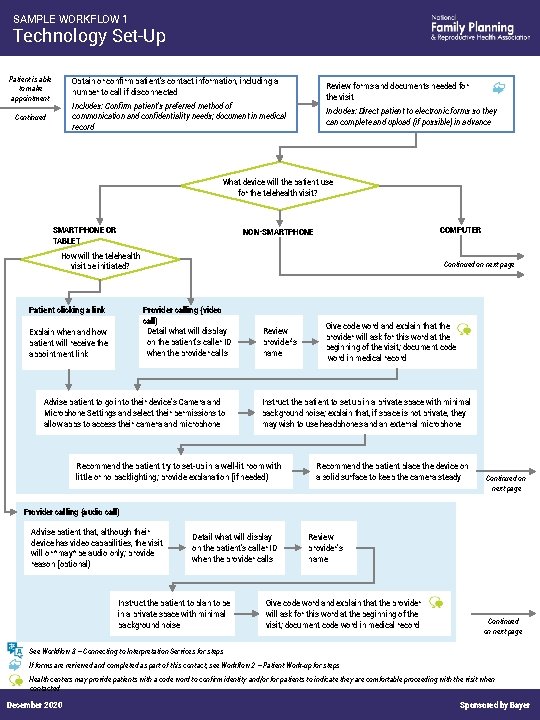
SAMPLE WORKFLOW 1 Technology Set-Up Patient is able to make appointment Obtain or confirm patient’s contact information, including a number to call if disconnected Review forms and documents needed for the visit Includes: Confirm patient’s preferred method of communication and confidentiality needs; document in medical record Continued Includes: Direct patient to electronic forms so they can complete and upload (if possible) in advance What device will the patient use for the telehealth visit? SMARTPHONE OR TABLET COMPUTER NON-SMARTPHONE How will the telehealth visit be initiated? Continued on next page Provider calling (video call) Detail what will display on the patient’s caller ID when the provider calls Patient clicking a link Explain when and how patient will receive the appointment link Advise patient to go into their device’s Camera and Microphone Settings and select their permissions to allow apps to access their camera and microphone Review provider’s name Give code word and explain that the provider will ask for this word at the beginning of the visit; document code word in medical record Instruct the patient to set up in a private space with minimal background noise; explain that, if space is not private, they may wish to use headphones and an external microphone Recommend the patient try to set-up in a well-lit room with little or no backlighting; provide explanation (if needed) Recommend the patient place the device on a solid surface to keep the camera steady Continued on next page Provider calling (audio call) Advise patient that, although their device has video capabilities, the visit will or *may* be audio only; provide reason (optional) Detail what will display on the patient’s caller ID when the provider calls Instruct the patient to plan to be in a private space with minimal background noise Review provider’s name Give code word and explain that the provider will ask for this word at the beginning of the visit; document code word in medical record Continued on next page See Workflow 3 – Connecting to Interpretation Services for steps If forms are reviewed and completed as part of this contact, see Workflow 2 – Patient Work-up for steps Health centers may provide patients with a code word to confirm identity and/or for patients to indicate they are comfortable proceeding with the visit when contacted December 2020 Sponsored by Bayer
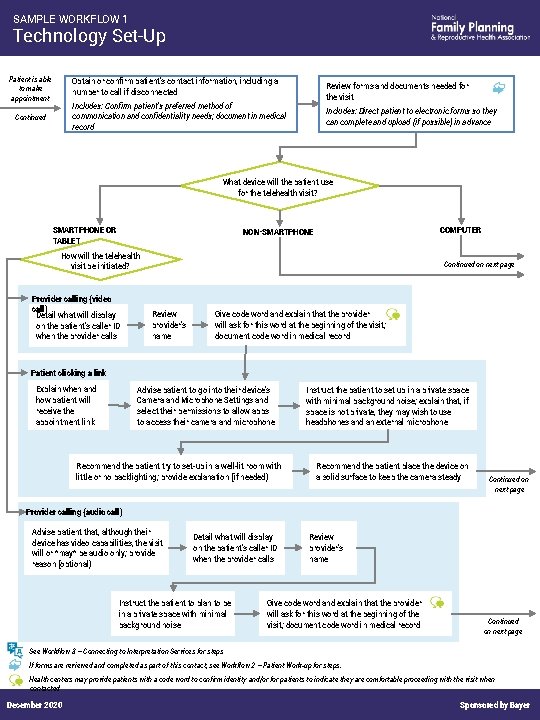
SAMPLE WORKFLOW 1 Technology Set-Up Patient is able to make appointment Obtain or confirm patient’s contact information, including a number to call if disconnected Review forms and documents needed for the visit Includes: Confirm patient’s preferred method of communication and confidentiality needs; document in medical record Continued Includes: Direct patient to electronic forms so they can complete and upload (if possible) in advance What device will the patient use for the telehealth visit? SMARTPHONE OR TABLET COMPUTER NON-SMARTPHONE How will the telehealth visit be initiated? Provider calling (video call) Detail what will display on the patient’s caller ID when the provider calls Continued on next page Review provider’s name Give code word and explain that the provider will ask for this word at the beginning of the visit; document code word in medical record Patient clicking a link Explain when and how patient will receive the appointment link Advise patient to go into their device’s Camera and Microphone Settings and select their permissions to allow apps to access their camera and microphone Recommend the patient try to set-up in a well-lit room with little or no backlighting; provide explanation (if needed) Instruct the patient to set up in a private space with minimal background noise; explain that, if space is not private, they may wish to use headphones and an external microphone Recommend the patient place the device on a solid surface to keep the camera steady Continued on next page Provider calling (audio call) Advise patient that, although their device has video capabilities, the visit will or *may* be audio only; provide reason (optional) Detail what will display on the patient’s caller ID when the provider calls Instruct the patient to plan to be in a private space with minimal background noise Review provider’s name Give code word and explain that the provider will ask for this word at the beginning of the visit; document code word in medical record Continued on next page See Workflow 3 – Connecting to Interpretation Services for steps If forms are reviewed and completed as part of this contact, see Workflow 2 – Patient Work-up for steps. Health centers may provide patients with a code word to confirm identity and/or for patients to indicate they are comfortable proceeding with the visit when contacted December 2020 Sponsored by Bayer
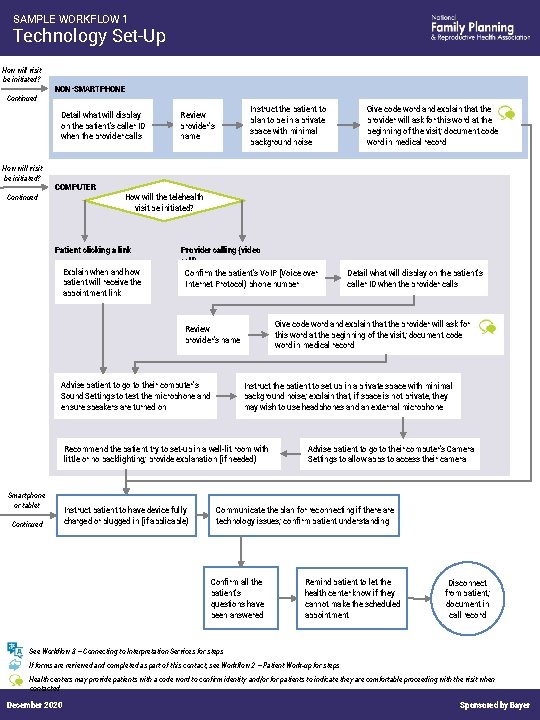
SAMPLE WORKFLOW 1 Technology Set-Up How will visit be initiated? Continued NON-SMARTPHONE Detail what will display on the patient’s caller ID when the provider calls How will visit be initiated? Continued COMPUTER Instruct the patient to plan to be in a private space with minimal background noise Review provider’s name How will the telehealth visit be initiated? Patient clicking a link Explain when and how patient will receive the appointment link Provider calling (video call) Confirm the patient’s Vo. IP (Voice over Internet Protocol) phone number Advise patient to go to their computer’s Sound Settings to test the microphone and ensure speakers are turned on Instruct the patient to set up in a private space with minimal background noise; explain that, if space is not private, they may wish to use headphones and an external microphone Recommend the patient try to set-up in a well-lit room with little or no backlighting; provide explanation (if needed) Continued Instruct patient to have device fully charged or plugged in (if applicable) Detail what will display on the patient’s caller ID when the provider calls Give code word and explain that the provider will ask for this word at the beginning of the visit; document code word in medical record Review provider’s name Smartphone or tablet Give code word and explain that the provider will ask for this word at the beginning of the visit; document code word in medical record Advise patient to go to their computer’s Camera Settings to allow apps to access their camera Communicate the plan for reconnecting if there are technology issues; confirm patient understanding Confirm all the patient’s questions have been answered Remind patient to let the health center know if they cannot make the scheduled appointment Disconnect from patient; document in call record See Workflow 3 – Connecting to Interpretation Services for steps If forms are reviewed and completed as part of this contact, see Workflow 2 – Patient Work-up for steps Health centers may provide patients with a code word to confirm identity and/or for patients to indicate they are comfortable proceeding with the visit when contacted December 2020 Sponsored by Bayer