
Sail Point Course Material for Access Certification Copyright

- Slides: 32
Sail. Point Course Material for Access Certification Copyright © Asha 24. All the contents of this material for education purpose only. Sailpoint is not the publisher of these material and is not responsible for it in any aspect.
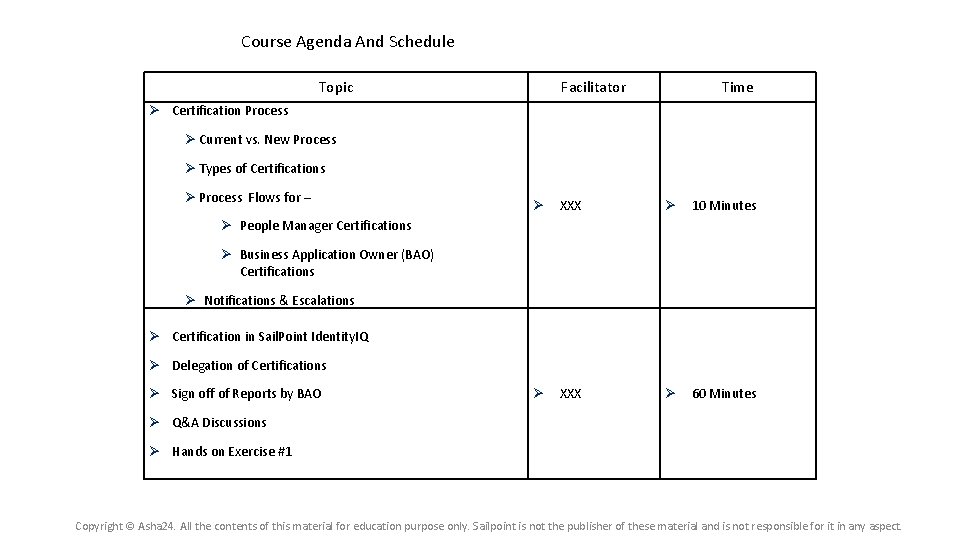
Course Agenda And Schedule Topic Facilitator Time Certification Process Current vs. New Process Types of Certifications Process Flows for – XXX 10 Minutes XXX 60 Minutes People Manager Certifications Business Application Owner (BAO) Certifications Notifications & Escalations Certification in Sail. Point Identity. IQ Delegation of Certifications Sign off of Reports by BAO Q&A Discussions Hands on Exercise #1 Copyright © Asha 24. All the contents of this material for education purpose only. Sailpoint is not the publisher of these material and is not responsible for it in any aspect.
Certification Process Copyright © Asha 24. All the contents of this material for education purpose only. Sailpoint is not the publisher of these material and is not responsible for it in any aspect.
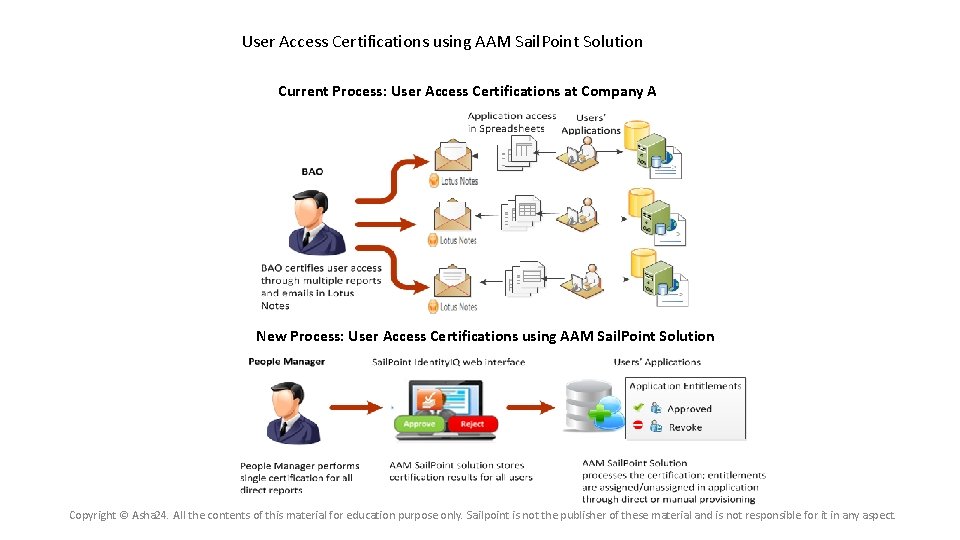
User Access Certifications using AAM Sail. Point Solution Current Process: User Access Certifications at Company A New Process: User Access Certifications using AAM Sail. Point Solution Copyright © Asha 24. All the contents of this material for education purpose only. Sailpoint is not the publisher of these material and is not responsible for it in any aspect.
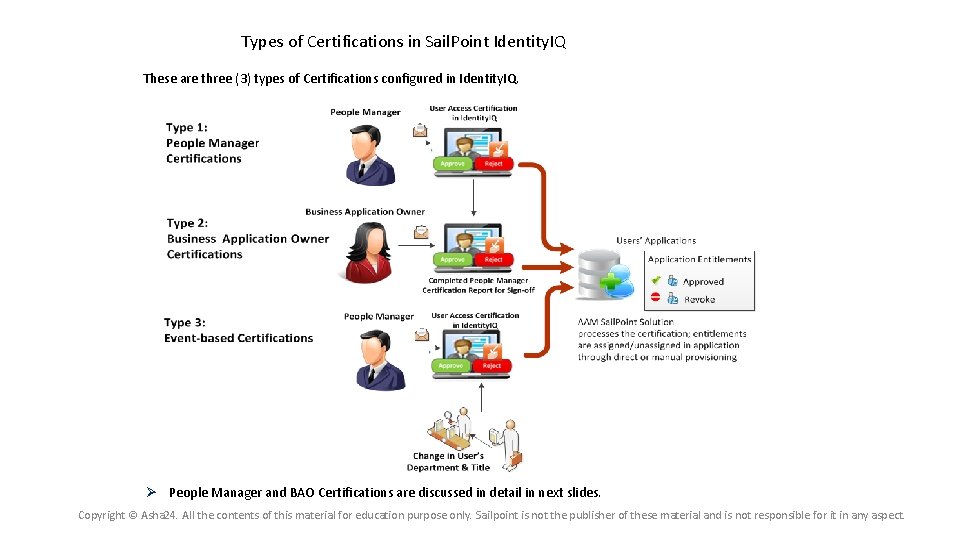
Types of Certifications in Sail. Point Identity. IQ These are three (3) types of Certifications configured in Identity. IQ. People Manager and BAO Certifications are discussed in detail in next slides. Copyright © Asha 24. All the contents of this material for education purpose only. Sailpoint is not the publisher of these material and is not responsible for it in any aspect.
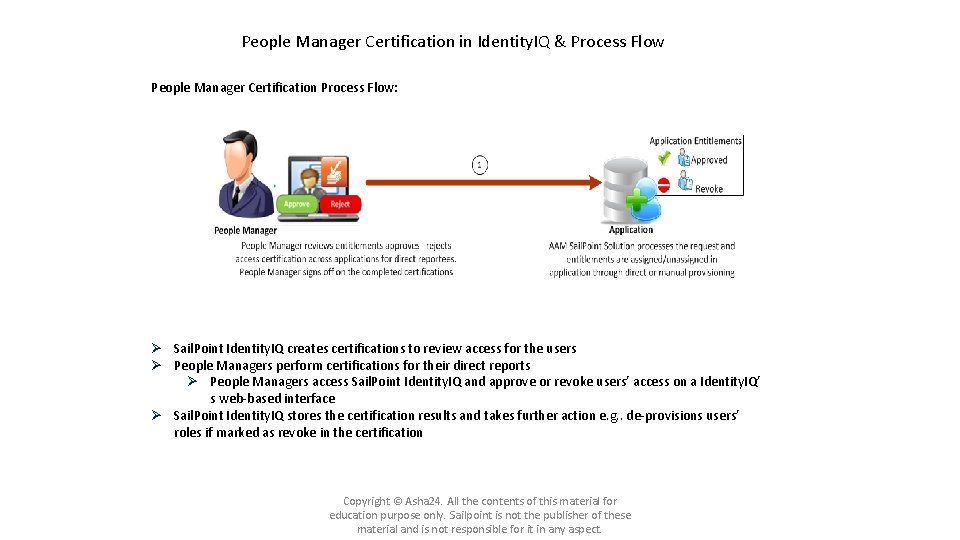
People Manager Certification in Identity. IQ & Process Flow People Manager Certification Process Flow: Sail. Point Identity. IQ creates certifications to review access for the users People Managers perform certifications for their direct reports People Managers access Sail. Point Identity. IQ and approve or revoke users’ access on a Identity. IQ’ s web-based interface Sail. Point Identity. IQ stores the certification results and takes further action e. g. . de-provisions users’ roles if marked as revoke in the certification Copyright © Asha 24. All the contents of this material for education purpose only. Sailpoint is not the publisher of these material and is not responsible for it in any aspect.
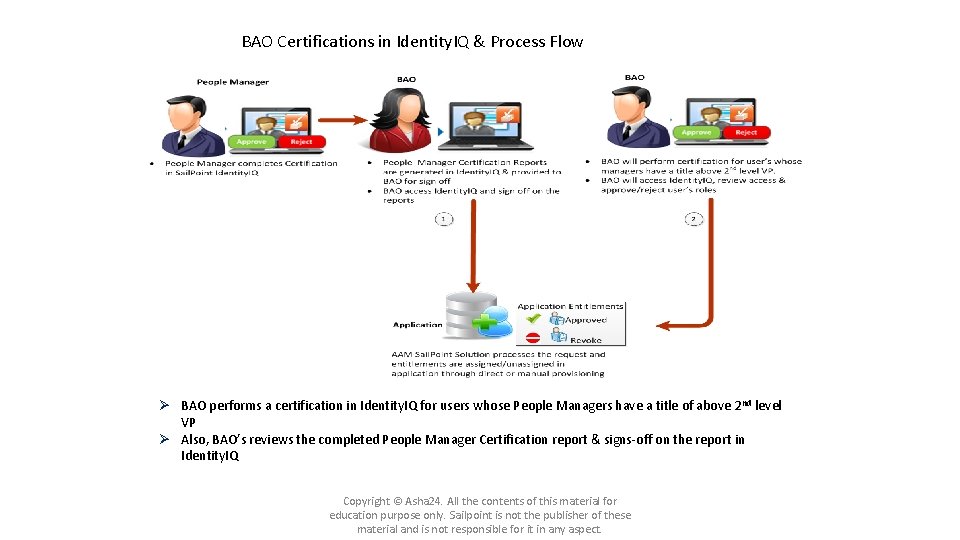
BAO Certifications in Identity. IQ & Process Flow BAO performs a certification in Identity. IQ for users whose People Managers have a title of above 2 nd level VP Also, BAO’s reviews the completed People Manager Certification report & signs-off on the report in Identity. IQ Copyright © Asha 24. All the contents of this material for education purpose only. Sailpoint is not the publisher of these material and is not responsible for it in any aspect.
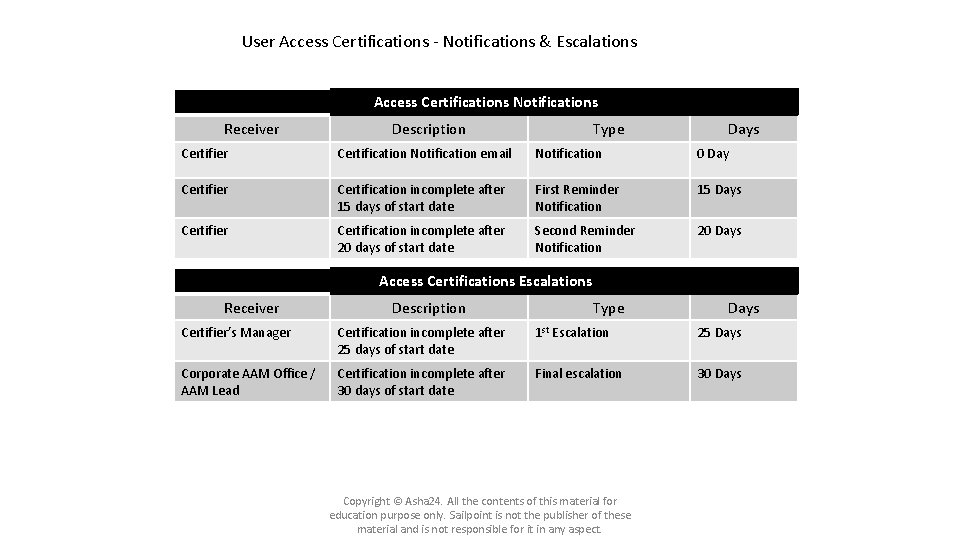
User Access Certifications - Notifications & Escalations Access Certifications Notifications Receiver Description Type Days Certifier Certification Notification email Notification 0 Day Certifier Certification incomplete after 15 days of start date First Reminder Notification 15 Days Certifier Certification incomplete after 20 days of start date Second Reminder Notification 20 Days Access Certifications Escalations Receiver Description Type Days Certifier’s Manager Certification incomplete after 25 days of start date 1 st Escalation 25 Days Corporate AAM Office / AAM Lead Certification incomplete after 30 days of start date Final escalation 30 Days Copyright © Asha 24. All the contents of this material for education purpose only. Sailpoint is not the publisher of these material and is not responsible for it in any aspect.
Certification in Sail. Point Identity. IQ Copyright © Asha 24. All the contents of this material for education purpose only. Sailpoint is not the publisher of these material and is not responsible for it in any aspect.
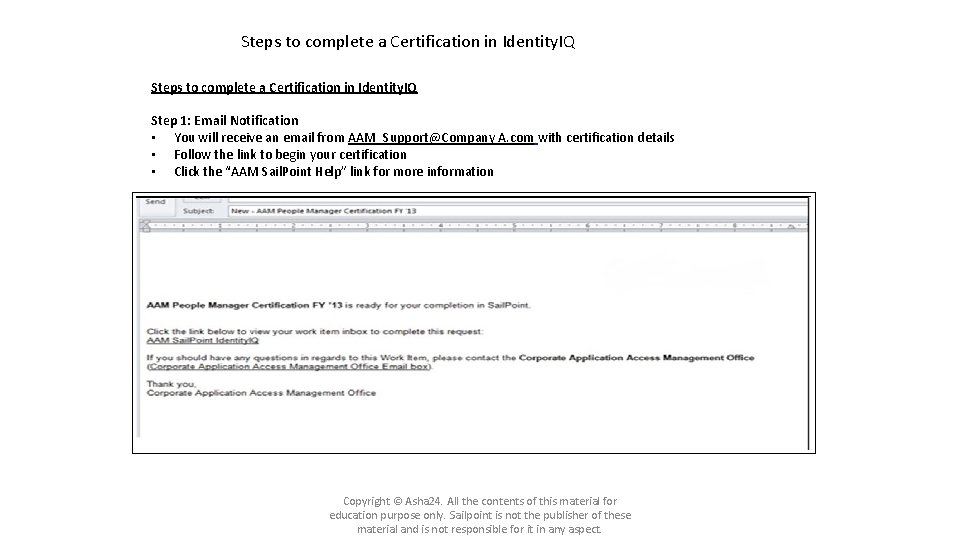
Steps to complete a Certification in Identity. IQ Step 1: Email Notification • You will receive an email from AAM_Support@Company A. com with certification details • Follow the link to begin your certification • Click the “AAM Sail. Point Help” link for more information Copyright © Asha 24. All the contents of this material for education purpose only. Sailpoint is not the publisher of these material and is not responsible for it in any aspect.
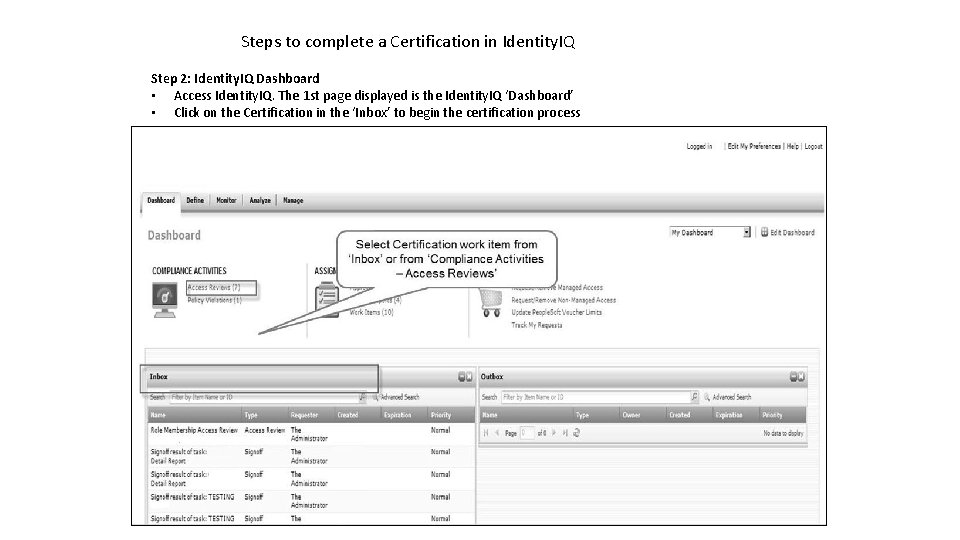
Steps to complete a Certification in Identity. IQ Step 2: Identity. IQ Dashboard • Access Identity. IQ. The 1 st page displayed is the Identity. IQ ‘Dashboard’ • Click on the Certification in the ‘Inbox’ to begin the certification process
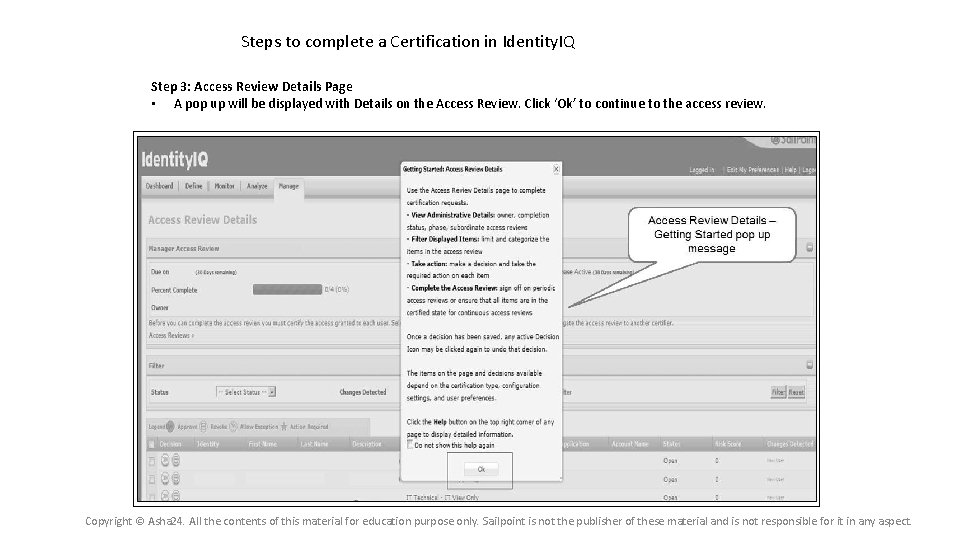
Steps to complete a Certification in Identity. IQ Step 3: Access Review Details Page • A pop up will be displayed with Details on the Access Review. Click ‘Ok’ to continue to the access review. Copyright © Asha 24. All the contents of this material for education purpose only. Sailpoint is not the publisher of these material and is not responsible for it in any aspect.
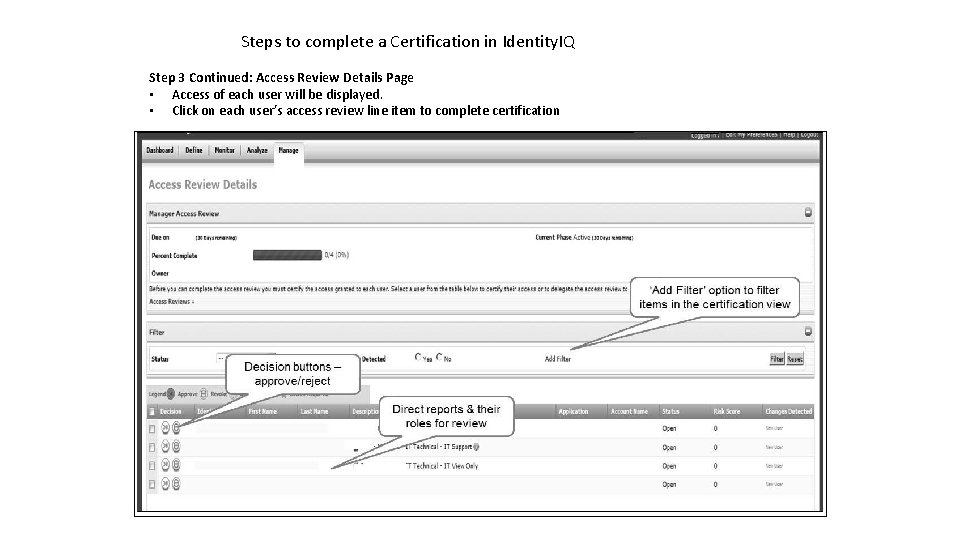
Steps to complete a Certification in Identity. IQ Step 3 Continued: Access Review Details Page • Access of each user will be displayed. • Click on each user’s access review line item to complete certification
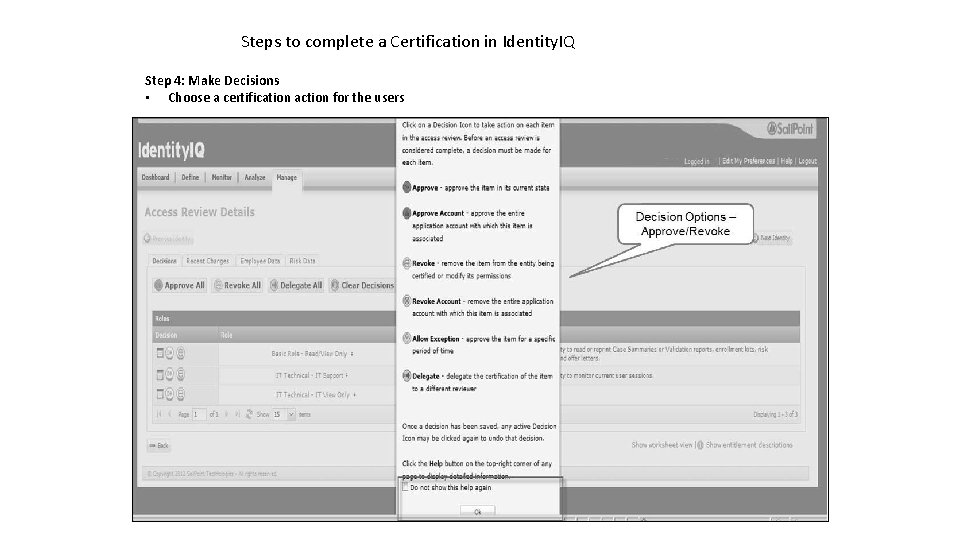
Steps to complete a Certification in Identity. IQ Step 4: Make Decisions • Choose a certification action for the users
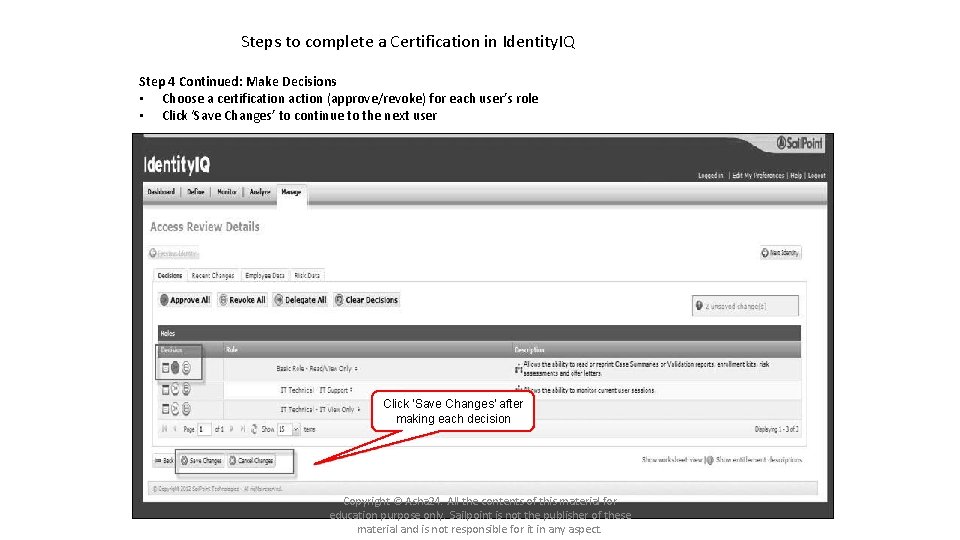
Steps to complete a Certification in Identity. IQ Step 4 Continued: Make Decisions • Choose a certification action (approve/revoke) for each user’s role • Click ‘Save Changes’ to continue to the next user Click ‘Save Changes’ after making each decision Copyright © Asha 24. All the contents of this material for education purpose only. Sailpoint is not the publisher of these material and is not responsible for it in any aspect.
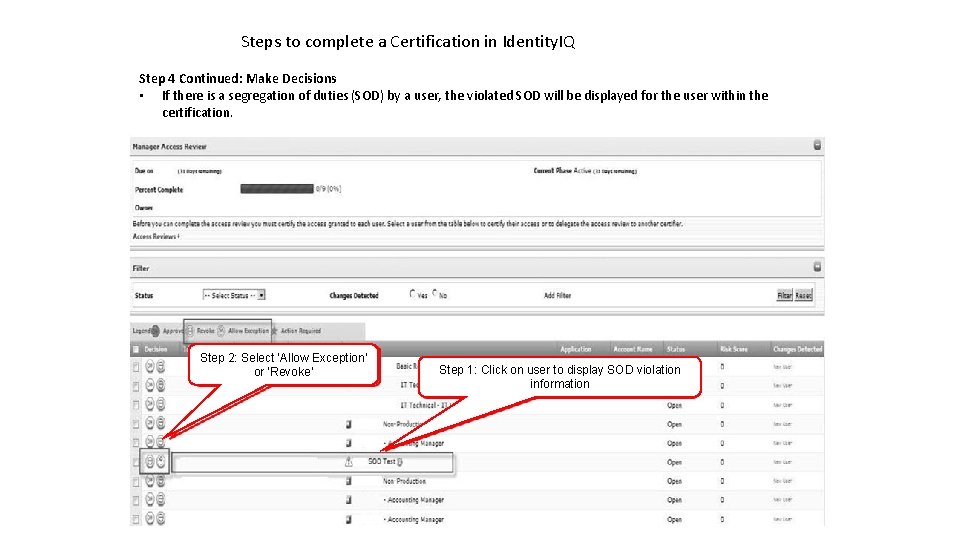
Steps to complete a Certification in Identity. IQ Step 4 Continued: Make Decisions • If there is a segregation of duties (SOD) by a user, the violated SOD will be displayed for the user within the certification. Step 2: Select ‘Allow Exception’ or ‘Revoke’ Step 1: Click on user to display SOD violation information
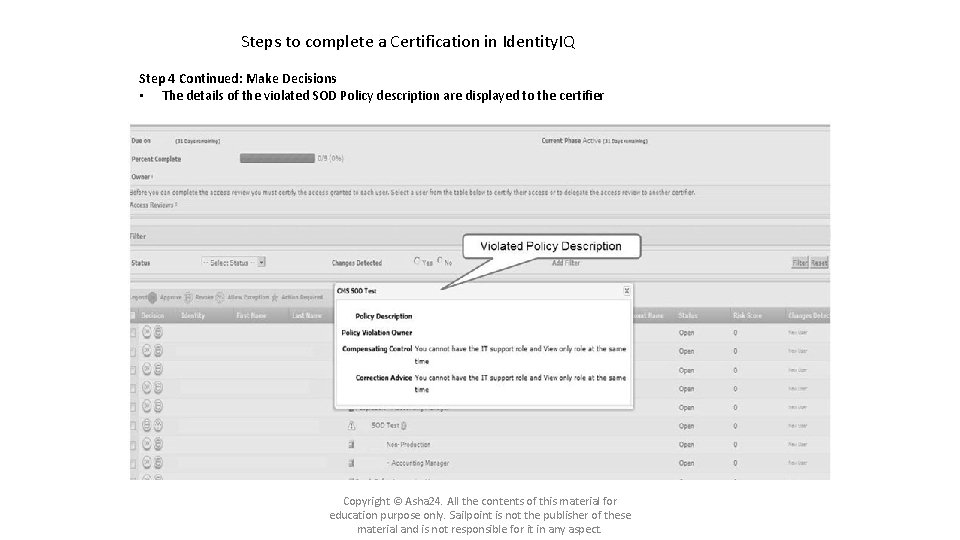
Steps to complete a Certification in Identity. IQ Step 4 Continued: Make Decisions • The details of the violated SOD Policy description are displayed to the certifier Copyright © Asha 24. All the contents of this material for education purpose only. Sailpoint is not the publisher of these material and is not responsible for it in any aspect.
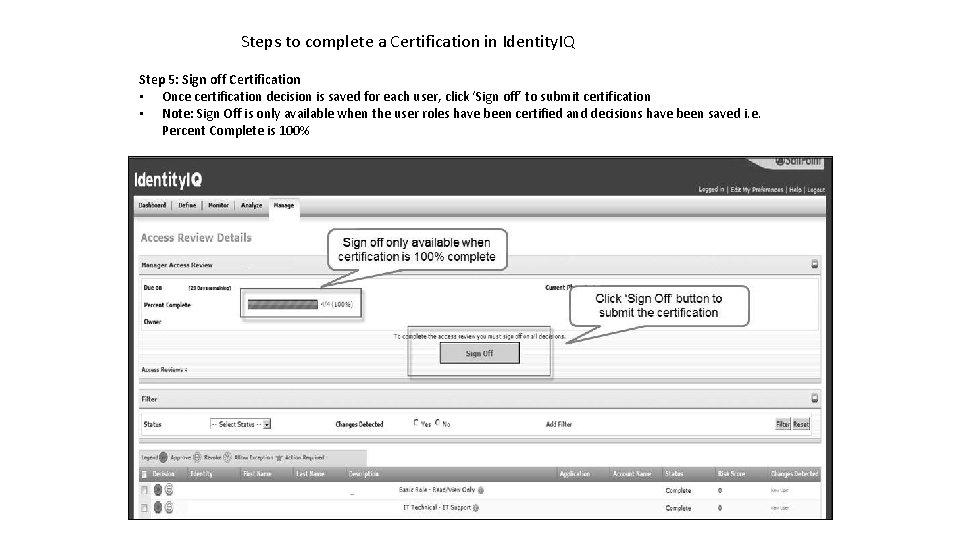
Steps to complete a Certification in Identity. IQ Step 5: Sign off Certification • Once certification decision is saved for each user, click ‘Sign off’ to submit certification • Note: Sign Off is only available when the user roles have been certified and decisions have been saved i. e. Percent Complete is 100%
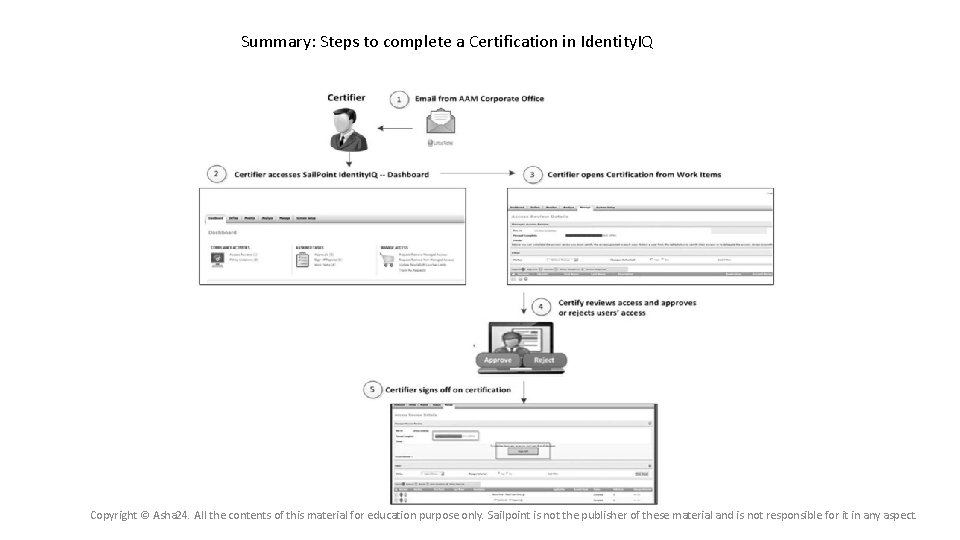
Summary: Steps to complete a Certification in Identity. IQ Copyright © Asha 24. All the contents of this material for education purpose only. Sailpoint is not the publisher of these material and is not responsible for it in any aspect.
Certification Delegations Copyright © Asha 24. All the contents of this material for education purpose only. Sailpoint is not the publisher of these material and is not responsible for it in any aspect.
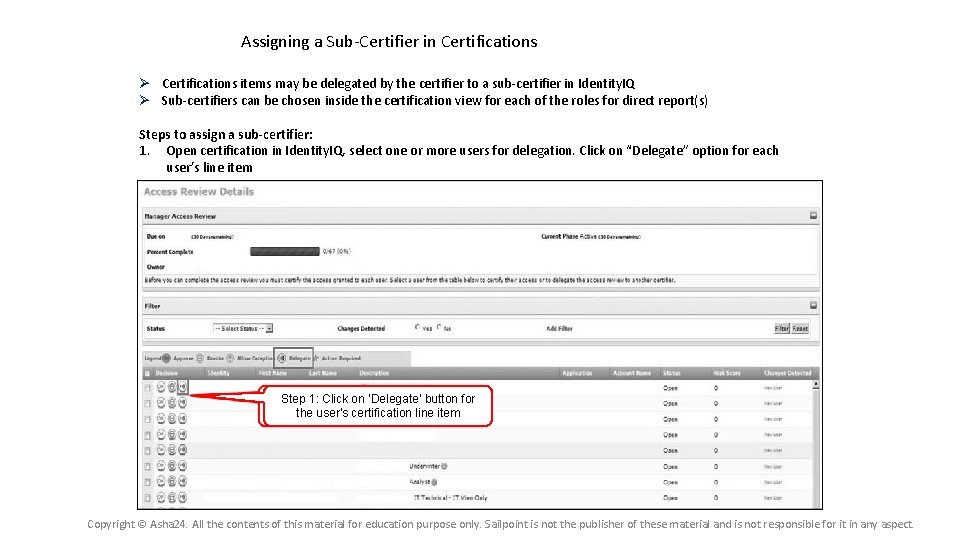
Assigning a Sub-Certifier in Certifications items may be delegated by the certifier to a sub-certifier in Identity. IQ Sub-certifiers can be chosen inside the certification view for each of the roles for direct report(s) Steps to assign a sub-certifier: 1. Open certification in Identity. IQ, select one or more users for delegation. Click on “Delegate” option for each user’s line item Step 1: Click on ‘Delegate’ button for the user’s certification line item Copyright © Asha 24. All the contents of this material for education purpose only. Sailpoint is not the publisher of these material and is not responsible for it in any aspect.
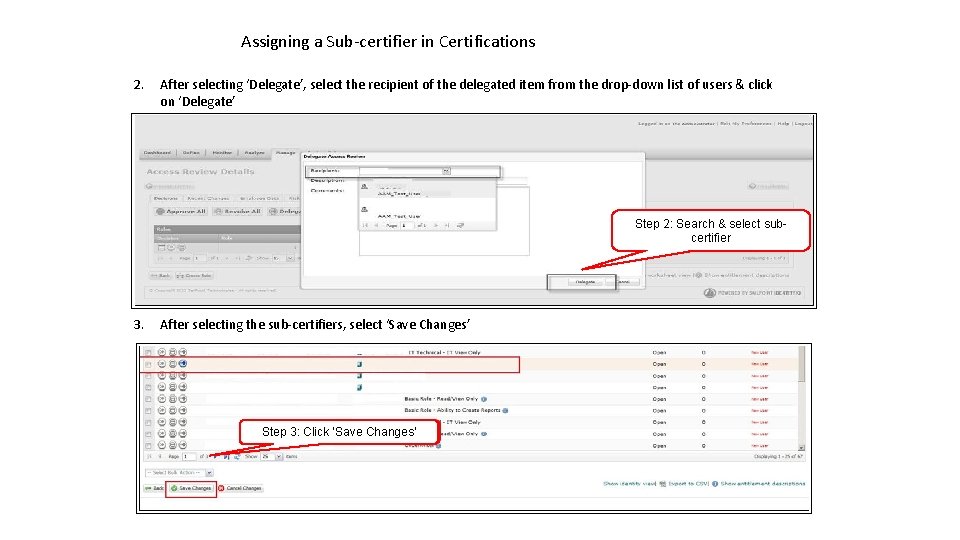
Assigning a Sub-certifier in Certifications 2. After selecting ‘Delegate’, select the recipient of the delegated item from the drop-down list of users & click on ‘Delegate’ Step 2: Search & select subcertifier 3. After selecting the sub-certifiers, select ‘Save Changes’ Step 3: Click ‘Save Changes’
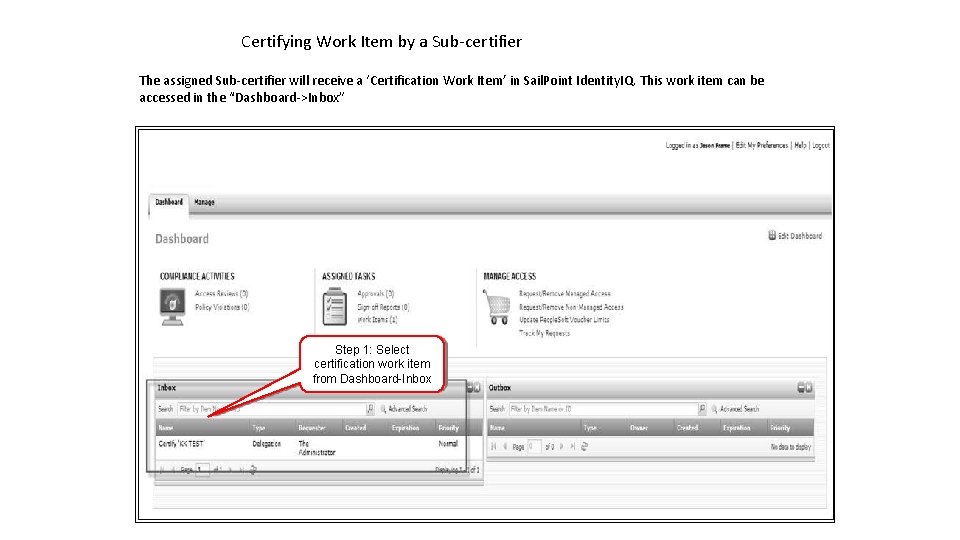
Certifying Work Item by a Sub-certifier The assigned Sub-certifier will receive a ‘Certification Work Item’ in Sail. Point Identity. IQ. This work item can be accessed in the “Dashboard->Inbox” Step 1: Select certification work item from Dashboard-Inbox
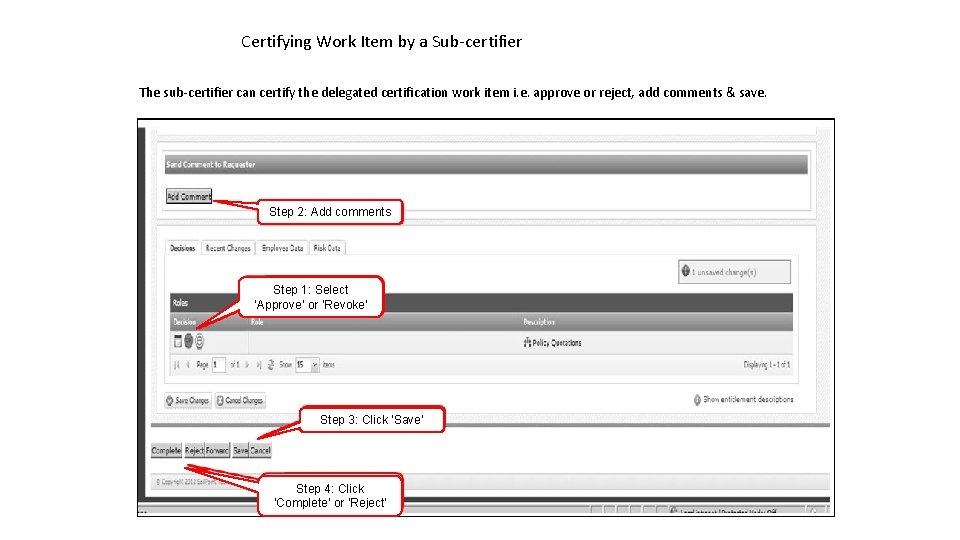
Certifying Work Item by a Sub-certifier The sub-certifier can certify the delegated certification work item i. e. approve or reject, add comments & save. Step 2: Add comments Step 1: Select ‘Approve’ or ‘Revoke’ Step 3: Click ‘Save’ Step 4: Click ‘Complete’ or ‘Reject’
Certification / Report Sign Off Copyright © Asha 24. All the contents of this material for education purpose only. Sailpoint is not the publisher of these material and is not responsible for it in any aspect.
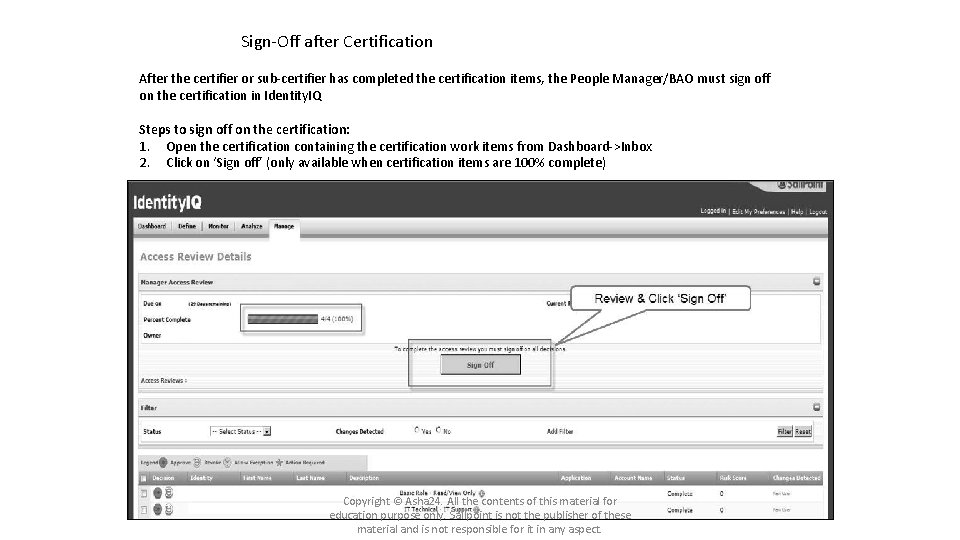
Sign-Off after Certification After the certifier or sub-certifier has completed the certification items, the People Manager/BAO must sign off on the certification in Identity. IQ Steps to sign off on the certification: 1. Open the certification containing the certification work items from Dashboard->Inbox 2. Click on ‘Sign off’ (only available when certification items are 100% complete) Copyright © Asha 24. All the contents of this material for education purpose only. Sailpoint is not the publisher of these material and is not responsible for it in any aspect.
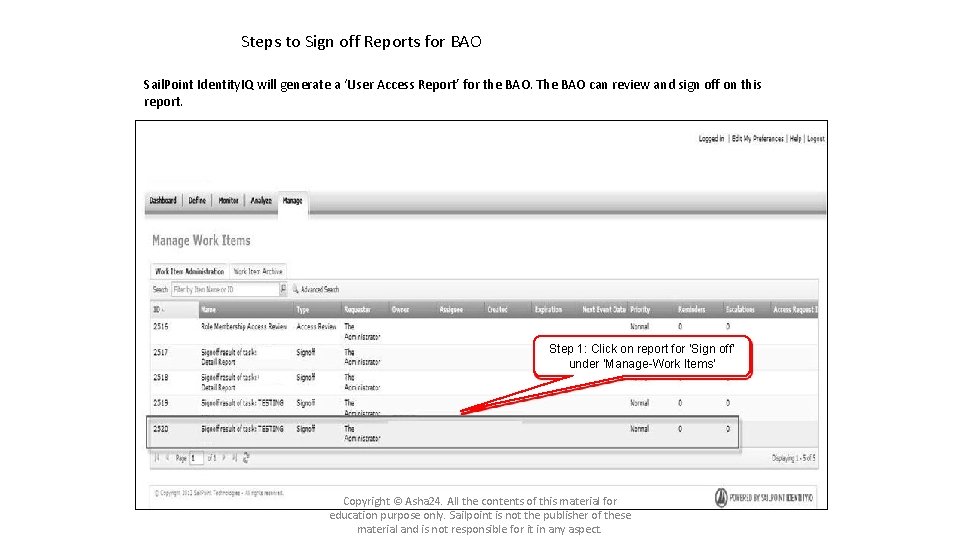
Steps to Sign off Reports for BAO Sail. Point Identity. IQ will generate a ‘User Access Report’ for the BAO. The BAO can review and sign off on this report. Step 1: Click on report for ‘Sign off’ under ‘Manage-Work Items’ Copyright © Asha 24. All the contents of this material for education purpose only. Sailpoint is not the publisher of these material and is not responsible for it in any aspect.
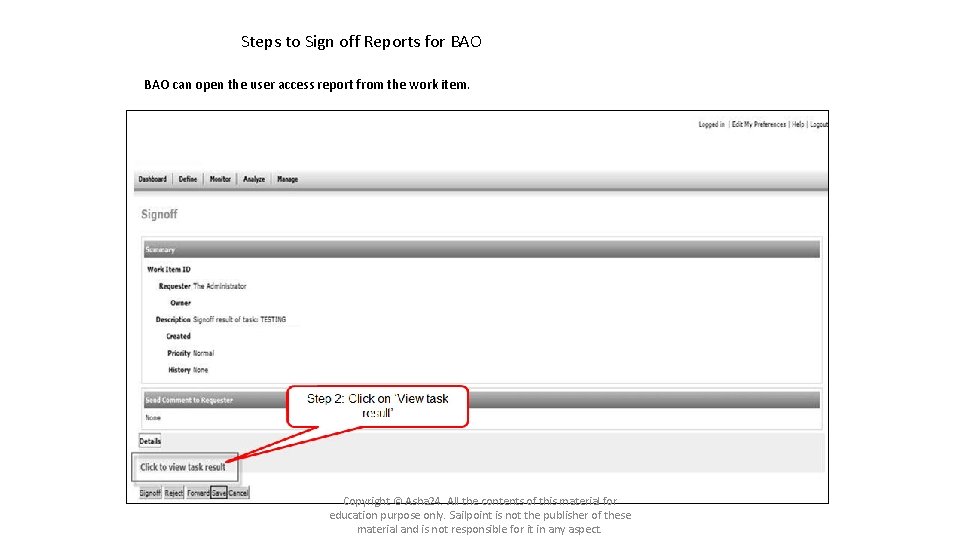
Steps to Sign off Reports for BAO can open the user access report from the work item. Copyright © Asha 24. All the contents of this material for education purpose only. Sailpoint is not the publisher of these material and is not responsible for it in any aspect.
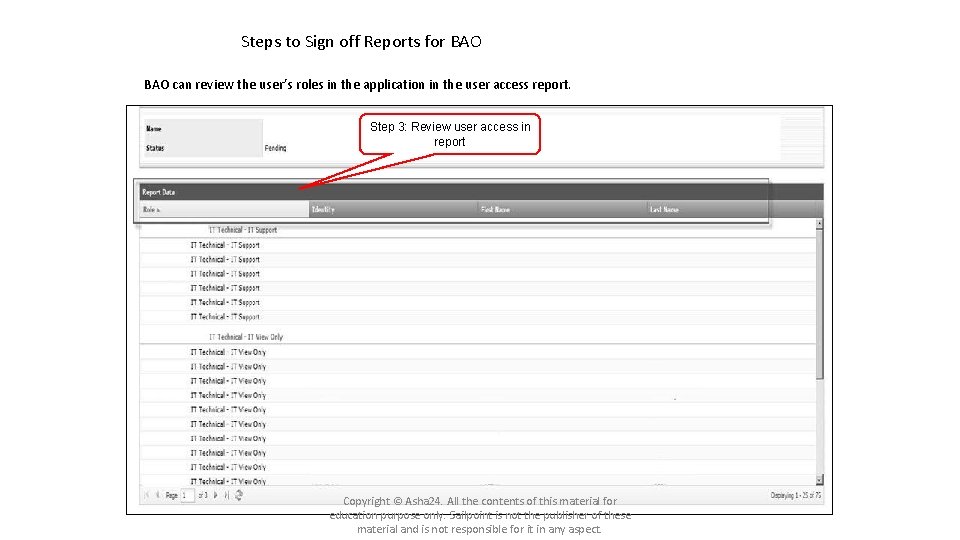
Steps to Sign off Reports for BAO can review the user’s roles in the application in the user access report. Step 3: Review user access in report Copyright © Asha 24. All the contents of this material for education purpose only. Sailpoint is not the publisher of these material and is not responsible for it in any aspect.
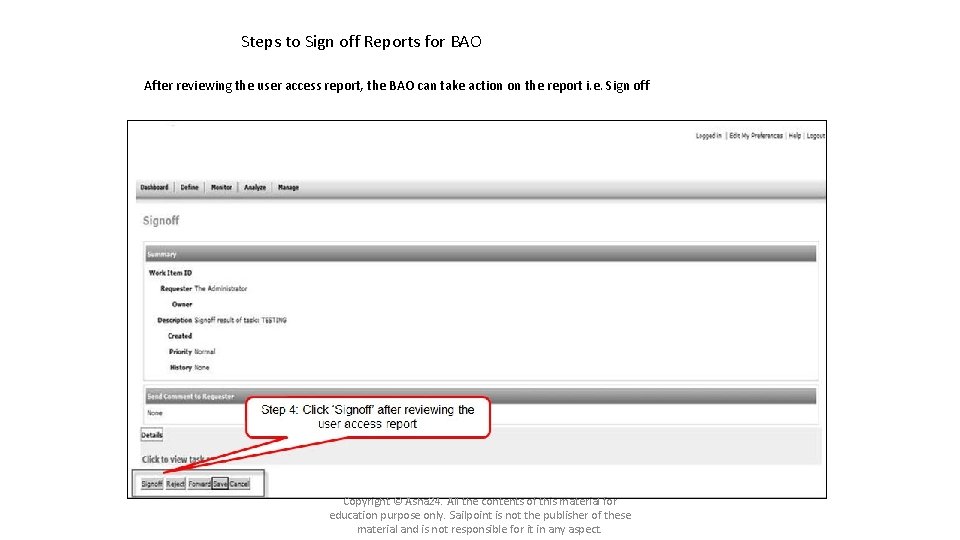
Steps to Sign off Reports for BAO After reviewing the user access report, the BAO can take action on the report i. e. Sign off Copyright © Asha 24. All the contents of this material for education purpose only. Sailpoint is not the publisher of these material and is not responsible for it in any aspect.
Questions and answers Copyright © Asha 24. All the contents of this material for education purpose only. Sailpoint is not the publisher of these material and is not responsible for it in any aspect.
Thank you Copyright © Asha 24. All the contents of this material for education purpose only. Sailpoint is not the publisher of these material and is not responsible for it in any aspect.