
Safeguard Your Business Sales Guide Customer profile Businesses
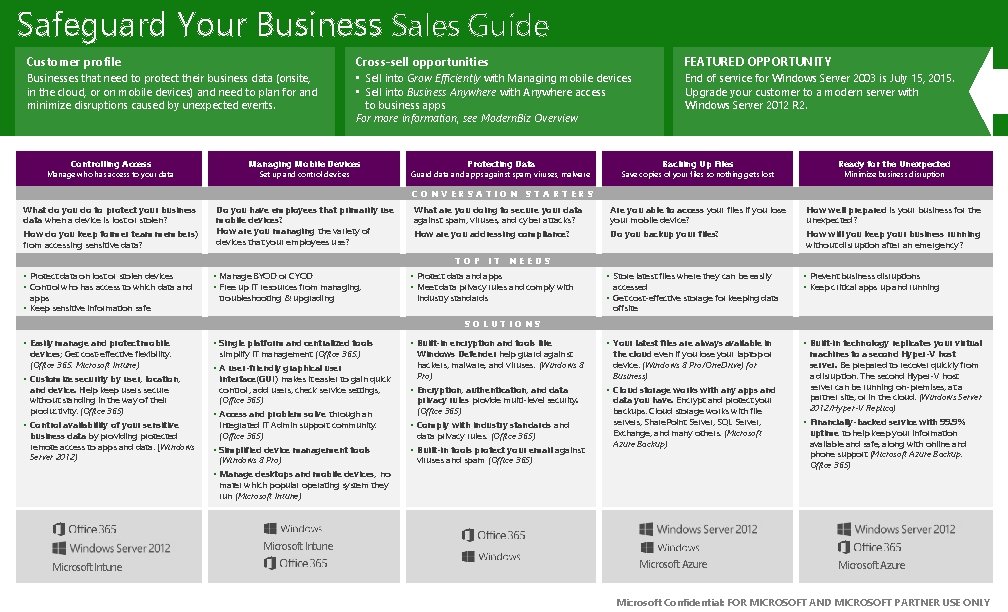
Safeguard Your Business Sales Guide Customer profile Businesses that need to protect their business data (onsite, in the cloud, or on mobile devices) and need to plan for and minimize disruptions caused by unexpected events. Controlling Access Manage who has access to your data Cross-sell opportunities • Sell into Grow Efficiently with Managing mobile devices • Sell into Business Anywhere with Anywhere access to business apps For more information, see Modern. Biz Overview Managing Mobile Devices Set up and control devices Protecting Data FEATURED OPPORTUNITY End of service for Windows Server 2003 is July 15, 2015. Upgrade your customer to a modern server with Windows Server 2012 R 2. Backing Up Files Ready for the Unexpected What are you doing to secure your data against spam, viruses, and cyber attacks? Are you able to access your files if you lose your mobile device? How well prepared is your business for the unexpected? How are you addressing compliance? Do you backup your files? How will you keep your business running without disruption after an emergency? Guard data and apps against spam, viruses, malware Save copies of your files so nothing gets lost Minimize business disruption CONVERSATION STARTERS What do you do to protect your business data when a device is lost or stolen? How do you keep former team members) from accessing sensitive data? Do you have employees that primarily use mobile devices? How are you managing the variety of devices that your employees use? TOP IT NEEDS • Protect data on lost or stolen devices • Control who has access to which data and apps • Keep sensitive information safe • Manage BYOD or CYOD • Free up IT resources from managing, troubleshooting & upgrading • Protect data and apps • Meet data privacy rules and comply with • Store latest files where they can be easily • Prevent business disruptions • Keep critical apps up and running • Built-in encryption and tools like • Your latest files are always available in • Built-in technology replicates your virtual • Encryption, authentication, and data • Cloud storage works with any apps and industry standards accessed • Get cost-effective storage for keeping data offsite SOLUTIONS • Easily manage and protect mobile devices; Get cost-effective flexibility. (Office 365, Microsoft Intune) • Customize security by user, location, and device. Help keep users secure without standing in the way of their productivity. (Office 365) • Control availability of your sensitive business data by providing protected remote access to apps and data. (Windows Server 2012) • Single platform and centralized tools simplify IT management (Office 365, ) • A user-friendly graphical user interface(GUI) makes it easier to gain quick control , add users, check service settings, (Office 365) • Access and problem solve through an integrated IT Admin support community. (Office 365) • Simplified device management tools (Windows 8 Pro) Windows Defender help guard against hackers, malware, and viruses. (Windows 8 Pro) privacy rules provide multi-level security. (Office 365) • Comply with industry standards and data privacy rules. (Office 365) • Built-in tools protect your email against the cloud even if you lose your laptop or device. (Windows 8 Pro/One. Drive) for Business) data you have. Encrypt and protect your backups. Cloud storage works with file servers, Share. Point Server, SQL Server, Exchange, and many others. (Microsoft Azure Backup) viruses and spam (Office 365) • Manage desktops and mobile devices, no machines to a second Hyper-V host server. Be prepared to recover quickly from a disruption. The second Hyper-V host server can be running on-premises, at a partner site, or in the cloud. (Windows Server 2012/Hyper-V Replica) • Financially-backed service with 99. 9% uptime to help keep your information available and safe, along with online and phone support (Microsoft Azure Backup, Office 365) mater which popular operating system they run (Microsoft Intune) Microsoft Intune Microsoft Azure Microsoft Confidential: FOR MICROSOFT AND MICROSOFT PARTNER USE ONLY
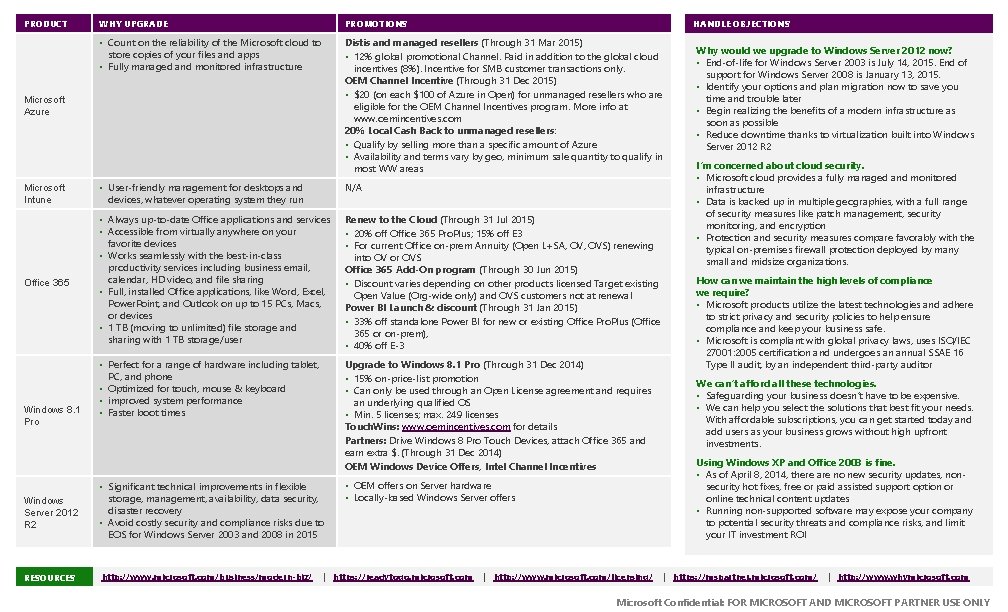
PRODUCT WHY UPGRADE PROMOTIONS • Count on the reliability of the Microsoft cloud to store copies of your files and apps • Fully managed and monitored infrastructure Distis and managed resellers (Through 31 Mar 2015) • 12% global promotional Channel. Paid in addition to the global cloud incentives (8%). Incentive for SMB customer transactions only. OEM Channel Incentive (Through 31 Dec 2015) • $20 (on each $100 of Azure in Open) for unmanaged resellers who are eligible for the OEM Channel Incentives program. More info at www. oemincentives. com 20% Local Cash Back to unmanaged resellers: • Qualify by selling more than a specific amount of Azure • Availability and terms vary by geo, minimum sale quantity to qualify in most WW areas Microsoft Azure HANDLE OBJECTIONS Microsoft Intune • User-friendly management for desktops and devices, whatever operating system they run N/A Office 365 • Always up-to-date Office applications and services • Accessible from virtually anywhere on your favorite devices • Works seamlessly with the best-in-class productivity services including business email, calendar, HD video, and file sharing • Full, installed Office applications, like Word, Excel, Power. Point, and Outlook on up to 15 PCs, Macs, or devices • 1 TB (moving to unlimited) file storage and sharing with 1 TB storage/user Renew to the Cloud (Through 31 Jul 2015) • 20% off Office 365 Pro. Plus; 15% off E 3 • For current Office on-prem Annuity (Open L+SA, OVS) renewing into OV or OVS Office 365 Add-On program (Through 30 Jun 2015) • Discount varies depending on other products licensed Target existing Open Value (Org-wide only) and OVS customers not at renewal Power BI Launch & discount (Through 31 Jan 2015) • 33% off standalone Power BI for new or existing Office Pro. Plus (Office 365 or on-prem), • 40% off E-3 • Perfect for a range of hardware including tablet, PC, and phone • Optimized for touch, mouse & keyboard • improved system performance • Faster boot times Upgrade to Windows 8. 1 Pro (Through 31 Dec 2014) • 15% on-price-list promotion • Can only be used through an Open License agreement and requires an underlying qualified OS • Min. 5 licenses; max. 249 licenses Touch. Wins: www. oemincentives. com for details Partners: Drive Windows 8 Pro Touch Devices, attach Office 365 and earn extra $. (Through 31 Dec 2014) OEM Windows Device Offers, Intel Channel Incentives Windows 8. 1 Pro Windows Server 2012 R 2 • Significant technical improvements in flexible storage, management, availability, data security, disaster recovery • Avoid costly security and compliance risks due to EOS for Windows Server 2003 and 2008 in 2015 RESOURCES http: //www. microsoft. com/business/modern-biz/ • OEM offers on Server hardware • Locally-based Windows Server offers | https: //readytogo. microsoft. com | http: //www. microsoft. com/licensing/ Why would we upgrade to Windows Server 2012 now? • End-of-life for Windows Server 2003 is July 14, 2015. End of support for Windows Server 2008 is January 13, 2015. • Identify your options and plan migration now to save you time and trouble later • Begin realizing the benefits of a modern infrastructure as soon as possible • Reduce downtime thanks to virtualization built into Windows Server 2012 R 2 I’m concerned about cloud security. • Microsoft cloud provides a fully managed and monitored infrastructure • Data is backed up in multiple geographies, with a full range of security measures like patch management, security monitoring, and encryption • Protection and security measures compare favorably with the typical on-premises firewall protection deployed by many small and midsize organizations. How can we maintain the high levels of compliance we require? • Microsoft products utilize the latest technologies and adhere to strict privacy and security policies to help ensure compliance and keep your business safe. • Microsoft is compliant with global privacy laws, uses ISO/IEC 27001: 2005 certification and undergoes an annual SSAE 16 Type II audit, by an independent third-party auditor We can’t afford all these technologies. • Safeguarding your business doesn’t have to be expensive. • We can help you select the solutions that best fit your needs. With affordable subscriptions, you can get started today and add users as your business grows without high upfront investments. Using Windows XP and Office 2003 is fine. • As of April 8, 2014, there are no new security updates, nonsecurity hot fixes, free or paid assisted support option or online technical content updates • Running non-supported software may expose your company to potential security threats and compliance risks, and limit your IT investment ROI | https: //mspartner. microsoft. com/ | http: //www. whymicrosoft. com Microsoft Confidential: FOR MICROSOFT AND MICROSOFT PARTNER USE ONLY
- Slides: 2