
S72 1130 Telecommunication Systems Overview HUT Comms Lab
S-72. 1130 Telecommunication Systems Overview HUT Comms. Lab, Timo O. Korhonen
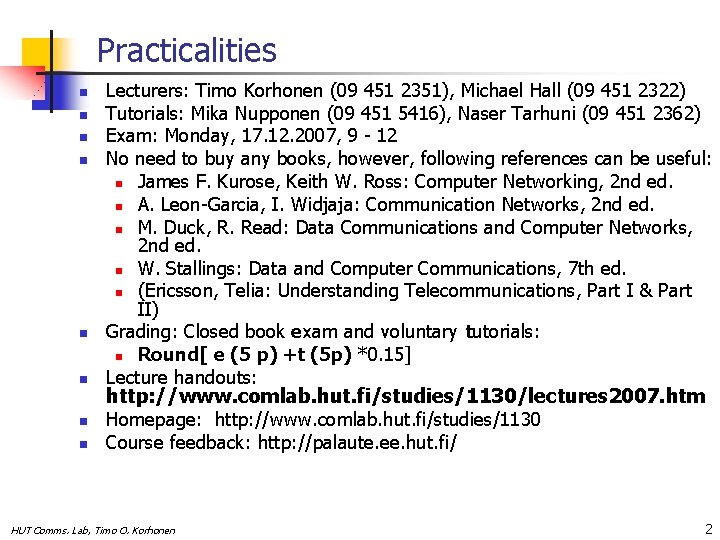
Practicalities n n n n Lecturers: Timo Korhonen (09 451 2351), Michael Hall (09 451 2322) Tutorials: Mika Nupponen (09 451 5416), Naser Tarhuni (09 451 2362) Exam: Monday, 17. 12. 2007, 9 - 12 No need to buy any books, however, following references can be useful: n James F. Kurose, Keith W. Ross: Computer Networking, 2 nd ed. n A. Leon-Garcia, I. Widjaja: Communication Networks, 2 nd ed. n M. Duck, R. Read: Data Communications and Computer Networks, 2 nd ed. n W. Stallings: Data and Computer Communications, 7 th ed. n (Ericsson, Telia: Understanding Telecommunications, Part I & Part II) Grading: Closed book exam and voluntary tutorials: n Round[ e (5 p) +t (5 p) *0. 15] Lecture handouts: http: //www. comlab. hut. fi/studies/1130/lectures 2007. htm Homepage: http: //www. comlab. hut. fi/studies/1130 Course feedback: http: //palaute. ee. hut. fi/ HUT Comms. Lab, Timo O. Korhonen 2
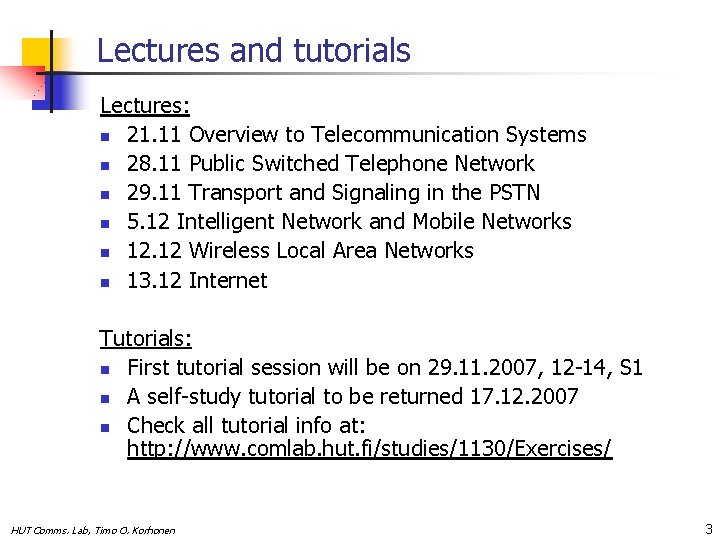
Lectures and tutorials Lectures: n 21. 11 Overview to Telecommunication Systems n 28. 11 Public Switched Telephone Network n 29. 11 Transport and Signaling in the PSTN n 5. 12 Intelligent Network and Mobile Networks n 12. 12 Wireless Local Area Networks n 13. 12 Internet Tutorials: n First tutorial session will be on 29. 11. 2007, 12 -14, S 1 n A self-study tutorial to be returned 17. 12. 2007 n Check all tutorial info at: http: //www. comlab. hut. fi/studies/1130/Exercises/ HUT Comms. Lab, Timo O. Korhonen 3
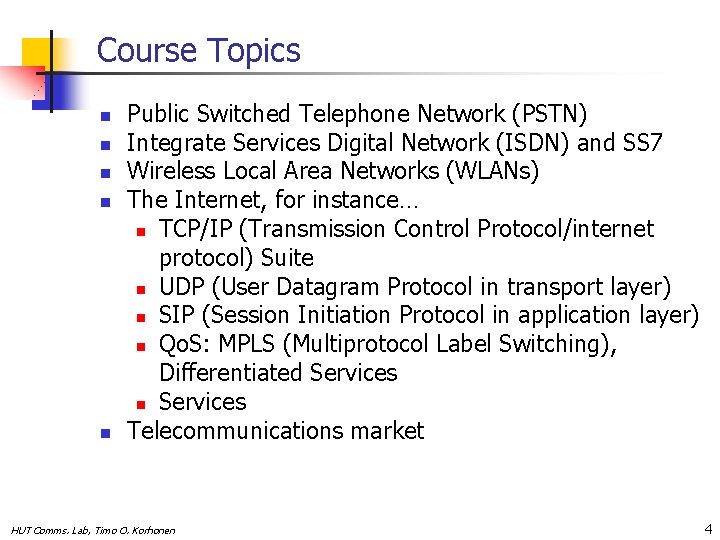
Course Topics n n n Public Switched Telephone Network (PSTN) Integrate Services Digital Network (ISDN) and SS 7 Wireless Local Area Networks (WLANs) The Internet, for instance… n TCP/IP (Transmission Control Protocol/internet protocol) Suite n UDP (User Datagram Protocol in transport layer) n SIP (Session Initiation Protocol in application layer) n Qo. S: MPLS (Multiprotocol Label Switching), Differentiated Services n Services Telecommunications market HUT Comms. Lab, Timo O. Korhonen 4
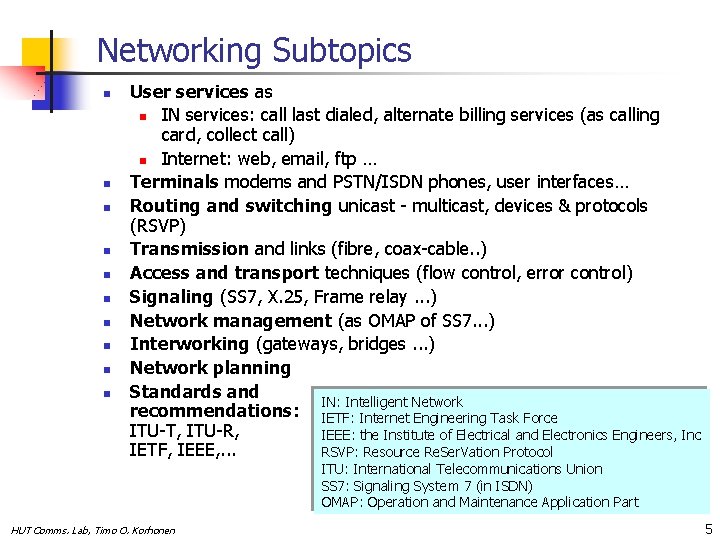
Networking Subtopics n n n n n User services as n IN services: call last dialed, alternate billing services (as calling card, collect call) n Internet: web, email, ftp … Terminals modems and PSTN/ISDN phones, user interfaces… Routing and switching unicast - multicast, devices & protocols (RSVP) Transmission and links (fibre, coax-cable. . ) Access and transport techniques (flow control, error control) Signaling (SS 7, X. 25, Frame relay. . . ) Network management (as OMAP of SS 7. . . ) Interworking (gateways, bridges. . . ) Network planning Standards and IN: Intelligent Network recommendations: IETF: Internet Engineering Task Force ITU-T, ITU-R, IEEE: the Institute of Electrical and Electronics Engineers, Inc IETF, IEEE, . . . RSVP: Resource Re. Ser. Vation Protocol ITU: International Telecommunications Union SS 7: Signaling System 7 (in ISDN) OMAP: Operation and Maintenance Application Part HUT Comms. Lab, Timo O. Korhonen 5
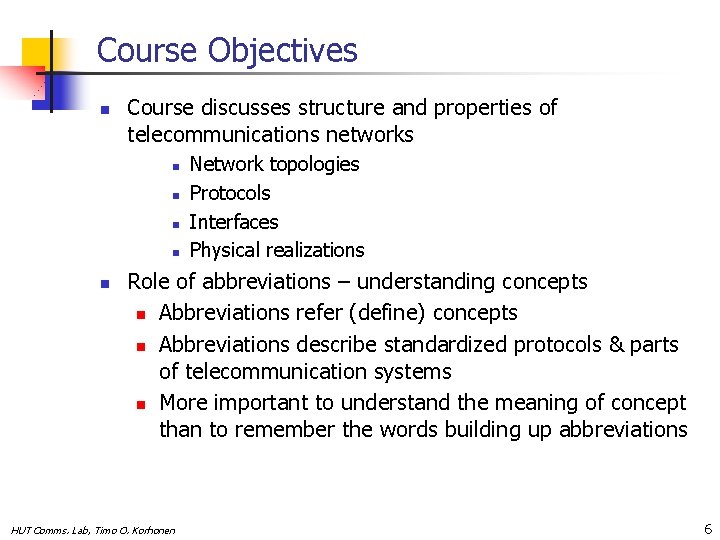
Course Objectives n Course discusses structure and properties of telecommunications networks n n n Network topologies Protocols Interfaces Physical realizations Role of abbreviations – understanding concepts n Abbreviations refer (define) concepts n Abbreviations describe standardized protocols & parts of telecommunication systems n More important to understand the meaning of concept than to remember the words building up abbreviations HUT Comms. Lab, Timo O. Korhonen 6
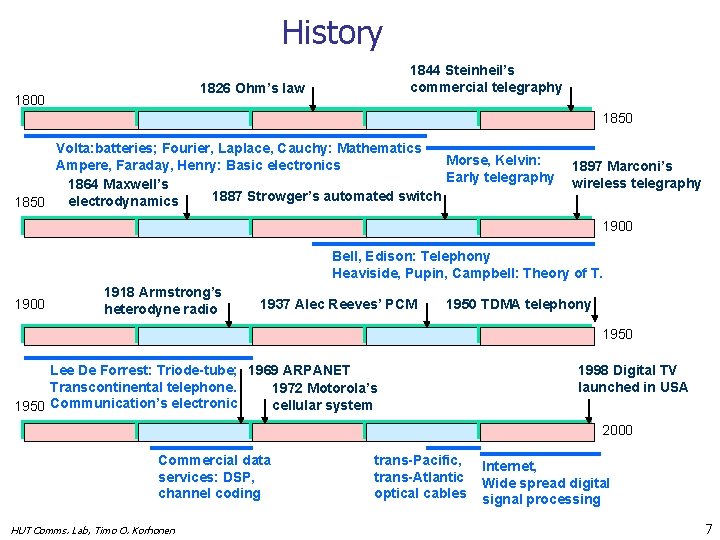
History 1844 Steinheil’s commercial telegraphy 1826 Ohm’s law 1800 1850 Volta: batteries; Fourier, Laplace, Cauchy: Mathematics Morse, Kelvin: Ampere, Faraday, Henry: Basic electronics Early telegraphy 1864 Maxwell’s 1887 Strowger’s automated switch electrodynamics 1850 1897 Marconi’s wireless telegraphy 1900 Bell, Edison: Telephony Heaviside, Pupin, Campbell: Theory of T. 1900 1918 Armstrong’s heterodyne radio 1937 Alec Reeves’ PCM 1950 TDMA telephony 1950 Lee De Forrest: Triode-tube; 1969 ARPANET Transcontinental telephone. 1972 Motorola’s cellular system 1950 Communication’s electronic 1998 Digital TV launched in USA 2000 Commercial data services: DSP, channel coding HUT Comms. Lab, Timo O. Korhonen trans-Pacific, trans-Atlantic optical cables Internet, Wide spread digital signal processing 7
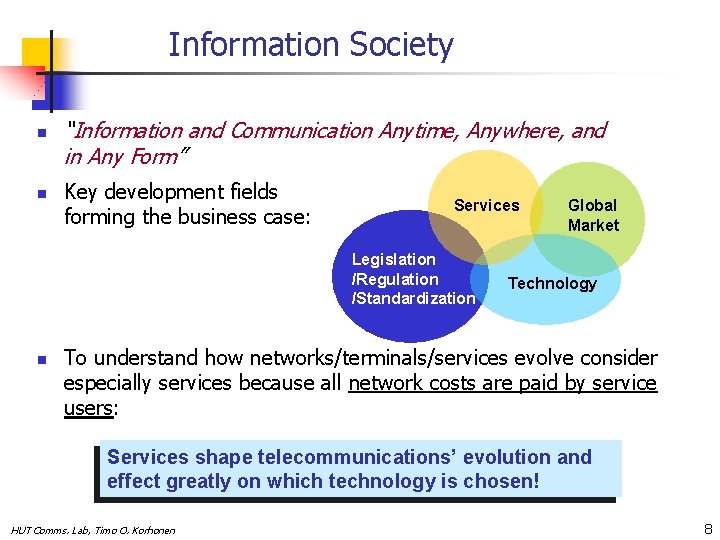
Information Society n n “Information and Communication Anytime, Anywhere, and in Any Form” Key development fields forming the business case: Services Legislation /Regulation /Standardization n Global Market Technology To understand how networks/terminals/services evolve consider especially services because all network costs are paid by service users: Services shape telecommunications’ evolution and effect greatly on which technology is chosen! HUT Comms. Lab, Timo O. Korhonen 8
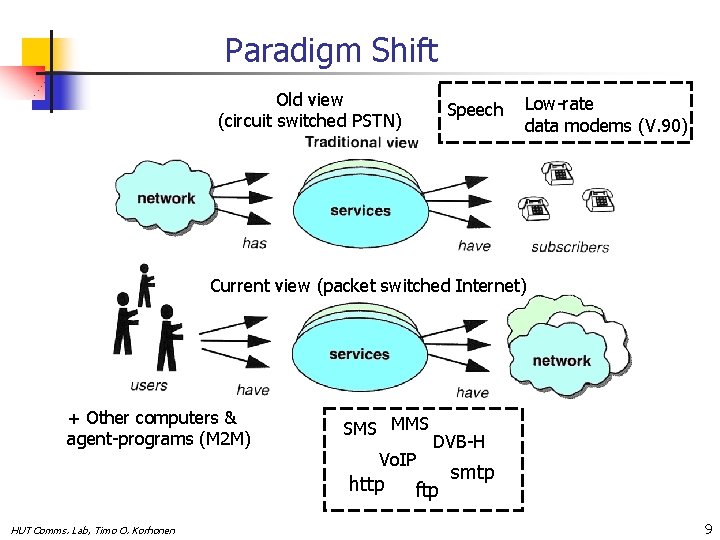
Paradigm Shift Old view (circuit switched PSTN) Speech Low-rate data modems (V. 90) Current view (packet switched Internet) + Other computers & agent-programs (M 2 M) SMS MMS Vo. IP http HUT Comms. Lab, Timo O. Korhonen DVB-H ftp smtp 9
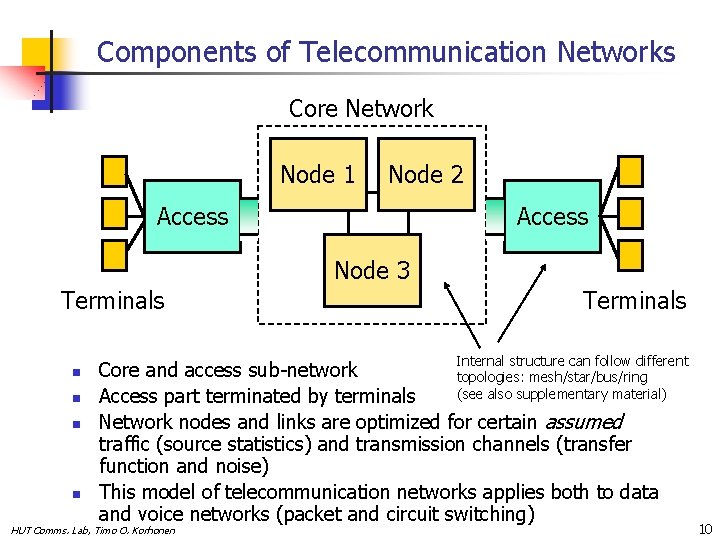
Components of Telecommunication Networks Core Network Node 1 Node 2 Access Node 3 Terminals n n Terminals Internal structure can follow different Core and access sub-network topologies: mesh/star/bus/ring (see also supplementary material) Access part terminated by terminals Network nodes and links are optimized for certain assumed traffic (source statistics) and transmission channels (transfer function and noise) This model of telecommunication networks applies both to data and voice networks (packet and circuit switching) HUT Comms. Lab, Timo O. Korhonen 10
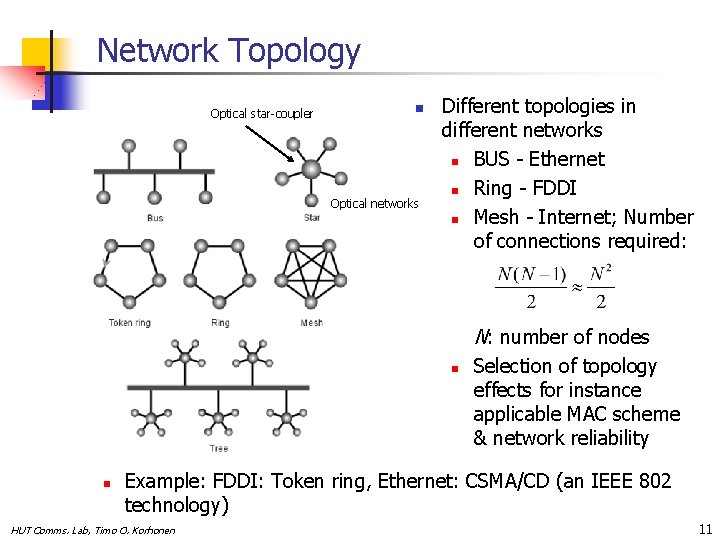
Network Topology Optical star-coupler n Optical networks Different topologies in different networks n BUS - Ethernet n Ring - FDDI n Mesh - Internet; Number of connections required: N: number of nodes n n Selection of topology effects for instance applicable MAC scheme & network reliability Example: FDDI: Token ring, Ethernet: CSMA/CD (an IEEE 802 technology) HUT Comms. Lab, Timo O. Korhonen 11

Tasks of a Telecommunication System Input Entity 3 Entity 2 Output interface Entity 1 Physical connection n n n n Initialization and release of link/across network Synchronization RX & TX - carriers, start and end of frames/packets Information exchange protocols determine protocols for communication in entities: CSMA, CDMA, … TCP/IP Error control - corrective measures Addressing and routing Message formatting, source coding Therefore, networks realized by following a layered structure (as Open System Interconnections (OSI) or TCP/IP stack ) NOTE: “Entities” refer to network elements as routers and bridges or different OSI-layers HUT Comms. Lab, Timo O. Korhonen 12
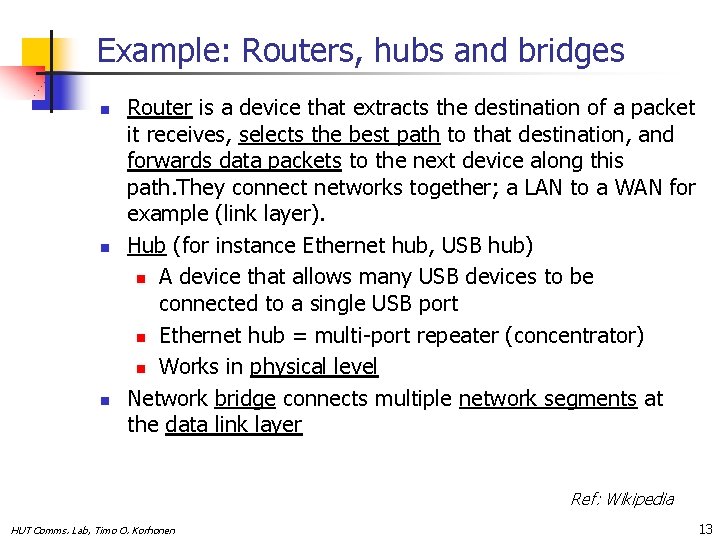
Example: Routers, hubs and bridges n n n Router is a device that extracts the destination of a packet it receives, selects the best path to that destination, and forwards data packets to the next device along this path. They connect networks together; a LAN to a WAN for example (link layer). Hub (for instance Ethernet hub, USB hub) n A device that allows many USB devices to be connected to a single USB port n Ethernet hub = multi-port repeater (concentrator) n Works in physical level Network bridge connects multiple network segments at the data link layer Ref: Wikipedia HUT Comms. Lab, Timo O. Korhonen 13
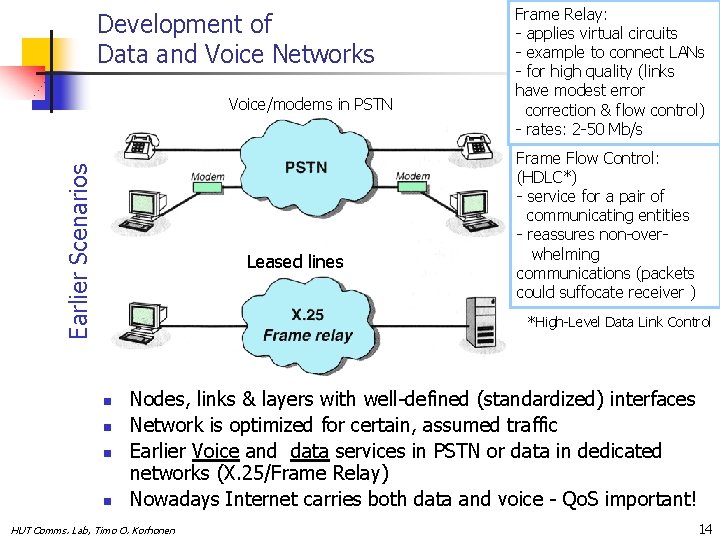
Development of Data and Voice Networks Earlier Scenarios Voice/modems in PSTN Leased lines Frame Relay: - applies virtual circuits - example to connect LANs - for high quality (links have modest error correction & flow control) - rates: 2 -50 Mb/s Frame Flow Control: (HDLC*) - service for a pair of communicating entities - reassures non-overwhelming communications (packets could suffocate receiver ) *High-Level Data Link Control n n Nodes, links & layers with well-defined (standardized) interfaces Network is optimized for certain, assumed traffic Earlier Voice and data services in PSTN or data in dedicated networks (X. 25/Frame Relay) Nowadays Internet carries both data and voice - Qo. S important! HUT Comms. Lab, Timo O. Korhonen 14

Current Scenario * ISDN, V. 90, Cable modem, ADSL etc. Fire. Wire Device MPLS Bluetooth Device WLAN Router Modified from W. Stallings: Data and Computer Communications, 7 th ed (home site lecture slides) HUT Comms. Lab, Timo O. Korhonen *Synchronous Optical Networking 15
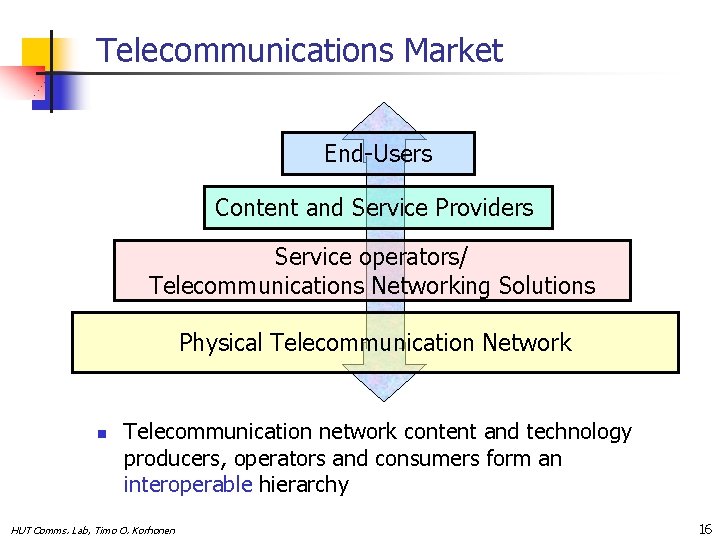
Telecommunications Market End-Users Content and Service Providers Service operators/ Telecommunications Networking Solutions Physical Telecommunication Network n Telecommunication network content and technology producers, operators and consumers form an interoperable hierarchy HUT Comms. Lab, Timo O. Korhonen 16
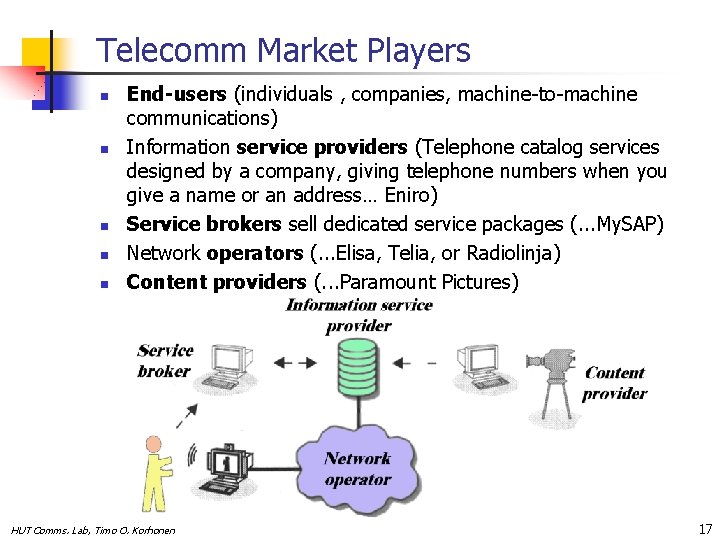
Telecomm Market Players n n n End-users (individuals , companies, machine-to-machine communications) Information service providers (Telephone catalog services designed by a company, giving telephone numbers when you give a name or an address… Eniro) Service brokers sell dedicated service packages (. . . My. SAP) Network operators (. . . Elisa, Telia, or Radiolinja) Content providers (. . . Paramount Pictures) HUT Comms. Lab, Timo O. Korhonen 17
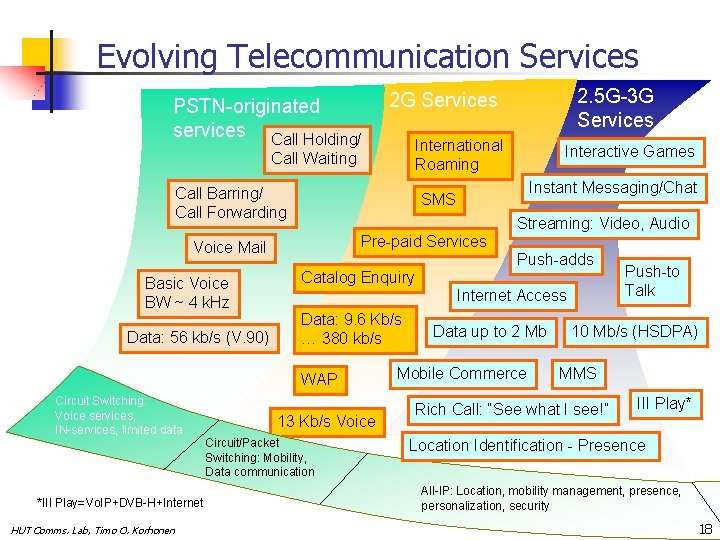
Evolving Telecommunication Services PSTN-originated services Call Holding/ International Roaming Call Waiting Call Barring/ Call Forwarding Data: 56 kb/s (V. 90) *III Play=Vo. IP+DVB-H+Internet HUT Comms. Lab, Timo O. Korhonen Instant Messaging/Chat Streaming: Video, Audio Pre-paid Services Push-adds Catalog Enquiry Internet Access Data: 9. 6 Kb/s … 380 kb/s WAP Circuit Switching: Voice services, IN-services, limited data Interactive Games SMS Voice Mail Basic Voice BW ~ 4 k. Hz 2. 5 G-3 G Services 2 G Services 13 Kb/s Voice Circuit/Packet Switching: Mobility, Data communication Data up to 2 Mb Mobile Commerce Push-to Talk 10 Mb/s (HSDPA) MMS Rich Call: “See what I see!” III Play* Location Identification - Presence All-IP: Location, mobility management, presence, personalization, security 18
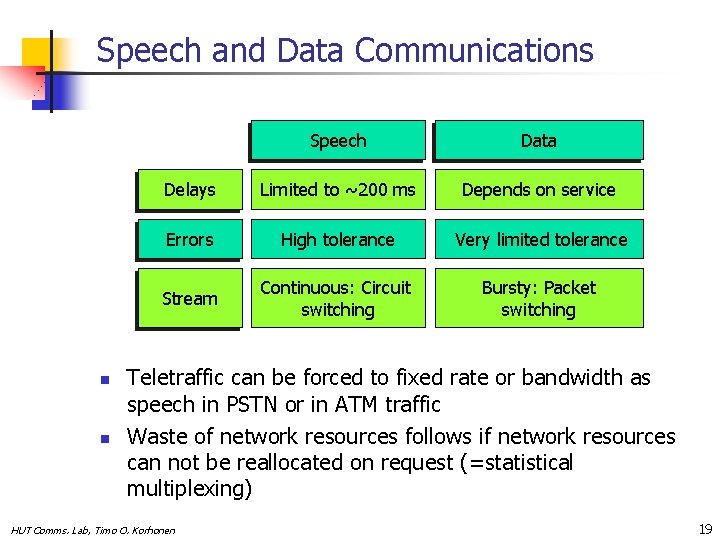
Speech and Data Communications n n Speech Data Delays Limited to ~200 ms Depends on service Errors High tolerance Very limited tolerance Stream Continuous: Circuit switching Bursty: Packet switching Teletraffic can be forced to fixed rate or bandwidth as speech in PSTN or in ATM traffic Waste of network resources follows if network resources can not be reallocated on request (=statistical multiplexing) HUT Comms. Lab, Timo O. Korhonen 19
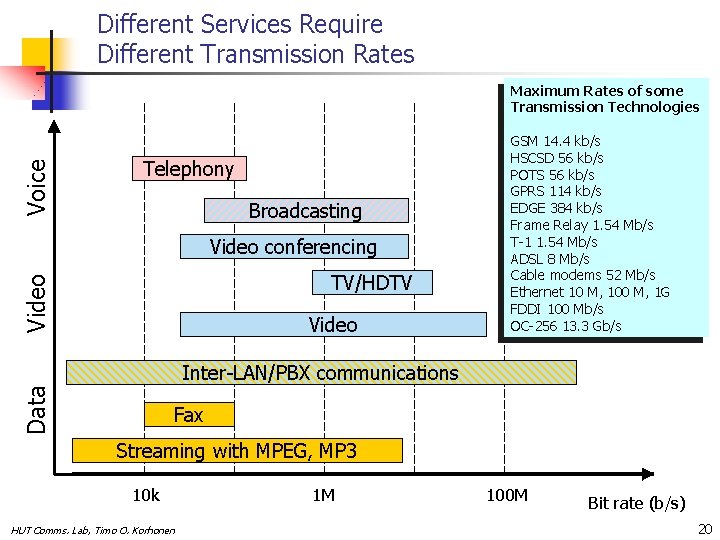
Different Services Require Different Transmission Rates Voice Maximum Rates of some Transmission Technologies Telephony Broadcasting Video conferencing Video TV/HDTV Video GSM 14. 4 kb/s HSCSD 56 kb/s POTS 56 kb/s GPRS 114 kb/s EDGE 384 kb/s Frame Relay 1. 54 Mb/s T-1 1. 54 Mb/s ADSL 8 Mb/s Cable modems 52 Mb/s Ethernet 10 M, 100 M, 1 G FDDI 100 Mb/s OC-256 13. 3 Gb/s Data Inter-LAN/PBX communications Fax Streaming with MPEG, MP 3 10 k HUT Comms. Lab, Timo O. Korhonen 1 M 100 M Bit rate (b/s) 20
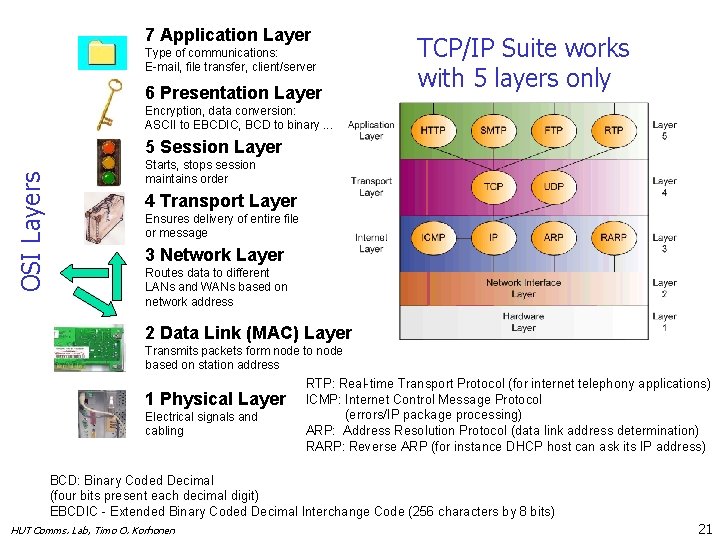
7 Application Layer Type of communications: E-mail, file transfer, client/server 6 Presentation Layer TCP/IP Suite works with 5 layers only Encryption, data conversion: ASCII to EBCDIC, BCD to binary. . . OSI Layers 5 Session Layer Starts, stops session maintains order 4 Transport Layer Ensures delivery of entire file or message 3 Network Layer Routes data to different LANs and WANs based on network address 2 Data Link (MAC) Layer Transmits packets form node to node based on station address 1 Physical Layer Electrical signals and cabling RTP: Real-time Transport Protocol (for internet telephony applications) ICMP: Internet Control Message Protocol (errors/IP package processing) ARP: Address Resolution Protocol (data link address determination) RARP: Reverse ARP (for instance DHCP host can ask its IP address) BCD: Binary Coded Decimal (four bits present each decimal digit) EBCDIC - Extended Binary Coded Decimal Interchange Code (256 characters by 8 bits) HUT Comms. Lab, Timo O. Korhonen 21
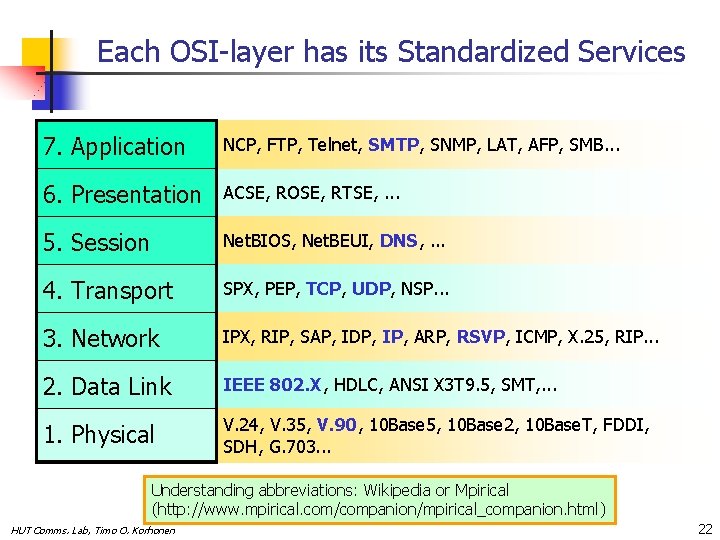
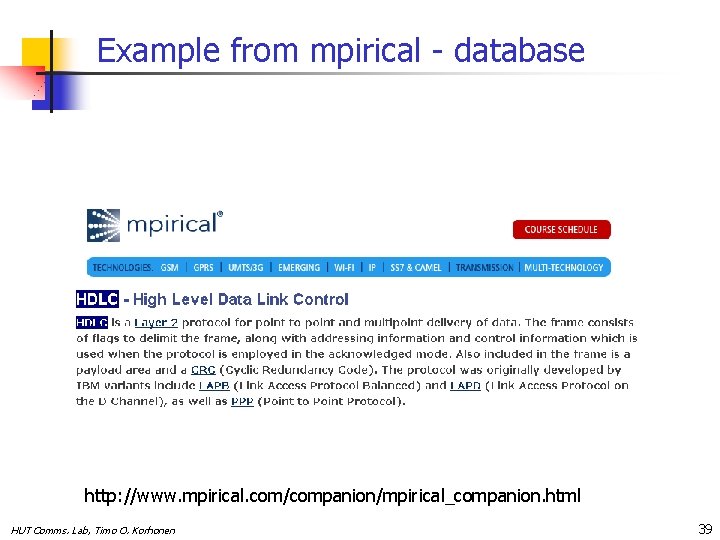
Each OSI-layer has its Standardized Services 7. Application NCP, FTP, Telnet, SMTP, SNMP, LAT, AFP, SMB. . . 6. Presentation ACSE, ROSE, RTSE, . . . 5. Session Net. BIOS, Net. BEUI, DNS, . . . 4. Transport SPX, PEP, TCP, UDP, NSP. . . 3. Network IPX, RIP, SAP, IDP, IP, ARP, RSVP, ICMP, X. 25, RIP. . . 2. Data Link IEEE 802. X, HDLC, ANSI X 3 T 9. 5, SMT, . . . 1. Physical V. 24, V. 35, V. 90, 10 Base 5, 10 Base 2, 10 Base. T, FDDI, SDH, G. 703. . . Understanding abbreviations: Wikipedia or Mpirical (http: //www. mpirical. com/companion/mpirical_companion. html) HUT Comms. Lab, Timo O. Korhonen 22
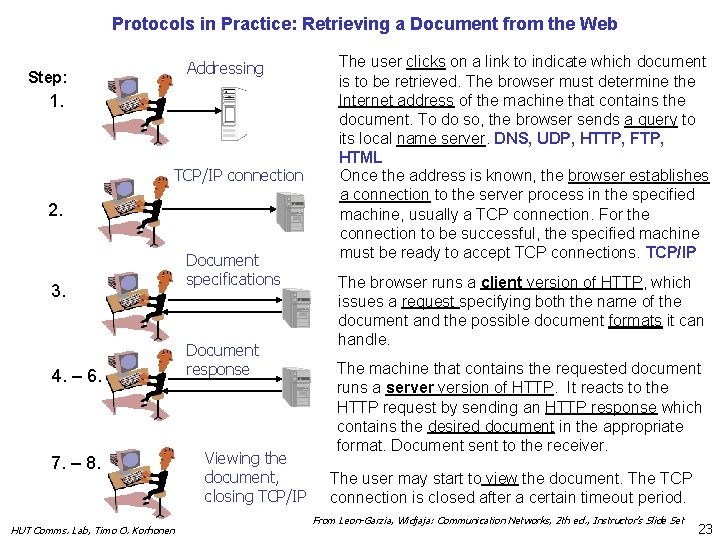
Protocols in Practice: Retrieving a Document from the Web Addressing Step: 1. TCP/IP connection 2. 3. 4. – 6. 7. – 8. HUT Comms. Lab, Timo O. Korhonen Document specifications Document response Viewing the document, closing TCP/IP The user clicks on a link to indicate which document is to be retrieved. The browser must determine the Internet address of the machine that contains the document. To do so, the browser sends a query to its local name server. DNS, UDP, HTTP, FTP, HTML Once the address is known, the browser establishes a connection to the server process in the specified machine, usually a TCP connection. For the connection to be successful, the specified machine must be ready to accept TCP connections. TCP/IP The browser runs a client version of HTTP, which issues a request specifying both the name of the document and the possible document formats it can handle. The machine that contains the requested document runs a server version of HTTP. It reacts to the HTTP request by sending an HTTP response which contains the desired document in the appropriate format. Document sent to the receiver. The user may start to view the document. The TCP connection is closed after a certain timeout period. From Leon-Garzia, Widjaja: Communication Networks, 2 th ed. , Instructor’s Slide Set 23
ITU-T Standards (www. itu. int) n n n G - Transmission Systems and media, digital systems and networks H - Audiovisual and multimedia systems I - ISDN Q - Switching and signalling V - Data communications over PSTN X- Data networks and open system communications Other important standardization organizations: - IEEE (Institute of Electrical and Electronics Engineers) - IETF (The Internet Engineering Task Force) - ISO (International Organization for Standardization) - ETSI (European Telecommunications Standards Institute) Note that ITU-T standards nowadays available free-of-charge at ITU-T site HUT Comms. Lab, Timo O. Korhonen 24
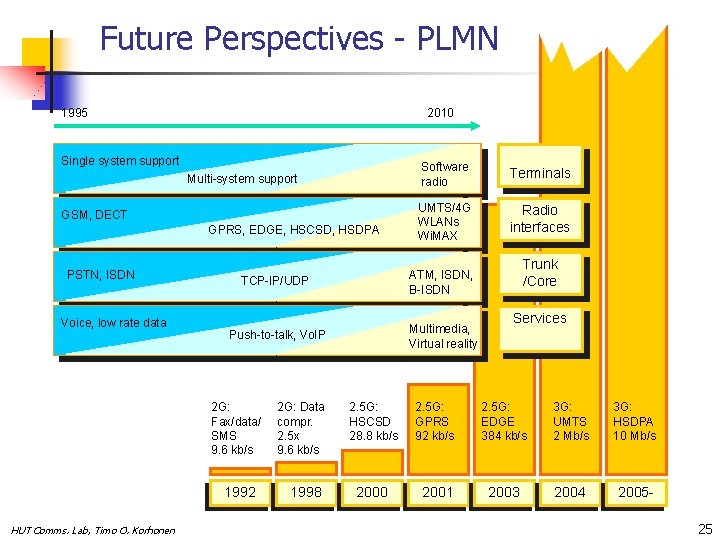
Future Perspectives - PLMN 1995 2010 Single system support Multi-system support GSM, DECT GPRS, EDGE, HSCSD, HSDPA PSTN, ISDN Voice, low rate data Modest-rate Push-to-talk, Vo. IP Internet 1992 HUT Comms. Lab, Timo O. Korhonen 2 G: Data compr. 2. 5 x 9. 6 kb/s 1998 Terminals UMTS/4 G WLANs Wi. MAX Radio interfaces Trunk /Core ATM, ISDN, B-ISDN TCP-IP/UDP 2 G: Fax/data/ SMS 9. 6 kb/s Software radio Portable, Multimedia, global virtual Virtual reality Services 2. 5 G: HSCSD 28. 8 kb/s 2. 5 G: GPRS 92 kb/s 2. 5 G: EDGE 384 kb/s 3 G: UMTS 2 Mb/s 3 G: HSDPA 10 Mb/s 2000 2001 2003 2004 200525
Future Perspectives n n n PLMNs and especially wireless LANs develop very fast in home & office networks Increasing data rates Qo. S very important Traffic gets more symmetrical (P 2 P) PSTN: n Used to transfer more and more data traffic n Voice services of PSTN use IP (Vo. IP) and move to Internet Need of seamless communication of NGN means that different networks must link efficiently -> Inter(net)working between different kind of networks important (example: Bluetooth-WLANUMTS) HUT Comms. Lab, Timo O. Korhonen PLMN: Public Land Mobile Network, IP: Internet Protocol SLIP: Serial line IP 26
Future Perspectives – Special Topics n n Sensor networking n Autonomous, self-organizing n Low power consumption n Flexible topology n High number of intelligent nodes n Complex MAC-protocols Usage of sensor networks n Monitoring n Body area networks (BANs) Cross-layer design Wire-replacement technologies n Bluetooth n Zigbee n Fire. Wire HUT Comms. Lab, Timo O. Korhonen 27
Web Resources n n n n n Tutorials, links, abbreviations : http: //searchnetworking. techtarget. com/ Mpirical bank of abbreviations: http: //www. mpirical. com/ companion/mpirical_companion. html Wikipedia: http: //en. wikipedia. org Note: Many standards available online in the Library (as for instance ITU-standards ) Have a look on course reference books homepages! 3: rd generation PLMN: www. w 3. org, www. 3 gpp. org Finish Spectral Regulation: www. ficora. fi IEEE standards: www. ieee. org ITU standards: www. iti. org x. DSL development: www. adsl. com HUT Comms. Lab, Timo O. Korhonen 28
Review Questions n n n What does the concept of information society means? Describe implications to technology/service development. What are the basic components and tasks of generalized telecommunication network? Give an example how telecommunication services have evolved? What were the enabling changes in technology? What are the OSI layers? Give examples of their tasks. Summarize the expected development of mobile telecommunication networks in terminals, radio interface core network and in services HUT Comms. Lab, Timo O. Korhonen 29
S-72. 1130 Telecommunication Systems - Annex What is … (Some important concepts) HUT Comms. Lab, Timo O. Korhonen
What is Ethernet? Ethernet is the most widely-installed local area network (LAN) technology. Specified in a standard, IEEE 802. 3, Ethernet was originally developed by Xerox and then developed further by Xerox, DEC, and Intel. An Ethernet LAN typically uses coaxial cable or special grades of twisted pair wires. Ethernet is also used in wireless LANs. The most commonly installed Ethernet systems are called 10 BASE-T (100 m / CAT 3 cables) and provide transmission speeds up to 10 Mbps. Devices are connected to the cable and compete for access using a Carrier Sense Multiple Access with Collision Detection (CSMA/CD) protocol. Fast Ethernet or 100 BASE-T provides transmission speeds up to 100 megabits per second and is typically used for LAN backbone systems, supporting workstations with 10 BASE-T cards. Gigabit Ethernet provides an even higher level of backbone support at 1000 megabits per second (1 gigabit or 1 billion bits per second). 10 -Gigabit Ethernet provides up to 10 billion bits per second. Source: Searchnetworking. com HUT Comms. Lab, Timo O. Korhonen 31
What is FDDI? FDDI (Fiber Distributed Data Interface) is a set of ANSI and ISO standards for data transmission on fiber optic lines in a local area network (LAN) that can extend in range up to 200 km (124 miles). The FDDI protocol is based on the token ring protocol. In addition to being large geographically, an FDDI local area network can support thousands of users. FDDI is frequently used on the backbone for a wide area network (WAN). An FDDI network contains two token rings, one for possible backup in case the primary ring fails. The primary ring offers up to 100 Mbps capacity. If the secondary ring is not needed for backup, it can also carry data, extending capacity to 200 Mbps. The single ring can extend the maximum distance; a dual ring can extend 100 km (62 miles). FDDI is a product of American National Standards Committee X 3 -T 9 and conforms to the Open Systems Interconnection (OSI) model of functional layering. It can be used to interconnect LANs using other protocols. FDDI-II is a version of FDDI that adds the capability to add circuit-switched service to the network so that voice signals can also be handled. Work is underway to connect FDDI networks to the developing Synchronous Optical Network (SONET). HUT Comms. Lab, Timo O. Korhonen Source: Searchnetworking. com 32
Multiprotocol Label Switching (MPLS) Multiprotocol Label Switching is a standards-approved technology (IETF: RFC 3031) for speeding up network traffic flow and making it easier to manage. MPLS involves setting up a specific path for a given sequence of packets, identified by a label put in each packet, thus saving the time needed for a router to look up the address to the next node to forward the packet to. MPLS is called multi-protocol because it works with the Internet Protocol (IP), Asynchronous Transport Mode (ATM), and frame relay network protocols. With reference to the standard model for a network (the Open Systems Interconnection, or OSI model), MPLS allows most packets to be forwarded at the layer 2(switching) level rather than at the layer 3(routing) level. In addition to moving traffic faster overall, MPLS makes it easy to manage a network for quality of service (Qo. S). Note: ATM header overhead always at least 10 %, for MPLS it is order of magnitude smaller. Source: Searchnetworking. com HUT Comms. Lab, Timo O. Korhonen 33
Streaming Technologies Major streaming video and streaming media technologies include Real. System G 2 from Real. Network, Microsoft Windows Media Technologies (including its Net. Show Services and Theater Server), and VDO. Microsoft's approach uses the standard MPEG compression algorithm for video. The other approaches use proprietary algorithms. (The program that does the compression and decompression is sometimes called the codec. ) Microsoft's technology offers streaming audio at up to 96 Kbps and streaming video at up to 8 Mbps (for the Net. Show Theater Server). However, for most Web users, the streaming video will be limited to the data rates of the connection (for example, up to 128 Kbps with an ISDN connection). Microsoft's streaming media files follow Advanced Streaming Format (ASF). Source: Searchnetworking. com HUT Comms. Lab, Timo O. Korhonen 34
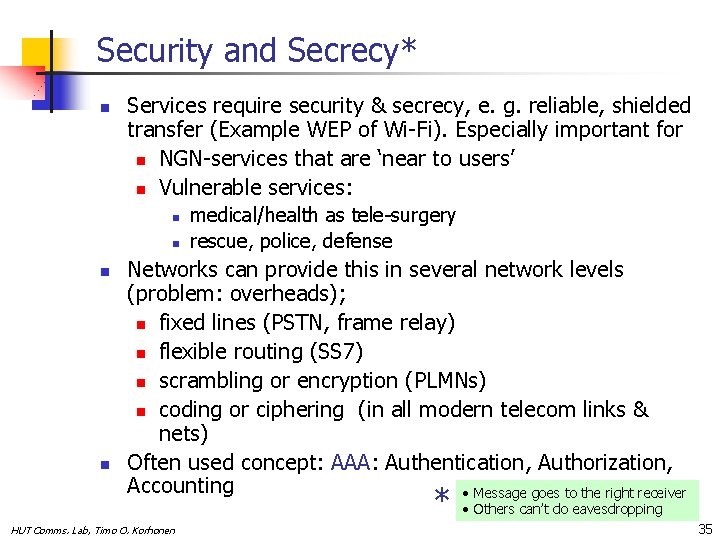
Security and Secrecy* n Services require security & secrecy, e. g. reliable, shielded transfer (Example WEP of Wi-Fi). Especially important for n NGN-services that are ‘near to users’ n Vulnerable services: n n medical/health as tele-surgery rescue, police, defense Networks can provide this in several network levels (problem: overheads); n fixed lines (PSTN, frame relay) n flexible routing (SS 7) n scrambling or encryption (PLMNs) n coding or ciphering (in all modern telecom links & nets) Often used concept: AAA: Authentication, Authorization, Accounting • Message goes to the right receiver * HUT Comms. Lab, Timo O. Korhonen • Others can’t do eavesdropping 35
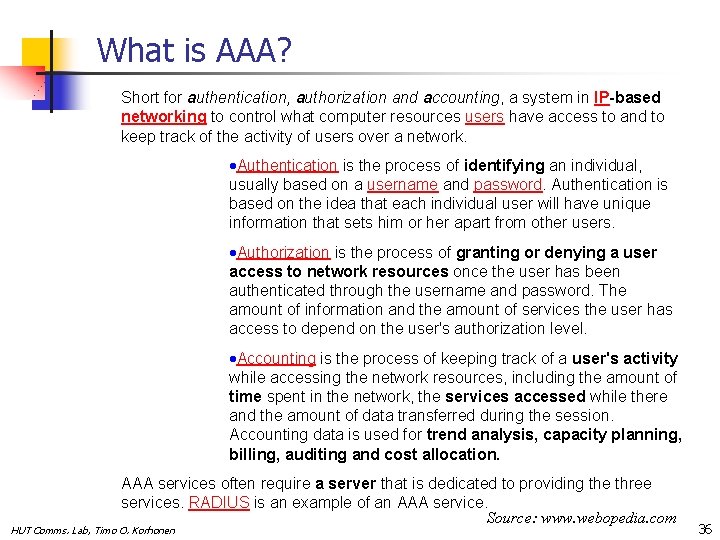
What is AAA? Short for authentication, authorization and accounting, a system in IP-based networking to control what computer resources users have access to and to keep track of the activity of users over a network. ·Authentication is the process of identifying an individual, usually based on a username and password. Authentication is based on the idea that each individual user will have unique information that sets him or her apart from other users. ·Authorization is the process of granting or denying a user access to network resources once the user has been authenticated through the username and password. The amount of information and the amount of services the user has access to depend on the user's authorization level. ·Accounting is the process of keeping track of a user's activity while accessing the network resources, including the amount of time spent in the network, the services accessed while there and the amount of data transferred during the session. Accounting data is used for trend analysis, capacity planning, billing, auditing and cost allocation. AAA services often require a server that is dedicated to providing the three services. RADIUS is an example of an AAA service. Source: www. webopedia. com HUT Comms. Lab, Timo O. Korhonen 36
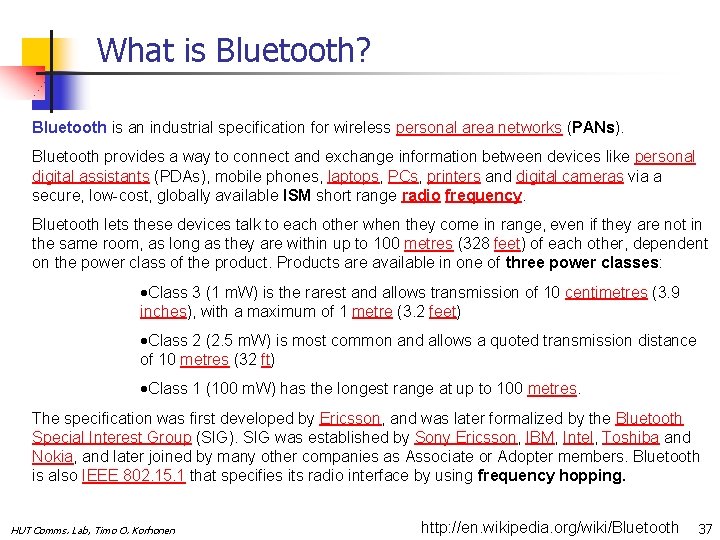
What is Bluetooth? Bluetooth is an industrial specification for wireless personal area networks (PANs). Bluetooth provides a way to connect and exchange information between devices like personal digital assistants (PDAs), mobile phones, laptops, PCs, printers and digital cameras via a secure, low-cost, globally available ISM short range radio frequency. Bluetooth lets these devices talk to each other when they come in range, even if they are not in the same room, as long as they are within up to 100 metres (328 feet) of each other, dependent on the power class of the product. Products are available in one of three power classes: ·Class 3 (1 m. W) is the rarest and allows transmission of 10 centimetres (3. 9 inches), with a maximum of 1 metre (3. 2 feet) ·Class 2 (2. 5 m. W) is most common and allows a quoted transmission distance of 10 metres (32 ft) ·Class 1 (100 m. W) has the longest range at up to 100 metres. The specification was first developed by Ericsson, and was later formalized by the Bluetooth Special Interest Group (SIG). SIG was established by Sony Ericsson, IBM, Intel, Toshiba and Nokia, and later joined by many other companies as Associate or Adopter members. Bluetooth is also IEEE 802. 15. 1 that specifies its radio interface by using frequency hopping. HUT Comms. Lab, Timo O. Korhonen http: //en. wikipedia. org/wiki/Bluetooth 37
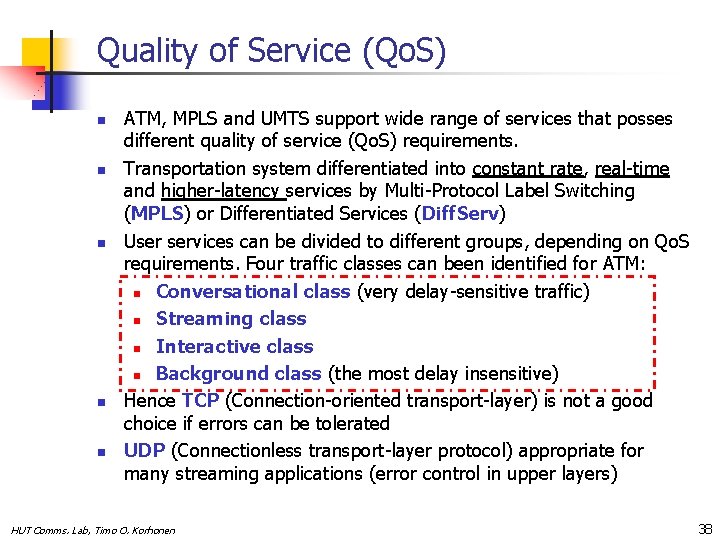
Quality of Service (Qo. S) n n n ATM, MPLS and UMTS support wide range of services that posses different quality of service (Qo. S) requirements. Transportation system differentiated into constant rate, real-time and higher-latency services by Multi-Protocol Label Switching (MPLS) or Differentiated Services (Diff. Serv) User services can be divided to different groups, depending on Qo. S requirements. Four traffic classes can been identified for ATM: n Conversational class (very delay-sensitive traffic) n Streaming class n Interactive class n Background class (the most delay insensitive) Hence TCP (Connection-oriented transport-layer) is not a good choice if errors can be tolerated UDP (Connectionless transport-layer protocol) appropriate for many streaming applications (error control in upper layers) HUT Comms. Lab, Timo O. Korhonen 38
Example from mpirical - database http: //www. mpirical. com/companion/mpirical_companion. html HUT Comms. Lab, Timo O. Korhonen 39
- Slides: 39