
Routing Algorithms Prof Niloy Ganguly IIT Kharagpur Broad
Routing Algorithms Prof. Niloy Ganguly IIT Kharagpur
Broad Topics • The Network Layer • Design Issues in the Network Layer • Routing Algorithms • Network Layer in the Internet 2
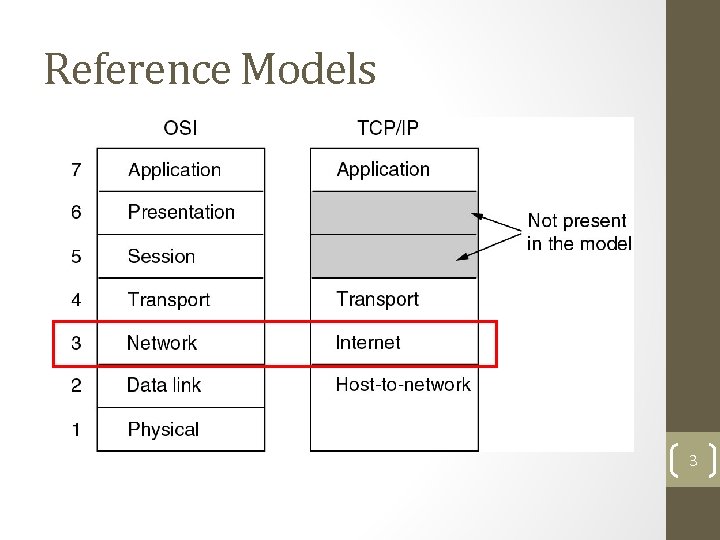
Reference Models 3
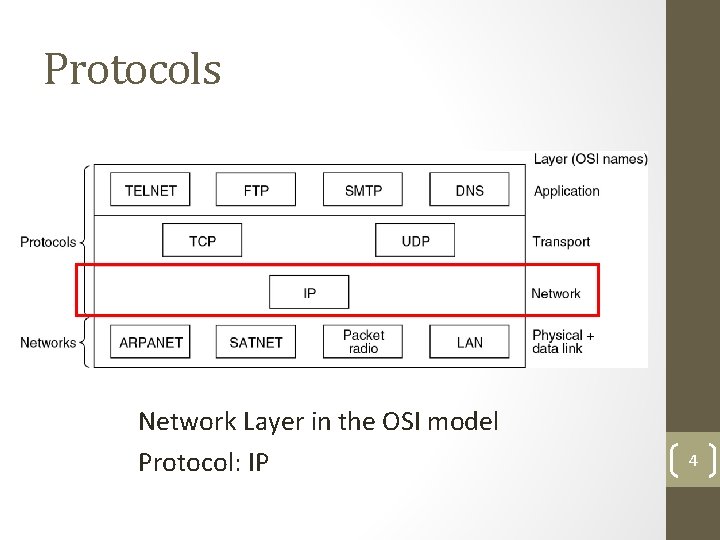
Protocols Network Layer in the OSI model Protocol: IP 4
The Network Layer • Concerned with getting packets from source to destination • May include multiple hops at intermediate routers • Lowest layer dealing with end-to-end transmission • Knowledge of network topology essential • Establishing connection between different networks 5
Network Layer Design Issues • Store-and-Forward Packet Switching • Services Provided to the Transport Layer • Implementation of Connectionless Service • Implementation of Connection-Oriented Service • Comparison of Virtual-Circuit and Datagram Networks 6
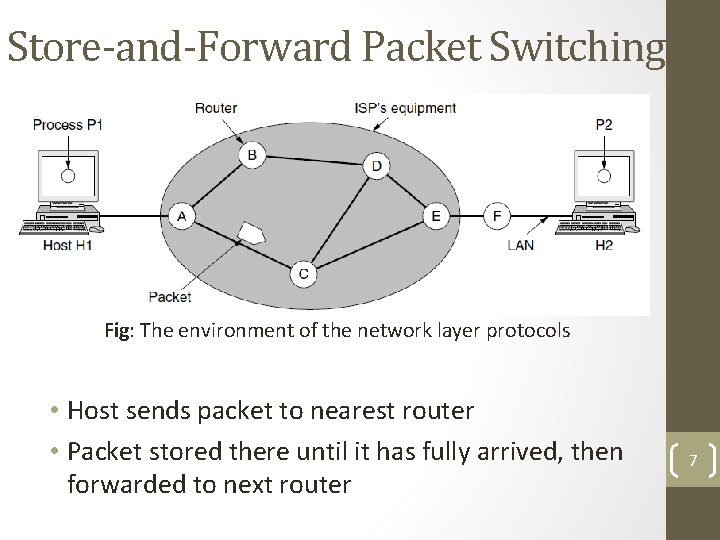
Store-and-Forward Packet Switching Fig: The environment of the network layer protocols • Host sends packet to nearest router • Packet stored there until it has fully arrived, then forwarded to next router 7
Services Provided to the Transport Layer 1. Services independent of router technology 2. Transport layer should be shielded from the number, type and topology of routers 3. Network addresses made available to transport layer should use a uniform numbering plan, even across LANs and WANs Debate regarding design of the network layer: • Internet Camp – Connectionless, e. g. , IP • Telephone Companies – Connection-oriented, e. g. , ATM 8
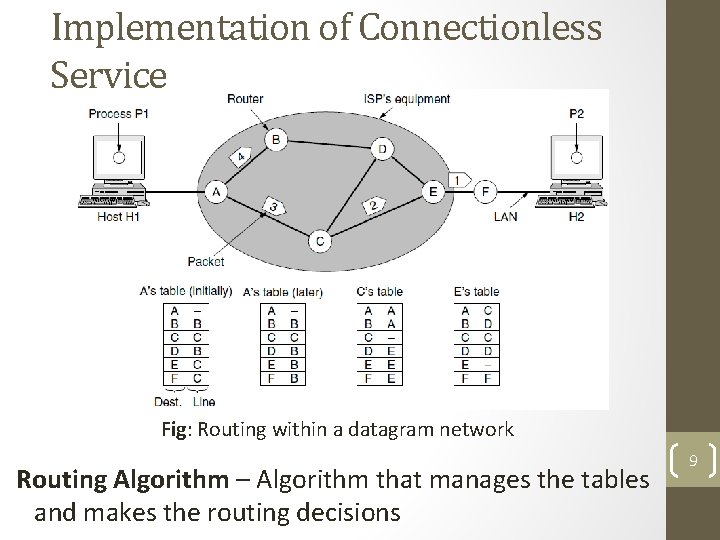
Implementation of Connectionless Service Fig: Routing within a datagram network Routing Algorithm – Algorithm that manages the tables and makes the routing decisions 9
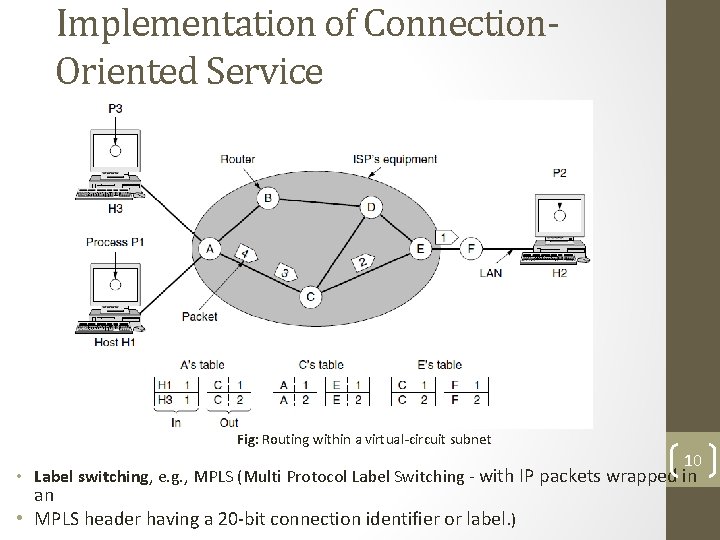
Implementation of Connection. Oriented Service Fig: Routing within a virtual-circuit subnet 10 • Label switching, e. g. , MPLS (Multi Protocol Label Switching - with IP packets wrapped in an • MPLS header having a 20 -bit connection identifier or label. )
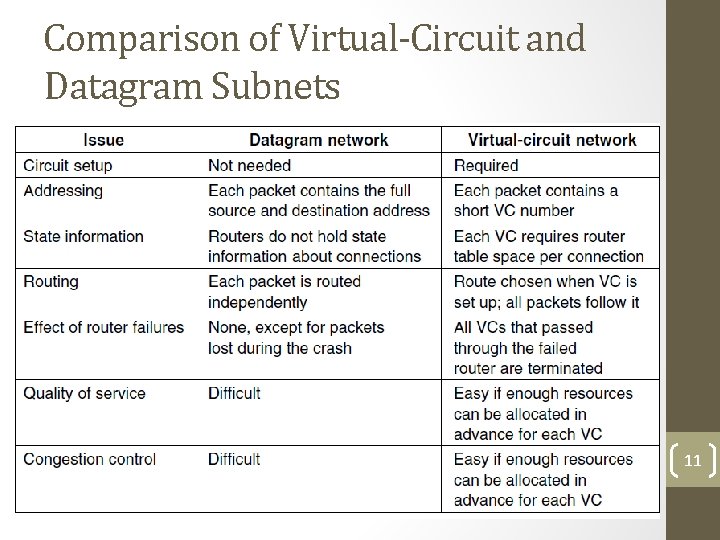
Comparison of Virtual-Circuit and Datagram Subnets 11
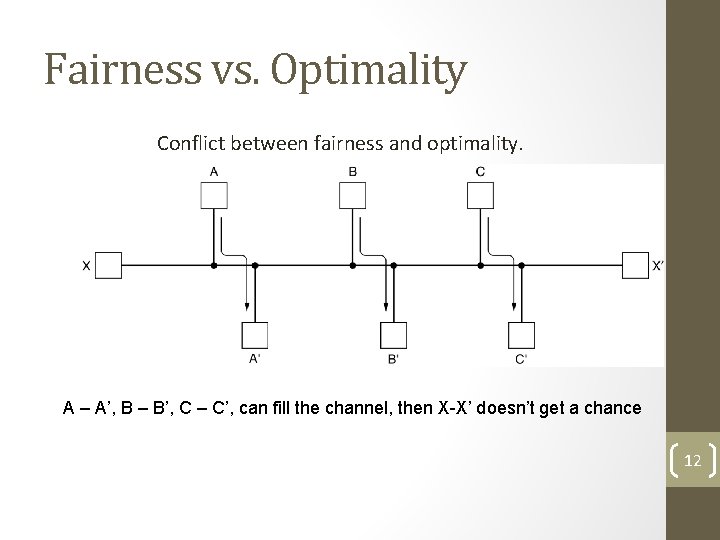
Fairness vs. Optimality Conflict between fairness and optimality. A – A’, B – B’, C – C’, can fill the channel, then X-X’ doesn’t get a chance 12
Types of Routing Algorithms • Non-adaptive (static) • Do not use measurements of current conditions • Static routes are downloaded at boot time • Adaptive Algorithms • Change routes dynamically • Gather information at runtime • locally • from adjacent routers • from all other routers • Change routes • Every delta T seconds • When load changes • When topology changes 13
Routing Algorithms • The Optimality Principle • Shortest Path Algorithm • Flooding • Distance Vector Routing • Link State Routing • Hierarchical Routing • Broadcast Routing • Multicast Routing • Anycast Routing • Routing for Mobile Hosts • Routing in Ad Hoc Networks 14
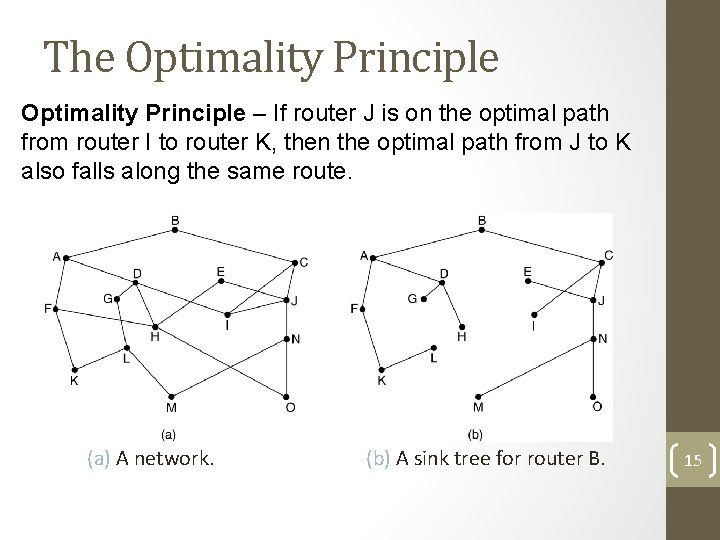
The Optimality Principle – If router J is on the optimal path from router I to router K, then the optimal path from J to K also falls along the same route. (a) A network. (b) A sink tree for router B. 15
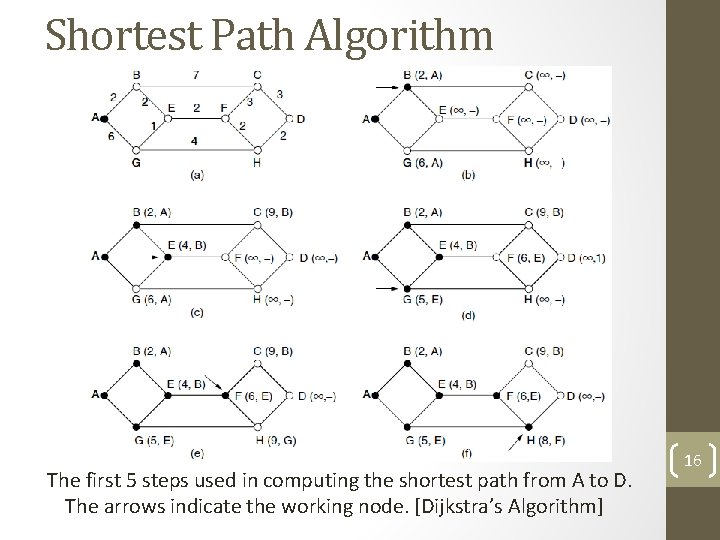
Shortest Path Algorithm The first 5 steps used in computing the shortest path from A to D. The arrows indicate the working node. [Dijkstra’s Algorithm] 16
Flooding • Flooding – every incoming packet is sent out on every outgoing line except the one it arrived on. • Robust but expensive • Finds use in: • Military application • Wireless Networks • Distributed Database • Metric against which other routing algorithms can be compared 17
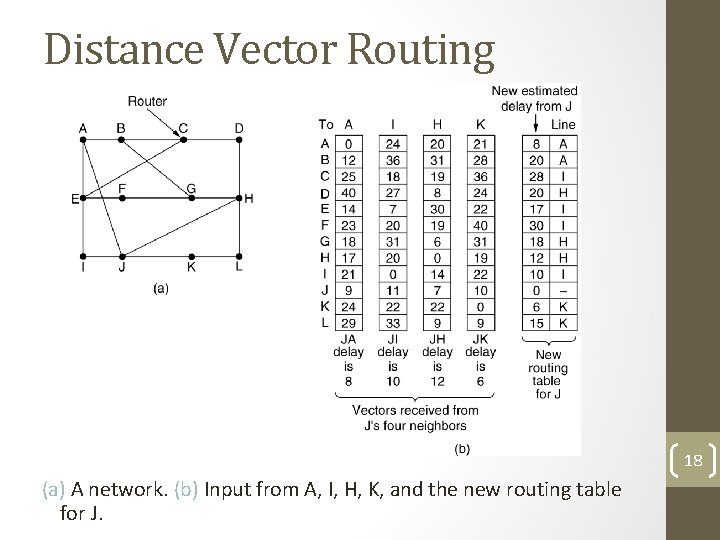
Distance Vector Routing 18 (a) A network. (b) Input from A, I, H, K, and the new routing table for J.
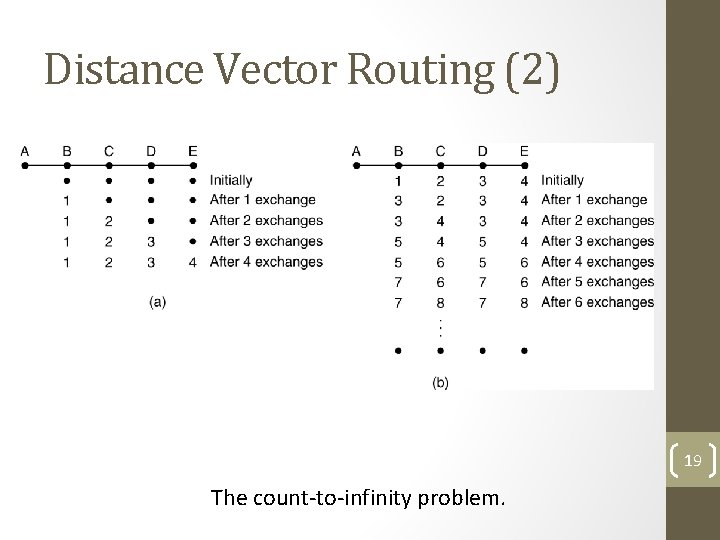
Distance Vector Routing (2) 19 The count-to-infinity problem.
Link State Routing Each router must do the following: 1. Discover its neighbors, learn their network address. 2. Set the distance or cost metric to each of its neighbors. 3. Construct a packet telling all it has just learned. 4. Send this packet to all other routers. 5. Compute the shortest path to every other router. 20
Setting Link Costs • Bandwidth • Delay – measured by sending special ECHO packet 21
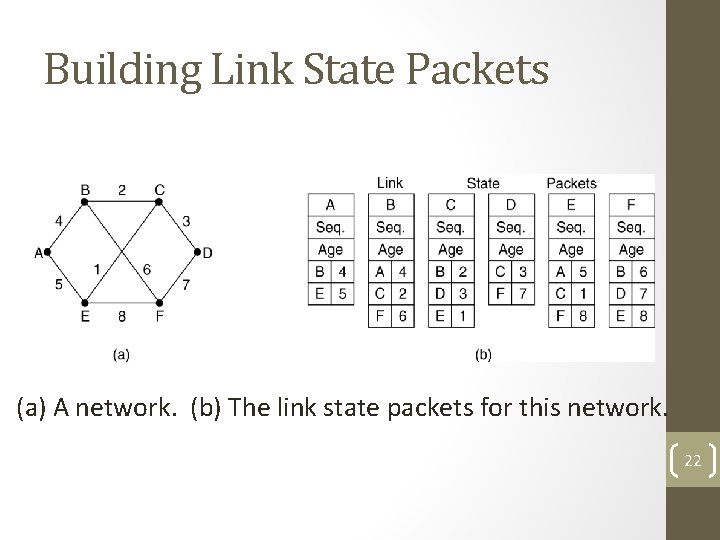
Building Link State Packets (a) A network. (b) The link state packets for this network. 22
Basic Algorithm • Use flooding to distribute the link state packets to all routers. • To keep the flood in check, each packet contains a sequence number that is incremented for each new packet sent • Routers keep track of all the (source router, sequence) pairs they see. • When a new link state packet comes in, it is checked against the list of packets already seen. • If it is new, it is forwarded on all lines except the one it arrived on. • If it is a duplicate, it is discarded. • If a packet with a sequence number lower than the highest one seen so far ever arrives, it is rejected as being obsolete as the router has more recent data. 23
Few Problems Algorithm – Sequence number less means obsolete • If sequence numbers wrap around, confusion will reign • Router crashes, sequence number is lost • Sequence number gets corrupted • Aging and then dropping the packet. • When a link-state packet comes in to router, it is not queued immediately, rather it waits to see if any other packets arrive. 24
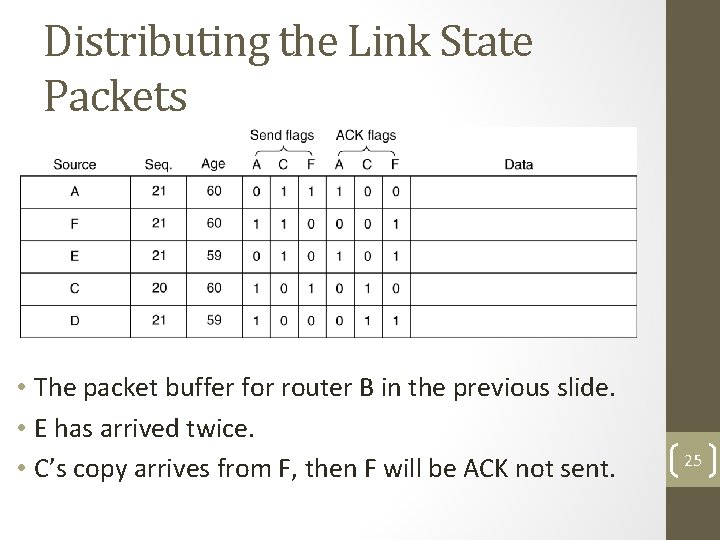
Distributing the Link State Packets • The packet buffer for router B in the previous slide. • E has arrived twice. • C’s copy arrives from F, then F will be ACK not sent. 25
Example Protocols Example protocols for Link State Routing: 1. IS-IS (Intermediate System – Intermediate System) 2. OSPF (Open Shortest Path First) • Important Difference: IS-IS can carry information about multiple network layer protocols at the same time (e. g. , IPX, and Apple. Talk), but not OSPF 26
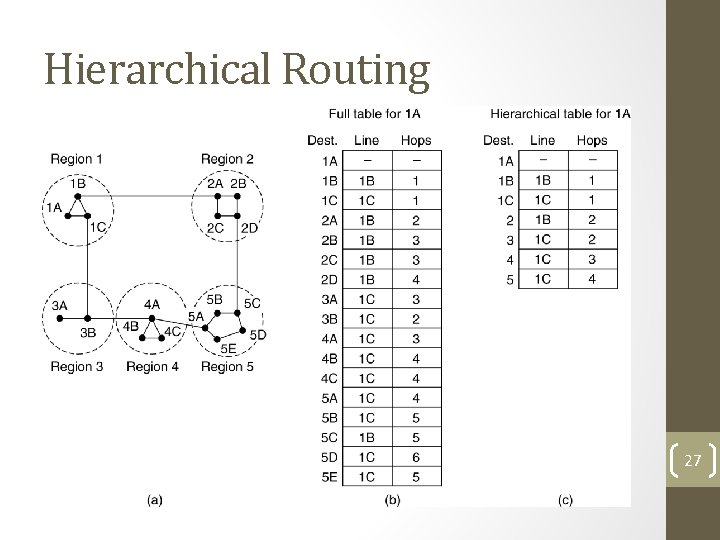
Hierarchical Routing Hierarchical routing. Problems – optimal paths are sacrificed 27
Hierarchical Routing (2) • How many levels of hierarchy? • Example: • 720 routers in 24 regions. • Three levels of hierarchy – 8 clusters each containing 9 regions of 10 clusters. 28
Broadcast Routing Multidimensional Routing • Each packet contains a list of destinations. • On arrival of a packet, router checks the set of destinations, and sends copies of packet along outgoing links to those destinations. Flooding • Flood with a sequence number per source. Spanning Tree • Build spanning tree (such as, a sink tree). • Forward packet along all links of spanning tree except the one from which packet is received. Reverse Path Forwarding 29
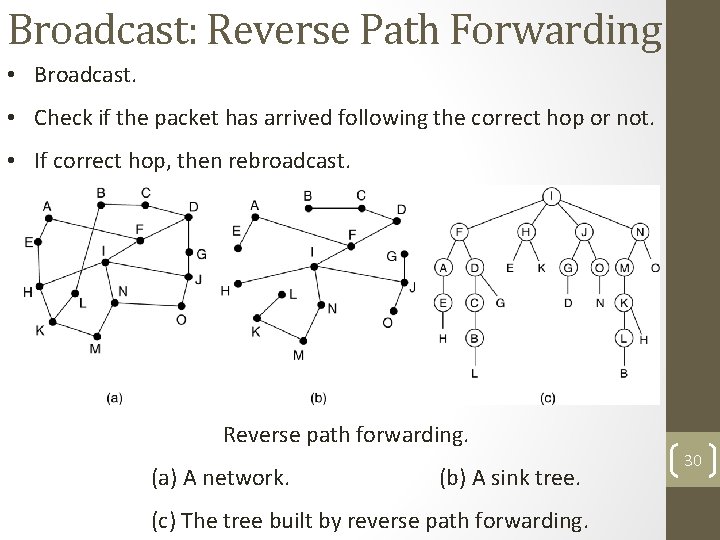
Broadcast: Reverse Path Forwarding • Broadcast. • Check if the packet has arrived following the correct hop or not. • If correct hop, then rebroadcast. Reverse path forwarding. (a) A network. (b) A sink tree. (c) The tree built by reverse path forwarding. 30
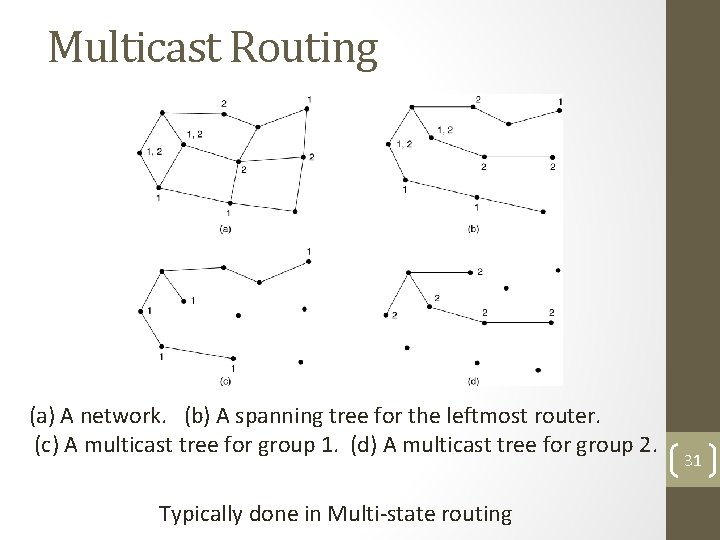
Multicast Routing (a) A network. (b) A spanning tree for the leftmost router. (c) A multicast tree for group 1. (d) A multicast tree for group 2. Typically done in Multi-state routing 31
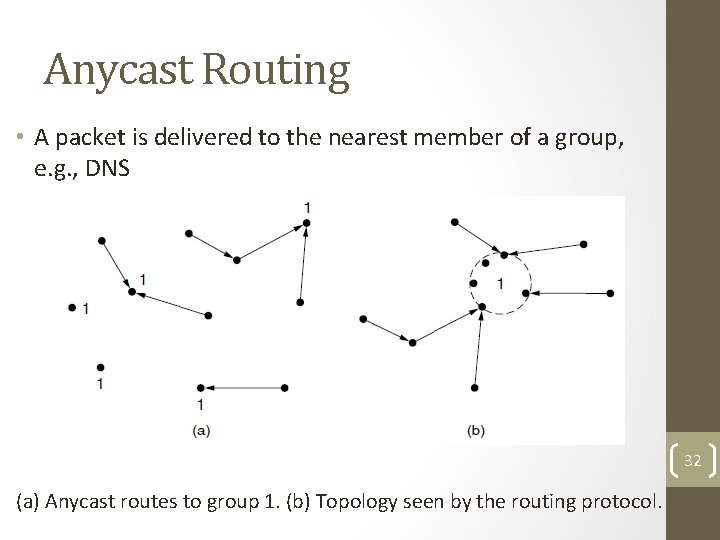
Anycast Routing • A packet is delivered to the nearest member of a group, e. g. , DNS 32 (a) Anycast routes to group 1. (b) Topology seen by the routing protocol.
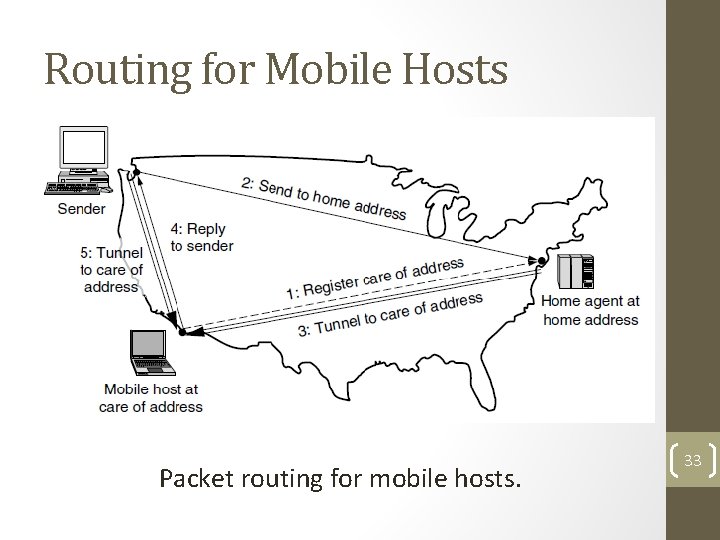
Routing for Mobile Hosts Packet routing for mobile hosts. 33
Node Lookup in Peer-to-Peer Networks P 2 P: Large connection of computers, without central control where typically each node has some information of interest. • No central control for routing • No central data repository Two basic questions: 1. How to make data at each node available? 2. How to find required information? The questions are interrelated, but will be looked at separately. 34
Assumption • Each record (data to be shared) can be identified by a ASCII string such as the filename. Over the past years, there have been several proposals for P 2 P architectures. We shall look at Chord. 35
Basics of Chord • Uses a hash function such as SHA-1. • SHA-1 converts a variable length input into a highly random 160 bit value • Using SHA-1, Chord hashes: node IP addresses names of records node identifiers (160 bits) keys (160 bits) 36
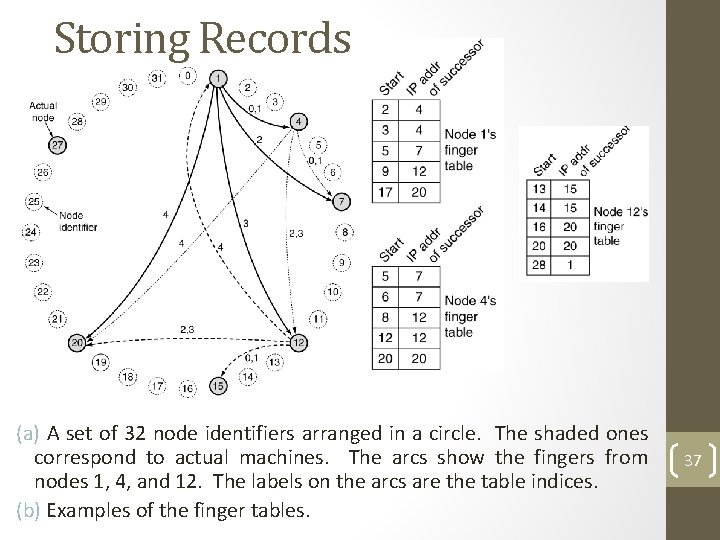
Storing Records (a) A set of 32 node identifiers arranged in a circle. The shaded ones correspond to actual machines. The arcs show the fingers from nodes 1, 4, and 12. The labels on the arcs are the table indices. (b) Examples of the finger tables. 37
Storing Records (2) • successor (k) is the first real node after k. • To store data name, a node N creates a tuple (name, N's IP address) and stores the tuple at successor(hash(name)). The original data remain at N, just the tuple is stored at successor(hash(name)). • If hash(name) = 22, then the tuple is stored at node 27. • To find information name, a node does key = hash(name), then gets the record tuple from successor(key). • Simple? Mostly, except for implementing successors(key) efficiently. 38
Finding Records Each node needs to store the IP addresses of its successor. Initially, the network start out with just a few nodes: 1. All nodes know each other. 2. They can easily arrange themselves into a the Chord ring. 3. successor(k) can be computed. When a node tries to join: 1. It calculates its node ID say p. 2. Then asks any node already in the ring to find successor(p). 3. Asks successor(p) for successor(p)'s predecessor and inserts itself between them. Any node in the ring can find successor(k) by propagating the query around the ring starting with its successor. 39
Finger Table • Even if both successor and predecessor pointers are used, a sequential search will take time on average O(n/2) [n is the number of nodes]. • Chord reduces this search time using a finger table at each node. • The finger table contains up to m entries where each entry i consists of IP address of successor(start[i]) • To find a record for key k, a node can directly jump to the closest predecessor of k. • Average time can be reduced to O(log n). 40
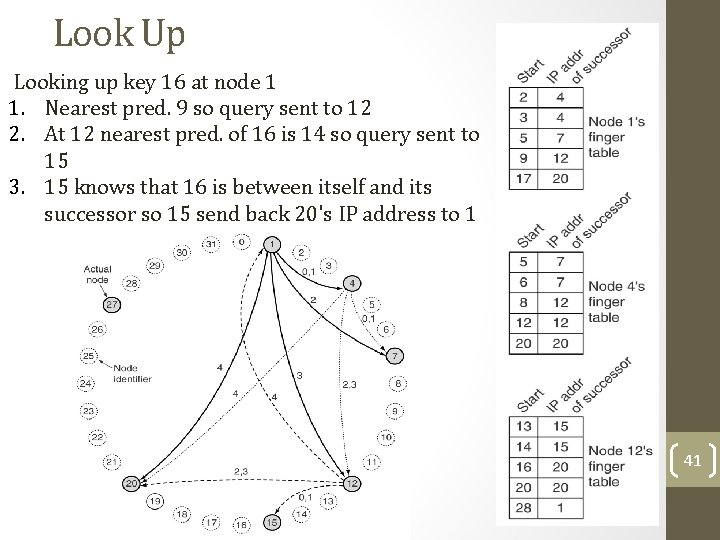
Look Up Looking up key 16 at node 1 1. Nearest pred. 9 so query sent to 12 2. At 12 nearest pred. of 16 is 14 so query sent to 15 3. 15 knows that 16 is between itself and its successor so 15 send back 20's IP address to 1 41
Maintaining Finger Table • Maintaining the finger table does not come for free. • Every time a new node is added a few successors and predecessor entries will change. 42
Internetwork Routing (1) Challenges in internetwork routing: 1. The networks may internally use different routing algorithms (e. g. , link state routing and distance vector routing) – finding shortest path becomes tricky. 2. Networks run by different operators: • Different ideas about what is a good path through the network – one operator wants least delay, another least cost. • One operator may not want another operator to know details of the paths in its network. 3. Individual networks may not need hierarchical solutions, while the combined network (internet) is huge and requires such solutions. 43
Internetwork Routing (2) Two-level routing algorithm: 1. Interior Gateway Protocol (IGP): Intra-domain routing protocol, used within individual networks. 2. Border Gateway Protocol (BGP): Inter-domain routing protocol, used across the networks which make up the network. Since each network is operated independently of all the others, it is often referred to as an AS (Autonomous System). Routes across networks determined by: 1. Business arrangements between ISPs. 2. Government laws for countries if internetwork routing requires crossing international boundaries. 44
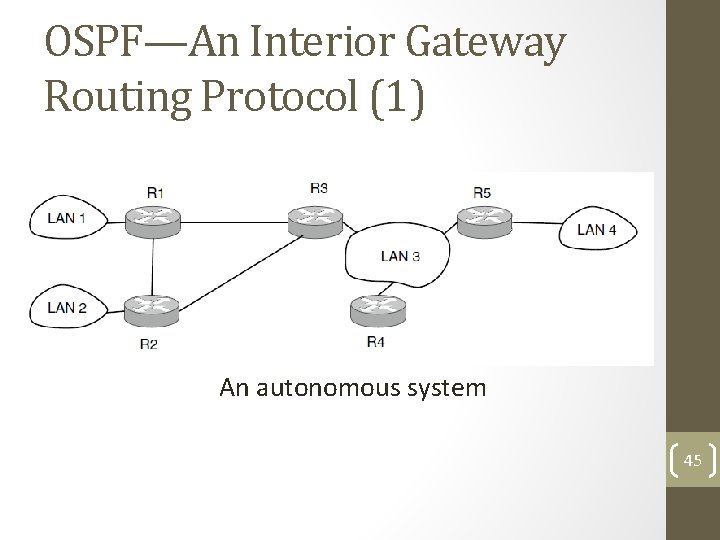
OSPF—An Interior Gateway Routing Protocol (1) An autonomous system 45
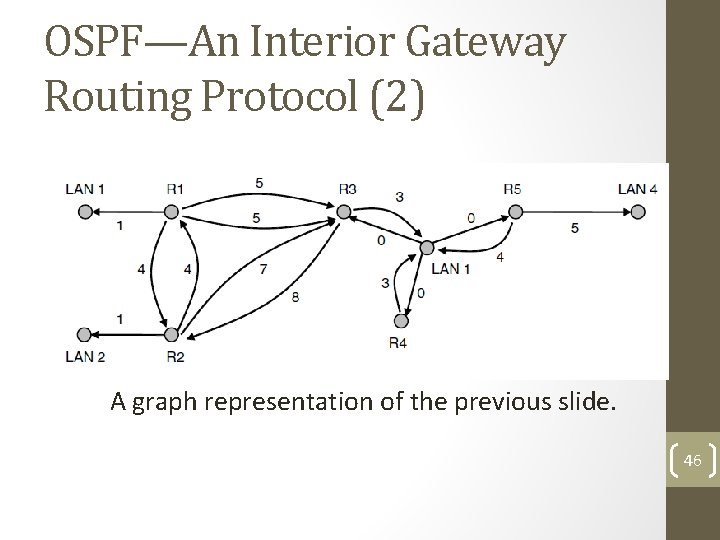
OSPF—An Interior Gateway Routing Protocol (2) A graph representation of the previous slide. 46
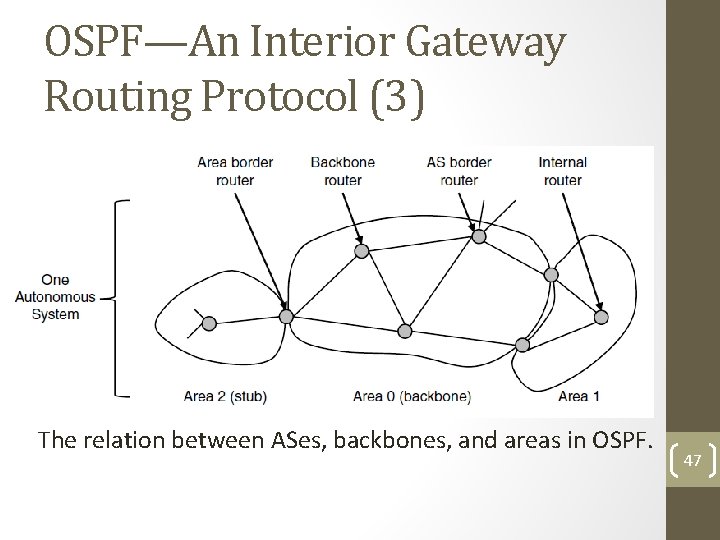
OSPF—An Interior Gateway Routing Protocol (3) The relation between ASes, backbones, and areas in OSPF. 47
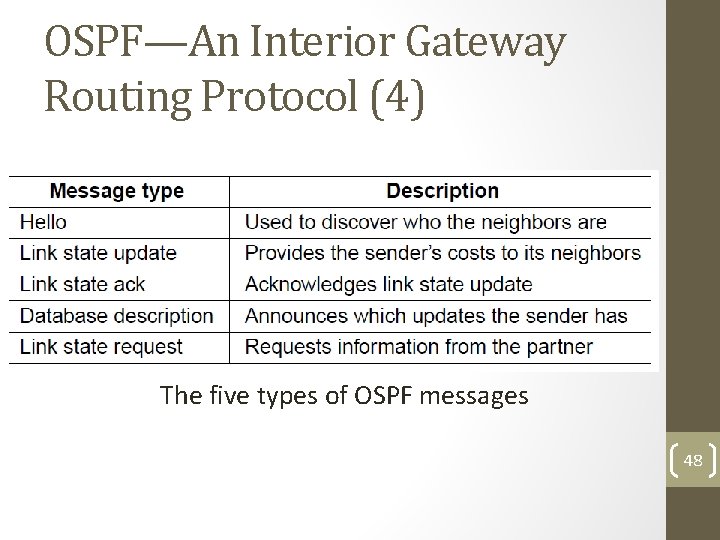
OSPF—An Interior Gateway Routing Protocol (4) The five types of OSPF messages 48
OSPF—An Interior Gateway Routing Protocol (5) Salient Features: a)Open source b)Support variety of distant metrics c)Dynamic algorithm – have to adapt d)Load balancing and not the best path e)Hierarchical systems f)Security is needed OSPF supports connection – point-to-point/multiaccess with broadcast 49
BGP—The Exterior Gateway Routing Protocol (1) Examples of routing constraints: 1. No commercial traffic for education network 2. Never put Iraq on route starting at Pentagon 3. Choose cheaper network 4. Choose better performing network 5. Don’t go from Apple to Google to Apple 50
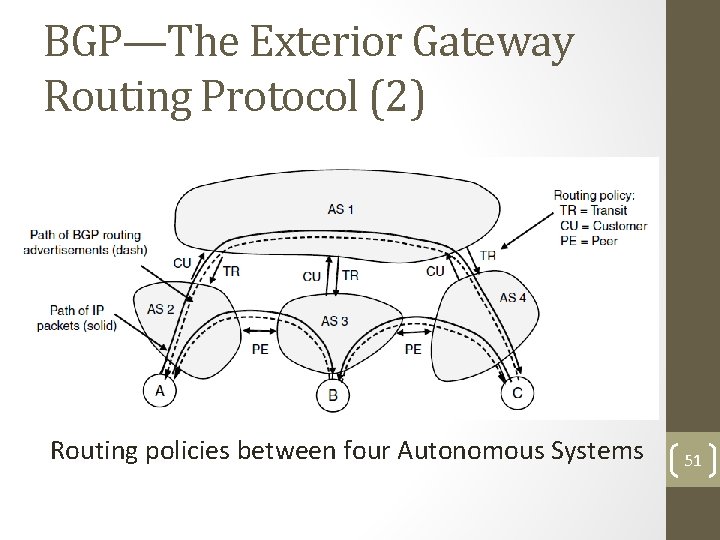
BGP—The Exterior Gateway Routing Protocol (2) Routing policies between four Autonomous Systems 51
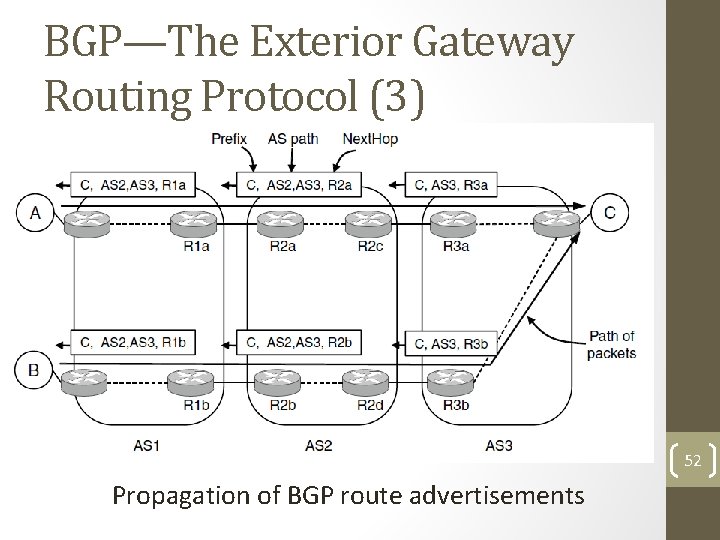
BGP—The Exterior Gateway Routing Protocol (3) 52 Propagation of BGP route advertisements
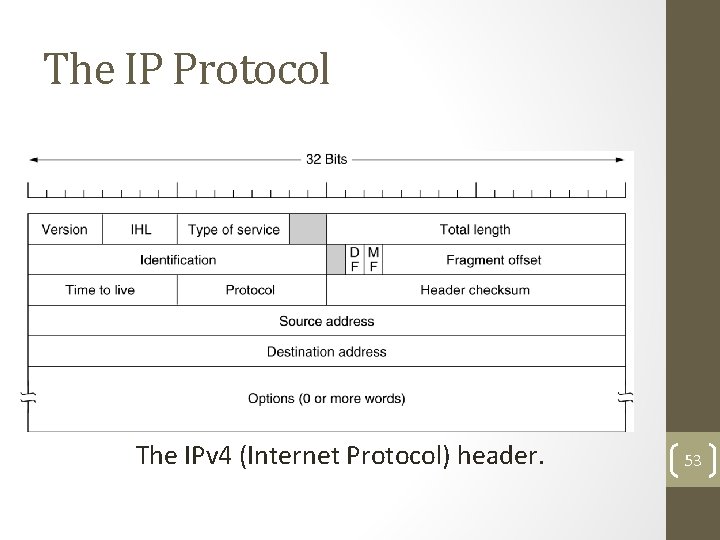
The IP Protocol The IPv 4 (Internet Protocol) header. 53
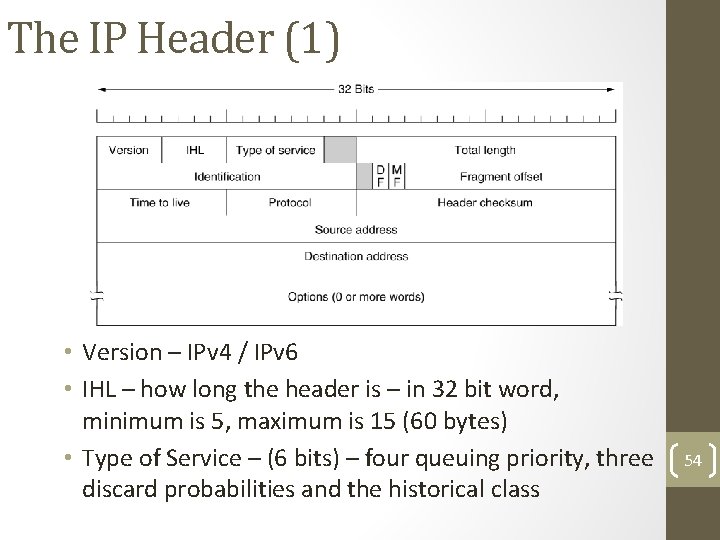
The IP Header (1) • Version – IPv 4 / IPv 6 • IHL – how long the header is – in 32 bit word, minimum is 5, maximum is 15 (60 bytes) • Type of Service – (6 bits) – four queuing priority, three discard probabilities and the historical class 54
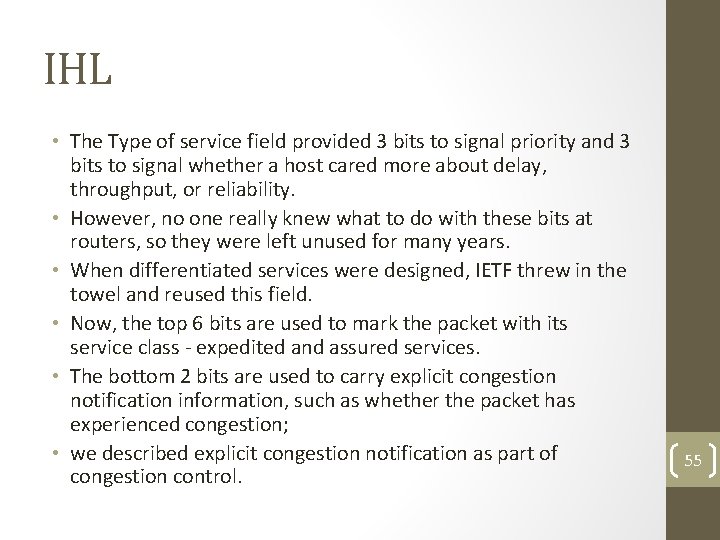
IHL • The Type of service field provided 3 bits to signal priority and 3 bits to signal whether a host cared more about delay, throughput, or reliability. • However, no one really knew what to do with these bits at routers, so they were left unused for many years. • When differentiated services were designed, IETF threw in the towel and reused this field. • Now, the top 6 bits are used to mark the packet with its service class - expedited and assured services. • The bottom 2 bits are used to carry explicit congestion notification information, such as whether the packet has experienced congestion; • we described explicit congestion notification as part of congestion control. 55
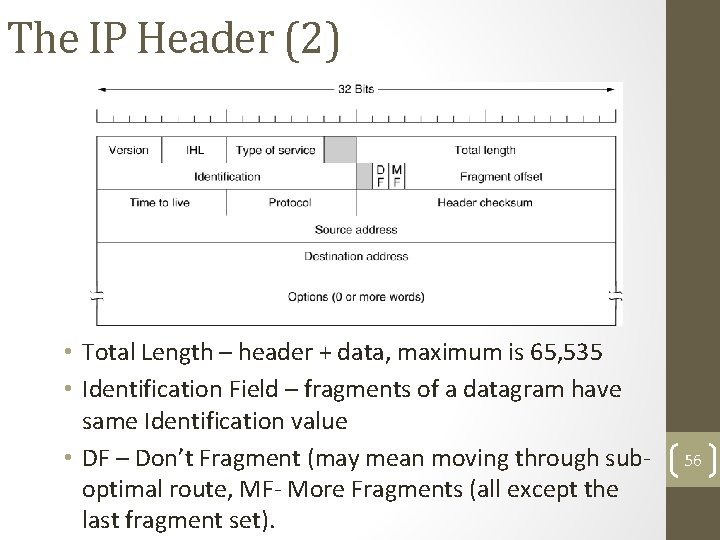
The IP Header (2) • Total Length – header + data, maximum is 65, 535 • Identification Field – fragments of a datagram have same Identification value • DF – Don’t Fragment (may mean moving through suboptimal route, MF- More Fragments (all except the last fragment set). 56
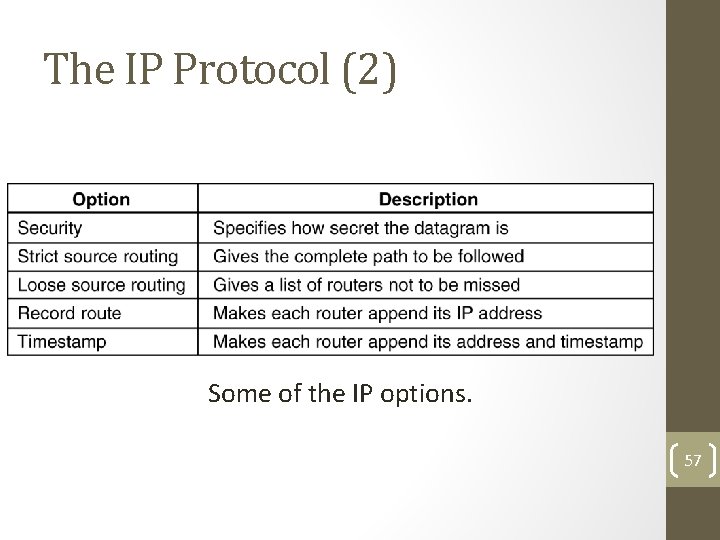
The IP Protocol (2) 5 -54 Some of the IP options. 57
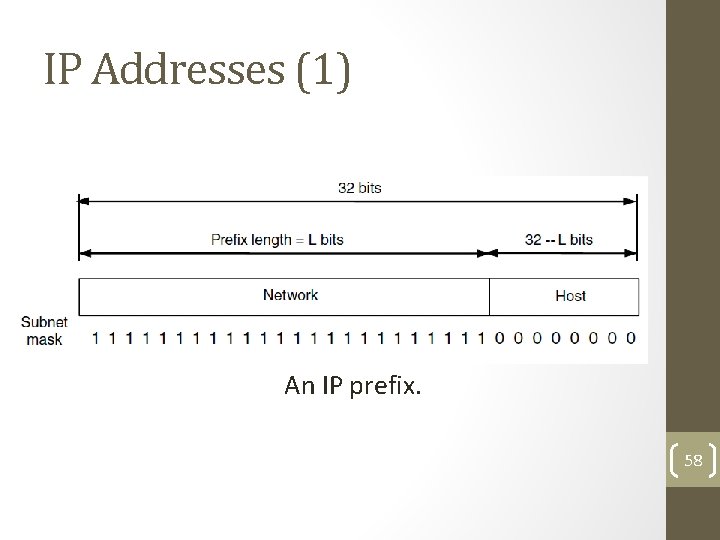
IP Addresses (1) An IP prefix. 58
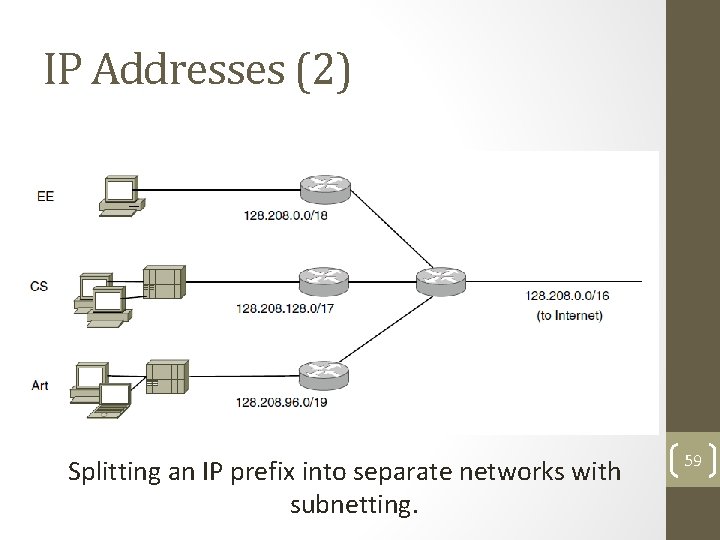
IP Addresses (2) Splitting an IP prefix into separate networks with subnetting. 59
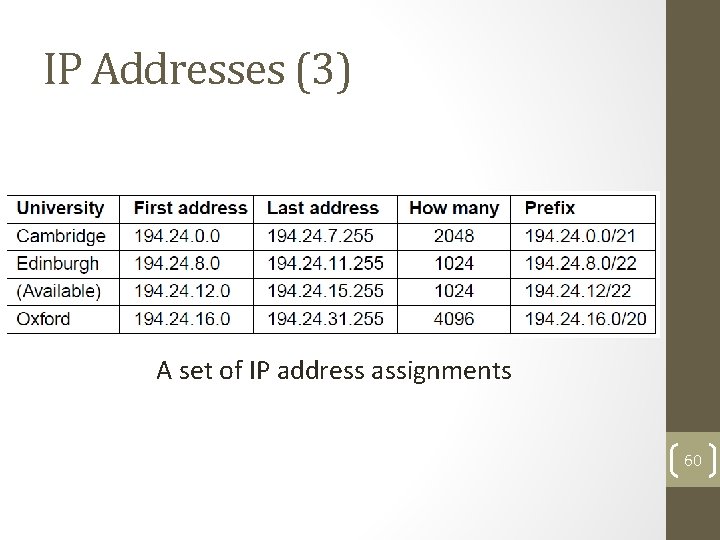
IP Addresses (3) A set of IP address assignments 60
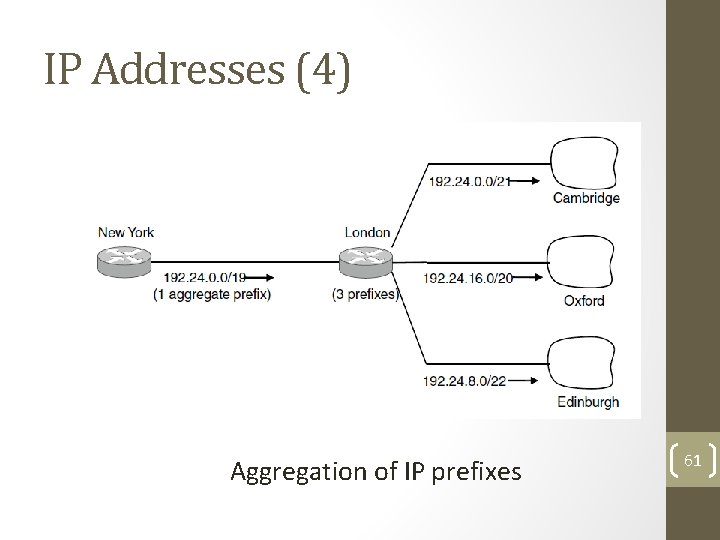
IP Addresses (4) Aggregation of IP prefixes 61
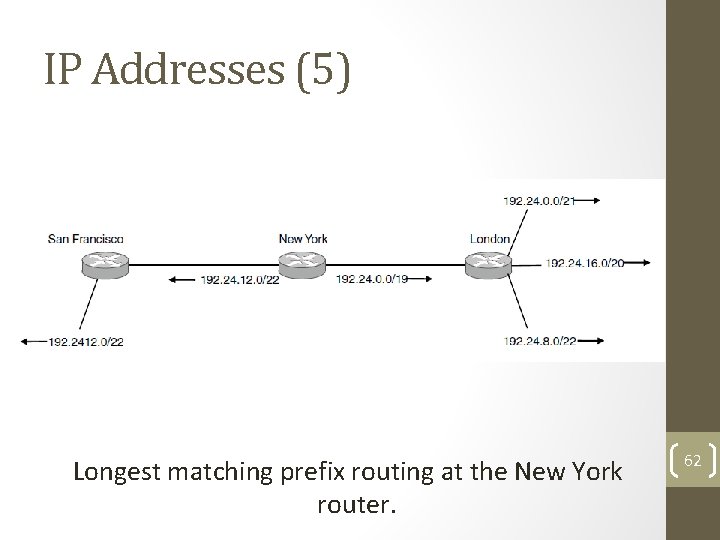
IP Addresses (5) Longest matching prefix routing at the New York router. 62
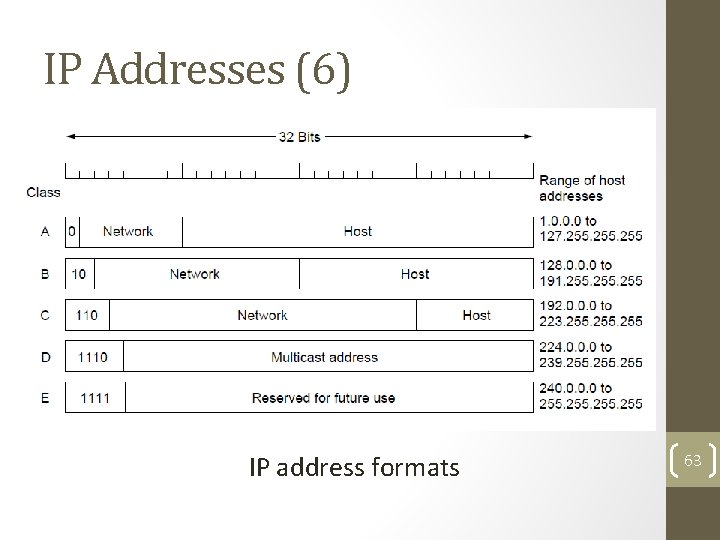
IP Addresses (6) IP address formats 63
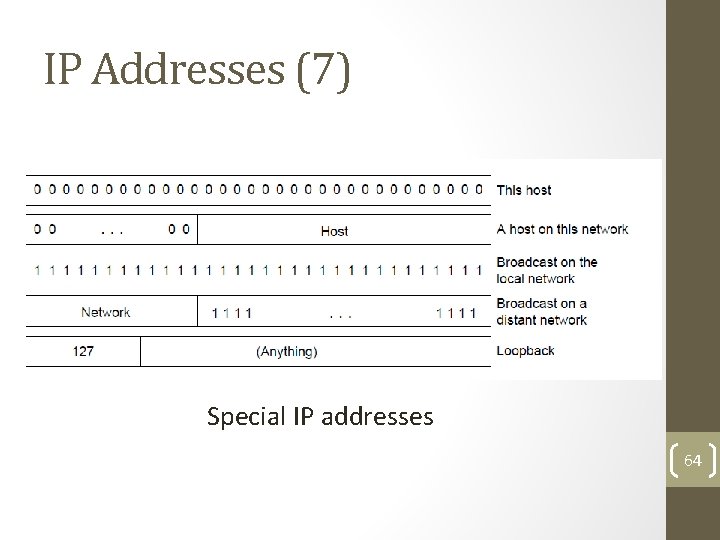
IP Addresses (7) Special IP addresses 64
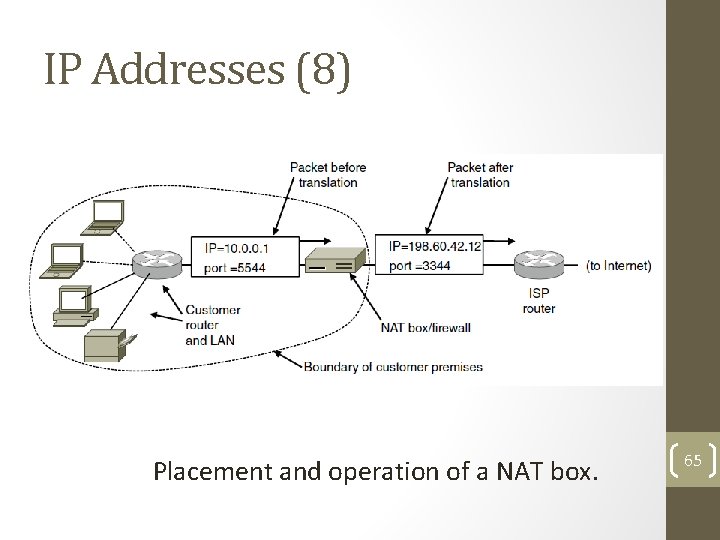
IP Addresses (8) Placement and operation of a NAT box. 65
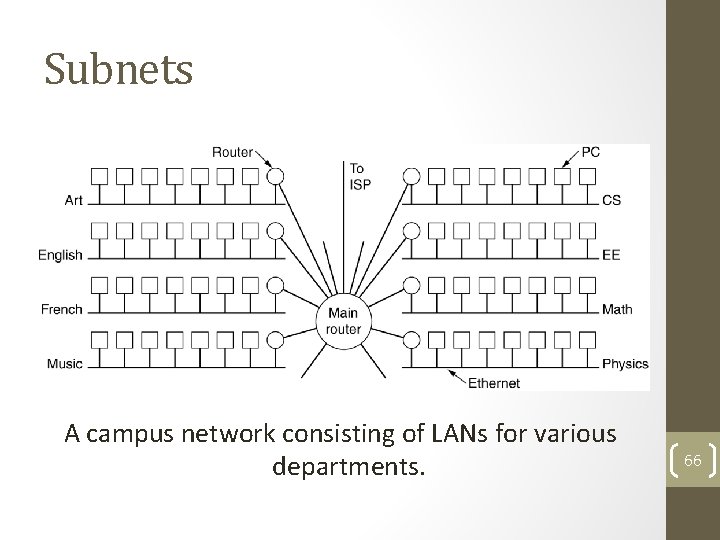
Subnets A campus network consisting of LANs for various departments. 66
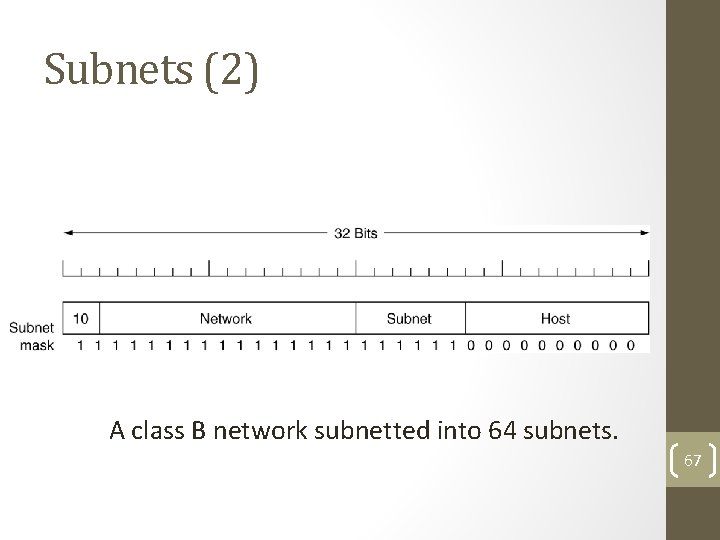
Subnets (2) A class B network subnetted into 64 subnets. 67
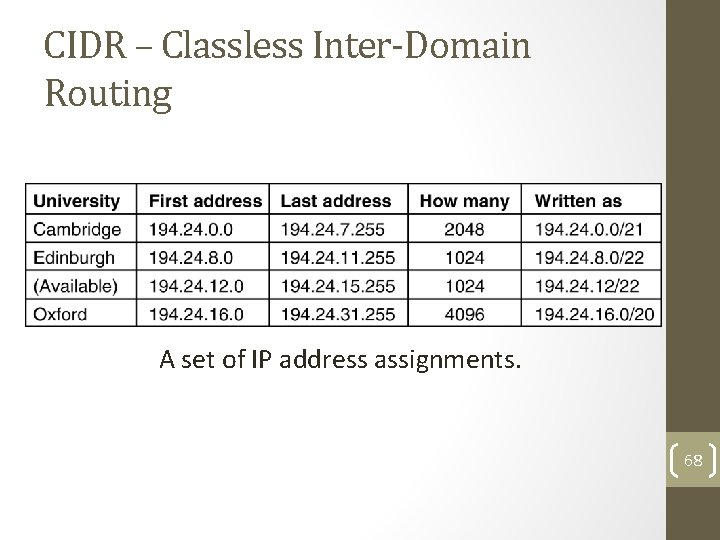
CIDR – Classless Inter-Domain Routing 5 -59 A set of IP address assignments. 68
Address Moving in CIDR • A packet comes in addressed to 194. 24. 17. 4 – compare it with each mask. • Largest Suffix match • Aggregated entry of the three – 194. 24. 0. 0/19 • Omaha Minneapolis, New York, Dallas, Denver • 194. 24. 12. 0/22 69
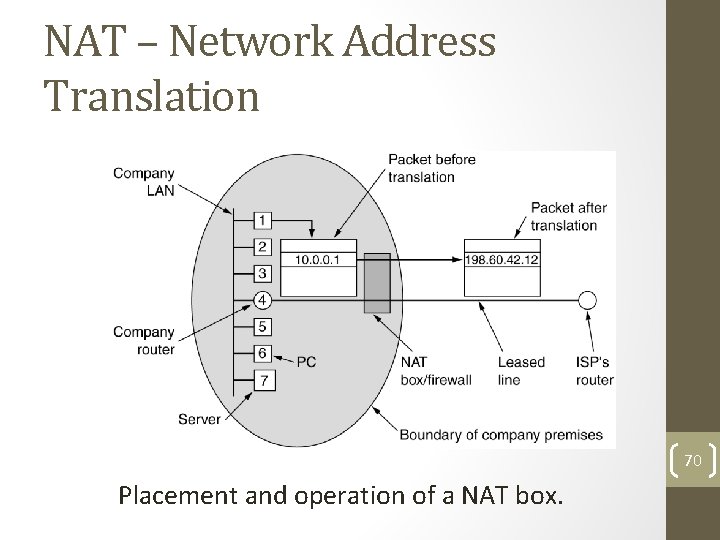
NAT – Network Address Translation 70 Placement and operation of a NAT box.
NAT • While leaving – IP, port are put in table, checksum is calculated and inserted into the packets. • While coming back – IP, port, checksum of IP and port checksum • Three ranges of IP addresses as private • 10. 0 • 172. 16 ---- 172. 31 • 192. 168 71
NAT – Criticism • Architectural model of IP where each IP is identified by a single machine • Internet from connection-less to connectionoriented • NAT violates the most fundamental rule of protocol layering • Processes on the Internet are not required to use TCP or UDP • Some application insert IP address in their body – (FTP) – NAT doesn’t know about it. 72
Congestion Control Algorithms • Approaches to Congestion Control • Traffic-Aware Routing • Admission Control • Traffic Throttling • Load Shedding
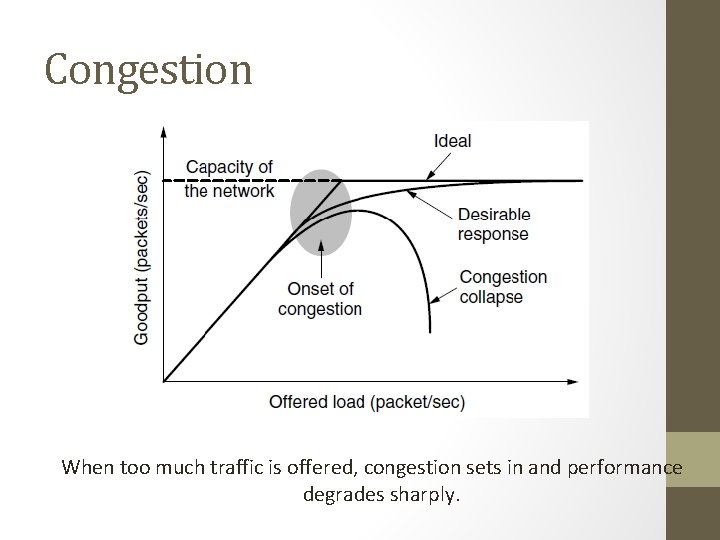
Congestion When too much traffic is offered, congestion sets in and performance degrades sharply.
General Principles of Congestion Control 1. Monitor the system • detect when and where congestion occurs. 2. Pass information to where action can be taken. 3. Adjust system operation to correct the problem. 4. Difference between Congestion control and flow control – Elaborate 5. Problem of infinite buffer - Elaborate
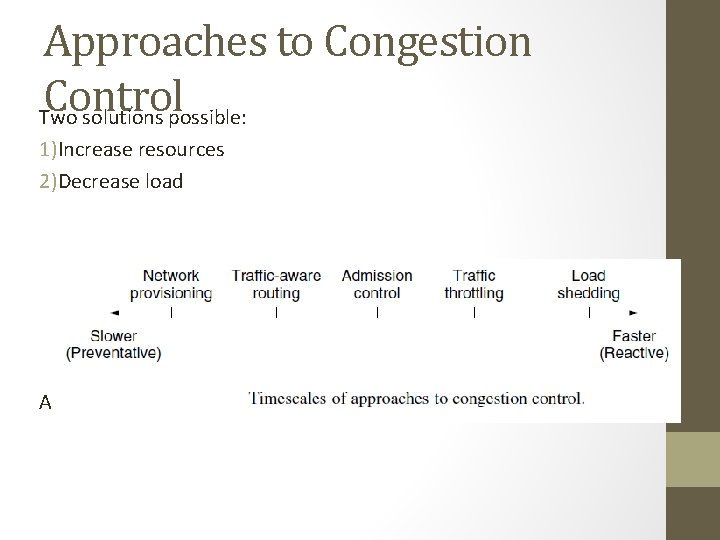
Approaches to Congestion Control Two solutions possible: 1)Increase resources 2)Decrease load Admission control in virtual networks – no more provisioning
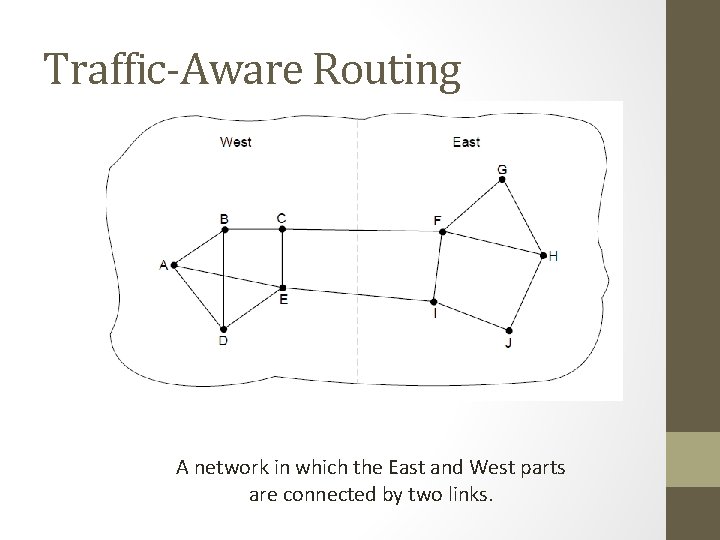
Traffic-Aware Routing A network in which the East and West parts are connected by two links.
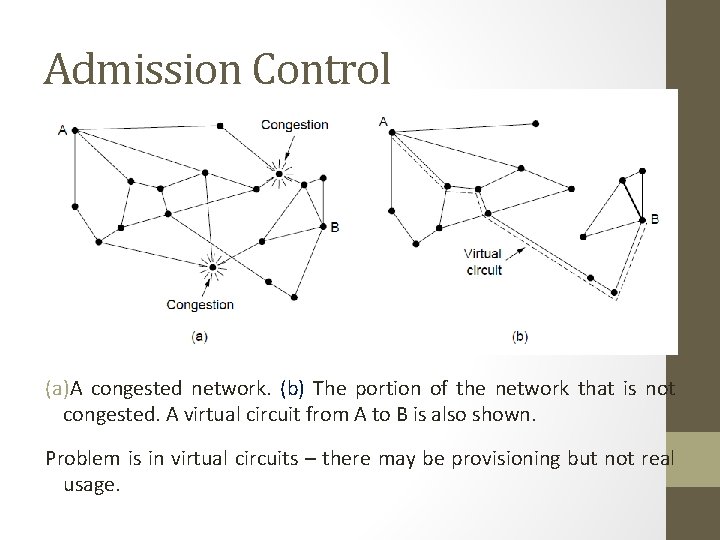
Admission Control (a)A congested network. (b) The portion of the network that is not congested. A virtual circuit from A to B is also shown. Problem is in virtual circuits – there may be provisioning but not real usage.
Traffic Throttling: Congestion • Detection Routers must determine when congestion is ideally before it has arrived. approaching, • Each router can continuously monitor the resources it is using. • 3 possibilities: 1. utilization of the output links 2. buffering of queued packets inside the router (most useful) 3. no. of packets that are lost due to insufficient buffering EWMA (Exponentially Weighted Moving Average) • dnew = αdold + (1 − α)s, where, the constant α determines how fast the router forgets recent history. • Whenever d moves above threshold, the router notes the onset of congestion.
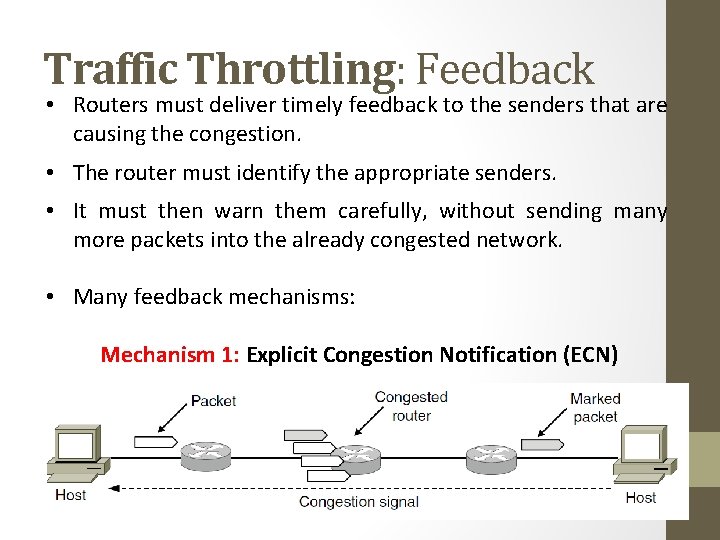
Traffic Throttling: Feedback • Routers must deliver timely feedback to the senders that are causing the congestion. • The router must identify the appropriate senders. • It must then warn them carefully, without sending many more packets into the already congested network. • Many feedback mechanisms: Mechanism 1: Explicit Congestion Notification (ECN)
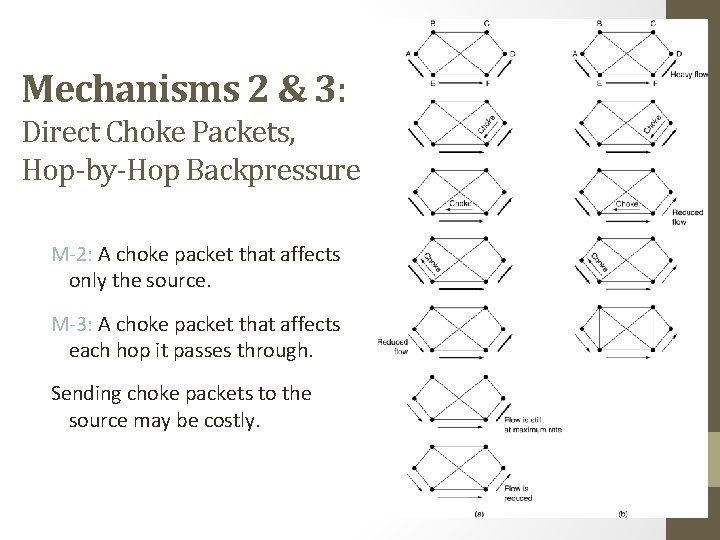
Mechanisms 2 & 3: Direct Choke Packets, Hop-by-Hop Backpressure M-2: A choke packet that affects only the source. M-3: A choke packet that affects each hop it passes through. Sending choke packets to the source may be costly.
Mechanism 4: Load Shedding • Performed when all other strategies fail. • Cause blackout in some areas to save the entire network from failing. • Intelligent packet drop policy desired. • Which packets to discard may depend on application Multimedia – old packets (full frame not to be discarded) Text – Recent Packets • Packet’s importance can be marked in the beginning (application layer), then decision on which packets to discard can be taken.
Mechanism 5: Random Early Detection • Discard packets before all the buffer space is really exhausted. • To determine when to start discarding, routers maintain a running average of their queue lengths. • When average queue length exceeds a threshold, the link is said to be congested – small fraction of packets dropped at random. • The affected sender will notice the loss when there is no acknowledgement – transport protocol slowed down.
Four issues must be addressed to ensure quality of service: 1. What applications need from the network. 2. How to regulate the traffic that enters the network. 3. How to reserve resources at routers to guarantee performance. 4. Whether the network can safely accept more traffic.
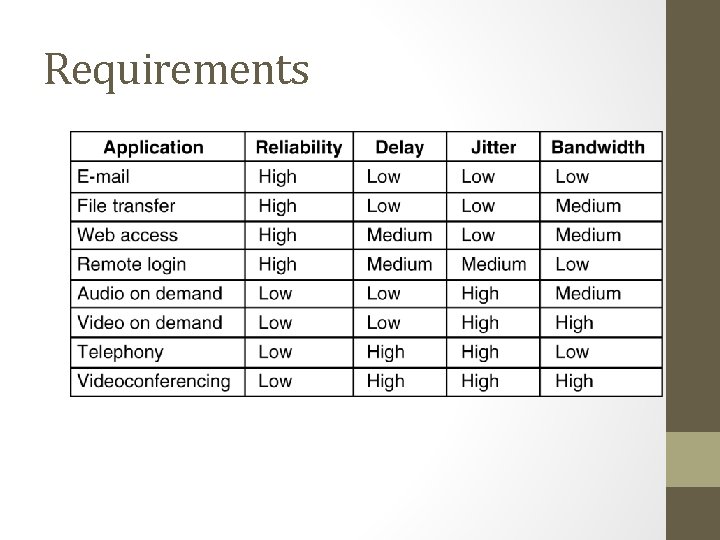
Requirements How stringent the quality-of-service requirements are. 5 -30
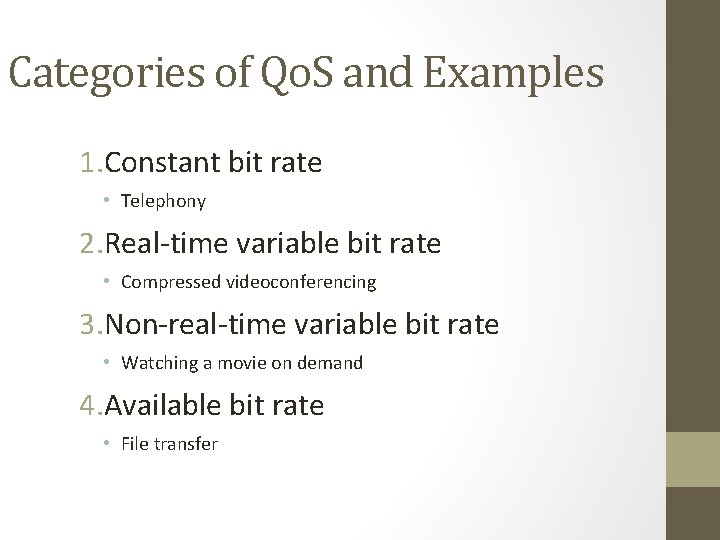
Categories of Qo. S and Examples 1. Constant bit rate • Telephony 2. Real-time variable bit rate • Compressed videoconferencing 3. Non-real-time variable bit rate • Watching a movie on demand 4. Available bit rate • File transfer
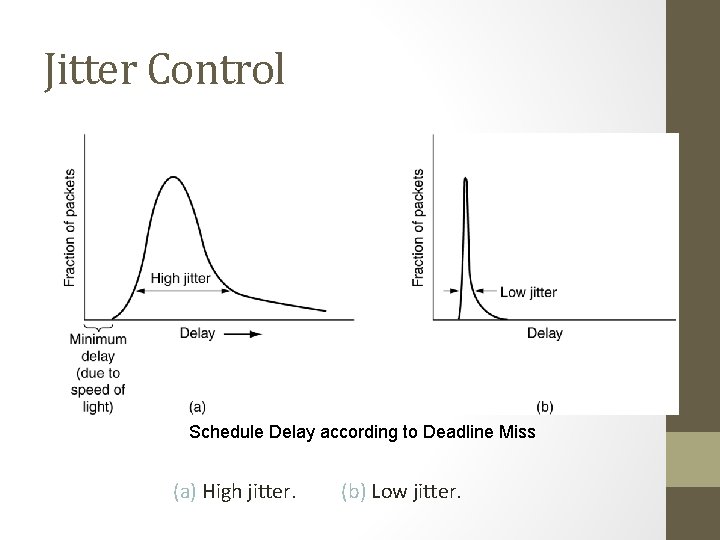
Jitter Control Schedule Delay according to Deadline Miss (a) High jitter. (b) Low jitter.
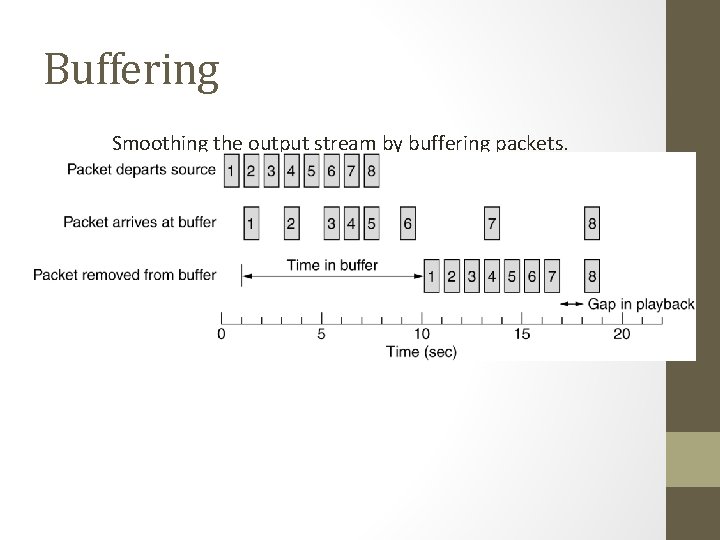
Buffering Smoothing the output stream by buffering packets.
Traffic Shaping • Traffic in data networks is bursty – typically arrives at non-uniform rates as the traffic rate varies. • Traffic shaping is a technique for regulating the average rate and burstiness of a flow of data that enters the network. • When a flow is set up, the user and the network agree on a certain traffic pattern (shape). • Sometimes this agreement is called an SLA (Service Level Agreement).
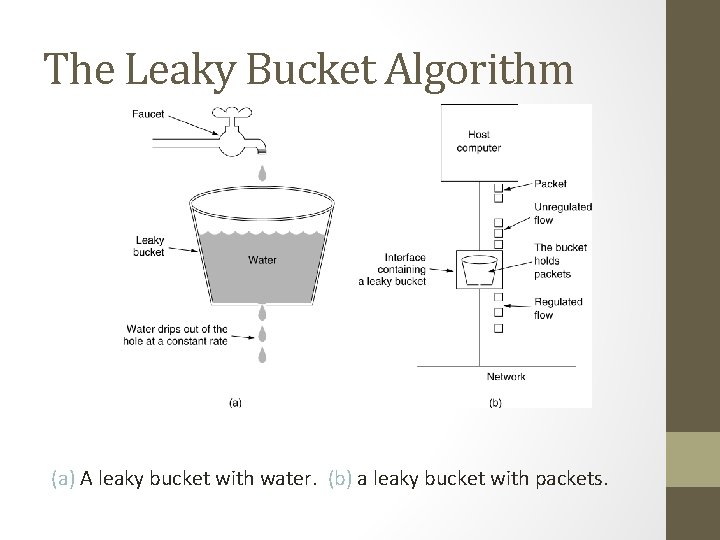
The Leaky Bucket Algorithm (a) A leaky bucket with water. (b) a leaky bucket with packets.
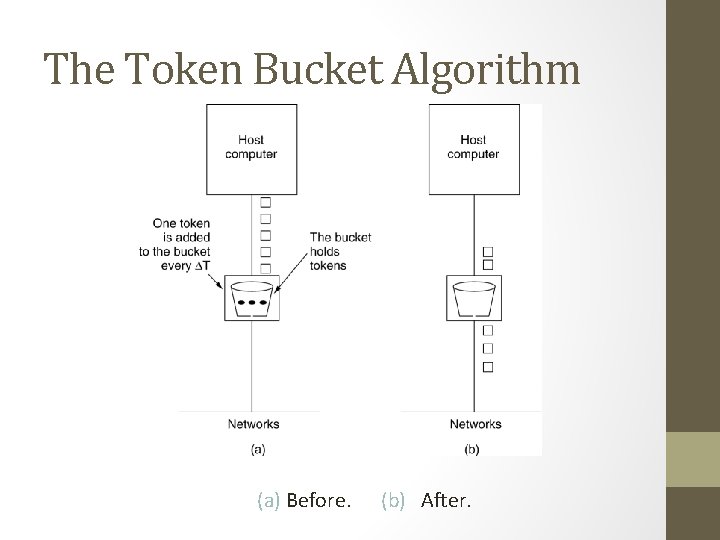
The Token Bucket Algorithm 5 -34 (a) Before. (b) After.
Token Bucket Algorithm (2) • • Burst length – S sec. Maximum output rate – M bytes/sec Token bucket capacity – B bytes Token arrival rate – R bytes/sec • An output burst contains a maximum of (B + RS) bytes. • The number of bytes in a maximum speed burst of length S seconds is MS. • Hence, we have: B + RS = MS • This equation can be solved to get S = B /(M − R)
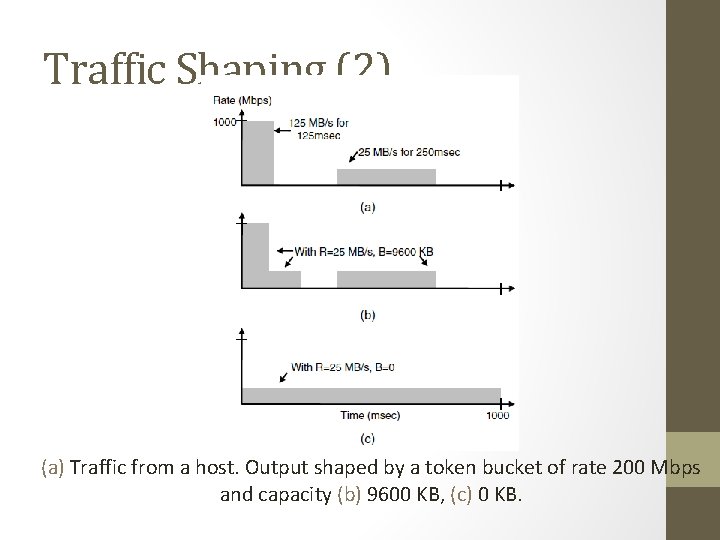
Traffic Shaping (2) (a) Traffic from a host. Output shaped by a token bucket of rate 200 Mbps and capacity (b) 9600 KB, (c) 0 KB.
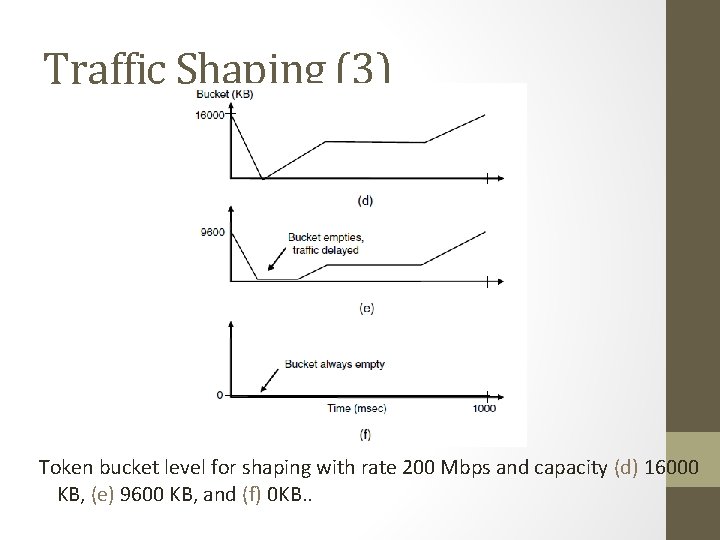
Traffic Shaping (3) Token bucket level for shaping with rate 200 Mbps and capacity (d) 16000 KB, (e) 9600 KB, and (f) 0 KB. .
Packet Scheduling Kinds of resources that can potentially be reserved for different flows: 1. Bandwidth. 2. Buffer space. 3. CPU cycles.
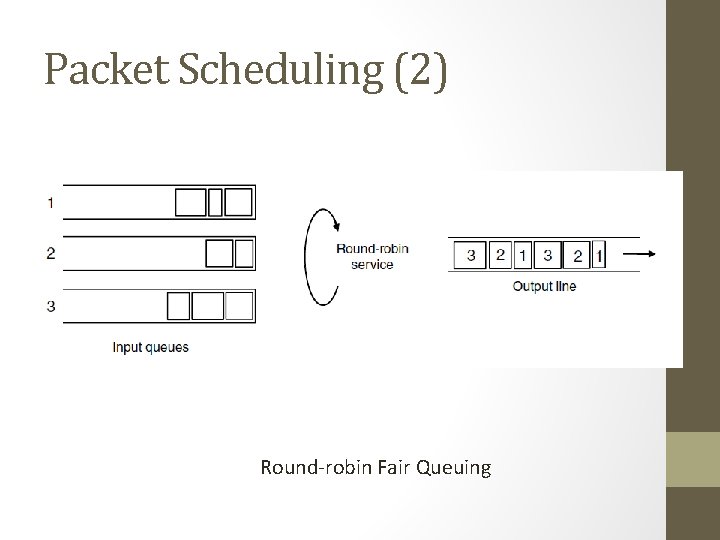
Packet Scheduling (2) Round-robin Fair Queuing
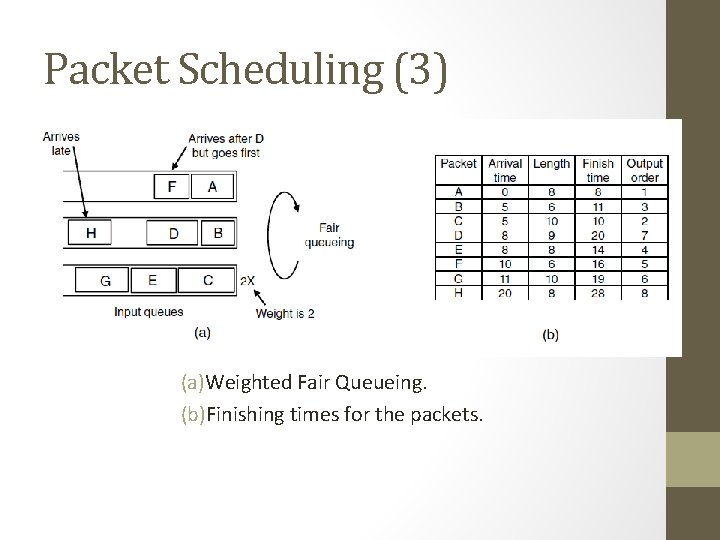
Packet Scheduling (3) (a)Weighted Fair Queueing. (b)Finishing times for the packets.
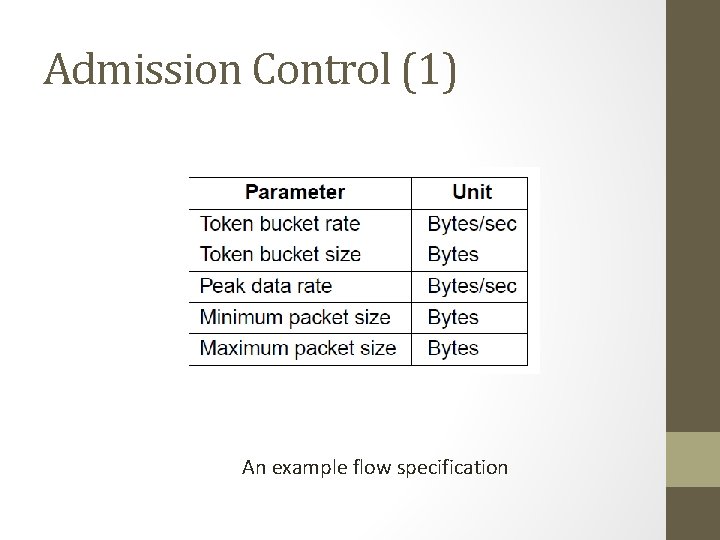
Admission Control (1) An example flow specification
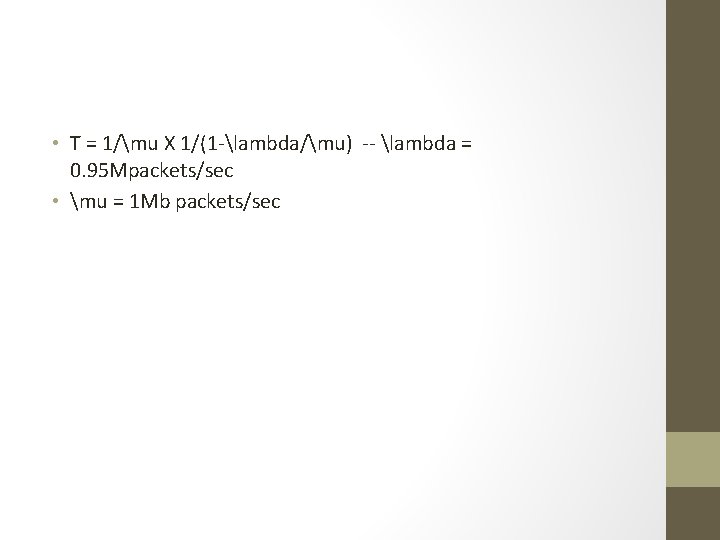
• T = 1/mu X 1/(1 -lambda/mu) -- lambda = 0. 95 Mpackets/sec • mu = 1 Mb packets/sec
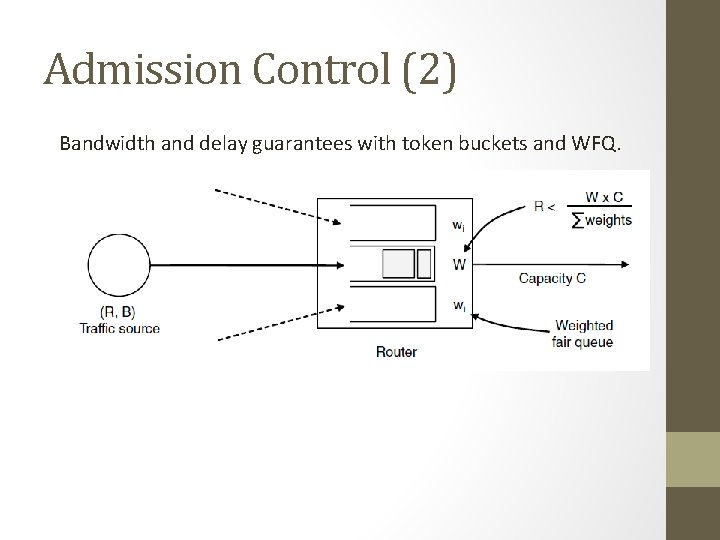
Admission Control (2) Bandwidth and delay guarantees with token buckets and WFQ.
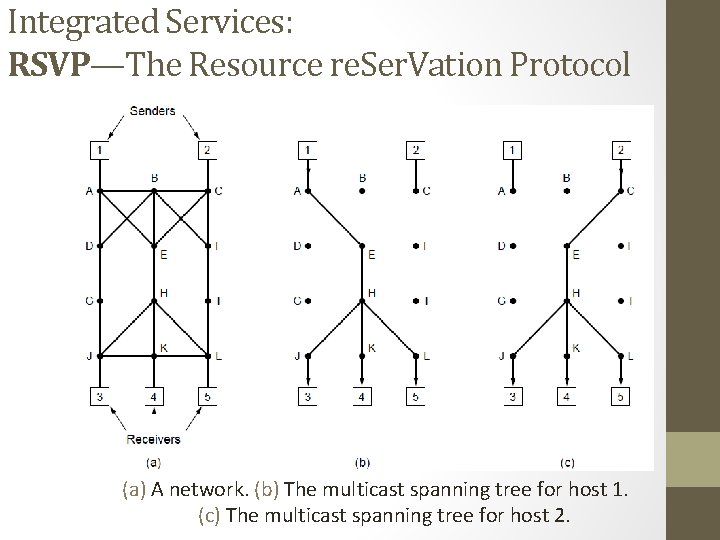
Integrated Services: RSVP—The Resource re. Ser. Vation Protocol (a) A network. (b) The multicast spanning tree for host 1. (c) The multicast spanning tree for host 2.
Hosts 1 and 2 are multicast sender 3, 4, 5 are multicast receiver Host 3 reserves for Host 1 and the Host 2 Host 5 reserves Host 1 (so the common path is utilized). However depending on need (Host 5 may be a bigger TV) – provision is made for the greediest part
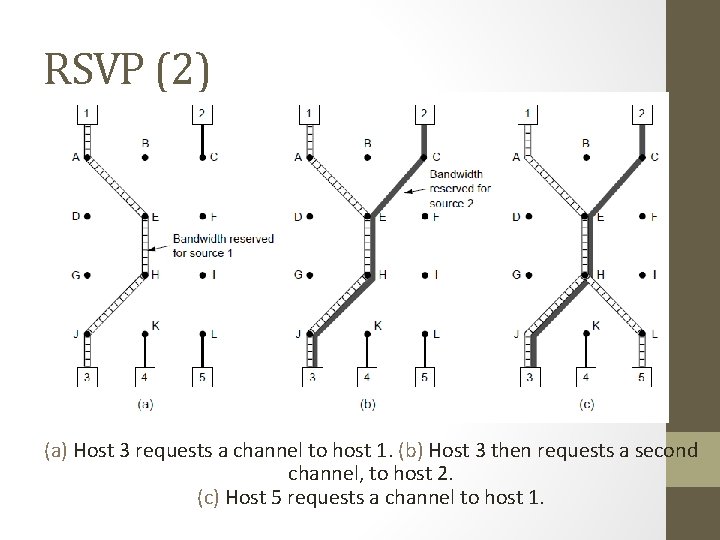
RSVP (2) (a) Host 3 requests a channel to host 1. (b) Host 3 then requests a second channel, to host 2. (c) Host 5 requests a channel to host 1.
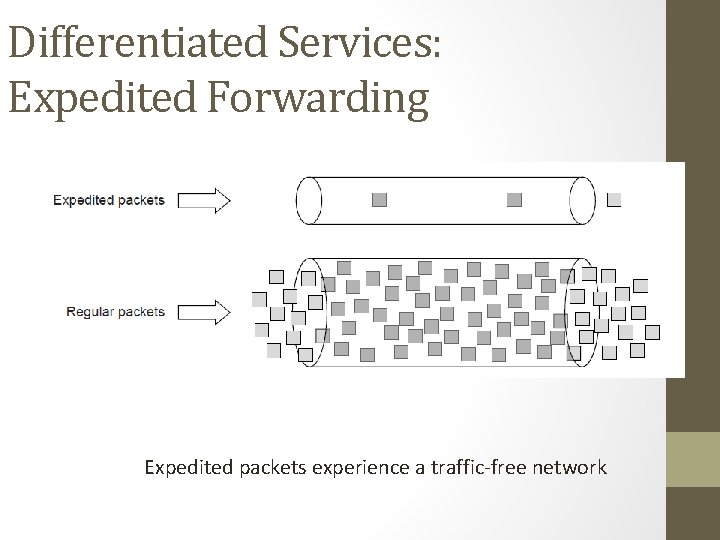
Differentiated Services: Expedited Forwarding Expedited packets experience a traffic-free network
Class-Based Service Per Hop Behaviors Traffic within a class are given preferential treatment Expedited Forwarding Packets marked – Regular or Expedited Assured Forwarding Gold, Silver, Bronze, common Packets that face congestion low (short burst), medium and high _ this classes are determined by tocken bucket algorithm
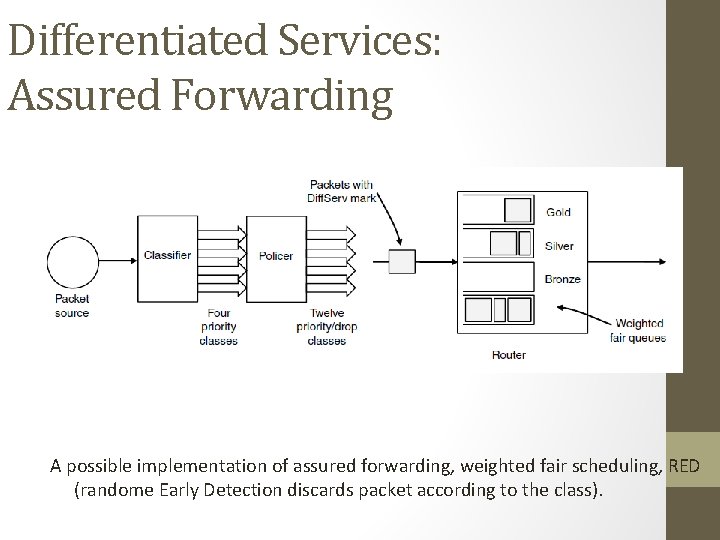
Differentiated Services: Assured Forwarding A possible implementation of assured forwarding, weighted fair scheduling, RED (randome Early Detection discards packet according to the class).
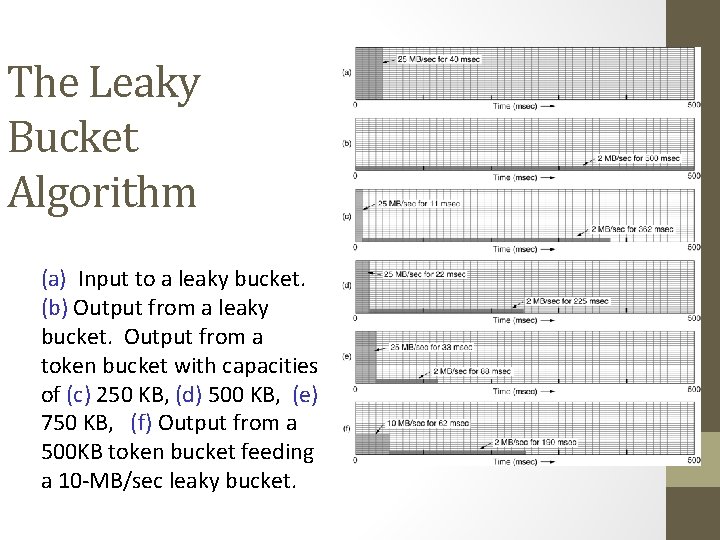
The Leaky Bucket Algorithm (a) Input to a leaky bucket. (b) Output from a leaky bucket. Output from a token bucket with capacities of (c) 250 KB, (d) 500 KB, (e) 750 KB, (f) Output from a 500 KB token bucket feeding a 10 -MB/sec leaky bucket.
Quality of Service • Requirements • Minimum throughput and maximum latency • Techniques for Achieving Good Quality of Service • Integrated Services • Differentiated Services • Label Switching and MPLS
Internetworking • How networks differ • How networks can be connected • Tunneling • Internetwork routing • Packet fragmentation
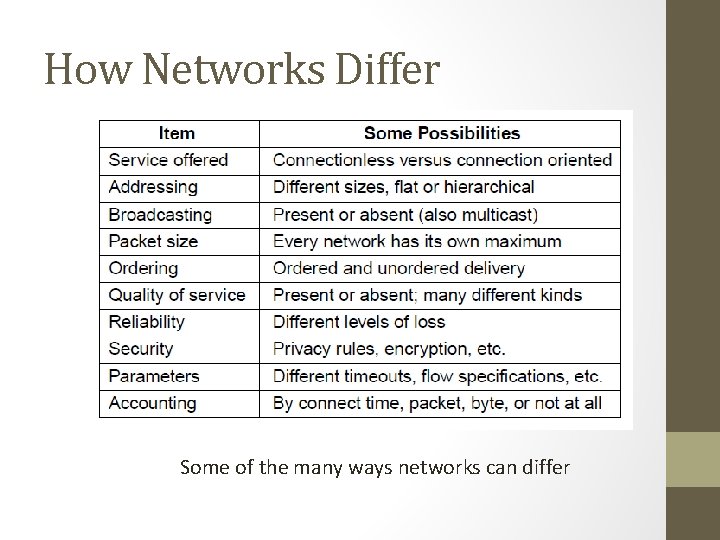
How Networks Differ Some of the many ways networks can differ
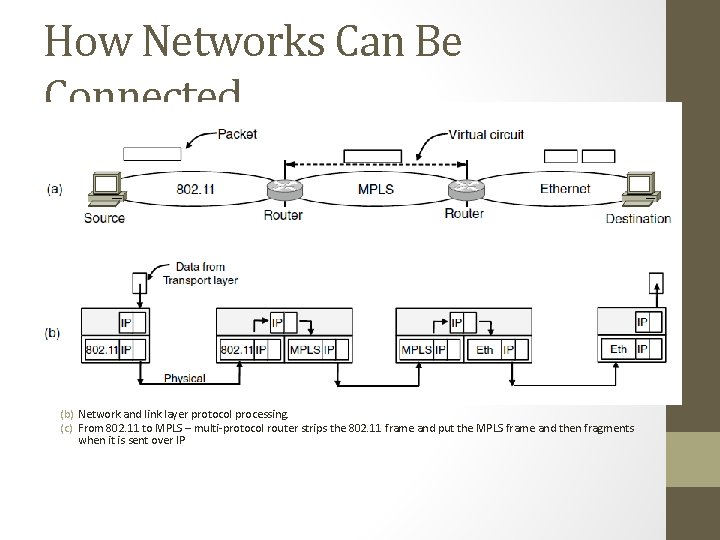
How Networks Can Be Connected (a) A packet crossing different networks. (b) Network and link layer protocol processing. (c) From 802. 11 to MPLS – multi-protocol router strips the 802. 11 frame and put the MPLS frame and then fragments when it is sent over IP
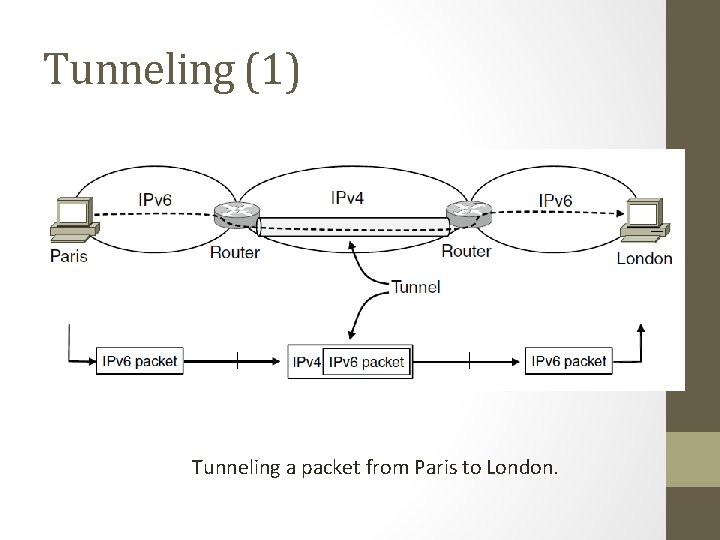
Tunneling (1) Tunneling a packet from Paris to London.
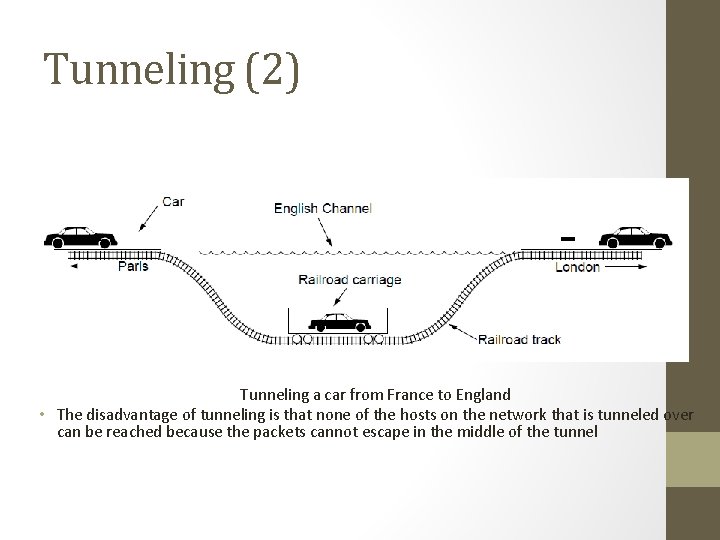
Tunneling (2) Tunneling a car from France to England • The disadvantage of tunneling is that none of the hosts on the network that is tunneled over can be reached because the packets cannot escape in the middle of the tunnel
Internetwork Routing (1) Challenges in internetwork routing: 1)The networks may internally use different routing algorithms (e. g. , link state routing and distance vector routing) – finding shortest path becomes tricky. 2)Networks run by different operators: a)Different ideas about what is a good path through the network – one operator wants least delay, another least cost. b)One operator may not want another operator to know details of the paths in its network. 3)Individual networks may not need hierarchical solutions, while the combined network (internet) is huge and requires such solutions for scaling
Internetwork Routing (2) Two-level routing algorithm: 1)Interior Gateway Protocol (IGP): Intra-domain routing protocol, used within individual networks. 2)Border Gateway Protocol (BGP): Inter-domain routing protocol, used across the networks which make up the network. Since each network is operated independently of all the others, it is often referred to as an AS (Autonomous System). Routes across networks determined by: 1)Business arrangements between ISPs. 2)Government laws for countries if internetwork routing requires crossing international boundaries.
Packet Fragmentation (1) Packet size issues: 1. Hardware 2. Operating system 3. Protocols 4. Compliance with (inter)national standard. 5. Reduce error-induced retransmissions 6. Prevent packet occupying channel too long.
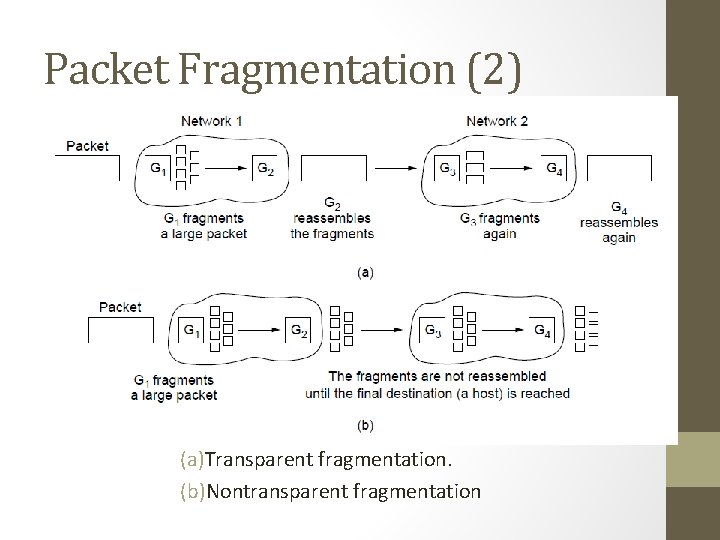
Packet Fragmentation (2) (a)Transparent fragmentation. (b)Nontransparent fragmentation
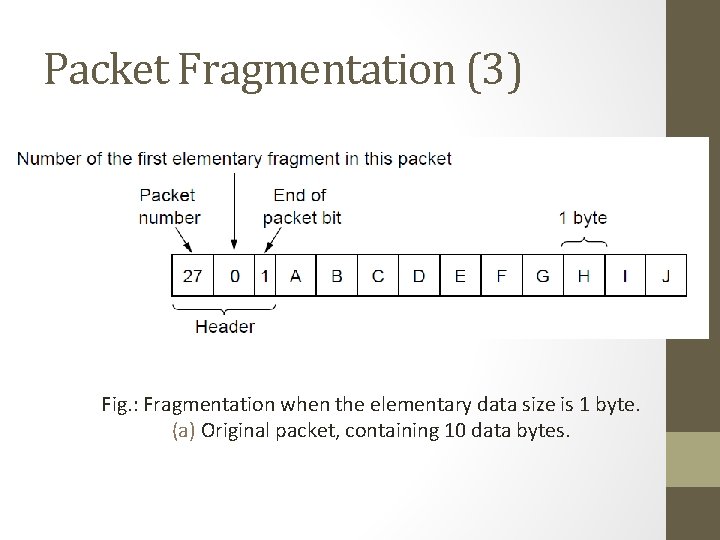
Packet Fragmentation (3) Fig. : Fragmentation when the elementary data size is 1 byte. (a) Original packet, containing 10 data bytes.
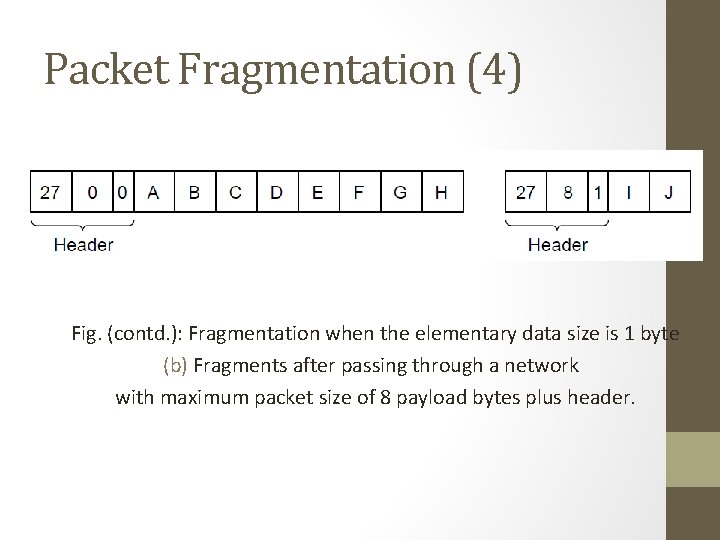
Packet Fragmentation (4) Fig. (contd. ): Fragmentation when the elementary data size is 1 byte (b) Fragments after passing through a network with maximum packet size of 8 payload bytes plus header.
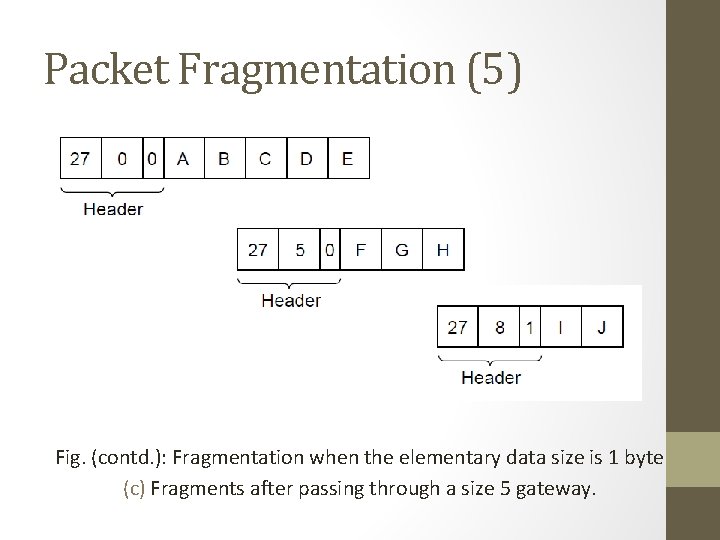
Packet Fragmentation (5) Fig. (contd. ): Fragmentation when the elementary data size is 1 byte (c) Fragments after passing through a size 5 gateway.
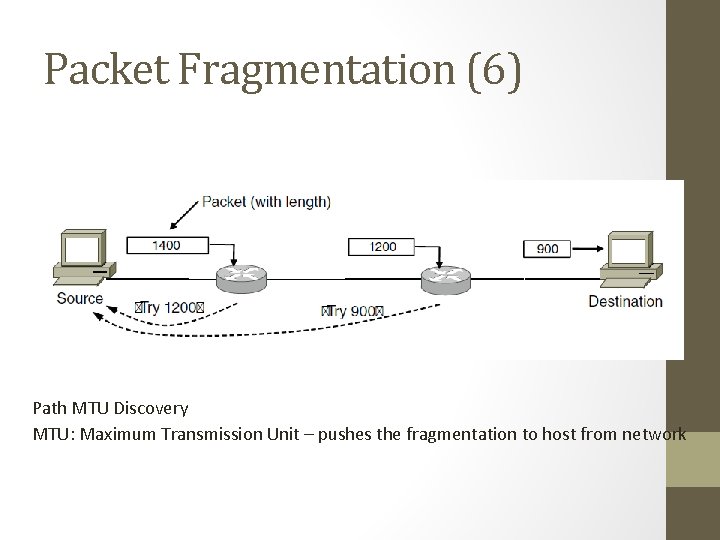
Packet Fragmentation (6) Path MTU Discovery MTU: Maximum Transmission Unit – pushes the fragmentation to host from network
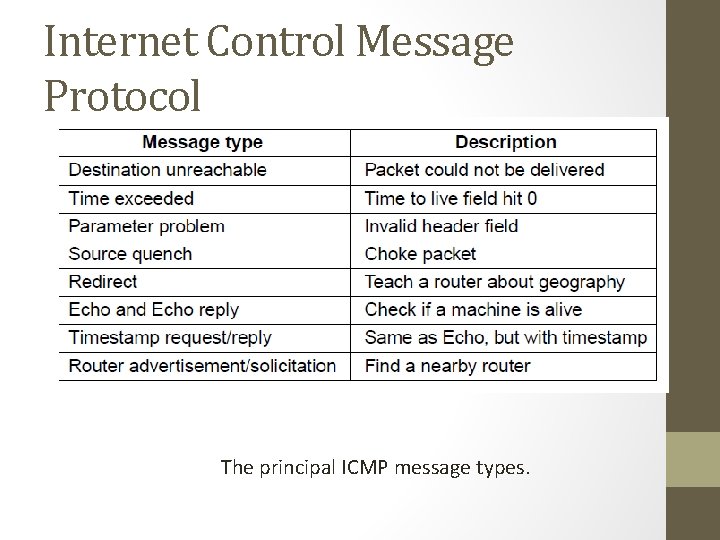
Internet Control Message Protocol The principal ICMP message types.
• Time exceeded path – when TTL becomes zero, the control packet comes back… Can be used for Traceroute • Congestion control – mainly done in transport layer • Redirect – router notices a packet is routed incorrectly • Echo – ping • Timestamp – arrival time and departure time • Router Advertisement – let hosts find nearby server
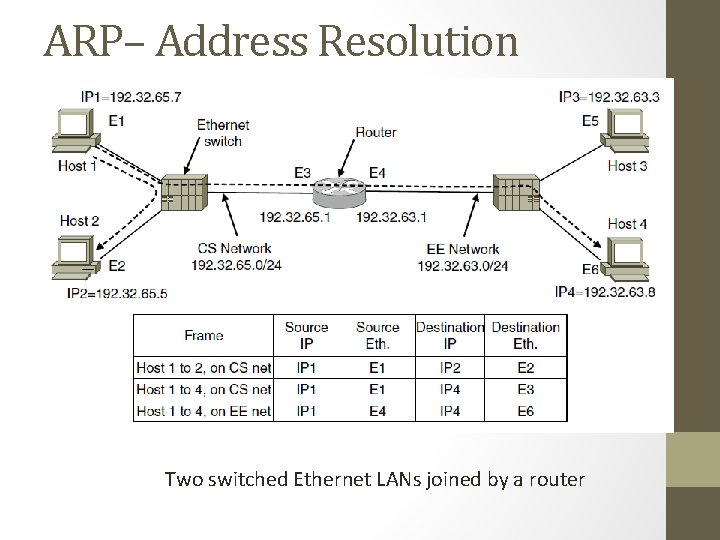
ARP– Address Resolution Protocol Two switched Ethernet LANs joined by a router
Optimizations on ARP Two Broad Techniques A. Have configuration file B. Broadcast Optimizations for ARP: • Caching • Broadcast the mapping when booting (gratuitous ARP) • Send it to router if not local
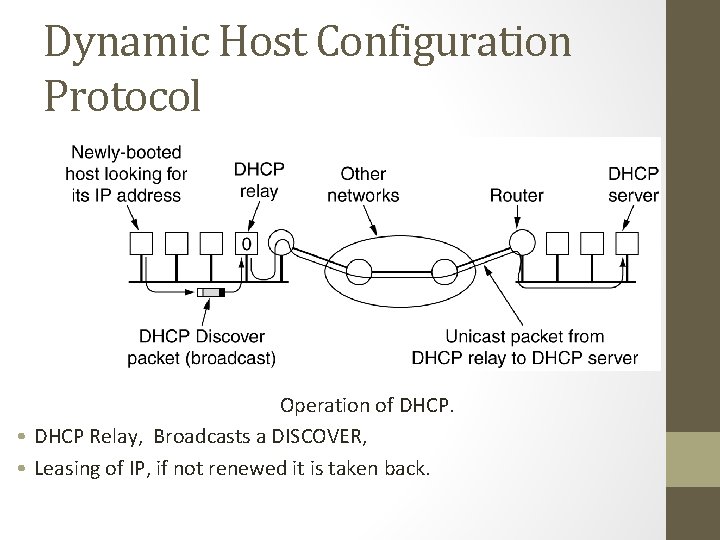
Dynamic Host Configuration Protocol Operation of DHCP. • DHCP Relay, Broadcasts a DISCOVER, • Leasing of IP, if not renewed it is taken back.
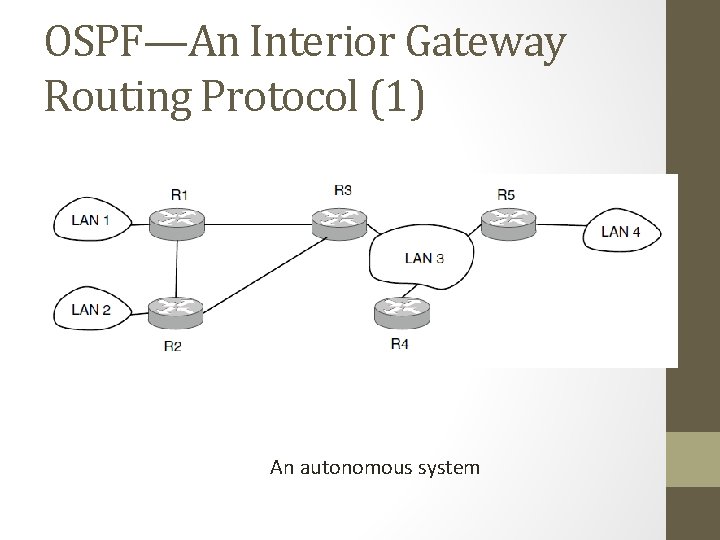
OSPF—An Interior Gateway Routing Protocol (1) An autonomous system
OSPF—An Interior Gateway Routing Protocol (5) Salient Features: a)O – open source b)Support variety of distant metrics c)Dynamic algorithm – have to adapt d)Load balancing and not the best path e)Hierarchical systems f)Security is needed OSPF supports connection – point-to-point/multi-access with broadcast
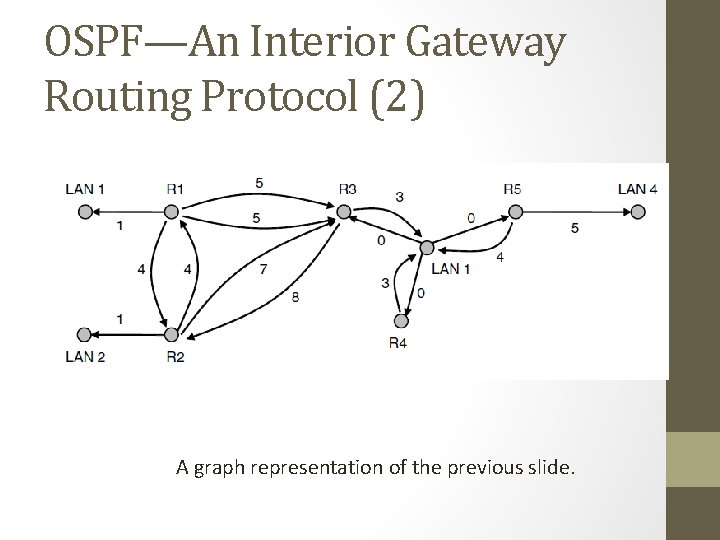
OSPF—An Interior Gateway Routing Protocol (2) A graph representation of the previous slide.
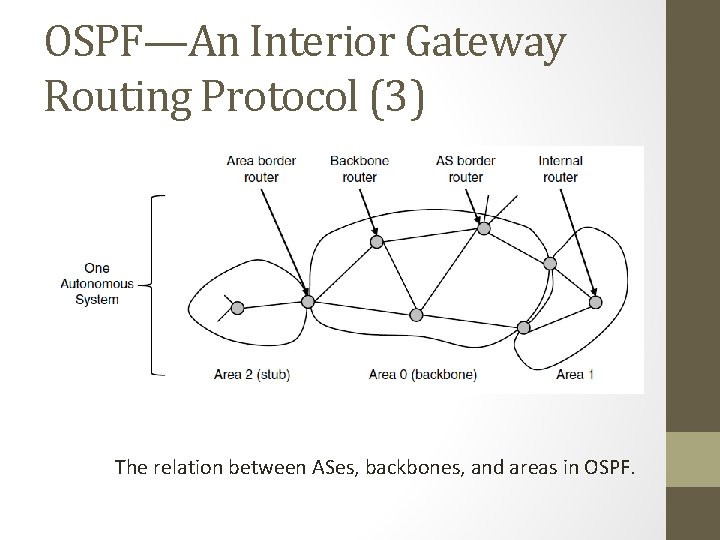
OSPF—An Interior Gateway Routing Protocol (3) The relation between ASes, backbones, and areas in OSPF.
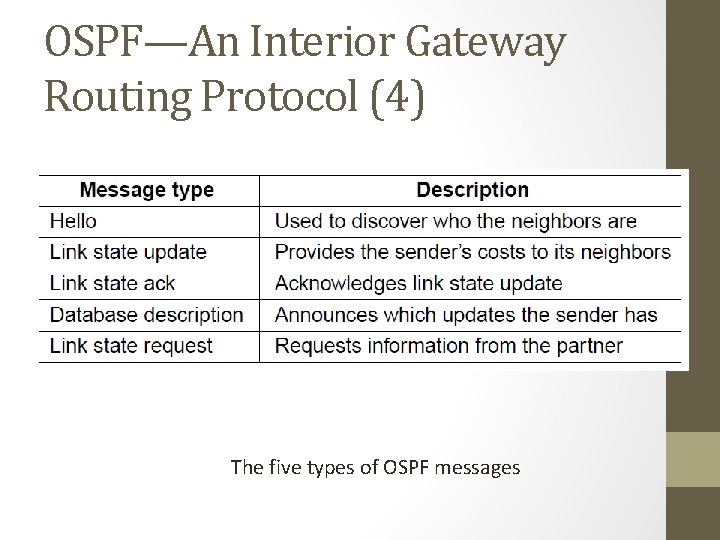
OSPF—An Interior Gateway Routing Protocol (4) The five types of OSPF messages
BGP—The Exterior Gateway Routing Protocol (1) Examples of routing constraints: 1. No commercial traffic for educat. network 2. Never put Iraq on route starting at Pentagon 3. Choose cheaper network 4. Choose better performing network 5. Don’t go from Apple to Google to Apple
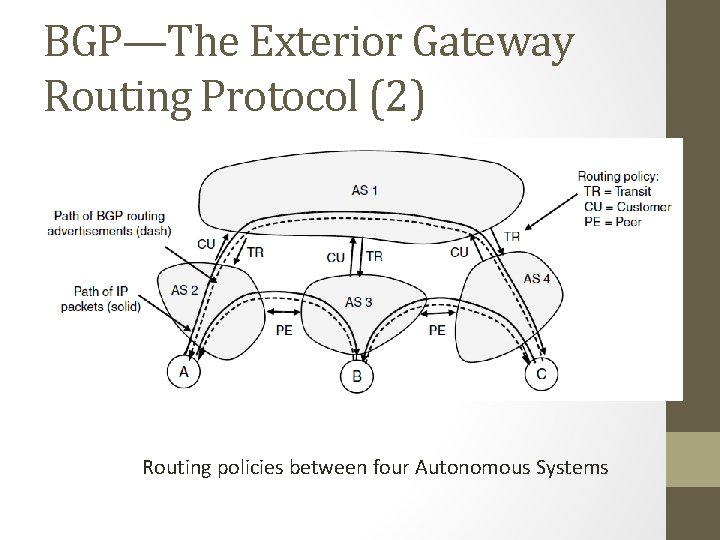
BGP—The Exterior Gateway Routing Protocol (2) Routing policies between four Autonomous Systems
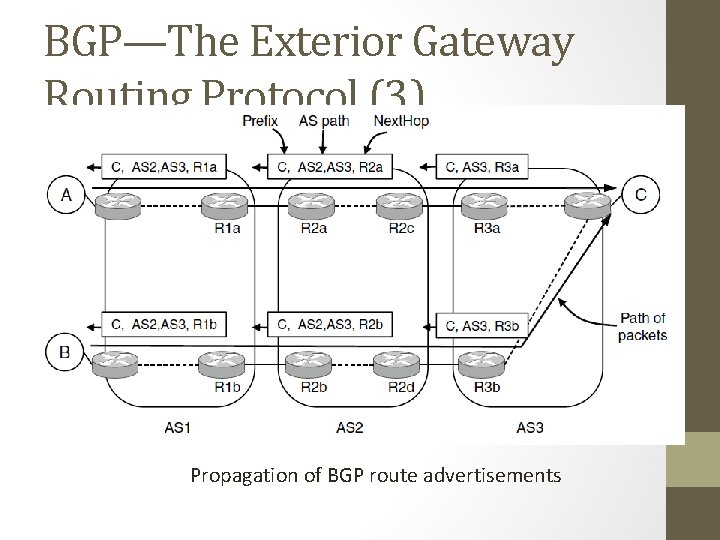
BGP—The Exterior Gateway Routing Protocol (3) Propagation of BGP route advertisements

END 135
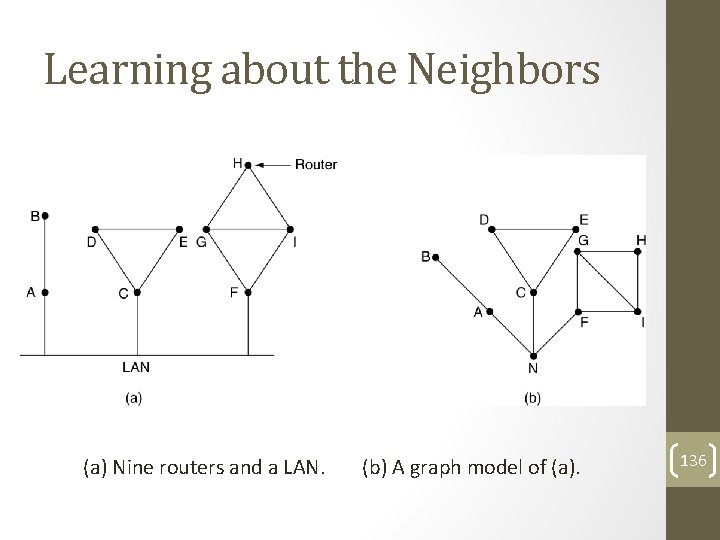
Learning about the Neighbors (a) Nine routers and a LAN. (b) A graph model of (a). 136
- Slides: 136