
Roots Open Methods Berlin Chen Department of Computer
Roots: Open Methods Berlin Chen Department of Computer Science & Information Engineering National Taiwan Normal University Reference: 1. Applied Numerical Methods with MATLAB for Engineers, Chapter 6 & Teaching material
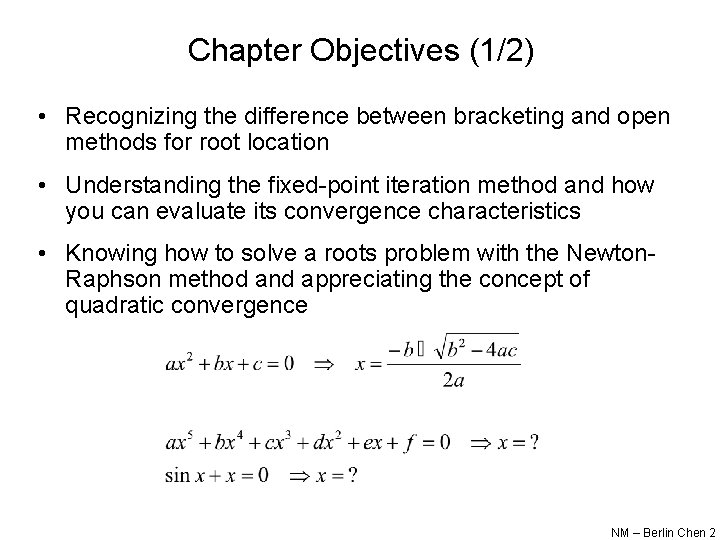
Chapter Objectives (1/2) • Recognizing the difference between bracketing and open methods for root location • Understanding the fixed-point iteration method and how you can evaluate its convergence characteristics • Knowing how to solve a roots problem with the Newton. Raphson method and appreciating the concept of quadratic convergence NM – Berlin Chen 2
Chapter Objectives (2/2) • Knowing how to implement both the secant and the modified secant methods • Knowing how to use MATLAB’s fzero function to estimate roots • Learning how to manipulate and determine the roots of polynomials with MATLAB NM – Berlin Chen 3
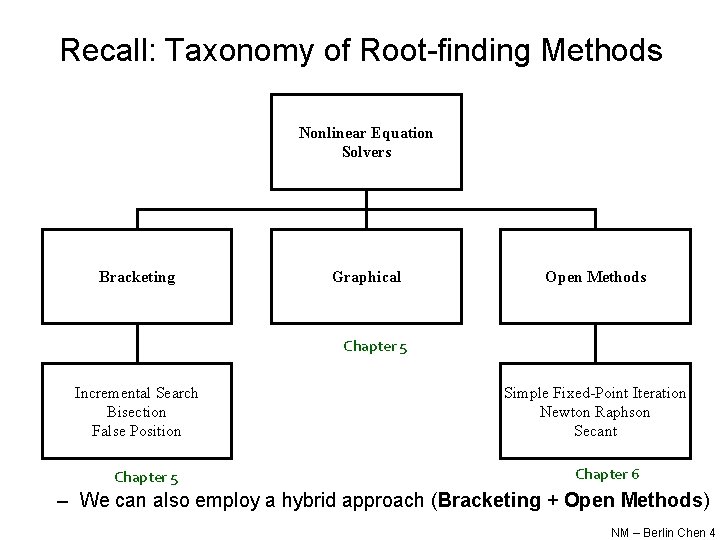
Recall: Taxonomy of Root-finding Methods Nonlinear Equation Solvers Bracketing Graphical Open Methods Chapter 5 Incremental Search Bisection False Position Chapter 5 Simple Fixed-Point Iteration Newton Raphson Secant Chapter 6 – We can also employ a hybrid approach (Bracketing + Open Methods) NM – Berlin Chen 4
Open Methods • Open methods differ from bracketing methods, in that open methods require only a single starting value or two starting values that do not necessarily bracket a root • Open methods may diverge as the computation progresses, but when they do converge, they usually do so much faster than bracketing methods NM – Berlin Chen 5
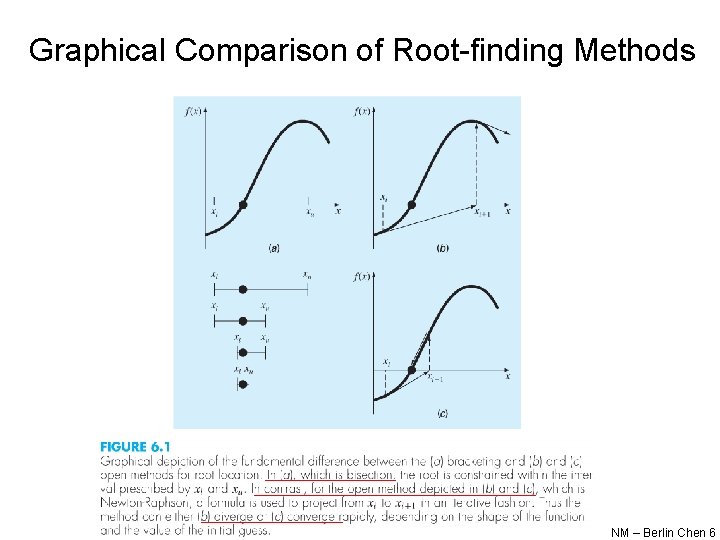
Graphical Comparison of Root-finding Methods NM – Berlin Chen 6

Simple Fixed-Point Iteration • Rearrange the function f(x)=0 so that x is on the left-hand side of the equation: x=g(x) • Use the new function g to predict a new value of x - that is, xi+1=g(xi) • The approximate error is given by: NM – Berlin Chen 7
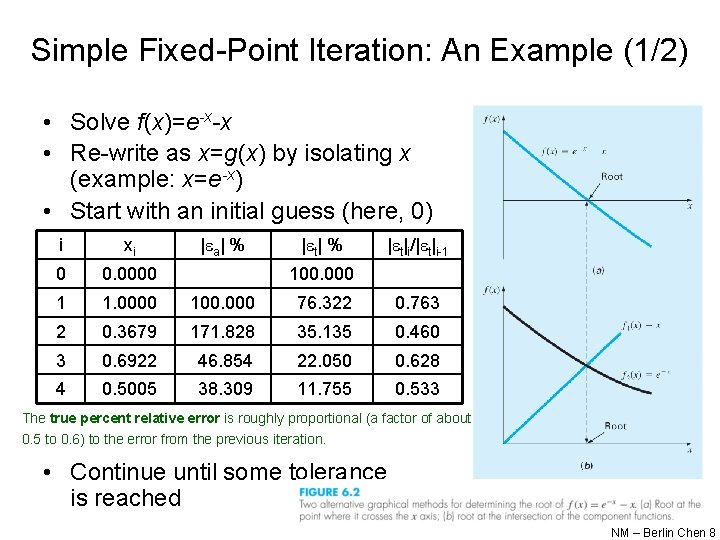
Simple Fixed-Point Iteration: An Example (1/2) • Solve f(x)=e-x-x • Re-write as x=g(x) by isolating x (example: x=e-x) • Start with an initial guess (here, 0) i xi | a| % | t|i/| t|i-1 0 0. 0000 1 1. 0000 100. 000 76. 322 0. 763 2 0. 3679 171. 828 35. 135 0. 460 3 0. 6922 46. 854 22. 050 0. 628 4 0. 5005 38. 309 11. 755 0. 533 100. 000 The true percent relative error is roughly proportional (a factor of about 0. 5 to 0. 6) to the error from the previous iteration. • Continue until some tolerance is reached NM – Berlin Chen 8

Simple Fixed-Point Iteration: An Example (2/2) NM – Berlin Chen 9
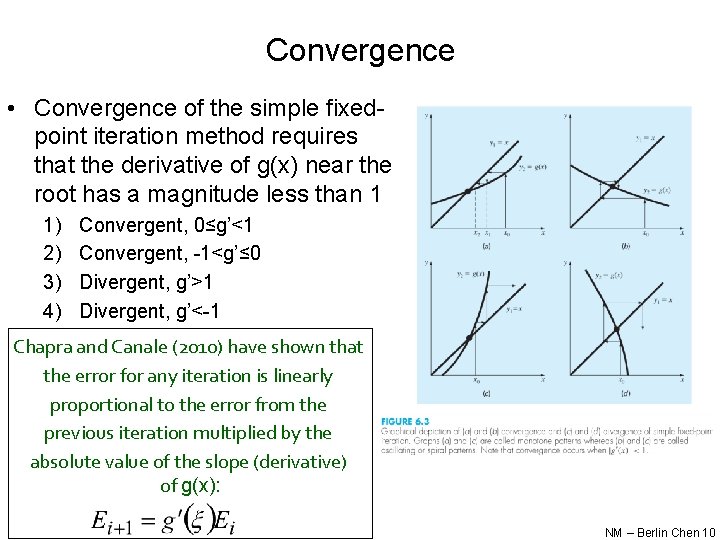
Convergence • Convergence of the simple fixedpoint iteration method requires that the derivative of g(x) near the root has a magnitude less than 1 1) 2) 3) 4) Convergent, 0≤g’<1 Convergent, -1<g’≤ 0 Divergent, g’>1 Divergent, g’<-1 Chapra and Canale (2010) have shown that the error for any iteration is linearly proportional to the error from the previous iteration multiplied by the absolute value of the slope (derivative) of g(x): NM – Berlin Chen 10
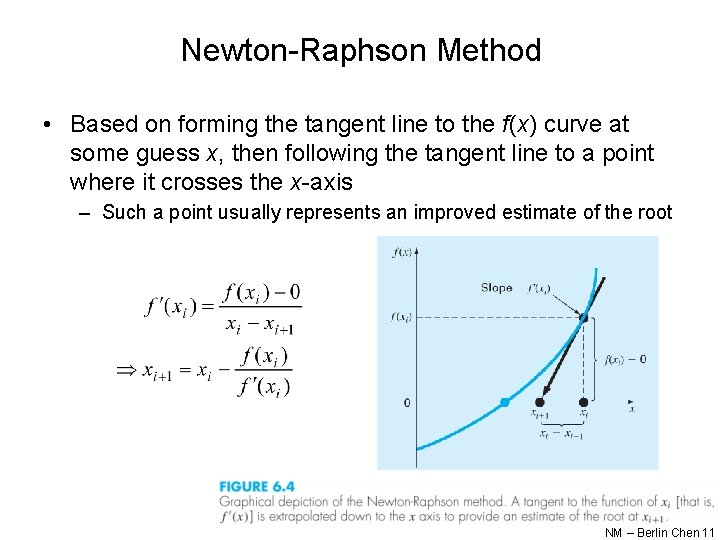
Newton-Raphson Method • Based on forming the tangent line to the f(x) curve at some guess x, then following the tangent line to a point where it crosses the x-axis – Such a point usually represents an improved estimate of the root NM – Berlin Chen 11

Newton-Raphson Method: Pros and Cons • Pro: The error of the i+1 th iteration is roughly proportional to the square of the error of the ith iteration - this is called quadratic convergence • Con: Some functions show slow or poor convergence Chapra and Canale (2010) have shown that the error is roughly proportional to the square of the previous error: NM – Berlin Chen 12
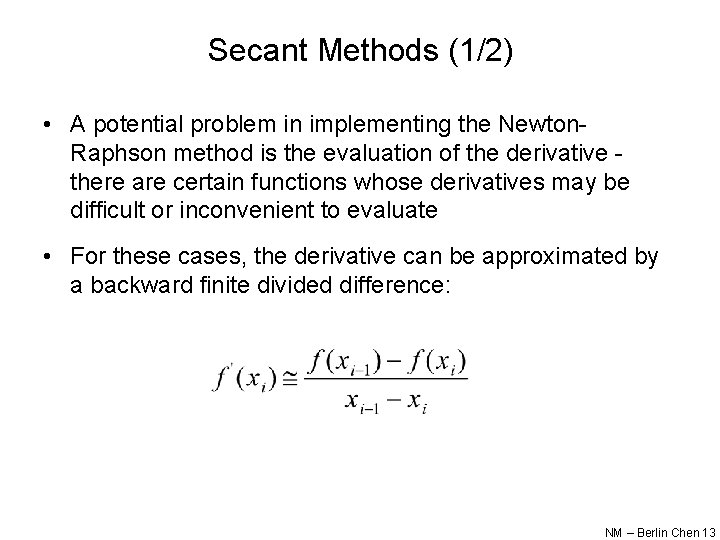
Secant Methods (1/2) • A potential problem in implementing the Newton. Raphson method is the evaluation of the derivative there are certain functions whose derivatives may be difficult or inconvenient to evaluate • For these cases, the derivative can be approximated by a backward finite divided difference: NM – Berlin Chen 13
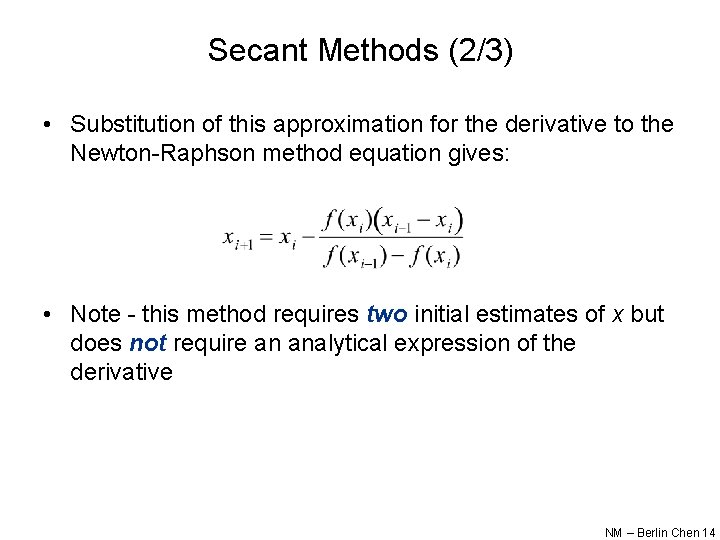
Secant Methods (2/3) • Substitution of this approximation for the derivative to the Newton-Raphson method equation gives: • Note - this method requires two initial estimates of x but does not require an analytical expression of the derivative NM – Berlin Chen 14

Secant Methods (3/3) • Modified Secant Method – Rather than using two arbitrary values to estimate the derivate, an alternative approach involves a fractional perturbation of the independent variable to estimate f’(x) NM – Berlin Chen 15
Brent’s Root-location Method • A hybrid approach that combines the reliability of bracketing with the speed of open methods – Try to apply a speedy open method whenever possible, but revert to a reliable bracketing method if necessary • That is, in the event that the open method generate an unacceptable result (i. e. , an estimate falling outside the bracket), the algorithm reverts to the more conservative bisection method – Developed by Richard Brent (1973) • Here the bracketing technique being used is the bisection method, whereas two open methods, namely, the secant method and inverse quadratic interpolation, are employed – Bisection typically dominates at first but as root is approached, the technique shifts to the fast open methods NM – Berlin Chen 16
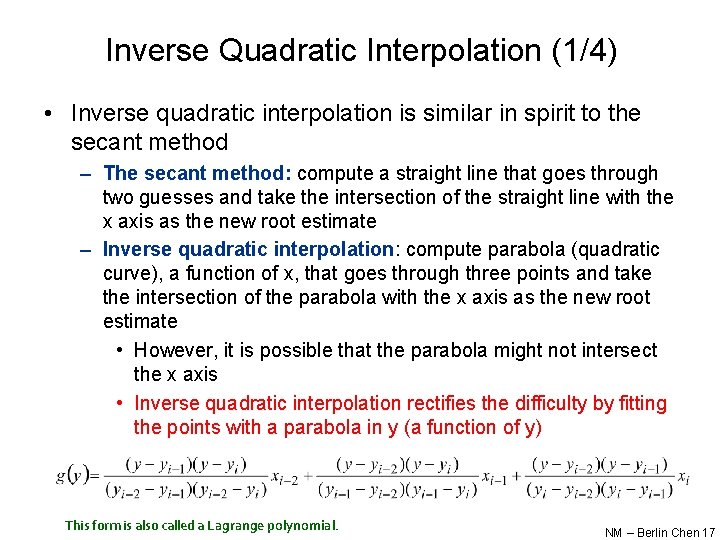
Inverse Quadratic Interpolation (1/4) • Inverse quadratic interpolation is similar in spirit to the secant method – The secant method: compute a straight line that goes through two guesses and take the intersection of the straight line with the x axis as the new root estimate – Inverse quadratic interpolation: compute parabola (quadratic curve), a function of x, that goes through three points and take the intersection of the parabola with the x axis as the new root estimate • However, it is possible that the parabola might not intersect the x axis • Inverse quadratic interpolation rectifies the difficulty by fitting the points with a parabola in y (a function of y) This form is also called a Lagrange polynomial. NM – Berlin Chen 17
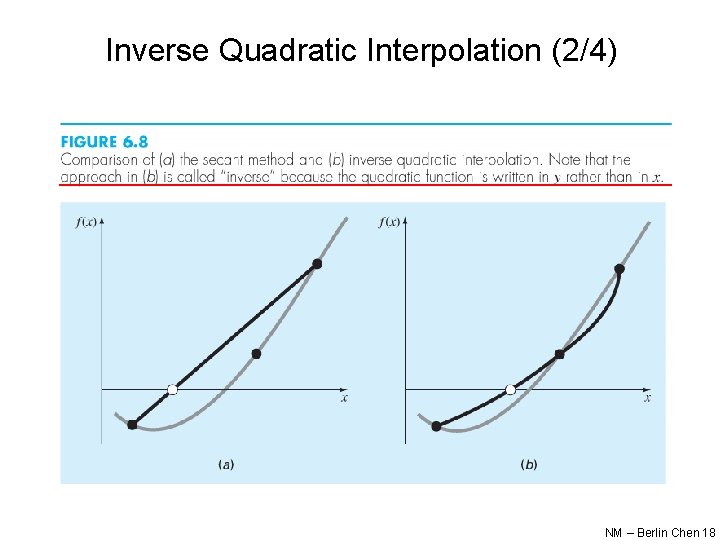
Inverse Quadratic Interpolation (2/4) NM – Berlin Chen 18
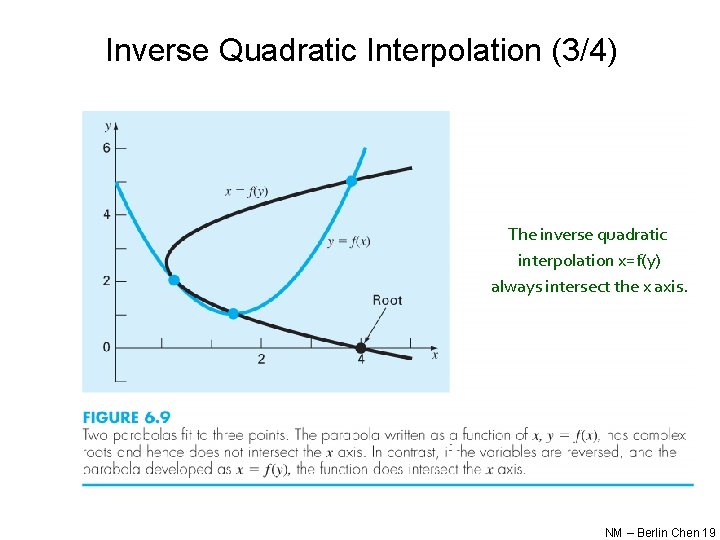
Inverse Quadratic Interpolation (3/4) The inverse quadratic interpolation x=f(y) always intersect the x axis. NM – Berlin Chen 19
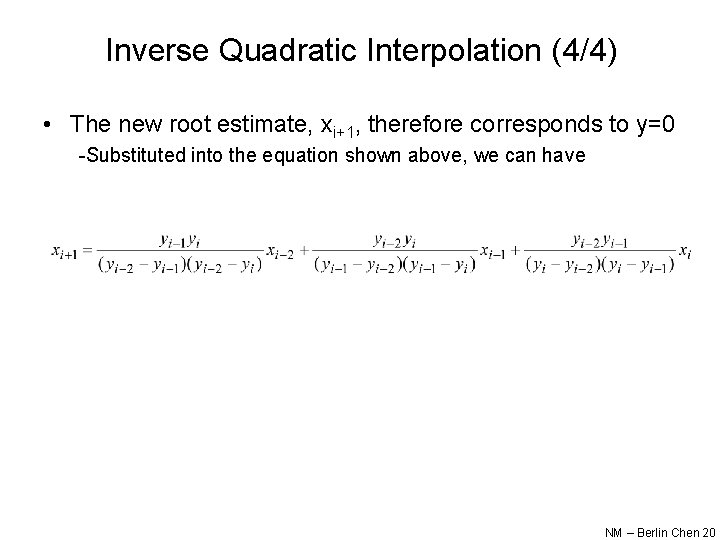
Inverse Quadratic Interpolation (4/4) • The new root estimate, xi+1, therefore corresponds to y=0 -Substituted into the equation shown above, we can have NM – Berlin Chen 20
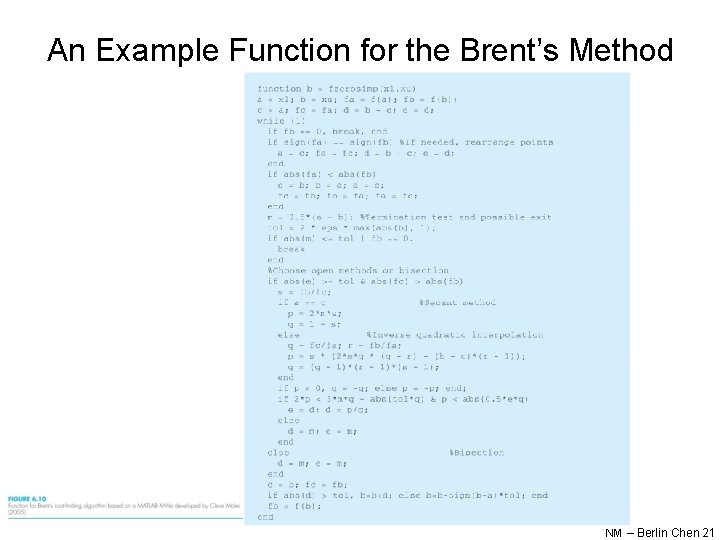
An Example Function for the Brent’s Method NM – Berlin Chen 21
MATLAB’s fzero Function • MATLAB’s fzero provides the best qualities of both bracketing methods and open methods. – Using an initial guess: x = fzero(function, x 0) [x, fx] = fzero(function, x 0) • • function is a function handle to the function being evaluated x 0 is the initial guess x is the location of the root fx is the function evaluated at that root – Using an initial bracket: x = fzero(function, [x 0 x 1]) [x, fx] = fzero(function, [x 0 x 1]) • As above, except x 0 and x 1 are guesses that must bracket a sign change NM – Berlin Chen 22
fzero Options • Options may be passed to fzero as a third input argument - the options are a data structure created by the optimset command • options = optimset(‘par 1’, val 1, ‘par 2’, val 2, …) – parn is the name of the parameter to be set – valn is the value to which to set that parameter – The parameters commonly used with fzero are: • display: when set to ‘iter’ displays a detailed record of all the iterations • tolx: A positive scalar that sets a termination tolerance on x NM – Berlin Chen 23
fzero Example • options = optimset(‘display’, ‘iter’); – Sets options to display each iteration of root finding process • [x, fx] = fzero(@(x) x^10 -1, 0. 5, options) – Uses fzero to find roots of f(x)=x 10 -1 starting with an initial guess of x=0. 5 – MATLAB reports x=1, fx=0 after 35 function counts NM – Berlin Chen 24
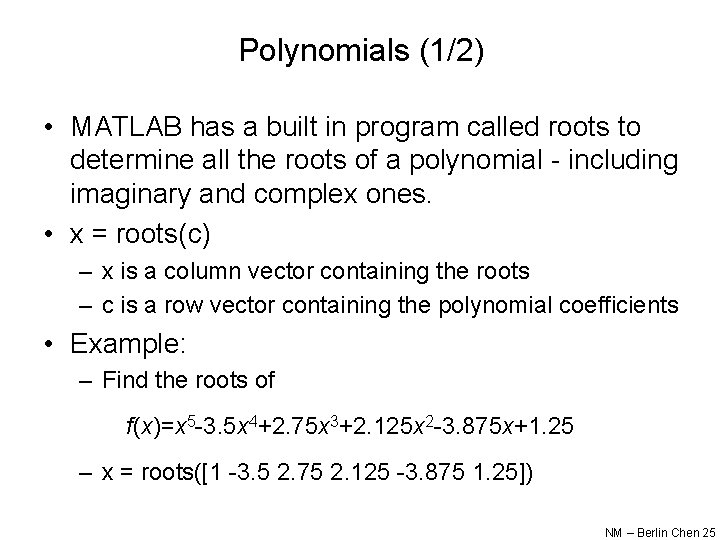
Polynomials (1/2) • MATLAB has a built in program called roots to determine all the roots of a polynomial - including imaginary and complex ones. • x = roots(c) – x is a column vector containing the roots – c is a row vector containing the polynomial coefficients • Example: – Find the roots of f(x)=x 5 -3. 5 x 4+2. 75 x 3+2. 125 x 2 -3. 875 x+1. 25 – x = roots([1 -3. 5 2. 75 2. 125 -3. 875 1. 25]) NM – Berlin Chen 25
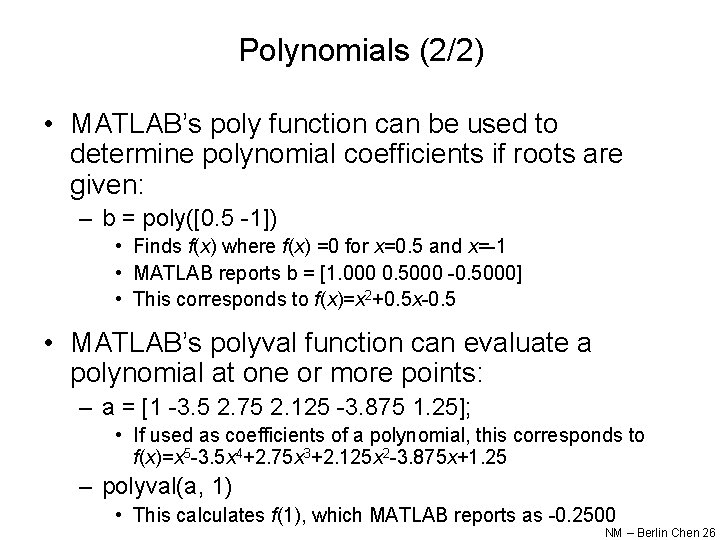
Polynomials (2/2) • MATLAB’s poly function can be used to determine polynomial coefficients if roots are given: – b = poly([0. 5 -1]) • Finds f(x) where f(x) =0 for x=0. 5 and x=-1 • MATLAB reports b = [1. 000 0. 5000 -0. 5000] • This corresponds to f(x)=x 2+0. 5 x-0. 5 • MATLAB’s polyval function can evaluate a polynomial at one or more points: – a = [1 -3. 5 2. 75 2. 125 -3. 875 1. 25]; • If used as coefficients of a polynomial, this corresponds to f(x)=x 5 -3. 5 x 4+2. 75 x 3+2. 125 x 2 -3. 875 x+1. 25 – polyval(a, 1) • This calculates f(1), which MATLAB reports as -0. 2500 NM – Berlin Chen 26
- Slides: 26