
Robot Workshop NATIONAL ELECTRONICS MUSEUM Dan Zeitlin Mr
Robot Workshop NATIONAL ELECTRONICS MUSEUM Dan Zeitlin “Mr. Z” April 23, 2016 Robot Workshop 2013 v. 1
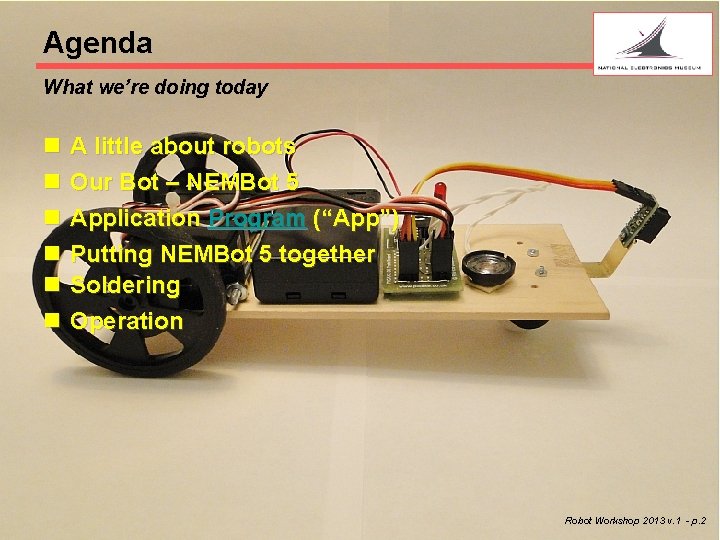
Agenda What we’re doing today n n n A little about robots Our Bot – NEMBot 5 Application Program (“App”) Putting NEMBot 5 together Soldering Operation Robot. Workshop 2014 2013 v. 1 v. 0 - p. 2
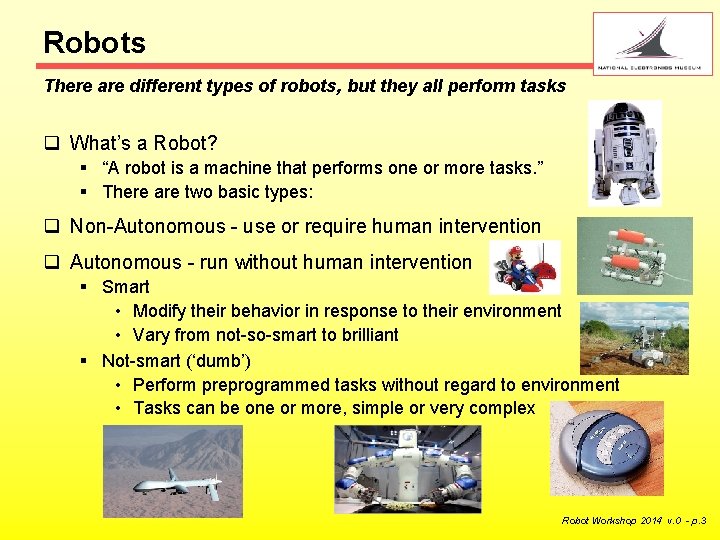
Robots There are different types of robots , but they all perform tasks q What’s a Robot? § “A robot is a machine that performs one or more tasks. ” § There are two basic types: q Non-Autonomous - use or require human intervention q Autonomous - run without human intervention § Smart • Modify their behavior in response to their environment • Vary from not-so-smart to brilliant § Not-smart (‘dumb’) • Perform preprogrammed tasks without regard to environment • Tasks can be one or more, simple or very complex Robot Workshop 2014 v. 0 - p. 3
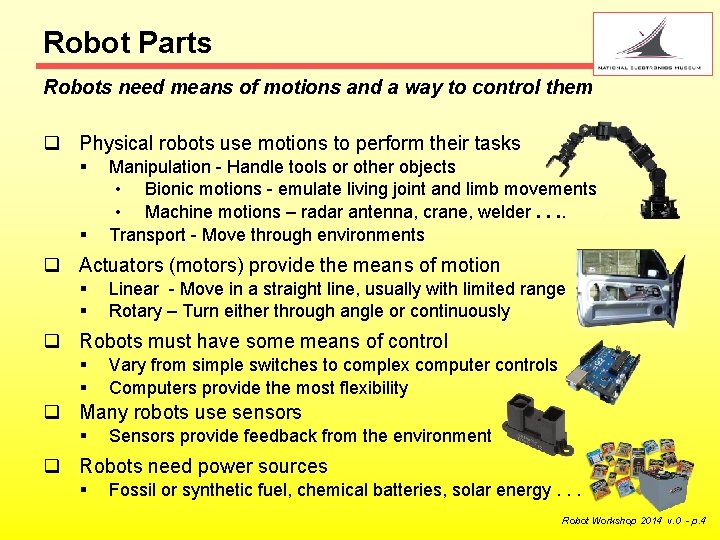
Robot Parts Robots need means of motions and a way to control them q Physical robots use motions to perform their tasks § § Manipulation - Handle tools or other objects • Bionic motions - emulate living joint and limb movements • Machine motions – radar antenna, crane, welder. . Transport - Move through environments q Actuators (motors) provide the means of motion § § Linear - Move in a straight line, usually with limited range Rotary – Turn either through angle or continuously q Robots must have some means of control § § Vary from simple switches to complex computer controls Computers provide the most flexibility q Many robots use sensors § Sensors provide feedback from the environment q Robots need power sources § Fossil or synthetic fuel, chemical batteries, solar energy. . . Robot Workshop 2014 v. 0 - p. 4
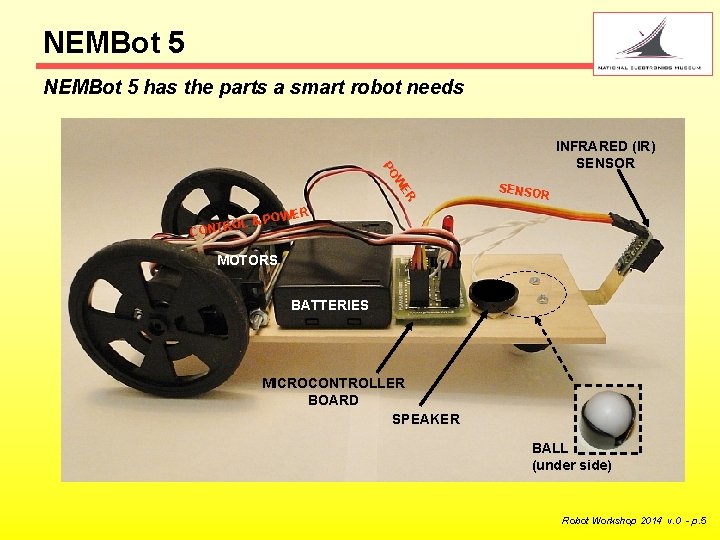
NEMBot 5 has the parts a smart robot needs ER W PO INFRARED (IR) SENSOR SENSO R ER & POW L O R T CON MOTORS BATTERIES MICROCONTROLLER BOARD SPEAKER BALL (under side) Robot Workshop 2014 v. 0 - p. 5
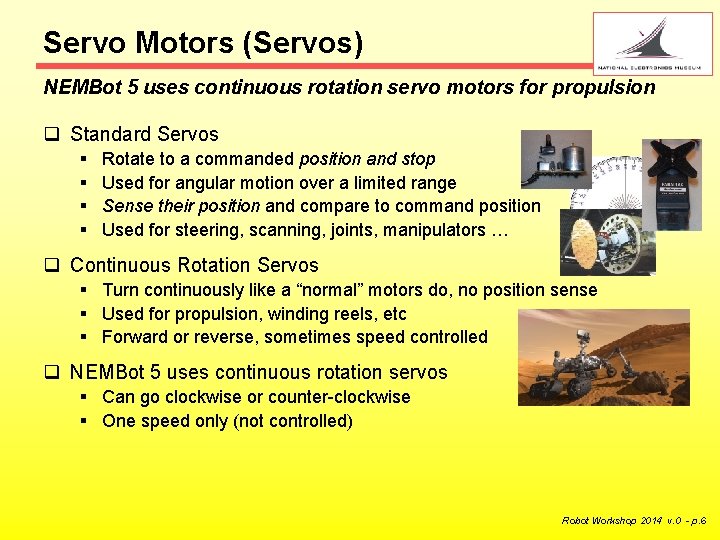
Servo Motors (Servos) NEMBot 5 uses continuous rotation servo motors for propulsion q Standard Servos § § Rotate to a commanded position and stop Used for angular motion over a limited range Sense their position and compare to command position Used for steering, scanning, joints, manipulators … q Continuous Rotation Servos § Turn continuously like a “normal” motors do, no position sense § Used for propulsion, winding reels, etc § Forward or reverse, sometimes speed controlled q NEMBot 5 uses continuous rotation servos § Can go clockwise or counter-clockwise § One speed only (not controlled) Robot Workshop 2014 v. 0 - p. 6
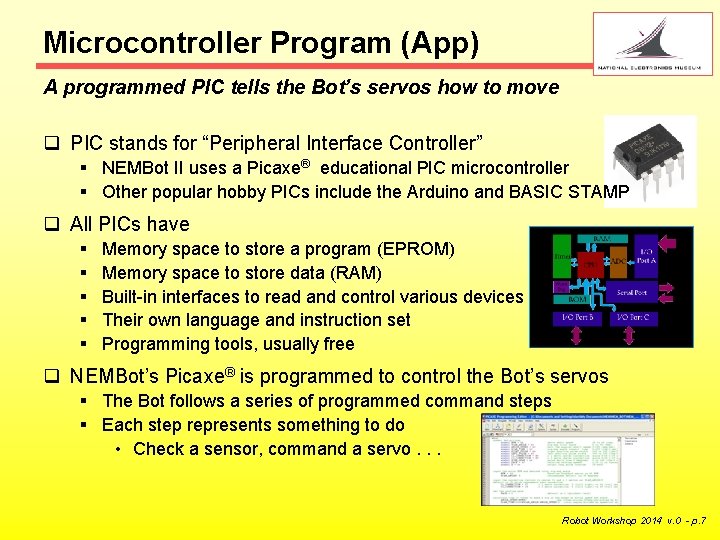
Microcontroller Program (App) A programmed PIC tells the Bot’s servos how to move q PIC stands for “Peripheral Interface Controller” § NEMBot II uses a Picaxe® educational PIC microcontroller § Other popular hobby PICs include the Arduino and BASIC STAMP q All PICs have § § § Memory space to store a program (EPROM) Memory space to store data (RAM) Built-in interfaces to read and control various devices Their own language and instruction set Programming tools, usually free q NEMBot’s Picaxe® is programmed to control the Bot’s servos § The Bot follows a series of programmed command steps § Each step represents something to do • Check a sensor, command a servo. . . Robot Workshop 2014 v. 0 - p. 7

IR Sensor NEMBot 5’s sensor send out irfrared light and senses reflections q Sharp GP 2 Y 0 D 810 Z 0 F IR Distance Detector § The Emitter send out a narrow infrared (IR) pencil beam § The Detector switches its output when it sees close-in reflected IR light § Target must be less than 4” away for GP 2 Y 0 D 810 Z 0 F to change state About 4 inches Object scatters the IR beam § IR light wavelengths cannot be seen with the naked eye § Some surfaces absorb IR wavelengths and become “stealth” to IR Robot Workshop 2014 v. 0 - p. 8
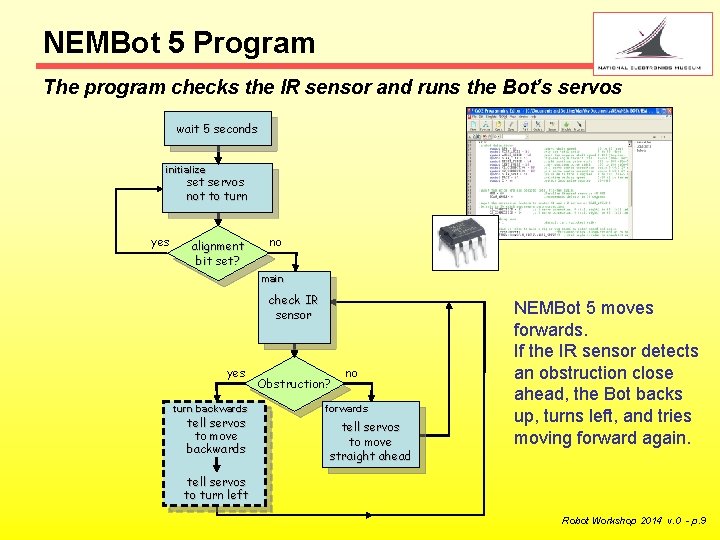
NEMBot 5 Program The program checks the IR sensor and runs the Bot’s servos wait 5 seconds initialize set servos not to turn yes alignment bit set? no main check IR sensor yes turn backwards tell servos to move backwards Obstruction? no forwards tell servos to move straight ahead NEMBot 5 moves forwards. If the IR sensor detects an obstruction close ahead, the Bot backs up, turns left, and tries moving forward again. tell servos to turn left Robot Workshop 2014 v. 0 - p. 9
Summary Robots have common types of elements, so does NEMBot 5 Robots are machines that do tasks q Can be autonomous or not, ‘dumb’ or ‘smart. ’ Robot movements are driven by servos, motors, and other actuators q Controls vary from simple to complicated q Robots often use specialized PIC Microcontroller computer chips NEMBot 5 q Continuous rotation servos drive the wheels q A PICaxe® microcontroller runs the control program q Motion depends on environment – is there an obstruction? q Program can be modified with a PC and free Editor software (you’ll need a a programming cable) Robot Workshop 2014 v. 0 - p. 10
NEMBot 5 Construction Steps Detailed circuit board and final assembly instructions are included in separate documents: • • General soldering instructions Picaxe® proto PC board instructions (you will complete the board) PC board Jumper wire instructions Final assembly instructions Robot Workshop 2014 v. 0 - p. 11
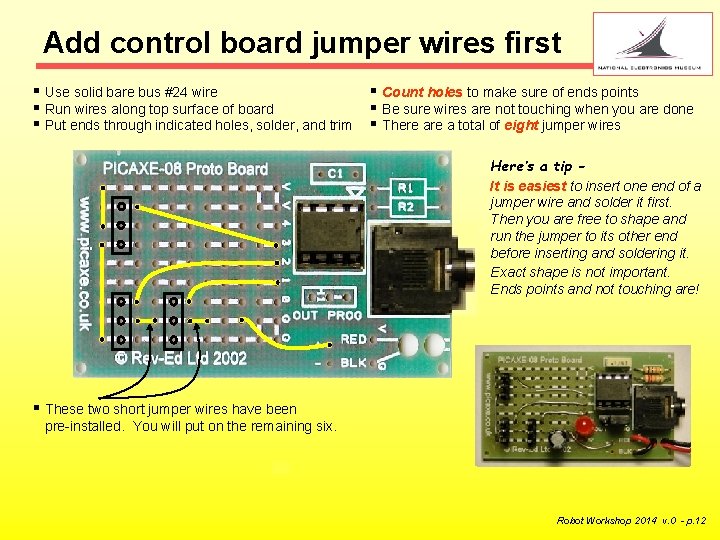
Add control board jumper wires first § Use solid bare bus #24 wire § Run wires along top surface of board § Put ends through indicated holes, solder, and trim § Count holes to make sure of ends points § Be sure wires are not touching when you are done § There a total of eight jumper wires Here’s a tip It is easiest to insert one end of a jumper wire and solder it first. Then you are free to shape and run the jumper to its other end before inserting and soldering it. Exact shape is not important. Ends points and not touching are! § These two short jumper wires have been pre-installed. You will put on the remaining six. Robot Workshop 2014 v. 0 - p. 12
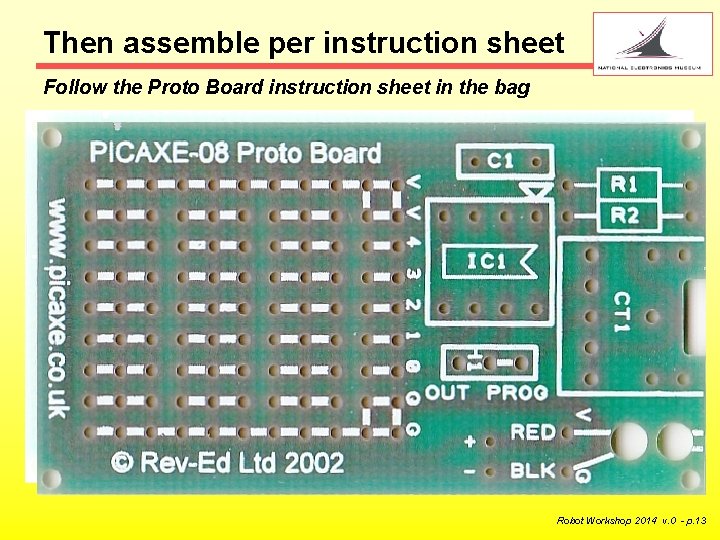
Then assemble per instruction sheet Follow the Proto Board instruction sheet in the bag q Use the instruction sheet in the board package for locations q Insert and solder the parts in this order: § (2) Resistors • Bend leads down to fit into board § (1) Square Capacitor § The OUT/PROG 3 -pin header (with tiny jumper plug) • The shorter pins go into the board - You will use a battery box instead of the battery clip shown on the sheet - The Integrated Circuit (IC) socket, programming connector, and three headers have been pre-installed. q Picaxe IC (chip) § You will receive and install your Picaxe after re-checking all the parts and solder joints on your board Robot Workshop 2014 v. 0 - p. 13
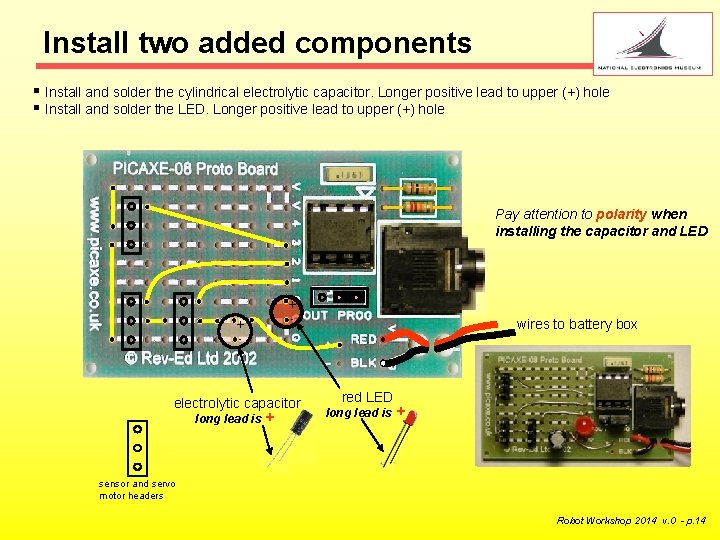
Install two added components § Install and solder the cylindrical electrolytic capacitor. Longer positive lead to upper (+) hole § Install and solder the LED. Longer positive lead to upper (+) hole Pay attention to polarity when installing the capacitor and LED + - + wires to battery box - electrolytic capacitor long lead is + red LED long lead is + sensor and servo motor headers Robot Workshop 2014 v. 0 - p. 14
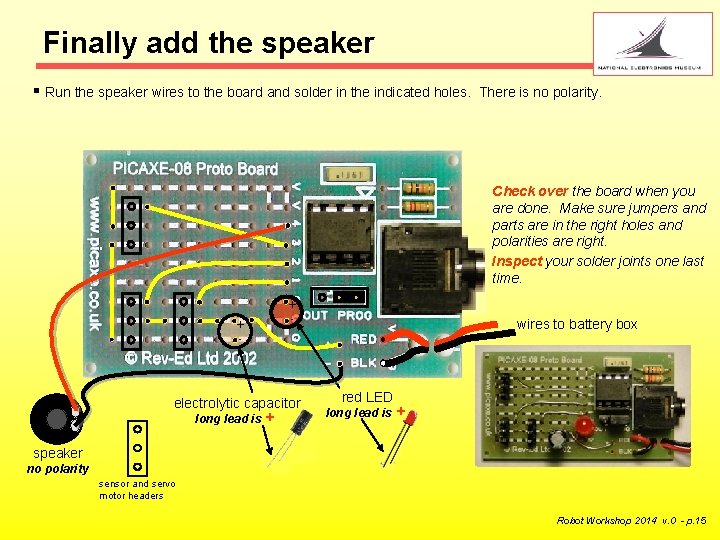
Finally add the speaker § Run the speaker wires to the board and solder in the indicated holes. There is no polarity. Check over the board when you are done. Make sure jumpers and parts are in the right holes and polarities are right. Inspect your solder joints one last time. + - + wires to battery box - electrolytic capacitor long lead is + red LED long lead is + speaker no polarity sensor and servo motor headers Robot Workshop 2014 v. 0 - p. 15
A Word about Soldering Electronic parts are connected using solder q Solder bonds metal together § Usually copper wire and copper Pads or terminals q Metal must be hot enough to melt solder to make it “stick” q Always heat the metals and let them melt the solder § Simply melting the solder alone makes a poor “cold joint” Soldering temperatures are over 700 degrees F! § Be Careful § Only touch the soldering iron insulated handle § Never set the iron down anywhere but in its holder § Wires will get hot. Hold them with a tool or not at all § Wear safety glasses to protect against solder and flux sputter Robot Workshop 2014 v. 0 - p. 16
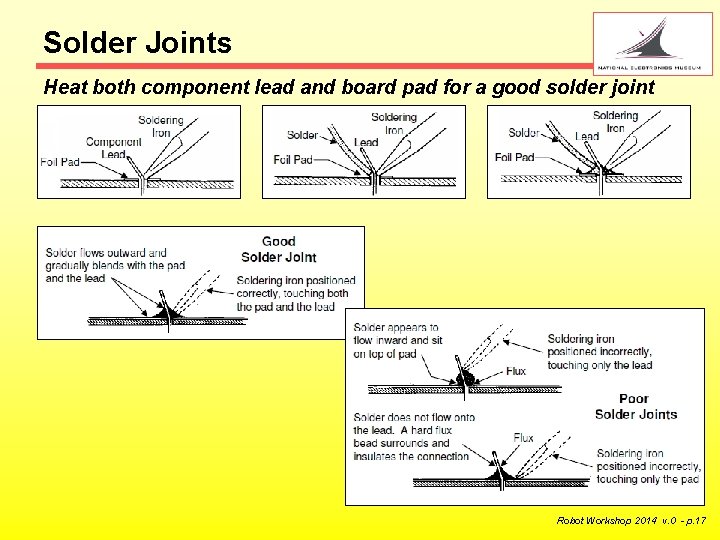
Solder Joints Heat both component lead and board pad for a good solder joint Robot Workshop 2014 v. 0 - p. 17
Check Operation Check out your Bot and align if necessary q Download the application program to your Bot’s microcontroller § The microcontroller may already be pre-programmed for you q Turn on the battery switch and put your Bot on the floor § The Bot should stand still and play a startup “tune” § After 5 seconds, the Bot should move forward q If the Bot does not run straight § Ask a course conductor to help you adjust the servos q Run your Bot and put your hand in front of it momentarily § The red LED on the sensor should light* § The Bot should back up and turn, then try to move forward again q You can modify parameters or any other part of the program § The Bot can always be re-programmed to restore the original code *Fluorescent lighting can confuse the sensor. Robot Workshop 2014 v. 0 - p. 18
More. . . Workshop materials form a basis for more projects q Expand or change NEMBot 5 § Add sensors such as Ultrasonic, Acoustic. . . § Try New robot projects q The Picaxe program Editor is free § You will need a serial or USB Picaxe programming cable (AXE-027) q Resources § § § § § nemrobots. org – This and previous workshop reference files www. picaxe. com – Program Editor, cable driver, and programming info www. picaxeforum. co. uk/forum - ideas and help sparkfun. com – servos, accessories, and robot parts (including AXE-027) pololu. com – servos, accessories, and robot parts servocity. com – servos, accessories, and robot parts parallax. com , futabarc. com , hitecrcd. com digikey. com , jameco. com – servos and electronics parts instructables. com - ideas and general info projects using other microcontrollers (PICs) can be adapted Remember Robot. Fest at NEM is next week! Robot Workshop 2014 v. 0 - p. 19
- Slides: 19