
Risk Management and Corrective Action Identification Transfer Monitoring
- Slides: 27
Risk Management and Corrective Action: Identification, Transfer, Monitoring, and Mitigation Sponsored By: 3 HTi, LLC PTC Reseller / Systems Integrator www. 3 hti. com Booth # 4709 Presented by: Duane Huffman, ASQ CRE
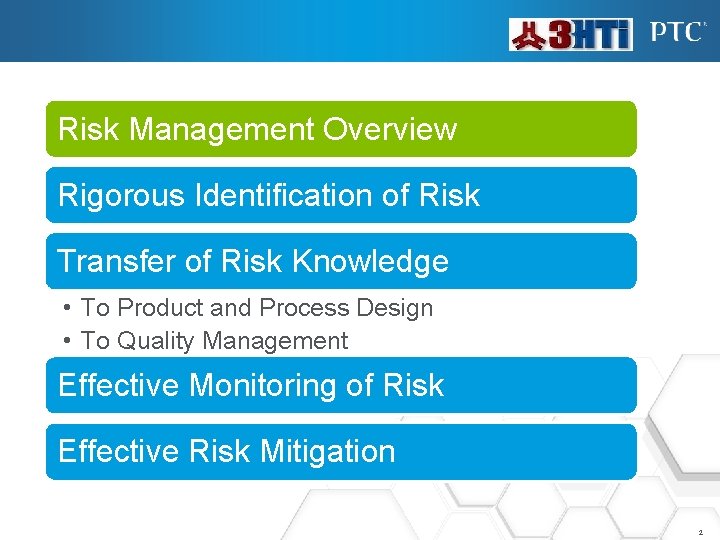
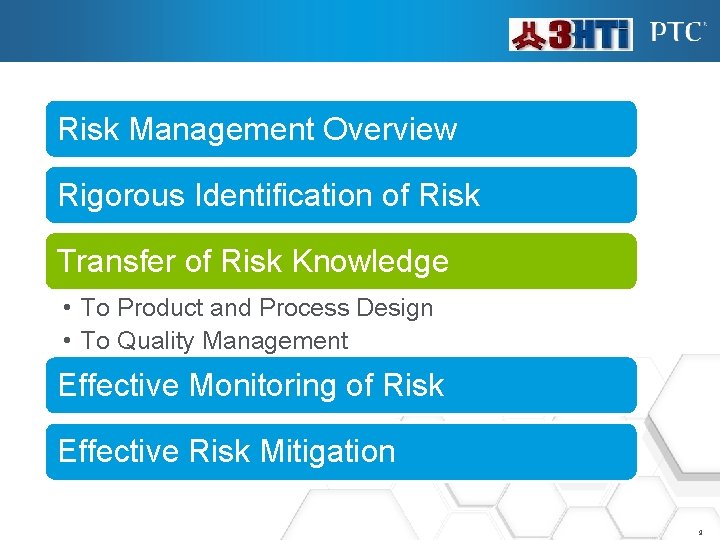
Risk Management Overview Rigorous Identification of Risk Transfer of Risk Knowledge • To Product and Process Design • To Quality Management Effective Monitoring of Risk Effective Risk Mitigation 2
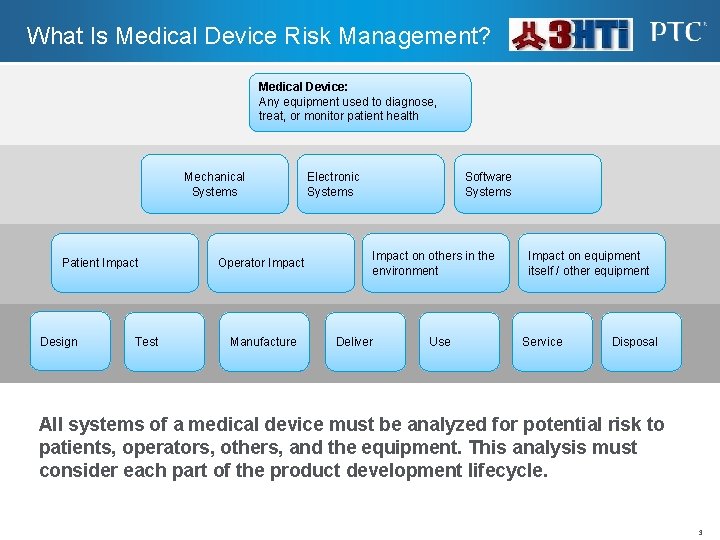
What Is Medical Device Risk Management? Medical Device: Any equipment used to diagnose, treat, or monitor patient health Mechanical Systems Patient Impact Design Test Operator Impact Manufacture Electronic Systems Software Systems Impact on others in the environment Deliver Use Impact on equipment itself / other equipment Service Disposal All systems of a medical device must be analyzed for potential risk to patients, operators, others, and the equipment. This analysis must consider each part of the product development lifecycle. 3
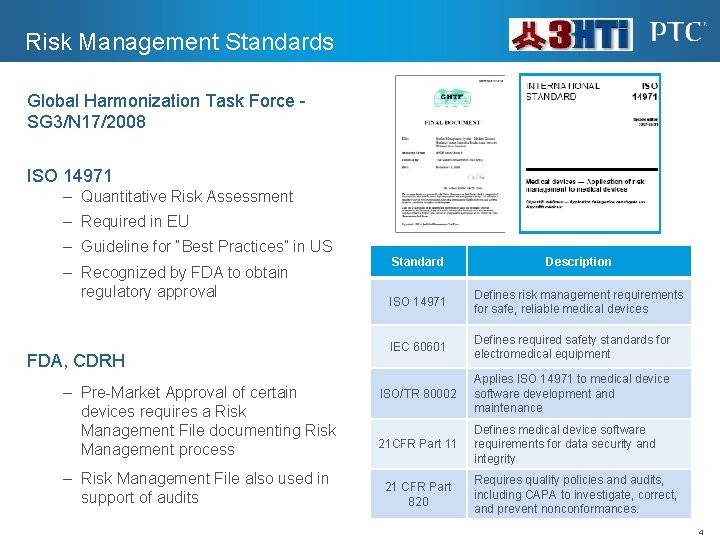
Risk Management Standards Global Harmonization Task Force SG 3/N 17/2008 ISO 14971 – Quantitative Risk Assessment – Required in EU – Guideline for “Best Practices” in US – Recognized by FDA to obtain regulatory approval FDA, CDRH – Pre-Market Approval of certain devices requires a Risk Management File documenting Risk Management process – Risk Management File also used in support of audits Standard Description ISO 14971 Defines risk management requirements for safe, reliable medical devices IEC 60601 Defines required safety standards for electromedical equipment ISO/TR 80002 Applies ISO 14971 to medical device software development and maintenance 21 CFR Part 11 Defines medical device software requirements for data security and integrity 21 CFR Part 820 Requires quality policies and audits, including CAPA to investigate, correct, and prevent nonconformances. 4
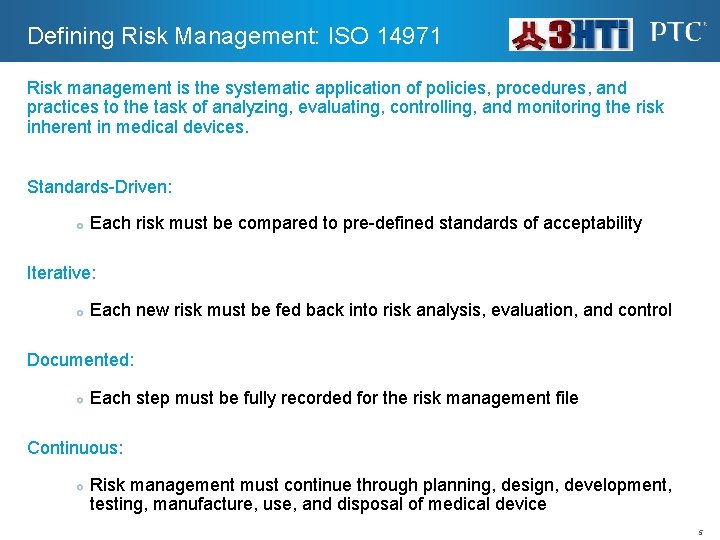
Defining Risk Management: ISO 14971 Risk management is the systematic application of policies, procedures, and practices to the task of analyzing, evaluating, controlling, and monitoring the risk inherent in medical devices. Standards-Driven: Each risk must be compared to pre-defined standards of acceptability Iterative: Each new risk must be fed back into risk analysis, evaluation, and control Documented: Each step must be fully recorded for the risk management file Continuous: Risk management must continue through planning, design, development, testing, manufacture, use, and disposal of medical device 5
Risk Management Overview Rigorous Identification of Risk Transfer of Risk Knowledge • To Product and Process Design • To Quality Management Effective Monitoring of Risk Effective Risk Mitigation 6
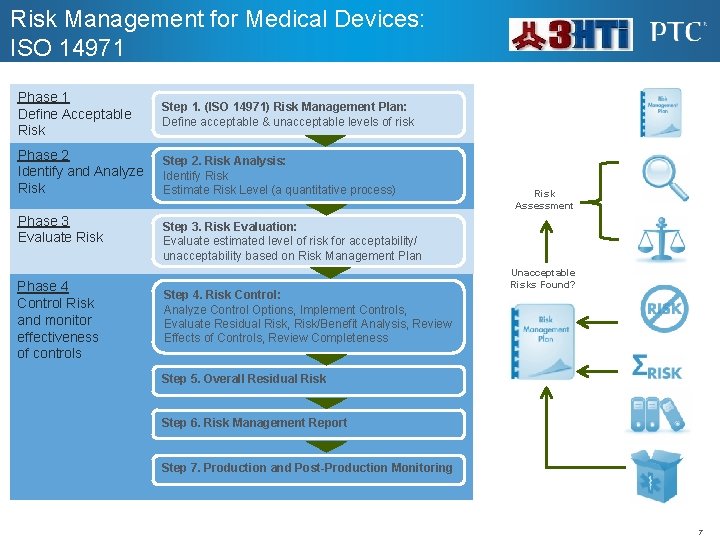
Risk Management for Medical Devices: ISO 14971 Phase 1 Define Acceptable Risk Step 1. (ISO 14971) Risk Management Plan: Define acceptable & unacceptable levels of risk Phase 2 Identify and Analyze Risk Step 2. Risk Analysis: Identify Risk Estimate Risk Level (a quantitative process) Phase 3 Evaluate Risk Phase 4 Control Risk and monitor effectiveness of controls Risk Assessment Step 3. Risk Evaluation: Evaluate estimated level of risk for acceptability/ unacceptability based on Risk Management Plan Step 4. Risk Control: Analyze Control Options, Implement Controls, Evaluate Residual Risk, Risk/Benefit Analysis, Review Effects of Controls, Review Completeness Unacceptable Risks Found? Step 5. Overall Residual Risk Step 6. Risk Management Report Step 7. Production and Post-Production Monitoring 7
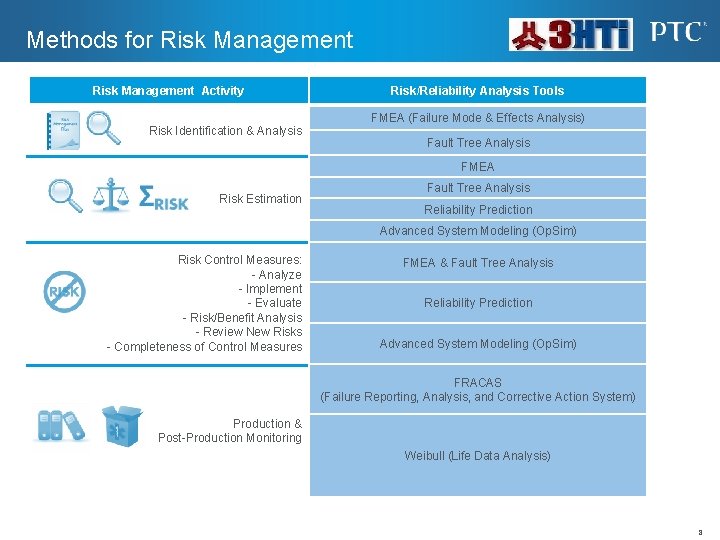
Methods for Risk Management Activity Risk Identification & Analysis Risk/Reliability Analysis Tools FMEA (Failure Mode & Effects Analysis) Fault Tree Analysis FMEA Risk Estimation Fault Tree Analysis Reliability Prediction Advanced System Modeling (Op. Sim) Risk Control Measures: - Analyze - Implement - Evaluate - Risk/Benefit Analysis - Review New Risks - Completeness of Control Measures FMEA & Fault Tree Analysis Reliability Prediction Advanced System Modeling (Op. Sim) FRACAS (Failure Reporting, Analysis, and Corrective Action System) Production & Post-Production Monitoring Weibull (Life Data Analysis) 8
Risk Management Overview Rigorous Identification of Risk Transfer of Risk Knowledge • To Product and Process Design • To Quality Management Effective Monitoring of Risk Effective Risk Mitigation 9
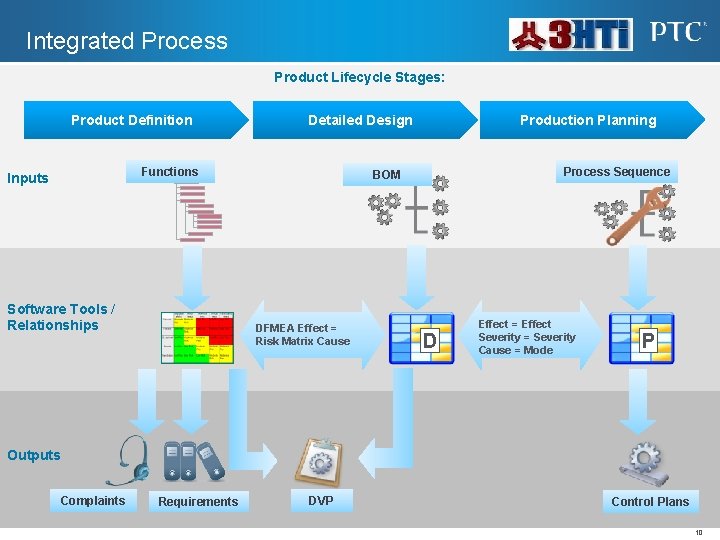
Integrated Process Product Lifecycle Stages: Product Definition Detailed Design Functions Inputs Software Tools / Relationships Production Planning Process Sequence BOM DFMEA Effect = Risk Matrix Cause D Effect = Effect Severity = Severity Cause = Mode P Outputs Complaints Requirements DVP Control Plans 10
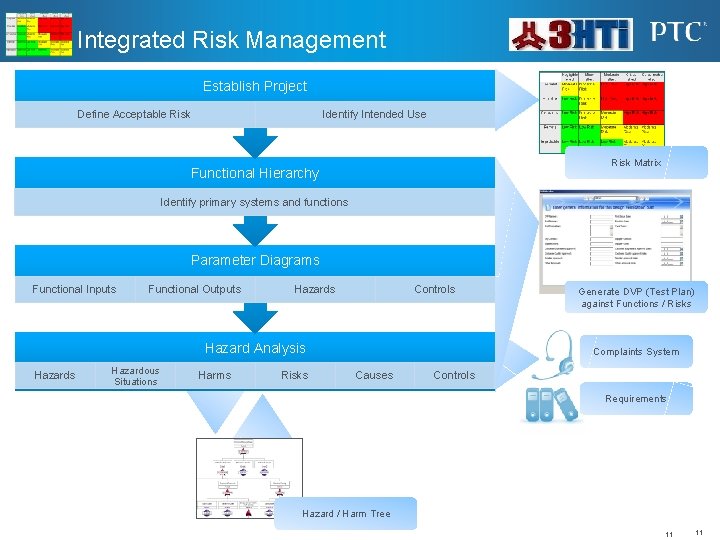
Integrated Risk Management Establish Project Define Acceptable Risk Identify Intended Use Risk Matrix Functional Hierarchy Identify primary systems and functions Parameter Diagrams Functional Inputs Functional Outputs Hazards Controls Hazard Analysis Hazardous Situations Harms Risks Generate DVP (Test Plan) against Functions / Risks Complaints System Causes Controls Requirements Hazard / Harm Tree 11 11
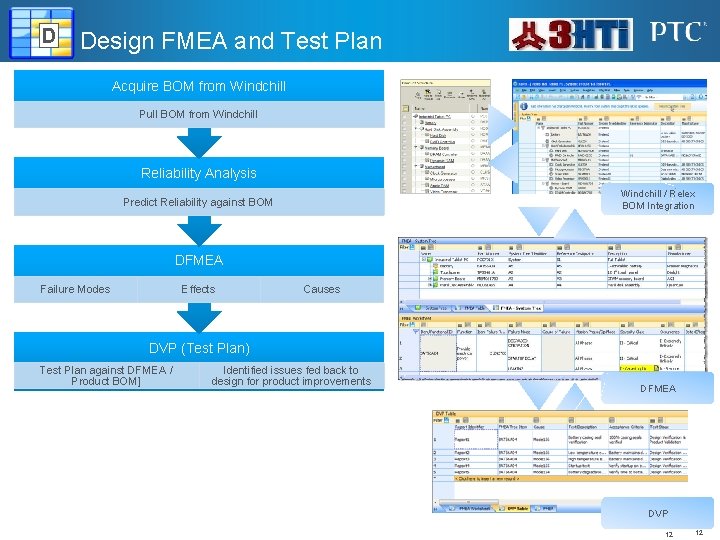
D Design FMEA and Test Plan Acquire BOM from Windchill Pull BOM from Windchill Reliability Analysis Windchill / Relex BOM Integration Predict Reliability against BOM DFMEA Failure Modes Effects Causes DVP (Test Plan) Test Plan against DFMEA / Product BOM] Identified issues fed back to design for product improvements DFMEA DVP 12 12
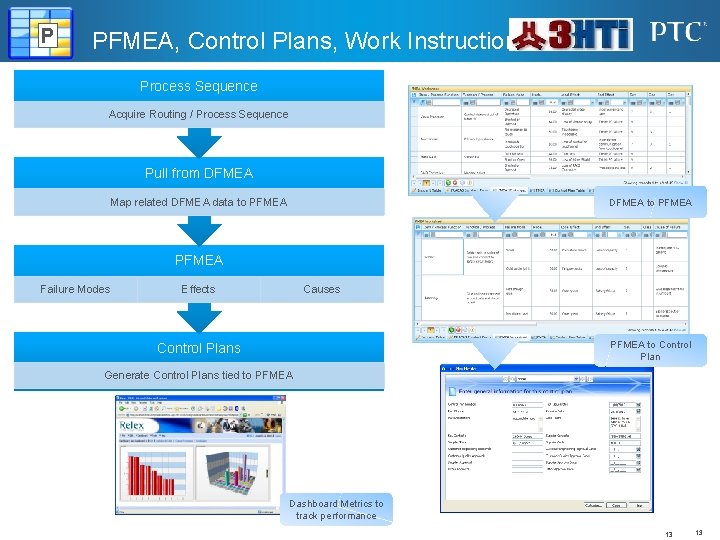
P PFMEA, Control Plans, Work Instructions Process Sequence Acquire Routing / Process Sequence Pull from DFMEA Map related DFMEA data to PFMEA DFMEA to PFMEA Failure Modes Effects Causes PFMEA to Control Plans Generate Control Plans tied to PFMEA Dashboard Metrics to track performance 13 13
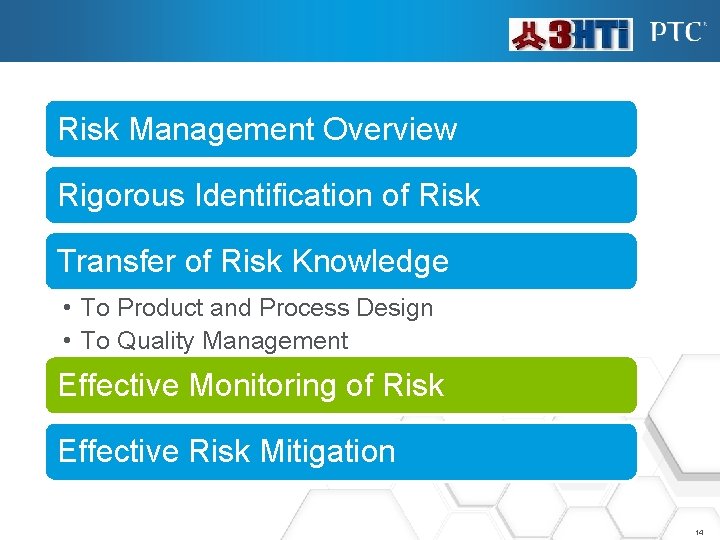
Risk Management Overview Rigorous Identification of Risk Transfer of Risk Knowledge • To Product and Process Design • To Quality Management Effective Monitoring of Risk Effective Risk Mitigation 14
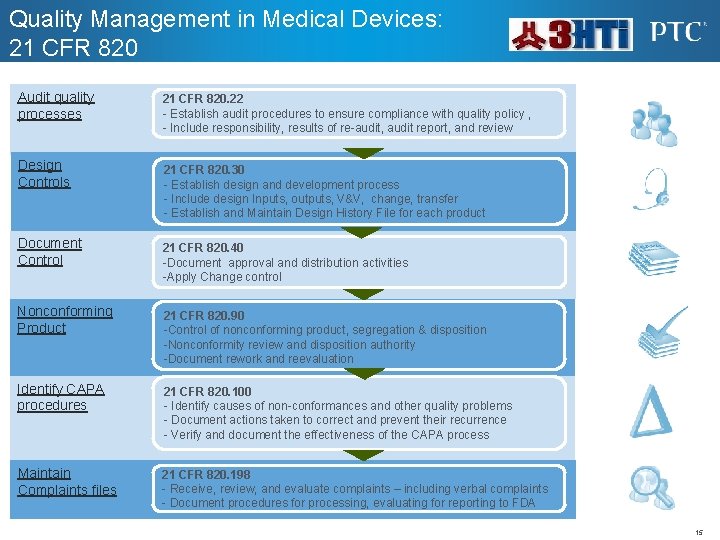
Quality Management in Medical Devices: 21 CFR 820 Audit quality processes Design Controls 21 CFR 820. 22 - Establish audit procedures to ensure compliance with quality policy , - Include responsibility, results of re-audit, audit report, and review 21 CFR 820. 30 - Establish design and development process - Include design Inputs, outputs, V&V, change, transfer - Establish and Maintain Design History File for each product Document Control 21 CFR 820. 40 -Document approval and distribution activities -Apply Change control Nonconforming Product 21 CFR 820. 90 -Control of nonconforming product, segregation & disposition -Nonconformity review and disposition authority -Document rework and reevaluation Identify CAPA procedures 21 CFR 820. 100 - Identify causes of non-conformances and other quality problems - Document actions taken to correct and prevent their recurrence - Verify and document the effectiveness of the CAPA process Maintain Complaints files 21 CFR 820. 198 - Receive, review, and evaluate complaints – including verbal complaints - Document procedures for processing, evaluating for reporting to FDA 15
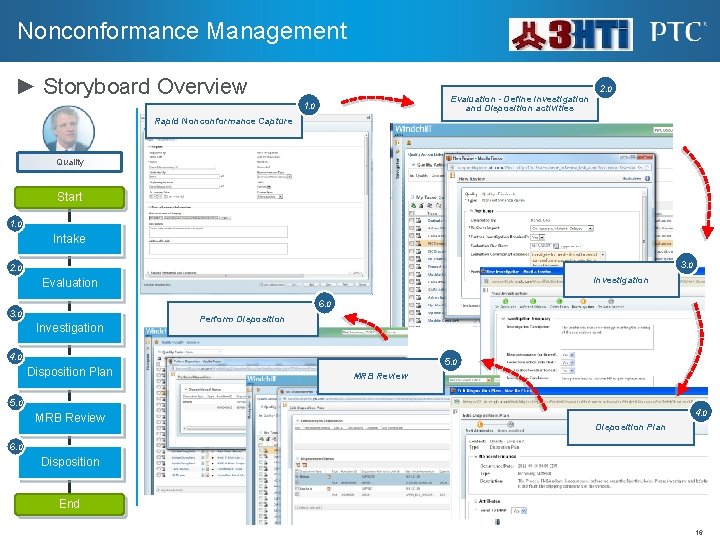
Nonconformance Management ► Storyboard Overview Evaluation - Define Investigation and Disposition activities 1. 0 2. 0 Rapid Nonconformance Capture Quality Start 1. 0 Intake 3. 0 2. 0 Investigation Evaluation 6. 0 3. 0 Investigation Perform Disposition 4. 0 Disposition Plan 5. 0 MRB Review 4. 0 Disposition Plan 6. 0 Disposition End 16
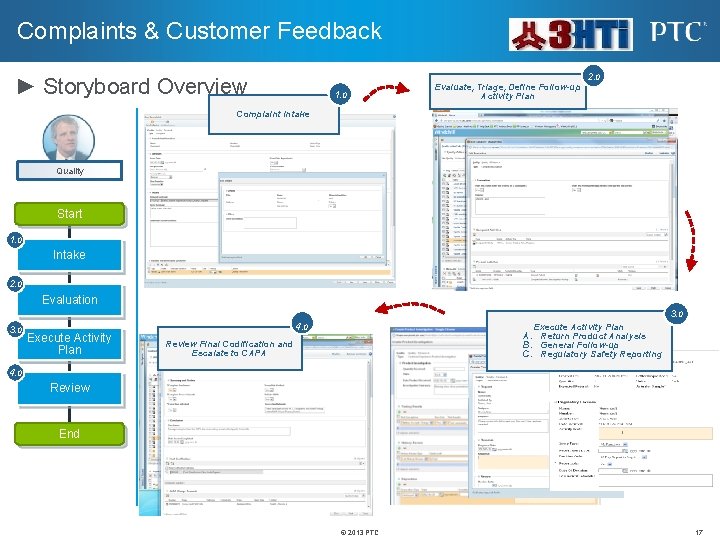
Complaints & Customer Feedback ► Storyboard Overview 1. 0 Evaluate, Triage, Define Follow-up Activity Plan 2. 0 Complaint Intake Quality Start 1. 0 Intake 2. 0 Evaluation 3. 0 Execute Activity Plan 4. 0 Execute Activity Plan A. Return Product Analysis B. General Follow-up C. Regulatory Safety Reporting Review Final Codification and Escalate to CAPA 4. 0 Review End © 2013 PTC 17
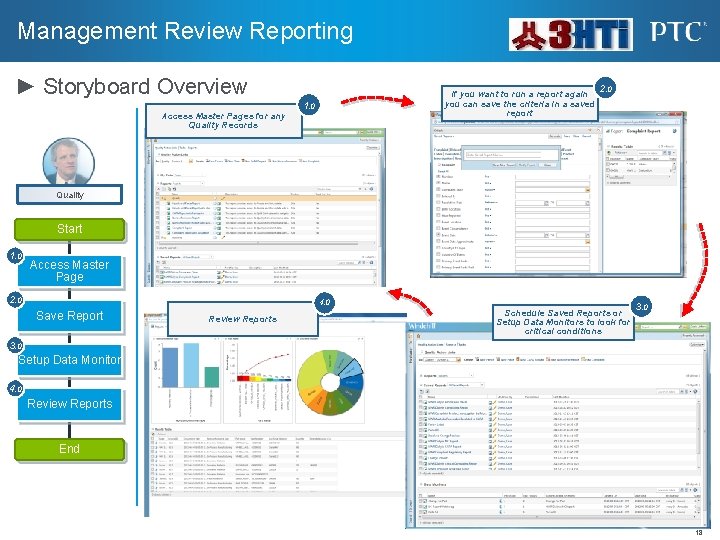
Management Review Reporting ► Storyboard Overview Access Master Pages for any Quality Records If you want to run a report again you can save the criteria in a saved report 1. 0 2. 0 Quality Start 1. 0 Access Master Page 2. 0 4. 0 Save Report Review Reports Schedule Saved Reports or Setup Data Monitors to look for critical conditions 3. 0 Setup Data Monitor 4. 0 Review Reports End 18
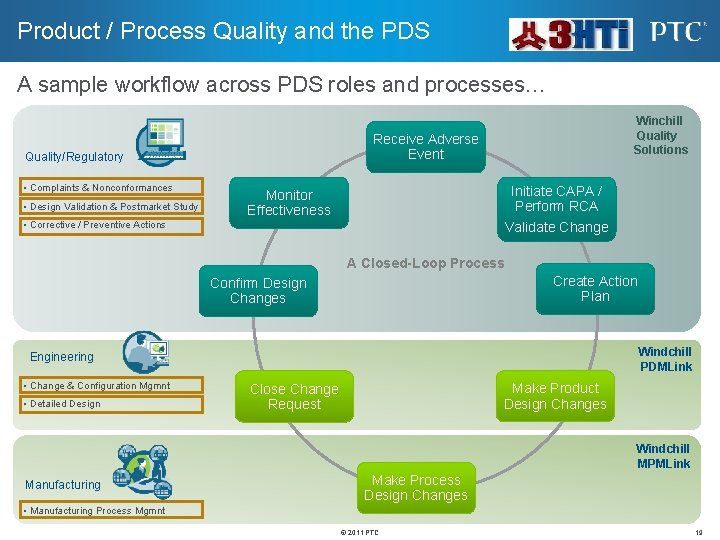
Product / Process Quality and the PDS A sample workflow across PDS roles and processes… Receive Adverse Event Quality/Regulatory • Complaints & Nonconformances • Design Validation & Postmarket Study Winchill Quality Solutions Initiate CAPA / Perform RCA Monitor Effectiveness • Corrective / Preventive Actions Validate Change A Closed-Loop Process Create Action Plan Confirm Design Changes Windchill PDMLink Engineering • Change & Configuration Mgmnt • Detailed Design Make Product Design Changes Close Change Request Windchill MPMLink Manufacturing Make Process Design Changes • Manufacturing Process Mgmnt © 2011 PTC 19
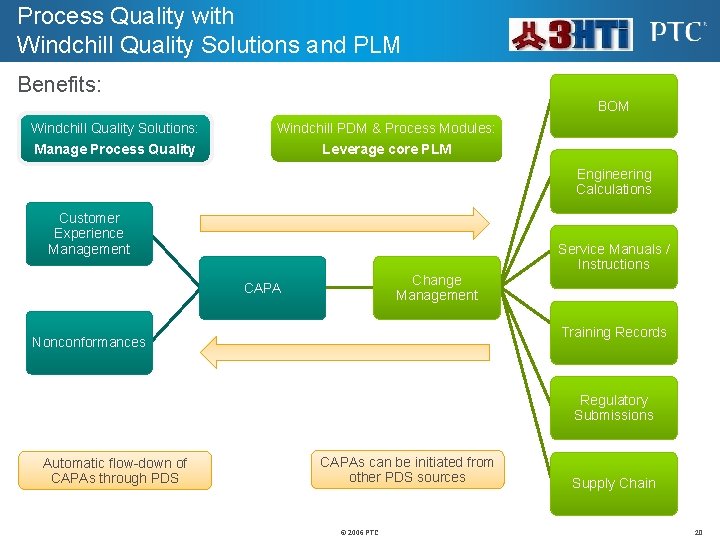
Process Quality with Windchill Quality Solutions and PLM Benefits: BOM Windchill Quality Solutions: Windchill PDM & Process Modules: Manage Process Quality Leverage core PLM Engineering Calculations Customer Experience Management Service Manuals / Instructions Change Management CAPA Training Records Nonconformances Regulatory Submissions Automatic flow-down of CAPAs through PDS CAPAs can be initiated from other PDS sources © 2006 PTC Supply Chain 20
Risk Management Overview Rigorous Identification of Risk Transfer of Risk Knowledge • To Product and Process Design • To Quality Management Effective Monitoring of Risk Effective Risk Mitigation 21
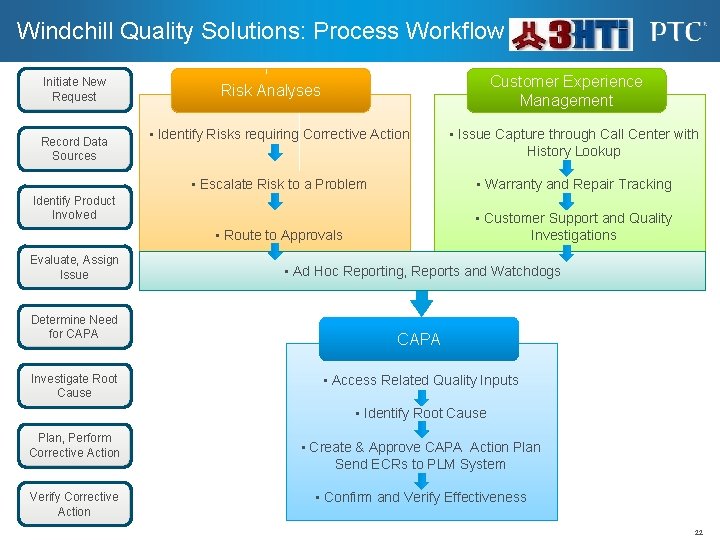
Windchill Quality Solutions: Process Workflow Initiate New Request Record Data Sources Customer Experience Management Risk Analyses • Identify Risks requiring Corrective Action • Issue Capture through Call Center with History Lookup • Escalate Risk to a Problem • Warranty and Repair Tracking • Route to Approvals • Customer Support and Quality Investigations Identify Product Involved Evaluate, Assign Issue Determine Need for CAPA Investigate Root Cause • Ad Hoc Reporting, Reports and Watchdogs CAPA • Access Related Quality Inputs • Identify Root Cause Plan, Perform Corrective Action Verify Corrective Action • Create & Approve CAPA Action Plan Send ECRs to PLM System • Confirm and Verify Effectiveness 22
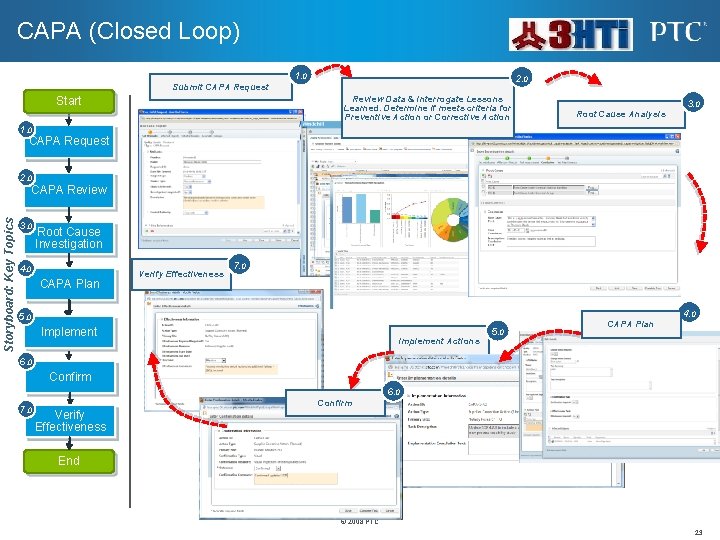
CAPA (Closed Loop) 1. 0 2. 0 Submit CAPA Request Review Data & Interrogate Lessons Learned. Determine if meets criteria for Preventive Action or Corrective Action Start 3. 0 Root Cause Analysis 1. 0 CAPA Request 2. 0 Storyboard: Key Topics CAPA Review 3. 0 Root Cause Investigation 4. 0 CAPA Plan Verify Effectiveness 7. 0 4. 0 5. 0 Implement Actions 5. 0 CAPA Plan 6. 0 Confirm 6. 0 7. 0 Confirm Verify Effectiveness End © 2008 PTC 23
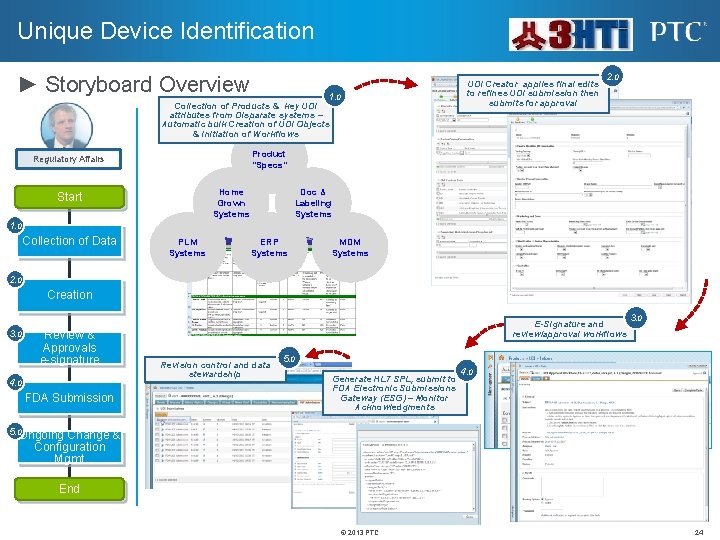
Unique Device Identification ► Storyboard Overview UDI Creator applies final edits to refines UDI submission then submits for approval 1. 0 Collection of Products & key UDI attributes from Disparate systems – Automatic bulk Creation of UDI Objects & Initiation of Workflows 2. 0 Product “Specs” Regulatory Affairs Home Grown Systems Start Doc & Labeling Systems 1. 0 Collection of Data PLM Systems ERP Systems MDM Systems 2. 0 Creation 3. 0 Review & Approvals e-signature 4. 0 FDA Submission E-Signature and review/approval workflows Revision control and data stewardship 3. 0 5. 0 Generate HL 7 SPL, submit to FDA Electronic Submissions Gateway (ESG) – Monitor Acknowledgments 4. 0 5. 0 Ongoing Change & Configuration Mgmt End © 2013 PTC 24
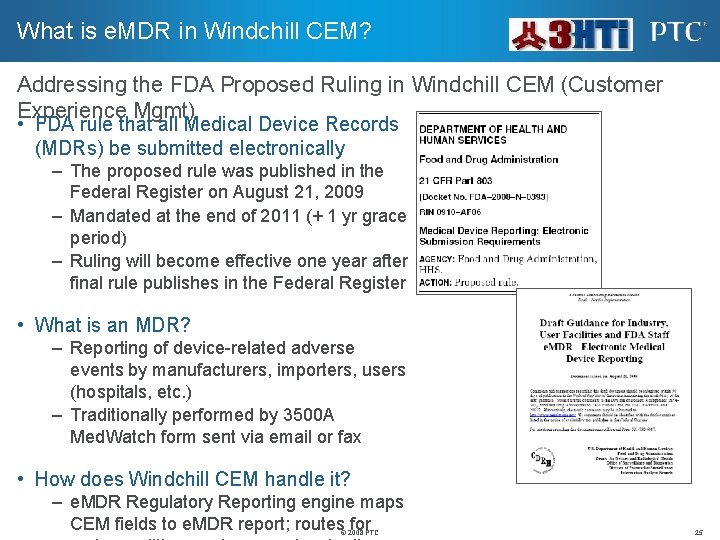
What is e. MDR in Windchill CEM? Addressing the FDA Proposed Ruling in Windchill CEM (Customer Experience Mgmt) • FDA rule that all Medical Device Records (MDRs) be submitted electronically – The proposed rule was published in the Federal Register on August 21, 2009 – Mandated at the end of 2011 (+ 1 yr grace period) – Ruling will become effective one year after final rule publishes in the Federal Register • What is an MDR? – Reporting of device-related adverse events by manufacturers, importers, users (hospitals, etc. ) – Traditionally performed by 3500 A Med. Watch form sent via email or fax • How does Windchill CEM handle it? – e. MDR Regulatory Reporting engine maps CEM fields to e. MDR report; routes for © 2008 PTC 25
Surgisense specializes in the design, development, testing, manufacturing, and marketing of innovative new technologies for medical devices. Surgisense focuses on developing the next generation of “smart” sensing surgical instruments and medical devices to further enhance surgery, patient care, and patient safety. Business Drivers: FDA Compliance for Medical Device Solution: Windchill Quality Solutions Documents Backbone - Manage & Control all key documents AKA Document Control Products Backbone - Provide Control of Product information AKA Design Control, DHF, DMR, BOM and BOO Quality Backbone – Quality Activities & Processes interact with the Anchor Points for Products and Processes 3 HTi, LLC, the authorized PTC reseller implemented Windchill Quality Solutions and Creo Design Software to streamline Surgisense product development process. 26
Thanks for Your Time For More Information: 3 HTi, LLC www. 3 hti. com info@3 hti. com 866 -624 -3 HTi 609 -303 -3400 27