
RIP Split Horizon RIP tutorial with pictures 2

- Slides: 5
RIP Split Horizon RIP tutorial with pictures -2 www. visualland. net Watch animation to learn networking. • Observe RIP operations in details: Request and Response packet structure, split horizon, periodical flooding routing info. • This pictured tutorial takes screenshots from RIP Split Horizon Animation. • OK to republish this slide. Please use hyperlink to point to its source. 2020/9/25 www. visualland. net 1
RIP animations 1. RIP basic It shows how to configure RIP at two routers and the process of synchronizing routing information with Request, Response. 2. Split Horizon Observe RIP operations in details: Request and Response packet structure, split horizon, periodical flooding routing info. 3. Link Failover It animates the steps of finding new routes upon a link down event. 4. Router poison RIP routers floods Response every 30 seconds. If a router has not heard from a neighbor for 180 seconds, it thinks the nieghbor is unreachble. It floods a Response to announce (with route metric 16. ) Neighbors propagate this Response to spread out through the RIP network. This is called route poisoning. 5. Equal cost - route poison When receivingg a route poison, a router does not re-flood route poison if it has other paths to reach the unreachable router. 6. Garbage Collection After 180 second of silence from a neighbor, the router declares the neighbor is unreachable and floods route poison. However, this obsolete route stays in RIP database for another 60 seconds (Garbage Collection Timer). When this timer expires, RIP removes the router from RIP datase. 7. Pinghole Congestion RIP uses hop count to calculate path cost, not bandwidth. If a router has two equal cost paths to reach a destination, it load balances traffic. However, if one path has a slower link, it is congested and becomes a bottleneck. This is called RIP pinhole congestion. 2020/9/25 www. visualland. net 2
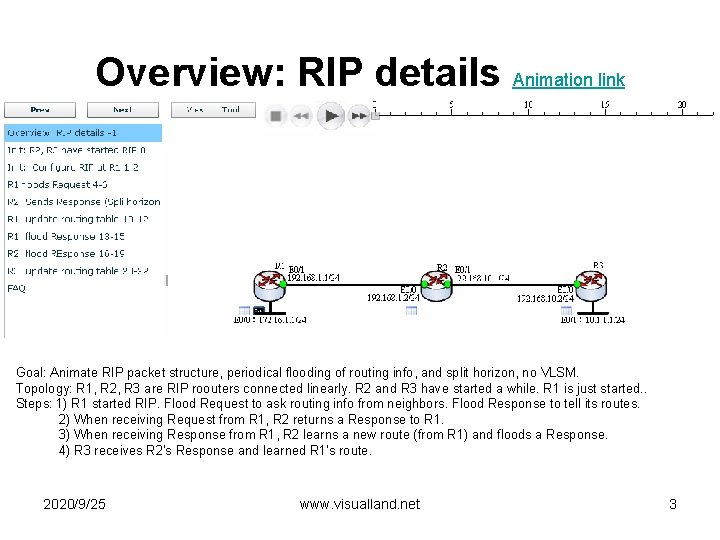
Overview: RIP details Animation link Goal: Animate RIP packet structure, periodical flooding of routing info, and split horizon, no VLSM. Topology: R 1, R 2, R 3 are RIP roouters connected linearly. R 2 and R 3 have started a while. R 1 is just started. . Steps: 1) R 1 started RIP. Flood Request to ask routing info from neighbors. Flood Response to tell its routes. 2) When receiving Request from R 1, R 2 returns a Response to R 1. 3) When receiving Response from R 1, R 2 learns a new route (from R 1) and floods a Response. 4) R 3 receives R 2's Response and learned R 1's route. 2020/9/25 www. visualland. net 3
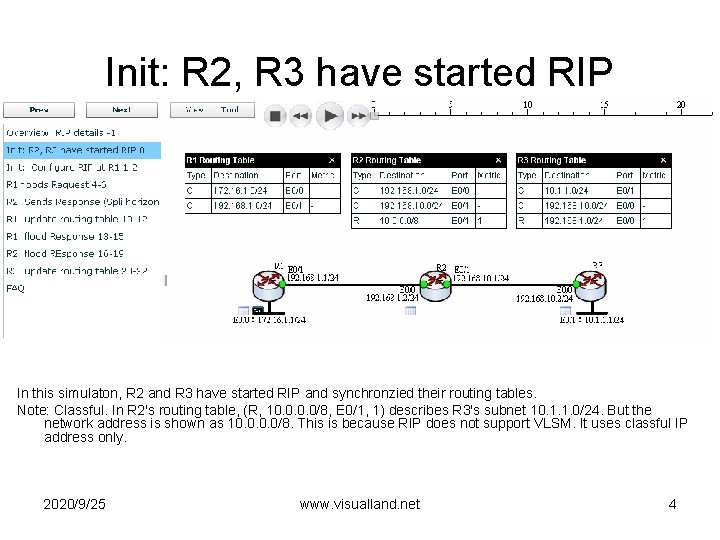
Init: R 2, R 3 have started RIP In this simulaton, R 2 and R 3 have started RIP and synchronzied their routing tables. Note: Classful. In R 2's routing table, (R, 10. 0/8, E 0/1, 1) describes R 3's subnet 10. 1. 1. 0/24. But the network address is shown as 10. 0/8. This is because RIP does not support VLSM. It uses classful IP address only. 2020/9/25 www. visualland. net 4
Interesting, right? This is just a sneak preview of the full presentation. We hope you like it! To see the rest of it, just click here to view it in full on Power. Show. com. Then, if you’d like, you can also log in to Power. Show. com to download the entire presentation for free.